Project Management Certifications

Project Management Certifications

Agile Scrum Explained Simply

Agile Scrum Explained Simply

Agile is a project management philosophy, while Scrum is the structured, real-world framework used to put that philosophy into action. Think of Agile as a commitment to healthy living, and Scrum as the specific daily workout routine you follow to stay fit. Instead of planning a massive project from start to finish upfront, Scrum breaks the work down into small, manageable pieces delivered in short cycles.

The easiest way to understand Scrum is through the 3-5-3 Rule: 3 Roles, 5 Events, and 3 Artifacts.


👥 The 3 Roles

A standard Scrum team is small, cross-functional, and self-managing, meaning they have all the skills needed to complete the work without relying on outsiders.

  • Product Owner: The visionary. They understand customer needs, decide what needs to be built, and maintain the master to-do list.
  • Scrum Master: The coach. They do not manage the team; instead, they protect them from distractions, facilitate meetings, and clear roadblocks.
  • Developers: The builders. This includes the engineers, designers, or writers who do the hands-on work and decide how to build it.

📦 The 3 Artifacts

Artifacts are simply the tangible items or lists used to maintain transparency across the project.

  • Product Backlog: The ultimate master list of features, fixes, and requirements needed for the product, prioritized by value.
  • Sprint Backlog: The specific subset of items selected from the master list that the team commits to finishing during the current cycle.
  • Increment: The final, working piece of the product delivered at the end of a cycle that meets the team’s “Definition of Done”.

📅 The 5 Events (Ceremonies)

Scrum operates in time-boxed blocks called Sprints, which usually last 1 to 4 weeks. Each Sprint includes four distinct meetings:

  1. The Sprint: The time-box itself where the actual building happens.
  2. Sprint Planning: A meeting at the start of a Sprint where the team decides what they can realistically achieve and creates a plan.
  3. Daily Scrum (Stand-up): A quick, 15-minute daily meeting where developers sync on progress, plan the next 24 hours, and flag blockers.
  4. Sprint Review: A showcase held at the end of the Sprint to demo the working increment to stakeholders and gather feedback.
  5. Sprint Retrospective: An internal team meeting to review what went well, what went wrong, and how to improve the process for the next Sprint.

🏗️ Why Does Scrum Work?

Scrum relies entirely on Empiricism, meaning making decisions based on real-world evidence rather than guesswork. It stands firmly on three pillars:

  • Transparency: Everyone involved sees exactly what is happening.
  • Inspection: The team frequently stops to check the quality of the product and progress.
  • Adaptation: If something goes off-course, the team shifts direction immediately rather than blindly following an outdated plan.

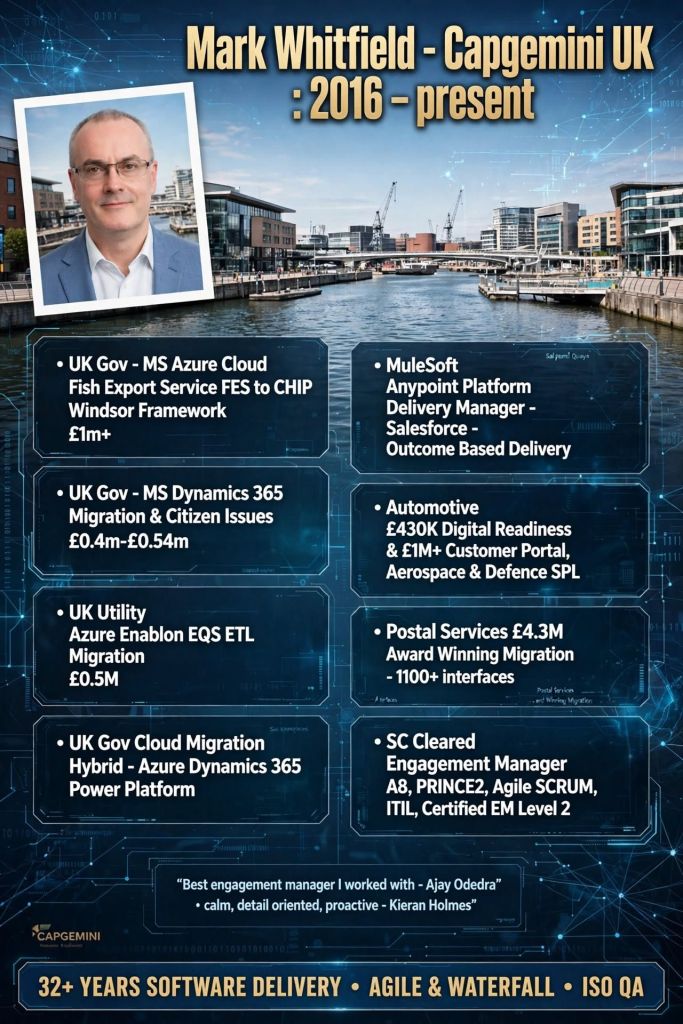
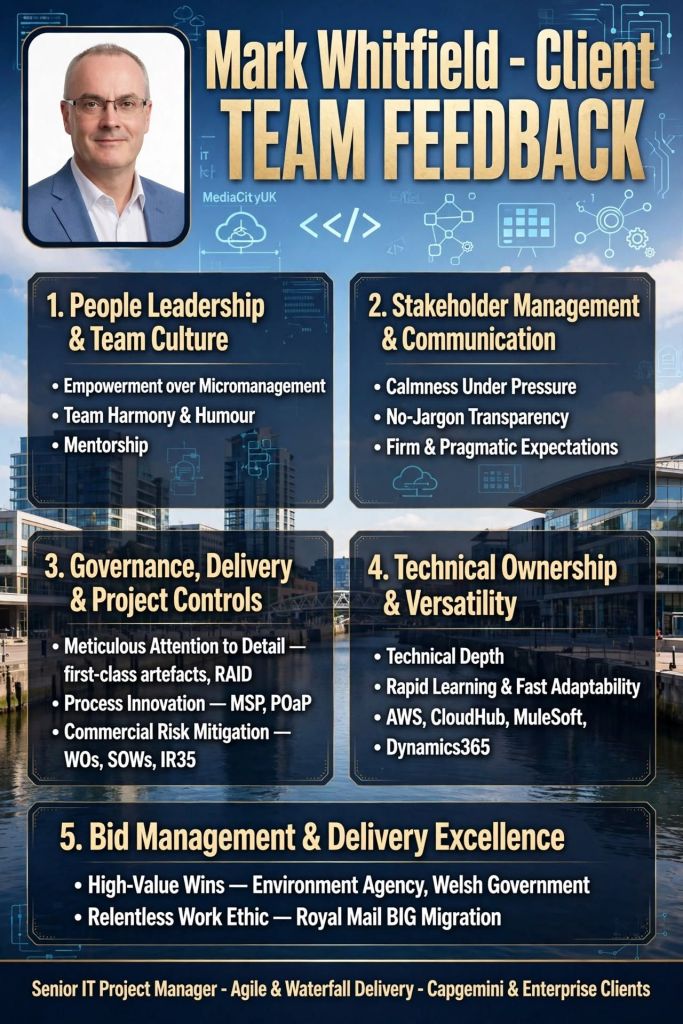
Mark Whitfield – Senior Project Manager – Projects Chronologically

Mark Whitfield is an SC-cleared Senior IT Project and Engagement Manager with over 30 years of experience. His career spans from early mainframe programming to leading multi-million-pound cloud migrations and digital transformations for major financial, utility, and government clients.

The chronological breakdown of his professional project portfolio, structured by his definitive career eras, is detailed below:

1. The Technical Era (1990–1995)

During this foundational era, Mark worked as a Programmer and Lead Analyst for The Software Partnership (acquired by Deluxe Data in 1994). He focused strictly on the development, optimization, and deployment of the sp/ARCHITECT-BANK electronic banking solution on Tandem Mainframe Computers.

  • Project: Barclays Business Master II (BBM II)
    • Year: 1990–1992
    • Client: Barclays (On-site at Knutsford, Cheshire)
    • Budget: Internal banking operational budget
    • Details: Handled the custom design and backend coding for a high-profile desktop electronic business banking application.
  • Project: Automated Touch-Tone Phone Banking Suite
    • Year: 1992–1993
    • Client: Girofon (Denmark)
    • Budget: Client-retained vendor contract
    • Details: Coded automated, menu-driven voice solutions operating on a Periphonics VRAM device to fetch live customer balances directly from mainframes.
  • Project: Early Digital Inter-Account Transfers
    • Year: 1993–1994
    • Client: TSB & Bank of Scotland
    • Budget: Internal product development
    • Details: Directed logic design and mainframe coding to support pioneering inter-account electronic funds transfers.
  • Project: International Banking Optimization
    • Year: 1994–1995
    • Client: Rabobank
    • Budget: Vendor-driven custom development framework
    • Details: Managed localized software optimization, custom patches, and deployment testing for global banking operations.

2. The Infrastructure & Monitoring Era (1995–2014)

Mark transitioned into a Product and Project Manager role at Insider Technologies Limited (and later a brief stint at Wincor Nixdorf). His focus shifted heavily toward platform diagnostics, high-availability transaction monitoring, and financial hardware software integrations.

  • Project: Reflex (Reflex 80:20) System Co-Development
    • Year: 1995–2004
    • Client: Multiple Tier-1 Investment Banks (including Euroclear/Crestco, Bank of England, and Deutsche Bank)
    • Budget: Part of a broader £3M Management Buyout (MBO) product portfolio
    • Details: Acted as Senior Programmer and Technical Lead to co-develop diagnostic monitoring modules for high-availability mainframes.
  • Project: ATM & Point-of-Sale (POS) Transaction Monitoring
    • Year: 2005–2013
    • Client: Barclays, HSBC, and Alliance & Leicester (now Santander)
    • Budget: Multi-year strategic technical vendor account
    • Details: Managed the integration of transaction tracking across ATM networks using ACI’s XPNET and HP NonStop architecture.
  • Project: Legacy ATM Software Modernisation
    • Year: 2013–2014
    • Client: Major UK Retail Bank (via Wincor Nixdorf Professional Services)
    • Budget: Corporate financial service transformation
    • Details: Served as Project Manager executing the swap-out of outdated, legacy ATM client systems for modernized software stacks.

3. The Digital and Cloud Era (2014–Present)

This era highlights Mark’s leadership of large-scale Agile and Waterfall digital delivery frameworks, moving from corporate gambling technology to complex, high-budget UK public sector programs.

  • Project: Mobile & Online Gaming Sportsbook Platforms
    • Year: 2014–2016
    • Client: Betfred Limited (Online & Mobile Division)
    • Budget: Multi-million phased agile commercial releases
    • Details: Led Agile Scrum development teams to upgrade payment gateways, implement fraud detection, and roll out football/horse racing mobile interfaces.
  • Project: National Air Space Real-Time Mobile Applications
    • Year: 2016
    • Client: NATS (UK-wide Air Traffic Organisation)
    • Budget: Corporate custom applications initiative
    • Details: Managed the secure Agile delivery of Apple iOS applications displaying live military and public airspace information.
  • Project: Core Systems Interface Data Centre Migration
    • Year: 2016 (May–October)
    • Client: Royal Mail Group (RMG) / Postal Services
    • Budget: £4.3 Million
    • Details: Led a massive cross-functional team of 90 Capgemini engineers to migrate over 1,100 platform data interfaces ahead of peak annual trading.
  • Project: Automated Call Centre CCaaS Telephony Implementation
    • Year: 2017 (May onwards)
    • Client: Local Regional Government
    • Budget: £400,000
    • Details: Deployed a programmatic dialler system linked with Microsoft Azure CRM to facilitate the “Support for Mortgage Interest” campaign.
  • Project: Automotive Online Car Sales and Digital Readiness
    • Year: 2017 (October)
    • Client: Jaguar Land Rover (JLR) / Aston Agile Delivery Centre
    • Budget: £1.1 Million (Split into a £670k Customer Sales Portal and a £430k Readiness project)
    • Details: Engagement Manager implementing a new-car ecommerce vehicle pipeline.

Project: Middleware & MuleSoft Anypoint Integrations

  • Year: 2018–2019
  • Client: UK Utility, Accounting, and Recruitment Industries (via MuleSoft augmentation)
  • Budget: Enterprise-wide technology vendor accounts
  • Details: Delivery Manager structuring API integration architectures across multi-million-pound client portfolios.

Project: Multi-App Cloud Migration Proof-of-Concept

  • Year: 2020 (Feb–May)
  • Client: UK Government
  • Budget: £375,000
  • Details: Directed a 3-month proof of concept migrating legacy Access, Oracle, and SQL databases to Microsoft Azure and Dynamics 365.

Project: Document Management Cloud Transformation

  • Year: 2021–2022
  • Client: UK Utility Industry (e.g., Welsh/Scottish Water)
  • Budget: £500,000+
  • Details: Managed the platform decommissioning and cloud modernization from legacy EQS document storage over to Azure Enablon.

Project: Enterprise Dynamics 365 Online Cloud Migration

  • Year: 2022 (November onwards)
  • Client: UK Government
  • Budget: £1 Million+ (Part of a larger £13.5M cloud program moving 130 apps)
  • Details: Orchestrated the launch and configuration of Azure Cloud frameworks migrating 12 historical Dynamics 2016 platforms to Dynamics 365 Online.

Project: Fish Export Service (FES) to CHIP Inspection Portal

  • Year: 2023–2024 (Nov–Feb)
  • Client: UK Government / Northern Ireland Trading Framework
  • Budget: £1 Million+
  • Details: Served as Technical Delivery Manager directing Agile Scrum teams to build cloud-hosted APIs supporting catch verification under the Windsor Framework.

Centiun

Centiun is a UK-based Microsoft AI Cloud Partner and IT consultancy specializing in digital transformation, cloud migration, and AI integration for public and private sector organizations.

Centiun is a UK-based Microsoft AI Cloud Partner and IT consultancy specializing in digital transformation, cloud migration, and AI integration for public and private sector organizations
Centiun is a UK-based Microsoft AI Cloud Partner and IT consultancy

They help businesses modernize operations, leverage low/no-code platforms, and transition legacy infrastructure to secure cloud environments.

Core Services

  • Cloud & App Modernization: Migrating on-premise, legacy applications to secure cloud environments to reduce costs and enhance agility.
  • Microsoft AI & Business Applications: Implementing solutions across the Microsoft stack, including Copilot, Power Platform, and Dynamics 365, to improve process efficiency and data-driven decision-making.
  • Managed Services & Governance: Providing SLA-compliant technical governance, threat monitoring, and support to ensure business continuity.
  • Training & Enablement: Upskilling staff to confidently use Microsoft tools and low-code solutions.

Target Industries

Centiun tailors their technology solutions to several specialized sectors, offering domain expertise in:

  • Healthcare and Non-profits
  • Public Bodies and Central Government
  • Financial Services and Manufacturing
  • Energy and Utilities

Why They Stand Out

  • Microsoft Expertise: Their seasoned experts hold numerous Microsoft certifications and boast a combined 20+ years of experience in Microsoft Business Applications.
  • Tailored Approach: They focus on personal service rather than one-size-fits-all solutions, aiming to help clients scale and modernize while minimizing operational disruption.
  • Security & Trust: The firm operates with strict data security measures, holding accreditations like Cyber Essentials and registration with the Information Commissioner’s Office (ICO).

Explore their complete list of solutions and case studies directly on the Centiun Official Website.

Agile Projects Overview and Timeline by year

Agile project management is an iterative, adaptive approach that breaks projects down into small, manageable cycles called sprints or iterations. Instead of planning the entire project upfront, teams continuously deliver functional increments, gather immediate feedback, and adapt to changing requirements. It prioritizes team collaboration, customer involvement, and rapid value delivery over rigid documentation and sequential phases.


Comprehensive Timeline Breakdown by Era and Year

Era 1: The Foundational Seeds (1950s – 1980s)

Before “Agile” existed as a formal term, engineers and researchers laid the groundwork through lean manufacturing and early iterative computing.

  • 1957: IBM begins utilizing incremental development concepts under Gerald M. Weinberg.
  • 1958: Software for Project Mercury (NASA’s first human spaceflight program) is developed using rapid half-day iterations.
  • 1970: Dr Winston Royce publishes a paper describing the Waterfall methodology. Paradoxically, he presents it as high-risk, yet it becomes the dominant, rigid corporate framework for decades.
  • 1980: Toyota refines “Just-In-Time” logistics and visual management system concepts, which later directly inspire Kanban and Lean software practices.
  • 1986: Authors Hirotaka Takeuchi and Ikujiro Nonaka publish “The New New Product Development Game” in the Harvard Business Review. They introduce a holistic, “rugby-style” team approach, coining the term “Scrum”.
  • 1988: Dr Barry Boehm introduces the Spiral Model, formalizing risk-driven, iterative lifecycle planning.

Era 2: The “Lightweight” Revolt (1990s)

Driven by frustration over the high failure rates and slow delivery of Waterfall, software pioneers independently build faster, more flexible frameworks.

  • 1991: James Martin formalizes Rapid Application Development (RAD), highlighting timeboxing, prototyping, and active customer involvement.
  • 1993: Jeff Sutherland, John Scumniotales, and Jeff McKenna deploy the very first operational Scrum process at Easel Corporation.
  • 1994: The Dynamic Systems Development Method (DSDM) is launched in the UK, providing one of the earliest structured frameworks for iterative project delivery.
  • 1995: Ken Schwaber and Jeff Sutherland co-present the formal Scrum Framework to the public at the OOPSLA conference.
  • 1996: Kent Beck introduces Extreme Programming (XP), introducing core engineering mechanics like pair programming and test-driven development (TDD).
  • 1997: Jeff De Luca and Peter Coad design Feature-Driven Development (FDD) to focus strictly on client-valued functional results.

Era 3: The Manifesto Moment (2000 – 2001)

The pivotal pivot point where separate iterative movements unite into a single, cohesive global movement.

  • 2000: Pre-meeting alignment occurs. Martin Fowler publishes his definitive article on Continuous Integration (CI), and Extreme Programming teams begin adopting Scrum’s three-question daily standup format.
  • February 2001: The Agile Manifesto is Born. Seventeen software development pioneers meet at a ski resort in Snowbird, Utah. They discover common ground, author the Manifesto for Agile Software Development, and establish the 4 Core Values and 12 Principles.
  • Late 2001: The Agile Alliance non-profit is established to safeguard, evolve, and distribute Agile education globally.

Era 4: Mainstream Adoption & Scaling (2002 – 2019)

Agile shifts from a rebellious IT trend into a standard corporate expectation, requiring frameworks that can scale across massive enterprises.

  • 2002: Ken Schwaber co-founds the Scrum Alliance to offer standardized certifications (like Certified ScrumMaster), dramatically accelerating global adoption.
  • 2003: Mary and Tom Poppendieck publish Lean Software Development, cleanly mapping Toyota’s manufacturing efficiencies directly onto digital projects.
  • 2009: The Software Craftsmanship Manifesto is created to ensure technical excellence and code quality are not forgotten during rapid business sprints.
  • 2011: Dean Leffingwell releases the Scaled Agile Framework (SAFe), allowing massive corporate enterprises to align hundreds of agile teams across entire portfolios.
  • 2015: Global project management authorities officially pivot; AXELOS releases PRINCE2 Agile, and the Project Management Institute (PMI) introduces Agile certifications into its core curriculum.

Era 5: Modern Continuous Agility (2020s – Present)

Agile transcends IT entirely, cementing its place as an overarching organizational strategy for business survival in an uncertain world.

  • 2020: The Scrum Guide receives its most significant structural update, streamlining language, eliminating prescriptive micro-management, and focusing intensely on a single, unified team working toward a singular “Product Goal”.
  • 2021–2023: Business Agility explodes. Non-technical departments—including HR, Marketing, Legal, and Finance—broadly restructure their workflows into iterative agile backlogs to manage volatile hybrid work environments.
  • 2024–Present: AI-Driven Agility becomes standard practice. Project management tools use generative AI to automatically draft user stories, estimate team velocity, and dynamically rewrite project sprint backlogs based on real-time market shifts.

Agile Projects Overview and Timeline by year

Project Management, Role Organization Chart

Project Management, Role Organization Chart

The 5 Pillars of Project Success Framework

The 5 Pillars of Project Success Framework
Five Pillars of Project Success Framework

Agile SAFe Events, Cadence of Collaboration

SAFe (Scaled Agile Framework) events are structured, time-boxed ceremonies designed to drive synchronization, alignment, and continuous improvement across different levels of an enterprise

SAFe (Scaled Agile Framework) events are structured, time-boxed ceremonies designed to drive synchronization, alignment, and continuous improvement across different levels of an enterprise.

These events are primarily categorized into Team-level events (which mirror standard Scrum practices) and Agile Release Train (ART) level events (which orchestrate multiple teams working toward a shared goal).

The core events within Essential SAFe are broken down below by organizational layer.

👥 Agile Team-Level Events

These recurrent ceremonies occur inside a short timebox called an Iteration (typically lasting 2 weeks) and focus on local execution.

  • Iteration Planning: Teams refine the iteration plan, select backlog stories, and commit to a set of Iteration Goals.
  • Team Sync (Daily Stand-up): A brief, daily 15-minute meeting where team members align on progress, discuss daily goals, and highlight impediments.
  • Iteration Review: A cadence-based showcase at the end of the iteration where teams demo working software to gather immediate feedback.
  • Iteration Retrospective: Held at the end of each iteration to reflect on the process, team dynamics, and behaviors to drive relentless improvement.
  • Backlog Refinement: A weekly meeting where the Product Owner and team flesh out, estimate, and prep user stories for upcoming iterations.

🚊 Agile Release Train (ART) Level Events

These higher-level events drive the Planning Interval (PI), an 8 to 12-week timebox where an entire “train” of 5–12 teams delivers cross-functional value.

  • PI Planning: The multi-day flagship event of SAFe where all teams, stakeholders, and leaders align on a shared business vision, map dependencies, and commit to PI objectives.
  • System Demo: A regular event occurring every iteration where the integrated functionality built by the entire ART is demonstrated to stakeholders for feedback.
  • Coach Sync (formerly Scrum of Scrums): Facilitated by the Release Train Engineer (RTE), Scrum Masters meet to resolve cross-team dependencies, risks, and progress hurdles.
  • PO Sync: Product Owners and Product Management meet to track milestone progress, manage scope adjustments, and ensure the train remains aligned with business goals.
  • ART Sync: A combined session of Coach Sync and PO Sync used to streamline communication regarding execution and deployment.
  • Inspect & Adapt (I&A): A major event held at the end of the PI consisting of a system demo, quantitative measurements, and a problem-solving workshop to implement systemic backlog improvements.

Summary of Differences

For a quick comparison, you can look at how responsibilities scale across the framework:

Scaled Agile Framework, SAFe events are structured, time-boxed ceremonies designed to drive synchronization, alignment, and continuous improvement across different levels of an enterprise
SAFe (Scaled Agile Framework) events are structured, time-boxed ceremonies designed to drive synchronization, alignment, and continuous improvement across different levels of an enterprise

Project Management Roles and some Certifications

Project Management Roles and some Certifications

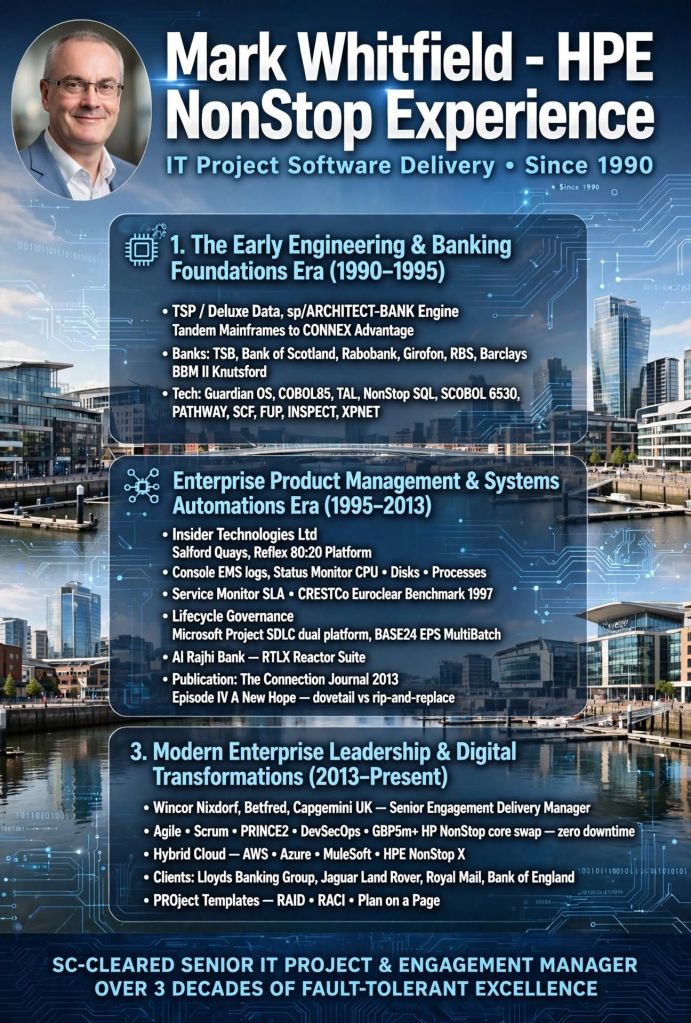
Mark Whitfield – projects timeline history from 1990

Mark Whitfield is an SC-cleared Senior IT Project Manager with over 30 years of experience delivering high-availability financial, cloud, and digital transformation projects. Over his career, he has transitioned from deep technical engineering on HPE NonStop (Tandem) mainframe systems to leading major corporate and public sector Agile and Waterfall software rollouts.

A comprehensive, year-by-year timeline breakdown of his project history and clients since 1990 is outlined below.

💻 The Technical Era (1990–1995)

During this period, Whitfield worked as a Programmer and Lead Analyst for The Software Partnership (acquired by Deluxe Data in 1994). He focused on electronic banking software (sp/ARCHITECT-BANK) on Tandem Mainframe Computers.

  • 1990–1992: Barclays Bank – Placed on-site at Knutsford, Cheshire to design and code software for the high-profile Barclays Business Master II (BBM II) electronic desktop banking project.
  • 1992–1993: Girofon (Denmark) – Developed a touch-tone phone banking suite. This allowed clients to use automated voice/menu-driven systems via a Periphonics VRAM device to fetch live balances from back-end mainframes.
  • 1993–1994: TSB & Bank of Scotland – Conducted early-era digital investigations, logic design, and mainframe coding for inter-account desktop money transfers.
  • 1994–1995: Rabobank – Headed software optimization, custom electronic coding patches, and on-site deployment validation for international operations.

🛡️ Monitoring & Infrastructure Era (1995–2013)

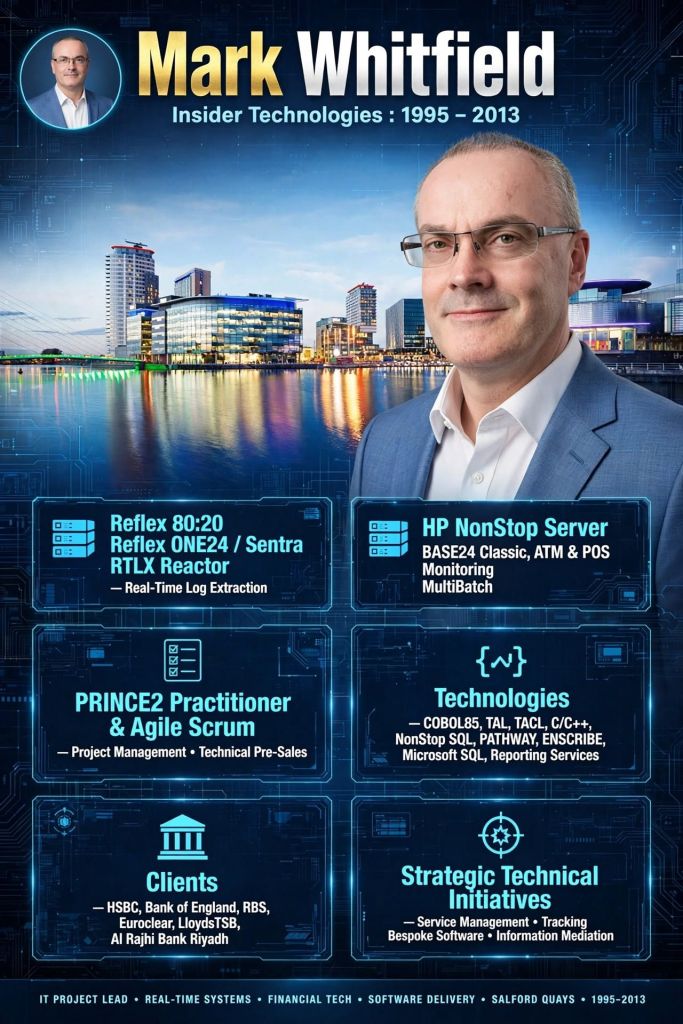
Whitfield joined Insider Technologies Limited (ITL) in Salford Quays, specializing in platform diagnostics, transaction monitoring, and financial logging systems for mission-critical infrastructure.

  • 1995–1996: Internal ITL Product R&D – Core developer on the Reflex monitoring suite (Reflex 80:20), creating platform health and diagnostic plug-in modules.
  • 1997–1998: CRESTCo (now Euroclear) – Brought in as a technical infrastructure consultant to run benchmark tests on newly released Tandem S7000 processing hardware nodes.
  • 1999–2001: Bank of England / Deutsche Bank – Deployed real-time tracking protocols utilizing ITL’s MultiBatch scheduling architectures and file monitors.
  • 2002–2003: Hewlett-Packard (HP) – Successfully managed the rigorous certification process for the first HP OpenView Operations (OVO) Smart Plug-In built for the NonStop mainframe environment.
  • 2004–2007: Alliance & Leicester (now Santander) / HSBC – Implemented transaction log extraction protocols (RTLX and Sentra) to audit automated teller machine (ATM) logs.
  • 2008–2010: Saudi Arabian Retail Bank – Acted as Project Manager overseeing the cross-border rollout of a high-volume ATM and Point-of-Sale (POS) monitoring system.
  • 2011–2013: Global Payments / Standard Chartered – Integrated transaction monitoring capabilities with external corporate frameworks such as TIVOLI and XPERT24 using ACI’s XPNET architecture.

🏦 Senior Project Management & Retail Banking (2013–2016)

This timeframe marked a total transition into senior contract project management, dealing directly with multi-million-pound programs.

  • 2013–2014: Lloyds Banking Group (LBG) – Augmented into Wincor Nixdorf as the IT Project Manager leading a £5+ million workstream. This was part of LBG’s comprehensive Self-Service Software Replacement (SSSR) initiative to modernise legacy ATM software.
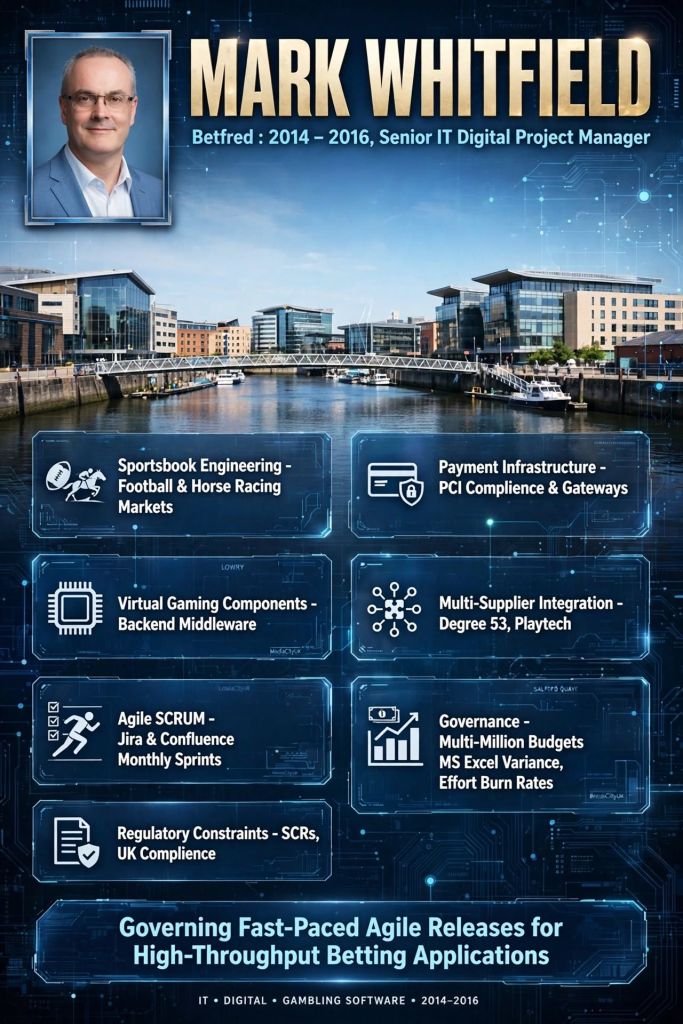
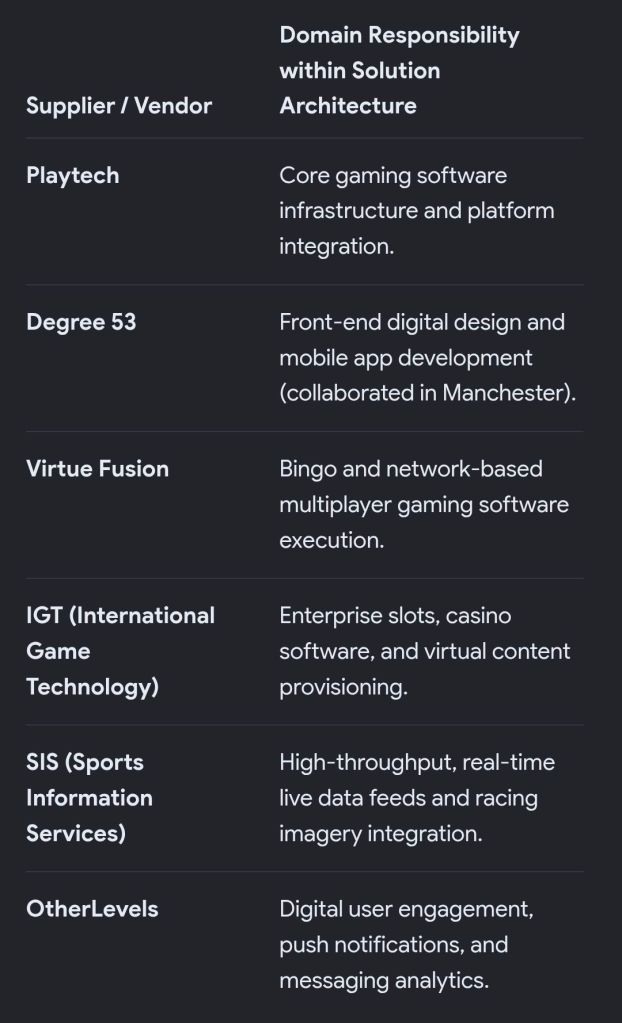
  • 2014–2016: Betfred – Senior IT Project Manager inside an Agile Scrum structure. Directed cross-functional software vendors to deliver updates for mobile apps (iOS/Android), fraud detection systems, and payment gateways for their digital sportsbook platforms.

🌐 Enterprise Consulting & Cloud Transformations (2016–Present)

In January 2016, Whitfield joined global consultancy firm Capgemini as a Senior client-facing Engagement/Delivery Manager.

  • 2016–2017: Aerospace & Defence Client – Managed an enterprise-level integration project to deploy a Salesforce-driven Single Customer View (SCV) portal platform.
  • 2017–2018: Jaguar Land Rover (JLR) – Served as Project Manager for the iFAB Middleware Project, a complex 12-month architecture development program linking global manufacturing supply components.
  • 2018–2019: MuleSoft (A Salesforce Company) – Augmented directly into MuleSoft’s London headquarters as a Delivery Manager, spearheading API-led connectivity deployments via the Anypoint Platform.
  • 2019–2021: UK Government Agency (UK Gov) – Commanded a major Hybrid Cloud Migration initiative to refactor, re-host, and re-platform 130 legacy agency software applications directly to cloud servers.
  • 2022: UK Utility Sector (Welsh Water / Scottish Water) – Dual-management lead executing a £0.5 million contract to migrate an aging, on-premise document management program (EQS) onto the Microsoft Azure cloud via Enablon.
  • 2023–2026: Public Sector & Core Tooling (Current) – Managing high-value middleware and API integrations for entities like the Royal Mail Group (RMG), NATS, and regional government bodies. Concurrently authors a widely used portfolio of commercial project management templates (RAID logs, RACI matrixes, and MS Project MPP layouts) published via PROject Templates.

Completing the Stakeholder List using Process Analysis

Completing the Stakeholder List using Process Analysis

Completing a stakeholder list using process analysis involves tracing the end-to-end lifecycle of a process to identify every individual, team, or organization that interacts with, influences, or is impacted by it. This ensures no hidden users, bottlenecks, or approvers are missed.

A four-step approach will ensure your list is thorough and actionable:

1. Map the Process Flow

Create a step-by-step flowchart of the current or future process. Break it down into key phases: Inputs, Activities, Outputs, and Outcomes. This visual map acts as a blueprint to spot every touchpoint where someone is involved.

2. Identify Stakeholders at Each Touchpoint

Go through each phase of your process map and ask the following dependency questions to pinpoint roles:

  • Input Stage: Who supplies the data, materials, or funding? (e.g., vendors, regulators, finance departments)
  • Activity Stage: Who performs the work or oversees it? (e.g., project teams, department managers, QA testers)
  • Output Stage: Who receives the final deliverable? (e.g., end-users, clients, customers)
  • Outcome Stage: Who is affected by the long-term results? (e.g., the community, executives, maintenance teams)

3. Classify and Prioritize

Once your comprehensive list is built, categorize stakeholders using the Power/Interest Matrix. This helps allocate your engagement efforts efficiently:

  • High Power, High Interest: Manage closely and collaborate heavily (e.g., Project Sponsors, Product Owners).
  • High Power, Low Interest: Keep satisfied but do not over-communicate (e.g., Regulators, Steering Committees).
  • Low Power, High Interest: Keep informed and consult regularly (e.g., End-users, Support Staff).
  • Low Power, Low Interest: Monitor with minimal effort (e.g., Peripheral departments).

4. Document and Review

Log all identified stakeholders in a Stakeholder Register. Key details to capture include:

  • Stake / Impact: How the process affects them (or vice-versa).
  • Expectations: What they need from the process.
  • Engagement Strategy: How and how often you will communicate with them.

Completing the Stakeholder List using Process Analysis

Wincor Nixdorf Overview & Timeline by Era and Year

Wincor Nixdorf was a premier global provider of IT solutions, hardware, software, and services tailored for retail banks and the retail industry.

Headquartered in Paderborn, Germany, the company historically commanded roughly 35% of the global automated teller machine (ATM) market and stood as a dominant force in electronic point-of-sale (EPOS) systems.

Its operations focused deeply on business process optimisation, automated cash handling, and retail self-checkout systems. In 2016, Wincor Nixdorf merged with its US rival Diebold, Inc., creating the modern consolidated market leader, Diebold Nixdorf.

Detailed Historical Timeline

The history of Wincor Nixdorf spans several distinct strategic eras, tracing its evolution from a post-war calculator workshop into a modern global fintech titan.

Era 1: The Founding & Decentralised Computing (1952–1989)

This era was defined by entrepreneur Heinz Nixdorf, who pioneered small-to-medium business computing and electronic banking terminals across Europe.

  • 1952: Heinz Nixdorf establishes Labor für Impulstechnik in Paderborn, Germany. The small enterprise builds electronic calculators for businesses rebuilding in post-war Europe.
  • 1964: The company shifts from acting as a third-party component supplier to marketing office calculators and billing systems under its own brand name. []
  • 1968: Following corporate acquisitions, the company officially rebrands as Nixdorf Computer AG and develops some of the world’s earliest decentralized minicomputers.
  • 1969: The firm enters the North American market by purchasing the electronics division of the US office equipment manufacturer Victor Comptometer.
  • 1971: Secures its first landmark international banking contract, supplying 1,000 terminals to the Swedish banking industry.
  • 1978: Global sales cross DEM 1 billion, and the workforce grows to over 10,000 employees globally.
  • 1982: Expands its engineering breadth by forming a dedicated corporate telecommunications division.
  • 1984: Launches its initial public offering (IPO), floating shares publicly on the Frankfurt Stock Exchange.
  • 1986: Founder Heinz Nixdorf suddenly dies of a heart attack at a corporate event. The company struggles to pivot from hardware-locked minicomputers to emerging open personal computer architectures.
  • 1989: Amid intensifying global hardware margins and strategic missed steps, corporate financial losses top DEM 1 billion.

Era 2: The Siemens Integration & Corporate Carve-Out (1990–1998)

During this stage, corporate giant Siemens rescued and absorbed the distressed business, later reorganizing its retail and banking assets into a specialized standalone vehicle.

  • 1990: Siemens AG steps in to purchase the shares of Nixdorf Computer AG, officially merging it with its own Data Information Services division to create Siemens Nixdorf Informationssysteme (SNI) AG.
  • 1992: SNI expands heavily across European IT markets, operating as a distinct, specialized computing arm under the Siemens umbrella.
  • 1996: Becomes the largest IT company in Germany and the second largest across the European continent.
  • 1998: Siemens restructures its computing strategy; it sells its personal computer division to Acer and spins off the highly profitable banking and retail segments into a new unit: Siemens Nixdorf Retail and Banking Systems GmbH.

Era 3: Private Equity Buyout & The Rise of Wincor Nixdorf (1999–2015)

This period marked the official birth of the independent “Wincor Nixdorf” brand, characterized by aggressive global expansion, software-driven solutions, and public market listing.

  • 1999: Private equity firms Kohlberg Kravis Roberts (KKR) and Goldman Sachs Capital Partners complete a buyout of the Siemens unit. The company is formally renamed Wincor Nixdorf GmbH.
  • 2000: Launches major end-to-end IT outsourcing and infrastructure managed services alongside its standard terminal hardware.
  • 2004: On 19 May, Wincor Nixdorf successfully returns to the public markets, listing as Wincor Nixdorf AG on the Frankfurt Stock Exchange via a high-performing IPO.
  • 2006: Longtime Chief Executive Officer Karl-Heinz Stiller resigns from the board, leaving a structurally sound company expanding deep into automated cash recycling and software.
  • 2009–2014: Deploys multi-vendor banking software and automated checkout machines worldwide, expanding operations across roughly 100 countries.
  • 2015: Reports global revenues of €1.8 billion, split roughly 65% in banking services and 35% in retail point-of-sale solutions. On 23 November, US rival Diebold announces a formal business combination agreement to acquire the company.

Era 4: The Diebold Nixdorf Consolidation (2016–Present)

This current era represents the unification of American and European ATM powerhouses to navigate shifting brick-and-mortar financial landscapes.

  • 2016: Diebold Inc. officially completes its $1.8 billion voluntary public takeover of Wincor Nixdorf AG on 15 August. The consolidated global giant begins unified operations as Diebold Nixdorf on 16 August.
  • 2017: The UK Competition and Markets Authority (CMA) formally clears the merger following a comprehensive antitrust review, requiring Diebold to divest its legacy UK customer ATM operation to avoid localized market monopoly.
  • 2021: Capitalizing on self-checkout shifts accelerated by the pandemic, the combined entity launches its next-generation DN Series™ EASY self-service retail product line.
  • 2023: Burdened by legacy debt structures, supply chain disruptions, and pandemic operational challenges, Diebold Nixdorf files for a prepackaged Chapter 11 bankruptcy protection in June. The restructuring swiftly sheds $2.1 billion in debt. By August, it successfully emerges from bankruptcy, resuming trading on the New York Stock Exchange (NYSE).
  • 2024–2026: The restructured firm shifts its focus from low-margin hardware to high-margin managed services and cloud software, stabilizing its global operations with annual revenues reaching $3.75 billion.
Wincor Nixdorf, Mark Whitfield, above and beyond awards, Customer Satisfaction and Commitment to Excellence
Mark Whitfield, above and beyond awards, Customer Satisfaction and Commitment to Excellence, Wincor Nixdorf

Diebold Wincor Nixdorf Overview & Timeline by Era and Year

Capgemini Engagement Manager is a senior-level, client-facing role

A Capgemini Engagement Manager is a senior-level, client-facing role responsible for end-to-end delivery of complex business and technology transformation programs. They bridge strategy and execution, acting as a trusted advisor to clients while maintaining operational and financial control over projects.

Mark Whitfield PM, Capgemini Engagement Manager from 2016
Engagement Manager, from 2016

Key Responsibilities

  • End-to-End Delivery: Overseeing projects from start to finish, ensuring milestones, SLAs, and contractual obligations are met on time and within budget.
  • Financial Accountability: Managing project budgets, revenue tracking, forecasting, invoicing, and contract compliance.
  • Stakeholder Management: Acting as the primary client point of contact while aligning cross-functional and globally distributed delivery teams.
  • Risk & Governance: Identifying potential roadblocks, proactively managing risks, and ensuring strict adherence to project governance standards.
  • Business Growth: Spotting opportunities for additional business and supporting bid activities for account expansion.
Mark Whitfield, Engagement Management EM Level 2 Exam Passed 2017

Ideal Candidate Profile

  • Experience: Typically requires a degree in Business, Engineering, or IT, combined with at least 5+ years of experience in project management or service delivery within a B2B environment.
  • Skills: Strong commercial acumen, proficiency in formal methodologies (e.g., Agile, ITIL), and the ability to lead diverse, multinational teams.
C&CA UK's Communications & Engagement Award Winner 2022, Cloud & Custom Applications, Mark Whitfield
C&CA UK’s Communications & Engagement Award Winner 2022, Cloud & Custom Applications, Mark Whitfield

Explore current vacancies and learn more about the EM community through the Capgemini Careers Portal or their specific Engagement Management Careers overview.

Capgemini Engagement Manager, from 2016.

Capgemini Campus – Serge Kampf Les Fontaines, Chantilly, France – Advanced Engagement Management Course – November 2017 Class – 2nd from left, Mark Whitfield
Capgemini Campus – Serge Kampf Les Fontaines, Chantilly, France – Advanced Engagement Management Course – November 2017 Class – 2nd from left

Mark Whitfield – Senior Project Manager – training received

Mark Whitfield, an SC cleared Senior Project Manager based in the Manchester area, has over 30 years of experience transitioning from a software engineer to an IT program leader.

His extensive technical and project management training spans methodologies, cloud infrastructure, and software applications.

A detailed breakdown of his training, certifications, and academic background includes:

Project Management Methodologies

  • PRINCE2 Practitioner: Certified via the ILX Group.
  • Agile SCRUM: Trained in-house with RADTAC.
  • Advanced Engagement Management: Level 2 certification completed via Capgemini.
  • Project Fundamentals: Completed “Fundamentals of Successful Project Management” and “Managing Multiple Projects” via Skillpath.
  • Microsoft Project: Microsoft Project ’98 certified.

Technical & Cloud Training

  • Microsoft Azure: AZ-900 Microsoft Certified Azure Fundamentals.
  • MuleSoft: Completed outcome-based delivery training and is a specialized Delivery Manager.
  • Technical Programming: Includes foundational database and software language training, such as C++ and MS SQL 2000 query training, as well as VPS and Tandem (HPE NonStop) technical/development courses.
  • Productivity: Completed Microsoft Excel Refresher and Expert skills training (Udemy and Microsoft).

Formal Education

  • Higher National Diploma (HND): Graduated with a Distinction (top) in Computing (1990).

You can review his detailed credential breakdown on the PROject Templates Professional Training Page.

HPE NonStop architecture (Tandem Computers) by Era and Year

Mark Whitfield invested many years in the HPE NonStop field from 1990. The HPE NonStop architecture (originally Tandem Computers) is a legendary fault-tolerant system known for 100% continuous availability. The platform’s hardware and software execution evolved across six distinct eras and processor transitions:

1. The Tandem Founding Era (1976–1981)

  • Years: 1976–1981
  • Processors: Proprietary 16-bit stack processors (e.g., Tandem/16, NonStop II)
  • Architecture: The foundational “shared-nothing” parallel architecture. Featured redundant components (processors, disks, power supplies) connected by a proprietary dual-bus (Dynabus). The operating system provided instant automated failover.

2. The Cyclone & Early RISC Era (1981–1996)

  • Years: 1981–1996
  • Processors: Proprietary non-RISC (NonStop Cyclone) & MIPS R-series RISC
  • Architecture: Expanded into 32-bit computing. To keep pace with industry performance, Tandem transitioned from proprietary processors to off-the-shelf MIPS RISC processors while heavily emulating the original instruction set for compatibility.

3. The Himalaya/ServerNet Era (1997–2004)

  • Years: 1997–2004
  • Processors: MIPS R-series
  • Architecture: Replaced the legacy Dynabus with ServerNet, a high-speed system interconnect that served as an early precursor to modern networking fabrics. (Compaq acquired Tandem in 1997, which subsequently merged with HP in 2002).

4. The Integrity Itanium Era (2005–2013)

  • Years: 2005–2013
  • Processors: Intel Itanium (TNS/E)
  • Architecture: Branded as HP Integrity NonStop (NonStop i). The platform moved off proprietary silicon to standard Intel Itanium processors. This was driven by the “NonStop Advanced Architecture” (NSAA), lowering hardware costs while maintaining Availability Level 4 (AL4) standards.

5. The NonStop X (x86-64) Era (2014–Present)

  • Years: 2014–2026
  • Processors: Intel Xeon x86-64 (TNS/X)
  • Architecture: Fully decoupled the OS from proprietary hardware by shifting to standard Intel x86-64 processors and InfiniBand fabric. The latest compute nodes (such as the NS5 X5 and NS9 X5) utilize modern Intel Xeon Scalable processors to maintain maximum Availability Level 4 (AL4) workloads.

6. The Virtualized NonStop Era (Present)

  • Years: 2015–Present
  • Processors: Virtual Machines / Cloud / x86
  • Architecture: HPE extended the platform to support Virtualized NonStop Software, allowing fault-tolerant enterprise workloads to run entirely in private clouds via standard VMware or hybrid architectures, independent of specific physical servers.
HPE NonStop article by Mark Whitfield in 2013, working for Insider Technologies Limited in Salford Quays

Functional BA vs Technical BA vs Product BA

Functional BA vs Technical BA vs Product BA

While all three roles fall under the “Business Analyst” umbrella, they differ in their primary focus: Functional BAs translate business needs into user requirements, Technical BAs focus on system architecture and integration, and Product BAs drive the product’s market value and long-term strategy.

1. Functional BA (The ‘Business’ Translator)

The Functional BA acts as the primary bridge between business stakeholders and the IT delivery team. They focus on what the business needs to achieve and how users will interact with the system.

  • Core Focus: Business processes, stakeholder communication, and end-user experience.
  • Day-to-day Responsibilities: Gathering requirements, mapping out user journeys, defining acceptance criteria, and creating process flow diagrams.
  • Key Skills: Stakeholder management, requirements elicitation, and deep domain knowledge (e.g., finance, healthcare).

2. Technical BA (The ‘System’ Architect)

The Technical BA bridges the gap between the functional requirements and the software development team. They focus on how the system will be built, ensuring the proposed solution is technically feasible, scalable, and secure.

  • Core Focus: System architecture, data flow, integrations, and non-functional requirements (like performance).
  • Day-to-day Responsibilities: Defining API structures, mapping data models, documenting system interfaces, and writing complex technical user stories.
  • Key Skills: Understanding of system integrations, database structures, basic coding logic, and system-to-system communication.

3. Product BA (The ‘Value’ Strategist)

The Product BA merges business analysis with product management principles. Rather than just fulfilling requested requirements, they focus on why a product or feature should be built, ensuring it aligns with overarching company goals and delivers tangible ROI.

  • Core Focus: Product strategy, feature prioritization, market viability, and user adoption.
  • Day-to-day Responsibilities: Conducting market research, managing the product backlog, defining Key Performance Indicators (KPIs), and analyzing user feedback/metrics.
  • Key Skills: Product discovery, data analysis, competitive analysis, and strategic roadmapping.

PMBOK Guide 8th Edition

PMBOK Guide 8th Edition

The PMBOK Guide 8th Edition is an integrated, value-driven framework that bridges the high-level principles of the 7th edition with the practical, process-oriented structure of older editions. It reintroduces 40 non-prescriptive processes alongside six core principles and seven performance domains.

📚 The Structure: Two Books in One

Similar to its predecessors, the printed volume of the 8th Edition includes two integrated publications:

  1. The Standard for Project Management: An official ANSI standard that focuses on strategic alignment, value delivery systems, and global applicability.
  2. A Guide to the Project Management Body of Knowledge (PMBOK Guide): The practical handbook containing the processes, tools, techniques, and tailoring considerations.

🟢 The 6 Core Principles

The 8th Edition streamlines the 12 principles from the 7th edition into six actionable pillars designed to guide professional behavior and mindset:

  • Adopt a Holistic View: Think in terms of systems and understand how a project integrates with organizational strategy.
  • Focus on Value: Direct efforts toward long-term outcomes and net-positive benefits rather than just output production.
  • Build Accountable Leadership: Cultivate a culture of transparency, clear responsibilities, and high-performance teamwork.
  • Embed Quality: Ensure quality processes and continuous improvement are woven into every phase of the work.
  • Integrate Sustainability: Consider the long-term environmental, social, and economic impacts of project delivery.
  • Build Empowered Teams: Foster environments where team members are supported, trusted, and empowered to solve problems.

🔵 The 7 Performance Domains

These represent key areas of practice, serving as the technical “what” of your project:

  1. Governance: Setting the rules, decision frameworks, and oversight mechanisms.
  2. Scope: Defining boundaries, deliverables, and requirements.
  3. Schedule: Managing timeframes, milestones, and critical paths.
  4. Finance: Budgeting, forecasting, and cost management.
  5. Stakeholders: Managing expectations, engagement, and communications.
  6. Resources: Allocating people, equipment, and physical/material assets.
  7. Risks: Identifying, analyzing, and mitigating uncertainties.

🟠 The 40 Evolved Processes & Focus Areas

A highly praised update in the 8th edition is the return of process guidance. To offer structured “how-to” guidance without becoming rigid, the processes are grouped into five Focus Areas (replacing the traditional Process Groups):

  • Initiating
  • Planning
  • Executing
  • Monitoring & Controlling
  • Closing

Across these five focus areas, there are 40 non-prescriptive processes that detail the typical inputs, tools, techniques, and outputs (ITTOs). The guide includes explicit tailoring advice on how to adapt these processes for predictive, hybrid, and agile environments.


💡 Key Modern Additions

Reflecting over 48,000 global practitioner data points, the 8th Edition expands coverage into modern project environments:

  • Artificial Intelligence (AI): Guidance on using AI and data analytics in project management.
  • Project Management Offices (PMOs): Expanded focus on PMO structures and strategic value alignment.
  • Procurement & Contracting: Modernized contracting types, dispute resolution, and vendor management.

📝 PMP Exam Note

If you are planning to take the PMP exam, make sure to check the official PMI PMP Certification Overview for the most up-to-date Exam Content Outline (ECO). The exam relies heavily on the ECO, and the 8th Edition guide serves as foundational reference material.

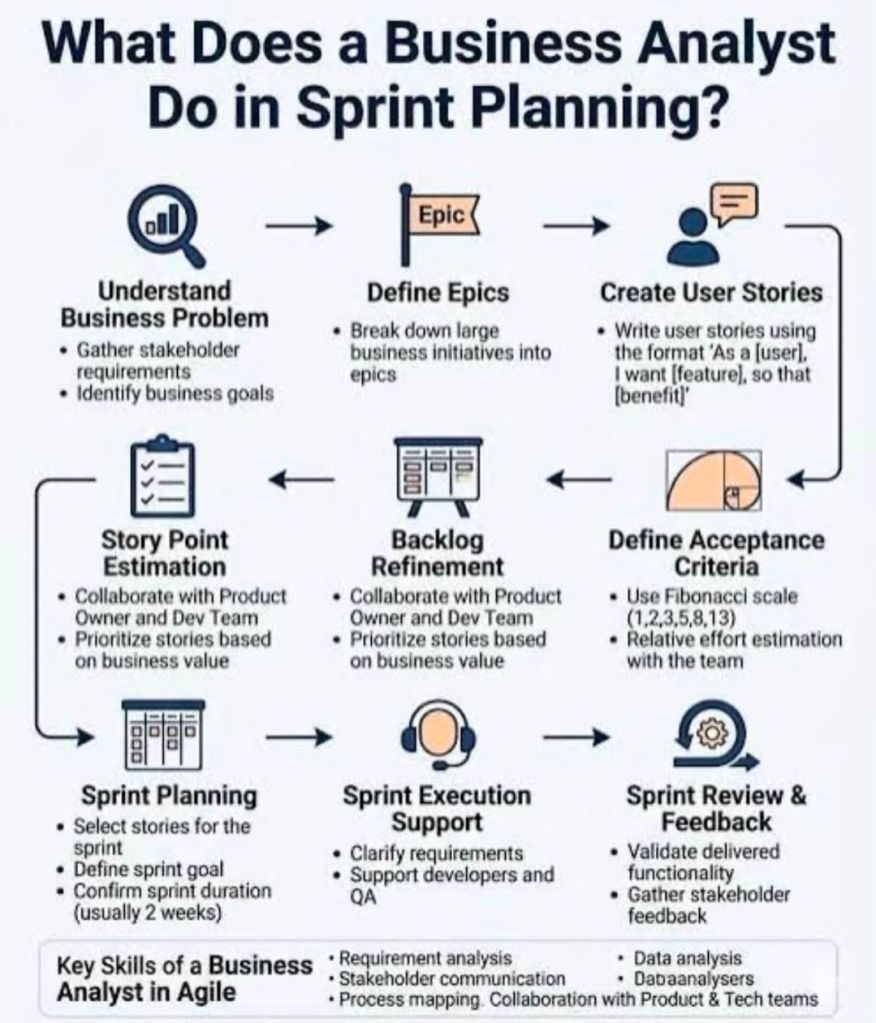
Business Analysis (BA) from week to week, across an example project

Business Analysis (BA) from week to week, across an example project

Another example;

Business Analysis (BA) across an example project—like building a custom mobile app—follows a dynamic, week-to-week lifecycle. It shifts focus from initial high-level strategy and stakeholder alignment to granular requirements, testing support, and post-launch evaluation.

Here is how a typical BA lifecycle breaks down across an example 8-week project timeline:

Week 1: Project Kickoff & Discovery

  • Focus: Understanding the business problem and setting boundaries.
  • Activities:
    • Facilitating kickoff workshops with key stakeholders.
    • Creating a Business Case or Vision Document to define the “why.”
    • Identifying key project sponsors, users, and subject matter experts (SMEs).

Week 2: Stakeholder Engagement & Elicitation

  • Focus: Extracting needs from the people who matter.
  • Activities:
    • Conducting interviews, surveys, and Focus Groups to gather initial wants and needs.
    • Mapping out high-level Business Processes (current “As-Is” workflows and future “To-Be” workflows).

Week 3: Analysis & Requirements Definition

  • Focus: Turning raw data into structured requirements.
  • Activities:
    • Writing user stories and establishing Acceptance Criteria (often using the Given-When-Then format).
    • Creating documentation like process models, wireframes, and data dictionaries.

Week 4: Prioritization & Scope Management

  • Focus: Deciding what gets built first.
  • Activities:
    • Facilitating prioritization sessions using frameworks like the MoSCoW Method (Must have, Should have, Could have, Won’t have).
    • Defining the Minimum Viable Product (MVP) to prevent scope creep.

Week 5: Backlog Refinement & Solution Design

  • Focus: Preparing work for the development team.
  • Activities:
    • Refining the product backlog alongside the Product Owner.
    • Working directly with UI/UX designers and technical architects to ensure designs align with business rules.

Week 6: Development Support & Clarification

  • Focus: Answering daily questions and unblocking the team.
  • Activities:
    • Hosting Agile ceremonies like Sprint Planning and Daily Stand-ups.
    • Clarifying edge cases and adjusting requirements if technical constraints arise during development.

Week 7: Testing & Validation

  • Focus: Ensuring the solution works and meets business needs.
  • Activities:
    • Assisting Quality Assurance (QA) teams by explaining acceptance criteria.
    • Facilitating User Acceptance Testing (UAT) with real business users to sign off on the software.

Week 8: Deployment & Post-Implementation Review

  • Focus: Launching the product and measuring success.
  • Activities:
    • Helping prepare training materials, user manuals, and release notes.
    • Conducting a Retrospective to identify process improvements for the next project phase.