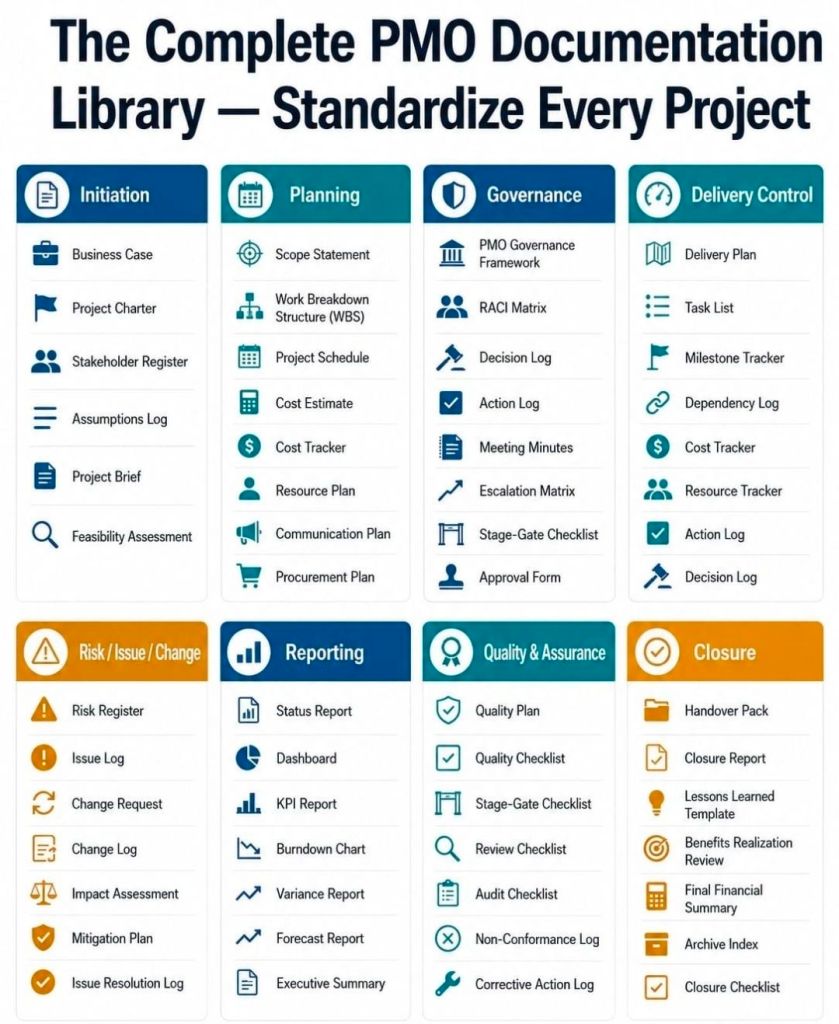
Agile Backlog Refinement Activities and Business Analyst BA

Agile Backlog Refinement Activities & Business Analyst

Buy Project Management Templates bundle

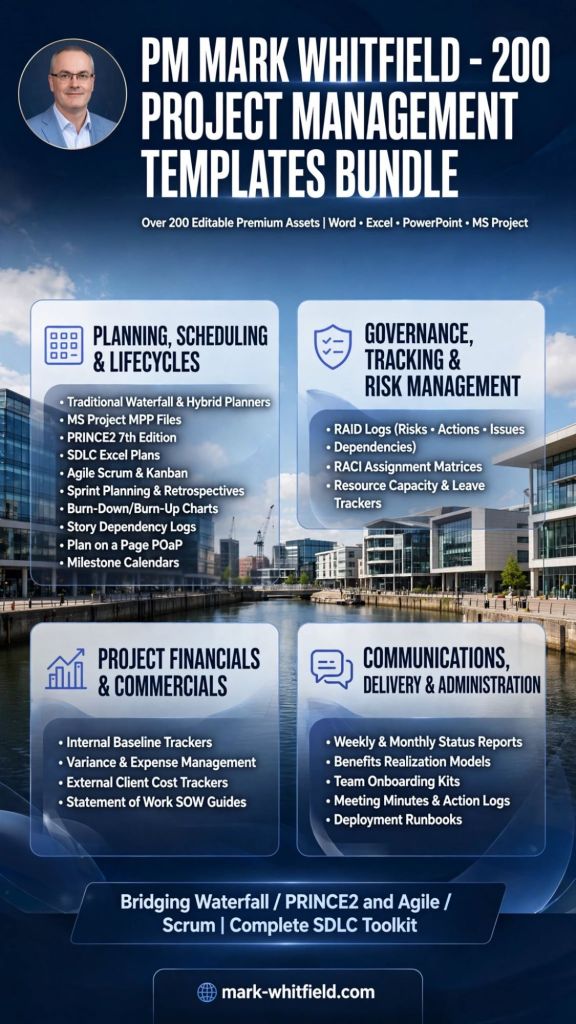
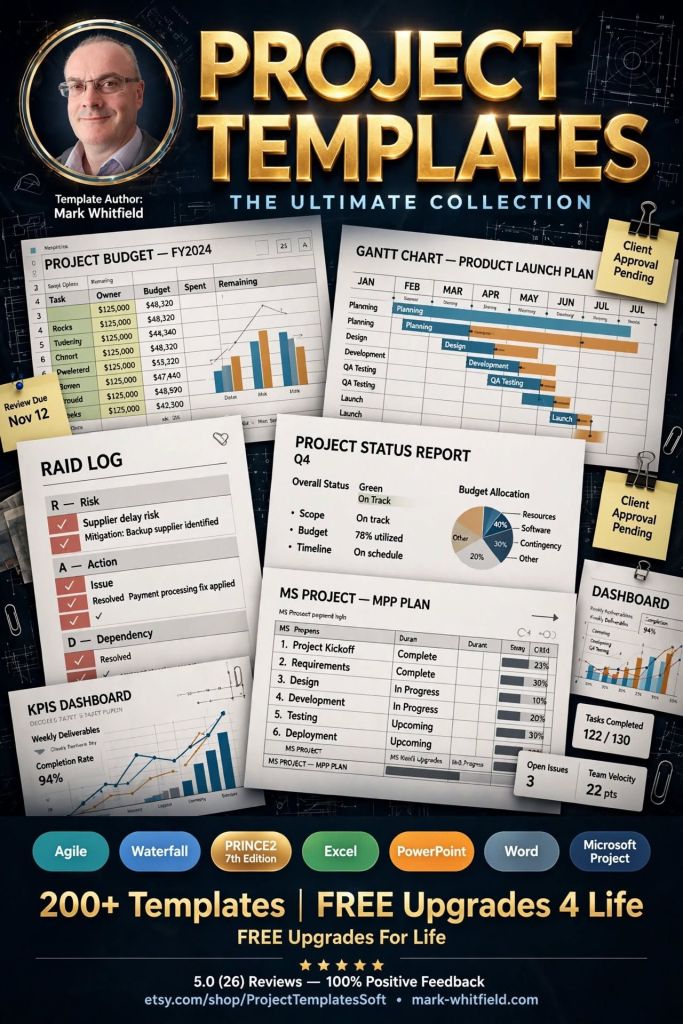
Mark Whitfield’s project management templates are a comprehensive collection of over 200 editable Microsoft Office resources designed for Agile, Waterfall, and PRINCE2 7th Edition delivery. Built from over 30 years of project delivery experience at blue-chip companies like Capgemini, Barclays, and HSBC, these tools focus on practical, functional utility rather than “flashy” design. 

Core Template Categories

The bundle is primarily provided in MS Excel, MS Project (.mpp), MS PowerPoint, and MS Word formats. 

  • Planning & Scheduling:
    • Detailed Project Plans: Pre-configured MS Project (MPP) and Excel templates for SDLC, PRINCE2, and Agile Scrum.
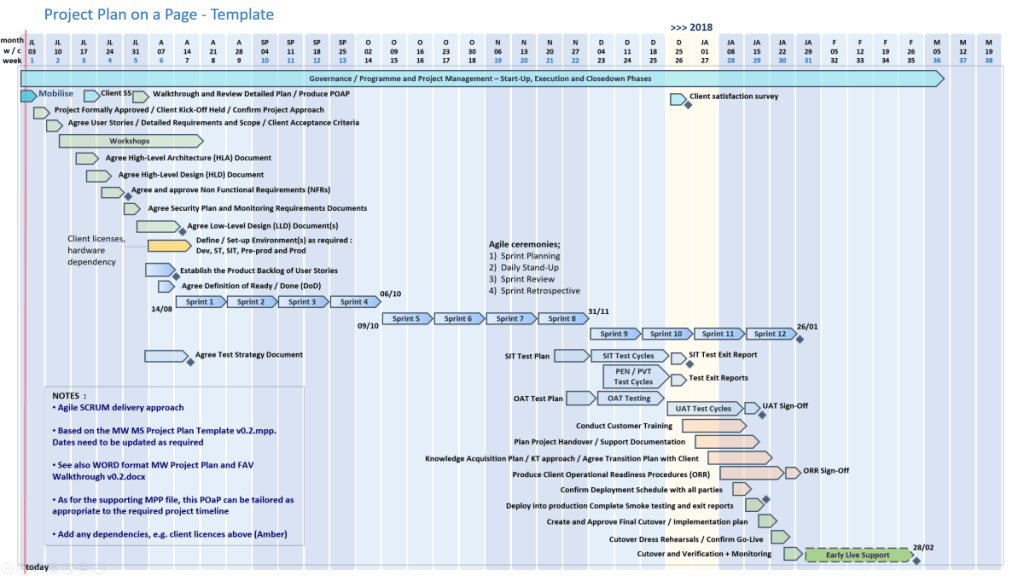
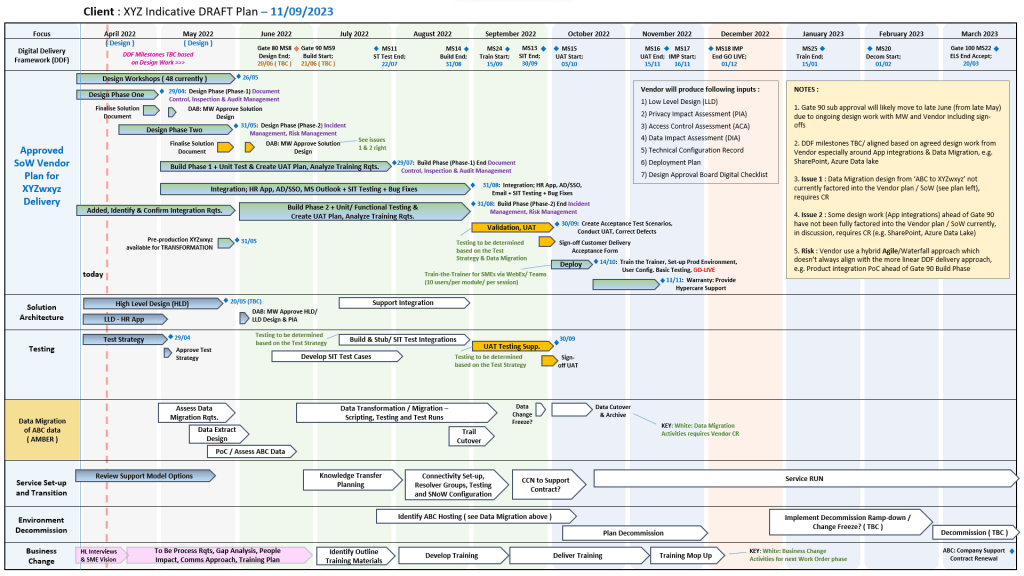
    • Plan on a Page (POaP): Over 35 PowerPoint and Excel slide examples for high-level executive summaries.
    • Gantt Charts: Built-in tracking views for both MS Project and Excel.
  • Tracking & Control:
    • RAID Logs: Comprehensive registers for tracking Risks, Actions, Issues, and Dependencies, often including charts and automated dashboards.
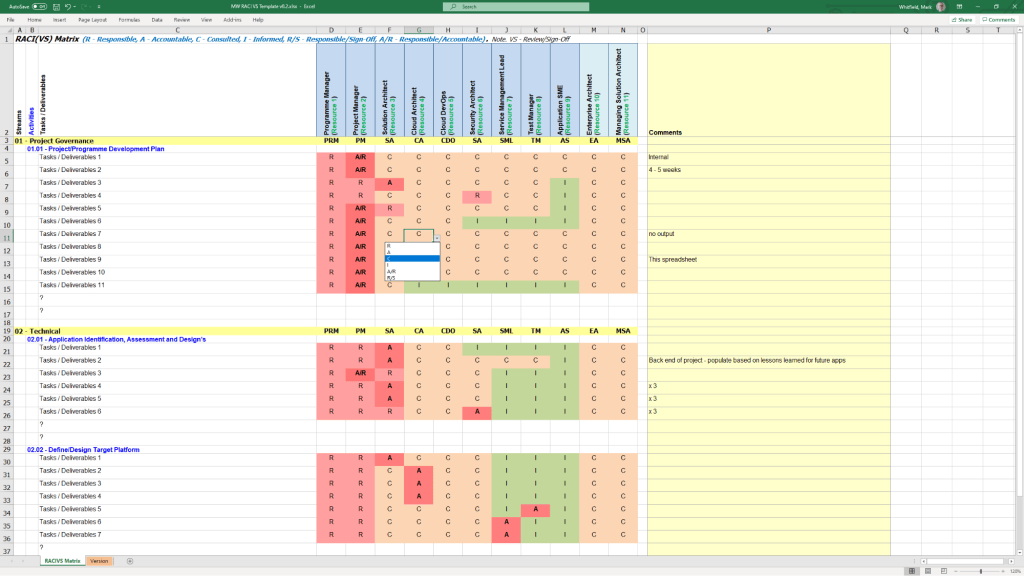
    • RACI Matrix: Templates to define team roles and responsibilities (Responsible, Accountable, Consulted, Informed).
    • Finance Trackers: Detailed spreadsheets for monitoring forecasts vs. actuals, margins, variances, and expenses.
  • Reporting & Governance:
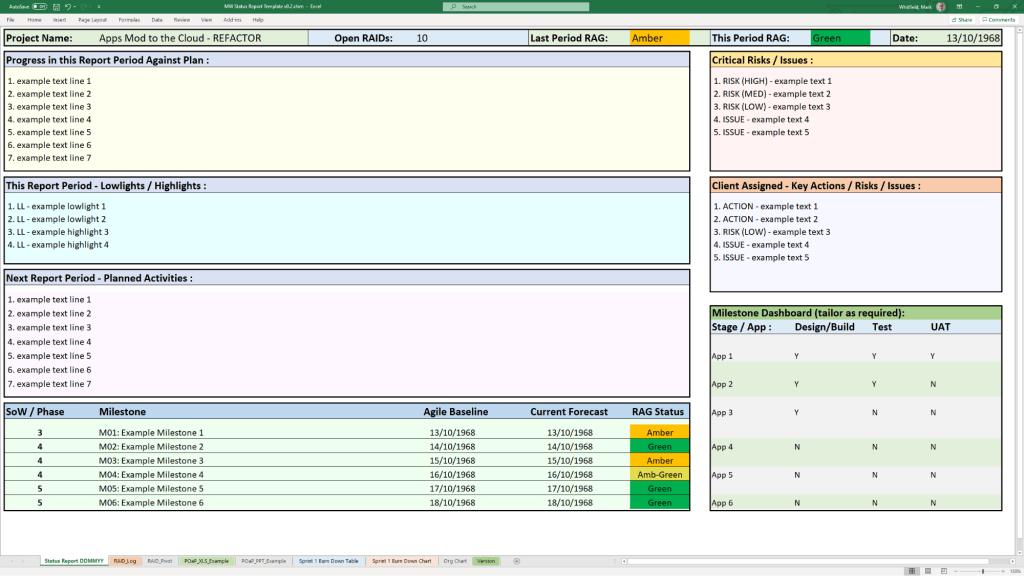
    • Status Reports: Weekly and monthly templates in Word and PowerPoint for internal and client health reporting.
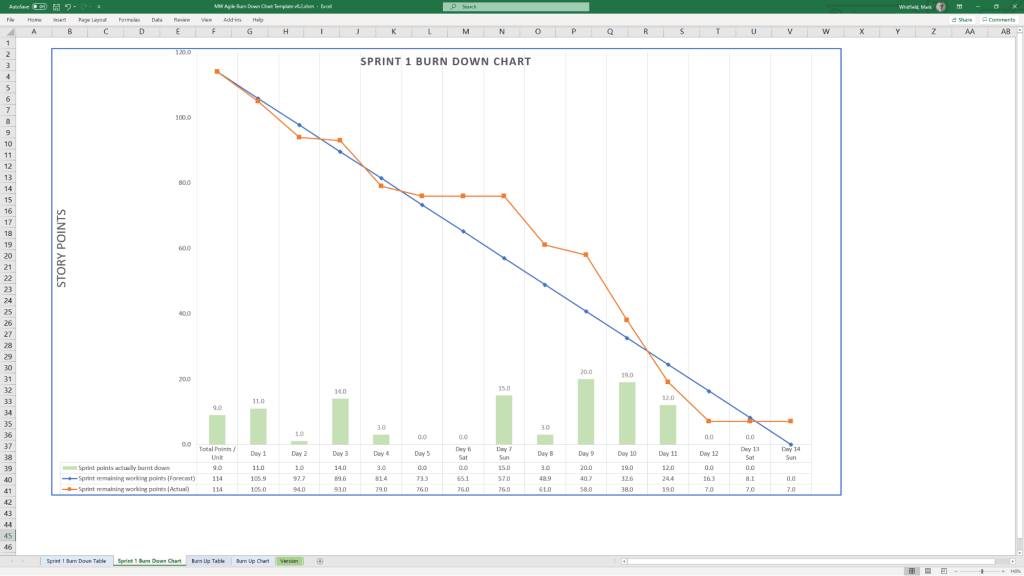
    • Agile Specifics: Burn Down and Burn Up charts in Excel for teams without access to tools like Jira.
    • PRINCE2 Management Products: Standard documents including Project Briefs, PIDs, Business Cases, and Lesson Logs. 

Key Features and Insight

  • Lifelong Support: A one-time purchase includes free upgrades and additions for life.
  • Full Customisation: All files are fully editable, allowing project managers to tailor them to specific project sizes and methodologies.
  • Methodology Neutral: Templates are designed to work for traditional Waterfall (PRINCE2) or modern Agile Scrum environments, with specific notes on how to transition between them.
  • Visual Dashboards: Many Excel templates include built-in charts and pivot tables to provide instant visual readouts of project health, such as financial variance or RAID status. 

Availability

The full package is available for purchase on Mark-Whitfield.com or through the ProjectTemplatesSoft Etsy shop

Buy Project Management Templates bundle

Over 200 editable Microsoft Office resources designed for Agile, Scrum, Waterfall, and PRINCE2 delivery.

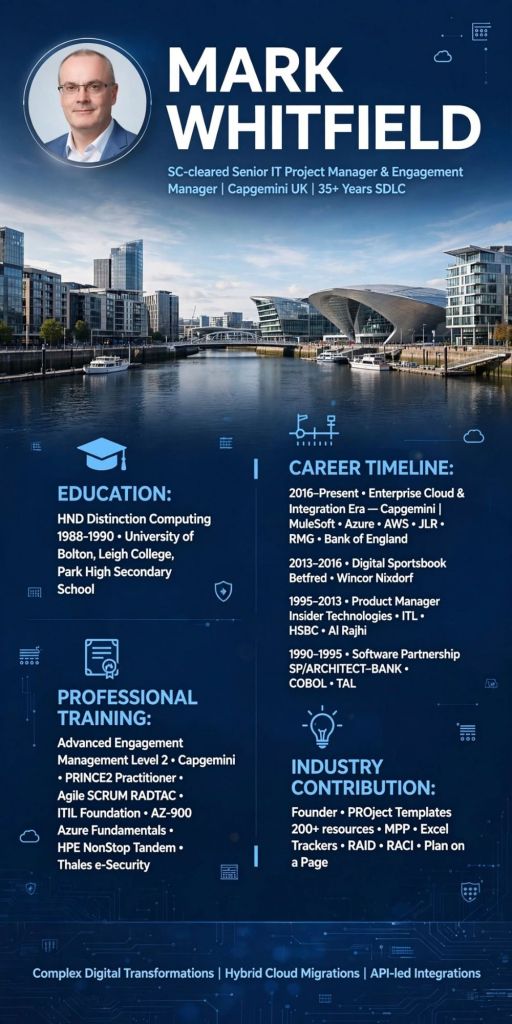
IT Mark Whitfield, SC Cleared Senior Project Manager

Mark Whitfield is a highly experienced SC cleared Senior IT Project Manager and Engagement Manager with over 30 years in the IT industry, specializing in both Agile and Waterfall delivery for large-scale blue-chip companies, digital projects, and payment systems. After starting as a programmer, he transitioned into project management, eventually working with Capgemini and establishing a professional templates resource site. 

SC cleared Senior IT Project Manager and Engagement Manager

IT Project Management Overview

  • Key Expertise: Senior IT Project Management (Agile / Scrum / Waterfall / PRINCE2), Delivery Management, Business Transformation, and SC clearance.
  • Sector Focus: Banking, Finance, Transportation (Heathrow, NATS), Retail, Government (Local Regional Government – LRG), Aerospace & Defence, and Gambling.
  • Technical Background: Programming in COBOL85, Tandem TAL, SQL, C, C++, Java, and experience with HPE NonStop (BASE24) systems.
Tandem TAL Programming certificate, 1995
  • Tools & Methodologies: PRINCE2, Agile SCRUM, Microsoft Project (MPP), Excel RAID logs, and Jira.
  • Value Proposition: Focuses on improving revenue, cost, and Customer Satisfaction (CSAT) through structured SDLC methodologies. 

Detailed Historical Timeline

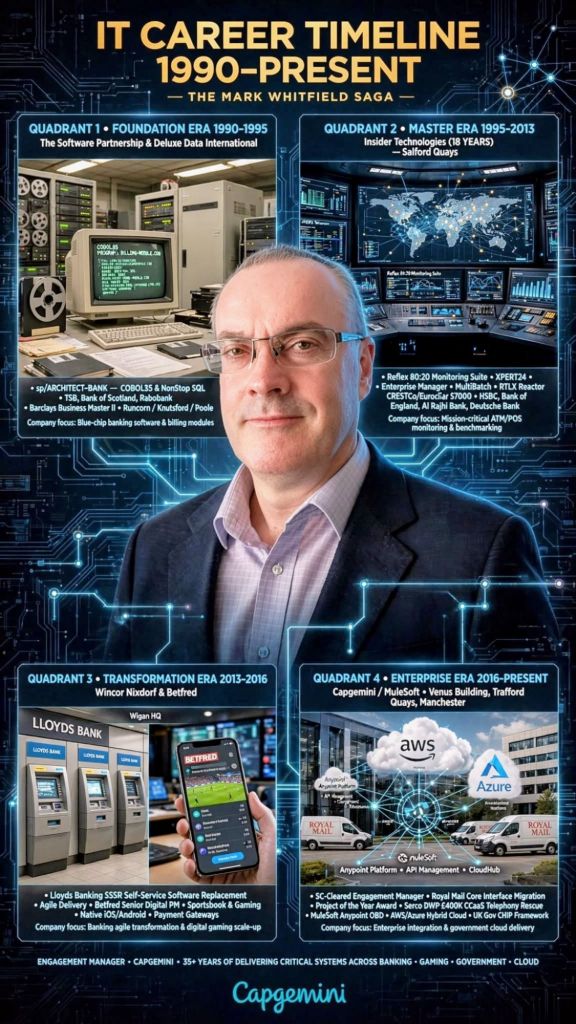
Era 1: Programming & Technical Development (1990–1995) 

  • 1990: Graduated in Computing and joined The Software Partnership (later Deluxe Data) in Runcorn as a programmer specializing in electronic banking software (sp/ARCHITECT) on Tandem Computers (now HPE NonStop).
  • 1990-1995: Developed code (COBOL85/NonStop SQL) for major banks, including TSB, Bank of Scotland, Rabobank, and Girofon.
  • 1993 (May): Completed Tandem Guardian Principles Course.
Tandem Guardian Principles Course, 1993
  • 1994: Deluxe Electronic Payment Systems acquired The Software Partnership.
  • 1995 (June): Completed HP NonStop Performance Analysis and Tuning.
Deluxe Electronic Payment Systems acquired The Software Partnership in 1994
HP NonStop Performance Analysis and Tuning, 1995

Era 2: Specialized Software & Product Management (1995–2013) 

Insider Technologies Limited (ITL) in Salford Quays
  • 1995 (August): Joined Insider Technologies Limited (ITL) in Salford Quays as a senior programmer, later moving into product / project management.
  • 1995-2013: Focused on monitoring (Reflex) and batch scheduling (MultiBatch) software for HPE NonStop systems, serving clients like Barclays and Alliance & Leicester.
  • 2000 (May): Completed Microsoft Project ’98 Certification and began training other ITL project managers on scheduling best practices.
  • 2007: Insider Technologies products (Reflex) integrated into FIS solutions.
  • 2013: Published work in the HP NonStop journal “The Connection”. 
HPE NonStop journal “The Connection” – article for the Insider Technologies product, RTLX

Era 3: Senior IT Project Management (2013–2016) 

  • 2013-2014: Worked at Wincor Nixdorf as an IT Project Manager (PRINCE2 / Agile Scrum) on a £5m+ LBG Self-Service Software Replacement (SSSR) program for Lloyds Banking Group, migrating ATM systems from HP NonStop to AIX.
  • 2014-2016: Joined Betfred as a Senior Project Manager, delivering payment gateways, sportsbook, and virtual gaming projects in Agile SCRUM for mobile and online platforms. 

Era 4: Engagement Management & Public Sector (2016–Present) 

  • 2016 (January): Joined Capgemini UK as a client-facing Engagement Manager (SC cleared).
  • 2016 (August): Founded Mark Whitfield Consultancy Ltd, managing independent IT, network, and improvement projects.
  • 2016-2018: Led Waterfall / Agile projects for automotive, local government, and postal services.
  • 2018-2019: Augmented into MuleSoft as a Delivery Manager for the Anypoint Platform.
  • 2023-2024 (Nov-Feb): Served as Technical Delivery Manager for a UK Government account, overseeing a £1m+ Fish Export Service (FES) to Common Entry Health Document (CHED) Inspection Portal (CHIP) project.
  • 2026: Continued to provide project management thought leadership and template resources for Agile/Scrum/PRINCE2. 
Agile Scrum Burn down Chart template in Microsoft Excel
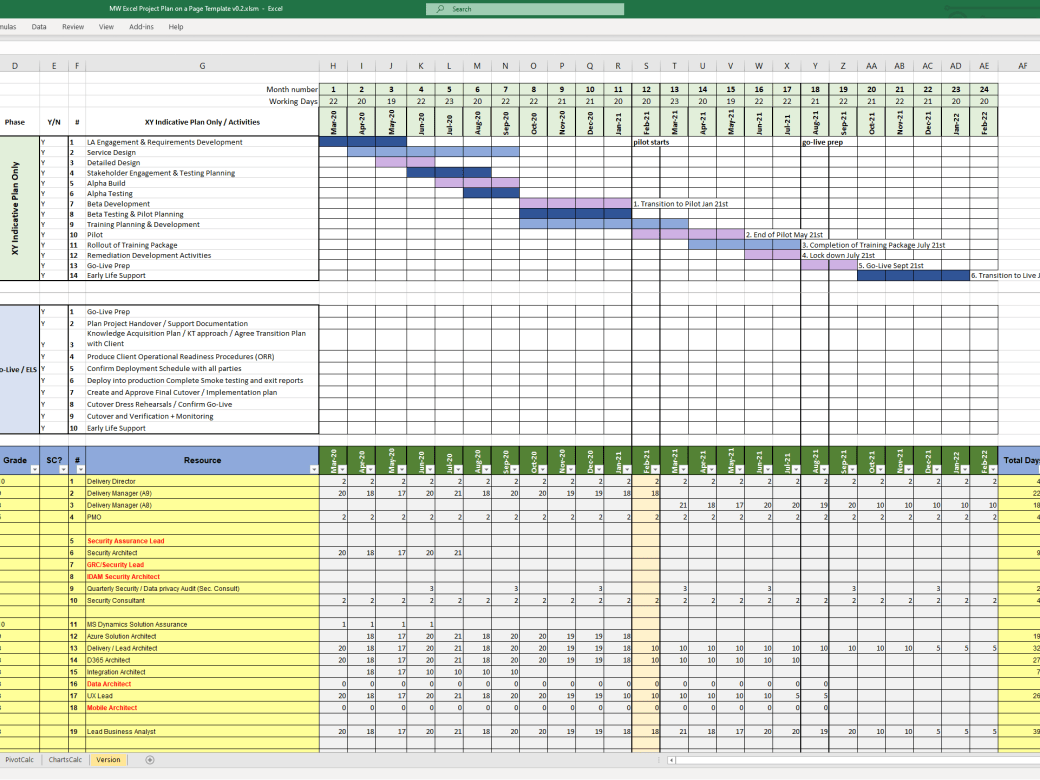
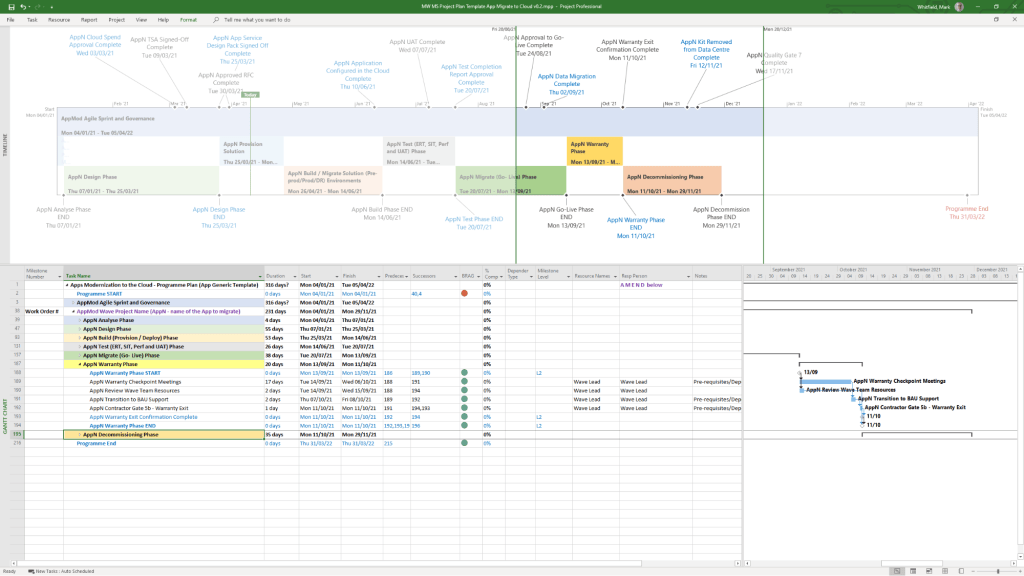
Microsoft Project MPP MSP Project Plan Template examples
Plan On a Page POaP templates plus MPP MS Project and MS Excel Project Plan templates

Key Projects & Clients

  • UK Gov / Capgemini: Fish Export Service (FES) Cloud Migration.
  • MuleSoft: Anypoint Platform.
  • Wincor Nixdorf/Lloyds: ATM/Self-Service Software Replacement.
  • Jaguar Landrover (JLR), Heathrow, Royal Mail Group, NATS, Euroclear: Various IT and Digital projects.
  • Banking: Rabobank, Barclays, HSBC, Bank of England, Standard Chartered. 

IT Mark Whitfield, SC Cleared Senior Project Manager

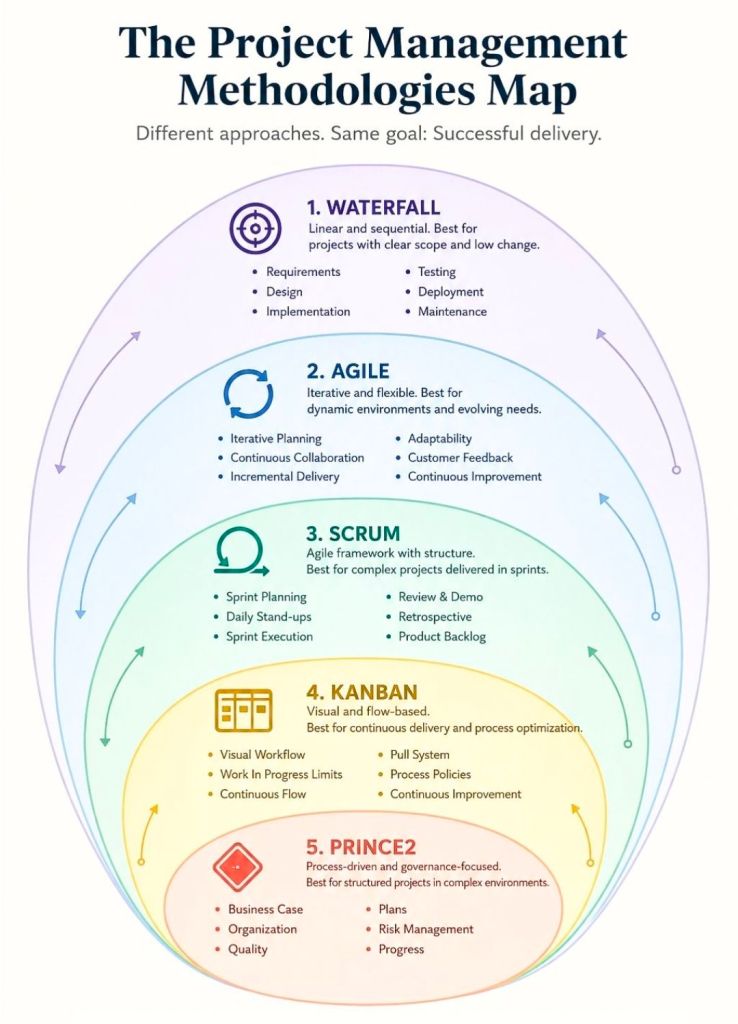
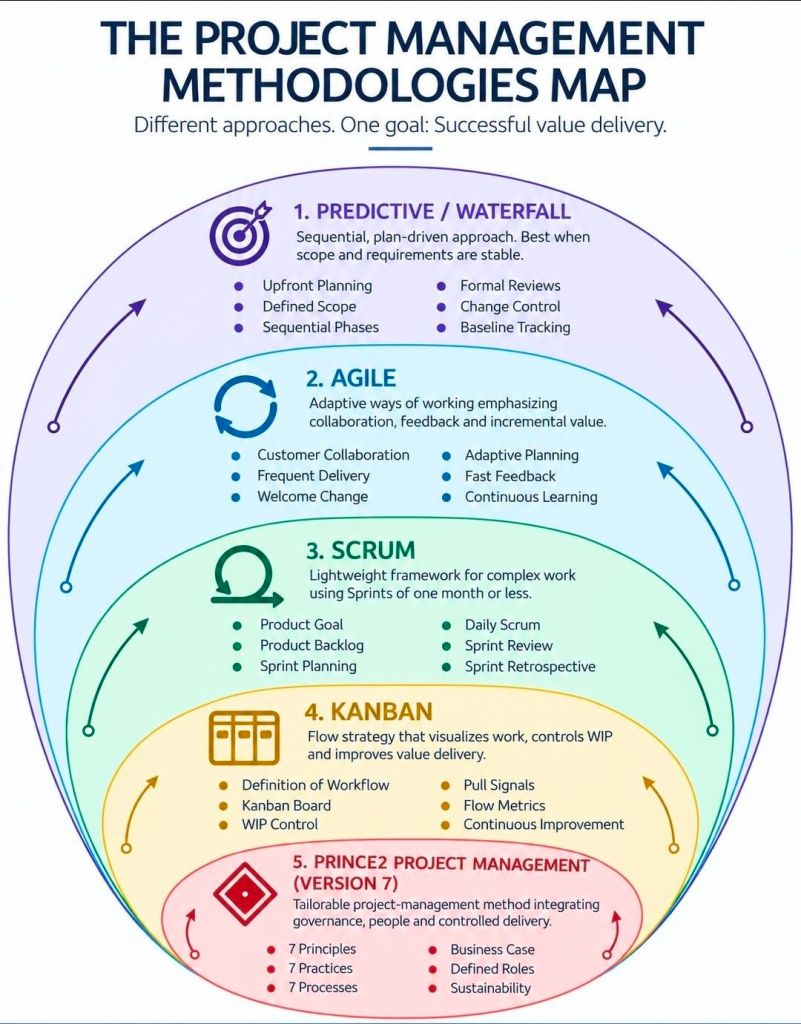
Project Management Methodologies Summarised

Project Management Methodologies Summarised

Senior IT Project Manager & Project Templates author – Mark Whitfield

Mark Whitfield is a highly experienced SC-cleared Senior IT Project Manager and Engagement Manager with over 30 years of experience in the software development lifecycle (SDLC), specializing in Agile and Waterfall delivery for financial, automotive, and public sector clients. He has a strong background in HP NonStop (Tandem) systems and currently works for Capgemini. 

Mark Whitfield, Senior IT PM and Project templates author

Comprehensive Career Timeline

Early Career & Foundations (1988–1995) 

  • 1988–1990: Completed Higher National Diploma (HND) in Computing at Bolton Institute of Higher Education (BIHE).
  • 1990–1994: The Software Partnership (Runcorn): Programmer specializing in electronic banking software (sp/ARCHITECT-BANK) on Tandem Computers.
  • 1994–1995: Deluxe Data (formerly TSP): Lead Analyst/Programmer, focusing on software investigation, design, coding, and on-site installation for clients like TSB, Bank of Scotland, and Rabobank. 

Development & Technical Specialization (1995–2013) 

  • 1995–2013: Insider Technologies Limited: Spent 18 years progressing from Senior Development Engineer to Project Manager for Strategic Technical Initiatives.
  • Key Roles: Managed Reflex 80:20 and Reflex ONE24 product development, technical pre-sales, and consultancy. Developed diagnostic software for monitoring payment systems (BASE24).
  • Notable Project: Managed a bid to replace legacy ATM tools at LloydsTSB (5000 ATMs) with Reflex ONE24. 

Banking & Digital Project Management (2013–2016) 

  • 2013–2014: Wincor Nixdorf: Project Manager in the Professional Services Banking Division, managing a £5m+ work stream for Lloyds Banking Group’s Self-Service Software Replacement (SSSR) programme.
  • 2014–2016: Betfred: Senior Digital Project Manager for the Online and Mobile Division, delivering payment gateways and sportsbooks for iOS, Android, and Windows. 

Senior Engagement Management (2016–Present)

  • 2016–Present: Capgemini UK: Engagement Project Manager responsible for delivering both Waterfall and Agile digital projects.
  • 2016 (Approx.): Assigned to a UK-wide Air Traffic organization (NATS) for Apple iOS app delivery.
  • 2018–2019: MuleSoft (Secondment): Served as a Delivery Manager for the Anypoint Platform.
  • Current Focus: Cloud Migration (Hybrid) of 130 apps for UK Government. 

Client & Colleague Recommendations

Mark Whitfield is noted for being a detail-oriented manager who provides a strong barrier between developers and difficult clients, while maintaining a friendly, professional, and diplomatical approach. 

  • Agile Management: “Mark provided an excellent barrier between us (developers) and a difficult client…ensuring that we followed the agile principles” — Callum Marriage (Developer).
  • MuleSoft/Capgemini Engagement: “Customers loved him. His was extremely detailed oriented and understood the often-complex needs…never became flustered in high pressure situations” — Delivery Manager, MuleSoft.
  • Betfred (2015): “I would highly recommend Mark for his ability to successfully multi-task under significant pressure… [he] produced a very comprehensive handover document” — IT Compliance Analyst, Betfred.
  • Capgemini/JLR Project: “Mark was able to do a good planning, with the correct resources, on time delivery and with good relationship between stakeholders” — Head of Integration Development

Key Areas of Expertise

  • Methodologies: PRINCE2 Practitioner, Agile SCRUM, ITIL, ISO9001:2008.
  • Tools: MS Project, MS Excel/Office, RAID logs.
  • Technical Background: HP NonStop (Tandem) Systems, BASE24, C++, TAL, COBOL.
  • Industries: Financial/Banking, Aerospace & Defence, Government, Automotive, Gambling. 

Mark Whitfield’s website (mark-whitfield.com) serves as a professional portfolio and resource hub for his 30+ year career as a SC-cleared Senior IT Project Manager. It offers over 200 editable project management templates for Agile, Waterfall, and PRINCE2 methodologies, alongside career insights and project experience. 

Website & Content Overview

  • Project Management Resources: The site, often known as PROject Templates, provides downloadable templates for planning, scheduling (Gantt charts), project initiation (PID), and project control.
  • Methodology Focus: Resources are tailored for PRINCE2 (including Agile Scrum), and Agile/Waterfall delivery methods.
  • Career Portfolio: Features his work history as a Senior IT Project Manager, including roles at Capgemini, Betfred, and various financial institutions.
  • Technical Specialization: Highlights expertise in HP NonStop systems, digital projects, and payment/transaction systems.
  • Professional Background: Mentions his experience with major clients such as Jaguar Landrover, Heathrow, Royal Mail, and various banks. 

The site is designed for project managers looking for templates to speed up project documentation and for clients looking to review his career accomplishments. 

Senior IT Project Manager & Project Templates author – Mark Whitfield

Templates sold on this website are designed for Microsoft Office (Excel, Word, PowerPoint) and MS Project (MPP) and are used for tracking and planning software development lifecycle (SDLC) projects. 

Template Breakdown

The templates, often sold in a bundle, include over 200+ editable items aimed at project delivery. Key components include: 

  • Project Planning (MS Project & Excel): Detailed Waterfall project planners with Gantt views, Agile Sprint plans, and Plan on a Page (POaP) examples.
  • RAID Logs (Risk, Action, Issue, Dependency): Comprehensive Excel trackers for managing risks, issues, assumptions, and dependencies.
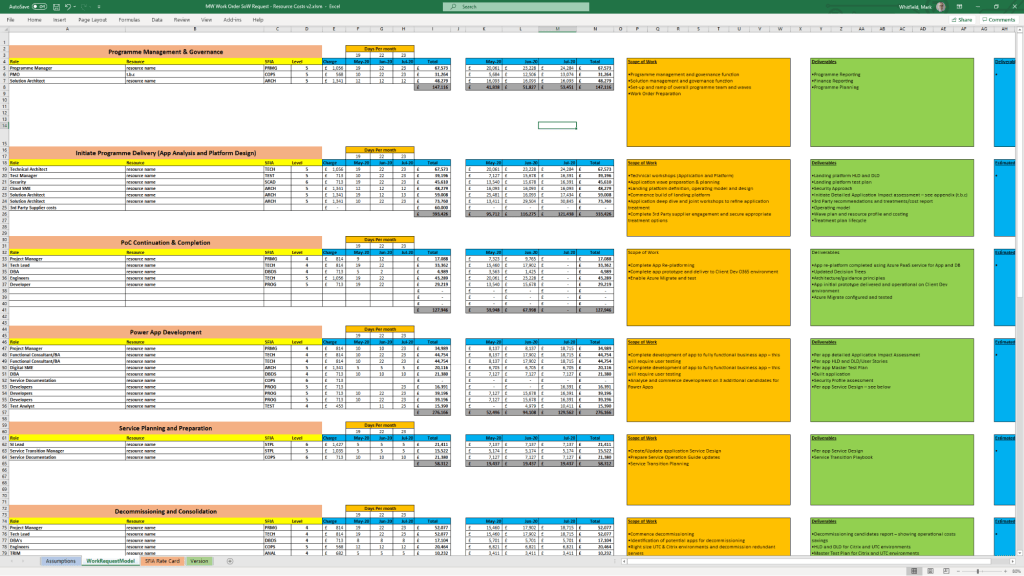
  • Financial & Resource Management: Project finance trackers (forecasts, actuals, variance) and resource trackers for tracking team members and costs.
  • Project Governance (Word & PowerPoint): Project initiation documentation (PID), status reports, RACI matrices (responsible, accountable, consulted, informed), and project organization charts.
  • Agile/Scrum Tools: Burn-down and burn-up charts, story dependency trackers, and Kanban templates.
  • Closeout: Lessons learned logs and benefit realization analysis trackers. 

Where to Buy

  • Official Website: mark-whitfield.com (PROject Templates) is the primary source, offering a bundle with free lifetime upgrades.
  • Etsy: Mark Whitfield’s templates are available for purchase here, particularly for those needing alternative payment methods.
  • Eloquens: He maintains a channel on Eloquens for downloading professional templates. 

The templates are fully editable, allowing users to tailor them to specific project requirements. 

Types of Product Managers Overview

Types of Product Managers Overview

Project Management Methodologies, historical timeline by era and year

This is a detailed, comprehensive historical timeline of project management methodologies, tracing the evolution from ancient practices to modern adaptive frameworks.

I. Pre-Modern Era (Before 1900): Foundation of Task Coordination

  • 2570 BC (Great Pyramid of Giza): Completion of the pyramids, demonstrating early project organization with managers for each of the four faces, planning, and logistics.
  • 208 BC (Great Wall of China): Construction of the Great Wall, involving massive workforce organization divided into soldiers, citizens, and criminals.
  • 1850s (Transcontinental Railroad): US railroad projects requiring large-scale resource and schedule management.
  • 1896 (Harmonogram): Karol Adamiecki developed the harmonogram, a predecessor to the Gantt chart (published in 1931). 

II. Early Modern Era (1910s–1950s): The Scientific Management Era 

This era brought “scientific management” to project control, focusing on efficiency and visualization. 

  • 1910s (Gantt Chart): Henry Gantt developed the Gantt chart, a visual tool for scheduling tasks over time.
  • 1911 (Scientific Management): Frederick Taylor published The Principles of Scientific Management, focusing on efficiency and time-saving.
  • 1931–1936 (Hoover Dam): One of the first large-scale applications of Gantt charts for complex scheduling.
  • 1942–1945 (Manhattan Project): Development of the atomic bomb, creating a need for rapid, complex planning and large-scale team coordination. 

III. The “Golden Age” of Project Management (1950s–1960s): Formal Methodologies 

This era introduced mathematical models for managing complex, interdependent tasks. 

  • 1956 (AACE Formed): The American Association of Cost Engineers (now AACE International) was formed, specializing in cost control and scheduling.
  • 1957 (Critical Path Method – CPM): Developed by Dupont Corporation to manage chemical plant maintenance shutdowns.
  • 1958 (Program Evaluation and Review Technique – PERT): Created by the US Navy Special Projects Office for the Polaris missile submarine project to manage task time and risk.
  • 1962 (Work Breakdown Structure – WBS): The US Department of Defense mandated the use of WBS for large, complex projects.
  • 1965 (IPMA Founded): The International Project Management Association (IPMA) was launched, the world’s first project management association.
  • 1969 (PMI Founded): The Project Management Institute (PMI) was launched to promote the profession, later developing the PMP certification. 

IV. The “Silver Age” (1970s–1980s): Systems and Controls 

  • 1970s (Waterfall Introduction): While used informally earlier, the Waterfall methodology was formalized for software development in the 1970s, emphasizing sequential phases.
  • 1975 (PROMPTII): Simpact Systems Ltd created PROMPTII, a methodology to handle cost overruns in computer projects, which later formed the basis of PRINCE.
  • 1975 (Mythical Man-Month): Fred Brooks published his seminal work on software engineering project management.
  • 1978 (Toyota Production System): Lean production and Kanban techniques, used in manufacturing, began to influence project workflow.
  • 1984 (Theory of Constraints – TOC): Dr. Eliyahu Goldratt published The Goal, introducing the Theory of Constraints for managing constraints (bottlenecks).
  • 1986 (Scrum): Takeuchi and Nonaka defined Scrum as a project management style for fast-paced development.
  • 1987 (PMBOK Guide): The Project Management Institute published the first Project Management Body of Knowledge (PMBOK) white paper.
  • 1989 (PRINCE): The UK government launched PRojects IN Controlled Environments (PRINCE), the standard for information systems projects. 

V. Rebirth and Modern Era (1990s–2000s): Agile and Adaptive Methods 

  • 1994 (CHAOS Report): The Standish Group published the first report documenting high IT project failure rates.
  • 1995 (Scrum Formalization): Jeff Sutherland and Ken Schwaber formally defined the Scrum framework.
  • 1996 (PRINCE2): PRINCE was updated to PRINCE2 to become a generic, more flexible methodology applicable to all project types.
  • 1997 (Critical Chain Project Management – CCPM): Eliyahu Goldratt invented CCPM, based on the Theory of Constraints.
  • 1998 (PMBOK Standard): The American National Standards Institute (ANSI) recognized PMBOK as a standard.
  • 2001 (Agile Manifesto): 17 software developers met to publish the Manifesto for Agile Software Development, prioritizing collaboration and adaptability over rigid plans.
  • 2007 (Kanban for Software): David Anderson adopted Kanban for software development, focusing on visualizing work and limiting work-in-progress. 

VI. The Contemporary Era (2010s–Present): Hybrid, AI, and Speed 

  • 2012 (ISO 21500): The International Organization for Standardization published ISO 21500:2012, “Guidance on Project Management”.
  • 2017 (PMBOK 6th Ed & PRINCE2 Update): PMI introduced Agile/adaptive practices into PMBOK, while AXELOS released a more flexible PRINCE2.
  • 2018 (PRINCE2 Agile): PRINCE2 Agile was launched to combine the governance of PRINCE2 with the flexibility of Agile.
  • 2021 (PMBOK 7th Ed): A major shift in PMI standards, moving from process-based to principle-based, focusing on project outcomes.
  • 2020s–Present (AI/Hybrid): Rise of AI-driven project management, automated reporting, and hybrid methodologies combining Waterfall stability with Agile speed. 

Project Management Methodologies, historical timeline by era and year

Mark Whitfield, Senior IT Project Manager

Mark Whitfield is a highly experienced IT Senior Project Manager and Engagement Manager based in Manchester, UK, specializing in Agile Scrum, PRINCE2, and Waterfall methodologies. He holds a degree in Computing (1990) and has extensive experience in IT hardware solutions, financial services, and Aerospace & Defence. 

Here is a comprehensive summary of his profile, with links based on the provided search data:

Professional Profile

  • Name: Mark Whitfield
  • Role: IT Senior Project Manager / Engagement Manager (SC Cleared)
  • Key Skills: Agile Scrum, PRINCE2, ITIL, Financial Forecasting, Stakeholder Management, Technical Initiative Leadership.
  • Education: Computing (Graduated 1990). 

Comprehensive Career History

  • Capgemini UK (Jan 2016 – Present): SC Cleared Engagement Manager (A8) in Custom Bespoke Solutions.
    • Recent Experience: Project Manager for a UK-wide Air Traffic organisation, delivering new Apple iOS Apps for military and public use.
  • Betfred Limited (Dec 2014 – Jan 2016): IT Senior Digital Project Manager, Online and Mobile Division.
  • Wincor Nixdorf Limited (Sep 2013 – Dec 2014): Project Manager, Professional Services – Banking Division.
    • Key Project: Managed a £5+ million project replacing legacy HP NonStop software systems with AIX-based J2EE/Oracle technologies for a major UK bank.
  • Reflex / Insider Technologies (Aug 1995 – Sep 2013): Project Manager – Strategic Technical Initiatives.
  • eFunds (1994 – 1995): Lead Analyst. 

Certifications & Training

  • Cloud & Project Management: AZ-900 Microsoft Certified Azure Fundamentals (2022), Advanced Engagement Management (2017), Registered PRINCE2 Practitioner (2011).
  • Agile: Agile SCRUM Training (2011).
  • Technical: TANDEM Performance Analysis (1995), C++ for Non-C Programmers (1997), Querying MS SQL 2000 (2009). 

Awards

  • C&CA UK’s Communications & Engagement Award Winner – Cloud & Custom Applications (Capgemini UK, Dec 2022).
  • Project Recognition Award – Wincor Nixdorf (Retail Banking Project). 

Web Presence & Documents

Mark Whitfield, Senior IT Project Manager

By era;

Mark Whitfield is a highly experienced IT Project Manager, Senior Developer, and SC-cleared consultant with over 30 years of experience, specializing in HP NonStop (Tandem) systems, banking software, and digital transformation projects. He is currently an Engagement Project Manager at Capgemini. 

Career Overview

  • Specialism: HP NonStop (Tandem) mainframes, BASE24, transaction monitoring, Agile/Waterfall methodologies.
  • Key Industries: Financial services, electronic banking, government, automotive, aerospace.
  • Core Competencies: Software development (C, C++, COBOL, TAL), Project Management (PRINCE2 Practitioner, Scrum), Pre-sales technical consultancy. 

Career Timeline by Era and Year

1. The Foundation & Tandem Era (1990–1995)

  • 1990: Graduated in Computing and started as a Programmer for The Software Partnership in Runcorn, specializing in sp/ARCHITECT-BANK on Tandem Computers.
  • 1990-1994: Developed banking code for TSB, Bank of Scotland, Rabobank, and Girofon (Denmark).
  • 1992: Worked on the Barclays Business Master II (BBM II) project in Knutsford.
  • 1994: Company taken over by Deluxe Data (later FIS). 

2. Insider Technologies & Monitoring Era (1995–2013)

  • 1995–2013: Joined Insider Technologies Ltd as a Senior Development Engineer and Project Manager.
  • 1995-2004: Developed monitoring/diagnostic software (Reflex 80:20, Reflex ONE24) for HP NonStop payment systems.
  • 1997: Worked on projects for CRESTCo.
  • Early 2000s: Focused on HP NonStop transaction/payment monitoring for ATM/POS devices using ACI’s XPNET.
  • 2005-2013: Managed first HP OpenView Operations Smart Plug-In certification for NonStop; designed XPERT24.
  • 2011: Certified as a PRINCE2 Practitioner. 

3. Banking Transformation & Consultancy Era (2013–2016)

  • 2013–2014: Wincor Nixdorf UK – Worked as a Project Manager in Professional Services for the Banking Division.
  • 2013-2014: Assigned to Lloyds Banking Group (LBG) for the Self-Service Software Replacement (SSSR) program (ATM estate upgrade).
  • 2014–2016: Joined Betfred as an IT Project Manager in the gambling/casinos industry, delivering mobile/online payment gateways (iOS, Android). 

4. Digital Transformation & Capgemini Era (2016–Present) 

  • 2016: Joined Capgemini UK as a client-facing Engagement Manager.
  • 2016-2017: Led digital projects for automotive, local government, and aerospace sectors.
  • 2017: Obtained Microsoft Excel Expert skills and Advanced Engagement Management certifications.
  • 2018–2019: Augmented into MuleSoft as a Delivery Manager for the Anypoint Platform.
  • 2022: Completed Microsoft Azure Fundamentals (AZ-900) certification.
  • 2023–2024: Assigned to a UK Government account for a cloud migration of 130+ applications and the Fish Export Service (FES) project. 

Key Qualifications

  • PRINCE2 Practitioner & Agile Scrum
  • ITIL Certified
  • SC Cleared (UK Government)
  • Technical Skills: C, C++, MS SQL, COBOL, TAL, Java, ASP.NET, HP NonStop

PRINCE2 (PRojects IN Controlled Environments) Overview and Timeline by Year

PRINCE2 (PRojects IN Controlled Environments) is a structured, process-based project management methodology focusing on organization, control, and business justification. Originating from UK government IT standards in the 1970s, it has evolved into a globally recognized, tailorable standard used in over 150 countries for projects across various industries. 

PRINCE2 Project Management Summary

  • Core Philosophy: Continued Business Justification (projects must make sense financially), Manage by Exception (delegating authority within limits), and Product-Based Planning.
  • Seven Principles: Projects must have continued business justification, learn from experience, define roles and responsibilities, manage by stages, manage by exception, focus on products, and tailor to suit the project.
  • Seven Processes: Starting a Project, Directing a Project, Initiating a Project, Controlling a Stage, Managing Product Delivery, Managing a Stage Boundary, and Closing a Project.
  • Key Themes: Business Case, Organization, Quality, Plans, Risk, Change, and Progress.
  • Main Benefits: Provides a common language, clear accountability, defined roles, and tailored, consistent documentation. 

Detailed Historical Timeline (1975–2023+)

Era 1: The PROMPT Origins (1975–1988) 

  • 1975: Simpact Systems Ltd develops PROMPT (Project Resource Organisation Management and Planning Techniques) in response to IT projects running over time and budget. PROMPT II introduces a phased approach (Initiation, Specification, Design, Development, Installation, Operation). 

Era 2: The PRINCE Birth (1989–1995)

  • April 1989: The UK Central Computer and Telecommunications Agency (CCTA) adopts PROMPT II as the standard for IT projects, renaming it PRINCE (initially “PROMPT II IN the CCTA Environment”).
  • 1990: PRINCE is released into the public domain and widely adopted by the private sector for non-IT projects, although it is perceived as too rigid for small projects. 

Era 3: The Birth of PRINCE2 (1996–2008) 

  • 1996: PRINCE2 is published by the CCTA. It is rewritten for broader use (not just IT), removing jargon to become a generic project management framework.
  • 1998: PRINCE2 begins undergoing revisions based on user feedback.
  • 2000: The Office of Government Commerce (OGC) becomes the owner of PRINCE2.
  • 2002: The international user community begins consultative updates to the method. 

Era 4: The Modern Revision Era (2009–2022) 

  • 2009: PRINCE2: 2009 Refresh is released by the OGC. This major revision simplifies the method, makes it more customizable, and introduces the seven core principles.
  • 2013: Ownership transfers from the UK Cabinet Office to AXELOS Ltd, a joint venture between the UK Government and Capita.
  • 2017: PRINCE2 2017 Update is published, focusing on increased flexibility, scalability, and better tailoring guidance.
  • 2018: PRINCE2 Agile is launched, bringing a governance layer to agile delivery methods like Scrum and Kanban.
  • 2020: PRINCE2 2017 is renamed “PRINCE2 6th Edition”.
  • 2021: PeopleCert becomes the sole owner of AXELOS and PRINCE2. 

Era 5: The Current Era (2023–Present) 

  • September 2023: PRINCE2 7th Edition is released. The update introduces a “People” element, focusing on change management and team leadership, along with new guidance on Sustainability, Commercial, and Digital & Data management. 
PRINCE2 Key Evolution Summary
May 2011 – Registered PRINCE2 Practitioner with ILX, Mark Whitfield

PRINCE2 (PRojects IN Controlled Environments) Overview and Timeline by Year

Waterfall project management is a linear, sequential methodology

Waterfall project management is a linear, sequential methodology where progress flows steadily downward through defined phases, much like a physical waterfall. In this model, each stage—such as requirements, design, implementation, and testing—must be fully completed and approved before the next one begins. 

Waterfall Project Plans, .xls and .mpp file formats respectively

Core Characteristics

  • Sequential Design: No overlapping phases; each “cascades” into the next.
  • Documentation-Driven: Extensive upfront planning and detailed records are required at every step.
  • Fixed Scope: Requirements are gathered at the start, making the project’s timeline and budget highly predictable but difficult to change.
  • Specialised Use: Best suited for regulated industries like aerospace, construction, and healthcare, where changes are costly or safety is paramount. 

Historical Timeline by Era and Year

The following timeline tracks Waterfall from its origins in post-WWII engineering to its current role in hybrid project management.

Examples, Waterfall Plan On a Page POaP in MS PowerPoint format

The Pre-Formal Era (1950s – 1969)

Software development adopted structured, sequential approaches from engineering, largely driven by complex, high-risk projects. 

  • 1956Herbert D. Benington documented a sequential process for the SAGE project, establishing the technical roots.
  • Late 1960sNASA applied linear, rigid methodologies to Apollo missions, setting a precedent for high-stakes, documentation-heavy development.
  • 1968: The NATO Software Engineering Conference highlighted the “software crisis,” prompting a push for formal, disciplined development models. 

The Formalisation Era (1970 – 1979)

The model was officially, yet ironically, described and named. 

  • 1970Dr. Winston W. Royce published his foundational paper on managing large software systems, often cited as the origin of the “Waterfall” model, though he originally presented it as a cautionary, flawed approach.
  • 1976T.E. Bell and T.A. Thayer likely first used the term “Waterfall” in literature. 

The Institutional Era (1980 – 1999)

Waterfall became the mandatory standard for large-scale, complex projects. 

  • 1985: The U.S. DoD mandated DOD-STD-2167, cementing Waterfall as the standard for military software.
  • 1989: The UK Government introduced PRINCE2, deeply influenced by Waterfall principles.
  • 1994: The U.S. DoD formally abandoned strict Waterfall mandates for more flexible methods. 

The Modern & Hybrid Era (2000 – Present)

Waterfall transitioned from the default standard to a specialised methodology. 

  • 2001: The Agile Manifesto marked a shift toward iterative development, reducing Waterfall’s dominance.
  • Present Day: It remains vital in regulated sectors (e.g., aerospace) and is often combined with Agile in hybrid approaches.

Waterfall project management is a linear, sequential methodology

Click on the link in the website banner above to purchase example, editable template project plans shown and many others.

Mark Whitfield, Website Author – Background and Career Timline

Mark Whitfield is a Senior IT Project Manager and Engagement Manager with over 30 years of experience in the software development lifecycle (SDLC). He is currently a SC-cleared Engagement Manager at Capgemini UK. 

Professional Background by Era

  • 1990–1995: Early Programming (The Software Partnership/Deluxe Data)
    • Role: Programmer/Lead Analyst.
    • Focus: Developed electronic banking software (sp/ARCHITECT-BANK) on Tandem Mainframe Computers (now HPE NonStop).
  • 1995–2013: Senior Development & Product Management (Insider Technologies)
    • Role: Progressed from Senior Programmer to Project Manager for Strategic Technical Initiatives.
    • Focus: Developed platform health and diagnostic modules for the “Reflex” monitoring product.
  • 2013–2014: Project Management (Wincor Nixdorf)
    • Role: Project Manager, Professional Services – Banking Division.
    • Focus: Managed the Wincor Nixdorf workstream for Lloyds Banking Group’s Self-Service Software Replacement (SSSR) programme.
  • 2014–2016: Digital Project Management (Betfred)
    • Role: Senior Digital Project Manager, Online and Mobile Division.
    • Focus: Delivered payment gateways, sportsbooks, and virtual gaming components for iOS, Android, and Windows.
  • 2016–Present: Senior Engagement Management (Capgemini)
    • Role: Engagement Manager (A8), Custom Bespoke Solutions.
    • Focus: Leading digital transformation and cloud migration projects for public and private sector clients. 

Technologies & Frameworks

  • Project Methodologies: Agile SCRUM, PRINCE2 (Practitioner), Waterfall, ITIL, and ISO QA.
  • Mainframe & Infrastructure: HPE NonStop (Tandem), IBM ESB, UNIX shell scripting, and Cloud (MS Azure/AWS).
  • Programming & Databases: C/C++, MS SQL, Java, COBOL85, TAL, TACL, and SCOBOL.
  • Tools: MS Project, MS Excel/Office, MuleSoft Anypoint Platform, and Jira. 

Major Projects & Customers

  • UK Government: Managed a £13.5m cloud migration of 130 applications and the £1m+ Fish Export Service (FES) to CHIP portal.
  • Royal Mail Group (RMG): Managed a £4.3m data centre migration project involving over 1,100 interfaces.
  • Lloyds Banking Group (LBG): Led a £5m+ self-service software replacement project.
  • Other Notable Clients: Jaguar Land Rover (JLR), Heathrow, NATS (Air Traffic Control), Barclays, HSBC, Deutsche Bank, and Euroclear. 

Awards & Education

  • Awards:
    • C&CA UK’s Communications & Engagement Award (2022) at Capgemini UK.
    • Project Recognition Award from Wincor Nixdorf for achievements on the LBG SSSR project.
  • Education:
    • HND in Computer Studies (Distinction) from the University of Greater Manchester (formerly BIHE), 1988–1990.
    • A-Levels in Computer Science and Biology from Leigh College. 

Project Management Templates

Whitfield provides a library of over 200 editable resources through his site, PROject Templates, designed for Agile, Waterfall, and PRINCE2 7th Edition delivery. Key items include: 

  • Plan on a Page (POaP): Over 35+ executive-level summary slides.
  • Detailed Project Plans: Templates in MS Project (MPP) and Excel for SDLC tracking.
  • RAID Logs: Comprehensive registers for risks, actions, issues, and dependencies. 

Mark Whitfield Background and Career Timline

PRINCE2 Management Products Templates Overview and Historical Timeline

PRINCE2 management products are the 26 standard documents (templates) used to manage a project throughout its lifecycle. They are categorised into Baselines (plans and definitions), Records (registers and logs), and Reports (periodic updates). 

PRINCE2 Microsoft Project & Excel templates

Management Products Overview

The core templates provided in the methodology ensure consistent project control. Official templates are often available through accredited providers, this website or the official AXELOS website. 

  • Baselines: Used to define the project foundation (e.g., Business Case, Project Initiation Document, Plan).
  • Records: Dynamic logs to track day-to-day data (e.g., Risk Register, Issue Register, Lessons Log).
  • Reports: Snapshots of progress or specific events (e.g., Highlight Report, Checkpoint Report, Exception Report). 

Historical Timeline of Templates & Methodology

The evolution of these products reflects a shift from rigid, IT-specific documents to flexible, industry-agnostic templates. 

The Pre-PRINCE Era (1975 – 1988) 

  • 1975PROMPT II (Project Resource Organisation Management and Planning Techniques) was developed by Simpact Systems Ltd.
  • Key Focus: Introduced the concept of project phases (Initiation, Specification, Design) but was strictly for IT. 

The PRINCE Era (1989 – 1995) 

  • 1989PRINCE (PROMPT II in the CCTA Environment) launched by the UK Government’s CCTA.
  • Key Focus: Added Critical Path Analysis and formal management roles, but remained IT-heavy and rigid. 

The PRINCE2 Emergence (1996 – 2008)

  • 1996PRINCE2 (1st Edition) was released as a generic framework.
  • Key Change: IT-specific jargon was removed to make templates applicable to any industry.
  • 2002/2005: Minor updates (3rd and 4th Editions) focused on minor refinements based on user feedback. 

The Revision Era (2009 – 2022)

  • 2009PRINCE2:2009 Refresh (5th Edition) introduced the seven core principles.
  • Key Change: Templates were simplified and made more customisable to reduce “prowess-driven” bureaucracy.
  • 2017PRINCE2 6th Edition (formerly the 2017 Update) launched.
  • Key Change: Emphasis on Tailoring and scalability for different project sizes. 

The Modern Era (2023 – Present)

  • 2023PRINCE2 7th Edition was released.
  • Key Change: Added a “People” element and introduced three new management approaches: SustainabilityCommercial, and Digital & Data

Template Kits & Resources

For those seeking pre-formatted digital versions:

  • PRINCE2 7th Edition Template Bundle: Comprehensive sets including MS Project MPP, Excel Gantt charts, and Word artifacts are available at Etsy and eBay.
  • Specialised Packs: Focused collections like the PRINCE2 Control & Monitoring Pack can be found at WorkFlo Design.
  • Individual Documents: Individual templates like the Project Initiation Document (PID) are often sold separately for specific project needs. 
  • PRINCE2 Templates can be purchased directly from this website including a Microsoft Project Plan in MPP format and also a Microsoft Excel Project Plan in XLS format, see below and website link.

PRINCE2 Management Products Templates Overview and Historical Timeline

PRINCE2 Microsoft Project MPP file template
PRINCE2 Microsoft Excel XLS template 1
PRINCE2 Microsoft Excel XLS template 2

PRINCE2 Templates FREE Upgrades

Mark Whitfield’s PRINCE2 template collection is a comprehensive set of over 200 editable Microsoft Office documents designed to support both waterfall and agile project delivery. These templates are classified into several key categories, ranging from core PRINCE2 management products to advanced planning and tracking tools. 

Example Microsoft Project MPP file template

Core PRINCE2 Management Product Templates

This category includes the standard documentation required by the PRINCE2 methodology, often provided in MS Word (.doc) format. 

  • Project Initiation & Definition:
    • Project Brief: Initial summary used to gain approval for the initiation stage.
    • Project Initiation Document (PID): A comprehensive document containing the project definition, approach, business case, and management strategies.
    • Business Case: The primary justification for the project’s existence.
  • Registers and Logs:
    • Risk Register: For identifying and managing project risks.
    • Issue Register & Issue Report: For tracking and detailing specific project problems.
    • Lessons Log & Lessons Report: To capture and share knowledge gained throughout the project.
    • Daily Log: For the Project Manager to record informal issues or activities.
  • Reporting and Progress:
    • Highlight Report: Periodic progress updates for the Project Board.
    • Checkpoint Report: Updates from the Team Manager to the Project Manager.
    • End Stage & End Project Reports: Summaries of performance at key project milestones.
    • Exception Report: Used when a project is forecast to exceed its tolerances.
  • Quality and Configuration:
    • Product Description: Detailed specifications for each project deliverable.
    • Quality Register: Records all planned and completed quality activities.
    • Configuration Item Record: Tracks the status and version of project products. 

Advanced Planning and Tracking Templates 

Whitfield provides specialized tools for visual scheduling and financial management, primarily in MS Excel and MS Project (.mpp) formats. 

  • Project Planners:
    • PRINCE2 Waterfall Project Planner: A detailed Gantt-view planner in Excel for those without MS Project licenses.
    • MS Project (MPP) Templates: Pre-configured plans for PRINCE2 7th Edition, including end-to-end tasks and lifecycle stages.
    • Plan on a Page (POaP): High-level visual summaries of project timelines.
  • Resource and Financial Management:
    • Project Financial Tracker: Monitors forecast vs. actual costs, including margins and expenses.
    • Resource Costing Grid: Detailed grids for calculating costs per project phase.
    • RACI Tracker: Defines Roles and Responsibilities (Responsible, Accountable, Consulted, Informed). 

Operational and Agile Support

These supplemental templates assist with daily project operations and hybrid agile environments. 

  • RAID Log: A centralized tracker for Risks, Actions, Issues, and Dependencies.
  • Agile Specifics: Burn-down/up charts and sprint-view Gantt charts for scrum-based delivery.
  • Stakeholder Analysis Plan: Tools to map stakeholder influence versus impact.
  • Mobilisation/On-boarding Kit: PowerPoint templates for team kick-offs and onboarding. 

Visual Classification (Font Coding) 

In many of Whitfield’s automated plans, tasks are color-coded for quick visual breakdown: 

  • Black: Traditional PRINCE2 stage or activity.
  • Blue: Creation of a PRINCE2 artefact (e.g., creating a log).
  • Purple: Updating an existing artefact.
  • Green: Formal closing of an artefact. 

The full bundle is available for purchase on Mark Whitfield’s Official Website or through his Etsy Store

PRINCE2 Templates FREE Upgrades

Waterfall Methodology in Project Management, a Timeline History

The Waterfall methodology is a linear, sequential project management approach where progress flows steadily downward through defined phases, such as requirements, design, implementation, and testing. Each stage must be completed and approved before the next begins, making it highly structured but often inflexible to changes. 

Waterfall template available on this website

Historical Timeline by Era and Year

The history of the Waterfall model spans from early post-WWII engineering to its formalisation in software and eventual institutionalisation in government standards. 

The Pre-Formal Era (1950s – 1969)

During this period, software development borrowed heavily from established engineering and manufacturing processes. 

  • 1956: Herbert D. Benington presents a paper on the Semi-Automatic Ground Environment (SAGE) project, describing a structured process that many consider the true technical origin of the sequential approach.
  • Late 1960s: Major NASA projects and government software systems for rockets (e.g., Apollo missions) utilise rigid specifications and linear development due to the high cost of changes.
  • 1968: The NATO Software Engineering Conference identifies the “software crisis”—projects consistently running over budget and time—leading to a push for more disciplined models. 

The Formalisation Era (1970 – 1979)

The methodology was formally described, ironically as a cautionary tale, and finally given its name. 

  • 1970: Dr. Winston W. Royce publishes “Managing the Development of Large Software Systems”. He presents the sequential diagram but explicitly critiques it as “risky and invites failure,” suggesting a more iterative approach instead.
  • 1976: The term “Waterfall” is officially coined in a paper by Bell and Thayer, “Software Requirements: Are They a Problem?”. 

The Institutional Era (1980 – 1999)

Waterfall becomes the global standard for large-scale and regulated industries. 

  • 1985: The U.S. Department of Defense (DoD) adopts DOD-STD-2167, which mandates the use of the Waterfall model for all software development contractors. This cements Waterfall as the “one true way” for government and aerospace projects.
  • 1989: The UK Government creates PRINCE2, a process-based method largely rooted in Waterfall principles, still widely used in the public sector today.
  • 1991: In response to Waterfall’s rigidity, James Martin introduces Rapid Application Development (RAD), one of the first major departures from the linear model. 

The Modern & Hybrid Era (2000 – Present)

As Agile became dominant, Waterfall shifted from the default choice to a specialised or hybrid tool. 

  • 2001: The Agile Manifesto is published, marking a significant industry-wide shift away from traditional Waterfall toward iterative development.
  • 2009: Major institutions like George Washington University and others begin documenting their Project Management Lifecycle (PMLC) to standardise Waterfall and hybrid models for better oversight.
  • 2020s: Waterfall persists in regulated domains like healthcare, aerospace, and construction. It is increasingly integrated into hybrid methodologies that use Waterfall for high-level planning and Agile for execution. 

Waterfall Methodology in Project Management, a Timeline History

Waterfall template available on this website

Free Upgrade Project Management Templates Download by focus area

Mark Whitfield provides a comprehensive suite of over 200 editable project management templates designed for both Agile and Waterfall delivery. These tools are built based on 21+ years of IT project delivery experience and are formatted for Microsoft Office (Excel, Word, PowerPoint) and Microsoft Project (MPP).


Core Planning & Tracking Templates

  • Detailed Project Plans: Comprehensive MPP and Excel files covering the full Software Development Life-cycle (SDLC), including Waterfall and Agile Scrum sprints.
  • Plan on a Page (POaP): High-level visual summaries in PowerPoint or Excel for client reporting and executive snapshots.
  • RAID Log: A central tracker for Risks, Actions, Issues, and Dependencies, often including tabs for Decisions, Opportunities, and Lessons Learned.
  • RACI Matrix: A tracker to define roles and responsibilities (Responsible, Accountable, Consulted, Informed). 

Financial & Resource Management

  • Project Finance Tracker: Tools for managing project budgets, including forecasts vs. actuals, margin analysis, and variation tracking.
  • Resource Planning: Grid templates for costing project resources per phase and tracking team allocations.
  • Benefits Realisation: A spreadsheet to compare initial project goals against actual business outcomes and costs. 

Reporting & Communication

  • Status Reports: Weekly and monthly templates in Word and PowerPoint that include milestone dashboards, project health indicators, and “next steps”.
  • Organisation Charts: Templates for visualising the project hierarchy and stakeholder contacts.
  • Agile Dashboards: Excel-based Burn Down and Burn Up charts for teams that do not have access to tools like Jira. 

Methodology Support

  • PRINCE2 7th Edition: Specific MPP and Excel templates aligned with the latest PRINCE2 standards.
  • Agile Frameworks: Templates for Sprint Planning, Daily Stand-ups, and Sprint Retrospectives. 

These templates are available for purchase on Mark Whitfield’s official site and typically include free lifetime upgrades. 

Free Upgrade Project Management Templates Download by focus area

Mark Whitfield IT Project Manager Training Focus

Mark Whitfield, an IT Project Manager specializing in HP NonStop systems, has a career and training history that spans over three decades, from his academic beginnings in the late 1980s to advanced cloud certifications in the 2020s. 

Early Career & Foundations (1988–1995)

During this era, Whitfield focused on core computer science and specialized mainframe systems while working for The Software Partnership (TSP) and Deluxe Data

  • 1988–1990: Completed a Higher National Diploma (HND) in Computing at the Bolton Institute of Higher Education (BIHE). Modules included Computer Systems Architecture, Programming Methodology, and Data Processing.
  • May 1993: Tandem Guardian Principles Course.
  • September 1994: VPS 7000/9000 Series and VPS Application Development (VOS 4.3).
  • June 1995: HP NonStop (Tandem) Performance Analysis and Tuning.

Development & Technical Specialisation (1995–2005)

Working primarily with Insider Technologies Limited, this period was marked by software development training in languages like C++ and initial forays into project management. 

  • November 1995: HP NonStop TAL Programming.
  • March 1997: C / C++ Programming at Comtec Computer Training.
  • October 1998: Managing Multiple Projects, Objectives, and Deadlines at SkillPath.
  • February 1999: Successful Project Management at SkillPath.
  • May 2000Microsoft Project ’98 Certification (Orange Belt) at the IIL UK Education Centre.
  • February 2001: Sales and Marketing training (In-House).
  • March 2004: MultiBatch NSK Job Scheduling Product.
  • February 2005: Web Services and SOA. 

Web Development & Security Focus (2006–2010) 

This era shows a shift toward web-based technologies and specialized security products. 

  • January 2006: PRINCE2 Project Management Foundation.
  • February 2006: NetObjects Fusion.
  • March 2006: Cryptography (In-House at Thales e-Security).
  • December 2006: Thales e-Security SafeSign Product.
  • January 2007: Developing Web Applications Using Microsoft Visual Studio .NET.
  • March 2009: Querying Microsoft SQL 2000 with Transact SQL (M2071) at QA Training.
  • May 2009: Writing for the Web and Website Visibility & Promotion at iTrain Education.
  • November 2009: Thales e-Security HP NonStop Security Resource Manager (SRM). 

Agile & Advanced Management (2011–Present) 

In his current era at companies like Betfred and Capgemini, Whitfield has prioritized professional certifications in management and cloud infrastructure. 

  • May 2011: Agile SCRUM Training (RADTAC) and PRINCE2 Practitioner Certification (ILX Group).
  • June–July 2011: Java and Google Android programming using the Eclipse IDE.
  • January 2012: ITIL Foundation Course.
  • July 2014: Advanced Microsoft Excel 2013.
  • November 2017Advanced Engagement Management Certification (Level 2) at Capgemini.
  • February 2022AZ-900 Microsoft Certified Azure Fundamentals.
  • July 2024: Microsoft Excel Refresher 2024 via Udemy. 

Mark Whitfield IT Project Manager Training Focus

Mark Whitfield Senior SC Cleared IT Project Manager

Mark Whitfield is a Senior, SC cleared IT Project and Engagement Manager with over 30 years of experience, specializing in the software development lifecycle (SDLC) for large-scale digital and financial payment systems. 

Mark Whitfield is a Senior, SC cleared IT Project and Engagement Manager

Professional Experience by Year

  • 2016–Present: Capgemini UK (Manchester)
    • Role: SC cleared Engagement Manager (A8), Custom Bespoke Solutions.
    • Key Projects: Leading high-value digital transformations and cloud migrations for UK Government applications, automotive (Jaguar Land Rover), and aerospace (Air Traffic Management iOS apps).
  • 2014–2016: Betfred Limited (UK)
    • Role: IT Senior Digital Project Manager, Online and Mobile Division.
    • Key Projects: Managed multiple Agile SCRUM projects for payment gateways, sportsbooks, and virtual gaming components across iOS, Android, and Windows platforms.
  • 2013–2014: Wincor Nixdorf Limited (UK)
    • Role: Project Manager, Professional Services – Banking Division.
    • Key Projects: Managed a £5M+ workstream for Lloyds Banking Group’s Self-Service Software Replacement (SSSR) program, migrating legacy HP NonStop systems to AIX-based Oracle technologies.
  • 1995–2013: Insider Technologies Limited
    • Role: Project Manager – Strategic Technical Initiatives / Senior Development Engineer.
    • Key Projects: Led the development of diagnostic products like Reflex 80:20 and RTLX for global banks including HSBC and Al Rajhi Bank in Saudi Arabia.
  • 1990–1995: The Software Partnership (later Deluxe Data/FIS)
    • Role: Senior Programmer / Lead Analyst.
    • Key Projects: Developed electronic banking software (sp/ARCHITECT) for major banks like Barclays and TSB on Tandem/HP NonStop mainframes. 
Led the development of diagnostic products like Reflex 80:20 and RTLX

Education

  • Higher National Diploma (HND) in Computer Studies (1988–1990)
    • Institution: Bolton Institute of Higher Education, BIHE (now University of Greater Manchester).
    • Achievement: Graduated with Distinction (overall first in class across 2 years).
  • A-Levels in Computer Science and Biology (1985–1988)
    • Institution: Leigh College. 

Awards and Key Certifications

Higher National Diploma (HND) in Computer Studies (1988–1990)
  • Communications & Engagement Award Winner (2022): Awarded by Capgemini UK for Cloud & Custom Applications.
  • Project Recognition Award (2014): Awarded by Wincor Nixdorf for successful delivery of the Lloyds Banking Group SSSR project.
  • Microsoft Certified: Azure Fundamentals (AZ-900) (2022).
  • Certified Engagement Manager (2016): Level 2 Certification through Capgemini.
  • Registered PRINCE2 Practitioner (Since 2011).
  • Agile SCRUM Certified (Since 2011).
  • ITIL Foundation Certified (Since 2012).

Mark Whitfield Senior SC Cleared IT Project Manager

Editable Project Management Templates for Agile and Waterfall projects

Mark Whitfield’s project management (PM) template collection is a comprehensive professional toolkit containing over 200 editable templates. Designed for both Agile Scrum and PRINCE2/Waterfall delivery, the set is built on over 24 years of real-world experience and is available for purchase on his official website and Etsy

Core Planning & Tracking Templates

  • Detailed Project Plans: Comprehensive Microsoft Project (MPP) and Excel plans mapped to the Software Development Life Cycle (SDLC).
  • Plan on a Page (POaP): High-level visual summaries for client presentations, provided in both Excel and PowerPoint.
  • RAID Log: A robust Excel tracker managing Risks, Assumptions, Issues, and Dependencies, often including tabs for Change Requests and Lessons Learned.
  • Financial Trackers: Detailed spreadsheets for tracking project forecasts, actuals, variance, and resource costing.
  • RACI Matrix: Essential for defining roles (Responsible, Accountable, Consulted, Informed) within the project team. 

Methodology-Specific Artifacts

  • Agile Scrum: Includes burn-down and burn-up charts, sprint planning logs, and templates for daily stand-ups and retrospectives.
  • PRINCE2/Waterfall: Tailored plans for 7th Edition standards, including project mandates, transition plans, and close-out checklists. 

Reporting & Documentation

  • Status Reports: Weekly and monthly templates in Word and PowerPoint to communicate project health to stakeholders.
  • Walkthrough Guides: The ZIP package includes Microsoft Word documents explaining how to use and customise each major template.
  • Additional Tools: Benefits realisation plans, resource trackers, project organisation charts, and dependency logs. 

Key Features

  • Format: Primarily Microsoft Office (Excel, Word, PowerPoint, Project) for compatibility across desktop and mobile.
  • Lifetime Value: A one-time purchase typically includes FREE upgrades for life; users can re-contact the author for updated versions of the toolkit.
  • Customisability: All files are fully editable to suit specific project or organizational needs.

Editable Project Management Templates for Agile and Waterfall projects

Building a Product on Paper and in Reality

Building a Product on Paper and in Reality

Project Management LinkedIn Group

Project Management LinkedIn Group

https://www.linkedin.com/groups/163300

Project Management Café, PRINCE2 Agile SCRUM Kanban MPP MSP Templates ITIL LEAN DevOps PMP Six Sigma

This is a Project Management Group Café for PM students, graduates and professionals looking to either locate, discuss or contribute ideas for PM templates for; Agile, Scrum, Kanban, PRINCE2 Waterfall projects, e.g. Plan on a Page (POaP), RACI, MPP, RAID logs, finance trackers, status reports, org charts etc. etc.

Project Management LinkedIn Group