From December 2014 to January 2016, Mark Whitfield served as a Senior IT Digital Project Manager within the Online and Mobile Division at Betfred’s UK Head Office in Wigan, Lancashire. Operating in the highly competitive Gambling and Casinos industry, his role centered on governing fast-paced, end-to-end agile software releases for core, high-throughput web and mobile betting applications.
An in-depth breakdown of his technical scope, supplier ecosystem, regulatory landscape, and performance feedback illustrates his delivery footprint at Betfred.
Mark Whitfield | Betfred | Senior IT Digital Project Manager, 2014 thru 2016
Core Project Portfolios & Engineering Scope
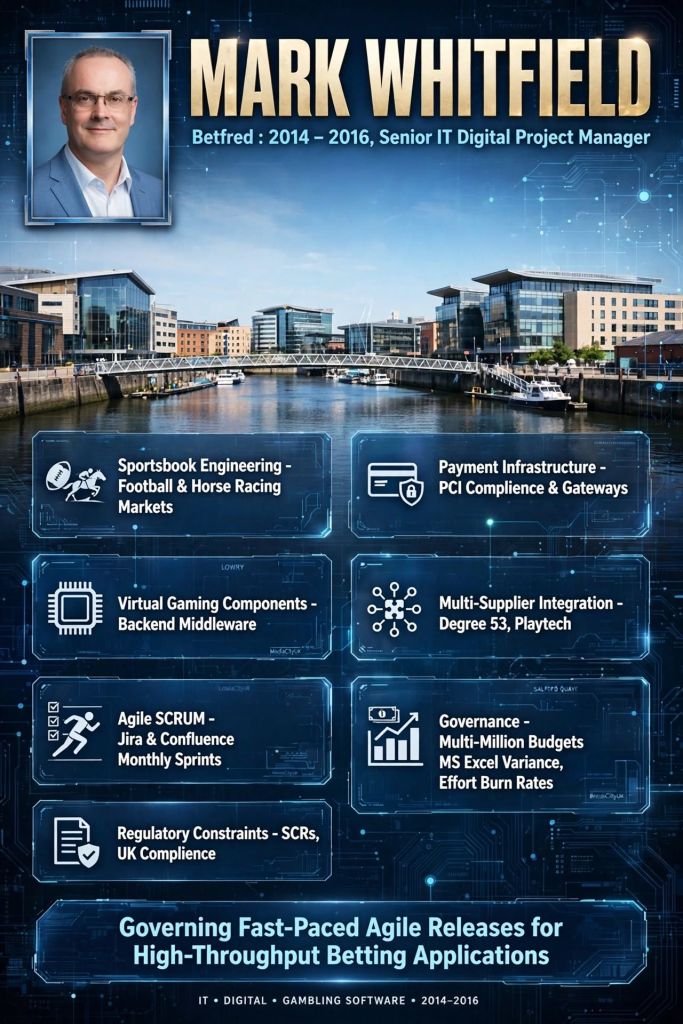
Whitfield deployed the Agile SCRUM framework with rolling monthly sprint cycles to lead development across three foundational gaming pillars:
Sportsbook Engineering: Orchestrated core feature rollouts and update loops for high-volume football and horse racing markets.
Payment Infrastructure: Supervised the integration, expansion, and security of frontend payment methods and high-velocity transactional payment gateways.
Virtual Gaming Components: Managed the complex backend integration and middleware required to power online, computer-generated virtual casino products.
The technical environment demanded managing native software application stacks concurrently across three main consumer ecosystems: iOS, Android, and Windows Mobile.
Multi-Supplier Integration Ecosystem
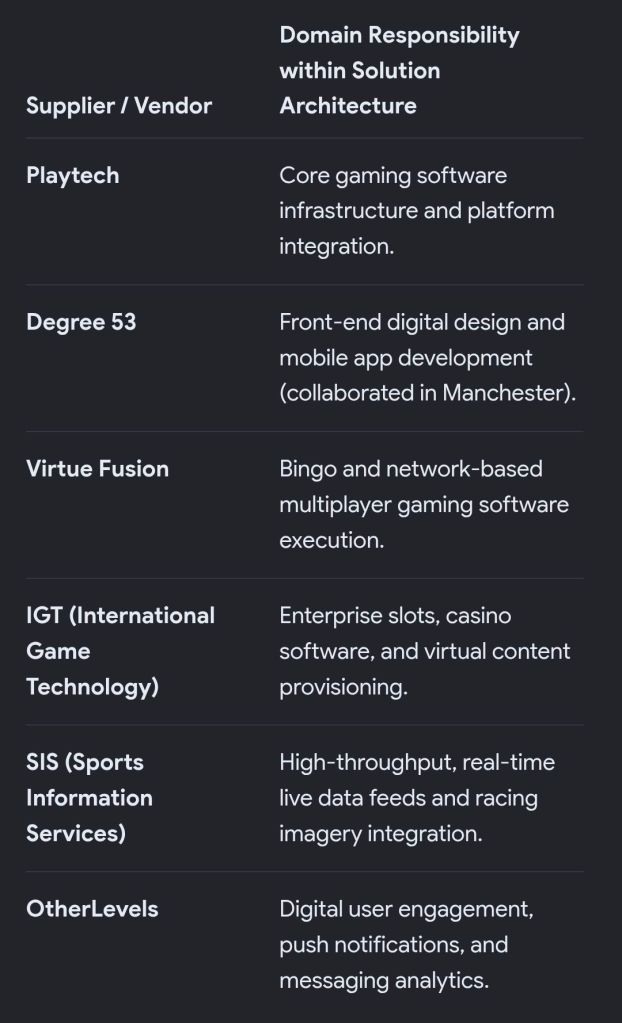
A massive portion of Whitfield’s role involved cross-functional supplier management. Because individual platform layers were built by separate third-party providers, he served as the central point of integration, managing UK- and EU-based delivery teams across several major industry suppliers:
Mark Whitfield’s role involved cross-functional supplier management
Project Governance & Financial Control
Whitfield handled multi-million rolling digital operational and R&D budgets. Rather than relying on automated corporate budgeting suites, his methodology focused heavily on granular variance tracking:
Effort Burn Rates: He took direct ownership of the weekly effort burn rates across distributed internal and external software teams, tracking exact resource consumption against forecasts via Custom MS Excel Variance Frameworks.
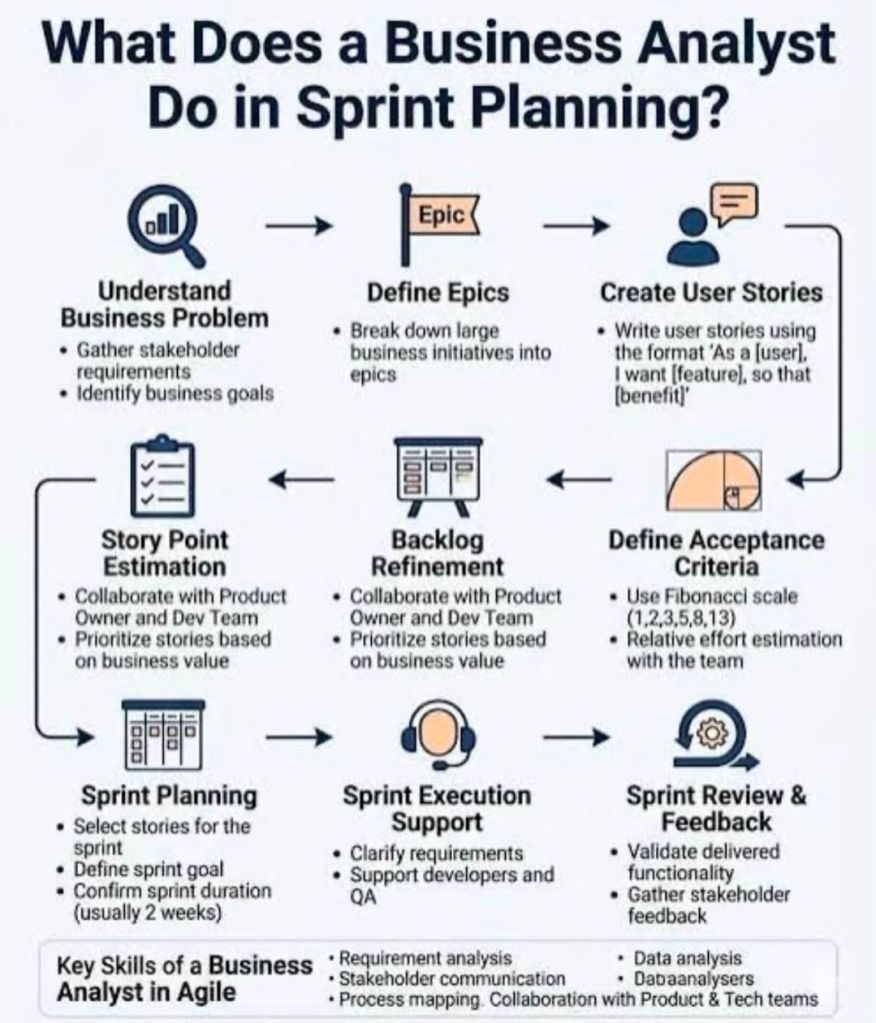
Delivery Infrastructure: Everyday Agile sprint workflows, backlog grooming, and cross-supplier alignment were facilitated directly through Jira and Confluence.
Regulatory Constraints & The Political Landscape
The delivery environment was heavily influenced by aggressive UK mobile entertainment deregulation and compliance updates. Whitfield was tasked with protecting Betfred’s operational licensing by responding to unexpected compliance mandates:
System Change Requests (SCRs): He structured rapid update loops to push compliance edits through production on minimal notice.
Directives Compliance: Industry auditors and compliance analysts commended his engineering oversight for maintaining strict adherence to mandatory industry directives, including rigorous PCI compliance protocols for financial processing streams.
Feedback & Professional Endorsements
Assessments from his tenure at Betfred and across his overarching tech career highlight a few recurring themes from peers, clients, and auditors:
Risk Mitigation under Pressure: Praised for his capability to handle complex “political landscapes” where changing regulatory goals frequently threatened project timelines. He successfully bridged the gap between strict compliance deadlines and flexible agile execution.
Supplier Synchronization: Commended by cross-functional teams for his ability to hold external software shops (like Degree 53 and Playtech) accountable to a unified release schedule.
Hybrid Delivery Prowess: Recognized for seamlessly blending strict financial reporting models (like PRINCE2 metrics) with fast-paced software loops (SCRUM sprints)—a structural approach he eventually popularized in the broader IT community through his Project Management Templates Gallery.
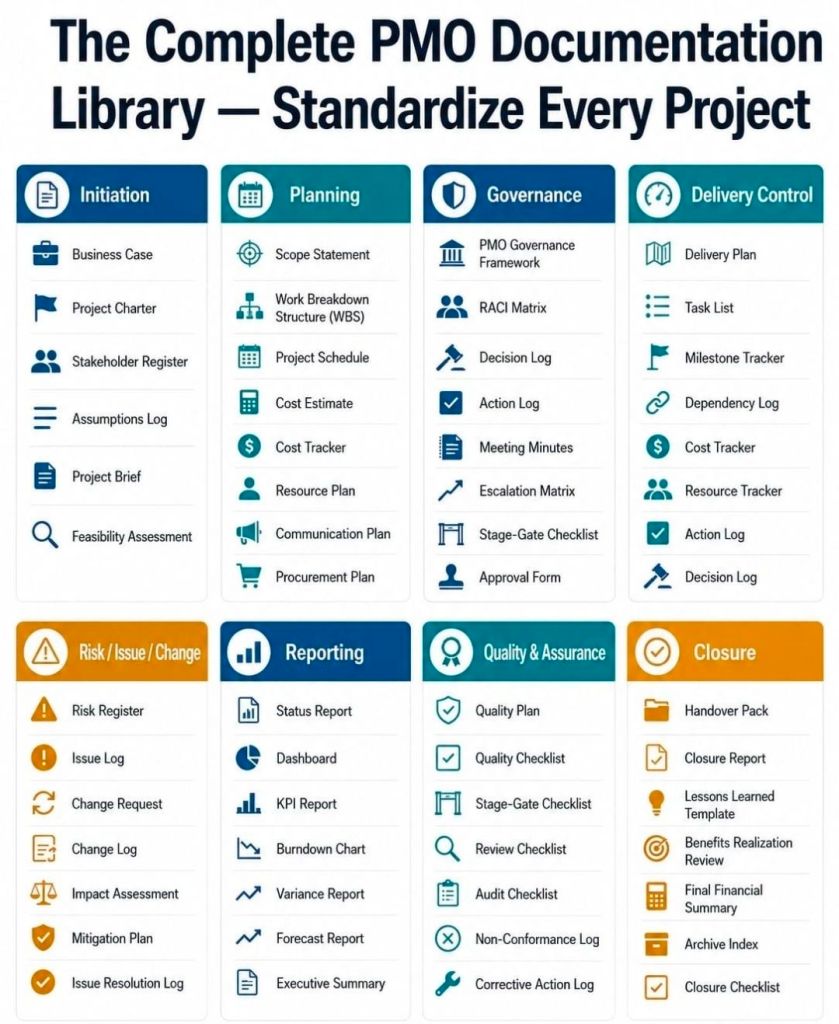
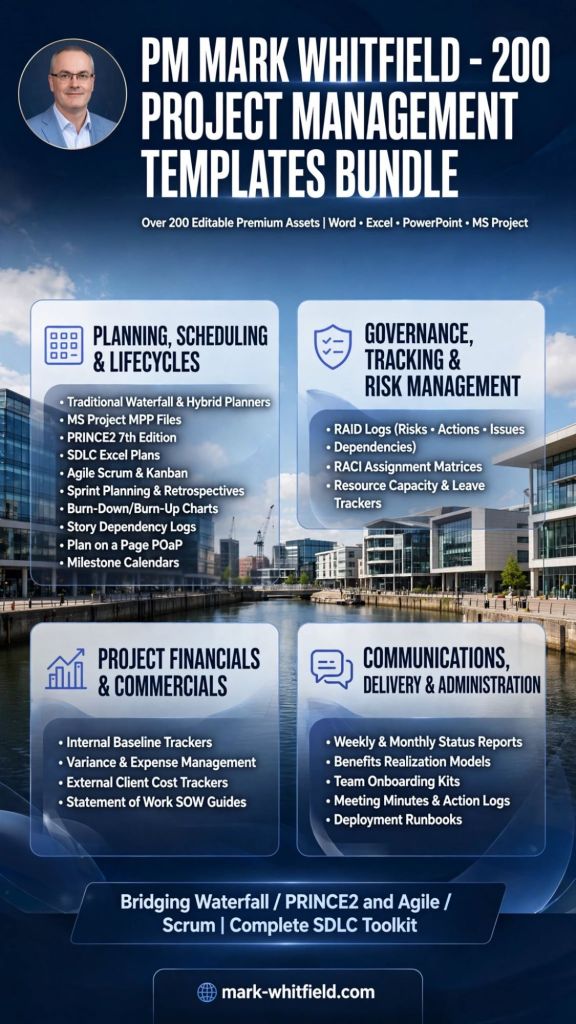
Mark Whitfield’s comprehensive Project Management Template Bundlecontains over 200 editable premium assets. These templates are designed to serve both traditional structured governance and modern frameworks, bridging the gap between Waterfall/PRINCE2 and Agile/Scrum execution.
Mark Whitfield | Free Upgrades | 200+ Project Management Templates
Available natively in Microsoft Word, Excel, PowerPoint, and MS Project (MPP) formats, they are built to support the entire software development lifecycle (SDLC) and general program delivery.
Below is an in-depth breakdown of the project management templates categorized by their primary operational focus, including links to relevant toolkits and deep-dives from the Mark Whitfield Project Management Portal:
📅 Planning, Scheduling & Lifecycles
These templates provide the core baseline for defining, pacing, and communicating project tasks across different methodologies.
Traditional Waterfall & Hybrid Planners
Microsoft Project Plan (MSP MPP) Files: Ready-made master schedules configured for structured delivery phases and software development lifecycles. Accessible via the MS Project Template Portal.
PRINCE2 7th Edition Schedules: Tailored governance templates adhering to the updated PRINCE2 framework principles.
Detailed SDLC Excel Project Plans: Complete alternative task trackers structured for teams operating without standard Microsoft Project desktop licenses. Available on the Excel and PowerPoint Plans Page.
Agile, Scrum & Kanban Execution
Sprint Planning & Retrospective Kits: Organized task blocks for managing daily stand-ups, backlog grooming, and sprint delivery cadences.
Agile Burn-Down & Burn-Up Charts: Dynamic visual tools to track team velocity and remaining sprint effort over active delivery blocks.
Story Dependency Logs: Dedicated cross-team alignment matrices specifically mapping blockers between product backlog items.
High-Level Stakeholder Communication
Plan on a Page (POaP) Viewports: Executive-level visual dashboards built natively in Excel and PowerPoint to summarize timelines for steering committees. Details can be reviewed on the Project Planning Examples Page.
Milestone Calendars: Simplified cloud-migration or deployment timeline graphics designed for quick C-suite alignment.
📊 Governance, Tracking & Risk Management
These documents enforce quality assurance, track real-time deviations, and maintain compliance throughout the project lifecycle.
RAID & Control Tracking
Comprehensive RAID Logs: Multi-tab Excel registers covering Risks, Actions, Issues, Opportunities, Lessons Learned, and Dependencies with built-in analytical charts. Complete operational toolsets are hosted on the PMO Toolkit Hub.
Basic RAID Frameworks: Lightweight, trimmed tracking variations engineered primarily for simpler project bids or rapid discovery blocks.
Resource and Accountability Management
RACI Assignment Matrices: Cross-functional grids to clearly assign and establish who is Responsible, Accountable, Consulted, and Informed across tasks.
Resource Capacity & Leave Trackers: Integrated team scheduling sheets managing calendar availability, annual leave allocations, and project burn rates.
💰 Project Financials & Commercials
A suite of detailed financial workbooks designed to align internal cost tracking against customer-facing baselines.
Cost & Baseline Engineering
Internal Baseline Trackers: Comprehensive “Company View” sheets detailing internal resourcing costs, forecast models, and gross margin goals. See structural breakdown details at the Template Folder Directory.
Variance & Expense Management: Formula-driven financial views tracking actual expenditures against forecasted baselines to flag overruns.
Vendor & Client Commercial Alignment
External Client Cost Trackers: Simplified, external-facing cost summary dashboards ready to share directly for regular client financial reviews.
Statement of Work (SOW) Guides: Document generation kits establishing delivery scope, contractual guidelines, and specific supplier rules.
📢 Communications, Delivery & Administration
Templates engineered to optimize day-to-day team functions, report project status, and handle operational management.
Status Reporting & Visibility
Weekly & Monthly Status Reports: Pre-built executive slide decks and text templates tailored to provide uniform delivery updates. These can be downloaded from the Professional Templates Page.
Benefits Realization Models: Analytical mapping systems designed to log, monitor, and formally verify the commercial value or ROI yielded by individual deliverables.
Onboarding & Daily Mechanics
Team Onboarding Kits: Structured resource folders containing organizational charts, contact lists, and system access paths for incoming team members.