Mark Whitfield, High-Level Project Management Summary

You can review or download the targeted, one-page CV for Mark Whitfield (Senior Project Manager specializing in HPE NonStop systems) via the Mark Whitfield CV PDF link.

Mark Whitfield, High-Level Project Management Summary

The high-level, scannable overview of his professional profile is outlined below:

Executive Profile

  • Role: IT Senior Project Manager / Delivery Lead
  • Background: 30+ years of experience delivering highly complex technology, business transformation, and infrastructure projects.
  • Core Skills: Cloud migration (hybrid), legacy ATM software modernisation, Point of Sale (POS) implementations, and software development lifecycles (SDLC).
  • Methodologies: Agile, Waterfall, PRINCE2 Practitioner, and ITIL certified.

Core Expertise & Competencies

  • HP NonStop & Legacy Integration: Deep technical roots in Tandem Computers/HP NonStop development, TAL programming, and high-volume transaction environments.
  • Global Delivery: Managed large-scale IT and system monitoring rollouts across the UK and international markets (e.g., Saudi Arabia).
  • Stakeholder Management: Experienced in bridging the gap between highly technical development teams and high-level business stakeholders.

For direct access to his official templates, articles, and full professional journey, you can visit the PROject Templates Website.

Business Analyst Documentation, Types, Uses and Impact

Business Analyst Documentation, Types, Uses and Impact

Agile Scrum Velocity & Burn Down Chart Summary

Agile Scrum Velocity & Burn Down Chart Summary

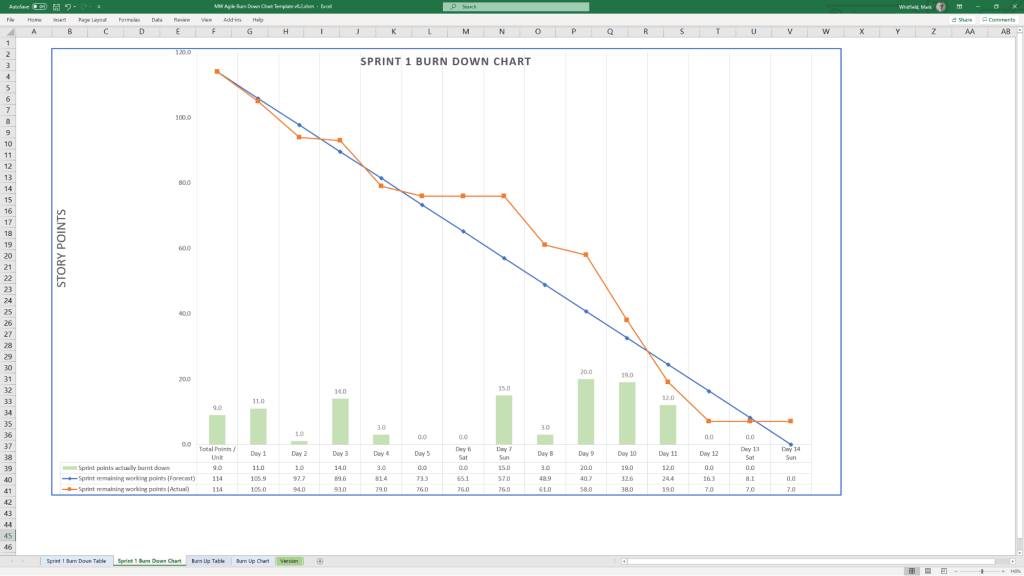
Scrum velocity and burndown charts are essential agile metrics used to measure team capacity and track progress. Velocity measures the average story points completed over past sprints to forecast future capacity. Burndown charts visually represent the remaining work daily, highlighting if the team is on track to meet sprint goals.

Scrum Velocity

  • Definition: The amount of work (usually in story points or hours) a team completes in a single sprint.
  • Purpose: Helps forecast team capacity for future sprints and promotes sustainable pace.
  • Calculation: Sum of story points for all “Done” items at the end of a sprint.
  • Best Practice: Average velocity over 3–5 sprints provides a more accurate, stable forecast.

Burndown Chart

  • Definition: A graph showing the amount of work remaining versus time (days) in a sprint.
  • Components:
    • Ideal Work Line: A straight line showing the projected pace to complete work.
    • Actual Work Line: A line plotting daily completed work against the ideal line.
  • Purpose: Provides daily visibility into progress and detects risks early (e.g., if the line is above the ideal, the team is behind).
  • Types: Sprint Burndown (short term) vs. Release/Product Burndown (long term).

Key Differences

  • Velocity is a planning metric looking at historical performance.
  • Burndown is a monitoring tool looking at current progress.

Common Pitfalls

  • Velocity: Treating velocity as a productivity metric (it is a capacity planning metric) or comparing it between teams.
  • Burndown: Using “manual updates” rather than automated tools, leading to inaccurate data.
  • Both: Neglecting to refine user stories, which makes velocity unpredictable and burndowns inaccurate.

Mark Whitfield IT, Technical & Project Management Training Overview

Mark Whitfield, a Manchester-based Senior IT Project Manager, has completed extensive professional training throughout his career, focusing on project management methodologies, delivery software, and technical tools.

Core Project Management Methodologies :

  • PRINCE2 Practitioner: Certified as a registered PRINCE2 Practitioner in May 2011 via the ILX Group (Gold e-Learning).
  • Agile SCRUM Training: Attended in-house training with RADTAC in May 2011.
  • Advanced Engagement Management (Level 2): Completed at Capgemini in November 2017.
  • Project Management Fundamentals: Completed “Fundamentals of Successful Project Management” in February 2000 through Skillpath in Manchester.
  • Managing Multiple Projects: Attended “Managing Multiple Projects, Objectives and Deadlines” in October 1999/1998 via Skillpath.

Software & Cloud Platforms :

  • AZ-900 Microsoft Azure Fundamentals: Certified in February 2022.
  • Microsoft Project: Completed the Microsoft Project ’98 Certification Series in May 2000 through the IIL UK Education Centre in Reading.
  • Microsoft Excel Expert Skills: Upgraded skills via a 2017 Expert course and a July 2024 Udemy refresher.

Technical & Programming Courses :

  • Tandem / HP NonStop: Completed Tandem Guardian Principles (1993), Tandem Performance Analysis (1995), and Tandem TAL Programming (1995).
  • C / C++ Programming: Attended “C++ for Non-C Programmers” with Comtec Computer Training in March 1997.
  • Database Querying: Completed “Querying Microsoft SQL 2000 with Transact SQL” via QA Training in March 2009.
  • Web Applications: Attended “Developing MS ASP Web Applications using MS Visual Studio .NET” in January 2007.

Marketing & Communication Training :

  • Writing for the Web: Completed in May 2009 with gbdirect (iTrain Education in London).
  • Brochure & Document Design: Attended a SkillPath Seminar on designing marketing brochures and reports in April 2006.

Mark Whitfield is a Senior IT Project Manager based in Manchester

Mark Whitfield is a highly experienced Senior IT Project Manager based in Manchester, UK, with over 31 years of experience in the IT industry specializing in both Agile and Waterfall methodologies. He holds SC clearance (valid until 2031) and has a strong technical background in banking and digital project delivery, including experience as a developer in software development lifecycles (SDLC).

Mark Whitfield is a highly experienced Senior IT Project Manager based in Manchester

Professional Biography

After graduating in Computing in 1990, Mark began his career as a programmer specializing in Electronic Banking software on Tandem Mainframe Computers (HPE NonStop). He spent five years coding in COBOL85 and NonStop SQL for banking clients before transitioning into project management.

Mark has operated as a Senior IT Project Manager for over two decades, delivering complex projects for major blue-chip clients, including Jaguar Landrover, Heathrow, Royal Mail Group, and various financial institutions. He currently provides project management templates based on his extensive experience via his website, PROject Templates.

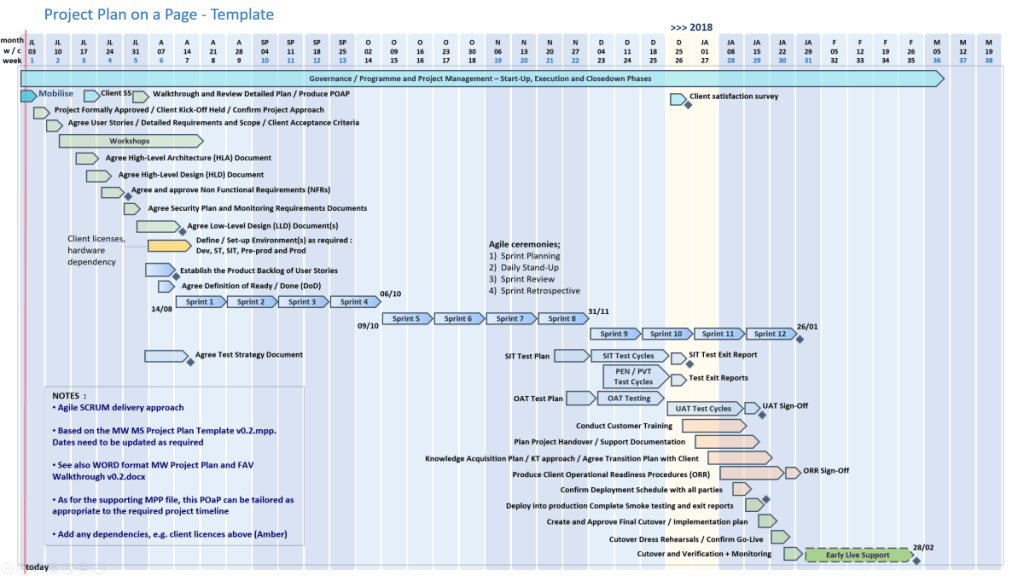
Example POaP Plan On a Page templates by Mark Whitfield

Key Skills & Expertise

  • Methodologies: Agile SCRUM, Waterfall, PRINCE2 Practitioner.
  • Technologies: HP NonStop (BASE24, TAL, C, C++, SQL), Java, .NET, Mobile (iOS, Android, Windows).
  • Areas: ATM software delivery, Gambling/Casinos, Public Sector/LRG, Payment Systems, Digital Transformation.
  • Clearance: SC Cleared until 2031.
Capgemini Engagement Manager, 2016 thru 2025

Professional Career & Projects

Capgemini UK (Jan 2016 – Present)

  • Role: Client-facing SC Cleared Engagement Manager.
  • Projects: Delivered Waterfall and Agile digital projects for automotive, local regional government (LRG), postal services, and aerospace & defence sectors.
C&CA UK’s Communications & Engagement Award Winner 2022

Betfred (Late 2014 – Jan 2016)

  • Role: Senior IT Project Manager.
  • Projects: Managed mobile and online gambling/casino projects, including payment gateways, sportsbook, and virtual gaming using Agile SCRUM.

Wincor Nixdorf (Sept 2013 – Late 2014)

  • Role: Agile IT PM, Professional Services – Banking Division.
  • Projects: Managed ATM software delivery (Wincor Nixdorf work stream >£5M) for Lloyds Banking Group/Halifax.

Insider Technologies Limited (Aug 1995 – Sept 2013)

  • Role: Project Manager – Strategic Technical Initiatives.
  • Projects: Technical pre-sales, product management, and installation for HPE NonStop banking products (Reflex 80:20, RTLX).
HP NonStop TAL Programming Course
1995, HP NonStop TAL Programming Course

The Software Partnership / Deluxe Data (1990 – 1995)

  • Role: Programmer.
  • Projects: Developed code for sp/ARCHITECT-BANK on Tandem Computers for banks like TSB, Bank of Scotland, and Rabobank.

Professional Training & Certification

Registered PRINCE2 Practitioner (May 2011, ILX)
1990, BTEC HND in Computer Studies from Bolton Institute of Higher Education, BIHE

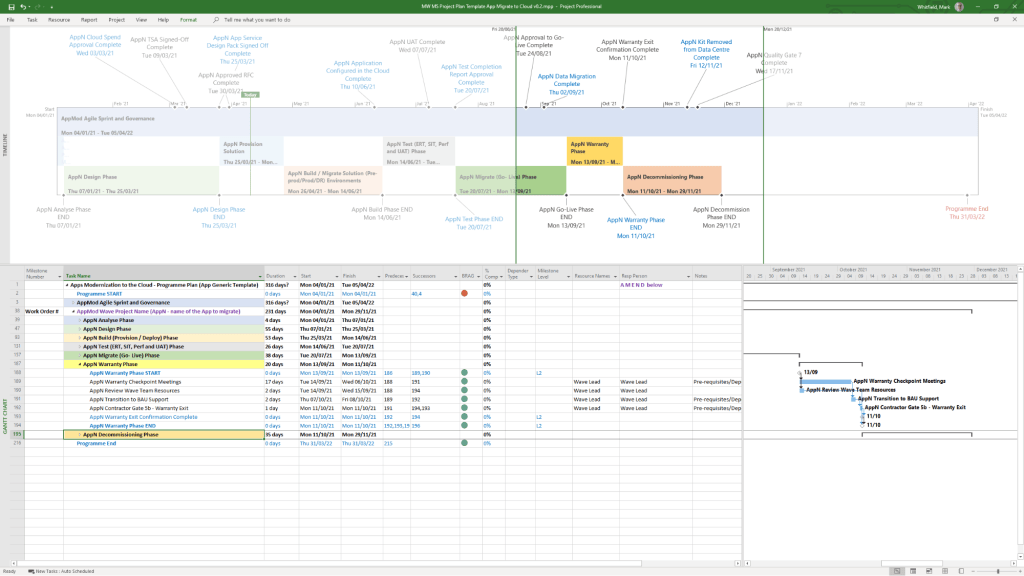
PowerPoint Plan On a Page (POaP) templates

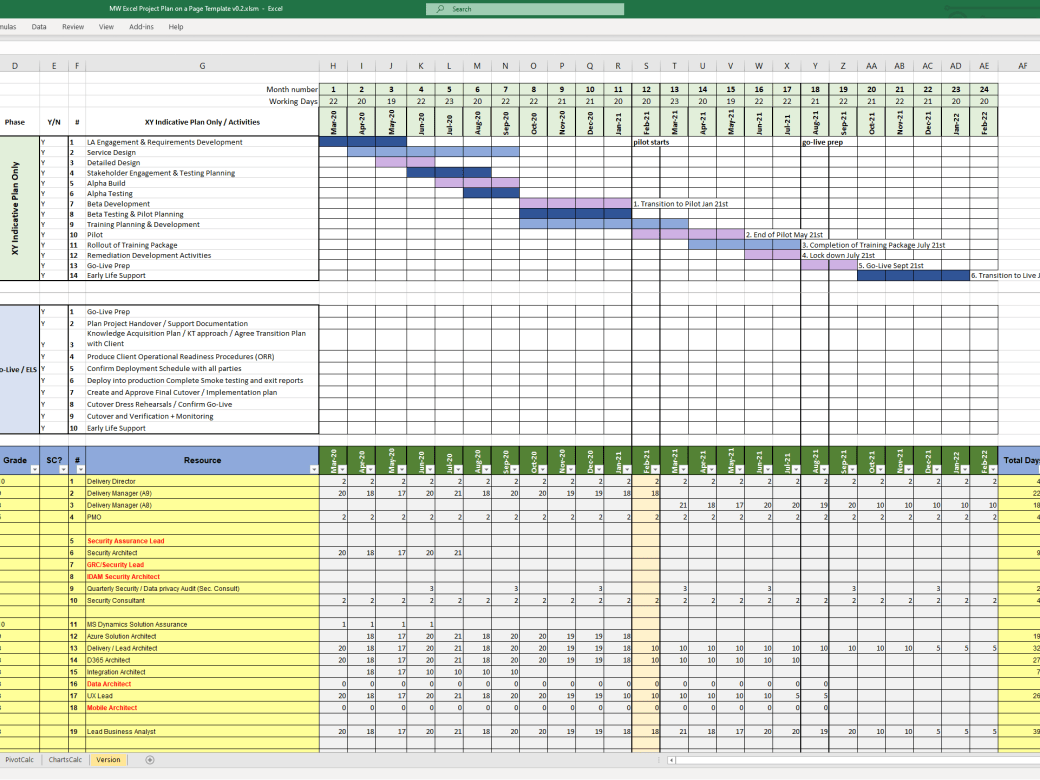
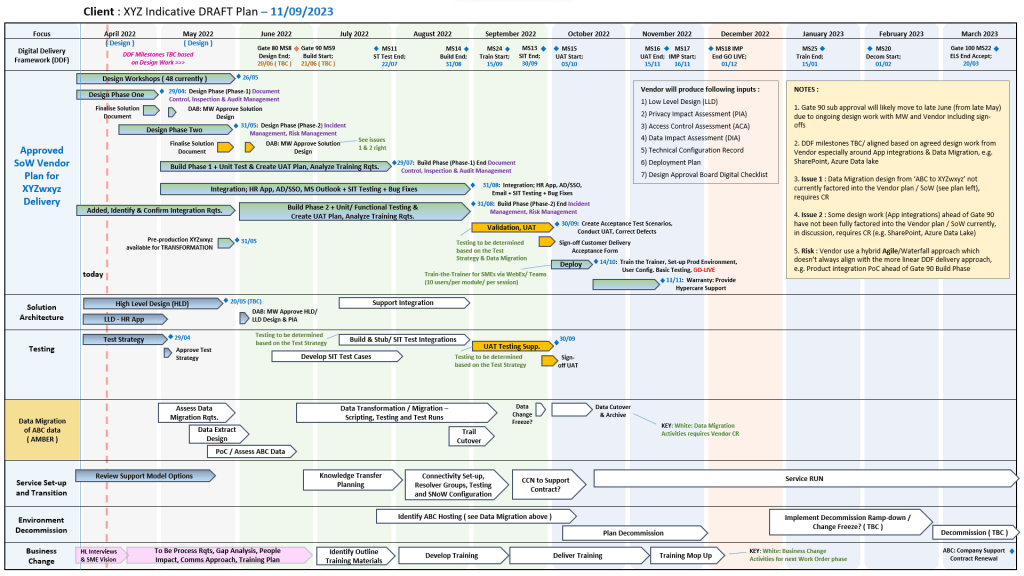
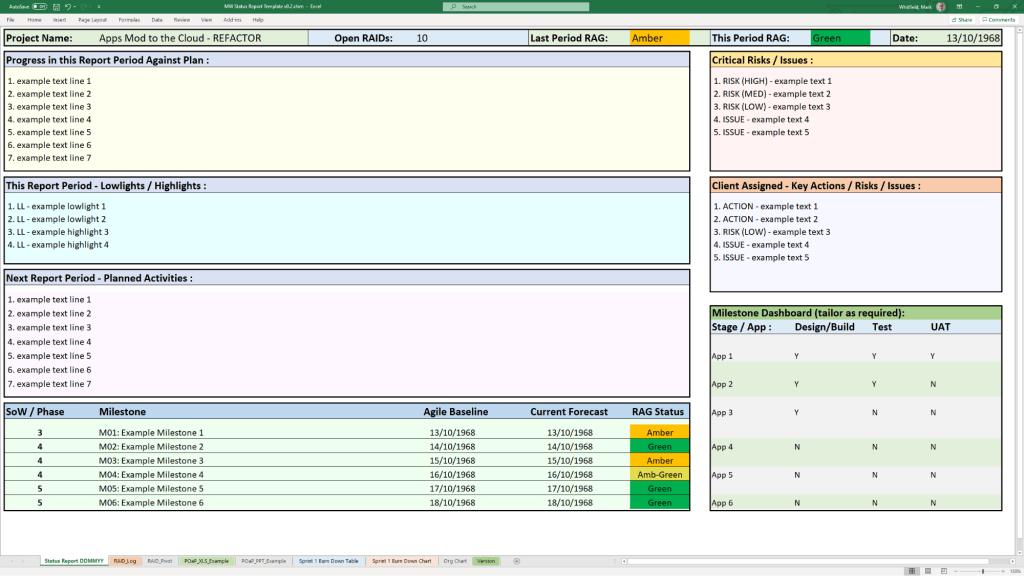
Mark Whitfield provides a variety of Plan On a Page (POaP) templates designed to simplify complex project schedules into a single, high-level visual. These templates are typically available through his official website as part of a larger project management toolkit that includes over 200 editable documents.

PowerPoint Plan On a Page (POaP) templates

Mark Whitfield’s POaP Template Formats

Whitfield’s templates are available across multiple platforms to suit different project needs:

PowerPoint POaP Templates

Includes over 35+ slide examples showing different ways to visualise a Software Development Life Cycle (SDLC) plan. These are ideal for client presentations where high-level detail is needed.

Excel POaP & Tracker Templates

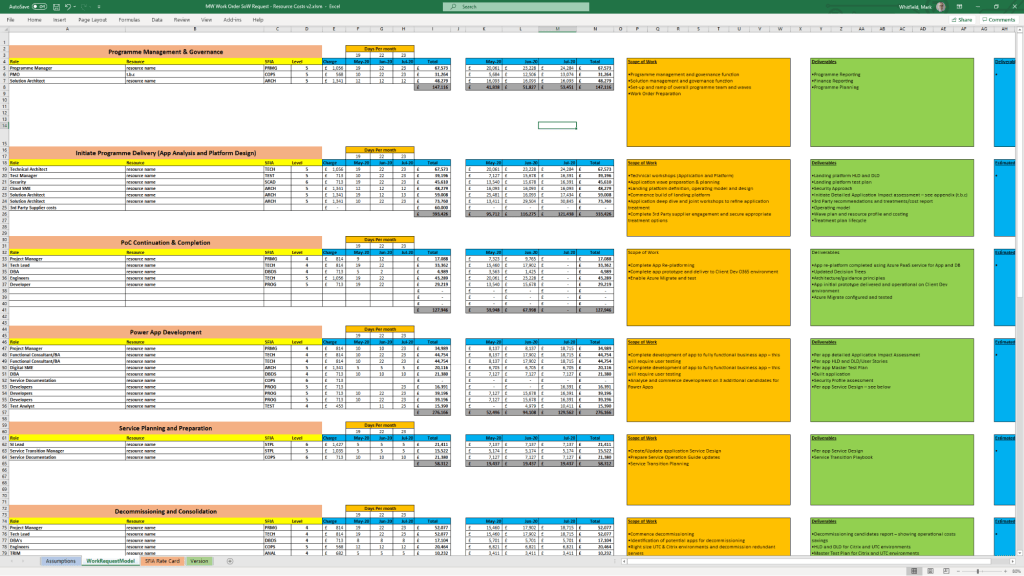
Features Gantt views, resource costing grids, and Agile Sprint views. Some Excel versions allow you to align the POaP with resource availability and overall phase costs, useful for project bids.

MS Project (MPP) Templates

Detailed PRINCE2 and Waterfall templates that can be condensed into a “timeline” view to serve as a POaP. These are annotated for tasks like Agile Scrum ceremonies or specific PRINCE2 7th Edition stages.

Key Features of the POaP Templates

  • Adaptability: Templates are designed to be tailored for Waterfall (PRINCE2) or Agile (Scrum/Sprints) methodologies.
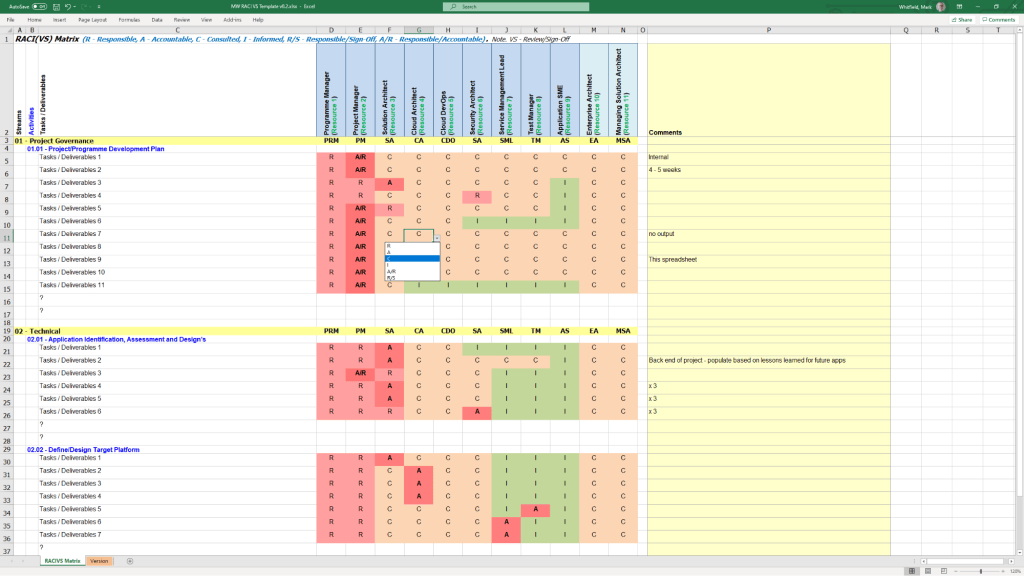
  • Integrated Tracking: Often bundled with RAID logs (Risk, Action, Issue, Dependency) and RACI trackers to provide a complete overview beyond just the schedule.
  • Visual Dashboards: Many versions include self-populating charts and summary dashboards for at-a-glance status reporting.
  • Availability: Templates can be purchased individually or as a bulk pack on Mark Whitfield’s Website or through platforms like Etsy and Eloquens.

PowerPoint Plan On a Page (POaP) templates

Understanding Agile Scrum, A Framework for Delivering Value, Iteratively

Understanding Agile Scrum, A Framework for Delivering Value, Iteratively

Agile Scrum Metrics that Drive Team Improvement

Agile Scrum Metrics that Drive Team Improvement

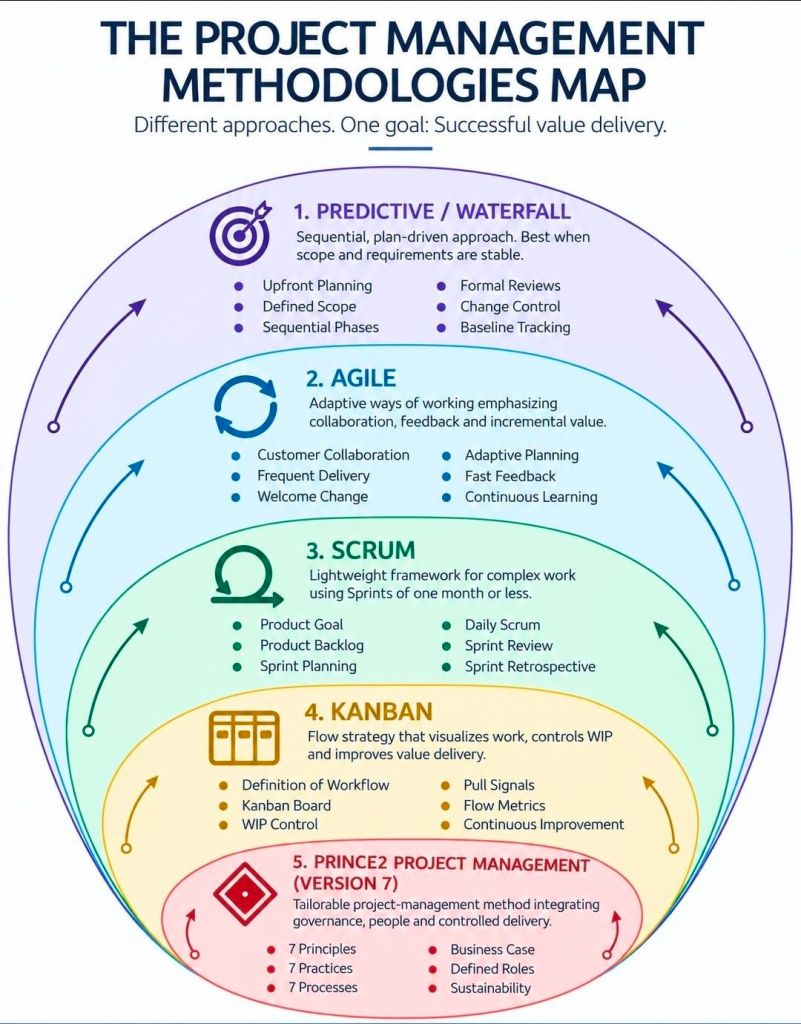
Right Project Management Approach, Adaptability over Rigid Approach

Right Project Management Approach, Adaptability over Rigid Approach

Comparing Agile Work Units; Epic, User Story & Task

Comparing Agile Work Units; Epic, User Story & Task

Agile User Story Creation for Scrum Masters; clarity, value and readiness

Agile User Story Creation for Scrum Masters; clarity, value and readiness

Agile ScrumBan, Structure of Scrum, Flow from Kanban

Agile ScrumBan, Structure of Scrum, Flow from Kanban
ScrumBan Structure of Scrum Flow from Kanban
Agile ScrumBan, Structure of Scrum, Flow from Kanban

Priorization Techniques in Agile Scrum

Priorization Techniques in Agile Scrum

Prioritization in AgileScrum is the systematic process of ordering Product Backlog items to maximize value delivery. These techniques are generally categorized by their primary focus: customer satisfaction, business value and economics, or collaborative consensus.

Category 1: Customer-Centric Frameworks

These methods prioritize features based on how they impact the end-user’s experience and satisfaction.

  • Kano Model: Categorizes features into three main types: Basic Needs (expected essentials), Performance Features (linear satisfaction), and Excitement Needs (unexpected “delighters”).
  • User Story Mapping: Visualizes the entire user journey to identify the most critical paths and “skeletal” features needed for a Minimum Viable Product (MVP).
  • Opportunity Scoring: Uses customer research to find gaps where importance is high but current satisfaction is low, identifying high-potential opportunities.

Category 2: Economic & Quantitative Models

These data-driven techniques use formulas to balance value against implementation costs or risks.

  • Weighted Shortest Job First (WSJF): Prioritizes tasks by dividing the Cost of Delay (value, urgency, and risk reduction) by Job Size (effort). The goal is to deliver the most value in the shortest time.
  • RICE Scoring: Calculates a score based on Reach (number of users), Impact, Confidence (certainty in estimates), and Effort.
  • Cost of Delay (CoD): Measures the economic impact or potential revenue loss of not delivering a feature within a specific timeframe.

Category 3: Stakeholder & Team-Based Consensus

These collaborative methods are used to reach agreement among diverse stakeholders or team members.

  • MoSCoW Method: A qualitative technique that buckets items into Must-Have, Should-Have, Could-Have, and Won’t-Have for a specific release cycle.
  • 100-Dollar Test: Participants are given a hypothetical $100 to “spend” on features, revealing what they value most through resource allocation.
  • Priority Poker: A gamified, collaborative approach where team members anonymously vote on an item’s priority level to remove bias and foster discussion.

Category 4: Structural & Visual Matrixes

These tools help teams visualize trade-offs, typically using 2×2 grids.

  • Value vs. Effort Matrix: Plots tasks on two axes to identify Quick Wins (high value, low effort) and Major Projects (high value, high effort) while avoiding “thankless tasks”.
  • Risk/Value Matrix: Balances potential business rewards against technical or project risks to decide which high-value but high-risk items to tackle early.
  • Stack Ranking: A “forced ranking” method where every item has a unique, linear position (1 to N), preventing the “everything is high priority” trap.

Priorization Techniques in Agile Scrum

Degree 53 was a Manchester-based digital agency specializing in user experience, design & software development

Degree 53 is a Manchester-based digital agency specializing in user experience (UX), design, and software development, primarily for the online gambling and sports betting industries.

Founded by Andrew Daniels in 2013, the agency has built a reputation for developing high-stakes transactional mobile apps and websites for major operators like Betfred and Scientific Games.

Following its acquisition by Bally’s Corporation in 2021, it now serves as the Sports Product Studio for Bally’s Interactive, focusing on North American gaming products.

Comprehensive Evaluation Timeline

  • 2013: Founding and Launch
    • Andrew Daniels, a former Betfred employee, founded Degree 53 Limited on May 21, 2013, with initial backing from Betfred founder Fred Done.
    • The agency initially established its office at The Sharp Project in Manchester.
  • 2015: Regulatory Milestone
    • In April 2015, the agency secured a Remote Gambling Software license from the UK Gambling Commission, a rare credential for a digital agency that allowed them to build bespoke transactional gambling platforms.
  • 2016 – 2017: Rapid Expansion
    • In 2017, the agency moved to a new HQ in Steam Packet House, Manchester, after recruiting over 30 new staff members, bringing its total headcount to 75.
    • The firm diversified its portfolio during this period, developing products for non-gambling clients like Vibe Tickets.
  • 2020: Sharp Gaming Spin-Off
    • Founder Andrew Daniels launched Sharp Gaming, a B2B gambling technology business, with £25 million in investment from Fred Done.
    • While Sharp Gaming focused on full-stack platform services, Degree 53 continued its focus on UX and front-end development under new Managing Director Richard Wagstaff.
  • 2021: Acquisition by Bally’s Corporation
    • On October 27, 2021, Bally’s Corporation acquired Degree 53 to bolster its internal technical unit for the launch of products like Bally Bet 2.0.
    • The team of 54 experts was integrated into Bally’s Interactive but remained based in their Manchester studio.
  • 2024 – 2026: Consolidation and Leadership Changes
    • The agency remains an active subsidiary of Bally’s. Recent regulatory filings indicate leadership transitions, such as the appointment of Raja B-Sheikh as a director in August 2025.

Summary of Key Services

  • Bespoke Development: Building native mobile applications (iOS, Android) and responsive web platforms.
  • UX/UI Specialization: User-centered design approach, including mapping customer journeys and conducting user testing.
  • Industry Expertise: Complex system integrations, data feed management, and API development specifically for the betting, gaming, and lottery sectors.

Key Areas Summarised

  • Core Focus: High-quality digital solutions for complex, regulated industries.
  • Key Services: UX/UI Design, Native iOS & Android Apps, Web Development, API Integrations, and Digital Strategy.
  • Strengths: Strong focus on user journey and engagement, particularly in betting platforms. They are noted for bringing high-quality digital solutions at competitive prices.
  • Impact: A significant player in the Manchester digital scene, moving to larger premises to accommodate growth from 50 to 75+ staff between 2014 and 2017.
  • Acquisition: In 2021, Degree 53 became the Sports Product Studio for Bally’s Interactive, supporting its North American expansion.

Key Clients and Projects

  • Betfred/Totesport: Mobile betting apps and websites.
  • Bally’s Interactive: Currently developing sports products.
  • Vibe Tickets: Developed a secure ticket-selling app.
  • Sofology: ‘My Account’ functionality.
  • Other projects: Ready for School, Football Acca, Horse Tracker.
Degree 53 logo Manchester Based
Degree 53 Logo

Key Company Facts

  • Acquisition: Acquired by Bally’s Corporation in October 2021 to advance its global sportsbook and mobile platforms.
  • Specialties: Mobile app development, UX/UI design, Bespoke .NET development, and API integrations.
  • Major Clients: Historically has worked with Betfred, Scientific Games, and Gamesys brands like Rainbow Riches.
  • Office Location: They are currently based at 60 Spring Gardens in Manchester city centre. Previous locations included Steam Packet House and The Sharp Project.

Mark Whitfield involvement 2014 – 2015 :

In late 2014, I joined Betfred as a Senior IT Project Manager in the Gambling and Casinos industry delivering multiple projects for both Betfred online and mobile (iOS, Android and Windows) using the Agile SCRUM framework. Project deliveries covered payment gateways and methods, sportsbook for football and horse racing amongst others and the online virtual (computer generated) gaming components.

As a major part of this allocation, I also linked into Degree 53 for project/ app status and aid in the setting of priorities for their Betfred specific software delivery.

Degree 53 was a Manchester-based digital agency specializing in user experience (UX), design, and software development
at Degree 53 Manchester office, 2015

Projects varied in size and cost and extended over multiple phases requiring the management of many software suppliers, each delivering different aspects of the solution from fraud detection, frontend, middleware, payment services and mobile apps.

Agile Scrum Overview and Evolution Timeline

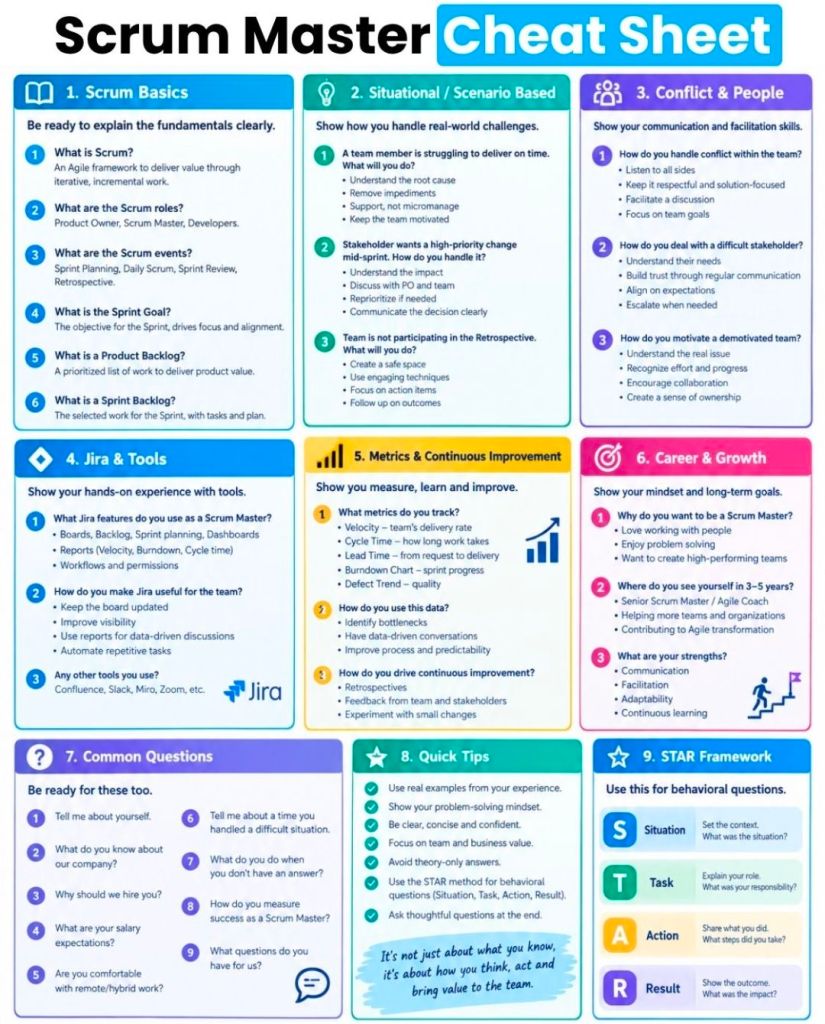
Agile Scrum is a widely adopted, iterative, and incremental framework designed to manage complex product development and software projects.

It breaks down large, daunting projects into small, manageable units called sprints—fixed-length iterations typically lasting 1–4 weeks—to deliver functional components faster and adapt to changing requirements.

Detailed Summary of the Scrum Framework

Scrum relies on three pillars—transparency, inspection, and adaptation—and is defined by specific roles, events, and artifacts.

1. The Scrum Team (Roles)

  • Product Owner (PO): Maximizes the value of the product by managing the Product Backlog. They define “what” is built.
  • Scrum Master: A servant-leader who helps the team follow Scrum theory and removes impediments.
  • Developers: The cross-functional team members responsible for creating the increment each sprint.

2. Scrum Events (Ceremonies)

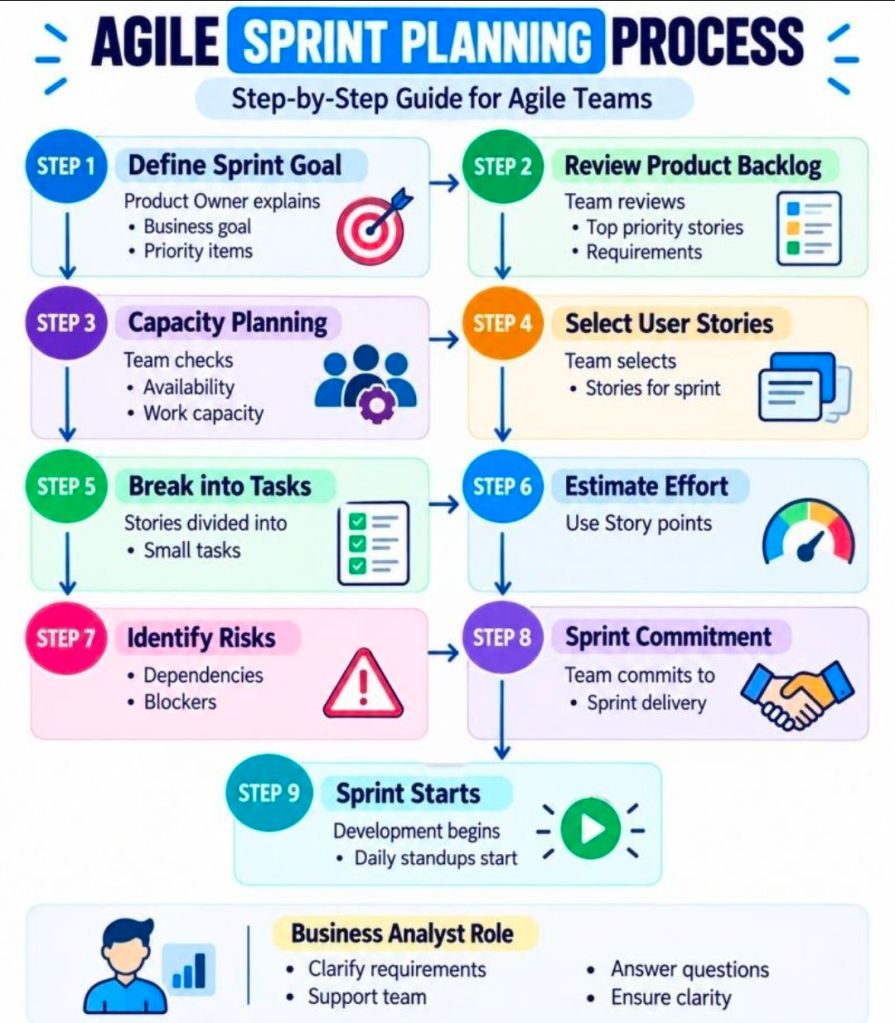
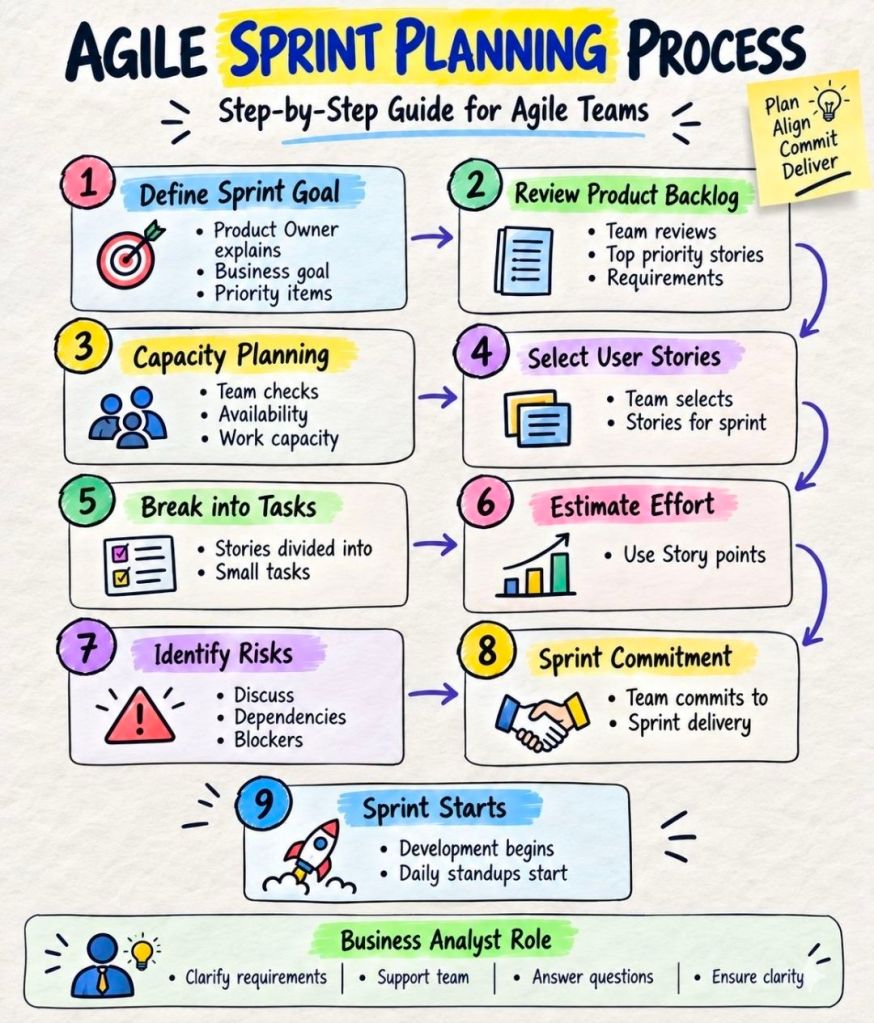
  • Sprint Planning: Defines the Sprint Goal and the work to be done during the sprint.
  • Daily Scrum: A 15-minute daily meeting for developers to synchronize activities and plan the next 24 hours.
  • Sprint Review: Held at the end of the sprint to showcase the increment to stakeholders and gather feedback.
  • Sprint Retrospective: The team reflects on the process and identifies improvements for the next sprint.

3. Scrum Artifacts

  • Product Backlog: An ordered list of everything required in the product.
  • Sprint Backlog: The set of Product Backlog items selected for the sprint, plus the plan for delivering them.
  • Increment: The usable, working product increment produced at the end of a sprint.

Evolution of Scrum Over the Years

Scrum was developed in the early 1990s as a response to the failures of the linear “waterfall” approach.

  • 1986 (Concept Origins): Takeuchi and Nonaka publish “The New New Product Development Game,” comparing traditional relay-race product development to a rugby “scrum” team.
  • 1993 (First Implementation): Jeff Sutherland, John Scumniotales, and Jeff McKenna implement the first Scrum team at Easel Corporation.
  • 1995 (Public Introduction): Ken Schwaber and Jeff Sutherland formalize Scrum and present “The Scrum Development Process” at the OOPSLA ’95 conference.
  • 2001 (Agile Manifesto): Sutherland and Schwaber become signatories of the Agile Manifesto, cementing Scrum as a major Agile methodology.
  • 2010 (The Scrum Guide): The first official Scrum Guide is released to standardize the framework worldwide.
  • 2011–2017 (Refinements): The guide is updated to clarify roles and events, including strengthening the role of the Scrum Master and introducing self-organizing teams.
  • 2020 (The Modern Scrum Guide): A major update makes the guide less prescriptive, focusing on a single Scrum Team (removing “development team” and “scrum team” split), introducing the Product Goal for long-term focus, and focusing on one team working towards one product.

Key Resources and Links

Agile Scrum Overview and Evolution Timeline

Agile Backlog MoSCoW, Must, Should, Could and Won’t Have

Agile Backlog MoSCoW, Must, Should, Could and Won't Have
Agile Backlog MoSCoW, Must, Should, Could and Won’t Have

Scrum and Agile in Projects

Scrum and Agile

Mark Whitfield, SC Cleared Senior Project Manager, Manchester

Mark Whitfield is a highly experienced, SC-cleared Senior Project Manager and Engagement Manager specializing in complex IT software development lifecycle (SDLC) projects, digital transformation, and cloud migrations.

Currently based in Greater Manchester, UK, he has over 31 years of experience in the IT industry, working with major blue-chip companies across various sectors, including UK Government, retail banking, aerospace, and utilities.

He is a certified PRINCE2 Practitioner, skilled in both Agile SCRUM and Waterfall methodologies.

Website Links:

Professional Biography:

Mark specializes in bridging technical teams and business stakeholders, delivering complex IT systems under challenging conditions.

His career spans from early roles as a developer on Tandem Mainframe Computers (HPE NonStop) to senior management positions focusing on cloud resources, API integrations, and CRM platform implementations.

  • Key Skills: Project Planning, Stakeholder Management, Financial Forecasting, Risk Management (RAID), Agile Scrum, PRINCE2, ITIL.
  • Key Strengths: Cloud Migration (Azure/Dynamics 365), Payment Systems (ATM/POS), and API-led connectivity.

Detailed Career Timeline:

  • Nov 2023 – Feb 2024 (UK Government – Capgemini): Acted as Client-Side Technical Delivery Manager for a £1m+ Fish Export Service (FES) to CHIP project, facilitating Azure-based API updates for UK-Northern Ireland trade.
  • Nov 2022 (UK Government – Capgemini): Managed two Microsoft Dynamics 365 Azure Cloud projects, including a £0.4m Dynamics 2016 migration and a £0.54m CRM platform discovery/build.
  • Feb 2022 (UK Utility Industry – Capgemini): Managed a £0.5M project migrating legacy document management systems to an Azure-based Enablon product.
  • 2020 (UK Gov – Capgemini): Senior PM for a £375k Agile proof-of-concept (POC) project migrating legacy applications (MS Access/Oracle) to Microsoft Azure and Dynamics 365.
  • Oct 2018 – June 2019 (MuleSoft): Served as Delivery Manager overseeing 5+ UK accounts for MuleSoft Anypoint Platform (API-led connectivity) implementations.
  • Oct 2017 (Automotive Industry – Capgemini): Managed a £430k Digital Readiness project and a £670k Customer Portal/Online Sales project (Agile).
  • May 2017 (Local Govt – Capgemini): Led a £400k telecommunications project (CCaaS) for the Support for Mortgage Interest (SMI) program.
  • Jan 2017 (Aerospace/Def – Capgemini): Senior Project Lead for two £1.3M projects with high-governance and gated deliverables.
  • Jan 2016 – Present (Capgemini UK): Joined as an Engagement Manager (A8), working on projects including Apple iOS app development for UK Air Traffic (NATS) and a £4.3M data center migration for Postal Services.
  • Dec 2014 – Jan 2016 (Betfred Limited): IT Senior Digital Project Manager for online/mobile payment gateways and sports book platforms.
  • Sep 2013 – Dec 2014 (Wincor Nixdorf): Senior Project Manager for a £5+ million ATM/POS software swap-out at a UK retail bank.
  • 2013 (Retail Banking – Riyadh): Delivered an RTLX transaction tracking project (BASE24 Classic) at a Saudi Arabian bank.
  • 1995 – 2013 (Insider Technologies): Worked on Strategic Technical Initiatives and bank-facing projects on the HPE NonStop platform (Tandem) for products Reflex 80:20, Reflex ONE24, RTLX and XPERT24.
  • 1990 – 1995 (The Software Partnership/Deluxe Data): Commenced career as a programmer specializing in electronic banking software on Tandem Computers (HPE NonStop), sp/ARCHITECT-BANK

Education:

  • 1988 – 1990: Higher National Diploma (HND) in Computing, Distinction/Overall First, Bolton Institute of Higher Education (now University of Greater Manchester from 2024).

Mark Whitfield, SC Cleared Senior Project Manager, Manchester

Agile Dependency Matrix Management in Project Management

Agile Dependency Matrix Management in Project Management

Agile Defintion of Done, DoD

Agile Defintion of Done, DoD