Project Management Templates with FREE upgrades

The IT Project Management (PM) toolkits created by Mark Whitfieldprovide a comprehensive digitized repository of over 200 tailored, editable Microsoft Office templates designed to structure, track, and report on software delivery lifecycles (SDLC).

Hosted on his platform PROject Templates, these artifacts bridge the gap between fast-paced Agile sprint execution and structured governance frameworks like PRINCE2 and Waterfall.

Here is an overview of the core template categories and artifacts included in the toolkit:

📅 Schedule, Planning & Timelines

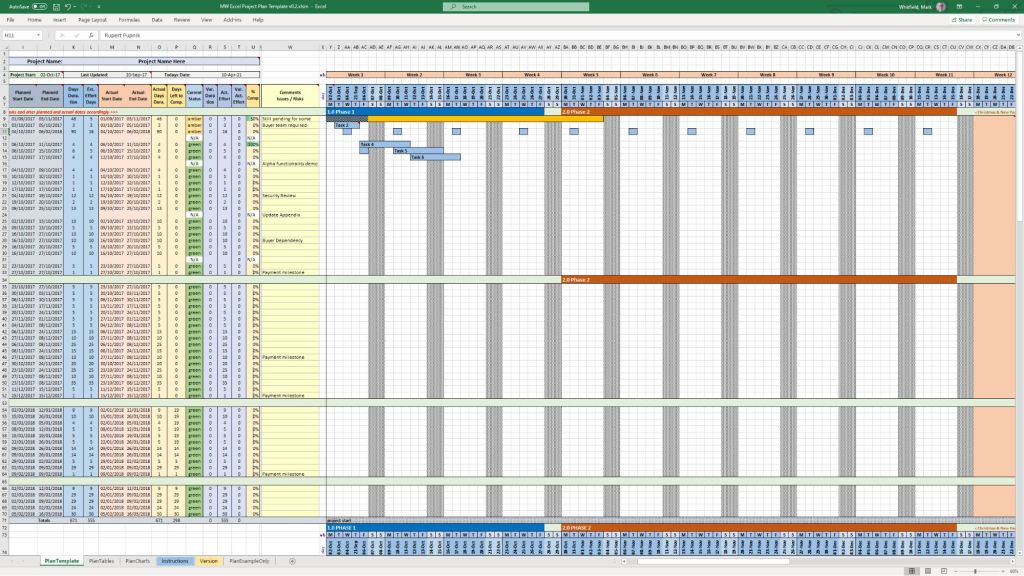
  • Detailed SDLC / PRINCE2 Project Plans: Native Microsoft Project (.mpp) and Excel (.xlsx) files featuring stage-gate structures, resource sheets, and milestone tracking.
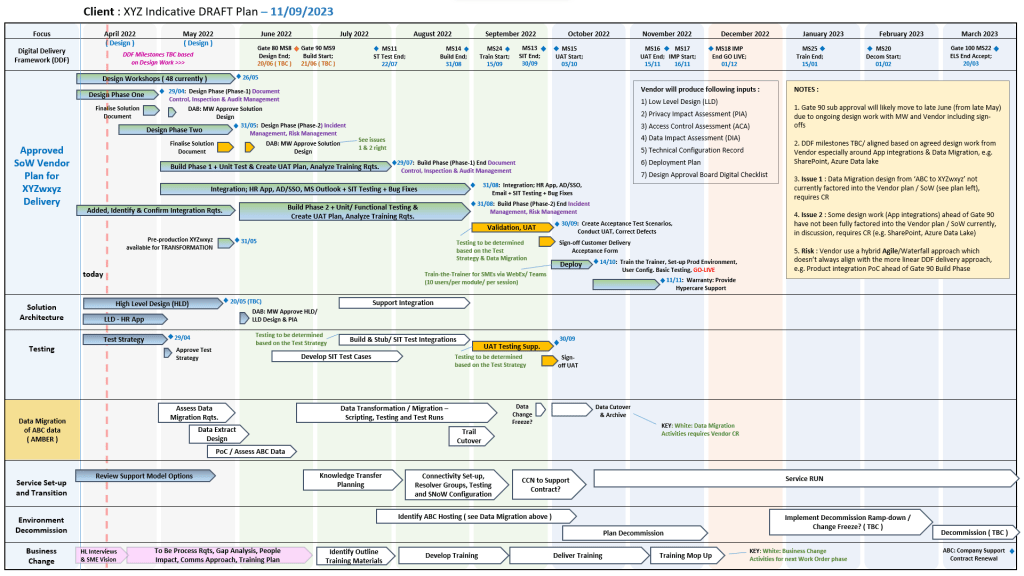
  • Plan on a Page (POaP): Over 35 PowerPoint variations and simplified Excel dashboards used to present high-level, visual timelines to executives and senior stakeholders.
  • Agile Scrum Sprint Planner & Delivery Plan: Templates constructed in Excel to track sprint velocity, capacity planning, and product backlogs.

⚠️ Risk, Governance & Tracking

  • Comprehensive RAID Logs: Centralized trackers mapping Risks, Actions, Issues, and Dependencies, including secondary tabs for opportunities, lessons learned, and change requests.
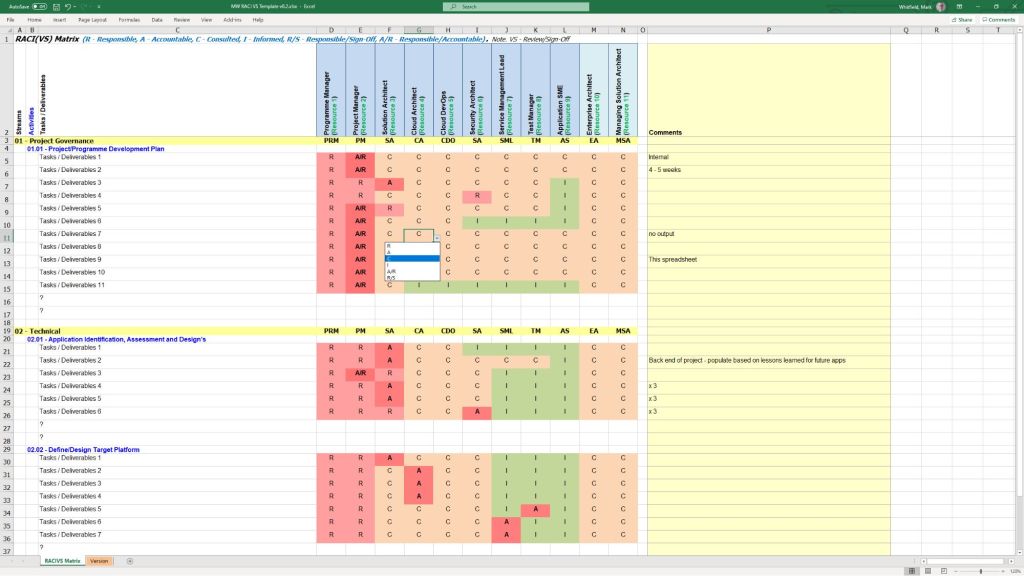
  • RACI Matrices: Responsibility assignment matrices used to formally define team roles (Responsible, Accountable, Consulted, Informed) across delivery workstreams.
  • Project Charter Blueprint: A foundational setup template used to establish formal authorization, align stakeholders, and outline scope boundaries.

📊 Performance & Financial Tracking

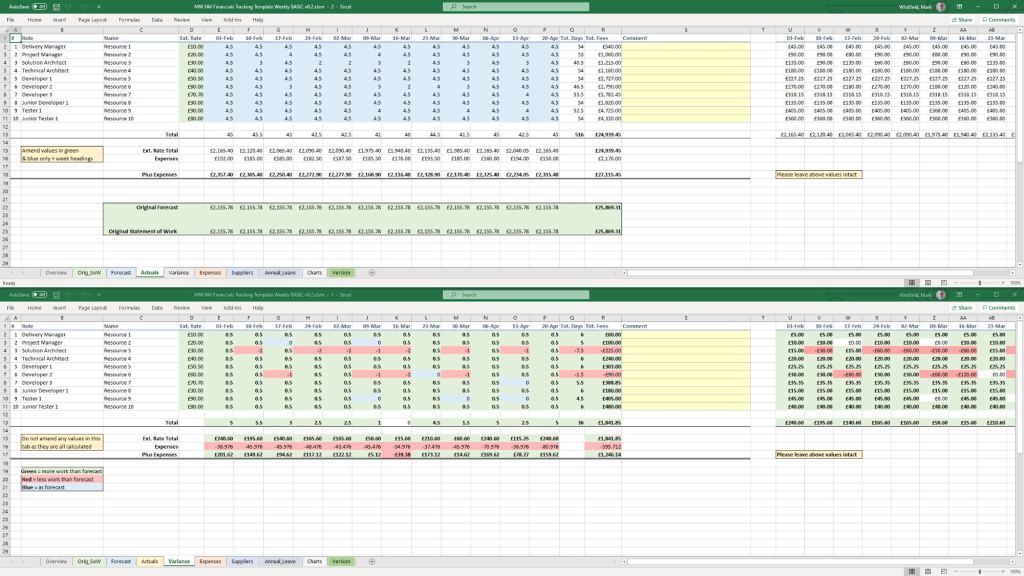
  • Project Financial Tracker: Metric dashboards containing charts for measuring internal and external forecast versus actual costs, profit margins, and expense variances.
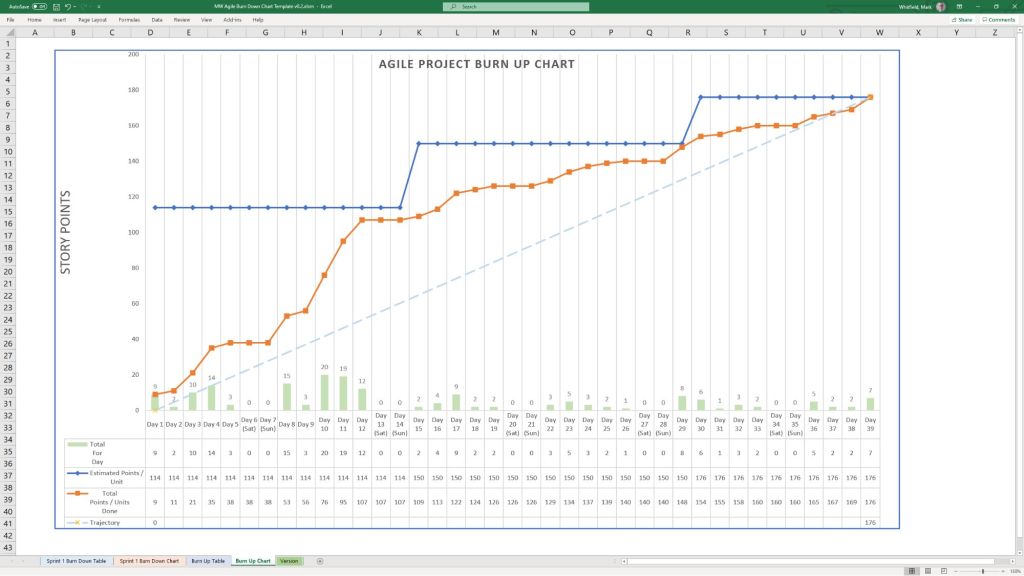
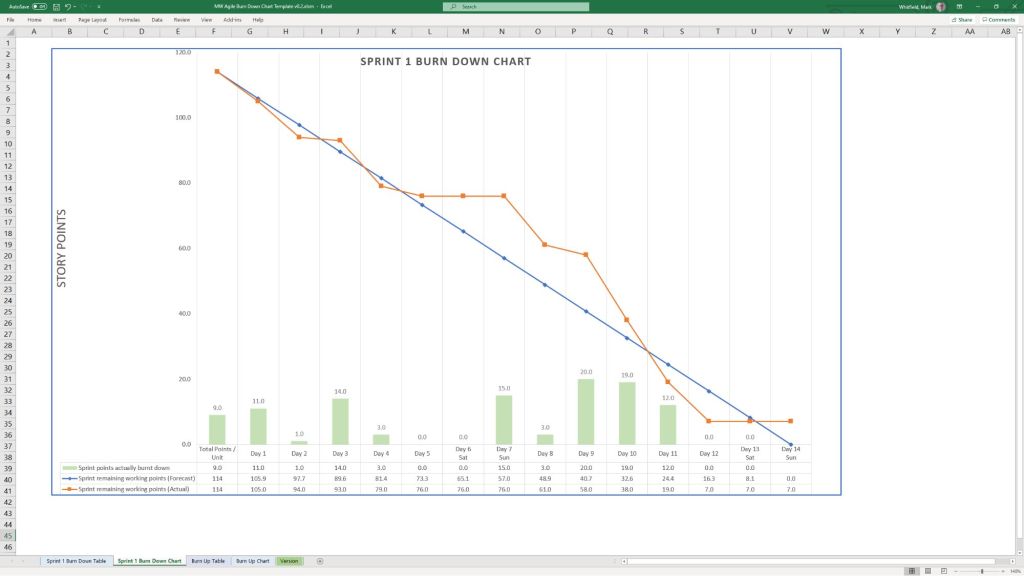
  • Agile Burn Down & Burn Up Charts: Standalone spreadsheet alternatives built specifically for environments where dedicated Agile software like Jira or Azure DevOps is unavailable.

📢 Status Reporting & Communication

  • Weekly/Monthly Status Reports: Formatted templates available in Word and PowerPoint summarizing project health, milestone progress, and immediate priorities for internal and client updates.
  • Project Kick-Off Slide Decks: Presentation baselines to align teams, outline deliverables, and walk members through execution workflows at launch.
Mark Whitfield, Biography overview

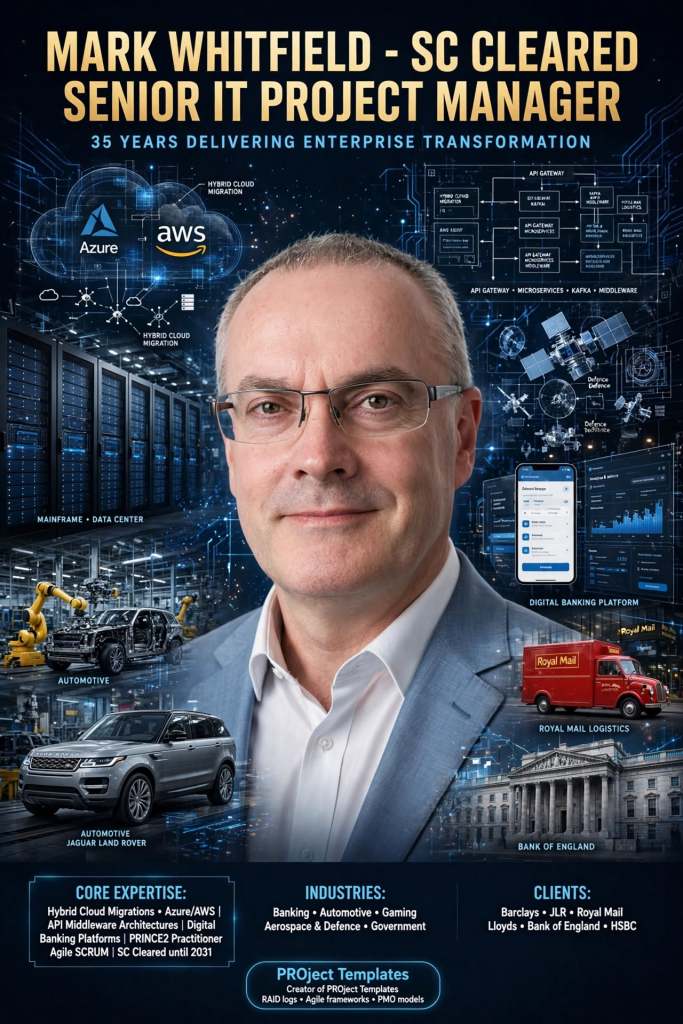
Mark Whitfield is a prominent UK-based, SC-cleared Senior IT Project Manager, Engagement Manager, and technology executive with over 35 years of experience spanning the entire Software Development Lifecycle (SDLC). He specialises in complex digital transformations, hybrid cloud migrations, and API-led system integrations.

Throughout his career, he has successfully delivered enterprise-scale solutions for massive blue-chip clients, including Barclays Bank, Jaguar Land Rover (JLR), Royal Mail Group (RMG), Lloyds Banking Group, and the Bank of England.

Executive Overview:

  • Core Expertise: Hybrid Cloud Migrations (Azure, AWS), API middleware architectures, and digital banking platforms.
  • Methodologies: Certified PRINCE2 Practitioner and Agile SCRUM delivery lead.
  • Security Clearance: Active UK Security Check (SC until 2031) clearance for public and defense-sector projects.
  • Industry Portfolio: Banking, Automotive, Gambling/Casinos, Aerospace & Defence, and Regional Government.

Professional Timeline & Milestones:

  • 1990–1995 (Early Engineering): Began his career immediately after graduating in Computing. He worked as a core programmer at The Software Partnership, building cutting-edge electronic banking software (sp/ARCHITECT-BANK) on legacy Tandem Mainframes (now HPE NonStop).
  • 1995–2013 (Insider Technologies Limited): Spent 18 years escalating from a Senior Programmer into a strategic project manager in Salford Quays, UK. He spearheaded high-volume mainframe transaction monitoring systems and ATM software delivery for major global banking institutions like HSBC and Al Rajhi Bank.
  • 2013–2016 (Retail & Gaming Delivery): Transitioned to Wincor Nixdorf as an Agile IT PM managing ATM software pipelines, followed by a Senior PM role at Betfred, delivering complex mobile sportsbook and online payment gateways.
  • 2016–Present (Enterprise Leadership): Joined Capgemini as a client-facing Engagement Project Manager. He later augmented into MuleSoft (a Salesforce company) as a Delivery Manager for the Anypoint Platform, directing massive cloud infrastructure overhauls.

Thought Leadership & Knowledge Sharing

Beyond active corporate execution, he is the creator of PROject Templates, an open professional repository where he publishes free upgrade enterprise project tracking models, RAID logs, and Agile planning frameworks used extensively by modern PMOs.

IT Project Management (PM) toolkits provide over 200 tailored templates spanning Agile, Waterfall, & PRINCE2 methodologies

The IT Project Management (PM) toolkits created by Mark Whitfield provide over 200 tailored templates spanning Agile, Waterfall, and PRINCE2 methodologies. These artifacts are designed to structure, track, and report on software delivery lifecycles (SDLC).

The framework’s core templates are categorized below by operational delivery area, specific template artifact, and native file format:

📅 Schedule, Planning & Timelines

Focuses on structural design, building work breakdown structures (WBS), and visualizing milestones for senior stakeholders.

  • Detailed SDLC / PRINCE2 Project Plan: Microsoft Project (.mpp), Excel (.xlsx)
  • Agile Scrum Sprint Planner & Delivery Plan: Microsoft Project (.mpp), Excel (.xlsx)
  • Plan on a Page (POaP) Milestone Visualizer: PowerPoint (.pptx)—over 35 custom variations
  • Gantt Chart Trackers: Excel (.xlsx)

🔍 Risk, Issue & Change Control (RAID)

Manages constraints, operational hazards, dependencies, and baseline deviations.

  • Simple RAID Log (Risks, Assumptions, Issues, Dependencies): Excel (.xlsx)
  • Comprehensive Tracking Register (Includes RAIDs, Suppliers, Deliverables, and Out-of-Scope tasks): Excel (.xlsx)
  • Change Request Tracker: Excel (.xlsx)

📊 Governance, Tracking & Status Reporting

Facilitates communication across team tiers and summarizes health indicators for client or internal reviews.

  • Weekly & Monthly Project Status Reports: PowerPoint (.pptx), Word (.docx)
  • RACI Matrix (Roles & Responsibilities Tracker): Excel (.xlsx)
  • Agile Burndown and Burnup Charts: Excel (.xlsx)
  • Meeting Minutes and Action Item Logs: Word (.docx)

💰 Finance, Resources & Benefits

Tracks financial trajectories, internal/external staffing allocation, and post-launch outcomes.

  • Full Project Financial Tracker (Forecasts, Actuals, Variances, Margins, and Expenses): Excel (.xlsx)
  • Simple Monthly Budget Forecast: Excel (.xlsx)
  • Resource Cost & Annual Leave Tracker: Excel (.xlsx)
  • Benefits Realisation Analysis Tracker: Excel (.xlsx)

🏗️ Initiation, Structure & Walkthroughs

Establishes the foundation of the delivery framework and walks team members through how to execute templates.

  • Project Kick-Off Presentation Deck: PowerPoint (.pptx)
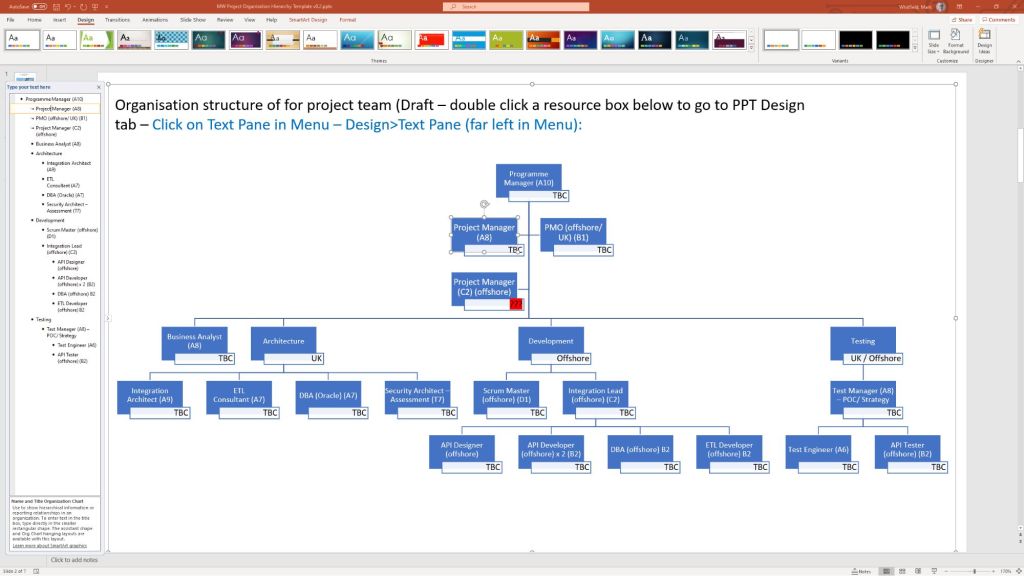
  • Project Organisation Charts: PowerPoint (.pptx)
  • Template Walkthrough Documentation Guides: Word (.docx)

The PRINCE2 7 AI Practice Guide recommends specific artificial intelligence categories

The PRINCE2 7 AI Practice Guide recommends specific artificial intelligence categories to streamline project delivery while strictly adhering to six core governance principles. In a PRINCE2 environment, AI acts strictly as an advisory tool, meaning that human accountability remains completely non-negotiable.

🛠️ Recommended AI Technologies for Delivery

PRINCE2 breaks down the most effective AI systems for project delivery into four core categories:

  • Decision Support Systems (DSS): Used to enhance scheduling, estimate task durations, and predict baseline deviations using historical data analytics.
  • Expert Systems: Configured using rule-based decision trees to automate routine governance workflows like initial change control and quality tolerance reviews.
  • Natural Language Processing (NLP): Leveraged to draft product descriptions, analyse text-heavy project logs, and evaluate extensive stakeholder documentation.
  • Chatbots & Virtual Assistants: Integrated to give team members and stakeholders real-time, automated project status updates at various stages.

📋 The 6 Foundational AI Principles in PRINCE2

When deploying these AI tools during the Managing Product Delivery stage, teams must follow the framework’s official compliance principles:

  1. Human Accountability: AI outputs must be handled strictly as advice, never final verdicts. Humans retain all formal decision-making authority.
  2. Absolute Transparency: Every AI recommendation must be recorded in an AI usage log. This includes the prompts, the output, and the human reviewer’s name.
  3. Strict Data Control: Project data must be stored in secure, compliance-cleared repositories. Personal identifiers must be stripped before processing.
  4. Value-Driven Use: Every AI activity must explicitly justify its inclusion by saving time, reducing costs, or directly protecting the business case.
  5. Proportionality: AI use must match the project’s scale. Use simpler text summaries for small projects, saving predictive ML models for complex ones.
  6. Continuous Learning: Post-stage reviews must evaluate AI performance alongside regular deliverables. Successful prompts and tool failures are logged for future stages.

💼 Professional Training & Official eLearning Options

If you are looking to master how the updated framework handles modern, technology-driven environments, several official certifications are available online:

  • PRINCE2 Agile Foundation Official eLearning: This course focuses heavily on balancing structured governance with highly flexible, modern delivery layers. You can purchase this complete digital package directly from Zindiak.
  • PRINCE2 Foundation & Practitioner Exam Plus Take2: A complete testing package featuring scenario-based testing, flexible scheduling, and a built-in safety net re-sit option. It can be booked online via PPM Careers.
  • PRINCE2 Programme Management Foundation & Practitioner: Best suited for leading large-scale transformational changes and complex multi-project portfolios. Live virtual classes and structured paths can be booked through prince2.com or ilxgroup.com.

The PRINCE2 7 AI Practice Guide recommends specific artificial intelligence categories

PRINCE2 project templates, Excel (.xls/.xlsm) & MS Project (.mpp) formats

You can find downloadable PRINCE2 project templates in Excel (.xls/.xlsm) and Microsoft Project (.mpp) formats across several specialized platforms. Because PRINCE2 is a highly structured methodology, standard templates usually map its specific processes (like Starting Up, Initiating, and Controlling a Stage) directly onto Gantt charts and tracking sheets.

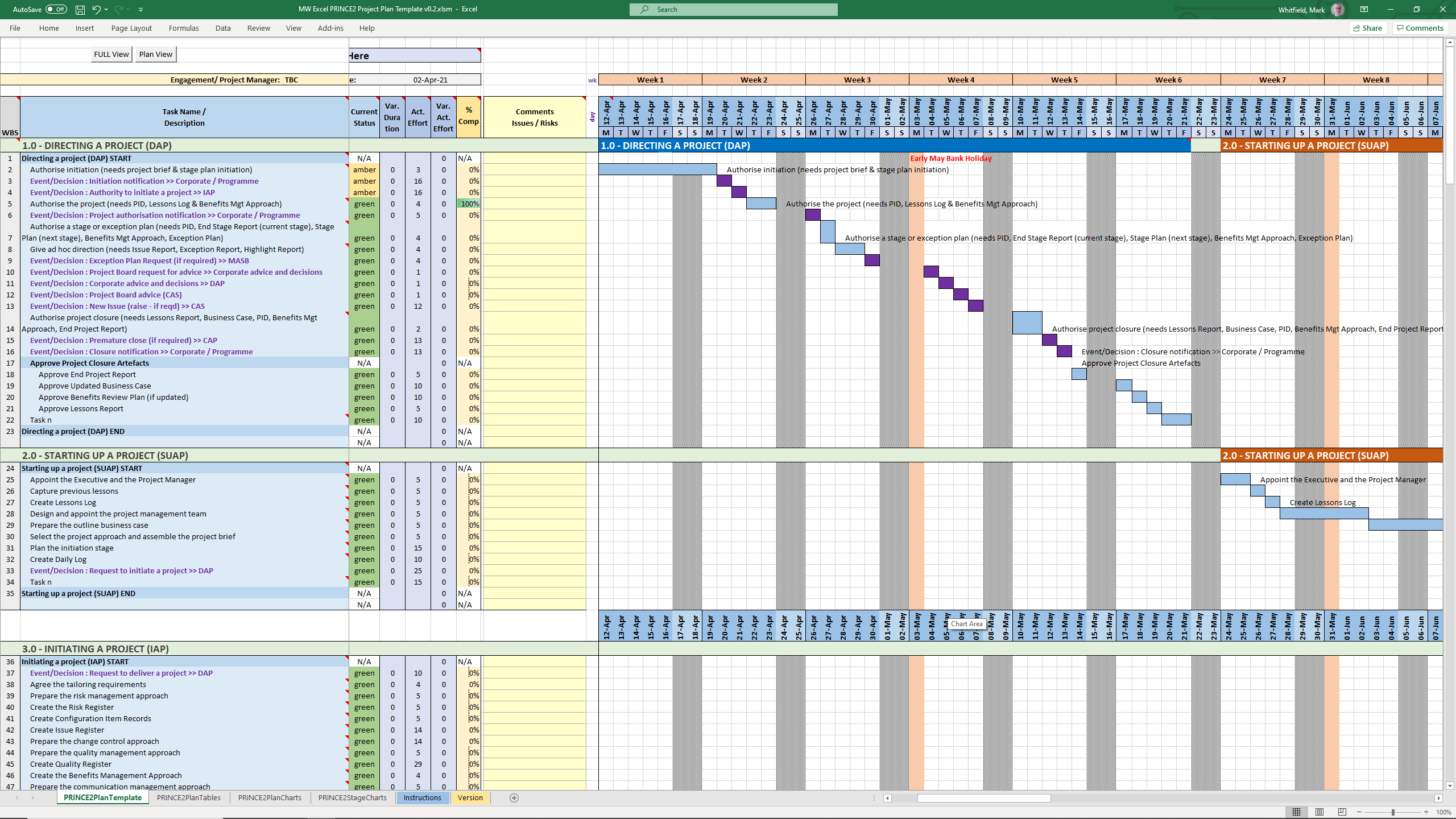
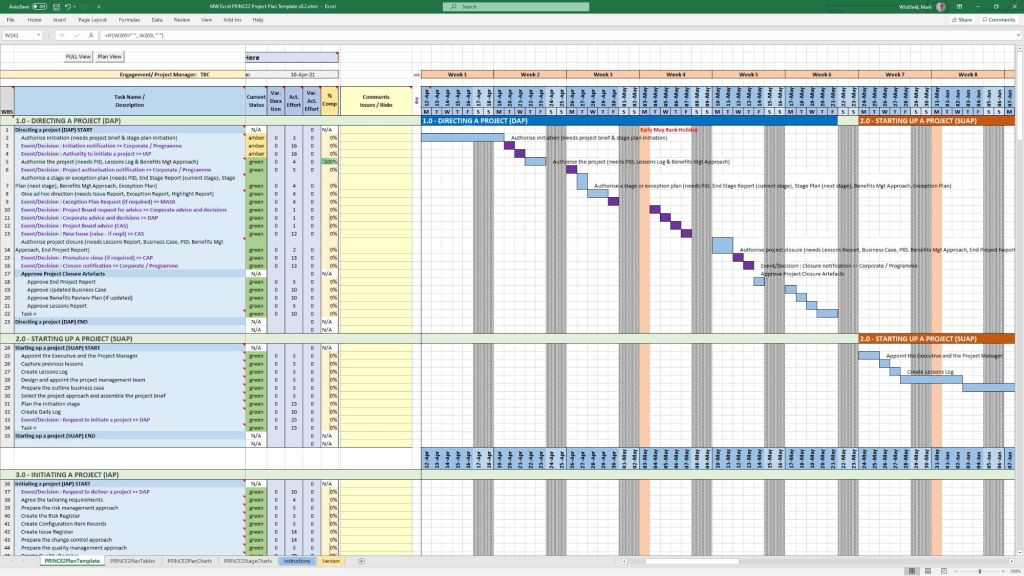
PRINCE2 MS Excel .xls plan in a spreadsheet
PRINCE2 MS Excel .xls plan
in a spreadsheet
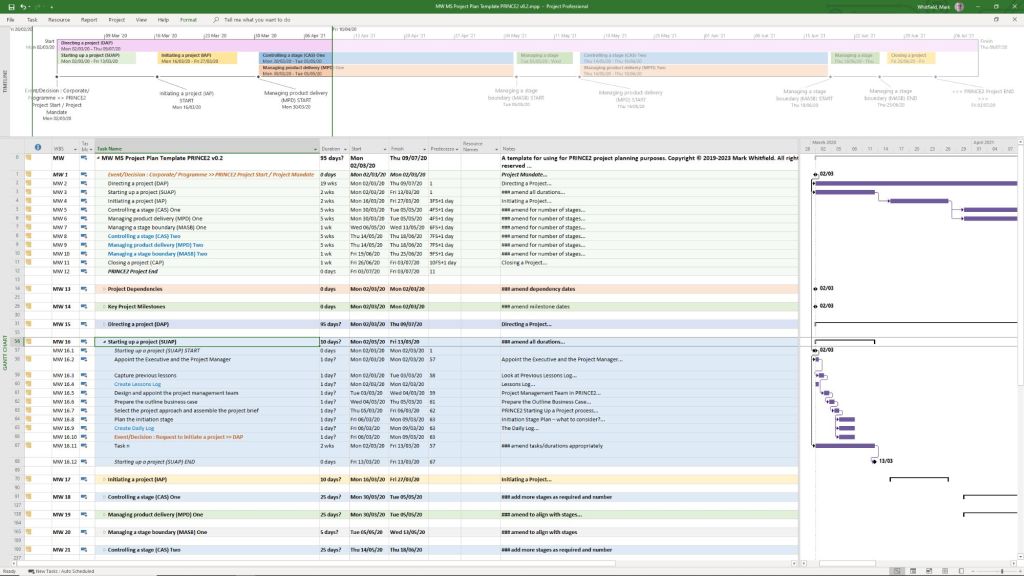
PRINCE2 MS Project .mpp plan in a project file
PRINCE2 MS Project .mpp plan
in a project file

The primary download options, ranging from premium practitioner bundles to free resource packages, are categorized below:

Comprehensive Premium Bundles (MPP & XLS)

If you require a fully integrated toolkit built specifically for the official PRINCE2 framework, individual project management practitioners offer comprehensive marketplace downloads:

  • Mark Whitfield PM Templates: Offers a dedicated seventh edition package including MW MS Project Plan Template PRINCE2 v0.2.mpp alongside its exact equivalent spreadsheet MW Excel PRINCE2 Project Plan Template v0.2.xlsm. You can download this Prince2 toolkit package plus others, on the Mark Whitfield Official Site or through the Mark Whitfield Etsy UK Shop.
  • Flevy Marketplace: Provides highly structured, professional enterprise files. You can purchase and download the PRINCE2 Templates + Microsoft Project MPP & MS Excel Document directly from their platform, which packs the MPP tracking timelines and XLSM / XLS sheets together.

PRINCE2 project templates, Excel (.xls/.xlsm) & MS Project (.mpp) formats

Microsoft Excel XLS PRINCE2 spreadsheet screenshots

Microsoft Excel XLS PRINCE Project Plan with Task Descriptions
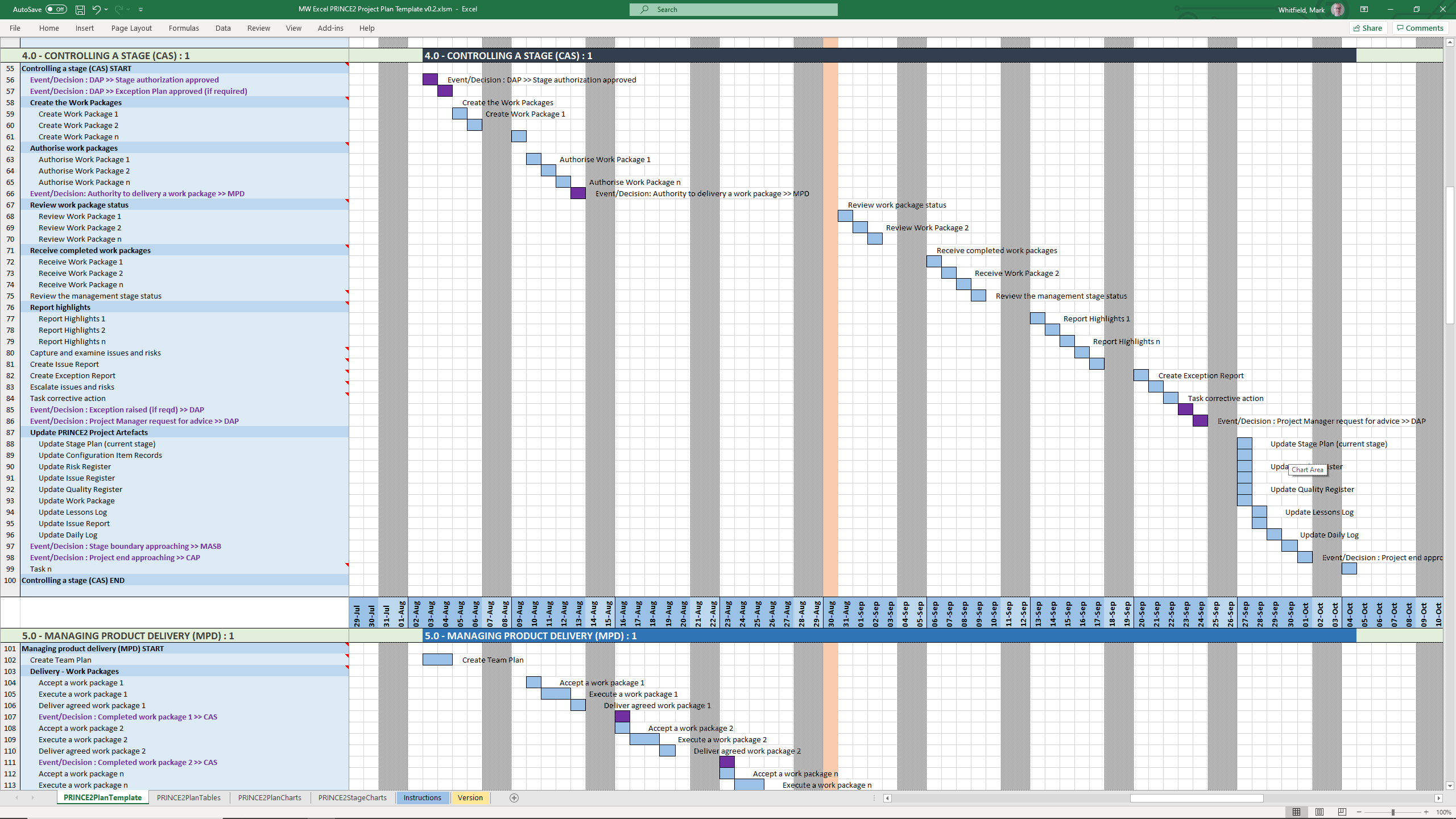
Microsoft Excel XLS PRINCE Project Plan with Gantt View 1
Microsoft Excel XLS PRINCE Project Plan with Gantt View 2
Microsoft Excel XLS PRINCE Project Plan with Gantt View 3
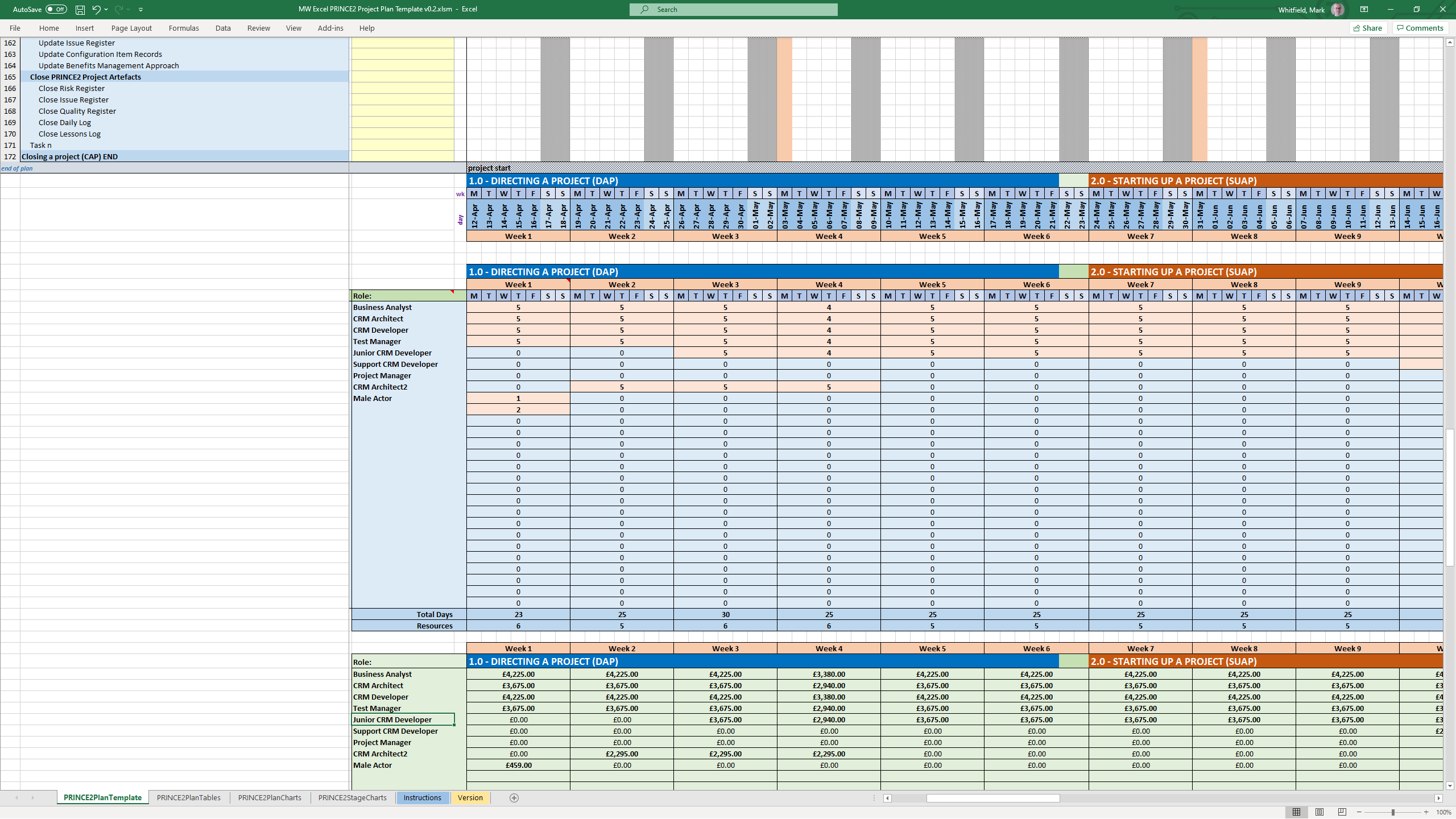
Microsoft Excel XLS PRINCE Project Plan with Delivery Costings
Microsoft Excel XLS PRINCE Project Plan with Charts
Microsoft Excel XLS PRINCE Project Plan with PRINCE2 Stage Charts

Standard Artifacts Included in Download Packages

When downloading a comprehensive .zip toolkit, the package typically contains the core structural elements of the framework divided across your scheduling software:

  • MS Project (.mpp): A pre-constructed Prince2 waterfall delivery layout mapped with the 7 key PRINCE2 stages, built-in dependency workflows, milestone gates, and methodological prompts embedded in the task notes.
  • MS Excel (.xls/.xlsm): Mirrored project planning sheets (with costing) utilizing native formulas to auto-populate Gantt charts, alongside targeted operational spreadsheets like RAID logs (Risks, Assumptions, Issues, Dependencies), RACI matrix charts, resource trackers, and project budget tools.

Over 200 editable templates tailored for Agile Scrum, Waterfall, and PRINCE2 frameworks

Mark Whitfield’s premium project management toolkit consists of over 200 editable templates tailored for Agile Scrum, Waterfall, and PRINCE2 frameworks. Built across 30+ years of digital and IT delivery, these frameworks prioritize corporate governance, seamless stakeholder reporting, and visual lifecycle control.

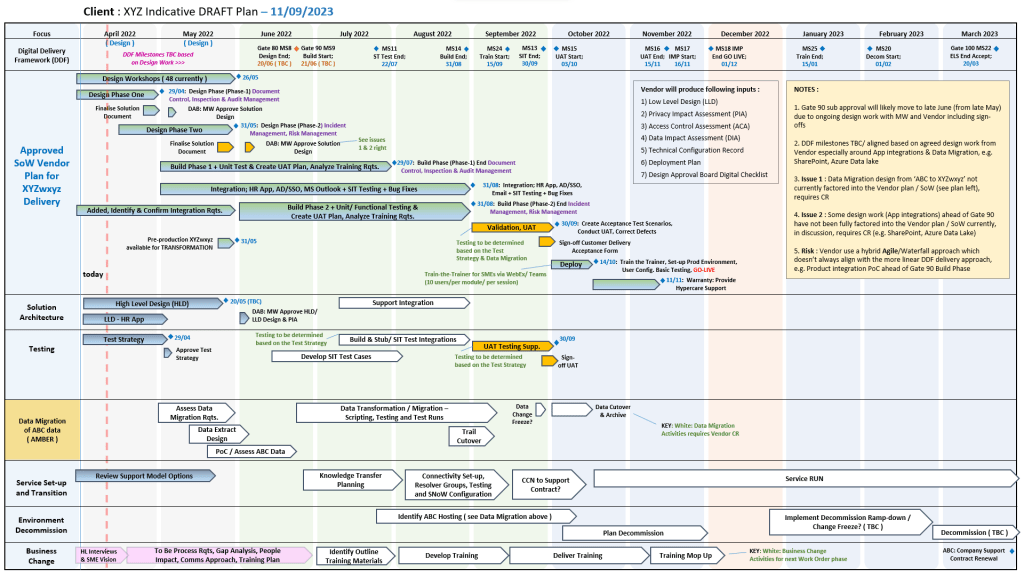
Example of many plan on a page poap ppt templates
Many POAP, Plan on a Page example templates

Below is the comprehensive, scannable breakdown of the core artifacts categorized by lifecycle focus, purpose, and application format. Purchase project templates here.


📅 1. Master Planning & Visual Roadmapping

These tools serve as the operational foundation for tracking dependencies, defining Work Breakdown Structures (WBS), and establishing executive visibility.

  • Detailed Software Development Life-Cycle (SDLC) Plan
    • Focus: End-to-end task tracking from inception and elaboration to construction, testing, and transition.
    • Format: Microsoft Project (.mpp) & Microsoft Excel (.xlsx).
    • Source Page: Mark Whitfield PMO Toolkit
  • PRINCE2 7th Edition Master Project Plan
    • Focus: Standardized governance processes structured according to the latest PRINCE2 methodology.
    • Format: Microsoft Project (.mpp) & Microsoft Excel Gantt Tracker.
    • Source Page: Mark Whitfield PRINCE2 Master Walkthrough
  • Plan on a Page (POaP) Blueprint
    • Focus: High-level, timeline-focused visual summaries mapping deliverables and milestones to client monthly views.
    • Format: Microsoft PowerPoint (.pptx, 30+ layout variations) & MS Excel.
    • Source Page: Mark Whitfield POaP Templates
Example MS Excel Project Plan template

🛡️ 2. Risk, Governance & Operational Control

These registers form the “engine room” of project health management, shifting risk mitigation from reactive to predictive.

  • Comprehensive RAID Log & Tracker
    • Focus: Integrated visibility over Risks, Actions, Issues, and Dependencies, alongside change requests and supplier impacts.
    • Format: Microsoft Excel (.xlsx featuring self-populating chart dashboards).
    • Source Page: Mark Whitfield Operational Tracking Tools
  • Agile Story Dependency Tracker
  • RACI Matrix
    • Focus: Mapping roles and responsibilities across project deliverables (Responsible, Accountable, Consulted, Informed).
    • Format: Microsoft Excel (.xlsx).
    • Source Page: Mark Whitfield Folder Structure & Guide
Example MS Excel RACI matrix template

📊 3. Performance reporting & Stakeholder Engagement

Designed to eliminate subjective performance analysis and maintain executive-level clarity.

  • Weekly / Monthly Project Status Report
    • Focus: Summarizing target completion, look-aheads, RAG indicators, and critical decisions for clients.
    • Format: Microsoft Word (.doc) & Microsoft PowerPoint (.pptx).
    • Source Page: Mark Whitfield Premium Delivery Page
  • Stakeholder Analysis & Influence Matrix
    • Focus: Mapping stakeholder influence versus organizational impact to tailor communication (Involve, Inform, Consult, Monitor).
    • Format: Microsoft Excel (.xlsx).
    • Source Page: Mark Whitfield Folder Structure & Guide
  • Project / Programme Kick-Off Deck
    • Focus: Initial team mobilization, workspace onboarding, and client approach alignment.
    • Format: Microsoft PowerPoint (.pptx).
    • Source Page: Mark Whitfield Main Purchase Index
Example PPT slide for Org. Structure

💰 4. Financial Trackers & Value Realization

These artifacts manage fiscal discipline, pricing bids, and mapping long-term outputs to business outcomes.

  • Full Project Financial Tracker
    • Focus: Internal/external cost variance, forecasting models, contractor day rates, margin tracking, and expense visibility.
    • Format: Microsoft Excel (.xlsx with embedded financial trend charts).
    • Source Page: Mark Whitfield Premium Delivery Page
  • Statement of Work (SOW) Templates
    • Focus: Work order structuring and delivery guardrails for both commercial Waterfall and Agile contracts.
    • Format: Microsoft Word (.doc).
    • Source Page: Mark Whitfield Operational Tracking Tools
  • Benefits Realization Analysis Tracker
    • Focus: Comparing projected baseline targets with actual organizational outcomes post-deployment.
    • Format: Microsoft Excel (.xlsx).
    • Source Page: Mark Whitfield Premium Delivery Page
Example Excel Project Financial Tracker

🏃 5. Agile Delivery Tools

Alternative visual logs created for environments where dedicated software like Jira or Azure DevOps is unavailable.

  • Agile Burn Down & Burn Up Charts
    • Focus: Visualizing sprint velocity, work remaining, and scope creep across iterative delivery cycles.
    • Format: Microsoft Excel (.xlsx with automatic mathematical plotting).
    • Source Page: Mark Whitfield Folder Structure & Guide
  • MS Teams Planner & To-Do Guide
    • Focus: Step-by-step framework configuration for running Kanban-style card streams in the cloud.
    • Format: Microsoft Word Walkthrough (.docx).
    • Source Page: Mark Whitfield Master Index
Example Agile Scrum Burn Up Chart
Example Agile Scrum Burn Down Chart

PRINCE2 or PRINCE2 Agile, features discussion

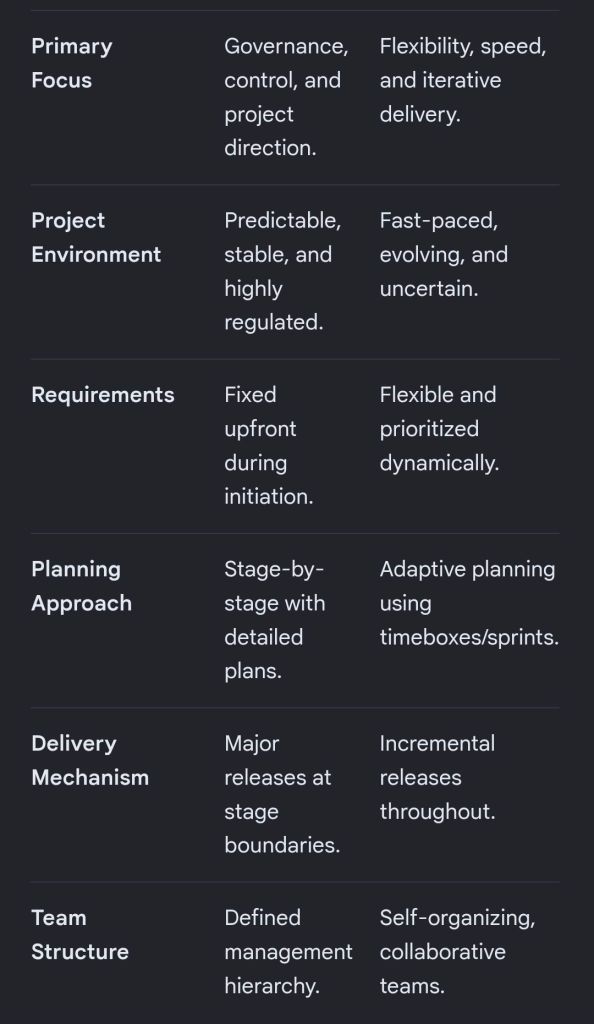
The choice between PRINCE2 and PRINCE2 Agile depends entirely on your project environment: PRINCE2 is best for highly structured, predictable projects with fixed requirements, while PRINCE2 Agile is designed for dynamic environments that require iterative delivery and flexibility.

Both methodologies are owned by PeopleCert and build upon the same core governance framework.

Core Differences

The table below breaks down how these two frameworks compare across key project dimensions:

PRINCE2 and PRINCE2 Agile features
Comparison PRINCE2 and PRINCE2 Agile features
PRINCE2 and PRINCE2 Agile features

PRINCE2 Breakdown

Traditional PRINCE2 (Projects IN Controlled Environments) is a structured, process-based approach for project management. It provides a clear blueprint for roles, responsibilities, and management stages.

  • Fixed Targets: It fixes the project scope, time, and cost upfront to minimize risk.
  • The 7 Principles: It relies on universal principles, such as continued business justification and defined roles.
  • Management Stages: Projects are broken into distinct sections to review progress before moving forward.
  • Predictability: Ideal for large infrastructure, construction, or compliance-heavy projects where changes are costly.

PRINCE2 Agile Breakdown

PRINCE2 Agile does not replace traditional PRINCE2; instead, it wraps agile delivery methods around the existing PRINCE2 governance framework. It allows corporate management to maintain control while development teams use frameworks like Scrum or Kanban.

  • The Hexagon: It fixes time, cost, quality, and benefits, but makes scope and risk flexible.
  • Agile Integration: It introduces agile concepts like daily standups, burn charts, and retrospectives.
  • Maturity Tool: It uses the “Agilometer” to assess if a project is suitable for agile execution.
  • Speed to Market: Ideal for software development, creative industries, or any project requiring quick consumer feedback.

Which Certification Should You Choose?

  • Choose PRINCE2 if you work in a traditional industry, need to establish clear corporate governance, or manage projects with strictly defined outcomes.
  • Choose PRINCE2 Agile if you already work in an agile environment and need to add corporate structure, or if your organization is transitioning from waterfall to agile.

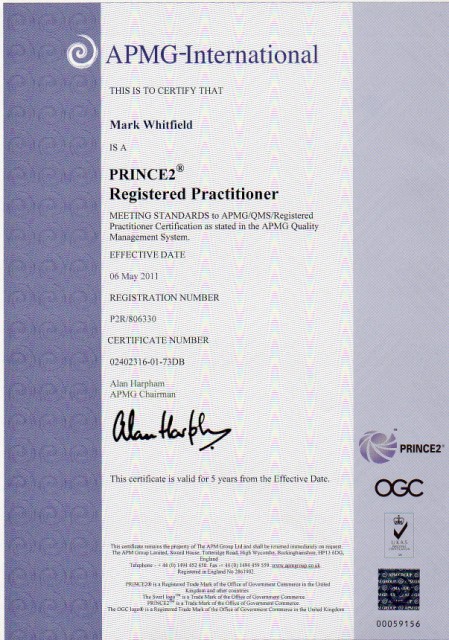
Mark Whitfield, May 2011 – Registered PRINCE2 Practitioner with ILX

Mark Whitfield May 2011, Registered PRINCE2 Practitioner with ILX

Over 200 editable templates for both Agile & Waterfall / PRINCE2 frameworks

Mark Whitfield’s Project Management (PM) methodology relies on over 200 editable templates tailored for both Agile Scrum and Waterfall / PRINCE2 frameworks. Developed over 24 years of IT and digital delivery, the toolkit focuses on high-level reporting, rigorous risk control, and visual tracking to align teams with corporate governance.

Over 200 editable templates for both Agile & Waterfall / PRINCE2 frameworks
An example of many Plan On a Page
(POAP) templates

Templates by Category and Methodology

1. Detailed Planning & Scheduling

  • Methodology: Mapped to the Software Development Life Cycle (SDLC) for both sequential Waterfall phases and iterative Agile sprints.
  • Templates:
    • Microsoft Project (MPP): Fully loaded schedules detailing project inception, elaboration, construction, and transition.
    • Excel Detailed Plans: Work Breakdown Structure (WBS) mapped to sequential and date-driven task management with built-in RAG (Red/Amber/Green) status indicators.

2. Visual Reporting & Execution (Plan on a Page)

  • Methodology: Focuses on structural, executive communication to prevent scope creep and keep stakeholders aligned.
  • Templates:
    • POaP (Plan on a Page): High-level visual summaries designed for client presentations and quick-glance milestone tracking in Excel and PowerPoint.
    • Burn-up / Burn-down Charts: Visual tracking metrics used in Agile Sprints to show progress towards delivery goals.

3. Risk & Governance Control

  • Methodology: Built on strict risk/action tracking and regular lessons learned to manage uncertainty throughout the project lifecycle.
  • Templates:
    • RAID Log: Centralized Excel trackers recording Risks, Actions, Issues, and Dependencies.
    • Change Requests/Decisions Log: Supplementary tabs within the RAID register to strictly manage scope changes and project governance.

4. Financial Trackers

  • Methodology: Ensures project adherence to contracted margins, tracking both internal/external costs and resource efforts.
  • Templates:
    • Budget & Resource Trackers: Spreadsheets for forecasting versus actual expenses, variance calculations, expense reporting, and margin tracking with pivot-table readiness.

5. Team RACI & Status Reporting

  • Methodology: Clearly defines stakeholder roles and communication frequencies (weekly/monthly) to ensure continuous monitoring and control.
  • Templates:
    • RACI Matrix: A mapping tool defining who is Responsible, Accountable, Consulted, and Informed.
    • Weekly Status Reports: Word/Excel templates detailing internal and external project health, current milestones, and upcoming sprints.

To explore the entire toolkit, you can visit the Mark Whitfield PROject Templates portal.