Project Management Office PMO

Project Management Office PMO

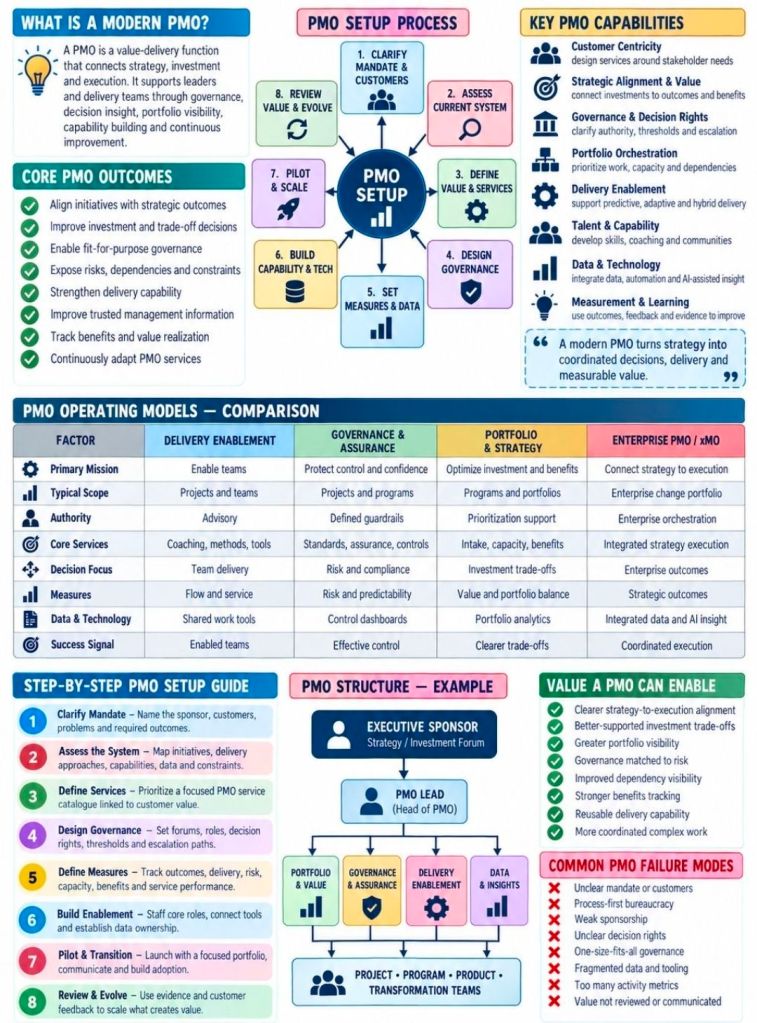
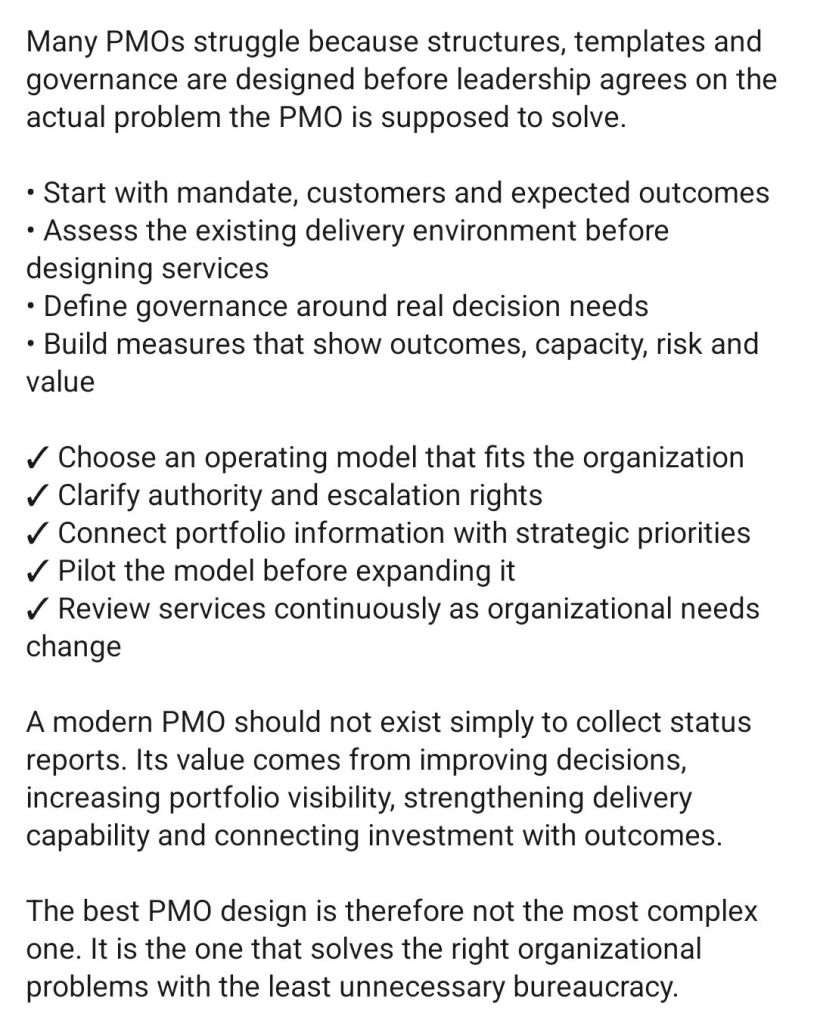
A Project Management Office (PMO) is a dedicated department or team within an organisation that defines, maintains, and standardises project management practices across the business. It serves as the central authority that ensures projects are executed efficiently, remain aligned with strategic business goals, and deliver maximum value.

Think of it as the regulatory and support hub for an organisation’s initiatives; while a project manager runs an individual project, the PMO creates the overall ecosystem in which all projects operate.


🔎 The 3 Main Types of PMOs (By Degree of Control)

Depending on the organization’s needs, a PMO typically falls into one of three structural categories:

  • Supportive PMO: Acts as a consultative hub. It provides templates, best practices, and training but exercises very low control over the actual project execution.
  • Controlling PMO: Enforces compliance and governance. It mandates that project teams adopt specific methodologies, templates, and frameworks, exercising a moderate level of control.
  • Directive PMO: Takes direct ownership of the projects. The PMO provides the project managers themselves and maintains high control, ensuring strict execution according to organizational standards.

📊 Key Responsibilities of a PMO

A high-performing PMO bridges the gap between executive strategy and day-to-day project execution through several core functions:

  • Governance and Compliance: Establishes approval workflows, audits project health, and ensures all teams comply with internal and external policies.
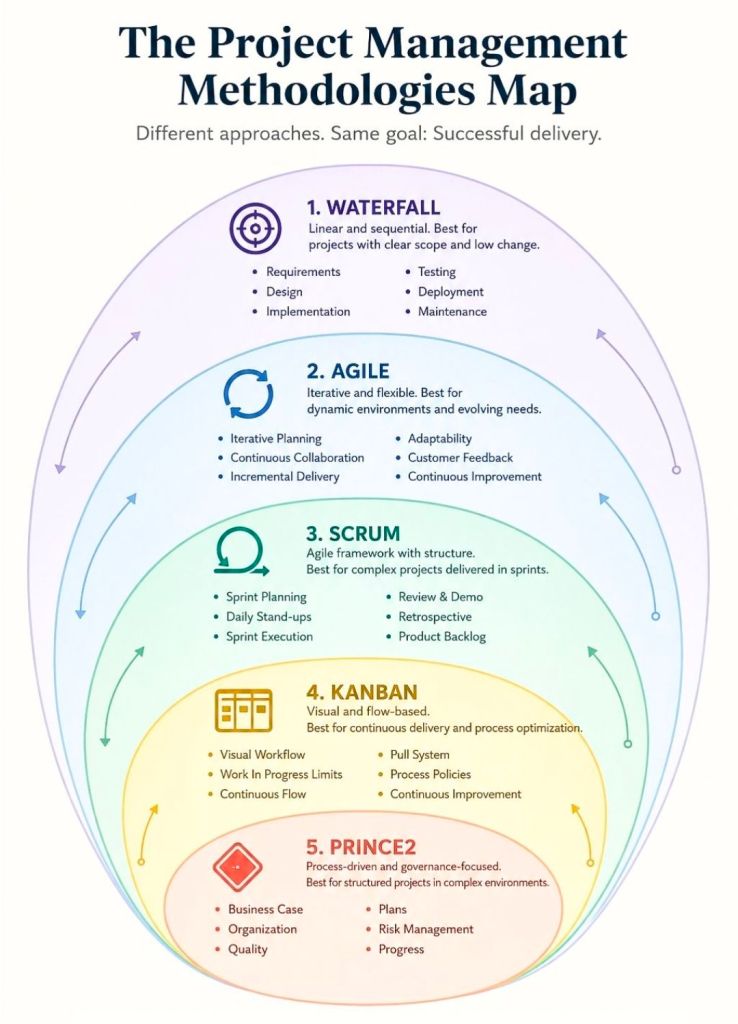
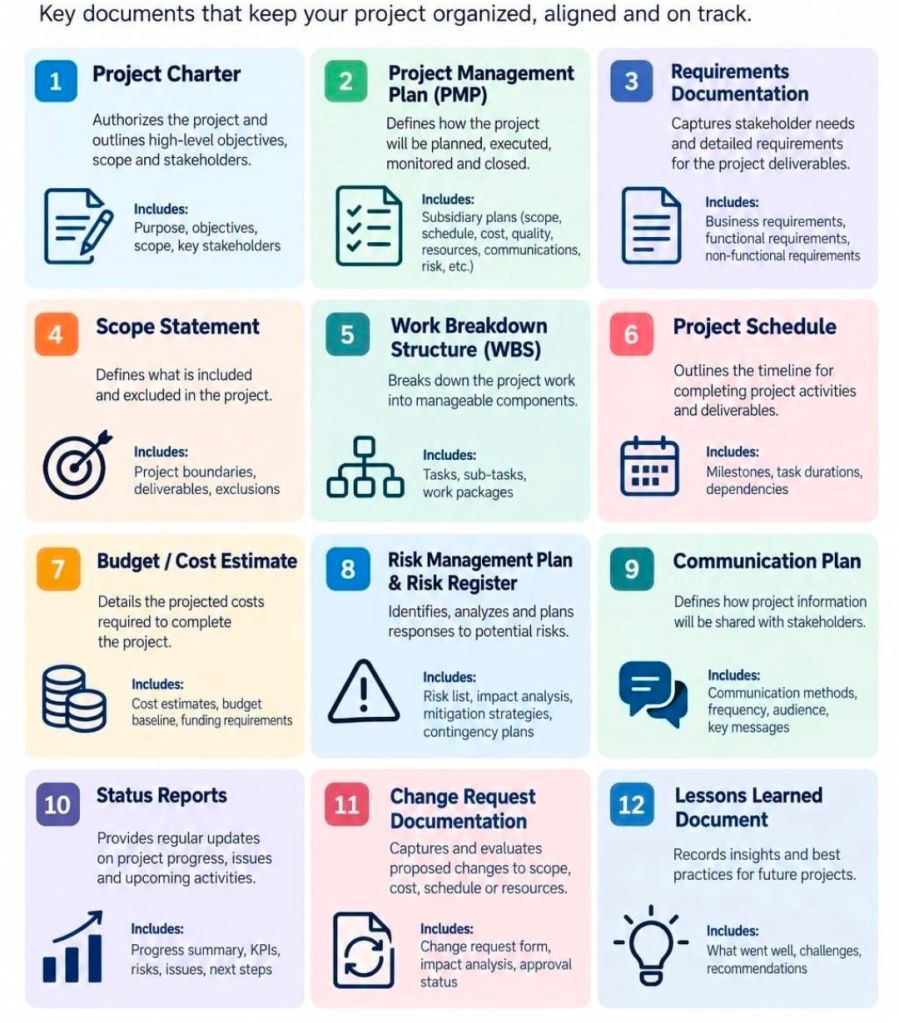
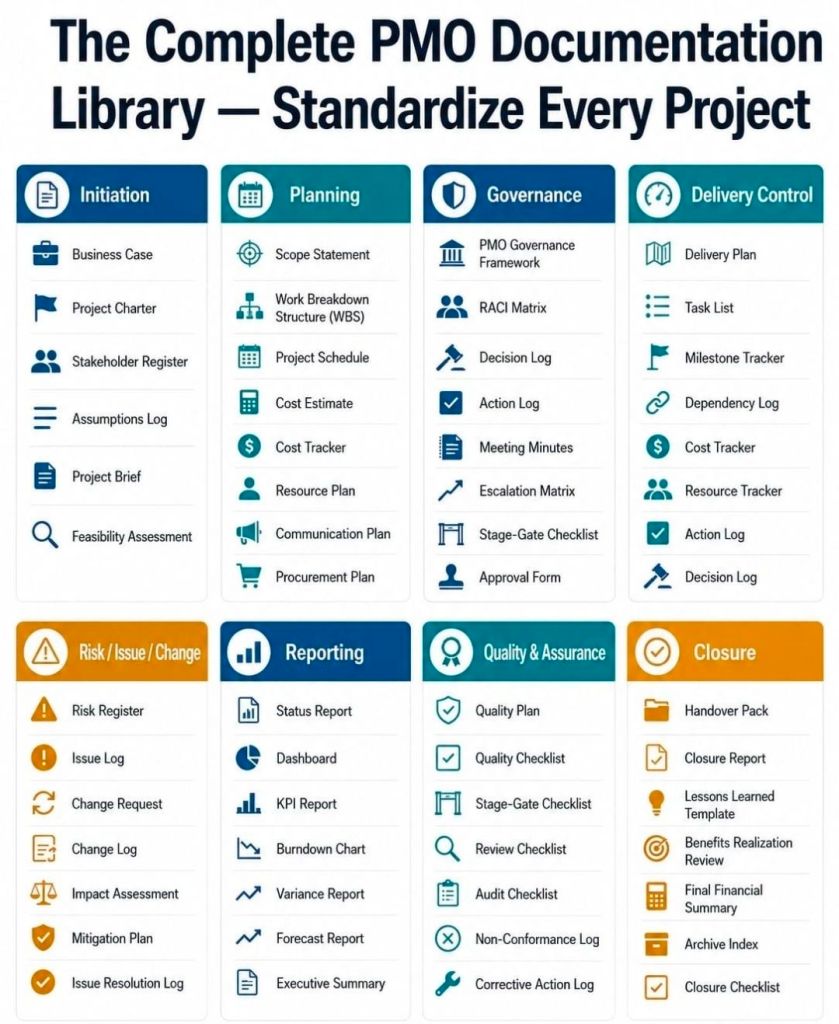
  • Standardisation: Creates standardized rules, templates, and methodologies (such as Agile or Prince2) so that everyone speaks the same project language.
  • Resource Management: Acts as a “traffic cop” to balance shared resources—like budget, tech tools, and personnel—across conflicting project schedules.
  • Strategic Portfolio Management: Reviews and prioritizes proposed projects against company priorities to ensure the business is spending its money on the right initiatives.
  • Performance Reporting: Tracks Key Performance Indicators (KPIs) and provides clean, objective data dashboards to stakeholders and C-suite executives.
PMO vs. Project Manager, the key difference

💡 Core Benefits of a PMO

Organisations with a mature PMO report significantly better project success rates. A PMO delivers value by reducing project financial waste via standard budgeting, speeding up execution timelines through repeatable templates, and preventing team burnout with proactive resource allocation. It also establishes a central “lessons learned” database so that the company does not repeat past mistakes on new ventures.

Business Analytics, BRD, FRD and SRS introduction

Business Analytics, BRD, FRD and SRS introduction

Agile vs Waterfall vs Scrum vs Kanban vs Lean vs XP

Agile,Kanban,Lean,Scrum,vs,Waterfall,xp,ba,Business Analyst,pmo,product owner,po
Agile vs Waterfall vs Scrum vs Kanban vs Lean vs XP

Microsoft Project MPP (.mpp) template examples for download

Mark Whitfield’s IT Project Management (PM) toolkits provide highly comprehensive, fully editable Microsoft Project (.mpp) templates designed to manage and track complex delivery lifecycles. His premium packages bridge the gap between traditional structured governance (like Waterfall and PRINCE2) and modern Agile execution.

MS Project mpp Template file example
Microsoft Project MPP Template file example

You can preview and purchase the complete toolkit via Mark Whitfield’s Project Management Templates Hub or download specific formats from his dedicated Project Planning Template Examples Page.

Core MPP Template Examples & Formats

Mark Whitfield’s templates feature color-coded logic and structured notes embedded directly into task rows to help PMs easily map out dependencies:

  • Detailed SDLC Project Plan (.mpp): Built specifically for Software Development Life-Cycles, incorporating essential stage-gate structures, development sprints, testing phases, and release checkpoints.
  • PRINCE2 7th Edition Delivery Template: Structurally maps out every required stage, activity, and artifact mandated by the framework (e.g., initiating, directing, managing stage boundaries, and closing).
  • Agile & Hybrid Scrum Frameworks: Blends fixed governance milestones with flexible, rolling 2-week Agile sprint schedules, sprint reviews, and retrospective tasks.
  • Gantt Plan on a Page (POaP): High-level visual schedules perfect for stakeholder reporting, summary timelines, and executive board meetings.

Key Features of His Project Plans

  • Color-Coded Tasks: Uses dedicated text colors (e.g., Blue for new artifacts, Black for traditional stages, and Purple for updates) to simplify visual navigation.
  • Annotated Task Notes: Key rows contain descriptions of the required activities or outputs right inside the MPP file notes section.
  • Embedded Best Practices: Pre-configured with dynamic WBS (Work Breakdown Structure) codes, baseline options, and calendar tracking for public holidays and resource leave.

What is Included in the Broader Toolkit?

If you opt for his full premium download bundle, it features over 200 tailored Microsoft Office files accumulated from 24+ years of enterprise PM experience. Alongside the core .mpp files, you receive companion assets on the Mark Whitfield Premium Delivery Templates Page including:

  • Comprehensive RAID Logs: Excel sheets tracking Risks, Assumptions, Issues, Dependencies, and Change Requests.
  • RACI Trackers: Matrices defining Accountabilities, Responsibilities, and Communication lines.
  • Financial & Budget Trackers: Sheets featuring rate lookups, project forecasting, actuals tracking, and variance charts.
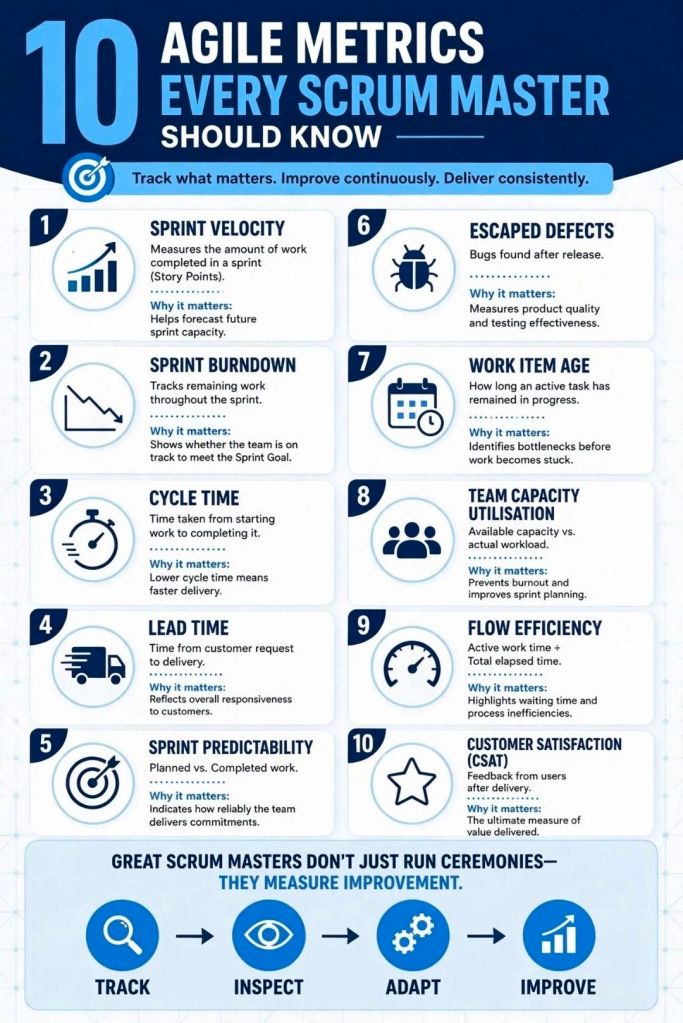
  • Agile Trackers: Templates for burn-down/burn-up metrics and resource allocation logs.

MS Project MPP (.mpp) template examples for download

IT Project Management toolkits feature over 200 tailored, editable Microsoft Office templates

The IT Project Management (PM) toolkits created by Mark Whitfield feature over 200 tailored, editable Microsoft Office templates designed to structure, track, and report on software delivery lifecycles (SDLC), bridging Agile sprint execution and structured governance frameworks like PRINCE2 and Waterfall.

Project Management toolkits feature over 200 tailored, editable MS Office templates
MS Excel Project & Budget Tracker Example

Below is the structured breakdown of the primary templates categorized by their project purpose, function, and file format.


📅 Project Planning & Scheduling

  • Category: Project Planning | Templates: Detailed SDLC Project Plan (.mpp/.xlsx) & Plan on a Page (POaP) (.pptx/.xlsx) | Description: These tools cover stage-gate structures, resource scheduling, and visual executive updates for software projects.

⚠️ Risk, Governance & Tracking

  • Category: Risk & Issue Management | Template: Comprehensive RAIDs Log (.xlsx) | Description: A multi-tab workbook to track Risks, Actions, Issues, Opportunities, Dependencies, and Lessons Learned.
  • Category: Governance | Templates: RACI Tracker & Change Request Log (.xlsx) | Description: Tools to define roles/responsibilities and manage project scope modifications.

💰 Financial & Resource Management

  • Category: Project Finances | Template: Project Financial Tracker (.xlsx) | Description: Monitors forecasted vs. actual costs, variances, and expenses.
  • Category: Resource Management | Template: Resource & Leave Tracker (.xlsx) | Description: Tracks team availability, capacity, and absences.

🏃 Agile Delivery

  • Category: Agile Scrum | Templates: Burn Down/Up Charts & Story Dependency Tracker (.xlsx) | Description: Provides metric-driven velocity tracking and dependency mapping between stories or external suppliers.

📊 Communications & Stakeholders

  • Category: Stakeholder Management | Template: Stakeholder Analysis Plan (.xlsx) | Description: Maps influence vs. impact to plan communication needs.
  • Category: Project Communications | Templates: Status Report & Kick-Off Deck (.docx/.pptx) | Description: Standardized templates for project updates and project launches.

IT PM toolkits feature over 200 tailored, editable Microsoft Office templates

Project Management Templates to be tailored as required with FREE upgrades

Mark Whitfield’s PM template library features over 200 editable project management and PMO templates. These templates span the entire project lifecycle and are categorized by focus area and framework (e.g., Agile, Waterfall, PRINCE2).

Project Management Templates to be tailored as required with FREE upgrades
Many POaP templates to
be tailored as required

The resources are formatted natively for the Microsoft Office suite, allowing them to be opened on all devices, including desktops, tablets, and smartphones.

The templates are divided into specific categories based on the standard project delivery phases:

📁 Core Template Categories

  • Planning & Execution:
    • Detailed MS Project schedules
    • Excel and PowerPoint Plan on a Page (POaP) examples (over 35 slide examples) to save time constructing from scratch
    • SDLC (Software Development Life-cycle) plans
  • Tracking & Control:
    • Weekly and monthly Status Reports
    • Meeting Minutes
  • Governance & Team Management:
    • Project Organization charts
    • RACI trackers (Responsible, Accountable, Consulted, Informed)
    • Stakeholder Analysis (influence vs. impact)
    • Team onboarding kits and quizzes

📂 Specialized & Framework-Specific Templates

  • Risk & Issue Management: Comprehensive RAIDs log (Risk, Action, Issue, Opportunity, Lessons Learned, Dependencies) with built-in summary charts.
  • Financials: Project Financial Trackers for internal/external costs, forecasting vs. actuals, margin/variation, and expenses.
  • Agile Frameworks: Agile Story Dependency tracking, Burn Down & Burn Up charts, and Sprint tracking guides.
Project Management MS Excel XLS Agile Scrum Sprint Burn Down and Up Templates to be tailored as required with FREE upgrades
MS Excel XLS Agile Sprint Burn
Down and Up Chart Examples

💻 File Formats

All templates are fully editable, and the package provides the following file formats for universal compatibility:

  • Microsoft Word (.docx): Used for walkthrough guides, governance documentation, and standard project status reports.
  • Microsoft Excel (.xlsx): Utilized for task trackers, financial dashboards, RAID logs, and non-MS Project Gantt charts.
  • Microsoft PowerPoint (.pptx): Used for Kick-Off decks, team hierarchy charts, and visual POaP (Plan on a Page) slides.
  • Microsoft Project (.mpp): Detailed work breakdown structure (WBS) and scheduling files for traditional and Agile-hybrid projects.
Project Management MPP Project Templates to be tailored as required with FREE upgrades
MS Project MPP file templates
to be tailored as required

You can download or purchase the complete inventory of these editable files at the Mark Whitfield PROject Templates Store (or via the Etsy Storefront if you prefer that platform). Once purchased, you are also entitled to free lifetime upgrades and additions.

Project Management Templates to be tailored as required with FREE upgrades

Why an Organisation Needs a PMO, Project Management Office

Why an Organisation Needs a PMO, Project Management Office
Why an Organisation Needs a PMO,
Project Management Office

An organisation needs a Project Management Office (PMO) to act as the strategic backbone that standardises processes, minimises operational risks, and directly aligns day-to-day project execution with long-term business goals.

Research by the Project Management Institute (PMI) highlights that 80% of high-performing organisations have established PMOs. Furthermore, companies utilizing a PMO deliver initiatives up to 2.5 times faster and waste 38% less budget compared to those operating without one.

1. Strategic Alignment & Portfolio Prioritisation

  • Goal connection: PMOs act as a filter, continuously checking that all active projects serve the corporate strategy.
  • Value redirection: The office can proactively recommend pausing or canceling redundant projects, redirecting resources to high-value initiatives.
  • Intake governance: They design a structured framework for project intake to stop random, impulsive investments.

2. Standardisation & Quality Assurance

  • Unified framework: PMOs replace chaotic “every-team-for-itself” habits with shared templates, common metrics, and standard delivery methodologies.
  • Repetitive economy: Creating consistent guidelines allows multi-project execution to become a predictable machine, reducing human error.
  • Performance baselines: Standardised metrics give leadership an objective rubric to compare project health across entirely different business units.

3. Resource Optimisation

  • Bottleneck reduction: Centralised control prevents staff from being unsustainably double-booked across competing silo projects.
  • Capacity visibility: Real-time capacity mapping lets the executive suite understand exactly who is available before approving future workloads.
  • Skills leverage: PMOs actively track internal talents, allowing organisations to pivot specialized professionals to high-priority issues quickly.

4. Data-Driven Governance & Risk Management

  • Executive transparency: PMOs deliver aggregated status dashboards (like “Stop Light” reporting) to keep stakeholders clearly informed without digging through minor details.
  • Early risk mitigation: Using institutional tools like RAID logs, they catch budget variances and deadline slips before they cascade out of control.
  • Compliance protection: They ensure strict adherence to industry regulations, corporate ethics, and legal benchmarks to safeguard the firm from penalties.

5. Knowledge Management & Continuity

  • Lessons learned: The PMO retains historical metrics, helping project teams build realistic, accurate cost and timeframe estimates on subsequent iterations.
  • Mentorship hubs: They provide ongoing skills coaching and workshops to organically raise the project management maturity level across the company.

Over 200 editable templates tailored for Agile Scrum, Waterfall, and PRINCE2 frameworks

Mark Whitfield’s premium project management toolkit consists of over 200 editable templates tailored for Agile Scrum, Waterfall, and PRINCE2 frameworks. Built across 30+ years of digital and IT delivery, these frameworks prioritize corporate governance, seamless stakeholder reporting, and visual lifecycle control.

Example of many plan on a page poap ppt templates
Many POAP, Plan on a Page example templates

Below is the comprehensive, scannable breakdown of the core artifacts categorized by lifecycle focus, purpose, and application format. Purchase project templates here.


📅 1. Master Planning & Visual Roadmapping

These tools serve as the operational foundation for tracking dependencies, defining Work Breakdown Structures (WBS), and establishing executive visibility.

  • Detailed Software Development Life-Cycle (SDLC) Plan
    • Focus: End-to-end task tracking from inception and elaboration to construction, testing, and transition.
    • Format: Microsoft Project (.mpp) & Microsoft Excel (.xlsx).
    • Source Page: Mark Whitfield PMO Toolkit
  • PRINCE2 7th Edition Master Project Plan
    • Focus: Standardized governance processes structured according to the latest PRINCE2 methodology.
    • Format: Microsoft Project (.mpp) & Microsoft Excel Gantt Tracker.
    • Source Page: Mark Whitfield PRINCE2 Master Walkthrough
  • Plan on a Page (POaP) Blueprint
    • Focus: High-level, timeline-focused visual summaries mapping deliverables and milestones to client monthly views.
    • Format: Microsoft PowerPoint (.pptx, 30+ layout variations) & MS Excel.
    • Source Page: Mark Whitfield POaP Templates
Example MS Excel Project Plan template

🛡️ 2. Risk, Governance & Operational Control

These registers form the “engine room” of project health management, shifting risk mitigation from reactive to predictive.

  • Comprehensive RAID Log & Tracker
    • Focus: Integrated visibility over Risks, Actions, Issues, and Dependencies, alongside change requests and supplier impacts.
    • Format: Microsoft Excel (.xlsx featuring self-populating chart dashboards).
    • Source Page: Mark Whitfield Operational Tracking Tools
  • Agile Story Dependency Tracker
  • RACI Matrix
    • Focus: Mapping roles and responsibilities across project deliverables (Responsible, Accountable, Consulted, Informed).
    • Format: Microsoft Excel (.xlsx).
    • Source Page: Mark Whitfield Folder Structure & Guide
Example MS Excel RACI matrix template

📊 3. Performance reporting & Stakeholder Engagement

Designed to eliminate subjective performance analysis and maintain executive-level clarity.

  • Weekly / Monthly Project Status Report
    • Focus: Summarizing target completion, look-aheads, RAG indicators, and critical decisions for clients.
    • Format: Microsoft Word (.doc) & Microsoft PowerPoint (.pptx).
    • Source Page: Mark Whitfield Premium Delivery Page
  • Stakeholder Analysis & Influence Matrix
    • Focus: Mapping stakeholder influence versus organizational impact to tailor communication (Involve, Inform, Consult, Monitor).
    • Format: Microsoft Excel (.xlsx).
    • Source Page: Mark Whitfield Folder Structure & Guide
  • Project / Programme Kick-Off Deck
    • Focus: Initial team mobilization, workspace onboarding, and client approach alignment.
    • Format: Microsoft PowerPoint (.pptx).
    • Source Page: Mark Whitfield Main Purchase Index
Example PPT slide for Org. Structure

💰 4. Financial Trackers & Value Realization

These artifacts manage fiscal discipline, pricing bids, and mapping long-term outputs to business outcomes.

  • Full Project Financial Tracker
    • Focus: Internal/external cost variance, forecasting models, contractor day rates, margin tracking, and expense visibility.
    • Format: Microsoft Excel (.xlsx with embedded financial trend charts).
    • Source Page: Mark Whitfield Premium Delivery Page
  • Statement of Work (SOW) Templates
    • Focus: Work order structuring and delivery guardrails for both commercial Waterfall and Agile contracts.
    • Format: Microsoft Word (.doc).
    • Source Page: Mark Whitfield Operational Tracking Tools
  • Benefits Realization Analysis Tracker
    • Focus: Comparing projected baseline targets with actual organizational outcomes post-deployment.
    • Format: Microsoft Excel (.xlsx).
    • Source Page: Mark Whitfield Premium Delivery Page
Example Excel Project Financial Tracker

🏃 5. Agile Delivery Tools

Alternative visual logs created for environments where dedicated software like Jira or Azure DevOps is unavailable.

  • Agile Burn Down & Burn Up Charts
    • Focus: Visualizing sprint velocity, work remaining, and scope creep across iterative delivery cycles.
    • Format: Microsoft Excel (.xlsx with automatic mathematical plotting).
    • Source Page: Mark Whitfield Folder Structure & Guide
  • MS Teams Planner & To-Do Guide
    • Focus: Step-by-step framework configuration for running Kanban-style card streams in the cloud.
    • Format: Microsoft Word Walkthrough (.docx).
    • Source Page: Mark Whitfield Master Index
Example Agile Scrum Burn Up Chart
Example Agile Scrum Burn Down Chart