Issuing vs Acquiring Banks for Card Payments

Issuing vs Acquiring Banks for Card Payments

Proper Contingency Planning

Proper Contingency Planning

European BASE24 User Group (EBUG) dedicated to the BASE24 payment processing system

The European BASE24 User Group (EBUG) was a prominent, community-led organization dedicated to the BASE24 payment processing system. It served as a vital hub for financial institutions and vendors to exchange technical knowledge, discuss platform migrations, and influence the development of ACI Worldwide products. 

Group Overview

  • Primary Purpose: EBUG facilitated networking and technical collaboration among users of the BASE24 ecosystem, including the BASE24 Classic and BASE24-eps platforms.
  • Evolution of Scope: While it began with a strict focus on BASE24, it eventually expanded to include other ACI products like Postilion.
  • Independence: The group shifted from being an ACI-sponsored event to a supplier-agnostic forum known as “The Payments Knowledge Forum” after ACI ended its direct involvement.
  • Legacy Transformation: In its later years, it was affectionately referred to as the “Everybody Belongs User’s Group”, reflecting its inclusive stance as “The Independent Group for All Payments System Users”. 

Detailed Timeline

The history of EBUG is marked by its annual conferences held in major European cities and its eventual transition to an independent entity: 

  • 1980s: EBUG is established as a regional group for the growing BASE24 community in Europe.
  • Early 2000s: EBUG events gain prestige, featuring technical tracks on HPE NonStop transaction monitoring and payment security.
  • 2006–2008: High-profile meetings held in cities such as Istanbul (2007) and Vienna (2008). The 2008 Vienna event was notable for discussing ACI’s strategic shift toward IBM platforms.
  • 2009: The conference takes place in Prague, continuing strong support for BASE24 on NonStop despite broader industry shifts.
  • 2012: The Technical Focus Group (TFG) is held in London at Trinity House. This marks a turning point as the event moved off ACI’s premises, signaling a shift in sponsorship dynamics.
  • 2013: EBUG holds a major forum in Westminster, London, at the Institution of Civil Engineers. By this time, it is officially rebranding toward the broader “Payments Knowledge Forum”.
  • 2015: EBUG fully transitions into the Payments Knowledge Forum, an annual gathering in London that continues the 30-year legacy as an independent, supplier-agnostic body.

……….

The Payments Knowledge Forum (PKF) is an independent, user-led resource dedicated to the exchange of information regarding payment systems. It operates without vendor affiliation, bringing together financial institutions, retailers, processors, and consultants to share practical expertise and shape the future of payment activities. 

Overview of the Payments Knowledge Forum

  • Purpose: PKF serves as a collaborative hub for payment system users to discuss industry challenges, regulatory changes, and technical innovations.
  • Composition: The forum is open to a wide range of industry stakeholders, including:
    • Financial Institutions: Banks and building societies.
    • Retailers: Businesses focusing on consumer point-of-sale and e-commerce.
    • Payments Processors: Entities managing the technical execution of transactions.
    • Consultants: Experts providing strategic and technical guidance.
  • Governance: It is uniquely “run by users for the benefit of users,” ensuring that the information shared is neutral and prioritises the operational needs of the participants over commercial vendor interests.
  • Activities: PKF hosts regular events and an annual conference to address evolving topics such as ISO 20022 migration, central bank digital currencies (CBDC), and security frameworks like PSD2.

Detailed Timeline of Major Payment Milestones

The following timeline tracks critical industry milestones often discussed and addressed within the forum’s scope:

  • 2015: The Payments Strategy Forum was established by the UK Payment Systems Regulator (PSR) to create a long-term roadmap for UK payments.
  • November 2016: Publication of the “Payments Strategy for the 21st Century,” introducing concepts like Request to Pay and enhanced data standards.
  • March 2018: Regulatory Technical Standards (RTS) for PSD2 were published, initiating the transition to Strong Customer Authentication (SCA).
  • November 2018: Launch of TARGET Instant Payment Settlement (TIPS), enabling real-time fund transfers across Europe.
  • September 2019: Full implementation of PSD2 security measures, including the requirement for standardised API interfaces for third-party access.
  • 2020–2024: Acceleration of digital payment adoption following the COVID-19 pandemic, with a notable decline in cash usage at points of sale.
  • October 2021: The Financial Stability Board (FSB) published global targets for cost, speed, and transparency in cross-border payments.
  • February 2024: Swedish krona successfully onboarded to the TIPS platform.
  • April 2025: Danish kroner scheduled for onboarding to the TIPS system.
  • September 2025: Publication of the Digital Euro innovation platform outcome report, detailing findings for future development.
  • April 2026: Review of the Senior Managers and Certification Regime (SM&CR) to enhance accountability in financial services.
  • June 2026: Deadline for firms to demonstrate credible timetables for addressing climate-related financial risks.
  • 2026 (Targeted): Anticipated go-live dates for enhanced access to the CHAPS high-value payment system.

Annual Conference & Resources

The PKF holds an annual conference that serves as its primary knowledge-sharing event.

  • Recent/Upcoming: The 2026 Conference continues the forum’s tradition of deep-diving into operational resilience and the digital transformation of finance.
  • Direct Access: For the latest news and detailed membership information, visit the The Payments Knowledge Forum Official Site. 

……….

Some HPE NonStop BASE24 related User groups on LinkedIn :

BASE24 BASE24-eps User Group Forum | HP NonStop Tandem NSK IBM SUN Windows – News Events Discussion
https://www.linkedin.com/groups/51296/

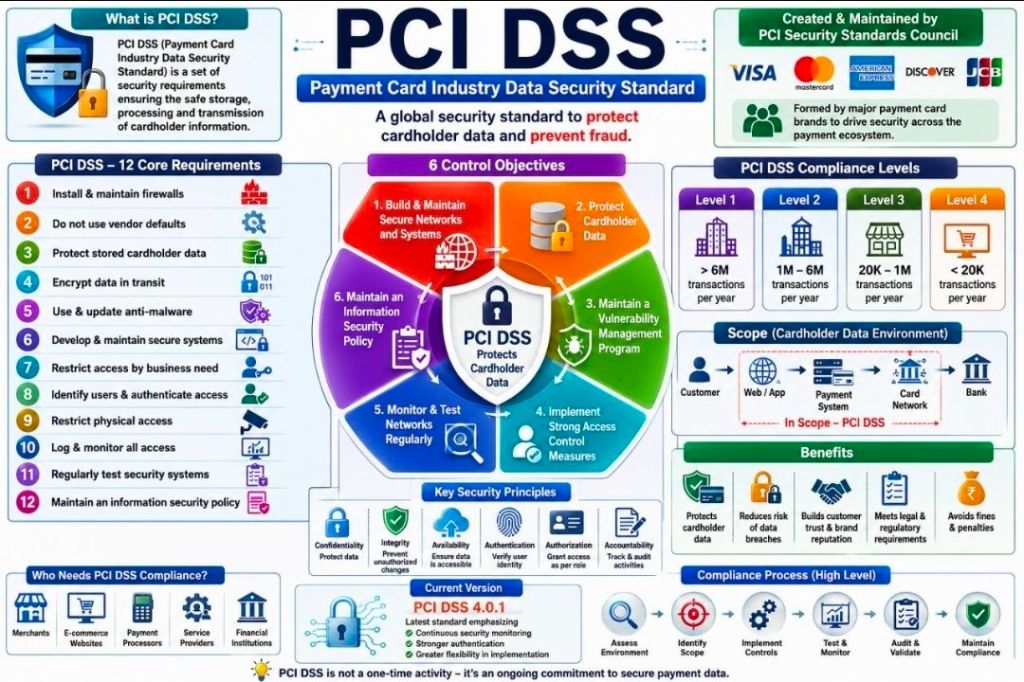
PCI DSS Compliant Payments Transactions Compliance Monitoring Alerting Querying Archiving Reporting
https://www.linkedin.com/groups/146595/

HPE NonStop Tandem | Guardian OSS Performance Monitoring Management Integrity Blade Itanium ServerNet
https://www.linkedin.com/groups/165816/

BASE24 BASE24-eps – HP NonStop Tandem IBM SUN – Open System Services OSS RealTime – Experts Users
https://www.linkedin.com/groups/150095/

SATUG Southern African HP NonStop Tandem NSK Server User Group – SATUG
https://www.linkedin.com/groups/81881/

Payment Engine Applications Forum | Retail and Wholesale | HP NonStop NSK Tandem SUN IBM Windows
https://www.linkedin.com/groups/80773/

HPE NonStop Tandem NSK OSS Open System Services Monitoring – Users, Experts and Technical Authorities 
https://www.linkedin.com/groups/80740/

Job Batch Scheduling | HP NonStop Tandem Guardian Open System Services OSS Servernet Integrity Blade  
https://www.linkedin.com/groups/78111/

Top 10 Conditional Calculations in Microsoft Excel

Top 10 Conditional Calculations in Microsoft Excel

Project Management Templates bundle with free upgrades

Mark Whitfield’s Project Management templates are a comprehensive, editable suite of over 200 documents designed for Agile, Waterfall, and PRINCE2 methodologies, based on over 30 years of project delivery experience. Available through his website (click banner link above), Etsy, Flevy and Eloquens, these templates are designed to be used across the project lifecycle—from initiation to closure—and include lifetime free updates and additions. 

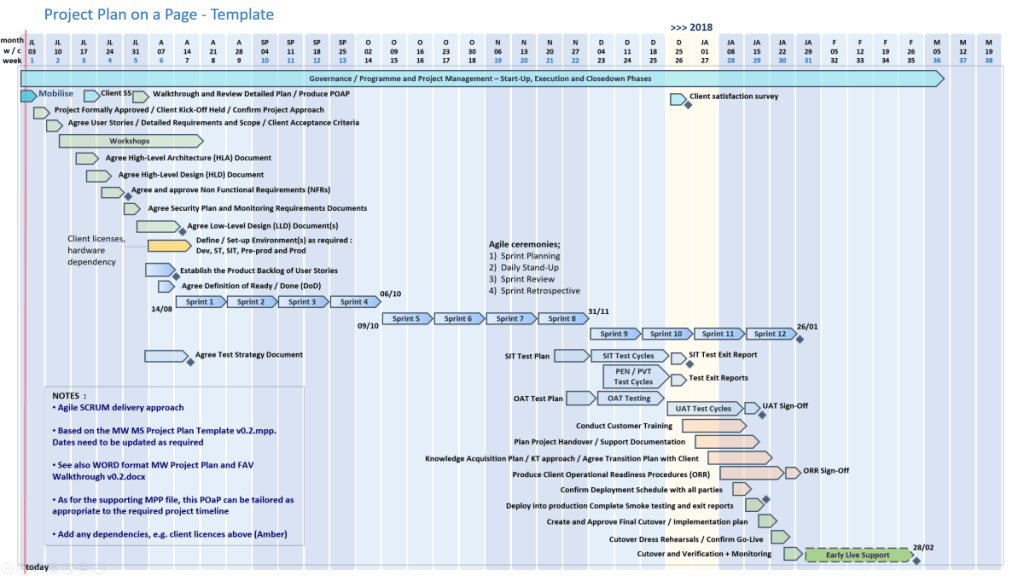
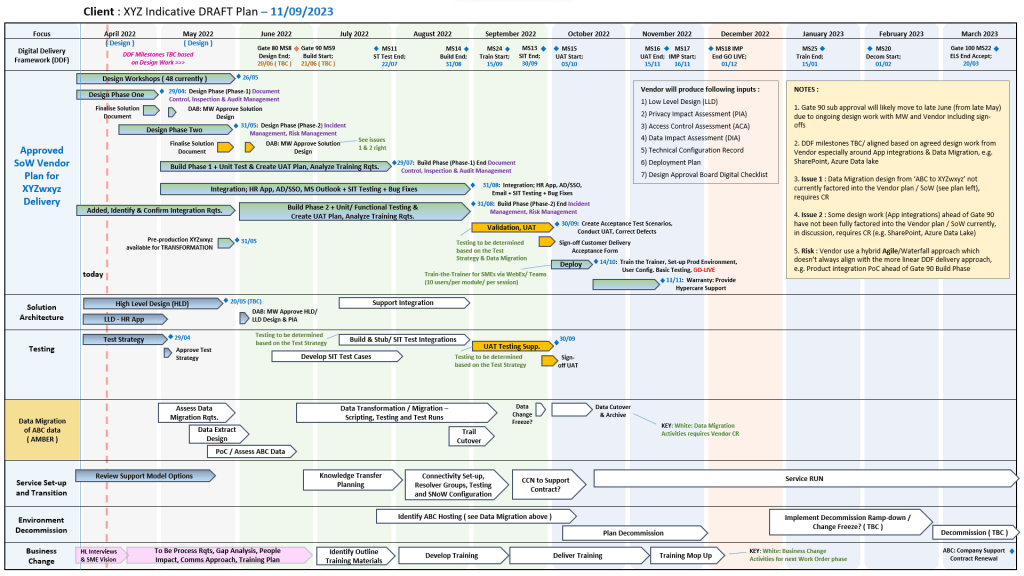
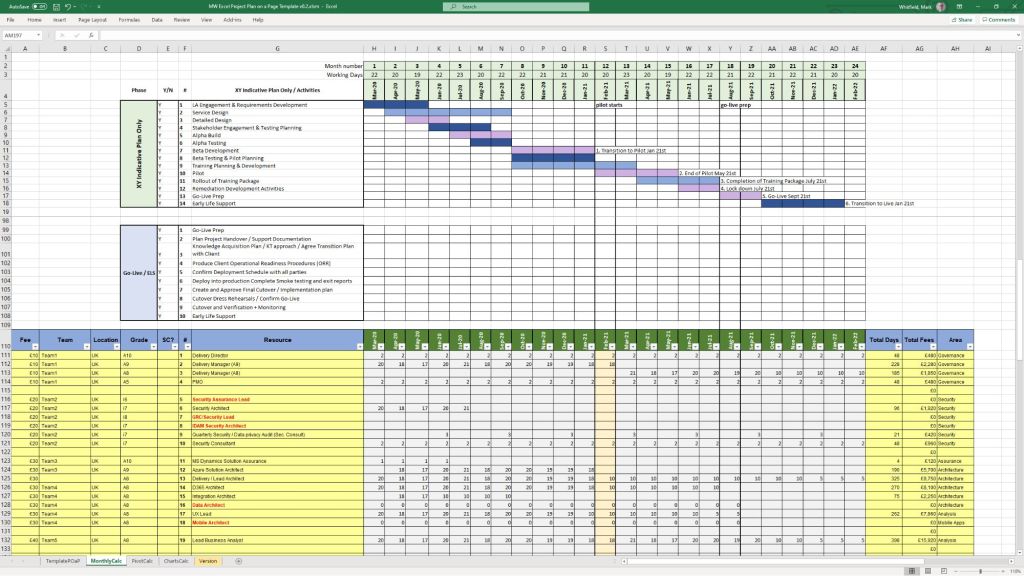
Many POaP Plan On a Page examples

Full Overview of Mark Whitfield Template Bundle

The bundle, priced at around £38.00 (as of April 2026), provides tools for MS Excel, Word, PowerPoint, and MS Project (.mpp). 

1. Planning & Scheduling

  • MS Project (MPP / MSP): Includes full PRINCE2 7th Edition, Agile Scrum, and SDLC (Software Development Life-cycle) plans.
  • Excel Detailed Plans: Includes Gantt chart tracking for users without MS Project.
  • Plan on a Page (POaP): Over 30 PowerPoint examples for executive summaries. 
Example Plan On a Page POaP

2. PRINCE2 & Governance

  • Full set of over 200 documents including Project Initiation Document (PID), Business Case, Work Packages, Risk Management Strategy, and Configuration Item Records.
  • Reporting: Highlight reports, exception reports, and end-stage reports. 
PRINCE2 Delivery Plan in MS Excel Example

3. Tracking & Risk Management

  • RAID Logs: Comprehensive trackers for Risks, Assumptions, Issues, and Dependencies (includes simple and detailed versions).
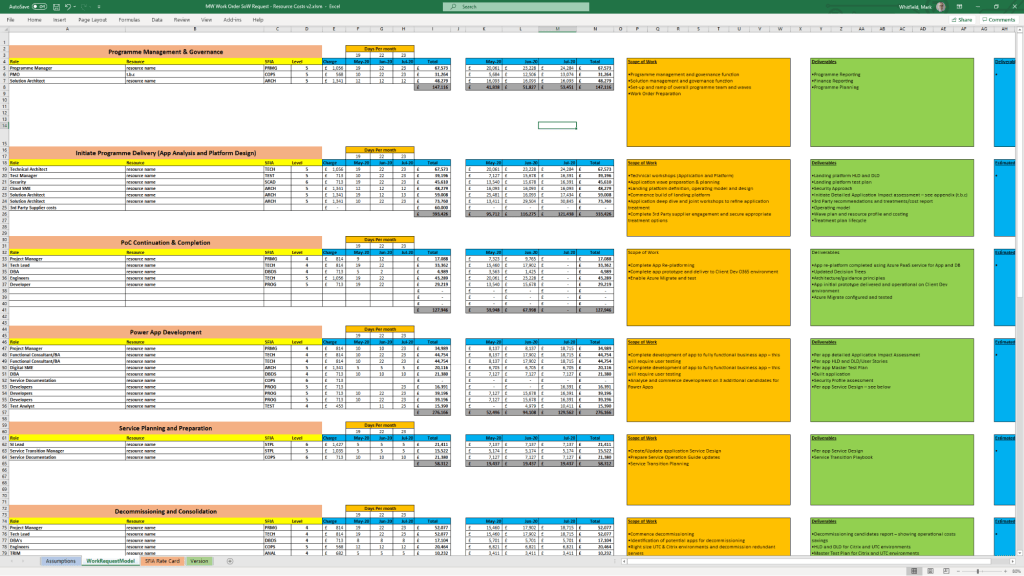
  • Finance Trackers: Simple and full project finance trackers (forecasting, actuals, variance, rate lookups).
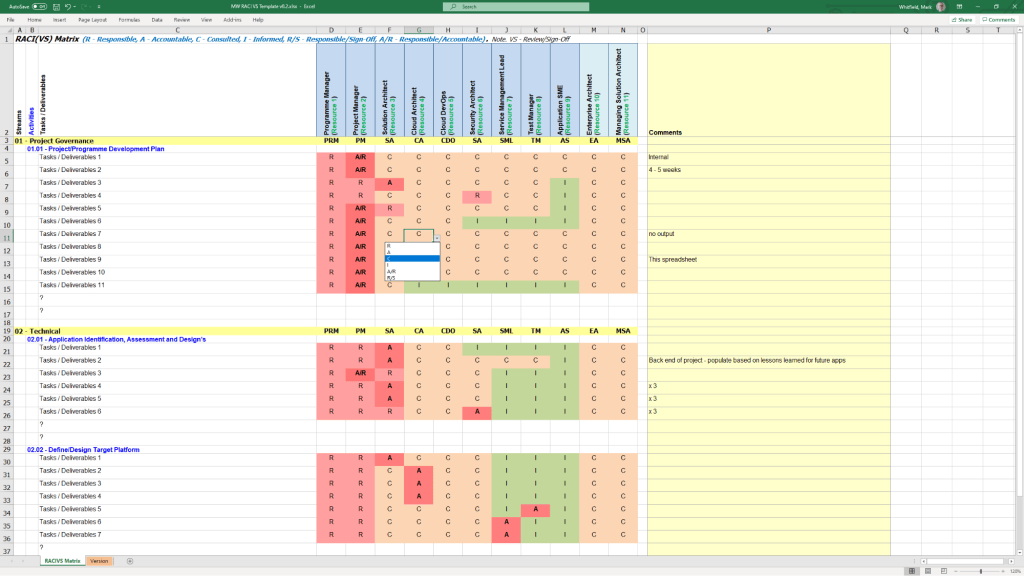
  • RACI Matrix: Resource Responsibility Assignment Matrix. 
Many Project Budget / Financial Tracker examples

4. Execution & Delivery

  • SDLC: Detailed Software Development Life-cycle plans.
  • Deployment/Runbook: Execution and release planning documents.
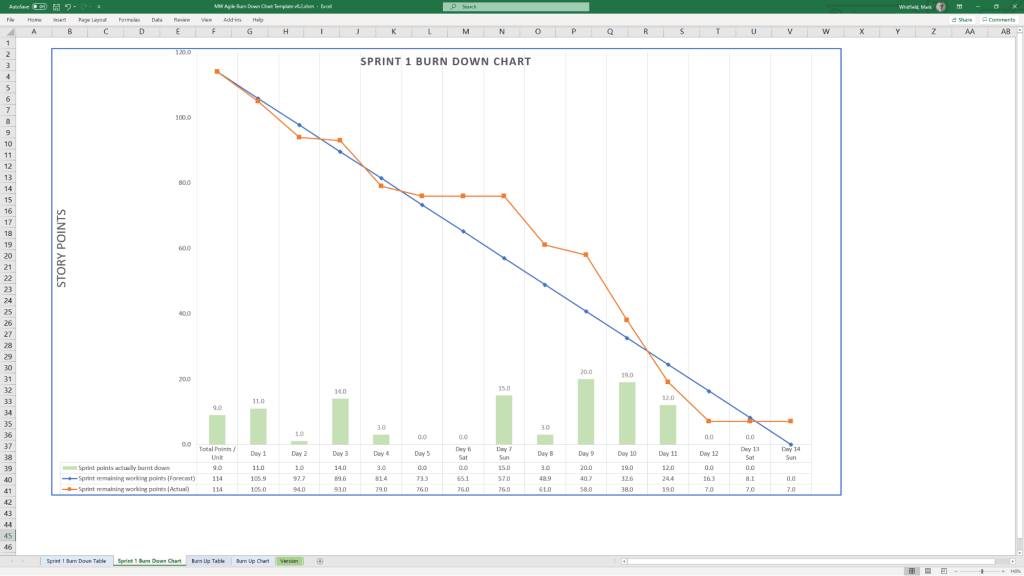
  • Agile: Burn down and burn up charts. 
Example Agile Scrum Burn Down Chart

Detailed Timeline by Project Life Cycle

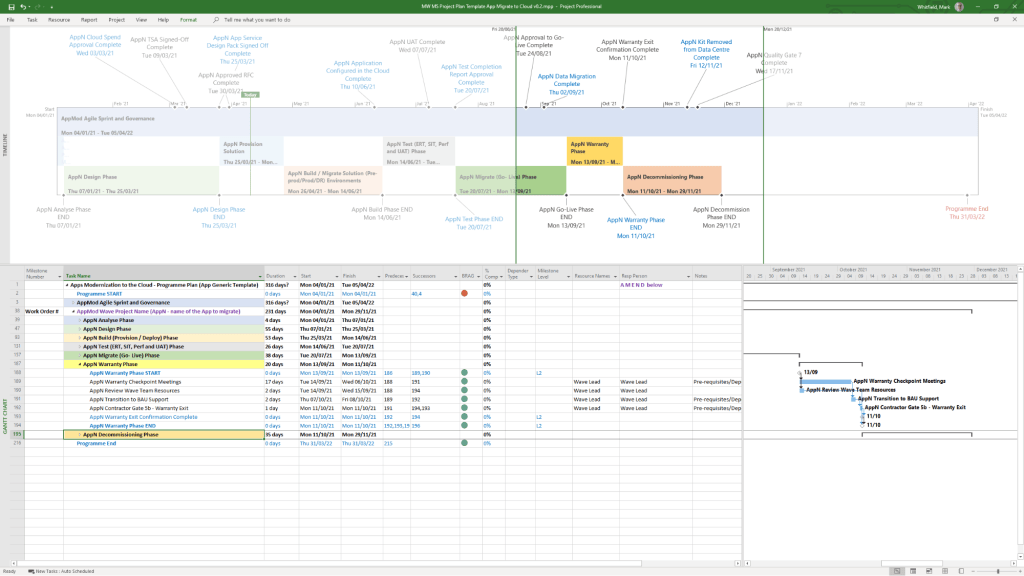
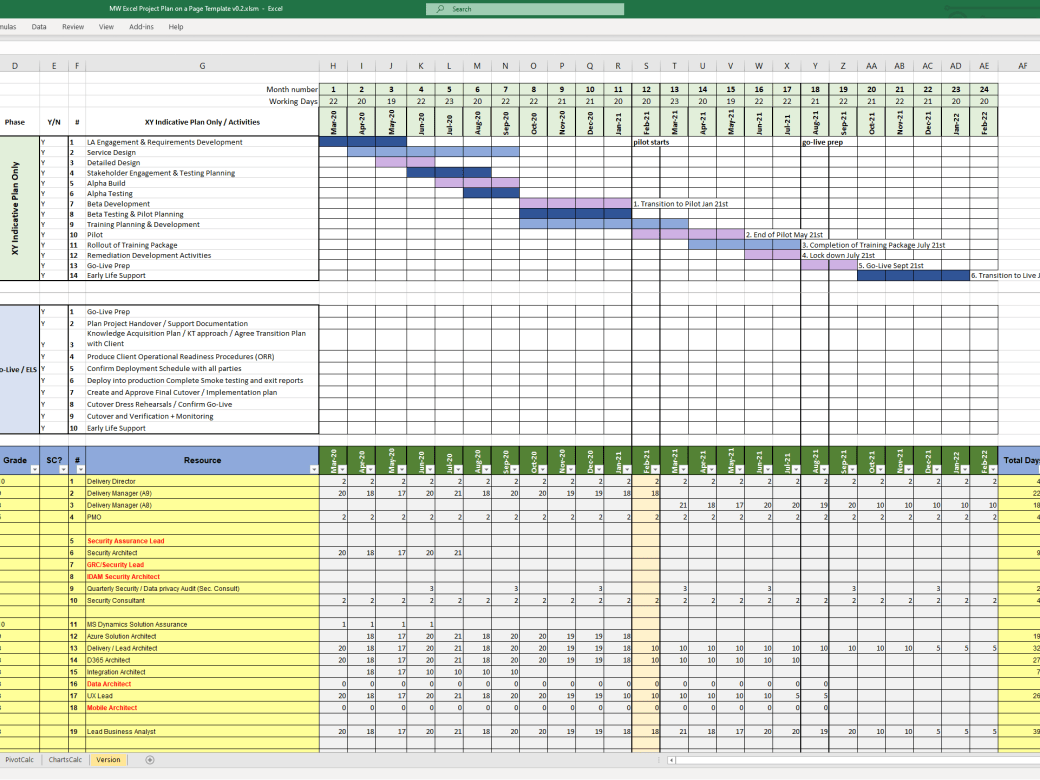
Templates provide detailed MS Project (.mpp) and Excel schedules that map out the standard project life cycle over time. The plans include notes and color-coded tasks (black: standard task, blue: artifact creation, brown: decision/event, purple: artifact update). 

Example MS Excel Delivery Plan

1. Project Startup / Initiation Phase 

  • Tasks: Project Mandate, Project Brief preparation, Appoint Project Board, Define Project Approach.
  • Key Templates: Project Brief, PID, Business Case, Project Board Structure. 

2. Planning Phase

  • Tasks: Develop the PID, Create Detailed Gantt Plans, Create Budgeting/RAID Logs, Setup Communication Strategies.
  • Key Templates: Detailed MS Project Plans (Waterfall/Agile), RACI Tracker, RAID Log. 

3. Project Execution / Control Phase

  • Tasks: Weekly Status Reporting, Risk Management, Managing Product Delivery, Stage Assessments.
  • Key Templates: Highlight Report, Issue Register, Daily Log, Financial Tracker. 

4. Project Close Phase

  • Tasks: Handover, Project Evaluation, Lessons Learned, Finalize Costs, Close Project.
  • Key Templates: End Project Report, Lessons Log, Benefits Realization Plan. 

Summary of Key Features

  • Fully Editable: Designed to be tailored to specific project needs (PRINCE2 Principle 7).
  • Access: Compatible with Desktop, Tablet, Smartphone, and Cloud (Microsoft Teams/SharePoint).
  • Support: Free lifetime upgrades (and additions) to the latest template package after purchase. 
  • Click on link in website banner above to purchase full templates bundle

Project Management Templates bundle with free upgrades.

sp/ARCHITECT electroinic banking by The Software Partnership TSP

sp/ARCHITECT was a pioneering electronic banking and funds-transfer software suite originally developed by the Runcorn-based firm The Software Partnership (TSP). Following its acquisition by the American firm Deluxe Electronic Payment Systems in 1994, the Runcorn office became the European hub for what was then rebranded as Deluxe Data

sp/ARCHITECT electroinic banking by The Software Partnership TSP

Overview

The Runcorn operation specialised in high-availability, mission-critical banking software, specifically the sp/ARCHITECT-BANK product. This software was designed to run on Tandem Computers (now HPE NonStop), which were known for their fault-tolerant architecture. The “sp/ARCHITECT” platform was highly valued for its client-server design, allowing it to be adapted for various hardware brands, including Unix-based systems. 

Historical Timeline

  • Mid-1980sThe Software Partnership (TSP) is co-founded by Nigel Walsh. The company starts developing online banking systems in Timperley before moving to Runcorn.
  • 1990: The firm establishes itself at Norton House in Crowngate, Runcorn, focusing on electronic banking software for major clients like TSB and Bank of Scotland.
  • 1992: The Runcorn office relocates to Wingate House on Northway.
  • 1994Deluxe Electronic Payment Systems (a subsidiary of Deluxe Corporation) acquires The Software Partnership for an undisclosed sum. The acquisition is aimed at helping Deluxe expand its global presence and accelerate the use of the sp/ARCHITECT suite.
  • 1994–1995: The Runcorn office operates as Deluxe Data, providing software design, coding, and 24-hour support for international clients including Rabobank.
  • 2000: Following a series of corporate shifts, the company name changes to EFD eFunds.
  • 2007: By this year, the operation has transitioned to Fidelity National Information Services (FIS) and is based in Aegon House, Daresbury, Warrington. 

sp/ARCHITECT electroinic banking by The Software Partnership TSP

C-Deep for Transaction Monitoring & Sentinel for HPE NonStop Monitoring

The Insider RTLX product at ETI-NET is now called C-Deep for Transaction Monitoring;

The Insider Reflex product at ETI-NET is now called Sentinel for NonStop Monitoring;

C-Deep for Transaction Monitoring & Sentinel for HPE NonStop Monitoring

Free Upgrade Project Management Templates Download by focus area

Mark Whitfield provides a comprehensive suite of over 200 editable project management templates designed for both Agile and Waterfall delivery. These tools are built based on 21+ years of IT project delivery experience and are formatted for Microsoft Office (Excel, Word, PowerPoint) and Microsoft Project (MPP).


Core Planning & Tracking Templates

  • Detailed Project Plans: Comprehensive MPP and Excel files covering the full Software Development Life-cycle (SDLC), including Waterfall and Agile Scrum sprints.
  • Plan on a Page (POaP): High-level visual summaries in PowerPoint or Excel for client reporting and executive snapshots.
  • RAID Log: A central tracker for Risks, Actions, Issues, and Dependencies, often including tabs for Decisions, Opportunities, and Lessons Learned.
  • RACI Matrix: A tracker to define roles and responsibilities (Responsible, Accountable, Consulted, Informed). 

Financial & Resource Management

  • Project Finance Tracker: Tools for managing project budgets, including forecasts vs. actuals, margin analysis, and variation tracking.
  • Resource Planning: Grid templates for costing project resources per phase and tracking team allocations.
  • Benefits Realisation: A spreadsheet to compare initial project goals against actual business outcomes and costs. 

Reporting & Communication

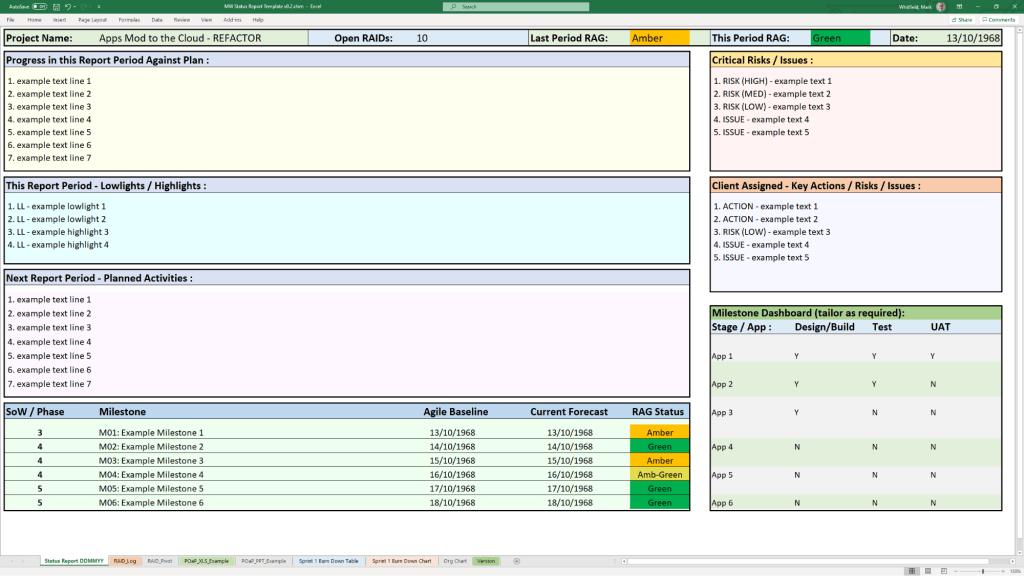
  • Status Reports: Weekly and monthly templates in Word and PowerPoint that include milestone dashboards, project health indicators, and “next steps”.
  • Organisation Charts: Templates for visualising the project hierarchy and stakeholder contacts.
  • Agile Dashboards: Excel-based Burn Down and Burn Up charts for teams that do not have access to tools like Jira. 

Methodology Support

  • PRINCE2 7th Edition: Specific MPP and Excel templates aligned with the latest PRINCE2 standards.
  • Agile Frameworks: Templates for Sprint Planning, Daily Stand-ups, and Sprint Retrospectives. 

These templates are available for purchase on Mark Whitfield’s official site and typically include free lifetime upgrades. 

Free Upgrade Project Management Templates Download by focus area

Mark Whitfield HP NonStop Tandem experience & Project Management Templates

Mark Whitfield is an experienced IT Project Manager and software developer who has spent over 22 years specialising in HP NonStop (formerly Tandem) systems. He is currently an Engagement Project Manager at Capgemini

Career & Expertise

Whitfield’s career in HP NonStop began in 1990 and includes significant technical and leadership roles across the financial and technology sectors: 

  • Software Development: Early in his career, he worked as a programmer for The Software Partnership (later Deluxe Data/FIS), focusing on electronic banking software like sp/ARCHITECT on Tandem mainframes.
  • Insider Technologies (1995–2013): He spent 18 years at Insider Technologies as a Senior Development Engineer and Project Manager. His work involved:
    • Developing monitoring and diagnostic software such as Reflex 80:20Reflex ONE24, and RTLX (Real-Time Log Extraction) for payment systems.
    • Managing the first HP OpenView Operations Smart Plug-In certification for the NonStop platform.
    • Designing XPERT24, a performance tracking product for ACI’s XPNET layer.
  • Capgemini (2016–Present): As an Engagement Project Manager, he has led digital projects for major clients in the automotive, government, and aerospace sectors, including a cloud migration for UK Government applications. 

Technical Contributions

  • Publications: He has authored articles for globally published journals like The Connection (2013), discussing topics such as querying terabytes of legacy transaction log data from NonStop mainframes.
  • Project History: He has managed high-value projects, including a £5 million initiative to migrate legacy HP NonStop software to AIX-based technologies for a large UK retail bank.
  • Training: He is trained in various NonStop-specific technologies, including TAL (Transaction Application Language), COBOL85PATHWAY, and NonStop SQL

Whitfield also maintains a professional website, mark-whitfield.com, where he provides project management templates and resources related to HP NonStop and Tandem systems. 

Mark Whitfield provides a comprehensive bundle of over 200 editable project management templates designed for Agile, Waterfall, and PRINCE2 methodologies. These templates are based on over 30 years of project delivery experience and are available for purchase via his official website or Etsy shop. 

Key Template Categories

The bundle includes a wide variety of tools across different formats (Excel, PowerPoint, Word, and MS Project): 

  • Planning & Scheduling:
    • Plan on a Page (POaP): Over 30 PowerPoint slide examples for executive-level summaries.
    • Detailed Project Plans: MS Project (MPP) and Excel templates for SDLC, PRINCE2 7th Edition, and Agile Scrum projects.
    • Gantt Charts: Built-in tracking views for both MS Project and Excel.
  • Tracking & Control:
    • RAID Logs: Comprehensive logs for tracking Risks, Actions, Issues, and Dependencies, plus additional tabs for Change Requests and Lessons Learned.
    • RACI Matrix: Templates to define project roles and responsibilities (Responsible, Accountable, Consulted, Informed).
    • Finance Trackers: Tools for internal and external forecast vs. actual costs, including margin and variance tracking.
  • Agile Specific Tools:
    • Burn Down & Burn Up Charts: Excel-based alternatives when tools like Jira are unavailable.
    • Agile Story Dependency Tracking: Specifically for managing dependencies between agile stories and external suppliers.
  • Reporting & Governance:
    • Status Reports: Weekly and monthly templates in Word and PowerPoint formats.
    • Stakeholder Analysis: Power/interest mapping and engagement plan templates.
    • Benefits Realisation: Plans to track project outcomes against initial business goals. 

Purchase Benefits

  • Lifetime Upgrades: Once purchased, all future additions and updates to the template package are provided for free.
  • Compatibility: Templates are designed for Microsoft Office 365 but also include Excel versions compatible with earlier software.
  • Support: The package typically includes walkthrough Word documents to guide users on how to use each major template.

Mark Whitfield HP NonStop Tandem experience & Project Management Templates

Cost Estimating vs Cost Planning

Cost Estimating vs Cost Planning

In professional project management and construction, cost estimating and cost planning are complementary processes that occur at different stages to ensure a project remains financially viable

1. Cost Estimating: “What will it cost?”

Cost estimating is a technical assessment used to predict the expenditures for a project. 

  • Early Stages: Estimates might be “rough orders of magnitude” based on square footage or historical data (e.g., cost per hotel room).
  • Later Stages: Estimates become precise “tender figures” used by contractors to bid on work, factoring in current market rates for labour and materials.
  • Function: It answers the question: “Is this specific plan affordable?”. 

2. Cost Planning: “How do we stay on budget?”

Cost planning is a strategic framework that manages a project’s financial health from start to finish. 

  • Iterative Process: It is a “living document” that is updated as the project moves from concept to detailed design.
  • Allocation: It breaks down the total budget into “elemental” targets (e.g., spending £X on the foundation and £Y on finishes).
  • Control: If an estimate for one part of the project exceeds its target, the cost plan guides the team to adjust the design or find savings elsewhere to keep the overall project on track. 

Standard Professional Guidance

The Royal Institution of Chartered Surveyors (RICS) provides the New Rules of Measurement (NRM 1), which standardises how these processes work together: 

  1. Order of Cost Estimate: Establishing the initial viability of a project.
  2. Elemental Cost Plan: Breaking the estimate down into functional parts.
  3. Cost Checking: Continually comparing design changes against the cost plan to prevent overspending.
Cost Estimating vs Cost Planning

Budgeting vs Forecasting, Financial Concepts overview

Budgeting vs Forecasting, Financial Concepts overview

Project Management and Cost Control

Project Management and Cost Control

Microsoft Excel Development Timeline History

Microsoft Excel has evolved from a niche Apple Macintosh tool into the world’s most dominant spreadsheet software. Its history is marked by strategic shifts, such as jumping from the MS-DOS era to graphical interfaces to outmanoeuvre then-leader Lotus 1-2-3

Timeline of Major Excel Milestones

Agile Templates available at download link at website banner
  • 1982: Multiplan (The Predecessor) – Microsoft’s first spreadsheet program. While popular on CP/M systems, it struggled against Lotus 1-2-3 on MS-DOS.
  • 1985: Excel 1.0 (Macintosh Exclusive) – Realising they couldn’t beat Lotus on DOS, Microsoft built a graphical spreadsheet for the new Mac. It introduced the ability to adjust cell heights, widths, and fonts.
  • 1987: Excel 2.0 (First Windows Version) – Launched alongside the first Windows environments, it introduced color support (like red for negative numbers) and was significantly faster than competitors.
  • 1990: Excel 3.0 – Added 3D charts, toolbars, and drawing tools, helping Excel finally overtake Lotus 1-2-3 as the market leader.
  • 1993: Excel 5.0 – A major turning point that introduced Visual Basic for Applications (VBA), allowing users to automate tasks with macros.
  • 1997: Excel 8.0 (Office 97) – Introduced the Paperclip Assistant (“Clippy”) and the first version of the modern VBA environment.
  • 2007: Excel 12.0 (The Ribbon Era) – Replaced menus with the Ribbon interface and dramatically increased grid capacity to 1,048,576 rows by 16,384 columns.
  • 2010: Excel 14.0 – Introduced Slicers for PivotTables and Sparklines (mini charts inside cells).
  • 2013-2016: Data Intelligence – Added Power Query, Power Pivot, and new chart types like Waterfall, Pareto, and Treemap to support advanced data modeling.
  • 2019-Present: AI & Cloud Integration – Modern versions focus on seamless collaboration, dynamic arrays (like XLOOKUP), and AI-powered insights that can extract data directly from images. 

Technological Evolution Highlights

MS Excel templates available on bundle download at website banner
  • Architecture: Shifted from 16-bit to 32-bit with Excel 95, greatly improving stability.
  • Collaborative Features: Modern Version History and “Show Changes” now allow teams to track every edit in real-time.
  • Visualisation: Excel now supports complex timelines via SmartArt or custom Scatter charts with error bars for professional project tracking.

Microsoft Excel Development Timeline History

Microsoft Excel templates available at banner above, FREE upgrades

Project Management Templates Bundle FREE Upgrades

Mark Whitfield’s project management templates offer a range of timeline and planning views designed for Agile, Waterfall, and PRINCE2 delivery. These templates typically include a high-level Plan on a Page (POaP) and detailed Microsoft Project (MPP) or Excel schedules. 

Example Plan on a Page POaP

Timeline & Planning Views

  • Plan on a Page (POaP): A high-level summary view (often in PowerPoint or Excel) used to communicate key phases and milestones to stakeholders without the clutter of a full Gantt chart.
  • Detailed Gantt Charts: Provided in both Microsoft Project (MPP) and Excel, these timelines include task dependencies, resource allocations, and critical path tracking.
  • Agile Sprint Timelines: Specialized views for tracking 2–4 week sprints, daily stand-ups, and sprint retrospectives within a broader project framework.
  • SDLC Progression: The templates are often structured around a typical Software Development Life-cycle (SDLC), moving from Inception to Transition and Early Live Support (ELS). 

Key Timeline Components

The templates are pre-configured with several essential timeline elements: 

  1. Project Start & End Dates: Easily adjustable fields that automatically update durations and downstream tasks.
  2. Milestones & Gateways: Visual markers for critical sign-off points and delivery stages.
  3. Task Dependencies: Pre-built links that show how delays in one area (e.g., hardware delivery) impact the overall project finish date.
  4. Resource View: Timelines integrated with resource calendars to account for holidays and leave. 

You can find the full package of over 200 editable templates, which include these timeline views and RAID logs, on Mark Whitfield’s official website or via his Etsy store

Project Management Templates Bundle FREE Upgrades

Earned Value Management EVM EV

Earned Value Management EVM EV

Operating Expenditure OPEX, Capital Expenditure CAPEX, Revenue Expenditure REVEX, Finance Expenditure FINEX

Operating Expenditure OPEX, Capital Expenditure CAPEX, Revenue Expenditure REVEX, Finance Expenditure FINEX

Project Management Templates with FREE Upgrades and Additions

Free Upgrade and Additions – 200+ Project Management & Planning Template Examples:

Contents of ZIP file (purchase templates here):

Gallery of ALL Project Management templates…

(also download the Template Inventory PDF file – 15MB)

Join the FREE PM templates related Facebook Group (LIKE Facebook page) and LinkedIn Group.

Accounting Key Performance Indicators KPIs Overview

Accounting Key Performance Indicators KPIs Overview