Agile: It’s Not a Race

Agile: It’s Not a Race

Agile Scrum Metrics that Drive Team Improvement

Agile Scrum Metrics that Drive Team Improvement

PRINCE2 Agile Outline

PRINCE2 Agile combines the structured governance of PRINCE2 with the flexibility of agile methods (like Scrum and Kanban) to manage projects effectively. It focuses on maintaining control, transparency, and high-quality delivery while empowering teams, making it ideal for fast-paced environments.

Key Aspects of PRINCE2 Agile:

  • Structure + Flexibility: It provides the framework to guide projects, while allowing the use of agile techniques to build the product.
  • Key Focus Areas:
    • The Agilometer: Assesses the level of risk and agility in a project.
    • Requirements: Prioritized to ensure the most valuable features are delivered first.
    • Rich Communication: Emphasizes face-to-face interaction and team rooms.
    • Frequent Releases: Ensures regular delivery and feedback loops.
  • Tailored Governance: Allows projects to remain aligned with organizational goals while keeping the flexibility needed for innovation.
  • Compatibility: Works well with various agile methods including Scrum, Kanban, and Lean Startup.

Main Benefits:

  • Increased Flexibility: Enables faster adaptation to changes and new information.
  • Improved Quality: Focuses on delivering high-quality products that meet client needs.
  • Enhanced Control: Provides necessary governance for project success.

When to Use:

  • Projects requiring both structure and high responsiveness.
  • Teams using Agile techniques who need to satisfy governing bodies.
  • Situations demanding regular, iterative delivery of results.

For more in-depth knowledge, consider exploring the PRINCE2 Agile Wiki and Good e-Learning articles.

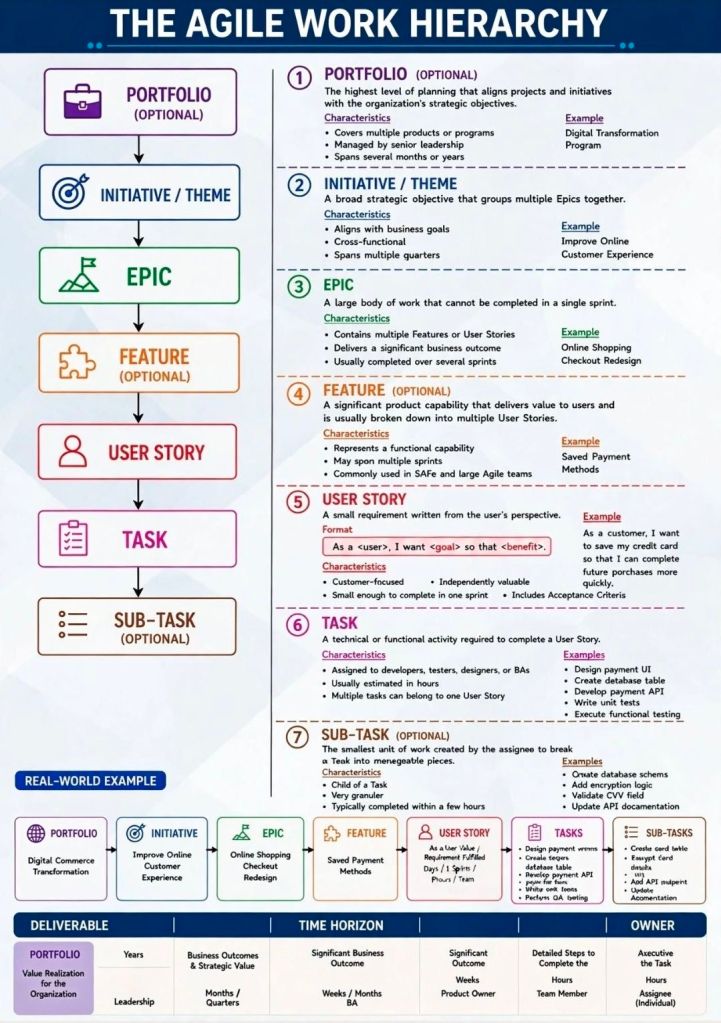
Comparing Agile Work Units; Epic, User Story & Task

Comparing Agile Work Units; Epic, User Story & Task

Agile User Story Creation for Scrum Masters; clarity, value and readiness

Agile User Story Creation for Scrum Masters; clarity, value and readiness

Waterfall vs Agile Methodology, Pros & Cons

Waterfall vs Agile Methodology, Pros & Cons
Agile vs Waterfall
Agile vs Waterfall

Mark Whitfield IT Project Manager, Brief Summary

Mark Whitfield is a highly experienced, SC-cleared Senior Project Manager and IT professional with over 31 years of experience in both public and private sectors, specializing in software development, cloud migration, and IT systems delivery.

He is currently associated with Capgemini (since 2016) and runs a project management resource website, PROject Templates.

Joined Capgemini in 2016 having worked at ascending points in software development lifecycle projects for over 31 years

Key Qualifications & Experience:

  • Roles: Senior Project Manager, Engagement Project Manager, Delivery Manager, and former programmer.
  • Methodologies: PRINCE2 Practitioner, skilled in both Waterfall and Agile (SCRUM) approaches.
  • Sector Experience: Extensive experience in finance and banking, including ATM software swap-outs, cloud migration (Azure, AWS, Power Platform), and POS monitoring systems.
  • Background: Graduated in Computing in 1990; worked as a developer (COBOL, SQL, Tandem / HPE NonStop) before transitioning to project management.
PRINCE2 Practitioner, skilled in both Waterfall and Agile (SCRUM) approaches

Professional Highlights:

  • Delivered major projects for clients such as Barclays, Bank of England, HSBC, Royal Mail Group, UK & Welsh Government, Heathrow, and Jaguar Land Rover.
  • Led complex IT infrastructure projects and business transformations.
  • Maintains mark-whitfield.com, offering over 200 project management templates, trackers (RAID, budget, benefit, cost etc.), and many plans for Agile / Waterfall projects including 30+ Plan On a Page (POaP) and MS Project MPP examples (click on Blog above for a summary).
  • Provides specialized templates for PRINCE2 7th edition and MS Project (MPP).
December 2022 – C&CA UK’s Communications & Engagement Award Winner – Cloud & Custom Applications – Capgemini UK
November 2017 – Advanced Engagement Management Course – Level 2 Exam
June 1990 – Higher National Diploma in Computer Studies (DISTINCTION – overall top) – BIHE
June 1990 – Higher National Diploma in Computer Studies, Distinction

Read more…

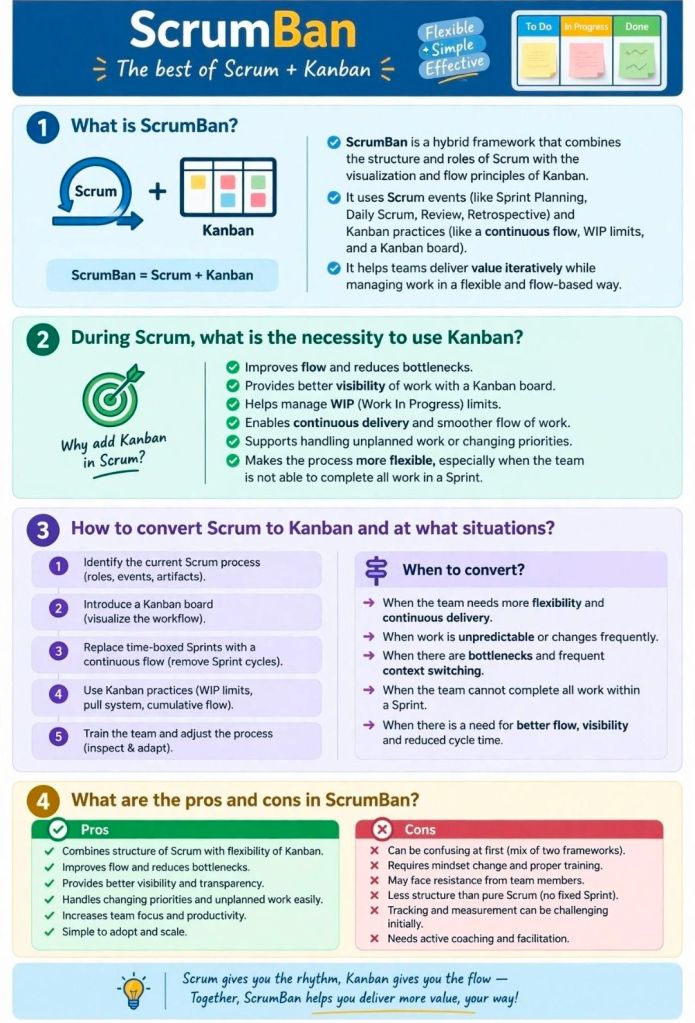
Agile ScrumBan, Structure of Scrum, Flow from Kanban

Agile ScrumBan, Structure of Scrum, Flow from Kanban
ScrumBan Structure of Scrum Flow from Kanban
Agile ScrumBan, Structure of Scrum, Flow from Kanban

Priorization Techniques in Agile Scrum

Priorization Techniques in Agile Scrum

Prioritization in AgileScrum is the systematic process of ordering Product Backlog items to maximize value delivery. These techniques are generally categorized by their primary focus: customer satisfaction, business value and economics, or collaborative consensus.

Category 1: Customer-Centric Frameworks

These methods prioritize features based on how they impact the end-user’s experience and satisfaction.

  • Kano Model: Categorizes features into three main types: Basic Needs (expected essentials), Performance Features (linear satisfaction), and Excitement Needs (unexpected “delighters”).
  • User Story Mapping: Visualizes the entire user journey to identify the most critical paths and “skeletal” features needed for a Minimum Viable Product (MVP).
  • Opportunity Scoring: Uses customer research to find gaps where importance is high but current satisfaction is low, identifying high-potential opportunities.

Category 2: Economic & Quantitative Models

These data-driven techniques use formulas to balance value against implementation costs or risks.

  • Weighted Shortest Job First (WSJF): Prioritizes tasks by dividing the Cost of Delay (value, urgency, and risk reduction) by Job Size (effort). The goal is to deliver the most value in the shortest time.
  • RICE Scoring: Calculates a score based on Reach (number of users), Impact, Confidence (certainty in estimates), and Effort.
  • Cost of Delay (CoD): Measures the economic impact or potential revenue loss of not delivering a feature within a specific timeframe.

Category 3: Stakeholder & Team-Based Consensus

These collaborative methods are used to reach agreement among diverse stakeholders or team members.

  • MoSCoW Method: A qualitative technique that buckets items into Must-Have, Should-Have, Could-Have, and Won’t-Have for a specific release cycle.
  • 100-Dollar Test: Participants are given a hypothetical $100 to “spend” on features, revealing what they value most through resource allocation.
  • Priority Poker: A gamified, collaborative approach where team members anonymously vote on an item’s priority level to remove bias and foster discussion.

Category 4: Structural & Visual Matrixes

These tools help teams visualize trade-offs, typically using 2×2 grids.

  • Value vs. Effort Matrix: Plots tasks on two axes to identify Quick Wins (high value, low effort) and Major Projects (high value, high effort) while avoiding “thankless tasks”.
  • Risk/Value Matrix: Balances potential business rewards against technical or project risks to decide which high-value but high-risk items to tackle early.
  • Stack Ranking: A “forced ranking” method where every item has a unique, linear position (1 to N), preventing the “everything is high priority” trap.

Priorization Techniques in Agile Scrum

Agile Backlog MoSCoW, Must, Should, Could and Won’t Have

Agile Backlog MoSCoW, Must, Should, Could and Won't Have
Agile Backlog MoSCoW, Must, Should, Could and Won’t Have

Agile Story Points and the Fibonacci Series, Estimation Strategy

Agile Story Points and the Fibonacci Series, Estimation Strategy

Scrum and Agile in Projects

Scrum and Agile

Agile Defintion of Done, DoD

Agile Defintion of Done, DoD

Agile Large Scale Scrum or LeSS, Cross Team Collaboration

Agile Large Scale Scrum or LeSS, Cross Team Collaboration

What is a Spike in Agile Scrum?

What is a Spike in Agile Scrum?

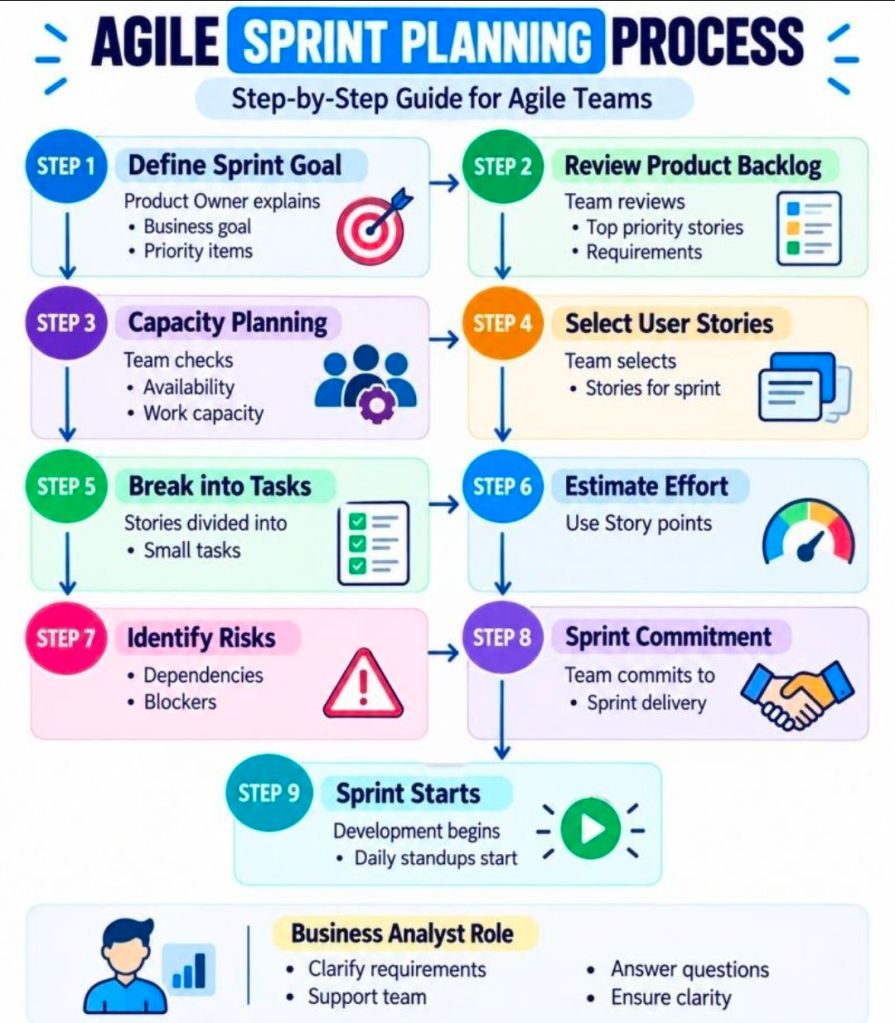
Agile Product Backlog Refinement before Sprint Planning

Agile Product Backlog Refinement before Sprint Planning

Agile Scrum Epic vs Feature vs User Story

Agile Scrum Epic vs Feature vs User Story

Agile Manifesto, Values and Principles

Agile Manifesto, Values and Principles

Agile Daily Scrum Checklist Overview

Agile Daily Scrum Checklist Overview

Agile Backlog Refinement Activities and Business Analyst BA

Agile Backlog Refinement Activities & Business Analyst