IT & Project Management training spans over three decades

Mark Whitfield’s IT and Project Management training spans over three decades, tracking his progression from a senior technical developer into an enterprise-level, SC-cleared Senior IT Project Manager.

His official training records and professional certificates listed on PROject Templates are grouped below by specific skill areas.

Project Management Methodologies & Frameworks

  • PRINCE2 Practitioner: Registered Practitioner certification achieved via ILX (May 2011).
  • Agile SCRUM Framework: Dedicated training completed for Agile SCRUM delivery mechanics (May 2011).
  • Advanced Engagement Management: Level 2 Exam certification completed during his tenure at Capgemini (November 2017).
  • Project Management Fundamentals: Core foundational training in Successful Project Management (February 2000).
  • Multi-Project Administration: Training in Managing Multiple Projects, Objectives, and Deadlines (October 1999).
  • Capgemini, Engagement Manager – eLearning and Group Training, 100+ Training Modules, see link 1) at bottom of this post.

Cloud & Database Infrastructure

  • Microsoft Azure Fundamentals: Certified under the official AZ-900 cloud training track (February 2022).
  • Transact-SQL Database Administration: Course M2071 covering Querying Microsoft SQL Server 2000 (March 2009).

Software Engineering & Legacy Systems (HPE NonStop)

  • Web Application Engineering: Developing Microsoft ASP Web Applications utilizing the MS Visual Studio .NET ecosystem (January 2007).
  • C++ OOP Programming: Accelerated Object-Oriented development training via “C++ for Non-C Programmers” (March 1997).
  • Tandem/HPE NonStop Systems Architecture: High-level platform training covering the TANDEM Guardian Principles (May 1993).
  • Tandem Performance & TAL Programming: Advanced courses in TANDEM Performance Analysis & Tuning (June 1995) and TANDEM TAL Programming (December 1995).
  • VPS Architecture: Mainframe application architecture training under VPS 7000/9000 Series Application Development VOS 4.3 (September 1994).

Productivity & Project Control Tools

  • Microsoft Project Enterprise: Orange Belt certification in Managing a Single Project via Microsoft Office Project (May 2000).
  • Advanced Data Management: Microsoft Excel Expert Skills training (April 2017) followed by an Excel Refresher Certification via Udemy (July 2024).

Digital Content & Professional Design

  • Web Design Analytics: Training in Website Visibility and Promotion by Design (May 2009).
  • Digital Copywriting: Professional framework training in Writing for the Web (May 2009).
  • Desktop Publishing: Strategic training on designing attention-grabbing brochures, catalogues, ads, newsletters, and corporate reports (April 2006).

More training detail and certificates 1) and 2)

Jira plus Claude to Support Project Management Delivery

Jira + Claude to Support Project Management Delivery
Jira plus Claude to Support Project Management Delivery
Jira plus Claude to Support
Project Management Delivery

Project Management Templates to be tailored as required with FREE upgrades

Mark Whitfield’s PM template library features over 200 editable project management and PMO templates. These templates span the entire project lifecycle and are categorized by focus area and framework (e.g., Agile, Waterfall, PRINCE2).

Project Management Templates to be tailored as required with FREE upgrades
Many POaP templates to
be tailored as required

The resources are formatted natively for the Microsoft Office suite, allowing them to be opened on all devices, including desktops, tablets, and smartphones.

The templates are divided into specific categories based on the standard project delivery phases:

📁 Core Template Categories

  • Planning & Execution:
    • Detailed MS Project schedules
    • Excel and PowerPoint Plan on a Page (POaP) examples (over 35 slide examples) to save time constructing from scratch
    • SDLC (Software Development Life-cycle) plans
  • Tracking & Control:
    • Weekly and monthly Status Reports
    • Meeting Minutes
  • Governance & Team Management:
    • Project Organization charts
    • RACI trackers (Responsible, Accountable, Consulted, Informed)
    • Stakeholder Analysis (influence vs. impact)
    • Team onboarding kits and quizzes

📂 Specialized & Framework-Specific Templates

  • Risk & Issue Management: Comprehensive RAIDs log (Risk, Action, Issue, Opportunity, Lessons Learned, Dependencies) with built-in summary charts.
  • Financials: Project Financial Trackers for internal/external costs, forecasting vs. actuals, margin/variation, and expenses.
  • Agile Frameworks: Agile Story Dependency tracking, Burn Down & Burn Up charts, and Sprint tracking guides.
Project Management MS Excel XLS Agile Scrum Sprint Burn Down and Up Templates to be tailored as required with FREE upgrades
MS Excel XLS Agile Sprint Burn
Down and Up Chart Examples

💻 File Formats

All templates are fully editable, and the package provides the following file formats for universal compatibility:

  • Microsoft Word (.docx): Used for walkthrough guides, governance documentation, and standard project status reports.
  • Microsoft Excel (.xlsx): Utilized for task trackers, financial dashboards, RAID logs, and non-MS Project Gantt charts.
  • Microsoft PowerPoint (.pptx): Used for Kick-Off decks, team hierarchy charts, and visual POaP (Plan on a Page) slides.
  • Microsoft Project (.mpp): Detailed work breakdown structure (WBS) and scheduling files for traditional and Agile-hybrid projects.
Project Management MPP Project Templates to be tailored as required with FREE upgrades
MS Project MPP file templates
to be tailored as required

You can download or purchase the complete inventory of these editable files at the Mark Whitfield PROject Templates Store (or via the Etsy Storefront if you prefer that platform). Once purchased, you are also entitled to free lifetime upgrades and additions.

Project Management Templates to be tailored as required with FREE upgrades

Project Management Acronyms

Project Management Acronyms
Example Project Management Acronyms

Project Management, Budgeting vs Forecasting

Project Management, Budgeting vs Forecasting
Project Management Budgeting versus Forecasting
Project Management, Budgeting vs Forecasting

12 Pillars of Project Management

12 Pillars of Project Management
  • Stewardship: Act with integrity, care, trustworthiness, and strict compliance to responsibly manage assets, finance, and social impacts.
  • Team: Foster a highly collaborative, respectful, and trusting project team environment to optimize productivity and collective learning.
  • Stakeholders: Engage proactively and effectively with all impacted individuals or groups to advance value delivery and counter opposition.
  • Value: Maintain a continuous focus on outcomes and intended business benefits rather than tracking empty operational outputs.
  • Systems Thinking: Evaluate and respond dynamically to internal and external system interactions to recognize how different project parts interconnect.
  • Leadership: Demonstrate adaptable, ethical leadership behaviors across all team members, regardless of formal titles or authority status.
  • Tailoring: Adapt the management framework iteratively based on context, unique project objectives, scope, governance, and environmental constraints.
  • Quality: Embed rigorous evaluation and acceptance criteria directly into project processes and deliverables to satisfy required expectations.
  • Complexity: Continuously identify, evaluate, and navigate project complexities arising from erratic human behaviors, system interactions, or ambiguity.
  • Risk: Optimize response mechanisms to systematically mitigate negative threats while proactively capturing positive project opportunities.
  • Adaptability & Resilience: Build structural flexibility into plans to rapidly recover from sudden setbacks and accommodate shifting environments.
  • Change: Prepare and support stakeholders for the targeted future state to avoid change fatigue and successfully implement new behaviors.

Critical Path Method CPM in Project Management

Critical Path Method CPM in Project Management

The Critical Path Method (CPM) is a project management algorithm used to identify the longest sequence of dependent tasks required to complete a project. It establishes the shortest possible project duration and highlights the “critical” activities that cannot be delayed without extending the entire project’s deadline.

How the Critical Path Works

CPM relies on finding the path through your project’s workflow that takes the most time from start to finish.

  • Critical Activities: Tasks on the critical path have zero “float” (or slack), meaning any delay directly impacts the final delivery date.
  • Non-Critical Activities: Other task sequences may have buffer time, allowing them to be delayed without throwing off the main project timeline.

Steps to Calculate the Critical Path

  1. Identify Tasks: Break the project down into individual activities (often using a Work Breakdown Structure).
  2. Determine Dependencies: Map out which tasks must happen before others can begin.
  3. Estimate Durations: Assign a realistic time frame for completing each task.
  4. Draw a Network Diagram: Create a flowchart visually connecting tasks with arrows to illustrate the sequence.
  5. Analyze the Paths: Calculate the total duration for every possible sequence of tasks. The longest sequence is your critical path.

Key Terminology

  • Float (Slack): The amount of time a task can be delayed without causing a delay to subsequent tasks or the overall project.
  • Forward Pass: A calculation used to find the Earliest Start and Earliest Finish times for each task.
  • Backward Pass: A calculation used to find the Latest Start and Latest Finish times for each task before the project is delayed.

When and Why to Use It

Project managers use CPM during the planning phase to build realistic schedules and set clear baselines. It is highly beneficial for complex, predictable projects like construction or software rollouts, where many tasks rely on the completion of previous ones.

By knowing exactly which tasks control your timeline, you can prioritize resources, prevent bottlenecks, and use “fast-tracking” (doing tasks in parallel) if you need to compress a timeline.

To get started with building a timeline, you can map out your workflows using digital tools such as Asana’s Critical Path Guide, Wrike’s CPM Implementation, or Monday.com’s CPM Tutorial.

Types of Agile Delivery in Project Management

Types of Agile Delivery in Project Management

Agile delivery is an iterative approach to project management that focuses on delivering value early, frequently adapting to change, and maintaining continuous customer feedback. Rather than executing a project sequentially, teams break work into small increments to maximize flexibility and product quality.

The most common types and frameworks of agile delivery include the following structured methodologies:

1. Scrum

Scrum is the most widely used agile framework, characterized by highly structured, time-boxed iterations called Sprints (typically 1 to 4 weeks long).

  • Key Concept: Teams work toward a single, actionable goal during each sprint.
  • Key Roles: Product Owner (represents the customer), Scrum Master (removes obstacles and enforces the framework), and Developers.
  • Best For: Projects where requirements change frequently and close collaboration with clients is required.

2. Kanban

Kanban is a visual workflow management system that emphasizes continuous delivery and transparency without strict time-boxed iterations.

  • Key Concept: Work is tracked on a Kanban board divided into columns (e.g., “To Do,” “In Progress,” “Done”).
  • Key Roles: Self-organizing teams with a pull-based approach.
  • Best For: Operational workflows, support/maintenance teams, and organizations that need to limit “work in progress” (WIP) to prevent bottlenecks.

3. Lean Software Development

Adapted from Toyota’s lean manufacturing principles, Lean focuses on maximizing customer value while minimizing waste.

  • Key Concept: Focuses on “eliminating waste” (anything that doesn’t add value to the end user), amplifying learning, and delivering as fast as possible.
  • Best For: Optimizing overall organizational workflows and reducing overhead.

4. Extreme Programming (XP)

XP focuses heavily on technical excellence and software engineering practices to boost product quality and responsiveness.

  • Key Concept: Uses practices like pair programming, test-driven development (TDD), and continuous integration.
  • Best For: Development teams that need to release updates frequently while maintaining strict quality and low bug rates.

5. Feature-Driven Development (FDD)

FDD is a model-driven approach that is highly structured and focuses on building software in short, feature-by-feature iterations.

  • Key Concept: Work revolves around creating detailed software models and planning by specific features, which are built one by one.
  • Best For: Teams that prefer structured, step-by-step processes or environments with traditional hierarchical structures.

6. Scaled Agile Framework (SAFe)

SAFe is designed for larger enterprises that need to align cross-functional, multiple Agile teams toward a single business strategy.

  • Key Concept: Blends Lean, Agile, and DevOps principles to coordinate alignment, governance, and delivery across a massive scale.
  • Best For: Large organizations and complex projects requiring multiple teams to coordinate efforts.

For further implementation details, you can refer to comprehensive resources like the Atlassian Agile Project Management Guide or the ICAgile Types of Agile Methodology Overview.

AI Artificial Intelligence and Project Management Approaches

Artificial intelligence is transforming project management by shifting software from passive data repositories into active, predictive engines that automate tedious administration and improve decision accuracy.

The breakdown below covers the primary AI approaches and the specific tools driving each function.


🧠 Core AI Approaches in Project Management

Rather than basic, rule-based automation (“if X happens, do Y”), true AI uses model-driven machine learning, natural language processing (NLP), and predictive analytics.

  • Predictive Analytics & Forecasting: Machine learning models evaluate past team velocity, budget trends, and historical timelines to forecast delays and cost overruns before they occur.
  • Natural Language Processing (NLP): Large Language Models (LLMs) digest unstructured data like unstructured chats, customer emails, and meeting transcripts to extract action items, drafting project updates automatically.
  • Resource Optimisation: Algorithms match team members’ skills, existing workloads, and availability with upcoming project requirements to distribute work sustainably and efficiently.
  • Proactive Risk & Scope Creep Detection: AI monitors real-time activity and flags deviations from the initial project charter, alerting teams to emerging bottlenecks.

🛠️ AI Project Management Tools Broken Down by Use Case

1. All-in-One Work Operating Systems (Work OS)

These comprehensive platforms integrate AI deeply into everyday task tracking, workflows, and communication.

  • Monday.com: Features an integrated AI Assistant that auto-generates task descriptions, brainstorms project ideas, and summarizes long activity threads across cross-functional workspaces.
  • ClickUp: Uses its unified “ClickUp Brain” engine to break down major project milestones into contextual subtasks, answer project-related queries instantly, and write status updates.
  • Asana: Leverages AI smart agents to recommend task assignments, identify workflow blockers early, and suggest ideal task prioritisation based on team capacity.
  • Wrike: Focuses heavily on predictive analytics and intelligent insights, allowing larger organisations to move past traditional tracking into data-driven risk monitoring.

2. Meeting & Communication Intelligence

These tools alleviate the administrative burden of manually taking notes, tracking ownership, and summarizing align-meetings.

  • Otter.ai: Transcribes team calls in real time and automatically creates bullet-point action items, keyword summaries, and structured meeting recaps.
  • Microsoft Copilot / Google Gemini: Seamlessly pulls historical data from your workspace ecosystem (emails, documents, calendars) to draft project charters or assemble stakeholder reports with minimal context.

🛠️ AI Project Management Tools Broken Down by Use Case

1. All-in-One Work Operating Systems (Work OS)

These comprehensive platforms integrate AI deeply into everyday task tracking, workflows, and communication.

  • Monday.com: Features an integrated AI Assistant that auto-generates task descriptions, brainstorms project ideas, and summarizes long activity threads across cross-functional workspaces.
  • ClickUp: Uses its unified “ClickUp Brain” engine to break down major project milestones into contextual subtasks, answer project-related queries instantly, and write status updates.
  • Asana: Leverages AI smart agents to recommend task assignments, identify workflow blockers early, and suggest ideal task prioritisation based on team capacity.
  • Wrike: Focuses heavily on predictive analytics and intelligent insights, allowing larger organisations to move past traditional tracking into data-driven risk monitoring.

2. Meeting & Communication Intelligence

These tools alleviate the administrative burden of manually taking notes, tracking ownership, and summarizing align-meetings.

  • Otter.ai: Transcribes team calls in real time and automatically creates bullet-point action items, keyword summaries, and structured meeting recaps.
  • Microsoft Copilot / Google Gemini: Seamlessly pulls historical data from your workspace ecosystem (emails, documents, calendars) to draft project charters or assemble stakeholder reports with minimal context.

3. Engineering & Agile Backlog Management

Built to address the rapid velocity changes and technical needs of software development teams.

  • Jira (Atlassian Rovo): Uses built-in AI agents to organize bloated backlogs, surface conflicting dependencies, and estimate how long features will take based on historical sprint velocities.

4. Document & Knowledge Management

Designed for centralizing organizational resources so teams don’t waste time hunting for internal data.

  • Notion AI: Acts as a central, conversational wiki workspace that synthesizes notes, translates documents, drafts release notes, and surfaces data buried in complex project databases.
  • NotebookLM: A powerful, localized research assistant that organizes complex internal project documentation, creates study guides for teams, and answers cross-document queries accurately.

⚖️ Traditional vs. AI-Powered Project Management

Traditional vs. AI-Powered Project Management

Project Management, Risk Types & Assessing Risk Severity

Project risks are uncertain events that, if they occur, can impact a project’s objectives. They are generally broken down into core categories: financial, technical, schedule, operational, and external. Proper risk assessment evaluates the probability and impact of these threats to prioritize mitigation strategies.

Detailed Risk Breakdown

1. Financial Risks

These risks relate to project budgets, funding cuts, and cash flow.

  • Cost Overruns: Expenses exceeding the allocated budget.
  • Funding Delays: Cash flow interruptions from sponsors or clients.
  • Currency Fluctuations: Affecting purchasing power for international materials.
  • Severity: High/Critical. Can lead to project cancellation if not mitigated.

2. Technical Risks

Emerging from technology gaps, security vulnerabilities, or poor integration.

  • Technology Failures: Systems crashing or underperforming.
  • Software Bugs: Errors causing glitches or data corruption.
  • Security Breaches: Data theft or loss compromising privacy.
  • Severity: Medium to High. Can completely stall deliverables or undermine final quality.

3. Operational Risks

Internal workflow inefficiencies, process breakdowns, and human factors.

  • Resource Shortages: Missing key team members or materials.
  • Poor Communication: Siloed workflows leading to rework and mistakes.
  • Supply Chain Disruptions: Delays in procuring high-quality goods.
  • Severity: Low to Medium. Tends to erode timelines quietly but can escalate if left unmanaged.

4. Schedule Risks

Risks jeopardizing deadlines, causing timeline slippage or severe delays.

  • Scope Creep: Uncontrolled changes or continuous addition of project requirements.
  • Unrealistic Estimates: Planning overly optimistic deadlines.
  • Dependency Delays: Waiting on third parties to finish preliminary tasks.
  • Severity: Medium to High. Directly impacts client satisfaction and delivery targets.

5. External Risks

Factors entirely outside the project team’s direct control.

  • Market Shifts: Changing customer demand or competitor actions.
  • Regulatory Changes: New laws requiring unexpected compliance adjustments.
  • Environmental/Hazards: Severe weather, natural disasters, or pandemics.
  • Severity: Varies (Low to Critical). Often unpredictable, requiring comprehensive contingency planning.

Assessing Risk Severity

To categorize the severity of risks accurately, project managers typically use a Risk Assessment Matrix based on two factors:

  1. Likelihood: How probable is the event to occur? (1 = Low probability, 5 = High probability)
  2. Impact: How severely would it affect the project? (1 = Minimal effect, 5 = Catastrophic failure)

The combination yields a risk score (e.g., Likelihood × Impact), allowing managers to prioritize risks:

  • Low Risk: Monitored periodically.
  • Medium Risk: Requires a defined contingency plan.
  • High/Critical Risk: Demands immediate, active mitigation strategies.

Project Management, Risk Types & Assessing Risk Severity

Project Management Certifications

Project Management Certifications

Project Management, Role Organization Chart

Project Management, Role Organization Chart

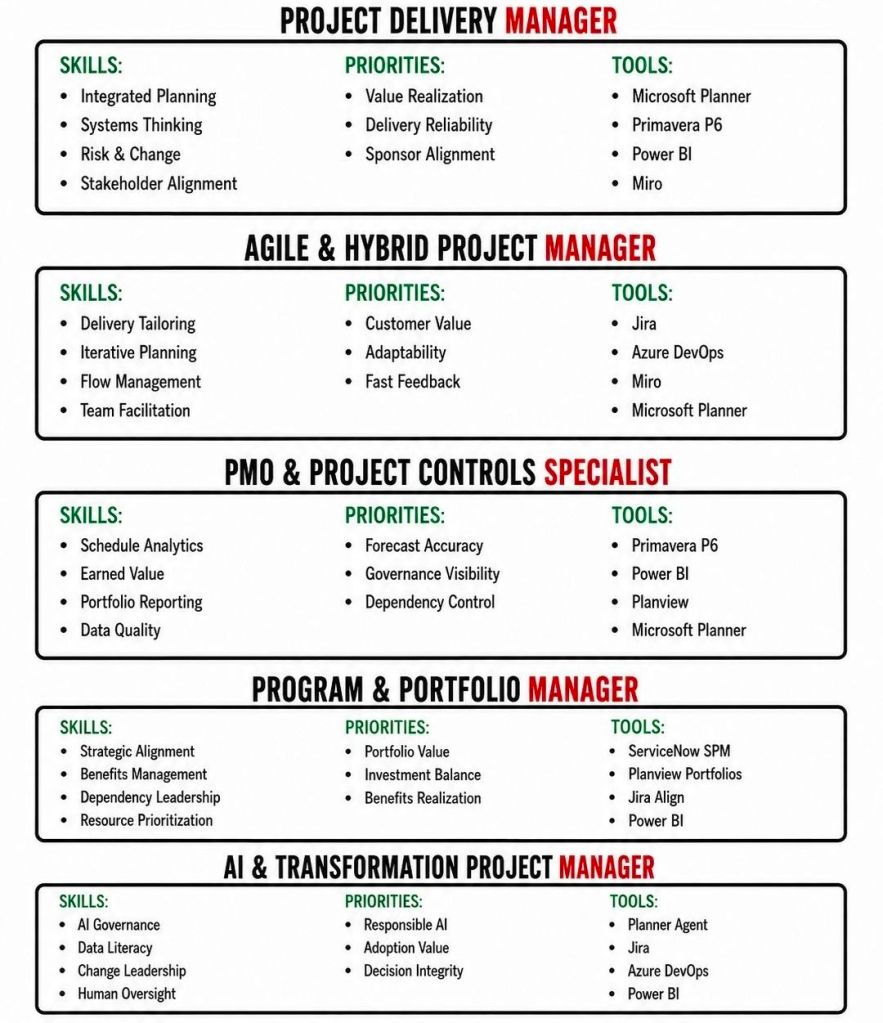
Project Management Roles and some Certifications

Project Management Roles and some Certifications

Mark Whitfield’s Project Management Templates offer a comprehensive, fully editable toolkit of over 200 documents

Mark Whitfield’s Project Management Templates offer a comprehensive, fully editable toolkit of over 200 documents spanning the entire project lifecycle. Designed for PRINCE2, Agile Scrum, and Waterfall methodologies, the suite helps project managers streamline planning and tracking. The toolkit is available on platforms like Mark Whitfield’s Project Templates and Etsy – ProjectTemplatesSoft.

Here is a detailed breakdown of the templates by type:

1. Planning & Scheduling Templates

These templates help structure timelines, resource allocation, and task dependencies.

  • MS Project Plans (.mpp): Detailed, annotated files spanning full Software Development Life-Cycles (SDLC) and PRINCE2 7th Edition. Includes sprint overviews for Agile teams.
  • Excel Detailed Plans: Full Gantt chart and task tracking for users who do not have MS Project. Includes self-populating columns for baseline variance, actual effort, and RAG (Red/Amber/Green) status.
  • Plan on a Page (POaP): Over 30 PowerPoint slide designs that simplify complex project timelines, allowing you to present the overarching plan to clients and executives without overwhelming them with micro-details.
Mark Whitfield’s Project Management Templates offer a comprehensive, fully editable toolkit of over 200 documents

2. RAIDs Log Templates

These core tracking documents help manage the unknowns and variables of your project.

  • Basic RAIDs Log: Simple trackers for Risks, Assumptions, Issues, and Dependencies.
  • Comprehensive RAIDs Log: Highly detailed sheets with separate tabs to track supplier details, individual deliverables, Change Requests (CR), and out-of-scope (OOS) tasks.

3. Financial Management Templates

Designed to maintain tight control of your budget and forecast.

  • Monthly Finance Tracker: Simple sheets to monitor monthly forecasts, actuals, annual leave, and monthly variances.
  • Project Cost Tracker: Full-featured financial spreadsheets providing rate lookups, margin calculations, expense logs, and built-in charts for financial reporting.

4. Governance & Project Controls

These templates form the administrative and structural backbone, primarily based on the PRINCE2 methodology.

  • Project Initiation Documentation (PID): Includes templates for the Business Case, project approach, roles & responsibilities, and team structure.
  • Reports: Standardized documents for Checkpoint Reports, Highlight Reports, End-Stage Reports, and Exception Reports.
  • Logs & Registers: Tailored templates for Lessons Learned, Quality Management, and Configuration Item Records.

5. Stakeholder & Team Management Templates

Focused on communication and team alignment.

  • RACI Matrix: A tracker to define exactly who is Responsible, Accountable, Consulted, and Informed for each project task.
  • Stakeholder Analysis: Charts and planning tables designed to measure stakeholder “influence vs. impact” so you know exactly how to manage expectations.
  • Mobilisation Kit: Onboarding documents and team kickoff presentations to get new resources up to speed quickly.

6. Agile & Specialized Execution Templates

  • Agile Dependency Tracking: Tools designed specifically to monitor user stories that have hard dependencies on external suppliers or stakeholders.
  • Burn Down / Burn Up Charts: Visual aids in Excel to track sprint velocity and project progression against deliverables.
  • Benefits Realization Plan: A spreadsheet that evaluates the project’s completed deliverables against the organization’s original business goals and financial targets.

All templates are designed for use across desktop, tablet, and cloud platforms. Purchases on his site come with lifetime free upgrades for any additions he makes to the package.

RACI, RAID and ROAM – Essential Project Management & Agile Tools

RACI, RAID and ROAM - Essential Project Management & Agile Tools
RACI, RAID and ROAM – Essential Project Management & Agile Tools

Right Project Management Approach, Adaptability over Rigid Approach

Right Project Management Approach, Adaptability over Rigid Approach

How AI Artificial Intelligence is Evolving in Project Management Career

How AI Artificial Intelligence is Evolving in Project Management Career

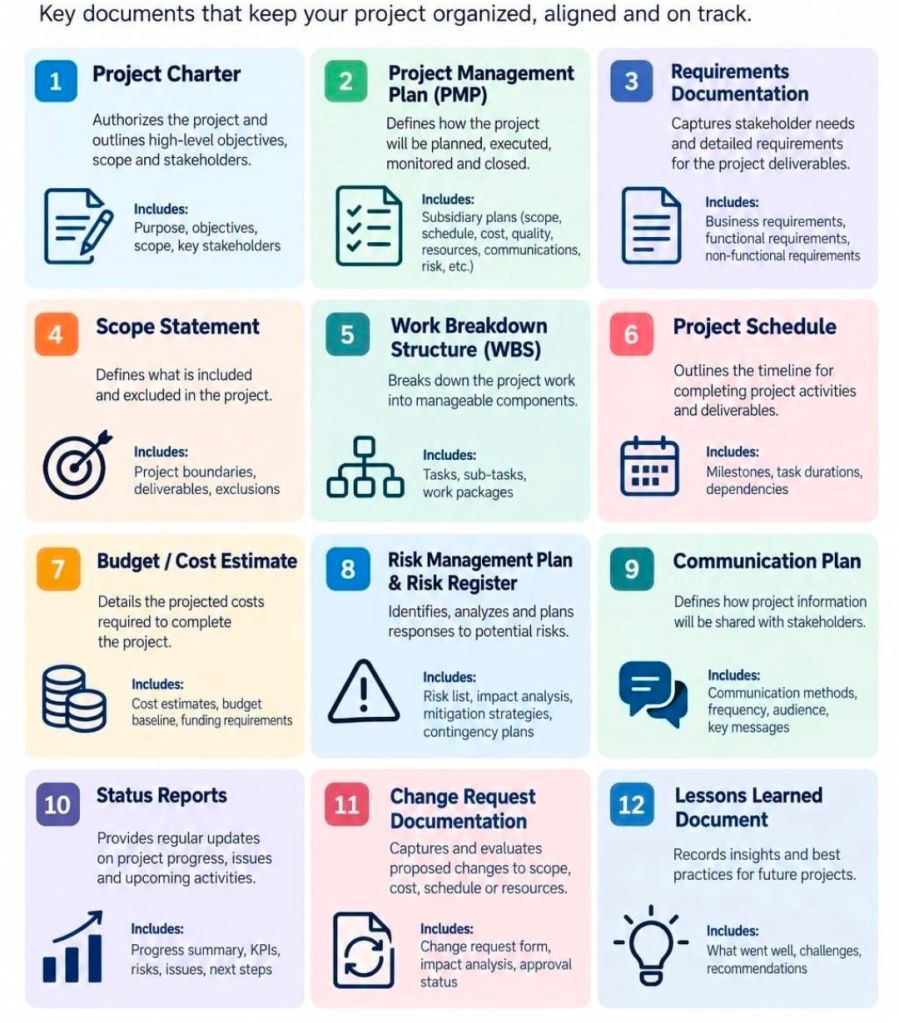
Project Management Deliverables relating to Project Lifecycle

Project management deliverables are the tangible or intangible outputs—products, services, or documents—produced as a result of project activities. They are specific, measurable, and agreed upon by stakeholders to demonstrate progress toward project goals.

Overview of Project Deliverables

Deliverables are essential for breaking down project goals into manageable components, tracking progress, and ensuring stakeholder alignment.

Types of Deliverables:

  • Internal Deliverables: Created for internal use, such as team charters, project plans, and risk logs.
  • External Deliverables: Client-facing, such as a finished software product, marketing campaign, or project report.
  • Process Deliverables: Interim outputs that mark progress, such as prototypes, wireframes, or testing reports.
  • Product Deliverables: The final, completed goods or services delivered.
  • Tangible vs. Intangible: Physical/digital items (e.g., machinery) vs. conceptual outcomes (e.g., a new training program).

Textual/Documentation Deliverables Project Lifecycle

The project lifecycle defines the stages a project goes through from start to finish. Textual and documentation deliverables are key to managing and controlling these stages.

1. Initiation Phase (Initiating)

  • Goal: Define the project at a high level and obtain authorization.
  • Key Deliverables:
    • Business Case: Why the project is needed.
    • Feasibility Study: Whether the project is achievable.
    • Project Charter: A formal document outlining objectives, scope, and key stakeholders.

2. Planning Phase (Planning)

  • Goal: Develop a roadmap for project execution and define constraints.
  • Key Deliverables:
    • Project Management Plan: A comprehensive document (roadmap) detailing tasks, timelines, and resources.
    • Scope Statement/WBS: Defines boundaries and breaks down work.
    • Communication Plan: Strategy for stakeholder communication.
    • Risk Register: Identifies potential threats and mitigation strategies.

3. Execution Phase (Executing)

  • Goal: Carry out the work defined in the plan to produce deliverables.
  • Key Deliverables:
    • Interim Products/Prototypes: Tangible outputs produced.
    • Meeting Minutes/Notes: Documentation of decisions and action items.
    • Change Requests: Documents updating scope or plan.

4. Monitoring and Controlling Phase

  • Goal: Measure performance against the plan and adjust as needed.
  • Key Deliverables:
    • Status Reports: Progress updates on key performance indicators (KPIs).
    • Quality Control Reports: Results of testing and validation.
    • Updated Project Schedule: Reflects current progress.

5. Closing Phase (Closure)

  • Goal: Formally accept deliverables and close out the project.
  • Key Deliverables:
    • Final Product/Report: The completed output.
    • Project Closure Report: Confirms final deliverables and contract closure.
    • Lessons Learned Document: Records successes and areas for improvement.

Best Practices for Managing Deliverables

  • Define Early: Ensure all stakeholders agree on what “done” means at the start.
  • Use Tools: Employ PM software (e.g., Asana, Jira, Monday.com) to track deliverables.
  • Assign Owners: Each deliverable should have a single, clear owner to ensure accountability.
  • Link to KPIs: Connect deliverables to key performance indicators to measure value.

Project Management Deliverables relating to Project Lifecycle

Agile Dependency Matrix Management in Project Management

Agile Dependency Matrix Management in Project Management

Project Management Core Knowledge Areas PMBOK Aligned

Project Management – Core Knowledge Areas, PMBOK Aligned
Project Management – Knowledge Areas – PMBOK Aligned

Project Management Templates bundle with free upgrades

Mark Whitfield’s Project Management templates are a comprehensive, editable suite of over 200 documents designed for Agile, Waterfall, and PRINCE2 methodologies, based on over 30 years of project delivery experience. Available through his website (click banner link above), Etsy, Flevy and Eloquens, these templates are designed to be used across the project lifecycle—from initiation to closure—and include lifetime free updates and additions. 

Many POaP Plan On a Page examples

Full Overview of Mark Whitfield Template Bundle

The bundle, priced at around £38.00 (as of April 2026), provides tools for MS Excel, Word, PowerPoint, and MS Project (.mpp). 

1. Planning & Scheduling

  • MS Project (MPP / MSP): Includes full PRINCE2 7th Edition, Agile Scrum, and SDLC (Software Development Life-cycle) plans.
  • Excel Detailed Plans: Includes Gantt chart tracking for users without MS Project.
  • Plan on a Page (POaP): Over 30 PowerPoint examples for executive summaries. 
Example Plan On a Page POaP

2. PRINCE2 & Governance

  • Full set of over 200 documents including Project Initiation Document (PID), Business Case, Work Packages, Risk Management Strategy, and Configuration Item Records.
  • Reporting: Highlight reports, exception reports, and end-stage reports. 
PRINCE2 Delivery Plan in MS Excel Example

3. Tracking & Risk Management

  • RAID Logs: Comprehensive trackers for Risks, Assumptions, Issues, and Dependencies (includes simple and detailed versions).
  • Finance Trackers: Simple and full project finance trackers (forecasting, actuals, variance, rate lookups).
  • RACI Matrix: Resource Responsibility Assignment Matrix. 
Many Project Budget / Financial Tracker examples

4. Execution & Delivery

  • SDLC: Detailed Software Development Life-cycle plans.
  • Deployment/Runbook: Execution and release planning documents.
  • Agile: Burn down and burn up charts. 
Example Agile Scrum Burn Down Chart

Detailed Timeline by Project Life Cycle

Templates provide detailed MS Project (.mpp) and Excel schedules that map out the standard project life cycle over time. The plans include notes and color-coded tasks (black: standard task, blue: artifact creation, brown: decision/event, purple: artifact update). 

Example MS Excel Delivery Plan

1. Project Startup / Initiation Phase 

  • Tasks: Project Mandate, Project Brief preparation, Appoint Project Board, Define Project Approach.
  • Key Templates: Project Brief, PID, Business Case, Project Board Structure. 

2. Planning Phase

  • Tasks: Develop the PID, Create Detailed Gantt Plans, Create Budgeting/RAID Logs, Setup Communication Strategies.
  • Key Templates: Detailed MS Project Plans (Waterfall/Agile), RACI Tracker, RAID Log. 

3. Project Execution / Control Phase

  • Tasks: Weekly Status Reporting, Risk Management, Managing Product Delivery, Stage Assessments.
  • Key Templates: Highlight Report, Issue Register, Daily Log, Financial Tracker. 

4. Project Close Phase

  • Tasks: Handover, Project Evaluation, Lessons Learned, Finalize Costs, Close Project.
  • Key Templates: End Project Report, Lessons Log, Benefits Realization Plan. 

Summary of Key Features

  • Fully Editable: Designed to be tailored to specific project needs (PRINCE2 Principle 7).
  • Access: Compatible with Desktop, Tablet, Smartphone, and Cloud (Microsoft Teams/SharePoint).
  • Support: Free lifetime upgrades (and additions) to the latest template package after purchase. 
  • Click on link in website banner above to purchase full templates bundle

Project Management Templates bundle with free upgrades.

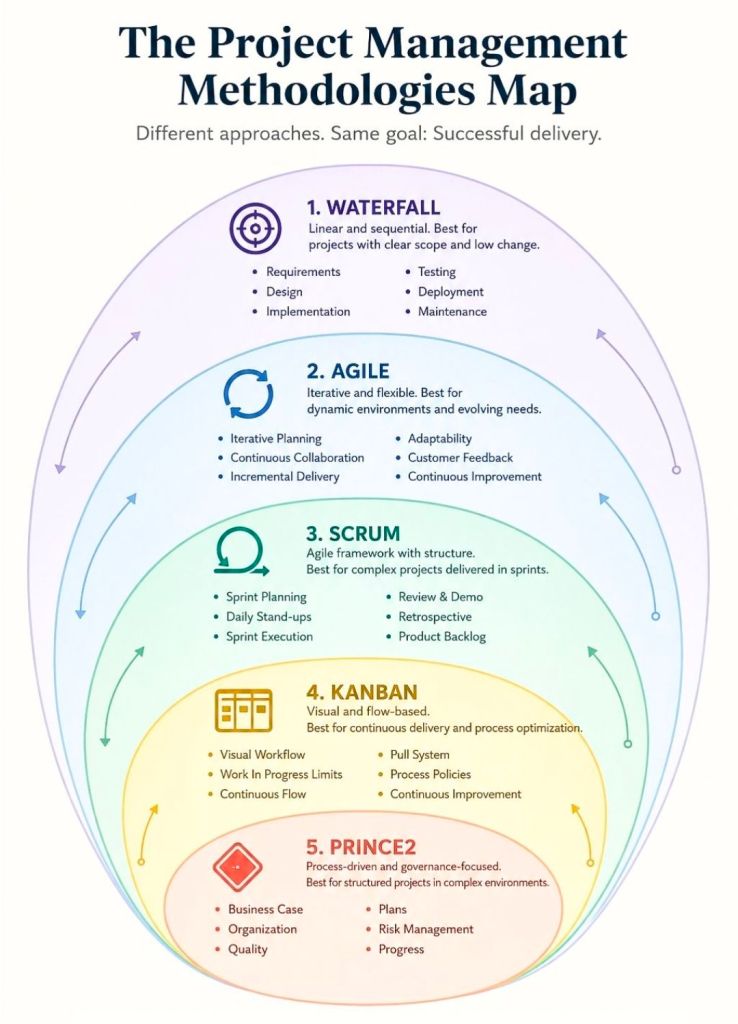
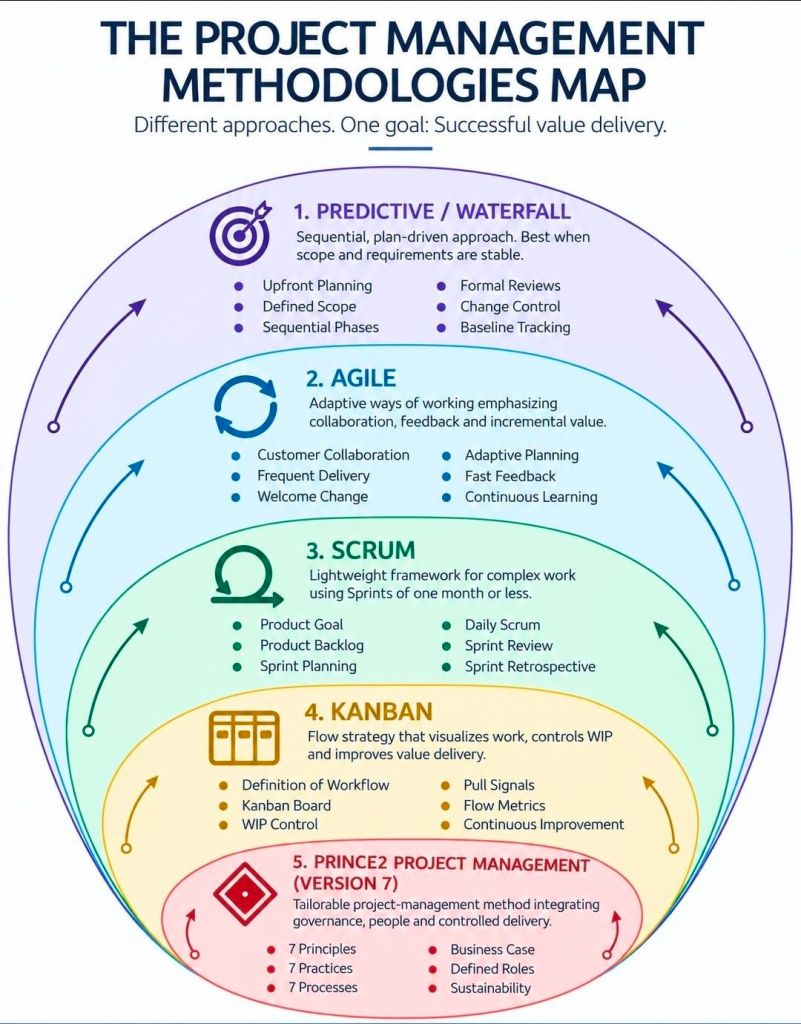
Project Management Methodologies Summarised

Project Management Methodologies Summarised

Project Management, the Delivery Paradox

Project Management, the Delivery Paradox

Project Management Methodologies, historical timeline by era and year

This is a detailed, comprehensive historical timeline of project management methodologies, tracing the evolution from ancient practices to modern adaptive frameworks.

I. Pre-Modern Era (Before 1900): Foundation of Task Coordination

  • 2570 BC (Great Pyramid of Giza): Completion of the pyramids, demonstrating early project organization with managers for each of the four faces, planning, and logistics.
  • 208 BC (Great Wall of China): Construction of the Great Wall, involving massive workforce organization divided into soldiers, citizens, and criminals.
  • 1850s (Transcontinental Railroad): US railroad projects requiring large-scale resource and schedule management.
  • 1896 (Harmonogram): Karol Adamiecki developed the harmonogram, a predecessor to the Gantt chart (published in 1931). 

II. Early Modern Era (1910s–1950s): The Scientific Management Era 

This era brought “scientific management” to project control, focusing on efficiency and visualization. 

  • 1910s (Gantt Chart): Henry Gantt developed the Gantt chart, a visual tool for scheduling tasks over time.
  • 1911 (Scientific Management): Frederick Taylor published The Principles of Scientific Management, focusing on efficiency and time-saving.
  • 1931–1936 (Hoover Dam): One of the first large-scale applications of Gantt charts for complex scheduling.
  • 1942–1945 (Manhattan Project): Development of the atomic bomb, creating a need for rapid, complex planning and large-scale team coordination. 

III. The “Golden Age” of Project Management (1950s–1960s): Formal Methodologies 

This era introduced mathematical models for managing complex, interdependent tasks. 

  • 1956 (AACE Formed): The American Association of Cost Engineers (now AACE International) was formed, specializing in cost control and scheduling.
  • 1957 (Critical Path Method – CPM): Developed by Dupont Corporation to manage chemical plant maintenance shutdowns.
  • 1958 (Program Evaluation and Review Technique – PERT): Created by the US Navy Special Projects Office for the Polaris missile submarine project to manage task time and risk.
  • 1962 (Work Breakdown Structure – WBS): The US Department of Defense mandated the use of WBS for large, complex projects.
  • 1965 (IPMA Founded): The International Project Management Association (IPMA) was launched, the world’s first project management association.
  • 1969 (PMI Founded): The Project Management Institute (PMI) was launched to promote the profession, later developing the PMP certification. 

IV. The “Silver Age” (1970s–1980s): Systems and Controls 

  • 1970s (Waterfall Introduction): While used informally earlier, the Waterfall methodology was formalized for software development in the 1970s, emphasizing sequential phases.
  • 1975 (PROMPTII): Simpact Systems Ltd created PROMPTII, a methodology to handle cost overruns in computer projects, which later formed the basis of PRINCE.
  • 1975 (Mythical Man-Month): Fred Brooks published his seminal work on software engineering project management.
  • 1978 (Toyota Production System): Lean production and Kanban techniques, used in manufacturing, began to influence project workflow.
  • 1984 (Theory of Constraints – TOC): Dr. Eliyahu Goldratt published The Goal, introducing the Theory of Constraints for managing constraints (bottlenecks).
  • 1986 (Scrum): Takeuchi and Nonaka defined Scrum as a project management style for fast-paced development.
  • 1987 (PMBOK Guide): The Project Management Institute published the first Project Management Body of Knowledge (PMBOK) white paper.
  • 1989 (PRINCE): The UK government launched PRojects IN Controlled Environments (PRINCE), the standard for information systems projects. 

V. Rebirth and Modern Era (1990s–2000s): Agile and Adaptive Methods 

  • 1994 (CHAOS Report): The Standish Group published the first report documenting high IT project failure rates.
  • 1995 (Scrum Formalization): Jeff Sutherland and Ken Schwaber formally defined the Scrum framework.
  • 1996 (PRINCE2): PRINCE was updated to PRINCE2 to become a generic, more flexible methodology applicable to all project types.
  • 1997 (Critical Chain Project Management – CCPM): Eliyahu Goldratt invented CCPM, based on the Theory of Constraints.
  • 1998 (PMBOK Standard): The American National Standards Institute (ANSI) recognized PMBOK as a standard.
  • 2001 (Agile Manifesto): 17 software developers met to publish the Manifesto for Agile Software Development, prioritizing collaboration and adaptability over rigid plans.
  • 2007 (Kanban for Software): David Anderson adopted Kanban for software development, focusing on visualizing work and limiting work-in-progress. 

VI. The Contemporary Era (2010s–Present): Hybrid, AI, and Speed 

  • 2012 (ISO 21500): The International Organization for Standardization published ISO 21500:2012, “Guidance on Project Management”.
  • 2017 (PMBOK 6th Ed & PRINCE2 Update): PMI introduced Agile/adaptive practices into PMBOK, while AXELOS released a more flexible PRINCE2.
  • 2018 (PRINCE2 Agile): PRINCE2 Agile was launched to combine the governance of PRINCE2 with the flexibility of Agile.
  • 2021 (PMBOK 7th Ed): A major shift in PMI standards, moving from process-based to principle-based, focusing on project outcomes.
  • 2020s–Present (AI/Hybrid): Rise of AI-driven project management, automated reporting, and hybrid methodologies combining Waterfall stability with Agile speed. 

Project Management Methodologies, historical timeline by era and year

Scrumban project management summary and detailed historical timeline by era and year

Scrumban is a hybrid Agile project management framework that blends the structured planning and roles of Scrum with the continuous flow and visualization of Kanban. Originally designed as a transition method for teams moving from Scrum to Kanban, it has evolved into a popular, distinct approach for teams needing to manage unpredictable work (e.g., support, maintenance) while maintaining prioritized planning. It focuses on pull-based workflows, limiting Work-in-Progress (WIP), and continuous improvement. 

Scrumban Summary

  • Best Used For: Teams needing more flexibility than Scrum (no rigid sprints) but more structure than Kanban (needs planning cycles).
  • Key Features: Visual board (Kanban), Work-in-Progress (WIP) limits, on-demand or iterative planning, and a pull-based workflow.
  • Differences from Parent Frameworks:
    • vs. Scrum: No set sprint length or rigid roles; work is pulled continuously rather than planned in batches.
    • vs. Kanban: Uses planning meetings and team retrospectives, whereas classic Kanban is purely continuous. 

Detailed Historical Timeline of Scrumban

1. The Pre-Scrumban Era (Pre-2008)

  • 1950s (Kanban Origin): Toyota develops Kanban to optimize manufacturing production processes, focusing on Just-in-Time (JIT) production.
  • 1986 (Scrum Concept): Takeuchi and Nonaka introduce the “rugby” approach to product development in the Harvard Business Review, fostering flexible, team-based development.
  • 1995 (Scrum Introduced): Ken Schwaber and Jeff Sutherland formalize the Scrum framework for software development.
  • 2001 (Agile Manifesto): Release of the Agile Manifesto, establishing core agile principles.
  • 2004 (Kanban in Software): David J. Anderson suggests applying Kanban practices to software development to improve workflow.
  • 2000-2007 (Evolution): Microsoft teams begin experimenting with “feature crews” that mix structured planning with continuous delivery, planting the seeds for hybrid approaches. 

2. Conception and Definition (2008–2010)

  • 2008: Corey Ladas coins the term “Scrumban” and introduces the concept in his work, proposing it as a mechanism for teams to transition from Scrum to Kanban, or as a sustainable hybrid for maintaining focus while reducing iteration overhead.
  • 2008: Ajay Reddy discusses the “Scrumban (R)evolution,” emphasizing that Scrumban is a distinct, powerful approach, not merely a blend.
  • 2009: Ladas publishes “Scrumban: Essays on Kanban Systems for Lean Software Development,” providing the definitive framework for the approach. 

3. Formalization and Adoption (2011–2019)

  • Early 2010s: The methodology gains popularity in specialized software areas, such as maintenance and support teams, where unpredictable bugs demand faster flexibility than two-week sprints.
  • 2016: Ajay Reddy releases “The Scrumban [R]Evolution: Getting the Most Out of Agile, Scrum, and Lean Kanban,” providing practical guidelines for applying the methodology.
  • 2018-2019: Adoption expands beyond software development into agile marketing and HR, looking for reduced bureaucracy. 

4. Mature Hybrid & Continued Growth (2020s–Present)

  • 2020s: Scrumban is recognized as a standard agile framework within major project management tools (e.g., Jira, Miro, Monday).
  • 2025-2026: Further refinement as teams integrate AI-driven task management with visual Kanban workflows to increase throughput and automate WIP tracking. 

Core Principles of Modern Scrumban (2026 Perspective)

  1. Pull System: Work is pulled by team members when capacity allows, rather than pushed into the team.
  2. Visual Board: All tasks are visualized to show bottlenecks.
  3. WIP Limits: Restricting the number of active tasks at any stage to improve efficiency.
  4. No Required Roles: Teams can keep Scrum roles (Product Owner, Scrum Master) or remove them, depending on their needs.
  5. Adaptive Planning: Planning occurs on-demand or at short intervals, not just in strict timeboxed sprints.

Scrumban project management summary and detailed historical timeline by era and year

CPM Critical Path Method project management and detailed historical timeline by era and year

The Critical Path Method (CPM) is a foundational project management technique developed in the late 1950s to identify the longest sequence of dependent tasks (the “critical path”) that determines the minimum time needed to complete a project. By focusing on these critical tasks, managers can identify which activities have flexibility (float) and which will delay the entire project if they slip. 

Detailed Historical Timeline of CPM

Pre-Development Era (1940-1955): The Need for Speed 

  • 1940–1943: DuPont develops precursor techniques to manage scheduling challenges during the Manhattan Project.
  • Early 1950s: The U.S. Navy recognizes the need for better planning systems for complex, high-stakes defense projects. 

Development Era (1956-1959): The Birth of CPM 

  • 1956: Morgan R. Walker (DuPont) and James E. Kelley Jr. (Remington Rand) begin collaborating to create a new method for managing industrial plant maintenance shutdowns.
  • 1957: Walker and Kelley formalize the Critical Path Method (CPM). The technique is first applied to DuPont’s chemical plant projects, saving $1 million in its first year.
  • 1958: Simultaneously, the U.S. Navy and Booz Allen Hamilton develop the Program Evaluation and Review Technique (PERT) for the Polaris missile program. The term “critical path” is coined by the PERT team.
  • 1959: First paper on the critical path, “Critical-Path Planning and Scheduling,” is published by Kelley and Walker. First computer-based CPM is implemented on UNIVAC computers. 

Expansion Era (1960-1979): Industrial Adoption

  • 1961: Dr. John Fondahl develops the Precedence Diagramming Method (PDM), a manual “non-computer” alternative to early computer-heavy CPM.
  • 1962: The U.S. Department of Defense (DoD) mandates the use of Work Breakdown Structures (WBS) along with network scheduling (PERT/CPM) for projects.
  • 1966: CPM is used for the first time in the construction of the World Trade Center Twin Towers in New York City.
  • 1970s: CPM moves from chemical and defense sectors to widespread use in construction, engineering, and infrastructure projects. 

Computerization Era (1980-1999): The PC Revolution

  • 1980s: Advent of personal computers (PCs) allows project management software (like Primavera) to make CPM accessible, removing the need for expensive mainframes.
  • 1987: The Project Management Institute (PMI) publishes the first Project Management Body of Knowledge (PMBOK Guide), standardizing CPM as a best practice.
  • 1997: Eliyahu M. Goldratt introduces Critical Chain Project Management (CCPM), a new method that builds on CPM by focusing on resource limitations rather than just activity sequence. 

Digital/Agile Era (2000-Present): Modern Integration 

  • 2001: The Agile Manifesto is written, introducing iterative, non-critical-path methods for software development.
  • 2010s: Hybrid project management becomes popular, combining CPM (for predictable, sequential work) with Agile methods (for unpredictable work).
  • Today: CPM algorithms are embedded in modern scheduling software (Microsoft Project, Oracle Primavera, ClickUp), enabling real-time recalculation of the critical path. 

Key Components of CPM

  • Network Diagram: A visual representation of activities (nodes) connected by dependencies.
  • Forward Pass: Calculates the earliest start (ES) and finish (EF) times for tasks.
  • Backward Pass: Calculates the latest start (LS) and finish (LF) times for tasks.
  • Float Calculation: Determines how long a task can be delayed without affecting the project completion date (Float = LS – ES).
  • Critical Path: The path with zero float; any delay in these tasks delays the project. 

CPM Critical Path Method project management and detailed historical timeline by era and year

Six Sigma project management summary and detailed historical timeline by era and year

Six Sigma is a disciplined, data-driven methodology and project management strategy designed to improve process performance, eliminate defects, and minimize variation. Pioneered at Motorola in the 1980s, it aims for a near-perfection standard of no more than 3.4 defects per million opportunities (DPMO). It is often used in combination with Lean principles (Lean Six Sigma) to simultaneously eliminate waste and reduce variation. 

Six Sigma Project Management Summary

Six Sigma project management relies on a structured, five-phase framework known as DMAIC (pronounced “duh-may-ick”) for improving existing processes: 

  • Define: Identify the project goals and customer deliverables (Critical to Quality – CTQ).
  • Measure: Quantify the current process performance and gather baseline data.
  • Analyze: Determine the root causes of defects and variation.
  • Improve: Implement and verify solutions that eliminate the root causes.
  • Control: Standardize the new process and implement monitoring to ensure long-term sustainability. 

Key Project Roles (The Belt System):

  • White/Yellow Belt: Basic awareness and team members.
  • Green Belt: Leads projects, assists Black Belts.
  • Black Belt: Leads complex projects, acts as change agent.
  • Master Black Belt: Coaches Black/Green Belts, oversees strategy.

Detailed Historical Timeline by Era and Year

Pre-1980s: Foundational Quality Efforts 

  • 1799: Eli Whitney introduces the concept of interchangeable parts (standardization) to produce muskets, reducing variation.
  • 1920s: Walter Shewhart at Bell Laboratories shows that 3-sigma process control is necessary to reduce variation.
  • 1950s: Toyota Production System (TPS) develops to create efficiency and quality. 

1980s: Origin and Development (The Motorola Era) 

  • 1981: Motorola leadership (Bob Galvin) initiates a push for increased quality, arguing that traditional 3-sigma defects (thousands) were insufficient, prompting a push for DPMO.
  • 1985: Engineer Bill Smith pens a paper proposing the term and methodology of Six Sigma.
  • 1986: Bill Smith officially introduces Six Sigma at Motorola, with Mikel Harry and Bob Galvin as co-contributors.
  • 1987: Motorola formally founds the Six Sigma improvement program, targeting a 10-fold reduction in defects.
  • 1988: Motorola receives the first Malcolm Baldrige National Quality Award.
  • 1989: Motorola establishes the Six Sigma Research Institute. 

1990s: Expansion and Standardization (The GE/Allied Signal Era) 

  • 1990: Motorola introduces the concept of Black Belts to formally lead improvement projects.
  • 1993: Motorola registers Six Sigma as a trademark.
  • 1994: AlliedSignal adopts Six Sigma, with CEO Larry Bossidy leading the effort.
  • 1995: Jack Welch adopts Six Sigma at General Electric (GE), optimizing the DMAIC approach and boosting its popularity.
  • Late 1990s: Over 2/3 of Fortune 500 companies start Six Sigma initiatives. 

2000s: Integration with Lean (The Lean Six Sigma Era) 

  • 2000s: Global adoption of Six Sigma by companies like Sony, Jaguar, Samsung, and Adidas.
  • 2002: Michael George publishes “Lean Six Sigma,” combining the speed of Lean (waste reduction) with the quality of Six Sigma (variation reduction).
  • Mid-2000s: Six Sigma expands beyond manufacturing into services, healthcare, and finance. 

2010s – Present: Digitalization and Advanced Analytics

  • 2010s: Integration of data-driven Six Sigma with technology, including real-time monitoring and advanced data analytics.
  • Present: Incorporation of Big Data, Machine Learning, and AI to enhance analytical capabilities and predictive maintenance within the DMAIC framework. 

Key Contributors to Six Sigma

  • Bill Smith: “Father of Six Sigma,” developed the concept at Motorola.
  • Bob Galvin: CEO of Motorola, supported and pushed the adoption of the methodology.
  • Mikel Harry: Co-developed the methodology and helped establish the Six Sigma Institute.
  • Jack Welch: Former CEO of GE, championed the strategy, proving its power outside of manufacturing.
  • Larry Bossidy: CEO of Allied Signal, instrumental in early adoption.

Six Sigma project management summary and detailed historical timeline by era and year

LeSS Large-Scale Scrum project management summary and detailed historical timeline by era and year

Large-Scale Scrum (LeSS) is a product management framework designed to scale the principles and purpose of Scrum across multiple teams working on a single product. Unlike other scaling frameworks that add complex layers of management, LeSS focuses on “descaling” organisational complexity by maintaining a single Product Owner and one unified Product Backlog for up to eight teams (Basic LeSS) or thousands of people (LeSS Huge). 

Historical Timeline of LeSS

The development of LeSS followed the maturation of Scrum and the need for a simplified way to apply it to large-scale, multi-site environments.

Era 1: Pre-Framework Foundation (1986–2004)

  • 1986: The term “Scrum” is first used in a management context by Hirotaka Takeuchi and Ikujiro Nonaka in their Harvard Business Review article, “The New New Product Development Game”.
  • 1993–1995: Jeff Sutherland and Ken Schwaber formalise Scrum as a practical software development framework.
  • 2001: The Agile Manifesto is authored, setting the cultural stage for lightweight scaling methods.
  • 2002: The Scrum Alliance is founded to promote and standardise Scrum training.

Era 2: Conception and Early Implementation (2005–2007)

  • 2005Craig Larman and Bas Vodde begin collaborating at Nokia Siemens Networks. They start combining their experiences to address the challenges of multi-site, large-scale agile development, laying the groundwork for what would become the LeSS framework.
  • 2005–2007: The principles are tested and refined in large-scale environments at companies like Nokia, Xerox, and Siemens. 

Era 3: Formalisation and Publication (2008–2015)

  • 2008: The first major book detailing these practices, Scaling Lean & Agile Development: Thinking and Organizational Tools for Large-Scale Scrum, is published by Larman and Vodde.
  • 2010Practices for Scaling Lean & Agile Development is released, providing concrete experiments and guides for practitioners.
  • 2014: The official LeSS.works website is launched to provide a centralized hub for LeSS rules, principles, and guides.
  • 2015: LeSS is increasingly recognized as a major scaling framework alongside others like SAFe and Nexus. 

Era 4: Consolidation and Modern Scaling (2016–Present)

  • 2016: The third book, Large-Scale Scrum: More with LeSS, is published, distilling the framework into its most essential rules and guides.
  • 2017–Present: LeSS adoption expands globally into diverse sectors including finance (JP Morgan), telecom, and large-scale hardware-software systems.
  • 2020s: Continuous evolution of “LeSS Huge” cases, showing the framework’s ability to support up to 2,500 people working on a single integrated product. 

Core Principles Summary

LeSS is guided by 10 core principles that differentiate it from other frameworks: 

  • Large-Scale Scrum is Scrum: It is not a “new” version but Scrum applied to many teams.
  • Empirical Process Control: Reliance on transparency, inspection, and adaptation.
  • More with LeSS: Scaling by removing roles and artifacts rather than adding them.
  • Whole-Product Focus: One Product Backlog and one Product Owner regardless of team count.
  • Systems Thinking: Optimising the whole system rather than individual team performance.

LeSS Large-Scale Scrum project management summary and detailed historical timeline by era and year

Extreme Programming XP project management summary and detailed historical timeline by era and year

Extreme Programming (XP) is a prominent, disciplined Agile software development framework designed to improve software quality and responsiveness to changing customer requirements. Developed by Kent Beck in the mid-1990s, it focuses on taking beneficial engineering practices—such as pair programming, testing, and continuous integration—to “extreme” levels. 

Project Management Summary: Core XP Components

XP differs from other Agile methods by focusing intensely on technical engineering practices alongside project management techniques. 

  • Core Values: Communication, Simplicity, Feedback, Courage, and Respect.
  • Key Practices: Pair Programming, Test-Driven Development (TDD), Collective Ownership, Continuous Integration, Refactoring, and Small Releases.
  • Project Management Focus:
    • The Planning Game: Combines business priorities with technical estimates to determine what to build next.
    • Small Releases: Frequent, working software releases (often 1–2 weeks) to gather rapid customer feedback.
    • On-site Customer: A customer representative works with the team to provide instant feedback and clarify requirements.
    • Sustainable Pace: Limiting work weeks to 40 hours to avoid burnout and maintain quality. 

Detailed Historical Timeline of XP

Era 1: Origins and The Chrysler C3 Project (1993–1996) 

  • 1993: Chrysler launches the Comprehensive Compensation System (C3) project to upgrade payroll software, which struggles for years.
  • March 1996: Kent Beck is brought in to lead the C3 project. To salvage the project, Beck starts encouraging team members to adopt a set of technical practices he developed based on his experiences.
  • 1996: Ward Cunningham heavily influences the development of early XP concepts, particularly the “metaphor”.
  • 1996: The project begins adopting daily meetings, pair programming, and TDD.

Era 2: Formalization and “Embracing Change” (1997–2000) 

  • 1997: Ron Jeffries is brought in to coach the C3 team, helping solidify the practices.
  • 1998: The term “Extreme Programming” becomes widely discussed within the Smalltalk and Object-Oriented programming communities.
  • October 1999: Kent Beck publishes Extreme Programming Explained: Embrace Change, formally defining the framework.
  • February 2000: Daimler-Benz acquires Chrysler and cancels the C3 project after 7 years of work. Despite cancellation, the methodology proved that it could produce working, high-quality software, just not fast enough to overcome the legacy backlog. 

Era 3: Rise of Agile and Expansion (2001–2005)

  • February 2001: Kent Beck and Ron Jeffries are among the 17 developers who draft the Manifesto for Agile Software Development at Snowbird, Utah. XP is recognized as one of the foundational “Agile” methods.
  • 2001: The first Agile Alliance conference is held. XP is considered the dominant agile methodology during this period.
  • 2002–2003: XP gains global popularity; numerous books are published expanding on the core 12 practices.
  • 2004: The second edition of Extreme Programming Explained is released, shifting focus from 12 rigid practices to more adaptive principles. 

Era 4: Integration with DevOps and Continuous Delivery (2006–Present)

  • 2006-2010: As Scrum gains popularity for general project management, XP practices like TDD and Pair Programming become the “standard” technical practices for high-performing teams, often blended with Scrum (ScrumXP).
  • 2010s: The rise of DevOps and continuous delivery, which inherently requires XP practices like CI/CD (Continuous Integration/Continuous Delivery).
  • 2020-2026: While fewer companies identify strictly as doing “XP,” its technical practices are considered essential to modern software development and are integrated into almost all Agile methodologies to ensure quality and speed.

Extreme Programming XP project management summary and detailed historical timeline by era and year

Agile project management summary and detailed historical timeline by era and year

Agile project management is an iterative, incremental approach to project management that focuses on flexibility, continuous improvement, and rapid delivery of value. Unlike the linear “Waterfall” approach, Agile breaks projects into small, time-boxed cycles (sprints or iterations) to allow for frequent feedback and adaptation to changing requirements. 

Summary of Agile Project Management

  • Core Values: Individuals/interactions over tools, working software over documentation, customer collaboration over negotiation, and responding to change over following a plan.
  • Key Techniques: Sprints, daily stand-up meetings, visual control (Kanban boards), and user stories.
  • Primary Benefits: Increased adaptability, higher quality through continuous testing, faster ROI, and better team collaboration.
  • Common Frameworks: Scrum, Kanban, Extreme Programming (XP), Crystal, and Dynamic Systems Development Method (DSDM). 

Detailed Historical Timeline of Agile (1950s–Present) 

1. The Pre-Agile Era: Iterative Roots (1950s–1980s) 

Before “Agile” was a term, software pioneers experimented with iterative approaches to break away from linear, heavy-documentation processes. 

  • 1957: Gerald M. Weinberg begins experimenting with incremental development at IBM.
  • 1968: “Conway’s Law” is coined, highlighting the impact of organizational communication on system design.
  • 1970s: Barry Boehm proposes “Wideband Delphi,” a forerunner to modern estimation techniques like Planning Poker.
  • 1985: Tom Gilb introduces the “Evolutionary Delivery Model” (Evo), focusing on small, incremental releases.
  • 1986: Takeuchi and Nonaka publish “The New New Product Development Game” in Harvard Business Review, describing a rugby-like approach that inspires Scrum.
  • 1988: Scott Schultz describes timeboxing in “Rapid Iterative Production Prototyping”. 

2. The Birth of “Lightweight” Methods (1990s)

Practitioners, frustrated with the “Waterfall” approach, created new, faster methodologies, often called “lightweight” methods. 

  • 1991: James Martin releases Rapid Application Development (RAD), popularizing prototyping and iterative feedback.
  • 1993: Jeff Sutherland, John Scumniotales, and Jeff McKenna develop the first Scrum framework at Easel Corporation.
  • 1994: The Dynamic Systems Development Method (DSDM) is created to provide structure to RAD.
  • 1995: Ken Schwaber and Jeff Sutherland co-present the Scrum methodology at the OOPSLA Conference.
  • 1996: Kent Beck develops Extreme Programming (XP) at Chrysler; Jon Kern, Ivan Joseph, and Peter Coad create Feature-Driven Development (FDD).
  • 1997: Ken Schwaber describes the “Daily Scrum”.
  • 1998: The Chrysler Goes to Extremes case study popularizes XP practices like pair programming and three-week iterations. 

3. The Agile Manifesto and Formalization (2000s)

  • 2000: A group of 17 thought leaders meets in Oregon to discuss lightweight development, setting the stage for the Manifesto.
  • 2001 (Feb): The 17 developers meet at Snowbird, Utah, to formulate the “Manifesto for Agile Software Development”.
  • 2001 (Late): The Agile Alliance is formed to support the community.
  • 2004: Ken Schwaber and Mike Beedle publish Agile Software Development with Scrum; Jim Highsmith publishes Agile Project Management.
  • 2009: Kanban gains significant traction in the IT sector, focusing on continuous flow. 

4. Mainstream Adoption and Scaling (2010s)

  • 2010s: Real-life success metrics and case studies accompany Agile, driving adoption above 50%.
  • 2011: The Agile Alliance holds “Agile2011” to reflect on ten years of the Manifesto.
  • 2012-2015: Large-scale adoption accelerates, prompting the creation of frameworks like SAFe (Scaled Agile Framework) and LeSS (Large-Scale Scrum).
  • 2017: AXELOS releases PRINCE2 Agile; Agile Testing gains a formal, collaborative definition. 

5. Enterprise Agility and Beyond (2020s)

  • 2020: COVID-19 pandemic drastically accelerates the adoption of remote/distributed Agile and digital tools like Jira.
  • 2021+: Continued focus on “Business Agility,” moving Agile principles from IT departments into HR, marketing, and leadership teams. 

Evolution of Core Methodologies

  • Scrum: Emerged 1993/1995 (Sutherland/Schwaber).
  • XP (Extreme Programming): Emerged 1996 (Beck).
  • Crystal: Emerged 1991 (Cockburn).
  • FDD (Feature Driven Development): Emerged 1997.
  • Kanban: Adopted from manufacturing (Toyota 1940s) and applied to IT in late 2000s. 

Agile project management summary and detailed historical timeline by era and year

Kanban project management summary and detailed historical timeline by era and year

Kanban is a visual project management framework used to implement lean and agile methodologies, focusing on reducing waste, managing work-in-progress (WIP), and ensuring continuous, high-quality flow. Originating from Japanese manufacturing in the 1940s, it has evolved into a dominant, flexible system for knowledge work, software development, and everyday task management, characterized by “pulling” work only when capacity allows. 

Summary of Kanban Project Management

  • Definition: “Kanban” is Japanese for “signboard” or “visual card”. It is a system for managing work as it moves through a process.
  • Core Principles: Visualize workflow, limit work-in-progress (WIP), manage flow, make process policies explicit, and improve collaboratively.
  • Key Components: Kanban Board (visual representation), Kanban Cards (work items), and Columns (workflow stages like To Do, Doing, Done).
  • Key Benefits: Increased visibility of bottlenecks, improved team focus, flexibility in priorities, and reduced waste (overproduction/excess inventory).
  • “Pull” System: Work is only started when a downstream team member “pulls” a new card, preventing overburdening.

Detailed Historical Timeline

Era 1: Roots & Conceptualization (1600s – 1930s)

  • 1600s (Edo Period): The term “Kanban” originates, referring to signboards used by Japanese shops to attract customers and distinguish their services, representing the need to communicate content clearly.
  • 1920s: Sakichi Toyoda, founder of Toyoda Automatic Loom Works, invents automatic looms that stop if a thread breaks, establishing the “jidoka” (automation with a human touch) principle.
  • 1930s: Toyota releases its first automobiles, with manufacturing heavily influenced by American assembly line methods. 

Era 2: Toyota Production System (1940s – 1990s) 

  • Late 1940s: Taiichi Ohno, an industrial engineer at Toyota, develops the “Just-in-Time” (JIT) production system to minimize waste and inventory costs while increasing manufacturing efficiency.
  • 1953: Toyota applies supermarket-style “pull” logic to its main plant machine shop, using cards to signal demand and replenish materials.
  • 1956: Ohno visits American supermarkets and studies how shelf-stocking relies on customer demand to trigger replenishment.
  • 1963: The Kanban system is officially implemented and adopted across all Toyota factories.
  • 1973–1978: Ohno publishes the principles of the Toyota Production System, popularizing Lean Manufacturing. 

Era 3: Transition to Knowledge Work (2000s) 

  • 2001: The Agile Manifesto is published, highlighting the need for faster software development, which Kanban later helps achieve.
  • 2003: Mary and Tom Poppendieck publish “Lean Software Development: An Agile Toolkit,” mapping manufacturing principles to IT.
  • 2004: David J. Anderson applies “pull system” principles to Microsoft’s XIT Sustaining Engineering group, creating the “Kanban Method”.
  • 2005: David Anderson implements the first Kanban system for change request management at Corbis.
  • 2007: Anderson introduces Kanban to the Agile community at the Agile 2007 conference. Karl Scotland introduces Kanban to Yahoo!.
  • 2008: The “kanbandev” Yahoo! group is formed, fostering community development of virtual kanban systems. 

Era 4: Modernization and Global Adoption (2009 – Present)

  • 2009: Corey Ladas publishes “Scrumban,” exploring the mix of Scrum and Kanban. The first Lean Kanban conference is held in Miami.
  • 2009 (Summer): Jim Benson begins developing Personal Kanban, applying the methodology to personal organization.
  • 2010: Anderson publishes “Kanban: Successful Evolutionary Change for Your Technology Business”, cementing the framework in tech management.
  • 2011: Jim Benson and Tonianne DeMaria Barry publish “Personal Kanban”.
  • 2016: “Essential Kanban Condensed” is published by David Anderson and Andy Carmichael, distilling the method into five core practices.
  • 2020s: Digital Kanban tools become industry standard for remote work, and adoption spreads to non-tech industries like marketing, human resources, and law.

Kanban project management summary and detailed historical timeline by era and year

Waterfall project management is a linear, sequential methodology

Waterfall project management is a linear, sequential methodology where progress flows steadily downward through defined phases, much like a physical waterfall. In this model, each stage—such as requirements, design, implementation, and testing—must be fully completed and approved before the next one begins. 

Waterfall Project Plans, .xls and .mpp file formats respectively

Core Characteristics

  • Sequential Design: No overlapping phases; each “cascades” into the next.
  • Documentation-Driven: Extensive upfront planning and detailed records are required at every step.
  • Fixed Scope: Requirements are gathered at the start, making the project’s timeline and budget highly predictable but difficult to change.
  • Specialised Use: Best suited for regulated industries like aerospace, construction, and healthcare, where changes are costly or safety is paramount. 

Historical Timeline by Era and Year

The following timeline tracks Waterfall from its origins in post-WWII engineering to its current role in hybrid project management.

Examples, Waterfall Plan On a Page POaP in MS PowerPoint format

The Pre-Formal Era (1950s – 1969)

Software development adopted structured, sequential approaches from engineering, largely driven by complex, high-risk projects. 

  • 1956Herbert D. Benington documented a sequential process for the SAGE project, establishing the technical roots.
  • Late 1960sNASA applied linear, rigid methodologies to Apollo missions, setting a precedent for high-stakes, documentation-heavy development.
  • 1968: The NATO Software Engineering Conference highlighted the “software crisis,” prompting a push for formal, disciplined development models. 

The Formalisation Era (1970 – 1979)

The model was officially, yet ironically, described and named. 

  • 1970Dr. Winston W. Royce published his foundational paper on managing large software systems, often cited as the origin of the “Waterfall” model, though he originally presented it as a cautionary, flawed approach.
  • 1976T.E. Bell and T.A. Thayer likely first used the term “Waterfall” in literature. 

The Institutional Era (1980 – 1999)

Waterfall became the mandatory standard for large-scale, complex projects. 

  • 1985: The U.S. DoD mandated DOD-STD-2167, cementing Waterfall as the standard for military software.
  • 1989: The UK Government introduced PRINCE2, deeply influenced by Waterfall principles.
  • 1994: The U.S. DoD formally abandoned strict Waterfall mandates for more flexible methods. 

The Modern & Hybrid Era (2000 – Present)

Waterfall transitioned from the default standard to a specialised methodology. 

  • 2001: The Agile Manifesto marked a shift toward iterative development, reducing Waterfall’s dominance.
  • Present Day: It remains vital in regulated sectors (e.g., aerospace) and is often combined with Agile in hybrid approaches.

Waterfall project management is a linear, sequential methodology

Click on the link in the website banner above to purchase example, editable template project plans shown and many others.

Project Management Process Summary

Project Management Process Summary

Project Management Processes Summary

Project Management Processes Summary

Waterfall Methodology in Project Management, a Timeline History

The Waterfall methodology is a linear, sequential project management approach where progress flows steadily downward through defined phases, such as requirements, design, implementation, and testing. Each stage must be completed and approved before the next begins, making it highly structured but often inflexible to changes. 

Waterfall template available on this website

Historical Timeline by Era and Year

The history of the Waterfall model spans from early post-WWII engineering to its formalisation in software and eventual institutionalisation in government standards. 

The Pre-Formal Era (1950s – 1969)

During this period, software development borrowed heavily from established engineering and manufacturing processes. 

  • 1956: Herbert D. Benington presents a paper on the Semi-Automatic Ground Environment (SAGE) project, describing a structured process that many consider the true technical origin of the sequential approach.
  • Late 1960s: Major NASA projects and government software systems for rockets (e.g., Apollo missions) utilise rigid specifications and linear development due to the high cost of changes.
  • 1968: The NATO Software Engineering Conference identifies the “software crisis”—projects consistently running over budget and time—leading to a push for more disciplined models. 

The Formalisation Era (1970 – 1979)

The methodology was formally described, ironically as a cautionary tale, and finally given its name. 

  • 1970: Dr. Winston W. Royce publishes “Managing the Development of Large Software Systems”. He presents the sequential diagram but explicitly critiques it as “risky and invites failure,” suggesting a more iterative approach instead.
  • 1976: The term “Waterfall” is officially coined in a paper by Bell and Thayer, “Software Requirements: Are They a Problem?”. 

The Institutional Era (1980 – 1999)

Waterfall becomes the global standard for large-scale and regulated industries. 

  • 1985: The U.S. Department of Defense (DoD) adopts DOD-STD-2167, which mandates the use of the Waterfall model for all software development contractors. This cements Waterfall as the “one true way” for government and aerospace projects.
  • 1989: The UK Government creates PRINCE2, a process-based method largely rooted in Waterfall principles, still widely used in the public sector today.
  • 1991: In response to Waterfall’s rigidity, James Martin introduces Rapid Application Development (RAD), one of the first major departures from the linear model. 

The Modern & Hybrid Era (2000 – Present)

As Agile became dominant, Waterfall shifted from the default choice to a specialised or hybrid tool. 

  • 2001: The Agile Manifesto is published, marking a significant industry-wide shift away from traditional Waterfall toward iterative development.
  • 2009: Major institutions like George Washington University and others begin documenting their Project Management Lifecycle (PMLC) to standardise Waterfall and hybrid models for better oversight.
  • 2020s: Waterfall persists in regulated domains like healthcare, aerospace, and construction. It is increasingly integrated into hybrid methodologies that use Waterfall for high-level planning and Agile for execution. 

Waterfall Methodology in Project Management, a Timeline History

Waterfall template available on this website

Project Management LinkedIn Group

Project Management LinkedIn Group

https://www.linkedin.com/groups/163300

Project Management Café, PRINCE2 Agile SCRUM Kanban MPP MSP Templates ITIL LEAN DevOps PMP Six Sigma

This is a Project Management Group Café for PM students, graduates and professionals looking to either locate, discuss or contribute ideas for PM templates for; Agile, Scrum, Kanban, PRINCE2 Waterfall projects, e.g. Plan on a Page (POaP), RACI, MPP, RAID logs, finance trackers, status reports, org charts etc. etc.

Project Management LinkedIn Group

PRINCE2 and Agile Project Management Templates Gallery

A gallery and inventory of screenshots for the Project Management Templates (both Agile and PRINCE2 waterfall projects) that are all available to be purchased as a bundle from this website link (note: upgrades to the latest template package after purchase, are totally FREE).

PRINCE2 & Agile PM Templates Gallery

PM templates include MS Project MPP and MS Excel detailed plans including PRINCE2 and Agile delivery, Gantt Plan on a Page examples (POaP), finance trackers, status reports, RAID logs (Risk, Issue, Assumption, Dependency log), RACI tracker (Responsible, Accountable, Consulted, Informed), agile burn down chart and burn up chart, resource tracker, benefits realization plan etc. etc.

(Download the Template Inventory PDF file – 15MB)

Join the FREE PM templates related Facebook Group (LIKE Facebook page) and LinkedIn Group.

PRINCE2 and Agile Project Management Templates Gallery examples

MPP Microsoft Project Plan Examples
Agile Scrum Burn Down (and Up) Chart in Microsoft Excel
Example Microsoft Excel Spreadsheet Examples for Project Planning

PRINCE2 & Agile PM Templates Gallery

Project Management Success Wheel, 8 Key Elements

Project Management Success Wheel, 8 Key Elements

Project Management Mistakes Overview

Project Management Mistakes Overview

Project Management KPIs to track

Project Key Performance Indicators KPIs
Key Performance Indicators KPI overview

Project Management KPIs to track

Mark Whitfield HP NonStop Tandem experience & Project Management Templates

Mark Whitfield is an experienced IT Project Manager and software developer who has spent over 22 years specialising in HP NonStop (formerly Tandem) systems. He is currently an Engagement Project Manager at Capgemini

Career & Expertise

Whitfield’s career in HP NonStop began in 1990 and includes significant technical and leadership roles across the financial and technology sectors: 

  • Software Development: Early in his career, he worked as a programmer for The Software Partnership (later Deluxe Data/FIS), focusing on electronic banking software like sp/ARCHITECT on Tandem mainframes.
  • Insider Technologies (1995–2013): He spent 18 years at Insider Technologies as a Senior Development Engineer and Project Manager. His work involved:
    • Developing monitoring and diagnostic software such as Reflex 80:20Reflex ONE24, and RTLX (Real-Time Log Extraction) for payment systems.
    • Managing the first HP OpenView Operations Smart Plug-In certification for the NonStop platform.
    • Designing XPERT24, a performance tracking product for ACI’s XPNET layer.
  • Capgemini (2016–Present): As an Engagement Project Manager, he has led digital projects for major clients in the automotive, government, and aerospace sectors, including a cloud migration for UK Government applications. 

Technical Contributions

  • Publications: He has authored articles for globally published journals like The Connection (2013), discussing topics such as querying terabytes of legacy transaction log data from NonStop mainframes.
  • Project History: He has managed high-value projects, including a £5 million initiative to migrate legacy HP NonStop software to AIX-based technologies for a large UK retail bank.
  • Training: He is trained in various NonStop-specific technologies, including TAL (Transaction Application Language), COBOL85PATHWAY, and NonStop SQL

Whitfield also maintains a professional website, mark-whitfield.com, where he provides project management templates and resources related to HP NonStop and Tandem systems. 

Mark Whitfield provides a comprehensive bundle of over 200 editable project management templates designed for Agile, Waterfall, and PRINCE2 methodologies. These templates are based on over 30 years of project delivery experience and are available for purchase via his official website or Etsy shop. 

Key Template Categories

The bundle includes a wide variety of tools across different formats (Excel, PowerPoint, Word, and MS Project): 

  • Planning & Scheduling:
    • Plan on a Page (POaP): Over 30 PowerPoint slide examples for executive-level summaries.
    • Detailed Project Plans: MS Project (MPP) and Excel templates for SDLC, PRINCE2 7th Edition, and Agile Scrum projects.
    • Gantt Charts: Built-in tracking views for both MS Project and Excel.
  • Tracking & Control:
    • RAID Logs: Comprehensive logs for tracking Risks, Actions, Issues, and Dependencies, plus additional tabs for Change Requests and Lessons Learned.
    • RACI Matrix: Templates to define project roles and responsibilities (Responsible, Accountable, Consulted, Informed).
    • Finance Trackers: Tools for internal and external forecast vs. actual costs, including margin and variance tracking.
  • Agile Specific Tools:
    • Burn Down & Burn Up Charts: Excel-based alternatives when tools like Jira are unavailable.
    • Agile Story Dependency Tracking: Specifically for managing dependencies between agile stories and external suppliers.
  • Reporting & Governance:
    • Status Reports: Weekly and monthly templates in Word and PowerPoint formats.
    • Stakeholder Analysis: Power/interest mapping and engagement plan templates.
    • Benefits Realisation: Plans to track project outcomes against initial business goals. 

Purchase Benefits

  • Lifetime Upgrades: Once purchased, all future additions and updates to the template package are provided for free.
  • Compatibility: Templates are designed for Microsoft Office 365 but also include Excel versions compatible with earlier software.
  • Support: The package typically includes walkthrough Word documents to guide users on how to use each major template.

Mark Whitfield HP NonStop Tandem experience & Project Management Templates

Project Management mindset, 8 thought processes

Project Management mindset, 8 thought processes

Product and Project Management

Product and Project Management

Project Management, Pre-Contract vs Post- Contract Phase

Project Management, Pre-Contract vs Post- Contract Phase

Project Management, Servant Leadership

Project Management, Servant Leadership

Project Scope vs Project Scope Statement in Project Management

Project Scope vs Project Scope Statement in Project Management

Project Management and Cost Control

Project Management and Cost Control

Essential Project Management Skills

Essential Project Management Skills

Project Management evolution timeline by era

The history of project management has evolved from ancient manual coordination to highly sophisticated, digital-first methodologies

Pre-20th Century: The Era of Ancient Marvels

During this era, project management was characterized by massive labour forces and basic resource coordination without standardized scheduling tools. 

  • 2570 BC: Completion of the Great Pyramid of Giza. Documentation shows managers were assigned to each of the four faces to oversee progress.
  • 208 BC: Construction of the Great Wall of China. Labour was systematically organized into groups of soldiers, civilians, and criminals.
  • 1850s: Construction of the Pacific Railroad. This is often cited as one of the first large-scale industrial project management undertakings in the U.S.. 

1900–1950: The Birth of Modern Project Management 

This era introduced scientific management principles and the first visual scheduling tools. 

  • 1911Frederick Taylor publishes The Principles of Scientific Management, focusing on efficiency and unskilled labour training.
  • 1917Henry Gantt develops the Gantt Chart, a radical tool for visualising schedules that remains a global standard today.
  • 1931–1936: Construction of the Hoover Dam. This project was a major early adopter of Gantt’s scheduling techniques.
  • 1942–1945The Manhattan Project. This complex R&D effort pioneered the use of large-scale task coordination and resource management. 

1950–1980: The Era of Management Science 

Driven by the Cold War and space race, this period saw the creation of mathematical scheduling techniques. 

  • 1956: AACE International is formed, focusing on cost engineering.
  • 1957–1958: Development of Critical Path Method (CPM) by DuPont and Program Evaluation and Review Technique (PERT) by the U.S. Navy.
  • 1962–1975: Introduction of Work Breakdown Structure (WBS) by the DoD, founding of IPMA and PMI, and development of PROMPT (later PRINCE). 

1980–2000: The Computing Revolution 

Personal computers allowed project management software to proliferate into the private sector. Key milestones included the early Scrum framework and the initial PMBOK Guide release. 

  • 1989–1997: Widespread adoption of Earned Value Management (EVM), release of PRINCE2, and development of Critical Chain Project Management (CCPM)

2000–Present: The Agile and Digital Era 

Modern project management emphasizes flexibility, speed, and digital tools. 

  • 2001: The Agile Manifesto is published.
  • 2012–2021: Release of ISO 21500, major updates to PRINCE2 and PMBOK to integrate Agile, and the shift to performance-based standards in PMBOK 7th Ed.

Project Management evolution timeline by era

Project management has evolved from ancient engineering feats to a highly structured, data-driven discipline. Below is a comprehensive timeline of its historical development and the evolution of its core methodologies. 

Ancient & Early Eras

  • 2570 BC: The Great Pyramid of Giza – Completed with record-keeping and oversight for each of the four faces, demonstrating early forms of planning and control.
  • 208 BC: The Great Wall of China – Built with a massive labour force organised into specific groups: soldiers, ordinary people, and criminals.
  • 1917: Gantt Chart – Developed by Henry Gantt, this scheduling diagram became a radical innovation for tracking project tasks chronologically. 

The Mid-20th Century: Formalization

  • 1956: AACE International Formed – Early practitioners of cost engineering and scheduling founded what is now the leading society for project control specialists.
  • 1957: Critical Path Method (CPM) – Invented by DuPont to address chemical plant maintenance; it saved the company $1 million in its first year.
  • 1958: PERT (Program Evaluation Review Technique) – Developed for the U.S. Navy’s Polaris project to analyse the minimum time needed for task completion.
  • 1962: Work Breakdown Structure (WBS) – Mandated by the U.S. Department of Defense as a hierarchical tree structure for project deliverables.
  • 1965: IPMA Founded – The world’s first project management association was started in Vienna as a global forum for networking.
  • 1969: Project Management Institute (PMI) Launched – Founded to advance the profession, PMI has since become the primary publisher of global standards. 

Late 20th Century: Methodology Proliferation 

  • 1975: PROMPTII & “The Mythical Man-Month” – Guidelines were created for computer projects, while Fred Brooks’s Brooks’s law observed that adding manpower to late software projects makes them later.
  • 1984: Theory of Constraints (TOC) – Introduced by Dr. Eliyahu M. Goldratt, focusing on identifying system bottlenecks.
  • 1986: Scrum – First named as a project management style for software development in a Harvard Business Review paper.
  • 1987: PMBOK Guide First Published – PMI published the first “A Guide to the Project Management Body of Knowledge” as a white paper to standardise practices.
  • 1989: PRINCE & Earned Value Management – The PRINCE method was developed for UK government IT projects; meanwhile, Earned Value Management (EVM) became an essential part of procurement.
  • 1996: PRINCE2 – A more generic revision of PRINCE was published, applicable to any project type.
  • 1997: Critical Chain Project Management (CCPM) – Invented to keep resources levelly loaded and flexible. 

21st Century: Agile & Global Standards

  • 2001: The Agile Manifesto – Written by 17 developers in Utah, codifying the principles of lightweight, iterative software development.
  • 2006: Total Cost Management Framework – Released by AACE International as the first integrated process for portfolio and project management.
  • 2012: ISO 21500:2012 – The International Organisation for Standardisation released its global guidance on project management.
  • 2017: PMBOK 6th Edition & PRINCE2 Update – Updates reflected the integration of Agile practices into traditional project settings.
  • 2021: PMBOK 7th Edition – Shifted toward a principle-based approach to help practitioners be more proactive and innovative.

Project Management Framework – Core Foundations

Project Management Framework – Core Foundations

Project Management Mistakes and How to Avoid

Project Management Mistakes and How to Avoid

RACI and DACI in Project Management

RACI and DACI in Project Management

Acronyms in Project Management, Waterfall and Agile

Acronyms in Project Management, Waterfall and Agile

Traditional Project Management vs Agile Management

Traditional Project Management vs Agile Management

Project Management Documents to Know

Project Management Documents to Know

Project Management Layers

Project Management Layers

Project Management Planning

Project Management Planning

Project Management Knowledge Areas PMBOK aligned

Project Management Knowledge Areas PMBOK aligned

Project Management Soft Skills

Project Management Soft Skills

Project Management, Collecting User Requirements

Project Management, Collecting User Requirements

Project Management Soft Skills Overview

Project Management Soft Skills Overview

Project Management Types Summarised, Overview

Project Management Types Summarised, Overview

Project Management videos

Project Management videos

Project Management Templates with FREE Upgrades and Additions

Free Upgrade and Additions – 200+ Project Management & Planning Template Examples:

Contents of ZIP file (purchase templates here):

Gallery of ALL Project Management templates…

(also download the Template Inventory PDF file – 15MB)

Join the FREE PM templates related Facebook Group (LIKE Facebook page) and LinkedIn Group.

Acronyms in Project Management for Agile and Waterfall

Acronyms in Project Management for Agile and Waterfall

Eloquens Project Management Templates with FREE upgrades, additions

https://www.eloquens.com/channel/mark-whitfield

Etsy Buy Project Management Templates

Etsy Buy Project Management Templates

https://www.etsy.com/uk/shop/ProjectTemplatesSoft

Project Management Methodologies – Waterfall, Agile, Scrum, Kanban, XP and Lean

Project Management Methodologies – Waterfall, Agile, Scrum, Kanban, XP and Lean

Project Management Methodologies

Project Management Methodologies

Essential Project Management Framework

Essential Project Management Framework

LinkedIn Project Management Templates Group

https://www.linkedin.com/groups/163300

LinkedIn Project Management Templates Group

200+ PM Templates | FREE Upgrades and Additions | Agile, Waterfall & Prince2 Project Management Templates

https://officedocdepot.com/channel/i_pro_pm_templates/

Project POAP – MS PowerPoint template – Both editable & easy to use

Types of Project Management Overview Summary

Types of Project Management Overview Summary

Dealing with Risk in Project Management

Dealing with Risk in Project Management

Translating Military Skills to Project Management Success

Translating Military Skills to Project Management Success

Project Management Documentation Templates

Project Management Documentation Templates

Plan on a Page POaP Examples in PowerPoint & Excel for Project Management, click link above banner to purchase

Plan on a Page POaP Examples in Excel & PowerPoint for Project Management – click link above website banner to buy

Types of Dependencies in Project Management

Types of Dependencies in Project Management

Types of Project Management Methodologies, Frameworks

Types of Project Management Methodologies, Frameworks

A Visual Guide to the Kanban Method

A Visual Guide to the Kanban Method

Top Project Management Trends in 2026

Top Project Management Trends in 2026

Types of Project Management

Types of Project Management

Project Management Templates and Documents

Project Management Templates and Documents

Requirement Elicitation in Project Management, Business Analyst BA

Requirement Elicitation in Project Management, Business Analyst BA

Risk vs Issue vs Blocker vs Impediment, Project Management

Risk vs Issue vs Blocker vs Impediment, Project Management

Project Management Office PMO

Project Management Office PMO

Project Management Processes, initiating, planning, executing, closing and monitoring & controlling

Project Management Processes, initiating, planning, executing, closing and monitoring & controlling

Project Management Overview

Project Management Overview

Project Management – Organisation Chart

Project Management – Organisation Chart

Types of Project Management

Types of Project Management

Project Management – Before and After Agile

Project Management – Before and After Agile

Project Management – How to Write a Project Plan

Project Management – How to Write a Project Plan

Project Management Templates and Documents

Project Management Templates and Documents

Project Management Documentation Templates aligned with Project Lifecycle

Project Management Documentation Templates aligned with Project Lifecycle

Project Management Guiding Principles Summary

Project Management Guiding Principles Summary

Project Management Soft Skills

Project Management Soft Skills

Project Management Documents and Templates

Project Management Documents and Templates

Statement of Work SOW in Project Management Blueprint

Statement of Work SOW in Project Management Blueprint

Types of Project Management

Types of Project Management

Agile Scrum bringing Real Value…

Agile Scrum bringing Real Value…