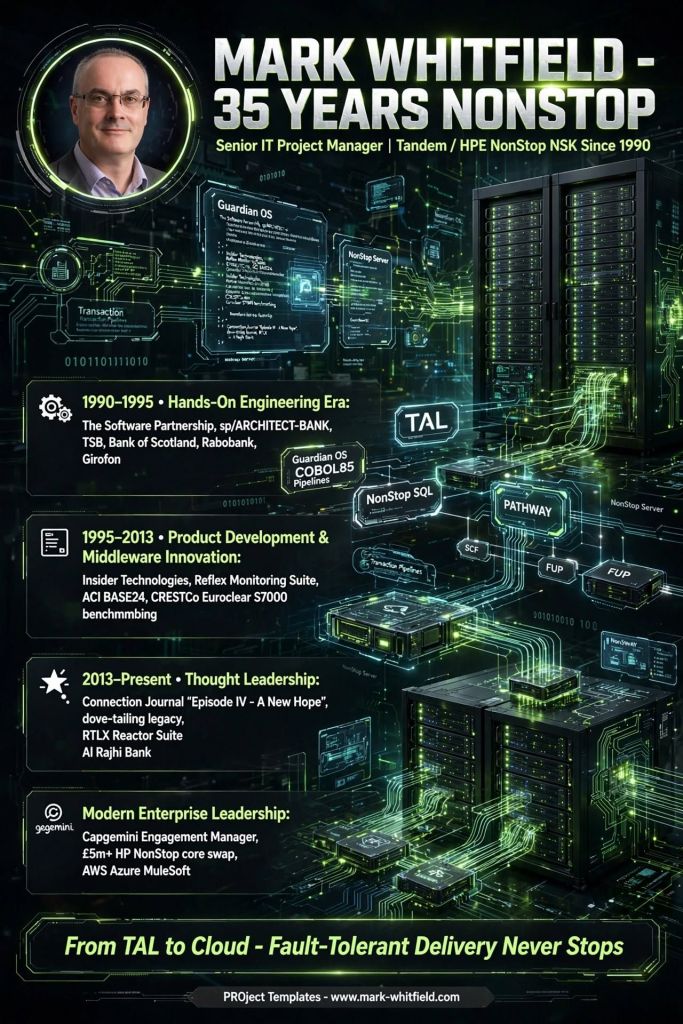
Senior IT Project Manager Mark Whitfield possesses over 35 years of specialized expertise in the software development lifecycle, heavily rooted in Tandem / HPE NonStop fault-tolerant mainframe environments.
Mark Whitfield | Tandem HPE NonStop NSK | Career Experience since 1990
After graduating with distinction in Computing in 1990, his career evolved from writing low-level architectural code for electronic banking platforms into steering multi-million-pound high-availability enterprise migrations.
1. Hands-On Engineering Era (1990–1995)
Upon entering the tech industry in 1990, Whitfield was recruited as a programmer at The Software Partnership (acquired by Deluxe Data International in 1994) in Runcorn, Cheshire.
The Mission: Developing and maintaining the sp/ARCHITECT-BANK platform, a pioneering electronic desktop banking system deployed for Tier-1 institutions like TSB, Bank of Scotland, Rabobank, and Girofon (Denmark). This allowed corporate clients desktop access to their accounts—a cutting-edge milestone in the pre-internet era.
Core Technical Stack: Built deep core systems using TAL (Tandem Application Language), COBOL85, NonStop C/C++, and NonStop SQL. He mastered low-level Tandem system management utilities including PATHWAY, SCF, FUP, INSPECT, and XPNET.
2. Product Development & Middleware Innovation (1995–2013)
Whitfield transitioned to Insider Technologies Limited (ITL) at Salford Quays, Manchester, embarking on an 18-year tenure as a Senior Programmer and eventual Product/Project Manager.
The “Reflex” Monitoring Suite: He co-developed core platform health, automated diagnostic, and real-time transaction log extraction modules. This software provided critical SLA tracking for ATM and POS pipelines across massive networks, directly integrating with industry-standard ACI Worldwide BASE24 Classic and BASE24-eps architectures.
CRESTCo Benchmarking (1997): Deployed as a technical consultant on-site at CRESTCo (now Euroclear) in London, he authored custom stress-testing and performance benchmarking software to evaluate settlement performance on newly rolled-out S7000 HPE NonStop hardware.
3. Thought Leadership & Commentary (2013–Present)
As a Principal Consultant, Whitfield’s deep technical domain knowledge translated into published expert commentary on system modernization.
The Connection Journal Feature (2013): Whitfield authored a major feature in The Connection, the globally recognized journal for HPE NonStop systems. Entitled “Episode IV – A New Hope (…for both Archived Legacy and Real-Time Transactions and NonStop EMS Alerts)”, the paper served as a deep architectural breakdown.
Core Thesis: Whitfield advocated for “dove-tailing” rather than “ripping and replacing” legacy mainframe infrastructure. He demonstrated how to harness Big Data and modern analytics by bridging fault-tolerant Guardian environments with open-system frameworks using real-time transaction log monitoring—specifically outlining the successful implementation of the RTLX Reactor Suite at Al Rajhi Bank in Saudi Arabia.
4. Modern Enterprise Leadership
Since 2016, working as an Engagement and Delivery Manager for Capgemini, Whitfield has successfully merged his foundational high-availability knowledge with modern governance. His portfolio includes orchestrating a £5m+ HP NonStop core swap and log monitoring overhaul for retail banking giants alongside secure cloud transformations (AWS, Azure, and MuleSoft integrations).
To support the wider IT delivery community, he also curates a repository of professional resources via his site, PROject Templates.
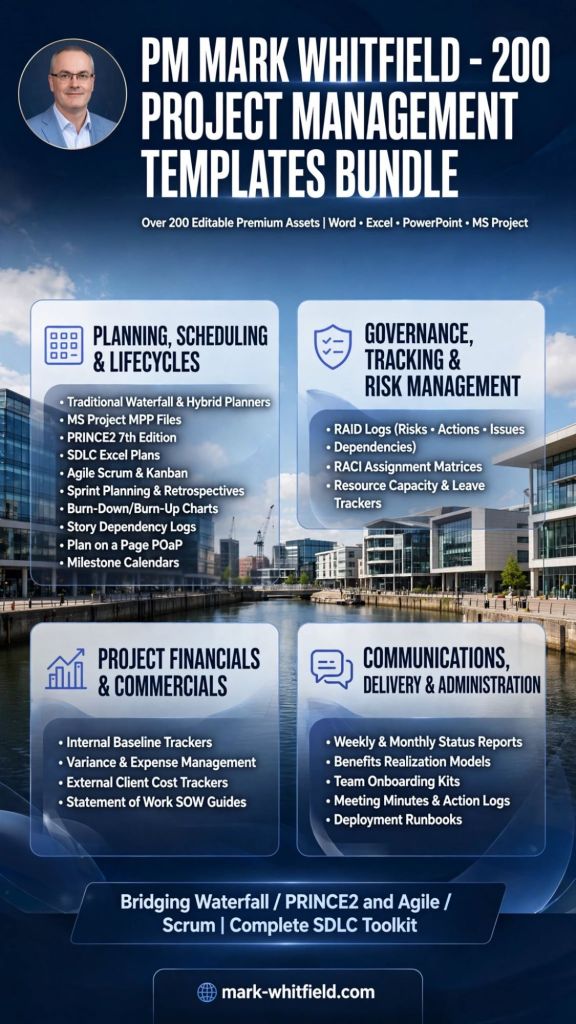
Mark Whitfield’s comprehensive Project Management Template Bundlecontains over 200 editable premium assets. These templates are designed to serve both traditional structured governance and modern frameworks, bridging the gap between Waterfall/PRINCE2 and Agile/Scrum execution.
Mark Whitfield | Free Upgrades | 200+ Project Management Templates
Available natively in Microsoft Word, Excel, PowerPoint, and MS Project (MPP) formats, they are built to support the entire software development lifecycle (SDLC) and general program delivery.
Below is an in-depth breakdown of the project management templates categorized by their primary operational focus, including links to relevant toolkits and deep-dives from the Mark Whitfield Project Management Portal:
📅 Planning, Scheduling & Lifecycles
These templates provide the core baseline for defining, pacing, and communicating project tasks across different methodologies.
Traditional Waterfall & Hybrid Planners
Microsoft Project Plan (MSP MPP) Files: Ready-made master schedules configured for structured delivery phases and software development lifecycles. Accessible via the MS Project Template Portal.
PRINCE2 7th Edition Schedules: Tailored governance templates adhering to the updated PRINCE2 framework principles.
Detailed SDLC Excel Project Plans: Complete alternative task trackers structured for teams operating without standard Microsoft Project desktop licenses. Available on the Excel and PowerPoint Plans Page.
Agile, Scrum & Kanban Execution
Sprint Planning & Retrospective Kits: Organized task blocks for managing daily stand-ups, backlog grooming, and sprint delivery cadences.
Agile Burn-Down & Burn-Up Charts: Dynamic visual tools to track team velocity and remaining sprint effort over active delivery blocks.
Story Dependency Logs: Dedicated cross-team alignment matrices specifically mapping blockers between product backlog items.
High-Level Stakeholder Communication
Plan on a Page (POaP) Viewports: Executive-level visual dashboards built natively in Excel and PowerPoint to summarize timelines for steering committees. Details can be reviewed on the Project Planning Examples Page.
Milestone Calendars: Simplified cloud-migration or deployment timeline graphics designed for quick C-suite alignment.
📊 Governance, Tracking & Risk Management
These documents enforce quality assurance, track real-time deviations, and maintain compliance throughout the project lifecycle.
RAID & Control Tracking
Comprehensive RAID Logs: Multi-tab Excel registers covering Risks, Actions, Issues, Opportunities, Lessons Learned, and Dependencies with built-in analytical charts. Complete operational toolsets are hosted on the PMO Toolkit Hub.
Basic RAID Frameworks: Lightweight, trimmed tracking variations engineered primarily for simpler project bids or rapid discovery blocks.
Resource and Accountability Management
RACI Assignment Matrices: Cross-functional grids to clearly assign and establish who is Responsible, Accountable, Consulted, and Informed across tasks.
Resource Capacity & Leave Trackers: Integrated team scheduling sheets managing calendar availability, annual leave allocations, and project burn rates.
💰 Project Financials & Commercials
A suite of detailed financial workbooks designed to align internal cost tracking against customer-facing baselines.
Cost & Baseline Engineering
Internal Baseline Trackers: Comprehensive “Company View” sheets detailing internal resourcing costs, forecast models, and gross margin goals. See structural breakdown details at the Template Folder Directory.
Variance & Expense Management: Formula-driven financial views tracking actual expenditures against forecasted baselines to flag overruns.
Vendor & Client Commercial Alignment
External Client Cost Trackers: Simplified, external-facing cost summary dashboards ready to share directly for regular client financial reviews.
Statement of Work (SOW) Guides: Document generation kits establishing delivery scope, contractual guidelines, and specific supplier rules.
📢 Communications, Delivery & Administration
Templates engineered to optimize day-to-day team functions, report project status, and handle operational management.
Status Reporting & Visibility
Weekly & Monthly Status Reports: Pre-built executive slide decks and text templates tailored to provide uniform delivery updates. These can be downloaded from the Professional Templates Page.
Benefits Realization Models: Analytical mapping systems designed to log, monitor, and formally verify the commercial value or ROI yielded by individual deliverables.
Onboarding & Daily Mechanics
Team Onboarding Kits: Structured resource folders containing organizational charts, contact lists, and system access paths for incoming team members.
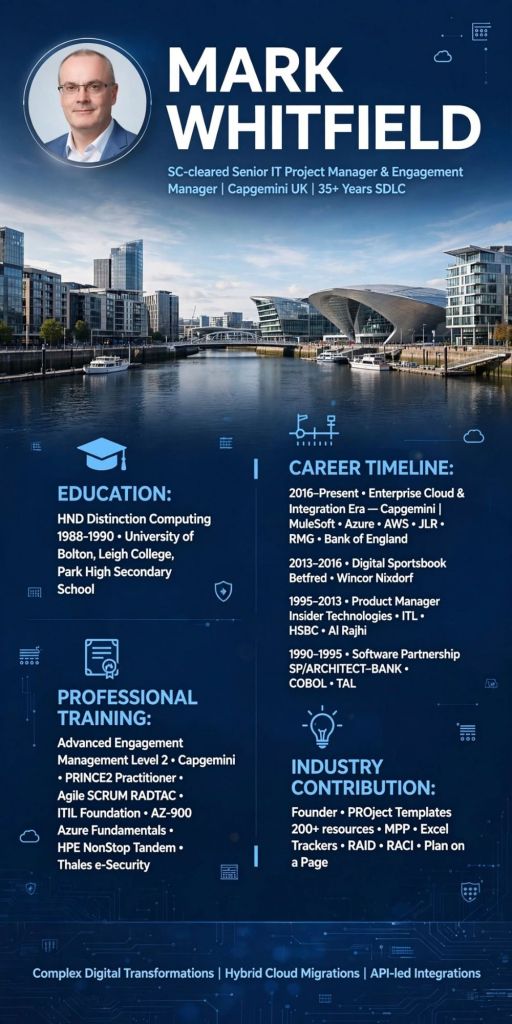
Mark Whitfield is an established, UK-based, SC-cleared Senior IT Project Manager and Engagement Manager at Capgemini UK with over 35 years of experience spanning the entire Software Development Lifecycle (SDLC).
Mark Whitfield | IT Project Manager | Education and Career Summary
Specialising in complex digital transformations, hybrid cloud migrations, and API-led system integrations, he has successfully directed multi-million-pound initiatives for major blue-chip clients, including Barclays, Jaguar Land Rover (JLR), Royal Mail Group (RMG), and the Bank of England.
Beyond corporate consulting, he is the founder and author of PROject Templates, an open repository containing over 200 professional project management resources and frameworks.
🎓 Education & Higher Learning
Mark Whitfield built his technical foundation in the late 1980s and early 1990s in Greater Manchester:
Higher Education: Graduated with an HND (Distinction) in Computing (1988–1990) from the University of Bolton (formerly known as the Bolton Institute of Higher Education).
Further Education: Studied at Leigh College, completing preliminary computing and technical certificates.
Throughout his career, Whitfield has continuously updated his project governance credentials across Agile, Waterfall, and technical infrastructure ecosystems:
Project Management & Framework Governance
Advanced Engagement Management (Level 2): Certified at the Capgemini Campus (Serge Kampf Les Fontaines in Chantilly, France) for enterprise client delivery.
PRINCE2 Practitioner & Foundation: Registered practitioner status achieved through the ILX Group.
Agile SCRUM Framework: Advanced agile mechanics and sprint methodology training completed via RADTAC.
ITIL Foundation: Certified in ITIL service management infrastructure.
Project Management Fundamentals: Completed specialized tracks including “Managing Multiple Projects” via Skillpath.
Cloud Infrastructure & Technical Programming
AZ-900 Microsoft Azure Fundamentals: Certified in cloud architecture concepts.
Mainframe & Enterprise Systems: Highly trained in HPE NonStop/Tandem architectures, including GUARDIAN, TAL (Tandem Application Language), Transaction Handlers, and SQL performance tuning.
Programming Languages: Formal background in C, C++, Transact-SQL, COBOL85, Java/Android development (via Eclipse), and the ASP.NET framework.
Cybersecurity & Cryptography: Completed specialist technical courses with Thales e-Security covering PayShield hardware security modules (HSM), SRM, and SafeSign configurations.
💼 Comprehensive Career & Project Breakdown
1. Enterprise Cloud & Integration Era (2016–Present)
Role: Senior Engagement Project Manager at Capgemini UK
Hybrid Cloud Migrations: Spearheaded massive cloud transformation workstreams migrating legacy on-premise infrastructure into Microsoft Azure and AWS ecosystems.
MuleSoft Delivery Management: Augmented into MuleSoft (a Salesforce company) as a Delivery Manager. He directed API-led connectivity frameworks across the Anypoint Platform to seamlessly unify decoupled enterprise systems.
Key Client Engagements: Managed high-stakes project deliveries for strategic portfolios, including Jaguar Land Rover (JLR), Royal Mail Group (RMG), Euroclear, NATS, and the Bank of England.
2. Digital Sportsbook & Retail Transformation Era (2013–2016)
Betfred Mobile Sportsbook: Acted as Senior PM delivering complex, high-concurrency mobile sports betting applications and integrated web payment gateways. Managed continuous integration pipelines during critical sporting events under strict regulatory frameworks.
Wincor Nixdorf Automation: Delivered software pipeline deployments for automated teller machines (ATMs) and banking point-of-sale (POS) hardware terminals across European retail networks.
3. Technical Consultancy & Product Management Era (1995–2013)
Multi-Product Lifecycle Control: Directed the end-to-end SDLC of four core automated system management products. Focused on real-time transaction tracking and Service Level Agreement (SLA) monitoring for global mainframes.
International Banking Deployments: Headed multi-disciplinary engineering squads to build and deploy high-volume transaction surveillance systems based on BASE24 ATM architectures.
Delivered major implementations for HSBC (2008) and Al Rajhi Bank in Saudi Arabia (2012).
Collaborated with joint architects at Alliance & Leicester (now Santander) to design, construct, and execute an advanced ATM/POS performance tracking engine.
4. Early Software Engineering Era (1990–1995)
Role: Core Programmer / Software Developer at The Software Partnership (Acquired by Deluxe Data International in 1994)
Electronic Banking Mainframes: Began his career immediately after graduating, authoring COBOL85, TAL, and NonStop SQL code for pioneering electronic banking systems.
sp/ARCHITECT-BANK Platform: Maintained and enhanced core terminal software running on Tandem Computers (now HPE NonStop). Implemented corporate inter-account desktop transfer modules for global institutions such as TSB, Bank of Scotland, Girofon (Denmark), and Rabobank.
📊 Industry Contribution: PROject Templates
Outside of corporate project delivery, Whitfield publishes structural planning toolkits widely referenced across modern PMOs. His platform, PROject Templates, focuses on accelerating fast-track client-facing deliverables through downloadable blueprints:
Core Artifacts: Customisable MS Project Plans (MPP) and advanced Excel Financial Trackers.
Governance Frameworks: Comprehensive, cross-functional RAID Logs (Risks, Actions, Issues, Dependencies), RACI Assignment Matrices, and Plan on a Page (POaP) timelines.
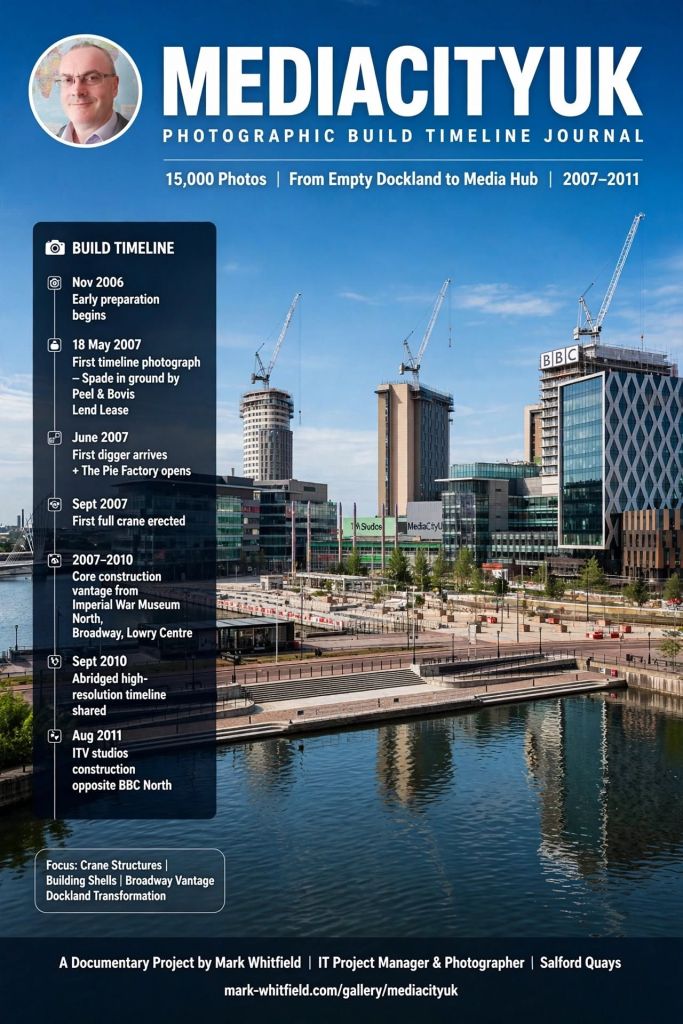
The MediaCityUK Photographic Build Timeline Journal is an extensive, long-term documentary project created by IT Project Manager and photographer Mark Whitfield. Working nearby in Salford Quays, Whitfield used his close proximity to methodically document the area’s massive transformation from an empty dockland into a major UK media hub.
Mark Whitfield | MediaCityUK Photographic Build Timeline Journal
The project captured over 15,000 photos over its lifespan, focusing heavily on the phase 1 construction lifecycle from the ground up.
Key Project Timeline & Milestones
November 2006: Early preparation work and digging begins around the site. Temporary cabins are placed off Broadway to house the initial project staff and BBC contingents.
18 May 2007: Mark Whitfield captures his first timeline photograph, marking the formal start of his build documentation. This coincides with the official “spade in the ground” by Peel Group and Bovis Lend Lease.
June 2007: Visible ground development scales up as the first digger arrives on-site. Concurrently, “The Pie Factory” (a refurbished bakery) opens as the first working studio space.
September 2007: Construction advances rapidly with the erection of the first full-sized crane on the development site.
2007–2010: The core construction phase takes place. Whitfield systematically updates his weekly journal from vantage points like the Imperial War Museum North, Broadway, and the Lowry Centre side, capturing the rising crane structures and building shells.
September 2010: As the main grassland is replaced by the finished media campus, Whitfield shares an abridged public high-resolution timeline containing a curated selection of his massive archive.
August 2011: Documentation expands to capture the next steps of growth, including the initial construction phases of the ITV studios situated directly opposite BBC North.
Exploring the Photo Journal
The full history and comprehensive photo collections can be found across Mark Whitfield’s active journals: