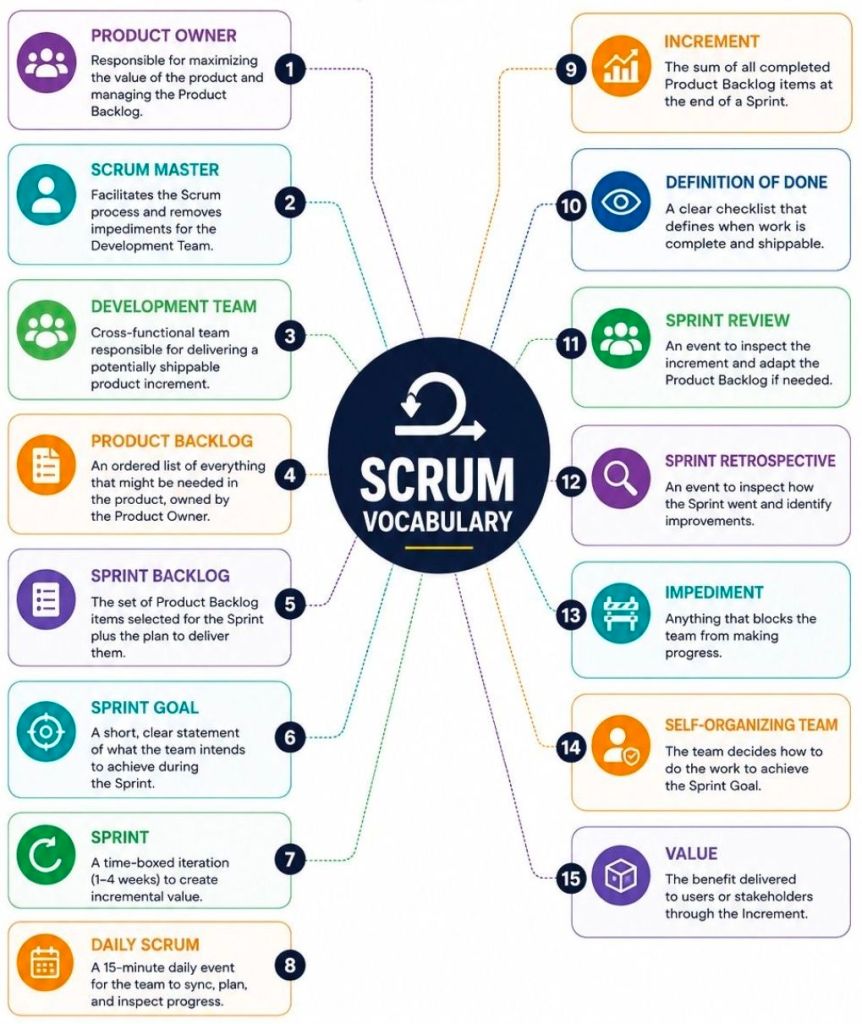
Agile Scrum Terms

Agile Scrum Terms
Agile Scrum Terms

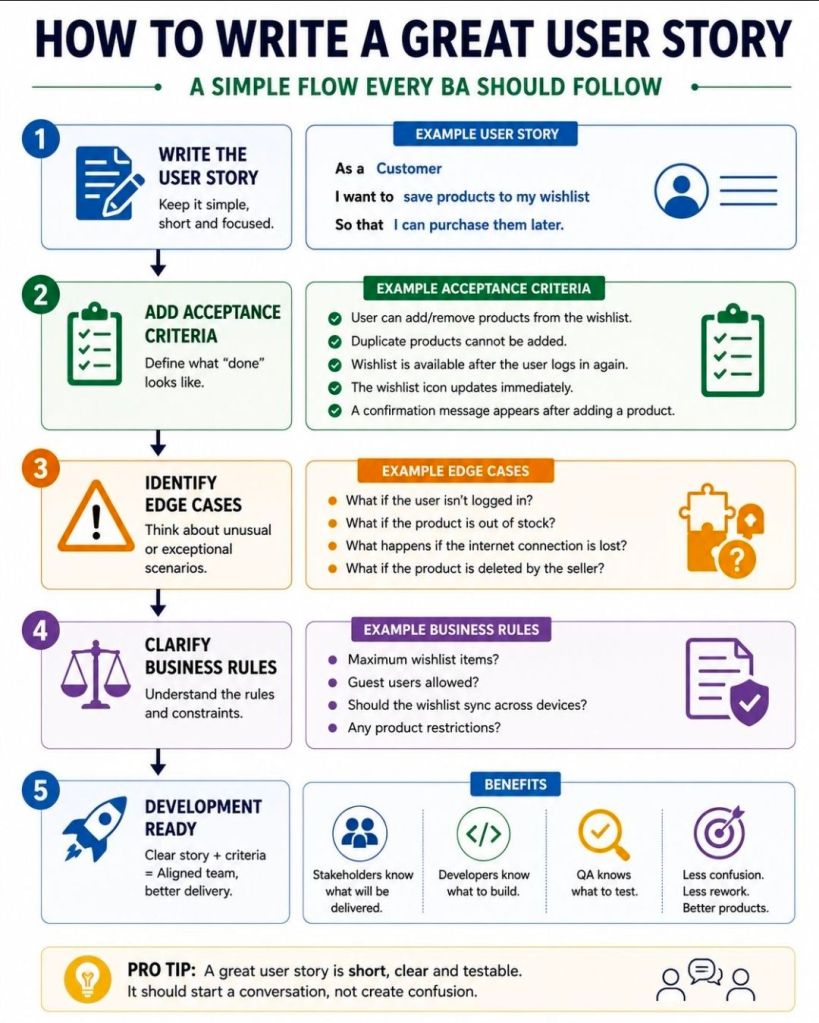
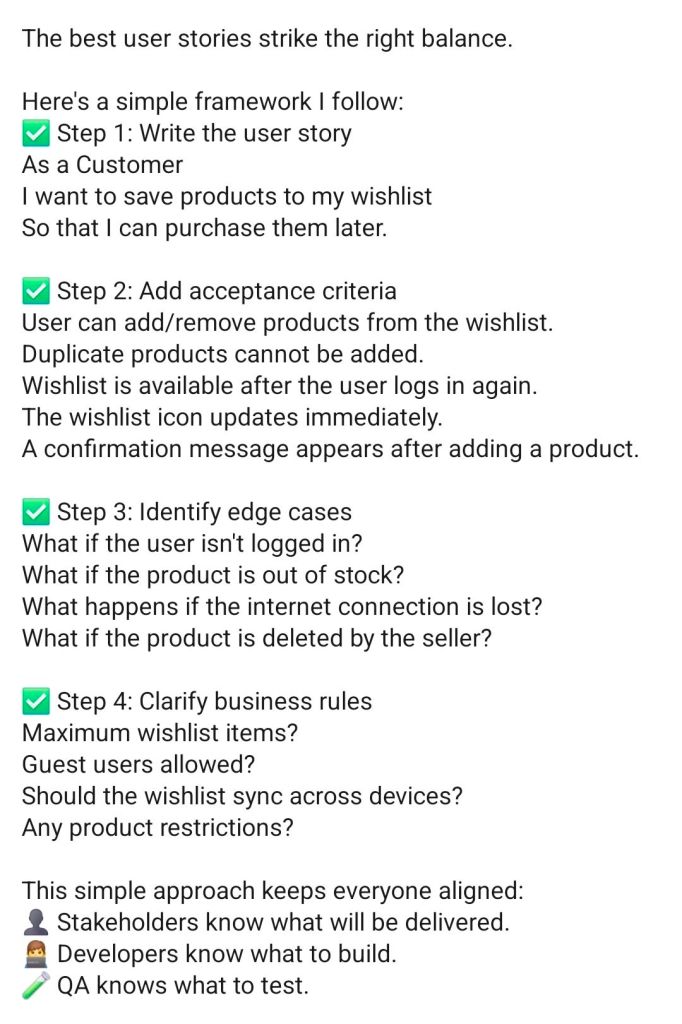
Agile Scrum, How to Write a Great User Story

Scrum How to Write a Great User Story
Agile Scrum, How to Write a Great User Story
How to Write a Great User Story

Definition of Done DoD vs Definition of Ready DoR in Agile Scrum

1. Definition of Done DoD vs Definition of Ready DoR in Agile Scrum
2. Definition of Done DoD vs Definition of Ready DoR in Agile Scrum
Definition of Done DoD vs Definition
of Ready DoR in Agile Scrum

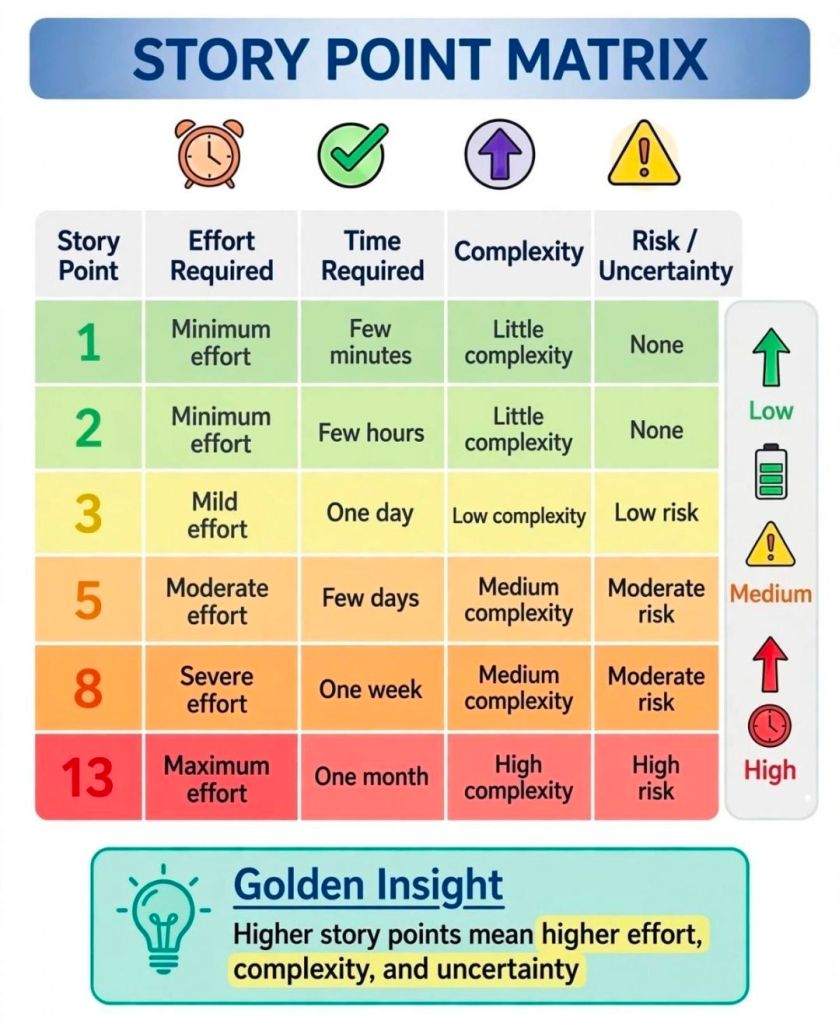
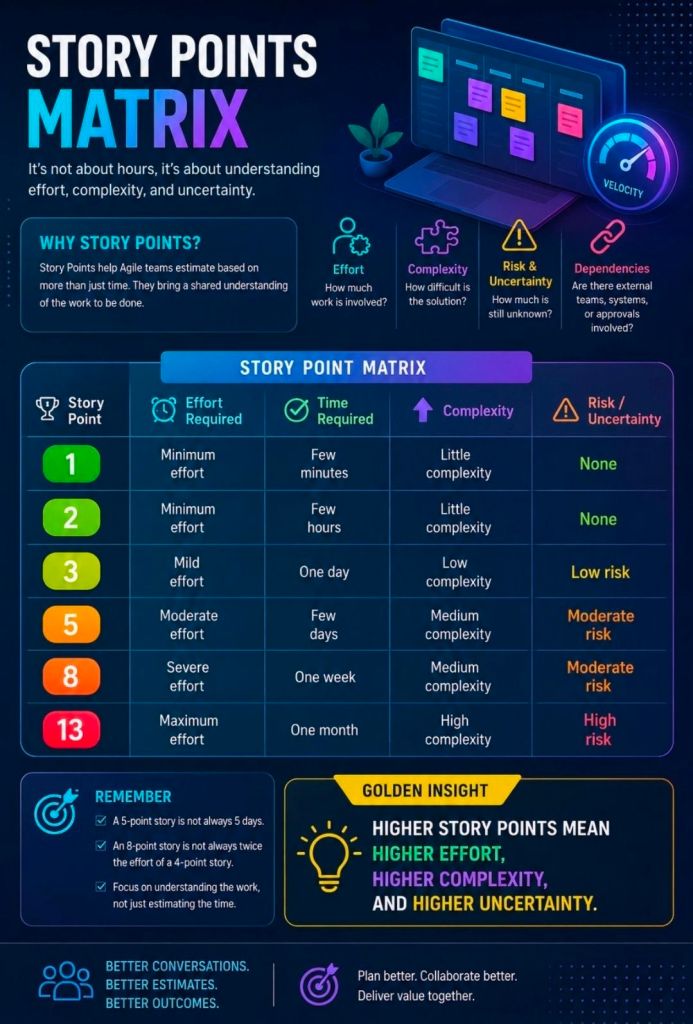
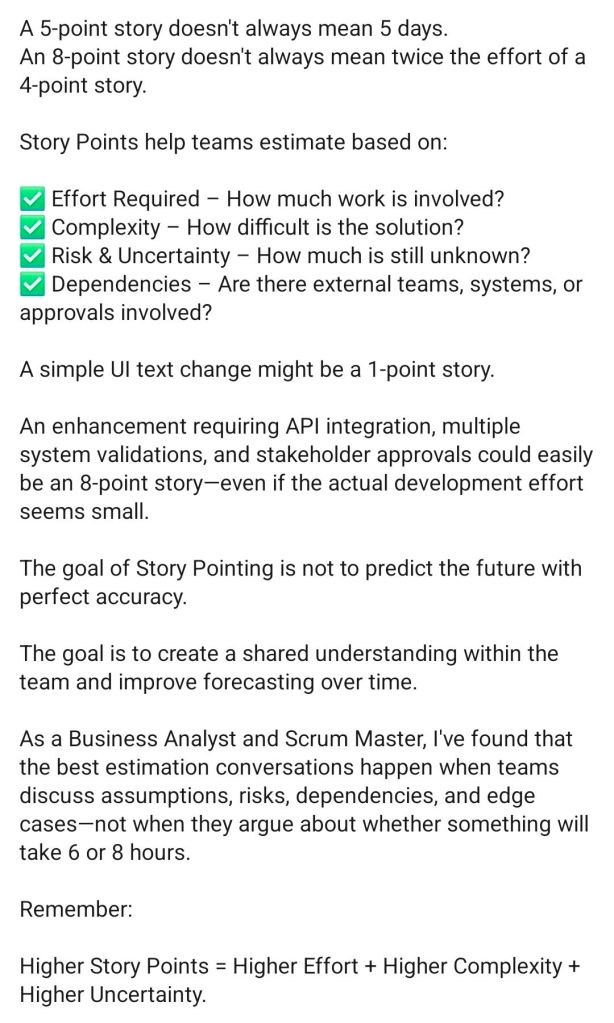
Agile Scrum Story Points Matrix

Story Points Matrix Agile Scrum
Scrum Story Points Matrix
Agile Scrum Story Points Matrix

Agile Scrum and Artificial Intelligence AI Role for Delivery

AI enhances Agile Scrum by automating routine administrative tasks and providing predictive data analytics, allowing teams to deliver high-quality increments faster. It accelerates delivery across the entire lifecycle, from backlog grooming and sprint planning to continuous testing and retrospective analysis.

AI serves as a powerful facilitator in Agile environments, streamlining key processes across the framework:

1. Backlog Management & Planning

  • Story & Task Generation: AI models can ingest unstructured business requirements and automatically generate structured user stories and acceptance criteria.
  • Intelligent Forecasting: Platforms utilize historical velocity and predictive algorithms (like Monte Carlo simulations) to forecast delivery dates and run what-if capacity simulations.
  • Estimation: AI assists developers by breaking down large epics into smaller tasks and suggesting relative effort based on past projects.

2. Daily Execution & Development

  • Coding Assistants: AI tools generate boilerplate code, assist with refactoring, and automate unit test creation to speed up development cycles.
  • Automated QA: AI inspections and vulnerability scanning ensure continuous quality assurance, allowing for rapid defect detection.

3. Scrum Ceremonies

  • Meeting Automation: AI tools (like meeting transcribers) generate automated sprint reports, summarize stand-ups, and track action items, saving Scrum Masters valuable time.
  • Retrospective Insights: AI analyzes sentiment and historical cycle time trends to highlight blockers and suggest actionable continuous improvement points.

While AI accelerates output, Agile emphasizes human empiricism. AI acts as an advisor, augmenting human judgment in prioritization and anticipating value, while Product Owners and teams retain ownership of the strategic direction and final commitments.

Also…

Artificial Intelligence (AI) is transforming Agile Scrum from a reactive framework into a predictive powerhouse. Rather than replacing human roles, AI serves as an “advisor” or “delivery catalyst” that cuts through the operational noise, allowing Scrum teams to focus on strategy, coaching, and actual value delivery.

The primary use cases for AI across Agile Scrum delivery are structured below by core accountability and phase.

🚀 Backlog Refinement & Product Ownership

Product Owners are major beneficiaries of AI automation, using it to rapidly move from raw stakeholder feedback to concrete, structured deliverables.

  • Automated User Stories: Generates draft user stories based on product feature briefs, user interview summaries, or raw documentation.
  • Accepting Criteria Creation: Produces detailed, high-quality Given-When-Then criteria, ensuring edge cases are addressed before a sprint begins.
  • Story Splitting: Scans large backlog items (Epics) and suggests logical boundaries to break them down into smaller, sprint-ready tasks.
  • Sentiment Synthesis: Ingests massive pools of unstructured customer feedback, clustering themes automatically to guide roadmap prioritization.

📊 Smarter Sprint Planning & Estimation

Predictive analytics eliminates reliance on human guesswork during planning sessions.

  • Predictive Forecasting: Uses machine learning models (like Monte Carlo simulations) to analyze historical velocity. It provides probabilistic delivery windows instead of single-date projections.
  • Capacity Optimization: Evaluates developer skill sets and availability to recommend optimized task assignments. This maintains healthy Work In Progress (WIP) limits and prevents developer burnout.
  • Early Risk Detection: Flags hidden dependencies or incomplete definition-of-ready requirements before work enters the active sprint.

🛠️ Active Sprint Delivery & Flow Optimization

During the sprint, AI acts as an early warning system to keep development on schedule.

  • Predictive Burndown Charts: Recognizes code and ticket-tracking patterns mid-sprint to predict if a team will miss its commitment.
  • Bottleneck Identification: Automatically flags tickets that are stalled, constantly rolling over, or blocked by external dependencies.
  • Admin Automation: Automatically triages incoming support bugs, updates ticket statuses, issues reminders, and drafts documentation.

🔄 Team Reflection & Retrospectives

AI helps the Scrum Master enhance empirical learning during sprint ceremonies.

  • Meeting Synthesis: Transcribes and summarizes standups and reviews, extracting key action items without human data-entry overhead.
  • Sentiment Analysis: Evaluates team communication channels to detect hidden friction, collaboration blocks, or dipping morale.
  • Trend Tracking: Cross-references action items from past retrospectives against subsequent sprint data to prove if improvements actually succeeded.

🛠️ Industry AI Tools in Action

Many delivery platforms now native-embed AI to streamline Scrum processes:

Platform Tool – Core Agile Capability (below):

Atlassian Intelligence / Jira – Surfaces delivery risks, predicts timelines, and automates ticket creation.

ClickUp Brain – Generates user stories, summarizes meetings, and drafts retrospective action plans.

Miro Assist – Groups brainstorming sticky notes by topic and generates summaries or next steps.

Forecast AI – Facilitates long-term resource capacity planning and automated timeline estimation.


⚠️ The Critical Boundary: The Human Loop

According to modern frameworks by organizations like Scrum.org and the Project Management Institute (PMI), AI should never own accountability:

  1. AI is an advisor, not a decision-maker: Humans own commitments and strategic vision; AI merely presents options based on historical numbers.
  2. The “Vague In, Vague Out” rule: If a team writes weak user stories or provides poor prompt data, AI output will simply amplify those execution flaws.
  3. Hallucination risks: LLMs struggle with precise math and statistical calculations; all AI-generated velocity metrics must be manually verified.

Agile Scrum and Artificial Intelligence AI Usage for Delivery

Over 200 editable templates tailored for Agile Scrum, Waterfall, and PRINCE2 frameworks

Mark Whitfield’s premium project management toolkit consists of over 200 editable templates tailored for Agile Scrum, Waterfall, and PRINCE2 frameworks. Built across 30+ years of digital and IT delivery, these frameworks prioritize corporate governance, seamless stakeholder reporting, and visual lifecycle control.

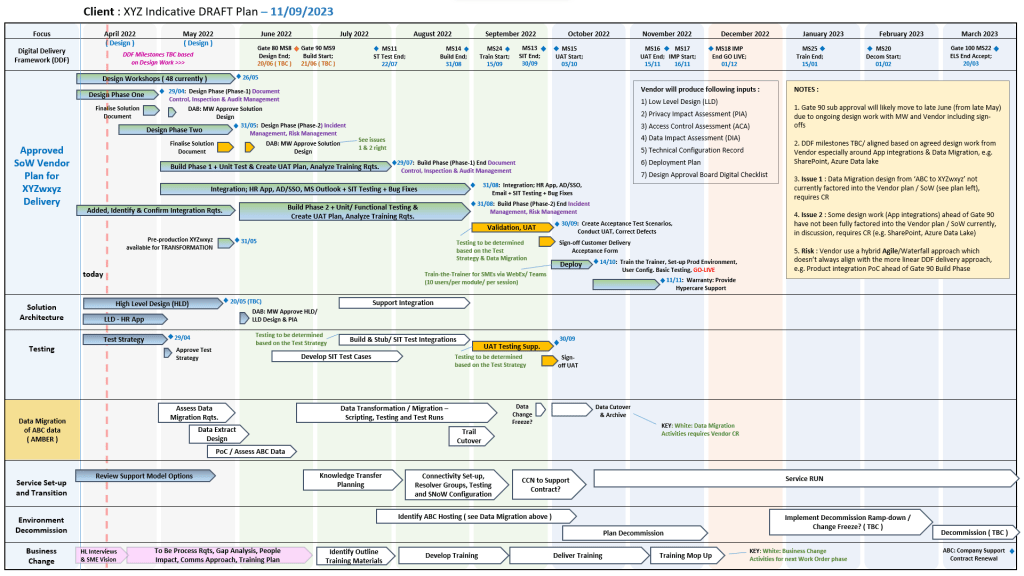
Example of many plan on a page poap ppt templates
Many POAP, Plan on a Page example templates

Below is the comprehensive, scannable breakdown of the core artifacts categorized by lifecycle focus, purpose, and application format. Purchase project templates here.


📅 1. Master Planning & Visual Roadmapping

These tools serve as the operational foundation for tracking dependencies, defining Work Breakdown Structures (WBS), and establishing executive visibility.

  • Detailed Software Development Life-Cycle (SDLC) Plan
    • Focus: End-to-end task tracking from inception and elaboration to construction, testing, and transition.
    • Format: Microsoft Project (.mpp) & Microsoft Excel (.xlsx).
    • Source Page: Mark Whitfield PMO Toolkit
  • PRINCE2 7th Edition Master Project Plan
    • Focus: Standardized governance processes structured according to the latest PRINCE2 methodology.
    • Format: Microsoft Project (.mpp) & Microsoft Excel Gantt Tracker.
    • Source Page: Mark Whitfield PRINCE2 Master Walkthrough
  • Plan on a Page (POaP) Blueprint
    • Focus: High-level, timeline-focused visual summaries mapping deliverables and milestones to client monthly views.
    • Format: Microsoft PowerPoint (.pptx, 30+ layout variations) & MS Excel.
    • Source Page: Mark Whitfield POaP Templates
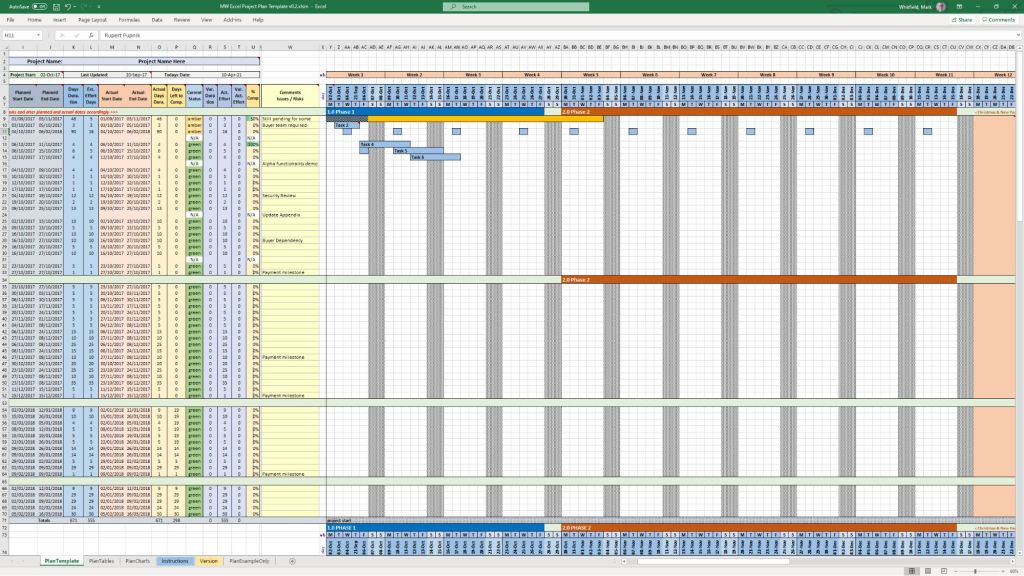
Example MS Excel Project Plan template

🛡️ 2. Risk, Governance & Operational Control

These registers form the “engine room” of project health management, shifting risk mitigation from reactive to predictive.

  • Comprehensive RAID Log & Tracker
    • Focus: Integrated visibility over Risks, Actions, Issues, and Dependencies, alongside change requests and supplier impacts.
    • Format: Microsoft Excel (.xlsx featuring self-populating chart dashboards).
    • Source Page: Mark Whitfield Operational Tracking Tools
  • Agile Story Dependency Tracker
  • RACI Matrix
    • Focus: Mapping roles and responsibilities across project deliverables (Responsible, Accountable, Consulted, Informed).
    • Format: Microsoft Excel (.xlsx).
    • Source Page: Mark Whitfield Folder Structure & Guide
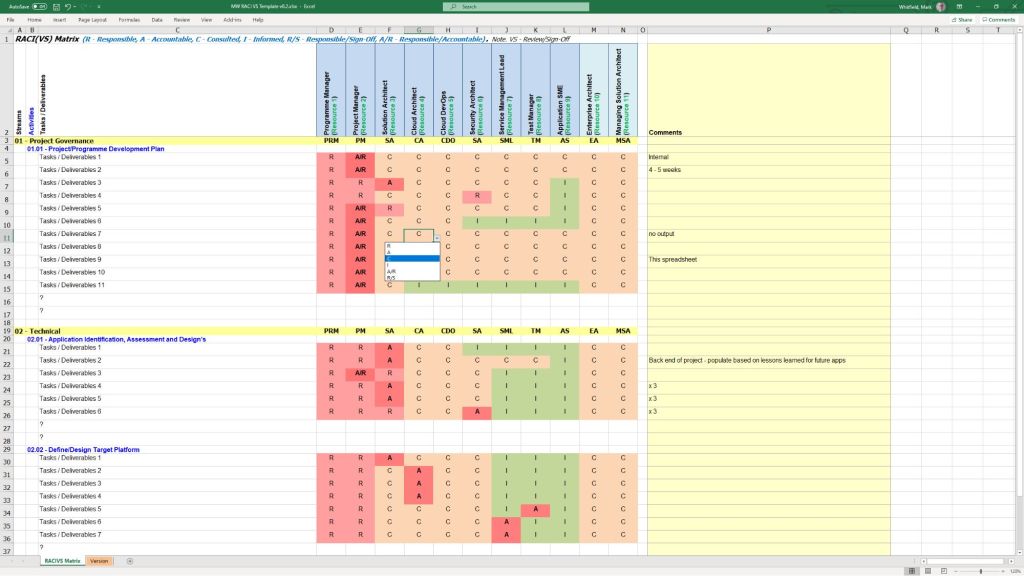
Example MS Excel RACI matrix template

📊 3. Performance reporting & Stakeholder Engagement

Designed to eliminate subjective performance analysis and maintain executive-level clarity.

  • Weekly / Monthly Project Status Report
    • Focus: Summarizing target completion, look-aheads, RAG indicators, and critical decisions for clients.
    • Format: Microsoft Word (.doc) & Microsoft PowerPoint (.pptx).
    • Source Page: Mark Whitfield Premium Delivery Page
  • Stakeholder Analysis & Influence Matrix
    • Focus: Mapping stakeholder influence versus organizational impact to tailor communication (Involve, Inform, Consult, Monitor).
    • Format: Microsoft Excel (.xlsx).
    • Source Page: Mark Whitfield Folder Structure & Guide
  • Project / Programme Kick-Off Deck
    • Focus: Initial team mobilization, workspace onboarding, and client approach alignment.
    • Format: Microsoft PowerPoint (.pptx).
    • Source Page: Mark Whitfield Main Purchase Index
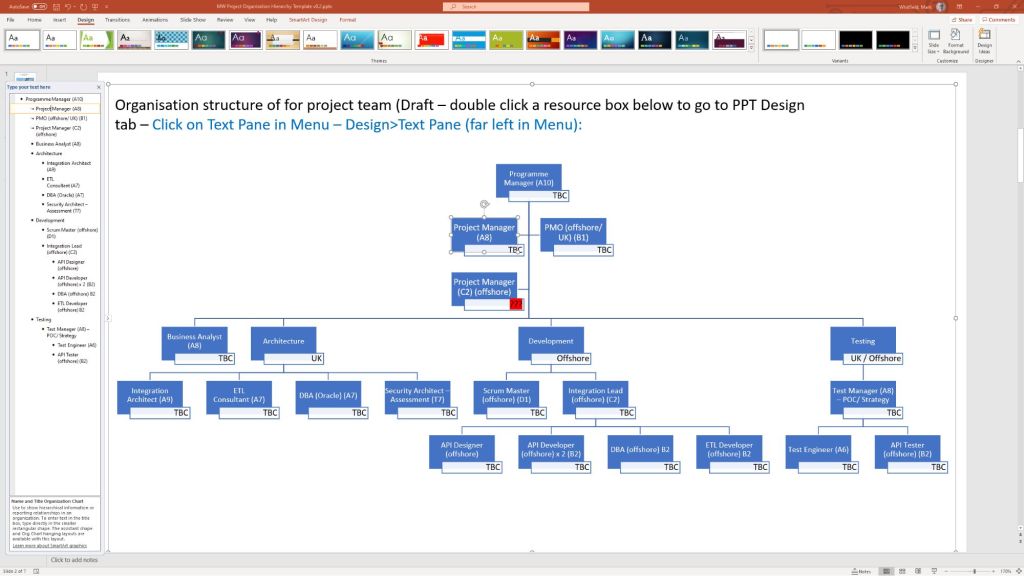
Example PPT slide for Org. Structure

💰 4. Financial Trackers & Value Realization

These artifacts manage fiscal discipline, pricing bids, and mapping long-term outputs to business outcomes.

  • Full Project Financial Tracker
    • Focus: Internal/external cost variance, forecasting models, contractor day rates, margin tracking, and expense visibility.
    • Format: Microsoft Excel (.xlsx with embedded financial trend charts).
    • Source Page: Mark Whitfield Premium Delivery Page
  • Statement of Work (SOW) Templates
    • Focus: Work order structuring and delivery guardrails for both commercial Waterfall and Agile contracts.
    • Format: Microsoft Word (.doc).
    • Source Page: Mark Whitfield Operational Tracking Tools
  • Benefits Realization Analysis Tracker
    • Focus: Comparing projected baseline targets with actual organizational outcomes post-deployment.
    • Format: Microsoft Excel (.xlsx).
    • Source Page: Mark Whitfield Premium Delivery Page
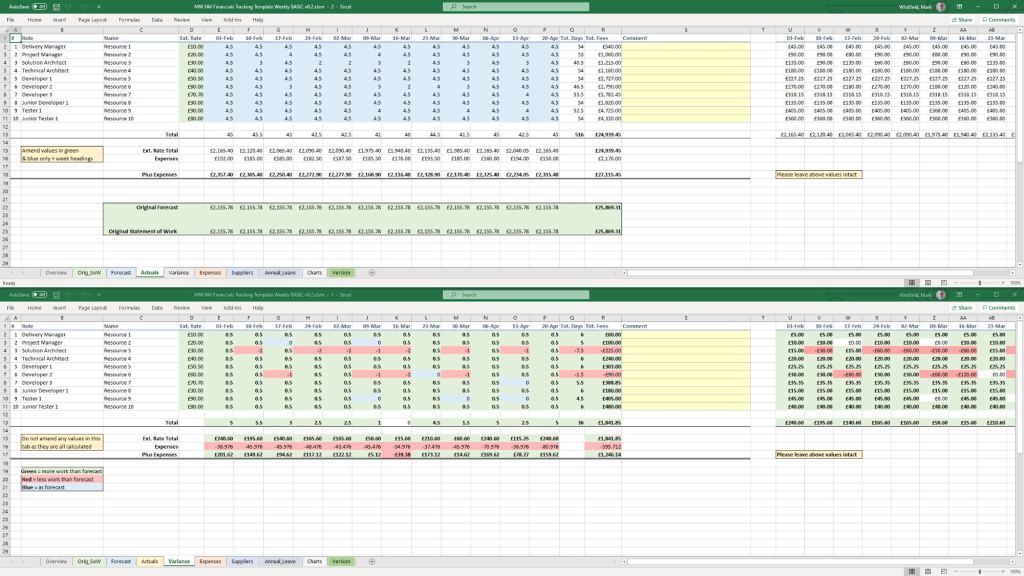
Example Excel Project Financial Tracker

🏃 5. Agile Delivery Tools

Alternative visual logs created for environments where dedicated software like Jira or Azure DevOps is unavailable.

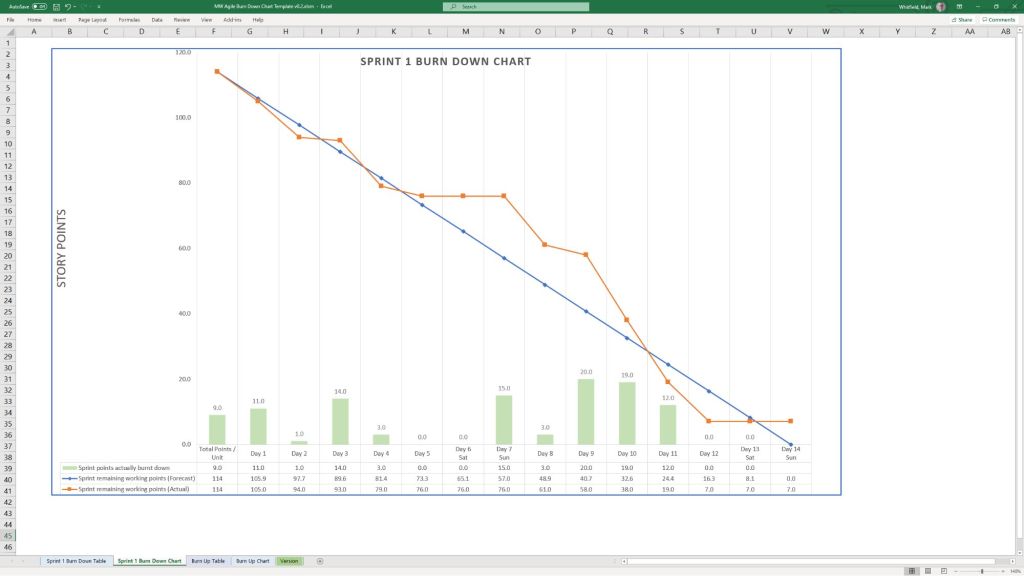
  • Agile Burn Down & Burn Up Charts
    • Focus: Visualizing sprint velocity, work remaining, and scope creep across iterative delivery cycles.
    • Format: Microsoft Excel (.xlsx with automatic mathematical plotting).
    • Source Page: Mark Whitfield Folder Structure & Guide
  • MS Teams Planner & To-Do Guide
    • Focus: Step-by-step framework configuration for running Kanban-style card streams in the cloud.
    • Format: Microsoft Word Walkthrough (.docx).
    • Source Page: Mark Whitfield Master Index
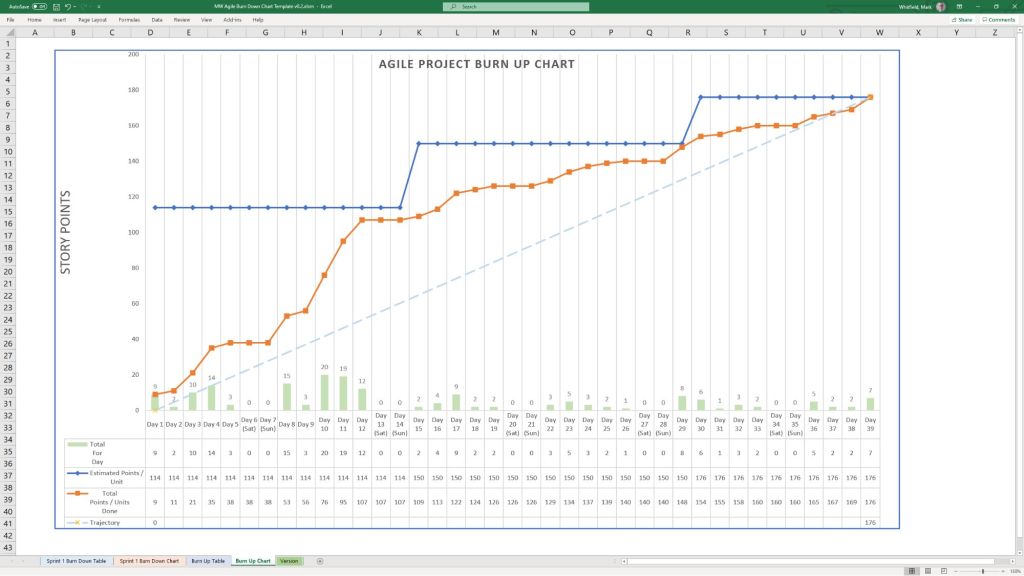
Example Agile Scrum Burn Up Chart
Example Agile Scrum Burn Down Chart

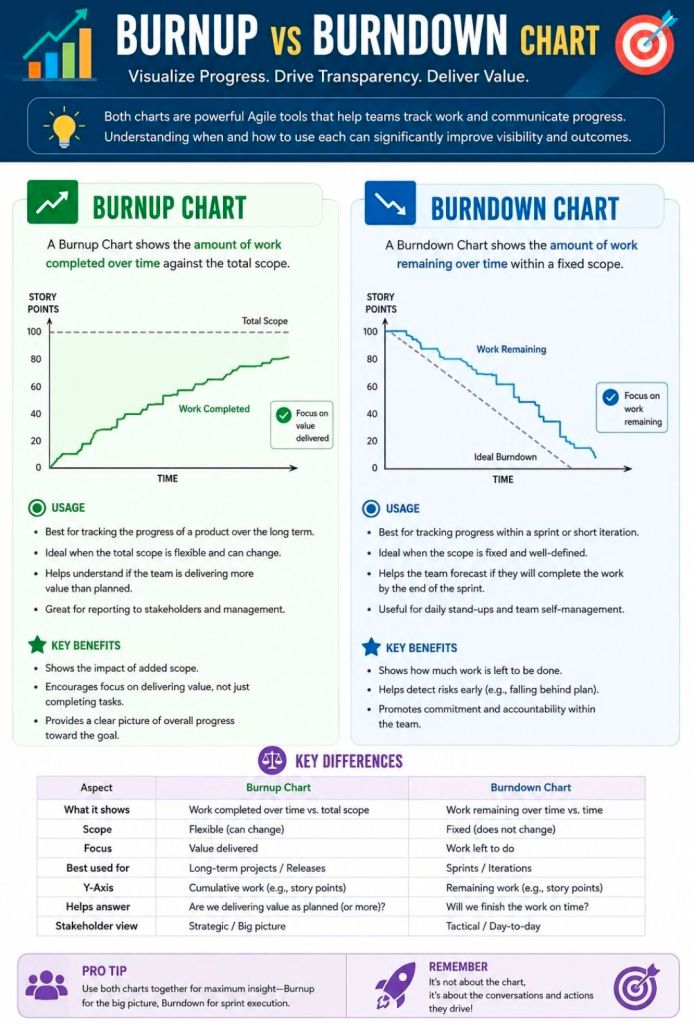
Agile Scrum Burnup vs Burndown Chart

Agile Scrum Burnup vs Burndown Chart

Top Agile Scrum Interview Questions

Top Agile Scrum Interview Questions

Preparing for an Agile Scrum interview requires a mix of theoretical knowledge, situational problem-solving, and a clear understanding of your specific role (Scrum Master, Product Owner, or Developer). Be ready to discuss the Scrum framework, roles, artifacts, ceremonies, and how you foster self-organization and continuous improvement.

Review these common Agile Scrum interview questions, categorized by topic:

1. Fundamentals & Frameworks

  • What is the difference between Agile and Scrum? Agile is an overarching project management philosophy focused on iterative development and flexibility. Scrum is a specific, lightweight framework within Agile that uses set roles, artifacts, and timeboxed “sprints” (usually 1-4 weeks).
  • What are the core roles on a Scrum Team? The three primary roles are the Product Owner (maximizes value, owns the backlog), the Scrum Master (servant-leader, removes impediments, ensures Scrum rules are followed), and the Developers (cross-functional team that delivers the increment).
  • What is a “Spike”? A spike is a timeboxed research or exploration task used to reduce uncertainty, figure out a technical approach, or better understand a requirement before development begins.

2. Scrum Ceremonies (Events)

  • What happens during a Sprint Planning meeting? The team collaborates to determine what work can be delivered in the upcoming sprint and creates a plan (the Sprint Backlog) for how to achieve this Product Goal.
  • Can you give a 2-3 minute overview of the Daily Scrum? It is a 15-minute timeboxed event for the Developers to inspect progress toward the Sprint Goal and adapt the upcoming work. It is not a status report to management; it is for the team to synchronize and plan the next 24 hours.
  • What is the purpose of a Sprint Retrospective? Held at the end of every sprint, the team inspects the past sprint regarding people, relationships, processes, and tools. The goal is to identify what went well and create a plan for implementing improvements.
  • What is the difference between a Sprint Review and a Retrospective? The Review inspects the software/product increment to adapt the Product Backlog. The Retrospective inspects the team’s process and working environment.

3. Artifacts & Estimation

  • What is the Definition of Done (DoD)? It is a shared, clear checklist of criteria that must be met for a product increment to be considered ready for release. It ensures consistency and quality across the team.
  • What is Velocity? Velocity measures the total amount of work (usually in Story Points) a Scrum Team can deliver during a single sprint. It is typically calculated as an average over the last 3-4 sprints and helps predict future delivery.
  • How do you handle scope creep? Emphasize that in Scrum, the sprint scope is locked once the sprint starts. If new work is urgent, it should go to the Product Backlog for future planning, or the team can negotiate with the Product Owner to remove an equally sized task from the current sprint to make room.

4. Situational & Behavioral (Scrum Master/Agile Coach focus)

  • What do you do if a manager tries to dictate or assign tasks to the team? Coach the manager on Scrum principles (self-management) and act as a shield to protect the team from outside interference, allowing them to focus on the Sprint Goal.
  • How do you build trust with your team? Focus on empathy, transparency, consistency, and active listening. Build a safe space where the team can fail forward, experiment, and voice concerns without fear of retaliation.
  • How do you handle conflict within the team? Encourage the team to resolve conflicts themselves first, stepping in only if it affects the sprint goals. Facilitate open dialogue focusing on the issue (the process/problem), not the person.