

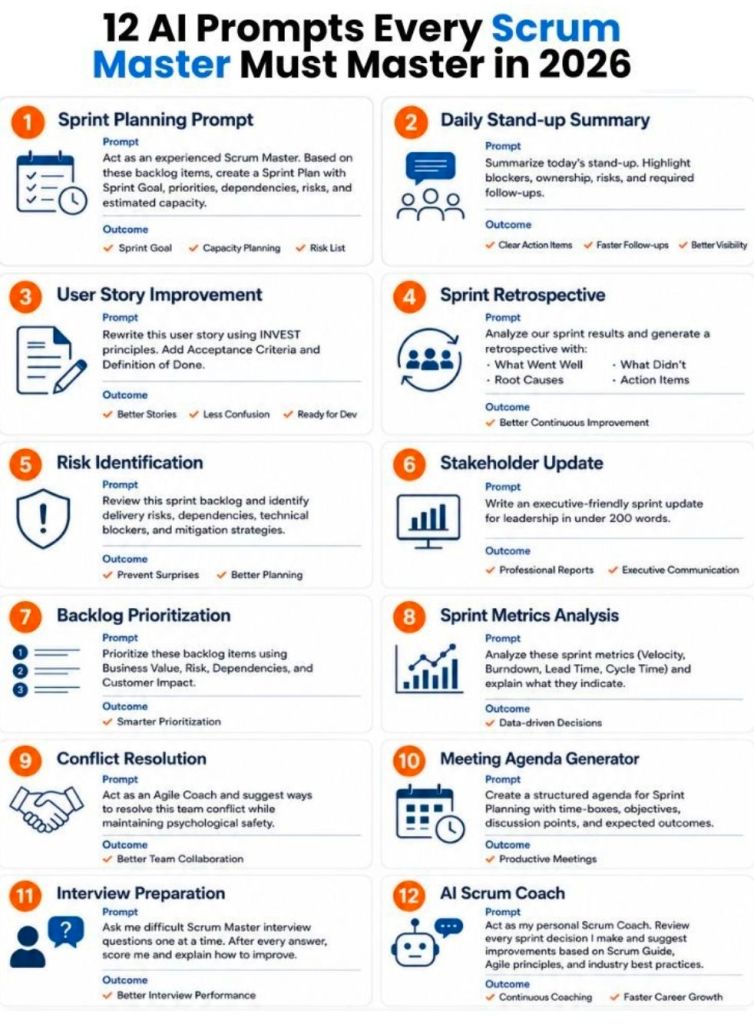
As an agile Scrum Master, you can significantly boost your efficiency and team collaboration by using AI tools for repetitive tasks, metric analysis, and ceremony preparation. The best way to utilize AI is to follow the CRAFT framework (Context, Role, Action, Format, and Tone) to give your AI model the necessary background. To get started, replace placeholder bracketed text with your specific information.
Review the structured AI prompts below, categorized by core Scrum Master responsibilities:
Sprint Planning Optimization
These prompts will help you streamline backlog management and ensure your next sprint cycle is data-driven and realistic.
- Predict Velocity & Capacity: “Based on historical sprint data: [insert last 3 sprints], predict our team’s velocity for the next 2-week sprint. Consider the following changes: [insert team changes, e.g., one developer out for a week], and provide a confidence interval.”
- Refine and Format Backlog Items: “As an expert in Agile backlog refinement, help me break down this user story: ‘[insert raw requirement text]’. List logical sub-tasks with realistic developer effort in hours, and flag any missing requirements or testability gaps.”
Daily Stand-up & Alignment
Enhance your team’s focus and identify bottlenecks before they impact flow.
- Goal-Oriented Stand-Up Agenda: “Act as a Stand-Up facilitator. Summarize these daily updates from my team: [insert team members’ updates]. Identify if we are at risk of missing the Sprint Goal, highlight cross-team dependencies, and suggest one follow-up question I can ask to redirect the team from ‘status updates’ to ‘problem-solving’.”
- Impediment Stress Test: “A common user story is stuck in the QA testing column for the third consecutive day, causing spillover risks. As an expert Scrum Master, suggest how I can facilitate a conversation with the team to address this impediment. Provide a tactical 3-step action plan.”
Retrospective Facilitation
Say goodbye to repetitive, generic retrospectives and tap into targeted, continuous improvement.
- Action-Oriented Theme Clustering: “Analyze these raw retrospective comments from my agile team: [insert list of comments]. Identify recurring themes, sentiment patterns, and root causes. Present the results in a ‘Start, Stop, Continue’ format, and suggest a concrete, actionable plan for the next sprint.”
- Psychological Safety & Conflict Simulation: “Tension has been mounting among team members regarding estimation methods and story point allocations. As an Agile conflict mediator, suggest opening questions I can use during the retro to encourage quiet team members to speak and de-escalate the disagreement.”
Coaching & Team Health
Use AI to strengthen your servant leadership and develop customized educational content.
- Agile Concept Teaching: “Generate a comprehensive guide on the Scrum framework for a team new to Agile. Focus on the core values of Scrum, how they relate to the Daily Scrum, and avoid overly technical jargon.”
- Handling Unrealistic Expectations: “Simulate a challenging conversation between myself (a Scrum Master) and a senior stakeholder who is demanding mid-sprint scope changes. Outline an approach I can use, rooted in Agile principles, to educate the stakeholder on the value of a frozen sprint goal without damaging the relationship.”
Best Practices for Agile Prompting
To avoid generic, hallucinated, or unhelpful answers, keep these best practices in mind:
- Context is Key: Always include your team’s composition (number of members, skill levels) and your product vision.
- Assign a Persona: Prompt the AI to “Act as an Agile Coach,” “Act as a Jira Expert,” or “Act as a QA Reviewer” to get specialized viewpoints.
- Validate Everything: AI is a sounding board, not a decision-maker. Always review suggestions and validate metrics using your human experience and team’s consensus.


