HPE NonStop Spoolcom subsystem Spooler Command Language program Overview and Timeline

The HPE NonStop Spoolcom (Spooler Command Language) program is the administrative interface for managing the Spooler subsystem on HPE NonStop systems. It allows operators to configure, monitor, and control print jobs, collectors, and print processes. 

Program Summary

  • Purpose: Used to define and manage spooler objects such as collectors, devices, and jobs.
  • Key Functions: Starting/stopping the spooler, modifying device attributes, and controlling job states (e.g., hold, release, delete).
  • Architecture: Operates within the Guardian environment, communicating with the Spooler supervisor process to maintain 24/7 fault-tolerant printing operations. 

Historical Timeline by Era

1. The Tandem Era (1974–1997) 

  • 1976: Introduction of the Tandem NonStop system; basic spooling capabilities were essential for early OLTP (Online Transaction Processing).
  • 1980s: The Spooler evolved to handle complex routing and multiple collectors to support growing enterprise needs.
  • 1997: Spooler D41 released, providing stable management for the MIPS-based architecture. 

2. The Compaq & Early HP Era (1997–2014)

  • 1999–2000: Release of Spooler D46, enhancing device ownership and virtual device support.
  • 2001–2002: Spooler D48 released during the transition to the HP Integrity NonStop (Itanium) platform.
  • 2012: Major updates to Spooler D48 to support H01 and H02 RVUs, improving scalability for high-end systems. 

3. The Modern HPE Era (2014–Present)

  • 2014NonStop X (x86-64) introduced. Spoolcom adapted to support the new architecture and virtualised environments.
  • 2018–2020: Focus shifted toward modernised interfaces. While Spoolcom remains the CLI standard, graphical alternatives like MultiBatch began gaining traction for batch management.
  • 2023–2024: Continued integration with HPE GreenLake and hybrid cloud models, ensuring spooling services are available in private cloud deployments. 

Futures and Roadmap

  • Modernisation: HPE is pushing toward “modernisation through tradition,” which includes better integration of legacy tools like Spoolcom with modern DevSecOps and cloud-native frameworks.
  • Kernel-Level Threading (KLT): Future updates aim to leverage KLT to improve the performance and scale-up capabilities of management processes.
  • Data-Centric Security: Integration with security platforms like TAMUNIO for field-level tokenization ensures that printed data remains compliant with PCI DSS 4.0 and GDPR. 

Useful Resources

HPE NonStop Spoolcom subsystem Spooler Command Language program – Overview and Timeline

HPE NonStop Inspect debugger Overview and timeline by year

HPE NonStop Inspect is the primary symbolic, source-level debugger for applications running on the HPE NonStop (formerly Tandem) operating system. It allows developers to interactively control program execution, examine and change data variables, and debug complex multi-process applications in both the Guardian and Open System Services (OSS) environments. 

Program Summary

The Inspect debugger family facilitates high-availability software development through several specialized versions: 

  • Inspect (Legacy): A command-line tool for TNS, TNS/R, and TNS/E systems.
  • Native Inspect (eInspect/xInspect): Adapted from GDB for Itanium and x86 architectures; it provides a command-line interface with scripting capabilities.
  • Visual Inspect: A Windows-hosted GUI debugger that provides “point-and-click” efficiency for setting breakpoints and displaying variables.
  • NSDEE (Eclipse): Modern debugging integrated into the Eclipse-based development environment, supporting NonStop Application, Attach Process, and Snapshot debug configurations. 

Historic Timeline by Era

The evolution of the NonStop debugger mirrors the platform’s hardware transitions over five decades.

The Tandem Era (1974 – 1997) 

  • 1974: Tandem Computers is founded; the platform begins with T/16 (NonStop I).
  • 1980s: Inspect is introduced as the standard interactive debugger for the TNS (Tandem Network Strategy) CISC architecture.
  • Early 1990s: Migration to MIPS-based TNS/R systems; Inspect is updated to support RISC instruction sets and optimized compilers. 

The Compaq & Early HP Era (1997 – 2014)

  • 1997: Compaq acquires Tandem.
  • 2002: HP acquires Compaq; migration to TNS/E (Intel Itanium) architecture begins.
  • 2005 – 2010: Visual Inspect becomes a staple for developers seeking a GUI experience on Windows.
  • 2013: Release of the Inspect H01 Manual, documenting full support for TNS/R and TNS/E concurrent debugging. 

The Modern HPE Era (2014 – Present)

  • 2014: Introduction of NonStop X (x86-64 architecture). Native Inspect (xInspect) is launched, based on GDB, to support the move away from Itanium.
  • 2015: HPE is formed; focus shifts to the NonStop Development Environment for Eclipse (NSDEE).
  • 2020 – 2024: Enhancements in NSDEE include improved OSS process handling and support for large-scale application debugging.
  • 2025: HPE celebrates 50 years of NonStop; updates to the OS introduce greater development and debugging flexibility for named processes on NS5 X5 and NS9 X5 platforms

Future Outlook

HPE’s roadmap for NonStop focuses on modernisation through tradition, ensuring that legacy tools like Inspect remain compatible while transitioning to cloud-native and virtualized environments. 

  • Virtualized NonStop (vNS): Debugging tools are being adapted to work seamlessly within enterprise private clouds and HPE GreenLake consumption models.
  • AI Integration: Future enhancements likely include AI-driven diagnostics and automation within the debugger infrastructure to manage the complexity of modern REST/JSON API gateways and Kafka messaging buses.

HPE NonStop Inspect debugger Overview and timeline by year

The Infinity Stones (formerly known as Infinity Gems) are six primeval artifacts representing different aspects of the universe

The Infinity Stones in the Marvel Cinematic Universe (MCU) are six ancient singularities that existed before the dawn of creation. Following the Big Bang, these singularities were forged into concentrated crystals—the Stones—each embodying and controlling an essential aspect of existence: Space, Mind, Reality, Power, Time, and Soul. Thanos sought to collect all six to balance the universe by eradicating half of all life, a goal he achieved in 2018 before destroying the Stones. 

The Infinity Stones are six primeval artifacts representing different aspects of the universe

Overview of the Stones

  • Space Stone (Blue): Allows for instantaneous travel anywhere in the universe. Housed within the Tesseract.
  • Mind Stone (Yellow): Grants control over the minds of others and enhances mental abilities. Initially housed in Loki’s scepter, later placed in Vision’s forehead.
  • Reality Stone (Red): Enables the wielder to alter physics and reality itself. Known as the Aether.
  • Power Stone (Purple): Grants unlimited access to all forms of energy and can destroy entire planets. Housed in an orb.
  • Time Stone (Green): Gives total control over time, including speeding it up, reversing it, or creating time loops. Housed in the Eye of Agamotto.
  • Soul Stone (Orange): Controls life and death, allowing the user to manipulate souls and access the “Soul World”. Located on Vormir. 

Historical Textual Timeline

This timeline follows the stones from their creation to their destruction, based on MCU events. 

Era: Pre-Universe (Before Time)

  • Creation: Six singularities exist representing different aspects of existence.
  • The Big Bang: The universe is formed, and the singularities are forged into the six Infinity Stones and scattered across the cosmos. 

Era: Ancient History

  • Circa 965 A.D.: Odin, King of Asgard, brings the Space Stone (Tesseract) to Earth for safekeeping, hiding it in Tønsberg, Norway.
  • Undated: The Dark Elves, led by Malekith, attempt to use the Reality Stone (Aether) to return the universe to darkness during a convergence. Odin’s father, Bor, defeats them and hides the Aether.
  • Undated: The Power Stone is used by the Celestials to judge and destroy civilizations. It is eventually hidden away on the planet Morag. 

Era: World War II (1940s)

  • 1942: Johann Schmidt (Red Skull) locates and steals the Tesseract from Norway to weaponize it for Hydra.
  • 1943: During a confrontation with Captain America, the Tesseract is damaged, activating a portal that transports Red Skull to Vormir, where he becomes the guardian of the Soul Stone.
  • 1945: The Tesseract falls into the Arctic Ocean. Howard Stark recovers it shortly after. 

Era: Late 20th Century

  • 1989: Dr. Wendy Lawson (Mar-Vell) experiments on the Tesseract for S.H.I.E.L.D., accidentally granting Carol Danvers (Captain Marvel) her powers.
  • 1995: The Tesseract is briefly swallowed by the Flerken Goose, who later vomits it onto Nick Fury’s desk.

Era: Modern Age (MCU Phase 1 & 2)

  • 2010/2011: Nick Fury shows the Tesseract to Dr. Erik Selvig for research.
  • 2012 (The Avengers): Loki uses the Space Stone (in the Tesseract) to open a portal for the Chitauri invasion of New York. The Avengers defeat him, and Thor returns the Tesseract to Asgard.
  • 2013 (Thor: The Dark World): The Aether (Reality Stone) is found by Jane Foster. It is secured by the Collector after the Dark Elves are defeated.
  • 2014 (Guardians of the Galaxy): Star-Lord retrieves the Power Stone from Morag. After a conflict with Ronan the Accuser, the Guardians entrust the stone to the Nova Corps on Xandar for safekeeping.
  • 2015 (Avengers: Age of Ultron): The Avengers recover the Mind Stone from a Hydra base. Tony Stark and Bruce Banner use it to create Vision, who acts as its protector. 

Era: The Infinity War (2018) 

  • 2018: Thanos decimates Xandar and takes the Power Stone.
  • 2018: Thanos attacks the Asgardian refugee ship and takes the Space Stone from Loki.
  • 2018: Thanos visits the Collector and takes the Reality Stone.
  • 2018: Thanos takes the Soul Stone from Vormir after sacrificing his daughter, Gamora.
  • 2018: Thanos takes the Time Stone from Doctor Strange on Titan.
  • 2018: Thanos kills Vision to take the Mind Stone in Wakanda.
  • 2018 (The Snap): Thanos activates the Gauntlet, erasing half of all life in the universe. He later uses the stones a second time to destroy them, reducing them to atoms. 

Era: Post-Snap (2023)

  • 2023 (Avengers: Endgame): The Avengers travel back in time to 2012, 2013, and 2014 to borrow the stones from alternate timelines.
  • 2023: The Avengers use the borrowed stones to reverse Thanos’ snap.
  • 2023: Captain America returns the borrowed stones to their original timelines to prevent the creation of dark alternate realities. 

The Infinity Stones are six primeval artifacts representing different aspects of the universe

Jackson Structured Programming JSP is a program design methodology, overview and timeline

Jackson Structured Programming (JSP) is a program design methodology developed by British software consultant Michael A. Jackson in the 1970s. It focuses on mapping the structure of a problem—specifically its data structures—directly onto the structure of the program used to solve it. 

Overview of Jackson Structured Programming

JSP is designed to create programs that are easy to maintain and modify because the program’s control structure naturally handles the input and output data structures. 

  • Core Principle: Requirement changes are typically minor tweaks to existing data structures. By aligning program structure with data structure, small changes to inputs or outputs translate into small, manageable changes in the code.
  • Methodology: The technique involves analyzing the structure of input files and output files, constructing diagrammatic representations of these, and then creating a program structure that handles both.
  • Key Constructs: JSP utilizes three basic structures for both data and programs, which can be visualized as a form of regular expression:
    • Sequence: A series of operations performed in order.
    • Iteration: The repetition of operations until a specific condition is met.
    • Selection: Choosing between different operations based on a condition.
  • Diagrams: JSP uses structure diagrams rather than flowcharts to represent the design, breaking down complex tasks into smaller, simpler parts. 
Excerpts from my HND project which made use of Jackson Structured Programming (JSP) as part of the program design phase

Detailed Historical Timeline

Early Years (1960s–1974): Conceptualization and Founding

  • 1960s: Michael A. Jackson works in data processing, encountering limitations in program reliability and seeking more systematic approaches to software design.
  • 1968: Jackson contributes to the early modular programming movement, collaborating with other pioneers.
  • 1970: Jackson leaves John Hoskyns & Company to found Michael Jackson Systems Limited, aimed at fully developing a new design methodology.
  • 1971: JSP becomes the core product of Michael Jackson Systems Limited, offering consultancy and training services.
  • 1974: The name “Jackson Structured Programming” is coined by a Swedish licensee of the company.

Established Method (1975–1979): Documentation and Adoption

  • 1975: Jackson publishes “Principles of Program Design,” the definitive text documenting JSP.
  • 1975: Michael Jackson Systems Ltd. begins offering software tools to support JSP design for COBOL programs.
  • 1977: JSP is widely recognized and adopted in Europe, the US, and Asia.
  • Late 1970s: The UK government adopts JSP (under the name “SDM” – System Development Methodology) as its standard program design method.
  • Late 1970s: The World Health Organization adopts JSP as a standard for program specification. 

Evolution into System Design (1980s): JSD

  • Early 1980s: Building on the principles of JSP, Jackson develops Jackson System Development (JSD) to address the design of entire information systems, not just individual programs.
  • 1983: Jackson publishes “System Development,” formally introducing JSD.
  • 1983-1989: JSD continues to evolve, with new features introduced in subsequent publications and manuals. 

Maturity and Retrospective (1990s–Present)

  • 1990s: Jackson develops the Problem Frames Approach, his third major methodology focusing on requirements analysis.
  • 1997: Jackson receives the Stevens Award for Software Development Methods.
  • 1998: Jackson receives the British Computer Society Lovelace Medal.
  • 2001: At a conference, Jackson provides a retrospective analysis of JSP’s driving forces and its relevance to modern software engineering.
  • Present: While overshadowed by object-oriented and agile methods, JSP principles remain useful for programming “in the small” and handling specific batch processing or embedded software tasks.

Jackson Structured Programming JSP is a program design methodology, overview and timeline

Stakeholder Requirements and Clarifying what is required

Stakeholder Requirements and Clarifying what is required

Daily Planning for Agile Scrum Teams on a page

Daily Planning for Agile Scrum Teams on a page

C-Deep for Transaction Monitoring & Sentinel for HPE NonStop Monitoring

The Insider RTLX product at ETI-NET is now called C-Deep for Transaction Monitoring;

The Insider Reflex product at ETI-NET is now called Sentinel for NonStop Monitoring;

C-Deep for Transaction Monitoring & Sentinel for HPE NonStop Monitoring

The Ryder Cup Golf Competition

The Ryder Cup is a prestigious biennial men’s golf competition pitting a team of professionals from the United States against a team from Europe. Founded in 1927 by English businessman Samuel Ryder, the event is renowned for its intense match-play format, team camaraderie, and the absence of prize money, focusing purely on pride and nationality. 

The Ryder Cup Golf Competition

Detailed Historical Timeline by Era

1. The Origin & Early Years (1921-1937)

  • 1921: Unofficial match played at Gleneagles, Scotland, won by Great Britain.
  • 1926: An unofficial match at Wentworth saw a British victory, leading Samuel Ryder to donate the trophy.
  • 1927: 1st Official Ryder Cup. USA wins 9½–2½ in Worcester, MA.
  • 1929: Great Britain records its first victory at Moortown, England.
  • 1933: Great Britain defeats the US by a narrow margin, 6½–5½.
  • 1935-1937: The United States initiates its dominance, winning the next two contests comfortably. 

2. The Post-War Era & US Dominance (1947-1977)

Following a pause during World War II, the USA solidified its dominance with superior putting and depth, winning 18 of the first 22 matches. 

  • 1947: Play resumes with a dominant US win in Portland, Oregon.
  • 1957: Great Britain wins at Lindrick, England, providing a brief respite from US dominance.
  • 1961: Matches reduced from 36-hole to 18-hole contests.
  • 1963: The format expands to three days and introduces fourball matches.
  • 1969: Famously, Jack Nicklaus conceded a 4-foot putt to Tony Jacklin, resulting in the first-ever tie (16–16).
  • 1973: The British team expands to include players from Ireland. 

3. The Birth of Team Europe (1979-1999)

To address the lack of competitiveness, the GB & Ireland team was expanded to include all of continental Europe, transforming the tournament into a truly competitive rivalry. 

  • 1979: First official “Team Europe” competes.
  • 1985: Europe breaks the streak. Led by Tony Jacklin, Europe wins on US soil for the first time in decades at The Belfry.
  • 1987: Europe wins again, retaining the cup on American soil at Muirfield Village.
  • 1989: The matches end in a 14–14 tie, with Europe retaining the cup.
  • 1991: “War on the Shore.” A highly controversial and intense US win in Kiawah Island, South Carolina.
  • 1997: The Ryder Cup is held in continental Europe for the first time (Valderrama, Spain), with Seve Ballesteros as captain.
  • 1999: “Battle of Brookline.” USA overcomes a large final-day deficit to win, leading to controversial celebrations. 

4. The Modern Era & European Dominance (2002-Present)

Since 2000, Europe has won the majority of matches, creating a new period of intense competition. 

  • 2001/2002: The 2001 event was postponed to 2002 due to 9/11, shifting the tournament to even-numbered years (until 2021).
  • 2004: Europe records its biggest ever win at Oakland Hills (18½–9½).
  • 2010: Europe regains the cup in Wales after a tense Monday finish.
  • 2012: “The Miracle at Medinah.” Europe stages the greatest comeback in history, trailing 10-6 before winning 14½-13½.
  • 2014: Paul McGinley leads Europe to a third consecutive victory at Gleneagles, Scotland.
  • 2018: Team Europe dominance in France, highlighted by the “Moliwood” pairing (Fleetwood/Molinari).
  • 2021: USA dominates a young European team 19-9, the largest margin of victory in modern history, at Whistling Straits.
  • 2023: Europe regains the cup in Italy, ensuring their home soil winning streak continues. 

Key Ryder Cup Facts

  • Recent Winner: Europe (2023)
  • Most Points: Sergio Garcia (Europe) – 25.5 points
  • Format: Three-day event consisting of Foursomes, Fourballs, and Singles matches.
  • Venue Rotation: Alternates between European and American soil every two years.

The Ryder Cup Golf Competition

Logo; The Ryder Cup Golf Competition

Richard Buckle of Pyalla Technologies, is a thought leader in the HPE NonStop community

Richard Buckle, founder of Pyalla Technologies, is a prominent thought leader in the HPE NonStop community known for his “Real Time View” column. His work provides a detailed chronological perspective on the platform’s evolution from its Tandem origins to modern cloud-native implementations. 

The Tandem Era: Foundations (1974 – 1997)

This era established the core architecture of fault tolerance and “non-stop” processing. 

  • 1974: Tandem Computers is founded; the first “NonStop” system is commissioned.
  • 1970s – 1980s: The platform gains dominance in financial services, telco, and healthcare.
  • 1996: Managed service models begin for Tandem users, with firms like Tandem Computer Management (TCM) winning major contracts like Bank of Scotland. 

The Compaq & Early HP Era: Transition (1997 – 2013)

A period of shifting corporate ownership and the end of the original Cupertino campus era. 

  • 1997: Compaq acquires Tandem Computers.
  • 2002: HP acquires Compaq, bringing NonStop into the HP Enterprise fold.
  • 2008: The official end of the Cupertino Tandem campus as NonStop teams move to other facilities. 

The X86 & Virtualization Era: Modernization (2013 – 2023)

Buckle documented the massive shift from proprietary hardware to industry-standard Intel x86 architecture. 

  • 2013: Announcement at NonStop TBC that the platform will support Intel x86.
  • 2014 – 2015: Launch of HPE Integrity NonStop X, utilizing InfiniBand and x86 architecture.
  • 2016: Demonstrations of Virtual NonStop (vNonStop), moving the platform toward software-defined infrastructure.
  • 2020 – 2021: Focus shifts to hybrid cloud and containerized environments. 

The 50th Anniversary & AI Era: Resilience (2024 – 2026+)

Current columns focus on “Business Resilience” and the integration of AI into mission-critical systems. 

Richard Buckle of Pyalla Technologies, is a thought leader in the HPE NonStop community

Bolton Market Place – About and Timeline History with Images

Bolton Market Place is a major retail and leisure destination in Bolton town centre, primarily housed within the Grade II listed Victorian Market Hall. Originally opened in 1855, it was once celebrated as the “largest covered market in the kingdom” and serves as a historical anchor for the town’s commercial heart. 

Market Place Bolton is a Grade II listed shopping and leisure destination located in the heart of Bolton town centre. Originally opened in 1855 as a covered market hall, it was once considered the largest in the kingdom. Today, it combines historic Victorian architecture—including its famous restored ironwork and glass roof—with modern retail and entertainment facilities. 

Shopping & Major Retailers

The centre spans two floors of retail space and features a mix of high-street giants and independent boutiques. 

  • Key Retailers: Primark (new 40,000 sq ft store opened Dec 2024), Next, H&M, New Look, JD Sports, River Island, and Footasylum.
  • Specialty Stores: Pandora, Hotel Chocolat, The Body Shop, and The Entertainer.
  • Recent Additions: The Works (opened 2024) and Carrs Pasties (opened 2026). 

Dining: The Vaults

The lower ground floor houses The Vaults, a converted Victorian basement that retains original stonework and atmospheric archways. 

  • Restaurants: Popular chains such as Nando’s and Prezzo, alongside various bars and cafes.
  • Food Court: A vibrant hub for socialising with a range of global cuisines. 

Leisure & Entertainment

Market Place has pivoted toward being a “leisure-first” destination to combat declining retail trends. 

  • The Light Cinema: A luxury 9-screen multiplex cinema located on the top floor.
  • Family Activities: Includes Amazonia (kids’ play area with adventure golf and a train), an escape room, and an indoor crazy golf course.
  • Events: The centre regularly hosts free events, such as art exhibitions and “Little Rascals” kids’ club activities. 

Visitor Information

  • Parking: On-site multi-storey car park with over 500 spaces. Offers competitive rates, often including incentives like one hour free.
  • Accessibility: Fully accessible for disabled visitors, with dedicated parking and a free wheelchair service available from the Customer Service desk.
  • Location: Knowsley Street, Bolton, BL1 2AL. It is roughly a 10-minute walk from the main bus and train stations. 

Historical Timeline of Bolton Market Place

The Victorian Era: Foundation & Grandeur

  • 1251: Bolton is granted a Royal Charter to hold a market, originally held on Mondays in the Churchgate area.
  • 1482: The Market Cross is first established at the entrance to Churchgate as a landmark for trade.
  • 1855: The Bolton Market Hall officially opens on 19 December. Designed by architect G. T. Robinson, it cost £50,000 and featured a massive cast-iron and glass roof.
  • 1865: A dedicated Fish Market is added next to the main hall at a cost of £30,000, further establishing Bolton as a major trading hub in the North.
  • 1894: The hall undergoes its first major modifications, including the addition of exterior shops on Knowsley Street and Corporation Street. 

Early to Mid-20th Century: Adaptation

  • 1909: The current version of the Market Cross is commissioned with bronze plaques detailing the town’s history.
  • 1932: The Victorian fish market is demolished as trade shifts toward the new Ashburner Street market.
  • 1938: The interior layout is modernised, replacing long rows of stalls with roofed islands to better manage foot traffic. 

Late 20th Century: The Shopping Centre Era 

  • 1982: A competition to redevelop the site into a modern shopping mall is won by Chapman Taylor Partners.
  • 1988: The refurbished site is reopened by Queen Elizabeth II as the Market Place Shopping Centre on 1 December.
  • 1998: Sunday trading is briefly suspended in the Market Hall due to low trader turnout. 

21st Century: Modernisation & Leisure 

  • 2004: Controversial plans to move traditional market stallholders out of the hall spark a petition with over 80,000 names.
  • 2007: After 151 years of traditional trading, the last 50 stallholders move out to allow for a full retail conversion.
  • 2008: The modernised Market Place, featuring units “slotted” into the historic listed structure, officially opens in October.
  • 2013: The centre is acquired by Moorgarth, who announce a £15 million investment plan.
  • 2016–2017: The development of The Vaults (dining/leisure in the basement) and a new 9-screen cinema on the roof is completed.
  • 2025: The centre continues to evolve with ongoing development plans to further enhance its position as a leading regional destination. 

Images through the years :

Last 3 images taken by Mark Whitfield (website author) in early 2026

Bolton Market Place – About and Timeline History with Images

Agile Framework Methodology Key Criteria for Selecting

Agile Framework Methodology Key Criteria for Selecting

Senior IT Project Manager & Project Templates author – Mark Whitfield

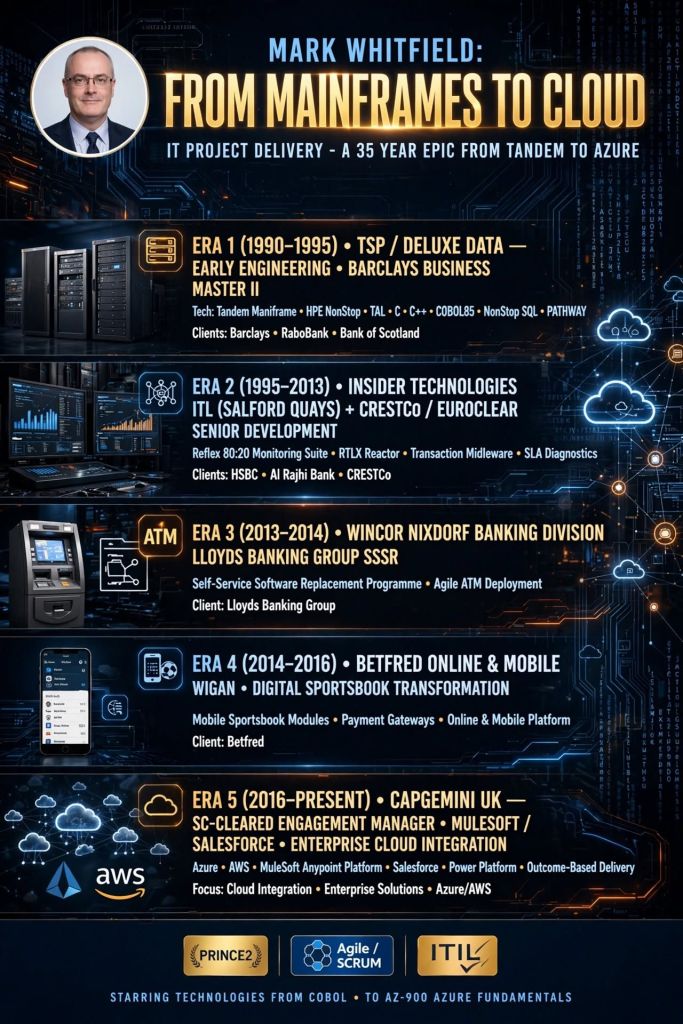
Mark Whitfield is a highly experienced SC-cleared Senior IT Project Manager and Engagement Manager with over 30 years of experience in the software development lifecycle (SDLC), specializing in Agile and Waterfall delivery for financial, automotive, and public sector clients. He has a strong background in HP NonStop (Tandem) systems and currently works for Capgemini. 

Mark Whitfield, Senior IT PM and Project templates author

Comprehensive Career Timeline

Early Career & Foundations (1988–1995) 

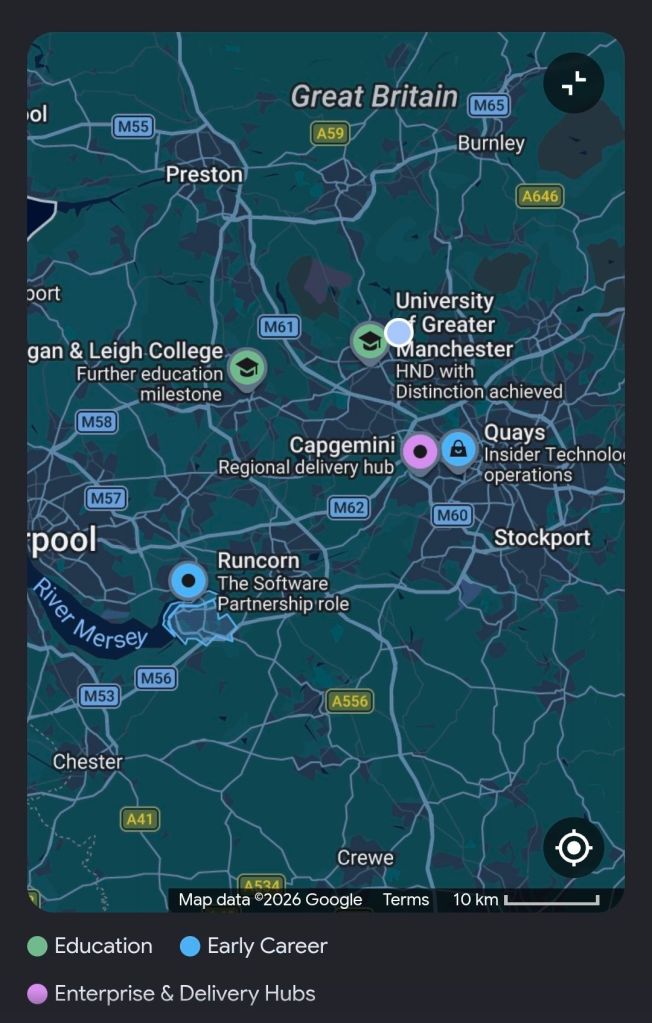
  • 1988–1990: Completed Higher National Diploma (HND) in Computing at Bolton Institute of Higher Education (BIHE).
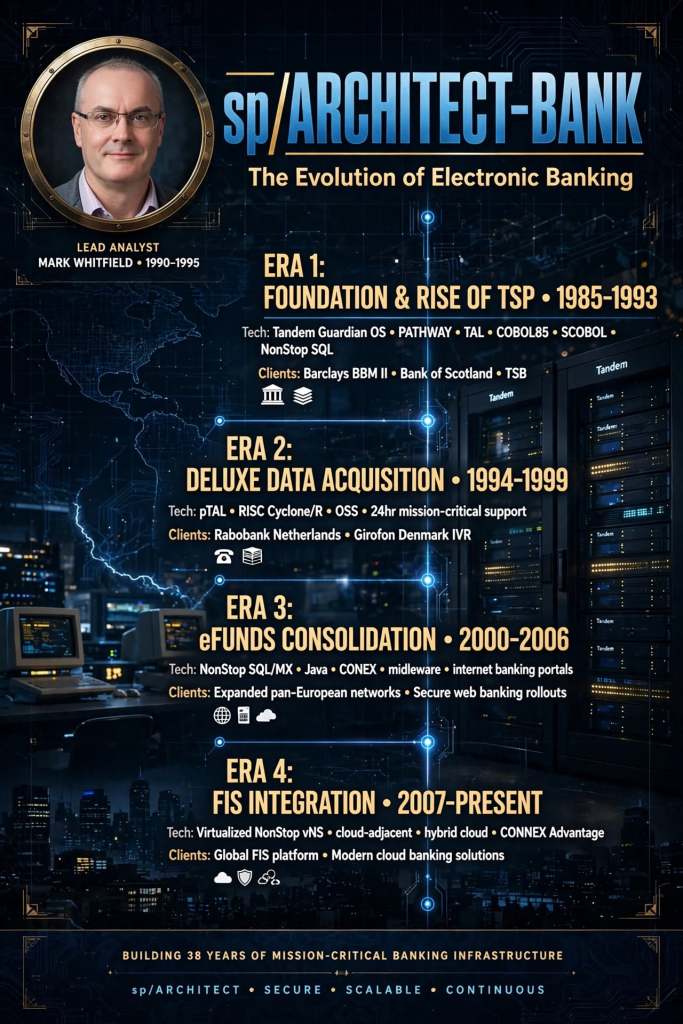
  • 1990–1994: The Software Partnership (Runcorn): Programmer specializing in electronic banking software (sp/ARCHITECT-BANK) on Tandem Computers.
  • 1994–1995: Deluxe Data (formerly TSP): Lead Analyst/Programmer, focusing on software investigation, design, coding, and on-site installation for clients like TSB, Bank of Scotland, and Rabobank. 

Development & Technical Specialization (1995–2013) 

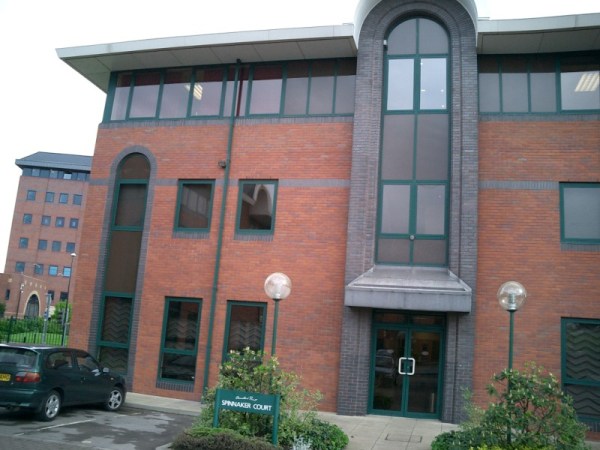
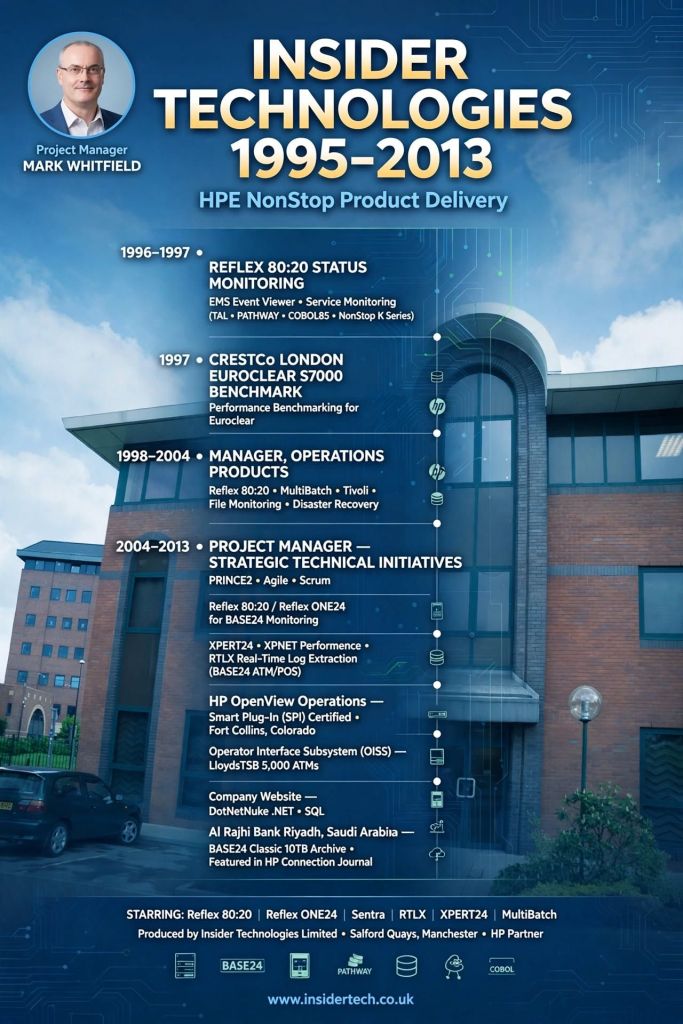
  • 1995–2013: Insider Technologies Limited: Spent 18 years progressing from Senior Development Engineer to Project Manager for Strategic Technical Initiatives.
  • Key Roles: Managed Reflex 80:20 and Reflex ONE24 product development, technical pre-sales, and consultancy. Developed diagnostic software for monitoring payment systems (BASE24).
  • Notable Project: Managed a bid to replace legacy ATM tools at LloydsTSB (5000 ATMs) with Reflex ONE24. 

Banking & Digital Project Management (2013–2016) 

  • 2013–2014: Wincor Nixdorf: Project Manager in the Professional Services Banking Division, managing a £5m+ work stream for Lloyds Banking Group’s Self-Service Software Replacement (SSSR) programme.
  • 2014–2016: Betfred: Senior Digital Project Manager for the Online and Mobile Division, delivering payment gateways and sportsbooks for iOS, Android, and Windows. 

Senior Engagement Management (2016–Present)

  • 2016–Present: Capgemini UK: Engagement Project Manager responsible for delivering both Waterfall and Agile digital projects.
  • 2016 (Approx.): Assigned to a UK-wide Air Traffic organization (NATS) for Apple iOS app delivery.
  • 2018–2019: MuleSoft (Secondment): Served as a Delivery Manager for the Anypoint Platform.
  • Current Focus: Cloud Migration (Hybrid) of 130 apps for UK Government. 

Client & Colleague Recommendations

Mark Whitfield is noted for being a detail-oriented manager who provides a strong barrier between developers and difficult clients, while maintaining a friendly, professional, and diplomatical approach. 

  • Agile Management: “Mark provided an excellent barrier between us (developers) and a difficult client…ensuring that we followed the agile principles” — Callum Marriage (Developer).
  • MuleSoft/Capgemini Engagement: “Customers loved him. His was extremely detailed oriented and understood the often-complex needs…never became flustered in high pressure situations” — Delivery Manager, MuleSoft.
  • Betfred (2015): “I would highly recommend Mark for his ability to successfully multi-task under significant pressure… [he] produced a very comprehensive handover document” — IT Compliance Analyst, Betfred.
  • Capgemini/JLR Project: “Mark was able to do a good planning, with the correct resources, on time delivery and with good relationship between stakeholders” — Head of Integration Development

Key Areas of Expertise

  • Methodologies: PRINCE2 Practitioner, Agile SCRUM, ITIL, ISO9001:2008.
  • Tools: MS Project, MS Excel/Office, RAID logs.
  • Technical Background: HP NonStop (Tandem) Systems, BASE24, C++, TAL, COBOL.
  • Industries: Financial/Banking, Aerospace & Defence, Government, Automotive, Gambling. 

Mark Whitfield’s website (mark-whitfield.com) serves as a professional portfolio and resource hub for his 30+ year career as a SC-cleared Senior IT Project Manager. It offers over 200 editable project management templates for Agile, Waterfall, and PRINCE2 methodologies, alongside career insights and project experience. 

Website & Content Overview

  • Project Management Resources: The site, often known as PROject Templates, provides downloadable templates for planning, scheduling (Gantt charts), project initiation (PID), and project control.
  • Methodology Focus: Resources are tailored for PRINCE2 (including Agile Scrum), and Agile/Waterfall delivery methods.
  • Career Portfolio: Features his work history as a Senior IT Project Manager, including roles at Capgemini, Betfred, and various financial institutions.
  • Technical Specialization: Highlights expertise in HP NonStop systems, digital projects, and payment/transaction systems.
  • Professional Background: Mentions his experience with major clients such as Jaguar Landrover, Heathrow, Royal Mail, and various banks. 

The site is designed for project managers looking for templates to speed up project documentation and for clients looking to review his career accomplishments. 

Senior IT Project Manager & Project Templates author – Mark Whitfield

Templates sold on this website are designed for Microsoft Office (Excel, Word, PowerPoint) and MS Project (MPP) and are used for tracking and planning software development lifecycle (SDLC) projects. 

Template Breakdown

The templates, often sold in a bundle, include over 200+ editable items aimed at project delivery. Key components include: 

  • Project Planning (MS Project & Excel): Detailed Waterfall project planners with Gantt views, Agile Sprint plans, and Plan on a Page (POaP) examples.
  • RAID Logs (Risk, Action, Issue, Dependency): Comprehensive Excel trackers for managing risks, issues, assumptions, and dependencies.
  • Financial & Resource Management: Project finance trackers (forecasts, actuals, variance) and resource trackers for tracking team members and costs.
  • Project Governance (Word & PowerPoint): Project initiation documentation (PID), status reports, RACI matrices (responsible, accountable, consulted, informed), and project organization charts.
  • Agile/Scrum Tools: Burn-down and burn-up charts, story dependency trackers, and Kanban templates.
  • Closeout: Lessons learned logs and benefit realization analysis trackers. 

Where to Buy

  • Official Website: mark-whitfield.com (PROject Templates) is the primary source, offering a bundle with free lifetime upgrades.
  • Etsy: Mark Whitfield’s templates are available for purchase here, particularly for those needing alternative payment methods.
  • Eloquens: He maintains a channel on Eloquens for downloading professional templates. 

The templates are fully editable, allowing users to tailor them to specific project requirements. 

Project Manager vs Product Manager, key differences overview

Project Manager vs Product Manager, key differences overview

Types of Product Managers Overview

Types of Product Managers Overview

Project Management, the Delivery Paradox

Project Management, the Delivery Paradox

Servant Leadership on a page overview

Servant Leadership on a page overview

Business Analyst BA Essential Requirements Practices

Business Analyst BA Essential Requirements Practices

Project Management Methodologies, historical timeline by era and year

This is a detailed, comprehensive historical timeline of project management methodologies, tracing the evolution from ancient practices to modern adaptive frameworks.

I. Pre-Modern Era (Before 1900): Foundation of Task Coordination

  • 2570 BC (Great Pyramid of Giza): Completion of the pyramids, demonstrating early project organization with managers for each of the four faces, planning, and logistics.
  • 208 BC (Great Wall of China): Construction of the Great Wall, involving massive workforce organization divided into soldiers, citizens, and criminals.
  • 1850s (Transcontinental Railroad): US railroad projects requiring large-scale resource and schedule management.
  • 1896 (Harmonogram): Karol Adamiecki developed the harmonogram, a predecessor to the Gantt chart (published in 1931). 

II. Early Modern Era (1910s–1950s): The Scientific Management Era 

This era brought “scientific management” to project control, focusing on efficiency and visualization. 

  • 1910s (Gantt Chart): Henry Gantt developed the Gantt chart, a visual tool for scheduling tasks over time.
  • 1911 (Scientific Management): Frederick Taylor published The Principles of Scientific Management, focusing on efficiency and time-saving.
  • 1931–1936 (Hoover Dam): One of the first large-scale applications of Gantt charts for complex scheduling.
  • 1942–1945 (Manhattan Project): Development of the atomic bomb, creating a need for rapid, complex planning and large-scale team coordination. 

III. The “Golden Age” of Project Management (1950s–1960s): Formal Methodologies 

This era introduced mathematical models for managing complex, interdependent tasks. 

  • 1956 (AACE Formed): The American Association of Cost Engineers (now AACE International) was formed, specializing in cost control and scheduling.
  • 1957 (Critical Path Method – CPM): Developed by Dupont Corporation to manage chemical plant maintenance shutdowns.
  • 1958 (Program Evaluation and Review Technique – PERT): Created by the US Navy Special Projects Office for the Polaris missile submarine project to manage task time and risk.
  • 1962 (Work Breakdown Structure – WBS): The US Department of Defense mandated the use of WBS for large, complex projects.
  • 1965 (IPMA Founded): The International Project Management Association (IPMA) was launched, the world’s first project management association.
  • 1969 (PMI Founded): The Project Management Institute (PMI) was launched to promote the profession, later developing the PMP certification. 

IV. The “Silver Age” (1970s–1980s): Systems and Controls 

  • 1970s (Waterfall Introduction): While used informally earlier, the Waterfall methodology was formalized for software development in the 1970s, emphasizing sequential phases.
  • 1975 (PROMPTII): Simpact Systems Ltd created PROMPTII, a methodology to handle cost overruns in computer projects, which later formed the basis of PRINCE.
  • 1975 (Mythical Man-Month): Fred Brooks published his seminal work on software engineering project management.
  • 1978 (Toyota Production System): Lean production and Kanban techniques, used in manufacturing, began to influence project workflow.
  • 1984 (Theory of Constraints – TOC): Dr. Eliyahu Goldratt published The Goal, introducing the Theory of Constraints for managing constraints (bottlenecks).
  • 1986 (Scrum): Takeuchi and Nonaka defined Scrum as a project management style for fast-paced development.
  • 1987 (PMBOK Guide): The Project Management Institute published the first Project Management Body of Knowledge (PMBOK) white paper.
  • 1989 (PRINCE): The UK government launched PRojects IN Controlled Environments (PRINCE), the standard for information systems projects. 

V. Rebirth and Modern Era (1990s–2000s): Agile and Adaptive Methods 

  • 1994 (CHAOS Report): The Standish Group published the first report documenting high IT project failure rates.
  • 1995 (Scrum Formalization): Jeff Sutherland and Ken Schwaber formally defined the Scrum framework.
  • 1996 (PRINCE2): PRINCE was updated to PRINCE2 to become a generic, more flexible methodology applicable to all project types.
  • 1997 (Critical Chain Project Management – CCPM): Eliyahu Goldratt invented CCPM, based on the Theory of Constraints.
  • 1998 (PMBOK Standard): The American National Standards Institute (ANSI) recognized PMBOK as a standard.
  • 2001 (Agile Manifesto): 17 software developers met to publish the Manifesto for Agile Software Development, prioritizing collaboration and adaptability over rigid plans.
  • 2007 (Kanban for Software): David Anderson adopted Kanban for software development, focusing on visualizing work and limiting work-in-progress. 

VI. The Contemporary Era (2010s–Present): Hybrid, AI, and Speed 

  • 2012 (ISO 21500): The International Organization for Standardization published ISO 21500:2012, “Guidance on Project Management”.
  • 2017 (PMBOK 6th Ed & PRINCE2 Update): PMI introduced Agile/adaptive practices into PMBOK, while AXELOS released a more flexible PRINCE2.
  • 2018 (PRINCE2 Agile): PRINCE2 Agile was launched to combine the governance of PRINCE2 with the flexibility of Agile.
  • 2021 (PMBOK 7th Ed): A major shift in PMI standards, moving from process-based to principle-based, focusing on project outcomes.
  • 2020s–Present (AI/Hybrid): Rise of AI-driven project management, automated reporting, and hybrid methodologies combining Waterfall stability with Agile speed. 

Project Management Methodologies, historical timeline by era and year

Mark Whitfield, Senior IT Project Manager

Mark Whitfield is a highly experienced IT Senior Project Manager and Engagement Manager based in Manchester, UK, specializing in Agile Scrum, PRINCE2, and Waterfall methodologies. He holds a degree in Computing (1990) and has extensive experience in IT hardware solutions, financial services, and Aerospace & Defence. 

Here is a comprehensive summary of his profile, with links based on the provided search data:

Professional Profile

  • Name: Mark Whitfield
  • Role: IT Senior Project Manager / Engagement Manager (SC Cleared)
  • Key Skills: Agile Scrum, PRINCE2, ITIL, Financial Forecasting, Stakeholder Management, Technical Initiative Leadership.
  • Education: Computing (Graduated 1990). 

Comprehensive Career History

  • Capgemini UK (Jan 2016 – Present): SC Cleared Engagement Manager (A8) in Custom Bespoke Solutions.
    • Recent Experience: Project Manager for a UK-wide Air Traffic organisation, delivering new Apple iOS Apps for military and public use.
  • Betfred Limited (Dec 2014 – Jan 2016): IT Senior Digital Project Manager, Online and Mobile Division.
  • Wincor Nixdorf Limited (Sep 2013 – Dec 2014): Project Manager, Professional Services – Banking Division.
    • Key Project: Managed a £5+ million project replacing legacy HP NonStop software systems with AIX-based J2EE/Oracle technologies for a major UK bank.
  • Reflex / Insider Technologies (Aug 1995 – Sep 2013): Project Manager – Strategic Technical Initiatives.
  • eFunds (1994 – 1995): Lead Analyst. 

Certifications & Training

  • Cloud & Project Management: AZ-900 Microsoft Certified Azure Fundamentals (2022), Advanced Engagement Management (2017), Registered PRINCE2 Practitioner (2011).
  • Agile: Agile SCRUM Training (2011).
  • Technical: TANDEM Performance Analysis (1995), C++ for Non-C Programmers (1997), Querying MS SQL 2000 (2009). 

Awards

  • C&CA UK’s Communications & Engagement Award Winner – Cloud & Custom Applications (Capgemini UK, Dec 2022).
  • Project Recognition Award – Wincor Nixdorf (Retail Banking Project). 

Web Presence & Documents

Mark Whitfield, Senior IT Project Manager

By era;

Mark Whitfield is a highly experienced IT Project Manager, Senior Developer, and SC-cleared consultant with over 30 years of experience, specializing in HP NonStop (Tandem) systems, banking software, and digital transformation projects. He is currently an Engagement Project Manager at Capgemini. 

Career Overview

  • Specialism: HP NonStop (Tandem) mainframes, BASE24, transaction monitoring, Agile/Waterfall methodologies.
  • Key Industries: Financial services, electronic banking, government, automotive, aerospace.
  • Core Competencies: Software development (C, C++, COBOL, TAL), Project Management (PRINCE2 Practitioner, Scrum), Pre-sales technical consultancy. 

Career Timeline by Era and Year

1. The Foundation & Tandem Era (1990–1995)

  • 1990: Graduated in Computing and started as a Programmer for The Software Partnership in Runcorn, specializing in sp/ARCHITECT-BANK on Tandem Computers.
  • 1990-1994: Developed banking code for TSB, Bank of Scotland, Rabobank, and Girofon (Denmark).
  • 1992: Worked on the Barclays Business Master II (BBM II) project in Knutsford.
  • 1994: Company taken over by Deluxe Data (later FIS). 

2. Insider Technologies & Monitoring Era (1995–2013)

  • 1995–2013: Joined Insider Technologies Ltd as a Senior Development Engineer and Project Manager.
  • 1995-2004: Developed monitoring/diagnostic software (Reflex 80:20, Reflex ONE24) for HP NonStop payment systems.
  • 1997: Worked on projects for CRESTCo.
  • Early 2000s: Focused on HP NonStop transaction/payment monitoring for ATM/POS devices using ACI’s XPNET.
  • 2005-2013: Managed first HP OpenView Operations Smart Plug-In certification for NonStop; designed XPERT24.
  • 2011: Certified as a PRINCE2 Practitioner. 

3. Banking Transformation & Consultancy Era (2013–2016)

  • 2013–2014: Wincor Nixdorf UK – Worked as a Project Manager in Professional Services for the Banking Division.
  • 2013-2014: Assigned to Lloyds Banking Group (LBG) for the Self-Service Software Replacement (SSSR) program (ATM estate upgrade).
  • 2014–2016: Joined Betfred as an IT Project Manager in the gambling/casinos industry, delivering mobile/online payment gateways (iOS, Android). 

4. Digital Transformation & Capgemini Era (2016–Present) 

  • 2016: Joined Capgemini UK as a client-facing Engagement Manager.
  • 2016-2017: Led digital projects for automotive, local government, and aerospace sectors.
  • 2017: Obtained Microsoft Excel Expert skills and Advanced Engagement Management certifications.
  • 2018–2019: Augmented into MuleSoft as a Delivery Manager for the Anypoint Platform.
  • 2022: Completed Microsoft Azure Fundamentals (AZ-900) certification.
  • 2023–2024: Assigned to a UK Government account for a cloud migration of 130+ applications and the Fish Export Service (FES) project. 

Key Qualifications

  • PRINCE2 Practitioner & Agile Scrum
  • ITIL Certified
  • SC Cleared (UK Government)
  • Technical Skills: C, C++, MS SQL, COBOL, TAL, Java, ASP.NET, HP NonStop

Agile Scrum on a page, summary of core focus areas

Agile Scrum on a page, summary of core focus areas