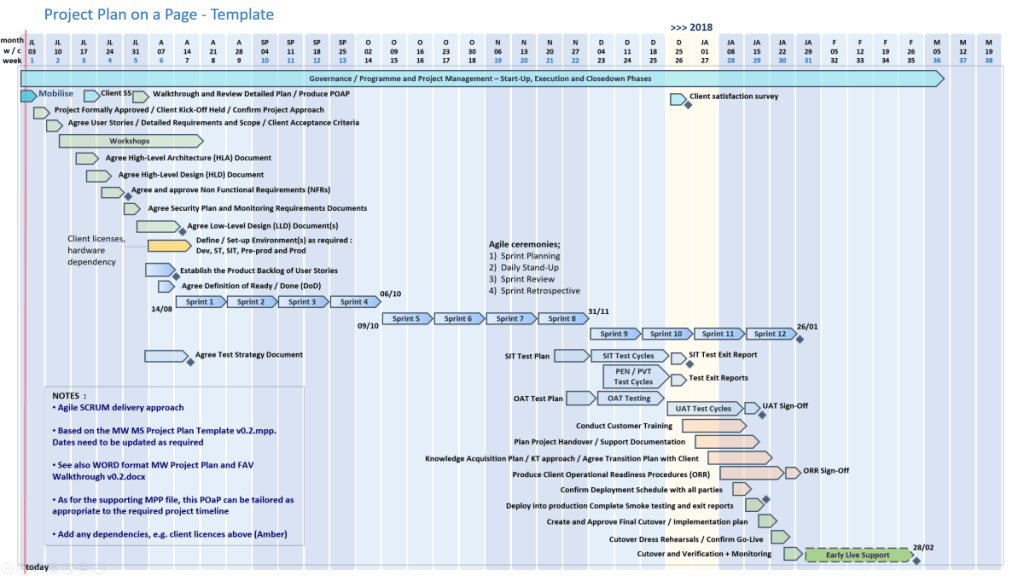
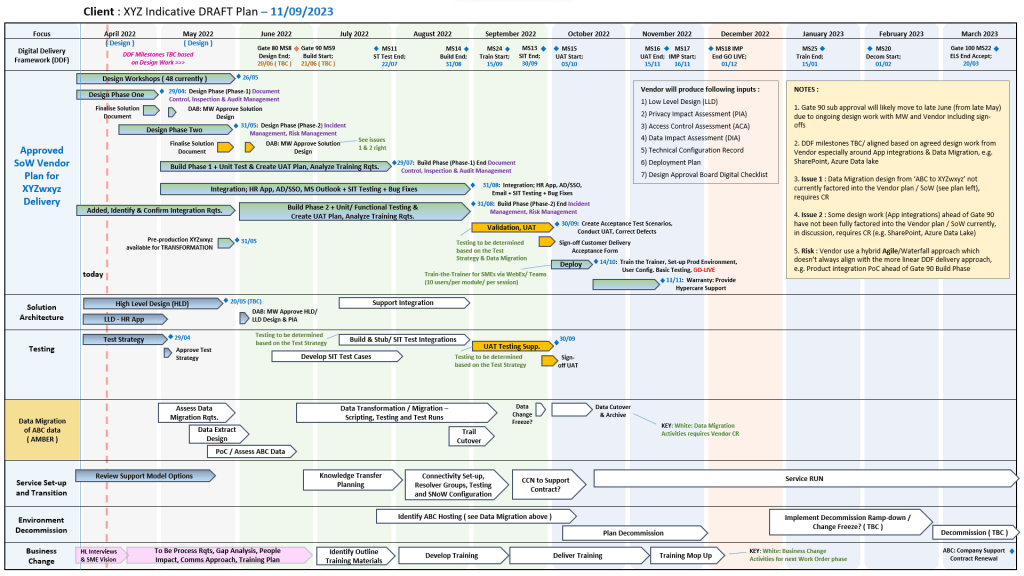
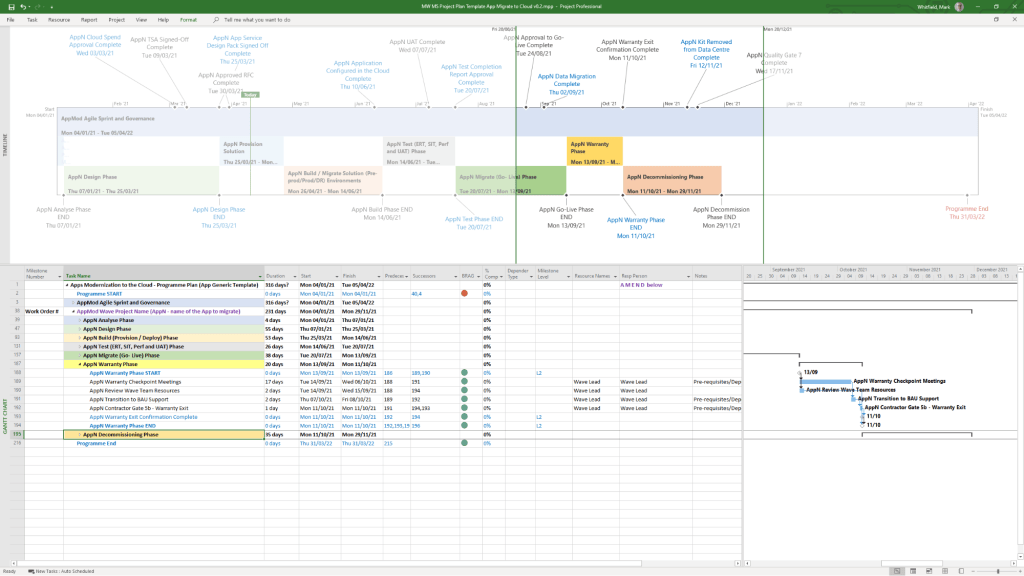
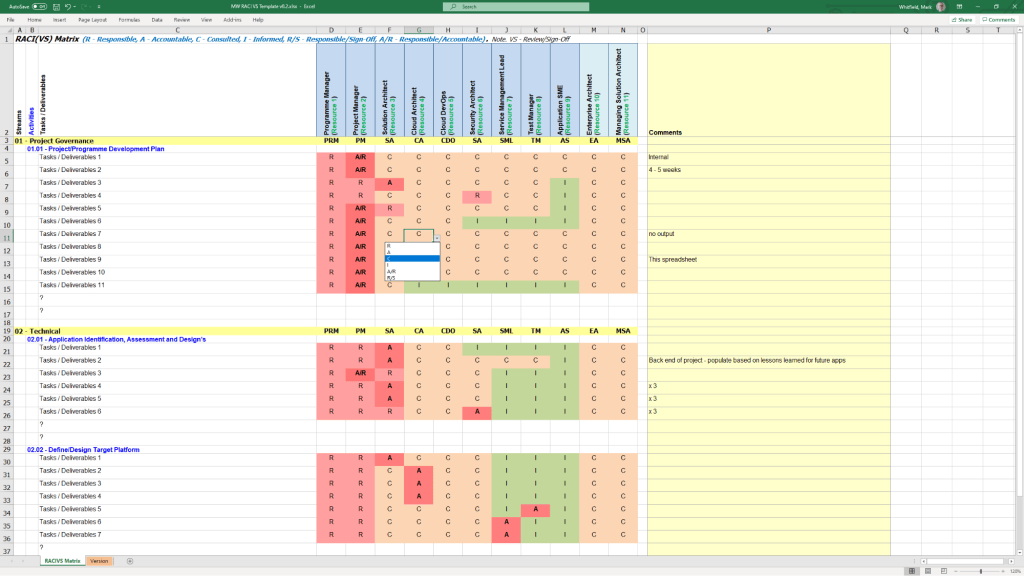
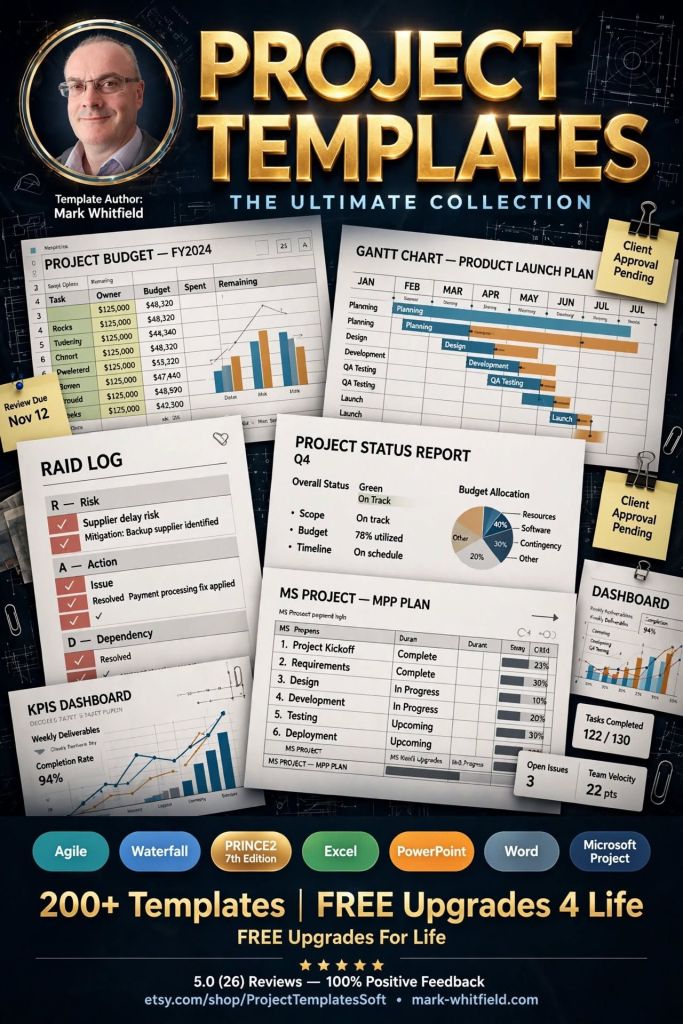
Download Templates for Project Management | FREE Upgrades & Additions
Author: Mark Whitfield
Welcome to my site!
After graduating in Computing in 1990, I accepted a position as a programmer at a Runcorn based software house specialising in electronic banking software, namely sp/ARCHITECT-BANK on Tandem Computers (now HPE NonStop). This was before the internet became more prevalent and so the notion of enabling desktop access to company accounts for inter-account transfers and book keeping was still quite a cutting edge idea (and smartphones only ever hinted at in Space 1999). The company was called The Software Partnership (which was taken over by Deluxe Data in 1994).
I spent 5 years in Runcorn developing code for SP/ARCHITECT for various banks like TSB, Bank of Scotland, Rabobank and Girofon (Denmark) to name but a few. I then moved onto a software house in Salford Quays for further bank facing projects. After a further 23 years in the IT industry and now a Senior IT Project Manager (both Agile and Waterfall delivery), I thought I would echo out my Career Profile in this corner of the internet for quick and easy access.
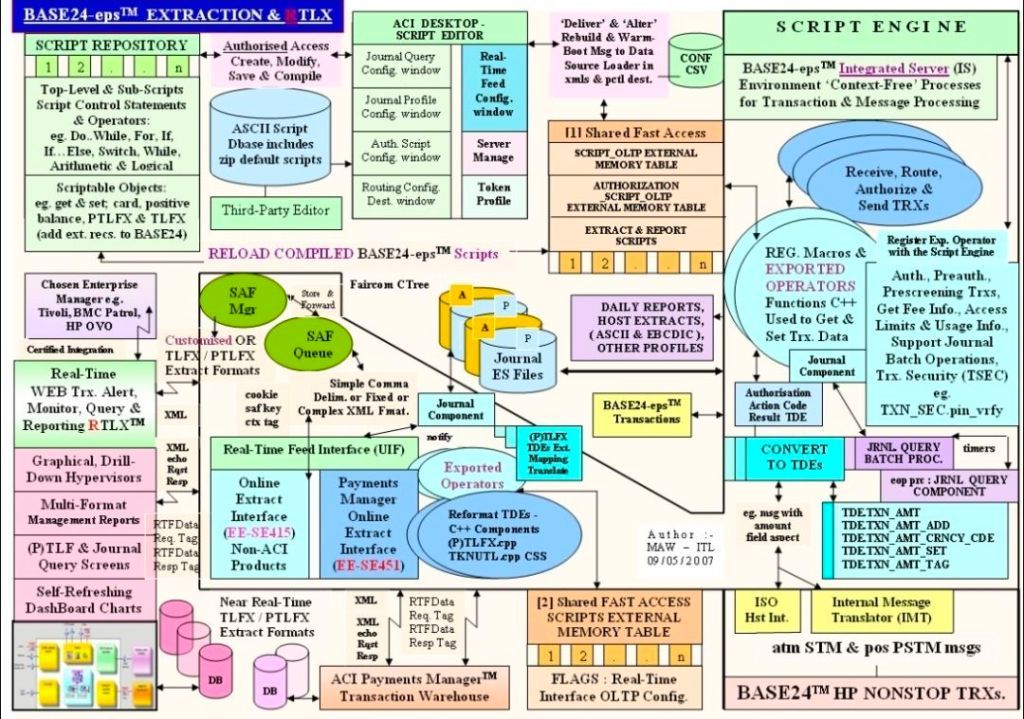
The BASE24 electronic payment system developed by ACI Worldwide exists in two primary architectural generations:
BASE24 Classic (historically deployed on HPE NonStop / Tandem fault-tolerant hardware) and
BASE24-eps (Enterprise Payments System, built using an object-oriented C++ framework deployable across open systems, z/OS, and cloud infrastructure).
Despite structural differences, both share a highly optimized, component-based transaction routing engine.
BASE24 architecture overview
Core Structural Component Layers
The component architecture maps the complete end-to-end lifecycle of a financial message (such as ISO 8583) through five distinct functional sub-systems:
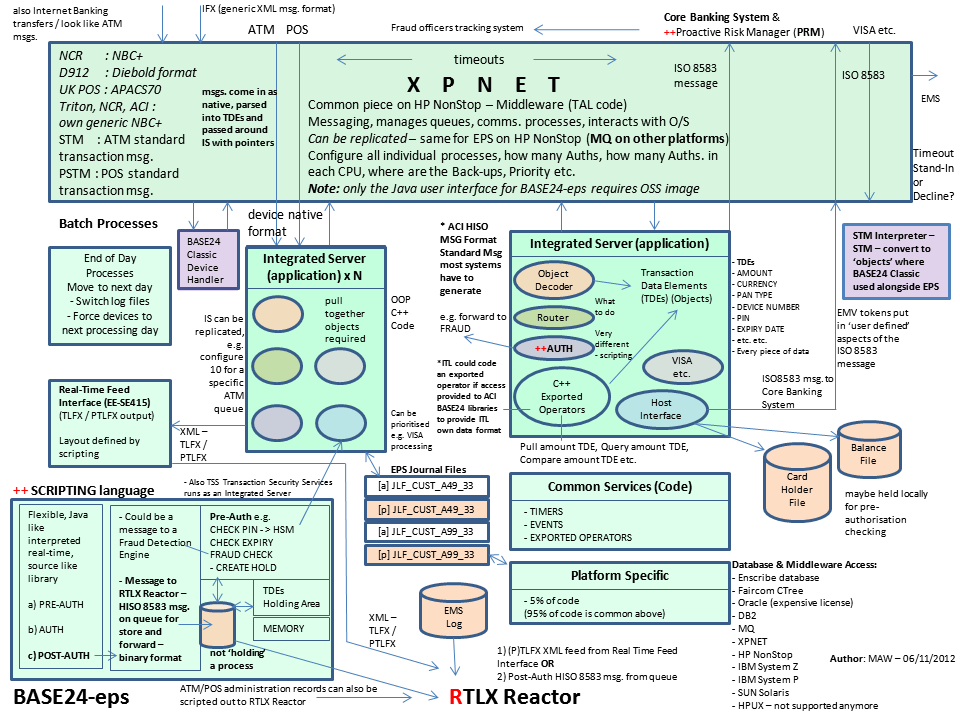
1. Network & Message Routing Component (XPNET)
Purpose: Coordinates all message traffic across internal processes and physical network nodes.
Function: Operates as a specialized middleware network manager that decouples low-level communication links from upper transaction routing layers.
Configuration: Relies on a Logical Network Configuration File (LCONF) to define active execution nodes, hardware lines, and physical stations.
2. Perimeter Access Layer (Device Handlers)
Purpose: Translates device-specific message protocol formats into the system’s unified internal format.
ATM Device Handlers (ATMDH): Manage direct connectivity to automated teller machines, unpack specific vendor dialects (such as Diebold or NCR states), and track terminal hardware statuses.
POS Device Handlers (POSDH): Interface with point-of-sale acquirer terminals and merchants.
Security Operations: Triggers immediate payload encryption/decryption and Hardware Security Module (HSM) PIN-block translation directly within this ingestion ring.
3. Core Transaction Logic (Authorization System)
Purpose: Determines whether a payment request should be accepted, rejected, or modified.
Full On-Us Authorization: Inspects internal databases for matching account records, positive balances, and velocity thresholds to issue real-time decisions.
Parametric/Negative Checks: Validates card status against offline negative files, usage restrictions, or custom risk parameters.
Scripting Engine: Modern BASE24-eps variants execute localized transaction routing scripts via customized operators without forcing a compile rewrite of the core engine core.
Interchange Interfaces (ICH): Package and transform the transaction payload into international network profiles (e.g., Visa, Mastercard, regional switches). It handles strict message mapping and regional network check requirements.
Host Interfaces (HIF): Create synchronous links back to an institution’s underlying Core Banking system to apply ledger adjustments, check balances, or execute real-time holds.
5. Offline & Administrative Subsystems
Extract Component: Gathers active transaction logs and streams filtered payloads out to analytical reporting databases.
Refresh Component: Updates terminal operational data, key packages, and card exclusion lists from parent systems down to active execution nodes.
Settlement Initiator: Groups, cleanses, and batches net-clearing totals to finalize payment entries into regional clearinghouses.
Architectural Divergence: Classic vs. EPS
The structural design varies significantly depending on the generation of the software deployment:
BASE24 and BASE24-eps architecture overview
End-to-End Component Transaction Flow
An ATM transaction arrives at the network interface layer managed by XPNET.
The message is routed to the Device Handler, which strips hardware packaging and requests translation from the HSM.
The clean internal message passes to the Authorization Engine.
If it is a “Not-On-Us” card, the engine identifies the destination BIN and transfers routing control to the Interchange Interface.
The Interchange Interface maps the payload to the external scheme standard (such as Visa) and transmits it to the external network.
The outbound network response is unwrapped by the Interchange component and tracked through the core engine to log final response codes.
The transaction safely records inside the active log file, allowing the Extract / Settlement components to pick it up later during batch processing.
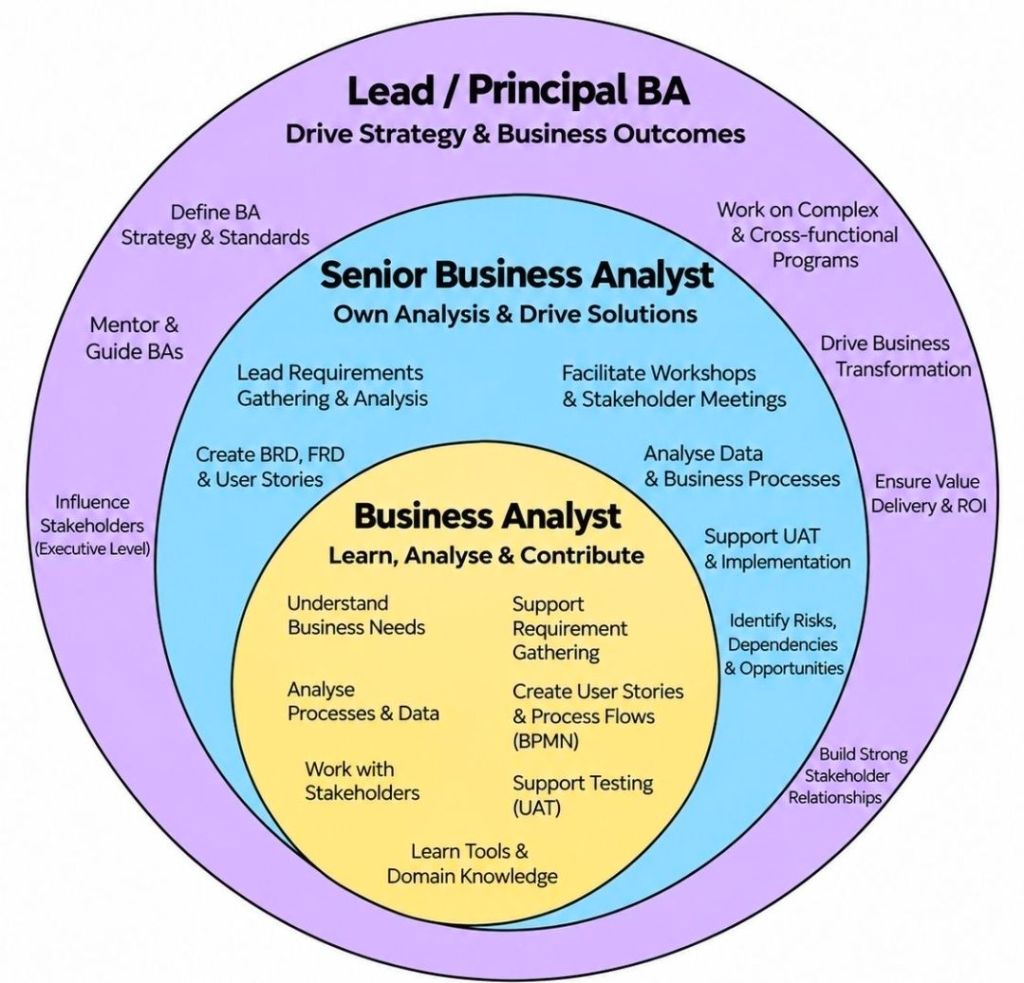
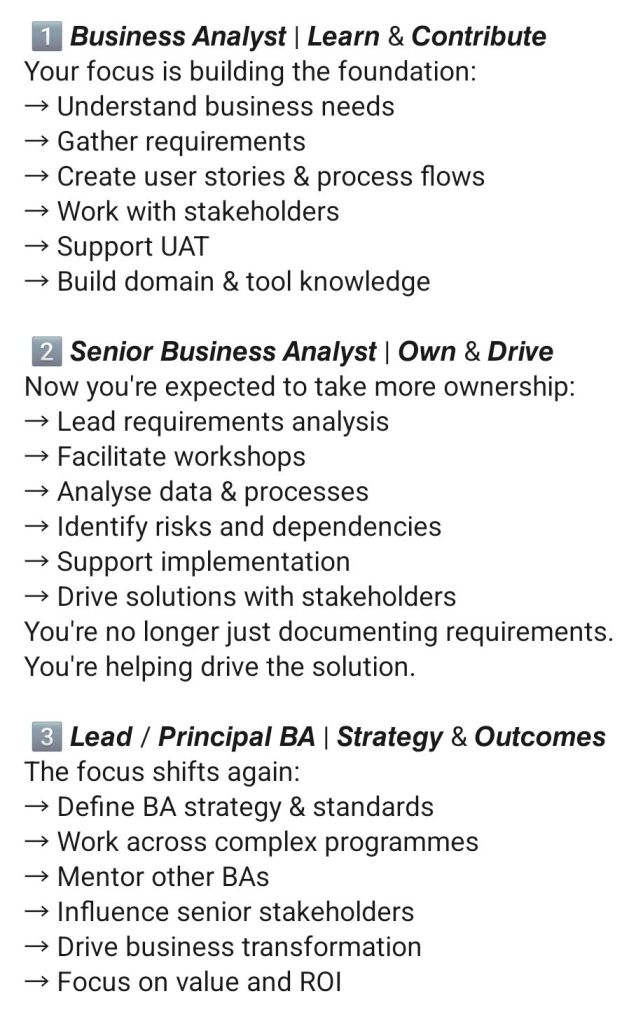
Business Analyst (BA) interview prep focuses on demonstrating how you translate business problems into technical/process solutions. Preparation revolves around three core pillars: competence (technical knowledge), communication (behavioral stories), and cultural fit.
1. Technical & Core Knowledge Prep
Familiarize yourself with the fundamental BA methodologies, documentation, and tools:
Methodologies: Understand the differences between Agile (Scrum, Kanban, sprints, user stories) and Waterfall (structured phase-gating).
Documentation: Review how to create a Business Requirements Document (BRD), Functional Requirements Document (FRD), and Software Requirements Specification (SRS).
Process Modeling: Refresh your knowledge on reading and creating Use Cases, User Stories, and UML diagrams (Activity diagrams, Flowcharts).
Requirements Gathering: Be ready to discuss techniques like interviews, workshops, prototyping, and document analysis.
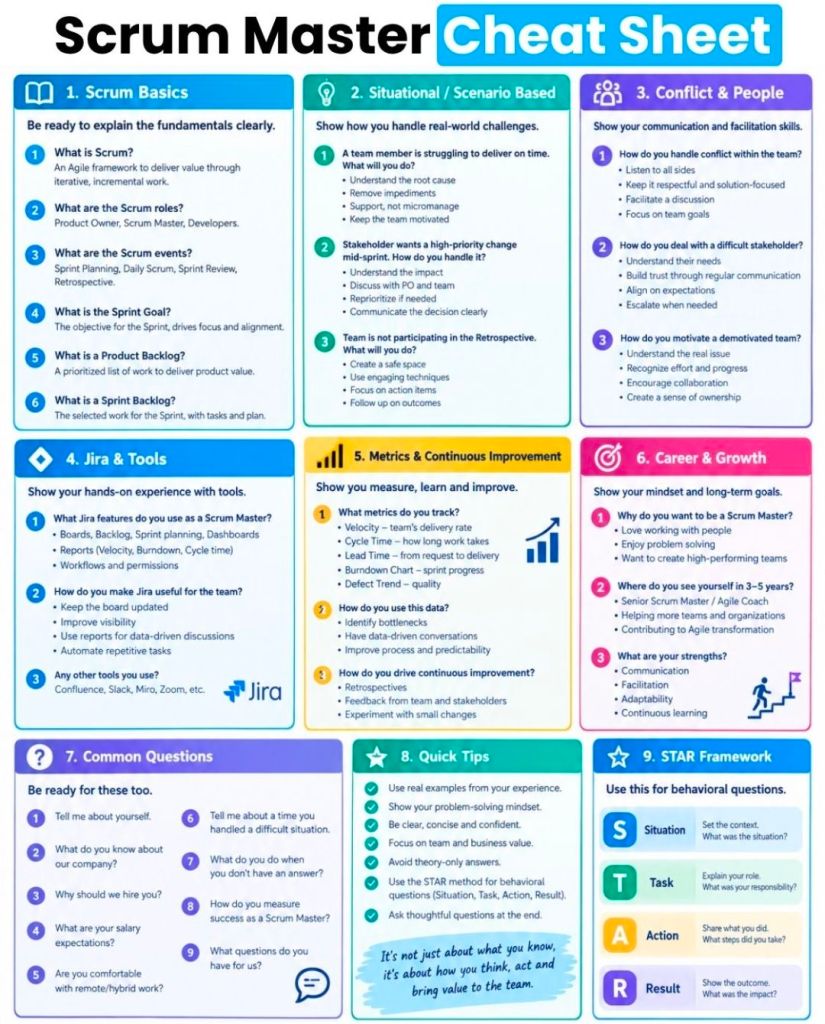
2. Behavioral & Scenario Prep (The STAR/STARS Method)
Expect situational questions that require you to tell a story about your past experience. Structure your answers using the STAR method (Situation, Task, Action, Result):
Conflict Resolution: How do you align stakeholders with opposing views or conflicting priorities?
Scope Creep: How do you manage a stakeholder requesting major changes midway through a project?
Ambiguity: Tell me about a time you had to work with limited data or changing requirements.
Failure/Mistakes: Describe a time you made an analytical error or missed a requirement and how you resolved it.
3. Interview Action Items Checklist
Work Samples: Bring a physical or digital portfolio containing redacted work samples (e.g., a process flow, user story backlog, or requirements document you’ve built).
The 30-60-90 Day Plan: Think about how you would approach the first few months on the job. (e.g., Day 1-30: Learn the business domain; Day 31-60: Map current processes; Day 61-90: Identify optimization opportunities.)
Reverse Questions: Prepare engaging questions to ask the interviewer, such as: “What does success look like in this role in the first 6 months?” or “Can you share more about how BAs collaborate with the technical team here?”
Action Man Soldier by parity, with gripping hands, 1970s
The Action Man Soldier with Gripping Hands is a legendary 12-inch military action figure produced in the UK by Palitoy under license from Hasbro. First introduced in 1973, this milestone version of the classic Action Soldier replaced the previous “hard hand” iterations with a new, soft plastic compound designed to realistically hold rifles, pistols, and equipment.
Era & Key Innovations
1973 Debut: Palitoy launched the updated figure in a freshly illustrated box featuring the text “Now with Gripping Hands”.
Flock Hair: This era retained the realistic fuzzy blonde, brown, or auburn flock hair originally introduced in 1970.
Signature Details: The figure featured Action Man’s distinctive square jaw and the iconic copyrighted battle scar on the right cheek.
Body Construction: Built using the standard 1960s/70s articulation setup featuring internal elastic stringing, crimped metal eyelets, and metal rivets.
Equipment & Box Variations
The standard 1973 Action Man Soldier package underwent several production tweaks throughout the mid-1970s:
The 1973 Box: Early printings mistakenly listed “Gaitors” in the contents list on the packaging, though they were not actually included in the box.
The 1975 Update: Palitoy corrected the box text to remove the mention of gaiters, updated the artwork, and added a revised “made in Hong Kong” manufacturing credit.
Standard Gear: The standard uniform typically included olive green army denim fatigues (jacket and trousers), a flat black plastic beret, tall brown boots with dished soles, a life-size replica dog tag, and an Army Manual.
Collector’s Note on Condition
When seeking a vintage 1970s figure on marketplaces like eBay, pay close attention to the hands. The early 1973 flexible hand compound (often made of Kraton) is notoriously prone to perishing over time. It is highly common to find vintage figures where the hands have turned dark orange, gone completely hard, become brittle, or disintegrated entirely. Intact, supple original hands significantly drive up the figure’s valuation.
MultiBatch is a robust enterprise workload automation and job scheduling tool designed specifically for the HPE NonStop parallel architecture. Developed originally by Insider Technologies and subsequently managed/distributed alongside partners like ETI-NET, it enables organization-wide task automation.
MultiBatch provides high-performance, concurrent execution of batch schedules across multiple nodes. It natively supports both Guardian and OSS environments. By utilizing modern graphical user interfaces (GUIs) alongside traditional Pathway components, it eliminates the need for complex, manual, and high-maintenance TACL or JCL scripts.
Core Technical Capabilities
Parallel Execution: Uses NonStop architecture to execute batch workloads concurrently across one or multiple nodes.
Advanced Scheduling: Drives automated tasks based on time parameters, complex intervals, custom calendars, and direct cross-job dependencies.
Reusable Infrastructure: Environment classes—including PARAM, ASSIGN, DEFINE, FD, and environmental variables—can be configured once and safely shared across various jobs.
Inbuilt Disaster Recovery: Features automated, built-in monitor recovery mechanisms to preserve execution integrity during hardware or connection failures.
Seamless Migration: Simplifies moving production workloads between environments via a deep migration utility that automatically handles environmental translation without manual intervention.
Timeline Breakdown by Year and Version
The evolution of MultiBatch highlights its transition toward broader configuration capacities, simplified environment integrations, and eventual product lifecycle milestones.
2020: Operational and Security Consolidation
Version Focus: Pre-v10 Infrastructure (Enterprise Deployments)
Key Enhancements:
Formalized rigid separation of internal user roles, establishing MBAT.OPS for view-only status monitoring and MBAT.CONFIG for structural schedule maintenance.
Refined the “Migrator” module, eliminating manual TACL operations when extracting and inserting batch definitions across network test and production nodes.
Added capabilities allowing all MultiBatch jobs to execute securely under the system Batch Monitor Process (BMON) owner or explicitly assigned application user IDs.
2022 (November): MultiBatch Version 10.0 Launch
Version Focus: Architecture Restructuring
Key Enhancements:
Define Classes: Introduced reusable Define Classes to group environments cleanly.
Scale Upgrades: Upgraded the main Batch Monitor (BMON) subsystem to actively scale up to 2,500 jobs concurrently.
Parameterization: Modified the core configuration boundaries and decoupled utility processes (MBPARHK) to seamlessly process non-step related records across database structures.
Clean Up: Formally deprecated legacy components including UTCSV to reduce technical debt.
2023 (February): MultiBatch Version 10.1 Refinement
Version Focus: OSS Overhaul & Operational Control
Key Enhancements:
OSS Reworking: Re-engineered and optimized support for Open System Services (OSS) processes, granting them equal parity with traditional Guardian tasks.
On-Demand Execution: Enabled ad-hoc “On Demand Job” invocation directly through user channels without altering master schedules.
Conditional Variables: Extended character limits for Conditional Parameter values up to 100 characters.
Subsystem Unification: Consolidated Event Timer processing and Conditional Parameters fully into standard MultiBatch menus, auditing frameworks, and security tracking.
Control Commands: Integrated the SWITCH BMON command line directive to easily pass control between operational monitors.
Interface Upgrade: Rolled out an entirely new Ops GUI Server to modernize scheduling visibility.
Current Era: Version 10.2 Maintenance & Commercial Sunset
Version Focus: Version 10.2 / Product Lifecycle Transition
Key Milestones:
MultiBatch 10.2: Operates as the current, stable production tier delivered via ETI-NET, featuring deep parameterization and centralized network deployment protocols.
Commercial End of Life: As of March 1, 2026, new software licenses for Multi-Batch are no longer available for purchase. The software has officially reached the end of its commercial sales life.
Ongoing Support: Existing license holders retain full permission to execute, maintain, and run the product inside their environments according to their long-term licensing agreements.
HPE NonStop MultiBatch Batch Job Scheduling Overview and Timeline
sp/ARCHITECT was a pioneering electronic banking and funds-transfer software suite. Originally built by the UK-based Software Partnership (TSP), it ran natively on fault-tolerant Tandem (now HPE NonStop) systems. It provided highly available transaction routing and real-time electronic book-keeping for major international financial institutions.
Detailed Timeline by Era and Year
1. The Genesis & Independent Era (Mid-1980s – 1989)
Mid-1980s: The Software Partnership (TSP) is co-founded in Timperley, UK. Development begins on sp/ARCHITECT, designed with a client-server architecture.
1986: Tandem launches NonStop SQL, providing the underlying high-availability relational database foundation that sp/ARCHITECT relied upon to ensure absolute data integrity for banks.
2. Mainstream Banking Adoption Era (1990 – 1994)
1990: TSP relocates to Norton House in Runcorn, UK. sp/ARCHITECT achieves production deployment and is widely utilized for inter-account transfers and book-keeping by major banks like TSB and Bank of Scotland.
1992: Due to rapid expansion, the Runcorn operations relocate to Wingate House.
1994: Deluxe Electronic Payment Systems (a subsidiary of Deluxe Corporation) acquires TSP to expand its global electronic funds transfer (EFT) footprint. The platform is globally marketed and supported, expanding to clients like Rabobank.
1990: TSP relocates to Norton House in Runcorn
1992: Due to rapid expansion, the Runcorn operations relocate to Wingate House.
3. Global Expansion & Compaq Transition Era (1995 – 2005)
1995 – 1997: The Runcorn-based team (operating as Deluxe Data) codes additional regional adaptations of sp/ARCHITECT for banks worldwide (e.g., Girofon in Denmark).
1997: Compaq acquires Tandem Computers, placing sp/ARCHITECT on Compaq’s enterprise roadmap.
2002: Hewlett-Packard (HP) acquires Compaq, absorbing the Tandem platform into the HP Integrity server line. The application undergoes adaptation to integrate modern Windows-based management systems (like DSM/NOW).
4. The HPE Modernization & Hybrid Era (2014 – 2026)
2014: HPE (Hewlett Packard Enterprise) is formed, spinning off from HP. NonStop shifts to Intel x86-64 architecture (NonStop X), requiring sp/ARCHITECT and related Tandem subsystems (like Pathway, COBOL, and TAL) to modernize for TNS/X processing.
2020: Legacy Itanium-based environments are phased out. sp/ARCHITECT systems, if still active, are migrated to virtualized NonStop (vNS) and operated within private cloud infrastructures.
2025/2026: HPE NonStop celebrates its 50th Anniversary. Applications originally designed on the sp/ARCHITECT schema are heavily evaluated for AI integration, continuous cyber resilience, and consumption-based models like HPE GreenLake.
Agile estimation techniques use relative sizing rather than exact time tracking to gauge the effort, complexity, and risk of completing tasks. These collaborative methods help Scrum teams maintain predictable delivery and realistic workloads without relying on rigid, top-down predictions.
Common Agile estimation techniques include:
1. Planning Poker
How it works: Team members use a deck of cards with values from the modified Fibonacci sequence (0, 1, 2, 3, 5, 8, 13, 21, etc.). The Product Owner presents a user story, the team discusses it, and each member privately selects a card representing their effort estimate.
When to use it: Ideal for detailed sprint planning and backlog refinement, especially when you need to encourage team collaboration and reach a consensus.
2. T-Shirt Sizing
How it works: Tasks are assigned sizes (XS, S, M, L, XL) based on high-level complexity rather than precise points.
When to use it: Excellent for rapid, broad-brush estimation during initial release planning or when mapping out large Epics that aren’t yet refined into granular user stories.
3. Affinity Estimation
How it works: The team collaboratively groups user stories on a wall or digital board into columns representing different sizes. Every team member can move a story if they disagree with its current size, creating a consensus through comparative grouping.
When to use it: Best suited for large product backlogs where many items need to be sized quickly in a single session.
4. Dot Voting
How it works: Team members receive a limited number of physical or digital “dots” to place on user stories they believe carry the highest complexity or effort, prioritizing stories based on the concentration of votes.
When to use it: Helpful for quick prioritization and establishing a baseline for relative difficulty among a large list of tasks.
5. The Bucket System
How it works: Similar to Affinity Estimation, various “buckets” (numbered with Fibonacci sequences) are laid out. Stories are placed in the buckets, which helps the team rapidly categorize relative effort.
When to use it: Great for medium-to-large backlogs requiring faster execution than traditional Planning Poker without sacrificing sizing accuracy.
Choosing between PRINCE2 and PMP depends on your career goals and location. PMP is a global, experience-based standard highly valued in the US and multinational corporations. PRINCE2 is a process-based methodology heavily favored in the UK, Europe, and government/public sectors.
A high-level text overview highlights the following core differences:
Project Management Professional (PMP)
What it is: A globally recognized framework and body of knowledge (PMBOK) that certifies a manager’s broad project leadership skills.
Focus: People, processes, and business domains. It is highly flexible and covers predictive (waterfall), agile, and hybrid methodologies.
Requirements: Strict prerequisites. Requires 36–60 months of project management experience and 35 hours of project management education before you can take the 180-question exam.
Best for: Experienced project managers seeking global mobility and opportunities in corporate and private sectors.
What it is: A structured, prescriptive methodology that gives you a step-by-step guide on how to run a project from start to finish.
Focus: Governance, defined roles, continuous business justification, and documentation. It uses a scaleable “Tailoring Approach” so it can be adapted to projects of varying sizes.
Requirements: No mandatory experience needed for the Foundation level, making it accessible to beginners. The Practitioner level tests your ability to apply the framework.
Best for: Early-to-mid career professionals and those targeting government, NHS, or public sector roles within the UK and Europe.
Official Hub: Browse certification pathways via Axelos.
Walking is a highly accessible form of exercise that offers a range of physical, mental, and lifestyle advantages. Just 30 minutes a day can significantly improve overall health, though even a brisk 10-minute walk provides measurable benefits.
Physical Health Benefits
Heart Health: Regular walking strengthens the heart, lowers blood pressure, and reduces the risk of stroke and coronary heart disease.
Disease Prevention: It helps manage or prevent type 2 diabetes by improving insulin sensitivity and controlling blood sugar levels. It is also linked to a lower risk of certain cancers, including breast and colon cancer.
Weight Management: Walking burns calories and boosts metabolism, which aids in losing body fat and maintaining a healthy weight.
Muscles & Bones: As a weight-bearing exercise, it increases bone density (reducing osteoporosis risk) and strengthens leg and core muscles, which improves balance and coordination.
Joint Support: Walking helps lubricate joints and strengthen the muscles that support them, which can alleviate arthritis pain.
Immune System: Daily walks can bolster the immune system, leading to fewer sick days and milder symptoms when you do fall ill.
Mental & Cognitive Benefits
Mood Elevation: Physical activity triggers the release of endorphins, serotonin, and dopamine, which naturally reduce stress, anxiety, and symptoms of depression.
Brain Function: Walking is linked to improved memory, focus, and creative thinking. It may also help prevent the early onset of dementia and Alzheimer’s by protecting brain volume.
Sleep Quality: Regular morning walks in natural light help regulate your circadian rhythm, making it easier to fall asleep and improving the quality of your rest.
Practical & Social Benefits
Accessibility: It is completely free, requires no special equipment (other than supportive shoes), and can be done almost anywhere.
Social Connection: Walking with friends, family, or in community groups helps combat feelings of isolation and improves social well-being.
Energy Levels: A brisk walk increases blood flow and oxygen delivery throughout the body, providing a natural energy boost that is more effective than caffeine for long-term fatigue.
Benefits of Walking Summarised
Summary of “Rules” & Methods
Various structured methods can help you get the most out of walking:
10-Minute Brisk Walk: The NHS recommends this as a baseline for significant health gains.
Japanese Walking Method (3-3-3): Alternating three minutes of fast walking with three minutes of slow walking for 30 minutes to improve cardiovascular fitness.
6-6-6 Rule: A 6-minute warm-up, a 60-minute brisk walk, and a 6-minute cool-down, often performed six days a week for weight loss.
The official HPE Nonstop Technology Architecture is a specialized, 100% fault-tolerant infrastructure built with a tightly integrated hardware and software stack designed to eliminate any single point of failure. Formal instruction and architectural frameworks have been modernized under the newly relaunched HPE Nonstop Compute Training Portfolio curriculum.
Originally developed by Tandem Computers in 1976, the platform eventually became part of Hewlett Packard Enterprise (HPE). Unlike standard servers that can crash due to a single component failure, NonStop uses a tightly integrated, “shared-nothing” architecture to ensure that if a hardware or software component fails, another instantly takes over with zero downtime or data loss.
Core Architectural Features
To understand how HPE NonStop works, you need to understand its unique design principles:
Shared-Nothing Architecture: Every processor has its own dedicated memory, I/O channels, and copy of the operating system. No single component is shared, eliminating any single point of failure.
Process Pairs: Applications run using a primary process and a backup process on a different processor. The primary process constantly copies its state to the backup. If the primary fails, the backup immediately takes over.
Massive Scalability: Systems can scale up seamlessly from small distributed environments to massive clusters containing up to 24,000 processor cores without interrupting running operations.
Hardware Platform: The modern software environment runs on industry-standard x86 architectures, available as physical server racks (like the HPE NonStop NS9 X5) or as virtualized instances in hybrid cloud environments.
Dual Operating Environments
HPE NonStop runs a specialized operating system called NonStop OS. Inside this OS, developers and administrators interact with two distinct environments:
Guardian Environment: The native, proprietary environment optimized for high-volume Online Transaction Processing (OLTP). It handles tasks sequentially through process-oriented manually-started jobs rather than traditional automated queues.
Open System Services (OSS): A UNIX-like, POSIX-compliant environment built on top of the NonStop kernel. This allows organizations to run standard open-source applications, tools, and scripts natively alongside Guardian.
Ecosystem and Use Cases
HPE NonStop is rarely used for standard office automation or basic web hosting. Instead, it serves as the backbone for global industries where an hour of downtime could cost millions of dollars:
Financial Transactions: Powers global stock exchanges, automated teller machines (ATMs), and retail point-of-sale credit card processing, eg. BASE24.
Travel and Logistics: Runs critical airline reservation systems and real-time cargo routing infrastructure.
Database Management: Features its own highly secure, distributed database engine called NonStop SQL, which guarantees absolute data integrity across all transactions.
Modern Development: Supports traditional languages like COBOL85 and ANSI C, alongside modern DevOps integrations like Git, Ansible, and Eclipse-based IDE environments.
An architectural blueprint of an HPE NonStop environment typically separates the layout into three core interdependent layers:
Hardware & Fabric Layer: Consists of independent, loosely-coupled Processor Nodes (handling up to 24,000 cores globally) connected via an ultra-fast InfiniBand or ServerNet system fabric backbone.
I/O & Subsystem Layer: Utilizes Cluster I/O Protocols (CLIMs), splitting tasks between Storage CLIMs (SCLIMs) and Network CLIMs (NCLIMs) to isolate external communication from main processing.
Operating System & DB Layer: Runs the NonStop OS, which simultaneously manages the traditional Guardian environment, Open System Services (OSS) for UNIX/Linux paradigms, and the NonStop SQL distributed database engine.
Recommended Architecture Training Curriculum
HPE organizes its technical blueprints into structured educational paths for engineers.
1. Foundational Blueprint Concepts
Course Code: U4147S (HPE Nonstop Compute System Fundamentals).
Focus: Delivers a top-down view of system goals, transaction processing, and fundamental architecture.
Key Modules: Explores Guardian vs OSS, Pathway application management, and basic database interaction.
2. System Operations & Administration
Course Code: H1SC3S (HPE Nonstop Compute System Administration I).
Focus: Maps physical and virtual components to real-world deployment.
You can review or download the targeted, one-page CV for Mark Whitfield (Senior Project Manager specializing in HPE NonStop systems) via the Mark Whitfield CV PDF link.
Mark Whitfield, High-Level Project Management Summary
The high-level, scannable overview of his professional profile is outlined below:
Executive Profile
Role: IT Senior Project Manager / Delivery Lead
Background: 30+ years of experience delivering highly complex technology, business transformation, and infrastructure projects.
Core Skills: Cloud migration (hybrid), legacy ATM software modernisation, Point of Sale (POS) implementations, and software development lifecycles (SDLC).
Methodologies: Agile, Waterfall, PRINCE2 Practitioner, and ITIL certified.
Core Expertise & Competencies
HP NonStop & Legacy Integration: Deep technical roots in Tandem Computers/HP NonStop development, TAL programming, and high-volume transaction environments.
Global Delivery: Managed large-scale IT and system monitoring rollouts across the UK and international markets (e.g., Saudi Arabia).
Stakeholder Management: Experienced in bridging the gap between highly technical development teams and high-level business stakeholders.
For direct access to his official templates, articles, and full professional journey, you can visit the PROject Templates Website.
Microsoft Power Platform is an enterprise-grade, low-code platform that allows organizations to build applications, automate workflows, analyze data, and create AI-powered virtual agents. It natively connects to Microsoft 365, Azure, and Dynamics 365, serving as a core pillar of modern digital transformation.
Microsoft Power Platform Overview
Core Pillars
Power Apps: A low-code development environment for building custom, cross-platform business applications (Canvas or Model-driven) without writing traditional code.
Power Automate: An automation service enabling the creation of workflows, API-based integrations, and Robotic Process Automation (RPA) for legacy systems.
Power BI: A business analytics service that provides interactive visualizations and business intelligence capabilities with an interface simple enough for end users to create their own reports and dashboards.
Power Pages: A secure, enterprise-grade low-code software-as-a-service (SaaS) platform for designing, configuring, and publishing external-facing websites.
Microsoft Copilot: AI-assisted generative capabilities natively built across the platform, allowing users to build apps, write flows, or generate reports using natural language.
Foundational Technologies
Dataverse: A secure, cloud-based data storage and management layer featuring a standardized common data model, allowing disparate Microsoft tools to seamlessly share information.
Connectors: Over 1,000 pre-built wrappers that facilitate communication between the Power Platform and external services (like Salesforce, SQL databases, or REST APIs).
Power Fx: A low-code, strongly-typed functional programming language based on Excel formulas that serves as the logic layer across the platform.
Technical Evolution by Year
The Power Platform did not launch overnight; it evolved through the gradual introduction of several standalone tools before Microsoft formally unified them under one umbrella.
2013–2015: The Origins of Data Analysis & Logic
2013: Power BI is initially released as an add-in for Microsoft Excel, allowing users to build pivot tables and light analytics.
2015: Power BI transitions into a standalone cloud service. Concurrently, Power Apps enters public preview, introducing the low-code app paradigm.
2016–2017: Workflow Automation
2016: Microsoft Flow (the predecessor to Power Automate) is launched to handle cloud-based workflow automation.
2017: Common Data Service (now Dataverse) is introduced to provide a standardized, secure data layer.
2018–2019: The “Power Platform” Unification
2018: Microsoft officially unifies Power BI, Power Apps, and Microsoft Flow under the official name “Microsoft Power Platform”, introducing the formal concept of a connected, low-code business ecosystem.
2019: The Common Data Service gets deeper integration across Dynamics 365 and Microsoft 365, accelerating citizen development across large enterprises.
2020: AI and Robotic Process Automation (RPA)
2020: Microsoft launches AI Builder, allowing users to integrate pre-trained AI models (like form processing and object detection) directly into their apps and workflows.
2020: Softomotive is acquired, bringing RPA (desktop flows) into Power Automate.
2021–2022: New Additions and Expanded Web Presence
2021: The Common Data Service is officially rebranded as Microsoft Dataverse.
2021: Power Fx is introduced as the standard, open-source low-code language.
2022: Power Apps Portals is rebranded and expanded into Power Pages, creating a dedicated, robust tool for building external-facing websites.
2023–2024: The Generative AI Wave
2023: Microsoft embeds generative AI across the suite through Copilot. Users begin building data tables, applications, and automation flows entirely through conversational prompts.
2024: Power Platform deepens its integration with Microsoft Fabric and brings further enterprise-grade management, data governance, and AI agent orchestration features directly into Dataverse.
2025–2026: Agentic Computing and Modern Controls
2025: Power Platform evolves beyond standard applications and automations into “agentic computing.” Makers can build autonomous, AI-driven data agents directly within Dataverse using the Python SDK.
2026: Power Apps rolls out massive updates to its interface, deploying responsive layouts and modern controls as default settings. Advanced lifecycle management and process-mining features cement the platform’s role in modern fusion development.
My Recent MS Power Platform Involvement :
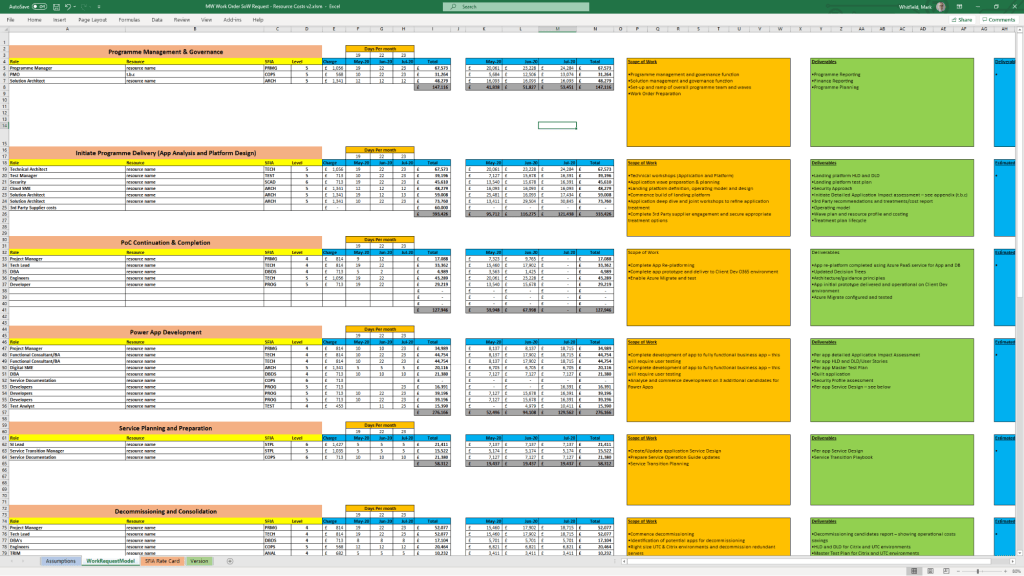
UK Gov : Cloud Migration (Hybrid) – In 2020, working as a Senior Project Manager on a client sponsored Agile proof-of-concept (POC) project to move 3 Client elected Apps (with MS Access, Oracle and SQL 2008 DBs), to the Cloud (Microsoft Azure and Dynamics365 Power Platform). The migration to the cloud was based on 3 primary app patterns namely; re-host, re-platform and re-factor. This project spanned approximately 3 months and started in early February 2020 with a budget of £375k.
The project was a pre-cursor and effort indicator for the larger piece of migration work to move 130 client estate apps to the cloud. This is a very complex app estate with many touch points and different technology stacks.
As the Capgemini Senior PM, responsible for the project planning, control, organisation, stakeholder communication, aligning with current GDPR directives and status reporting against delivery of Capgemini services to the client. As the PM, also the first escalation point for the project team and the client.
December 2022 – C&CA UK’s Communications & Engagement Award Winner – Cloud & Custom Applications – Capgemini UK
Project Management Office (PMO) models dictate the structure, control level, and strategic focus of a PMO within an organization. The most common frameworks break down into three primary operational types, alongside broader structural and strategic classifications that define how governance is applied.
Project Management Office (PMO) models overview
1. Operational Models (By Control Level)
These models define how the PMO interacts with project teams and enforces standards.
Supportive PMO: Acts as an advisory entity. It provides templates, best practices, training, and tools on demand, but has no direct control or authority over project execution. Best for: Organizations with a decentralized, highly autonomous culture.
Controlling PMO: Enforces strict governance, standardizes methodologies, and ensures compliance across all initiatives. It provides more than advice and actively verifies adherence, but typically relies on established escalation paths rather than direct authority. Best for: Organizations that need consistency and reduced risk.
Directive PMO: Assumes full control and direct ownership of projects. The PMO assigns project managers, directs resources, and takes total responsibility for execution, timelines, and outcomes. Best for: Complex or mission-critical projects requiring rigid governance.
2. Structural Models (By Scope & Placement)
These classifications indicate where the PMO sits and its organizational reach.
Enterprise PMO (EPMO): Operates at the highest organizational level, overseeing the entire project portfolio. It ensures all programs directly align with overarching corporate business objectives and strategy.
Departmental/Divisional PMO: Supports specific business units (such as IT, Marketing, or Engineering). It is highly tailored to the specialized needs of that function, though it runs the risk of creating siloed practices.
Embedded or Project-Specific PMO: A temporary model dedicated to one large, highly complex, or mission-critical project or program. It lasts for the duration of the project and then disbands or reallocates.
3. Advanced / Strategic Models (By Focus)
Modern organizations often adapt the PMO to focus on high-level value rather than just tracking timelines.
Center of Excellence (CoE): Focuses heavily on continuously elevating the organization’s project management maturity. It acts as an innovation hub for methodologies, technology evaluation, and skill-building.
Value Management Office (VMO): Focuses entirely on benefits realization and return on investment (ROI). Rather than just asking “are we on time?”, it asks “is this project generating the business value we wanted?”
A Project Management Office (PMO) is a centralized department within an organization tasked with standardizing project management processes, enforcing governance, and aligning projects with strategic business goals. Its primary mission is to optimize resource utilization, mitigate risks across the portfolio, and improve the overall success rate of projects.
The core responsibilities of a PMO vary based on its organizational maturity and type (Supportive, Controlling, or Directive), but generally span five major domains:
1. Governance and Standardisation
Developing Methodologies: Establishing uniform frameworks, processes, and project management methodologies (such as Agile, Waterfall, or hybrid models) across all departments.
Creating Templates: Developing standard documentation, templates, and tools to ensure consistency in project initiation, tracking, and reporting.
Conducting Audits: Monitoring compliance with established standards through health checks and project reviews to identify and correct process deviations.
2. Strategic Portfolio Management
Strategic Alignment: Ensuring every project investment directly supports the organization’s high-level strategy and long-term business goals.
Project Prioritization: Evaluating incoming project proposals and business cases to prioritize high-value initiatives while deferring or canceling low-priority options.
Benefits Realization: Tracking and measuring project outcomes to ensure that completed deliverables provide the expected economic or structural value to the company.
3. Monitoring, Tracking, and Reporting
Performance Reporting: Collecting and analyzing performance metrics via dashboards to provide regular progress updates to senior executives and stakeholders.
Dependency Management: Tracking cross-project dependencies, scheduling overlaps, and potential bottlenecks to prevent organizational conflicts.
Risk Management: Identifying systemic risks and early-warning signs of failing projects to trigger timely interventions or escalation protocols.
4. Resource and Capacity Management
Resource Optimization: Coordinating the allocation and utilization of personnel, skill sets, and budgets across the entire project portfolio.
Capacity Planning: Assisting line managers with strategic capacity planning to identify talent gaps, prevent team burnout, and support hiring decisions.
Effort Estimation Support: Providing historical data and expert insights to help project teams produce accurate cost and time estimates.
5. Training and Knowledge Management
Mentorship and Coaching: Providing regular guidance, professional coaching, and continuous support to project managers and their delivery teams.
Skills Development: Organizing training sessions and educational paths on core project management practices, specialized software, and new industry standards.
Lessons Learned Repository: Maintaining a centralized repository of project documentation, historical metrics, and post-project reviews to drive continuous organizational learning.