Columbo Overview and Detailed Timeline by Era and Year

Columbo is a landmark American crime drama television series that revolutionized the genre by popularizing the “inverted detective story” (howcatchem) format. Running for over 35 years (1968–2003), the show starred Peter Falk as a brilliant, disheveled LAPD homicide detective whose unkempt appearance and polite, rambling demeanor hidden a razor-sharp mind. 

Columbo – Pilot Episode with Gene Barry, 1968

Overview and Key Elements

  • Format: The audience almost always knows who committed the murder at the beginning of the episode. The suspense lies in how Lieutenant Columbo unravels the culprit’s “perfect” alibi.
  • Signature Traits: The Peugeot 403 car, a shabby beige raincoat, a cigar, frequent mentions of an unseen wife, and the catchphrase “Just one more thing”.
  • The “Howcatchem”: Columbo rarely appears in the first act, allowing the killer to showcase their arrogance and meticulous planning before he systematically dismantle their world.
  • Class Conflict: The show frequently pits Columbo (a blue-collar, unassuming figure) against affluent, privileged suspects.
  • Creator/Legacy: Created by Richard Levinson and William Link, inspired by Crime and Punishment and Father Brown, the character first appeared on TV in 1960 and on stage in 1962, but Peter Falk made it his own in 1968. 

Comprehensive Historic Timeline (1960–2014)

Era 1: Pre-Falk & Pilots (1960–1971) 

  • 1960: Columbo appears in “Enough Rope,” an episode of The Chevy Mystery Show (based on the story “Dear Corpus Delicti”). Bert Freed played the lieutenant.
  • 1962: Stage play Prescription: Murder debuts. Thomas Mitchell plays Columbo.
  • 1968 (Feb 20): Prescription: Murder (Pilot 1) airs on NBC, featuring Peter Falk for the first time.
  • 1971 (Mar 1): Ransom for a Dead Man (Pilot 2) airs. Its success leads to a series order. 

Era 2: The NBC Classic Era (1971–1978) 

  • 1971–1972 (Season 1): Columbo becomes a “wheel” program in The NBC Mystery Movie. Notable episode: “Murder by the Book” (directed by Steven Spielberg).
  • 1972 (Sep 17): Season 2 premieres, establishing the show as a top-rated Sunday night anchor.
  • 1973: Peter Falk wins his first Golden Globe for the role.
  • 1974: Season 3. “Any Old Port in a Storm” introduces Columbo’s penchant for humming “This Old Man”.
  • 1975: Season 4/5. “Forgotten Lady” (with Janet Leigh) and “Case of Immunity”.
  • 1976: Peter Falk wins Emmys (1972, 1975, 1976).
  • 1978 (May): Final NBC episode airs (Season 7) before Falk leaves the role due to scheduling. 

Era 3: The ABC Revival Era (1989–2003) 

  • 1989 (Feb): Columbo returns on ABC under The ABC Mystery Movie with “Columbo Goes to the Guillotine”.
  • 1990: Season 9/10 begins. Falk wins his 4th Primetime Emmy (1990).
  • 1991–2002: The show airs irregularly as “Specials” rather than a strict series.
  • 2003 (Jan 30): Last episode, “Columbo Likes the Nightlife,” airs, completing 69 total episodes. 

Post-Series & Legacy

  • 2007: Peter Falk pitches “Columbo’s Last Case” to ABC; it is rejected.
  • 2011 (June 23): Peter Falk dies at age 83.
  • 2014: A statue of Lieutenant Columbo and his dog is unveiled in Budapest, Hungary. 

Major Episodes and Guest Stars

  • Jack Cassidy: Played killers in 3 episodes (best known as Riley Greenleaf in “Publish or Perish”).
  • Robert Culp: Played killers in 3 episodes (“Death Lends a Hand,” “The Most Crucial Game,” “Double Exposure”).
  • Patrick McGoohan: Acted in 4 episodes (3 as killer) and directed 5, including “By Dawn’s Early Light”.
  • William Shatner: Starred in “Fade In to Murder” (1976) and “Butterfly in Shades of Gray” (1994).
  • Johnny Cash: Starred in “Swan Song” (1974). 

Where to Watch & Review Sites

Columbo Overview and Detailed Timeline by Era and Year

Agile Scrum Epic vs Feature vs User Story

Agile Scrum Epic vs Feature vs User Story

PMO Types, Project Management Office

PMO Types, Project Management Office

Movie Martial Arts and Timeline by Era and Year

Martial arts cinema has evolved from silent, fantastical tales of folklore to a global, high-octane genre blending practical fighting skills with advanced technology. Dominated primarily by Hong Kong action cinema, the genre peaked from the early 1970s through the mid-1990s, with significant modern revivals in Thailand, Indonesia, and Hollywood. 

Detailed Historic Timeline and Eras

1. The Origins & Silent Era (1920s–1940s)
Early martial arts films originated in Shanghai, drawing heavily from Chinese opera and wuxia (sword-fighting fantasy) novels. 

  • 1928: The Burning of the Red Lotus Temple (Shanghai) is widely considered the first kung fu film, pioneering stylized, fantastical fight scenes.
  • 1943: Sanshiro Sugata (Judo Saga), Akira Kurosawa’s directorial debut, marks a significant, more grounded entry in Japanese cinema. 

2. The Pre-Boom & Wuxia Revival (1950s–1960s)
This era saw the rise of the Mandarin-speaking studios in Hong Kong (Shaw Brothers) and the dominance of Japanese samurai (chambara) films. 

  • 1954: Seven Samurai (Japan) elevates swordplay choreography.
  • 1966: King Hu’s Come Drink with Me redefines the genre with elegant, dance-like choreography.
  • 1967: The One-Armed Swordsman (Chang Cheh) brings a more brutal, masculine edge to the genre, breaking records in Hong Kong. 

3. The Golden Age & Bruce Lee Era (1970–1979)
The 70s saw the shift from fantastical swordplay to realistic hand-to-hand kung fu, propelled by Bruce Lee. 

  • 1970: The Chinese Boxer (Jimmy Wang Yu) shifts focus from swordplay to unarmed combat.
  • 1971: The Big Boss (Fist of Fury) breaks all Hong Kong box office records, launching Bruce Lee as a global superstar.
  • 1973: Enter the Dragon becomes the first Hollywood-Hong Kong co-production, cementing kung fu in global popular culture.
  • 1978: Drunken Master makes Jackie Chan a star, introducing a comedic, acrobatic fighting style.
  • 1978: The 36th Chamber of Shaolin sets the benchmark for training montages and traditional kung fu films. 

4. Comedy, Action & The Golden Harvest Era (1980s–1990s)
Jackie Chan, Sammo Hung, and Jet Li dominated this era with insane stunts and high-speed choreography. 

  • 1983: Project A showcases Jackie Chan’s dangerous, physical stunt comedy.
  • 1984: The Karate Kid (USA) mainstreamed martial arts in Western youth culture.
  • 1988: Bloodsport (Jean-Claude Van Damme) sparks a resurgence of interest in martial arts cinema in the US.
  • 1991: Once Upon a Time in China launches Jet Li to fame, blending traditional techniques with fast-paced editing.
  • 1994: Drunken Master II (The Legend of Drunken Master) is released, often considered one of the greatest martial arts films ever made. 

5. Modernization & Global Expansion (2000s–Present)
The 21st century brought a mix of stylistic, high-budget wuxia and brutally realistic,, practical action. 

  • 2000: Crouching Tiger, Hidden Dragon earns critical acclaim and international accolades for its artistic blend of wuxia and drama.
  • 2003: Ong-Bak: The Thai Warrior introduces Tony Jaa and the raw, dangerous power of Muay Thai to the world.
  • 2008: Ip Man (Donnie Yen) revives the biographical, martial arts hero film in China.
  • 2011: The Raid: Redemption (Indonesia) raises the bar for grittier, intense, high-speed combat.
  • 2021: Shang-Chi and the Legend of the Ten Rings represents the integration of HK-style choreography into the Marvel Cinematic Universe. 

Summary of Key Styles & Subgenres :

  • Wuxia: Fantastical, wire-fu, sword-fighting (e.g., HeroCrouching Tiger).
  • Kung Fu: Traditional unarmed combat, training focus (e.g., 36th Chamber).
  • Kung Fu Comedy: Acrobatics and physical comedy (e.g., Drunken Master).
  • Chambara: Japanese samurai films (e.g., Yojimbo).
  • Urban/Action: Modern setting, hard-hitting choreography (e.g., The Raid).
  • Gun Fu: Blending martial arts with firearms (e.g., John Wick). 

Movie Martial Arts and Timeline by Era and Year

Frameworks for making better decisions, setting priorities

Frameworks for making better decisions, setting priorities

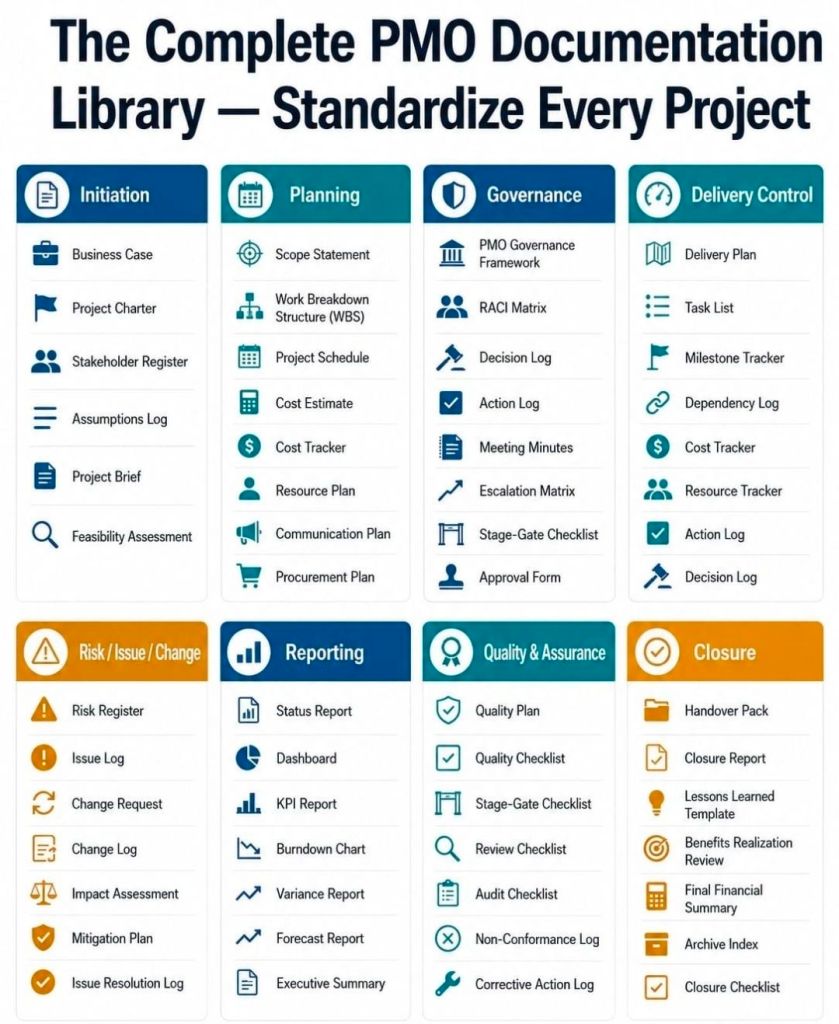
Project Management Templates bundle with free upgrades

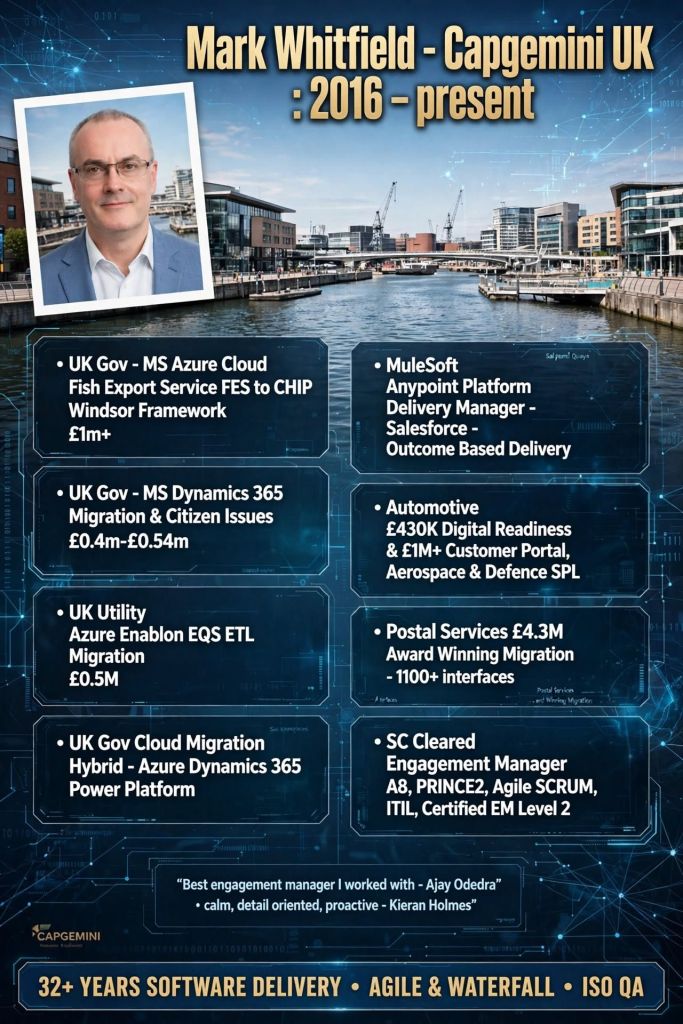
Mark Whitfield’s Project Management templates are a comprehensive, editable suite of over 200 documents designed for Agile, Waterfall, and PRINCE2 methodologies, based on over 30 years of project delivery experience. Available through his website (click banner link above), Etsy, Flevy and Eloquens, these templates are designed to be used across the project lifecycle—from initiation to closure—and include lifetime free updates and additions. 

Many POaP Plan On a Page examples

Full Overview of Mark Whitfield Template Bundle

The bundle, priced at around £38.00 (as of April 2026), provides tools for MS Excel, Word, PowerPoint, and MS Project (.mpp). 

1. Planning & Scheduling

  • MS Project (MPP / MSP): Includes full PRINCE2 7th Edition, Agile Scrum, and SDLC (Software Development Life-cycle) plans.
  • Excel Detailed Plans: Includes Gantt chart tracking for users without MS Project.
  • Plan on a Page (POaP): Over 30 PowerPoint examples for executive summaries. 
Example Plan On a Page POaP

2. PRINCE2 & Governance

  • Full set of over 200 documents including Project Initiation Document (PID), Business Case, Work Packages, Risk Management Strategy, and Configuration Item Records.
  • Reporting: Highlight reports, exception reports, and end-stage reports. 
PRINCE2 Delivery Plan in MS Excel Example

3. Tracking & Risk Management

  • RAID Logs: Comprehensive trackers for Risks, Assumptions, Issues, and Dependencies (includes simple and detailed versions).
  • Finance Trackers: Simple and full project finance trackers (forecasting, actuals, variance, rate lookups).
  • RACI Matrix: Resource Responsibility Assignment Matrix. 
Many Project Budget / Financial Tracker examples

4. Execution & Delivery

  • SDLC: Detailed Software Development Life-cycle plans.
  • Deployment/Runbook: Execution and release planning documents.
  • Agile: Burn down and burn up charts. 
Example Agile Scrum Burn Down Chart

Detailed Timeline by Project Life Cycle

Templates provide detailed MS Project (.mpp) and Excel schedules that map out the standard project life cycle over time. The plans include notes and color-coded tasks (black: standard task, blue: artifact creation, brown: decision/event, purple: artifact update). 

Example MS Excel Delivery Plan

1. Project Startup / Initiation Phase 

  • Tasks: Project Mandate, Project Brief preparation, Appoint Project Board, Define Project Approach.
  • Key Templates: Project Brief, PID, Business Case, Project Board Structure. 

2. Planning Phase

  • Tasks: Develop the PID, Create Detailed Gantt Plans, Create Budgeting/RAID Logs, Setup Communication Strategies.
  • Key Templates: Detailed MS Project Plans (Waterfall/Agile), RACI Tracker, RAID Log. 

3. Project Execution / Control Phase

  • Tasks: Weekly Status Reporting, Risk Management, Managing Product Delivery, Stage Assessments.
  • Key Templates: Highlight Report, Issue Register, Daily Log, Financial Tracker. 

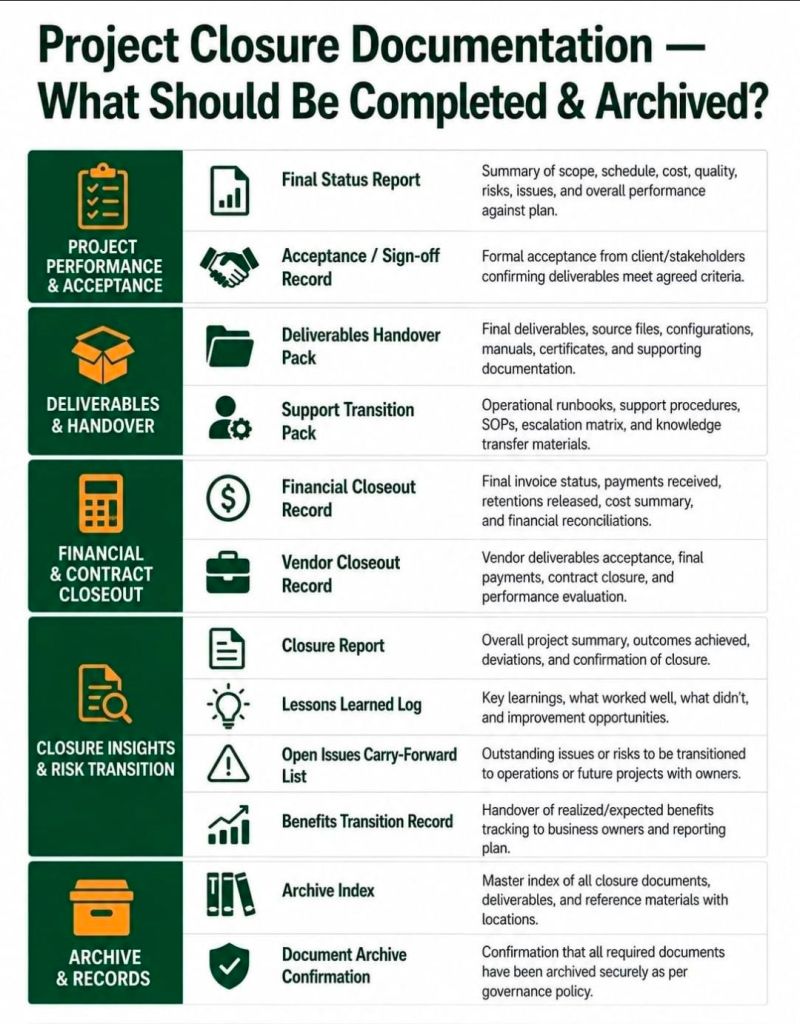
4. Project Close Phase

  • Tasks: Handover, Project Evaluation, Lessons Learned, Finalize Costs, Close Project.
  • Key Templates: End Project Report, Lessons Log, Benefits Realization Plan. 

Summary of Key Features

  • Fully Editable: Designed to be tailored to specific project needs (PRINCE2 Principle 7).
  • Access: Compatible with Desktop, Tablet, Smartphone, and Cloud (Microsoft Teams/SharePoint).
  • Support: Free lifetime upgrades (and additions) to the latest template package after purchase. 
  • Click on link in website banner above to purchase full templates bundle

Project Management Templates bundle with free upgrades.

Godzilla Minus Zero – November 06, 2026 by TAKASHI YAMAZAKI, sequel

Godzilla Minus Zero – November 06, 2026 by TAKASHI YAMAZAKI

Godzilla Minus Zero (Japanese: ゴジラ-0.0マイナスゼロ, Hepburn: Gojira Mainasu Zero) is an upcoming Japanese kaiju film written, directed, and with visual effects supervised by Takashi Yamazaki.

A sequel to Godzilla Minus One (2023), it is the 39th film in the Godzilla franchise, the 34th film by Toho, and the sixth installment in the franchise’s Reiwa era. The film stars Ryunosuke Kamiki and Minami Hamabe, reprising their roles from Godzilla Minus One.

Cast:

Ryunosuke Kamiki as Kōichi Shikishima, a former kamikaze pilot


Minami Hamabe as Noriko Ōishi, Shikishima’s girlfriend


Munetaka Aoki as Sōsaku Tachibana, a former Navy Air Service mechanic


Hidetaka Yoshioka as Kenji Noda, a former Naval weapons engineer


Miou Tanaka as Tatsuo Hotta, captain of the destroyer Yukikaze


Sae Nagatani as Akiko, Ōishi and Shikishima’s adopted daughter

Godzilla Minus Zero

Godzilla Minus Zero – November 06, 2026 by TAKASHI YAMAZAKI, sequel to Godzilla Minus One (2023)

Wimbledon Championships Overview and Detailed Timeline History

The Championships, Wimbledon, is the world’s oldest tennis tournament and widely considered the most prestigious. Founded in 1877 by the All England Croquet and Lawn Tennis Club, it is the only Grand Slam still played on outdoor grass courts. 

Full Overview

  • Location: All England Lawn Tennis and Croquet Club, Church Road, Wimbledon, London.
  • Surface: Outdoor Grass (100% rye grass, cut to 8mm).
  • Timeframe: Typically held over two weeks in late June – early July.
  • Key Traditions: All-white dress code for players, serving strawberries and cream, and Royal patronage.
  • Main Events: Gentlemen’s Singles, Ladies’ Singles, Gentlemen’s Doubles, Ladies’ Doubles, and Mixed Doubles.
  • Key Facilities: Centre Court (featuring a retractable roof since 2009) and No. 1 Court. 

Detailed Historic Timeline by Era

The Beginnings & The Amateur Era (1877–1967)

  • 1877: Inaugural championship held. Only Gentlemen’s Singles with 22 participants. Spencer Gore wins.
  • 1884: Ladies’ Singles and Gentlemen’s Doubles introduced. Maud Watson becomes the first female champion.
  • 1905: May Sutton (USA) becomes the first overseas champion.
  • 1915–1918: No tournament held due to World War I.
  • 1922: Tournament moves from Worple Road to the current Church Road venue.
  • 1934–1936: Fred Perry wins three consecutive Gentlemen’s singles titles.
  • 1937: First television broadcast of the tournament.
  • 1940–1945: No tournament held during World War II; Centre Court is bombed in 1940.
  • 1951: First black player, Bertrand Clark, competes.
  • 1957: Althea Gibson becomes the first black American winner.
  • 1967: First live colour television broadcast. 

The Open Era (1968–Present) 

  • 1968: Wimbledon becomes an “Open” tournament, allowing professional players to compete alongside amateurs.
  • 1971: First Wimbledon singles final to end on a tie-break (Evonne Goolagong def. Chris Evert).
  • 1976–1980: Bjorn Borg wins five consecutive Gentlemen’s singles titles.
  • 1977: Centenary Championships. Virginia Wade is the last British woman to win the title.
  • 1985: Boris Becker becomes the youngest ever male champion at age 17.
  • 1990s: Steffi Graf and Pete Sampras dominate the decade.
  • 2001: Goran Ivanišević wins the Gentlemen’s singles as a wildcard.
  • 2003–2007: Roger Federer wins five consecutive titles.
  • 2008: Rafael Nadal defeats Roger Federer in a historic final considered one of the best matches in history.
  • 2009: Retractable roof installed on Centre Court.
  • 2010: Longest match in history: John Isner vs. Nicolas Mahut (11 hours 5 minutes).
  • 2013: Andy Murray becomes the first British male winner in 77 years.
  • 2020: Cancelled for the first time since WWII due to the COVID-19 pandemic.
  • 2022: All-white clothing rule modified to allow women to wear darker undershorts.
  • 2023/2024: Carlos Alcaraz wins back-to-back Gentlemen’s titles. 

Key Records & Facts

  • Most Titles (Gentlemen’s Singles): Roger Federer (8).
  • Most Titles (Ladies’ Singles): Martina Navratilova (9).
  • Fastest Serve: John Isner (157.2 mph).
  • Oldest Champion: Dorothea Lambert Chambers (1914).
  • Youngest Champion: Lottie Dod (1887). 

Links

Wimbledon Championships Overview and Detailed Timeline History

Bolton Institute of Higher Education (BIHE), 1982 to 2004

The Bolton Institute of Higher Education (BIHE), which officially existed between 1982 and 2004, is the direct predecessor to the current University of Bolton (now rebranded as the University of Greater Manchester). Its roots extend back to the early 19th century, evolving from a Technical School into a major centre for higher education. 

Bolton Institute of Higher Education (BIHE) before the rebuild to the university.

LinkedIn Group: https://www.linkedin.com/groups/51224

Overview of Bolton Institute of Higher Education

  • Formation: Established in 1982 through the merger of Bolton Institute of Technology and Bolton College of Education (Technical).
  • Status: A “post-92” institution that developed from a vocational technical college to a degree-awarding Higher Education body.
  • Key Powers: Gained taught-degree awarding powers in 1992 and research degree awarding powers in 1995/1996.
  • Key Locations: Based at the Deane Campus (Deane Tower completed 1970) and Chadwick Campus.
  • Final Evolution: Achieved university status in 2004/2005. 

Detailed Historic Timeline (1824–2024) 

Era 1: Foundations (Mechanics’ Institute to Technical College)

  • 1824-1825: Bolton Mechanics’ Institute is established, marking the educational origins of the institution.
  • 1887: A new Technical School is created with student numbers rising above 1,500.
  • 1926: Bolton Technical School is renamed Bolton Technical College.
  • 1941: A new building is opened for technical and engineering education.
  • 1946: Bolton Training College is approved by the Ministry of Education.
  • 1959: Bolton Training College settles at Chadwick Street. 

Era 2: The Technical and Institute Era (1960s–1981) 

  • 1960s: Development of Bolton College of Education at Chadwick Street.
  • 1964: Bolton Technical College and Bolton Institute of Technology (BIT) are divided into separate organisations. A.J. Jenkinson serves as principal for both in succession.
  • 1970: Deane Tower (Deane Campus) is completed.
  • 1971: A technology block and sports hall (later the Excel Centre) are added. 

Era 3: Formation of BIHE (1982–2004) 

  • 1982: Bolton Institute of Technology and Bolton College of Education merge to form Bolton Institute of Higher Education (BIHE). John McKenzie is the first principal.
  • 1990: The Institute gains its own taught-degree awarding powers.
  • 1991: An £8.3 million extension project begins, including the purchase of the former Eagle Factory.
  • 1992: Reorganisation following the Further and Higher Education Act 1992.
  • 1995/1996: Awarded research degree awarding powers.
  • 1998: Mollie Temple becomes the third principal, leading the drive for university status.
  • 2004: BIHE is granted university status.
  • 2005: The institution is officially named the University of Bolton. 

Era 4: Modern Era (University of Bolton to University of Greater Manchester) 

  • 2009-2010: Rebranding and opening of the new Deane Road campus building.
  • 2018: Bolton College merges with the University of Bolton.
  • 2023: Application made to change the name to the University of Greater Manchester.
  • 2024: The university begins operating as the University of Greater Manchester. 

Key Historical Links & Resources

Agile Manifesto, Values and Principles

Agile Manifesto, Values and Principles

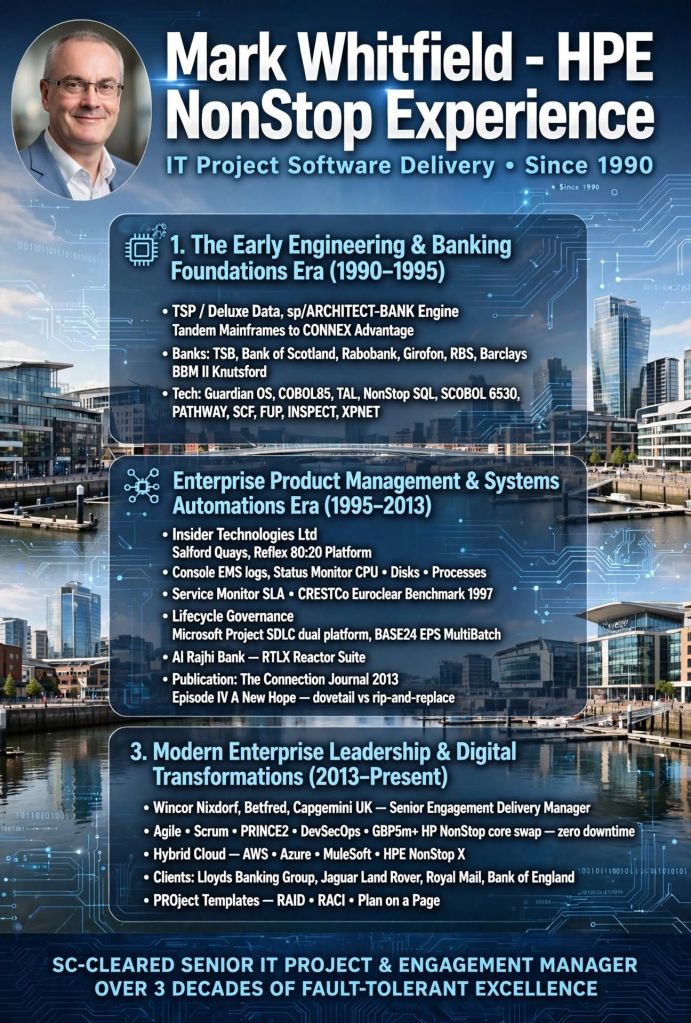
Tandem Computers ( HPE NonStop ) Overview & Detailed Timeline

Tandem Computers, founded in 1974 by James (Jimmy) Treybig, revolutionized the computing industry by pioneering fault-tolerant computer systems. Designed specifically for online transaction processing (OLTP) in banking, stock exchanges, and telephone switching, Tandem’s “NonStop” systems provided near-zero downtime by utilizing redundant, modular processors and a “shared-nothing” architecture. 

Tandem remained an independent, rapidly growing company until it was acquired by Compaq in 1997, later becoming part of Hewlett Packard Enterprise (HPE). 

Overview of Key Technologies

  • NonStop Architecture: The core design featured multiple independent processors, each with its own memory and I/O bus, interconnected by a redundant inter-CPU bus called the Dynabus.
  • Guardian OS: A message-based operating system designed to detect faults immediately (“fail-fast”) and mirror process states to a backup processor, allowing seamless failover.
  • NonStop SQL (1986): The first fault-tolerant SQL database, known for linear scalability.
  • ServerNet (1995): A high-speed, scalable, point-to-point network system that replaced the Dynabus and influenced modern InfiniBand standards. 

Detailed Historic Timeline by Era and Year

The Founding Era (1974–1979) 

  • 1974: Tandem Computers is founded in Cupertino, California, by Jimmy Treybig, formerly of HP. Initial venture capital investment comes from Kleiner & Perkins.
  • 1975: Design of the Tandem/16 (T/16) is completed.
  • 1976: The first T/16 NonStop system is shipped to Citibank.
  • 1977: Tandem goes public; sales begin rapid, exponential growth.
  • 1978: Introduction of the ENCOMPASS database management system.

The Growth and Competition Era (1980–1989)

  • 1980: Inc. magazine ranks Tandem as the fastest-growing public company in America.
  • 1981: NonStop II is introduced, supporting 32-bit addressing to allow for larger applications.
  • 1982: Competition intensifies as Stratus Technologies enters the fault-tolerant market. Tandem faces its first quarter of declining growth.
  • 1983: Introduction of the NonStop TXP, the first entirely new implementation of the TNS architecture with cache memory.
  • 1985: Attempted entry into the PC market with the MS-DOS-based Dynamite PC, which fails commercially and is withdrawn.
  • 1986: Introduction of the NonStop VLX (32-bit datapath) and the revolutionary NonStop SQL database.
  • 1987: Introduction of the low-cost NonStop CLX for small office environments.
  • 1988: Tandem acquires Ungermann-Bass, Inc. to strengthen networking capabilities.
  • 1989: Introduction of the NonStop Cyclone, a high-end ECL-based processor aimed at mainframe markets. 

The Open Standards & MIPS Transition Era (1990–1996)

  • 1990: Tandem introduces the Integrity line of fault-tolerant Unix systems.
  • 1991: Cyclone/R (CLX/R) is released, marking the start of the migration from proprietary stack machines to MIPS R3000 RISC microprocessors.
  • 1993: Introduction of the NonStop Himalaya K-series using faster MIPS R4400 processors.
  • 1994: NonStop Kernel (NSK) is extended with Open System Services (OSS), a POSIX-compliant Unix environment.
  • 1995: Introduction of ServerNet, designed for extremely low-latency inter-processor communication.
  • 1995–1997: Partnered with Microsoft on the “Wolfpack” project, which becomes Microsoft Cluster Server. 

Acquisition and Integration Era (1997–Present)

  • 1997: Compaq acquires Tandem Computers for roughly $3 billion. The Himalaya S-Series is introduced.
  • 1998: Compaq acquires DEC, leading to a shift in engineering strategy towards Alpha/Itanium instead of MIPS.
  • 2001: Compaq terminates Alpha engineering, committing to Intel’s Itanium (Merced) processors.
  • 2002: Hewlett-Packard acquires Compaq. Tandem becomes the core of the HP Integrity NonStop Server division.
  • 2005: The first HP Integrity NonStop servers (TNS/E) based on Itanium processors are released.
  • 2014: Completion of the migration to Intel x86 architecture (NonStop X). 

Note: Following the split of HP into Hewlett Packard Enterprise (HPE) and HP Inc., the NonStop product line continues to be developed and supported by HPE.

Tandem Computers Overview and Detailed Timeline

Business Analyst BA Core Documents in Project Delivery

Business Analyst BA Core Documents in Project Delivery

Interview Questions, Senior Leaders and Responses

Interview Questions, Senior Leaders and Responses

Finance Terms every IT Professional Should Know

Finance Terms every IT Professional Should Know

Lean Six Sigma Global, How to Lead a Project

Lean Six Sigma Global, How to Lead a Project

Agile Daily Scrum Checklist Overview

Agile Daily Scrum Checklist Overview

BA Business Analyst in a Software Development Project

Business Analyst BA in a Software Development Project
BA in a Software Development Project

Microsoft Excel Project Backlog template & Work in Progress WIP

A Microsoft Excel project backlog template is a prioritized, centralized list of all pending work—features, user stories, bug fixes, and tasks—that need to be completed, often used in Agile, Scrum, or Kanban frameworks to manage team workload and project scope. 

Key Columns for an Effective Backlog Template

To create a detailed backlog, the following columns are essential for tracking, prioritizing, and assigning work items: 

  • ID / Task Number: A unique identifier for each item (e.g., P-001, P-002) for easy referencing.
  • Item Name / Title: A concise title describing the task or requirement.
  • User Story / Description: A detailed description of the work, often in the format: “As a [type of user], I want to [action], so that [value]”.
  • Type: Categorizes the work (e.g., Feature, Bug, Improvement, Technical Debt).
  • Priority: Defines the order of execution, typically Rank (1, 2, 3), High/Medium/Low, or MoSCoW (Must-have, Should-have, Could-have, Won’t-have).
  • Status: Indicates the current stage of the item (e.g., Backlog, To-Do, In Progress, Testing, Done).
  • Assignee / Owner: The team member responsible for completing the item.
  • Story Points / Effort Estimate: An estimated size of the task (e.g., using Fibonacci sequence: 1, 2, 3, 5, 8…).
  • Acceptance Criteria: Specific conditions that must be met for the item to be marked as “Done”.
  • Target Sprint / Release: The planned iteration or release version in which the task is scheduled. 

Example Structure for MS Excel Project Backlog

This structure can be implemented in a simple Microsoft Excel sheet, enabling filtering and sorting by priority or assignee. 

Example Structure for MS Excel Project Backlog

Detailed Overview of Functional Features

  • Drop-down Menus (Data Validation): Use these for “Status,” “Priority,” and “Type” columns to maintain data consistency.
  • Conditional Formatting: Automatically color-code rows based on status (e.g., “Done” turns green) or priority (e.g., “High” turns red) to visually identify bottlenecks.
  • Formulas: Implement formulas to calculate total story points or project completion percentage.
  • Filtering: Use filtering on column headers to immediately view specific categories or an assignee’s workload. 

Related Agile Templates in MS Excel

  • Sprint Backlog: Contains only items selected from the main Product Backlog for the current 2-4 week sprint.
  • Kanban Board View: Organizes the backlog into vertical columns representing stages of workflow (Backlog, In Progress, Done).
  • Burndown Chart: Uses data from the backlog to plot remaining work hours over the course of a sprint.

……….

Project Work in Progress or WIP

A Work in Progress (WIP) template in Microsoft Excel serves two primary purposes depending on your industry: operational task tracking for project management or financial reporting for construction and contracting. 

1. Essential Columns for Operational WIP (Project Management) 

This format focuses on day-to-day task execution and risk management. 

  • Task / Activity: Clear description of the work being done (e.g., “Design Phase Sign-off”).
  • Owner / Assigned To: Name of the person or team responsible for the task.
  • Due Date: The critical deadline for task completion.
  • Status: Current state of the task, typically using a dropdown menu for “Not Started,” “In Progress,” “Blocked,” or “Complete”.
  • % Complete: A numerical value (0–100%) providing granular visibility into progress.
  • Priority: Categorisation of importance (High, Medium, Low) to help teams focus on critical items.
  • Notes / Blockers: Documentation of risks, dependencies, or reasons for delay. 

2. Essential Columns for Financial WIP (Construction/Contracting)

This format bridges financial data with project completion to calculate earned revenue and billing accuracy.

Essential MS Excel Columns for Financial WIP (Construction/Contracting)

Advanced Template Features

  • Status Dashboard: A summary section at the top of the sheet displaying overall project health, risks, and budget status.
  • Data Validation: Using dropdown lists for the “Status” and “Budget” columns to ensure consistent data entry.
  • Conditional Formatting: Using color-coded indicators (Red, Yellow, Green) for at-risk tasks or budget overruns.
  • Freeze Panes: Locking the header rows so they remain visible while scrolling through long task lists. 

Microsoft Excel Project Backlog template & Work in Progress WIP

……….

Summary of ‘Project Backlog’ columns in Excel

  1. ID / Task Number
  2. Item Name / Title
  3. User Story / Description
  4. Type
  5. Priority
  6. Status
  7. Assignee / Owner
  8. Story Points / Effort Estimate
  9. Acceptance Criteria
  10. Target Sprint / Release

……….

Summary of (Project Management) ‘Operational’ Work in Progress (WIP) columns in Excel

  1. Task Activity
  2. Owner / Assigned To
  3. Due Date
  4. Status
  5. % Complete
  6. Priority
  7. Notes / Blockers

……….

Summary of (Construction / Contracting) ‘Financial’ Work in Progress (WIP) columns in Excel

  1. Contract Data
  2. Cost Tracking
  3. Forecasting
  4. Progress
  5. Revenue
  6. Billing
  7. Variance

……….

End> Microsoft Excel Project Backlog template & Work in Progress WIP

Every Artificial Intelligence AI Agent Explained

Every Artificial Intelligence AI Agent Explained

Agile Backlog Refinement Activities and Business Analyst BA

Agile Backlog Refinement Activities & Business Analyst