Understanding Agile Scrum, A Framework for Delivering Value, Iteratively

Understanding Agile Scrum, A Framework for Delivering Value, Iteratively

Agile Scrum Metrics that Drive Team Improvement

Agile Scrum Metrics that Drive Team Improvement

Project Management Office (PMO) Overview

A Project Management Office (PMO) is a centralized department or group that defines, maintains, and ensures project management standards across an organization. It serves as the “command center” that aligns project execution with broader business strategy to improve success rates and ROI.

Core PMO Models

The level of control a PMO exerts depends on its specific operational model:

  • Supportive PMO: Provides a consultative role by supplying templates, best practices, and training. It has low control, acting primarily as a project repository.
  • Controlling PMO: Enforces governance and requires compliance through specific frameworks and tools. It maintains a moderate degree of control.
  • Directive PMO: Directly manages projects by assigning project managers who report to the PMO. This model offers the highest degree of control and accountability.

Key Responsibilities

A PMO’s daily functions bridge the gap between high-level strategy and ground-level execution:

Common PMO Roles:

Common PMO Roles
Common PMO Roles

Staffing varies by organization size, but typical roles include:

  • PMO Director/Manager: Oversees the entire office, ensuring processes are followed and goals are met.
  • PMO Analyst: Collects and analyzes project data to support decision-making and reporting.
  • Project/Portfolio Managers: Lead individual projects or entire portfolios to completion.
  • PMO Specialist: Focuses on implementing methodologies and providing expert advice on project management.

Organizational Levels

PMOs can operate at different tiers within a company:

  • Project PMO: Focused on a single, large-scale project.
  • Program/Department PMO: Oversees a group of related projects within a specific department (e.g., IT or Marketing).
  • Enterprise PMO (EPMO): Operates at the executive level, ensuring all projects across the entire organization align with strategic corporate goals.

Project Management Office (PMO) Overview

Right Project Management Approach, Adaptability over Rigid Approach

Right Project Management Approach, Adaptability over Rigid Approach

Business Analysts and Artificial Intelligence AI, Future

Business Analysts and Artificial Intelligence AI Future
Business Analysts and Artificial Intelligence AI, future

Artificial Intelligence (AI) is fundamentally shifting the role of the Business Analyst (BA) from a focus on routine data processing and documentation to more strategic, human-centric activities. While AI excels at identifying patterns and automating labor-intensive tasks, it currently lacks the contextual awareness and emotional intelligence required to manage complex stakeholder relationships.

Core AI Applications for Business Analysts

AI functions as a high-speed “copilot” that streamlines the traditional BA lifecycle.

  • Requirement Generation: AI can process meeting transcripts to draft an initial list of requirements, user stories, or a Business Requirements Document (BRD).
  • Data Analysis & Forecasting: Machine learning algorithms can identify subtle trends in large datasets and move analysis from descriptive (what happened) to predictive (what might happen).
  • Visual Modeling: Tools can now generate process flows, data models, and architecture diagrams from simple text descriptions, drastically reducing time spent on manual formatting.
  • Information Elicitation: Analysts can use AI to quickly extract key details from vast document repositories or prepare for stakeholder interviews by anticipating potential questions.

Skills That Remain Uniquely Human

As AI handles the “grunt work,” the most valuable BA skills are those that cannot be easily automated.

  • Strategic Thinking: Connecting big-picture organizational goals to specific technical solutions and defining the “why” behind an initiative.
  • Stakeholder Management: Navigating office politics, facilitating discussions to resolve disagreements, and building trust across teams.
  • Creative Problem Solving: Tackling ambiguous business challenges where there is no clear historical data for an AI to learn from.
  • Critical Evaluation: Fact-checking AI outputs to ensure they are accurate and free from “hallucinations” before they influence business decisions.

The Shift from “AI4BA” to “BA4AI”

A new perspective emerging in the field is that BAs shouldn’t just use AI, but should lead the organization’s AI adoption.

  • Guiding Implementation: BAs act as strategic enablers, ensuring that AI projects solve meaningful problems rather than just chasing technological trends.
  • Managing Risk: Analysts play a critical role in addressing ethical concerns, bias detection, and security risks associated with AI-driven systems.
  • Bridging the Gap: They serve as the essential link between technical AI teams and non-technical business leaders to ensure projects deliver tangible value.

Future Career Outlook

The consensus among industry experts is that AI will transform—rather than eliminate—the BA profession. The market for business analytics is projected to grow significantly through 2031. Analysts who successfully integrate AI into their workflow to enhance productivity are expected to replace those who do not.

IT Project Triangle, Scope, Timeline and Budget

IT Project Triangle, Scope, Timeline and Budget

PRINCE2 Agile Outline

PRINCE2 Agile combines the structured governance of PRINCE2 with the flexibility of agile methods (like Scrum and Kanban) to manage projects effectively. It focuses on maintaining control, transparency, and high-quality delivery while empowering teams, making it ideal for fast-paced environments.

Key Aspects of PRINCE2 Agile:

  • Structure + Flexibility: It provides the framework to guide projects, while allowing the use of agile techniques to build the product.
  • Key Focus Areas:
    • The Agilometer: Assesses the level of risk and agility in a project.
    • Requirements: Prioritized to ensure the most valuable features are delivered first.
    • Rich Communication: Emphasizes face-to-face interaction and team rooms.
    • Frequent Releases: Ensures regular delivery and feedback loops.
  • Tailored Governance: Allows projects to remain aligned with organizational goals while keeping the flexibility needed for innovation.
  • Compatibility: Works well with various agile methods including Scrum, Kanban, and Lean Startup.

Main Benefits:

  • Increased Flexibility: Enables faster adaptation to changes and new information.
  • Improved Quality: Focuses on delivering high-quality products that meet client needs.
  • Enhanced Control: Provides necessary governance for project success.

When to Use:

  • Projects requiring both structure and high responsiveness.
  • Teams using Agile techniques who need to satisfy governing bodies.
  • Situations demanding regular, iterative delivery of results.

For more in-depth knowledge, consider exploring the PRINCE2 Agile Wiki and Good e-Learning articles.

PRINCE2 (PRojects IN Controlled Environments) Overview and Evolution Timeline

PRINCE2 (PRojects IN Controlled Environments) is a structured, process-driven project management method used internationally to deliver projects within time, cost, and quality constraints. Originally developed for IT projects, it has evolved into a generic, flexible, and scalable framework applicable to any type of project, now owned by PeopleCert.

Detailed Overview of PRINCE2 (2026 Framework)

As of 2026, the current framework is PRINCE2 7th Edition, launched in late 2023. It is characterized by its focus on people, digital tools, and sustainability, while retaining its core focus on governance.

MS Project MPP template example

1. The Seven Principles (Why PRINCE2 is used)

  • Continued Business Justification: A project must have a valid business case.
  • Learn from Experience: Lessons are documented and used.
  • Defined Roles and Responsibilities: Clear organizational structure.
  • Manage by Stages: Projects are broken into manageable chunks.
  • Manage by Exception: Empowerment given to managers to act within tolerances.
  • Focus on Products: Focus on deliverables rather than activities.
  • Tailor to Suit the Project: Adapted to suit the project’s size, environment, and complexity.

2. The Seven Themes (What must be managed)

  • Business Case
  • Organization
  • Quality
  • Plans
  • Risk
  • Change
  • Progress

3. The Seven Processes (How to manage)

  • Starting up a Project
  • Directing a Project
  • Initiating a Project
  • Controlling a Stage
  • Managing Product Delivery
  • Managing a Stage Boundary
  • Closing a Project

4. Certification Levels

  • Foundation: Confirms basic knowledge of the methodology.
  • Practitioner: Tests the ability to apply and tailor the method to scenarios.

Detailed Timeline Evolution by Era and Year

PRINCE2 has evolved from a niche IT methodology to a global standard through three major revisions.

Era 1: The Foundations (1975–1989)

  • 1975: Simpact Systems Ltd. creates the PROMPT (Project, Resource, Organization, Management, and Planning Technique) methodology.
  • Early 1980s: UK Central Computer and Telecommunications Agency (CCTA) licenses PROMPT.
  • 1989: CCTA enhances PROMPT II, renaming it PRINCE (PROMPT in the CCTA Environment), mandated for UK IT projects.

Era 2: Launch and Public Adoption (1990–2005)

  • 1990: PRINCE is released into the public domain.
  • 1996: PRINCE2 is released by CCTA, designed for a broader range of projects (non-IT).
  • 2000: Ownership transfers to the UK Office of Government Commerce (OGC).
  • 2002/2005: Major revisions to the manual structure, strengthening the “product-based planning” approach.

Era 3: Modernization & Privatization (2009–2021)

  • 2009: Major “Refresh” released, introducing the seven principles, themes, and processes. Focuses on simplicity and customizability.
  • 2013: Ownership transfers to AXELOS Ltd, a joint venture between the UK Government and Capita.
  • 2017: PRINCE2 2017 Update (6th Edition) is released, focusing on enhanced flexibility and tailoring guidance.
  • 2018: Launch of PRINCE2 Agile.
  • 2021: PeopleCert acquires AXELOS, taking full ownership of the methodology.

Era 4: The 7th Edition (2023–Present/2026)

  • September 2023: Launch of PRINCE2 7th Edition.
  • 2024: PRINCE2 is branded as “PRINCE2 Project Management”.
  • 2026 (Current): Focus on hybrid delivery, digital transformation, and sustainability within the 7th edition framework.
Mark Whitfield, May 2011 – Registered PRINCE2 Practitioner with ILX
May 2011 – Registered PRINCE2 Practitioner with ILX, Mark Whitfield
Prince2, Plan On a Page POaP, MS Excel Template

Comparing Agile Work Units; Epic, User Story & Task

Comparing Agile Work Units; Epic, User Story & Task

Agile User Story Creation for Scrum Masters; clarity, value and readiness

Agile User Story Creation for Scrum Masters; clarity, value and readiness

Waterfall vs Agile Methodology, Pros & Cons

Waterfall vs Agile Methodology, Pros & Cons
Agile vs Waterfall
Agile vs Waterfall

BRD vs FRD, Business Requirements vs Functional Requirements

BRD vs FRD, Business Requirements vs Functional Requirements

The primary difference between a Business Requirement Document (BRD) and a Functional Requirement Document (FRD) is that the BRD focuses on “why” a project is needed (business objectives), while the FRD details “how” the system will work to meet those needs. The BRD serves stakeholders and leadership, whereas the FRD guides developers and technical teams.

Key Differences at a Glance:

  • BRD (Business Requirements Document):
    • Goal: Defines business objectives, goals, and high-level needs.
    • Focus: “What” the business wants to achieve.
    • Audience: Stakeholders, Project Sponsors, Project Managers.
    • Key Content: Business problem, scope, ROI, high-level project goals.
  • FRD (Functional Requirements Document):
    • Goal: Translates business needs into detailed technical functionalities.
    • Focus: “How” the system will perform to meet requirements.
    • Audience: Developers, Testers, Technical Team, Business Analysts.
    • Key Content: Feature descriptions, user interactions, system workflows, data requirements, UI mockups.

How They Work Together:
The BRD is created first to get approval for the project, while the FRD is developed based on the approved BRD. The FRD ensures the project is actionable, testable, and feasible. In Agile, these are often combined into smaller artifacts like User Stories.

Mark Whitfield IT Project Manager, Brief Summary

Mark Whitfield is a highly experienced, SC-cleared Senior Project Manager and IT professional with over 31 years of experience in both public and private sectors, specializing in software development, cloud migration, and IT systems delivery.

He is currently associated with Capgemini (since 2016) and runs a project management resource website, PROject Templates.

Joined Capgemini in 2016 having worked at ascending points in software development lifecycle projects for over 31 years

Key Qualifications & Experience:

  • Roles: Senior Project Manager, Engagement Project Manager, Delivery Manager, and former programmer.
  • Methodologies: PRINCE2 Practitioner, skilled in both Waterfall and Agile (SCRUM) approaches.
  • Sector Experience: Extensive experience in finance and banking, including ATM software swap-outs, cloud migration (Azure, AWS, Power Platform), and POS monitoring systems.
  • Background: Graduated in Computing in 1990; worked as a developer (COBOL, SQL, Tandem / HPE NonStop) before transitioning to project management.
PRINCE2 Practitioner, skilled in both Waterfall and Agile (SCRUM) approaches

Professional Highlights:

  • Delivered major projects for clients such as Barclays, Bank of England, HSBC, Royal Mail Group, UK & Welsh Government, Heathrow, and Jaguar Land Rover.
  • Led complex IT infrastructure projects and business transformations.
  • Maintains mark-whitfield.com, offering over 200 project management templates, trackers (RAID, budget, benefit, cost etc.), and many plans for Agile / Waterfall projects including 30+ Plan On a Page (POaP) and MS Project MPP examples (click on Blog above for a summary).
  • Provides specialized templates for PRINCE2 7th edition and MS Project (MPP).
December 2022 – C&CA UK’s Communications & Engagement Award Winner – Cloud & Custom Applications – Capgemini UK
November 2017 – Advanced Engagement Management Course – Level 2 Exam
June 1990 – Higher National Diploma in Computer Studies (DISTINCTION – overall top) – BIHE
June 1990 – Higher National Diploma in Computer Studies, Distinction

Read more…

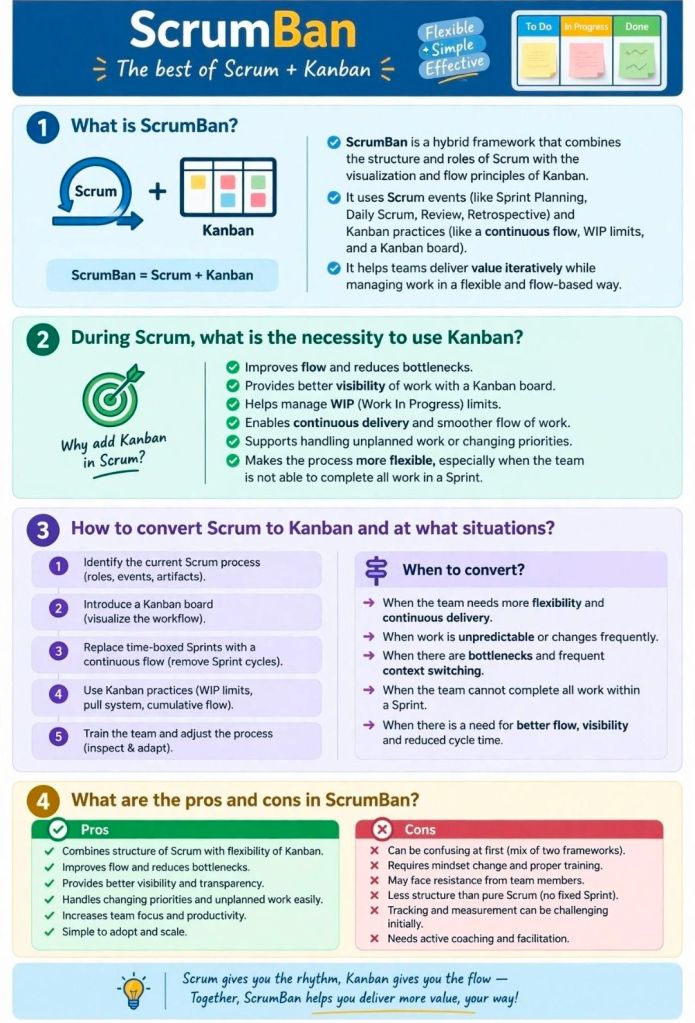
Agile ScrumBan, Structure of Scrum, Flow from Kanban

Agile ScrumBan, Structure of Scrum, Flow from Kanban
ScrumBan Structure of Scrum Flow from Kanban
Agile ScrumBan, Structure of Scrum, Flow from Kanban

AI Courses and Certifications for Project Managers

As of 2026, AI is transforming project management by automating scheduling, risk management, and reporting. The best AI courses for project managers (PMs) focus on practical application, generative AI, and AI governance.

Top AI Courses and Certifications for Project Managers

  1. PMI Certified Professional in Managing AI (PMI-CPMAI) (PMI)
    • Summary: The premier certification for managing AI projects from start to finish, including data prep and model deployment.
    • Best For: Advanced specialists managing AI projects.
  2. AI-Driven Project Manager (AIPM) Certification (APMG/Provek)
    • Summary: Focuses on leveraging AI tools for project efficiency and strategic management.
    • Best For: Global recognition and practical PM application.
  3. Generative AI for Project Managers Specialization (Coursera/Various)
    • Summary: A comprehensive series focusing on using Large Language Models (LLMs) to enhance project documentation, communication, and planning.
    • Best For: Understanding practical GenAI applications.
  4. AI Essentials for Project Managers Learning Path (LinkedIn Learning)
    • Summary: A practical, beginner-friendly path covering prompt engineering, AI productivity tools, and managing AI-driven teams.
    • Best For: Immediate productivity gains.
  5. Mastering AI for Digital Projects (The Digital Project Manager)
    • Summary: Covers AI for risk, stakeholder management, and project planning with real-world scenarios.
    • Best For: Digital and IT project managers.
  6. IBM AI Project Management Certificate (Coursera)
    • Summary: Explores AI foundations, data ethics, and using AI in project lifecycles using IBM frameworks.
    • Best For: Structured learning with strong enterprise focus.
  7. Generative AI Overview for Project Managers (PMI)
    • Summary: A free introduction by PMI covering AI project patterns and practical application.
    • Best For: Quick, foundational understanding.
  8. Artificial Intelligence Strategies for Project Managers (Learning Tree)
    • Summary: Focuses on AI governance, managing AI risks, and implementing AI technologies.
    • Best For: Technical PMs and IT governance.
  9. Google AI Essentials (Coursera)
    • Summary: A flexible, beginner course designed to boost productivity with AI tools.
    • Best For: General AI awareness and everyday productivity.
  10. Certified Generative AI Professional (GSDC)
    • Summary: Focuses on the implementation of Generative AI tools and techniques in project environments.
    • Best For: Budget-conscious learners.

Key Areas of Focus for 2026 PMs

  • AI Governance & Ethics: Ensuring compliance with data privacy, avoiding AI bias, and mitigating risks in project decisions.
  • Prompt Engineering: Learning to interact with Generative AI (like ChatGPT/Copilot) to create schedules, project charters, and risk logs.
  • Automation: Using AI tools to handle administrative tasks, allowing PMs to focus on team collaboration and strategy.

Free AI Courses for Project Managers

Top AI Courses and Certifications for Project Managers
Free AI Courses for Project Managers

Priorization Techniques in Agile Scrum

Priorization Techniques in Agile Scrum

Prioritization in AgileScrum is the systematic process of ordering Product Backlog items to maximize value delivery. These techniques are generally categorized by their primary focus: customer satisfaction, business value and economics, or collaborative consensus.

Category 1: Customer-Centric Frameworks

These methods prioritize features based on how they impact the end-user’s experience and satisfaction.

  • Kano Model: Categorizes features into three main types: Basic Needs (expected essentials), Performance Features (linear satisfaction), and Excitement Needs (unexpected “delighters”).
  • User Story Mapping: Visualizes the entire user journey to identify the most critical paths and “skeletal” features needed for a Minimum Viable Product (MVP).
  • Opportunity Scoring: Uses customer research to find gaps where importance is high but current satisfaction is low, identifying high-potential opportunities.

Category 2: Economic & Quantitative Models

These data-driven techniques use formulas to balance value against implementation costs or risks.

  • Weighted Shortest Job First (WSJF): Prioritizes tasks by dividing the Cost of Delay (value, urgency, and risk reduction) by Job Size (effort). The goal is to deliver the most value in the shortest time.
  • RICE Scoring: Calculates a score based on Reach (number of users), Impact, Confidence (certainty in estimates), and Effort.
  • Cost of Delay (CoD): Measures the economic impact or potential revenue loss of not delivering a feature within a specific timeframe.

Category 3: Stakeholder & Team-Based Consensus

These collaborative methods are used to reach agreement among diverse stakeholders or team members.

  • MoSCoW Method: A qualitative technique that buckets items into Must-Have, Should-Have, Could-Have, and Won’t-Have for a specific release cycle.
  • 100-Dollar Test: Participants are given a hypothetical $100 to “spend” on features, revealing what they value most through resource allocation.
  • Priority Poker: A gamified, collaborative approach where team members anonymously vote on an item’s priority level to remove bias and foster discussion.

Category 4: Structural & Visual Matrixes

These tools help teams visualize trade-offs, typically using 2×2 grids.

  • Value vs. Effort Matrix: Plots tasks on two axes to identify Quick Wins (high value, low effort) and Major Projects (high value, high effort) while avoiding “thankless tasks”.
  • Risk/Value Matrix: Balances potential business rewards against technical or project risks to decide which high-value but high-risk items to tackle early.
  • Stack Ranking: A “forced ranking” method where every item has a unique, linear position (1 to N), preventing the “everything is high priority” trap.

Priorization Techniques in Agile Scrum

Questions to Answer Before Any Project Kickoff

Questions to Answer Before Any Project Kick off
Questions to Answer Before Any Project Kickoff

Before launching any project, answering key questions during the initiation phase ensures alignment, prevents scope creep, and sets the foundation for success. These questions help define the “why,” “what,” and “how” of the project, often formalized in a project charter or statement of work (SOW).

Overview: The 5 Ws of Pre-Kickoff

The most effective pre-kickoff approach centers on the 5 Ws + H:

  • Why: What is the business purpose, problem to solve, or opportunity?
  • What: What are the high-level objectives, scope, and deliverables?
  • Who: Who are the stakeholders, sponsors, and team members?
  • When: What are the milestones, hard deadlines, and time constraints?
  • Where: Where will work take place (e.g., remote, onsite, systems used)?
  • How: How will success be measured and how will communication work?

Detailed Description of Essential Pre-Kickoff Questions

1. Context & Rationale (“Why”)

  • What is the core problem or opportunity? Define the “pain point” triggering this project.
  • How does this align with company strategy? Understand why this project matters now compared to other priorities.
  • What happens if we fail or do nothing? This identifies the true urgency.

2. Objectives & Success Criteria (“What”)

  • What are the measurable goals? Define success (e.g., specific KPIs, revenue increase, time reduction) rather than just stating “improved efficiency”.
  • What is explicitly in-scope? List the key deliverables.
  • What is out of scope? Crucial for preventing scope creep—list items that won’t be delivered.
  • What is the “Minimum Viable Product” (MVP)? What is the absolute bare minimum needed to launch?

3. Stakeholders & Roles (“Who”)

  • Who is the Project Sponsor? Who is championing the project and ultimately accountable?
  • Who has final sign-off authority? Identify the key decision-makers to avoid bottlenecks.
  • Who is the target audience/end-user? Who is this being built for?
  • Do we have the right skills on the team? Assess the need for external resources or specialized training.

4. Constraints & Logistics (“When” & “Where”)

  • Is the deadline fixed or flexible? Are there immovable external dates (e.g., conferences, legal compliance)?
  • What is the rough budget? Have all funds been secured?
  • What are the key milestones? Identify early dependencies.

5. Risks & Dependencies

  • What are the major threats? Identify risks to the schedule, budget, or quality early.
  • What dependencies exist? What outside factors (e.g., vendor delivery, legal approval) must happen first?

6. Operating Model (“How”)

  • How will the team communicate? Define tools (e.g., Slack, email) and meeting cadence (e.g., weekly, daily standups).
  • How will we track progress? Where will documentation and tasks be stored (e.g., Jira, Asana)?

Summary Checklist for Pre-Kickoff Success

  • Business Case Approved: Does a charter exist?
  • Goals Aligned: Do stakeholders agree on what success looks like?
  • Constraints Known: Deadline and budget are understood.
  • Risks Documented: A preliminary risk list is started.
  • Dependencies Identified: Known bottlenecks are mapped.
  • Team Identified: Key players are assigned.

Tip: Before the main kickoff, hold one-on-one “sanity check” conversations with key stakeholders to identify unspoken concerns.

Project Leaders Driving Vision, Alignment and Results

Project Leaders Driving Vision, Alignment and Results