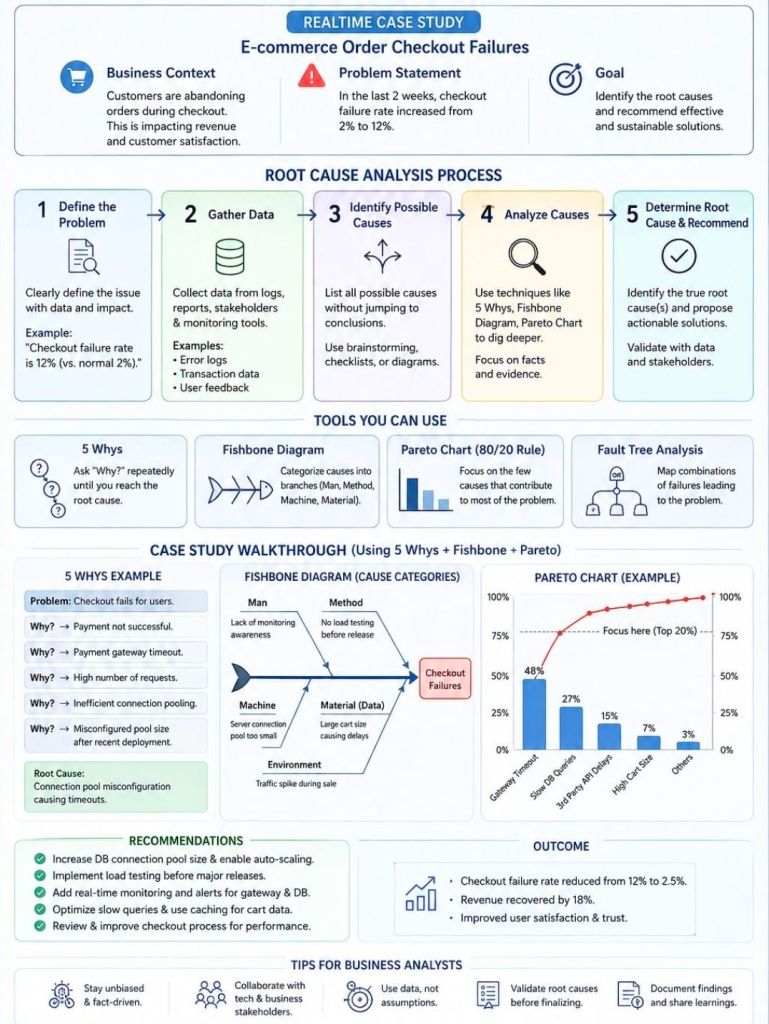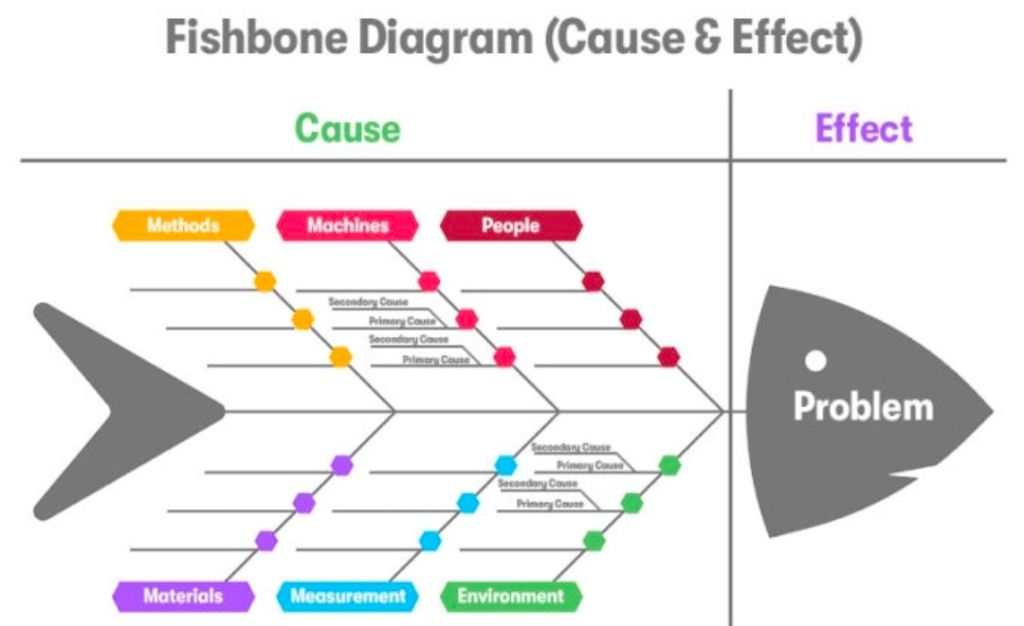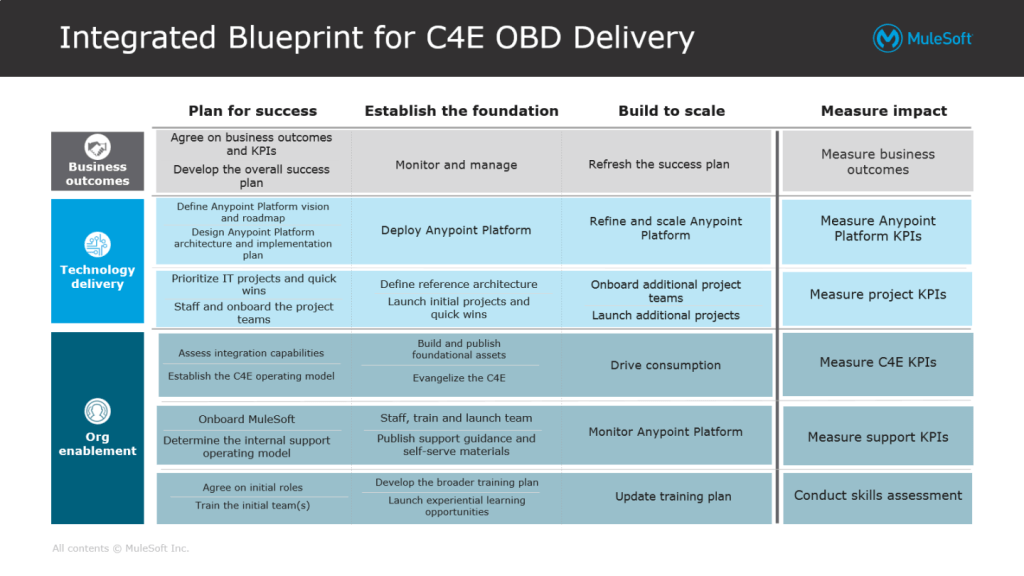
Types of Product Managers Overview

Types of Product Managers Overview

Project Management, the Delivery Paradox

Project Management, the Delivery Paradox

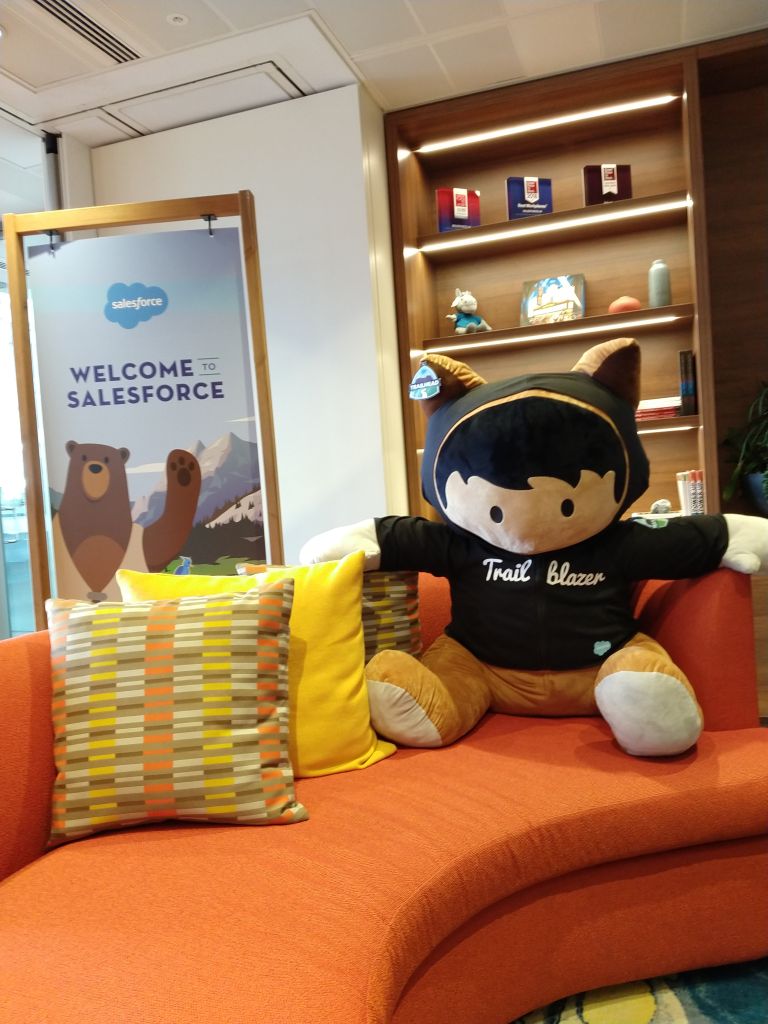
Servant Leadership on a page overview

Servant Leadership on a page overview

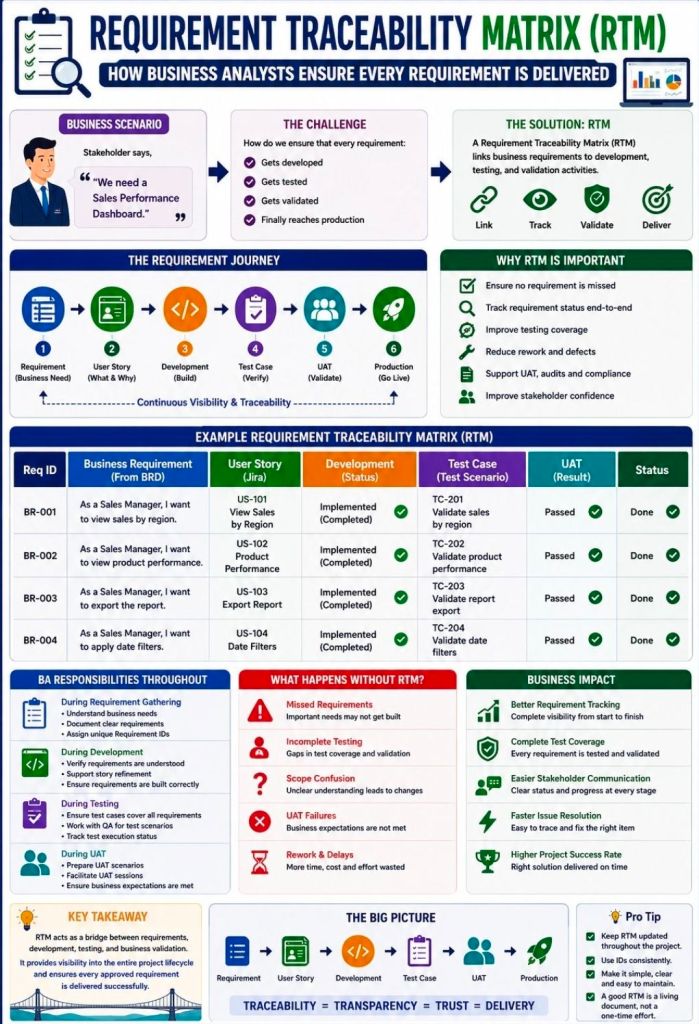
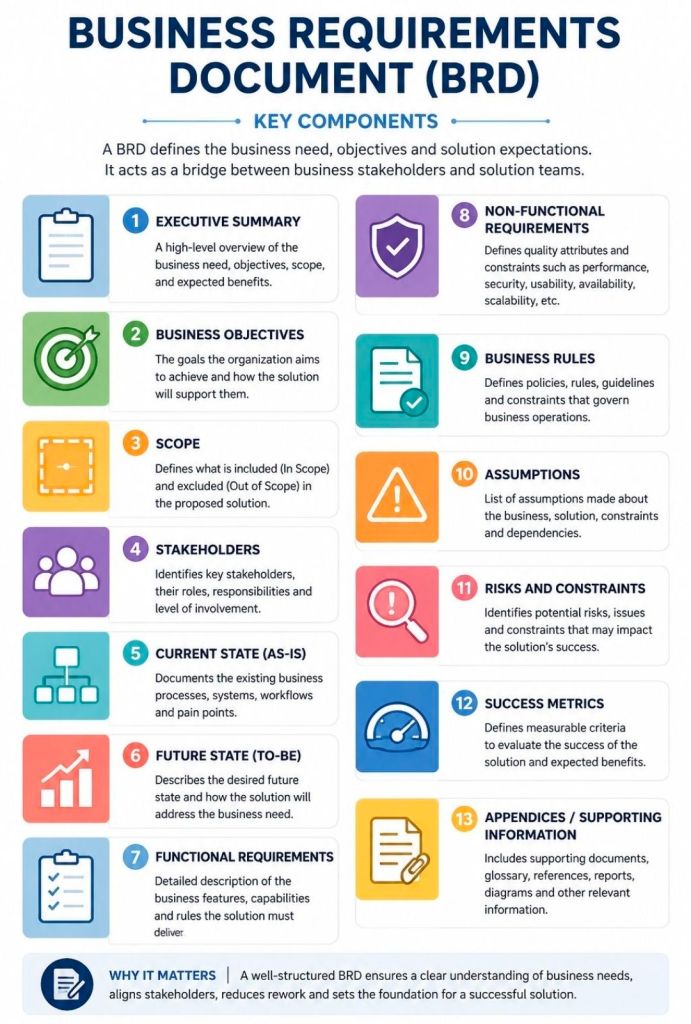
Business Analyst BA Essential Requirements Practices

Business Analyst BA Essential Requirements Practices

Project Management Methodologies, historical timeline by era and year

This is a detailed, comprehensive historical timeline of project management methodologies, tracing the evolution from ancient practices to modern adaptive frameworks.

I. Pre-Modern Era (Before 1900): Foundation of Task Coordination

  • 2570 BC (Great Pyramid of Giza): Completion of the pyramids, demonstrating early project organization with managers for each of the four faces, planning, and logistics.
  • 208 BC (Great Wall of China): Construction of the Great Wall, involving massive workforce organization divided into soldiers, citizens, and criminals.
  • 1850s (Transcontinental Railroad): US railroad projects requiring large-scale resource and schedule management.
  • 1896 (Harmonogram): Karol Adamiecki developed the harmonogram, a predecessor to the Gantt chart (published in 1931). 

II. Early Modern Era (1910s–1950s): The Scientific Management Era 

This era brought “scientific management” to project control, focusing on efficiency and visualization. 

  • 1910s (Gantt Chart): Henry Gantt developed the Gantt chart, a visual tool for scheduling tasks over time.
  • 1911 (Scientific Management): Frederick Taylor published The Principles of Scientific Management, focusing on efficiency and time-saving.
  • 1931–1936 (Hoover Dam): One of the first large-scale applications of Gantt charts for complex scheduling.
  • 1942–1945 (Manhattan Project): Development of the atomic bomb, creating a need for rapid, complex planning and large-scale team coordination. 

III. The “Golden Age” of Project Management (1950s–1960s): Formal Methodologies 

This era introduced mathematical models for managing complex, interdependent tasks. 

  • 1956 (AACE Formed): The American Association of Cost Engineers (now AACE International) was formed, specializing in cost control and scheduling.
  • 1957 (Critical Path Method – CPM): Developed by Dupont Corporation to manage chemical plant maintenance shutdowns.
  • 1958 (Program Evaluation and Review Technique – PERT): Created by the US Navy Special Projects Office for the Polaris missile submarine project to manage task time and risk.
  • 1962 (Work Breakdown Structure – WBS): The US Department of Defense mandated the use of WBS for large, complex projects.
  • 1965 (IPMA Founded): The International Project Management Association (IPMA) was launched, the world’s first project management association.
  • 1969 (PMI Founded): The Project Management Institute (PMI) was launched to promote the profession, later developing the PMP certification. 

IV. The “Silver Age” (1970s–1980s): Systems and Controls 

  • 1970s (Waterfall Introduction): While used informally earlier, the Waterfall methodology was formalized for software development in the 1970s, emphasizing sequential phases.
  • 1975 (PROMPTII): Simpact Systems Ltd created PROMPTII, a methodology to handle cost overruns in computer projects, which later formed the basis of PRINCE.
  • 1975 (Mythical Man-Month): Fred Brooks published his seminal work on software engineering project management.
  • 1978 (Toyota Production System): Lean production and Kanban techniques, used in manufacturing, began to influence project workflow.
  • 1984 (Theory of Constraints – TOC): Dr. Eliyahu Goldratt published The Goal, introducing the Theory of Constraints for managing constraints (bottlenecks).
  • 1986 (Scrum): Takeuchi and Nonaka defined Scrum as a project management style for fast-paced development.
  • 1987 (PMBOK Guide): The Project Management Institute published the first Project Management Body of Knowledge (PMBOK) white paper.
  • 1989 (PRINCE): The UK government launched PRojects IN Controlled Environments (PRINCE), the standard for information systems projects. 

V. Rebirth and Modern Era (1990s–2000s): Agile and Adaptive Methods 

  • 1994 (CHAOS Report): The Standish Group published the first report documenting high IT project failure rates.
  • 1995 (Scrum Formalization): Jeff Sutherland and Ken Schwaber formally defined the Scrum framework.
  • 1996 (PRINCE2): PRINCE was updated to PRINCE2 to become a generic, more flexible methodology applicable to all project types.
  • 1997 (Critical Chain Project Management – CCPM): Eliyahu Goldratt invented CCPM, based on the Theory of Constraints.
  • 1998 (PMBOK Standard): The American National Standards Institute (ANSI) recognized PMBOK as a standard.
  • 2001 (Agile Manifesto): 17 software developers met to publish the Manifesto for Agile Software Development, prioritizing collaboration and adaptability over rigid plans.
  • 2007 (Kanban for Software): David Anderson adopted Kanban for software development, focusing on visualizing work and limiting work-in-progress. 

VI. The Contemporary Era (2010s–Present): Hybrid, AI, and Speed 

  • 2012 (ISO 21500): The International Organization for Standardization published ISO 21500:2012, “Guidance on Project Management”.
  • 2017 (PMBOK 6th Ed & PRINCE2 Update): PMI introduced Agile/adaptive practices into PMBOK, while AXELOS released a more flexible PRINCE2.
  • 2018 (PRINCE2 Agile): PRINCE2 Agile was launched to combine the governance of PRINCE2 with the flexibility of Agile.
  • 2021 (PMBOK 7th Ed): A major shift in PMI standards, moving from process-based to principle-based, focusing on project outcomes.
  • 2020s–Present (AI/Hybrid): Rise of AI-driven project management, automated reporting, and hybrid methodologies combining Waterfall stability with Agile speed. 

Project Management Methodologies, historical timeline by era and year

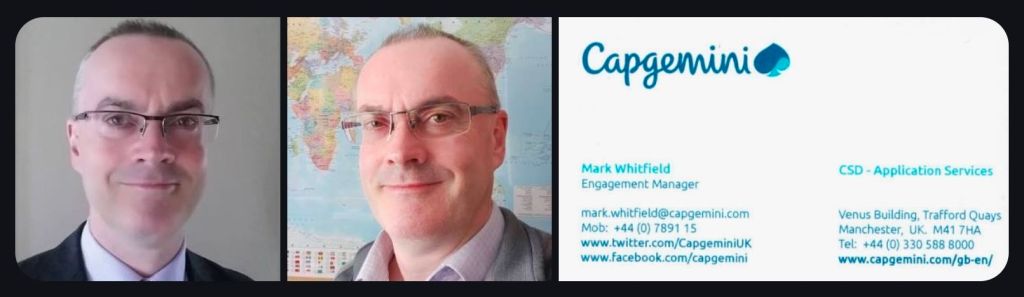
Mark Whitfield, Senior IT Project Manager

Mark Whitfield is a highly experienced IT Senior Project Manager and Engagement Manager based in Manchester, UK, specializing in Agile Scrum, PRINCE2, and Waterfall methodologies. He holds a degree in Computing (1990) and has extensive experience in IT hardware solutions, financial services, and Aerospace & Defence. 

Here is a comprehensive summary of his profile, with links based on the provided search data:

Professional Profile

  • Name: Mark Whitfield
  • Role: IT Senior Project Manager / Engagement Manager (SC Cleared)
  • Key Skills: Agile Scrum, PRINCE2, ITIL, Financial Forecasting, Stakeholder Management, Technical Initiative Leadership.
  • Education: Computing (Graduated 1990). 

Comprehensive Career History

  • Capgemini UK (Jan 2016 – Present): SC Cleared Engagement Manager (A8) in Custom Bespoke Solutions.
    • Recent Experience: Project Manager for a UK-wide Air Traffic organisation, delivering new Apple iOS Apps for military and public use.
  • Betfred Limited (Dec 2014 – Jan 2016): IT Senior Digital Project Manager, Online and Mobile Division.
  • Wincor Nixdorf Limited (Sep 2013 – Dec 2014): Project Manager, Professional Services – Banking Division.
    • Key Project: Managed a £5+ million project replacing legacy HP NonStop software systems with AIX-based J2EE/Oracle technologies for a major UK bank.
  • Reflex / Insider Technologies (Aug 1995 – Sep 2013): Project Manager – Strategic Technical Initiatives.
  • eFunds (1994 – 1995): Lead Analyst. 

Certifications & Training

  • Cloud & Project Management: AZ-900 Microsoft Certified Azure Fundamentals (2022), Advanced Engagement Management (2017), Registered PRINCE2 Practitioner (2011).
  • Agile: Agile SCRUM Training (2011).
  • Technical: TANDEM Performance Analysis (1995), C++ for Non-C Programmers (1997), Querying MS SQL 2000 (2009). 

Awards

  • C&CA UK’s Communications & Engagement Award Winner – Cloud & Custom Applications (Capgemini UK, Dec 2022).
  • Project Recognition Award – Wincor Nixdorf (Retail Banking Project). 

Web Presence & Documents

Mark Whitfield, Senior IT Project Manager

By era;

Mark Whitfield is a highly experienced IT Project Manager, Senior Developer, and SC-cleared consultant with over 30 years of experience, specializing in HP NonStop (Tandem) systems, banking software, and digital transformation projects. He is currently an Engagement Project Manager at Capgemini. 

Career Overview

  • Specialism: HP NonStop (Tandem) mainframes, BASE24, transaction monitoring, Agile/Waterfall methodologies.
  • Key Industries: Financial services, electronic banking, government, automotive, aerospace.
  • Core Competencies: Software development (C, C++, COBOL, TAL), Project Management (PRINCE2 Practitioner, Scrum), Pre-sales technical consultancy. 

Career Timeline by Era and Year

1. The Foundation & Tandem Era (1990–1995)

  • 1990: Graduated in Computing and started as a Programmer for The Software Partnership in Runcorn, specializing in sp/ARCHITECT-BANK on Tandem Computers.
  • 1990-1994: Developed banking code for TSB, Bank of Scotland, Rabobank, and Girofon (Denmark).
  • 1992: Worked on the Barclays Business Master II (BBM II) project in Knutsford.
  • 1994: Company taken over by Deluxe Data (later FIS). 

2. Insider Technologies & Monitoring Era (1995–2013)

  • 1995–2013: Joined Insider Technologies Ltd as a Senior Development Engineer and Project Manager.
  • 1995-2004: Developed monitoring/diagnostic software (Reflex 80:20, Reflex ONE24) for HP NonStop payment systems.
  • 1997: Worked on projects for CRESTCo.
  • Early 2000s: Focused on HP NonStop transaction/payment monitoring for ATM/POS devices using ACI’s XPNET.
  • 2005-2013: Managed first HP OpenView Operations Smart Plug-In certification for NonStop; designed XPERT24.
  • 2011: Certified as a PRINCE2 Practitioner. 

3. Banking Transformation & Consultancy Era (2013–2016)

  • 2013–2014: Wincor Nixdorf UK – Worked as a Project Manager in Professional Services for the Banking Division.
  • 2013-2014: Assigned to Lloyds Banking Group (LBG) for the Self-Service Software Replacement (SSSR) program (ATM estate upgrade).
  • 2014–2016: Joined Betfred as an IT Project Manager in the gambling/casinos industry, delivering mobile/online payment gateways (iOS, Android). 

4. Digital Transformation & Capgemini Era (2016–Present) 

  • 2016: Joined Capgemini UK as a client-facing Engagement Manager.
  • 2016-2017: Led digital projects for automotive, local government, and aerospace sectors.
  • 2017: Obtained Microsoft Excel Expert skills and Advanced Engagement Management certifications.
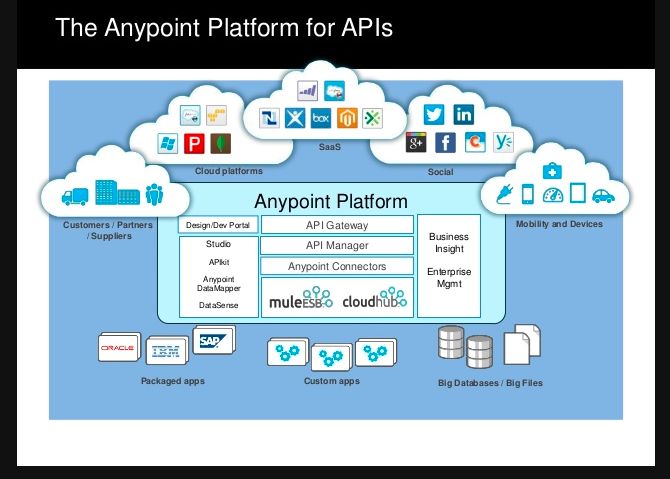
  • 2018–2019: Augmented into MuleSoft as a Delivery Manager for the Anypoint Platform.
  • 2022: Completed Microsoft Azure Fundamentals (AZ-900) certification.
  • 2023–2024: Assigned to a UK Government account for a cloud migration of 130+ applications and the Fish Export Service (FES) project. 

Key Qualifications

  • PRINCE2 Practitioner & Agile Scrum
  • ITIL Certified
  • SC Cleared (UK Government)
  • Technical Skills: C, C++, MS SQL, COBOL, TAL, Java, ASP.NET, HP NonStop

Agile Scrum on a page, summary of core focus areas

Agile Scrum on a page, summary of core focus areas

Agile Scrum Backlog Grooming & Sprint Planning

Agile Scrum Backlog Grooming & Sprint Planning

Extreme Programming XP project management summary and detailed historical timeline by era and year

Extreme Programming (XP) is a prominent, disciplined Agile software development framework designed to improve software quality and responsiveness to changing customer requirements. Developed by Kent Beck in the mid-1990s, it focuses on taking beneficial engineering practices—such as pair programming, testing, and continuous integration—to “extreme” levels. 

Project Management Summary: Core XP Components

XP differs from other Agile methods by focusing intensely on technical engineering practices alongside project management techniques. 

  • Core Values: Communication, Simplicity, Feedback, Courage, and Respect.
  • Key Practices: Pair Programming, Test-Driven Development (TDD), Collective Ownership, Continuous Integration, Refactoring, and Small Releases.
  • Project Management Focus:
    • The Planning Game: Combines business priorities with technical estimates to determine what to build next.
    • Small Releases: Frequent, working software releases (often 1–2 weeks) to gather rapid customer feedback.
    • On-site Customer: A customer representative works with the team to provide instant feedback and clarify requirements.
    • Sustainable Pace: Limiting work weeks to 40 hours to avoid burnout and maintain quality. 

Detailed Historical Timeline of XP

Era 1: Origins and The Chrysler C3 Project (1993–1996) 

  • 1993: Chrysler launches the Comprehensive Compensation System (C3) project to upgrade payroll software, which struggles for years.
  • March 1996: Kent Beck is brought in to lead the C3 project. To salvage the project, Beck starts encouraging team members to adopt a set of technical practices he developed based on his experiences.
  • 1996: Ward Cunningham heavily influences the development of early XP concepts, particularly the “metaphor”.
  • 1996: The project begins adopting daily meetings, pair programming, and TDD.

Era 2: Formalization and “Embracing Change” (1997–2000) 

  • 1997: Ron Jeffries is brought in to coach the C3 team, helping solidify the practices.
  • 1998: The term “Extreme Programming” becomes widely discussed within the Smalltalk and Object-Oriented programming communities.
  • October 1999: Kent Beck publishes Extreme Programming Explained: Embrace Change, formally defining the framework.
  • February 2000: Daimler-Benz acquires Chrysler and cancels the C3 project after 7 years of work. Despite cancellation, the methodology proved that it could produce working, high-quality software, just not fast enough to overcome the legacy backlog. 

Era 3: Rise of Agile and Expansion (2001–2005)

  • February 2001: Kent Beck and Ron Jeffries are among the 17 developers who draft the Manifesto for Agile Software Development at Snowbird, Utah. XP is recognized as one of the foundational “Agile” methods.
  • 2001: The first Agile Alliance conference is held. XP is considered the dominant agile methodology during this period.
  • 2002–2003: XP gains global popularity; numerous books are published expanding on the core 12 practices.
  • 2004: The second edition of Extreme Programming Explained is released, shifting focus from 12 rigid practices to more adaptive principles. 

Era 4: Integration with DevOps and Continuous Delivery (2006–Present)

  • 2006-2010: As Scrum gains popularity for general project management, XP practices like TDD and Pair Programming become the “standard” technical practices for high-performing teams, often blended with Scrum (ScrumXP).
  • 2010s: The rise of DevOps and continuous delivery, which inherently requires XP practices like CI/CD (Continuous Integration/Continuous Delivery).
  • 2020-2026: While fewer companies identify strictly as doing “XP,” its technical practices are considered essential to modern software development and are integrated into almost all Agile methodologies to ensure quality and speed.

Extreme Programming XP project management summary and detailed historical timeline by era and year

Waterfall project management is a linear, sequential methodology

Waterfall project management is a linear, sequential methodology where progress flows steadily downward through defined phases, much like a physical waterfall. In this model, each stage—such as requirements, design, implementation, and testing—must be fully completed and approved before the next one begins. 

Waterfall Project Plans, .xls and .mpp file formats respectively

Core Characteristics

  • Sequential Design: No overlapping phases; each “cascades” into the next.
  • Documentation-Driven: Extensive upfront planning and detailed records are required at every step.
  • Fixed Scope: Requirements are gathered at the start, making the project’s timeline and budget highly predictable but difficult to change.
  • Specialised Use: Best suited for regulated industries like aerospace, construction, and healthcare, where changes are costly or safety is paramount. 

Historical Timeline by Era and Year

The following timeline tracks Waterfall from its origins in post-WWII engineering to its current role in hybrid project management.

Examples, Waterfall Plan On a Page POaP in MS PowerPoint format

The Pre-Formal Era (1950s – 1969)

Software development adopted structured, sequential approaches from engineering, largely driven by complex, high-risk projects. 

  • 1956Herbert D. Benington documented a sequential process for the SAGE project, establishing the technical roots.
  • Late 1960sNASA applied linear, rigid methodologies to Apollo missions, setting a precedent for high-stakes, documentation-heavy development.
  • 1968: The NATO Software Engineering Conference highlighted the “software crisis,” prompting a push for formal, disciplined development models. 

The Formalisation Era (1970 – 1979)

The model was officially, yet ironically, described and named. 

  • 1970Dr. Winston W. Royce published his foundational paper on managing large software systems, often cited as the origin of the “Waterfall” model, though he originally presented it as a cautionary, flawed approach.
  • 1976T.E. Bell and T.A. Thayer likely first used the term “Waterfall” in literature. 

The Institutional Era (1980 – 1999)

Waterfall became the mandatory standard for large-scale, complex projects. 

  • 1985: The U.S. DoD mandated DOD-STD-2167, cementing Waterfall as the standard for military software.
  • 1989: The UK Government introduced PRINCE2, deeply influenced by Waterfall principles.
  • 1994: The U.S. DoD formally abandoned strict Waterfall mandates for more flexible methods. 

The Modern & Hybrid Era (2000 – Present)

Waterfall transitioned from the default standard to a specialised methodology. 

  • 2001: The Agile Manifesto marked a shift toward iterative development, reducing Waterfall’s dominance.
  • Present Day: It remains vital in regulated sectors (e.g., aerospace) and is often combined with Agile in hybrid approaches.

Waterfall project management is a linear, sequential methodology

Click on the link in the website banner above to purchase example, editable template project plans shown and many others.

Oracle SQL Forms triggers, event-handlers historical timeline by era

Oracle Forms triggers are event-handlers written in PL/SQL (originally a proprietary step-based language) that execute in response to specific events within an application, such as mouse clicks, data entry, or database transactions. They allow developers to augment or replace default processing behavior. 

My final year Higher National Diploma project in Oracle SQL forms.

HND Oracle SQL forms design example 1, 1990

Historical Timeline of Oracle Forms & Triggers

The evolution of Oracle Forms is defined by its transition from character-mode terminals to graphical user interfaces (GUI) and eventually to web-based and cloud architectures. 

HND Oracle SQL forms design example 2, 1990

Era 1: The Character Mode & Macro Era (1979 – 1980s)

In this era, applications were designed for text-only terminals like the VT220. Logic was primitive and lacked the structural flow of modern programming. 

  • 1979 – Interactive Application Facility (IAF): The earliest form of the tool, consisting of a compiler (IAG) and a runtime interpreter (IAP).
  • 1984 – FastForms / SQL*Forms 2.0: Renamed during the Oracle v4/v5 database era.
    • Trigger Detail: Triggers did not use PL/SQL. They used a proprietary language based on trigger steps. To achieve logic like an IF statement, developers had to jump between steps based on the success or failure of a SQL statement.
  • 1987 – SQL*Forms 2.3: A significant improvement that introduced procedural capabilities via EXEMACRO CASE for more complex logic. 

Era 2: The PL/SQL & GUI Revolution (Late 1980s – 1990s)

This period marked the shift toward modern programming standards and the Windows operating system.

  • 1988 – SQL*Forms 3.0: The first version to support PL/SQL within triggers. This replaced the old step-based triggers with block-structured code.
  • 1993 – Oracle Forms 4.0: The first true GUI-based version, supporting checkboxes, radio groups, and mouse-based interactions.
  • 1994 – Oracle Forms 4.5: A “quantum leap” in the product’s history.
    • Trigger Detail: Introduced GUI-based triggers (e.g., WHEN-MOUSE-CLICK) and a modern IDE with an Object Navigator and Code Editor. 


Era 3: The Web & Internet Era (Late 1990s – 2010s)

As the internet grew, Oracle pivoted to a three-tier architecture where forms ran in web browsers via Java. 

  • 1999 – Oracle Forms 6i: The ‘i’ stood for Internet. It introduced the Forms Server, allowing forms to run in a browser using a Java applet.
  • 2002 – Oracle Forms 9i: Officially dropped support for client-server and character-mode deployment. Triggers began to support Java integration via imported Java classes.
  • 2004 – Oracle Forms 10g: Integrated more deeply with J2EE and web services.
  • 2009 – Oracle Forms 11g: Introduced external events and JavaScript support, allowing triggers to interact with web-based elements. 

Era 4: Modern Cloud & Standalone Era (2015 – Present)

The current focus is on maintaining legacy reliability while adapting to modern infrastructure without a browser dependency. 

  • 2015 – Oracle Forms 12c: Introduced Java Web Start (JWS) and standalone modes, allowing applications to run without a parent browser.
  • 2023 – Oracle Forms 12.2.1.19: Released with features like automatic language detection and browser-less launching (FSAL).
  • 2024 – Oracle Forms 14.1.2: The latest stable release (skipping version 13), featuring modernized widgets and support for REST data sources.
  • 2025/2026 – Transition Period: Long-time product advocates have left Oracle, signaling a shift toward sustaining mode where users are encouraged to modernize toward Oracle APEX. 

Oracle Forms SQL triggers, event-handlers historical timeline by era

HPE NonStop architecture overview and technical commentary and approach by era and year

The HPE NonStop architecture is defined by its “shared-nothing” design, where every hardware and software component is redundant and operates independently to ensure 100% operational continuity. For over 40 years, it has evolved through four distinct hardware eras while maintaining upward software compatibility.

1. The Tandem Era (1974–1997): Proprietary Foundations 

  • Architecture Approach: Founded by James Treybig, Tandem introduced the first commercial fault-tolerant system using a proprietary 16-bit stack-based architecture.
  • Key Technical Milestones:
    • 1976 (NonStop I/T16): Introduced the Dynabus, a custom inter-processor backplane, and the Guardian OS, which used message-passing instead of shared memory to isolate faults.
    • 1981–1983 (NonStop II & TXP): Introduced 32-bit addressing and the Transaction Monitoring Facility (TMF), which allowed applications to be fault-tolerant without specialized coding.
    • 1986–1989 (VLX & Cyclone): Scaled to the mainframe market with ECL gate-array chips and the first fault-tolerant relational database, NonStop SQL

2. The MIPS Era (1991–2004): Migration to RISC

  • Architecture Approach: To keep pace with industry performance, Tandem transitioned from proprietary processors to off-the-shelf MIPS RISC processors while emulating the original instruction set for compatibility.
  • Key Technical Milestones:
    • 1991 (Cyclone/R): The first MIPS-based system.
    • 1997 (Himalaya S-Series): Replaced Dynabus with ServerNet, a high-speed system interconnect that later evolved into the industry-standard InfiniBand.
    • Ownership Shift: Compaq acquired Tandem in 1997, and HP merged with Compaq in 2002. 

3. The Itanium Era (2005–2013): HP Integrity NonStop 

  • Architecture Approach: Branded as Integrity NonStop (NonStop i), this era moved the platform to Intel Itanium processors.
  • Key Technical Milestones:
    • 2005 (NS-series/J-series): Focused on “NonStop Advanced Architecture” (NSAA), leveraging standard HP server components to lower costs while maintaining Availability Level 4 (AL4).
    • Technical Commentary: While powerful, the reliance on Itanium’s EPIC architecture eventually limited growth as the industry consolidated around x86-64. 

4. The Modern HPE Era (2014–Present): x86-64 & Virtualization 

  • Architecture Approach: Shifted to standard Intel x86-64 processors (NonStop X), fully decoupling the software stack from proprietary hardware.
  • Key Technical Milestones:
    • 2014 (NonStop X/TNS/X): Introduced the L-series operating system. The architecture transitioned to a standard InfiniBand fabric for inter-processor communication.
    • 2017–2020 (vNS): Launched Virtualized NonStop (vNS), allowing the environment to run on standard hypervisors like VMware, bringing fault tolerance to private and hybrid clouds.
    • 2025 (NS9 X5): Modern systems now support up to 8 TB of RAM and are integrated into the HPE GreenLake consumption-based cloud model. 
  • Summary of Architectural Evolution

PASCAL Programming Language Overview, Timeline and Technical Insight

Pascal is a historically significant imperative and procedural programming language designed by Niklaus Wirth between 1968 and 1969. It was created to encourage structured programming and efficient data structuring, serving as a clean, disciplined alternative to more complex languages of the time like ALGOL 60 and FORTRAN. 

Key Features and Overview

  • Strong Typing: Every variable must have a defined type (e.g., Integer, Real, Boolean, Char), and the compiler strictly enforces these to prevent errors during execution.
  • Rich Data Structures: Pascal introduced built-in support for complex types including records, sets, enumerations, subranges, and pointers.
  • Structured Control: It uses clear, English-like keywords such as beginendif-then-else, and while to organize program logic into manageable blocks.
  • Educational Focus: Originally intended as a teaching tool, it became the global standard for introductory computer science courses for nearly two decades. 

Historical Timeline of Pascal

The Foundation Era (1960s)

  • 1964–1966: Niklaus Wirth joins the IFIP Working Group to design a successor to ALGOL 60. His “pragmatic” proposal is rejected in favour of the more complex ALGOL 68.
  • 1966: Wirth implements his proposal at Stanford as ALGOL W, which introduces many concepts later found in Pascal.
  • 1968: Wirth begins designing a new language at ETH Zurich, naming it Pascal after the 17th-century mathematician Blaise Pascal. 

The Emergence Era (1970–1979)

  • 1970: The first Pascal compiler becomes operational on the CDC 6000 mainframe, and the official language definition is published.
  • 1971: Formal announcement of Pascal appears in Communications of the ACM.
  • 1972: The first successful port to another system (ICL 1900) is completed by Welsh and Quinn.
  • 1973: The Pascal-P kit (P-code) is released, providing a portable intermediate code that allows Pascal to be easily ported to different hardware.
  • 1975: The UCSD Pascal system is developed at the University of California, San Diego, eventually bringing the language to microcomputers like the Apple II.
  • 1979: Apple releases Apple Pascal, licensing the UCSD p-System for its platforms. 

The Dominance Era (1980–1989)

  • 1983ISO 7185:1983 is published, establishing the first international standard for Pascal.
  • 1983: Borland International releases Turbo Pascal 1.0. Priced at $49.95, its extreme speed and integrated environment revolutionize PC programming.
  • 1984: The Educational Testing Service (ETS) adopts Pascal as the official language for the AP Computer Science exam in the U.S..
  • 1985: Apple introduces Object Pascal on the Macintosh to support object-oriented programming.
  • 1989: Borland adds object-oriented features to Turbo Pascal 5.5, adopting the Apple Object Pascal extensions. 

The Transition and Legacy Era (1990–Present)

  • 1990: The Extended Pascal standard (ISO/IEC 10206) is released, adding modularity and separate compilation.
  • 1995: Borland releases Delphi, a Rapid Application Development (RAD) tool based on Object Pascal, designed for the Windows graphical interface.
  • 1997: The open-source Free Pascal compiler (originally FPK Pascal) emerges to provide a cross-platform alternative to commercial tools.
  • 1999: Pascal is replaced by C++ as the official language for the AP Computer Science exam, marking the end of its educational dominance.
  • Present: Pascal remains active through projects like Lazarus (an open-source IDE for Free Pascal) and continued updates to Embarcadero Delphi for Windows, macOS, Android, and iOS development. 

Pascal is a historically significant, high-level, and statically typed programming language designed in the late 1960s by Niklaus Wirth. Its primary technical goal was to encourage structured programming—a disciplined approach that uses clear, logical sequences and data structuring to make code more readable and reliable. 

Technical Insights

The technical architecture of Pascal is built on a few core pillars that distinguish it from its contemporaries like C or FORTRAN: 

  • Strong Typing: Unlike many early languages, Pascal is strongly typed, meaning data types cannot be mixed or converted without explicit instruction. This reduces runtime errors by catching type mismatches during compilation.
  • Block-Structured Design: Programs are organized into clear blocks (using BEGIN and END), including nested procedures and functions. This hierarchical structure allows for precise control over variable scope.
  • Unique Data Structures: Pascal introduced native support for sets (representing mathematical sets as bit vectors) and variant records, which allow different fields to overlap in memory to save space.
  • One-Pass Compilation: The strict ordering of declarations (constants, then types, then variables, then procedures) was originally designed to allow the compiler to process the entire program in a single pass. 

General Programming Approach

Pascal enforces a “think before you code” philosophy through its rigid syntax and organizational requirements: 

  1. Top-Down Design: The language encourages breaking complex problems into smaller, manageable sub-tasks (procedures and functions).
  2. Explicit Declarations: Every variable must be declared in a specific VAR section before the executable code begins. This prevents the “spaghetti code” common in earlier languages.
  3. Algorithmic Focus: Because the syntax is so close to pseudo-code, the approach focuses heavily on the logic of the algorithm rather than language-specific “tricks”.
  4. Parameter Passing Control: Developers have explicit control over how data moves; using the VAR keyword allows passing by reference (modifying the original variable), while omitting it passes by value (working on a copy). 

Modern Relevance

While its peak in education was the 1980s and 90s, Pascal evolved into Object Pascal, which powers modern tools: 

  • Delphi: A popular IDE by Embarcadero Technologies used for rapid application development (RAD) on Windows, macOS, and mobile.
  • Free Pascal (FPC) & Lazarus: Open-source alternatives that bring modern features like generics and anonymous methods to the language. 

BASIC programming insight and detailed historical timeline by era and year

BASIC (Beginner’s All-purpose Symbolic Instruction Code) was designed to make computers accessible to non-technical users, revolutionising personal computing and software development. 

BASIC Historical Timeline

The Dartmouth Era (1964–1970s)

  • 1964: BASIC was created at Dartmouth College by John G. Kemeny and Thomas E. Kurtz. It first ran on 1 May 1964 on a GE-225 mainframe.
  • 1964: The Dartmouth Time-Sharing System (DTSS) was launched alongside BASIC, allowing multiple users to program simultaneously.
  • 1965: Added character string functionality and simplified mathematical support.
  • 1967: Approximately 2,000 Dartmouth students had learned to code in BASIC by this year.
  • Late 1960s: Hewlett-Packard launched the HP 2000 series, which ran a version of BASIC and brought the language to minicomputers. 

The Microcomputer Revolution (1975–1980s) 

  • 1975Bill Gates and Paul Allen developed a BASIC interpreter for the MITS Altair 8800, leading to the founding of Microsoft.
  • 1976: Steve Wozniak wrote Integer BASIC for the Apple I, which later became a staple of the Apple II.
  • 1977: BASIC became the de facto standard for the “1977 Trinity” of home computers: the Apple IICommodore PET, and TRS-80.
  • 1979Atari BASIC was released for Atari 8-bit computers.
  • 1981IBM PC launched with a BASIC interpreter in its firmware (ROM BASIC) and GW-BASIC for disk-based systems.
  • 1982: The BBC Micro launched with BBC BASIC, which introduced structured programming features like procedures and local variables to home users.
  • 1982: The Commodore 64 (and Sinclair ZX Spectrum) was released, eventually becoming the best-selling computer model, with BASIC as its primary user interface. 

Modern and Visual Era (1990s–Present)

  • 1991: Microsoft released Visual Basic, which introduced a graphical “drag-and-drop” interface for building Windows applications, revitalising the language for professional use.
  • 2001Visual Basic .NET was released, fully integrating BASIC into the modern object-oriented .NET framework.
  • Modern Day: Various modern dialects exist, such as XojoFreeBASIC, and QB64, while legacy-style BASIC remains popular in the hobbyist “retro-computing” community. 

Key Insights into BASIC

  • Democratisation of Coding: Before BASIC, programming required knowledge of complex assembly or scientific languages like FORTRAN. BASIC used simple English commands like PRINTGOTO, and IF...THEN to make coding accessible to everyone.
  • Immediate Feedback: Unlike “batch processing” where users waited hours for results, BASIC was designed for interactive use, providing immediate error messages and results.
  • Hardware Efficiency: Early BASIC versions were highly optimised to fit into the tiny memories (often as little as 4 KB) of 1970s microcomputers.
  • Cultural Impact: An entire generation of software engineers began by typing BASIC code into their home computers from hobbyist magazines.

BASIC (Beginners’ All-purpose Symbolic Instruction Code), first released in 1964, was designed to make computing accessible to non-scientists. While modern programming has evolved, the core technical insights and approaches remain the foundation for all software development. 

Technical Insights: The Building Blocks

Programs are constructed using universal building blocks that dictate how a machine processes data: 

  • Variables & Data Types: Containers that store values (e.g., integers, strings).
  • Control Flow (The Logic):
    • Sequence: The specific order in which instructions are executed.
    • Selection: Conditional “if-else” statements that determine the program’s path based on criteria.
    • Iteration (Loops): Repeating a section of code (e.g., FOR or WHILE loops) until a condition is met.
  • Functions & Subroutines: Blocks of reusable code designed to perform specific tasks, improving organization and readability.
  • Syntax: The “grammar” of a language (keywords, operators, punctuation) that must be followed for the machine to understand instructions. 

General Programming Approach

Mastering programming requires a systematic method for solving problems rather than just memorizing code. 

  1. Understand the Problem: Identify the necessary inputs, desired outputs, and any constraints before writing a single line of code.
  2. Design the Algorithm: Break the problem into smaller, manageable steps. Using flowcharts or pseudocode helps map out the logic without getting bogged down in syntax.
  3. Implementation: Translate your plan into the chosen language (e.g., Python, C++, or JavaScript).
  4. Test & Debug: Execute the code with sample data to ensure accuracy. Debugging is the process of identifying and fixing errors when the output doesn’t match expectations.
  5. Refine & Optimize: Improve the performance and maintainability of your code by reducing steps or using more efficient data structures.

COBOL Programming Overview & Detailed Timeline History by Era and Year

COBOL, (COmmon Business-Oriented Language) is a high-level, compiled programming language designed specifically for business, finance, and administrative systems. Developed as a portable “stopgap” for the US Department of Defense, it has endured for over 65 years and remains the backbone of global financial infrastructure. 

Programming Overview

  • Design Philosophy: It features a “prose” syntax designed to be self-documenting and readable by non-technical business professionals.
  • Structure: Programs are strictly divided into four Divisions:
    1. Identification: Defines the program name and metadata.
    2. Environment: Specifies the physical computer and files used.
    3. Data: Defines variables, structures, and record layouts.
    4. Procedure: Contains the logic and executable statements.
  • Core Paradigms: Originally strictly procedural and imperative, COBOL was updated in 2002 to include object-oriented features.
  • Key Characteristics: It is known for its verbosity (using over 300 reserved words), weak/static typing, and exceptional reliability in large-scale batch and transaction processing. 

Detailed Historical Timeline

Era 1: The Foundation (1950s)

This era focused on consolidating disparate manufacturer-specific languages into a single, hardware-independent standard for business. 

  • 1955: Grace Hopper develops FLOW-MATIC, which introduced English-like commands and influenced COBOL’s design.
  • 1958: IBM releases COMTRAN, another major precursor focused on commercial translation.
  • 1959 (April): Mary Hawes organizes a meeting at the University of Pennsylvania to propose a common business language.
  • 1959 (May): The Pentagon hosts a meeting creating CODASYL (Committee on Data Systems Languages) to oversee the project.
  • 1959 (December): The first specifications, “COBOL – Specifications for a COmmon Business Oriented Language,” are released. 

Era 2: Early Versions & Rapid Adoption (1960–1967)

The language quickly transitioned from a theoretical specification to a functioning industry standard. 

  • 1960COBOL-60 is officially published.
  • 1960 (August): The first COBOL program runs on an RCA 501.
  • 1961COBOL-61 is released, providing a major cleanup of original logical flaws.
  • 1962: IBM announces COBOL as its primary development language, ending work on COMTRAN.
  • 1963COBOL-61 Extended is released, introducing “Sort” and “Report Writer” facilities.
  • 1965COBOL Edition 1965 adds mass storage file handling and table processing.

Era 3: Standardization & Dominance (1968–1984)

COBOL became the most widely used language in the world as ANSI and ISO codified its rules. 

  • 1968COBOL-68 (ANSI X3.23-1968) is published as the first official US standard.
  • 1970: COBOL becomes the world’s most widely used programming language.
  • 1974COBOL-74 is standardized, introducing the DELETE statement and file organization improvements.
  • 1978: ISO formally adopts the COBOL-74 standard. 

Era 4: Structured Programming & Modernization (1985–2001) 

The language evolved to support better logic flow while managing the massive global codebase. 

  • 1985COBOL-85 introduces structured programming features like END-IFEVALUATE, and nested subprograms.
  • 1989: First amendment to COBOL-85 adds Intrinsic Function Modules.
  • 1997: Gartner Group estimates 200 billion lines of COBOL code are in existence.
  • 1999: Massive effort peaks to patch legacy COBOL code for the Y2K (Year 2000) problem

Era 5: The Object-Oriented & Modern Era (2002–Present)

Recent updates focus on interoperability with modern web and cloud environments. 

  • 2002COBOL-2002 introduces Object-Oriented Programming (OOP), Unicode support, and recursion.
  • 2014COBOL-2014 standardizes IEEE 754 data types and method overloading.
  • 2020: The COVID-19 pandemic highlights a critical shortage of COBOL programmers to maintain aging state unemployment systems.
  • 2023COBOL-2023 adds asynchronous messaging (SEND/RECEIVE) and transaction processing (COMMIT/ROLLBACK).
  • 2024: COBOL celebrates its 65th anniversary of active service.

COBOL Programming Overview & Detailed Timeline History by Era and Year

TAL & PTAL Programming Language on Tandem HPE NonStop

Tandem TAL (Transaction Application Language) is a block-structured, procedural language designed in the mid-1970s for Tandem’s NonStop fault-tolerant operating systems, optimized for systems programming, high-reliability OLTP, and direct hardware interaction. It is heavily influenced by ALGOL and HP 3000 systems, allowing high-performance, message-based applications, and remains supported on modern HP Enterprise NonStop x86-64 platforms. 

Tandem TAL Programming certificate back in 1995, Mark Whitfield

Overview of TAL Programming

  • Purpose: Developed to run on Tandem’s GUARDIAN operating system to build highly available, fault-tolerant transactional systems.
  • Characteristics: Procedural, block-structured, efficient (closer to assembly than C), and designed for speed and direct memory access, according to a NonStop Insider article.
  • Features: Strong support for data manipulation, process management, and message-based IPC (Inter-Process Communication) necessary for node-to-node replication, as described on the Wikipedia page on Tandem Computers.
  • Relation to TACL: While TAL is for creating compiled applications, TACL (Tandem Advanced Command Language) is the interpreter/macro language used for command procedures and system interaction, as explained in a Scribd document

Historical Timeline of TAL

  • 1975–1976 (Founding Era): TAL is created for the first Tandem/16 system shipped in 1976, heavily utilizing expertise from HP 3000 systems programming, according to a personal blog post.
  • Early 1980s (Expansion): TAL becomes the standard for ATM networks and banking systems, requiring high-reliability code, as seen in this blogger.com article.
  • 1985 (Evolution): TAL is used to build complex OLTP environments, distinguishing it from nascent PC markets as noted in archived Tandem press clippings.
  • 1990s (Native TAL): Introduction of “Native” TAL (T/TAL) to handle new architecture requirements and move from 16-bit to 32-bit environments, according to a TAL Programmer’s Guide document.
  • 1997 (Compaq Merger): Tandem is acquired by Compaq; TAL continues as the core systems language.
  • 2001 (HP Merger): Tandem (via Compaq) is acquired by HP, bringing TAL to the HP Integrity (Itanium) platform.
  • 2010s–Present (Modernization): TAL applications are ported to HP Enterprise NonStop x86-64, with support for running TAL programs on Intel processors and in virtualized instances, according to a NonStop Insider article. 

Present Day

  • TAL remains essential for maintaining legacy systems, but new applications often utilize C/C++ or Java on the modern NonStop platform, as noted in the Wikipedia page on Transaction Application Language.
  • TAL applications are still relevant due to the “single system image” and fault-tolerance features that define the current NonStop environment, according to the NonStop Insider article. 

PTAL Overview and Timeline

Tandem PTAL (Portable Transaction Application Language) is a block-structured, procedural systems programming language used on HPE NonStop (formerly Tandem) servers. It is the portable successor to the original TAL (Transaction Application Language), designed to allow high-level systems programming without an assembler while maintaining near-machine efficiency. 

Overview: TAL, PTAL, and epTAL

The language evolved to support different processor architectures over Tandem’s 50-year history: 

  • TAL (Original): Designed for the 16-bit CISC stack machine architecture (TNS). It has the syntax of ALGOL/Pascal but the low-level semantics of C.
  • PTAL (Portable): Introduced during the migration to MIPS RISC processors (TNS/R). It removed machine-specific constructs to allow code to be compiled into native RISC instructions.
  • epTAL (Extended): Developed for the migration to Intel Itanium processors (TNS/E). 

Historical Timeline by Year

Year Milestone

1974, Tandem Computers founded by James Treybig; initial design of the Tandem/16 hardware begins.

1976, TAL released. The Tandem/16 (NonStop I) ships with TAL as its only programming language.

1981, NonStop II introduced, adding 32-bit addressing support to TAL via an “extended data segment”.

1983, NonStop TXP launched; first major reimplementation of the instruction set architecture supported by TAL.

1986, NonStop VLX introduced with 32-bit data paths; NonStop SQL released, often managed via TAL-based systems.

1989, NonStop Cyclone released, the high-end mainframe competitor for the TAL environment.

1991, PTAL Development starts with the release of Cyclone/R, the first MIPS-based machine. TAL code is initially translated via an “Accelerator” tool before native PTAL compilers take over.

1993, Himalaya K-series released; native mode operating system (NSK) and native compilers (PTAL) become standard.

1997, Compaq acquires Tandem. Migration begins from MIPS to Alpha (later abandoned).

2002, HP merges with Compaq. Development focuses on the Itanium (TNS/E) architecture.

2005, epTAL introduced for the new Integrity NonStop i servers based on Intel Itanium microprocessors.

2014, x86 Migration. NonStop X (TNS/X) systems are released, transitioning the TAL/PTAL environment to Intel x86-64 processors.

Mark Whitfield, Website Author – Background and Career Timline

Mark Whitfield is a Senior IT Project Manager and Engagement Manager with over 30 years of experience in the software development lifecycle (SDLC). He is currently a SC-cleared Engagement Manager at Capgemini UK. 

Professional Background by Era

  • 1990–1995: Early Programming (The Software Partnership/Deluxe Data)
    • Role: Programmer/Lead Analyst.
    • Focus: Developed electronic banking software (sp/ARCHITECT-BANK) on Tandem Mainframe Computers (now HPE NonStop).
  • 1995–2013: Senior Development & Product Management (Insider Technologies)
    • Role: Progressed from Senior Programmer to Project Manager for Strategic Technical Initiatives.
    • Focus: Developed platform health and diagnostic modules for the “Reflex” monitoring product.
  • 2013–2014: Project Management (Wincor Nixdorf)
    • Role: Project Manager, Professional Services – Banking Division.
    • Focus: Managed the Wincor Nixdorf workstream for Lloyds Banking Group’s Self-Service Software Replacement (SSSR) programme.
  • 2014–2016: Digital Project Management (Betfred)
    • Role: Senior Digital Project Manager, Online and Mobile Division.
    • Focus: Delivered payment gateways, sportsbooks, and virtual gaming components for iOS, Android, and Windows.
  • 2016–Present: Senior Engagement Management (Capgemini)
    • Role: Engagement Manager (A8), Custom Bespoke Solutions.
    • Focus: Leading digital transformation and cloud migration projects for public and private sector clients. 

Technologies & Frameworks

  • Project Methodologies: Agile SCRUM, PRINCE2 (Practitioner), Waterfall, ITIL, and ISO QA.
  • Mainframe & Infrastructure: HPE NonStop (Tandem), IBM ESB, UNIX shell scripting, and Cloud (MS Azure/AWS).
  • Programming & Databases: C/C++, MS SQL, Java, COBOL85, TAL, TACL, and SCOBOL.
  • Tools: MS Project, MS Excel/Office, MuleSoft Anypoint Platform, and Jira. 

Major Projects & Customers

  • UK Government: Managed a £13.5m cloud migration of 130 applications and the £1m+ Fish Export Service (FES) to CHIP portal.
  • Royal Mail Group (RMG): Managed a £4.3m data centre migration project involving over 1,100 interfaces.
  • Lloyds Banking Group (LBG): Led a £5m+ self-service software replacement project.
  • Other Notable Clients: Jaguar Land Rover (JLR), Heathrow, NATS (Air Traffic Control), Barclays, HSBC, Deutsche Bank, and Euroclear. 

Awards & Education

  • Awards:
    • C&CA UK’s Communications & Engagement Award (2022) at Capgemini UK.
    • Project Recognition Award from Wincor Nixdorf for achievements on the LBG SSSR project.
  • Education:
    • HND in Computer Studies (Distinction) from the University of Greater Manchester (formerly BIHE), 1988–1990.
    • A-Levels in Computer Science and Biology from Leigh College. 

Project Management Templates

Whitfield provides a library of over 200 editable resources through his site, PROject Templates, designed for Agile, Waterfall, and PRINCE2 7th Edition delivery. Key items include: 

  • Plan on a Page (POaP): Over 35+ executive-level summary slides.
  • Detailed Project Plans: Templates in MS Project (MPP) and Excel for SDLC tracking.
  • RAID Logs: Comprehensive registers for risks, actions, issues, and dependencies. 

Mark Whitfield Background and Career Timline

IT Project Testing Techniques

IT Project Testing Techniques

Successful Project Plan

Successful Project Plan

PRINCE2 Management Products Templates Overview and Historical Timeline

PRINCE2 management products are the 26 standard documents (templates) used to manage a project throughout its lifecycle. They are categorised into Baselines (plans and definitions), Records (registers and logs), and Reports (periodic updates). 

PRINCE2 Microsoft Project & Excel templates

Management Products Overview

The core templates provided in the methodology ensure consistent project control. Official templates are often available through accredited providers, this website or the official AXELOS website. 

  • Baselines: Used to define the project foundation (e.g., Business Case, Project Initiation Document, Plan).
  • Records: Dynamic logs to track day-to-day data (e.g., Risk Register, Issue Register, Lessons Log).
  • Reports: Snapshots of progress or specific events (e.g., Highlight Report, Checkpoint Report, Exception Report). 

Historical Timeline of Templates & Methodology

The evolution of these products reflects a shift from rigid, IT-specific documents to flexible, industry-agnostic templates. 

The Pre-PRINCE Era (1975 – 1988) 

  • 1975PROMPT II (Project Resource Organisation Management and Planning Techniques) was developed by Simpact Systems Ltd.
  • Key Focus: Introduced the concept of project phases (Initiation, Specification, Design) but was strictly for IT. 

The PRINCE Era (1989 – 1995) 

  • 1989PRINCE (PROMPT II in the CCTA Environment) launched by the UK Government’s CCTA.
  • Key Focus: Added Critical Path Analysis and formal management roles, but remained IT-heavy and rigid. 

The PRINCE2 Emergence (1996 – 2008)

  • 1996PRINCE2 (1st Edition) was released as a generic framework.
  • Key Change: IT-specific jargon was removed to make templates applicable to any industry.
  • 2002/2005: Minor updates (3rd and 4th Editions) focused on minor refinements based on user feedback. 

The Revision Era (2009 – 2022)

  • 2009PRINCE2:2009 Refresh (5th Edition) introduced the seven core principles.
  • Key Change: Templates were simplified and made more customisable to reduce “prowess-driven” bureaucracy.
  • 2017PRINCE2 6th Edition (formerly the 2017 Update) launched.
  • Key Change: Emphasis on Tailoring and scalability for different project sizes. 

The Modern Era (2023 – Present)

  • 2023PRINCE2 7th Edition was released.
  • Key Change: Added a “People” element and introduced three new management approaches: SustainabilityCommercial, and Digital & Data

Template Kits & Resources

For those seeking pre-formatted digital versions:

  • PRINCE2 7th Edition Template Bundle: Comprehensive sets including MS Project MPP, Excel Gantt charts, and Word artifacts are available at Etsy and eBay.
  • Specialised Packs: Focused collections like the PRINCE2 Control & Monitoring Pack can be found at WorkFlo Design.
  • Individual Documents: Individual templates like the Project Initiation Document (PID) are often sold separately for specific project needs. 
  • PRINCE2 Templates can be purchased directly from this website including a Microsoft Project Plan in MPP format and also a Microsoft Excel Project Plan in XLS format, see below and website link.

PRINCE2 Management Products Templates Overview and Historical Timeline

PRINCE2 Microsoft Project MPP file template
PRINCE2 Microsoft Excel XLS template 1
PRINCE2 Microsoft Excel XLS template 2