Project Management LinkedIn Group

Project Management LinkedIn Group

https://www.linkedin.com/groups/163300

Project Management Café, PRINCE2 Agile SCRUM Kanban MPP MSP Templates ITIL LEAN DevOps PMP Six Sigma

This is a Project Management Group Café for PM students, graduates and professionals looking to either locate, discuss or contribute ideas for PM templates for; Agile, Scrum, Kanban, PRINCE2 Waterfall projects, e.g. Plan on a Page (POaP), RACI, MPP, RAID logs, finance trackers, status reports, org charts etc. etc.

Project Management LinkedIn Group

PRINCE2 and Agile Project Management Templates Gallery

A gallery and inventory of screenshots for the Project Management Templates (both Agile and PRINCE2 waterfall projects) that are all available to be purchased as a bundle from this website link (note: upgrades to the latest template package after purchase, are totally FREE).

PRINCE2 & Agile PM Templates Gallery

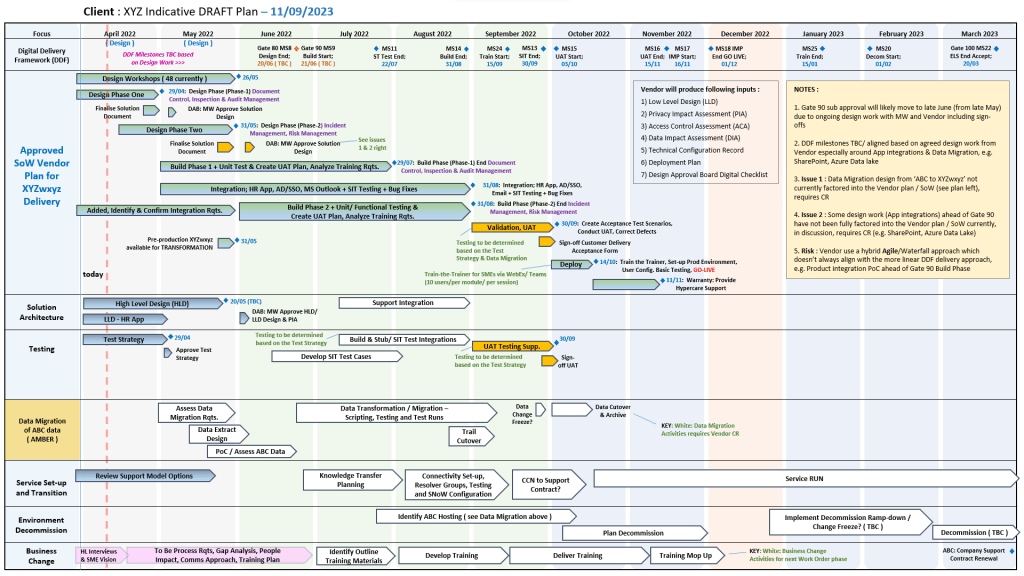
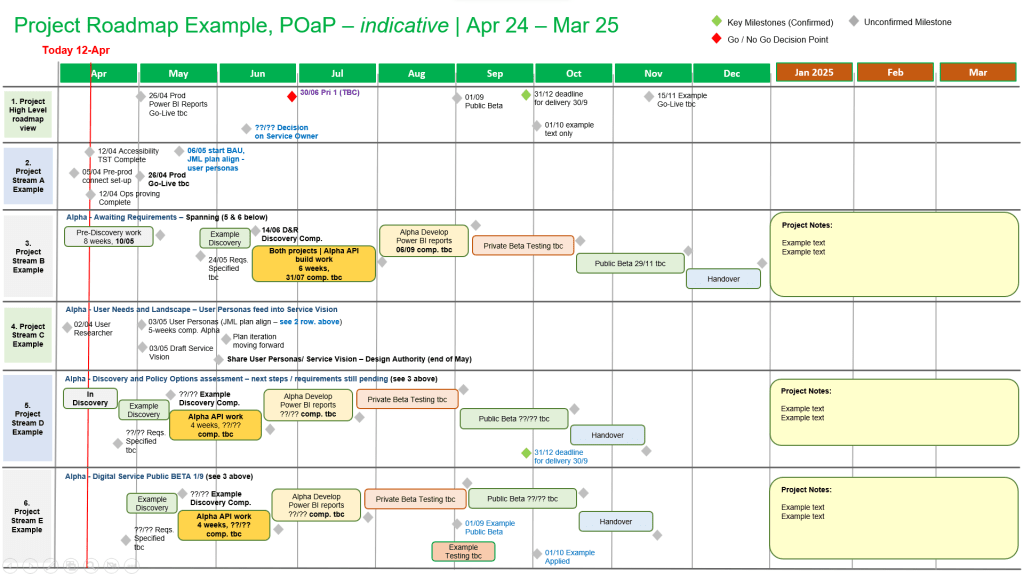
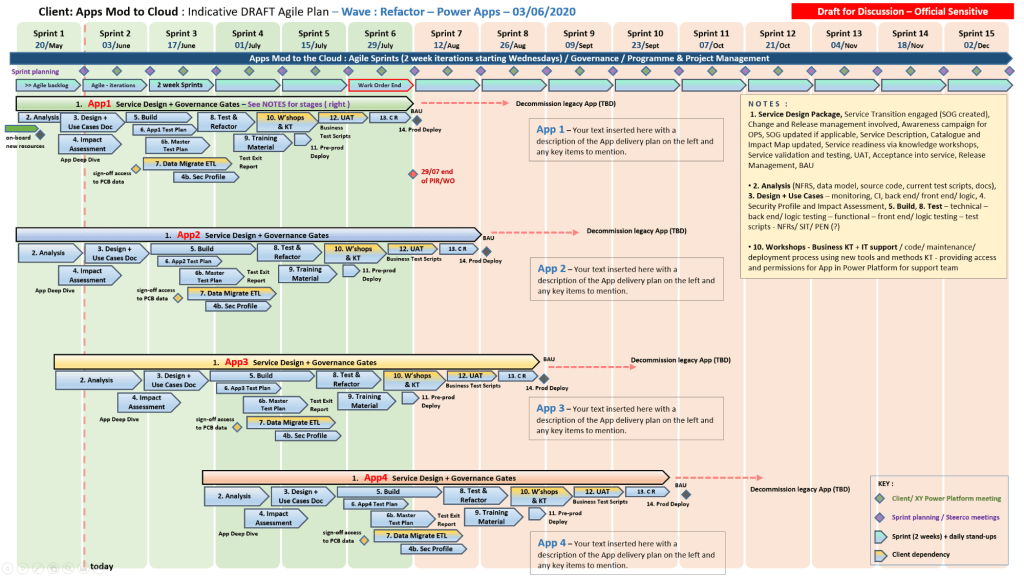
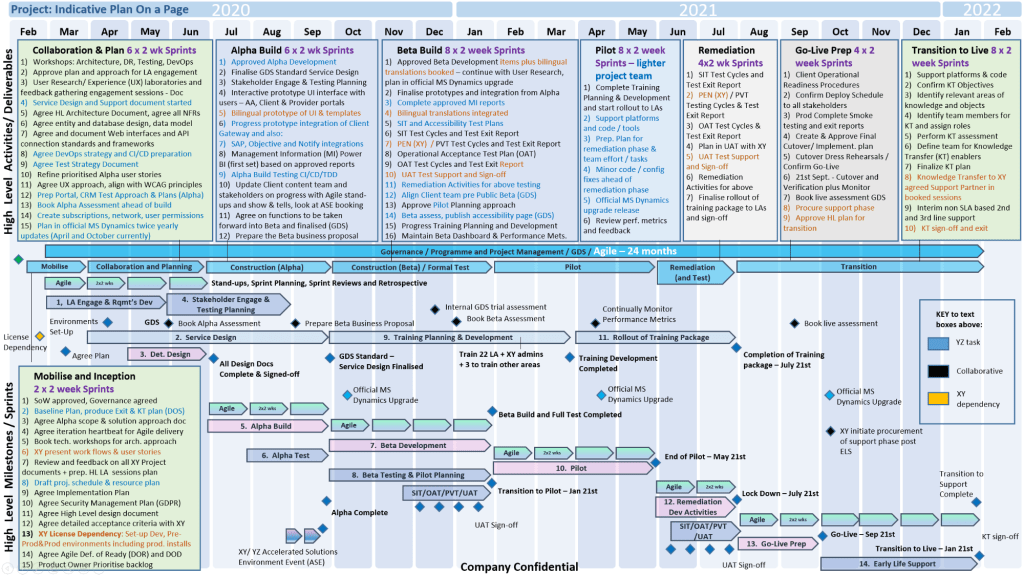
PM templates include MS Project MPP and MS Excel detailed plans including PRINCE2 and Agile delivery, Gantt Plan on a Page examples (POaP), finance trackers, status reports, RAID logs (Risk, Issue, Assumption, Dependency log), RACI tracker (Responsible, Accountable, Consulted, Informed), agile burn down chart and burn up chart, resource tracker, benefits realization plan etc. etc.

(Download the Template Inventory PDF file – 15MB)

Join the FREE PM templates related Facebook Group (LIKE Facebook page) and LinkedIn Group.

PRINCE2 and Agile Project Management Templates Gallery examples

MPP Microsoft Project Plan Examples
Agile Scrum Burn Down (and Up) Chart in Microsoft Excel
Example Microsoft Excel Spreadsheet Examples for Project Planning

PRINCE2 & Agile PM Templates Gallery

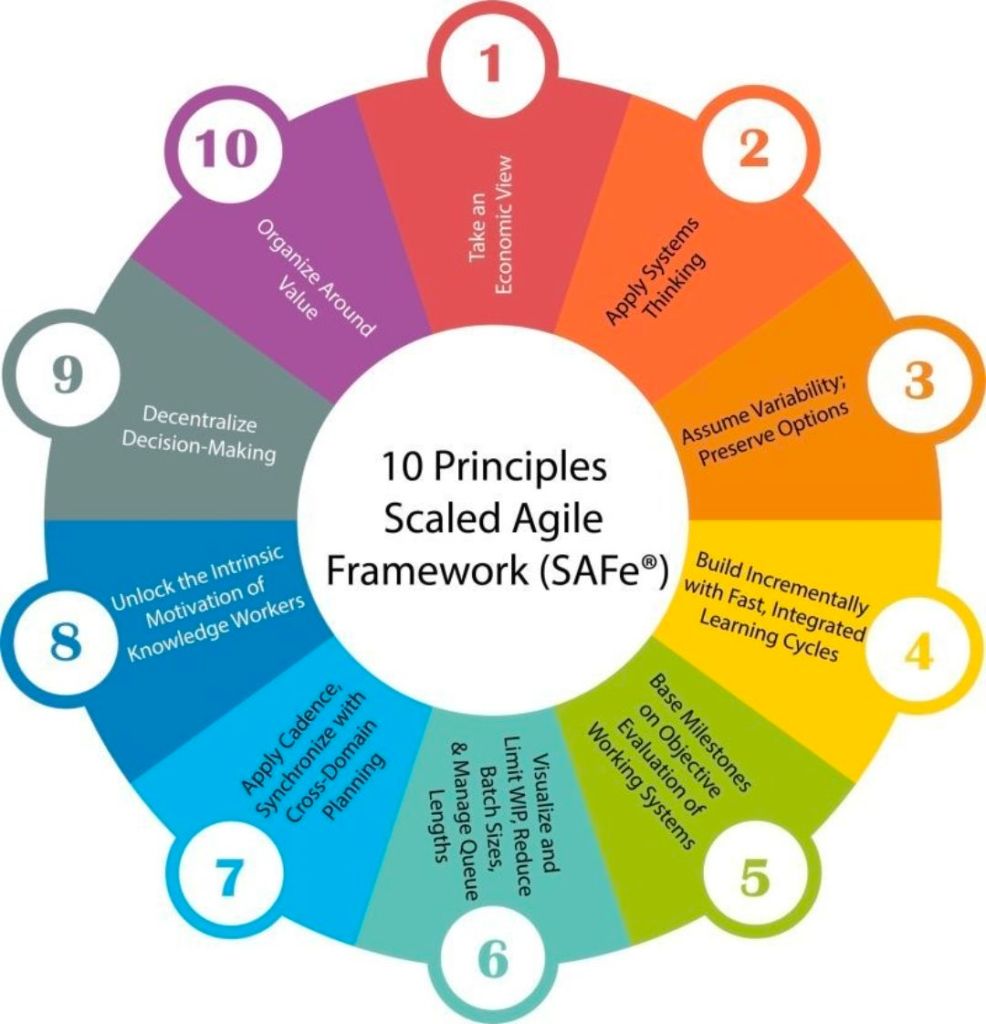
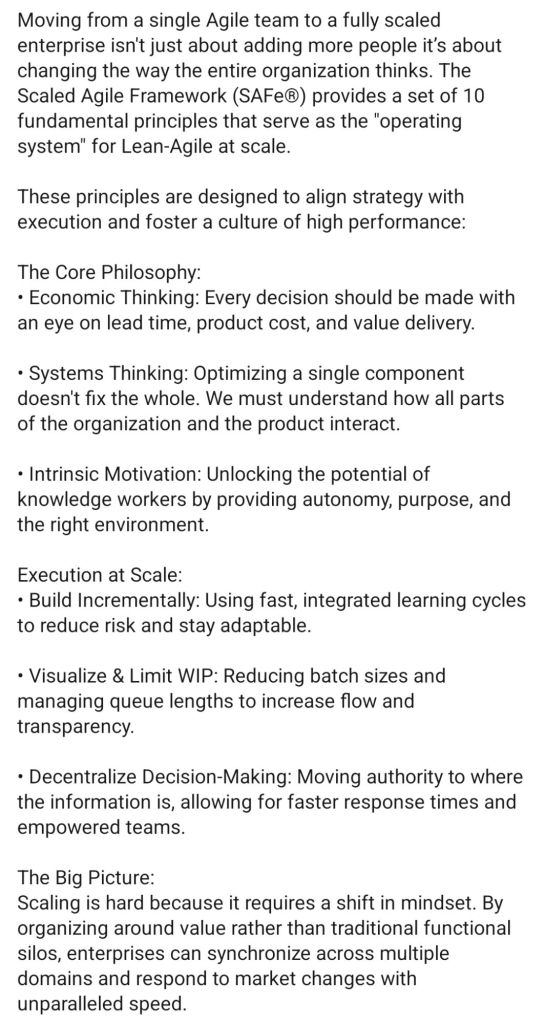
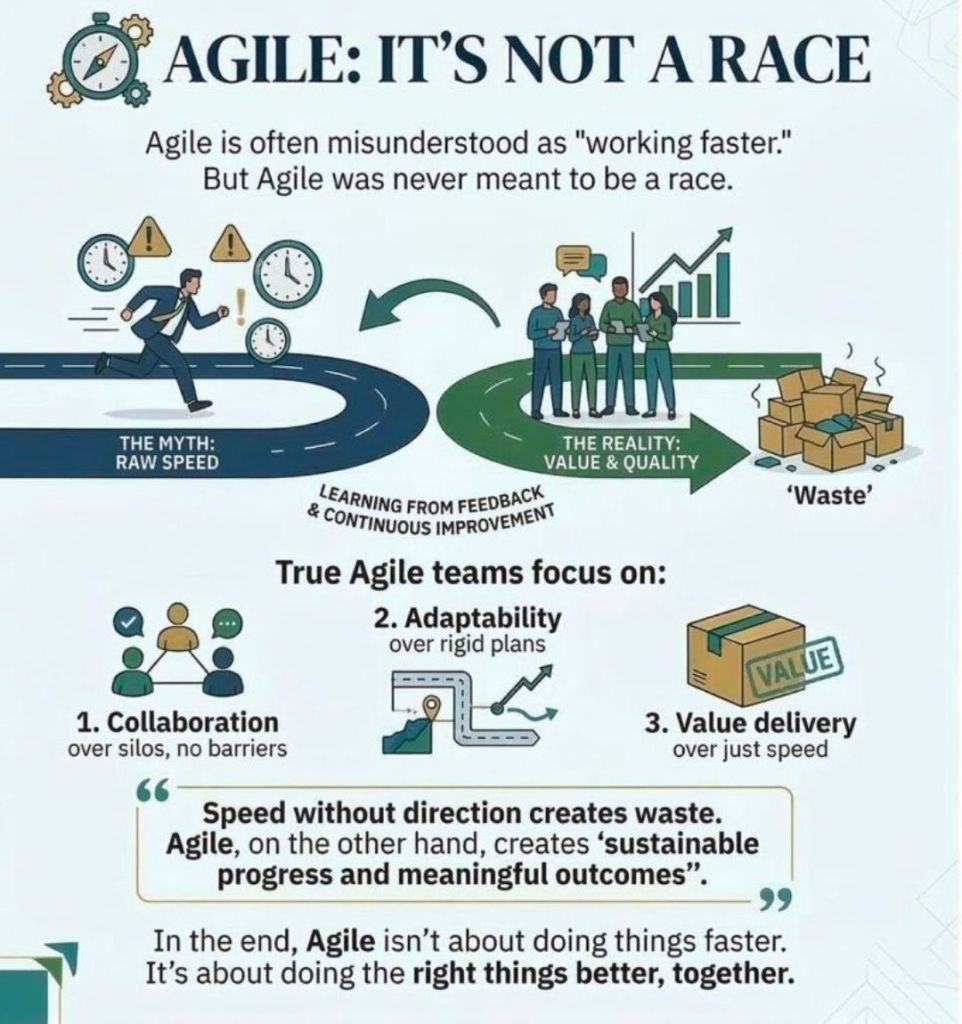
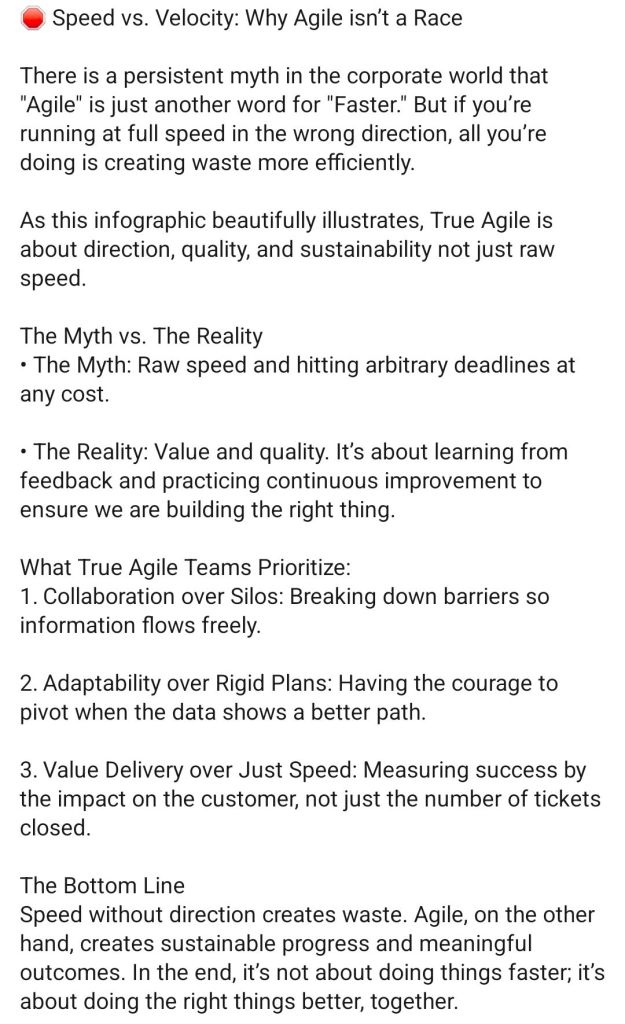
Principles of Agile

Principles of Agile

Barclays locations worked at for Tandem HP NonStop code development

Radbroke Hall is a 64-acre “Innovation Campus” in Cheshire that serves as the global technology and operations hub for Barclays. Originally built as a French chateau-style private residence in 1917, it transitioned through use by a nuclear research group before Barclays acquired it in 1972. Today, it employs approximately 4,000–6,500 staff and has been the development site for pioneering banking technology, including the first ATMs, debit cards, and mobile banking platforms. 

Radbroke Hall History Timeline

Era 1: Private Residence (1914–1956)

  • 1914: Construction begins on the Hall for Manchester textile manufacturer Claude Hardy and his wife Olga.
  • 1916: Claude Hardy dies; Olga oversees the completion of the Portland stone building alone.
  • 1917: The Hall is completed as a private residence.
  • 1920s–1930s: The Hall remains largely unoccupied during these decades. 

Era 2: Industrial & Nuclear Research (1956–1972)

  • 1956: The Hardy family sells the estate to The Nuclear Power Group.
  • 1956–1972: The site is used for nuclear energy research, with offices and a testing tower constructed on the grounds. 

Era 3: The Barclays Transformation (1972–1990s)

  • 1972: Barclays purchases the site from The Nuclear Power Group to reduce high rental costs in London.
  • 1972 (Relocation): Approximately 1,400 staff are relocated from London or hired locally; many find the move from London to the “rural North” a significant culture shock.
  • 1970s–1980s: The site begins its role as an IT hub, instrumental in developing the first cash machines (ATMs) and debit cards.
  • 1985: Barclays reorganises its UK and International banks into a single entity, further centralising tech and staff services at Radbroke. 

Era 4: Global Tech & Modernisation (2000s–Present)

  • Early 2000s: The campus leads the development of Barclays’ online and mobile banking applications.
  • 2012: Barclays celebrates the 40th anniversary of its presence at Radbroke Hall.
  • 2017: The original Hall building marks its 100th anniversary.
  • 2021: Barclays announces a major redevelopment plan to modernise the campus, including the demolition of older buildings (Kilburn, Lovelace, and Brooker Houses) to create a new central “town square” and “re-green” 80,000 sq. ft. of land.
  • 2024: Investment continues to transform Radbroke into a “world-class campus” focused on the future of work and advanced banking APIs.

Barclays House, located at 1 Wimborne Road, was a dominant fixture of the Poole skyline for 46 years. Originally built to decentralise Barclays Bank International operations from London, the nine-storey brutalist structure served as a major regional headquarters from 1976 until its closure in 2022. Following its vacancy, the building was earmarked for conversion into a residential complex featuring 362 apartments

Historical Overview

  • Purpose: The building was commissioned to move staff away from high London costs and boost local employment in Poole.
  • Architecture: Designed by Wilson, Mason and Partners, it features three interlinked octagonal/hexagonal towers in the brutalist style.
  • Landmark Features: A massive 14-foot aluminium eagle logo (the Barclays emblem) adorned the front of the building for decades. 

Detailed Timeline Breakdown

The Development Era (1960s – 1975) 

  • Late 1960s: Poole is selected as the primary location for Barclays Bank DCO (Dominion, Colonial and Overseas) decentralisation.
  • 1971 (August): Planning permission is granted for the project after a public inquiry, with an estimated cost of £5 million.
  • 1972 (September): Construction begins, led by the John Laing Group.
  • 1975 (June): Construction is officially completed. 

The Operational Era (1976 – 2021) 

  • 1976 (January): Barclays first occupies the building.
  • 1976 – 1980s: Workforce grows rapidly; in its first year, it employed 800 people, eventually peaking at roughly 2,500 employees.
  • 2007 (January): A planning bid to demolish the building for flats is refused due to its scale and lack of amenity space.
  • 2008: Barclays announces plans to build a new HQ in Poole, though these did not result in immediate relocation from the Wimborne Road site.
  • 2016: The building undergoes a major refurbishment to celebrate its 40th anniversary

The Closure & Transition Era (2022 – Present) 

  • 2022 (January 26): Barclays officially closes its doors at Wimborne Road after 46 years.
  • 2022 (October 27): The iconic Barclays eagle logo is removed from the building’s facade by cranes.
  • 2022 (December): Remaining staff (approximately 700) are relocated to new offices in Bournemouth.
  • 2023: VCRE Four Poole submits a planning bid to convert the structure into 362 homes.
  • 2024 (March 8): The separate Poole High Street branch also closes.
  • 2024 (June 10): Bournemouth, Christchurch and Poole (BCP) Council grants final approval for the conversion of Barclays House into residential apartments.

Barclays locations worked at for Tandem HP NonStop code development

Website Author IT Career Timeline Breakdown

Mark Whitfield is a highly experienced IT professional with a career spanning over 30 years, transitioning from a technical programmer to a senior digital engagement and project manager. His expertise is rooted in HPE NonStop (Tandem) systems and has evolved to encompass complex Agile and Cloud delivery across diverse industries. 

Early Technical Era (1990–1995)

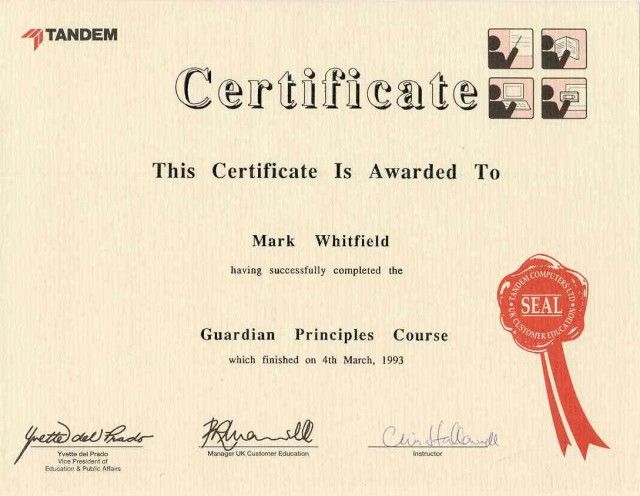
Following his graduation in Computing in 1990, Whitfield began his career as a Programmer at The Software Partnership (later Deluxe Data). 

  • Focus: Electronic banking software, specifically sp/ARCHITECT-BANK on Tandem Mainframe Computers.
  • Key Work: Developed code for major banks including TSB, Barclays, and Rabobank. This included early digital innovations like voice-driven phone banking and inter-account transfers before the internet was widespread. 

Growth and Product Management Era (1995–2004) 

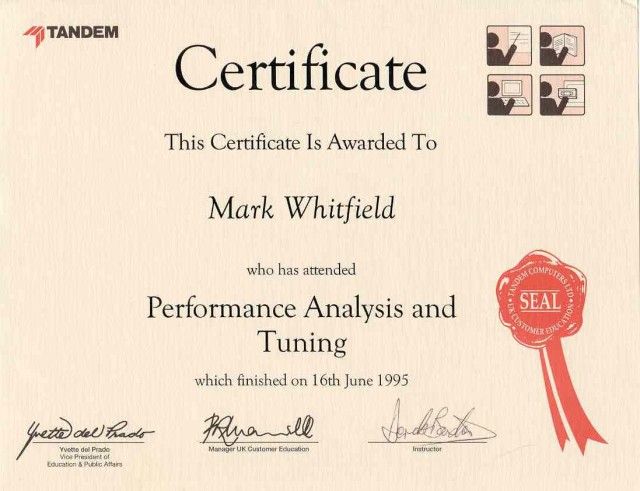
Whitfield joined Insider Technologies Limited (ITL) in 1995 as a Senior Programmer

  • Focus: Platform health and diagnostic software for HPE NonStop systems.
  • Key Projects:
    • Co-developed diagnostic plug-ins for the Reflex monitoring suite.
    • Managed the first HP OpenView Operations (OVO) Smart Plug-In certification for the NonStop platform in 2002.
    • Consulted for CRESTCo (Euroclear) in 1997, conducting benchmark testing on new S7000 nodes. 

Strategic Leadership and Project Management Era (2005–2014) 

During this decade, he transitioned into IT Project Management, focusing on high-value financial transaction tracking. 

  • Focus: Waterfall and Agile project delivery for payment systems and banking infrastructure.
  • Key Milestones:
    • 2011: Led a massive transaction tracking project at Al Rajhi Bank (Saudi Arabia), parsing terabytes of tape-archived data into a normalised SQL database.
    • 2013–2014: At Wincor Nixdorf, managed a £5+ million project for Lloyds Banking Group to migrate ATM driving responsibilities from legacy systems to AIX-based Oracle technologies. 

Senior Digital Engagement Era (2014–Present)

Since 2014, Whitfield has focused on senior-level digital transformation and engagement management. 

  • Betfred (2014–2016): Served as Senior Digital Project Manager for online and mobile platforms (iOS/Android), managing fraud detection and payment gateway integrations.
  • Capgemini (2016–Present): Joined as an Engagement Manager (SC cleared).
    • Focus: Managing large-scale Agile and Waterfall digital projects across aerospace, defence, and government sectors.
    • Notable Projects: Leading a £13.5m programme to migrate 130 UK government applications to the cloud (AWS/Azure) and delivering real-time airspace monitoring apps for air traffic organisations. 
Mark Whitfield IT Career Timeline Breakdown

Project Management Success Wheel, 8 Key Elements

Project Management Success Wheel, 8 Key Elements

Mark Whitfield Online Resume Overview

Mark Whitfield is a highly experienced Senior IT Project Manager and former developer with over 30 years of expertise in HP NonStop (formerly Tandem) systems, primarily within the electronic banking and payments sectors. He is currently a Senior Project Manager at Capgemini (SC cleared until 2031) and maintains a professional portfolio at mark-whitfield.com

Historical Timeline & Customer Breakdown

  • 1990 – 1995: The Software Partnership / Deluxe Data (now FIS)
    • Customer/Projects: Developed electronic banking software, specifically sp/ARCHITECT-BANK, for major financial institutions including TSBBank of ScotlandRabobank, and Girofon (Denmark).
    • Technical Breakdown: Focused on low-level programming using COBOL85NonStop SQL, and TAL (Transaction Application Language).
    • Role: Programmer.
  • 1995 – 2013: Insider Technologies Ltd (ITL)
    • Customer/Projects: Focused on HP NonStop monitoring, diagnostic, and payment software for high-value banking clients. Key products included Enterprise ManagerXPNETBASE24, and EPS.
    • Technical Breakdown:
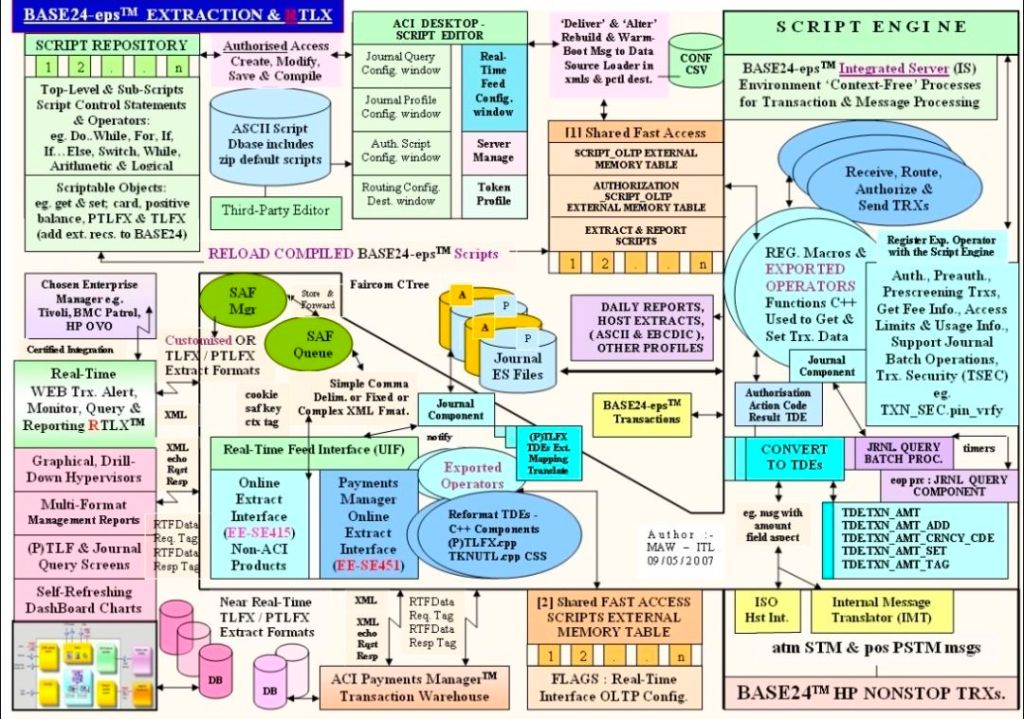
      • XPERT24: Produced technical designs for this performance monitoring tool to track XPNET layers and transaction interchange counters (ATM/POS approval rates).
      • RTLX Payments: Served as IT Project Manager for RTLX (Real-Time Long-term eXchange) payment software.
      • Infrastructure: Extensive use of Guardian utilities (PATHWAY, SCF, FUP, INSPECT), TACL, and SCOBOL.
    • Role: Software Design, Team Leading, and Product Management.
  • 2013 – 2016: Freelance / Contract Projects
    • Customer/Projects: Managed software development lifecycle (SDLC) projects for various blue-chip companies.
    • Role: IT Project Manager.
  • 2016 – Present: Capgemini
    • Customer/Projects: Managing large-scale digital and public sector transformations. Notable clients include UK Government (MS Azure Cloud migration), Jaguar Land Rover (JLR)HeathrowRoyal Mail GroupBank of EnglandHSBCBarclays, and Deutsche Bank.
    • Technical Breakdown: Transitioned from legacy Tandem environments to modern Agile Scrum delivery and Microsoft Azure Cloud hosting.
    • Role: Senior Project Manager / Technical Delivery Manager.

Technical Breakdown by Competency

  • Operating Systems: HP NonStop (Guardian/NSK), Windows, Linux, Unix.
  • Programming Languages: TALTACLCOBOL85SCOBOL, C, C++, Java, and ASP.NET framework.
  • Databases: NonStop SQL/MP, MS SQL.
  • NonStop Middleware: PATHWAYXPNETBASE24EPS, and EMS (Event Management System).
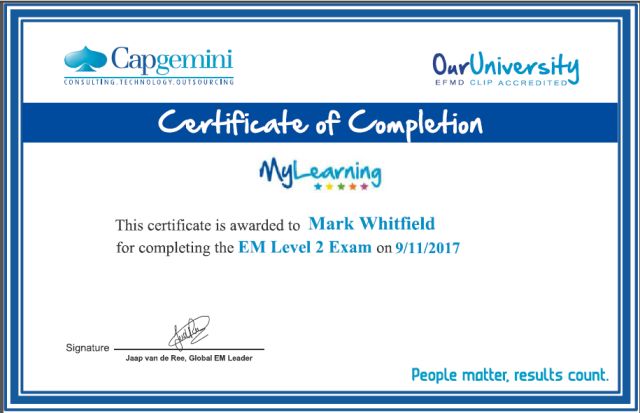
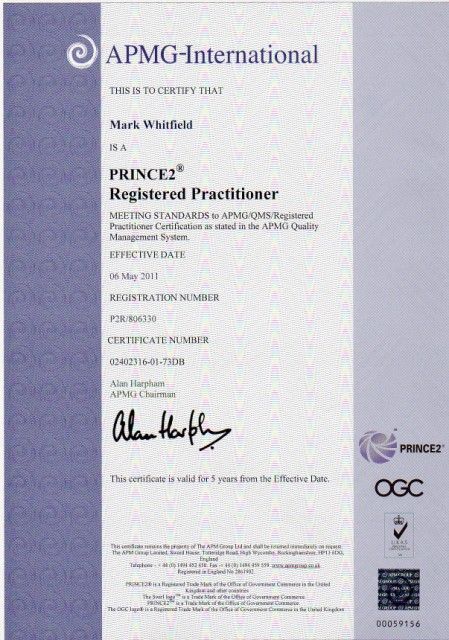
  • Methodologies: Registered PRINCE2 PractitionerAgile SCRUM, ITIL, and ISO9001:2008. 

Web Hyperlinks & Resources

iProPMTemplates on Etsy for Project Management Templates with FREE Upgrades

Mark Whitfield is a Senior Project Manager with over 30 years of experience in delivering PRINCE2 Waterfall and Agile Scrum projects. Operating the Etsy shop ProjectTemplatesSoft (also known as iProPMTemplates), he provides a comprehensive bundle of over 200 professional project management templates. 

Operating the Etsy shop ProjectTemplatesSoft (also known as iProPMTemplates)

Author Overview: Mark Whitfield

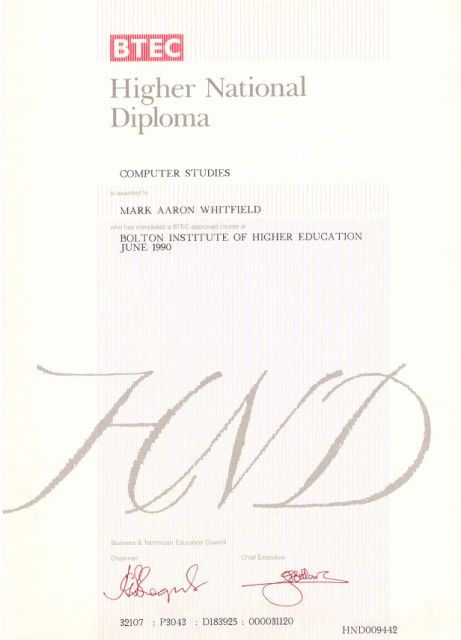
  • Professional Background: Graduated in Computing in 1990 and began his career as a programmer in electronic banking software.
  • Expertise: Senior Project Manager and PRINCE2 Practitioner with extensive experience in the Software Development Lifecycle (SDLC).
  • Value Proposition: His templates are designed to be “imitation-proof” professional toolsets used in real-world project delivery.
  • Support Policy: Offers FREE upgrades and additions for life to anyone who purchases his template bundles; users simply contact him via Etsy or his official website

Detailed Project Templates Inventory

The expanded inventory typically included in his master ZIP file covers the entire project lifecycle across various formats (Excel, Word, PowerPoint, and MS Project). 

1. Planning & Scheduling Templates

  • MS Project (MPP) Plans: Detailed SDLC Microsoft Project plans adaptable for Waterfall and Agile Scrum, including PRINCE2 7th Edition specific plans.
  • Excel Project Planners: Robust Waterfall and PRINCE2 planners with automated Gantt views, designed for users without MS Project licenses.
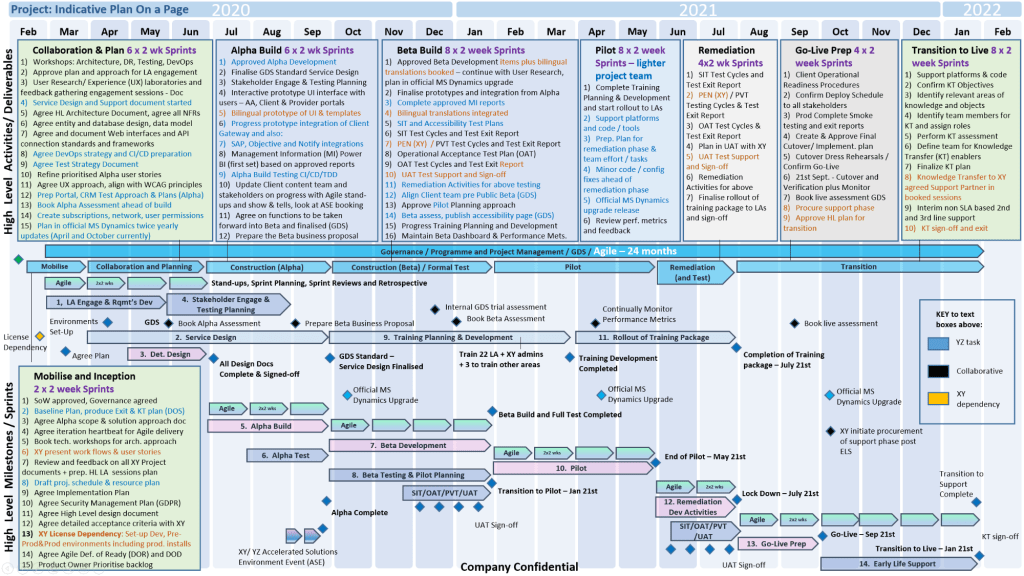
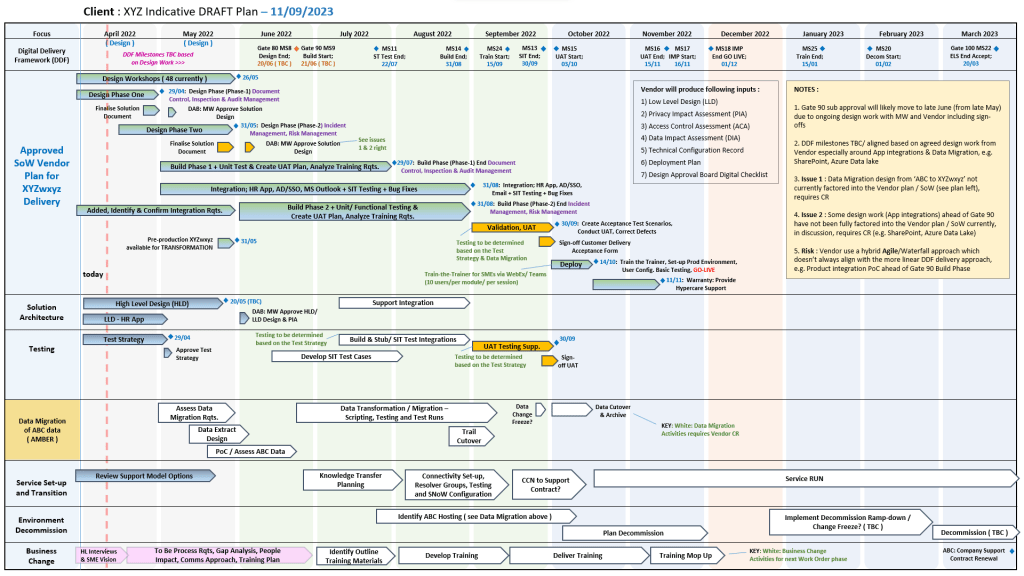
  • Plan on a Page (POaP): High-level PowerPoint and Excel templates for stakeholder presentations, showing project timelines and key milestones.
  • Agile Frameworks: Templates for Sprint planning, Daily Stand-ups, Sprint Reviews, and Retrospectives. 

2. Tracking & Control (RAID & RACI)

  • Comprehensive RAID Log: An Excel-based master tracker for Risks, Assumptions, Issues, Dependencies, and Decisions.
  • RACI Matrix: For defining roles and responsibilities (Responsible, Accountable, Consulted, Informed).
  • Agile Trackers: Includes Burn Down and Burn Up charts for teams not using Jira or similar tools. 

3. Financial & Resource Management

  • Project Financial Tracker: Detailed spreadsheets for tracking forecasts, actuals, margins, and variance.
  • Resource Costing Grid: Tools for estimating resource costs across project phases, useful for bidding and Statements of Work (SoW).
  • Capacity Planning: Templates for managing team availability and on-boarding mobilization kits

4. Documentation & Reporting

  • Status Reports: Weekly and monthly templates in Word and PowerPoint.
  • Standard PRINCE2 Artifacts: Complete set including Business Cases, Project Briefs, Highlight Reports, and End Stage Reports.
  • Governance Tools: Meeting minutes, stakeholder analysis plans, and Benefits Realisation Plans

iProPMTemplates on Etsy for Project Management Templates with FREE Upgrades

Project Management Templates Overview and Author Timeline

Mark Whitfield provides a comprehensive suite of over 200 editable project management templates designed for Agile, Waterfall, and PRINCE2 methodologies. These tools are based on his 30+ years of project delivery experience in high-stakes sectors like banking and aerospace. 

Overview of Project Management Templates

Whitfield’s collection, available on his official website and Etsy, includes specialized tools for various delivery phases: 

  • Planning & Scheduling: Includes Plan on a Page (POaP) (30+ PowerPoint examples for executive summaries), detailed MS Project (MPP) plans, and Excel-based Gantt charts for those without MS Project licenses.
  • Tracking & ControlRAID Logs (Risks, Actions, Issues, Dependencies/Decisions) with built-in charts, and RACI Trackers for defining roles and responsibilities.
  • Methodology-Specific Tools:
    • PRINCE2: Full 7th Edition MS Project plans and standard Word templates.
    • Agile/Scrum: Agile burn-down and burn-up charts, story dependency trackers, and sprint overview templates.
  • Financial Management: Detailed trackers for budgets, forecasts, actuals, margins, and resource costing per project phase.
  • Reporting & Governance: Weekly/monthly status report templates (Word and PowerPoint), project organization charts, stakeholder analysis plans, and meeting minutes.
  • Delivery & Mobilization: Onboarding kits, deployment runbooks, and Statement of Work (SOW) guidance for both Agile and Waterfall. 

Historical Career Timeline

Mark Whitfield’s template development is rooted in a career that evolved from technical programming to senior engagement management. 

  • 1990–1995: The Software Partnership / Deluxe Data: Started as a programmer specializing in electronic banking software for Tandem Computers (HPE NonStop).
  • 1995–2013: Insider Technologies (18 years):
    • 1997: Consultant at CRESTCo (now Euroclear) for volume testing and performance benchmarking.
    • 2002: Managed the first HP OpenView Operations 2-way Smart Plug-In certification for the NonStop platform.
    • Early 2000s: Transitioned to IT Project Manager, managing waterfall projects for real-time log extraction (RTLX) products for clients like HSBC.
    • Late 2000s–2013: Senior roles in product and project management, managing large-scale transaction monitoring for global banks.
  • 2013–2014: Wincor Nixdorf: Served as a Project Manager for the Banking Division, managing a £5m+ project for Lloyds Banking Group (LBG) to replace legacy software across their ATM estate.
  • 2014–2016: Betfred: Senior IT Digital Project Manager in the Online and Mobile Division, delivering projects using the Agile Scrum framework.
  • 2016–Present: Capgemini UK:
    • 2016: Lead Project Manager for a UK Air Traffic organization, delivering iOS apps for airspace visualization.
    • 2023–2024: Technical Delivery Manager for a £1m+ UK Government project involving fish export and health document portals.
    • Current: Serving as an Engagement Manager (Certified PRINCE2 Practitioner and Agile SCRUM) augmented into MuleSoft. 

Project Management Templates Overview and Author Timeline

HND Higher National Diploma Overview and Historical Timeline by Year

Higher National Diploma (HND) is a Level 5 vocational qualification in the UK, equivalent to the first two years of a university bachelor’s degree. Designed to provide industry-specific practical skills, it typically takes two years of full-time study or three to four years part-time. 

Higher National Diploma HND in Computer Studies (3)

Historical Timeline of the HND

The HND has evolved from a niche engineering credential into a globally recognised vocational standard. 

The Early Era: Origins and Industrial Focus (1920s–1950s)

  • 1920: The Higher National Diploma was first introduced in England and Wales alongside the Ordinary National Diploma (OND) and Higher National Certificate (HNC).
  • 1921–1923: Initial subject frameworks were established, starting with Mechanical Engineering (1921) and Electrical Engineering (1923).
  • 1930s: The qualification expanded into Building (1929) and Commerce (1939) to support a growing industrial economy.
  • Post-WWII: The 1944 Butler Act reorganised secondary education, but HNDs remained the primary route for advanced technical training in colleges. 

The Expansion Era: Growth and New Governance (1960s–1970s)

  • 1960s: HNDs gained prominence in polytechnics, addressing critical skills gaps through a practical approach to higher education.
  • 1968–1969: Awards for HNDs saw a massive 665% increase compared to a decade prior, beginning to rival university “ordinary degrees” in popularity.
  • 1972–1974: Under Margaret Thatcher (then Education Secretary), the Haselgrave Report recommendations led to moving qualifications from the City and Guilds to two new bodies: the Business Education Council (BEC) and the Technician Education Council (TEC)

The BTEC and Modernisation Era (1980s–2000s)

  • 1983: BEC and TEC merged to form the Business and Technician Education Council (BTEC), which became the primary awarding body for HNDs.
  • 1990s: BTEC merged with the University of London Examinations Board to form Edexcel (now part of Pearson).
  • 1980s–90s: The curriculum diversified rapidly into modern sectors such as computing, business, catering, and performing arts.
  • 2000s: Global expansion accelerated; for instance, the HND was formally introduced in Cameroon in 2002
Higher National Diploma HND in Computer Studies (1)

The Contemporary Era: Frameworks and Global Standard (2010s–Present)

  • 2013–2014: Despite a decline in public sector colleges due to the rise of Foundation Degrees, HND student numbers at private providers grew from 13,000 to 30,000 in just one year.
  • 2018: Major global curriculum updates were implemented to integrate digital literacy, sustainability, and entrepreneurship into traditional vocational subjects.
  • 2020s: Current HNDs are positioned at Level 5 on the Regulated Qualifications Framework (RQF) and are delivered in over 60 countries. 

Key Characteristics of the HND

  • Academic Standing: Equivalent to Level 5 (Year 2 of a Degree).
  • Progression: Over 95% of UK universities allow HND graduates to “top up” to a full bachelor’s degree, often entering directly into the final year.
  • Assessment: Focuses on practical projects, case studies, and work placements rather than just theoretical exams. 

HND Higher National Diploma Overview and Historical Timeline by Year

Higher National Diploma HND in Computer Studies (2)

Agile Development Overview and Detailed Timeline by Era

Agile development is an iterative and incremental approach to project management and software delivery that prioritises flexible planning, frequent delivery of working software, and rapid response to change. At its core, Agile seeks to shorten work cycles to deliver value to customers quickly while using frequent feedback to improve quality. 

Core Overview

The foundation of modern Agile is defined by the Agile Manifesto (2001), which establishes four central values: 

  • Individuals and interactions over processes and tools.
  • Working software over comprehensive documentation.
  • Customer collaboration over contract negotiation.
  • Responding to change over following a plan. 

The Agile life cycle typically moves through six phases: Concept, Inception, Iteration, Release, Maintenance, and Retirement


Comprehensive Timeline of Agile Development

Agile did not emerge in a vacuum; it evolved from early 20th-century industrial concepts and decades of experimentation in software engineering. 

Era 1: The Industrial & Theoretical Roots (1910s – 1960s)

This era established the foundational concepts of efficiency, waste reduction, and iterative cycles that would later inform Agile frameworks. 

  • 1911: Frederick Taylor publishes The Principles of Scientific Management, advocating for managers to analyse and adopt worker-led process improvements.
  • 1930s: Walter Shewhart at Bell Labs develops the Plan-Do-Check-Act (PDCA) cycle, a groundbreaking iterative methodology for quality control.
  • 1948: Toyota formalises the Toyota Production System (Lean), introducing concepts like Kaizen (continuous improvement) and Just-in-Time manufacturing.
  • 1957: Gerald Weinberg and others at IBM begin using incremental development on projects.
  • 1958: NASA’s Project Mercury uses half-day iterations and test-first development, marking one of the earliest high-stakes uses of iterative cycles.

Era 2: Evolutionary Alternatives to Waterfall (1970s – 1980s) 

As the rigid Waterfall model became dominant, practitioners began developing “lightweight” alternatives to handle complex, shifting requirements. 

  • 1970s: Barry Boehm proposes Wideband Delphi, an early forerunner to Planning Poker.
  • 1976: Tom Gilb publishes the Evolutionary Delivery Model (Evo), perhaps the first explicitly named incremental alternative to Waterfall.
  • 1980: Toyota introduces Visual Control, the predecessor to Agile “information radiators” like Kanban boards.
  • 1986: Hirotaka Takeuchi and Ikujiro Nonaka publish “The New New Product Development Game” in Harvard Business Review, introducing the “rugby” approach that inspired the Scrum framework.
  • 1988: Barry Boehm formalises the Spiral Model, an iterative model focused on identifying and reducing risks. 

Era 3: The Proliferation of Frameworks (1990 – 2000) 

This decade saw a “crisis” in software development where traditional methods failed to keep up with the personal computing boom, leading to the birth of modern frameworks. 

  • 1991: James Martin publishes Rapid Application Development (RAD), formalising the use of timeboxing and iterations.
  • 1993: Jeff Sutherland and team at Easel Corporation first implement Scrum as a formal process.
  • 1994: The Dynamic Systems Development Method (DSDM) is created as a non-profit consortium to provide a framework for RAD.
  • 1995: Ken Schwaber and Jeff Sutherland co-present the Scrum methodology at the OOPSLA conference.
  • 1996: Kent Beck creates Extreme Programming (XP) while working on the Chrysler Comprehensive Compensation (C3) project.
  • 1997: Jeff De Luca introduces Feature-Driven Development (FDD).
  • 1999: Kent Beck publishes Extreme Programming Explained, popularising many engineering practices like pair programming.

Era 4: The Manifesto & Mainstream Adoption (2001 – 2010)

Agile shifted from a niche experimental approach to a global industry standard. 

  • 2001 (Feb): 17 developers meet at Snowbird, Utah, and author the Manifesto for Agile Software Development.
  • 2001 (Post): The Agile Alliance is formed to promote the manifesto’s values.
  • 2003: Mary and Tom Poppendieck publish Lean Software Development, formally linking Lean manufacturing principles to Agile.
  • 2005: Mike Cohn introduces Planning Poker in Agile Estimating and Planning.
  • 2007: The Scaled Agile Framework (SAFe) is introduced by Dean Leffingwell to apply Agile to large enterprises.
  • 2009: The concept of DevOps emerges, seeking to bridge the gap between Agile development and IT operations. 

Era 5: Scale, Transformation, and Modern Evolution (2011 – Present)

Agile has expanded beyond software into marketing, HR, and education, becoming a “culture” rather than just a tool. 

  • 2011: The Project Management Institute (PMI) introduces the Agile Certified Practitioner (PMI-ACP).
  • 2012–2015: Agile adoption surpasses 50% in the development world as success metrics become undeniably clear.
  • 2017: AXELOS updates PRINCE2 to make agility a core focus of the project management standard.
  • 2020s: Continued evolution toward “Business Agility,” where entire organisations adopt Agile mindsets to survive rapidly changing market conditions. 

Agile Development Overview and Detailed Timeline by Era

HP NonStop Tandem Overview and Timeline History by year

HP NonStop is a series of fault-tolerant server computers designed for online transaction processing (OLTP) and mission-critical applications that require 100% uptime. Originally introduced by Tandem Computers Inc. in 1976, the platform uses a proprietary, integrated hardware and software stack known as NonStop OS (formerly Guardian) to eliminate single points of failure through massive redundancy and “fail-fast” logic

Historical Timeline by Era

1. The Tandem Founding Era (1974–1981) 

  • 1974: Tandem Computers Inc. is founded by James (Jimmy) Treybig and a team from Hewlett-Packard’s HP 3000 division.
  • 1976: The first system, the Tandem/16 (later NonStop I), is shipped to Citibank.
  • 1977: Tandem systems gain early traction as intelligent front-end processors for bank ATM networks. 

2. The Stack Machine Expansion (1981–1990) 

  • 1981: NonStop II is introduced, adding 32-bit addressing capabilities and replacing magnetic core memory with battery-backed DRAM.
  • 1983: NonStop TXP (Transaction Processing) launches as the first new implementation of the architecture, featuring cache memory and 2.0 MIPS performance.
  • 1986: Introduction of NonStop VLX (Very Large eXpansion) and NonStop SQL, the first fault-tolerant relational database designed for linear scalability.
  • 1987: NonStop CLX launches as a lower-cost, compact minicomputer for remote office environments.
  • 1989: NonStop Cyclone is released for high-end mainframe markets, featuring superscalar CPUs and fiber optic interconnects. 

3. The MIPS RISC Transition & Acquisitions (1991–2003)

  • 1991: Cyclone/R (or CLX/R) marks the move to MIPS R3000 RISC processors, using object code translation to maintain backward compatibility.
  • 1993: Himalaya K-series is released using MIPS R4400 processors.
  • 1995: Open System Services (OSS) is added to the NonStop Kernel to provide a POSIX/Unix-like environment.
  • 1997: Compaq acquires Tandem Computers. The Himalaya S-Series introduces ServerNet, which later becomes the InfiniBand industry standard.
  • 2002/2003: HP merges with Compaq, bringing the NonStop line under Hewlett-Packard. 

4. The HP Integrity & x86 Era (2005–Present)

  • 2005: HP Integrity NonStop (TNS/E) is introduced, migrating the platform to Intel Itanium microprocessors.
  • 2014: NonStop X (TNS/X) launches, shifting the architecture to Intel x86-64 processors for greater industry-standard alignment.
  • 2015: Following the HP corporate split, NonStop becomes part of Hewlett Packard Enterprise (HPE).
  • 2020: Sales of Itanium-based systems officially end in July 2020.
  • 2024–2025: HPE expands the platform with Virtualized NonStop Software for private clouds and consumption-based models via HPE GreenLake.

HP NonStop Tandem Overview and Timeline History by year

HPE NonStop (formerly Tandem and Compaq NonStop) is a family of fault-tolerant, integrated hardware and software systems designed for mission-critical enterprise workloads. Since its introduction in 1976, it has served as the backbone for high-volume transaction environments like banks, stock exchanges, and payment systems, offering 100% continuous uptime

Core Architecture and Features

The platform is defined by its “shared-nothing” architecture, where every component is redundant to eliminate single points of failure. 

  • Continuous Availability: If a hardware or software component fails, a backup takes over immediately without disrupting the application, a process often managed through process pairs (primary and hot backup processes).
  • Linear Scalability: You can add capacity (CPUs, memory) seamlessly without downtime. Systems can scale from a few processors to clusters of over 4,000 CPUs while maintaining a single-system image for management.
  • Integrated Stack: Unlike standard servers, NonStop includes a fully integrated stack of hardware, the NonStop OS (a proprietary kernel), a relational database (NonStop SQL), and middleware.
  • Fail-Fast Design: Modules are self-checking; they stop immediately upon detecting an error to prevent data corruption, allowing the redundant backup to resume processing from the last known good state. 

Current Hardware and Deployment

While historically based on proprietary or Itanium processors, modern NonStop systems (NonStop X) utilize industry-standard Intel Xeon processors and high-speed InfiniBand interconnects. 

  • High-End Systems: Models like the NS9 X5 are built for the most demanding high-volume transaction processing (OLTP).
  • Mid-Range/Entry Systems: Models like the NS5 X5 offer fault tolerance for smaller enterprises or development environments.
  • Virtualization & Cloud: HPE Virtualized NonStop Software allows the platform to run on standard private cloud infrastructure (e.g., VMware, OpenStack), and it is also available via HPE GreenLake as a consumption-based, pay-as-you-go service. 

Software and Security

  • Database: Supports NonStop SQL/MX and SQL/MP for multi-tenant, fault-tolerant data management.
  • Development: Supports modern languages like Java, C++, Python, COBOL, and the TACL scripting language. Developers can use the Eclipse-based IDE for building and debugging applications.
  • Security: Built with Zero Trust principles, including hardware-level vulnerability mitigations (e.g., against Spectre/Meltdown) and real-time threat detection. 

Detailed Architecture

HPE NonStop architecture is a fault-tolerant, shared-nothing, massively parallel computing platform designed for 100% operational continuity. Originally developed by Tandem Computers, it is engineered so that no single hardware or software failure can bring down the system. 

Core Architectural Pillars

  • Shared-Nothing Architecture: Each processor has its own dedicated memory, I/O bus, and copy of the HPE NonStop Operating System (NSK). This eliminates resource contention and single points of failure found in shared-memory systems.
  • Massive Scalability: Systems scale linearly by adding more processors. A single node can support up to 16 CPUs, and multiple nodes can be clustered to support over 4,000 CPUs.
  • Fault Tolerance (Process Pairs): Software availability is maintained through “process pairs”—a primary process and a passive backup process. If the primary fails, the backup immediately takes over without losing data or state.
  • Fail-Fast Design: Hardware and software modules are designed to stop immediately upon detecting an error (“fail-stop”) to prevent data corruption from propagating. 

Hardware Components

  • Compute Nodes: Modern HPE NonStop X systems use standard Intel Xeon x86-64 processors but implement fault tolerance through specialized system interconnects.
  • System Interconnect (Fabric):
    • InfiniBand: Used in NonStop X systems for high-speed, low-latency communication between CPUs and I/O devices (up to 56 Gbps).
    • ServerNet: The legacy high-speed, point-to-point switched fabric used in older S-series and Integrity i-series systems.
  • CLIMs (Cluster I/O Modules): Specialized offload engines for networking (IP CLIM), storage (Storage CLIM), and telco protocols. They handle I/O processing to free up the main host CPUs. 

Integrated Software Stack

The NonStop platform is a “tightly coupled” environment where hardware and software are integrated for availability. 

  • NonStop OS (NSK): A message-based operating system that manages the distributed resources as a single system image.
  • HPE NonStop SQL/MX: A distributed, fault-tolerant relational database that provides ANSI SQL compliance and automatic load balancing across the cluster.
  • HPE Pathway (TS/MP): An application server and middleware framework that manages workload distribution, load balancing, and automatic process restarts.
  • TMF (Transaction Monitoring Facility): Ensures database integrity by managing atomic transactions; if an update fails, TMF automatically rolls back the changes. 

Modern Deployment Options

  • HPE Virtualized NonStop (vNS): The complete software stack decoupled from proprietary hardware, allowing it to run as a set of virtual machines on industry-standard x86 servers within a private cloud (VMware).
  • HPE GreenLake: A consumption-based model providing NonStop capabilities as a cloud-like service. 

Business Analyst typical day example

Business Analyst typical day example

Senior Project Manager vs Project Manager vs Program Manager

Senior Project Manager vs Project Manager vs Program Manager

Mark Whitfield HP NonStop Tandem experience & Project Management Templates

Mark Whitfield is an experienced IT Project Manager and software developer who has spent over 22 years specialising in HP NonStop (formerly Tandem) systems. He is currently an Engagement Project Manager at Capgemini

Career & Expertise

Whitfield’s career in HP NonStop began in 1990 and includes significant technical and leadership roles across the financial and technology sectors: 

  • Software Development: Early in his career, he worked as a programmer for The Software Partnership (later Deluxe Data/FIS), focusing on electronic banking software like sp/ARCHITECT on Tandem mainframes.
  • Insider Technologies (1995–2013): He spent 18 years at Insider Technologies as a Senior Development Engineer and Project Manager. His work involved:
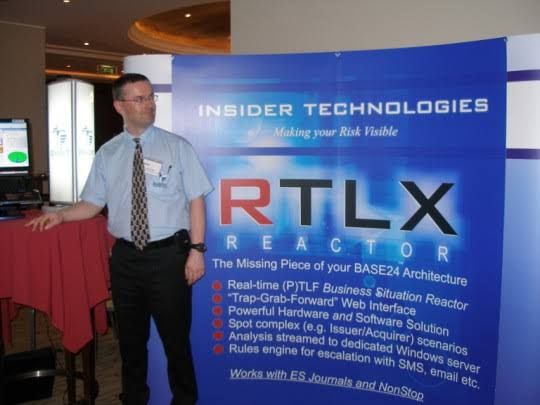
    • Developing monitoring and diagnostic software such as Reflex 80:20Reflex ONE24, and RTLX (Real-Time Log Extraction) for payment systems.
    • Managing the first HP OpenView Operations Smart Plug-In certification for the NonStop platform.
    • Designing XPERT24, a performance tracking product for ACI’s XPNET layer.
  • Capgemini (2016–Present): As an Engagement Project Manager, he has led digital projects for major clients in the automotive, government, and aerospace sectors, including a cloud migration for UK Government applications. 

Technical Contributions

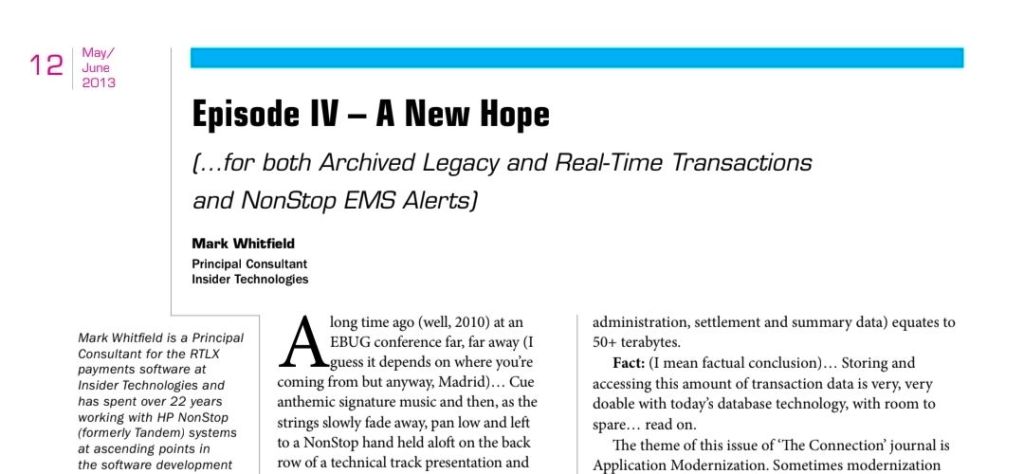
  • Publications: He has authored articles for globally published journals like The Connection (2013), discussing topics such as querying terabytes of legacy transaction log data from NonStop mainframes.
  • Project History: He has managed high-value projects, including a £5 million initiative to migrate legacy HP NonStop software to AIX-based technologies for a large UK retail bank.
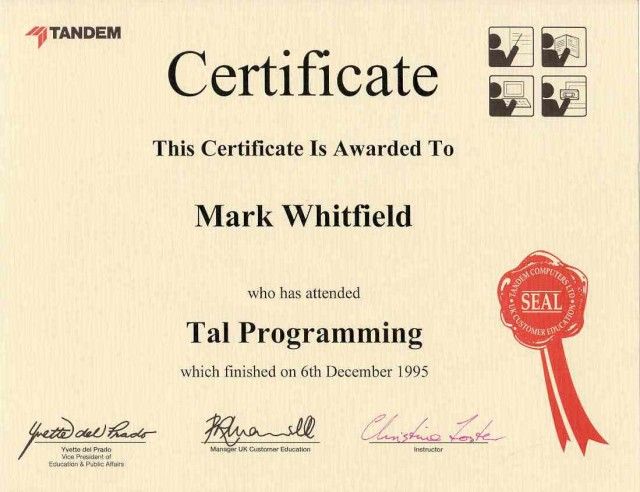
  • Training: He is trained in various NonStop-specific technologies, including TAL (Transaction Application Language), COBOL85PATHWAY, and NonStop SQL

Whitfield also maintains a professional website, mark-whitfield.com, where he provides project management templates and resources related to HP NonStop and Tandem systems. 

Mark Whitfield provides a comprehensive bundle of over 200 editable project management templates designed for Agile, Waterfall, and PRINCE2 methodologies. These templates are based on over 30 years of project delivery experience and are available for purchase via his official website or Etsy shop. 

Key Template Categories

The bundle includes a wide variety of tools across different formats (Excel, PowerPoint, Word, and MS Project): 

  • Planning & Scheduling:
    • Plan on a Page (POaP): Over 30 PowerPoint slide examples for executive-level summaries.
    • Detailed Project Plans: MS Project (MPP) and Excel templates for SDLC, PRINCE2 7th Edition, and Agile Scrum projects.
    • Gantt Charts: Built-in tracking views for both MS Project and Excel.
  • Tracking & Control:
    • RAID Logs: Comprehensive logs for tracking Risks, Actions, Issues, and Dependencies, plus additional tabs for Change Requests and Lessons Learned.
    • RACI Matrix: Templates to define project roles and responsibilities (Responsible, Accountable, Consulted, Informed).
    • Finance Trackers: Tools for internal and external forecast vs. actual costs, including margin and variance tracking.
  • Agile Specific Tools:
    • Burn Down & Burn Up Charts: Excel-based alternatives when tools like Jira are unavailable.
    • Agile Story Dependency Tracking: Specifically for managing dependencies between agile stories and external suppliers.
  • Reporting & Governance:
    • Status Reports: Weekly and monthly templates in Word and PowerPoint formats.
    • Stakeholder Analysis: Power/interest mapping and engagement plan templates.
    • Benefits Realisation: Plans to track project outcomes against initial business goals. 

Purchase Benefits

  • Lifetime Upgrades: Once purchased, all future additions and updates to the template package are provided for free.
  • Compatibility: Templates are designed for Microsoft Office 365 but also include Excel versions compatible with earlier software.
  • Support: The package typically includes walkthrough Word documents to guide users on how to use each major template.

Mark Whitfield HP NonStop Tandem experience & Project Management Templates

Key Skills for the Project Manager

Key Skills for the Project Manager

Project Quality Plan PQP in QA/QC Overview

Project Quality Plan PQP in QA/QC Overview

The primary purpose of a Project Quality Plan (PQP) is to define the standards, tools, and processes required to ensure a project’s deliverables are “fit for purpose” and meet all stakeholder expectations. It serves as a strategic roadmap for the project team to maintain consistent quality throughout the project lifecycle rather than treating it as an afterthought. 

Core Objectives

A PQP is designed to achieve several critical goals: 

  • Define “Quality”: Translates vague stakeholder needs into measurable criteria and specific benchmarks.
  • Prevent Defects: Establishes Quality Assurance (QA) processes to proactively “build in” quality from the start, reducing the risk of errors.
  • Detect and Correct Issues: Outlines Quality Control (QC) activities, such as testing and inspections, to identify and fix defects before they reach the customer.
  • Clarify Accountability: Assigns specific roles and responsibilities so every team member knows who is responsible for performing, checking, and approving work.
  • Ensure Compliance: Guarantees the project adheres to relevant internal policies, legal regulations, and industry standards like ISO 9001. 

Strategic Benefits

Implementing a structured quality plan provides tangible advantages for project management: 

  • Reduced Costs and Rework: By catching errors early, the team avoids expensive last-minute fixes and wasted resources.
  • Improved Efficiency: Standardised workflows and clear metrics allow the team to focus on production rather than constant troubleshooting.
  • Increased Stakeholder Trust: Providing objective evidence through audits and reports gives sponsors and clients confidence in the final outcome.
  • Continuous Improvement: The plan often includes feedback loops and lessons-learned processes to refine and enhance quality for future project phases.

Project Quality Plan PQP in QA/QC Overview

Technical Program Manager Roadmap

Technical Program Manager Roadmap

Agile Framework Executive Summary Overview Snapshot

Agile Framework Executive Summary Overview Snapshot

Project Management, Pre-Contract vs Post- Contract Phase

Project Management, Pre-Contract vs Post- Contract Phase