MediaCityUK Photo Journal and Historical Timeline, Salford Quays

Mark Whitfield is a photographer who has documented the development of MediaCityUK in Salford Quays through an extensive “Photographic Build Timeline Journal”. His collection includes over 15,000 images that capture the site’s transformation from a derelict dockland into a global media hub. 

MediaCityUK Photo Timeline

Mark Whitfield: Photography Overview

  • Project Focus: Whitfield began documenting the rise of MediaCityUK in May 2007, specifically focusing on the construction of the BBC’s new northern home.
  • Visual Documentation: His work is described as a unique photo timeline that charts the incredible structural changes at the site over several years.
  • Background: Beyond his photography, Whitfield has a background in IT project management and has worked in Salford Quays for over 15 years.
  • Galleries: Much of his work is hosted on his personal website, mark-whitfield.com, and he has shared specific milestones on platforms like Flickr and Instagram
MediaCityUK site in 2007

Historical Timeline of MediaCityUK

The following timeline integrates key development milestones with Whitfield’s photographic journey:

  • 2004–2006: Pre-Construction Phase
    • The BBC signals its intention to move jobs to Manchester (2004).
    • Salford Quays is officially chosen as the site for the new development (June 2006).
  • 2007: Construction Begins
    • May 18, 2007: Mark Whitfield captures his first timeline photo, marking the start of the build.
    • The first “spade in the ground” occurs as Peel Group and Bovis Lend Lease begin work.
    • The Pie Factory, a refurbished bakery, opens as the first working studio complex.
  • 2008–2009: Structural Growth
    • Whitfield continues extensive documentation; photos from April 2008 and February 2009 capture the rising concrete frames of the main buildings.
    • The high-rise 2,116-space multi-storey car park is completed (August 2009).
  • 2010: Infrastructure Milestones
    • The MediaCityUK Metrolink station opens (September 20), connecting the site to the wider Manchester tram network.
    • First trial show is recorded in Studio HQ2 (November), featuring a simulated power failure and evacuation.
    • Initial infrastructure is completed by December.
  • 2011: Operational Launch
    • January 2011: Dock10 studios become operational.
    • February 2011: The first program, Don’t Scare the Hare, is filmed at MediaCityUK.
    • May 2011: BBC staff begin moving into three dedicated buildings: Bridge House, Dock House, and Quay House.
    • October 2011: The University of Salford opens its new media academy at the site.
  • 2012–2014: Full Integration
    • April 2012: The Queen and Duke of Edinburgh officially open MediaCityUK.
    • March 2013: ITV completes its move to the site.
    • January 2014: Coronation Street records its first episode at the new production facility on Trafford Wharf.
  • 2015–2021: Expansion & Sustainability
    • 2016: Completion of “Tomorrow,” the final building in Phase One.
    • 2020: The Pie Factory closes and is demolished to make way for Phase Two.
    • 2021: MediaCityUK buildings become the first in the UK to achieve net-zero carbon status. 
MediaCityUK building beginning to take shape in late 2008

Waterfall Methodology in Project Management, a Timeline History

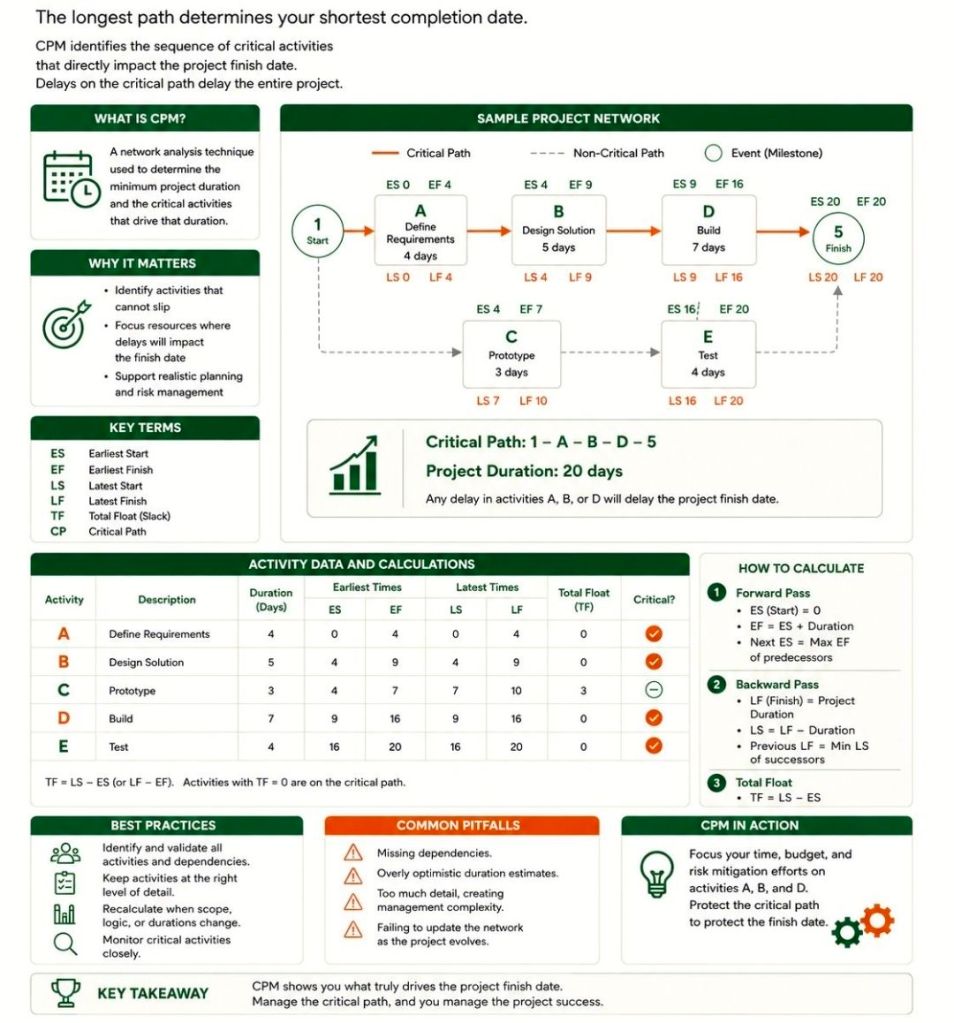
The Waterfall methodology is a linear, sequential project management approach where progress flows steadily downward through defined phases, such as requirements, design, implementation, and testing. Each stage must be completed and approved before the next begins, making it highly structured but often inflexible to changes. 

Waterfall template available on this website

Historical Timeline by Era and Year

The history of the Waterfall model spans from early post-WWII engineering to its formalisation in software and eventual institutionalisation in government standards. 

The Pre-Formal Era (1950s – 1969)

During this period, software development borrowed heavily from established engineering and manufacturing processes. 

  • 1956: Herbert D. Benington presents a paper on the Semi-Automatic Ground Environment (SAGE) project, describing a structured process that many consider the true technical origin of the sequential approach.
  • Late 1960s: Major NASA projects and government software systems for rockets (e.g., Apollo missions) utilise rigid specifications and linear development due to the high cost of changes.
  • 1968: The NATO Software Engineering Conference identifies the “software crisis”—projects consistently running over budget and time—leading to a push for more disciplined models. 

The Formalisation Era (1970 – 1979)

The methodology was formally described, ironically as a cautionary tale, and finally given its name. 

  • 1970: Dr. Winston W. Royce publishes “Managing the Development of Large Software Systems”. He presents the sequential diagram but explicitly critiques it as “risky and invites failure,” suggesting a more iterative approach instead.
  • 1976: The term “Waterfall” is officially coined in a paper by Bell and Thayer, “Software Requirements: Are They a Problem?”. 

The Institutional Era (1980 – 1999)

Waterfall becomes the global standard for large-scale and regulated industries. 

  • 1985: The U.S. Department of Defense (DoD) adopts DOD-STD-2167, which mandates the use of the Waterfall model for all software development contractors. This cements Waterfall as the “one true way” for government and aerospace projects.
  • 1989: The UK Government creates PRINCE2, a process-based method largely rooted in Waterfall principles, still widely used in the public sector today.
  • 1991: In response to Waterfall’s rigidity, James Martin introduces Rapid Application Development (RAD), one of the first major departures from the linear model. 

The Modern & Hybrid Era (2000 – Present)

As Agile became dominant, Waterfall shifted from the default choice to a specialised or hybrid tool. 

  • 2001: The Agile Manifesto is published, marking a significant industry-wide shift away from traditional Waterfall toward iterative development.
  • 2009: Major institutions like George Washington University and others begin documenting their Project Management Lifecycle (PMLC) to standardise Waterfall and hybrid models for better oversight.
  • 2020s: Waterfall persists in regulated domains like healthcare, aerospace, and construction. It is increasingly integrated into hybrid methodologies that use Waterfall for high-level planning and Agile for execution. 

Waterfall Methodology in Project Management, a Timeline History

Waterfall template available on this website

History of the x86 IBM PC platform by Era and Year

The history of the x86 IBM PC platform is defined by a shift from a proprietary IBM product to an open industry standard (“Wintel”) and finally to the modern diverse ecosystem of high-performance computing. 

Era 1: The Foundation & The “Big Blue” Monopoly (1978–1981)

Before the first PC, the building blocks of the x86 architecture were established by Intel. 

  • 1978: Intel introduces the 8086 microprocessor, the 16-bit foundation of the x86 instruction set.
  • 1979: Intel releases the 8088, a lower-cost version with an 8-bit external bus, which IBM would later choose for its first PC.
  • 1980: Microsoft signs a contract with IBM to develop an operating system (MS-DOS/PC DOS) for their upcoming machine.
  • 1981 (August 12): IBM announces the IBM Personal Computer (Model 5150).
    • Spec highlights: 4.77 MHz 8088 CPU, 16KB–256KB RAM, and CGA graphics.
    • Impact: Its “open architecture” allowed third-party expansion, though the BIOS remained proprietary. 

Era 2: The Rise of the Clones (1982–1986) 

IBM’s dominance was quickly challenged as other companies “cloned” the hardware and reverse-engineered the BIOS. 

  • 1982Columbia Data Products introduces the MPC 1600, the first 100% IBM PC compatible.
  • 1982: Intel announces the 80286, supporting protected mode and up to 16MB of RAM.
  • 1983Compaq releases the Compaq Portable, the first highly successful 100% compatible clone with a clean-room engineered BIOS.
  • 1983: IBM launches the PC/XT (Model 5160), the first PC with a built-in hard drive.
  • 1984: IBM introduces the PC/AT (Model 5170) using the 80286 chip, which sets the standard for PC architecture for the next decade.
  • 1985: Intel introduces the 80386, the first 32-bit x86 processor.
  • 1986Compaq beats IBM to market with the first 386-based PC, the Deskpro 386, signalling IBM’s loss of control over the platform’s technical lead.

Era 3: The “Wintel” Standard & Multimedia (1987–1999)

As IBM tried and failed to regain control with proprietary standards, Microsoft and Intel became the new “de facto” leaders. 

  • 1987: IBM launches the PS/2 line with the proprietary MicroChannel Architecture (MCA), but the industry rejects it in favour of the open AT-bus (ISA).
  • 1989: Intel releases the 486DX, integrating the math co-processor and L1 cache onto the chip.
  • 1993: Intel debuts the Pentium processor, moving away from numbers to a trademarked brand to prevent competitors from using the name.
  • 1995Windows 95 is released, cementing the GUI as the standard interface for x86 PCs.
  • 1997: Intel launches MMX technology to improve multimedia performance on PCs. 

Era 4: 64-Bit & Multi-Core (2000–2019)

The platform evolved to handle massive data and professional workloads through architectural shifts. 

  • 2003AMD introduces x86-64, the 64-bit extension that Intel eventually adopts as the industry standard.
  • 2005: Intel ships its first dual-core processor, starting the “core war” to improve performance without increasing heat.
  • 2005: IBM exits the PC market entirely, selling its division to Lenovo.
  • 2006: Apple transitions its Macintosh line to Intel x86 processors (a move that lasted until 2020).
  • 2011: The 30th anniversary of the IBM PC; by this time, “PC” almost exclusively meant an x86 machine running Windows. 

Era 5: The Modern Era (2020–Present)

Current x86 systems focus on massive core counts, high-speed storage (NVMe), and integrated AI. 

  • 2020–2022: Development of high-performance multi-core architectures like Intel’s 12th Gen (Alder Lake), introducing hybrid performance and efficiency cores.
  • 2025–2026: Transition to “AI PCs” using processors like the Intel Core Ultra series (Series 2), which include NPUs (Neural Processing Units) for local AI workloads.
  • Today: Modern x86 PCs, such as those from Dell or Lenovo, feature 20+ cores, DDR5 memory, and PCIe 5.0 expansion.

History of the x86 IBM PC platform by Era and Year

BASE24 by ACI Worldwide timeline by era and year

BASE24 is the world’s most widely used payment processing platform, developed by ACI Worldwide. Originally designed for ATM networks, it evolved into a comprehensive system for acquiring, authenticating, and routing card-based and digital transactions across various channels. It is known for its high-performance, fault-tolerant architecture, processing nearly 50% of the world’s electronic transactions at its peak. 

Comprehensive Timeline by Era

Era 1: Foundations & The Rise of BASE24 Classic (1975–1990s)

This era focused on high-availability software for the emerging automated banking industry, specifically for Tandem NonStop servers. 

  • 1975: ACI founded in Omaha, Nebraska, to develop software for the new “NonStop” server computers used by banks and stock exchanges.
  • 1981: Secured its first international client, an Australian bank, marking the start of global expansion.
  • 1982: Launch of BASE24, the first global product designed for 24-hour system operations, originally focused on ATM networks.
  • 1986: Rapid growth led to 131 customers across 14 different countries. 

Era 2: Expansion & Public Transition (1995–2000s) 

The platform expanded into Point of Sale (POS) and branch systems while the company underwent major structural changes. 

  • 1995: The company went public on NASDAQ as Transaction Systems Architects (TSA).
  • 1997: Officially adopted the name ACI Worldwide.
  • Early 2000s: Introduction of BASE24-es (later renamed BASE24-eps), a next-generation platform using C++ and object-based architecture to replace the legacy monolithic design. 

Era 3: Modernisation & The “eps” Shift (2005–2015)

ACI shifted focus toward BASE24-eps, a more flexible, open-architecture version designed for multi-channel transaction processing. 

  • 2005: ACI launches BASE24-eps, featuring a modular engine capable of processing approximately 2,000 transactions per second (TPS) with extremely low latency.
  • 2007: TSA officially rebranded all operations under the ACI Worldwide, Inc. (ACIW) name.
  • 2008: Announced that BASE24 Classic would begin maturing in 2011, urging customers to migrate to the eps platform for better integration with modern systems like IBM System z.
  • 2011–2012: Release of BASE24-eps 11.1, adding support for DB2 on IBM System p, enhanced EMV acquiring, and tools for easier migration from legacy BASE24. 

Era 4: Cloud & Universal Payments (2015–Present)

The platform moved toward cloud-native capabilities and broader ecosystem integration. 

  • 2015: ACI celebrated its 40th anniversary, continuing to power electronic payments for over 6,000 organisations worldwide.
  • 2018: Introduction of UP BASE24-eps on Linux in the Cloud, demonstrating significantly reduced Total Cost of Ownership (TCO) through public and private cloud deployment.
  • Present: BASE24 remains a core pillar of ACI’s portfolio, supporting traditional card, ATM, mobile commerce, and internet banking transactions.

BASE24-eps by ACI Worldwide timeline by era and year

BASE24-eps is a modular, high-availability payment processing engine developed by ACI Worldwide. It evolved from the original “BASE24 Classic” to provide a more flexible, open-system architecture for acquiring, authenticating, routing, and authorizing electronic transactions

Base24-eps Overview

  • Architecture: Unlike the TAL-based Classic version, BASE24-eps uses an object-oriented design written primarily in C++ and Java.
  • Key Features:

Detailed Timeline

The Foundation Era (1970s – 1990s)

  • 1975: ACI is founded in Omaha, Nebraska, initially developing software for NonStop server computers.
  • Late 1970s: Development of the original BASE24 (now known as “Classic”), focused on high-uptime ATM processing.
  • 1981: First international customer (an Australian bank) signs on, starting the global expansion of BASE24. 

Transition & Development Era (2000 – 2005)

  • Early 2000s: ACI begins developing the “next generation” platform, initially called BASE24-es (extended systems), which later becomes BASE24-eps (enterprise payment system).
  • 2003 – 2004: The product begins migrating to open architectures, moving away from platform-specific languages. 

Mainstream Adoption Era (2006 – 2013)

  • 2007: ACI highlights BASE24-eps as its strategic future platform in investor overviews.
  • 2008: ACI announces the maturation of BASE24 Classic (ending standard maintenance in 2011), urging customers to migrate to BASE24-eps.
  • 2009: IBM Redbooks releases technical guides for BASE24-eps 08.2 on z/OS, solidifying its place in enterprise banking.
  • 2013: Release of BASE24-eps 2.0, introducing the “customer component” and enhanced service-enabling wrappers. 

Modernization & Cloud Era (2014 – Present)

Solution Architect, must know items

Solution Architect, must know items

Free Upgrade Project Management Templates Download by focus area

Mark Whitfield provides a comprehensive suite of over 200 editable project management templates designed for both Agile and Waterfall delivery. These tools are built based on 21+ years of IT project delivery experience and are formatted for Microsoft Office (Excel, Word, PowerPoint) and Microsoft Project (MPP).


Core Planning & Tracking Templates

  • Detailed Project Plans: Comprehensive MPP and Excel files covering the full Software Development Life-cycle (SDLC), including Waterfall and Agile Scrum sprints.
  • Plan on a Page (POaP): High-level visual summaries in PowerPoint or Excel for client reporting and executive snapshots.
  • RAID Log: A central tracker for Risks, Actions, Issues, and Dependencies, often including tabs for Decisions, Opportunities, and Lessons Learned.
  • RACI Matrix: A tracker to define roles and responsibilities (Responsible, Accountable, Consulted, Informed). 

Financial & Resource Management

  • Project Finance Tracker: Tools for managing project budgets, including forecasts vs. actuals, margin analysis, and variation tracking.
  • Resource Planning: Grid templates for costing project resources per phase and tracking team allocations.
  • Benefits Realisation: A spreadsheet to compare initial project goals against actual business outcomes and costs. 

Reporting & Communication

  • Status Reports: Weekly and monthly templates in Word and PowerPoint that include milestone dashboards, project health indicators, and “next steps”.
  • Organisation Charts: Templates for visualising the project hierarchy and stakeholder contacts.
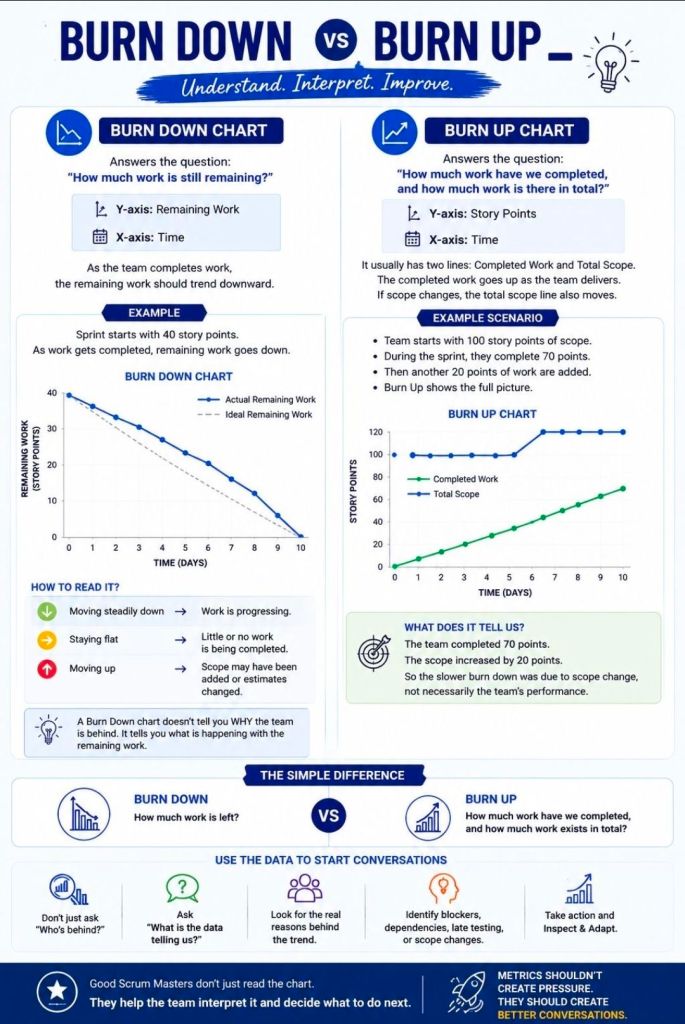
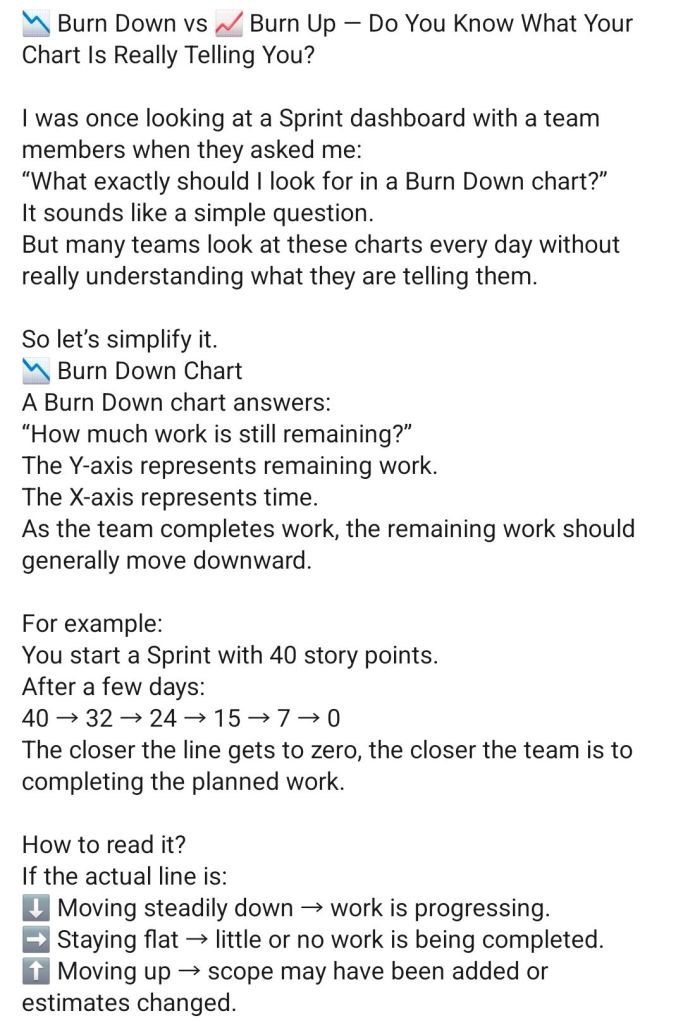
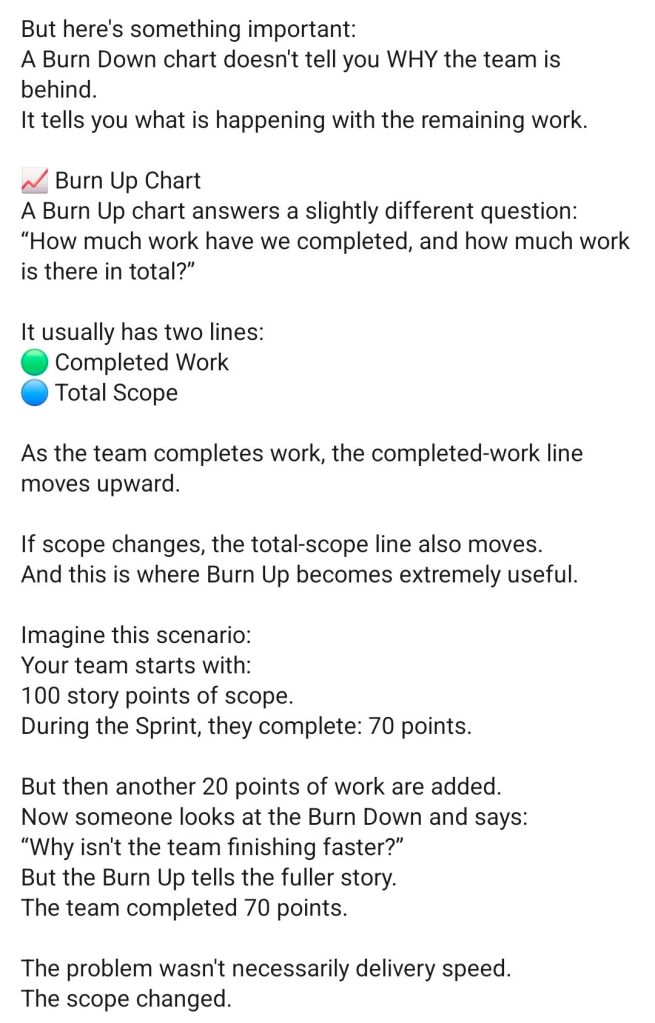
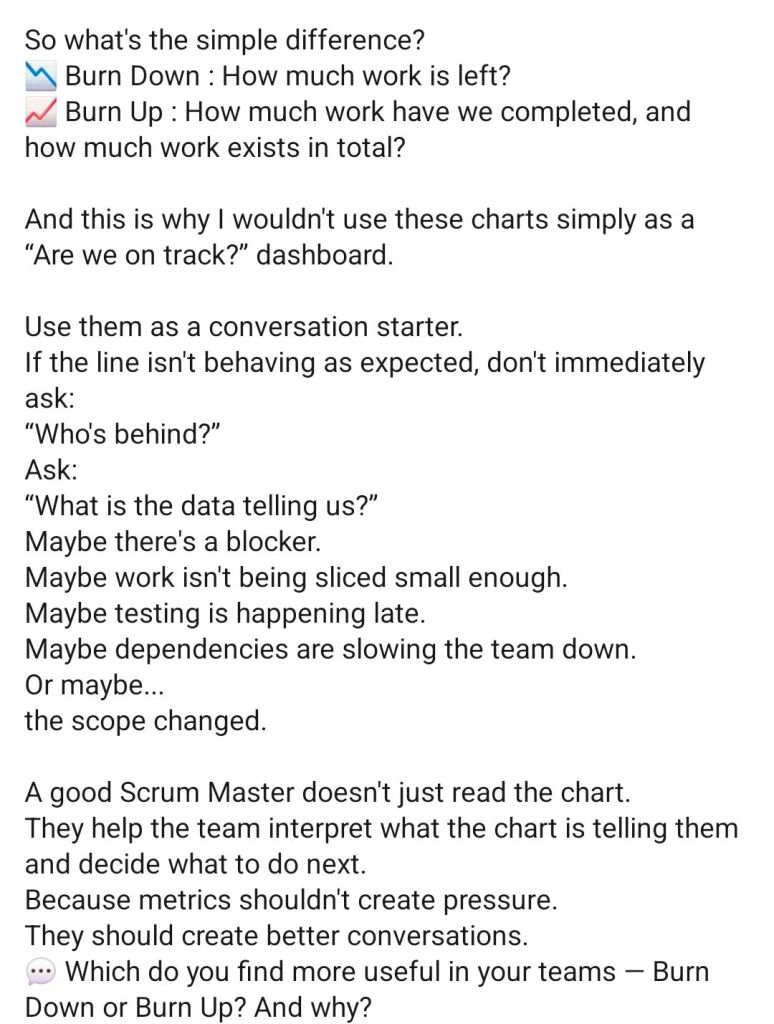
  • Agile Dashboards: Excel-based Burn Down and Burn Up charts for teams that do not have access to tools like Jira. 

Methodology Support

  • PRINCE2 7th Edition: Specific MPP and Excel templates aligned with the latest PRINCE2 standards.
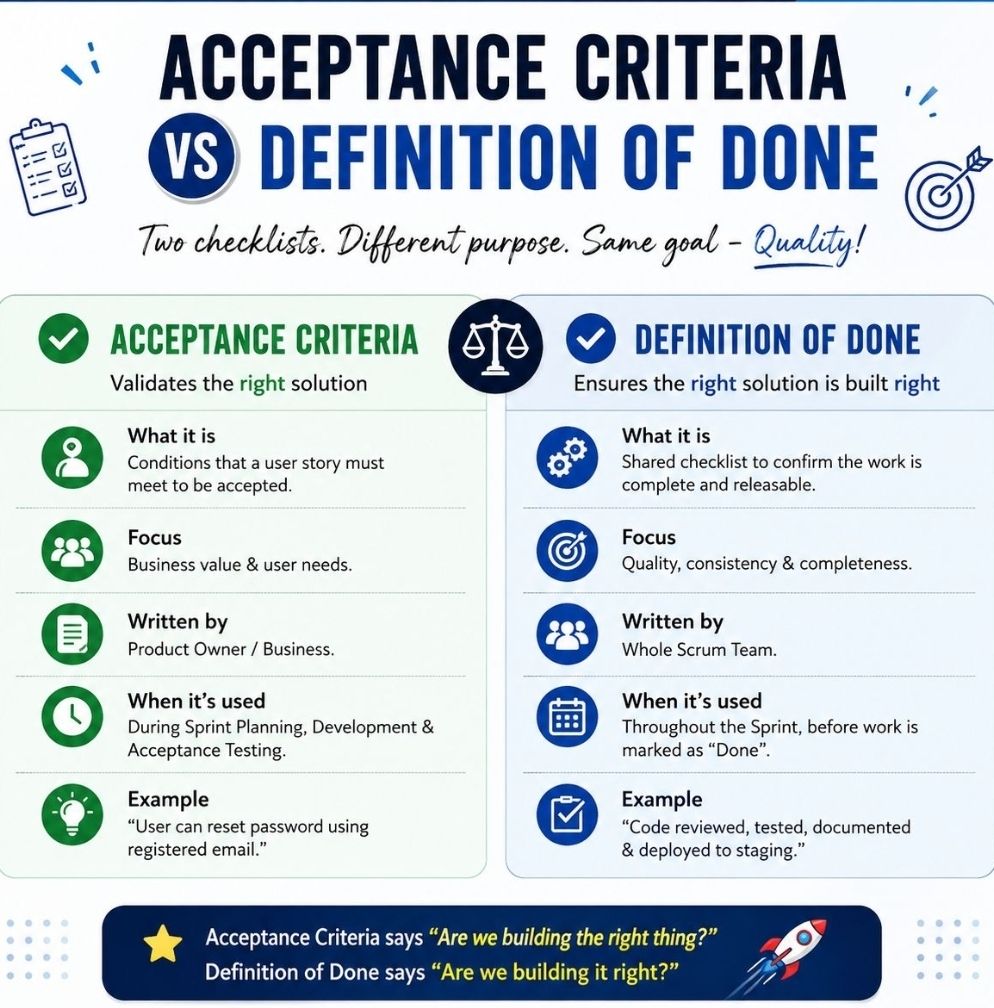
  • Agile Frameworks: Templates for Sprint Planning, Daily Stand-ups, and Sprint Retrospectives. 

These templates are available for purchase on Mark Whitfield’s official site and typically include free lifetime upgrades. 

Free Upgrade Project Management Templates Download by focus area

Mark Whitfield IT Project Manager Training Focus

Mark Whitfield, an IT Project Manager specializing in HP NonStop systems, has a career and training history that spans over three decades, from his academic beginnings in the late 1980s to advanced cloud certifications in the 2020s. 

Early Career & Foundations (1988–1995)

During this era, Whitfield focused on core computer science and specialized mainframe systems while working for The Software Partnership (TSP) and Deluxe Data

  • 1988–1990: Completed a Higher National Diploma (HND) in Computing at the Bolton Institute of Higher Education (BIHE). Modules included Computer Systems Architecture, Programming Methodology, and Data Processing.
  • May 1993: Tandem Guardian Principles Course.
  • September 1994: VPS 7000/9000 Series and VPS Application Development (VOS 4.3).
  • June 1995: HP NonStop (Tandem) Performance Analysis and Tuning.

Development & Technical Specialisation (1995–2005)

Working primarily with Insider Technologies Limited, this period was marked by software development training in languages like C++ and initial forays into project management. 

  • November 1995: HP NonStop TAL Programming.
  • March 1997: C / C++ Programming at Comtec Computer Training.
  • October 1998: Managing Multiple Projects, Objectives, and Deadlines at SkillPath.
  • February 1999: Successful Project Management at SkillPath.
  • May 2000Microsoft Project ’98 Certification (Orange Belt) at the IIL UK Education Centre.
  • February 2001: Sales and Marketing training (In-House).
  • March 2004: MultiBatch NSK Job Scheduling Product.
  • February 2005: Web Services and SOA. 

Web Development & Security Focus (2006–2010) 

This era shows a shift toward web-based technologies and specialized security products. 

  • January 2006: PRINCE2 Project Management Foundation.
  • February 2006: NetObjects Fusion.
  • March 2006: Cryptography (In-House at Thales e-Security).
  • December 2006: Thales e-Security SafeSign Product.
  • January 2007: Developing Web Applications Using Microsoft Visual Studio .NET.
  • March 2009: Querying Microsoft SQL 2000 with Transact SQL (M2071) at QA Training.
  • May 2009: Writing for the Web and Website Visibility & Promotion at iTrain Education.
  • November 2009: Thales e-Security HP NonStop Security Resource Manager (SRM). 

Agile & Advanced Management (2011–Present) 

In his current era at companies like Betfred and Capgemini, Whitfield has prioritized professional certifications in management and cloud infrastructure. 

  • May 2011: Agile SCRUM Training (RADTAC) and PRINCE2 Practitioner Certification (ILX Group).
  • June–July 2011: Java and Google Android programming using the Eclipse IDE.
  • January 2012: ITIL Foundation Course.
  • July 2014: Advanced Microsoft Excel 2013.
  • November 2017Advanced Engagement Management Certification (Level 2) at Capgemini.
  • February 2022AZ-900 Microsoft Certified Azure Fundamentals.
  • July 2024: Microsoft Excel Refresher 2024 via Udemy. 

Mark Whitfield IT Project Manager Training Focus

Mark Whitfield Senior SC Cleared IT Project Manager

Mark Whitfield is a Senior, SC cleared IT Project and Engagement Manager with over 30 years of experience, specializing in the software development lifecycle (SDLC) for large-scale digital and financial payment systems. 

Mark Whitfield is a Senior, SC cleared IT Project and Engagement Manager

Professional Experience by Year

  • 2016–Present: Capgemini UK (Manchester)
    • Role: SC cleared Engagement Manager (A8), Custom Bespoke Solutions.
    • Key Projects: Leading high-value digital transformations and cloud migrations for UK Government applications, automotive (Jaguar Land Rover), and aerospace (Air Traffic Management iOS apps).
  • 2014–2016: Betfred Limited (UK)
    • Role: IT Senior Digital Project Manager, Online and Mobile Division.
    • Key Projects: Managed multiple Agile SCRUM projects for payment gateways, sportsbooks, and virtual gaming components across iOS, Android, and Windows platforms.
  • 2013–2014: Wincor Nixdorf Limited (UK)
    • Role: Project Manager, Professional Services – Banking Division.
    • Key Projects: Managed a £5M+ workstream for Lloyds Banking Group’s Self-Service Software Replacement (SSSR) program, migrating legacy HP NonStop systems to AIX-based Oracle technologies.
  • 1995–2013: Insider Technologies Limited
    • Role: Project Manager – Strategic Technical Initiatives / Senior Development Engineer.
    • Key Projects: Led the development of diagnostic products like Reflex 80:20 and RTLX for global banks including HSBC and Al Rajhi Bank in Saudi Arabia.
  • 1990–1995: The Software Partnership (later Deluxe Data/FIS)
    • Role: Senior Programmer / Lead Analyst.
    • Key Projects: Developed electronic banking software (sp/ARCHITECT) for major banks like Barclays and TSB on Tandem/HP NonStop mainframes. 
Led the development of diagnostic products like Reflex 80:20 and RTLX

Education

  • Higher National Diploma (HND) in Computer Studies (1988–1990)
    • Institution: Bolton Institute of Higher Education, BIHE (now University of Greater Manchester).
    • Achievement: Graduated with Distinction (overall first in class across 2 years).
  • A-Levels in Computer Science and Biology (1985–1988)
    • Institution: Leigh College. 

Awards and Key Certifications

Higher National Diploma (HND) in Computer Studies (1988–1990)
  • Communications & Engagement Award Winner (2022): Awarded by Capgemini UK for Cloud & Custom Applications.
  • Project Recognition Award (2014): Awarded by Wincor Nixdorf for successful delivery of the Lloyds Banking Group SSSR project.
  • Microsoft Certified: Azure Fundamentals (AZ-900) (2022).
  • Certified Engagement Manager (2016): Level 2 Certification through Capgemini.
  • Registered PRINCE2 Practitioner (Since 2011).
  • Agile SCRUM Certified (Since 2011).
  • ITIL Foundation Certified (Since 2012).

Mark Whitfield Senior SC Cleared IT Project Manager

SDLC vs ADLC Traditional vs Agentic

SDLC vs ADLC Traditional vs Agentic

Editable Project Management Templates for Agile and Waterfall projects

Mark Whitfield’s project management (PM) template collection is a comprehensive professional toolkit containing over 200 editable templates. Designed for both Agile Scrum and PRINCE2/Waterfall delivery, the set is built on over 24 years of real-world experience and is available for purchase on his official website and Etsy

Core Planning & Tracking Templates

  • Detailed Project Plans: Comprehensive Microsoft Project (MPP) and Excel plans mapped to the Software Development Life Cycle (SDLC).
  • Plan on a Page (POaP): High-level visual summaries for client presentations, provided in both Excel and PowerPoint.
  • RAID Log: A robust Excel tracker managing Risks, Assumptions, Issues, and Dependencies, often including tabs for Change Requests and Lessons Learned.
  • Financial Trackers: Detailed spreadsheets for tracking project forecasts, actuals, variance, and resource costing.
  • RACI Matrix: Essential for defining roles (Responsible, Accountable, Consulted, Informed) within the project team. 

Methodology-Specific Artifacts

  • Agile Scrum: Includes burn-down and burn-up charts, sprint planning logs, and templates for daily stand-ups and retrospectives.
  • PRINCE2/Waterfall: Tailored plans for 7th Edition standards, including project mandates, transition plans, and close-out checklists. 

Reporting & Documentation

  • Status Reports: Weekly and monthly templates in Word and PowerPoint to communicate project health to stakeholders.
  • Walkthrough Guides: The ZIP package includes Microsoft Word documents explaining how to use and customise each major template.
  • Additional Tools: Benefits realisation plans, resource trackers, project organisation charts, and dependency logs. 

Key Features

  • Format: Primarily Microsoft Office (Excel, Word, PowerPoint, Project) for compatibility across desktop and mobile.
  • Lifetime Value: A one-time purchase typically includes FREE upgrades for life; users can re-contact the author for updated versions of the toolkit.
  • Customisability: All files are fully editable to suit specific project or organizational needs.

Editable Project Management Templates for Agile and Waterfall projects

Higher National Diploma (HND) in Computer Studies, Bolton Institute of Higher Education (BIHE)—now the University of Greater Manchester

The Higher National Diploma (HND) in Computer Studies at the Bolton Institute of Higher Education (BIHE)—now the University of Greater Manchester—is a two-year, Level 5 vocational qualification designed to provide practical, industry-specific skills. 

LinkedIn Group: https://www.linkedin.com/groups/51224

BIHE / University of Greater Manchester Evolution

The institution has undergone several name changes and status upgrades that affected the delivery of the HND: 

  • 1982: BIHE was formed through the merger of Bolton Institute of Technology and Bolton College of Education (Technical).
  • 1992: The Institute was granted the power to award taught degrees.
  • 2004/2005: BIHE achieved full university status, becoming the University of Bolton.
  • 2024: The university rebranded as the University of Greater Manchester

HND Computer Studies: Detailed Timeline

The course traditionally follows a two-year full-time or three-year part-time structure. 

Year 1: Foundations (HE4 Level)

The first year focuses on establishing core technical and business knowledge. In many versions of the Bolton curriculum, Year 1 is common across several computing programmes to allow for flexible progression. 

  • Core Modules:
    • Introduction to Programming: Developing fundamental coding logic.
    • Computer Platforms & Systems Architecture: Understanding the hardware and software environments.
    • Information Systems & Databases: The basics of data management.
    • Website Production & Networking Fundamentals: Introduction to web technologies and connectivity.
    • Quantitative Techniques & Business Studies: Integrating mathematical and commercial contexts. 

Year 2: Specialisation (HE5 Level)

The second year shifts toward advanced application, systems analysis, and professional practice. 

  • Advanced Modules:
    • Systems Analysis & Design: Producing system requirements and user interface specifications.
    • Programming Methodology: Moving into more complex application development.
    • Business Information Systems: Exploring how IT supports organizational requirements.
    • Database Design: Implementing industry-standard database packages.
  • Final Year Project: A major 20-credit core project where students investigate a specific field and apply their cumulative skills to a real-world scenario. 

Progression and Modern Standards

  • Academic Standing: Completion of the HND is equivalent to the first two years of a Bachelor’s degree (Level 5).
  • Degree Top-Up: Successful HND graduates can typically proceed directly into the final year (Level 6) of the BSc (Hons) Computer Science or BSc (Hons) Computing at Bolton.
  • Modern HTQs: Current versions of the course, such as the HND Computing for England (HTQ), now integrate modern fields like Artificial IntelligenceCloud Computing, and VR technologies.
1988 to 1990 : University of Greater Manchester (previously Bolton Institute of Higher Education – BIHE)
Higher National Diploma (HND) in Computer Studies, Bolton Institute of Higher Education (BIHE)—now the University of Greater Manchester

Creative Arts BA (Hons) at Bangor University is a full-time course that integrates film, media, journalism, and creative writing

The Creative Arts BA (Hons) at Bangor University is a three-year, full-time course (UCAS code: WPQ3) that integrates film, media, journalism, and creative writing. It is designed to balance theoretical study with practical, hands-on production. 

Creative Arts BA (Hons) at Bangor University is a full-time course that integrates film, media, journalism, and creative writing

Year 1: Foundations

In the first year, students must complete 120 credits to build a base in both creative practice and academic theory. 

  • Compulsory Modules: A primary core module is Adventures in the Creative Arts (20 credits), which introduces multidisciplinary approaches to the field.
  • Core Skills: You will begin developing production techniques in areas such as audio and visual production, print journalism, and digital media.
  • Theoretical Grounding: Introductory modules cover film theory and cultural studies to enrich your research and analytical skills. 

Year 2: Specialisation & Development

The second year allows for deeper engagement with specific creative industries. 

  • Elective Choice: Students can tailor their studies to their interests, choosing between practice-based modules (e.g., screenwriting, documentary filmmaking, journalism practice) or academic-focused modules (e.g., media regulation, history of film).
  • Professional Engagement: You are encouraged to build professional networks through regular visits from filmmakers, journalists, and designers.
  • Optional Years: After Year 2, you may opt to take an International Experience Year or a Placement Year to work with a professional organisation. 

Year 3: Synthesis & Final Project

The final year focuses on high-level production and a significant independent project. 

  • Final Year Project: Instead of a traditional long-form essay, you can demonstrate your progress through creative outputs such as a fictionalised response, an online exhibition, a vlog, or a professional portfolio.
  • Advanced Practice: Modules continue to cover specialized topics like digital journalism, visual culture, and global media.
  • Professional Showcase: Students often participate in the annual media showcase held at the Pontio Arts and Innovation Centre, providing exposure for their work. 

Teaching & Facilities

  • Learning Methods: Instruction is delivered through lectures, small seminar groups, interactive workshops, and one-to-one supervision.
  • Facilities: Students have access to industry-standard equipment via an extensive loan service (video/stills cameras, digital recorders) and dedicated creative spaces.
  • Assessment: Progress is measured via coursework, presentations, essays, and practical submissions (e.g., short films, scripts, or digital media pieces).

Creative Arts BA (Hons) at Bangor University is a full-time course that integrates film, media, journalism, and creative writing

Bangor University History Timeline by Era and Year

Bangor University (Welsh: Prifysgol Bangor) is a public research university in North Wales, originally founded as the University College of North Wales (UCNW) on 18 October 1884. Established through a historic public campaign, its foundation was uniquely funded by local quarrymen and farmers who contributed their own wages to ensure access to higher education for the people of North Wales. 

Today, it is a prominent institution with over 10,000 students and 2,000 staff members, recognised for its research excellence and strong Welsh cultural identity. 

Comprehensive Timeline of Bangor University

Era 1: Foundation & Early Years (1881–1899) 

  • 1881: The Aberdare Report recommends creating two university colleges in Wales, one for the south and one for the north.
  • 1883: A committee selects Bangor over 12 other towns (including Wrexham and Rhyl) to host the new college.
  • 1884 (18 October): The University College of North Wales officially opens in the Penrhyn Arms, an old coaching inn, with 58 students and 10 staff members.
  • 1884Mary Ellen Williams becomes the first student to enrol; female students notably make up one-third of the initial population.
  • 1885: The institution receives its Royal Charter.
  • 1893: Bangor becomes a founding constituent college of the federal University of Wales, ending its initial practice of conferring degrees through the University of London. 

Era 2: The College on the Hill (1900–1939) 

  • 1903: The city of Bangor donates a 10-acre site at Penrallt for a new building.
  • 1907King Edward VII lays the foundation stone for the “Main Arts” building.
  • 1911: The iconic Main Arts Building (the “College on the Hill”) is officially opened by King George V.
  • 1926: The Science Departments, which had remained at the old Penrhyn Arms, move to new purpose-built facilities funded by the North Wales Heroes Memorial

Era 3: Wartime & Mid-Century Expansion (1940–1999) 

  • 1940s (WWII): The university’s Prichard-Jones Hall is used to safeguard national art gallery paintings from enemy bombing.
  • 1942Neuadd Reichel, a hostel for male students designed by Percy Thomas, opens on the Ffriddoedd site.
  • 1960s: Rapid expansion follows the Robbins Report, including the completion of the “New Arts” wing (1968) and the establishment of new departments like Social Theory (1966).
  • 1967: The Bangor Normal College hosts lectures by the Maharishi Mahesh Yogi, attended by The Beatles.
  • 1977St Mary’s College, a women’s teacher training college, merges with the university.
  • 1996: The Normal College (founded 1858) officially merges with the university, which is renamed University of Wales, Bangor

Era 4: Independence & Modern Era (2000–Present)

  • 2003Storm FM, the official student radio station, begins broadcasting.
  • 2007: The institution gains independent university status and adopts its current name, Bangor University.
  • 2009: The university celebrates its 125th anniversary and begins awarding its own degrees independently of the University of Wales.
  • 2015: The Pontio Arts and Innovation Centre and St Mary’s Student Village open.
  • 2018: The M-SParc science park on Anglesey is completed.
  • 2024: The university celebrates its 140th anniversary and opens its independent North Wales Medical School with its first intake of 80 students.
  • 2025: A £10.5 million donation leads to the redevelopment and renaming of the Albert Guday Business School

HP NonStop Tandem Training provided by HPE Education Services

HP NonStop (originally Tandem) training focuses on the platform’s unique fault-tolerant architecture, designed to ensure 24×7 availability and data integrity for mission-critical industries like finance and telecommunications. Current training is provided by HPE Education Services, which offers expert-led courses ranging from basic concepts to advanced system management and database administration. 

Training Overview

HPE’s curriculum is structured to support IT teams at all levels—from beginners to experienced operators—and can be customised for specific business needs. Key training areas include: 

  • System Operations: Managing NonStop environments, including S-Series or newer x86-based systems.
  • Architecture & Concepts: Understanding fault tolerance, “fail fast” mechanisms, and message-based operating systems.
  • Database Management: Specialized courses for NonStop SQL/MXSQL/MP, and Enscribe.
  • Application Development: Training in languages like C/C++COBOL, and TAL (Transaction Application Language).
  • Modern Environments: Transitioning to virtualised instances and hybrid cloud infrastructures. 

Detailed course information, including outlines and lab access, is available through the HPE NonStop Compute training portfolio


Detailed Textual Timeline: Era & Year

The NonStop platform has undergone three major architectural shifts since its founding.

1. The Tandem Era (1974–1997)

  • 1974: Tandem Computers Inc. is founded by James (Jimmy) Treybig.
  • 1975: Design of the Tandem/16 (later NonStop I) is completed.
  • 1976: The first system is shipped to Citibank, marking the birth of commercial fault-tolerant computing.
  • 1981: NonStop II is introduced, adding 32-bit addressing support.
  • 1983: NonStop TXP launches as the first new implementation of the instruction set, featuring cache memory.
  • 1983: Transaction Monitoring Facility (TMF) and Pathway are introduced, removing the need for applications to be manually coded for fault tolerance.
  • 1986: NonStop VLX is released with 32-bit datapaths and NonStop SQL, the first fault-tolerant SQL database.
  • 1987: NonStop CLX is introduced for the low-end/distributed market.
  • 1989: NonStop Cyclone debuts for high-end mainframe-level performance.
  • 1991: Migration to MIPS architecture begins with the Cyclone/R.
  • 1993: NonStop Himalaya K-series is released, using native MIPS R4400 processors.
  • 1994: Open System Services (OSS) adds a POSIX-compliant environment to the NonStop Kernel.
  • 1997: NonStop Himalaya S-Series introduces ServerNet, replacing older bus architectures. WikipediaWikipedia +7

2. The Compaq Era (1997–2002)

  • 1997: Compaq acquires Tandem Computers.
  • 1999: Zero Latency Enterprise (ZLE) solutions are introduced for real-time information access.
  • 2001: Compaq announces the migration of the entire NonStop line to Intel Itanium processors. 

3. The HP / HPE Era (2002–Present)

  • 2002: HP merges with Compaq, bringing the NonStop division under HP.
  • 2005: HP Integrity NonStop (“NonStop i” or TNS/E) is launched, completing the migration to Itanium.
  • 2014: NonStop X (TNS/X) is introduced, transitioning the platform to Intel x86-64 architecture.
  • 2015: Hewlett-Packard splits; NonStop becomes part of Hewlett Packard Enterprise (HPE).
  • 2020: Sales of Itanium-based systems officially end.
  • 2023–2024: NonStop evolves to support virtualised instances and deployment on hybrid infrastructures. 

HP NonStop Tandem Training provided by HPE Education Services

MuleSoft Architecture Overview, API-Led Connectivity

MuleSoft Architecture Overview, API-Led Connectivity

MuleSoft (a Salesforce company) – From October 2018 – June 2019, assigned as a Delivery Manager at MuleSoft (augmented) to deliver the Anypoint Platform.

Agentic Artificial Intelligence AI Explained

Agentic Artificial Intelligence AI Explained

Centiun, Ebook Microsoft Dynamics 365 Agentic Sales PDF

Centiun, Ebook Microsoft Dynamics 365 Agentic Sales PDF

Click to access Ebook-Dynamics-365-Agentic-Sales.pdf

Centiun Overview and Current Timeline

Centiun is a British IT services consultancy and Microsoft Solutions Partner that focuses on digital transformation through the Microsoft Cloud. The company specialises in Microsoft Dynamics 365Power Platform, and Microsoft 365, providing services ranging from CRM transformation and business process automation to AI-enabled innovation. Centiun positions itself as a “SME” partner, offering a more personalised service compared to larger competitors. 

Company Overview

  • Business Model: Expert consultancy, solution architecture, implementation, and managed services for public and private sector organisations.
  • Key Focus Areas:
    • Modernisation: Moving legacy on-premise systems to the cloud and updating out-of-support applications.
    • AI Integration: Identifying and implementing AI-driven solutions (like Microsoft Copilot) to improve workflow efficiency.
    • Governance: Setting up secure frameworks for low-code/no-code development (Power Apps) to ensure compliance and security.
  • Partnership Status: Official Microsoft AI Cloud Partner

Company Timeline (Monthly Expansion)

The following timeline tracks Centiun’s recent growth and strategic milestones, particularly throughout 2025 and 2026.

2025

  • October:
    • Incorporation: Centiun Limited was officially incorporated as a private limited company on 30 October 2025.
  • November:
    • Government Appointment: On 16 November 2025, Centiun was appointed as a supplier for the Crown Commercial Service (CCS), a major milestone enabling the firm to provide services to the UK public sector.
  • December:
    • AI Community Engagement: On 10 December 2025, the company published its “Microsoft Ignite 2025 Wrapped” report, detailing its focus on deep AI integration.
    • Strategic Partnership: On 29 December 2025, Centiun announced a new partnership with Pax8, a leading cloud marketplace provider, to expand its service delivery capabilities. 

2026

  • January:
  • February:
  • October (Projected/Planned):
    • Reporting Milestone: The company’s first confirmation statement is due by 29 October 2026.
    • Fiscal Year End: The first set of accounts will be made up to 31 October 2026

Arrived in Scilly Isles 10 years ago

Arrived in Scilly Isles 10 years ago

How to Run User Acceptance Testing UAT as a Business Analyst

How to Run User Acceptance Testing UAT as a Business Analyst

University of Greater Manchester Bolton formerly Bolton Institute BIHE LinkedIn

University of Greater Manchester Bolton formerly Bolton Institute BIHE LinkedIn

Group link: https://www.linkedin.com/groups/51224

Henry Ford Mastered Leadership in 8 Ways

Henry Ford Mastered Leadership in 8 Ways