Over 200 editable templates tailored for Agile Scrum, Waterfall, and PRINCE2 frameworks

Mark Whitfield’s premium project management toolkit consists of over 200 editable templates tailored for Agile Scrum, Waterfall, and PRINCE2 frameworks. Built across 30+ years of digital and IT delivery, these frameworks prioritize corporate governance, seamless stakeholder reporting, and visual lifecycle control.

Example of many plan on a page poap ppt templates
Many POAP, Plan on a Page example templates

Below is the comprehensive, scannable breakdown of the core artifacts categorized by lifecycle focus, purpose, and application format. Purchase project templates here.


📅 1. Master Planning & Visual Roadmapping

These tools serve as the operational foundation for tracking dependencies, defining Work Breakdown Structures (WBS), and establishing executive visibility.

  • Detailed Software Development Life-Cycle (SDLC) Plan
    • Focus: End-to-end task tracking from inception and elaboration to construction, testing, and transition.
    • Format: Microsoft Project (.mpp) & Microsoft Excel (.xlsx).
    • Source Page: Mark Whitfield PMO Toolkit
  • PRINCE2 7th Edition Master Project Plan
    • Focus: Standardized governance processes structured according to the latest PRINCE2 methodology.
    • Format: Microsoft Project (.mpp) & Microsoft Excel Gantt Tracker.
    • Source Page: Mark Whitfield PRINCE2 Master Walkthrough
  • Plan on a Page (POaP) Blueprint
    • Focus: High-level, timeline-focused visual summaries mapping deliverables and milestones to client monthly views.
    • Format: Microsoft PowerPoint (.pptx, 30+ layout variations) & MS Excel.
    • Source Page: Mark Whitfield POaP Templates
Example MS Excel Project Plan template

🛡️ 2. Risk, Governance & Operational Control

These registers form the “engine room” of project health management, shifting risk mitigation from reactive to predictive.

  • Comprehensive RAID Log & Tracker
    • Focus: Integrated visibility over Risks, Actions, Issues, and Dependencies, alongside change requests and supplier impacts.
    • Format: Microsoft Excel (.xlsx featuring self-populating chart dashboards).
    • Source Page: Mark Whitfield Operational Tracking Tools
  • Agile Story Dependency Tracker
  • RACI Matrix
    • Focus: Mapping roles and responsibilities across project deliverables (Responsible, Accountable, Consulted, Informed).
    • Format: Microsoft Excel (.xlsx).
    • Source Page: Mark Whitfield Folder Structure & Guide
Example MS Excel RACI matrix template

📊 3. Performance reporting & Stakeholder Engagement

Designed to eliminate subjective performance analysis and maintain executive-level clarity.

  • Weekly / Monthly Project Status Report
    • Focus: Summarizing target completion, look-aheads, RAG indicators, and critical decisions for clients.
    • Format: Microsoft Word (.doc) & Microsoft PowerPoint (.pptx).
    • Source Page: Mark Whitfield Premium Delivery Page
  • Stakeholder Analysis & Influence Matrix
    • Focus: Mapping stakeholder influence versus organizational impact to tailor communication (Involve, Inform, Consult, Monitor).
    • Format: Microsoft Excel (.xlsx).
    • Source Page: Mark Whitfield Folder Structure & Guide
  • Project / Programme Kick-Off Deck
    • Focus: Initial team mobilization, workspace onboarding, and client approach alignment.
    • Format: Microsoft PowerPoint (.pptx).
    • Source Page: Mark Whitfield Main Purchase Index
Example PPT slide for Org. Structure

💰 4. Financial Trackers & Value Realization

These artifacts manage fiscal discipline, pricing bids, and mapping long-term outputs to business outcomes.

  • Full Project Financial Tracker
    • Focus: Internal/external cost variance, forecasting models, contractor day rates, margin tracking, and expense visibility.
    • Format: Microsoft Excel (.xlsx with embedded financial trend charts).
    • Source Page: Mark Whitfield Premium Delivery Page
  • Statement of Work (SOW) Templates
    • Focus: Work order structuring and delivery guardrails for both commercial Waterfall and Agile contracts.
    • Format: Microsoft Word (.doc).
    • Source Page: Mark Whitfield Operational Tracking Tools
  • Benefits Realization Analysis Tracker
    • Focus: Comparing projected baseline targets with actual organizational outcomes post-deployment.
    • Format: Microsoft Excel (.xlsx).
    • Source Page: Mark Whitfield Premium Delivery Page
Example Excel Project Financial Tracker

🏃 5. Agile Delivery Tools

Alternative visual logs created for environments where dedicated software like Jira or Azure DevOps is unavailable.

  • Agile Burn Down & Burn Up Charts
    • Focus: Visualizing sprint velocity, work remaining, and scope creep across iterative delivery cycles.
    • Format: Microsoft Excel (.xlsx with automatic mathematical plotting).
    • Source Page: Mark Whitfield Folder Structure & Guide
  • MS Teams Planner & To-Do Guide
    • Focus: Step-by-step framework configuration for running Kanban-style card streams in the cloud.
    • Format: Microsoft Word Walkthrough (.docx).
    • Source Page: Mark Whitfield Master Index
Example Agile Scrum Burn Up Chart
Example Agile Scrum Burn Down Chart

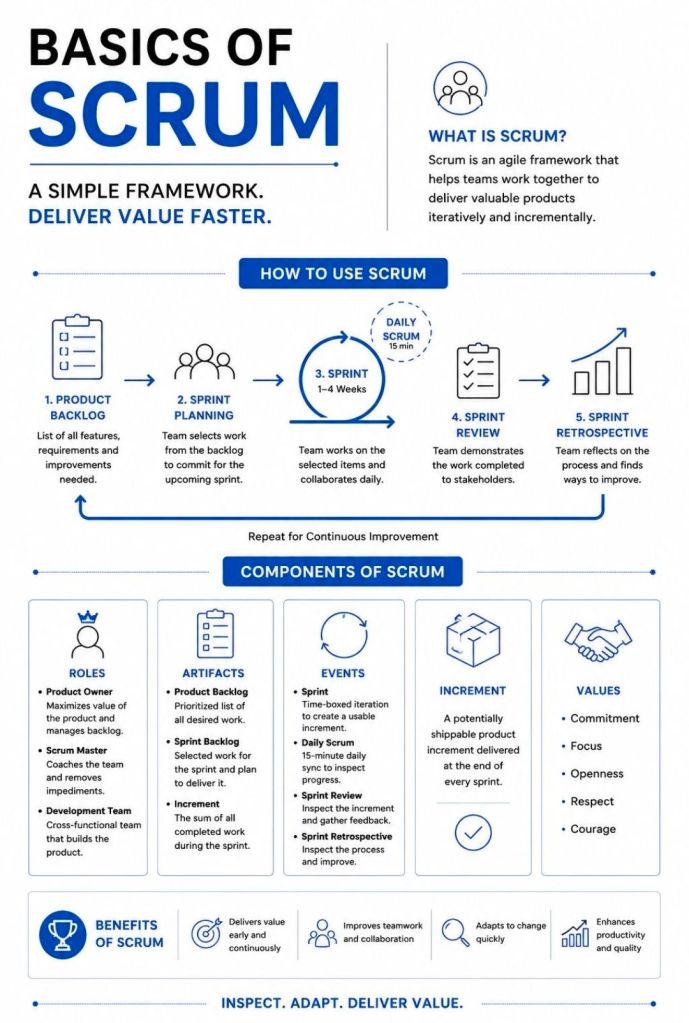
Agile, the 5 Scrum Events

Agile the 5 Scrum Events
the 5 Scrum Events

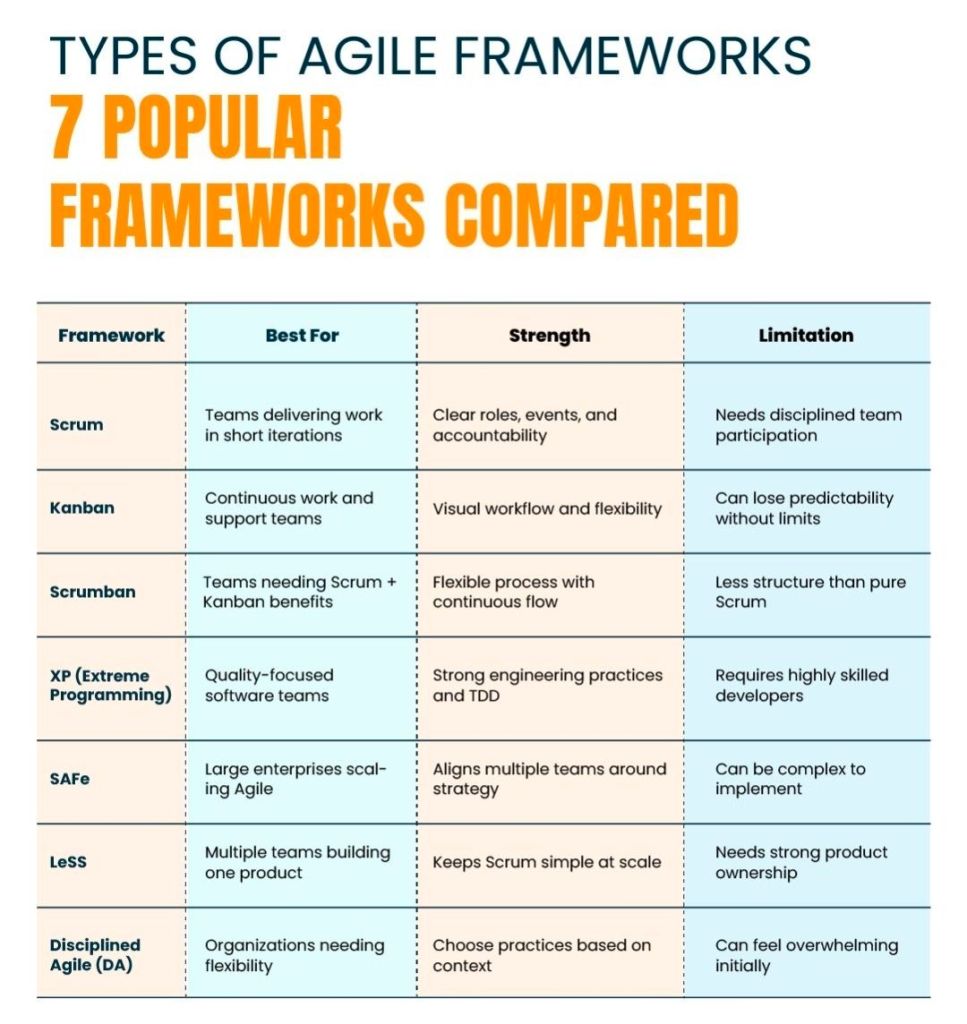
PRINCE2 or PRINCE2 Agile, features discussion

The choice between PRINCE2 and PRINCE2 Agile depends entirely on your project environment: PRINCE2 is best for highly structured, predictable projects with fixed requirements, while PRINCE2 Agile is designed for dynamic environments that require iterative delivery and flexibility.

Both methodologies are owned by PeopleCert and build upon the same core governance framework.

Core Differences

The table below breaks down how these two frameworks compare across key project dimensions:

PRINCE2 and PRINCE2 Agile features
Comparison PRINCE2 and PRINCE2 Agile features
PRINCE2 and PRINCE2 Agile features

PRINCE2 Breakdown

Traditional PRINCE2 (Projects IN Controlled Environments) is a structured, process-based approach for project management. It provides a clear blueprint for roles, responsibilities, and management stages.

  • Fixed Targets: It fixes the project scope, time, and cost upfront to minimize risk.
  • The 7 Principles: It relies on universal principles, such as continued business justification and defined roles.
  • Management Stages: Projects are broken into distinct sections to review progress before moving forward.
  • Predictability: Ideal for large infrastructure, construction, or compliance-heavy projects where changes are costly.

PRINCE2 Agile Breakdown

PRINCE2 Agile does not replace traditional PRINCE2; instead, it wraps agile delivery methods around the existing PRINCE2 governance framework. It allows corporate management to maintain control while development teams use frameworks like Scrum or Kanban.

  • The Hexagon: It fixes time, cost, quality, and benefits, but makes scope and risk flexible.
  • Agile Integration: It introduces agile concepts like daily standups, burn charts, and retrospectives.
  • Maturity Tool: It uses the “Agilometer” to assess if a project is suitable for agile execution.
  • Speed to Market: Ideal for software development, creative industries, or any project requiring quick consumer feedback.

Which Certification Should You Choose?

  • Choose PRINCE2 if you work in a traditional industry, need to establish clear corporate governance, or manage projects with strictly defined outcomes.
  • Choose PRINCE2 Agile if you already work in an agile environment and need to add corporate structure, or if your organization is transitioning from waterfall to agile.

Mark Whitfield, May 2011 – Registered PRINCE2 Practitioner with ILX

Mark Whitfield May 2011, Registered PRINCE2 Practitioner with ILX

sp/ARCHITECT-BANK originally developed by The Software Partnership (TSP), Runcorn, Cheshire

The Software Partnership Logo

The core electronic banking software product sp/ARCHITECT-BANK was originally developed by The Software Partnership (TSP), a highly specialized British software house co-founded by Nigel Walsh in Runcorn, Cheshire.

Engineered to deliver high-availability, fault-tolerant electronic and desktop home-banking services, it ran natively on Tandem NonStop mainframe computers (now HPE NonStop).

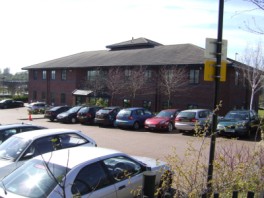
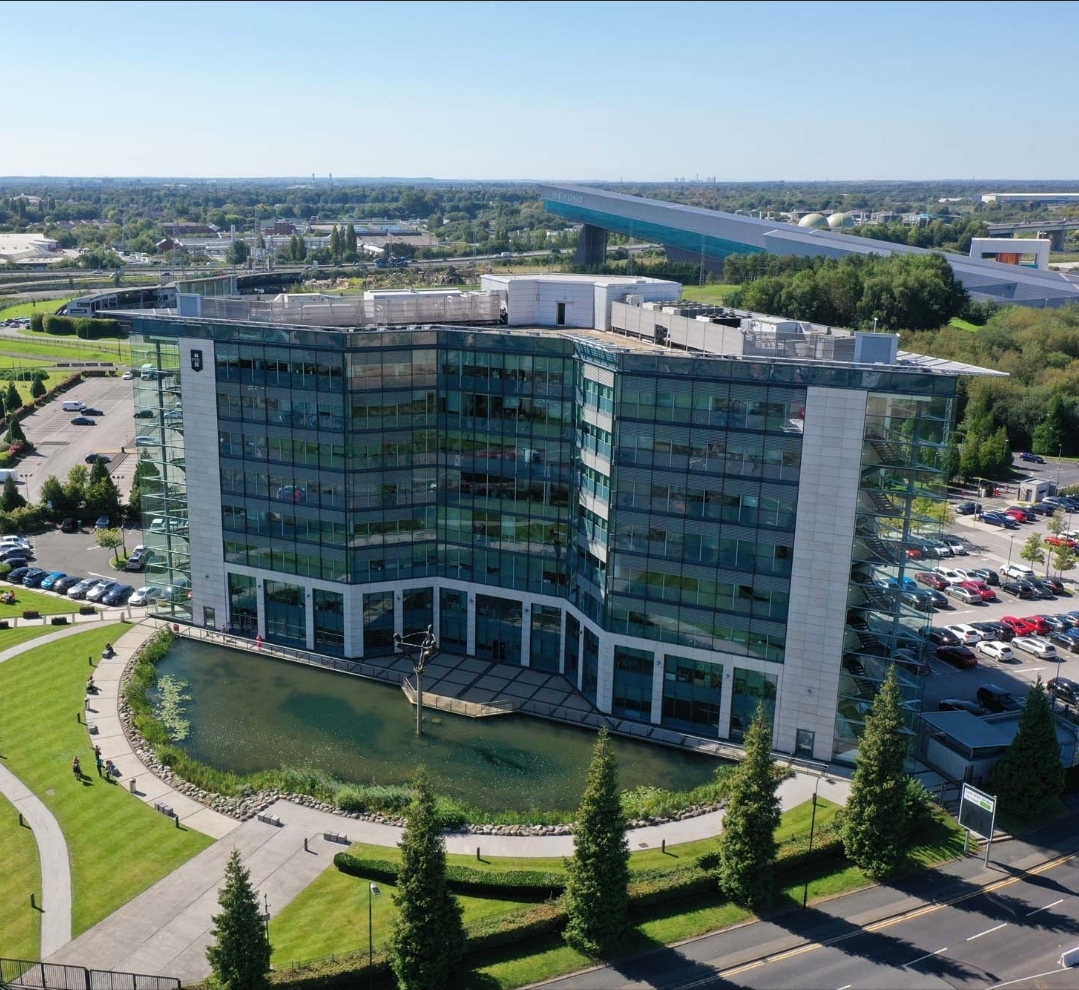
The Software Partnership, Norton House, Crowngate, Runcorn, Cheshire

Over the decades, the product evolved through major corporate acquisitions, eventually being integrated into enterprise-level banking suites like CONNEX Advantage under eFunds and FIS.

The detailed timeline of the product, broken down by corporate era and year, is provided below by Mark Whitfield.

Click the previous link for more sp/ARCHITECT BANK project level detail between 1990 thru 1995.

Also, here is a LinkedIn group for the company Alumni.


🌅 Era 1: The Inception and Independent Software House Era (Mid-1980s–1993)

During this foundational era, The Software Partnership engineered the core product from scratch to meet the emerging demand for “Direct Electronic Banking” before the commercial internet became prevalent.

  • 1985: The Software Partnership (TSP) is co-founded by Nigel Walsh in Runcorn, Cheshire. Development begins on a standard product architecture designed specifically for the transaction processing monitor (PATHWAY) and operating system (Guardian) of Tandem Computers.
  • 1988–1989: The company establishes sp/ARCHITECT (and its core module, sp/ARCHITECT-BANK) as a premier client-server base package for corporate and home-office electronic banking.
  • 1990: The engineering team scales up to build standard product releases written in COBOL85 and utilizing NonStop SQL databases. They develop proprietary testing utilities like sp/TESTBED to simulate PC-to-mainframe interfaces. Mark Whitfield joins the company after graduating in Computing in late 1990.
  • 1991: Major deployment begins for the high-profile Barclays Business Master II (BBM II) desktop corporate banking application, with TSP placing teams (including Mark Whitfield) on-site at Barclays in Knutsford, Cheshire.
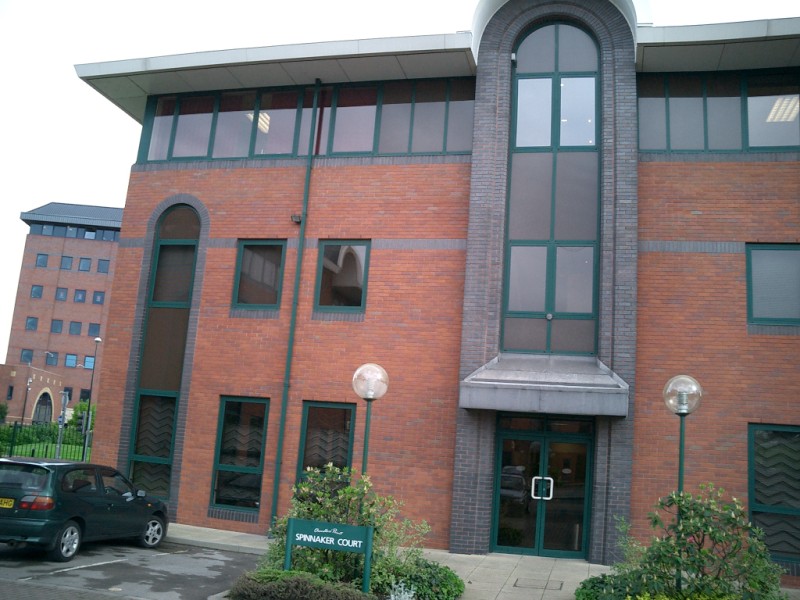
Barclays, Radbroke Hall, Knutsford, Cheshire
  • 1992: A batch billing and invoicing suite of modules is engineered over 3-months and appended to the Barclays installation at Poole, Dorset. Mark Whitfield is assigned to this HPE NonStop (Tandem) billing/ invoicing development on the UK south coast. Simultaneously, TSP expands internationally into continental Europe.
Barclays, Wimborne Road, Poole, Dorset
  • 1993: TSP develops an automated, touch-tone voice menu system for Girofon (Denmark). The code interfaces phone lines through Periphonics Interactive Voice Response (IVR) hardware directly into the back-end Tandem banking system. Concurrently, the core application handles desktop money transfers and early logic checking for clearing giants TSB and Bank of Scotland. Mark Whitfield is also involved with supporting this IVR technology.

🤝 Era 2: The Deluxe Data International Era (1994–1999)

Recognizing the massive European banking client footprints of sp/ARCHITECT, US-based electronic funds transfer (EFT) specialist Deluxe Data acquired TSP to merge their direct banking and card processing capabilities.

  • 1994: Deluxe Data Corporation acquires The Software Partnership. The Runcorn offices are reorganised as Deluxe Data International Operations.
Deluxe Data International Operations, Wingate House, Northway
  • 1995: The product undergoes heavy code optimization to satisfy customer acceptance loops for international clearers, notably deploying direct electronic banking solutions for major Dutch institutions like Rabobank. Mark Whitfield moves on from Deluxe Data (after 5 years) to Insider Technologies Limited in Salford Quays in late 1995. This to continue HPE NonStop programming work for both monitoring and diagnostic products like Reflex 80:20.
  • 1996: Development transitions toward hybrid enterprise networking. The sp/ARCHITECT system is updated with custom TCP/IP software interfaces to allow newer mid-range UNIX servers (such as IBM RS/6000) to safely communicate with the core Tandem server environment.
  • 1997: Deluxe Data expands the core platform’s messaging logic using Tandem’s Remote Server Call (RSC) facility. This enables early Windows NT operating systems to request live financial data from the sp/ARCHITECT host.
  • 1998: An automated, multi-process file transfer protocol is integrated natively into the bank database, leveraging Connect:Direct transport layers to securely transfer corporate SWIFT financial data files.

🚀 Era 3: The eFunds & Corporate Consolidation Era (2000–2006)

Deluxe Data’s technologies spun off into a new corporate entity called eFunds Corporation, altering the delivery model of the legacy software.

  • 2000: Deluxe Electronic Payment Systems officially merges with other divisions to form eFunds Corporation (EFD). The sp/ARCHITECT package becomes a core pillar of eFunds’ international banking portfolio.
  • 2002–2004: To modernise the transaction handling backbone, components of the sp/ARCHITECT platform are refactored. The system’s underlying communication routing is systematically aligned with CONNEX, a dominant market-leading Electronic Funds Transfer (EFT) processing engine.
  • 2005–2006: eFunds transitions the direct client-server software layers into highly secure corporate portals, providing the foundational logic for what would eventually be rebranded as the CONNEX Advantage banking solution.

🏢 Era 4: The FIS Integration and Legacy Modernisation Era (2007–Present)

The final stage of the product timeline represents its absorption into global banking infrastructure software, where its high-availability DNA remains active in institutional transaction environments.

  • 2007: Financial technology behemoth Fidelity National Information Services (FIS) acquires eFunds Corporation for approximately $1.8 billion. Following industry consolidation, the corporate remnants of the original TSP Runcorn operations are absorbed into Fidelity National Information Services (FIS) and relocated to Aegon House in Daresbury, Warrington.
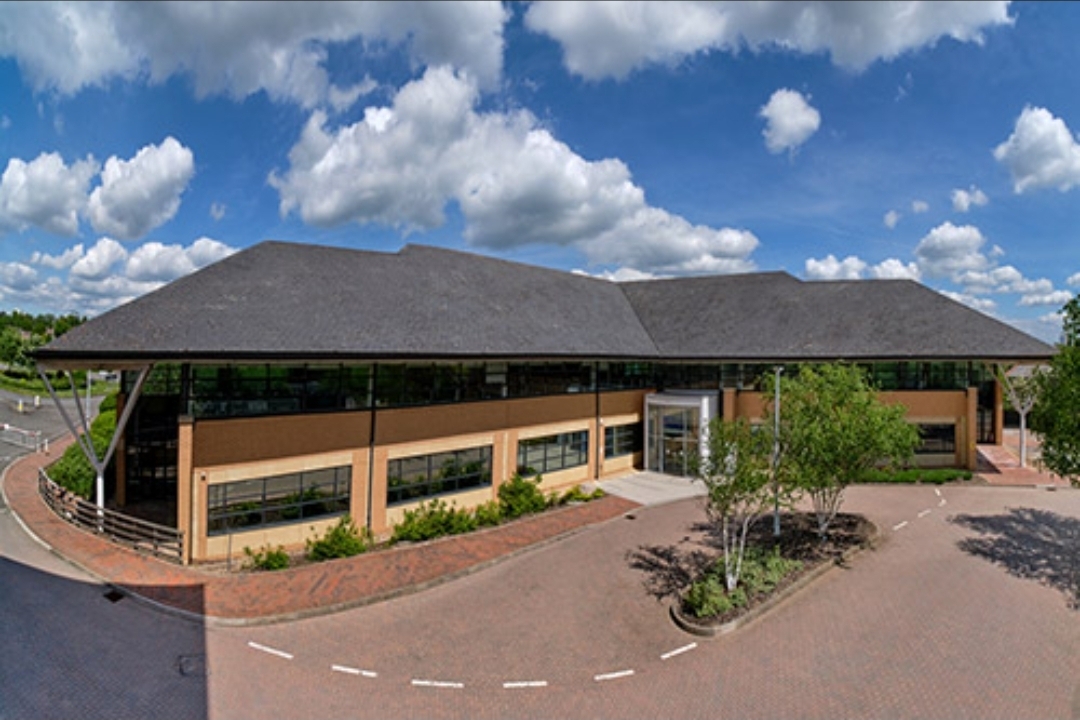
Fidelity National Information Services (FIS) Aegon House in Daresbury, Warrington 2007
Fidelity National Information Services (FIS) Aegon House, Warrington (in 2007)
  • 2010: FIS fully absorbs the remaining codebase, utilizing its core Tandem architecture algorithms to fortify transaction processing stability.
  • 2015–2020: The architectural concepts pioneered by sp/ARCHITECT-BANK continue to govern high-volume legacy systems. The logic stays preserved in COBOL85 code bases running on modern HPE Integrity NonStop (Intel Xeon-based) fault-tolerant environments.
  • 2020s–Present: Modern banking infrastructures gradually migrate from the classic database frameworks toward microservice configurations and open-banking APIs. However, the core system layout remains a primary point of historical reference for designing high-throughput, 24/7/365 fault-tolerant banking systems.

sp/ARCHITECT-BANK originally developed by The Software Partnership (TSP), Runcorn, Cheshire

sp/ARCHITECT-BANK Code Evolution Timeline

The timeline below details how the code’s core design, language implementations, and application deployment strategies transformed by era and year.


1. The Monolithic & TAL Foundation Era (1980s – Early 1990s)

During this era, the application focus was strictly high-throughput, fault-tolerant electronic funds transfer (EFT) and point-of-sale (POS) switching systems natively built for Tandem Guardian environments.

  • Late 1980s: The core design of sp/ARCHITECT is established using TAL (Tandem Application Language). Applications are deployed as single-system monoliths. Code optimization focuses heavily on low-level bit manipulation and message structuring to survive CPU or inter-process failures without losing in-flight transactions.
  • 1991–1993: Structuring of modular execution libraries. Early iterations of the codebase segment transaction processing routes from core database logging routines. The introduction of Tandem’s newer NonStop SQL forces early integration layers to transition from standard unstructured unstructured file systems (Enscribe) to early relational tracking.

2. Distributed Client/Server & pTAL Migration Era (Mid 1990s – Early 2000s)

The architectural demands shifted from single-frame monoliths toward distributed banking systems, giving rise to “Distributed Monoliths” and client/server network structures.

  • 1995–1996: Hardware evolutions transition from the older CISC-based Tandem systems to RISC architectures (MIPS processors). sp/ARCHITECT undergoes a massive compilation shift to pTAL (portable TAL) to preserve legacy code performance across new instruction sets.
  • 1998–1999: Tandem’s acquisition by Compaq pushes the software suite to handle open standard protocols. The application code begins abstracting system calls to prepare for broader networking interfaces.
  • 2001–2003: Deluxe Data / eFunds eras. The code sees the introduction of C/C++ wrappers around the legacy pTAL components. Systems are decoupled into a clear 3-Tier architecture: front-end terminal networks, back-end pTAL transactional engines, and standardized clearing houses.

3. Open Systems, Modern Middleware, & Java Integration Era (Mid 2000s – 2010s)

Following HP’s acquisition of Compaq and subsequent software realignments, the sp/ARCHITECT codebase was re-engineered to prevent vendor lock-in and adopt modern enterprise standards.

  • 2005–2007: Java is introduced into the sp/ARCHITECT ecosystem. New application modules, specifically merchant portal interfaces and settlement reporting tools, are written entirely in Java and run via OSS (Open System Services) environments.
  • 2010–2012: FIS acquisition era integration. Legacy pTAL code blocks are systematically refactored or heavily wrapped in C++ using object-oriented principles to ensure long-term maintenance. The transaction routing engine is altered to support early SOA (Service-Oriented Architecture) paradigms via web-services hooks.
  • 2015–2018: Mainstream deployment of COB (Core Banking) standard formats within the application layer. The system moves away from old proprietary network messaging layouts to ISO 20022 compliance frameworks, utilizing dedicated conversion engines native to the sp/ARCHITECT stack.

4. Modern Cloud-Adjacent & Hybrid Infrastructure Era (2020s)

The current evolutionary footprint centers on maintaining the absolute sub-millisecond reliability of the core architecture while exposing capabilities to dynamic cloud endpoints.

  • 2021–2023: Modernization of the application payload. High-performance micro-frontends handle real-time fraud monitoring and data streaming using asynchronous event-driven pipelines (e.g., Kafka event consumers interfacing directly with the NonStop core runtime environments).
  • 2024–2026: Transition to containerized orchestration and cloud-adjacent infrastructure. The sp/ARCHITECT footprint utilizes x86-based virtualized NonStop systems (NSX), enabling legacy core modules (derived from the original TAL logic) to execute seamlessly on modern virtual environments alongside Linux-based multi-tenant applications.

Agile Scrum Definition of Done DOD

Agile Scrum Definition of Done DOD

The Definition of Done (DoD) in Agile Scrum is a shared, team-wide checklist of the quality criteria every product backlog item must meet before it can be considered truly complete and releasable. It ensures consistent quality standards and prevents “almost done” work from accumulating as technical debt.

DoD vs. Acceptance Criteria

It is common to confuse the DoD with Acceptance Criteria, but they serve different purposes:

  • Definition of Done: Applies to all product backlog items. It dictates the technical quality standards (e.g., code reviewed, tests passed) required to be releasable.
  • Acceptance Criteria: Specific to an individual user story. It details the unique functional behaviors and business requirements needed to satisfy the user.

Typical DoD Checklist

While the DoD evolves as the team matures, a standard software development checklist often includes:

  • Code written and passes static analysis checks
  • Peer code review completed (Pull Request approved)
  • All unit and automated acceptance tests are written and passing
  • Security and performance checks completed
  • Meets accessibility standards (e.g., WCAG)
  • All necessary documentation (API, release notes, user guides) is updated
  • Deployed to a staging/testing environment

Why the DoD Matters

  • Transparency: Everyone—from developers to stakeholders—knows exactly what “done” means, removing ambiguity.
  • Quality Assurance: Establishes a minimum quality threshold, reducing bugs and future rework.
  • Releasability: Ensures the product increment is genuinely usable and ready to be shipped to end-users.

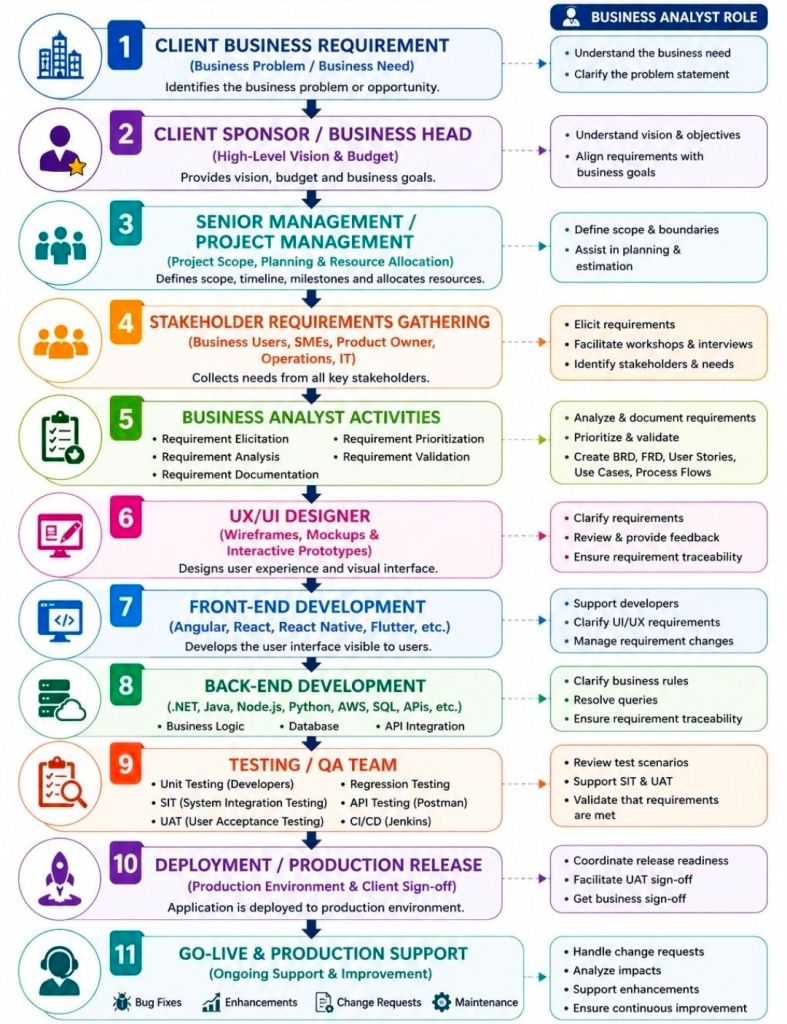
Planning Phase Business Analyst BA Deliverables

Planning Phase Business Analyst BA Deliverables

In the project planning phase, a Business Analyst (BA) focuses on establishing the project’s strategic alignment, defining the baseline scope, mapping stakeholders, and structuring the business analysis methodology.

The critical BA deliverables generated during this phase ensure clarity and alignment across technical and business teams before execution begins.

Strategic & Scope Foundations

  • Business Problem Statement: Defines the core issue being addressed, why it matters to the organisation, and the downstream impact if no action is taken.
  • Business Case: Outlines the shortlisted, viable operational choices alongside a comprehensive cost-benefit analysis to justify financial investment.
  • Project Vision & Scope: A high-level description outlining system boundaries, project objectives, and structural constraints to prevent eventual scope creep.

Stakeholder & Communication Frameworks

  • Stakeholder Map: Visually identifies all internal and external parties who are involved in, impacted by, or influential to the initiative.
  • Stakeholder Analysis Matrix: Assesses stakeholder interest and decision-making power to customize communication and engagement strategies.
  • Business Glossary: A standardized registry defining critical business terminology to maintain consistent vocabulary across different teams.

Process & Data Models

  • Current State Discovery (“As-Is” Models): A structured overview detailing exactly how today’s workflows, processes, and operating models currently function.
  • High-Level Context Diagram: Maps the structural boundaries of the proposed project, showing how the internal system will interact with external users and data systems.
  • Data Flow Diagram (DFD): Illustrates how information travels visually across different processes, storage points, actors, and functional areas.

BA Execution Planning

  • Business Analysis Approach: Outlines the core delivery methodology (e.g., Predictive/Waterfall or Adaptive/Agile), specifying the timelines, techniques, and governance processes to be used.
  • Requirements Management Plan: Defines the tools for managing requirements, access protocols, configuration control, and how changes to the baseline will be systematically approved.

Business Analyst and Sprint Planning focus

Business Analyst and Sprint Planning focus

In Agile and Scrum frameworks, the Business Analyst (BA) bridges the gap between high-level business vision and tactical development execution. During Sprint Planning, a BA’s primary focus is to ensure that the development team has absolute requirement clarity, eliminating assumptions before a single line of code is written.

The exact focus areas of an Agile Business Analyst are divided into pre-planning readiness, active session support, and look-ahead risk management.

1. Requirements Readiness (Definition of Ready)

The primary pre-planning objective for a BA is ensuring that the top of the Product Backlog satisfies the team’s “Definition of Ready” (DoR).

  • INVEST Criteria: Verifying that each Product Backlog Item (PBI) is Independent, Negotiable, Valuable, Estimable, Small, and Testable.
  • Acceptance Criteria: Drafting robust, edge-case-tested functional parameters (often using the Given-When-Then format) to govern testing.
  • Business Rules & Models: Mapping complex data models, workflows, and process rules so developers have clear visuals alongside text.

2. Guarding the Business Value and Sprint Goal

While the Product Owner (PO) sets the priority, the BA confirms that the selected sprint backlog items align logically to form a cohesive target.

  • Sprint Goal Formulation: Supporting the PO in defining a functional, clear objective for the iteration rather than a random collection of tickets.
  • Value Justification: Serving as the “voice of the user,” reminding the technical team why a feature is being built and how it affects the end-user journey.

3. Technical and Functional Bridging

During the actual planning meeting, developers break down stories into sub-tasks and estimate effort. The BA provides live context.

  • Assumption Removal: Answering immediate clarifications regarding data constraints, legacy dependencies, or UI expectations.
  • Sizing Support: Assisting the team during story-point estimation by highlighting hidden functional complexities that impact effort.
  • Scope Trimming: Helping break down massive User Stories (Epics) into bite-sized, single-sprint tasks if an item is deemed too large.

4. Dependency and Risk Mitigation

A critical focus for the BA is ensuring the upcoming sprint does not get blocked by outside factors.

  • Cross-Team Alignment: Identifying if a story relies on an API or data feed managed by an external team, ensuring those pieces are unblocked.
  • Non-Functional Requirements (NFRs): Catching frequently missed parameters, such as specific security protocols, compliance standards, or localization requirements, before work kicks off.

Agile Scrum Burnup vs Burndown Chart

Agile Scrum Burnup vs Burndown Chart