Mark Whitfield is a Senior IT Project Manager and Engagement Manager with over 30 years of experience in the software development lifecycle (SDLC). He is currently a SC-cleared Engagement Manager at Capgemini UK.
Professional Background by Era
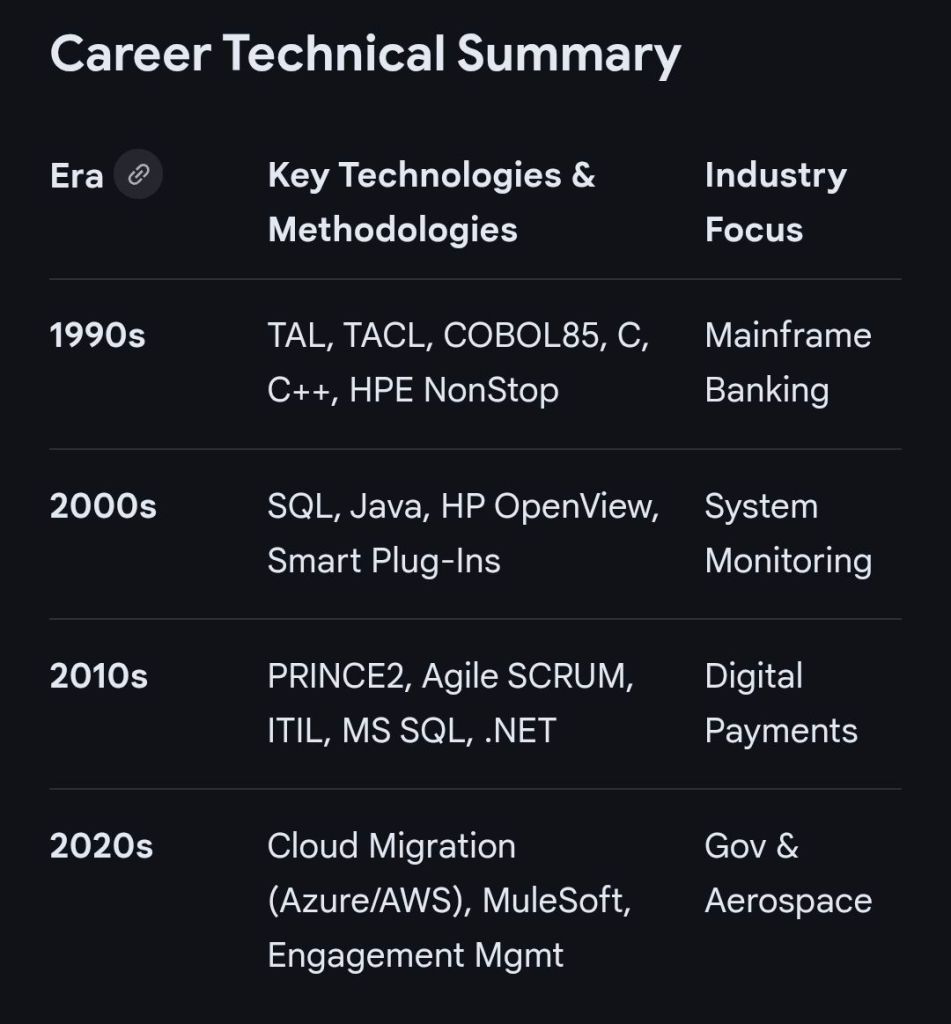
1990–1995: Early Programming (The Software Partnership/Deluxe Data)
Role: Programmer/Lead Analyst.
Focus: Developed electronic banking software (sp/ARCHITECT-BANK) on Tandem Mainframe Computers (now HPE NonStop).
1995–2013: Senior Development & Product Management (Insider Technologies)
Role: Progressed from Senior Programmer to Project Manager for Strategic Technical Initiatives.
Focus: Developed platform health and diagnostic modules for the “Reflex” monitoring product.
2013–2014: Project Management (Wincor Nixdorf)
Role: Project Manager, Professional Services – Banking Division.
Focus: Managed the Wincor Nixdorf workstream for Lloyds Banking Group’s Self-Service Software Replacement (SSSR) programme.
2014–2016: Digital Project Management (Betfred)
Role: Senior Digital Project Manager, Online and Mobile Division.
Focus: Delivered payment gateways, sportsbooks, and virtual gaming components for iOS, Android, and Windows.
Focus: Leading digital transformation and cloud migration projects for public and private sector clients.
Technologies & Frameworks
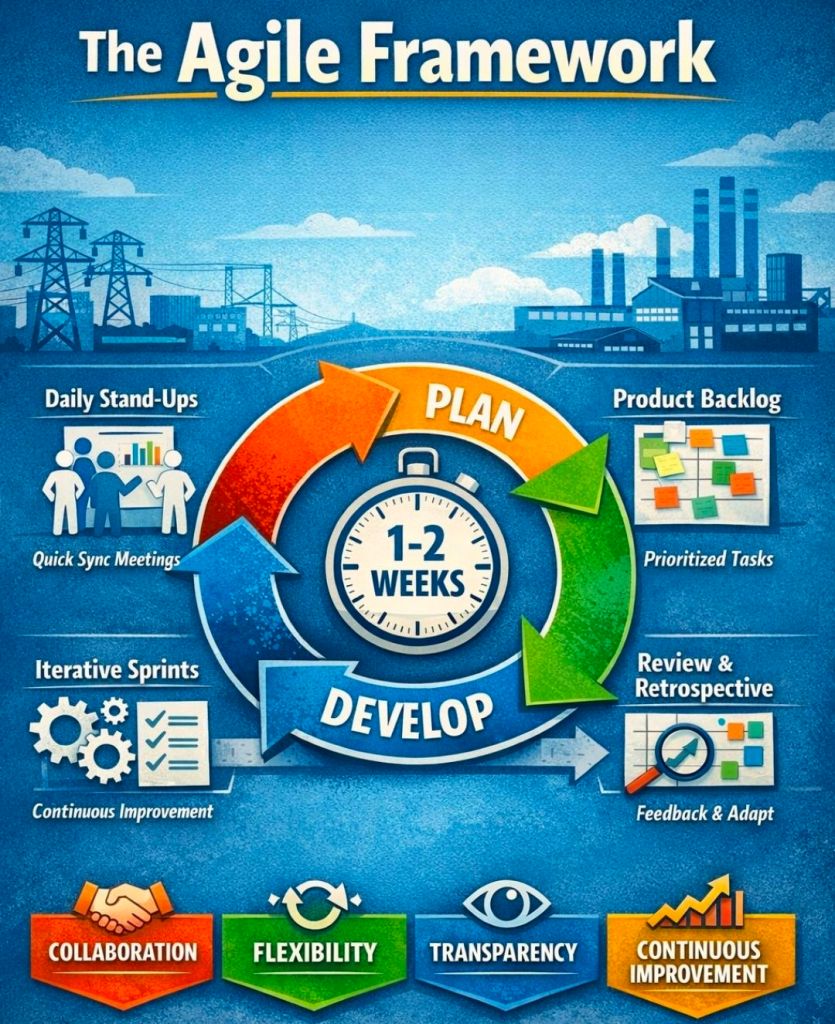
Project Methodologies: Agile SCRUM, PRINCE2 (Practitioner), Waterfall, ITIL, and ISO QA.
Mainframe & Infrastructure: HPE NonStop (Tandem), IBM ESB, UNIX shell scripting, and Cloud (MS Azure/AWS).
Programming & Databases: C/C++, MS SQL, Java, COBOL85, TAL, TACL, and SCOBOL.
Tools: MS Project, MS Excel/Office, MuleSoft Anypoint Platform, and Jira.
Major Projects & Customers
UK Government: Managed a £13.5m cloud migration of 130 applications and the £1m+ Fish Export Service (FES) to CHIP portal.
Royal Mail Group (RMG): Managed a £4.3m data centre migration project involving over 1,100 interfaces.
Lloyds Banking Group (LBG): Led a £5m+ self-service software replacement project.
Other Notable Clients: Jaguar Land Rover (JLR), Heathrow, NATS (Air Traffic Control), Barclays, HSBC, Deutsche Bank, and Euroclear.
Awards & Education
Awards:
C&CA UK’s Communications & Engagement Award (2022) at Capgemini UK.
Project Recognition Award from Wincor Nixdorf for achievements on the LBG SSSR project.
Education:
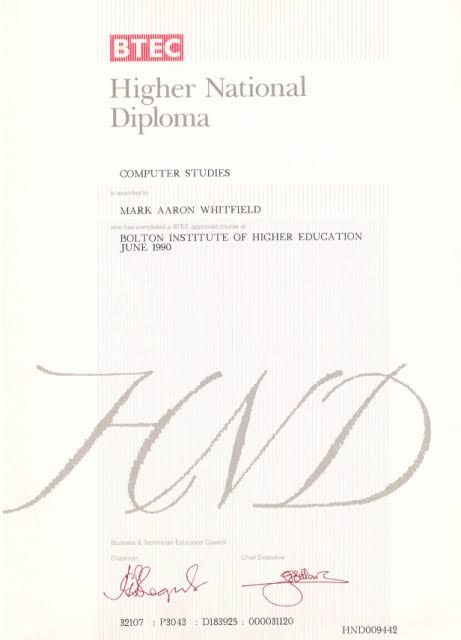
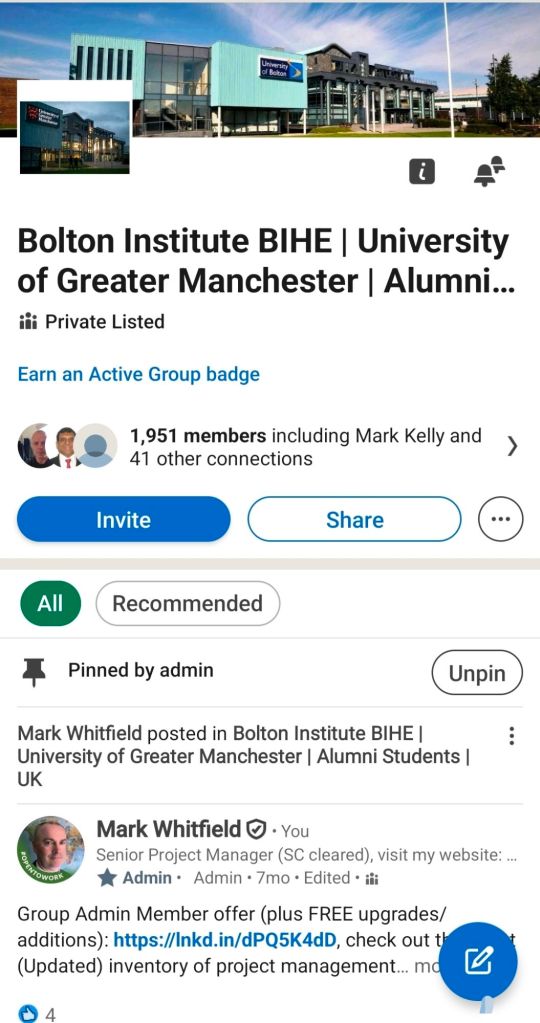
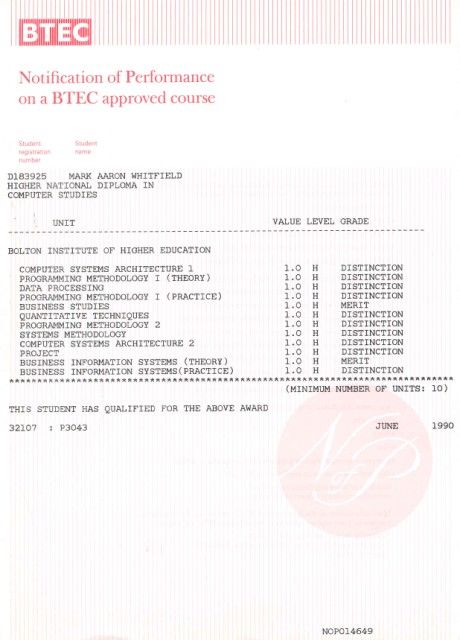
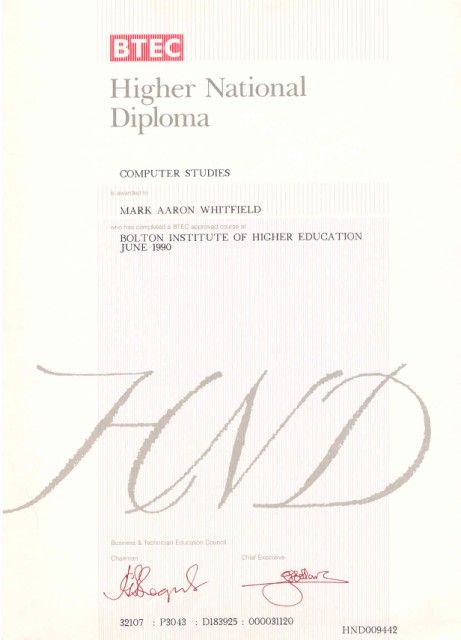
HND in Computer Studies (Distinction) from the University of Greater Manchester (formerly BIHE), 1988–1990.
A-Levels in Computer Science and Biology from Leigh College.
Project Management Templates
Whitfield provides a library of over 200 editable resources through his site, PROject Templates, designed for Agile, Waterfall, and PRINCE2 7th Edition delivery. Key items include:
Plan on a Page (POaP): Over 35+ executive-level summary slides.
Detailed Project Plans: Templates in MS Project (MPP) and Excel for SDLC tracking.
RAID Logs: Comprehensive registers for risks, actions, issues, and dependencies.
Mark Whitfield, an IT Project Manager specializing in HP NonStop systems, has a career and training history that spans over three decades, from his academic beginnings in the late 1980s to advanced cloud certifications in the 2020s.
Early Career & Foundations (1988–1995)
During this era, Whitfield focused on core computer science and specialized mainframe systems while working for The Software Partnership (TSP) and Deluxe Data.
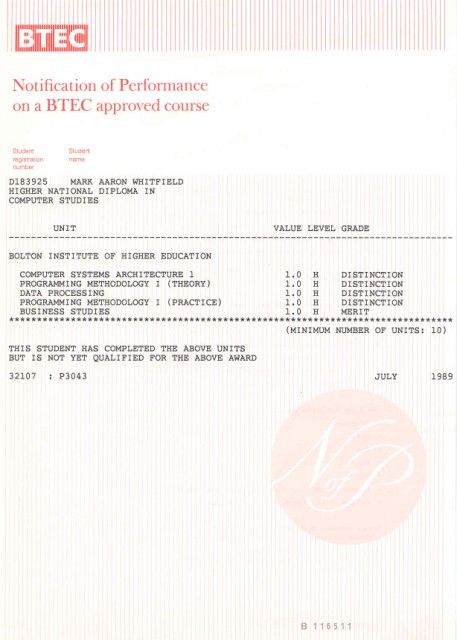
1988–1990: Completed a Higher National Diploma (HND) in Computing at the Bolton Institute of Higher Education (BIHE). Modules included Computer Systems Architecture, Programming Methodology, and Data Processing.
May 1993: Tandem Guardian Principles Course.
September 1994: VPS 7000/9000 Series and VPS Application Development (VOS 4.3).
June 1995: HP NonStop (Tandem) Performance Analysis and Tuning.
Development & Technical Specialisation (1995–2005)
Working primarily with Insider Technologies Limited, this period was marked by software development training in languages like C++ and initial forays into project management.
November 1995: HP NonStop TAL Programming.
March 1997: C / C++ Programming at Comtec Computer Training.
October 1998: Managing Multiple Projects, Objectives, and Deadlines at SkillPath.
February 1999: Successful Project Management at SkillPath.
May 2000: Microsoft Project ’98 Certification (Orange Belt) at the IIL UK Education Centre.
February 2001: Sales and Marketing training (In-House).
March 2004: MultiBatch NSK Job Scheduling Product.
February 2005: Web Services and SOA.
Web Development & Security Focus (2006–2010)
This era shows a shift toward web-based technologies and specialized security products.
January 2006: PRINCE2 Project Management Foundation.
February 2006: NetObjects Fusion.
March 2006: Cryptography (In-House at Thales e-Security).
December 2006: Thales e-Security SafeSign Product.
January 2007: Developing Web Applications Using Microsoft Visual Studio .NET.
March 2009: Querying Microsoft SQL 2000 with Transact SQL (M2071) at QA Training.
May 2009: Writing for the Web and Website Visibility & Promotion at iTrain Education.
November 2009: Thales e-Security HP NonStop Security Resource Manager (SRM).
Agile & Advanced Management (2011–Present)
In his current era at companies like Betfred and Capgemini, Whitfield has prioritized professional certifications in management and cloud infrastructure.
May 2011: Agile SCRUM Training (RADTAC) and PRINCE2 Practitioner Certification (ILX Group).
June–July 2011: Java and Google Android programming using the Eclipse IDE.
January 2012: ITIL Foundation Course.
July 2014: Advanced Microsoft Excel 2013.
November 2017: Advanced Engagement Management Certification (Level 2) at Capgemini.
February 2022: AZ-900 Microsoft Certified Azure Fundamentals.
July 2024: Microsoft Excel Refresher 2024 via Udemy.
Mark Whitfield is a Senior, SC cleared IT Project and Engagement Manager with over 30 years of experience, specializing in the software development lifecycle (SDLC) for large-scale digital and financial payment systems.
Mark Whitfield is a Senior, SC cleared IT Project and Engagement Manager
Key Projects: Leading high-value digital transformations and cloud migrations for UK Government applications, automotive (Jaguar Land Rover), and aerospace (Air Traffic Management iOS apps).
2014–2016: Betfred Limited (UK)
Role: IT Senior Digital Project Manager, Online and Mobile Division.
Key Projects: Managed multiple Agile SCRUM projects for payment gateways, sportsbooks, and virtual gaming components across iOS, Android, and Windows platforms.
2013–2014: Wincor Nixdorf Limited (UK)
Role: Project Manager, Professional Services – Banking Division.
Key Projects: Managed a £5M+ workstream for Lloyds Banking Group’s Self-Service Software Replacement (SSSR) program, migrating legacy HP NonStop systems to AIX-based Oracle technologies.
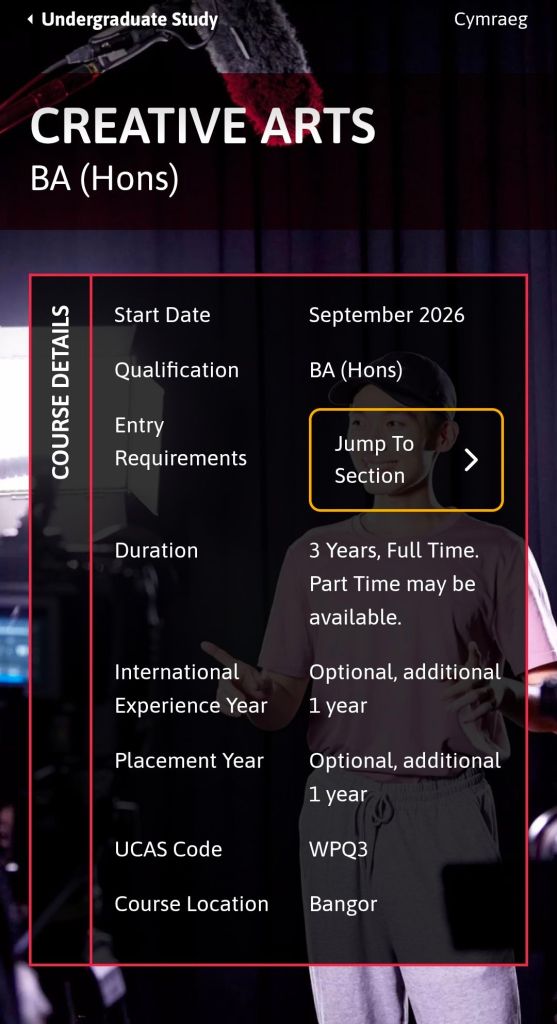
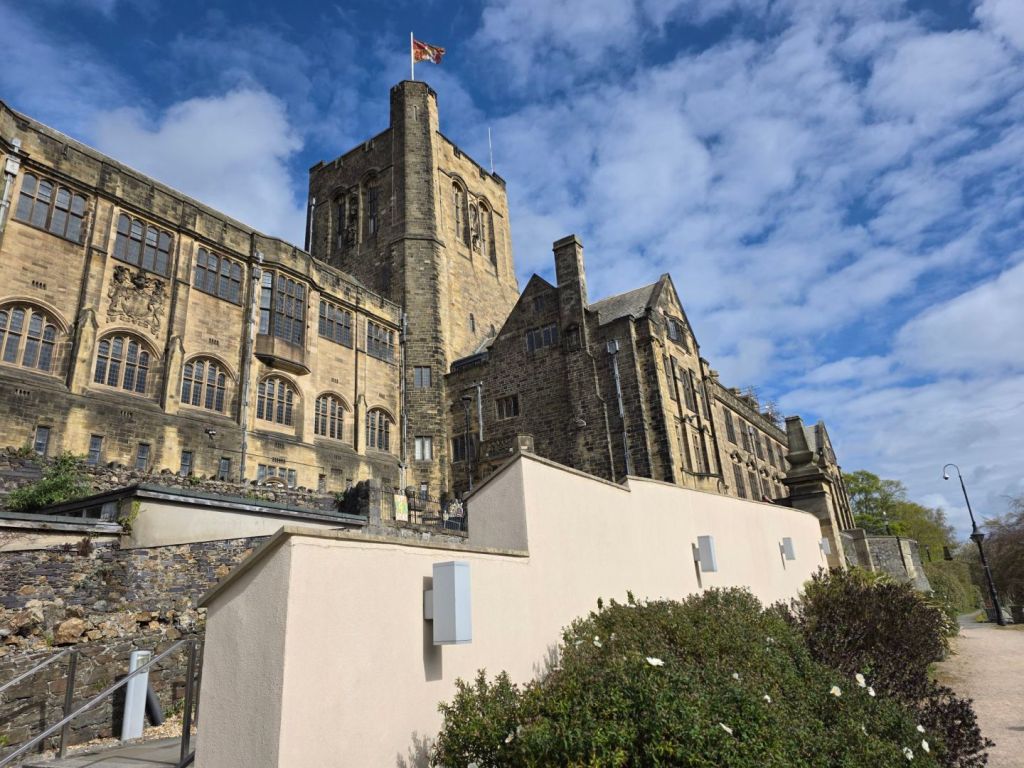
The Creative Arts BA (Hons) at Bangor University is a three-year, full-time course (UCAS code: WPQ3) that integrates film, media, journalism, and creative writing. It is designed to balance theoretical study with practical, hands-on production.
Creative Arts BA (Hons) at Bangor University is a full-time course that integrates film, media, journalism, and creative writing
Year 1: Foundations
In the first year, students must complete 120 credits to build a base in both creative practice and academic theory.
Compulsory Modules: A primary core module is Adventures in the Creative Arts (20 credits), which introduces multidisciplinary approaches to the field.
Core Skills: You will begin developing production techniques in areas such as audio and visual production, print journalism, and digital media.
Theoretical Grounding: Introductory modules cover film theory and cultural studies to enrich your research and analytical skills.
Year 2: Specialisation & Development
The second year allows for deeper engagement with specific creative industries.
Elective Choice: Students can tailor their studies to their interests, choosing between practice-based modules (e.g., screenwriting, documentary filmmaking, journalism practice) or academic-focused modules (e.g., media regulation, history of film).
Professional Engagement: You are encouraged to build professional networks through regular visits from filmmakers, journalists, and designers.
Optional Years: After Year 2, you may opt to take an International Experience Year or a Placement Year to work with a professional organisation.
Year 3: Synthesis & Final Project
The final year focuses on high-level production and a significant independent project.
Final Year Project: Instead of a traditional long-form essay, you can demonstrate your progress through creative outputs such as a fictionalised response, an online exhibition, a vlog, or a professional portfolio.
Advanced Practice: Modules continue to cover specialized topics like digital journalism, visual culture, and global media.
Professional Showcase: Students often participate in the annual media showcase held at the Pontio Arts and Innovation Centre, providing exposure for their work.
Teaching & Facilities
Learning Methods: Instruction is delivered through lectures, small seminar groups, interactive workshops, and one-to-one supervision.
Facilities: Students have access to industry-standard equipment via an extensive loan service (video/stills cameras, digital recorders) and dedicated creative spaces.
Assessment: Progress is measured via coursework, presentations, essays, and practical submissions (e.g., short films, scripts, or digital media pieces).
Creative Arts BA (Hons) at Bangor University is a full-time course that integrates film, media, journalism, and creative writing
Bangor University History Timeline by Era and Year
Bangor University (Welsh: Prifysgol Bangor) is a public research university in North Wales, originally founded as the University College of North Wales (UCNW) on 18 October 1884. Established through a historic public campaign, its foundation was uniquely funded by local quarrymen and farmers who contributed their own wages to ensure access to higher education for the people of North Wales.
Today, it is a prominent institution with over 10,000 students and 2,000 staff members, recognised for its research excellence and strong Welsh cultural identity.
Comprehensive Timeline of Bangor University
Era 1: Foundation & Early Years (1881–1899)
1881: The Aberdare Report recommends creating two university colleges in Wales, one for the south and one for the north.
1883: A committee selects Bangor over 12 other towns (including Wrexham and Rhyl) to host the new college.
1884 (18 October): The University College of North Wales officially opens in the Penrhyn Arms, an old coaching inn, with 58 students and 10 staff members.
1884: Mary Ellen Williams becomes the first student to enrol; female students notably make up one-third of the initial population.
1885: The institution receives its Royal Charter.
1893: Bangor becomes a founding constituent college of the federal University of Wales, ending its initial practice of conferring degrees through the University of London.
Era 2: The College on the Hill (1900–1939)
1903: The city of Bangor donates a 10-acre site at Penrallt for a new building.
1907: King Edward VII lays the foundation stone for the “Main Arts” building.
1911: The iconic Main Arts Building (the “College on the Hill”) is officially opened by King George V.
1926: The Science Departments, which had remained at the old Penrhyn Arms, move to new purpose-built facilities funded by the North Wales Heroes Memorial.
Era 3: Wartime & Mid-Century Expansion (1940–1999)
1940s (WWII): The university’s Prichard-Jones Hall is used to safeguard national art gallery paintings from enemy bombing.
1942: Neuadd Reichel, a hostel for male students designed by Percy Thomas, opens on the Ffriddoedd site.
1960s: Rapid expansion follows the Robbins Report, including the completion of the “New Arts” wing (1968) and the establishment of new departments like Social Theory (1966).
1967: The Bangor Normal College hosts lectures by the Maharishi Mahesh Yogi, attended by The Beatles.
1977: St Mary’s College, a women’s teacher training college, merges with the university.
1996: The Normal College (founded 1858) officially merges with the university, which is renamed University of Wales, Bangor.
Era 4: Independence & Modern Era (2000–Present)
2003: Storm FM, the official student radio station, begins broadcasting.
2007: The institution gains independent university status and adopts its current name, Bangor University.
2009: The university celebrates its 125th anniversary and begins awarding its own degrees independently of the University of Wales.
2015: The Pontio Arts and Innovation Centre and St Mary’s Student Village open.
2018: The M-SParc science park on Anglesey is completed.
2024: The university celebrates its 140th anniversary and opens its independent North Wales Medical School with its first intake of 80 students.
2025: A £10.5 million donation leads to the redevelopment and renaming of the Albert Guday Business School.
Mark Whitfield is a highly experienced IT professional with a career spanning over 30 years, transitioning from a technical programmer to a senior digital engagement and project manager. His expertise is rooted in HPE NonStop (Tandem) systems and has evolved to encompass complex Agile and Cloud delivery across diverse industries.
Early Technical Era (1990–1995)
Following his graduation in Computing in 1990, Whitfield began his career as a Programmer at The Software Partnership (later Deluxe Data).
Focus: Electronic banking software, specifically sp/ARCHITECT-BANK on Tandem Mainframe Computers.
Key Work: Developed code for major banks including TSB, Barclays, and Rabobank. This included early digital innovations like voice-driven phone banking and inter-account transfers before the internet was widespread.
Growth and Product Management Era (1995–2004)
Whitfield joined Insider Technologies Limited (ITL) in 1995 as a Senior Programmer.
Focus: Platform health and diagnostic software for HPE NonStop systems.
Key Projects:
Co-developed diagnostic plug-ins for the Reflex monitoring suite.
Managed the first HP OpenView Operations (OVO) Smart Plug-In certification for the NonStop platform in 2002.
Consulted for CRESTCo (Euroclear) in 1997, conducting benchmark testing on new S7000 nodes.
Strategic Leadership and Project Management Era (2005–2014)
During this decade, he transitioned into IT Project Management, focusing on high-value financial transaction tracking.
Focus: Waterfall and Agile project delivery for payment systems and banking infrastructure.
Key Milestones:
2011: Led a massive transaction tracking project at Al Rajhi Bank (Saudi Arabia), parsing terabytes of tape-archived data into a normalised SQL database.
2013–2014: At Wincor Nixdorf, managed a £5+ million project for Lloyds Banking Group to migrate ATM driving responsibilities from legacy systems to AIX-based Oracle technologies.
Senior Digital Engagement Era (2014–Present)
Since 2014, Whitfield has focused on senior-level digital transformation and engagement management.
Betfred (2014–2016): Served as Senior Digital Project Manager for online and mobile platforms (iOS/Android), managing fraud detection and payment gateway integrations.
Capgemini (2016–Present): Joined as an Engagement Manager (SC cleared).
Focus: Managing large-scale Agile and Waterfall digital projects across aerospace, defence, and government sectors.
Notable Projects: Leading a £13.5m programme to migrate 130 UK government applications to the cloud (AWS/Azure) and delivering real-time airspace monitoring apps for air traffic organisations.
A Higher National Diploma (HND) is a Level 5 vocational qualification in the UK, equivalent to the first two years of a university bachelor’s degree. Designed to provide industry-specific practical skills, it typically takes two years of full-time study or three to four years part-time.
Higher National Diploma HND in Computer Studies (3)
Historical Timeline of the HND
The HND has evolved from a niche engineering credential into a globally recognised vocational standard.
The Early Era: Origins and Industrial Focus (1920s–1950s)
1920: The Higher National Diploma was first introduced in England and Wales alongside the Ordinary National Diploma (OND) and Higher National Certificate (HNC).
1921–1923: Initial subject frameworks were established, starting with Mechanical Engineering (1921) and Electrical Engineering (1923).
1930s: The qualification expanded into Building (1929) and Commerce (1939) to support a growing industrial economy.
Post-WWII: The 1944 Butler Act reorganised secondary education, but HNDs remained the primary route for advanced technical training in colleges.
The Expansion Era: Growth and New Governance (1960s–1970s)
1960s: HNDs gained prominence in polytechnics, addressing critical skills gaps through a practical approach to higher education.
1968–1969: Awards for HNDs saw a massive 665% increase compared to a decade prior, beginning to rival university “ordinary degrees” in popularity.
1972–1974: Under Margaret Thatcher (then Education Secretary), the Haselgrave Report recommendations led to moving qualifications from the City and Guilds to two new bodies: the Business Education Council (BEC) and the Technician Education Council (TEC).
The BTEC and Modernisation Era (1980s–2000s)
1983: BEC and TEC merged to form the Business and Technician Education Council (BTEC), which became the primary awarding body for HNDs.
1990s: BTEC merged with the University of London Examinations Board to form Edexcel (now part of Pearson).
1980s–90s: The curriculum diversified rapidly into modern sectors such as computing, business, catering, and performing arts.
2000s: Global expansion accelerated; for instance, the HND was formally introduced in Cameroon in 2002.
Higher National Diploma HND in Computer Studies (1)
The Contemporary Era: Frameworks and Global Standard (2010s–Present)
2013–2014: Despite a decline in public sector colleges due to the rise of Foundation Degrees, HND student numbers at private providers grew from 13,000 to 30,000 in just one year.
2018: Major global curriculum updates were implemented to integrate digital literacy, sustainability, and entrepreneurship into traditional vocational subjects.
Mark Whitfield is an experienced IT Project Manager and software developer who has spent over 22 years specialising in HP NonStop (formerly Tandem) systems. He is currently an Engagement Project Manager at Capgemini.
Career & Expertise
Whitfield’s career in HP NonStop began in 1990 and includes significant technical and leadership roles across the financial and technology sectors:
Software Development: Early in his career, he worked as a programmer for The Software Partnership (later Deluxe Data/FIS), focusing on electronic banking software like sp/ARCHITECT on Tandem mainframes.
Insider Technologies (1995–2013): He spent 18 years at Insider Technologies as a Senior Development Engineer and Project Manager. His work involved:
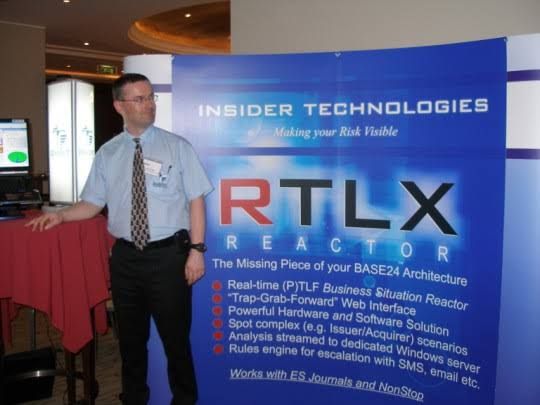
Developing monitoring and diagnostic software such as Reflex 80:20, Reflex ONE24, and RTLX (Real-Time Log Extraction) for payment systems.
Managing the first HP OpenView Operations Smart Plug-In certification for the NonStop platform.
Designing XPERT24, a performance tracking product for ACI’s XPNET layer.
Capgemini (2016–Present): As an Engagement Project Manager, he has led digital projects for major clients in the automotive, government, and aerospace sectors, including a cloud migration for UK Government applications.
Technical Contributions
Publications: He has authored articles for globally published journals like The Connection (2013), discussing topics such as querying terabytes of legacy transaction log data from NonStop mainframes.
Project History: He has managed high-value projects, including a £5 million initiative to migrate legacy HP NonStop software to AIX-based technologies for a large UK retail bank.
Training: He is trained in various NonStop-specific technologies, including TAL (Transaction Application Language), COBOL85, PATHWAY, and NonStop SQL.
Whitfield also maintains a professional website, mark-whitfield.com, where he provides project management templates and resources related to HP NonStop and Tandem systems.
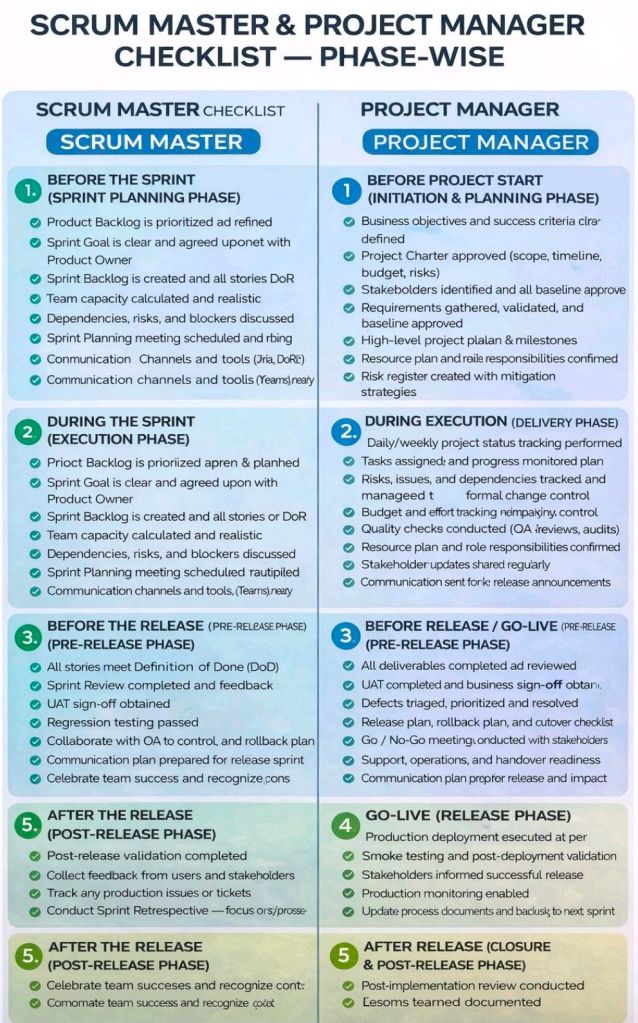
Mark Whitfield provides a comprehensive bundle of over 200 editable project management templates designed for Agile, Waterfall, and PRINCE2 methodologies. These templates are based on over 30 years of project delivery experience and are available for purchase via his official website or Etsy shop.
Key Template Categories
The bundle includes a wide variety of tools across different formats (Excel, PowerPoint, Word, and MS Project):
Planning & Scheduling:
Plan on a Page (POaP): Over 30 PowerPoint slide examples for executive-level summaries.
Detailed Project Plans: MS Project (MPP) and Excel templates for SDLC, PRINCE2 7th Edition, and Agile Scrum projects.
Gantt Charts: Built-in tracking views for both MS Project and Excel.
Tracking & Control:
RAID Logs: Comprehensive logs for tracking Risks, Actions, Issues, and Dependencies, plus additional tabs for Change Requests and Lessons Learned.
RACI Matrix: Templates to define project roles and responsibilities (Responsible, Accountable, Consulted, Informed).
Finance Trackers: Tools for internal and external forecast vs. actual costs, including margin and variance tracking.
Agile Specific Tools:
Burn Down & Burn Up Charts: Excel-based alternatives when tools like Jira are unavailable.
Agile Story Dependency Tracking: Specifically for managing dependencies between agile stories and external suppliers.
Reporting & Governance:
Status Reports: Weekly and monthly templates in Word and PowerPoint formats.
Stakeholder Analysis: Power/interest mapping and engagement plan templates.
Benefits Realisation: Plans to track project outcomes against initial business goals.
Purchase Benefits
Lifetime Upgrades: Once purchased, all future additions and updates to the template package are provided for free.
Compatibility: Templates are designed for Microsoft Office 365 but also include Excel versions compatible with earlier software.
Support: The package typically includes walkthrough Word documents to guide users on how to use each major template.
Mark Whitfield HP NonStop Tandem experience & Project Management Templates
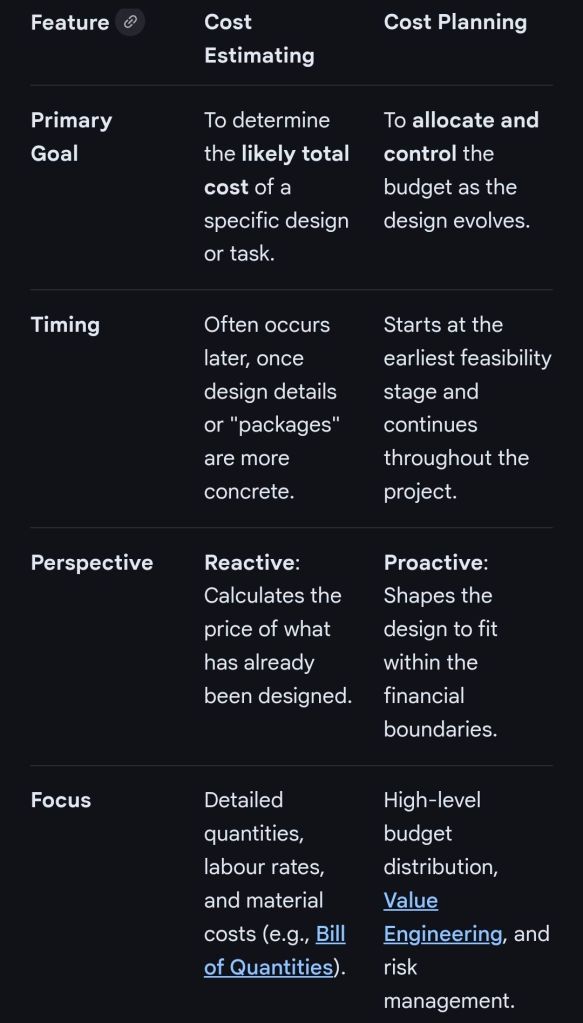
In professional project management and construction, cost estimating and cost planning are complementary processes that occur at different stages to ensure a project remains financially viable.
1. Cost Estimating: “What will it cost?”
Cost estimating is a technical assessment used to predict the expenditures for a project.
Early Stages: Estimates might be “rough orders of magnitude” based on square footage or historical data (e.g., cost per hotel room).
Later Stages: Estimates become precise “tender figures” used by contractors to bid on work, factoring in current market rates for labour and materials.
Function: It answers the question: “Is this specific plan affordable?”.
2. Cost Planning: “How do we stay on budget?”
Cost planning is a strategic framework that manages a project’s financial health from start to finish.
Iterative Process: It is a “living document” that is updated as the project moves from concept to detailed design.
Allocation: It breaks down the total budget into “elemental” targets (e.g., spending £X on the foundation and £Y on finishes).
Control: If an estimate for one part of the project exceeds its target, the cost plan guides the team to adjust the design or find savings elsewhere to keep the overall project on track.
Standard Professional Guidance
The Royal Institution of Chartered Surveyors (RICS) provides the New Rules of Measurement (NRM 1), which standardises how these processes work together:
Order of Cost Estimate: Establishing the initial viability of a project.
Elemental Cost Plan: Breaking the estimate down into functional parts.
Cost Checking: Continually comparing design changes against the cost plan to prevent overspending.
Research Machines (now RM plc) has a long-standing history as a primary provider of technology for the UK education sector. Founded in 1973, the company transitioned from a hobbyist component supplier to a leading manufacturer of educational microcomputers and networking systems.
Overview of Research Machines “LINK”
The LINK designation primarily referred to the RM Link 480Z, introduced in 1982. It was designed as a lower-cost, diskless network station that could “link” into a chain, typically using a more powerful 380Z as a file server. This system was one of three chosen for the UK government’s 1982 Educational Scheme.
Timeline History by Era and Device
The Founding Era (1973–1976)
1973: Founded as Research Machines Limited in Oxford by Mike Fischer and Mike O’Regan.
1974: Operated under the name Sintel, a mail-order supplier of electronic components for hobbyists.
The Z80 Era (1977–1984)
1977: Launched the RML 380Z, an 8-bit microcomputer based on the Zilog Z80 processor. It typically ran the CP/M operating system and was often housed in a distinctive large black metal case.
1982: Introduced the RM Link 480Z.
Purpose: Designed as a diskless network node for schools.
Networking: Used the proprietary CHAIN Network or Z-Net to connect to a 380Z file server.
Hardware: Featured a Z80 CPU and up to 256 KB of bank-switched RAM. Early models had black metal cases, later replaced by cream plastic.
The Nimbus & PC Transition (1985–1990s)
1985: Launched the RM Nimbus PC-186, using the Intel 80186 processor. While not fully IBM-compatible, it could run early versions of Microsoft Windows (up to 3.0).
1986: Released the RM AX (using the Intel 80286), often used as a file server for Nimbus networks.
Late 1980s: Introduced the M Series (PC-286/386) and S Series (PC-386 and later), which were fully IBM PC compatible.
The PC Era & Diversification (1994–Present)
1994: Floated on the London Stock Exchange as RM plc.
1997: Introduced the C Series of computers for schools.
2003: Launched the F Series (blue chassis) pre-installed with Windows XP.
2010: Released a new line of black and silver RM computers for Windows 7.
Current: RM has pivoted from hardware manufacturing to becoming a global EdTech solutions provider, focusing on digital assessment (RM Ava) and managed IT services.
Research Machines Limited, Link Timeline History by Era and Device
ISO 9001 is founded on seven core Quality Management Principles (QMPs) designed to guide organisations toward improved performance and consistent quality. Its history is a progression from rigid, procedure-heavy military-style standards to flexible, risk-based management systems.
Core Principles of ISO 9001:2015
These seven principles form the foundation of the current standard:
Customer Focus: Meeting and exceeding customer expectations is the primary focus to drive loyalty and revenue.
Leadership: Leaders at all levels establish unity of purpose and direction, creating an environment where people are engaged.
Engagement of People: Competent, empowered, and engaged people across all levels are essential to enhance the organisation’s value.
Process Approach: Understanding activities as interrelated processes that function as a coherent system leads to more predictable results.
Improvement: A permanent objective of every successful organisation is the continual improvement of its performance.
Evidence-based Decision Making: Decisions based on the analysis and evaluation of data are more likely to produce desired results.
Relationship Management: Managing relationships with interested parties, such as suppliers and partners, optimizes their impact on performance.
Detailed Timeline History
The evolution of ISO 9001 can be categorised into four distinct eras:
1. The Pre-ISO Foundations (1950s – 1986)
1959: US and UK military departments establish MIL-SPECS for procurement.
1969: NATO AQAP standards are introduced for defense industry mutual recognition.
1971: The British Standards Institution (BSI) releases BS 9000 for the electronics industry.
1979: BS 5750 is published in the UK, becoming the first general-purpose quality management standard for industry.
2. The Procedural & Quality Assurance Era (1987 – 1999)
1987 (ISO 9001:1987): First international publication. Focused on quality assurance through procedural controls and final product inspections. Three models existed: 9001 (Design/Production), 9002 (Production), and 9003 (Inspection).
1994 (ISO 9001:1994): First revision. Shifted focus toward preventative actions rather than just checking finished products. However, it remained “document-heavy,” often leading to excessive bureaucracy.
3. The Process Management Era (2000 – 2014)
2000 (ISO 9001:2000): A major overhaul. Consolidated ISO 9001, 9002, and 9003 into a single standard. Introduced the Process Approach and the original eight Quality Management Principles.
2008 (ISO 9001:2008): A minor update focusing on clarification and consistency with other standards like ISO 14001 (Environment). No new requirements were added.
4. The Risk-Based & Strategy Era (2015 – Present)
2015 (ISO 9001:2015): Introduced Risk-Based Thinking and the High-Level Structure (HLS) to ease integration with other management systems. It reduced prescriptive documentation requirements, focusing instead on organisational context and leadership accountability.
2026 (Upcoming): The next major revision is currently under development (target: September 2026), expected to address digitalisation, sustainability (ESG), and climate change.
ISO 9001 Quality Assurance Detailed Timeline History by year
The history of the General Data Protection Regulation (GDPR) spans several decades, evolving from early privacy concepts to a globally adopted gold standard for data protection.
The Early Era: Foundations of Privacy (1890–1990)
1890: The “Right to Privacy” concept is first articulated in the USA by Warren and Brandeis.
1950: The European Convention on Human Rights is established, protecting the right to respect for private and family life.
1970: The German state of Hesse passes the world’s first data protection law.
1973: Sweden enacts the first national Data Protection Act.
1980: The OECD issues privacy principles to harmonise international data flows.
1981: Convention 108 is signed, becoming the first legally binding international treaty for data protection.
The Directive Era: Pre-Internet Regulation (1995–2011)
1995: The EU adopts the Data Protection Directive (95/46/EC), setting minimum standards for member states.
This resume summarizes the career of Mark Whitfield, a Senior IT Project Manager with over 30 years of experience specializing in digital and software development lifecycles, cloud migrations, and HP NonStop systems.
Core Focus: Senior Project Management for Digital/ Software Development Lifecycles (SDLC).
Expertise: Transitioning from a technical background in programming (pre-2000) to senior leadership in large-scale projects for global blue-chip companies.
Key Skills & Competencies
Methodologies: PRINCE2 Practitioner, Agile (Scrum/ Kanban), Waterfall, ITIL, ISO QA.
Project Controls: MS Project, Budget & Burn Tracking, GDPR compliance, Supplier & Stakeholder Management, Statement of Work (SoW).
Technical Proficiencies:
Platforms: HP NonStop (Tandem), Cloud Migration (Hybrid).
Languages (Historical): C/C++, Java, COBOL85, TAL, TACL, SCOBOL, SQL, MS SQL.
Utilities: PATHWAY, SCF, FUP, INSPECT, XPNET.
Professional Experience
Senior IT Project Manager (Various Projects):
Managed large-scale solutions for clients including Jaguar Land Rover (JLR), Heathrow, Royal Mail Group (RMG), NATS, and Euroclear.
Extensive work within the financial sector for Bank of England, Barclays, HSBC, Santander, Standard Chartered, Deutsche Bank, and Global Payments.
Government and public sector projects for Defra, UKEF, Welsh Water, and Scottish Water.
Early Career (Programmer / Technical Lead):
1990 – 1995: Programmer at The Software Partnership (later Deluxe Data) in Runcorn, specializing in electronic banking software (sp/ARCHITECT-BANK) on Tandem Mainframe Computers.
Education & Certifications
Degree: Higher National Diploma (HND) in Computing (Distinction, Graduated 1990).
BASIC (Beginner’s All-purpose Symbolic Instruction Code) was designed to make computing accessible to non-scientists, evolving from a simple teaching tool into the foundational language of the personal computer revolution.
The Academic Era (1964–1974)
1964: Invention at Dartmouth. John Kemeny and Thomas Kurtz created BASIC at Dartmouth College to allow students in non-technical fields to use computers.
1964: First Execution. The first BASIC program ran on 1 May 1964, on a GE-225 mainframe.
Philosophy of Simplicity. It featured an intuitive, English-like syntax and was originally a “compile-and-run” language rather than a slow interpreter.
Time-Sharing. BASIC was designed for the Dartmouth Time-Sharing System (DTSS), allowing multiple users to program simultaneously from different terminals.
The Home Computer Revolution (1975–1980s)
1975: Altair BASIC. Bill Gates and Paul Allen developed a BASIC interpreter for the MITS Altair 8800, which became Microsoft’s first product.
The “De Facto” Standard. By the late 1970s, BASIC was pre-installed in the ROM of almost every major home computer, including the Apple II, Commodore PET, and TRS-80.
Interpreted vs. Compiled. To save memory (often limited to 4KB), these versions were typically “interpreted,” meaning the computer translated code line-by-line during execution.
Hobbyist Culture. Magazines and books published “type-in” programs, allowing millions of users to learn coding by manually entering BASIC code.
The Professionalization & Decline (Mid-1980s–1990)
Structured Evolution. Microsoft released QuickBASIC (1985), which introduced structured syntax (removing the need for line numbers) and a compiler for faster performance.
Rise of C and Pascal. Professional developers began shifting toward more powerful languages like C and Pascal as hardware became capable of supporting them.
Shift to Applications. As pre-written commercial software became common, the average user stopped writing their own programs in BASIC.
The Visual & Enterprise Era (1991–Present)
1991: Visual Basic (VB). Microsoft combined BASIC with a graphical user interface (GUI) designer, allowing developers to “drag and drop” buttons and forms.
Dominance in Business. By 1998, an estimated two-thirds of Windows business applications were built using Visual Basic 6.0.
2002: Visual Basic .NET. Microsoft transitioned the language to the .NET framework, turning it into a fully object-oriented language.
Modern Status. While C# has surpassed it in popularity, VB.NET remains a stable, maintained language used heavily for maintaining legacy systems and Office automation.
BASIC programming language timeline history by year
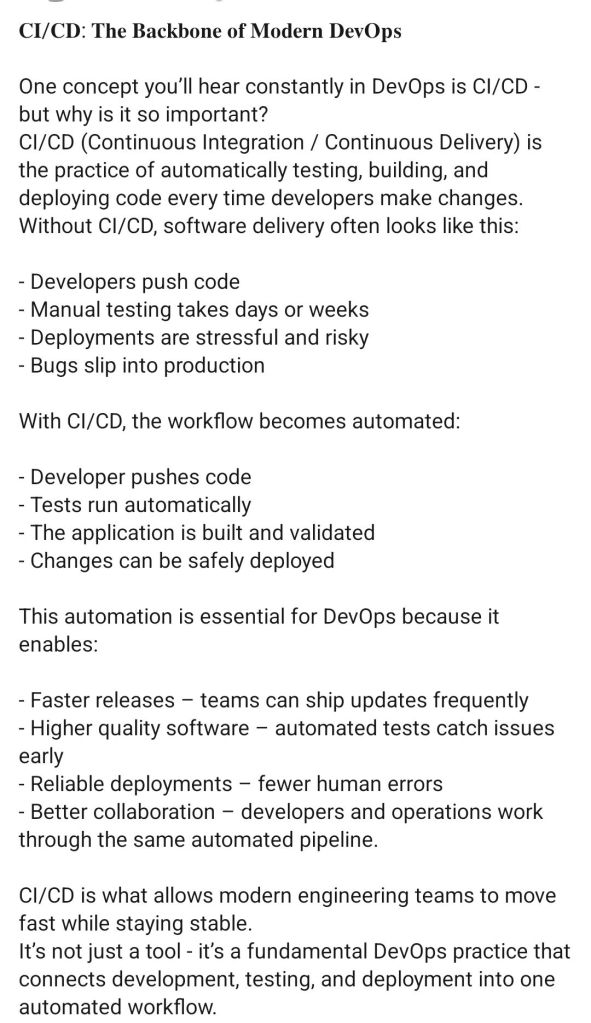
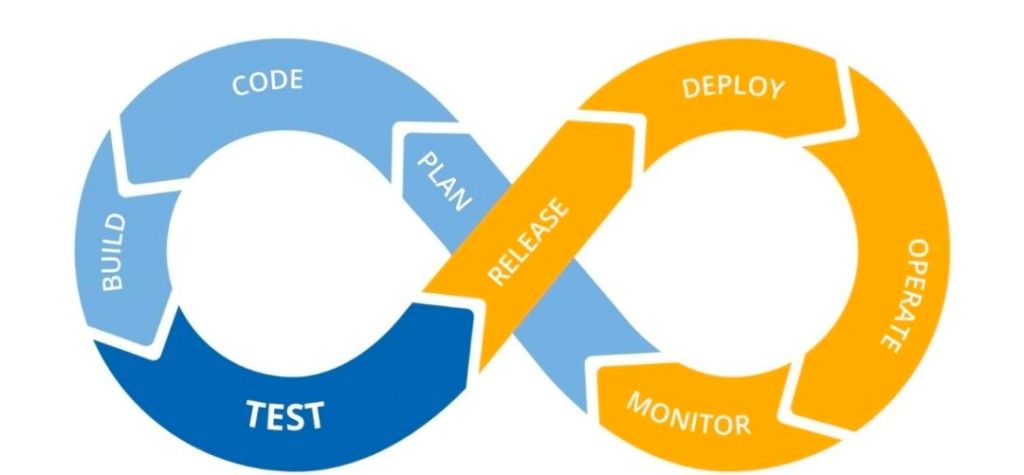
The evolution of CI/CD (Continuous Integration and Continuous Delivery/Deployment) has transitioned from manual, high-risk “integration hell” to fully automated, cloud-native pipelines.
Foundational Era (Pre-2000s)
1989: Earliest known work on CI with the Infuse environment.
1991: Root practices of CI/CD began to emerge.
1994: Grady Booch used the term “continuous integration” in his book Object-Oriented Analysis and Design with Applications.
1997–1999: Kent Beck and Ron Jeffries formalise CI as a core practice of Extreme Programming (XP).
The Rise of Automation (2001–2010)
2001:CruiseControl is released as the first widely used open-source CI server.
2005:Hudson (the predecessor to Jenkins) is created by Kohsuke Kawaguchi at Sun Microsystems.
2006: JetBrains releases TeamCity.
2010: Jez Humble and David Farley publish the seminal book Continuous Delivery, formalising the “CD” part of the equation.
2010: IMVU engineers document the first practical CD system, initially met with skepticism but quickly adopted by lean software movements.
Modern CI/CD & Cloud Era (2011–2018)
2011:Jenkins is born after a legal dispute between Oracle and the Hudson community.
2011:Travis CI launches, popularising CI-as-a-Service for GitHub projects.
2013: Docker is released, revolutionising CI/CD through containerisation.
2014: GitLab CI is integrated directly into the GitLab platform.
2018:GitHub Actions is introduced, bringing native automation directly into the world’s largest code repository.
Cloud-Native & AI Era (2019–Present)
2019:Argo CD and Flux gain prominence as Kubernetes-native GitOps tools.
2020–2021: Massive growth phase for GitHub Actions, with over 12% of projects adopting or changing CI/CD technologies during this period.
2024–2026: Modern pipelines transition toward adaptive systems that use AI to optimize test suites and make contextual decisions rather than just running fixed sequences.
Evolution of CI/CD (Continuous Integration and Continuous Delivery/Deployment
The Third Normal Form (3NF) is a standard for database design that ensures data integrity by removing transitive dependencies. Its development was part of the foundational era of the relational model.
Comprehensive Timeline of 3NF and Normalization
1970 — The Birth of Relational Theory: Dr. E.F. Codd, a researcher at IBM, published his seminal paper, “A Relational Model of Data for Large Shared Data Banks.” This introduced the concepts of First Normal Form (1NF) and the initial framework for normalization.
1971 — Official Definition of 3NF: Codd formally defined Third Normal Form in his paper “Further Normalization of the Data Base Relational Model.” He also refined Second Normal Form (2NF) in this same period.
1971 (August) — Technical Specification: The specific requirements for 3NF were further detailed in the IBM Research Report RJ909, solidifying the mathematical rules for removing transitive functional dependencies.
1974 — Extension to Boyce-Codd Normal Form (BCNF): Together with Raymond F. Boyce, Codd introduced BCNF. Often considered a stronger version of 3NF, it addresses certain anomalies that 3NF might still permit.
1977–1979 — Higher Normal Forms: Ronald Fagin introduced Fourth Normal Form (4NF) in 1977 and Fifth Normal Form (5NF) in 1979 to address multi-valued and join dependencies, respectively.
2002 — 6NF Definition: C.J. Date, Hugh Darwen, and Nikos Lorentzos defined Sixth Normal Form (6NF) specifically for temporal databases.
3NF Requirement Summary
To reach 3NF, a table must follow a cumulative progression:
1NF: Each cell must contain atomic values, and there should be no repeating groups.
2NF: The table must be in 1NF, and every non-key attribute must depend on the entire primary key (no partial dependencies).
3NF: The table must be in 2NF, and every non-key attribute must depend only on the primary key (no transitive dependencies).
To reach Third Normal Form (3NF), a database table must first satisfy the requirements of 1NF and 2NF. The primary goal of 3NF is to ensure that all non-key columns depend only on the primary key, effectively eliminating “transitive dependencies”.
Step-by-Step Process
Verify Second Normal Form (2NF)
Ensure the table has a primary key.
Confirm all non-key attributes depend on the entire primary key (no partial dependencies).
Identify Transitive Dependencies
Look for “hidden” relationships where a non-prime attribute depends on another non-prime attribute.
Logic: If Attribute A (Primary Key) → Attribute B, and Attribute B → Attribute C, then Attribute C has a transitive dependency on the Primary Key through B.
Remove the Dependent Attributes
Select the attributes that do not directly depend on the primary key.
Move these attributes into a new, separate table.
Establish Relationships
In the original table, keep the attribute that served as the “determinant” (the non-key attribute that others depended on) to act as a foreign key.
In the new table, set that same attribute as the primary key.
Practical Example
Consider a Student table with: StudentID (PK), StudentName, ZipCode, and City.
Problem: City depends on ZipCode, and ZipCode depends on StudentID. This is a transitive dependency (StudentID → ZipCode → City).
By following these steps, you eliminate data redundancy and prevent update anomalies where changing a city name would otherwise require updating every student record in that zip code.
Third Normal Form 3NF Development Timeline and Example




 PROject Templates