IT Project Management (PM) toolkits provide over 200 tailored templates spanning Agile, Waterfall, & PRINCE2 methodologies

The IT Project Management (PM) toolkits created by Mark Whitfield provide over 200 tailored templates spanning Agile, Waterfall, and PRINCE2 methodologies. These artifacts are designed to structure, track, and report on software delivery lifecycles (SDLC).

The framework’s core templates are categorized below by operational delivery area, specific template artifact, and native file format:

📅 Schedule, Planning & Timelines

Focuses on structural design, building work breakdown structures (WBS), and visualizing milestones for senior stakeholders.

  • Detailed SDLC / PRINCE2 Project Plan: Microsoft Project (.mpp), Excel (.xlsx)
  • Agile Scrum Sprint Planner & Delivery Plan: Microsoft Project (.mpp), Excel (.xlsx)
  • Plan on a Page (POaP) Milestone Visualizer: PowerPoint (.pptx)—over 35 custom variations
  • Gantt Chart Trackers: Excel (.xlsx)

🔍 Risk, Issue & Change Control (RAID)

Manages constraints, operational hazards, dependencies, and baseline deviations.

  • Simple RAID Log (Risks, Assumptions, Issues, Dependencies): Excel (.xlsx)
  • Comprehensive Tracking Register (Includes RAIDs, Suppliers, Deliverables, and Out-of-Scope tasks): Excel (.xlsx)
  • Change Request Tracker: Excel (.xlsx)

📊 Governance, Tracking & Status Reporting

Facilitates communication across team tiers and summarizes health indicators for client or internal reviews.

  • Weekly & Monthly Project Status Reports: PowerPoint (.pptx), Word (.docx)
  • RACI Matrix (Roles & Responsibilities Tracker): Excel (.xlsx)
  • Agile Burndown and Burnup Charts: Excel (.xlsx)
  • Meeting Minutes and Action Item Logs: Word (.docx)

💰 Finance, Resources & Benefits

Tracks financial trajectories, internal/external staffing allocation, and post-launch outcomes.

  • Full Project Financial Tracker (Forecasts, Actuals, Variances, Margins, and Expenses): Excel (.xlsx)
  • Simple Monthly Budget Forecast: Excel (.xlsx)
  • Resource Cost & Annual Leave Tracker: Excel (.xlsx)
  • Benefits Realisation Analysis Tracker: Excel (.xlsx)

🏗️ Initiation, Structure & Walkthroughs

Establishes the foundation of the delivery framework and walks team members through how to execute templates.

  • Project Kick-Off Presentation Deck: PowerPoint (.pptx)
  • Project Organisation Charts: PowerPoint (.pptx)
  • Template Walkthrough Documentation Guides: Word (.docx)

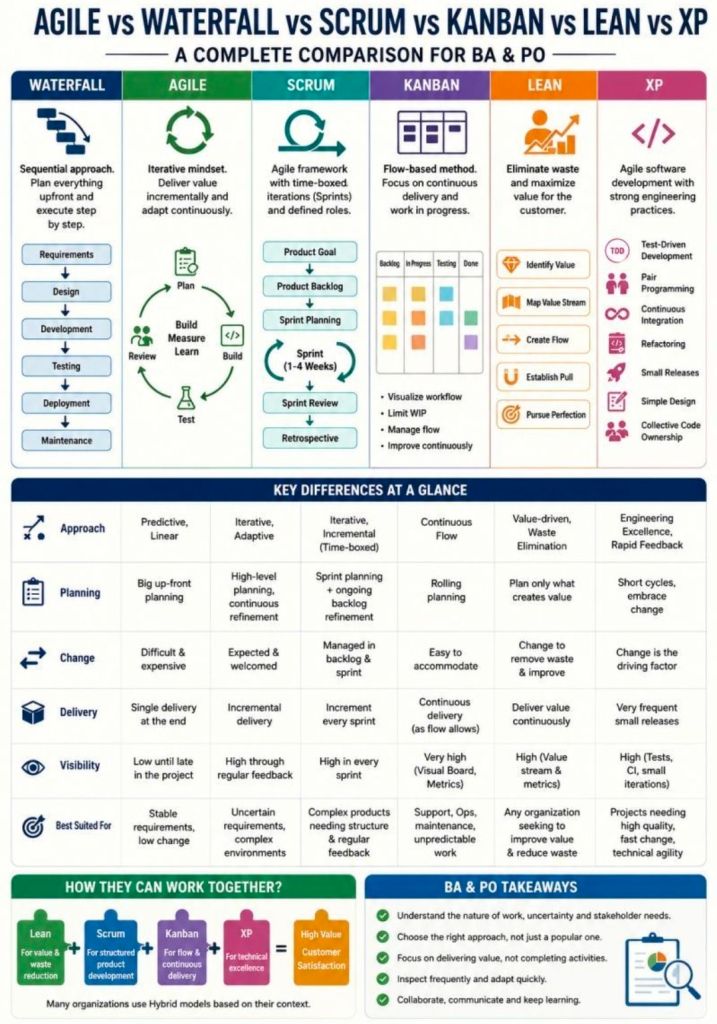
Agile Waterfall Scrum Kanban Lean XP for BA & PO

Agile Waterfall Scrum Kanban Lean XP for BA & PO

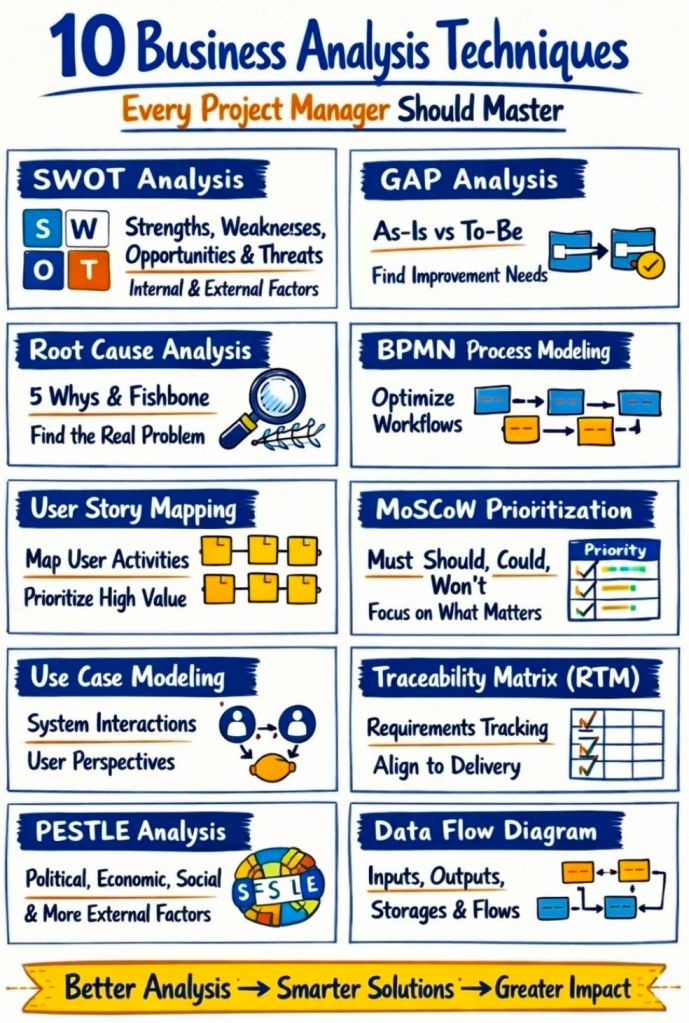
Business Analysis Techniques for Project Managers

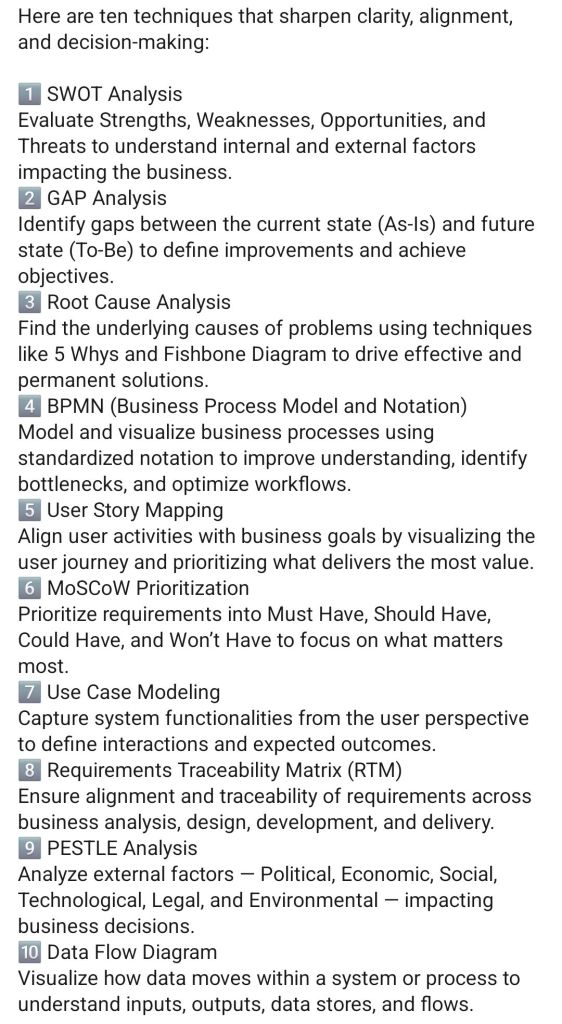
1. Business Analysis Techniques for Project Managers
2. Business Analysis Techniques for Project Managers
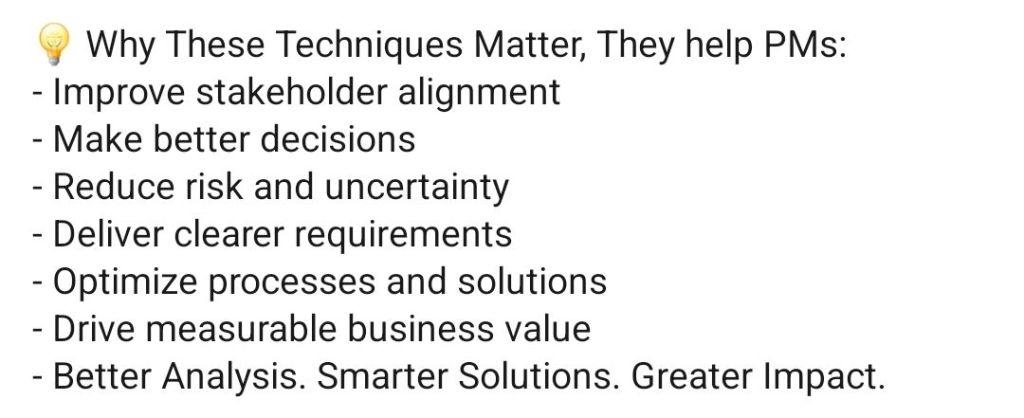
3. Business Analysis Techniques for Project Managers
BA Techniques for Project Managers

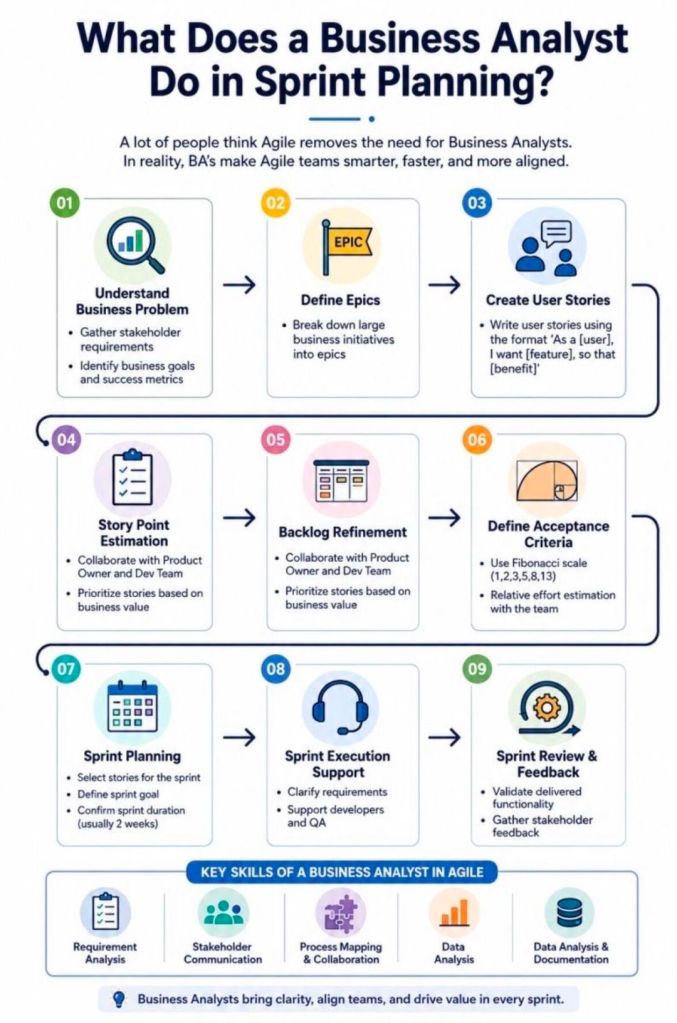
What Does a Business Analyst Do in Sprint Planning?

What Does a Business Analyst Do in Agile Sprint Planning?
What Does a BA Do in Sprint Planning?

Download Free Upgrade Project Management Templates

The full toolkit of Mark Whitfield’s Project Management (PM) templates is structured below according to structural focus areas, overview of utility, and native file formats. Free upgrades and additions after purchase.

📅 Project Planning & Roadmapping

  • Focus: Schedule design and milestone visualization for SDLC, PRINCE2, and Agile.
  • Overview: Builds work breakdown structures (WBS), tracks timelines, and presents milestones to stakeholders.
  • Format: Microsoft Project (.mpp), Excel (.xlsx), and PowerPoint (.pptx).
  • Included: Detailed plans, Excel Gantt trackers, over 35 Plan on a Page (POaP) slides, and spreadsheet-based timelines.

⚠️ Risk, Governance & Operational Control

  • Focus: Threat tracking, dependency mitigation, and accountability.
  • Overview: Ensures structural control and compliance, managing risks, issues, and resource ownership.
  • Format: Excel (.xlsx) and Word (.docx).
  • Included: Comprehensive RAIDs log, RACI tracker, stakeholder analysis map, and meeting minutes templates.

💰 Financial Management & Tracking

  • Focus: Cost control, margin maintenance, and expenditure reporting.
  • Overview: Tracks internal/external resources, supplier fees, and expenses with visualized budget usage.
  • Format: Excel (.xlsx) with pivot tables and charts.
  • Included: Project financial tracker, FAV basic tracking template, and client-facing external cost tracker.

🏃 Agile Delivery & Metric Performance

  • Focus: Iterative delivery, velocity tracking, and roadblock visibility.
  • Overview: Used for manual tracking of sprint metrics and third-party dependencies when native tools are unavailable.
  • Format: Excel (.xlsx).
  • Included: Burn down/up charts, and agile story dependency trackers.

📢 Communications & Project Status Reporting

  • Focus: Executive updates and onboarding consistency.
  • Overview: Standardizes project reporting, status updates, and organization charts.
  • Format: PowerPoint (.pptx) and Word (.docx).
  • Included: Project status reports, kick-off decks, organizational charts, and benefits realization plans.

What Project Management Really is…

What Project Management Really is...
What Project Management Really is…

Useful Career links

Recent Experience:

Recent Experience

All Projects Chronologically:

Projects Chronologically

Engineering Background:

Engineering Background

Certificates:

Certificates

Recommendations:

Recommendations

All Capgemini Projects:

MuleSoft Augmentation:

Awards & Highlights:

Training Summary:

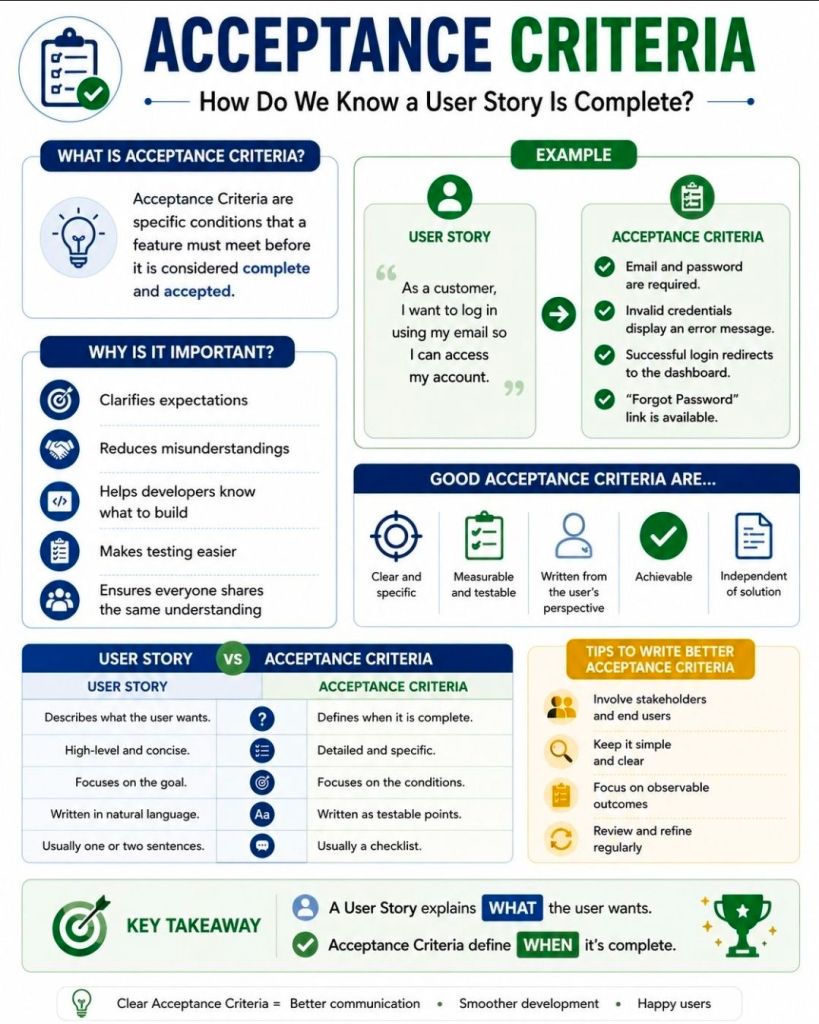
Acceptance Criteria for an Agile User Story

Acceptance Criteria for an Agile User Story
Acceptance Criteria for
an Agile User Story

Acceptance criteria are a set of predefined conditions that define the exact boundaries of a user story. They dictate what must be built for the story to be considered complete and ready for release.

Effective acceptance criteria serve to align the vision of the client and the development team, ensuring everyone knows exactly what behavior the feature must demonstrate. A good set of criteria must be:

  • Verifiable & Testable: Each criterion should yield a binary (pass/fail) result, often allowing for automated or manual testing.
  • Concise & Unambiguous: Written in plain language that avoids subjective terms like “fast” or “user-friendly” in favor of quantifiable metrics.
  • User-Centric: Focus on the outcome delivered to the user rather than the internal technical process to get there.

Common Formats

Criteria are typically documented using standard Agile formats:

  1. Given-When-Then (BDD Format): A structured approach often used for functional scenarios.
    • Given some precondition.
    • When an action occurs.
    • Then the expected outcome happens.
  2. Rule-Oriented List: A simple checklist of constraints, rules, or system reactions.
  3. “It’s done when…”: A declarative list of the specific conditions met once functionality is delivered.

Best Practices

  • Keep it to 3–5 items: If a user story requires more than 8 criteria, it is often too complex and should be split into smaller, more manageable stories.
  • Define positive and negative paths: Ensure criteria cover both successful scenarios and edge cases (e.g., what happens when a user enters invalid data).
  • Include Non-Functional Requirements: Account for aspects like security, accessibility, and performance.