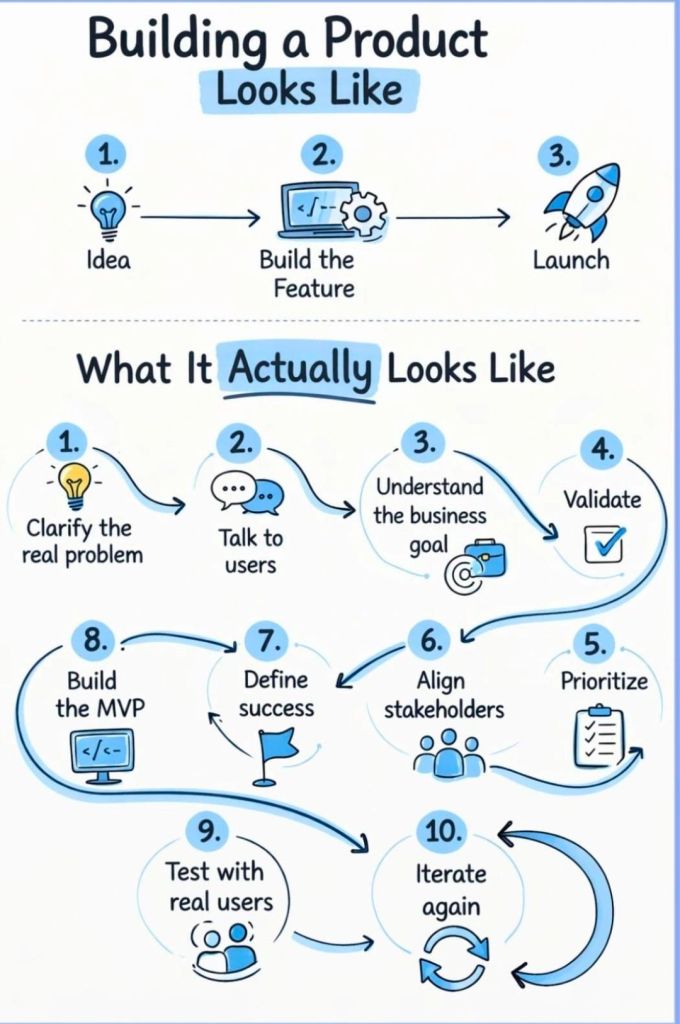
Key Skills for the Project Manager

Key Skills for the Project Manager

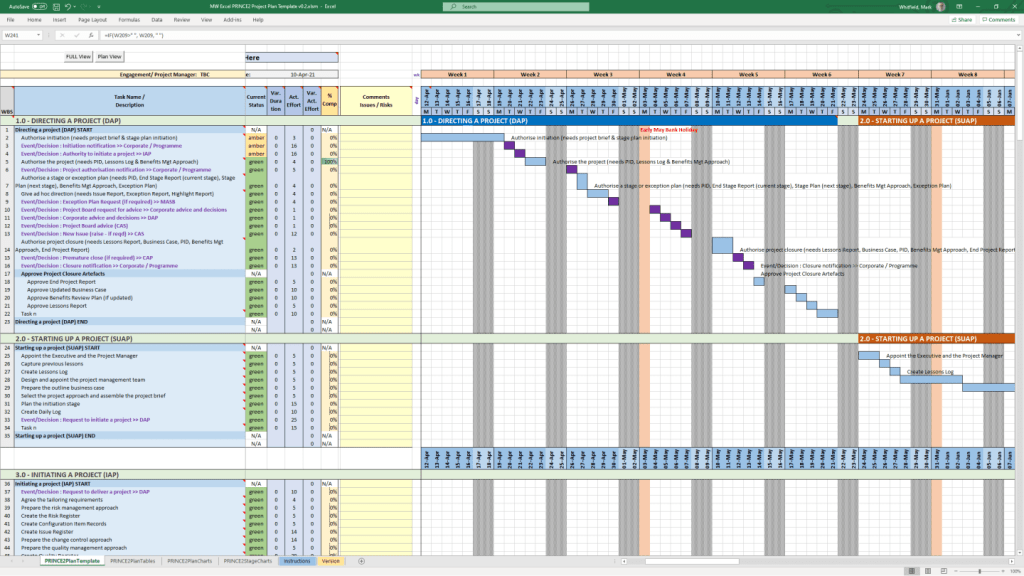
PRINCE2 Management Stages Overview

In PRINCE2, a project is managed through a series of management stages, which are discrete sections of a project that the Project Board authorises at specific decision points. Every PRINCE2 project must have at least two stages: an initiation stage and at least one further delivery stage

PRINCE2 Management Stages Overview

A detailed breakdown of these stages, aligned with the seven core PRINCE2 processes, is provided below. 

1. Starting Up a Project (SU)

This is a pre-project process designed to determine if the project is viable and worthwhile before committing significant resources. 

  • Key Activities:
    • Appointing the Executive and Project Manager.
    • Developing an Outline Business Case.
    • Creating a Project Brief which defines objectives and scope.
    • Planning the initiation stage itself. 

2. Initiating a Project (IP)

This represents the first management stage of the project. It establishes the firm foundation for the project’s execution. 

  • Key Activities:
    • Creating the Project Initiation Documentation (PID), which includes the full Business Case, Project Plan, and management strategies for risk, quality, and communication.
    • Setting up project controls and refining the project approach.
    • Securing formal approval from the Project Board to proceed. 

3. Directing a Project (DP)

This is an ongoing process that spans the entire project lifecycle, focusing on high-level decision-making by the Project Board. 

  • Key Activities:
    • Authorising the project to start and approving each subsequent stage.
    • Giving ad hoc direction and advice to the Project Manager.
    • Making the final “stop/proceed” decisions at stage boundaries.

4. Controlling a Stage (CS)

This covers the day-to-day management of each delivery stage by the Project Manager. 

  • Key Activities:
    • Assigning work to teams via Work Packages.
    • Monitoring progress and managing risks and issues.
    • Reporting status to the Project Board through Highlight Reports

5. Managing Product Delivery (MP)

This process manages the link between the Project Manager and the Team Managers who are actually building the products

  • Key Activities:
    • Teams accepting and executing Work Packages.
    • Ensuring work meets the specified quality standards.
    • Delivering completed and tested products back to the Project Manager. 

6. Managing a Stage Boundary (SB)

This occurs at the end of each stage (except the final one) to help the Project Board decide whether to continue. 

  • Key Activities:
    • Reporting on the performance of the current stage.
    • Creating a detailed Stage Plan for the next stage.
    • Updating the overall Project Plan and Business Case with the latest information. 

7. Closing a Project (CP)

This is the final part of the last management stage, ensuring the project is shut down in a controlled manner. 

  • Key Activities:
    • Confirming all products have been accepted by the customer.
    • Capturing Lessons Learned for future projects.
    • Preparing an End Project Report to evaluate performance against the original plan.

PRINCE2 Management Stages Overview

PRINCE2 7 Themes / Practices of PRINCE2

In the PRINCE2 project management methodology, Themes (renamed to Practices in the 7th edition released in 2023) are the seven functional areas of project management that must be addressed continuously throughout the project lifecycle. They provide a structured framework for managing key aspects like cost, risk, and quality to ensure the project remains on track. 

7 Themes / Practices of PRINCE2

Overview of the Seven Themes (Practices)

  • Business Case: Focuses on the “Why” of the project. It establishes the justification for the investment and ensures the project remains desirable, viable, and achievable.
  • Organisation: Addresses the “Who” by defining the project’s structure of accountability and responsibilities. It identifies key stakeholders and establishes the project management team.
  • Quality: Focuses on the “What” by defining the user’s requirements and quality standards. It ensures that deliverables are fit for purpose and meet stakeholder expectations.
  • Plans: Describes the “How,” “How Much,” and “When”. This theme provides techniques for creating project, stage, and team plans to facilitate communication and control.
  • Risk: Manages the “What If” by identifying, assessing, and controlling uncertainties that could impact the project’s objectives, whether they are threats or opportunities.
  • Change (Issues): Deals with the impact of changes and unexpected events. It provides a formal process for capturing, assessing, and controlling requests for change to project baselines.
  • Progress: Evaluates “Where are we now?” versus “Where are we going?”. It establishes mechanisms to monitor actual achievements against planned outcomes and manage deviations through tolerances. 

Key Concepts and Terminology

  • Continuous Application: Unlike processes, which follow a sequence, themes are applied simultaneously throughout the project.
  • Tolerances: Each theme uses tolerances (allowable deviations for time, cost, quality, etc.) to support the principle of Manage by Exception.
  • PRINCE2 7 Updates: The latest edition introduces Sustainability as a 7th performance target and emphasizes People as a core element alongside Principles, Practices, and Processes.

PRINCE2 Process Model Overview

PRINCE2 Process Model

The PRINCE2 process model provides a structured, process-driven roadmap for managing a project from its initial conception to formal closure. It consists of seven core processes that define specific activities, responsibilities, and decision points across the project lifecycle. 

The 7 PRINCE2 Processes

The processes are designed to ensure control and align with the project’s management levels: 

  • Starting Up a Project (SU): A pre-project process that filters out unviable ideas. It focuses on confirming if there is a “viable and worthwhile” business case and appoints the Project Manager and Executive.
  • Directing a Project (DP): Spans the entire project from start to finish. It is the responsibility of the Project Board, which provides strategic oversight, makes key decisions (e.g., authorising stages), and manages by exception.
  • Initiating a Project (IP): Occurs during the first management stage. It involves detailed planning to establish solid foundations, resulting in the Project Initiation Documentation (PID), which includes the project plan, risk management approach, and full business case.
  • Controlling a Stage (CS): Focuses on the Project Manager’s day-to-day management of a stage. This includes assigning work to teams, monitoring progress, and dealing with issues or risks within agreed tolerances.
  • Managing Product Delivery (MP): Governs the link between the Project Manager and Team Managers. It is where the “specialist products” (actual deliverables) are created, quality-checked, and delivered.
  • Managing a Stage Boundary (SB): Occurs at the end of each management stage (except the final one). The Project Manager reviews the current stage, updates the project plan and business case, and plans the next stage for Board approval.
  • Closing a Project (CP): Ensures an orderly end to the project. It confirms that objectives have been met, products have been accepted by the user, and lessons are captured before the project is formally disbanded. 

Hierarchy of Management Levels

The process model operates across four distinct levels of authority: 

  1. Corporate or Programme Management: Sets the initial project mandate.
  2. Directing (Project Board): Responsible for overall governance and major decisions (Directing a Project).
  3. Managing (Project Manager): Handles daily management and stage control (Controlling a Stage, Initiating a Project).
  4. Delivering (Team Members/Managers): Focuses on creating the physical products (Managing Product Delivery). 

Key Characteristics

  • Management Stages: Projects are broken into at least two stages (Initiation and at least one Delivery stage) to provide “stop/go” decision points.
  • Triggers: Each process is activated by a specific trigger, such as a “Project Mandate” from corporate management to start the SU process.
  • Management Products: These are documents like the Business CaseProject Brief, and Highlight Reports used to facilitate control and communication.

Understanding Project Management Frameworks

Understanding Project Management Frameworks

Gantt Chart Detailed Timeline History by Era and Year

Henry Gantt (1861–1919) was an American mechanical engineer and management consultant who revolutionized project management by introducing visual tools to track work against time. A close associate of Frederick Taylor, he humanized “scientific management” by focusing on employee motivation and social responsibility alongside industrial efficiency. 

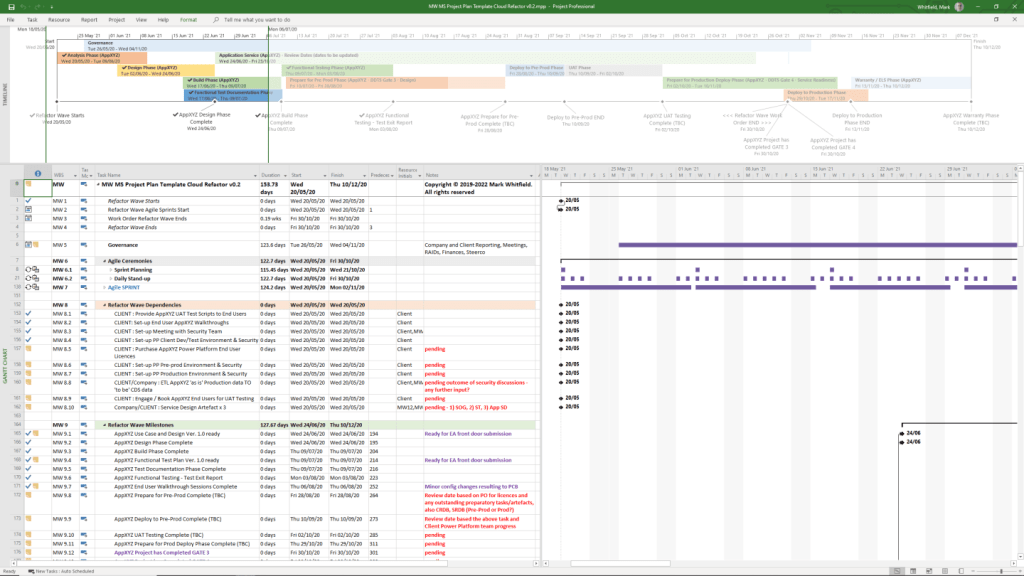
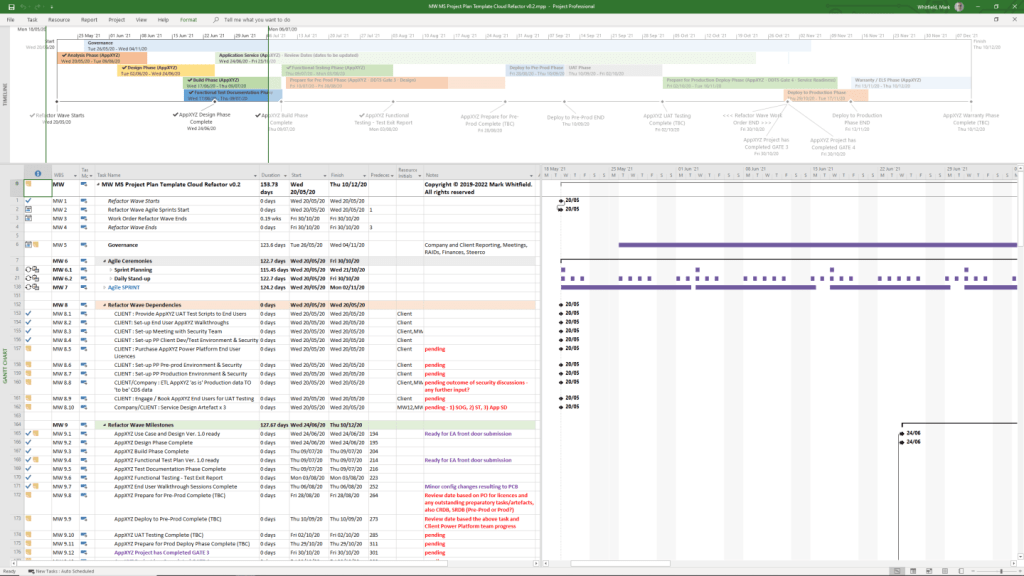
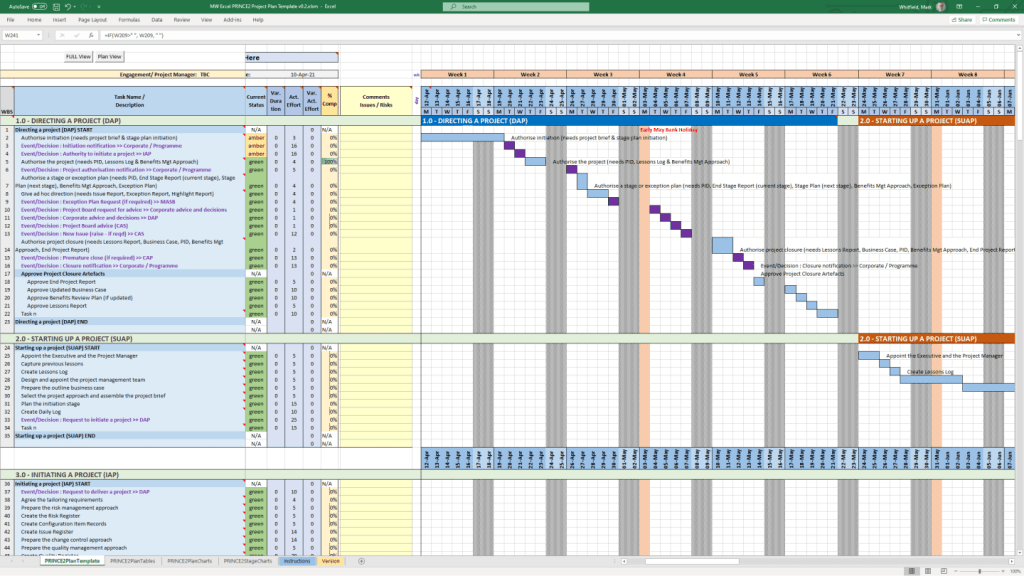
Gantt Chart in MS Project, templates can be downloaded at website banner link

Overview of Henry Gantt’s Contributions

  • The Gantt Chart: His most famous invention, a horizontal bar chart that illustrates a project schedule, including task durations and progress.
  • Task and Bonus System: A wage system that guaranteed a base rate but offered bonuses to workers who exceeded daily production goals.
  • Social Responsibility: He argued that businesses have a moral obligation to the welfare of the society in which they operate, not just to their owners.
  • Industrial Efficiency: He advocated for using scientific analysis to eliminate “chance and accidents” in manufacturing. 

Comprehensive Gantt Timeline History

Era 1: Pre-Gantt & Early Origins (1765–1896)

  • 1765: Joseph Priestley creates early timeline charts, which some consider the conceptual distant ancestors of the Gantt chart.
  • 1896: Polish engineer Karol Adamiecki develops the “Harmonogram,” a precursor that displayed interdependent processes. However, he published it only in Polish and Russian, limiting its global recognition. 

Era 2: The Henry Gantt Era (1903–1919)

  • 1903: Henry Gantt develops his first version of a production chart for the American Locomotive Company.
  • 1910–1915: Gantt refines and popularizes his chart through articles and his book Work, Wages and Profits (1910).
  • 1917–1918: At the request of General William Crozier, Gantt charts are used to manage massive military production for the U.S. during World War I.
  • 1919: Henry Gantt passes away. 

Era 3: Global Adoption & Infrastructure (1920s–1970s) 

  • 1922: Wallace Clark, a colleague of Gantt, publishes The Gantt Chart: A Working Tool of Management, leading to international adoption.
  • 1929: Walter Polakov introduces Gantt charts to the Soviet Union for their First Five Year Plan.
  • 1931–1936: Gantt charts are used on massive infrastructure projects like the Hoover Dam and later the U.S. Interstate highway system.
  • 1940s: Extensively used for logistics and military project management during World War II.
  • 1950s: Become a staple in the construction and engineering industries; the first digital predecessors like PERT and Critical Path Method (CPM) emerge. 

Era 4: The Digital Revolution (1980s–Present) 

  • 1980s: The advent of personal computers allows project managers to create and update charts without redrawing them by hand.
  • 1990s: Software like Microsoft Project adds “link lines” to display complex dependencies between tasks.
  • 2000s–2010s: Web-based and cloud-based applications (like Jira or Asana) integrate Gantt charts for real-time team collaboration.
  • Present: Modern tools use AI to automate chart maintenance and predict risks based on historical data.

Gantt Chart Detailed Timeline History by Era and Year

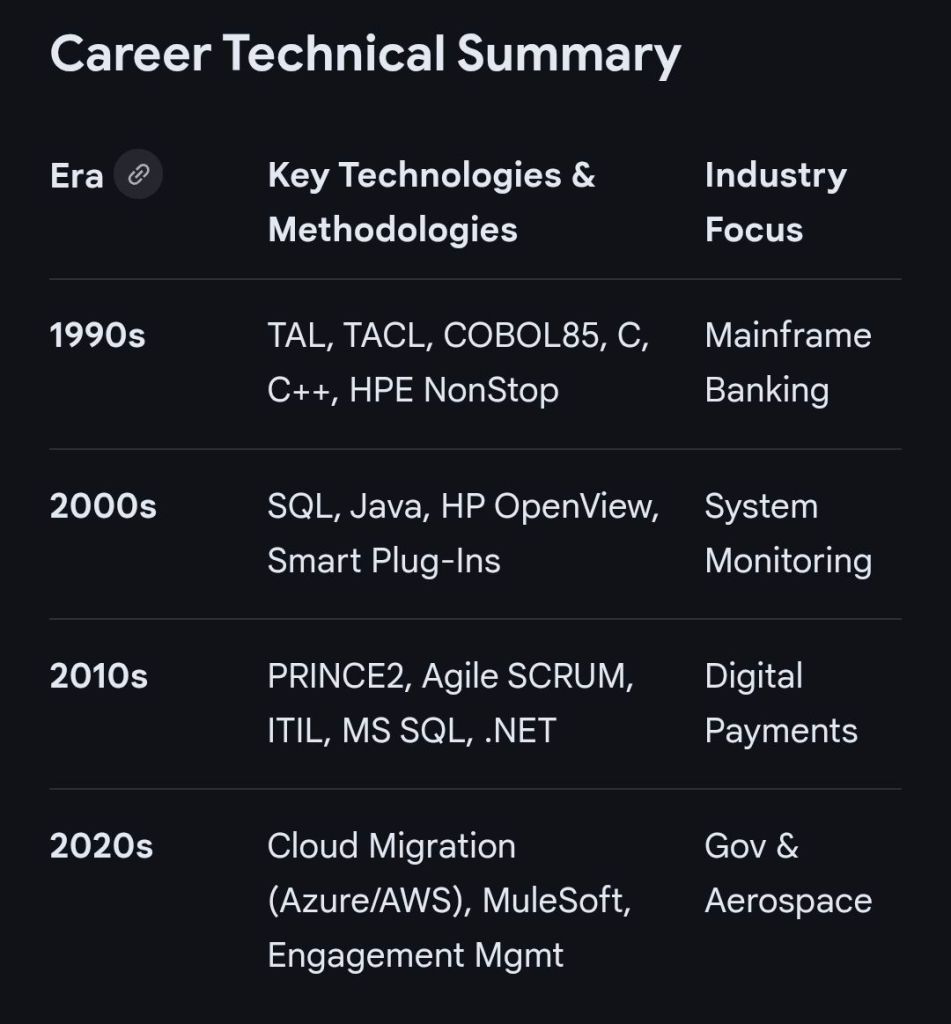
IT Career snapshot of Mark Whitfield, Senior IT Project Manager (SC cleared)

This resume summarizes the career of Mark Whitfield, a Senior IT Project Manager with over 30 years of experience specializing in digital and software development lifecycles, cloud migrations, and HP NonStop systems

Personal Details

  • Name: Mark A. Whitfield
  • Location: Manchester, UK
  • Nationality: British
  • Security Clearance: SC Cleared to 2031
  • Professional Profiles: Official Website | LinkedIn Profile 

Executive Summary

  • Experience: 30+ years in IT.
  • Core Focus: Senior Project Management for Digital/ Software Development Lifecycles (SDLC).
  • Expertise: Transitioning from a technical background in programming (pre-2000) to senior leadership in large-scale projects for global blue-chip companies. 

Key Skills & Competencies

  • Methodologies: PRINCE2 Practitioner, Agile (Scrum/ Kanban), Waterfall, ITIL, ISO QA.
  • Project Controls: MS Project, Budget & Burn Tracking, GDPR compliance, Supplier & Stakeholder Management, Statement of Work (SoW).
  • Technical Proficiencies:
    • Platforms: HP NonStop (Tandem), Cloud Migration (Hybrid).
    • Languages (Historical): C/C++, Java, COBOL85, TAL, TACL, SCOBOL, SQL, MS SQL.
    • Utilities: PATHWAY, SCF, FUP, INSPECT, XPNET. 

Professional Experience

  • Senior IT Project Manager (Various Projects):
    • Managed large-scale solutions for clients including Jaguar Land Rover (JLR)HeathrowRoyal Mail Group (RMG)NATS, and Euroclear.
    • Extensive work within the financial sector for Bank of EnglandBarclaysHSBCSantanderStandard CharteredDeutsche Bank, and Global Payments.
    • Government and public sector projects for DefraUKEFWelsh Water, and Scottish Water.
  • Early Career (Programmer / Technical Lead):
    • 1990 – 1995: Programmer at The Software Partnership (later Deluxe Data) in Runcorn, specializing in electronic banking software (sp/ARCHITECT-BANK) on Tandem Mainframe Computers. 

Education & Certifications

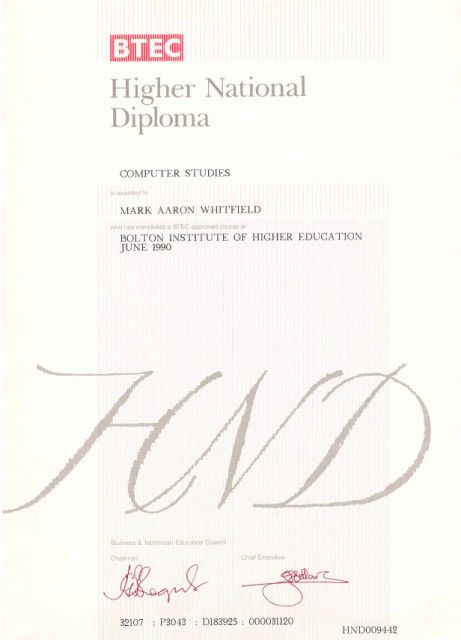
  • Degree: Higher National Diploma (HND) in Computing (Distinction, Graduated 1990).
  • Certifications:
    • Microsoft Azure Fundamentals (Certified).
    • PRINCE2 Practitioner.
    • Agile/ Radtac Course Completion. 

Mark Whitfield IT Training Career Timeline Overview

Mark Whitfield, an experienced IT Project Manager, has a career and certification history spanning over 30 years. His professional development includes a range of technical, project management, and cloud-based qualifications. 

2020s: Cloud & Modern Platforms

  • 2024 (July): Microsoft Excel Refresher Course – Udemy.
  • 2022 (December/February): C&CA UK’s Communications & Engagement Award and AZ-900 Microsoft Certified Azure Fundamentals. 

2010s: Advanced Management & Development 

  • 2017 (November/April): Advanced Engagement Management (Level 2) and Microsoft Excel 2010 Expert Skills.
  • 2014 (July): Advanced Microsoft Excel 2013.
  • 2011 (May–July): PRINCE2 Practitioner, Agile SCRUM, Java, and Android programming. 

2000s: Web Applications & Database Systems 

  • 2009 (March–November): Thales e-Security, BIRT, Web Design, and SQL Server training.
  • 2006 (Feb–Dec): NetObjects Fusion, Cryptography, and Thales e-SECURITY SafeSign.
  • 2004 (March): MultiBatch NSK Job Scheduling.
  • 2000 (February): Fundamentals of Successful Project Management. 

1990s: Core Programming & System Fundamentals

  • 1990s (1993–1999): TANDEM/HP NonStop systems, C/C++ programming, project management, and HND in Computer Studies (1990).

Mark Whitfield Training IT Career Timeline Overview

Mark Whitfield, a Senior IT Project Manager who has spent over 30 years specialising in HP NonStop (formerly Tandem) computing systems

Professional Background

  • Specialisation: Mark Whitfield is a highly experienced technician and project manager for the HP NonStop platform, which is a high-availability, fault-tolerant mainframe environment used primarily for mission-critical financial transactions.
  • Career Timeline:
    • The Software Partnership / Deluxe Data (1990–1995): Began as a programmer working on the sp/ARCHITECT-BANK solution for Tandem computers.
    • Insider Technologies (1995–2013): Spent 18 years focusing on monitoring and diagnostic software for HP NonStop, including products like Reflex 80:20XPERT24, and Enterprise Manager.
    • Capgemini (2016–Present): Currently serves as an SC-cleared Senior Project Manager, delivering complex IT projects for major banks and government agencies. 

Key Technical Contributions to NonStop

  • Product Development: He co-developed Reflex (a platform health/diagnostic tool) and designed XPERT24 to monitor performance in the XPNET layer of BASE24.
  • Financial Systems: He has managed major projects for global financial entities, including BarclaysHSBCBank of England, and Royal Mail Group, often involving ATM and POS monitoring systems.
  • Programming Expertise: His technical skill set includes NonStop-specific languages and tools such as TAL (Tandem Application Language)PATHWAYXPNETCOBOL85, and C++

About HP NonStop Systems

In the context of Mark Whitfield’s work, NonStop refers to a “shared-nothing” architecture designed by Tandem Computers. These systems are uniquely capable of: 

  • Fault Tolerance: Handling hardware or software failures without system downtime.
  • Scalability: Doubling throughput by adding processors (up to 4,000) without hitches in performance.
  • Core Banking: Processing massive commercial workloads for retail banks and stock exchanges globally.