Free Upgrade MS Project Management Templates for Download

The ⁠Project Management Templates by Mark Whitfield constitute a comprehensive toolkit of over 200 editable resources designed to accelerate project delivery across Agile, Waterfall, and PRINCE2 frameworks.

The structural breakdown of the core templates is organised by functional category, specific template, integrated Microsoft Office tool, and operational description:

1. Project Planning & Scheduling

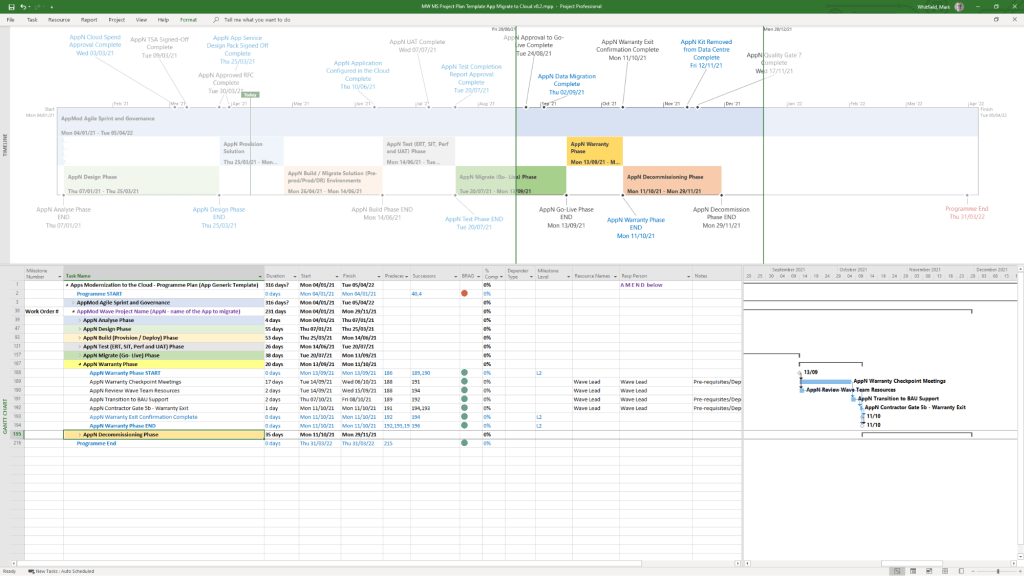
  • Detailed SDLC Project Plan
    • MS Tool: Microsoft Project (.mpp)
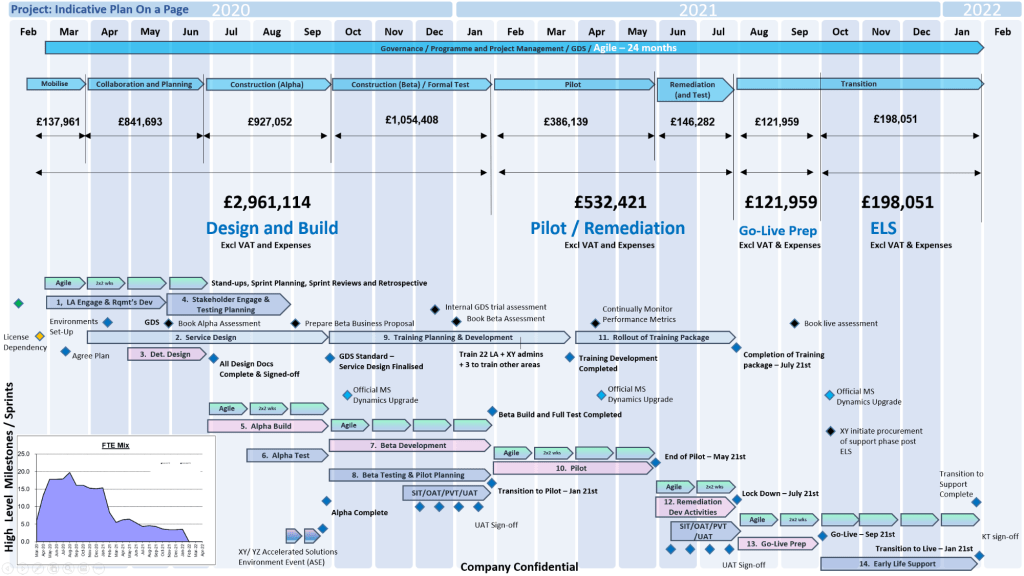
    • Description: A master schedule structured around the Software Development Lifecycle (SDLC) from development through testing, deployment, and Early Live Support (ELS), easily toggled between Agile Scrum and traditional Waterfall.
  • PRINCE2 7th Edition Project Plan
    • MS Tool: Microsoft Project (.mpp) & MS Excel (.xlsm)
    • Description: Fully annotated task list aligned with the 7th edition principles, colour-coded by activity type (blue for artifact creation, brown for management decisions, purple for updates).
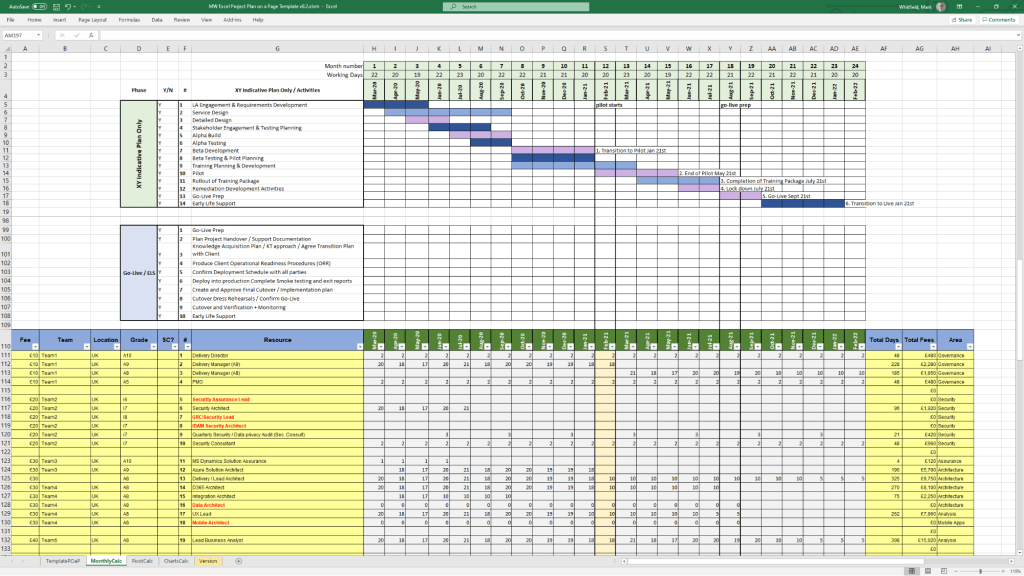
  • Detailed Waterfall Project Planner
    • MS Tool: MS Excel
    • Description: A portable, license-free alternative to MS Project featuring baseline versus forecast tracking, an integrated Gantt chart view, and automated progress charts.
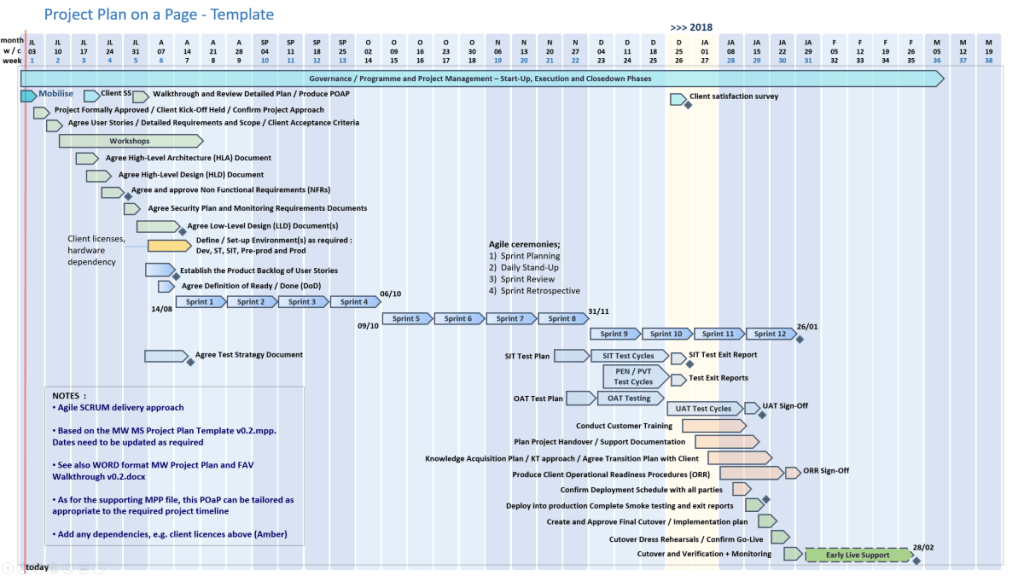
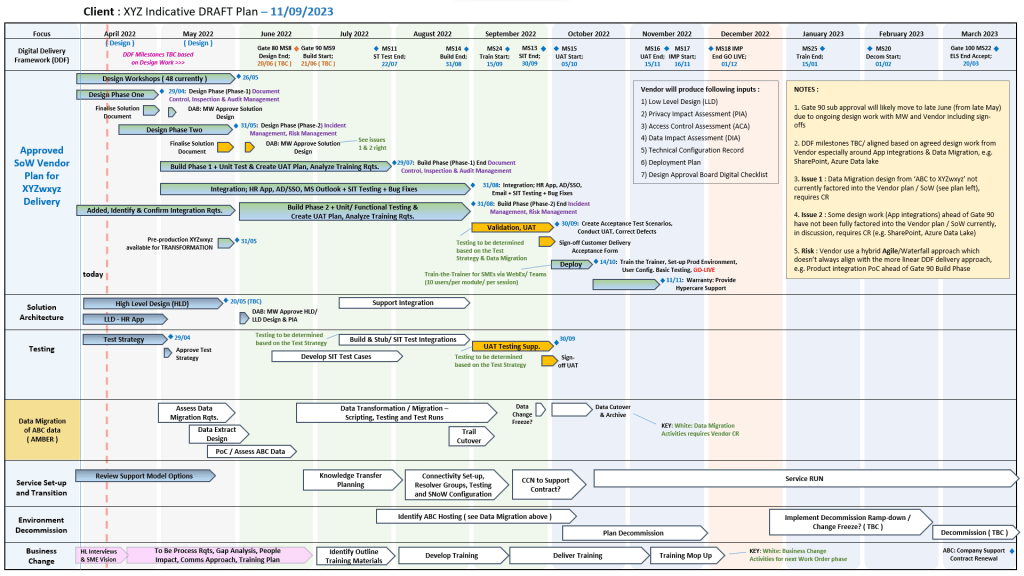
  • Plan on a Page (POaP)
    • MS Tool: MS PowerPoint & MS Excel
    • Description: High-level, executive-ready roadmaps containing over 30 slide variations used to communicate project timelines, key milestones, and work streams to senior stakeholders.
1. Project Planning & Scheduling POAP MS PowerPoint
1. Project Planning & Scheduling POAP MS PowerPoint Templates
2. Project Planning & Scheduling MS Project Templates
3. Project Planning & Scheduling MS Excel Templates

2. Operational Control & Governance

  • Comprehensive RAID Log & Charts
    • MS Tool: MS Excel
    • Description: A highly detailed central registry featuring distinct tabs to track Risks, Actions, Issues, Opportunities, Dependencies, Lessons Learned, and Change Requests alongside visual metric dashboards.
  • Basic RAIDs Tracker
    • MS Tool: MS Excel
    • Description: A scaled-down, simplified version of the master RAID log optimized for quick turnarounds, minor bids, and low-complexity projects.
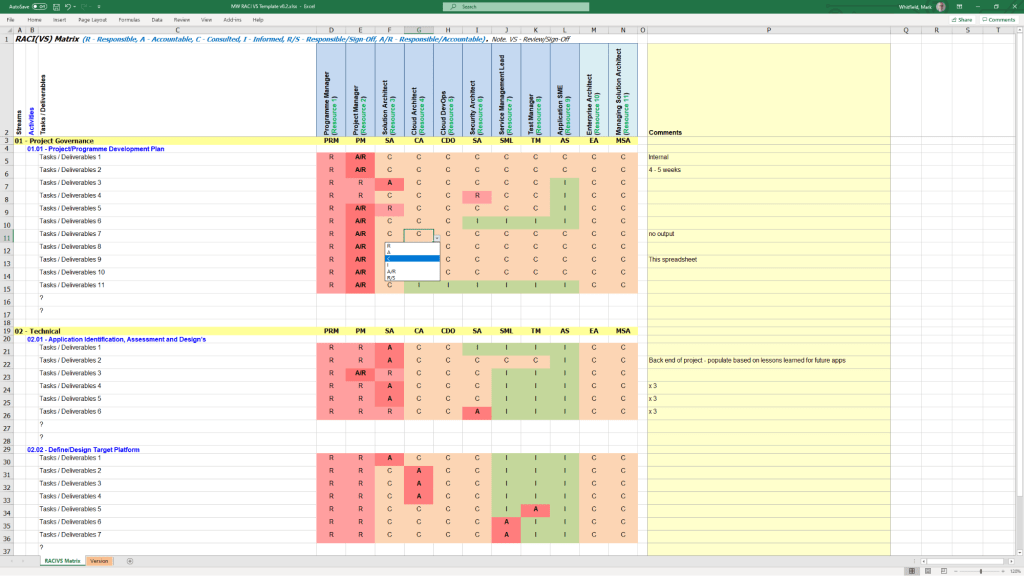
  • RACI Matrix
    • MS Tool: MS Excel
    • Description: A governance sheet mapping project deliverables against specific team roles to clarify who is Responsible, Accountable, Consulted, and Informed.
  • Agile Story Dependency Tracker
    • MS Tool: MS Excel
    • Description: A specialised log to document and track blocker stories tied to external suppliers or client-side dependencies that risk driving scope changes.
1. Operational Control & Governance MS Excel RACI Template

3. Financial & Resource Management

  • Project Financial Tracker
    • MS Tool: MS Excel
    • Description: A financial controller mapping internal and external forecast costs against actuals, factoring in margins, variances, supplier fees, and expense categories.
  • Resource, Sickness, & Leave Tracker
    • MS Tool: MS Excel
    • Description: An operational matrix monitoring annual leave, sickness, and training schedules to adjust resource availability and capacity within the master schedule.
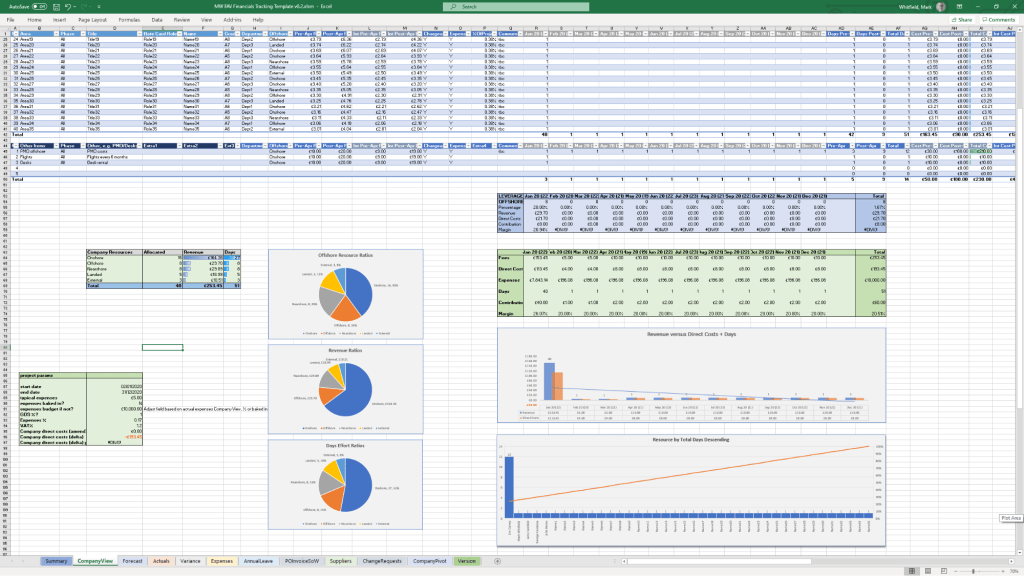
1. Financial & Resource Management MS Excel Templates

4. Agile Delivery Metrics

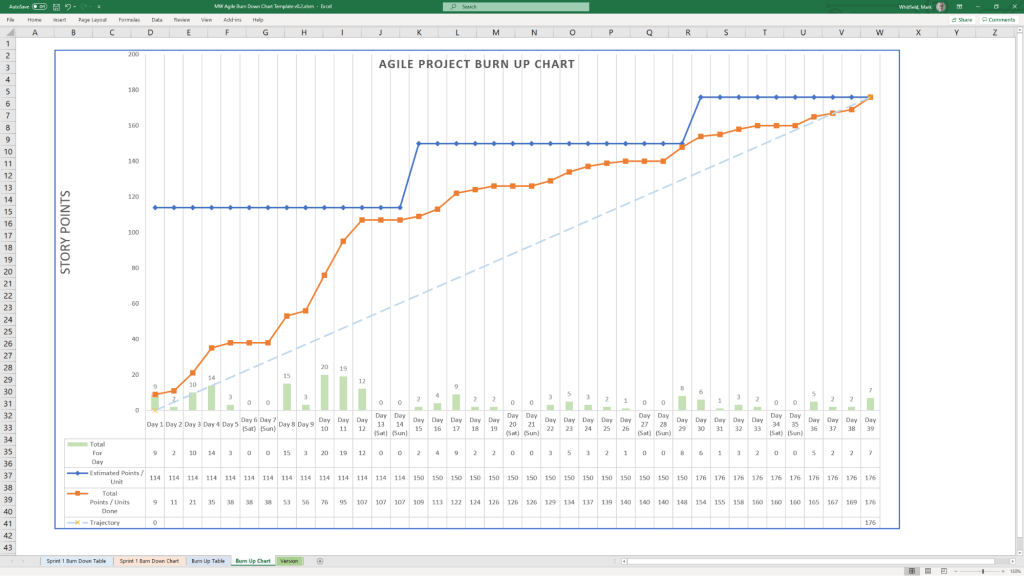
  • Agile Burn Down & Burn Up Charts
    • MS Tool: MS Excel
    • Description: Manual data-table tracking solutions designed to visualise sprint or release velocity for teams operating without access to enterprise tools like Jira.
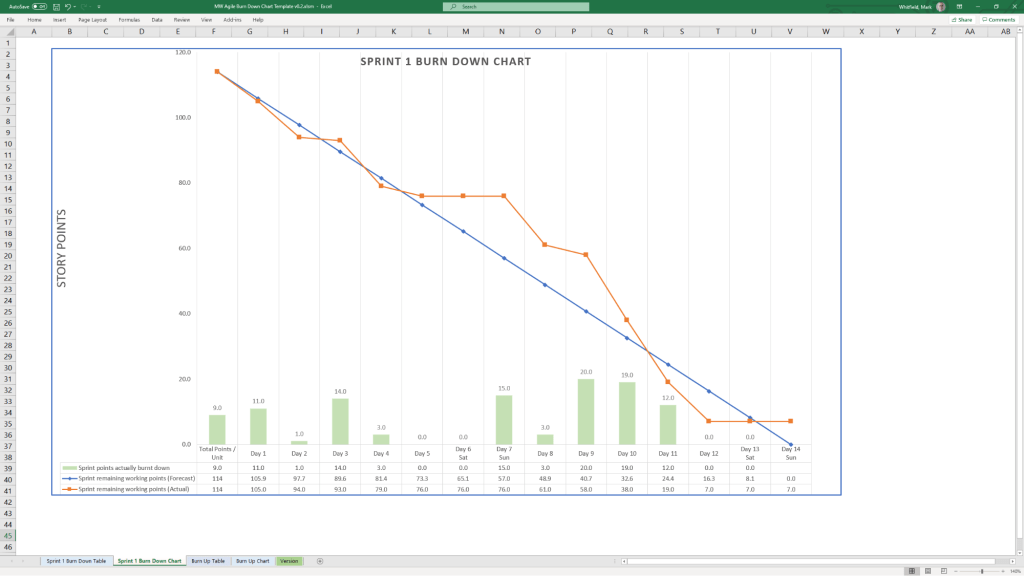
1. Agile Burn Down Chart in MS Excel
1. Agile Burn Down Chart in MS Excel Template Example
2. Agile Burn Up Chart in MS Excel
2. Agile Burn Up Chart in MS Excel Template Example

5. Communications & Administration

  • PRINCE2 Management Products
    • MS Tool: MS Word (.doc)
    • Description: A full portfolio of standard documentation masters including Project Initiation Documents (PID), Project Briefs, Highlight Reports, and Business Cases.
  • Project Status Report
    • MS Tool: MS Word & MS PowerPoint
    • Description: Weekly and monthly progress reporting templates featuring structured sections for milestones, blockers, financial status, and RAG indicators.
  • Kick-Off Deck & Mobilisation Kit
    • MS Tool: MS PowerPoint
    • Description: Onboarding and alignment slide decks designed to define scope, establish ground rules, and guide teams through project initiation.
  • Meeting Minutes Template
    • MS Tool: MS Word
    • Description: An action-oriented meeting layout tailored for capturing critical decisions, owners, and deadlines uniformly.
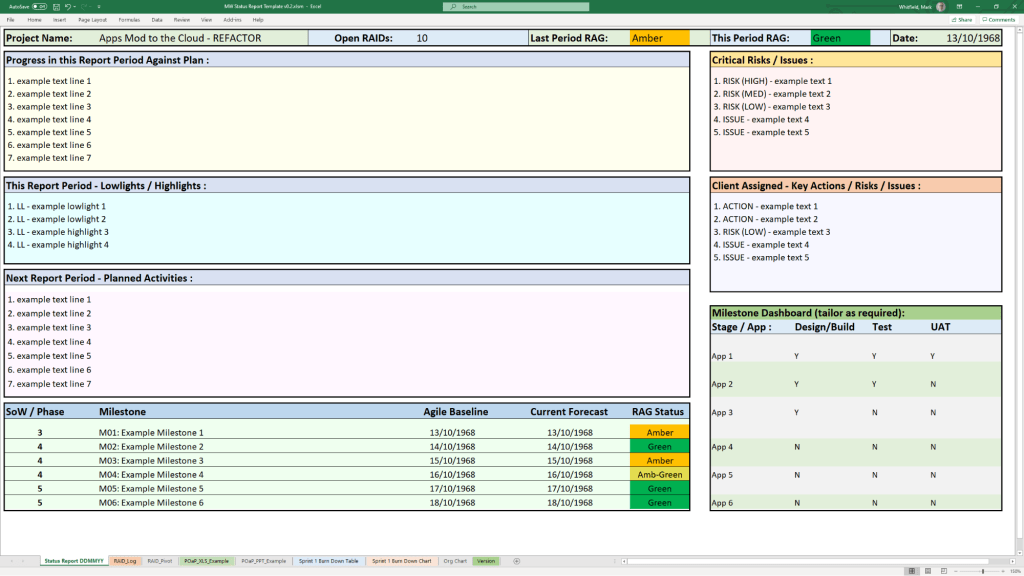
1. Communications & Administration MS Excel Status Report Template Example

If you are looking to purchase or deploy these, the complete ecosystem is distributed on marketplaces like the ⁠ProjectTemplatesSoft Etsy Shop or through his official site Mark Whitfield’s Project Management Templates.
Best approach to writing a project plan with breakdown

The best approach to writing a project plan breakdown is to use a top-down decomposition strategy centered on a Work Breakdown Structure (WBS). This technique methodically slices a complex, high-level project into smaller, manageable chunks called work packages, ensuring that nothing is missed.

To build a flawless, actionable project breakdown, you must establish the project’s foundation before dissecting it into individual tasks.

1. Define the Scope and Deliverables

Before diving into a micro-level breakdown, you must know what you are building—and what you are not building.

  • Write a scope statement: Document the final outcomes, project boundaries, and explicit exclusions to prevent scope creep.
  • Identify major deliverables: Determine the high-level milestones or chunks of tangible value that must be completed.
  • Apply the 100% rule: The Project Management Institute (⁠PMI) notes that your WBS must include 100% of the internal, external, and interim project management work.

2. Structure the Levels of Decomposition

A good project plan breakdown uses hierarchical tiers. Do not mix daily tasks with macro phases. Instead, follow a logical breakdown hierarchy:

  • Level 1 (The Project): The overall project objective or final product.
  • Level 2 (Phases or Major Deliverables): Broad operational segments (e.g., Initiation, Design, Development, Testing).
  • Level 3 (Sub-deliverables): Specific components within a phase (e.g., under Development, you might have Frontend Architecture).
  • Level 4 (Work Packages): The lowest level of the WBS. These are discrete items that can be assigned to a specific team or individual and estimated for time and budget.

3. Apply the 80-Hour Rule

When decomposing down to the task level, determine how granular you need to be by tracking effort, not just calendar time:

  • The 80-hour threshold: A single work package should take no more than 80 hours (two weeks of full-time work) and no less than 8 hours to complete.
  • Avoid micro-management: If a task takes less than 8 hours, group it with others. If it exceeds 80 hours, it is too complex and needs to be broken down further.

4. Build a WBS Dictionary

A visual chart or list is helpful, but context prevents mistakes. For each work package at the bottom of your hierarchy, document:

  • Task description: Clear language outlining what “done” actually looks like.
  • Assigned owner: One single person or team responsible for the execution.
  • Pre-requisites and dependencies: Clarify which tasks must finish before the next can begin.

5. Sequence, Estimate, and Schedule

Once the work is broken down, pull it into a working chronological timeline using software like Microsoft Project (see MS .mpp templates in website banner), ⁠Asana or ⁠Monday.com.

  • Sequence activities: Map the chronological order and identify the critical path—the longest string of dependent tasks.
  • Estimate duration & resources: Gather the actual people doing the work to estimate time, capacity, and material needs realistically.
  • Add contingency: Factor in safety buffers to protect the project baseline from unexpected delays.

Microsoft Project Plan MPP Overview & Approach to Configuring a Good Plan

Microsoft Project is a powerful project management software used to plan, schedule, and oversee tasks, resources, and deadlines. Its native .mpp file format supports building Work Breakdown Structures (WBS), calculating critical paths, allocating resources, and monitoring project budgets within the Microsoft ecosystem.

Configuring a high-quality .mpp plan requires a systematic approach to ensure schedule accuracy and prevent logic errors. Follow this step-by-step methodology to build a robust plan:

1. Project Initialization

  • Set Project Information: Go to the Project tab, click Project Information, and define your Start Date. Ensure the scheduling is set to start from this date rather than a “Current Date” override.
  • Define Working Calendars: Adjust your project’s default calendar for weekends, statutory holidays, and company non-working time so the timeline accurately reflects actual working days.
  • Configure Default Scheduling: Go to File > Options > Schedule and set New tasks created to Auto Schedule. This ensures your tasks respond automatically to changes in predecessors and durations.

2. Work Breakdown Structure (WBS)

  • Brainstorm Task Lists: Before entering dates, list all project deliverables and normal tasks in the Gantt Chart view.
  • Apply Hierarchy: Use the Indent/Outdent features to organize tasks into major phases (Summary Tasks) and actionable subtasks (Work Packages).
  • Create Milestones: Set the duration of key deliverable completions or approval gates to 0 days to act as clear checkpoints on your timeline.

3. Task Dependencies & Logic

  • Establish Relationships: Link tasks in logical sequences (e.g., using Finish-to-Start relationships). Every task—except the very first one in the project—must have a predecessor.
  • Never Link Summary Tasks: Only link the lowest-level subtasks. Linking summary task bars introduces circular logic errors and unpredictability.
  • Avoid Hard Constraints: Do not type specific dates into the Start/Finish columns unless absolutely mandatory. Doing so creates “Must Start On” constraints that break the critical path when upstream tasks are delayed.

4. Resource Allocation

  • Setup the Resource Sheet: Navigate to the Resource Sheet and add all resources required to do the work, defining their standard rates, maximum capacities (e.g., 100% availability), and calendars.
  • Assign Resources: Return to the Gantt Chart and assign specific work resources (people) to corresponding tasks. This helps Microsoft Project calculate total effort and spot resource overallocations.
  • Resource Leveling: Use the built-in Resource Leveling feature to automatically adjust assignments and resolve conflicts when team members are overcommitted.

5. Finalizing and Tracking

  • Set a Baseline: Once the plan has been reviewed and approved by stakeholders, go to Project > Set Baseline. This captures a snapshot of your original scope, Start, Finish, Cost, and Work fields.
  • Set the Status Date: When recording progress, always set the Status Date to today’s date before entering percentage completions.

Project Management, Risk Types & Assessing Risk Severity

Project risks are uncertain events that, if they occur, can impact a project’s objectives. They are generally broken down into core categories: financial, technical, schedule, operational, and external. Proper risk assessment evaluates the probability and impact of these threats to prioritize mitigation strategies.

Detailed Risk Breakdown

1. Financial Risks

These risks relate to project budgets, funding cuts, and cash flow.

  • Cost Overruns: Expenses exceeding the allocated budget.
  • Funding Delays: Cash flow interruptions from sponsors or clients.
  • Currency Fluctuations: Affecting purchasing power for international materials.
  • Severity: High/Critical. Can lead to project cancellation if not mitigated.

2. Technical Risks

Emerging from technology gaps, security vulnerabilities, or poor integration.

  • Technology Failures: Systems crashing or underperforming.
  • Software Bugs: Errors causing glitches or data corruption.
  • Security Breaches: Data theft or loss compromising privacy.
  • Severity: Medium to High. Can completely stall deliverables or undermine final quality.

3. Operational Risks

Internal workflow inefficiencies, process breakdowns, and human factors.

  • Resource Shortages: Missing key team members or materials.
  • Poor Communication: Siloed workflows leading to rework and mistakes.
  • Supply Chain Disruptions: Delays in procuring high-quality goods.
  • Severity: Low to Medium. Tends to erode timelines quietly but can escalate if left unmanaged.

4. Schedule Risks

Risks jeopardizing deadlines, causing timeline slippage or severe delays.

  • Scope Creep: Uncontrolled changes or continuous addition of project requirements.
  • Unrealistic Estimates: Planning overly optimistic deadlines.
  • Dependency Delays: Waiting on third parties to finish preliminary tasks.
  • Severity: Medium to High. Directly impacts client satisfaction and delivery targets.

5. External Risks

Factors entirely outside the project team’s direct control.

  • Market Shifts: Changing customer demand or competitor actions.
  • Regulatory Changes: New laws requiring unexpected compliance adjustments.
  • Environmental/Hazards: Severe weather, natural disasters, or pandemics.
  • Severity: Varies (Low to Critical). Often unpredictable, requiring comprehensive contingency planning.

Assessing Risk Severity

To categorize the severity of risks accurately, project managers typically use a Risk Assessment Matrix based on two factors:

  1. Likelihood: How probable is the event to occur? (1 = Low probability, 5 = High probability)
  2. Impact: How severely would it affect the project? (1 = Minimal effect, 5 = Catastrophic failure)

The combination yields a risk score (e.g., Likelihood × Impact), allowing managers to prioritize risks:

  • Low Risk: Monitored periodically.
  • Medium Risk: Requires a defined contingency plan.
  • High/Critical Risk: Demands immediate, active mitigation strategies.

Project Management, Risk Types & Assessing Risk Severity

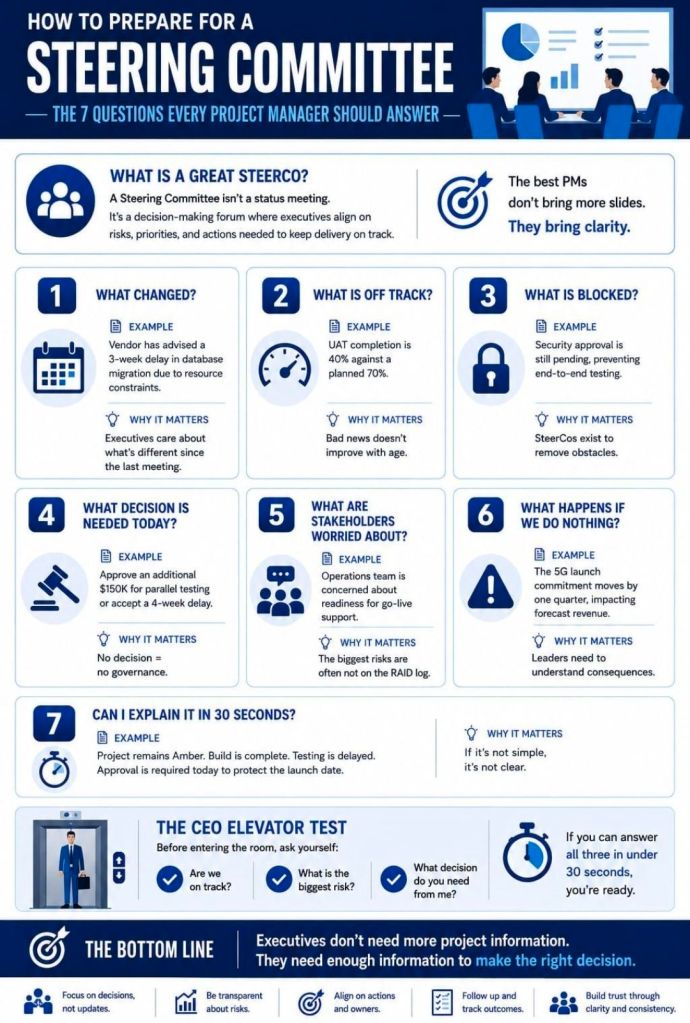
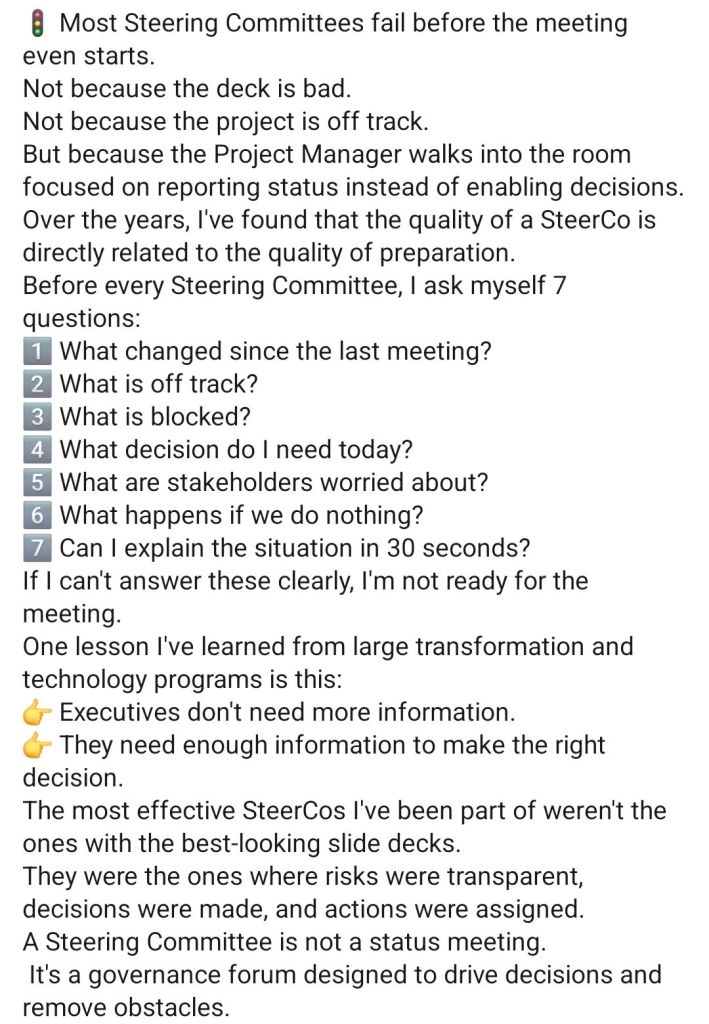
Preparing for a Steering Committee, SteerCo

Preparing for a Steering Committee, SteerCo
1. Preparing for a Steering Committee, SteerCo
2. Preparing for a Steering Committee, SteerCo

Also,

Preparing for a Steering Committee (SteerCo) means ensuring senior stakeholders are aligned, not surprised.

Share a concise pre-read 48–72 hours prior focusing on strategic updates, key risks, and necessary decisions. Use the meeting itself to seek guidance or arbitration rather than just reading through slides.

A successful SteerCo relies on keeping your presentation highly strategic. Here is an actionable checklist to prepare:

1. The Pre-Read (Distribute 2-3 Days Before)

  • One-Page Status Summary: A simple Red-Amber-Green (RAG) dashboard covering schedule, budget, and scope.
  • The “Ask”: Clearly outline the specific decisions or approvals you need from the committee.
  • No Surprises Rule: If there is a major blocker or budget overrun, brief key members individually before sending the formal pack.

2. The Presentation Structure

  • Executive Summary: Quick reminder of project goals, scope, and target timelines.
  • Project Progress: Highlight major milestones recently achieved.
  • Financial Health: Compare actual spend vs. planned budget.
  • Risks & Issues: Focus only on severe roadblocks and present actionable mitigation options.
  • Decisions Needed: State the options, pros/cons, and your recommendation.

3. During the Meeting

  • Focus on the Big Picture: Do not get bogged down in granular project details.
  • Manage the Politics: Be prepared for pushback and answer objectively. If you don’t know an answer, take an action item rather than bluffing.

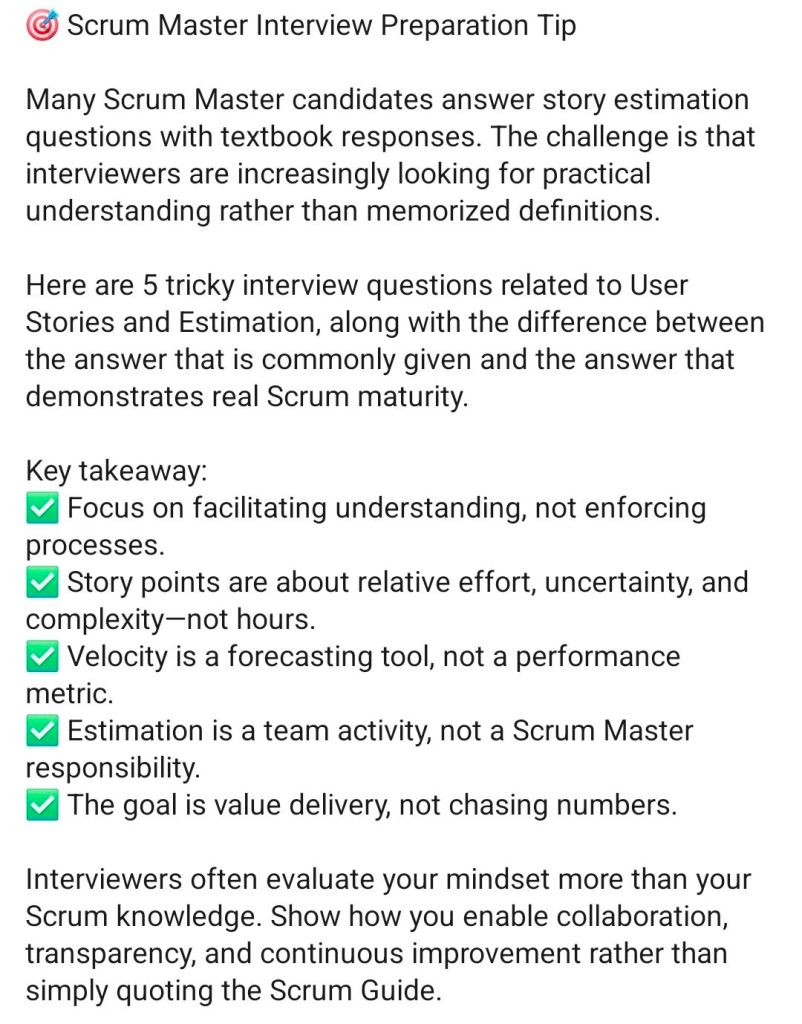
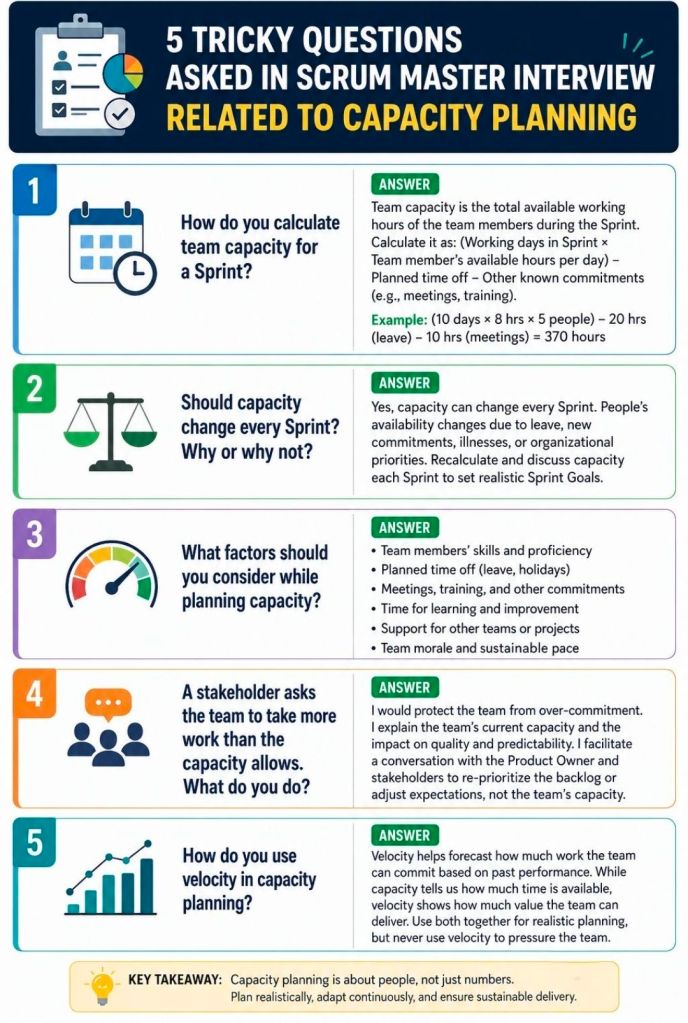
Agile Scrum Master Interview Questions & Preparation Advice

Agile Scrum Master Interview Questions
Agile Scrum Master Interview Preparation Advice

Typical Agile Scrum Master interview questions evaluate your understanding of the Scrum Framework (the 3-5-3 structure), your ability to facilitate continuous improvement, and your soft skills in conflict resolution and servant leadership.

The questions generally fall into four core categories:

1. Scrum Fundamentals & Frameworks

These questions test your technical knowledge of Scrum and how it compares to other frameworks.

  • Explain Scrum vs. Agile: Agile is the overarching mindset and set of principles; Scrum is a specific, lightweight framework for implementing Agile.
  • The 3-5-3 structure: What are the three roles (Product Owner, Scrum Master, Developers), five events (Sprint, Sprint Planning, Daily Scrum, Sprint Review, Sprint Retrospective), and three artifacts (Product Backlog, Sprint Backlog, Increment)?
  • Scaling Agile: What experience do you have scaling Agile (e.g., SAFe, Scrum of Scrums, Nexus) if the organization is large?

2. Facilitation & Coaching

Interviewers want to see how you run events, coach Product Owners, and improve team delivery.

  • Daily Scrum: What is your approach to running the Daily Scrum, and how do you prevent it from becoming just a status update?
  • Retrospectives: What specific techniques or games do you use to keep retrospectives fresh and actionable?
  • Definition of Done (DoD): How do you help a team create and adhere to a clear Definition of Done?
  • Metrics: How do you track a team’s effectiveness (e.g., velocity, sprint goal success, cycle time, burndown charts)?

3. Behavioral & Situational Scenarios

These “tell me about a time when…” questions assess your real-world experience.

  • Team Conflict: Can you describe a time when you had to resolve a conflict between team members or between a developer and the Product Owner?
  • Resistant Teams: What would you do if a team member or stakeholder doesn’t see the value in Scrum ceremonies and refuses to participate?
  • Management Intervention: How do you handle managers or executives who try to bypass the Scrum process or assign work directly to the developers?
  • Scope Creep: How do you handle sudden mid-sprint requirement changes or scope creep?

4. Self-Awareness & Servant Leadership

Hiring managers ask these to test your humility and growth mindset.

  • Your Greatest Failure: Can you share a time you failed as a Scrum Master, and what you learned from the experience?
  • Protecting the Team: How do you say “no” to leadership or protect the team from external noise while still serving the broader organization?

__________

More Agile Scrum Questions with Example Answers:

Mastering a Scrum Master interview involves demonstrating a deep understanding of servant leadership, the Agile mindset, and hands-on experience navigating team dynamics. Below are the most common interview questions, summarized with strategic, industry-recommended answers to help you stand out.

Core Scrum Framework & Mechanics

Question 1: Explain the 3-5-3 structure of Scrum.

  • What they’re looking for: A solid foundation in Scrum basics.
  • Recommended Answer: “Scrum is governed by a ‘3-5-3’ rule: 3 roles (Product Owner, Scrum Master, Developers), 5 events (Sprint, Sprint Planning, Daily Scrum, Sprint Review, Sprint Retrospective), and 3 artifacts (Product Backlog, Sprint Backlog, Increment).”

Question 2: What is the difference between a Product Backlog and a Sprint Backlog?

  • What they’re looking for: Understanding of backlog management and scope.
  • Recommended Answer: “The Product Backlog is a continuously evolving, prioritized list of everything needed for the product, owned by the Product Owner. The Sprint Backlog is a subset of the Product Backlog—it’s the specific forecast of items the team commits to delivering during the current sprint.”

Behavioral & Situational Questions

Question 3: How do you handle conflict within the Scrum team?

  • What they’re looking for: Your facilitation and conflict-resolution skills, avoiding direct intervention where the team can self-manage.
  • Recommended Answer: “I avoid playing the role of a micromanager. Instead, I facilitate open dialogue and encourage the team to address the conflict directly using the Scrum values of openness and respect. My goal is to guide them to find a mutually agreeable solution while fostering an environment of psychological safety.”

Question 4: What do you do if a team member refuses to adopt Scrum practices?

  • What they’re looking for: Change management skills and patience.
  • Recommended Answer: “I first try to understand the root cause of their resistance, as it usually stems from a lack of understanding or fear of change. I would have a private one-on-one conversation to address their concerns. I might pair them with an experienced Agile advocate or use team-building exercises to demonstrate the value of Scrum in a low-pressure way.”

Leadership & Stakeholder Management

Question 5: Tell me about a time you had to challenge leadership or management.

  • What they’re looking for: The courage to protect the team’s focus and uphold Scrum principles.
  • Recommended Answer: “I once had a stakeholder attempt to bypass the Product Owner and directly assign high-priority tasks to Developers mid-sprint. I respectfully but firmly challenged this by explaining how breaking the Sprint Goal jeopardizes the team’s focus and the project’s overall velocity. I then helped the stakeholder work with the Product Owner to place the new task in the Product Backlog for the next sprint planning.”

Question 6: How do you measure if your team is truly Agile?

  • What they’re looking for: Focus on delivering value over measuring arbitrary metrics like velocity.
  • Recommended Answer: “Velocity is for planning, not for measuring success. I look at outcome-based metrics, such as Sprint Goal success rates, customer satisfaction scores, time-to-market, and the quality of increments. The ultimate measure is whether we are continuously delivering iterative business value to our end users.”
Agile Scrum, Capacity Planning

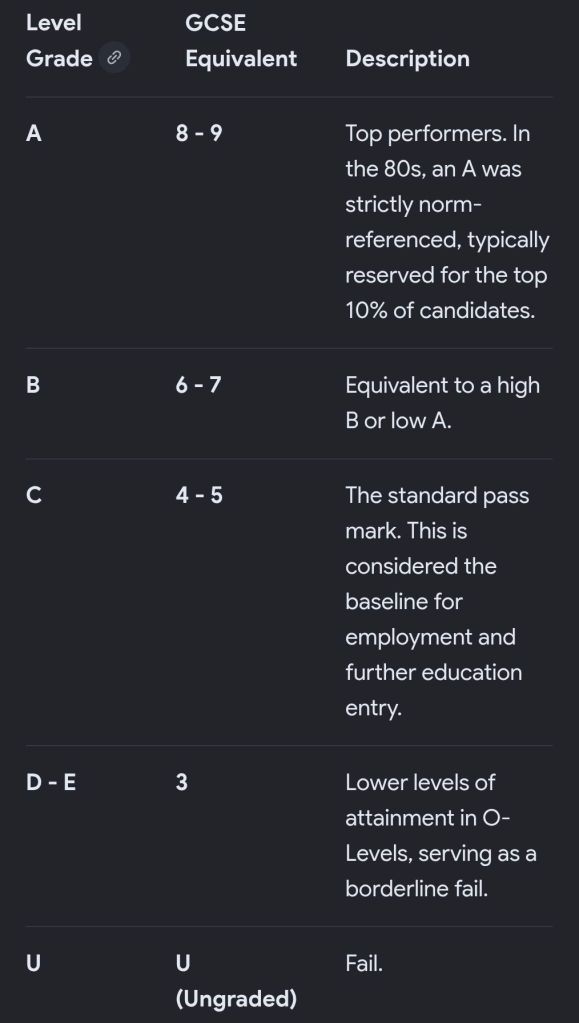
Direct comparison between O-Level system of 1980s and today’s numerical GCSE grades

In the 1980s, GCE O-Level grades ranged from A to E (where A, B, and C were considered passing). Due to grade inflation and changes in the curriculum over the decades, an O-Level grade C is roughly equivalent to a Grade 4 in the current numerical GCSE system, while an O-Level grade A equates to a Grade 7 or 8.

A direct, point-by-point comparison between the O-Level system of the 1980s and today’s numerical GCSE grades reveals the following equivalence:

O-Level grade C is roughly equivalent to a Grade 4 in the current numerical GCSE system, while an O-Level grade A equates to a Grade 7 or 8
O-Level grade C is equivalent to Grade 4, while O-Level grade A equates to Grade 7/8

Important Differences in System Design

  • Grading Method: O-Levels were norm-referenced, meaning a fixed percentage of students received each grade every year, regardless of the overall score. Today’s GCSEs are criterion-referenced, meaning grades are awarded based strictly on the skills and knowledge the student demonstrates, with grade boundaries adjusted accordingly.
  • Cohort Reach: In the 1980s, O-Levels were designed for the top 20–25% of the academic cohort, while the next 40% took CSE (Certificate of Secondary Education) exams. The modern GCSE is designed to cater to the vast majority of all abilities.
  • Assessment & Breadth: O-Levels were almost entirely dependent on final, high-stakes written exams, whereas modern GCSEs require more breadth across a wider range of subjects and rely heavily on 9-1 scoring.

Direct comparison between O-Level system of 1980s and today’s numerical GCSE grades

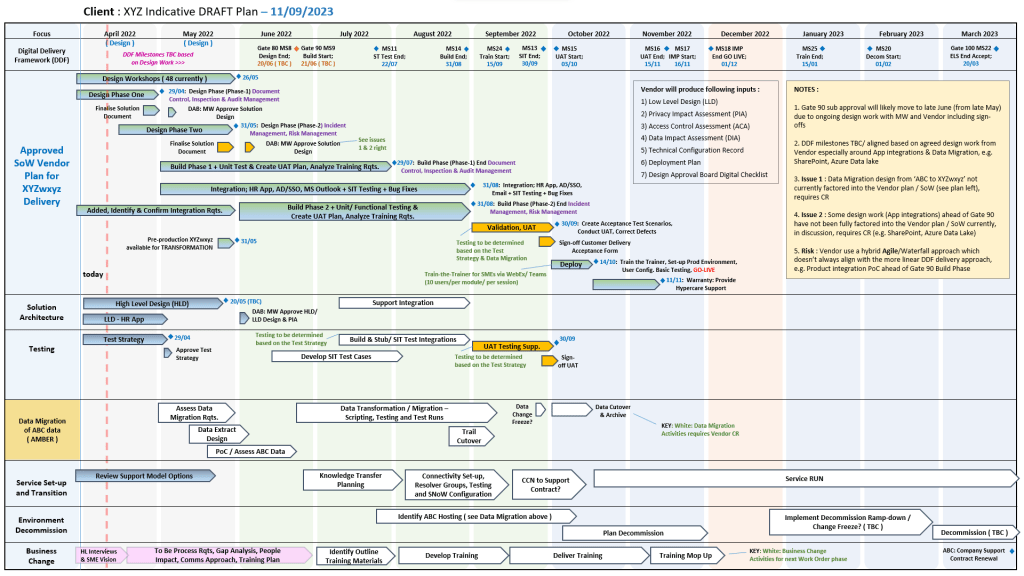
Plan on a Page, POAP – is a visual summary of a project’s core elements

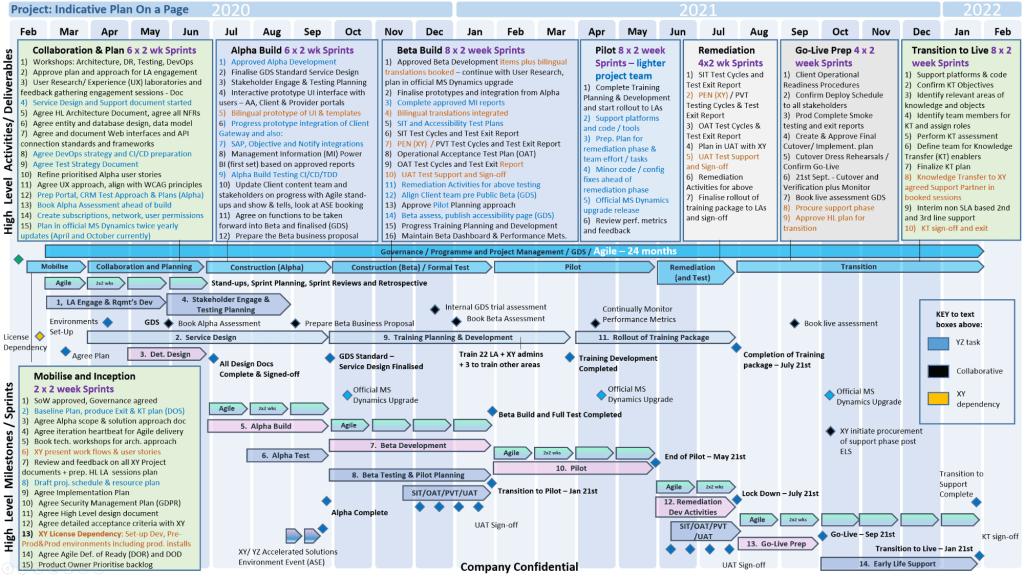
A Plan on a Page (POAP) is a concise, visual summary of a project’s core elements. It distills complex, granular project details into a highly accessible, single-page format.

It acts as an executive summary rather than a replacement for comprehensive, detailed project plans. Example, tailorable Agile and Waterfall MS PowerPoint POaP project templates can be purchased at this link.

A Plan on a Page (POAP) is a concise, visual summary of a project's core elements
Plan On a Page also known as a POAP

🎯 Primary Purpose

  • Executive Communication: Provides busy stakeholders and C-level management with rapid visibility into a project’s status without overwhelming them with data.
  • Alignment: Ensures teams, sponsors, and stakeholders share a unified understanding of project goals and direction.
  • Focus & Risk Management: Keeps the strategic vision front-and-center, prevents teams from getting “lost in the weeds,” and allows leaders to spot high-level risks early.
  • Decision Support: Serves as a quick reference guide during steering committee and status meetings.
POAP is a concise, visual summary of a project's core elements
A Plan on a Page (POAP) is a concise, visual summary of a project’s core elements

📝 Content Summary

To fit on a single page, a POAP strips away tactical daily tasks and focuses only on the most critical strategic and timeline components:

  • Project Vision & Scope: A concise statement of what the project aims to deliver.
  • Objectives & KPIs: Specific, measurable targets and Key Performance Indicators to measure success.
  • Visual Timeline: A high-level roadmap, Gantt chart, or phase-based breakdown (e.g., Discovery, Execution, Launch) displaying major milestones.
  • Project Health/Status: Current RAG (Red/Amber/Green) status or progress tracking.
  • Resource & Budget Allocation: High-level overview of assigned budget and key personnel.
  • Risk & Dependencies: Notable blockers, constraints, or critical assumptions.
  • Governance & Contacts: The project sponsors, managers, and the best way to get support.
Plan on a Page concise, visual summary of a project's core elements
All POAP templates can be purchased by clicking on the link on the website banner