Download Templates for PROject Management | FREE Upgrades & Additions
Author: Mark Whitfield
Welcome to my site!
After graduating in Computing in 1990, I accepted a position as a programmer at a Runcorn based software house specialising in electronic banking software, namely sp/ARCHITECT-BANK on Tandem Computers (now HPE NonStop). This was before the internet became more prevalent and so the notion of enabling desktop access to company accounts for inter-account transfers and book keeping was still quite a cutting edge idea (and smartphones only ever hinted at in Space 1999). The company was called The Software Partnership (which was taken over by Deluxe Data in 1994).
I spent 5 years in Runcorn developing code for SP/ARCHITECT for various banks like TSB, Bank of Scotland, Rabobank and Girofon (Denmark) to name but a few. I then moved onto a software house in Salford Quays for further bank facing projects. After a further 23 years in the IT industry and now a Senior IT Project Manager (both Agile and Waterfall delivery), I thought I would echo out my Career Profile in this corner of the internet for quick and easy access.
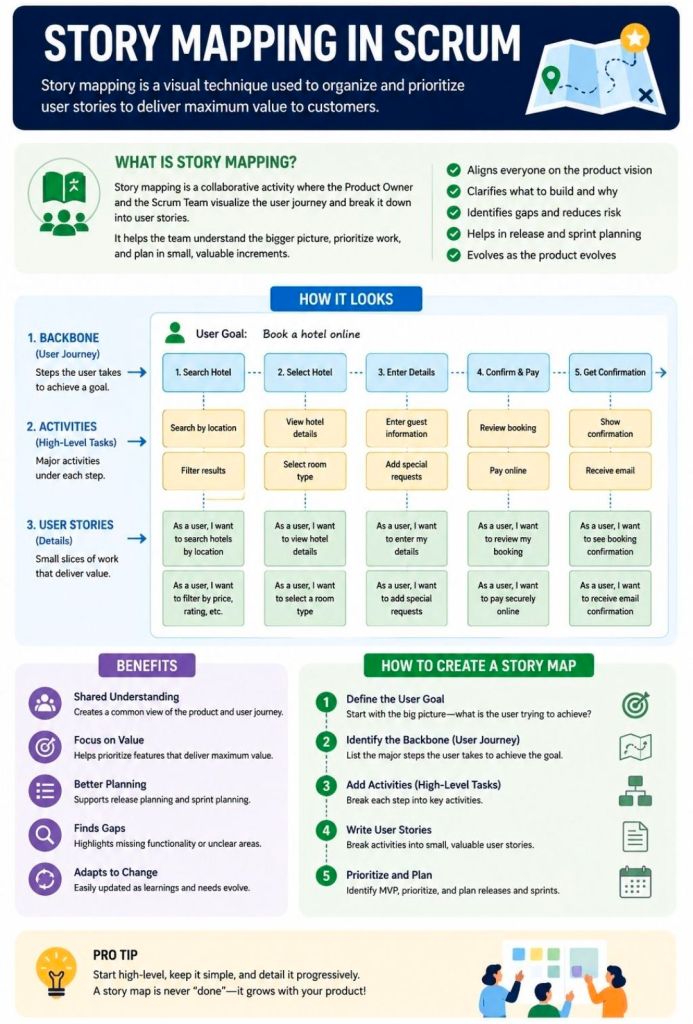
Story Mapping in Agile and Scrum is a visual technique that organizes user stories along a chronological user journey. It helps teams see the big picture, avoid flat, disconnected backlogs, and collaborate on planning iterative releases that consistently deliver user value.
How a Story Map is Structured
A story map is a two-dimensional grid—often built with sticky notes on a whiteboard or via software like Miro or Visual Paradigm. It breaks work down into three levels of hierarchy:
Horizontal Axis (The Spine): Arranges the customer journey chronologically.
Activities: The broadest goals a user wants to achieve (e.g., “Checkout”).
Steps: The specific tasks required to complete the activity (e.g., “Enter Shipping Info,” “Pay”).
Vertical Axis (Details & Priority): Stacks beneath each step are the detailed user stories, epics, or features. They are organized by priority, with the most critical or highly sophisticated tasks at the top.
The Benefits of Story Mapping
Teams use this technique—popularized by Jeff Patton—to achieve several core Agile goals:
Prevents “Flat Backlog” Blindness: Gives stakeholders and developers a birds-eye view of how the entire application or feature fits together.
Defines the MVP: Allows teams to draw horizontal “release lines” across the map. The items sitting above this line form the barebones “walking skeleton” or Minimum Viable Product (MVP).
Aids Sprint Planning: Helps the Product Owner pull well-sequenced, context-aware stories directly into sprint backlogs.
Fosters Collaboration: Moves the team away from siloed requirement docs and toward collaborative conversations around actual user behavior.
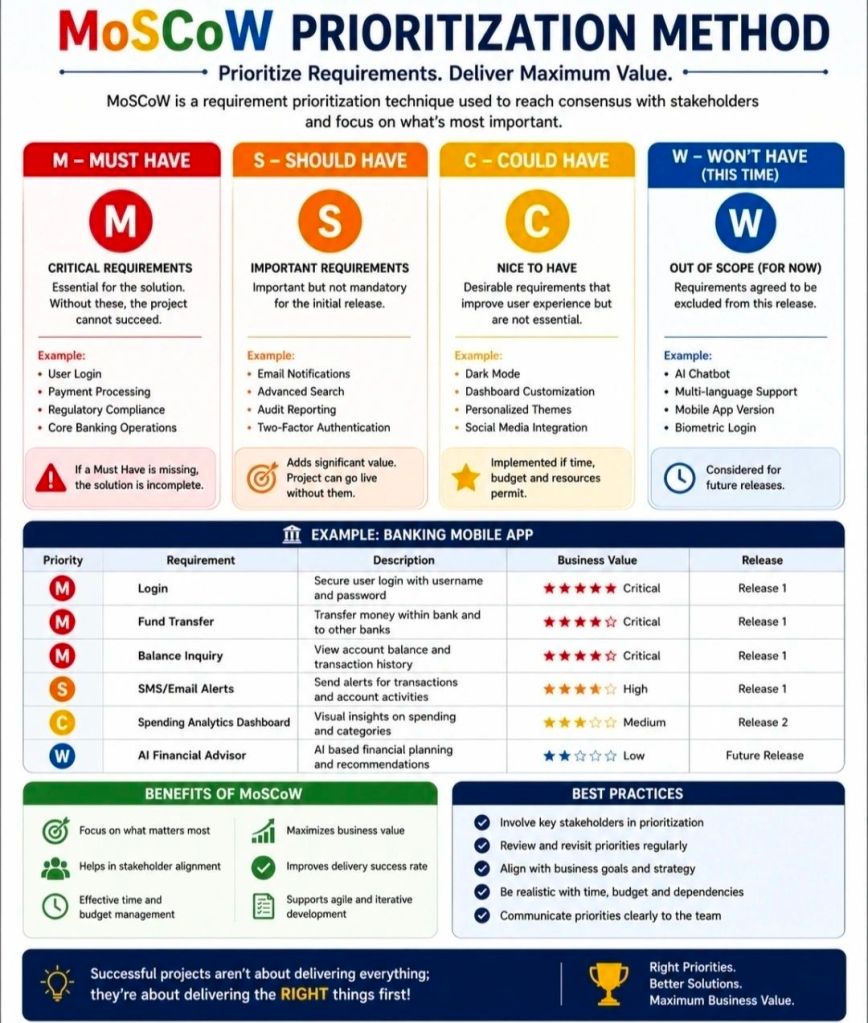
The MoSCoW method is a popular requirements prioritization technique used in project management and software development to help stakeholders reach a common understanding on the importance of deliverables. It categorizes tasks into Must, Should, Could, and Won’t have.
The MoSCoW Categories
Must Have: Non-negotiable requirements that are critical for success, compliance, or safety. Without these, the project is considered a failure and cannot be deployed.
Should Have: High-priority, important features that add significant value but are not strictly vital for immediate delivery. These are generally included if time permits, or they may have a manual workaround.
Could Have: Desirable, “nice-to-have” features that are small and easy to implement. These improve user experience but can be deferred or dropped without impacting the project’s overall success.
Won’t Have (or Won’t Have this time): Features that have been mutually agreed upon as out-of-scope for the current release or timeframe. They are deliberately excluded to prevent scope creep, though they may be added to the backlog for future cycles.
Why and When to Use It
Resource Management: It helps maximize limited time, budget, and resources by focusing effort on the features that provide the most immediate ROI.
Stakeholder Alignment: It acts as a negotiation tool, forcing stakeholders to agree on what is genuinely critical versus what is purely desirable.
Agile Environments: It is a foundational practice in Agile frameworks like DSDM, where teams adhere to fixed deadlines (timeboxes) and adjust the project scope instead.
Best Practices for Implementation
The 60-20-20 Rule: A common best practice is to ensure that Must Haves consume no more than 60% of the team’s total effort. Roughly 20% should be allocated to Should Haves, and 20% reserved for Could Haves to act as contingency room.
Challenge Assumptions: When classifying a requirement as a Must, ask: “What happens if we don’t do this? Can we still deploy the product?” If the project can still function—even awkwardly—it is likely a Should or Could.
Continuous Review: Priorities aren’t static. Re-evaluate your MoSCoW list at the end of every sprint or development cycle, as a Could Have from a previous phase might be upgraded or permanently discarded.
The eBUG (European BASE24 User Group) Conference is the premier annual gathering for financial institutions, retail banking professionals, and technical architects utilizing ACI Worldwide’s foundational retail payment engine, BASE24 and BASE24-eps.
Operating alongside global HPE NonStop hardware environments, the conference traditionally functions as a collaborative technical focus group (TFG) and customer roundtable. It brings together industry experts to address mission-critical transaction switching, regulatory compliance mandates, payment security architectures, and core software migrations.
Detailed Era Breakdown & Timeline
Era 1: The Classic BASE24 & ITUG Tandem Era (1980s – Late 1990s)
Focus: Evolution of core ATM/POS switching on Tandem (HPE NonStop) platforms, localized compliance, and basic card processing networks.
1982–1985: The birth of the early European user networks following the launch of BASE24 software by Applied Communications Inc. (now ACI Worldwide). Early meetings are heavily dependent on regional vendor user group support.
1992: Initial formations of explicit regional sub-committees under the International Tandem User Group (ITUG). The European base of users establishes formal communication pipelines.
1996: Increased focus on the early adoption of regional card mandates, standardising early transaction switching over X.25 networks, and prepping mainframe systems for high-availability roundups.
1999: A definitive milestone focused on Y2K compliance readiness. Conferences during this era are heavily centered on stress-testing legacy BASE24 code blocks, ensuring clock dates rollover flawlessly across financial networks without disrupting global merchant processing.
Era 2: The EMV Mandate & “Classic-to-EPS” Transition Era (2000 – 2010)
Focus: Overhauling core code for Chip & PIN (EMV) regulations, migrating toward open system frameworks, and introducing the next-generation BASE24-eps payment platform.
2003:The EMV Blueprint Era. The conference takes a primary steering role for European banks facing strict Eurocard, Mastercard, and Visa (EMV) liabilities. User sessions heavily focus on updating terminal messaging scripts.
2005: Introduction of BASE24-eps to the wider user group community. Discussions shift away from the classic architecture toward modern open-systems deployments, leveraging UNIX, Linux, and IBM z/OS alongside traditional NonStop environments.
2007 (Istanbul, Turkey): The group expands geographic footprints into the borders of Europe and Asia. Themes heavily stress global interoperability, cross-border transactional routing, and real-time fraud monitoring.
2008 (Vienna, Austria): High-water mark for attendance during the mid-2000s. Presentations focus on deep-dive technical configurations of BASE24-eps Release 08.2, service-oriented architecture (SOA) wrappers, and high-availability testing matrices.
2009 (Prague, Czech Republic): Real-time monitoring tools become a central talking point. Despite global financial pressures, the user community explicitly defends the strength of HPE NonStop infrastructure for running foundational retail networks.
Era 3: Security Hardening & The Independent Pivot Era (2011 – 2018)
Focus: Adapting payment loops to rigid PCI-DSS requirements, cloud capability tracking, and shifting the conference structure to independent consulting sponsorships.
2011: Focus turns squarely onto PCI-DSS Compliance and tokenisation. Roundtables detail architectural techniques to secure transaction journals, encrypt key lines, and prevent man-in-the-middle exploits at the ATM level.
2012 (London, UK): Held at the historic Trinity House near Tower Bridge, this event marks a structural pivot. Moving away from a pure ACI-hosted workspace, independent payment consultancies (such as PayX) drive user discussions. This Technical Focus Group explicitly evaluates the limits of legacy systems against “intelligent” multi-vendor ATM software.
2015: Immediate focus addresses the challenges of Real-Time / Instant Payments mandates across the Eurozone. Systems engineers share optimization scripting paradigms to support sub-second processing SLA ceilings.
2018: The rise of Open Banking / PSD2 Regulations. Technical breakout sessions outline how to safely open classic BASE24 architectures to third-party APIs through microservices wrappers and middleware adapters without breaking strict system uptime criteria.
Era 4: Modernisation & Cloud-Native Coexistence Era (2019 – Present)
Focus: ISO 20022 message standard migrations, cloud-native deployments, and containerization strategies.
2020–2022: Transition to hybrid tracking methodologies due to travel constraints. The baseline focus targets data integration, remote system management, and virtualized system-hardening techniques.
2023–2024:The ISO 20022 Mandate. Sessions are dominated by the industry-wide migration from legacy ISO 8583 message lines to the XML-based ISO 20022 financial standard. Systems architects present automated script parsers to translate real-time payment formats across legacy logic systems.
2025–2026: Integration of Cloud-Native BASE24-eps architectures. Contemporary meetups explore containerized execution patterns, utilizing AI models within the authorization loop to spot edge-case fraud patterns in real-time, and evaluating long-term roadmaps for hardware-security modules (HSMs).
eBUG (European BASE24 User Group) Conference Overview and Chronological Timeline
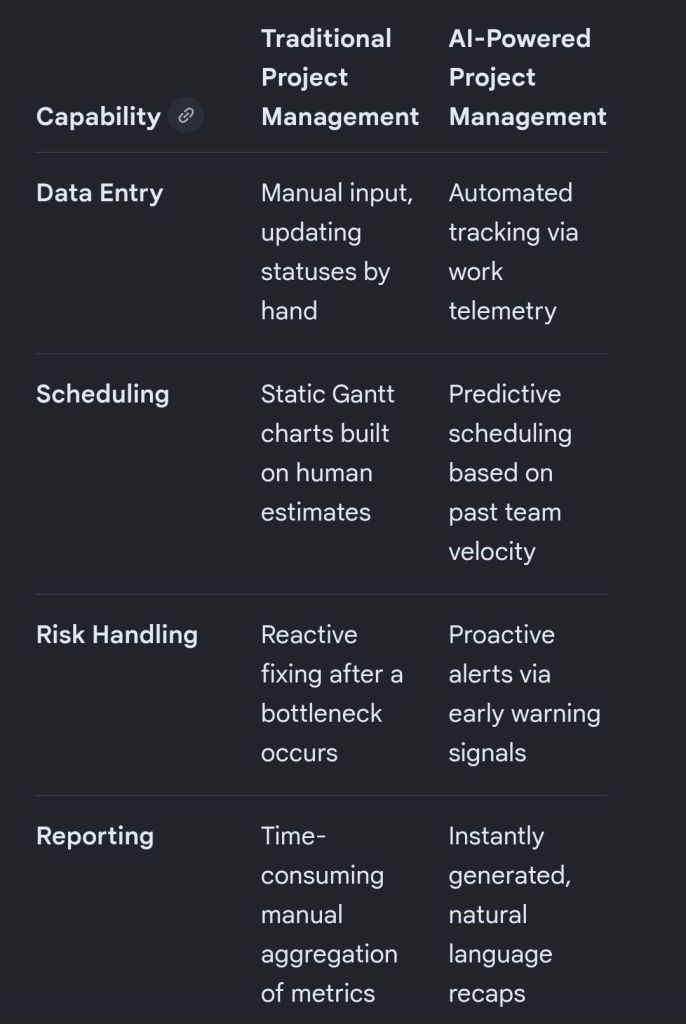
Artificial intelligence is transforming project management by shifting software from passive data repositories into active, predictive engines that automate tedious administration and improve decision accuracy.
The breakdown below covers the primary AI approaches and the specific tools driving each function.
🧠 Core AI Approaches in Project Management
Rather than basic, rule-based automation (“if X happens, do Y”), true AI uses model-driven machine learning, natural language processing (NLP), and predictive analytics.
Predictive Analytics & Forecasting: Machine learning models evaluate past team velocity, budget trends, and historical timelines to forecast delays and cost overruns before they occur.
Natural Language Processing (NLP): Large Language Models (LLMs) digest unstructured data like unstructured chats, customer emails, and meeting transcripts to extract action items, drafting project updates automatically.
Resource Optimisation: Algorithms match team members’ skills, existing workloads, and availability with upcoming project requirements to distribute work sustainably and efficiently.
Proactive Risk & Scope Creep Detection: AI monitors real-time activity and flags deviations from the initial project charter, alerting teams to emerging bottlenecks.
🛠️ AI Project Management Tools Broken Down by Use Case
1. All-in-One Work Operating Systems (Work OS)
These comprehensive platforms integrate AI deeply into everyday task tracking, workflows, and communication.
Monday.com: Features an integrated AI Assistant that auto-generates task descriptions, brainstorms project ideas, and summarizes long activity threads across cross-functional workspaces.
ClickUp: Uses its unified “ClickUp Brain” engine to break down major project milestones into contextual subtasks, answer project-related queries instantly, and write status updates.
Asana: Leverages AI smart agents to recommend task assignments, identify workflow blockers early, and suggest ideal task prioritisation based on team capacity.
Wrike: Focuses heavily on predictive analytics and intelligent insights, allowing larger organisations to move past traditional tracking into data-driven risk monitoring.
2. Meeting & Communication Intelligence
These tools alleviate the administrative burden of manually taking notes, tracking ownership, and summarizing align-meetings.
Otter.ai: Transcribes team calls in real time and automatically creates bullet-point action items, keyword summaries, and structured meeting recaps.
Microsoft Copilot / Google Gemini: Seamlessly pulls historical data from your workspace ecosystem (emails, documents, calendars) to draft project charters or assemble stakeholder reports with minimal context.
🛠️ AI Project Management Tools Broken Down by Use Case
1. All-in-One Work Operating Systems (Work OS)
These comprehensive platforms integrate AI deeply into everyday task tracking, workflows, and communication.
Monday.com: Features an integrated AI Assistant that auto-generates task descriptions, brainstorms project ideas, and summarizes long activity threads across cross-functional workspaces.
ClickUp: Uses its unified “ClickUp Brain” engine to break down major project milestones into contextual subtasks, answer project-related queries instantly, and write status updates.
Asana: Leverages AI smart agents to recommend task assignments, identify workflow blockers early, and suggest ideal task prioritisation based on team capacity.
Wrike: Focuses heavily on predictive analytics and intelligent insights, allowing larger organisations to move past traditional tracking into data-driven risk monitoring.
2. Meeting & Communication Intelligence
These tools alleviate the administrative burden of manually taking notes, tracking ownership, and summarizing align-meetings.
Otter.ai: Transcribes team calls in real time and automatically creates bullet-point action items, keyword summaries, and structured meeting recaps.
Microsoft Copilot / Google Gemini: Seamlessly pulls historical data from your workspace ecosystem (emails, documents, calendars) to draft project charters or assemble stakeholder reports with minimal context.
3. Engineering & Agile Backlog Management
Built to address the rapid velocity changes and technical needs of software development teams.
Jira (Atlassian Rovo): Uses built-in AI agents to organize bloated backlogs, surface conflicting dependencies, and estimate how long features will take based on historical sprint velocities.
4. Document & Knowledge Management
Designed for centralizing organizational resources so teams don’t waste time hunting for internal data.
Notion AI: Acts as a central, conversational wiki workspace that synthesizes notes, translates documents, drafts release notes, and surfaces data buried in complex project databases.
NotebookLM: A powerful, localized research assistant that organizes complex internal project documentation, creates study guides for teams, and answers cross-document queries accurately.
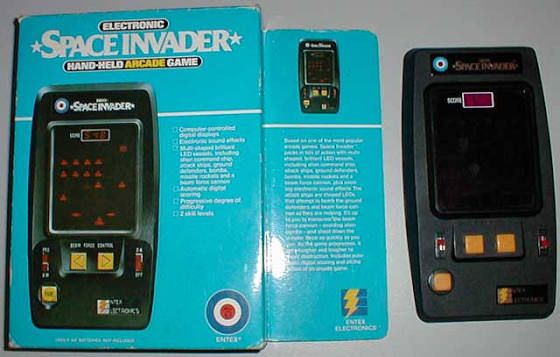
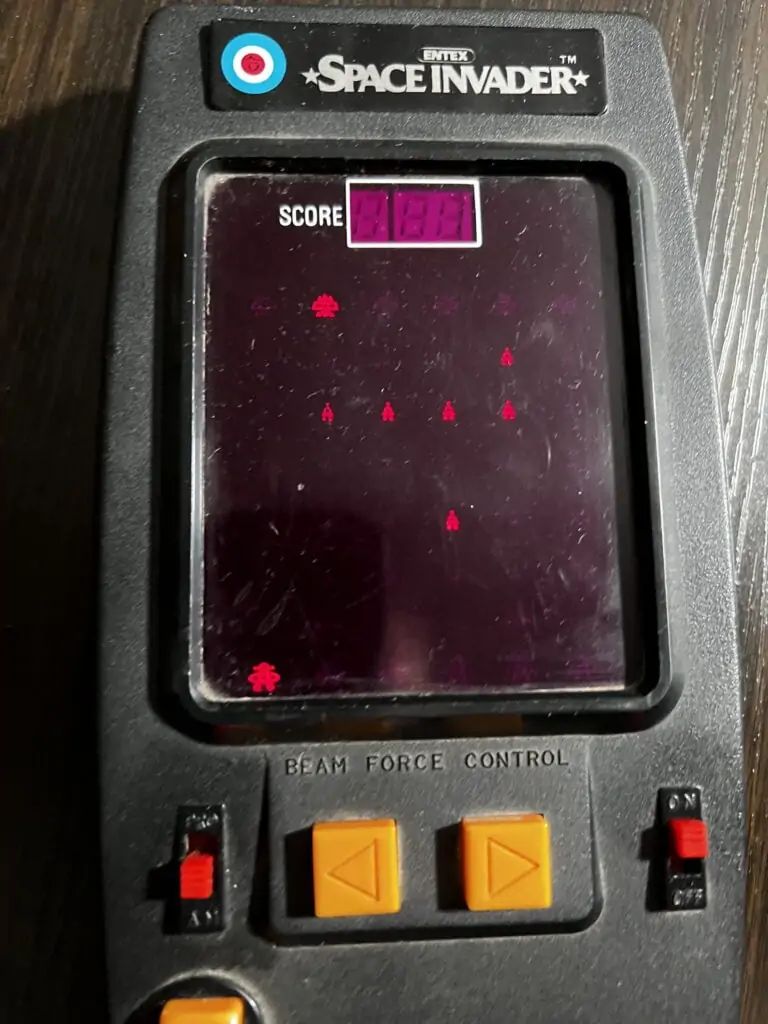
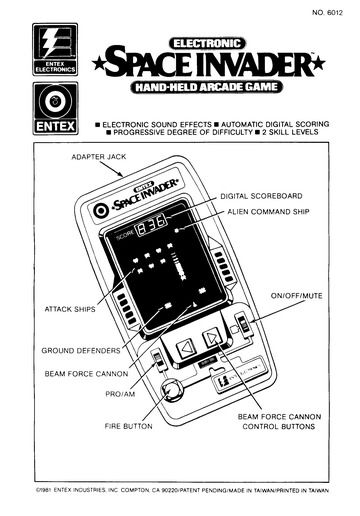
The Entex Space Invader handheld electronic game is a classic VHF-style portable arcade unit released in 1980. It is highly sought after by collectors of vintage 1980s electronics. I used to have one in the early eighties, my first taste of computing technology and gaming.
Design & Hardware
Entex Space Invader handheld electronic game
Form Factor: Large wedge-shaped black plastic tabletop/handheld console designed by Entex Tokyo.
Objective: Move your laser cannon horizontally across the bottom of the screen to shoot down descending waves of alien invaders.
Layout: Displays four distinct lanes of action with columns of moving digital alien targets.
Scoring System: Tracks and displays electronic numeric scoring up to a maximum of 1,000 points.
Audio: Features simple built-in, synthesized electronic space sound effects for firing lasers and alien tracking.
Known Product Variants
1980 Black Model: The original release featuring a dark case, designed and programmed natively in Japan by Entex Tokyo.
1981 Grey Model: A re-programmed version developed by Rick Dyer & AMS featuring slightly adjusted gameplay. The distinct grey casing was actually the result of a factory paperwork typo that swapped two Pantone color codes.
Entex Space Invader handheld electronic game, back of box