Home Computers, ZX Spectrum versus Commodore 64

The Commodore 64 (C64) and ZX Spectrum were the primary rivals of the 8-bit home computing era, particularly in the UK, where they defined a decade of “playground wars”. While the ZX Spectrum launched in April 1982 as an affordable entry into computing, the Commodore 64 followed in August 1982 with superior custom hardware for sound and graphics. 

1982: The Birth of the Icons 

  • January: Commodore unveils the Commodore 64 at CES in Las Vegas.
  • 23 April: Sinclair Research launches the Sinclair ZX Spectrum 16K/48K in the UK. It is marketed for its 15-colour palette and affordable price compared to the BBC Micro.
  • August: The Commodore 64 begins volume production and goes on sale in the US for $595.
  • Late 1982: Sinclair introduces the Issue 2 motherboard for the Spectrum to fix manufacturing defects. 

1983: Expansion and Price Wars

  • January: Commodore introduces the Commodore SX-64, the first commercial full-color portable computer.
  • July: The Timex Sinclair 2068, an enhanced US version of the Spectrum, is launched.
  • August: Spectrum sales in Britain and Europe exceed 500,000 units.
  • December: The millionth ZX Spectrum is manufactured.
  • Market Shift: Commodore begins aggressive price-cutting to underbid competitors, leading to the “Home Computer Price War”. 

1984–1985: New Iterations and Corporate Shifts

  • January 1984: Sinclair announces the Sinclair QL, intended as a professional successor to the Spectrum.
  • October 1984: Sinclair releases the Sinclair ZX Spectrum+, featuring a new QL-style case and a plastic injection-moulded keyboard to replace the original rubber keys.
  • January 1985: Commodore releases the Commodore 128, a successor that includes a dedicated “64 mode” for 100% compatibility with C64 software.
  • September 1985: The Sinclair ZX Spectrum 128 (codenamed “Derby”) is launched in Spain, featuring 128KB RAM and a three-channel sound chip. 

1986–1987: The Amstrad Era and Redesigns 

  • January 1986: The ZX Spectrum 128 is officially released in the UK.
  • 7 April 1986: Amstrad acquires the Sinclair brand and computer range for £5 million after Sinclair Research faces financial difficulties.
  • Late 1986: Commodore introduces the Commodore 64C, a redesigned model with a sleeker, light-coloured case matching the C128’s aesthetic.
  • Late 1986: Amstrad releases the ZX Spectrum +2, featuring a grey case and a built-in cassette recorder.
  • 1987: Amstrad launches the ZX Spectrum +3, which includes a built-in 3-inch floppy disk drive. 

1988–1994: The Twilight Years 

  • 1988: Amstrad releases the ZX Spectrum +2A, updating the +2 with the internal circuitry of the +3.
  • 1990: Commodore attempts to move into the console market with the Commodore 64 Games System (C64GS), a keyboard-less version of the C64 that ultimately fails commercially.
  • 1992: Amstrad officially discontinues all ZX Spectrum models after approximately 5 million total units sold.
  • April 1994: The Commodore 64 is officially discontinued as Commodore International enters bankruptcy. It remains the best-selling single computer model of all time with 12.5 to 17 million units sold. 

Home Computers, ZX Spectrum versus Commodore 64

Commodore 64 Home Computer Timeline Overview

The Commodore 64 (C64) is the best-selling single computer model of all time, with an estimated 12.5 to 30 million units sold during its 12-year production run

Commodore 64 Annual Timeline

  • 1981: Development Phase
    • January: Engineers at MOS Technology begin a project to design state-of-the-art video and sound chips (VIC-II and SID) for the next generation of games consoles.
    • November: The cutting-edge chips are completed, and Commodore decides to use them for a new home computer to succeed the VIC-20.
  • 1982: Launch and Early Expansion
    • January: The Commodore 64 is officially introduced at the Consumer Electronics Show (CES) with a starting price of $595.
    • August: The C64 begins shipping in the USA, featuring its iconic “breadbox” design.
    • Other Models: The Japan-only MAX Machine (a console version) and the Educator 64 (aimed at schools) are also released.
  • 1983: Price Wars and Portables
    • January: Commodore introduces the SX-64, the world’s first portable computer with a colour screen, retailing for approximately $1,600.
    • June: To dominate the market, Commodore slashes the C64 price to $300, triggering an intense price war that drives competitors like Texas Instruments out of the market.
  • 1984: Leadership Changes
    • January: Founder Jack Tramiel resigns from Commodore after a disagreement with chairman Irving Gould.
    • Expansion: The Commodore 16 and Plus/4 are introduced as low-cost alternatives, though they lack full C64 compatibility.
  • 1985: Peak Performance
    • C128 Release: Commodore launches the Commodore 128, which includes a dedicated C64 compatibility mode to leverage the existing library.
    • Gaming Dominance: The C64 becomes the primary platform for video games, with thousands of titles released by developers like System 3 and MicroProse.
  • 1986: The Redesign
    • May: The Commodore 64C is released, featuring a sleeker, flatter cream-coloured case similar to the Amiga 500.
    • Milestones: To celebrate selling one million units in Germany, a limited “Gold Edition” is presented at the BMW museum.
  • 1987–1989: Late-Era Variants
    • 1987: The C64 Aldi is sold through German supermarkets as a budget model.
    • 1988: The C64G is introduced, returning to the original breadbox shape but using the modern 64C internal hardware.
  • 1990: Consolidation and Consoles
    • C64 Games System (GS): Commodore attempts to enter the console market by releasing the C64 GS (a keyboardless C64), but it fails to compete with the rising 16-bit systems like the Sega Genesis.
  • 1994: The End of an Era
    • April: Despite reaching a final sales total of roughly 17–22 million units, Commodore International files for bankruptcy and the C64 is officially discontinued. 

Commodore 64 Home Computer Timeline Overview

Techniques for Time Management Overview

Techniques for Time Management Overview

AI Skills to Learn in 2026

AI Skills to Learn in 2026

Dinosaur Timeline by Triassic, Jurassic and Cretaceous Period

Dinosaurs lived during the Mesozoic Era, commonly known as the “Age of Reptiles,” which lasted from approximately 252 to 66 million years ago (mya). This era is divided into three distinct geological periods: the Triassic, Jurassic, and Cretaceous. 

1. Triassic Period (252 – 201 mya) 

The Triassic began after the “Great Dying” extinction event, which wiped out 90% of life on Earth. 

  • Early Triassic: The world was a single supercontinent called Pangaea, largely covered by deserts.
  • The Dawn of Dinosaurs (~243–233 mya): The first dinosaurs emerged as small, bipedal creatures.
  • Key Dinosaurs:

2. Jurassic Period (201 – 145 mya) 

Following a mass extinction at the end of the Triassic, dinosaurs became the dominant land animals as the climate became warm and humid. 

  • Middle to Late Jurassic: Pangaea began to split into two smaller landmasses, Laurasia (North) and Gondwana (South).
  • Rise of Giants: This period is famous for the evolution of massive long-necked herbivores (sauropods).
  • Key Dinosaurs:

3. Cretaceous Period (145 – 66 mya) 

The longest period of the Mesozoic saw the greatest diversity of dinosaurs and the appearance of flowering plants. 

  • Peak Diversity: Continents continued to drift toward their modern positions, creating isolated environments where unique species flourished.
  • Famous Predators & Herbivores:
  • The K-Pg Extinction (66 mya): A massive asteroid impact in the Yucatan Peninsula triggered a global catastrophe that wiped out all non-avian dinosaurs. 

Sinclair ZX Spectrum Timeline History

The ZX Spectrum timeline spans from its revolutionary launch in 1982 to its final official production in 1992, followed by a vibrant modern era of community-driven hardware. 

The Sinclair Era (1982–1986) 

  • 23 April 1982Sinclair Research launches the ZX Spectrum at the Earls Court Computer Show. It features 16 KB (£125) or 48 KB (£175) of RAM, a Z80A CPU, and the iconic rubber “chiclet” keyboard.
  • 1983: Timex Sinclair 2068 is released in the US as a modified version of the Spectrum.
  • October 1984: The ZX Spectrum+ is released for £179. It features a new injection-moulded keyboard similar to the Sinclair QL and a dedicated reset button, but remains electronically identical to the 48K model.
  • September 1985: The ZX Spectrum 128 (“The Toast Rack”) is unveiled at the SIMO trade show in Spain. It introduces 128 KB of RAM, an AY-3-8912 sound chip, and MIDI compatibility.
  • January 1986: The ZX Spectrum 128 officially goes on sale in the UK for £179.95. 

The Amstrad Era (1986–1992) 

  • 7 April 1986Amstrad plc acquires the “Sinclair” brand and all Spectrum assets from Sinclair Research for £5 million.
  • 1986: The ZX Spectrum +2 is released. It features a grey case with a spring-loaded keyboard and a built-in “Datacorder” cassette player.
  • 1987: The ZX Spectrum +3 launches with a built-in 3-inch floppy disk drive, replacing the tape deck. It is the only official Spectrum capable of running the CP/M operating system.
  • 1988–1989: Amstrad releases the +2A+2B, and +3B models, which use unified circuit boards and transition to black cases.
  • 1992: Official production of all ZX Spectrum models is discontinued. 

The Modern Revival (2017–Present)

  • 2017: The ZX Spectrum Next Kickstarter campaign successfully funds a new, officially licensed hardware evolution.
  • February 2020: The first batch of ZX Spectrum Next machines is delivered to backers.
  • November 2023: The ZX Touch, a handheld emulation console, is released.
  • 22 November 2024Retro Games releases “The Spectrum”, a modern HDMI-compatible recreation with 48 built-in games.

ZX Spectrum Timeline History

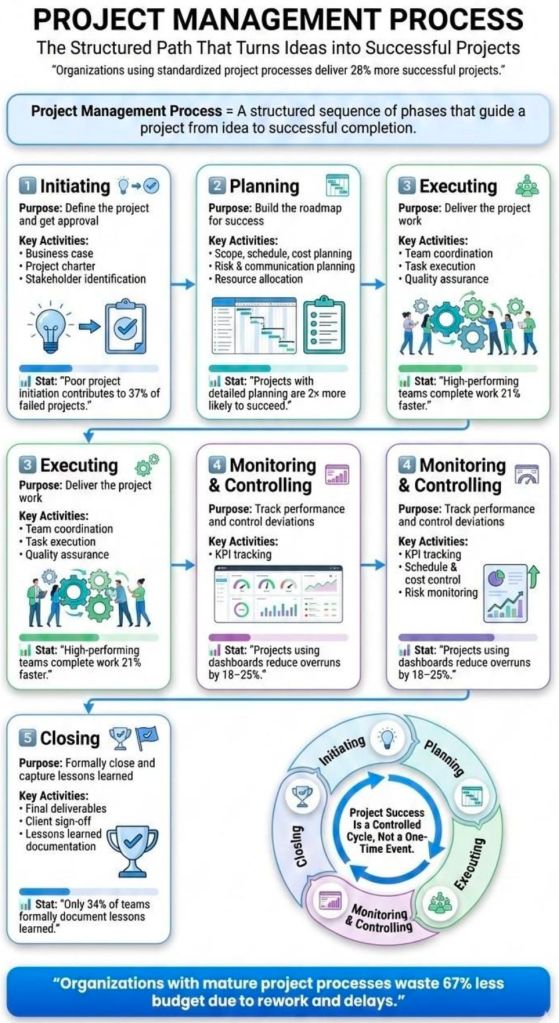
Project planning timeline is typically structured to five phases

A project planning timeline is typically structured around the five phases of the project management lifecycleInitiation, Planning, Execution, Monitoring/Control, and Closure. This framework breaks a complex project into manageable stages to ensure systematic progress and stakeholder alignment. 

1. Project Initiation

The foundation phase where the project’s value and feasibility are established. 

  • Primary Objective: Secure formal approval to begin.
  • Key Activities: Identify stakeholders, perform feasibility studies, and create a Project Charter.
  • Output: Project Charter or Business Case. 

2. Project Planning

The most critical stage for the timeline, where the high-level vision is translated into a detailed roadmap. 

  • Primary Objective: Define the “how” of project delivery.
  • Key Activities:
    • Scope Definition: Establish what is and is not included.
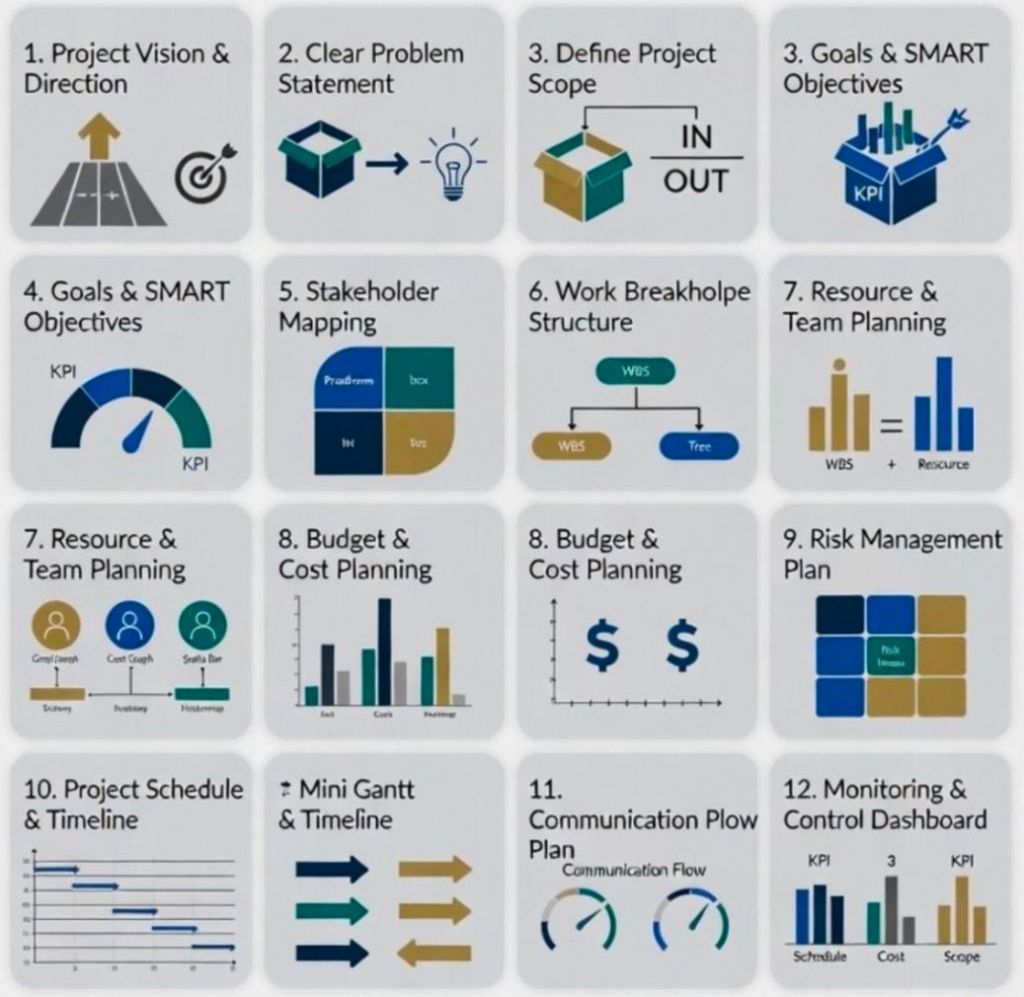
    • Work Breakdown Structure (WBS): Break large goals into “bite-sized” tasks.
    • Scheduling: Sequence tasks, estimate durations, and link dependencies.
    • Resource & Risk Planning: Allocate staff/budget and identify potential bottlenecks.
  • Output: Gantt Chart or Project Management Plan

3. Project Execution

The “action” phase where the team carries out the planned tasks to produce deliverables. 

  • Primary Objective: Complete the work according to the finalized plan.
  • Key Activities: Assign tasks, hold kickoff meetings, and manage workflows using tools like Asana or Trello.
  • Output: Status reports and tangible deliverable packages. 

4. Project Monitoring and Controlling

This phase runs concurrently with Execution to ensure the project stays on track. 

  • Primary Objective: Track progress against the original timeline and budget.
  • Key Activities: Measure KPIs (e.g., ROI, cost performance), manage scope creep, and adjust schedules as needed.
  • Output: KPI Dashboards and Change Logs. 

5. Project Closure

The final wrap-up where the project is formally ended and evaluated. 

  • Primary Objective: Formal handover and knowledge capture for future projects.
  • Key Activities: Host a Post-Mortem Meeting, archive project documents, and release remaining resources.
  • Output: Final reports and a lessons-learned document. 

Project planning timeline is typically structured to five phases

World’s Tallest Buildings Timeline by Era Overview

The timeline of the world’s tallest buildings has evolved from ancient stone monuments to modern steel and concrete megastructures. Historically, the title has shifted from religious and funerary structures in Egypt and Europe to the corporate skyscrapers of North America, and most recently, to the massive mixed-use towers of Asia and the Middle East. 

Ancient & Medieval Era (Spiritual & Funerary)

For millennia, the tallest structures were largely pyramids and cathedrals, often holding records for centuries. 

  • c. 2570 BC – 1311 AD: Great Pyramid of Giza (Egypt) – 146.6m. Held the record for over 3,800 years.
  • 1311 – 1548: Lincoln Cathedral (England) – 160m. The first structure to surpass the Great Pyramid.
  • 1548 – 1884: European Cathedrals (Various) – Following the collapse of Lincoln’s spire, several cathedrals held the title, including St. Mary’s Church (151m) and Cologne Cathedral (157m). 

The Rise of Modern Structures (1884–1930) 

The Industrial Revolution introduced steel frames and safety elevators, moving the “race to the sky” to the United States. 

  • 1884 – 1889: Washington Monument (USA) – 169m. The world’s tallest all-stone structure.
  • 1889 – 1930: Eiffel Tower (France) – 312m. Nearly doubled the previous record; it was the first structure to exceed 300 metres.
  • 1894 – 1908: Philadelphia City Hall (USA) – 167m. Often cited as the first modern building to hold the title. 

The “Golden Age” of NYC Skyscrapers (1930–1974)

A fierce competition in New York City led to rapid record-breaking. 

  • 1930: Chrysler Building – 319m. The first building to surpass 1,000 feet.
  • 1931 – 1970: Empire State Building – 381m. Held the record for 40 years and was the first building with over 100 stories.
  • 1970 – 1973: World Trade Center (North Tower) – 417m. Briefly the world’s tallest before being surpassed by Chicago. 

The Contemporary Era (1974–Present)

The record moved from the US to Asia and the Middle East as construction technology advanced. 

  • 1974 – 1998: Sears Tower (Willis Tower) (USA) – 442m. Held the record for 25 years.
  • 1998 – 2004: Petronas Towers (Malaysia) – 452m. The first time the record left the US in a century.
  • 2004 – 2010: Taipei 101 (Taiwan) – 508m. The first building to reach the 500-metre mark.
  • 2010 – Present: Burj Khalifa (UAE) – 828m. Currently the world’s tallest building, shattered previous records by over 300 metres.
  • 2024: Merdeka 118 (Malaysia) – 678.9m. While not the tallest overall, it was completed in 2024 as the second-tallest building in the world.

World’s Tallest Buildings Timeline by Era Overview

Tennis Development Timeline History by Era and Player

Tennis history is defined by three primary eras, characterized by significant shifts in professionalism and court surfaces. 

The Amateur Era (1877–1967)

During this period, only amateur players were permitted to compete in the Grand Slam tournaments. Professional players were banned from these events and played on their own separate tour. 

  • 1877: Wimbledon is founded in London. It has been played on Grass since its inception.
  • 1881: The U.S. National Championship (now the US Open) begins on Grass in Newport, Rhode Island.
  • 1891: The French Championships are established. It was initially played on Sand/Clay and restricted to French club members until 1925.
  • 1905: The Australasian Championships (now the Australian Open) starts on Grass.
  • 1913: The International Lawn Tennis Federation (ILTF) is formed to standardise rules globally.
  • 1925: The French Championships opens to international players, officially becoming a major played on Clay

The Early Open Era (1968–1987)

The “Open Era” began when Grand Slam tournaments agreed to allow professional players to compete alongside amateurs, unifying the sport. 

  • 1968: The French Open becomes the first Grand Slam of the Open Era.
  • 1970: The Tiebreaker is introduced to tennis rules to shorten match lengths.
  • 1972/1973: The ATP (men) and WTA (women) are formed, introducing the first computerised world rankings.
  • 1975: The US Open switches its surface from grass to Clay (Har-Tru).
  • 1978: The US Open moves to Flushing Meadows and switches to its current surface: Hard Court (DecoTurf).
  • 1987: The Australian Open moves its calendar slot from December to January, becoming the first Slam of the year. 

The Modern Open Era (1988–Present)

This era is marked by the dominance of “The Big Three” and the standardisation of surfaces across the tour. 

  • 1988: The Australian Open moves to Flinders Park (now Melbourne Park) and switches from grass to Hard Court (Rebound Ace).
  • 2006: Hawk-Eye technology is first introduced at the US Open to allow players to challenge line calls.
  • 2007: Wimbledon and the French Open join the other Slams in offering Equal Prize Money for men and women.
  • 2009: Wimbledon installs a Retractable Roof on Centre Court, ensuring play during rain.
  • 2020s: Standardisation of a 10-point tiebreak in the final set across all four Grand Slams to ensure consistency.
Surface Timeline Summary
My trip to Wimbledon 2007 where Roger won his 5 in a row

Tennis Development Timeline History by Era

The history of professional tennis is broadly divided into the Amateur Era (pre-1968) and the Open Era (1968–present), which allowed professionals to compete in Grand Slam tournaments for the first time. 

Key Eras and Milestones

  • 1877–1905: The Birth of the Majors
    • 1877: The first Wimbledon Championships are held, won by Spencer Gore.
    • 1881: The US Open is established.
    • 1891: The French Open begins (initially for French club members; open to all in 1925).
    • 1905: The Australian Open is founded.
  • 1913–1967: The Amateur Era and Pro Tours
    • 1913: The International Tennis Federation (ITF) is formed.
    • 1938: Don Budge becomes the first player to achieve a calendar-year Grand Slam.
    • 1953: Maureen Connolly becomes the first woman to achieve a calendar-year Grand Slam.
    • 1962: Rod Laver wins his first calendar-year Grand Slam as an amateur.
  • 1968–2000: The Start of the Open Era
    • 1968: The Open Era begins; professionals are finally allowed to play in Grand Slams.
    • 1969: Rod Laver achieves a second calendar-year Grand Slam, the only person to do so in the Open Era.
    • 1973: The ATP Rankings for men and the Women’s Tennis Association (WTA) are established.
    • 1988: Steffi Graf achieves the only “Golden Slam” in history, winning all four majors and Olympic Gold in one year.
  • 2003–Present: The “Big Three” and Modern Dominance
    • 2003–2007: Roger Federer ascends to dominance, followed by the rise of Rafael Nadal.
    • 2011–2021: Novak Djokovic joins Federer and Nadal to form the “Big Three,” collectively dominating almost every major title for over a decade.
    • 2022–2024: Roger Federer and Rafael Nadal officially retire, marking the end of an era.
    • 2025–2026: Novak Djokovic reaches milestone of 100 career titles and continues to pursue Grand Slam records.

Agentic AI Artificial Intelligence, Layers of Capability Explained

Agentic AI Artificial Intelligence, Layers of Capability Explained

Project Management evolution timeline by era

The history of project management has evolved from ancient manual coordination to highly sophisticated, digital-first methodologies

Pre-20th Century: The Era of Ancient Marvels

During this era, project management was characterized by massive labour forces and basic resource coordination without standardized scheduling tools. 

  • 2570 BC: Completion of the Great Pyramid of Giza. Documentation shows managers were assigned to each of the four faces to oversee progress.
  • 208 BC: Construction of the Great Wall of China. Labour was systematically organized into groups of soldiers, civilians, and criminals.
  • 1850s: Construction of the Pacific Railroad. This is often cited as one of the first large-scale industrial project management undertakings in the U.S.. 

1900–1950: The Birth of Modern Project Management 

This era introduced scientific management principles and the first visual scheduling tools. 

  • 1911Frederick Taylor publishes The Principles of Scientific Management, focusing on efficiency and unskilled labour training.
  • 1917Henry Gantt develops the Gantt Chart, a radical tool for visualising schedules that remains a global standard today.
  • 1931–1936: Construction of the Hoover Dam. This project was a major early adopter of Gantt’s scheduling techniques.
  • 1942–1945The Manhattan Project. This complex R&D effort pioneered the use of large-scale task coordination and resource management. 

1950–1980: The Era of Management Science 

Driven by the Cold War and space race, this period saw the creation of mathematical scheduling techniques. 

  • 1956: AACE International is formed, focusing on cost engineering.
  • 1957–1958: Development of Critical Path Method (CPM) by DuPont and Program Evaluation and Review Technique (PERT) by the U.S. Navy.
  • 1962–1975: Introduction of Work Breakdown Structure (WBS) by the DoD, founding of IPMA and PMI, and development of PROMPT (later PRINCE). 

1980–2000: The Computing Revolution 

Personal computers allowed project management software to proliferate into the private sector. Key milestones included the early Scrum framework and the initial PMBOK Guide release. 

  • 1989–1997: Widespread adoption of Earned Value Management (EVM), release of PRINCE2, and development of Critical Chain Project Management (CCPM)

2000–Present: The Agile and Digital Era 

Modern project management emphasizes flexibility, speed, and digital tools. 

  • 2001: The Agile Manifesto is published.
  • 2012–2021: Release of ISO 21500, major updates to PRINCE2 and PMBOK to integrate Agile, and the shift to performance-based standards in PMBOK 7th Ed.

Project Management evolution timeline by era

Project management has evolved from ancient engineering feats to a highly structured, data-driven discipline. Below is a comprehensive timeline of its historical development and the evolution of its core methodologies. 

Ancient & Early Eras

  • 2570 BC: The Great Pyramid of Giza – Completed with record-keeping and oversight for each of the four faces, demonstrating early forms of planning and control.
  • 208 BC: The Great Wall of China – Built with a massive labour force organised into specific groups: soldiers, ordinary people, and criminals.
  • 1917: Gantt Chart – Developed by Henry Gantt, this scheduling diagram became a radical innovation for tracking project tasks chronologically. 

The Mid-20th Century: Formalization

  • 1956: AACE International Formed – Early practitioners of cost engineering and scheduling founded what is now the leading society for project control specialists.
  • 1957: Critical Path Method (CPM) – Invented by DuPont to address chemical plant maintenance; it saved the company $1 million in its first year.
  • 1958: PERT (Program Evaluation Review Technique) – Developed for the U.S. Navy’s Polaris project to analyse the minimum time needed for task completion.
  • 1962: Work Breakdown Structure (WBS) – Mandated by the U.S. Department of Defense as a hierarchical tree structure for project deliverables.
  • 1965: IPMA Founded – The world’s first project management association was started in Vienna as a global forum for networking.
  • 1969: Project Management Institute (PMI) Launched – Founded to advance the profession, PMI has since become the primary publisher of global standards. 

Late 20th Century: Methodology Proliferation 

  • 1975: PROMPTII & “The Mythical Man-Month” – Guidelines were created for computer projects, while Fred Brooks’s Brooks’s law observed that adding manpower to late software projects makes them later.
  • 1984: Theory of Constraints (TOC) – Introduced by Dr. Eliyahu M. Goldratt, focusing on identifying system bottlenecks.
  • 1986: Scrum – First named as a project management style for software development in a Harvard Business Review paper.
  • 1987: PMBOK Guide First Published – PMI published the first “A Guide to the Project Management Body of Knowledge” as a white paper to standardise practices.
  • 1989: PRINCE & Earned Value Management – The PRINCE method was developed for UK government IT projects; meanwhile, Earned Value Management (EVM) became an essential part of procurement.
  • 1996: PRINCE2 – A more generic revision of PRINCE was published, applicable to any project type.
  • 1997: Critical Chain Project Management (CCPM) – Invented to keep resources levelly loaded and flexible. 

21st Century: Agile & Global Standards

  • 2001: The Agile Manifesto – Written by 17 developers in Utah, codifying the principles of lightweight, iterative software development.
  • 2006: Total Cost Management Framework – Released by AACE International as the first integrated process for portfolio and project management.
  • 2012: ISO 21500:2012 – The International Organisation for Standardisation released its global guidance on project management.
  • 2017: PMBOK 6th Edition & PRINCE2 Update – Updates reflected the integration of Agile practices into traditional project settings.
  • 2021: PMBOK 7th Edition – Shifted toward a principle-based approach to help practitioners be more proactive and innovative.

Project Management Framework – Core Foundations

Project Management Framework – Core Foundations

Project Management Mistakes and How to Avoid

Project Management Mistakes and How to Avoid

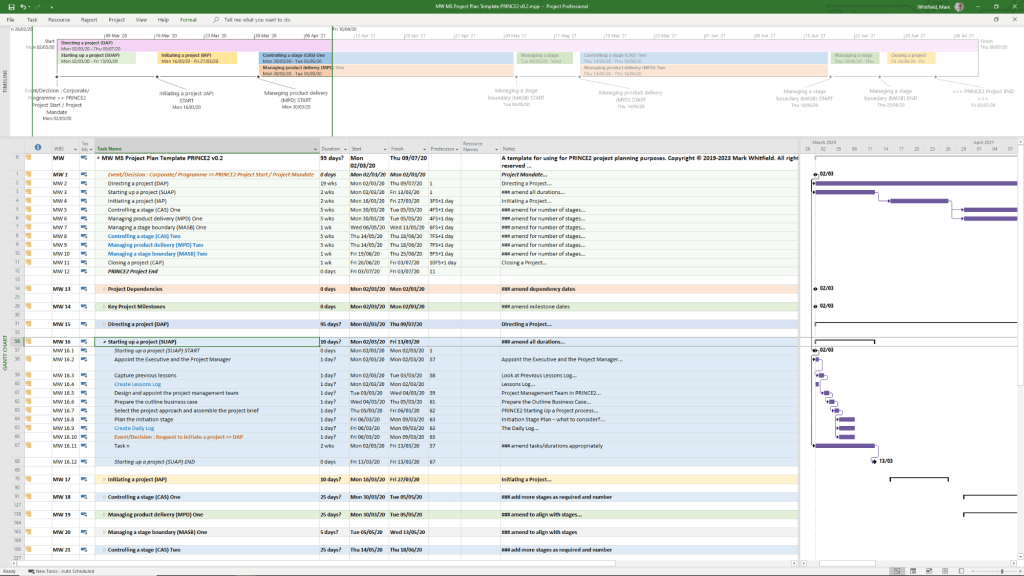
Is Microsoft MS Project Desktop (offline) app being retired?

No, Microsoft Project desktop is not being retired. It remains the “gold standard” for complex project scheduling and will continue to be supported and available for purchase. 

MS Project Templates can be downloaded in the template bundle, click on link at banner above

Confusion often arises because Microsoft has announced the retirement of several related cloud-based and web-based services. Here is the current status of the Microsoft Project ecosystem: 

Products Being Retired

  • Project Online: This service will officially retire on September 30, 2026. After this date, Project Online environments and data will no longer be accessible.
  • Project for the Web: Retired as a standalone brand and was fully merged into the new Microsoft Planner in 2024/2025.
  • Project/Roadmap Apps in Teams: These were retired in August 2025 and replaced by the unified Planner experience. 

Products Staying Active

  • Project Desktop (Project Professional/Standard): Not impacted by the cloud service retirements. You can still use it to manage .mpp files locally or connect it to alternative backend systems like Project Server SE.
  • Project Server Subscription Edition (SE): This on-premises/self-hosted version will remain supported through at least 2031. It is the recommended migration path for organizations that want to keep the “Project Web App” (PWA) interface without using the retired Project Online cloud service.
  • Microsoft Planner: Now serves as the primary cloud-based project management tool, absorbing the features of Project for the Web. 
MS Project Templates can be downloaded in the template bundle, click on link at banner above

Key Dates for Project Online Users:

  • October 1, 2025: End of sale for new Project Online subscriptions.
  • April 2, 2026: SharePoint 2013 workflows (which many Project Online users rely on) will be retired.
  • September 30, 2026: Full shutdown of Project Online.

Home Computer historical development timeline by era

The transition from massive, industrial room-sized mainframes to the “home computer” was driven by the invention of the microprocessor in the early 1970s

The Pre-Home Era (1971–1976) 

Before “home computers” existed as off-the-shelf products, they were sold as DIY kits for electronics hobbyists. 

  • 1971Intel releases the 4004, the first commercial single-chip microprocessor.
  • 1974: The MITS Altair 8800 is featured in Popular Electronics; it is widely considered the spark of the personal computer revolution.
  • 1976Apple Computer is founded. The Apple I goes on sale as a hand-soldered board for $666.66.
  • 1976: MOS Technology releases the KIM-1, the first single-board computer kit. 

The “1977 Trinity” & Early Adoption

In 1977, three computers were released that targeted ordinary consumers rather than just hobbyists. 

  • Apple II: Features colour graphics and eight expansion slots, becoming a standard for schools and early home users.
  • Commodore PET 2001: The first “all-in-one” home computer with a built-in monitor and tape drive.
  • TRS-80 Model I: Sold through Radio Shack stores, making computers accessible on the high street for $399. 

The 1980s Boom

This decade saw fierce competition between manufacturers and the rise of gaming and office productivity. 

  • 1980Sinclair ZX80 launches in the UK as a very low-cost entry point into computing.
  • 1981: The IBM PC is released, creating the “PC-compatible” standard that still dominates today.
  • 1981: The Commodore VIC-20 becomes the first computer to sell over one million units.
  • 1982: The Commodore 64 launches and eventually becomes the best-selling single computer model of all time.
  • 1984Apple launches the Macintosh, the first successful mass-market computer with a Graphical User Interface (GUI) and a mouse.
  • 1985: The Amiga 1000 and Atari ST bring advanced multimedia and multitasking to the home. 

Standardisation & The Modern Age (1990s–Present) 

The market shifted away from proprietary “home computers” toward standardized “PCs” and portable devices. 

  • 1990Microsoft Windows 3.0 is released, making GUI computing standard on IBM-compatible PCs.
  • 1995Windows 95 launches, moving the PC away from its MS-DOS roots and integrating internet support.
  • 1998: The Apple iMac revitalizes Apple’s consumer line with an integrated, colourful design and USB ports.
  • 2010: The Apple iPad introduces the “tablet” as a primary home computing device for many users.
  • 2012: The Raspberry Pi launches, bringing home computing back to its DIY and educational roots.

The history of the home computer evolved from large, room-sized mainframes into the diverse, interconnected devices used today. This timeline categorises the evolution by era and key annual milestones

The Pre-Home Era: Mainframes & Minicomputers (1940s–1960s) 

Before computers could fit in a home, they were massive machines used by governments and corporations. 

  • 1945ENIAC (Electronic Numerical Integrator and Computer) is completed as the first general-purpose electronic digital computer.
  • 1951UNIVAC I is delivered to the US Census Bureau, becoming the first commercial computer produced in the US.
  • 1960DEC PDP-1 is introduced, representing the first “minicomputer” that was smaller than its predecessors.
  • 1965: The DEC PDP-8 launches, becoming the first commercially successful minicomputer. 

The Hobbyist Era: The First Personal Computers (1970–1976) 

The invention of the microprocessor allowed computers to become small enough for individuals to own, though they often required manual assembly. 

  • 1971Intel 4004, the first single-chip microprocessor, is released.
  • 1974: The MITS Altair 8800 appears on the cover of Popular Electronics, sparking the hobbyist revolution.
  • 1976: The Apple I, a single-board computer kit designed by Steve Wozniak, is released.

The “1977 Trinity” & The Home Boom (1977–1983) 

This era saw the transition from kits to fully assembled, consumer-ready “home computers”. 

  • 1977: The “1977 Trinity” launches: the Apple II (with colour graphics), the Commodore PET, and the Tandy TRS-80.
  • 1980Sinclair ZX80 is released as one of the first low-cost home computers in the UK.
  • 1981: The IBM PC is released, setting the industry standard for hardware and software compatibility.
  • 1981: The Osborne 1 is released as the first commercially successful portable computer.
  • 1982: The Commodore 64 launches; it eventually becomes the best-selling single computer model of all time.
  • 1982: The ZX Spectrum is released, becoming a cultural icon in Europe. 

The Graphical User Interface (GUI) Era (1984–1994)

Computers moved away from text-based commands toward visual icons and mice. 

  • 1984: The Apple Macintosh launches, popularising the mouse and Graphical User Interface (GUI).
  • 1985: The Commodore Amiga 1000 and Atari ST launch, bringing advanced multimedia and multitasking capabilities.
  • 1990: Tim Berners-Lee creates the World Wide Web, fundamentally changing how home computers would be used.
  • 1994: PowerPC processors are introduced by Apple, significantly increasing processing speed. 

The Internet & Mobility Era (1995–Present)

Home computing shifted focus toward connectivity, portability, and eventually, the cloud. 

  • 1995Windows 95 is released, integrating internet support and making PCs user-friendly for the masses.
  • 1998: The Apple iMac launches, ditching the floppy drive and embracing USB.
  • 2000s: Laptops begin to outsell desktops as portable computing gains momentum.
  • 2010: The Apple iPad pioneers the modern tablet market, creating a new “casual computing” category.
  • 2012: The Raspberry Pi is released, re-engaging a new generation in hobbyist computer building.
  • 2020s: The rise of Cloud Computing and AI Integration (like the Apple M1 chip) shifts the focus from local storage to remote applications and machine learning.

Golf Historical Timeline Overview

The history of golf is broadly categorised into five distinct eras that track its evolution from a forbidden Scottish pastime to a multi-billion dollar global industry. 

1. The Foundation Years (Pre-1400s – 1899)

This era established the basic rules, the 18-hole standard, and the first major championships. 

  • 1457: King James II of Scotland bans golf and football because they distract young men from archery and military training.
  • 1502: King James IV lifts the ban and becomes a golfer himself, leading to the sport’s popularity among royalty.
  • 1744: The first official golf club, the Honourable Company of Edinburgh Golfers, is formed and establishes the first 13 rules of golf.
  • 1764: The Old Course at St Andrews reduces its round from 22 holes to 18 holes, setting the global standard for course length.
  • 1848: The “Guttie” ball (made of gutta-percha) is introduced, making the game more affordable and durable than the original feather-filled leather balls.
  • 1860: The first Open Championship (British Open) is held at Prestwick, won by Willie Park Snr.
  • 1894: The United States Golf Association (USGA) is founded to govern the sport in America.
  • 1895: The first U.S. Open and U.S. Women’s Amateur championships are held. 

2. The Golden Era (1900 – 1945)

This period saw the rise of legendary players, the formalisation of the professional tour, and the transition to steel equipment. 

  • 1916: The PGA of America is founded, and the PGA Championship is inaugurated.
  • 1920s: Steel shafts are patented and eventually legalised by the USGA (1924) and R&A (1929), replacing hickory.
  • 1927: The first Ryder Cup match is played between teams from the United States and Great Britain.
  • 1930Bobby Jones achieves the “Grand Slam” by winning the U.S. Open, U.S. Amateur, British Open, and British Amateur in a single year.
  • 1934: The first Masters Tournament is held at Augusta National, founded by Bobby Jones.
  • 1945Byron Nelson sets a record by winning 11 consecutive tournaments (18 total in the year).

3. The Television Boom (1946 – 1980s)

Broadcast sports turned golf into a global phenomenon, fueled by the rivalry between Jack Nicklaus and Arnold Palmer

  • 1950: The LPGA Tour is officially formed.
  • 1968: The PGA Tour is formally established as a separate entity from the PGA of America.
  • 1971: Astronaut Alan Shepard hits a golf ball on the moon during the Apollo 14 mission.
  • 1970s: Graphite shafts and metal-headed woods (drivers) begin to replace traditional wooden clubs. 

4. The Tiger Era (1990s – 2010) 

The arrival of Tiger Woods sparked a massive surge in popularity, prize money, and athletic training. 

  • 1991: Callaway introduces the Big Bertha driver, popularising oversized metalwood heads.
  • 1997Tiger Woods wins the Masters at age 21 by 12 strokes, becoming the youngest champion and sparking a global “Tiger Boom”.
  • 2009Tiger Woods becomes the first athlete to surpass $1 billion in career earnings. 

5. The Modern Game (2011 – Present)

This era is defined by extreme data analysis (Launch Monitors), advanced technology, and shifting tours. 

  • 2016: Golf returns to the Olympic Games after a 112-year absence.
  • 2022: The launch of LIV Golf introduces a significant competitive landscape shift in professional golf.
  • 2026: A planned “golf ball rollback” is scheduled to manage the increasing distances professional players are hitting the ball.

Golf Historical Timeline Overview

Agile Before and After

Agile Before and After

Azure AI vs Google Cloud AI vs AWS AI vs IBM Watson vs Alibaba Qwen

Azure AI vs Google Cloud AI vs AWS AI vs IBM Watson vs Alibaba Qwen

Agile Scrum Evolution Timeline Overview

Agile and Scrum have evolved from specific product development theories into a global standard for project management. While Scrum predates the Agile Manifesto by several years, it has become the most widely adopted framework within the Agile umbrella. 

Agile Scrum Burn down and Burn up charts – can be downloaded from website banner

Evolution Timeline

  • 1986: The Inspiration. Hirotaka Takeuchi and Ikujiro Nonaka publish “The New New Product Development Game” in Harvard Business Review, introducing the “rugby” approach to product development.
  • 1993: The First Scrum. Jeff Sutherland and his team at Easel Corporation implement the first official Scrum.
  • 1995: Public Presentation. Ken Schwaber and Jeff Sutherland formally present Scrum at the OOPSLA ’95 conference, introducing the concept of Sprints.
  • 2001: The Agile Manifesto. 17 software developers meet in Utah to sign the Manifesto for Agile Software Development, codifying the 4 values and 12 principles that define Agile.
  • 2002: Scrum Alliance Founded. The Scrum Alliance is established by Ken Schwaber, Mike Cohn, and Esther Derby to provide training and certifications like the Certified ScrumMaster (CSM).
  • 2009: Founding of Scrum.org. Ken Schwaber founds Scrum.org to provide a more consistent approach to Scrum training and assessments.
  • 2010: The First Scrum Guide. Sutherland and Schwaber publish the first Official Scrum Guide, providing a definitive, minimal definition of the framework.
  • 2011–2017: Iterative Refinements. Updates to the Scrum Guide clarify the Daily Scrum purpose (2013) and emphasize Scrum Values (2016).
  • 2020: The “Simplified” Guide. The latest 2020 Scrum Guide is released, focusing on making the framework less prescriptive and more applicable to non-software industries by removing technical jargon. 

Key Shifts in Scrum Maturity

  • Prescriptive to Descriptive: Early Scrum was highly prescriptive about meetings and roles; modern Scrum focuses on Empiricism (Transparency, Inspection, Adaptation).
  • Team Autonomy: The 2013 update pivoted from “selecting tasks” to focusing on the Sprint Goal, empowering teams to decide how to achieve the objective.
  • Scaling Frameworks: As organizations grew, frameworks like SAFe (2011) and LeSS (2013) emerged to apply Scrum across hundreds of teams.
Plan On a Page POaP for an Agile Scrum project, available for download above

Agile Development History Timeline Overview

Agile’s history is a transition from rigid, manufacturing-based “Waterfall” models to flexible, people-centric frameworks. While the term was coined in 2001, its roots trace back to early 20th-century industrial practices and the “software crisis” of the 1960s. 

Early Foundations (Pre-1990s)

Before Agile became a formal software methodology, its core principles of efficiency and iteration emerged from manufacturing and early computing.

  • 1896: Sakichi Toyota introduced the “Stop and Notify” concept (Jidoka), a foundational Lean/Agile practice for immediate problem-solving.
  • 1948: The Toyota Production System (TPS) established Lean manufacturing and the Kanban system to manage workflow.
  • 1957: IBM began using incremental development on large software projects.
  • 1970: Winston Royce published “Managing the Development of Large Software Systems,” which formalized the Waterfall Model but actually cautioned against its rigidity.
  • 1986: Takeuchi and Nonaka published The New New Product Development Game, introducing the “rugby” metaphor for team-based development that inspired Scrum

The Rise of “Lightweight” Methods (1990–2000) 

Frustrated by Waterfall’s slow delivery, practitioners developed several “lightweight” frameworks. 

  • 1991: Rapid Application Development (RAD) popularized timeboxing and iterations.
  • 1993: Jeff Sutherland and his team first implemented Scrum at Easel Corporation.
  • 1994: The Dynamic Systems Development Method (DSDM) was created as a vendor-independent RAD framework.
  • 1995: Ken Schwaber and Jeff Sutherland formally co-presented Scrum at the OOPSLA conference.
  • 1996: Kent Beck introduced Extreme Programming (XP), emphasizing practices like pair programming and continuous testing.
  • 1997: Feature-Driven Development (FDD) and Crystal Clear emerged as alternative iterative models. 

Formalisation & Modern Evolution (2001–Present)

The movement unified under a single name and eventually scaled to entire enterprises. 

  • 2001: 17 software leaders met at Snowbird, Utah, to draft the Agile Manifesto, establishing four core values and 12 principles.
  • 2003: The book Lean Software Development by Mary and Tom Poppendieck officially bridged Lean manufacturing and software agility.
  • 2009: The concept of DevOps emerged, extending Agile principles into IT operations and deployment.
  • 2011: The Scaled Agile Framework (SAFe) was introduced to help large organizations manage multiple Agile teams.
  • 2012–2015: Agile surpassed the 50% mark in global adoption, becoming the industry standard for development.
  • 2020s: Agile principles are now widely applied outside of tech, in fields like marketing, education, and HR

Agile’s evolution is not just a 21st-century phenomenon but a response to decades of “software crises” and rigid industrial processes. Below is a comprehensive historical breakdown of Agile’s journey. 

1. Pre-Digital Foundations (1910s – 1940s)

Long before software, the concepts of efficiency and waste reduction were born in manufacturing. 

  • 1911: Scientific Management. Frederick Taylor encouraged managers to adopt worker suggestions for efficiency, opposing rigid habits.
  • 1940s: Lean Manufacturing (Toyota). Toyota pioneered the “Just-in-Time” method and Kaizen (continuous improvement) after observing American supermarkets.
  • 1948: Toyota Production System. Introduction of Kanban for visual workflow management. 

2. Early Iterative Development (1950s – 1970s)

The 1950s saw the first departures from strictly sequential “waterfall” planning. 

  • 1957: Incremental Development. IBM and Motorola teams, including Gerald Weinberg, used iterative methods indistinguishable from modern Extreme Programming (XP) for Project Mercury.
  • 1968: NATO Software Engineering Conference. Formally identified the “Software Crisis” (projects being late and over budget), sparking a search for better methodologies.
  • 1970: Waterfall Formalised (and Critiqued). Winston Royce described the Waterfall model but notably advocated for iterative releases to reduce risk. 

3. The Proliferation of “Lightweight” Methods (1980s – 1990s) 

Frustration with heavyweight, document-heavy processes led to several “Agile” precursors. 

  • 1986: “The New New Product Development Game.” Takeuchi and Nonaka published this HBR article, introducing the “Rugby” approach (teamwork over relay-race handoffs), which directly inspired Scrum.
  • 1991: Rapid Application Development (RAD). James Martin introduced RAD, emphasising fast prototyping and client feedback.
  • 1993–1995: The Birth of Scrum. Jeff Sutherland and Ken Schwaber formalised Scrum, presenting it at the OOPSLA ’95 conference.
  • 1996: Extreme Programming (XP). Kent Beck introduced XP at Chrysler, focusing on technical excellence through practices like Pair Programming and Test-Driven Development

4. The Agile Manifesto & Formalisation (2001 – 2010)

Agile moved from a collection of “lightweight” methods to a global standard. 

  • 2001: The Agile Manifesto. 17 developers met in Snowbird, Utah, to draft the Manifesto for Agile Software Development, establishing four core values and 12 principles.
  • 2003: Lean Software Development. Mary and Tom Poppendieck adapted Toyota’s Lean principles specifically for software engineering.
  • 2009: Software Craftsmanship. The Software Craftsmanship Manifesto emerged to refocus the community on the quality of the “craft” rather than just project management.
  • 2010: The First Scrum Guide. Published as the definitive resource on Scrum framework rules. 

5. Scaling and Modern Business Agility (2011 – Present) 

Agile expanded beyond coding into enterprise-wide strategy. 

  • 2011: Scaled Agile Framework (SAFe). Dean Leffingwell launched SAFe to help large corporations apply Agile at scale.
  • 2015–2017: Project Management Integration. Major bodies like AXELOS released PRINCE2 Agile, and the PMI introduced the Agile Certified Practitioner (ACP).
  • 2020s: Beyond Software. Agile principles are now standard in marketing, HR, and hardware development through concepts like Business Agility