WordPress Content Management System (CMS) Timeline Overview

WordPress has evolved from a basic blogging tool in 2003 into a dominant Content Management System (CMS) that powers over 43% of the internet including this https://mark-whitfield.com website. Its history is defined by major version releases, often named after jazz musicians, and shifts toward “Full Site Editing”. 

This WordPress website started around 2021

The Early Years (2001–2005)

  • 2001: French developer Michel Valdrighi launches b2/cafelog, the PHP/MySQL-based blogging software that served as the foundation for WordPress.
  • 2003 (May 27): Matt Mullenweg and Mike Little release WordPress Version 0.7, a fork of b2/cafelog.
  • 2004: Version 1.0 (“Miles Davis”) introduces SEO-friendly permalinks and comment moderation. Version 1.2 (“Mingus”) debuts the plugin architecture, allowing for external extensibility.
  • 2005: Version 1.5 (“Strayhorn”) introduces the Themes system and static Pages, moving WordPress beyond just chronological blog posts. Automattic is founded by Matt Mullenweg in August. 

Expansion and Ecosystem Growth (2006–2010)

  • 2006: The first WordCamp is held in San Francisco. Automattic registers the WordPress trademark.
  • 2007: Version 2.1 (“Ella”) adds autosave and spell-check. Version 2.2 (“Getz”) introduces Widgets.
  • 2008: Version 2.7 (“Coltrane”) revamps the dashboard, moving the menu to the sidebar where it remains today.
  • 2010: Version 3.0 (“Thelonious”) is a major milestone, introducing Custom Post Types and Multisite capabilities. The WordPress trademark is transferred to the non-profit WordPress Foundation

The “Modern” Dashboard & Visual Improvements (2011–2017)

  • 2011: WooCommerce is released (later acquired by Automattic in 2015), revolutionising WordPress e-commerce.
  • 2013: Version 3.7 (“Basie”) introduces automatic background updates for security patches. Version 3.8 (“Parker”) gives the admin dashboard the modern, flat design used today.
  • 2014: Version 4.0 (“Benny”) focuses on media management with a new grid view.
  • 2016: The REST API is integrated into core (v4.4), allowing WordPress to interact with other web applications. 

The Gutenberg & Site Editing Era (2018–Present)

  • 2018 (Dec 6): Version 5.0 (“Bebo”) launches the Gutenberg block-based editor, fundamentally changing content creation from text-heavy to visual blocks.
  • 2022: Version 6.0 introduces Full Site Editing (FSE), enabling users to edit headers, footers, and templates visually without code.
  • 2024: WordPress continues to refine the site editing experience with Version 6.7 (“Rollins”). In late 2024, a public legal conflict began between Automattic and WP Engine over trademark usage and contributions.
  • 2025–2026: Version 6.8 (April 2025) and future Version 7.0 roadmap focus on real-time collaboration (Phase 3 of Gutenberg) and AI integration.

WordPress Content Management System (CMS) Timeline Overview

This WordPress website selling Project Management templates – see banner above

Microsoft Project Timeline, Development History Overview

Microsoft Project has evolved from a DOS-based tool in the 1980s into a cloud-integrated platform. Its “Timeline” feature specifically has transitioned from a simple static view to a multi-layered, interactive reporting tool. 

Template included in package – see website banner

Timeline Feature Development History

  • Early Era (1984–2007): For decades, the “timeline” was synonymous with the Gantt Chart. Users had to rely on complex print-outs or third-party tools to create high-level summaries for executives.
  • The dedicated Timeline View (2010): Microsoft introduced a native Timeline view in Project 2010, allowing users to cherry-pick specific tasks and milestones to display on a single horizontal bar.
  • Multi-Timeline Support (2016): Project 2016 expanded this by allowing multiple timeline bars in a single view. This enabled managers to represent different project phases or workstreams with independent start and end dates.
  • Cloud & Web Integration (2019–Present): With the launch of Project for the web, timelines became more interactive, supporting drag-and-drop adjustments and real-time co-authoring.
  • Task History Tracking (2023): Microsoft added a Task History pane to the web version, allowing users to see a chronological log of changes to specific timeline items. 

Key Components of a Modern MS Project Timeline

Templates included in download bundle – see website banner
  • Gantt-Style Visualization: Displays tasks as horizontal bars against a calendar timescale.
  • Milestones & Callouts: Important dates appear as diamonds or labels that can be dragged above or below the main bar to avoid clutter.
  • Dependencies: Visual links between tasks that illustrate the sequence of work and the Critical Path.
  • Copy for Presentation: A dedicated formatting tool that allows users to export the timeline directly to Microsoft PowerPoint or email at various sizes (Small, Medium, Full Size). 

Future Outlook

Template included in download bundle – see website banner

Microsoft has announced that Project Online will be officially retired on 30 September 2026, with development focus shifting entirely to the new Microsoft Planner and Project for the web ecosystem.

Microsoft Project Timeline, Development History Overview

ITSM IT Service Management Framework Overview

ITSM IT Service Management Framework Overview

Agile Scrum Timeline and Overview

In Scrum, the “timeline” is typically structured as a repeatable, time-boxed cycle known as a Sprint, which usually lasts between one and four weeks. Each sprint follows a strict sequence of “ceremonies” designed to ensure constant delivery and feedback. 

The Standard Sprint Timeline (2-Week Example)

The following is a common chronological breakdown of a typical 10-day (two-week) sprint:

  1. Day 1: Sprint Planning
    • Goal: Define what will be delivered and how.
    • Activity: The Product Owner presents prioritized items from the Product Backlog. The team selects items to move into the Sprint Backlog.
  2. Days 2–9: Development & Daily Scrum
    • Development: The team works in parallel on design, coding, and testing.
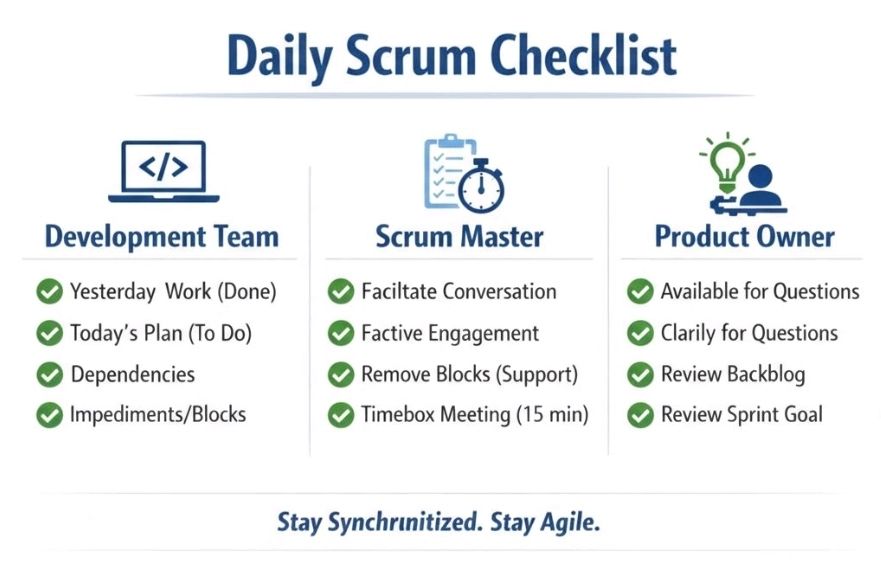
    • Daily Scrum: A 15-minute “stand-up” held every morning. Team members sync on progress and identify blockers.
  3. Ongoing: Backlog Refinement
    • Goal: Prepare for future sprints.
    • Activity: The team reviews upcoming backlog items to ensure they are “ready” for the next planning session.
  4. Day 10: Sprint Review & Retrospective
    • Sprint Review: A demo for stakeholders to show the Product Increment (completed work) and gather feedback.
    • Sprint Retrospective: An internal meeting where the team reflects on their process to improve for the next cycle. 

Strategic Project Phases

While the sprint is the heart of execution, a broader Agile project often follows these foundational stages: 

  • Concept/Ideation: Defining project vision, high-level requirements, and initial scope.
  • Inception: Building the team, setting up architecture, and creating a mock-up.
  • Construction (Iterative Sprints): The primary execution phase consisting of multiple back-to-back sprints.
  • Release/Deployment: Final testing, security checks, and launching the product increment to production.
  • Maintenance & Operations: Ongoing support, bug fixes, and incorporating user feedback into new sprints. 

Time Allocation (The 15/10/5 Rule)

For a standard sprint, many teams use a percentage-based guide to manage ceremony time: 

  • 15% for Sprint Planning.
  • 10% for Sprint Review.
  • 5% for Sprint Retrospective. 

For more hands-on planning, tools like the Wrike Sprint Template or Jira Timelines can help visualize these cycles across a long-term roadmap.

Agile Scrum Timeline and Overview

Project Management Terms Explained Overview

Project Management Terms Explained Overview

Project Management Soft Skills Overview

Project Management Soft Skills Overview

Agile Scrum Pillars Overview – Transparency, Inspection and Adaption

Agile Scrum Pillars Overview – Transparency, Inspection and Adaption

Project Management Types Summarised, Overview

Project Management Types Summarised, Overview

Agile Scrum Terms Summary Overview

Agile Scrum Terms Summary Overview

Accounting Key Performance Indicators KPIs Overview

Accounting Key Performance Indicators KPIs Overview

Common IT Protocol Ports Summary Overview

Common IT Protocol Ports Summary Overview

Overview – Agile Scrum Kanban SAFe LeSS XP

Overview – Agile Scrum Kanban SAFe LeSS XP

IaaS PaaS SaaS Explained – Overview

IaaS PaaS SaaS Explained – Overview

Cloud Computing Simplified

IaaS – Infrastructure as a Service

PaaS – Platform as a Service

SaaS – Software as a Service

IT Service Management (ITSM) Overview

IT Service Management (ITSM) Overview

Agile Scrum Summarised Overview

Agile Scrum Summarised Overview

Overview – Agile versus Scrum – the Difference

Overview – Agile versus Scrum – the Difference

Earned Value Management EVM Overview Summary

Earned Value Management EVM Overview Summary

Types of Project Management Overview Summary

Types of Project Management Overview Summary

Agile User Story, 6 Steps Cycle Summary

Agile User Story, 6 Steps Cycle Summary

New in Eighth Edition of PMBOK Guide, Overview

What’s New in the Eighth Edition of the PMBOK Guide, Eighth Edition Overview