Mark Whitfield Online Resume Overview

Mark Whitfield is a highly experienced Senior IT Project Manager and former developer with over 30 years of expertise in HP NonStop (formerly Tandem) systems, primarily within the electronic banking and payments sectors. He is currently a Senior Project Manager at Capgemini (SC cleared until 2031) and maintains a professional portfolio at mark-whitfield.com. 

Historical Timeline & Customer Breakdown

  • 1990 – 1995: The Software Partnership / Deluxe Data (now FIS)
    • Customer/Projects: Developed electronic banking software, specifically sp/ARCHITECT-BANK, for major financial institutions including TSB, Bank of Scotland, Rabobank, and Girofon (Denmark).
    • Technical Breakdown: Focused on low-level programming using COBOL85, NonStop SQL, and TAL (Transaction Application Language).
    • Role: Programmer.
  • 1995 – 2013: Insider Technologies Ltd (ITL)
    • Customer/Projects: Focused on HP NonStop monitoring, diagnostic, and payment software for high-value banking clients. Key products included Enterprise Manager, XPNET, BASE24, and EPS.
    • Technical Breakdown:
      • XPERT24: Produced technical designs for this performance monitoring tool to track XPNET layers and transaction interchange counters (ATM/POS approval rates).
      • RTLX Payments: Served as IT Project Manager for RTLX (Real-Time Long-term eXchange) payment software.
      • Infrastructure: Extensive use of Guardian utilities (PATHWAY, SCF, FUP, INSPECT), TACL, and SCOBOL.
    • Role: Software Design, Team Leading, and Product Management.
  • 2013 – 2016: Freelance / Contract Projects
    • Customer/Projects: Managed software development lifecycle (SDLC) projects for various blue-chip companies.
    • Role: IT Project Manager.
  • 2016 – Present: Capgemini
    • Customer/Projects: Managing large-scale digital and public sector transformations. Notable clients include UK Government (MS Azure Cloud migration), Jaguar Land Rover (JLR), Heathrow, Royal Mail Group, Bank of England, HSBC, Barclays, and Deutsche Bank.
    • Technical Breakdown: Transitioned from legacy Tandem environments to modern Agile Scrum delivery and Microsoft Azure Cloud hosting.
    • Role: Senior Project Manager / Technical Delivery Manager.

Technical Breakdown by Competency

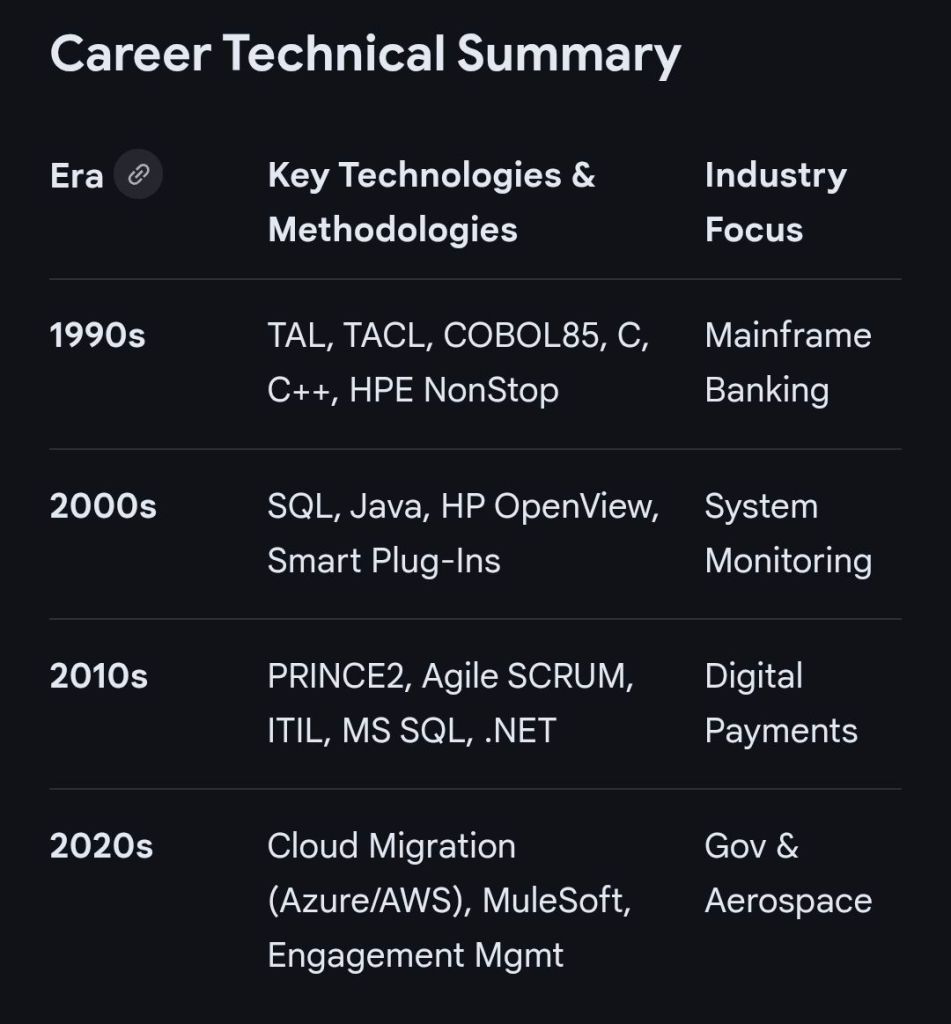
  • Operating Systems: HP NonStop (Guardian/NSK), Windows, Linux, Unix.
  • Programming Languages: TAL, TACL, COBOL85, SCOBOL, C, C++, Java, and ASP.NET framework.
  • Databases: NonStop SQL/MP, MS SQL.
  • NonStop Middleware: PATHWAY, XPNET, BASE24, EPS, and EMS (Event Management System).
  • Methodologies: Registered PRINCE2 Practitioner, Agile SCRUM, ITIL, and ISO9001:2008. 

Web Hyperlinks & Resources

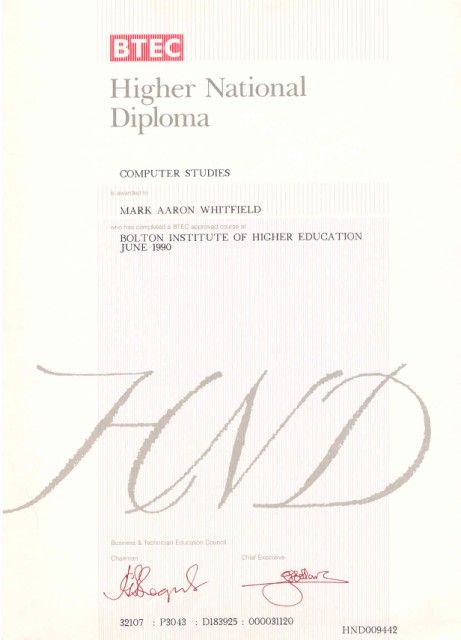
HND Higher National Diploma Overview and Historical Timeline by Year

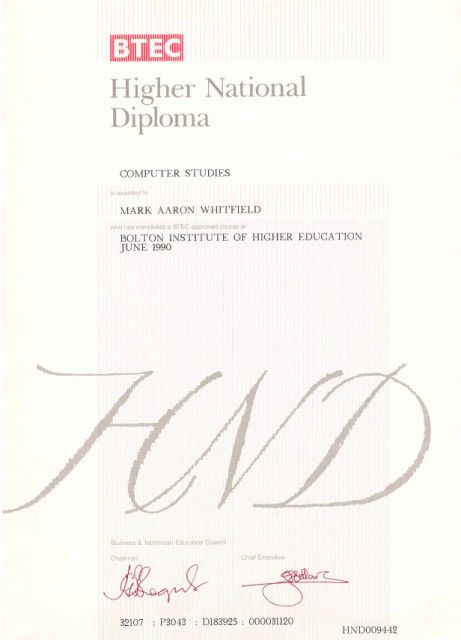
A Higher National Diploma (HND) is a Level 5 vocational qualification in the UK, equivalent to the first two years of a university bachelor’s degree. Designed to provide industry-specific practical skills, it typically takes two years of full-time study or three to four years part-time. 

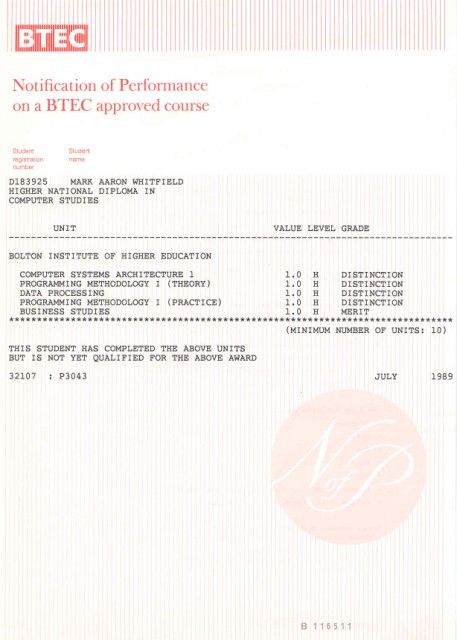
Higher National Diploma HND in Computer Studies (3)

Historical Timeline of the HND

The HND has evolved from a niche engineering credential into a globally recognised vocational standard. 

The Early Era: Origins and Industrial Focus (1920s–1950s)

  • 1920: The Higher National Diploma was first introduced in England and Wales alongside the Ordinary National Diploma (OND) and Higher National Certificate (HNC).
  • 1921–1923: Initial subject frameworks were established, starting with Mechanical Engineering (1921) and Electrical Engineering (1923).
  • 1930s: The qualification expanded into Building (1929) and Commerce (1939) to support a growing industrial economy.
  • Post-WWII: The 1944 Butler Act reorganised secondary education, but HNDs remained the primary route for advanced technical training in colleges. 

The Expansion Era: Growth and New Governance (1960s–1970s)

  • 1960s: HNDs gained prominence in polytechnics, addressing critical skills gaps through a practical approach to higher education.
  • 1968–1969: Awards for HNDs saw a massive 665% increase compared to a decade prior, beginning to rival university “ordinary degrees” in popularity.
  • 1972–1974: Under Margaret Thatcher (then Education Secretary), the Haselgrave Report recommendations led to moving qualifications from the City and Guilds to two new bodies: the Business Education Council (BEC) and the Technician Education Council (TEC). 

The BTEC and Modernisation Era (1980s–2000s)

  • 1983: BEC and TEC merged to form the Business and Technician Education Council (BTEC), which became the primary awarding body for HNDs.
  • 1990s: BTEC merged with the University of London Examinations Board to form Edexcel (now part of Pearson).
  • 1980s–90s: The curriculum diversified rapidly into modern sectors such as computing, business, catering, and performing arts.
  • 2000s: Global expansion accelerated; for instance, the HND was formally introduced in Cameroon in 2002. 
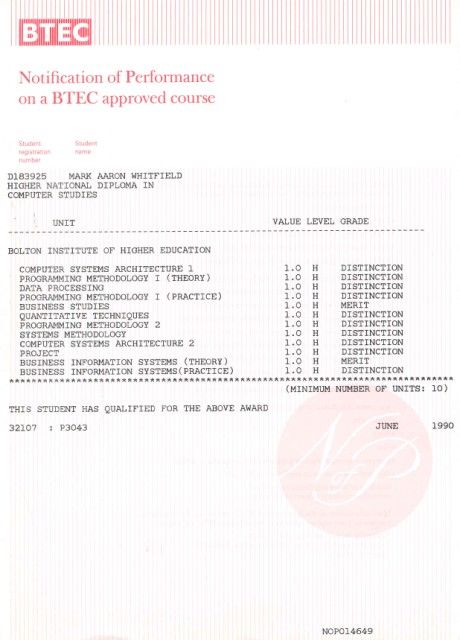
Higher National Diploma HND in Computer Studies (1)

The Contemporary Era: Frameworks and Global Standard (2010s–Present)

  • 2013–2014: Despite a decline in public sector colleges due to the rise of Foundation Degrees, HND student numbers at private providers grew from 13,000 to 30,000 in just one year.
  • 2018: Major global curriculum updates were implemented to integrate digital literacy, sustainability, and entrepreneurship into traditional vocational subjects.
  • 2020s: Current HNDs are positioned at Level 5 on the Regulated Qualifications Framework (RQF) and are delivered in over 60 countries. 

Key Characteristics of the HND

  • Academic Standing: Equivalent to Level 5 (Year 2 of a Degree).
  • Progression: Over 95% of UK universities allow HND graduates to “top up” to a full bachelor’s degree, often entering directly into the final year.
  • Assessment: Focuses on practical projects, case studies, and work placements rather than just theoretical exams. 

HND Higher National Diploma Overview and Historical Timeline by Year

Higher National Diploma HND in Computer Studies (2)

Mark Whitfield HP NonStop Tandem experience & Project Management Templates

Mark Whitfield is an experienced IT Project Manager and software developer who has spent over 22 years specialising in HP NonStop (formerly Tandem) systems. He is currently an Engagement Project Manager at Capgemini. 

Career & Expertise

Whitfield’s career in HP NonStop began in 1990 and includes significant technical and leadership roles across the financial and technology sectors: 

  • Software Development: Early in his career, he worked as a programmer for The Software Partnership (later Deluxe Data/FIS), focusing on electronic banking software like sp/ARCHITECT on Tandem mainframes.
  • Insider Technologies (1995–2013): He spent 18 years at Insider Technologies as a Senior Development Engineer and Project Manager. His work involved:
    • Developing monitoring and diagnostic software such as Reflex 80:20, Reflex ONE24, and RTLX (Real-Time Log Extraction) for payment systems.
    • Managing the first HP OpenView Operations Smart Plug-In certification for the NonStop platform.
    • Designing XPERT24, a performance tracking product for ACI’s XPNET layer.
  • Capgemini (2016–Present): As an Engagement Project Manager, he has led digital projects for major clients in the automotive, government, and aerospace sectors, including a cloud migration for UK Government applications. 

Technical Contributions

  • Publications: He has authored articles for globally published journals like The Connection (2013), discussing topics such as querying terabytes of legacy transaction log data from NonStop mainframes.
  • Project History: He has managed high-value projects, including a £5 million initiative to migrate legacy HP NonStop software to AIX-based technologies for a large UK retail bank.
  • Training: He is trained in various NonStop-specific technologies, including TAL (Transaction Application Language), COBOL85, PATHWAY, and NonStop SQL. 

Whitfield also maintains a professional website, mark-whitfield.com, where he provides project management templates and resources related to HP NonStop and Tandem systems. 

Mark Whitfield provides a comprehensive bundle of over 200 editable project management templates designed for Agile, Waterfall, and PRINCE2 methodologies. These templates are based on over 30 years of project delivery experience and are available for purchase via his official website or Etsy shop. 

Key Template Categories

The bundle includes a wide variety of tools across different formats (Excel, PowerPoint, Word, and MS Project): 

  • Planning & Scheduling:
    • Plan on a Page (POaP): Over 30 PowerPoint slide examples for executive-level summaries.
    • Detailed Project Plans: MS Project (MPP) and Excel templates for SDLC, PRINCE2 7th Edition, and Agile Scrum projects.
    • Gantt Charts: Built-in tracking views for both MS Project and Excel.
  • Tracking & Control:
    • RAID Logs: Comprehensive logs for tracking Risks, Actions, Issues, and Dependencies, plus additional tabs for Change Requests and Lessons Learned.
    • RACI Matrix: Templates to define project roles and responsibilities (Responsible, Accountable, Consulted, Informed).
    • Finance Trackers: Tools for internal and external forecast vs. actual costs, including margin and variance tracking.
  • Agile Specific Tools:
    • Burn Down & Burn Up Charts: Excel-based alternatives when tools like Jira are unavailable.
    • Agile Story Dependency Tracking: Specifically for managing dependencies between agile stories and external suppliers.
  • Reporting & Governance:
    • Status Reports: Weekly and monthly templates in Word and PowerPoint formats.
    • Stakeholder Analysis: Power/interest mapping and engagement plan templates.
    • Benefits Realisation: Plans to track project outcomes against initial business goals. 

Purchase Benefits

  • Lifetime Upgrades: Once purchased, all future additions and updates to the template package are provided for free.
  • Compatibility: Templates are designed for Microsoft Office 365 but also include Excel versions compatible with earlier software.
  • Support: The package typically includes walkthrough Word documents to guide users on how to use each major template.

Mark Whitfield HP NonStop Tandem experience & Project Management Templates

Llandudno Pier Overview and Historical Timeline by Era

Llandudno Pier, often called the “Queen of Welsh Piers”, is the longest pier in Wales at 2,295 feet (700 metres). It is a Grade II* listed structure renowned for its Victorian and Edwardian elegance, featuring ornate ironwork and classic kiosks. 

Llandudno Pier, often called the “Queen of Welsh Piers”, is the longest pier in Wales

Historical Timeline by Era

Early Origins (The Pre-Pier Era)

  • 1858: A short wooden pier (242 ft) was built by the St George’s Harbour and Railway Company to export limestone.
  • 1859: This original structure was severely damaged by the “Royal Charter Storm”.
  • 1860–1875: Though repaired, the wooden pier was too short for steamships except at high tide. 

Victorian Era: Construction and Growth

  • 1875: The Llandudno Pier Company was formed to build a new, modern structure.
  • 1876: Construction began in June/July. The first pile was driven on 16 September 1876.
  • 1877: The pier officially opened on 1 August, initially measuring 1,234 feet.
  • 1878: Construction was fully completed; the first steamboat (Prince Arthur) landed in May.
  • 1884: A landward extension was added, bringing the pier to its current length of 2,295 feet.
  • 1886: The Pier Pavilion opened on 16 September as a 2,000-seat theatre and concert hall.
  • 1887: Renowned conductor Jules Rivière took charge of the pier’s orchestra, which eventually grew to symphony proportions.
  • 1891: A new landing stage was added to accommodate increased steamship traffic. 

Edwardian and Mid-20th Century

  • 1905: A pier-head pavilion was constructed.
  • 1910: Extensive improvements were made, including widening most of the pier.
  • 1938: Major alterations were carried out on the landing stage.
  • 1968: The pier was purchased by the Trust House Forte Group.
  • 1969: The landing stage was totally rebuilt in concrete and steel to handle large Isle of Man steamers. 

Modern Era: Challenges and Restoration

  • 1983: The pier became part of the First Leisure Corporation.
  • 1984: The Pier Pavilion theatre closed.
  • 1994: A major fire destroyed the Pier Pavilion on 13 February, leaving only the iron supports.
  • 1998: Purchased by Leisure Parks Ltd (Trevor Hemmings) along with several other UK piers.
  • 2005: Voted “Pier of the Year” by the National Piers Society.
  • 2015: Purchased by local entrepreneur Adam Williams (Tir Prince Leisure Group) for £4.5 million.
  • 2021: Adam Williams purchased the derelict Pavilion site to protect the pier’s future.
  • 2025: Voted “Pier of the Year” for the second time following major restoration efforts. 

Llandudno Pier Overview and Historical Timeline by Era

Research Machines Limited, Link Timeline History by Era and Device

Research Machines (now RM plc) has a long-standing history as a primary provider of technology for the UK education sector. Founded in 1973, the company transitioned from a hobbyist component supplier to a leading manufacturer of educational microcomputers and networking systems. 

Overview of Research Machines “LINK”

The LINK designation primarily referred to the RM Link 480Z, introduced in 1982. It was designed as a lower-cost, diskless network station that could “link” into a chain, typically using a more powerful 380Z as a file server. This system was one of three chosen for the UK government’s 1982 Educational Scheme. 


Timeline History by Era and Device

The Founding Era (1973–1976)

  • 1973: Founded as Research Machines Limited in Oxford by Mike Fischer and Mike O’Regan.
  • 1974: Operated under the name Sintel, a mail-order supplier of electronic components for hobbyists. 

The Z80 Era (1977–1984)

  • 1977: Launched the RML 380Z, an 8-bit microcomputer based on the Zilog Z80 processor. It typically ran the CP/M operating system and was often housed in a distinctive large black metal case.
  • 1982: Introduced the RM Link 480Z.
    • Purpose: Designed as a diskless network node for schools.
    • Networking: Used the proprietary CHAIN Network or Z-Net to connect to a 380Z file server.
    • Hardware: Featured a Z80 CPU and up to 256 KB of bank-switched RAM. Early models had black metal cases, later replaced by cream plastic. 

The Nimbus & PC Transition (1985–1990s) 

  • 1985: Launched the RM Nimbus PC-186, using the Intel 80186 processor. While not fully IBM-compatible, it could run early versions of Microsoft Windows (up to 3.0).
  • 1986: Released the RM AX (using the Intel 80286), often used as a file server for Nimbus networks.
  • Late 1980s: Introduced the M Series (PC-286/386) and S Series (PC-386 and later), which were fully IBM PC compatible. 

The PC Era & Diversification (1994–Present)

  • 1994: Floated on the London Stock Exchange as RM plc.
  • 1997: Introduced the C Series of computers for schools.
  • 2003: Launched the F Series (blue chassis) pre-installed with Windows XP.
  • 2010: Released a new line of black and silver RM computers for Windows 7.
  • Current: RM has pivoted from hardware manufacturing to becoming a global EdTech solutions provider, focusing on digital assessment (RM Ava) and managed IT services.

Research Machines Limited, Link Timeline History by Era and Device

BASIC programming language timeline history by year

BASIC (Beginner’s All-purpose Symbolic Instruction Code) was designed to make computing accessible to non-scientists, evolving from a simple teaching tool into the foundational language of the personal computer revolution. 

The Academic Era (1964–1974)

  • 1964: Invention at Dartmouth. John Kemeny and Thomas Kurtz created BASIC at Dartmouth College to allow students in non-technical fields to use computers.
  • 1964: First Execution. The first BASIC program ran on 1 May 1964, on a GE-225 mainframe.
  • Philosophy of Simplicity. It featured an intuitive, English-like syntax and was originally a “compile-and-run” language rather than a slow interpreter.
  • Time-Sharing. BASIC was designed for the Dartmouth Time-Sharing System (DTSS), allowing multiple users to program simultaneously from different terminals. 

The Home Computer Revolution (1975–1980s) 

  • 1975: Altair BASIC. Bill Gates and Paul Allen developed a BASIC interpreter for the MITS Altair 8800, which became Microsoft’s first product.
  • The “De Facto” Standard. By the late 1970s, BASIC was pre-installed in the ROM of almost every major home computer, including the Apple II, Commodore PET, and TRS-80.
  • Interpreted vs. Compiled. To save memory (often limited to 4KB), these versions were typically “interpreted,” meaning the computer translated code line-by-line during execution.
  • Hobbyist Culture. Magazines and books published “type-in” programs, allowing millions of users to learn coding by manually entering BASIC code. 

The Professionalization & Decline (Mid-1980s–1990)

  • Structured Evolution. Microsoft released QuickBASIC (1985), which introduced structured syntax (removing the need for line numbers) and a compiler for faster performance.
  • Rise of C and Pascal. Professional developers began shifting toward more powerful languages like C and Pascal as hardware became capable of supporting them.
  • Shift to Applications. As pre-written commercial software became common, the average user stopped writing their own programs in BASIC. 

The Visual & Enterprise Era (1991–Present)

  • 1991: Visual Basic (VB). Microsoft combined BASIC with a graphical user interface (GUI) designer, allowing developers to “drag and drop” buttons and forms.
  • Dominance in Business. By 1998, an estimated two-thirds of Windows business applications were built using Visual Basic 6.0.
  • 2002: Visual Basic .NET. Microsoft transitioned the language to the .NET framework, turning it into a fully object-oriented language.
  • Modern Status. While C# has surpassed it in popularity, VB.NET remains a stable, maintained language used heavily for maintaining legacy systems and Office automation. 

BASIC programming language timeline history by year

Evolution of Leadership – Culture, Team and Individual Focused

Evolution of Leadership – Culture, Team and Individual Focused

Best way to optimize SEO Search Engine Optimization for your website

To optimize SEO (Search Engine Optimization), you must align your website with search engine requirements across four foundational pillars: technical performance, on-page structure, content value, and off-page authority. 

1. Technical SEO (The Foundation)

Technical optimization ensures search engines can find, crawl, and index your pages. 

  • Improve Page Speed: Use Google PageSpeed Insights to identify bottlenecks; compress images and use modern formats like WebP or AVIF.
  • Enable Mobile-First Design: Ensure your site is fully responsive, as Google prioritizes mobile versions for indexing.
  • Secure with HTTPS: Use an SSL certificate to protect user data and gain a minor ranking boost.
  • Use XML Sitemaps: Submit a sitemap via Google Search Console to help bots discover all your URLs. 

2. On-Page SEO (The Structure)

On-page factors help search engines understand what a specific page is about. 

  • Optimize Meta Tags: Include your primary keyword near the beginning of your Title Tag (under 60 characters) and Meta Description (105-160 characters).
  • Use Descriptive Headings: Structure content with a single H1 for the main title and logical H2/H3 tags for subtopics.
  • Clean URL Slugs: Create short, descriptive URLs that include the target keyword (e.g., /how-to-optimize-seo/).
  • Add Image Alt Text: Write descriptive text for all images to assist both accessibility and image search rankings. 

3. Content Strategy (The Value)

High-quality content is the most influential factor for long-term SEO success. 

  • Keyword Research: Use tools like Ahrefs, Semrush, or Google Keyword Planner to find terms with high volume and low difficulty.
  • Match Search Intent: Identify if users want information, a specific product, or a comparison, and tailor your content to fulfill that exact need.
  • Demonstrate E-E-A-T: Show Experience, Expertise, Authoritativeness, and Trustworthiness by citing original research, expert quotes, and unique insights.
  • Optimize for AI Overviews: Use clear “Key Takeaways” boxes and answer common questions directly to increase chances of being cited by AI search features. 

4. Off-Page SEO (The Authority)

Off-page signals prove your site’s credibility to the rest of the web. 

  • Build High-Quality Backlinks: Earn links from reputable websites through guest posting, digital PR, or creating “linkable assets” like infographics.
  • Internal Linking: Connect related pages within your own site to distribute “link equity” and help users navigate.
  • Manage Online Reputation: For local businesses, maintain an updated Google Business Profile and respond promptly to reviews.

Best way to optimize SEO Search Engine Optimization for your website