HPE NonStop Pathway (now often part of NonStop TS/MP) – Detailed Timeline

HPE NonStop Pathway (now often part of NonStop TS/MP) has a legacy spanning nearly five decades, evolving from a terminal management system into a sophisticated middleware for high-scale, fault-tolerant Online Transaction Processing (OLTP)

Comprehensive Evolution Timeline

  • 1976: Genesis (Tandem Computers)
    The HP NonStop platform was originally introduced by Tandem Computers Inc. as the first fault-tolerant commercial computer. Pathway was soon developed to manage the distribution of transaction requests across multiple server processes.
  • 1980s: The Classic Pathway Era
    Pathway became the standard for “Screen COBOL” applications. It introduced the PATHMON process to monitor and manage serverclasses, ensuring that if one process failed, another would immediately take its place.
  • 1997: Compaq Acquisition
    Compaq acquired Tandem, integrating the NonStop technology into its enterprise portfolio. During this time, Pathway began adapting to newer networking protocols and client-server architectures.
  • 2002: Hewlett-Packard (HP) Acquisition
    HP merged with Compaq, and the platform was rebranded as HP NonStop. Pathway evolved into NonStop TS/MP (Transaction Services/Massive Parallelism), allowing for even greater scalability across massive clusters of processors.
  • 2014–2015: The x86 Revolution
    HP announced the NonStop X architecture, moving the platform from Itanium processors to standard Intel x86 hardware. Pathway (TS/MP) was optimized to run on this new architecture, providing the same high availability with modern hardware performance.
  • 2015–Present: HPE and Modern Middleware
    Following the split of HP, Hewlett Packard Enterprise (HPE) continued developing Pathway. Modern versions (like NonStop TS/MP 2.8) support advanced features like:
    • Dynamic Server Processes: Automatically scaling server instances based on load.
    • Heterogeneous Interoperability: Allowing TUXEDO or Java clients to access Pathway servers.
    • Virtualization: Deployment via HPE NonStop Virtual Enterprise (vNS). 

Core Components Over Time

  • PATHMON: The “manager” process that monitors all objects in the environment.
  • PATHCOM: The command-line interface used to configure and start Pathway objects.
  • Serverclasses: Groups of identical server processes that distribute transaction load for fault tolerance. 

HPE NonStop Pathway (now often part of NonStop TS/MP) – Detailed Timeline

TACL for HPE NonStop Tandem, Detailed Timeline

Tandem Advanced Command Language (TACL) is the interpreted, high-level command and programming language for HPE NonStop (formerly Tandem) systems. Its timeline follows the evolution of Tandem hardware and the Guardian operating system. 

Comprehensive TACL Timeline

  • 1974–1976: Foundation of Tandem
    • Tandem Computers Inc. was founded. The initial operating system, Guardian, was designed for fault-tolerant computing.
  • Late 1970s: Initial Release
    • TACL was introduced in the 1970s as the primary command interface, replacing or augmenting earlier, more primitive command interpreters. It was written in TAL (Tandem Application Language).
  • 1980s: Mature Programming Capabilities
    • TACL evolved from a simple shell into a powerful programming language. Key features like MacrosRoutines, and Variables (TEXT, ALIAS, STRUCT) were solidified during this era to automate complex system tasks.
  • 1994: D-Series (D30.00) Release
    • A significant update was documented in the TACL Programming Guide for D30.00, which detailed advanced features like Nowait I/OPathway Server integration, and SPI/EMS programmatic interfaces.
  • 1997–2000s: Corporate Transitions (Compaq & HP)
    • 1997: Compaq acquired Tandem.
    • 2002: HP merged with Compaq, and TACL development continued under the HP NonStop banner.
    • 2000: Updated reference manuals detailed TACL’s environment customization and the use of the _EXECUTE variable for program flow.
  • 2010s: H-Series and HPE Era
    • 2013: Comprehensive Reference Manuals were released, refining built-in functions for the H-Series architecture.
    • 2015: Hewlett Packard Enterprise (HPE) was formed. TACL is now maintained as part of the HPE NonStop software stack.
  • Current: Legacy & Automation
    • TACL remains the essential tool for administrative tasks and system-level automation on modern HPE NonStop X (x86) platforms.

TACL for HPE NonStop Tandem, Detailed Timeline

HPE NonStop Tandem TAL Detailed Timeline

TAL (Tandem Application Language) is the original system programming language for the HPE NonStop (formerly Tandem) platform. Developed by Tandem Computers in the mid-1970s, it was designed to provide high-level efficiency while allowing low-level machine access, similar to C but with a syntax influenced by ALGOL. 

Detailed Development Timeline

  • Mid-1970s: The Genesis
    • Tandem Computers, founded by James Treybig, introduces the first NonStop I system in 1976.
    • TAL is released as the primary language for writing the Guardian Operating System and system-level utilities.
    • The Tandem Advanced Command Language (TACL) is initially developed during this decade using TAL.
  • 1980s: Growth and Maturity
    • 1981–1983: Introduction of the NonStop II and TXP systems. TAL becomes the standard for developing mission-critical transaction applications like banking and point-of-sale systems.
    • 1985: The TAL Reference Manual is updated (March 1985), formalising advanced features like DEFINEsLITERALs, and complex pointer arithmetic.
  • 1990s: Transition to RISC
    • Tandem introduces TNS/R (RISC) systems based on MIPS processors.
    • pTAL (Portable TAL) is introduced to allow TAL code to run “natively” on RISC hardware, offering better performance than the emulated TNS environment.
  • 2000s–Present: Modernisation and Maintenance
    • 2003–2005: HP (which acquired Compaq, who had bought Tandem) migrates NonStop to Intel Itanium (TNS/E) and later x86 architectures (TNS/X).
    • 2006: The Common Run-Time Environment (CRE) is enhanced to support mixed-language programs (C, COBOL, pTAL) seamlessly.
    • Current Status: TAL is considered a legacy language, with most new development occurring in C/C++ or Java. However, it remains vital for maintaining the core Guardian OS and legacy banking kernels. 

Typical Program Development Workflow

According to the TAL Programmer’s Guide, a developer follows this “timeline” to create a program:

  1. Source Code Creation: Writing statements, removing comments, and defining PROCs and SUBPROCs.
  2. Compilation: Running the TAL Compiler to generate an object file.
  3. Binding: Using the Binder Program to link the object file with the TALLIB Run-Time Library.
  4. Acceleration: Running the Accelerator (for TNS code) to optimise it for native hardware execution.
  5. Execution: Deploying via the TACL interface. 

HPE NonStop Tandem TAL Detailed Timeline

WordPress Content Management System (CMS) Timeline Overview

WordPress has evolved from a basic blogging tool in 2003 into a dominant Content Management System (CMS) that powers over 43% of the internet including this https://mark-whitfield.com website. Its history is defined by major version releases, often named after jazz musicians, and shifts toward “Full Site Editing”. 

This WordPress website started around 2021

The Early Years (2001–2005)

  • 2001: French developer Michel Valdrighi launches b2/cafelog, the PHP/MySQL-based blogging software that served as the foundation for WordPress.
  • 2003 (May 27): Matt Mullenweg and Mike Little release WordPress Version 0.7, a fork of b2/cafelog.
  • 2004: Version 1.0 (“Miles Davis”) introduces SEO-friendly permalinks and comment moderation. Version 1.2 (“Mingus”) debuts the plugin architecture, allowing for external extensibility.
  • 2005: Version 1.5 (“Strayhorn”) introduces the Themes system and static Pages, moving WordPress beyond just chronological blog posts. Automattic is founded by Matt Mullenweg in August. 

Expansion and Ecosystem Growth (2006–2010)

  • 2006: The first WordCamp is held in San Francisco. Automattic registers the WordPress trademark.
  • 2007: Version 2.1 (“Ella”) adds autosave and spell-check. Version 2.2 (“Getz”) introduces Widgets.
  • 2008: Version 2.7 (“Coltrane”) revamps the dashboard, moving the menu to the sidebar where it remains today.
  • 2010: Version 3.0 (“Thelonious”) is a major milestone, introducing Custom Post Types and Multisite capabilities. The WordPress trademark is transferred to the non-profit WordPress Foundation

The “Modern” Dashboard & Visual Improvements (2011–2017)

  • 2011: WooCommerce is released (later acquired by Automattic in 2015), revolutionising WordPress e-commerce.
  • 2013: Version 3.7 (“Basie”) introduces automatic background updates for security patches. Version 3.8 (“Parker”) gives the admin dashboard the modern, flat design used today.
  • 2014: Version 4.0 (“Benny”) focuses on media management with a new grid view.
  • 2016: The REST API is integrated into core (v4.4), allowing WordPress to interact with other web applications. 

The Gutenberg & Site Editing Era (2018–Present)

  • 2018 (Dec 6): Version 5.0 (“Bebo”) launches the Gutenberg block-based editor, fundamentally changing content creation from text-heavy to visual blocks.
  • 2022: Version 6.0 introduces Full Site Editing (FSE), enabling users to edit headers, footers, and templates visually without code.
  • 2024: WordPress continues to refine the site editing experience with Version 6.7 (“Rollins”). In late 2024, a public legal conflict began between Automattic and WP Engine over trademark usage and contributions.
  • 2025–2026: Version 6.8 (April 2025) and future Version 7.0 roadmap focus on real-time collaboration (Phase 3 of Gutenberg) and AI integration.

WordPress Content Management System (CMS) Timeline Overview

This WordPress website selling Project Management templates – see banner above

RACI and DACI in Project Management

RACI and DACI in Project Management

Microsoft Word Development Timeline History

Microsoft Word has evolved from a niche tool for Xerox programmers into the world’s most dominant word processor. Below is the comprehensive history of its development and key milestones

Templates available for download at website banner

The Early Years (1980s)

  • 1981: Microsoft hires Charles Simonyi and Richard Brodie, former Xerox PARC developers, to create a word processor.
  • 1983 (October): The first version, Multi-Tool Word, is released for Xenix and MS-DOS.
  • 1985: Word for Macintosh is released, introducing the GUI (Graphical User Interface) that would define its future.
  • 1989: The first version of Word for Windows debuts, setting the stage for its commercial dominance. 

The Rise to Dominance (1990s)

Templates available for download at website banner
  • 1990: With the release of Windows 3.0, Word becomes a massive commercial success.
  • 1993: Word 6.0 is released, skipping versions 3, 4, and 5 to synchronise version numbers across platforms.
  • 1995: Word 95 launches as part of the first Microsoft Office suite, moving to a year-based naming convention.
  • 1997: Word 97 introduces the infamous “Clippy” assistant and the standard .doc format that would last for a decade. 

Modernisation & The Ribbon (2000s) 

  • 2003: Word 2003 introduces XML-based formats and better collaboration tools.
  • 2007: A massive overhaul introduces the Fluent User Interface (the Ribbon) and the new .docx (Office Open XML) file format.
  • 2010: Word 2010 adds more customisation to the Ribbon and introduces the Backstage view for file management. 

Cloud & AI Era (2011–Present)

  • 2011: Office 365 is launched, shifting Word toward a subscription-based, cloud-first model.
  • 2013: Introduces better PDF editing and Read Mode.
  • 2014-2016: Real-time collaboration and Smart Lookup are added, allowing users to research directly within the document.
  • 2021: AI-powered writing suggestions and better dark mode are introduced.
  • 2024: Integration with Microsoft Copilot allows for AI-generated drafts, summaries, and advanced editing.

Microsoft Word Development Timeline History

Microsoft PowerPoint Development Timeline History

Microsoft PowerPoint was originally developed as “Presenter” by Forethought, Inc. in 1987 for the Apple Macintosh. Microsoft acquired it just three months later for $14 million, marking their first major acquisition. 

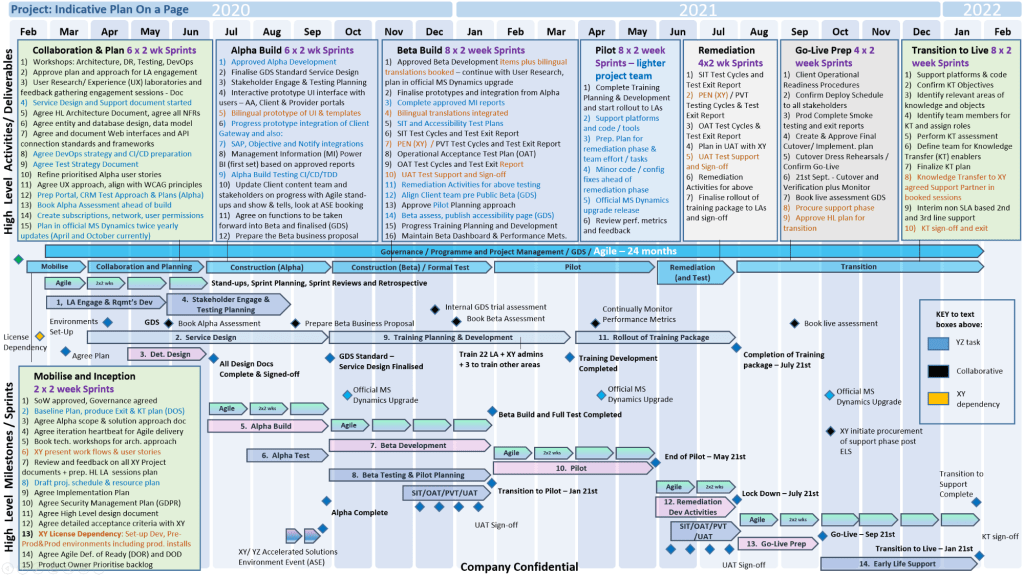
MS PowerPoint Plan On a Page POaP templates downloaded at website banner

Foundational Years (1984–1990) 

  • 1984: The idea for a presentation program is conceived by Robert Gaskins.
  • 1987 (April): PowerPoint 1.0 launches for Macintosh, supporting only black and white slides.
  • 1987 (July): Microsoft acquires Forethought.
  • 1990 (May): The first Windows version (PowerPoint 2.0) is released, coinciding with Windows 3.0. 

Office Integration (1992–2003) 

MS PowerPoint Plan On a Page POaP templates downloaded at website banner
  • 1992: PowerPoint 3.0 introduces video transitions and sound.
  • 1994: PowerPoint 4.0 begins deep integration with the Microsoft Office suite, sharing interface components with Word and Excel.
  • 1997: PowerPoint 97 brings significant upgrades like “Custom Animation” and the “Office Assistant” (Clippy).
  • 2003: PowerPoint 2003 focuses on collaboration and improved “Package for CD” features. 

Modernization & Cloud (2007–Present)

MS PowerPoint Plan On a Page POaP templates downloaded at website banner
  • 2007: Introduces the Ribbon interface and the XML-based .pptx file format.
  • 2010: Adds video export, section organization, and co-authoring capabilities.
  • 2013: PowerPoint for Web is released, alongside the first dedicated mobile apps for iOS and Android.
  • 2016–2021: Features focus on AI-driven design (PowerPoint Designer), Morph transitions, and real-time collaboration via Microsoft 365.
  • 2023+: Integration of AI tools like Copilot for automated slide generation and DALL-E 2 for image creation. 

Microsoft PowerPoint Development Timeline History

MS PowerPoint Plan On a Page POaP templates downloaded at website banner

Microsoft Excel Development Timeline History

Microsoft Excel has evolved from a niche Apple Macintosh tool into the world’s most dominant spreadsheet software. Its history is marked by strategic shifts, such as jumping from the MS-DOS era to graphical interfaces to outmanoeuvre then-leader Lotus 1-2-3

Timeline of Major Excel Milestones

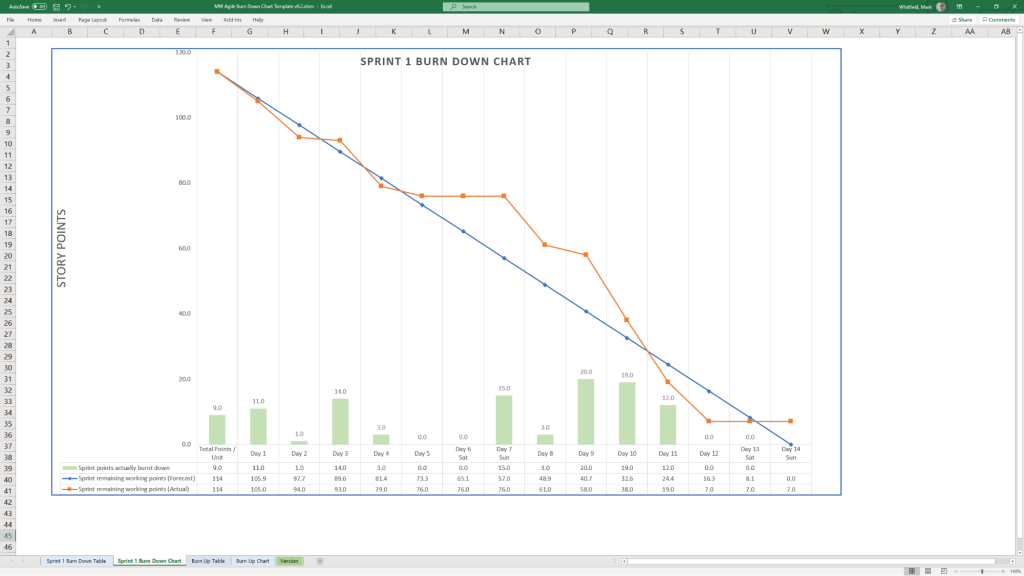
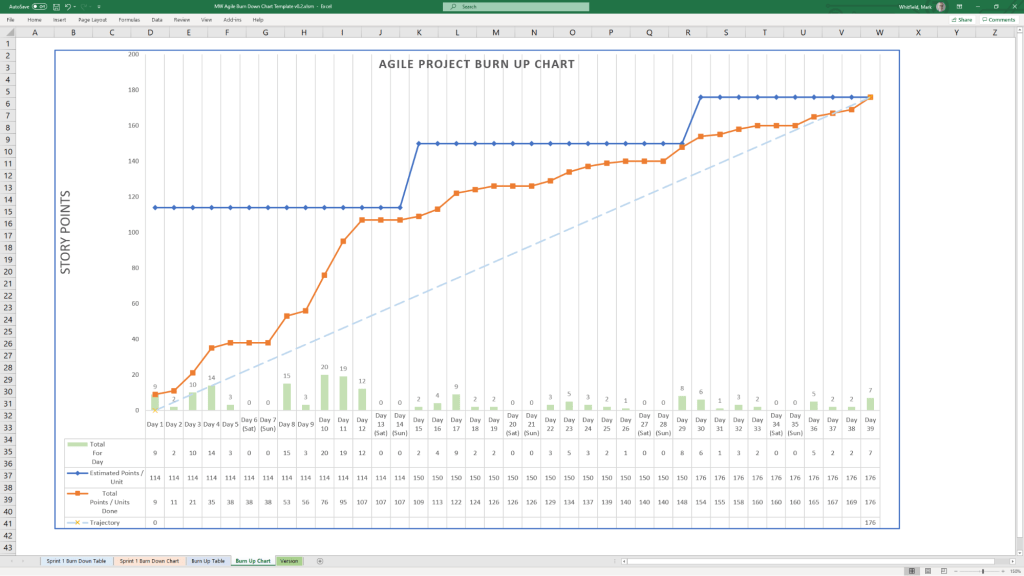
Agile Templates available at download link at website banner
  • 1982: Multiplan (The Predecessor) – Microsoft’s first spreadsheet program. While popular on CP/M systems, it struggled against Lotus 1-2-3 on MS-DOS.
  • 1985: Excel 1.0 (Macintosh Exclusive) – Realising they couldn’t beat Lotus on DOS, Microsoft built a graphical spreadsheet for the new Mac. It introduced the ability to adjust cell heights, widths, and fonts.
  • 1987: Excel 2.0 (First Windows Version) – Launched alongside the first Windows environments, it introduced color support (like red for negative numbers) and was significantly faster than competitors.
  • 1990: Excel 3.0 – Added 3D charts, toolbars, and drawing tools, helping Excel finally overtake Lotus 1-2-3 as the market leader.
  • 1993: Excel 5.0 – A major turning point that introduced Visual Basic for Applications (VBA), allowing users to automate tasks with macros.
  • 1997: Excel 8.0 (Office 97) – Introduced the Paperclip Assistant (“Clippy”) and the first version of the modern VBA environment.
  • 2007: Excel 12.0 (The Ribbon Era) – Replaced menus with the Ribbon interface and dramatically increased grid capacity to 1,048,576 rows by 16,384 columns.
  • 2010: Excel 14.0 – Introduced Slicers for PivotTables and Sparklines (mini charts inside cells).
  • 2013-2016: Data Intelligence – Added Power Query, Power Pivot, and new chart types like Waterfall, Pareto, and Treemap to support advanced data modeling.
  • 2019-Present: AI & Cloud Integration – Modern versions focus on seamless collaboration, dynamic arrays (like XLOOKUP), and AI-powered insights that can extract data directly from images. 

Technological Evolution Highlights

MS Excel templates available on bundle download at website banner
  • Architecture: Shifted from 16-bit to 32-bit with Excel 95, greatly improving stability.
  • Collaborative Features: Modern Version History and “Show Changes” now allow teams to track every edit in real-time.
  • Visualisation: Excel now supports complex timelines via SmartArt or custom Scatter charts with error bars for professional project tracking.

Microsoft Excel Development Timeline History

Microsoft Excel templates available at banner above, FREE upgrades