Artificial intelligence (AI) is transforming project management through two distinct but related paths: the use of AI-powered tools to manage general projects and the specialized methodologies required to manage AI development itself.
1. Methodologies for Managing AI Projects
Traditional software development methods (like Waterfall) often fail for AI because these projects are experimental and non-linear. Specialized frameworks have emerged to handle the “data-first” nature of AI:
CPMAI (Cognitive Project Management for AI): A leading methodology that combines Agile principles with data-centric phases: Business Understanding, Data Understanding, Data Preparation, Model Development, Model Evaluation, and Model Operationalization.
Agile-AI Hybrid: Adapts standard Agile by using “short-boxed” iterations for model training and allowing for a “flexible scope” because model performance is unpredictable until tested.
Data Driven Scrum: A variation of Scrum that prioritizes work based on data availability and experimental results rather than just feature backlogs.
MLOps (Machine Learning Operations): An operational framework focused on the continuous integration, deployment, and monitoring of models to prevent “model drift” after a project officially “ends”.
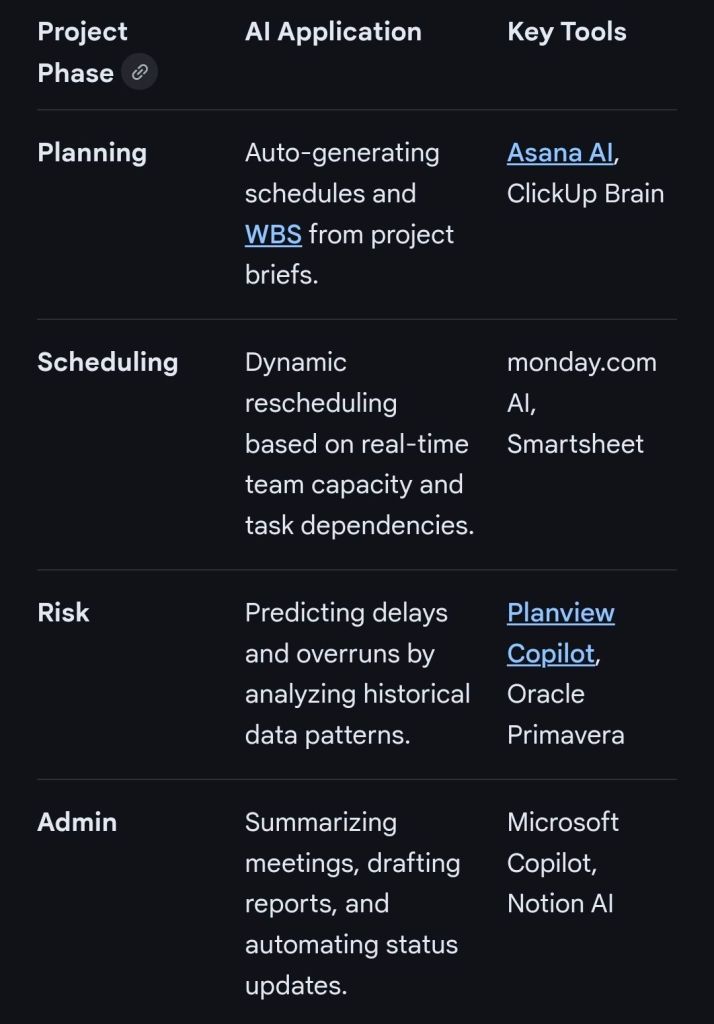
2. AI-Augmented Project Management (The “AI Copilot”)
For non-AI projects, AI acts as an intelligent assistant to automate administrative tasks and provide predictive insights.
3. Implementation Strategy
Experts recommend a phased approach to integrating AI into management workflows:
Assess Inefficiencies: Identify repetitive tasks (e.g., status reporting) that can be automated first.
Data Governance: Ensure project data is clean and centralized; AI is only as good as the data it consumes (“Garbage In, Garbage Out”).
Human-in-the-Loop: Use AI for data-heavy lifting, but retain human judgment for high-stakes leadership, ethics, and stakeholder empathy.
AI Projects and Methodologies for Managing AI Projects
Mark Whitfield is an experienced IT Project Manager and software developer who has spent over 22 years specialising in HP NonStop (formerly Tandem) systems. He is currently an Engagement Project Manager at Capgemini.
Career & Expertise
Whitfield’s career in HP NonStop began in 1990 and includes significant technical and leadership roles across the financial and technology sectors:
Software Development: Early in his career, he worked as a programmer for The Software Partnership (later Deluxe Data/FIS), focusing on electronic banking software like sp/ARCHITECT on Tandem mainframes.
Insider Technologies (1995–2013): He spent 18 years at Insider Technologies as a Senior Development Engineer and Project Manager. His work involved:
Developing monitoring and diagnostic software such as Reflex 80:20, Reflex ONE24, and RTLX (Real-Time Log Extraction) for payment systems.
Managing the first HP OpenView Operations Smart Plug-In certification for the NonStop platform.
Designing XPERT24, a performance tracking product for ACI’s XPNET layer.
Capgemini (2016–Present): As an Engagement Project Manager, he has led digital projects for major clients in the automotive, government, and aerospace sectors, including a cloud migration for UK Government applications.
Technical Contributions
Publications: He has authored articles for globally published journals like The Connection (2013), discussing topics such as querying terabytes of legacy transaction log data from NonStop mainframes.
Project History: He has managed high-value projects, including a £5 million initiative to migrate legacy HP NonStop software to AIX-based technologies for a large UK retail bank.
Training: He is trained in various NonStop-specific technologies, including TAL (Transaction Application Language), COBOL85, PATHWAY, and NonStop SQL.
Whitfield also maintains a professional website, mark-whitfield.com, where he provides project management templates and resources related to HP NonStop and Tandem systems.
Mark Whitfield provides a comprehensive bundle of over 200 editable project management templates designed for Agile, Waterfall, and PRINCE2 methodologies. These templates are based on over 30 years of project delivery experience and are available for purchase via his official website or Etsy shop.
Key Template Categories
The bundle includes a wide variety of tools across different formats (Excel, PowerPoint, Word, and MS Project):
Planning & Scheduling:
Plan on a Page (POaP): Over 30 PowerPoint slide examples for executive-level summaries.
Detailed Project Plans: MS Project (MPP) and Excel templates for SDLC, PRINCE2 7th Edition, and Agile Scrum projects.
Gantt Charts: Built-in tracking views for both MS Project and Excel.
Tracking & Control:
RAID Logs: Comprehensive logs for tracking Risks, Actions, Issues, and Dependencies, plus additional tabs for Change Requests and Lessons Learned.
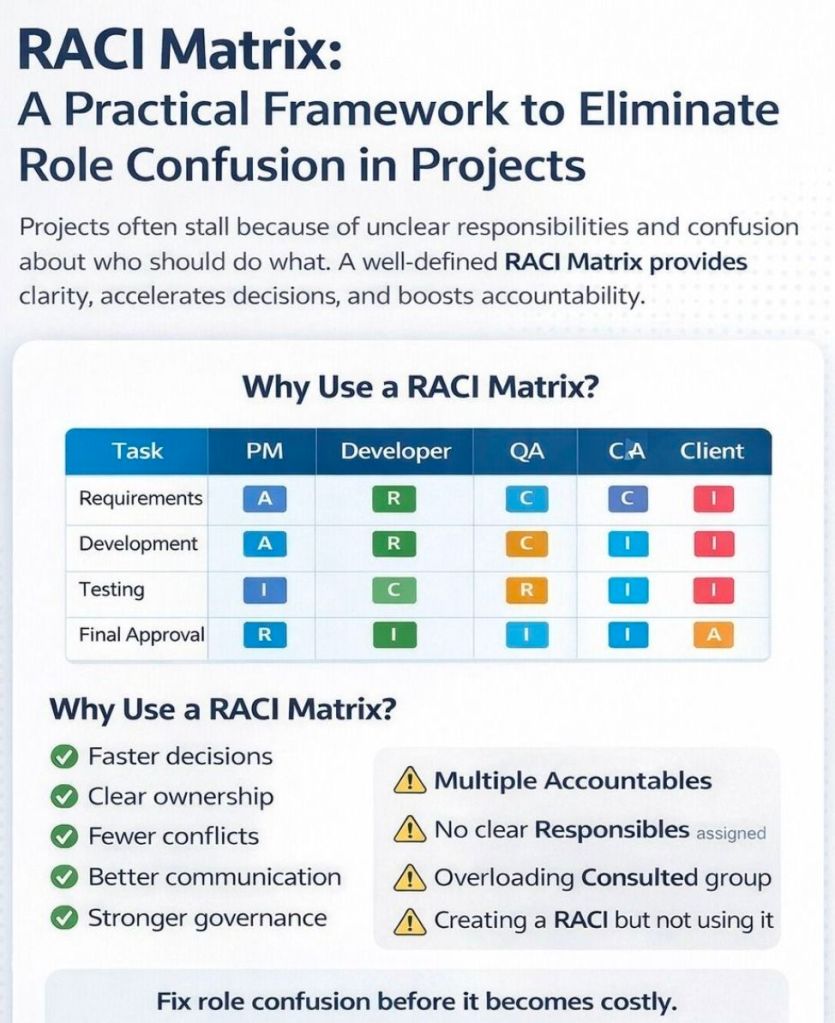
RACI Matrix: Templates to define project roles and responsibilities (Responsible, Accountable, Consulted, Informed).
Finance Trackers: Tools for internal and external forecast vs. actual costs, including margin and variance tracking.
Agile Specific Tools:
Burn Down & Burn Up Charts: Excel-based alternatives when tools like Jira are unavailable.
Agile Story Dependency Tracking: Specifically for managing dependencies between agile stories and external suppliers.
Reporting & Governance:
Status Reports: Weekly and monthly templates in Word and PowerPoint formats.
Stakeholder Analysis: Power/interest mapping and engagement plan templates.
Benefits Realisation: Plans to track project outcomes against initial business goals.
Purchase Benefits
Lifetime Upgrades: Once purchased, all future additions and updates to the template package are provided for free.
Compatibility: Templates are designed for Microsoft Office 365 but also include Excel versions compatible with earlier software.
Support: The package typically includes walkthrough Word documents to guide users on how to use each major template.
Mark Whitfield HP NonStop Tandem experience & Project Management Templates
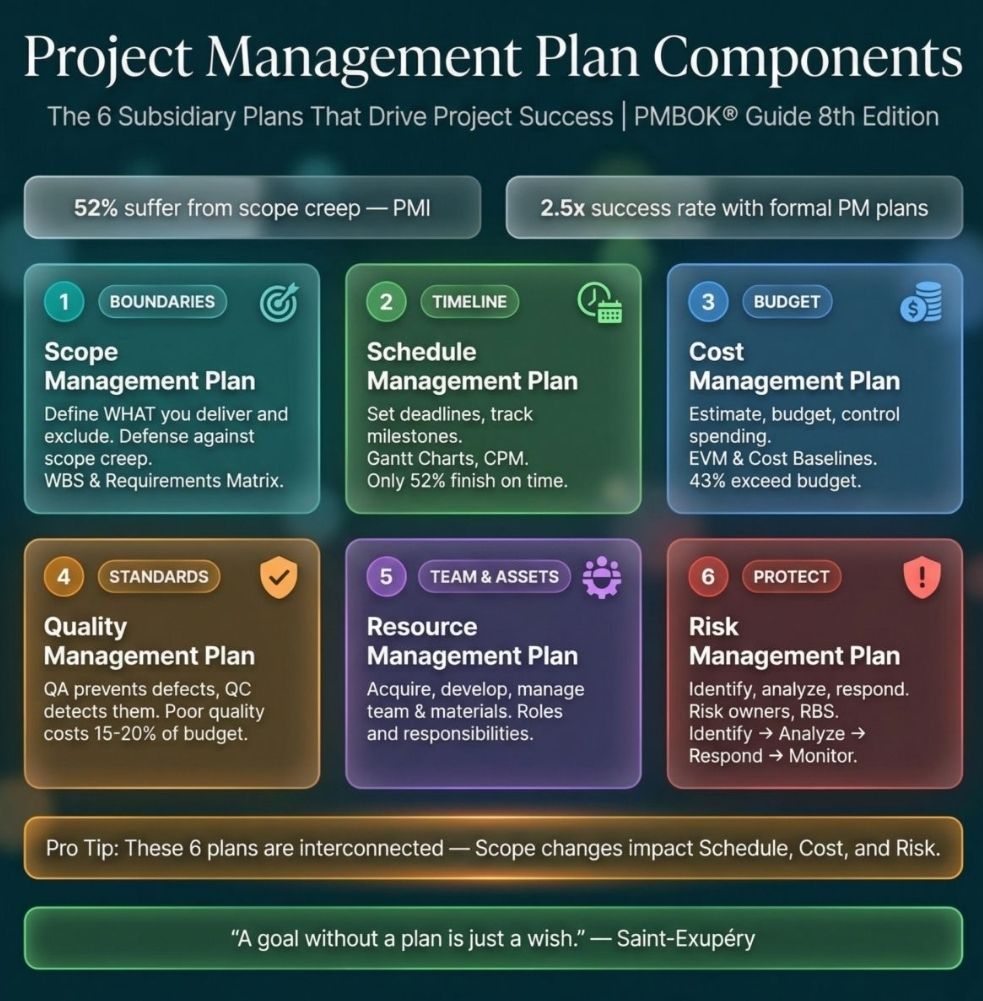
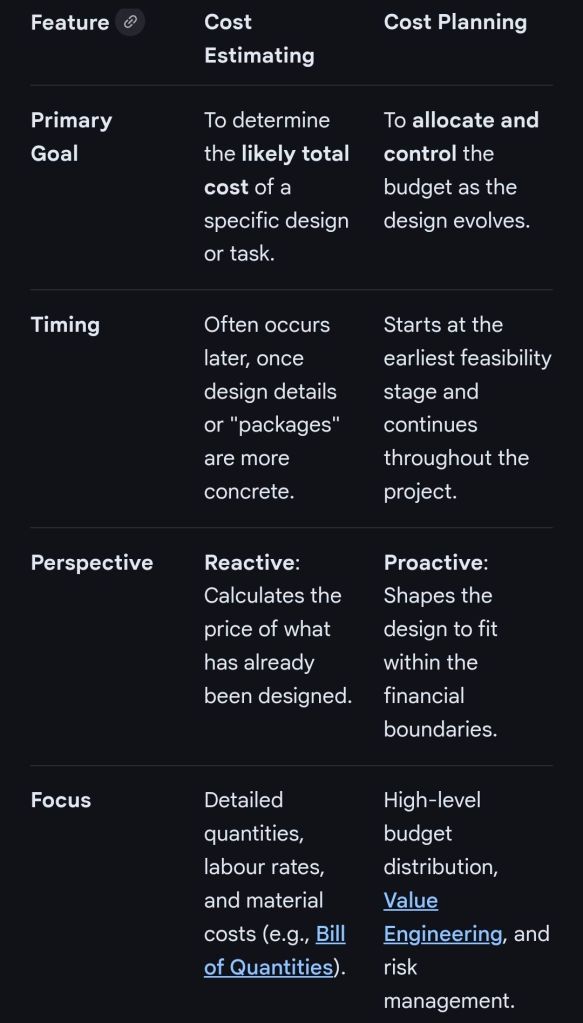
In professional project management and construction, cost estimating and cost planning are complementary processes that occur at different stages to ensure a project remains financially viable.
1. Cost Estimating: “What will it cost?”
Cost estimating is a technical assessment used to predict the expenditures for a project.
Early Stages: Estimates might be “rough orders of magnitude” based on square footage or historical data (e.g., cost per hotel room).
Later Stages: Estimates become precise “tender figures” used by contractors to bid on work, factoring in current market rates for labour and materials.
Function: It answers the question: “Is this specific plan affordable?”.
2. Cost Planning: “How do we stay on budget?”
Cost planning is a strategic framework that manages a project’s financial health from start to finish.
Iterative Process: It is a “living document” that is updated as the project moves from concept to detailed design.
Allocation: It breaks down the total budget into “elemental” targets (e.g., spending £X on the foundation and £Y on finishes).
Control: If an estimate for one part of the project exceeds its target, the cost plan guides the team to adjust the design or find savings elsewhere to keep the overall project on track.
Standard Professional Guidance
The Royal Institution of Chartered Surveyors (RICS) provides the New Rules of Measurement (NRM 1), which standardises how these processes work together:
Order of Cost Estimate: Establishing the initial viability of a project.
Elemental Cost Plan: Breaking the estimate down into functional parts.
Cost Checking: Continually comparing design changes against the cost plan to prevent overspending.
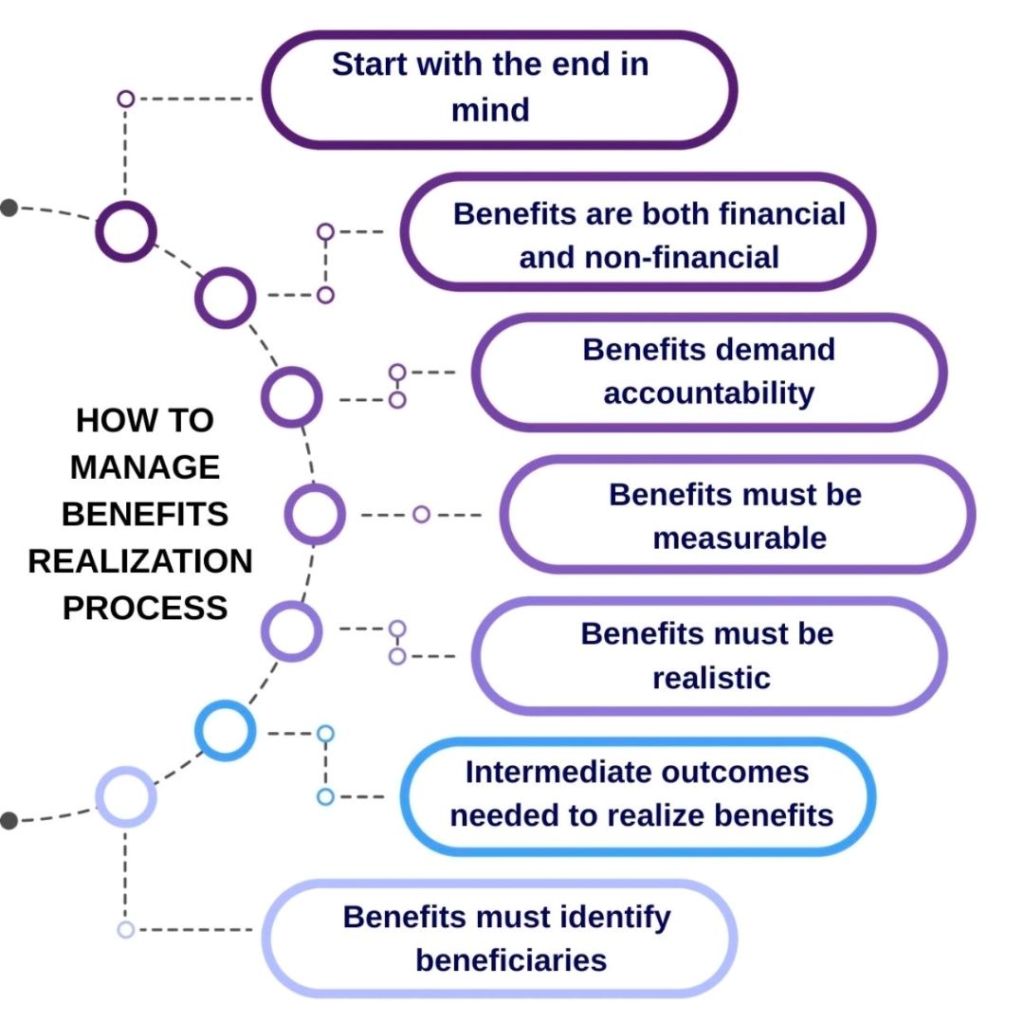
The benefits realization process is a structured framework used to ensure that projects and programmes deliver the tangible value and strategic outcomes intended by an organisation. Unlike traditional project management, which focuses on outputs (deliverables like a new software), benefits realization focuses on outcomes (the actual value derived, such as a 10% increase in efficiency).
Core Stages of the Process
While various frameworks exist, most follow three or four primary stages:
1. Identification: Defining the expected benefits at the start of a project. This involves aligning benefits with the organisation’s strategic goals and identifying “benefit owners” who will be accountable for their delivery.
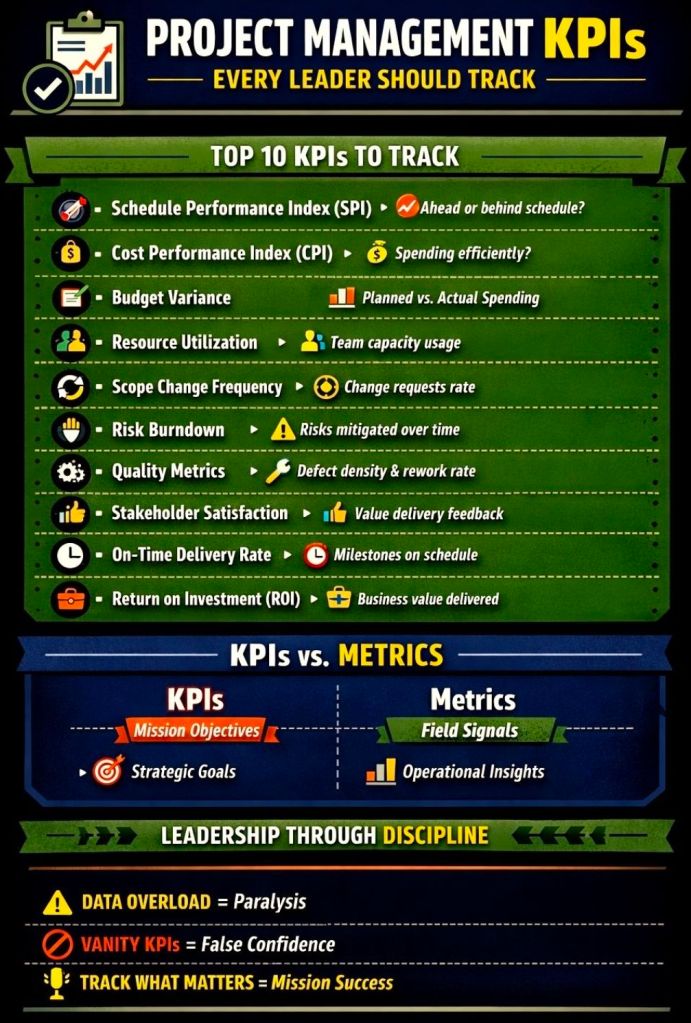
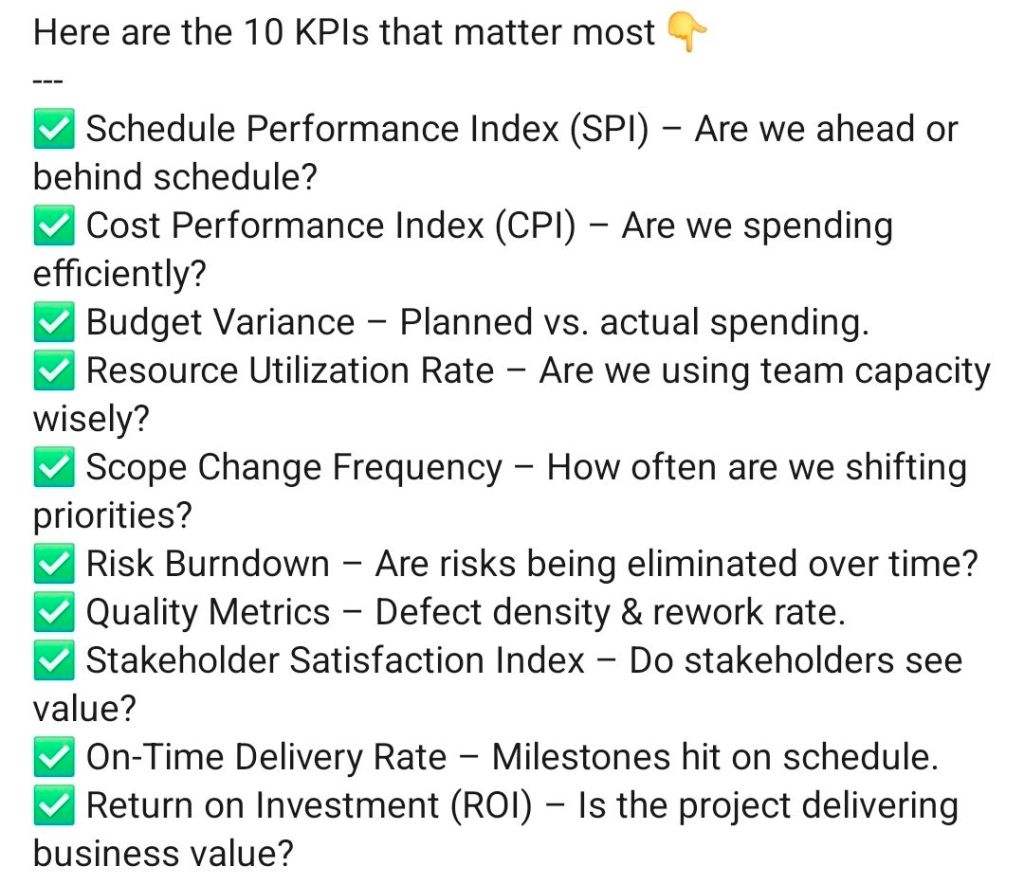
2. Planning: Developing a Benefits Realization Plan that establishes metrics, Key Performance Indicators (KPIs), and timelines for when benefits will be achieved.
3. Execution & Delivery: Monitoring and managing the project to ensure it stays on track to deliver the planned benefits. This includes managing risks that could negatively impact benefit delivery.
4. Sustainment & Review: Occurring post-project completion, this stage focuses on ensuring benefits are fully realized and sustained over the long term. A final review is conducted to compare actual results against the original business case.
Key Components and Tools
Benefits Register: A central document used to track and manage all identified benefits, their owners, and their current status.
Benefit Profiles: Detailed records for individual benefits, describing what they are, how they will be measured, and who is responsible for them.
Benefit Dependency Map (BDM): A visual tool showing the links between project outputs, organizational changes, and final strategic objectives.
Benefit Owners: Individuals (usually from the business side) who are accountable for ensuring a specific benefit is achieved and sustained after the project team disbands.
Why It Matters
Organizations that mature in benefits realization management are significantly more likely to meet their original goals and business intent. It bridges the gap between high-level strategy and tactical project execution, ensuring that investments translate into actual business value.
Benefits Realization Process is a structured framework
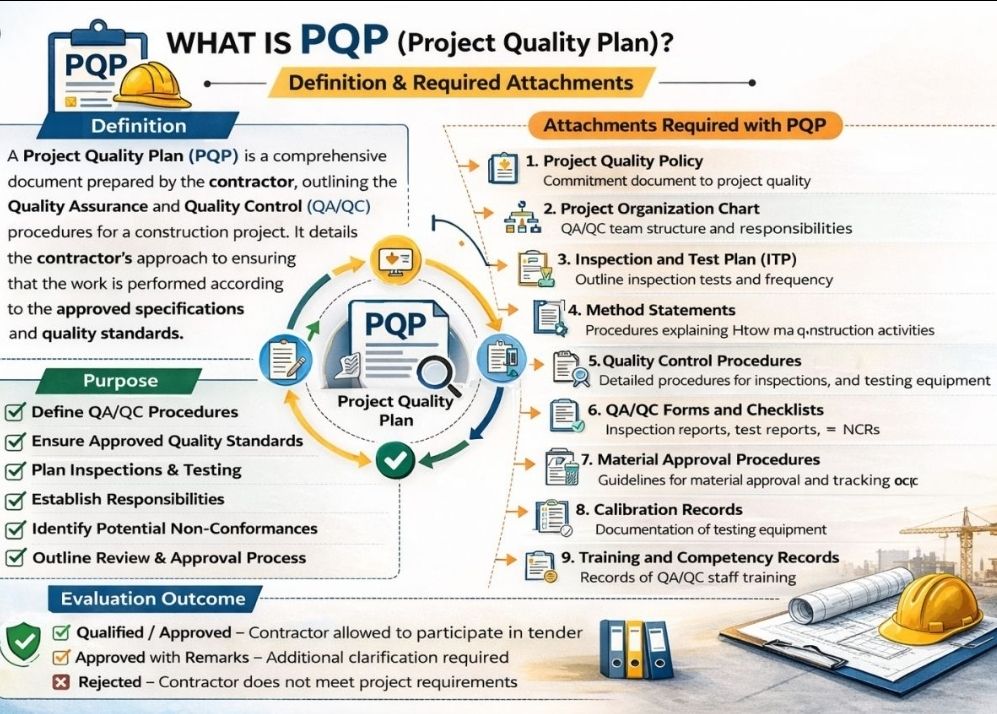
The primary purpose of a Project Quality Plan (PQP) is to define the standards, tools, and processes required to ensure a project’s deliverables are “fit for purpose” and meet all stakeholder expectations. It serves as a strategic roadmap for the project team to maintain consistent quality throughout the project lifecycle rather than treating it as an afterthought.
Core Objectives
A PQP is designed to achieve several critical goals:
Define “Quality”: Translates vague stakeholder needs into measurable criteria and specific benchmarks.
Prevent Defects: Establishes Quality Assurance (QA) processes to proactively “build in” quality from the start, reducing the risk of errors.
Detect and Correct Issues: Outlines Quality Control (QC) activities, such as testing and inspections, to identify and fix defects before they reach the customer.
Clarify Accountability: Assigns specific roles and responsibilities so every team member knows who is responsible for performing, checking, and approving work.
Ensure Compliance: Guarantees the project adheres to relevant internal policies, legal regulations, and industry standards like ISO 9001.
Strategic Benefits
Implementing a structured quality plan provides tangible advantages for project management:
Reduced Costs and Rework: By catching errors early, the team avoids expensive last-minute fixes and wasted resources.
Improved Efficiency: Standardised workflows and clear metrics allow the team to focus on production rather than constant troubleshooting.
Increased Stakeholder Trust: Providing objective evidence through audits and reports gives sponsors and clients confidence in the final outcome.
Continuous Improvement: The plan often includes feedback loops and lessons-learned processes to refine and enhance quality for future project phases.
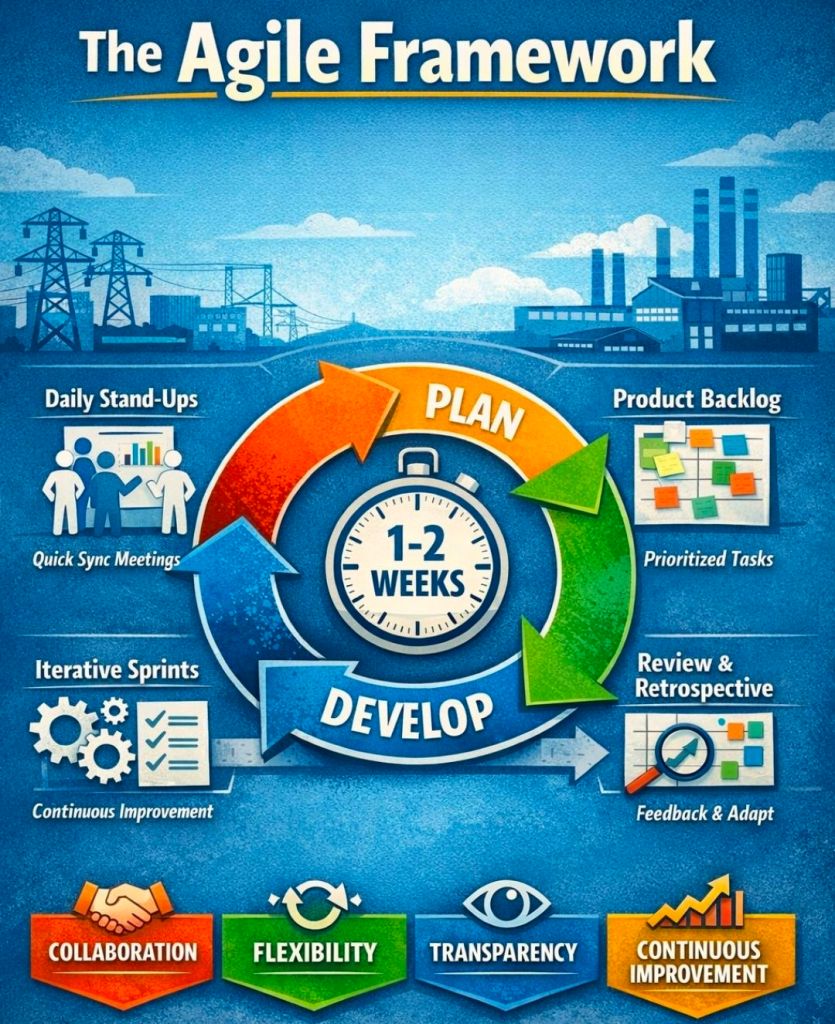
Scrum is a lightweight framework within the broader Agile methodology used to manage complex work through iterative, incremental delivery. It organizes work into fixed-length cycles called sprints, typically lasting two to four weeks, to deliver a usable “increment” of value at the end of each cycle.
Core Components (The 3-5-3 Structure)
The framework is built around three accountabilities, five events, and three artifacts.
1. Three Accountabilities (Roles)
Product Owner: Represents the customer and stakeholders. They manage the Product Backlog and prioritize work to maximize the value delivered by the team.
Scrum Master: A servant leader who coaches the team on Scrum theory and removes impediments that block progress.
Developers: A cross-functional, self-managing team that does the actual work to create the product increment.
2. Five Events (Ceremonies)
The Sprint: The container for all other events; a time-boxed period where work is performed.
Sprint Planning: The team defines what will be delivered in the sprint and how the work will be achieved.
Daily Scrum: A 15-minute daily check-in for developers to synchronize progress and plan the next 24 hours.
Sprint Review: Held at the end of the sprint to inspect the outcome with stakeholders and adapt the Product Backlog.
Sprint Retrospective: An internal team meeting to reflect on the process and identify improvements for the next sprint.
3. Three Artifacts
Product Backlog: An ordered, evolving list of everything needed for the product.
Sprint Backlog: The subset of product backlog items selected for the current sprint, plus a plan for delivering them.
Increment: The concrete sum of all completed backlog items that meet the Definition of Done.
The Three Pillars of Empiricism
Scrum is founded on empirical process control, which relies on:
Transparency: The process and work must be visible to everyone involved.
Inspection: Frequent checks of artifacts and progress to detect variances.
Adaptation: Adjusting the process or product if an inspection reveals unacceptable deviations.
Key Values
Success with Scrum depends on the team’s commitment to five core values: Commitment, Courage, Focus, Openness, and Respect.
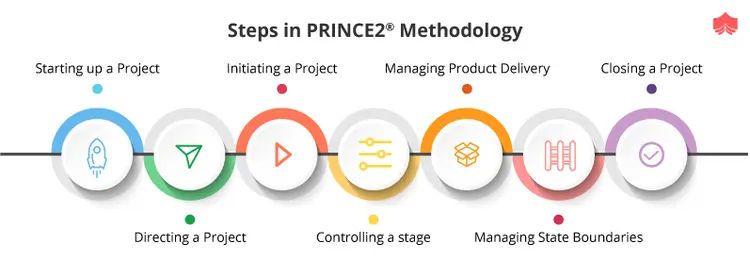
In PRINCE2, a project is managed through a series of management stages, which are discrete sections of a project that the Project Board authorises at specific decision points. Every PRINCE2 project must have at least two stages: an initiation stage and at least one further delivery stage.
PRINCE2 Management Stages Overview
A detailed breakdown of these stages, aligned with the seven core PRINCE2 processes, is provided below.
1. Starting Up a Project (SU)
This is a pre-project process designed to determine if the project is viable and worthwhile before committing significant resources.
Key Activities:
Appointing the Executive and Project Manager.
Developing an Outline Business Case.
Creating a Project Brief which defines objectives and scope.
Planning the initiation stage itself.
2. Initiating a Project (IP)
This represents the first management stage of the project. It establishes the firm foundation for the project’s execution.
Key Activities:
Creating the Project Initiation Documentation (PID), which includes the full Business Case, Project Plan, and management strategies for risk, quality, and communication.
Setting up project controls and refining the project approach.
Securing formal approval from the Project Board to proceed.
3. Directing a Project (DP)
This is an ongoing process that spans the entire project lifecycle, focusing on high-level decision-making by the Project Board.
Key Activities:
Authorising the project to start and approving each subsequent stage.
Giving ad hoc direction and advice to the Project Manager.
Making the final “stop/proceed” decisions at stage boundaries.
4. Controlling a Stage (CS)
This covers the day-to-day management of each delivery stage by the Project Manager.
Key Activities:
Assigning work to teams via Work Packages.
Monitoring progress and managing risks and issues.
Reporting status to the Project Board through Highlight Reports.
5. Managing Product Delivery (MP)
This process manages the link between the Project Manager and the Team Managers who are actually building the products.
Key Activities:
Teams accepting and executing Work Packages.
Ensuring work meets the specified quality standards.
Delivering completed and tested products back to the Project Manager.
6. Managing a Stage Boundary (SB)
This occurs at the end of each stage (except the final one) to help the Project Board decide whether to continue.
Key Activities:
Reporting on the performance of the current stage.
Creating a detailed Stage Plan for the next stage.
Updating the overall Project Plan and Business Case with the latest information.
7. Closing a Project (CP)
This is the final part of the last management stage, ensuring the project is shut down in a controlled manner.
Key Activities:
Confirming all products have been accepted by the customer.
Capturing Lessons Learned for future projects.
Preparing an End Project Report to evaluate performance against the original plan.
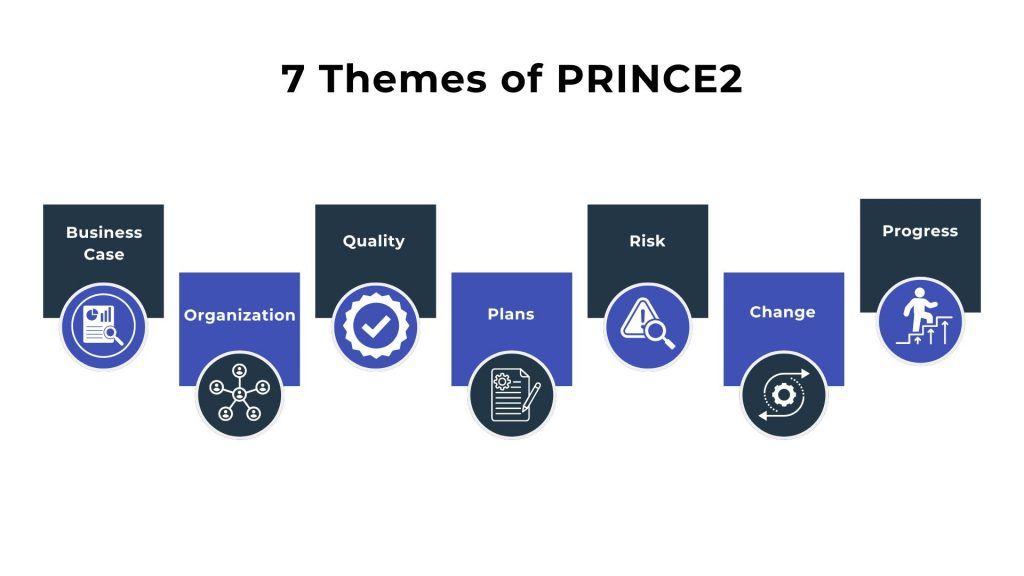
In the PRINCE2 project management methodology, Themes (renamed to Practices in the 7th edition released in 2023) are the seven functional areas of project management that must be addressed continuously throughout the project lifecycle. They provide a structured framework for managing key aspects like cost, risk, and quality to ensure the project remains on track.
7 Themes / Practices of PRINCE2
Overview of the Seven Themes (Practices)
Business Case: Focuses on the “Why” of the project. It establishes the justification for the investment and ensures the project remains desirable, viable, and achievable.
Organisation: Addresses the “Who” by defining the project’s structure of accountability and responsibilities. It identifies key stakeholders and establishes the project management team.
Quality: Focuses on the “What” by defining the user’s requirements and quality standards. It ensures that deliverables are fit for purpose and meet stakeholder expectations.
Plans: Describes the “How,” “How Much,” and “When”. This theme provides techniques for creating project, stage, and team plans to facilitate communication and control.
Risk: Manages the “What If” by identifying, assessing, and controlling uncertainties that could impact the project’s objectives, whether they are threats or opportunities.
Change (Issues): Deals with the impact of changes and unexpected events. It provides a formal process for capturing, assessing, and controlling requests for change to project baselines.
Progress: Evaluates “Where are we now?” versus “Where are we going?”. It establishes mechanisms to monitor actual achievements against planned outcomes and manage deviations through tolerances.
Key Concepts and Terminology
Continuous Application: Unlike processes, which follow a sequence, themes are applied simultaneously throughout the project.
Tolerances: Each theme uses tolerances (allowable deviations for time, cost, quality, etc.) to support the principle of Manage by Exception.
PRINCE2 7 Updates: The latest edition introduces Sustainability as a 7th performance target and emphasizes People as a core element alongside Principles, Practices, and Processes.
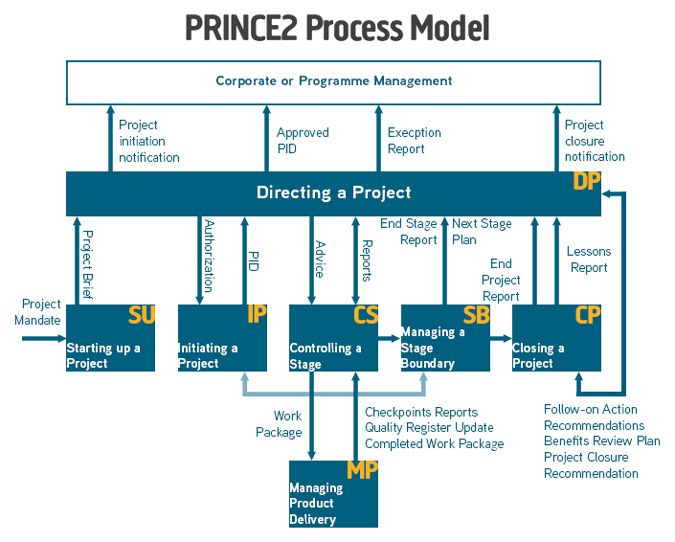
The PRINCE2 process model provides a structured, process-driven roadmap for managing a project from its initial conception to formal closure. It consists of seven core processes that define specific activities, responsibilities, and decision points across the project lifecycle.
The 7 PRINCE2 Processes
The processes are designed to ensure control and align with the project’s management levels:
Starting Up a Project (SU): A pre-project process that filters out unviable ideas. It focuses on confirming if there is a “viable and worthwhile” business case and appoints the Project Manager and Executive.
Directing a Project (DP): Spans the entire project from start to finish. It is the responsibility of the Project Board, which provides strategic oversight, makes key decisions (e.g., authorising stages), and manages by exception.
Initiating a Project (IP): Occurs during the first management stage. It involves detailed planning to establish solid foundations, resulting in the Project Initiation Documentation (PID), which includes the project plan, risk management approach, and full business case.
Controlling a Stage (CS): Focuses on the Project Manager’s day-to-day management of a stage. This includes assigning work to teams, monitoring progress, and dealing with issues or risks within agreed tolerances.
Managing Product Delivery (MP): Governs the link between the Project Manager and Team Managers. It is where the “specialist products” (actual deliverables) are created, quality-checked, and delivered.
Managing a Stage Boundary (SB): Occurs at the end of each management stage (except the final one). The Project Manager reviews the current stage, updates the project plan and business case, and plans the next stage for Board approval.
Closing a Project (CP): Ensures an orderly end to the project. It confirms that objectives have been met, products have been accepted by the user, and lessons are captured before the project is formally disbanded.
Hierarchy of Management Levels
The process model operates across four distinct levels of authority:
Corporate or Programme Management: Sets the initial project mandate.
Directing (Project Board): Responsible for overall governance and major decisions (Directing a Project).
Managing (Project Manager): Handles daily management and stage control (Controlling a Stage, Initiating a Project).
Delivering (Team Members/Managers): Focuses on creating the physical products (Managing Product Delivery).
Key Characteristics
Management Stages: Projects are broken into at least two stages (Initiation and at least one Delivery stage) to provide “stop/go” decision points.
Triggers: Each process is activated by a specific trigger, such as a “Project Mandate” from corporate management to start the SU process.
Management Products: These are documents like the Business Case, Project Brief, and Highlight Reports used to facilitate control and communication.
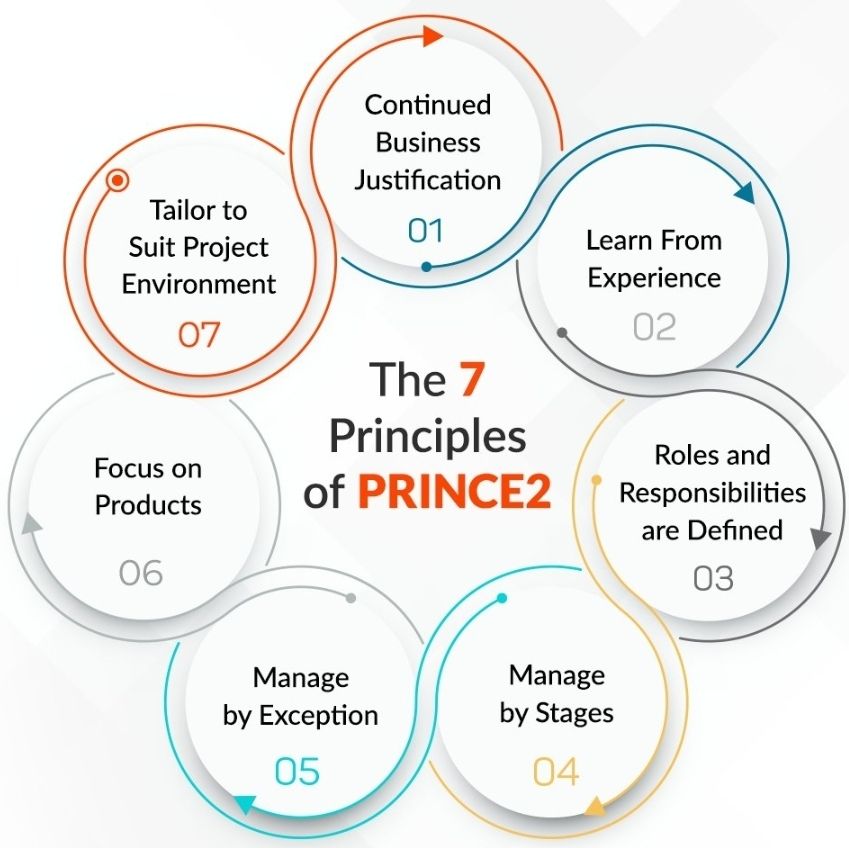
PRINCE2 framework is built on seven core principles
The PRINCE2 (PRojects IN Controlled Environments) framework is built on seven core principles that serve as guiding obligations for any project using this methodology. For a project to be considered a “PRINCE2 project,” all seven must be applied.
Continued Business Justification: A project must have a valid reason to start and must remain justified throughout its lifecycle. This is documented in a Business Case, which is regularly reviewed to ensure the project remains viable, desirable, and achievable.
Learn from Experience: Project teams are required to seek out lessons from previous projects and record new lessons as the current project progresses. A Lessons Log is typically used to capture these insights.
Defined Roles and Responsibilities: Every person involved must understand what is expected of them and who is responsible for specific tasks. PRINCE2 defines a clear management hierarchy: Project Board (Direction), Project Manager (Management), and Team Manager (Delivery).
Manage by Stages: Projects are broken down into manageable chunks called management stages. Each stage acts as a “stop/continue” decision point for the Project Board to assess progress before committing more resources.
Manage by Exception: Senior management (Project Board) only intervenes when the project deviates beyond agreed tolerances for time, cost, quality, scope, risk, or benefits. This empowers the Project Manager while ensuring efficient use of executive time.
Focus on Products: The methodology prioritizes the definition and delivery of high-quality products (outputs) rather than just completing activities. Product descriptions specify the quality criteria and requirements for each deliverable.
Tailor to Suit the Project: PRINCE2 is not a rigid “one-size-fits-all” approach; it must be adapted to the project’s specific scale, complexity, and environment. Tailoring ensures that the controls are appropriate for the level of risk involved.



 PROject Templates