Capgemini Projects Managed from 2016 thru 2025, Summary

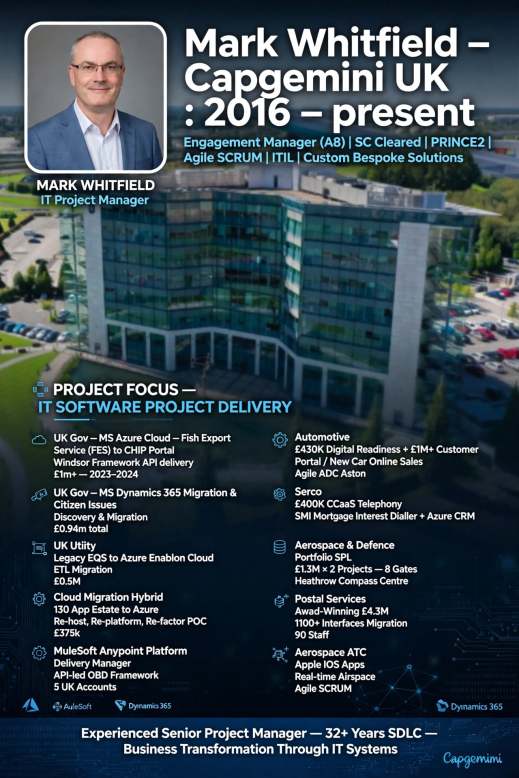
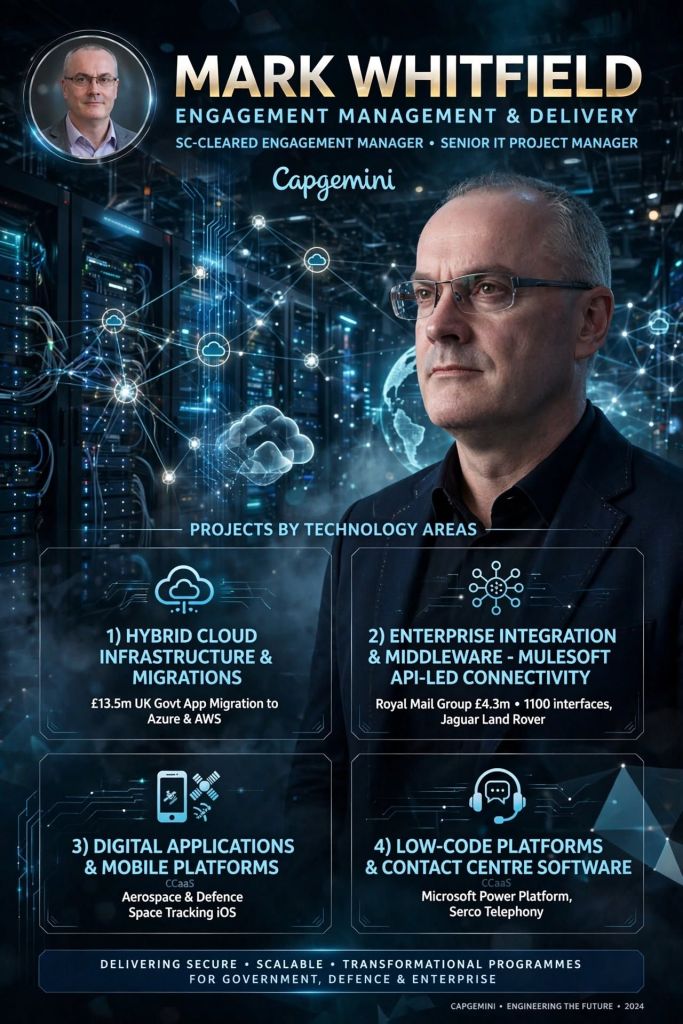
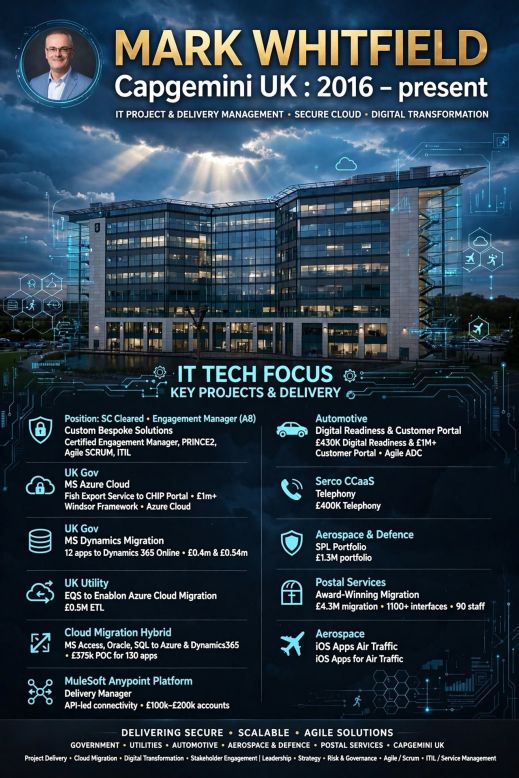
Mark Whitfield is an SC-cleared Senior IT Project Manager and Engagement Manager at Capgemini UK (Custom Bespoke Solutions).

Joining in January 2016, he has orchestrated enterprise-scale cloud migrations, middleware application refactoring, and API-led integration architectures across public sector and tier-one corporate clients.

Capgemini UK, Floor 7, Venus Building, Trafford Quays, Manchester. M41 7HA
Capgemini UK, Floor 7, Venus Building,
Trafford Quays

Below is the complete portfolio overview and highly detailed chronological breakdown by year of his project delivery history at Capgemini.


Project Portfolio Overview

  • Role Title: Certified Engagement Manager / Delivery Manager (A8 Core Level)
  • Methodologies: Agile Scrum ceremonies, Waterfall frameworks, and hybrid delivery patterns
  • Core Competencies: Hybrid cloud migrations, API lifecycle architectures, cross-data centre integration, multi-supplier governance, and financial forecasting
  • Key Clients Served: UK Government, MuleSoft / Salesforce, Jaguar Land Rover, Royal Mail Group, NATS, and Welsh Water

Detailed Capgemini Projects Timeline Breakdown by Year:

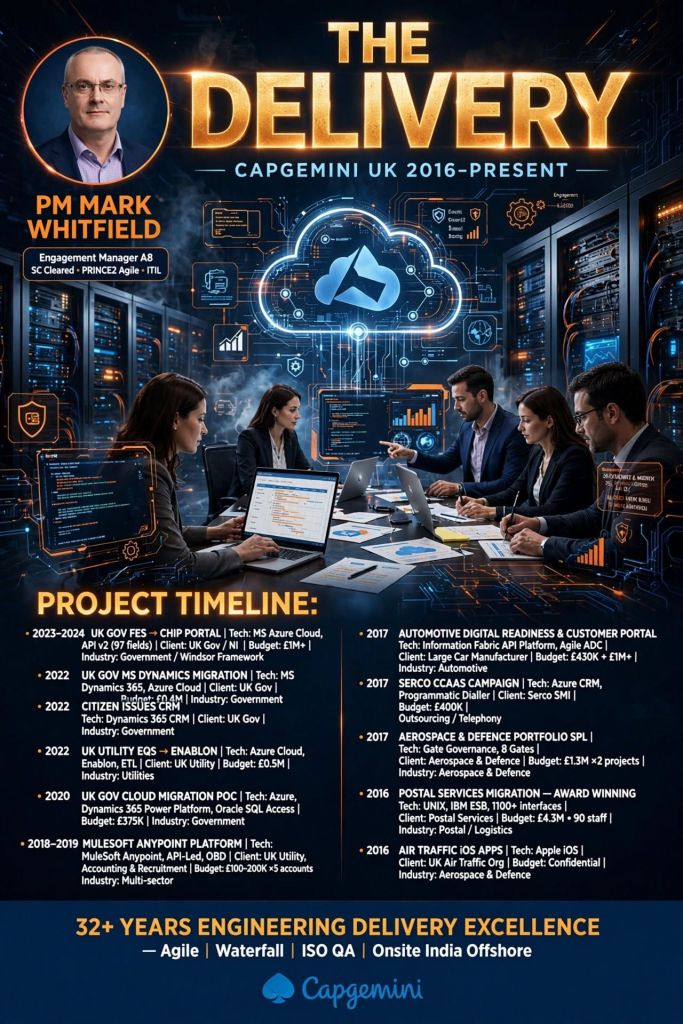
2016 – 2017: Aerospace & Defence Integration & Postal Infrastructure

  • Aerospace & Defence Mobile Apps: Managed an Agile Scrum delivery stream for a UK-wide Air Traffic organisation (NATS). He supervised the development of dual-layered Apple iOS applications rendering real-time airspace positioning data, separating sensitive internal military maps from public views.
  • Salesforce Portal Deployment: Led the enterprise integration and deployment of a Salesforce-driven Single Customer View (SCV) portal platform for defence stakeholders.
  • Postal Services Migration (May 2016 – Oct 2016): Appointed as PM for an award-winning £4.3 million Data Centre Migration project for a major postal client (Royal Mail Group). He directed 90 Capgemini engineers to shift 1,100+ critical interfaces—migrating file transmissions written in UNIX shell scripts and upgrading 150 interfaces processing through IBM ESB to safe software versions right before peak seasonal trading lockouts.

2017 – 2018: Automotive Supply Chain Middleware

  • Jaguar Land Rover iFAB Project: Directed the complex 12-month iFAB Middleware Project architecture development scheme. This cross-functional framework connected globally dispersed manufacturing supply components.
  • Supplier Governance: Coordinated on-site daily standups alongside integration engineering leads to accurately synchronize multiple software suppliers handling distinct tiers of middleware, messaging queues, and front-end architectures.

2018 – 2019: Enterprise API Platform Delivery (MuleSoft)

  • MuleSoft HQ Augmentation (October 2018 – June 2019): Embedded directly into MuleSoft’s London headquarters (Salesforce Tower) as a Senior Delivery Manager.
MuleSoft's London office is located within the Salesforce Tower (formerly known as Heron Tower) at 110 Bishopsgate.
MuleSoft’s London office is located within the Salesforce Tower at 110 Bishopsgate.
  • Anypoint Platform Deployments: Guided multinational corporate clients through API-led connectivity lifecycles. This encompassed configuring Anypoint Code Builder structures, validating hyper-automation runtime layers, and ensuring architectural compliance against regulatory framework rules.
Anypoint Platform Deployments: Guided multinational corporate clients through API-led connectivity lifecycles.
Anypoint Platform is the leading enterprise platform for building APIs, integrations & application networks

2019 – 2021: Large-Scale Public Sector Cloud Migration

  • UK Government Hybrid Cloud Transformation: Commanded a massive modernization program migrating a highly complex estate of legacy code.
  • 130 Applications Transformed: Acted as the primary client escalation point to refactor, re-host, and re-platform 130 public-sector software applications into hybrid cloud environments. His responsibilities included aligning the massive multi-stack migration with strict GDPR protection directives and managing offshore project delivery targets.

2022: Utility Infrastructure & Cloud Upgrades

  • Water Utility EQS Cloud Shift: Dual-managed a £0.5 million technical contract moving an legacy document management environment (EQS) onto Microsoft Azure cloud structures via Enablon for Welsh Water and Scottish Water.
  • MS Dynamics 365 Evolution: Supervised a £0.4 million discovery and blueprint phase to move 12 legacy Microsoft Dynamics 2016 instances operating on outdated shared 8.2 infrastructure onto the unified Microsoft Dynamics 365 Online ecosystem. This involved authoring precise Statements of Work (SoW), custom exit strategies, and foundational Microsoft Project (MPP) tracking models.
  • Accolades: Won the prestigious Capgemini C&CA UK Communications & Engagement Award in December 2022 for outstanding delivery inside the Cloud & Custom Applications business unit.
C&CA UK's Communications & Engagement Award Winner 2022 - Cloud & Custom Applications - Capgemini UK
C&CA UK’s Communications & Engagement Award Winner 2022 – Cloud & Custom Applications – Capgemini UK

Verified Sourcing & Portfolio Links

Capgemini Projects Managed from 2016 thru 2025, Summary

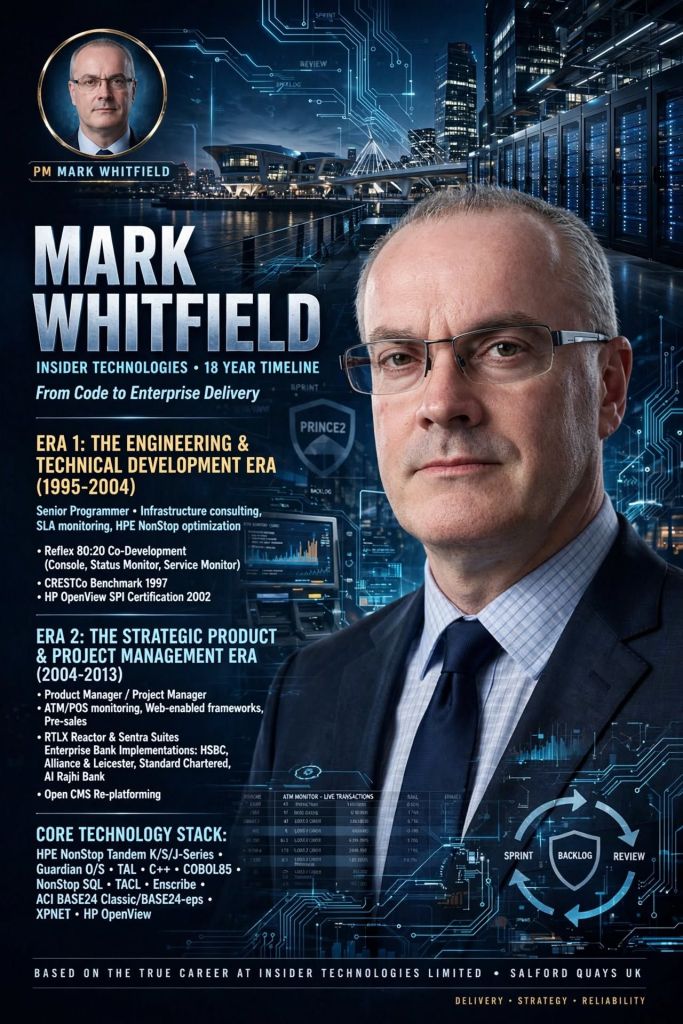
Mark Whitfield HPE NonStop Tandem Experience over three decades

Mark Whitfield is a Senior IT Project Manager with over three decades of experience, heavily rooted in HPE NonStop (formerly Tandem).

His career has transitioned from hands-on NonStop development and product management into large enterprise cloud and digital transformation projects.

His NonStop specific projects and career trajectory can be broken down (at a high-level) by era, location, and focus as follows:

1990–1995: Early Programming

  • Location: Barclays, Poole, Dorset, UK
  • Focus: Electronic banking programming and development on Tandem Mainframe Computers.
  • Projects: Wrote, developed, and maintained software like sp/ARCHITECT-BANK and associated billing software (in Poole, 1993). This involved building early electronic banking systems for desktops long before internet banking was prevalent.
1993, Barclays, Poole, Dorset, UK

1995–2013: Senior Development & Product Management

  • Location: Insider Technologies, Salford Quays, Manchester, UK
  • Focus: NonStop product management, software design, and real-time event monitoring.
  • Projects: Product managed software lifecycles for four monitoring products (two NonStop based). This included creating health and diagnostic tools (RTLX, Reflex 80:20, Reflex ONE24, XPERT24) for mission-critical NonStop environments. He also deployed volume testing on early HP NonStop S7000 nodes for CRESTCo in London in 1997.
Spinnaker Court, Chandlers Point, Insider Technologies, Salford Quays, Manchester, UK
Insider Technologies, Salford Quays, Manchester, UK

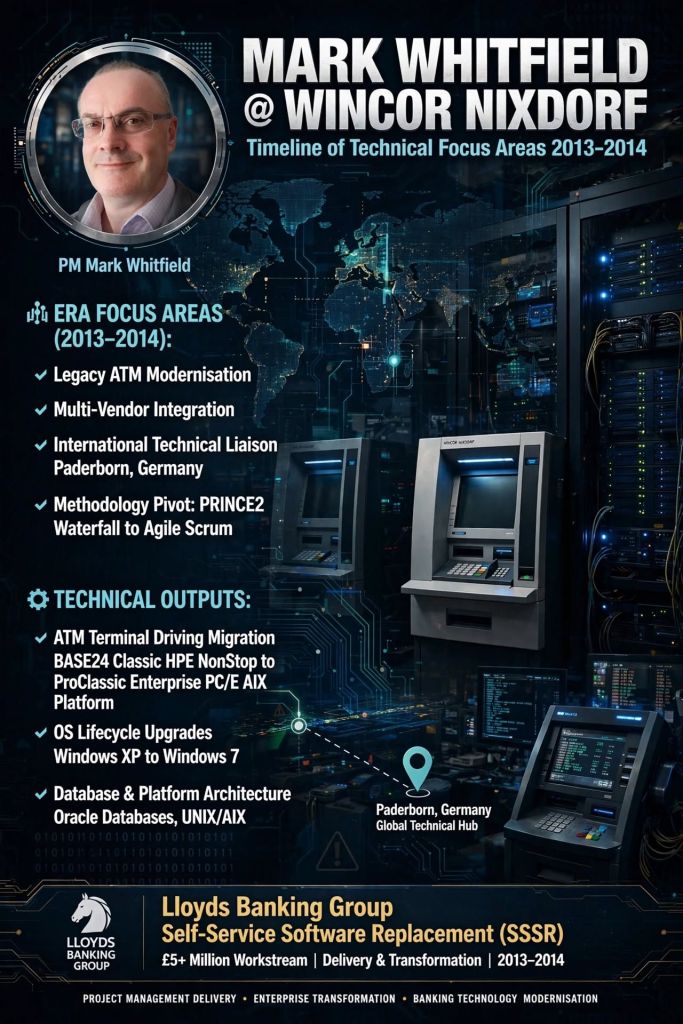
2013–2014: Legacy Migration & Consulting

  • Location: Wincor Nixdorf & ATM/POS Financial Services, UK
  • Focus: Modernization and migration of legacy systems.
  • Projects: Managed a £5M+ replacement of legacy HP NonStop software systems at a large UK retail bank, migrating functionalities to AIX-based J2EE and Oracle architectures.
Diebold Nixdorf Ltd, Cain Rd, Binfield, Bracknell, RG12 1WP
Diebold Nixdorf Ltd, Cain Rd,
Binfield, Bracknell, RG12 1WP

2016–Present: Cloud Transformation & Digital Delivery

  • Location: Capgemini UK, Trafford Quays / UK-Wide
  • Focus: Delivery of enterprise-scale middleware, digital transformation, and cloud.
  • Projects: Acts as an Engagement Manager and SC-Cleared Project Manager. Focus includes Agile software delivery for Air Traffic organisations (e.g., iOS applications for military and public-facing airspace tracking) and rolling out middleware solutions.
Capgemini UK, Floor 7, Venus Building, Trafford Quays, Manchester. M41 7HA
Capgemini UK, Floor 7,
Venus Building, Trafford Quays
C&CA UK's Communications & Engagement Award Winner 2022 - Cloud & Custom Applications - Capgemini UK
C&CA UK’s Communications & Engagement Award Winner 2022 – Cloud & Custom Applications – Capgemini UK

For more career detail, click here.

In Jira Software, an Agile workflow is the sequential path a work item follows

In Jira Software, an Agile workflow is the sequential path a work item follows from creation to completion. It maps out your team’s real-world processes onto a digital Jira Board, ensuring full transparency, accountability, and tracking during iterative cycles.

Whether your team uses the structured Scrum framework or the continuous delivery of Kanban, the core workflow engine runs on the same underlying components.


Core Components of a Jira Workflow

Every workflow in Jira is built using three essential pillars:

  • Status: This indicates exactly where a task sits in the process cycle (e.g., “To Do”, “In Progress”, “In Review”).
  • Transition: The one-way link or action taken to move an issue from one status to another (e.g., clicking “Start Progress” or dragging a card).
  • Resolution: The ultimate reason why a task is closed (e.g., “Done”, “Fixed”, “Duplicate”, “Won’t Do”).

The Standard Agile Workflow Stages

By default, Jira uses a simplified three-step framework, but high-performing Agile teams usually build out custom statuses to mirror their cross-functional pipelines. A comprehensive Agile software workflow typically looks like this:

1. The Backlog

The master list where the Product Owner documents all upcoming feature requests, bugs, and requirements. Work here is represented as Epics (large bodies of work) and User Stories (smaller, user-focused features). Items sit here until they are prioritized and pulled into active development.

2. To Do (Selected for Development)

Issues committed to the current active iteration—like a 2-week Sprint in Scrum. These items are assigned to specific team members, estimation points are locked in, and they sit in the queue waiting for a developer to pick them up.

3. In Progress

The work is actively being executed. In software teams, moving a card to “In Progress” frequently triggers background Atlassian Automations, such as linking the Jira task to a live branch in a code repository like Bitbucket.

4. In Review / QA

The work is complete but requires validation. This stage is critical for peer code reviews, automated builds, and quality assurance testing. If a bug is caught, a transition can send the issue back to “In Progress”.

5. Done

The work successfully meets the team’s shared “Definition of Done” and is ready for release. Moving a card to this final column automatically strikes through the issue key, triggering a status of “Resolved”.

Structuring Work Across Frameworks

Scrum Workflows: Heavily time-boxed. Issues move sequentially from a groomed backlog into active sprints. Progress and performance metrics are measured via built-in Jira Agile Reports like Burndown Charts and Velocity tracking.

Kanban Workflows: Focused on continuous, fluid delivery. Instead of sprints, teams place Work in Progress (WIP) limits on individual columns. This visually exposes system bottlenecks immediately if too many tasks stack up in a column like “In Review”.

Workflow Best Practices for Teams

  • Keep it Simple Early On: Start with minimal statuses (To Do, In Progress, Done). Only introduce custom steps like “Design” or “UAT” when your team physically hits a communication gap.
  • Leverage Transitions Wisely: Define whether an issue can transition “From Any Status” or must follow a strict, linear progression.
  • Automate Repetitive Steps: Set up rules to auto-assign tasks when they change hands, or auto-close parent User Stories once all child subtasks hit “Done”.

In Jira Software, an Agile workflow is the sequential path a work item follows from creation to completion

Agile Scrum Story Points Matrix

Story Points Matrix Agile Scrum
Scrum Story Points Matrix
Agile Scrum Story Points Matrix

Agile, Scrum and SAFe – How the Principles Connect

Agile, Scrum and SAFe - How the Principles Connect
2. Agile, Scrum and SAFe - How the Principles Connect
Agile, Scrum and SAFe –
How the Principles Connect

Scrum Master drives value by serving 3 critical areas

Scrum Master drives value by serving 3 critical areas
Agile Scrum Master drives value by serving three critical areas
Scrum Master drives value by
serving 3 critical areas

Comparison Between Load and Capacity in Agile Scrum

In Scrum, capacity represents the total amount of available work time a team has for an upcoming sprint, while load is the actual amount of work the team pulls into that sprint.

1 Comparison Between Load and Capacity in Agile Scrum
2 Comparison Between Load and Capacity in Agile Scrum
Comparison Between Load
& Capacity in Scrum

Understanding Capacity

Capacity acts as your ceiling. It is a forward-looking calculation performed right before sprint planning. It accounts for the reality of the upcoming calendar cycle.

  • To find a team’s capacity, you multiply total working days by the number of team members.
  • You then subtract non-productive time like public holidays, planned vacation days, and standard company meetings.
  • Finally, you apply a focus factor (typically around 70% to 80%) to account for daily distractions and context switching.

Understanding Load

Load represents the weight of the commitments made by the developers. It is the cumulative volume of user stories and tasks that the team intends to deliver during the sprint.

  • Load is entirely determined by how the team estimates the product backlog items pulled into the sprint.
  • Unlike capacity (which is restricted by time), load can theoretically be pushed to any level, though overloading creates major delivery risks.

Balancing the Relationship

The ultimate goal of a Scrum Master is to help the team balance load against capacity to maintain a sustainable pace.

  • The Safe Zone: Best practices dictate keeping your load at 10% to 20% below your absolute capacity. This visual buffer creates room for unexpected blockers or minor illness.
  • The Danger Zone (Overcommitment): An exact match where load equals capacity is considered an anti-pattern in Agile frameworks. It strips the team of flexibility, spikes burnout, encourages poor-quality code, and almost always leads to missed sprint goals.

Comparison Between Load & Capacity in Agile Scrum

POAP Plan On a Page Example Templates for Download

Available for download here.

Plan on a page POaP example 1
POaP example 1
Plan on a page POaP example 2
POaP example 2
Plan on a page POaP example 3
POaP example 3
Plan on a page POaP example 4
POaP example 4
Plan on a page POaP example 5
POaP example 5
Plan on a page POaP example 6
POaP example 6
Plan on a page POaP example 7
POaP example 7

Many more examples available in download pack.

A Plan on a Page (POaP) is a concise, high-level visual summary of a project used to communicate timelines, milestones, and strategic objectives to stakeholders and executives. It condenses detailed data into an easy-to-digest, single-page format.

Core Components of a POaP

An effective POaP cuts out the noise of day-to-day task lists and focuses purely on headline information. It typically includes:

  • Project Overview: Title, project manager, and the overarching business objective.
  • Timeline & Milestones: A horizontal, time-phased bar chart mapping the project’s key phases.
  • Key Deliverables: 4 to 6 major outputs or goals required for success.
  • Risks & Dependencies: Critical blockers that require executive attention.

Why and When to Use It

  • Steering Committees: Ideal for Steering Committee meetings (Steerco) where executives need to see progress at a glance.
  • Stakeholder Alignment: Keeps teams focused on strategic vision rather than getting “lost in the weeds” of daily operations.
  • Client Updates: Acts as an excellent executive summary for clients without overwhelming them with micro-details

POAP Plan On a Page Example Templates for Download