Evolution of CI/CD (Continuous Integration and Continuous Delivery/Deployment

The evolution of CI/CD (Continuous Integration and Continuous Delivery/Deployment) has transitioned from manual, high-risk “integration hell” to fully automated, cloud-native pipelines.

Foundational Era (Pre-2000s)

  • 1989: Earliest known work on CI with the Infuse environment.
  • 1991: Root practices of CI/CD began to emerge.
  • 1994: Grady Booch used the term “continuous integration” in his book Object-Oriented Analysis and Design with Applications.
  • 1997–1999: Kent Beck and Ron Jeffries formalise CI as a core practice of Extreme Programming (XP)

The Rise of Automation (2001–2010) 

  • 2001: CruiseControl is released as the first widely used open-source CI server.
  • 2005: Hudson (the predecessor to Jenkins) is created by Kohsuke Kawaguchi at Sun Microsystems.
  • 2006: JetBrains releases TeamCity.
  • 2010: Jez Humble and David Farley publish the seminal book Continuous Delivery, formalising the “CD” part of the equation.
  • 2010: IMVU engineers document the first practical CD system, initially met with skepticism but quickly adopted by lean software movements. 

Modern CI/CD & Cloud Era (2011–2018)

  • 2011: Jenkins is born after a legal dispute between Oracle and the Hudson community.
  • 2011: Travis CI launches, popularising CI-as-a-Service for GitHub projects.
  • 2013: Docker is released, revolutionising CI/CD through containerisation.
  • 2014: GitLab CI is integrated directly into the GitLab platform.
  • 2018: GitHub Actions is introduced, bringing native automation directly into the world’s largest code repository. 

Cloud-Native & AI Era (2019–Present)

  • 2019: Argo CD and Flux gain prominence as Kubernetes-native GitOps tools.
  • 2020–2021: Massive growth phase for GitHub Actions, with over 12% of projects adopting or changing CI/CD technologies during this period.
  • 2024–2026: Modern pipelines transition toward adaptive systems that use AI to optimize test suites and make contextual decisions rather than just running fixed sequences. 

Evolution of CI/CD (Continuous Integration and Continuous Delivery/Deployment

Third Normal Form 3NF Development Timeline and Example

The Third Normal Form (3NF) is a standard for database design that ensures data integrity by removing transitive dependencies. Its development was part of the foundational era of the relational model. 

Comprehensive Timeline of 3NF and Normalization

  • 1970 — The Birth of Relational Theory: Dr. E.F. Codd, a researcher at IBM, published his seminal paper, “A Relational Model of Data for Large Shared Data Banks.” This introduced the concepts of First Normal Form (1NF) and the initial framework for normalization.
  • 1971 — Official Definition of 3NF: Codd formally defined Third Normal Form in his paper “Further Normalization of the Data Base Relational Model.” He also refined Second Normal Form (2NF) in this same period.
  • 1971 (August) — Technical Specification: The specific requirements for 3NF were further detailed in the IBM Research Report RJ909, solidifying the mathematical rules for removing transitive functional dependencies.
  • 1974 — Extension to Boyce-Codd Normal Form (BCNF): Together with Raymond F. Boyce, Codd introduced BCNF. Often considered a stronger version of 3NF, it addresses certain anomalies that 3NF might still permit.
  • 1977–1979 — Higher Normal Forms: Ronald Fagin introduced Fourth Normal Form (4NF) in 1977 and Fifth Normal Form (5NF) in 1979 to address multi-valued and join dependencies, respectively.
  • 1980s–Present — Industry Standard: 3NF became the most commonly used level of normalization for Relational Database Management Systems (RDBMS) because it strikes an ideal balance between reducing redundancy and maintaining query performance.
  • 2002 — 6NF Definition: C.J. Date, Hugh Darwen, and Nikos Lorentzos defined Sixth Normal Form (6NF) specifically for temporal databases. 

3NF Requirement Summary

To reach 3NF, a table must follow a cumulative progression: 

  1. 1NF: Each cell must contain atomic values, and there should be no repeating groups.
  2. 2NF: The table must be in 1NF, and every non-key attribute must depend on the entire primary key (no partial dependencies).
  3. 3NF: The table must be in 2NF, and every non-key attribute must depend only on the primary key (no transitive dependencies). 

To reach Third Normal Form (3NF)a database table must first satisfy the requirements of 1NF and 2NF. The primary goal of 3NF is to ensure that all non-key columns depend only on the primary key, effectively eliminating “transitive dependencies”. 

Step-by-Step Process

  1. Verify Second Normal Form (2NF)
    • Ensure the table has a primary key.
    • Confirm all non-key attributes depend on the entire primary key (no partial dependencies).
  2. Identify Transitive Dependencies
    • Look for “hidden” relationships where a non-prime attribute depends on another non-prime attribute.
    • Logic: If Attribute A (Primary Key) → Attribute B, and Attribute B → Attribute C, then Attribute C has a transitive dependency on the Primary Key through B.
  3. Remove the Dependent Attributes
    • Select the attributes that do not directly depend on the primary key.
    • Move these attributes into a new, separate table.
  4. Establish Relationships
    • In the original table, keep the attribute that served as the “determinant” (the non-key attribute that others depended on) to act as a foreign key.
    • In the new table, set that same attribute as the primary key

Practical Example

Consider a Student table with: StudentID (PK), StudentNameZipCode, and City

  • ProblemCity depends on ZipCode, and ZipCode depends on StudentID. This is a transitive dependency (StudentID → ZipCode → City).
  • 3NF Solution:
    • Table 1 (Students)StudentID (PK), StudentNameZipCode (FK).
    • Table 2 (Locations)ZipCode (PK), City

By following these steps, you eliminate data redundancy and prevent update anomalies where changing a city name would otherwise require updating every student record in that zip code. 

Third Normal Form 3NF Development Timeline and Example

DevOps Development Timeline History Overview

The history of DevOps is a transition from siloed development and operations teams toward a unified culture of automation and collaboration

Timeline History of DevOps

Pre-DevOps & Foundations (2001–2008)

  • 2001: The Agile Manifesto is published, laying the groundwork for iterative software development and cross-functional teamwork.
  • 2006Amazon Web Services (AWS) launches, providing the cloud infrastructure necessary for rapid, automated deployments.
  • 2007: Belgian consultant Patrick Debois begins investigating ways to bridge the gap between development and operations while working on a data centre migration project.
  • 2008: At the Agile conference in Toronto, Andrew Shafer and Patrick Debois meet and discuss “Agile Infrastructure,” marking the conceptual start of the movement. 

The Emergence of DevOps (2009–2014) 

  • 2009: John Allspaw and Paul Hammond give the legendary talk “10+ Deploys Per Day: Dev and Ops Cooperation at Flickr” at the Velocity Conference.
  • 2009: Patrick Debois organises the first DevOpsDays in Ghent, Belgium, and coins the term “DevOps“.
  • 2011: Analyst firm Gartner officially predicts DevOps will evolve from a niche concept to a mainstream strategy.
  • 2013: The book The Phoenix Project is published, popularising DevOps principles through a fictional narrative of a company’s digital transformation.
  • 2013Docker is released, revolutionising the industry by making containerization accessible and consistent across environments.
  • 2014: The first State of DevOps Report is published by Puppet, providing data-driven evidence of DevOps’ impact on performance. 

Mainstream Adoption & Cloud-Native (2015–2019)

  • 2015: Google releases Kubernetes as an open-source project, establishing the standard for container orchestration.
  • 2015: Major cloud providers launch managed container services, such as Google Kubernetes Engine (GKE).
  • 2017: Security begins “shifting left,” leading to the formalisation of DevSecOps within development pipelines.
  • 2018: The book Accelerate is published, detailing the science behind high-performing DevOps organisations.
  • 2019DevOpsDays celebrates its 10th anniversary with events in over 20 countries, signalling global maturity. 

The AI & Platform Era (2020–2026)

  • 2020: The COVID-19 pandemic accelerates remote work and digital transformation, making DevOps practices essential for enterprise survival.
  • 2023Generative AI begins to be integrated into CI/CD pipelines for automated code generation, testing, and anomaly detection.
  • 2024: The focus shifts to Platform Engineering, aiming to reduce developer cognitive load through Internal Developer Platforms (IDPs).
  • 2025AIOps (Artificial Intelligence for IT Operations) becomes standard for predictive analytics and self-healing infrastructure.
  • 2026: DevOps continues to evolve with a focus on zero-CVE container images and high-demand roles for engineers who can manage AI-driven workflows.
DevOps over time

DevOps Development Timeline History Overview

Microsoft Dynamics 365 Timeline History by Year

Microsoft Dynamics 365 as it exists today is the result of decades of acquisitions and rebranding, primarily involving four Enterprise Resource Planning (ERP) systems and one Customer Relationship Management (CRM) platform. 

The Pre-Microsoft Era (1980s – 2001)

The foundations of Dynamics were built by independent companies before being acquired by Microsoft. 

  • 1980: Solomon Software is founded (later becomes Dynamics SL).
  • 1983: Great Plains Software is founded by Doug Burgum (later becomes Dynamics GP).
  • 1983: Damgaard Data is founded in Denmark (later becomes Dynamics AX).
  • 1984: PC&C A/S is founded (later becomes Dynamics NAV).
  • 1998: Damgaard and IBM release Axapta 1.0.
  • 2000: Damgaard merges with Navision Software to form NavisionDamgaard.
  • 2001: Microsoft acquires Great Plains Software (including Solomon) for $1.1 billion. 

The Early Microsoft Dynamics Era (2002 – 2011)

During this period, Microsoft unified its business applications under the “Dynamics” brand. 

  • 2002: Microsoft acquires Navision A/S, gaining the Axapta and Navision products.
  • 2003: Microsoft releases its first home-grown CRM, Microsoft CRM 1.0.
  • 2005: The Microsoft Dynamics brand is officially launched to harmonize the ERP and CRM offerings.
  • 2008Dynamics CRM Online is launched, marking Microsoft’s first major step into cloud-based business apps.
  • 2011Dynamics CRM 2011 and Dynamics AX 2012 are released, introducing a more modern “Ribbon” interface. 

The Transition to the Cloud (2012 – 2015)

Microsoft shifted toward a “cloud-first” strategy and rapid release cycles. 

  • 2013Dynamics CRM 2013 debuts with a new UI that removes pop-up windows and introduces a flatter design.
  • 2015Dynamics NAV 2016 introduces native integration with Azure SQL and a dedicated phone client. 

The Dynamics 365 Era (2016 – Present)

Microsoft unified CRM and ERP into a single cloud ecosystem. 

  • 2016Microsoft Dynamics 365 is officially released on November 1, 2016.
    • Dynamics AX 7 is rebranded as Dynamics 365 for Operations.
    • CRM is split into specialized apps like SalesCustomer Service, and Field Service.
  • 2018Dynamics 365 Business Central is released as the cloud successor to Dynamics NAV.
  • 2019: Power Platform (Power BI, Power Apps, Power Automate) becomes deeply integrated, allowing users to extend Dynamics 365 without code.
  • 2020: Dynamics 365 for Operations is split into Dynamics 365 Finance and Dynamics 365 Supply Chain Management.
  • 2023: Re-integration of Dynamics 365 Human Resources back into the Finance and Operations infrastructure.
  • 2024–2025: The introduction of Microsoft Copilot across all Dynamics 365 apps, adding generative AI for summaries and automated tasks.

Microsoft Dynamics 365 Timeline History by Year

Microsoft Power Platform Development Timeline Overview

Microsoft Power Platform is a suite of low-code tools designed to help organizations analyze data, build custom solutions, automate processes, and create AI-powered agents. It enables both professional developers and “citizen developers” (business users) to rapidly build end-to-end business applications that integrate with the broader Microsoft Cloud ecosystem

Microsoft Power Platform

Core Product Areas

The platform consists of five primary applications: 

  • Power BI: A business analytics tool for data visualization and interactive reporting.
  • Power Apps: A low-code development environment for building custom web and mobile business applications.
  • Power Automate: A service for workflow automation and robotic process automation (RPA).
  • Power Pages: A platform for creating and hosting secure, external-facing business websites.
  • Copilot Studio: A graphical tool for building and customizing AI-powered agents and chatbots. 

Underlying Capabilities

The platform’s strength lies in its shared infrastructure: 

  • Microsoft Dataverse: A secure, cloud-scale data store that provides a common data model for all Power Platform apps.
  • Connectors: Over 1,000 prebuilt integrations that allow apps to communicate with external data sources like SAP, Salesforce, and Google Analytics.
  • AI Builder: A capability that allows users to add AI models (e.g., sentiment analysis or object detection) to their apps and flows without writing code.
  • Power Fx: A low-code, strongly-typed programming language used for expressing logic across the platform.

The Microsoft Power Platform has evolved from individual components like Power BI and Power Apps into a unified suite, now heavily integrated with Copilot and AI

Origins & Early Growth (2013–2018)

  • 2013Power BI is first released as an Excel add-in before becoming a standalone service in 2015.
  • 2015Power Apps enters public preview as a low-code tool for building business applications.
  • 2016Microsoft Flow (now Power Automate) is launched to provide workflow automation across apps and services.
  • 2018: The term “Microsoft Power Platform” is officially introduced to unify Power BI, Power Apps, and Flow. 

Expansion & Rebranding (2019–2022)

  • 2019Power Virtual Agents is added to the suite for creating no-code chatbots. Microsoft Flow is rebranded as Power Automate.
  • 2020: Launch of Power BI Premium per user and the Dataverse (formerly Common Data Service) rebranding.
  • 2021Power Fx, an open-source formula language based on Excel, is introduced as the standard language across the platform.
  • 2022Power Pages is launched as the fifth standalone product for building secure, low-code business websites. 

The AI & Copilot Era (2023–Present)

  • 2023: Integration of Copilot across all Power Platform products, allowing users to build apps, flows, and reports using natural language.
  • 2024: Introduction of Timeline Highlights in Power Apps to provide AI-generated summaries of record activities.
  • 2025: Microsoft announces the retirement of the Power Apps per app plan (January) and ends support for contact tracking in the Dynamics 365 App for Outlook (October).
  • 2026: The 2026 Release Wave 1 begins (April–September), focusing on deeper Role-based Copilot offerings and enhanced security agents.
Microsoft Power Platform Milestone Summary

The Microsoft Power Platform originated from Microsoft’s effort to democratise data and app development by evolving its existing business tools into a unified low-code ecosystem

Origins and Evolution (2003–2015)

The platform’s roots trace back to early business solutions that were eventually merged into the modern suite: 

  • Dynamics CRM 1.0 (2003): The foundation for what became the Microsoft Dataverse (formerly Common Data Service), providing a secure relational database.
  • Project Siena (2013): A “garage project” at Microsoft aimed at building web apps without professional coding tools. This project eventually became Power Apps.
  • Power BI Launch (2015): Originally “Project Crescent” for SQL Server, Power BI was the first of the modern “Power” services to be delivered, entering preview in January 2015. 

Expansion and Formalisation (2016–2019) 

Microsoft transitioned from individual tools to an integrated platform: 

  • Power Apps and Flow (2016): Power Apps and Microsoft Flow (later renamed Power Automate) became generally available in November 2016.
  • Common Data Service (2016): Introduced to provide a shared data platform across Dynamics 365 and the new “Power” tools.
  • Official Branding (2018–2019): The term “Microsoft Power Platform” was officially established as an umbrella brand for the suite of tools. In 2019, Microsoft Flow was rebranded to Power Automate to align with the platform’s naming convention. 

Modern Era and AI Integration (2020–Present) 

The platform has shifted toward “AI-first” development and expanded its core pillars: 

  • New Components: Power Virtual Agents (now Copilot Studio) and Power Pages (for external websites) were added to the core lineup.
  • Acquisitions: Microsoft acquired Softomotive (2020) and Minit (2022) to bolster Power Automate with Robotic Process Automation (RPA) and process mining capabilities.
  • Generative AI: Recent updates have focused on integrating Copilots across all products, allowing users to build apps and automations using natural language. 

Microsoft Power Platform Development Timeline Overview

Microsoft Dynamics 365 Timeline

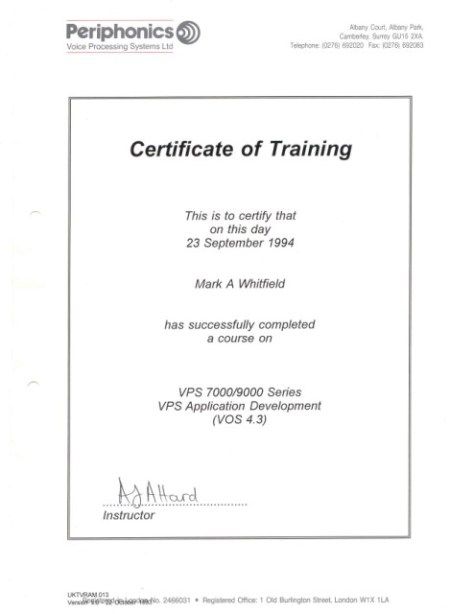
Mark Whitfield IT Training Career Timeline Overview

Mark Whitfield, an experienced IT Project Manager, has a career and certification history spanning over 30 years. His professional development includes a range of technical, project management, and cloud-based qualifications. 

2020s: Cloud & Modern Platforms

  • 2024 (July): Microsoft Excel Refresher Course – Udemy.
  • 2022 (December/February): C&CA UK’s Communications & Engagement Award and AZ-900 Microsoft Certified Azure Fundamentals. 

2010s: Advanced Management & Development 

  • 2017 (November/April): Advanced Engagement Management (Level 2) and Microsoft Excel 2010 Expert Skills.
  • 2014 (July): Advanced Microsoft Excel 2013.
  • 2011 (May–July): PRINCE2 Practitioner, Agile SCRUM, Java, and Android programming. 

2000s: Web Applications & Database Systems 

  • 2009 (March–November): Thales e-Security, BIRT, Web Design, and SQL Server training.
  • 2006 (Feb–Dec): NetObjects Fusion, Cryptography, and Thales e-SECURITY SafeSign.
  • 2004 (March): MultiBatch NSK Job Scheduling.
  • 2000 (February): Fundamentals of Successful Project Management. 

1990s: Core Programming & System Fundamentals

  • 1990s (1993–1999): TANDEM/HP NonStop systems, C/C++ programming, project management, and HND in Computer Studies (1990).

Mark Whitfield Training IT Career Timeline Overview

Mark Whitfield, a Senior IT Project Manager who has spent over 30 years specialising in HP NonStop (formerly Tandem) computing systems

Professional Background

  • Specialisation: Mark Whitfield is a highly experienced technician and project manager for the HP NonStop platform, which is a high-availability, fault-tolerant mainframe environment used primarily for mission-critical financial transactions.
  • Career Timeline:
    • The Software Partnership / Deluxe Data (1990–1995): Began as a programmer working on the sp/ARCHITECT-BANK solution for Tandem computers.
    • Insider Technologies (1995–2013): Spent 18 years focusing on monitoring and diagnostic software for HP NonStop, including products like Reflex 80:20XPERT24, and Enterprise Manager.
    • Capgemini (2016–Present): Currently serves as an SC-cleared Senior Project Manager, delivering complex IT projects for major banks and government agencies. 

Key Technical Contributions to NonStop

  • Product Development: He co-developed Reflex (a platform health/diagnostic tool) and designed XPERT24 to monitor performance in the XPNET layer of BASE24.
  • Financial Systems: He has managed major projects for global financial entities, including BarclaysHSBCBank of England, and Royal Mail Group, often involving ATM and POS monitoring systems.
  • Programming Expertise: His technical skill set includes NonStop-specific languages and tools such as TAL (Tandem Application Language)PATHWAYXPNETCOBOL85, and C++

About HP NonStop Systems

In the context of Mark Whitfield’s work, NonStop refers to a “shared-nothing” architecture designed by Tandem Computers. These systems are uniquely capable of: 

  • Fault Tolerance: Handling hardware or software failures without system downtime.
  • Scalability: Doubling throughput by adding processors (up to 4,000) without hitches in performance.
  • Core Banking: Processing massive commercial workloads for retail banks and stock exchanges globally.

Home Computers, ZX Spectrum versus Commodore 64

The Commodore 64 (C64) and ZX Spectrum were the primary rivals of the 8-bit home computing era, particularly in the UK, where they defined a decade of “playground wars”. While the ZX Spectrum launched in April 1982 as an affordable entry into computing, the Commodore 64 followed in August 1982 with superior custom hardware for sound and graphics. 

1982: The Birth of the Icons 

  • January: Commodore unveils the Commodore 64 at CES in Las Vegas.
  • 23 April: Sinclair Research launches the Sinclair ZX Spectrum 16K/48K in the UK. It is marketed for its 15-colour palette and affordable price compared to the BBC Micro.
  • August: The Commodore 64 begins volume production and goes on sale in the US for $595.
  • Late 1982: Sinclair introduces the Issue 2 motherboard for the Spectrum to fix manufacturing defects. 

1983: Expansion and Price Wars

  • January: Commodore introduces the Commodore SX-64, the first commercial full-color portable computer.
  • July: The Timex Sinclair 2068, an enhanced US version of the Spectrum, is launched.
  • August: Spectrum sales in Britain and Europe exceed 500,000 units.
  • December: The millionth ZX Spectrum is manufactured.
  • Market Shift: Commodore begins aggressive price-cutting to underbid competitors, leading to the “Home Computer Price War”. 

1984–1985: New Iterations and Corporate Shifts

  • January 1984: Sinclair announces the Sinclair QL, intended as a professional successor to the Spectrum.
  • October 1984: Sinclair releases the Sinclair ZX Spectrum+, featuring a new QL-style case and a plastic injection-moulded keyboard to replace the original rubber keys.
  • January 1985: Commodore releases the Commodore 128, a successor that includes a dedicated “64 mode” for 100% compatibility with C64 software.
  • September 1985: The Sinclair ZX Spectrum 128 (codenamed “Derby”) is launched in Spain, featuring 128KB RAM and a three-channel sound chip. 

1986–1987: The Amstrad Era and Redesigns 

  • January 1986: The ZX Spectrum 128 is officially released in the UK.
  • 7 April 1986: Amstrad acquires the Sinclair brand and computer range for £5 million after Sinclair Research faces financial difficulties.
  • Late 1986: Commodore introduces the Commodore 64C, a redesigned model with a sleeker, light-coloured case matching the C128’s aesthetic.
  • Late 1986: Amstrad releases the ZX Spectrum +2, featuring a grey case and a built-in cassette recorder.
  • 1987: Amstrad launches the ZX Spectrum +3, which includes a built-in 3-inch floppy disk drive. 

1988–1994: The Twilight Years 

  • 1988: Amstrad releases the ZX Spectrum +2A, updating the +2 with the internal circuitry of the +3.
  • 1990: Commodore attempts to move into the console market with the Commodore 64 Games System (C64GS), a keyboard-less version of the C64 that ultimately fails commercially.
  • 1992: Amstrad officially discontinues all ZX Spectrum models after approximately 5 million total units sold.
  • April 1994: The Commodore 64 is officially discontinued as Commodore International enters bankruptcy. It remains the best-selling single computer model of all time with 12.5 to 17 million units sold. 

Home Computers, ZX Spectrum versus Commodore 64

Commodore 64 Home Computer Timeline Overview

The Commodore 64 (C64) is the best-selling single computer model of all time, with an estimated 12.5 to 30 million units sold during its 12-year production run

Commodore 64 Annual Timeline

  • 1981: Development Phase
    • January: Engineers at MOS Technology begin a project to design state-of-the-art video and sound chips (VIC-II and SID) for the next generation of games consoles.
    • November: The cutting-edge chips are completed, and Commodore decides to use them for a new home computer to succeed the VIC-20.
  • 1982: Launch and Early Expansion
    • January: The Commodore 64 is officially introduced at the Consumer Electronics Show (CES) with a starting price of $595.
    • August: The C64 begins shipping in the USA, featuring its iconic “breadbox” design.
    • Other Models: The Japan-only MAX Machine (a console version) and the Educator 64 (aimed at schools) are also released.
  • 1983: Price Wars and Portables
    • January: Commodore introduces the SX-64, the world’s first portable computer with a colour screen, retailing for approximately $1,600.
    • June: To dominate the market, Commodore slashes the C64 price to $300, triggering an intense price war that drives competitors like Texas Instruments out of the market.
  • 1984: Leadership Changes
    • January: Founder Jack Tramiel resigns from Commodore after a disagreement with chairman Irving Gould.
    • Expansion: The Commodore 16 and Plus/4 are introduced as low-cost alternatives, though they lack full C64 compatibility.
  • 1985: Peak Performance
    • C128 Release: Commodore launches the Commodore 128, which includes a dedicated C64 compatibility mode to leverage the existing library.
    • Gaming Dominance: The C64 becomes the primary platform for video games, with thousands of titles released by developers like System 3 and MicroProse.
  • 1986: The Redesign
    • May: The Commodore 64C is released, featuring a sleeker, flatter cream-coloured case similar to the Amiga 500.
    • Milestones: To celebrate selling one million units in Germany, a limited “Gold Edition” is presented at the BMW museum.
  • 1987–1989: Late-Era Variants
    • 1987: The C64 Aldi is sold through German supermarkets as a budget model.
    • 1988: The C64G is introduced, returning to the original breadbox shape but using the modern 64C internal hardware.
  • 1990: Consolidation and Consoles
    • C64 Games System (GS): Commodore attempts to enter the console market by releasing the C64 GS (a keyboardless C64), but it fails to compete with the rising 16-bit systems like the Sega Genesis.
  • 1994: The End of an Era
    • April: Despite reaching a final sales total of roughly 17–22 million units, Commodore International files for bankruptcy and the C64 is officially discontinued. 

Commodore 64 Home Computer Timeline Overview