Agile Scrum Definition of Done DOD

Agile Scrum Definition of Done DOD

The Definition of Done (DoD) in Agile Scrum is a shared, team-wide checklist of the quality criteria every product backlog item must meet before it can be considered truly complete and releasable. It ensures consistent quality standards and prevents “almost done” work from accumulating as technical debt.

DoD vs. Acceptance Criteria

It is common to confuse the DoD with Acceptance Criteria, but they serve different purposes:

  • Definition of Done: Applies to all product backlog items. It dictates the technical quality standards (e.g., code reviewed, tests passed) required to be releasable.
  • Acceptance Criteria: Specific to an individual user story. It details the unique functional behaviors and business requirements needed to satisfy the user.

Typical DoD Checklist

While the DoD evolves as the team matures, a standard software development checklist often includes:

  • Code written and passes static analysis checks
  • Peer code review completed (Pull Request approved)
  • All unit and automated acceptance tests are written and passing
  • Security and performance checks completed
  • Meets accessibility standards (e.g., WCAG)
  • All necessary documentation (API, release notes, user guides) is updated
  • Deployed to a staging/testing environment

Why the DoD Matters

  • Transparency: Everyone—from developers to stakeholders—knows exactly what “done” means, removing ambiguity.
  • Quality Assurance: Establishes a minimum quality threshold, reducing bugs and future rework.
  • Releasability: Ensures the product increment is genuinely usable and ready to be shipped to end-users.

Business Analyst and Sprint Planning focus

Business Analyst and Sprint Planning focus

In Agile and Scrum frameworks, the Business Analyst (BA) bridges the gap between high-level business vision and tactical development execution. During Sprint Planning, a BA’s primary focus is to ensure that the development team has absolute requirement clarity, eliminating assumptions before a single line of code is written.

The exact focus areas of an Agile Business Analyst are divided into pre-planning readiness, active session support, and look-ahead risk management.

1. Requirements Readiness (Definition of Ready)

The primary pre-planning objective for a BA is ensuring that the top of the Product Backlog satisfies the team’s “Definition of Ready” (DoR).

  • INVEST Criteria: Verifying that each Product Backlog Item (PBI) is Independent, Negotiable, Valuable, Estimable, Small, and Testable.
  • Acceptance Criteria: Drafting robust, edge-case-tested functional parameters (often using the Given-When-Then format) to govern testing.
  • Business Rules & Models: Mapping complex data models, workflows, and process rules so developers have clear visuals alongside text.

2. Guarding the Business Value and Sprint Goal

While the Product Owner (PO) sets the priority, the BA confirms that the selected sprint backlog items align logically to form a cohesive target.

  • Sprint Goal Formulation: Supporting the PO in defining a functional, clear objective for the iteration rather than a random collection of tickets.
  • Value Justification: Serving as the “voice of the user,” reminding the technical team why a feature is being built and how it affects the end-user journey.

3. Technical and Functional Bridging

During the actual planning meeting, developers break down stories into sub-tasks and estimate effort. The BA provides live context.

  • Assumption Removal: Answering immediate clarifications regarding data constraints, legacy dependencies, or UI expectations.
  • Sizing Support: Assisting the team during story-point estimation by highlighting hidden functional complexities that impact effort.
  • Scope Trimming: Helping break down massive User Stories (Epics) into bite-sized, single-sprint tasks if an item is deemed too large.

4. Dependency and Risk Mitigation

A critical focus for the BA is ensuring the upcoming sprint does not get blocked by outside factors.

  • Cross-Team Alignment: Identifying if a story relies on an API or data feed managed by an external team, ensuring those pieces are unblocked.
  • Non-Functional Requirements (NFRs): Catching frequently missed parameters, such as specific security protocols, compliance standards, or localization requirements, before work kicks off.

Agile Scrum Burnup vs Burndown Chart

Agile Scrum Burnup vs Burndown Chart

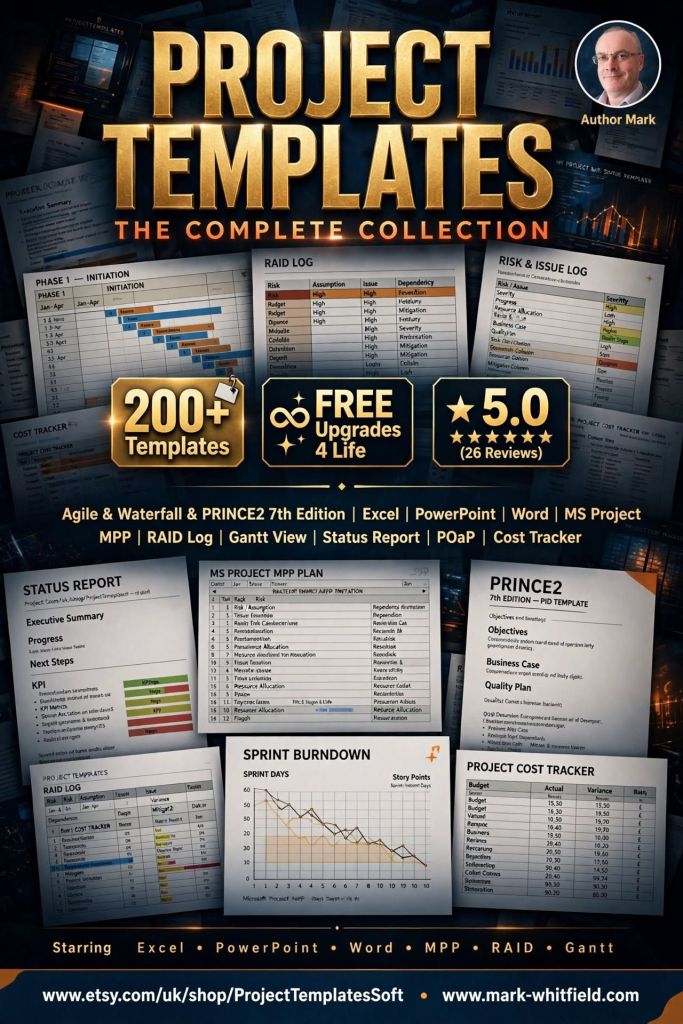
Over 200 editable templates for both Agile & Waterfall / PRINCE2 frameworks

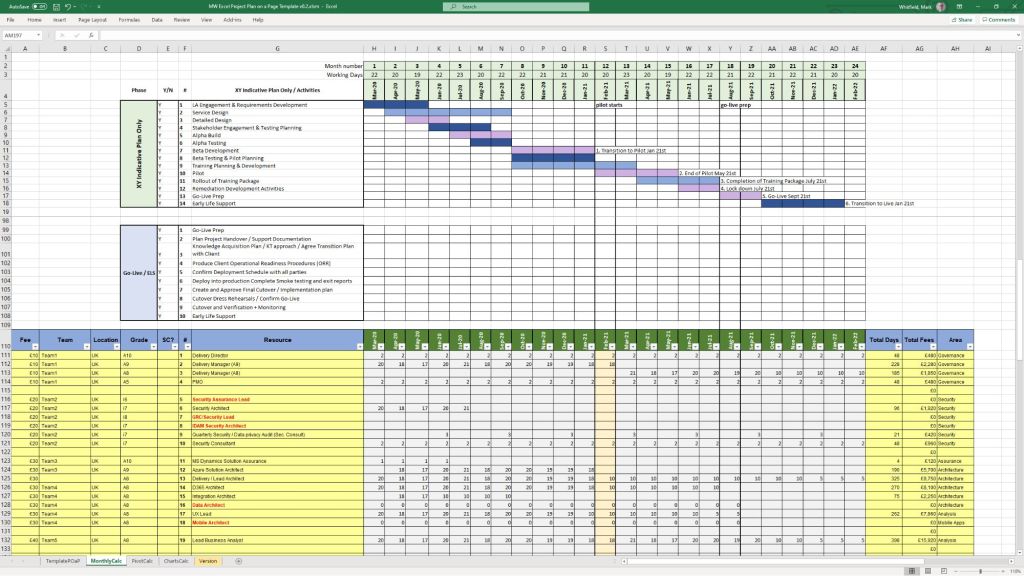
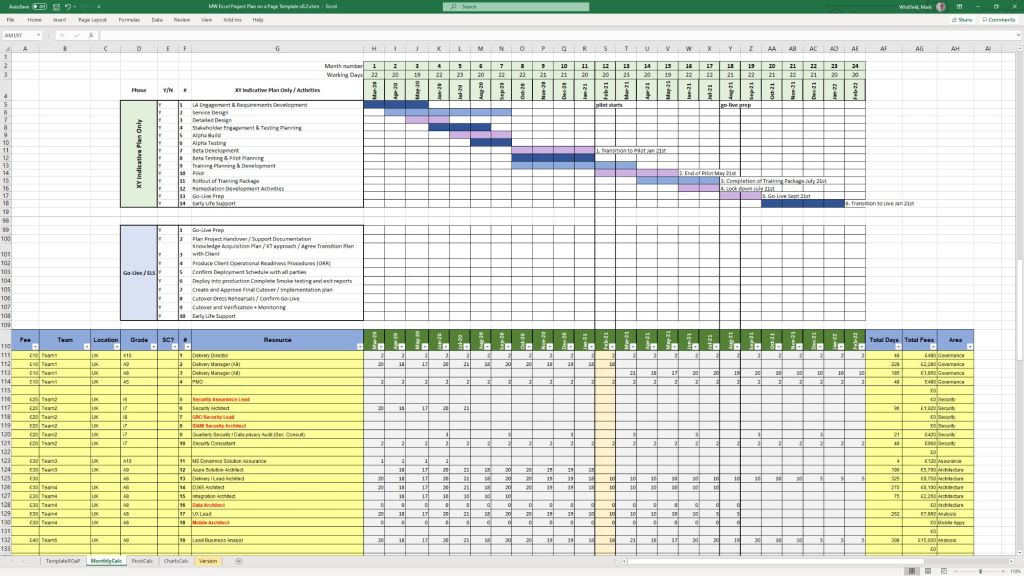
Mark Whitfield’s Project Management (PM) methodology relies on over 200 editable templates tailored for both Agile Scrum and Waterfall / PRINCE2 frameworks. Developed over 24 years of IT and digital delivery, the toolkit focuses on high-level reporting, rigorous risk control, and visual tracking to align teams with corporate governance.

Over 200 editable templates for both Agile & Waterfall / PRINCE2 frameworks
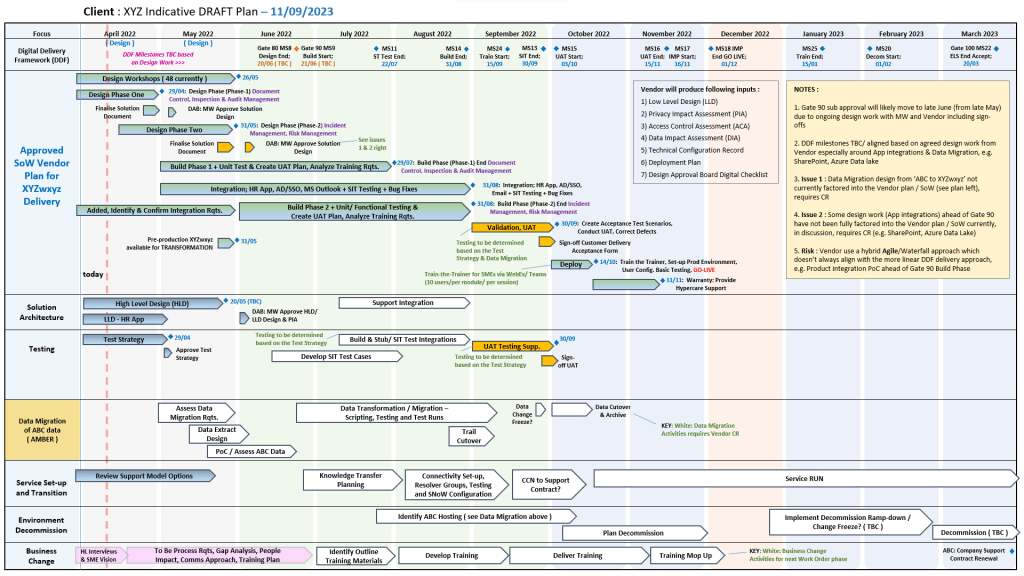
An example of many Plan On a Page
(POAP) templates

Templates by Category and Methodology

1. Detailed Planning & Scheduling

  • Methodology: Mapped to the Software Development Life Cycle (SDLC) for both sequential Waterfall phases and iterative Agile sprints.
  • Templates:
    • Microsoft Project (MPP): Fully loaded schedules detailing project inception, elaboration, construction, and transition.
    • Excel Detailed Plans: Work Breakdown Structure (WBS) mapped to sequential and date-driven task management with built-in RAG (Red/Amber/Green) status indicators.

2. Visual Reporting & Execution (Plan on a Page)

  • Methodology: Focuses on structural, executive communication to prevent scope creep and keep stakeholders aligned.
  • Templates:
    • POaP (Plan on a Page): High-level visual summaries designed for client presentations and quick-glance milestone tracking in Excel and PowerPoint.
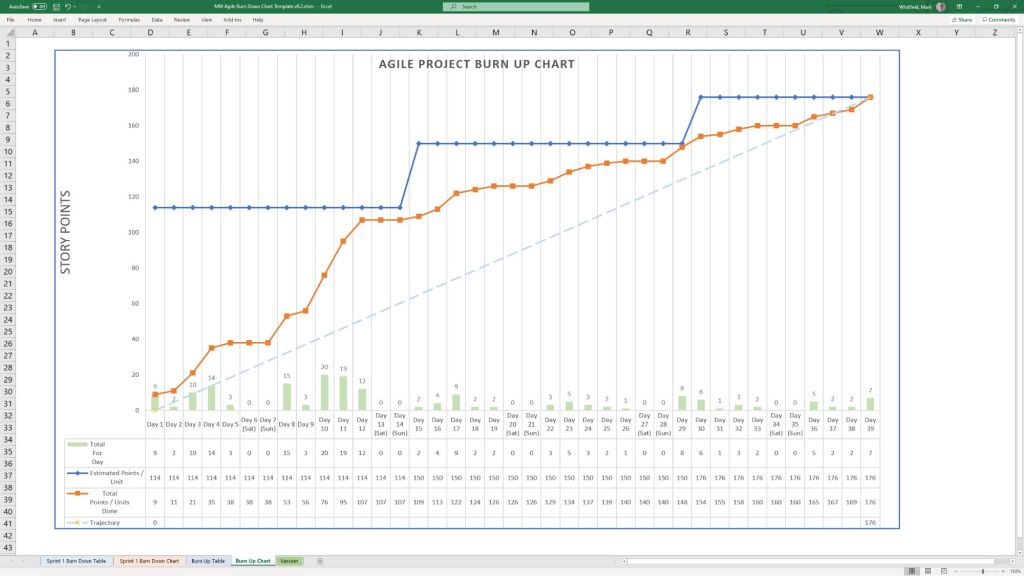
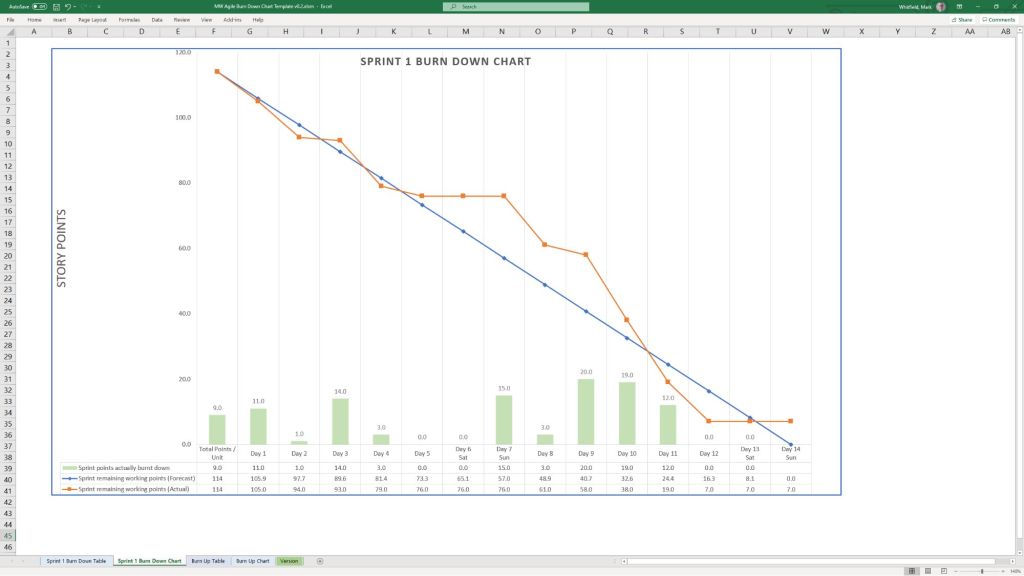
    • Burn-up / Burn-down Charts: Visual tracking metrics used in Agile Sprints to show progress towards delivery goals.

3. Risk & Governance Control

  • Methodology: Built on strict risk/action tracking and regular lessons learned to manage uncertainty throughout the project lifecycle.
  • Templates:
    • RAID Log: Centralized Excel trackers recording Risks, Actions, Issues, and Dependencies.
    • Change Requests/Decisions Log: Supplementary tabs within the RAID register to strictly manage scope changes and project governance.

4. Financial Trackers

  • Methodology: Ensures project adherence to contracted margins, tracking both internal/external costs and resource efforts.
  • Templates:
    • Budget & Resource Trackers: Spreadsheets for forecasting versus actual expenses, variance calculations, expense reporting, and margin tracking with pivot-table readiness.

5. Team RACI & Status Reporting

  • Methodology: Clearly defines stakeholder roles and communication frequencies (weekly/monthly) to ensure continuous monitoring and control.
  • Templates:
    • RACI Matrix: A mapping tool defining who is Responsible, Accountable, Consulted, and Informed.
    • Weekly Status Reports: Word/Excel templates detailing internal and external project health, current milestones, and upcoming sprints.

To explore the entire toolkit, you can visit the Mark Whitfield PROject Templates portal.

Empiricism is the foundational theory of the Scrum framework

Empiricism is the foundational theory of the Agile Scrum framework, asserting that knowledge comes from experience and that decisions should be based on real-world observations rather than upfront predictions. Instead of following a rigid, predefined plan, Scrum relies on an iterative process to navigate complex and unpredictable environments. This empirical process control model is sustained by three distinct pillars.

The Three Pillars of Empiricism

The Three Pillars of Empiricism

The Scrum Guide specifies three pillars that must work together to create an effective empirical feedback loop:

  • Transparency: The significant aspects of the process must be visible to those responsible for the outcome. Decisions are driven by the perceived state of artifacts, which means any hidden issues or misreported metrics directly sabotage future decision-making.
  • Inspection: Scrum artifacts and progress toward agreed goals must be evaluated frequently and diligently. This continuous assessment identifies unwanted variances or deviations from the desired outcome.
  • Adaptation: If an inspection reveals that aspects of a process or product deviate outside acceptable limits, the team must adjust immediately. An adjustment must be made as quickly as possible to minimize further deviation.

How Scrum Events Enable Empiricism

Inspection and adaptation cannot happen in a vacuum. Scrum provides four formal events that act as a structured cadence for empirical evaluation:

  • Sprint Planning: The team inspects the Product Backlog and adapts their upcoming workload to define a realistic Sprint Goal.
  • Daily Scrum: Developers inspect progress toward the Sprint Goal and adapt their immediate daily plan.
  • Sprint Review: The team and stakeholders inspect the newly created product increment to adapt the Product Backlog for future value.
  • Sprint Retrospective: The team inspects their internal dynamics, tools, and processes to adapt how they operate in the next Sprint.

The Critical Role of Trust

Empiricism fails without a baseline culture of trust and psychological safety. For transparency to occur, team members must possess the courage to share bad news and highlight product deficiencies early. When individuals fear blame, they hide reality—rendering subsequent inspection flawed and any adaptation completely wasteful.

Business Requirements Document, BRD Key Sections

Business Requirements Document, BRD Key Components
BRD Key Sections

A Business Requirements Document (BRD) details what a project must accomplish and why it matters to the organization, acting as a bridge between business stakeholders and technical execution teams.

Here is a summary of the core sections required to construct a comprehensive BRD:

1. Document Control

  • Version History: Tracks changes, authors, and dates to ensure everyone uses the current iteration.
  • Approvals: Formal sign-off section where stakeholders authorize moving the project forward.

2. Executive Summary

  • Project Overview: A brief one-page overview stating the essence and main purpose of the project.
  • Needs Statement: Outlines the core business challenges or opportunities the project solves.

3. Project Scope & Objectives

  • Project Objectives: High-level, measurable targets aligned with company goals, often using SMART criteria.
  • In-Scope: Clear boundaries stating exactly what deliverables or processes are included.
  • Out-of-Scope: Explicit list of features or tasks intentionally left out to prevent scope creep.

4. Stakeholder Analysis

  • Key Stakeholders: Identifies project sponsors, department heads, and end-users.
  • Roles & Responsibilities: Maps out who provides requirements, who reviews them, and who receives deliverables.

5. Process Specifications

  • Current State (AS-IS): Maps current operational workflows to illustrate existing bottlenecks.
  • Future State (TO-BE): Details the desired future process after implementing the solution.

6. Core Requirements

  • Business Requirements: The high-level operational goals and capabilities the system must offer.
  • Functional Requirements: Descriptions of specific system tasks or behaviours from a business user perspective.
  • Non-Functional Requirements: Standards for performance, system security, and scalability.

7. Financial & Strategic Analysis

  • Cost-Benefit Analysis: Compares estimated financial expenses against anticipated business gains.
  • Success Metrics: Defines Key Performance Indicators (KPIs) and expected Return on Investment (ROI).

8. Project Dynamics & Risk Management

  • Assumptions: Unverified elements assumed to be true for the project to progress.
  • Constraints: Fixed limitations such as budget, time, technology, or legal compliance.
  • Risks & Mitigation: Potential threats to project delivery paired with backup action plans.
  • Dependencies: External factors or other projects that this initiative relies on to succeed.

9. Supporting Documentation

  • Acceptance Criteria: The standards and conditions required for stakeholders to accept the final delivery.
  • Glossary: Clear definitions of industry terms and acronyms used throughout the document.

Agile Scrum Artifacts and Commitments

Artifacts and Commitments in Scrum
Scrum Artifacts & Commitments
Agile Scrum Artifacts and Commitments

Agile Scrum Master versus Project Manager

The fundamental difference in project delivery ownership is that a Project Manager (PM) owns the overall project outcomes (Scope, Schedule, Budget, Risks), whereas a Scrum Master (SM) owns the delivery process, team effectiveness, and Agile practices.

Scrum Master vs Project Manager –
who owns delivery

A PM directs what needs to happen externally, while an SM coaches how the team works internally.

Agile Scrum Master versus Project Manager
Scrum Master vs Project Manager

Detailed Ownership Breakdown

1. Scope, Requirements, and Product Backlog

  • Project Manager: Directly manages the agreed-upon project scope. They review change requests, evaluate how scope changes impact the budget, and negotiate modifications with stakeholders. They are legally or contractually accountable for delivering the specified scope.
  • Scrum Master: Holds no direct ownership over the product content or scope. Instead, they coach the Product Owner on how to effectively manage the Product Backlog, draft clear user stories, and refine items for upcoming sprints.

2. Schedule, Milestones, and Timeline

  • Project Manager: Owns the macro-level timeline. They track critical path milestones, define task dependencies across multiple teams, and are accountable to executive management if a delivery deadline is missed.
  • Scrum Master: Owns the micro-level iteration cadence (sprints). They do not assign tasks or dictate schedules. Instead, they facilitate Sprint Planning, ensuring the team commits to a sustainable pace of predictable delivery.

3. Budget and Financial Accountability

  • Project Manager: Fully owns the project’s financial performance. They forecast costs, track actual spend against the budget, manage vendor contracts, and seek approval for capital expenditures.
  • Scrum Master: Has zero financial accountability or budget ownership. Their focus is entirely operational—maximizing value and efficiency through team performance rather than managing corporate balance sheets.

4. Issue Resolution and Risk Management

  • Project Manager: Focuses on long-term, macro-level risks (e.g., market shifts, organizational changes, vendor failures). They maintain formal risk registers and coordinate executive-level mitigation plans.
  • Scrum Master: Focuses on immediate, tactical impediments. They own the removal of daily “blockers”—such as technical hurdles, broken tools, or communication gaps—that slow down the development team.

5. Team Governance and Task Assignment

  • Project Manager: Operates with a directive or orchestrating leadership style. They often assign work packages, manage resource utilization, and hold individuals accountable for specific task deadlines.
  • Scrum Master: Operates as a servant-leader and coach. They have no direct authority over team members and do not assign tasks. They empower the team to self-manage, collaborate, and decide collectively how to accomplish the work.

Summary of Success Metrics

  • The Project Manager succeeds when the project is delivered on time, within budget, and according to specifications.
  • The Scrum Master succeeds when the team becomes highly self-managing, continuously improves, and predictably delivers increments of high value.