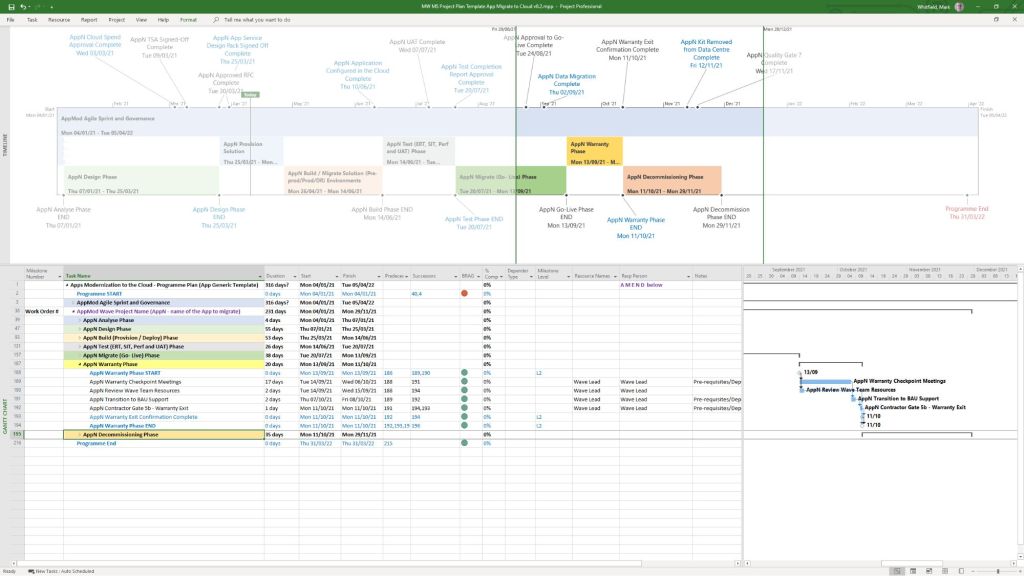
POAP Plan On a Page Example Templates for Download

Available for download here.

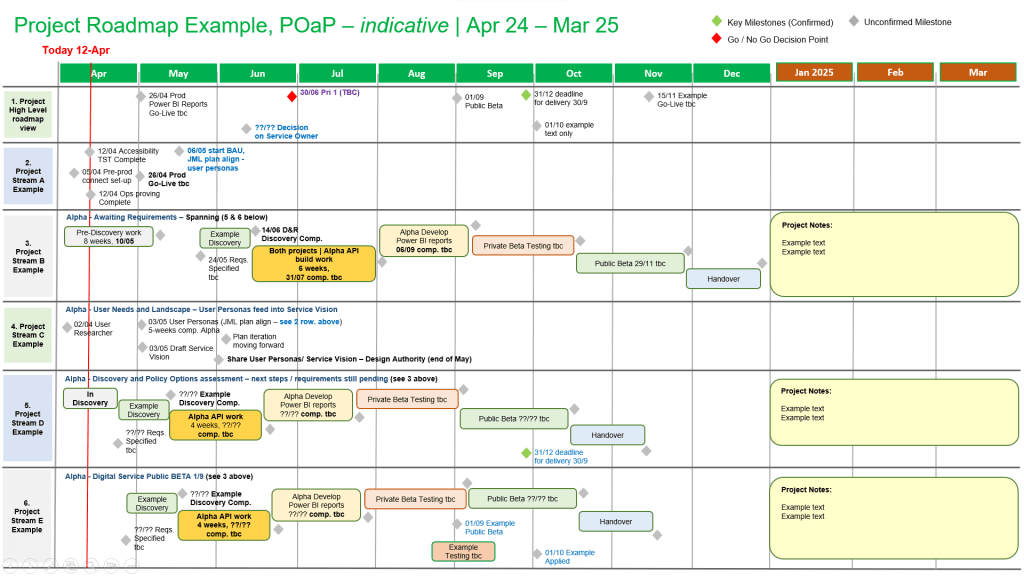
Plan on a page POaP example 1
POaP example 1
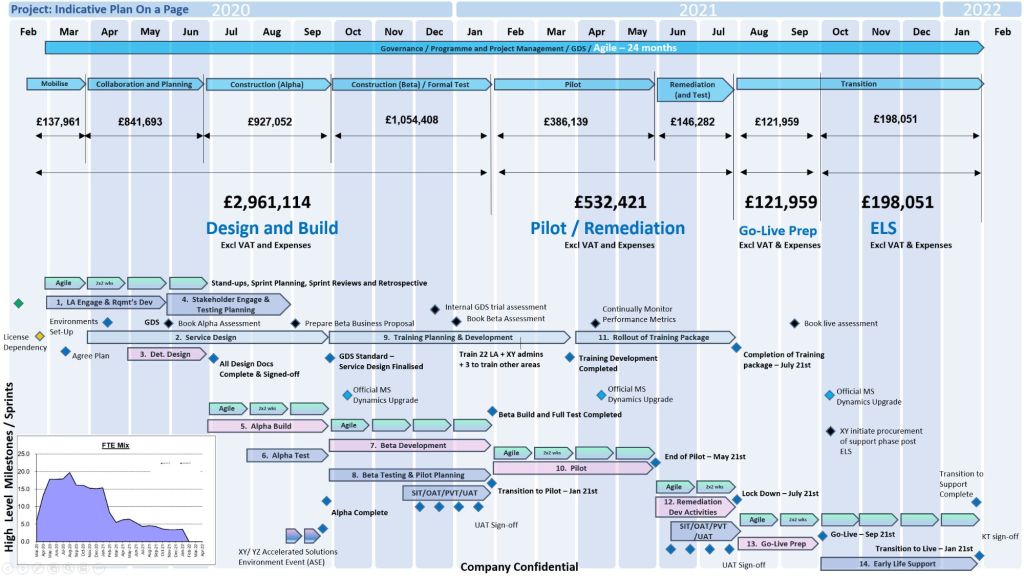
Plan on a page POaP example 2
POaP example 2
Plan on a page POaP example 3
POaP example 3
Plan on a page POaP example 4
POaP example 4
Plan on a page POaP example 5
POaP example 5
Plan on a page POaP example 6
POaP example 6
Plan on a page POaP example 7
POaP example 7

Many more examples available in download pack.

A Plan on a Page (POaP) is a concise, high-level visual summary of a project used to communicate timelines, milestones, and strategic objectives to stakeholders and executives. It condenses detailed data into an easy-to-digest, single-page format.

Core Components of a POaP

An effective POaP cuts out the noise of day-to-day task lists and focuses purely on headline information. It typically includes:

  • Project Overview: Title, project manager, and the overarching business objective.
  • Timeline & Milestones: A horizontal, time-phased bar chart mapping the project’s key phases.
  • Key Deliverables: 4 to 6 major outputs or goals required for success.
  • Risks & Dependencies: Critical blockers that require executive attention.

Why and When to Use It

  • Steering Committees: Ideal for Steering Committee meetings (Steerco) where executives need to see progress at a glance.
  • Stakeholder Alignment: Keeps teams focused on strategic vision rather than getting “lost in the weeds” of daily operations.
  • Client Updates: Acts as an excellent executive summary for clients without overwhelming them with micro-details

POAP Plan On a Page Example Templates for Download

Daily Scrum format and step-by-step walkthrough

The Daily Scrum is a strictly time-boxed 15-minute daily planning event designed for the developers of a Scrum team to inspect progress toward the Sprint Goal and adapt their plan for the next 24 hours. It is not a management status report; it is a collaborative alignment ritual owned completely by the people doing the execution work.

Daily Scrum is a strictly time-boxed 15-minute daily planning event
Daily Scrum is a strictly time-boxed
15-minute daily planning event

Here is a step-by-step walkthrough of how to run an effective Daily Scrum, including modern formats and common pitfalls.

📋 The Event Overview

  • Time-box: Strictly 15 minutes max.
  • When & Where: Held at the exact same time and place every working day to minimize complexity.
  • Primary Audience: Developers. The Scrum Master and Product Owner can attend, but they only participate if they are actively working on Sprint Backlog items.

🚶‍♂️ Step-by-Step Walkthrough

1. Kickoff & Goal Review (Minutes 0 – 2)

  • Start on time: Never wait for latecomers; starting promptly builds professional respect and consistency.
  • Anchor to the Goal: The facilitator opens the session by clearly showing or reading aloud the Sprint Goal. Every update that follows must tie back to this shared objective.

2. Execution & Synchronization (Minutes 2 – 12)

The team syncs on current progress. Depending on your team’s preference, select one of these common execution formats:

Format A: “Walking the Board” (Highly Recommended)

Instead of focusing on individual people, focus on the work items themselves.

  • Start from the rightmost column of your Sprint Board (closest to “Done”) and work backward.
  • The team discusses the highest-priority item currently in progress.
  • The individuals contributing to it answer: What will it take to pull this specific card over the finish line today?
  • Repeat this for subsequent active tickets until you run out of items in progress.

Format B: The Classic Three Questions

Each developer takes turns speaking, keeping their personal update to under 60 seconds. They answer:

  • What did I do yesterday that helped the team meet the Sprint Goal?
  • What will I do today to help the team meet the Sprint Goal?
  • Do I see any impediments that prevent me or the team from meeting the Sprint Goal?

3. Parking Lot Identification & Wrap-up (Minutes 12 – 15)

  • Spotlight Impediments: If someone mentions a blocker, note it down on a visible impediment tracker. Do not try to solve the problem right now.
  • Form the After-Meeting: Identify which specific team members need to stay behind to solve the blocker.
  • Adjourn on time: Release everyone else exactly at or before the 15-minute mark to let them protect their deep-focus work time.

⚠️ Common Pitfalls to Avoid

  • Turning it into a status report: If developers look at the Scrum Master or Product Owner while talking, they are reporting status. Ensure team members look at each other or the sprint board.
  • Falling into deep problem-solving: The Daily Scrum is for identifying issues, not fixing them. Use the “ELMO” technique (Enough, Let’s Move On) if conversations drift into technical design.
  • Rambling or multi-tasking: Keep updates brief and focus exclusively on the current sprint. For remote teams, keeping video cameras turned on enhances presence and keeps attention sharp.

Daily Scrum format and step-by-step walkthrough

1. Agile Scrum Explained Simply - what it is and how it actually works
1. Agile Scrum Explained Simply –
what it is and how it actually works
2. Agile Scrum Explained Simply - what it is and how it actually works
2. Agile Scrum Explained Simply –
what it is and how it actually works

Mark Whitfield Project Management Professional Training Certificates

Mark Whitfield, Project Management Professional Training Certificates
Project Management Professional Training

December 2022 – C&CA UK’s Communications & Engagement Award Winner – Cloud & Custom Applications – Capgemini UK

Capgemini C&CA UK's Communications & Engagement Award Winner 2022 - Cloud & Custom Applications - Capgemini UK
December 2022 – Capgemini C&CA UK’s Communications & Engagement Award Winner

November 2017 – Advanced Engagement Management Course – Level 2 Exam

November 2017 – Capgemini Advanced Engagement Management Course – Level 2 Exam
November 2017 – Capgemini Advanced Engagement Management Course

May 2011 – Agile SCRUM Training Course

May 2011 – Agile SCRUM Training Course mark whitfield
May 2011 – Agile SCRUM Training Course

May 2011 – Registered PRINCE2 Practitioner with ILX

May 2011 – Registered PRINCE2 Practitioner with ILX

May 2000 – Microsoft Project: Orange Belt –
Managing a Single Project with Microsoft Office Project 98

May 2000 – Microsoft Project: Orange Belt –
Managing a Single Project with Microsoft Office Project 98
May 2000 – Microsoft Project: Orange Belt

February 2000 – Fundamentals of Successful Project Management

February 2000 – Fundamentals of Successful Project Management

October 1999 – Managing Multiple Projects, Objectives and Deadlines

October 1999 – Managing Multiple Projects, Objectives and Deadlines

June 1990 – Higher National Diploma in Computer Studies
(DISTINCTION – overall top) – BIHE

June 1990 – Higher National Diploma in Computer Studies (DISTINCTION – overall top) – BIHE
June 1990 – Higher National Diploma in Computer Studies, Distinction

Mark Whitfield Project Management Professional Training Certificates

Agile Scrum and Artificial Intelligence AI Role for Delivery

AI enhances Agile Scrum by automating routine administrative tasks and providing predictive data analytics, allowing teams to deliver high-quality increments faster. It accelerates delivery across the entire lifecycle, from backlog grooming and sprint planning to continuous testing and retrospective analysis.

AI serves as a powerful facilitator in Agile environments, streamlining key processes across the framework:

1. Backlog Management & Planning

  • Story & Task Generation: AI models can ingest unstructured business requirements and automatically generate structured user stories and acceptance criteria.
  • Intelligent Forecasting: Platforms utilize historical velocity and predictive algorithms (like Monte Carlo simulations) to forecast delivery dates and run what-if capacity simulations.
  • Estimation: AI assists developers by breaking down large epics into smaller tasks and suggesting relative effort based on past projects.

2. Daily Execution & Development

  • Coding Assistants: AI tools generate boilerplate code, assist with refactoring, and automate unit test creation to speed up development cycles.
  • Automated QA: AI inspections and vulnerability scanning ensure continuous quality assurance, allowing for rapid defect detection.

3. Scrum Ceremonies

  • Meeting Automation: AI tools (like meeting transcribers) generate automated sprint reports, summarize stand-ups, and track action items, saving Scrum Masters valuable time.
  • Retrospective Insights: AI analyzes sentiment and historical cycle time trends to highlight blockers and suggest actionable continuous improvement points.

While AI accelerates output, Agile emphasizes human empiricism. AI acts as an advisor, augmenting human judgment in prioritization and anticipating value, while Product Owners and teams retain ownership of the strategic direction and final commitments.

Also…

Artificial Intelligence (AI) is transforming Agile Scrum from a reactive framework into a predictive powerhouse. Rather than replacing human roles, AI serves as an “advisor” or “delivery catalyst” that cuts through the operational noise, allowing Scrum teams to focus on strategy, coaching, and actual value delivery.

The primary use cases for AI across Agile Scrum delivery are structured below by core accountability and phase.

🚀 Backlog Refinement & Product Ownership

Product Owners are major beneficiaries of AI automation, using it to rapidly move from raw stakeholder feedback to concrete, structured deliverables.

  • Automated User Stories: Generates draft user stories based on product feature briefs, user interview summaries, or raw documentation.
  • Accepting Criteria Creation: Produces detailed, high-quality Given-When-Then criteria, ensuring edge cases are addressed before a sprint begins.
  • Story Splitting: Scans large backlog items (Epics) and suggests logical boundaries to break them down into smaller, sprint-ready tasks.
  • Sentiment Synthesis: Ingests massive pools of unstructured customer feedback, clustering themes automatically to guide roadmap prioritization.

📊 Smarter Sprint Planning & Estimation

Predictive analytics eliminates reliance on human guesswork during planning sessions.

  • Predictive Forecasting: Uses machine learning models (like Monte Carlo simulations) to analyze historical velocity. It provides probabilistic delivery windows instead of single-date projections.
  • Capacity Optimization: Evaluates developer skill sets and availability to recommend optimized task assignments. This maintains healthy Work In Progress (WIP) limits and prevents developer burnout.
  • Early Risk Detection: Flags hidden dependencies or incomplete definition-of-ready requirements before work enters the active sprint.

🛠️ Active Sprint Delivery & Flow Optimization

During the sprint, AI acts as an early warning system to keep development on schedule.

  • Predictive Burndown Charts: Recognizes code and ticket-tracking patterns mid-sprint to predict if a team will miss its commitment.
  • Bottleneck Identification: Automatically flags tickets that are stalled, constantly rolling over, or blocked by external dependencies.
  • Admin Automation: Automatically triages incoming support bugs, updates ticket statuses, issues reminders, and drafts documentation.

🔄 Team Reflection & Retrospectives

AI helps the Scrum Master enhance empirical learning during sprint ceremonies.

  • Meeting Synthesis: Transcribes and summarizes standups and reviews, extracting key action items without human data-entry overhead.
  • Sentiment Analysis: Evaluates team communication channels to detect hidden friction, collaboration blocks, or dipping morale.
  • Trend Tracking: Cross-references action items from past retrospectives against subsequent sprint data to prove if improvements actually succeeded.

🛠️ Industry AI Tools in Action

Many delivery platforms now native-embed AI to streamline Scrum processes:

Platform Tool – Core Agile Capability (below):

Atlassian Intelligence / Jira – Surfaces delivery risks, predicts timelines, and automates ticket creation.

ClickUp Brain – Generates user stories, summarizes meetings, and drafts retrospective action plans.

Miro Assist – Groups brainstorming sticky notes by topic and generates summaries or next steps.

Forecast AI – Facilitates long-term resource capacity planning and automated timeline estimation.


⚠️ The Critical Boundary: The Human Loop

According to modern frameworks by organizations like Scrum.org and the Project Management Institute (PMI), AI should never own accountability:

  1. AI is an advisor, not a decision-maker: Humans own commitments and strategic vision; AI merely presents options based on historical numbers.
  2. The “Vague In, Vague Out” rule: If a team writes weak user stories or provides poor prompt data, AI output will simply amplify those execution flaws.
  3. Hallucination risks: LLMs struggle with precise math and statistical calculations; all AI-generated velocity metrics must be manually verified.

Agile Scrum and Artificial Intelligence AI Usage for Delivery

i_Pro_PM_Templates on Flevy is a comprehensive library of 19 project management templates

The i_Pro_PM_Templates collection on Flevy is a highly comprehensive library of 19 specialized project management resources spanning Waterfall and Agile methodologies. Developed by a contributor with 30 years of project management experience, these fully editable files (PowerPoint, Excel, Word, and MS Project) are designed to bridge corporate strategy with rapid execution. The complete 200+ template ZIP file package can be purchased here also.

The specific templates offered by i_Pro_PM_Templates are organized below by their operational category and core function:


🗺️ 1. Project Planning & Roadmaps

Designed to provide executive stakeholders and project teams with high-level visualization and structured timelines.

  • Plan on a Page (PoaP) 30+ Examples (PowerPoint): Synthesises complex timelines into an executive-ready format.
  • Project Plan on a Page Template (Excel): Tracks milestones and deliverables on a single sheet.
  • Waterfall Project Planner with Gantt View (Excel): Automates timeline bars and highlights dependency tracking.
  • Microsoft Project Plan Editable Templates (MPP / MSP): Implements native tracking with pre-populated project paths.

📊 2. Project Governance & Status Reporting

Built to manage the cadence of team communications, track risks, and report progress up to the PMO.

  • Weekly Status Report (PowerPoint): Provides standardized internal and external updates for Agile or Waterfall projects.
  • Status Report with PoaP, RAIDs, & Burn Down (Excel): Combines execution charts with high-level summary roadmaps.
  • MS Excel RAID Log: Acts as a central command log for Risks, Issues, Dependencies, and Change Requests (CRs).

⚖️ 3. Value & Benefits Realization

Ensures project delivery aligns with financial targets and baseline calculations.

  • Programme & Project Benefits Realization Tracker (Excel): Uses automated calculations and RAG status indicators to ensure value delivery.
  • Project Finance Tracker (Excel): Integrates budget forecasting against actual financial performance.

📦 4. Comprehensive Master Toolkits

Bundled suites that consolidate hundreds of micro-assets into standalone lifecycle frameworks.

  • 200+ Project Management Templates Bundle (PDF/ZIP): Features customizable documents covering initialization through to closeout.
  • PRINCE2 Templates + MPP & Excel Pack: Embeds strict PRINCE2 project stages into functional tracking models.
  • MS Teams Free Planner Guide: Details how to organize and execute Agile backlogs directly inside Microsoft Teams.

A detailed breakdown of the exact templates published by this author, structured by their functional use and file format, includes the following:

📈 PowerPoint (PPT / PPTX) Formats

  • Plan on a Page (POaP) Examples: A 39-slide PowerPoint document providing high-level visual roadmap templates to summarize project delivery tracks for executives.
  • Weekly Status Report (Internal / External): A 15-slide PowerPoint designed for recurring project health reporting, configured for both Agile and Waterfall methodologies.

📊 Excel (XLS / XLSX) Formats

  • Waterfall Project Planner: A structured spreadsheet featuring built-in, automated Gantt view generation tools for scheduling sequential project stages.
  • Status Report with Plan on a Page & RAIDs: A hybrid workbook integrating high-level timelines, a Risk, Assumptions, Issues, and Dependencies (RAID) log, and an Agile burn-down chart tracker.
  • PRINCE2 Editable Planning & Cost Tracker: A financial tracking sheet customized specifically to align with the stage-gate requirements of the PRINCE2 methodology.

🛠️ Microsoft Project (MPP) Formats

  • Microsoft Project Plan Template: A baseline editable project plan native schedule built for resource loading and critical path tracking.
  • PRINCE2 Microsoft Project Plan: A pre-configured schedule mapped directly to standard PRINCE2 product breakdowns and stages.

PRINCE2 project templates, Excel (.xls/.xlsm) & MS Project (.mpp) formats

You can find downloadable PRINCE2 project templates in Excel (.xls/.xlsm) and Microsoft Project (.mpp) formats across several specialized platforms. Because PRINCE2 is a highly structured methodology, standard templates usually map its specific processes (like Starting Up, Initiating, and Controlling a Stage) directly onto Gantt charts and tracking sheets.

PRINCE2 MS Excel .xls plan in a spreadsheet
PRINCE2 MS Excel .xls plan
in a spreadsheet
PRINCE2 MS Project .mpp plan in a project file
PRINCE2 MS Project .mpp plan
in a project file

The primary download options, ranging from premium practitioner bundles to free resource packages, are categorized below:

Comprehensive Premium Bundles (MPP & XLS)

If you require a fully integrated toolkit built specifically for the official PRINCE2 framework, individual project management practitioners offer comprehensive marketplace downloads:

  • Mark Whitfield PM Templates: Offers a dedicated seventh edition package including MW MS Project Plan Template PRINCE2 v0.2.mpp alongside its exact equivalent spreadsheet MW Excel PRINCE2 Project Plan Template v0.2.xlsm. You can download this Prince2 toolkit package plus others, on the Mark Whitfield Official Site or through the Mark Whitfield Etsy UK Shop.
  • Flevy Marketplace: Provides highly structured, professional enterprise files. You can purchase and download the PRINCE2 Templates + Microsoft Project MPP & MS Excel Document directly from their platform, which packs the MPP tracking timelines and XLSM / XLS sheets together.

PRINCE2 project templates, Excel (.xls/.xlsm) & MS Project (.mpp) formats

Microsoft Excel XLS PRINCE2 spreadsheet screenshots

Microsoft Excel XLS PRINCE Project Plan with Task Descriptions
Microsoft Excel XLS PRINCE Project Plan with Gantt View 1
Microsoft Excel XLS PRINCE Project Plan with Gantt View 2
Microsoft Excel XLS PRINCE Project Plan with Gantt View 3
Microsoft Excel XLS PRINCE Project Plan with Delivery Costings
Microsoft Excel XLS PRINCE Project Plan with Charts
Microsoft Excel XLS PRINCE Project Plan with PRINCE2 Stage Charts

Standard Artifacts Included in Download Packages

When downloading a comprehensive .zip toolkit, the package typically contains the core structural elements of the framework divided across your scheduling software:

  • MS Project (.mpp): A pre-constructed Prince2 waterfall delivery layout mapped with the 7 key PRINCE2 stages, built-in dependency workflows, milestone gates, and methodological prompts embedded in the task notes.
  • MS Excel (.xls/.xlsm): Mirrored project planning sheets (with costing) utilizing native formulas to auto-populate Gantt charts, alongside targeted operational spreadsheets like RAID logs (Risks, Assumptions, Issues, Dependencies), RACI matrix charts, resource trackers, and project budget tools.

Over 200 editable templates tailored for Agile Scrum, Waterfall, and PRINCE2 frameworks

Mark Whitfield’s premium project management toolkit consists of over 200 editable templates tailored for Agile Scrum, Waterfall, and PRINCE2 frameworks. Built across 30+ years of digital and IT delivery, these frameworks prioritize corporate governance, seamless stakeholder reporting, and visual lifecycle control.

Example of many plan on a page poap ppt templates
Many POAP, Plan on a Page example templates

Below is the comprehensive, scannable breakdown of the core artifacts categorized by lifecycle focus, purpose, and application format. Purchase project templates here.


📅 1. Master Planning & Visual Roadmapping

These tools serve as the operational foundation for tracking dependencies, defining Work Breakdown Structures (WBS), and establishing executive visibility.

  • Detailed Software Development Life-Cycle (SDLC) Plan
    • Focus: End-to-end task tracking from inception and elaboration to construction, testing, and transition.
    • Format: Microsoft Project (.mpp) & Microsoft Excel (.xlsx).
    • Source Page: Mark Whitfield PMO Toolkit
  • PRINCE2 7th Edition Master Project Plan
    • Focus: Standardized governance processes structured according to the latest PRINCE2 methodology.
    • Format: Microsoft Project (.mpp) & Microsoft Excel Gantt Tracker.
    • Source Page: Mark Whitfield PRINCE2 Master Walkthrough
  • Plan on a Page (POaP) Blueprint
    • Focus: High-level, timeline-focused visual summaries mapping deliverables and milestones to client monthly views.
    • Format: Microsoft PowerPoint (.pptx, 30+ layout variations) & MS Excel.
    • Source Page: Mark Whitfield POaP Templates
Example MS Excel Project Plan template

🛡️ 2. Risk, Governance & Operational Control

These registers form the “engine room” of project health management, shifting risk mitigation from reactive to predictive.

  • Comprehensive RAID Log & Tracker
    • Focus: Integrated visibility over Risks, Actions, Issues, and Dependencies, alongside change requests and supplier impacts.
    • Format: Microsoft Excel (.xlsx featuring self-populating chart dashboards).
    • Source Page: Mark Whitfield Operational Tracking Tools
  • Agile Story Dependency Tracker
  • RACI Matrix
    • Focus: Mapping roles and responsibilities across project deliverables (Responsible, Accountable, Consulted, Informed).
    • Format: Microsoft Excel (.xlsx).
    • Source Page: Mark Whitfield Folder Structure & Guide
Example MS Excel RACI matrix template

📊 3. Performance reporting & Stakeholder Engagement

Designed to eliminate subjective performance analysis and maintain executive-level clarity.

  • Weekly / Monthly Project Status Report
    • Focus: Summarizing target completion, look-aheads, RAG indicators, and critical decisions for clients.
    • Format: Microsoft Word (.doc) & Microsoft PowerPoint (.pptx).
    • Source Page: Mark Whitfield Premium Delivery Page
  • Stakeholder Analysis & Influence Matrix
    • Focus: Mapping stakeholder influence versus organizational impact to tailor communication (Involve, Inform, Consult, Monitor).
    • Format: Microsoft Excel (.xlsx).
    • Source Page: Mark Whitfield Folder Structure & Guide
  • Project / Programme Kick-Off Deck
    • Focus: Initial team mobilization, workspace onboarding, and client approach alignment.
    • Format: Microsoft PowerPoint (.pptx).
    • Source Page: Mark Whitfield Main Purchase Index
Example PPT slide for Org. Structure

💰 4. Financial Trackers & Value Realization

These artifacts manage fiscal discipline, pricing bids, and mapping long-term outputs to business outcomes.

  • Full Project Financial Tracker
    • Focus: Internal/external cost variance, forecasting models, contractor day rates, margin tracking, and expense visibility.
    • Format: Microsoft Excel (.xlsx with embedded financial trend charts).
    • Source Page: Mark Whitfield Premium Delivery Page
  • Statement of Work (SOW) Templates
    • Focus: Work order structuring and delivery guardrails for both commercial Waterfall and Agile contracts.
    • Format: Microsoft Word (.doc).
    • Source Page: Mark Whitfield Operational Tracking Tools
  • Benefits Realization Analysis Tracker
    • Focus: Comparing projected baseline targets with actual organizational outcomes post-deployment.
    • Format: Microsoft Excel (.xlsx).
    • Source Page: Mark Whitfield Premium Delivery Page
Example Excel Project Financial Tracker

🏃 5. Agile Delivery Tools

Alternative visual logs created for environments where dedicated software like Jira or Azure DevOps is unavailable.

  • Agile Burn Down & Burn Up Charts
    • Focus: Visualizing sprint velocity, work remaining, and scope creep across iterative delivery cycles.
    • Format: Microsoft Excel (.xlsx with automatic mathematical plotting).
    • Source Page: Mark Whitfield Folder Structure & Guide
  • MS Teams Planner & To-Do Guide
    • Focus: Step-by-step framework configuration for running Kanban-style card streams in the cloud.
    • Format: Microsoft Word Walkthrough (.docx).
    • Source Page: Mark Whitfield Master Index
Example Agile Scrum Burn Up Chart
Example Agile Scrum Burn Down Chart

PRINCE2 or PRINCE2 Agile, features discussion

The choice between PRINCE2 and PRINCE2 Agile depends entirely on your project environment: PRINCE2 is best for highly structured, predictable projects with fixed requirements, while PRINCE2 Agile is designed for dynamic environments that require iterative delivery and flexibility.

Both methodologies are owned by PeopleCert and build upon the same core governance framework.

Core Differences

The table below breaks down how these two frameworks compare across key project dimensions:

PRINCE2 and PRINCE2 Agile features
Comparison PRINCE2 and PRINCE2 Agile features
PRINCE2 and PRINCE2 Agile features

PRINCE2 Breakdown

Traditional PRINCE2 (Projects IN Controlled Environments) is a structured, process-based approach for project management. It provides a clear blueprint for roles, responsibilities, and management stages.

  • Fixed Targets: It fixes the project scope, time, and cost upfront to minimize risk.
  • The 7 Principles: It relies on universal principles, such as continued business justification and defined roles.
  • Management Stages: Projects are broken into distinct sections to review progress before moving forward.
  • Predictability: Ideal for large infrastructure, construction, or compliance-heavy projects where changes are costly.

PRINCE2 Agile Breakdown

PRINCE2 Agile does not replace traditional PRINCE2; instead, it wraps agile delivery methods around the existing PRINCE2 governance framework. It allows corporate management to maintain control while development teams use frameworks like Scrum or Kanban.

  • The Hexagon: It fixes time, cost, quality, and benefits, but makes scope and risk flexible.
  • Agile Integration: It introduces agile concepts like daily standups, burn charts, and retrospectives.
  • Maturity Tool: It uses the “Agilometer” to assess if a project is suitable for agile execution.
  • Speed to Market: Ideal for software development, creative industries, or any project requiring quick consumer feedback.

Which Certification Should You Choose?

  • Choose PRINCE2 if you work in a traditional industry, need to establish clear corporate governance, or manage projects with strictly defined outcomes.
  • Choose PRINCE2 Agile if you already work in an agile environment and need to add corporate structure, or if your organization is transitioning from waterfall to agile.

Mark Whitfield, May 2011 – Registered PRINCE2 Practitioner with ILX

Mark Whitfield May 2011, Registered PRINCE2 Practitioner with ILX