Project Management Templates to be tailored as required with FREE upgrades

Mark Whitfield’s PM template library features over 200 editable project management and PMO templates. These templates span the entire project lifecycle and are categorized by focus area and framework (e.g., Agile, Waterfall, PRINCE2).

Project Management Templates to be tailored as required with FREE upgrades
Many POaP templates to
be tailored as required

The resources are formatted natively for the Microsoft Office suite, allowing them to be opened on all devices, including desktops, tablets, and smartphones.

The templates are divided into specific categories based on the standard project delivery phases:

📁 Core Template Categories

  • Planning & Execution:
    • Detailed MS Project schedules
    • Excel and PowerPoint Plan on a Page (POaP) examples (over 35 slide examples) to save time constructing from scratch
    • SDLC (Software Development Life-cycle) plans
  • Tracking & Control:
    • Weekly and monthly Status Reports
    • Meeting Minutes
  • Governance & Team Management:
    • Project Organization charts
    • RACI trackers (Responsible, Accountable, Consulted, Informed)
    • Stakeholder Analysis (influence vs. impact)
    • Team onboarding kits and quizzes

📂 Specialized & Framework-Specific Templates

  • Risk & Issue Management: Comprehensive RAIDs log (Risk, Action, Issue, Opportunity, Lessons Learned, Dependencies) with built-in summary charts.
  • Financials: Project Financial Trackers for internal/external costs, forecasting vs. actuals, margin/variation, and expenses.
  • Agile Frameworks: Agile Story Dependency tracking, Burn Down & Burn Up charts, and Sprint tracking guides.
Project Management MS Excel XLS Agile Scrum Sprint Burn Down and Up Templates to be tailored as required with FREE upgrades
MS Excel XLS Agile Sprint Burn
Down and Up Chart Examples

💻 File Formats

All templates are fully editable, and the package provides the following file formats for universal compatibility:

  • Microsoft Word (.docx): Used for walkthrough guides, governance documentation, and standard project status reports.
  • Microsoft Excel (.xlsx): Utilized for task trackers, financial dashboards, RAID logs, and non-MS Project Gantt charts.
  • Microsoft PowerPoint (.pptx): Used for Kick-Off decks, team hierarchy charts, and visual POaP (Plan on a Page) slides.
  • Microsoft Project (.mpp): Detailed work breakdown structure (WBS) and scheduling files for traditional and Agile-hybrid projects.
Project Management MPP Project Templates to be tailored as required with FREE upgrades
MS Project MPP file templates
to be tailored as required

You can download or purchase the complete inventory of these editable files at the Mark Whitfield PROject Templates Store (or via the Etsy Storefront if you prefer that platform). Once purchased, you are also entitled to free lifetime upgrades and additions.

Project Management Templates to be tailored as required with FREE upgrades

Agile Scrum Sprint Planning Workflow for Successful Sprint

Agile Scrum Sprint Planning Workflow for Successful Sprint
Agile Scrum Sprint Planning
Workflow for Successful Sprint

Microsoft Project MPP format, timeline & future direction

Microsoft Project—whose native file format extension is .mpp—is one of Microsoft’s longest-running products, originally originating from a DOS-based tool acquired in 1984. Over its four-decade lifespan, it has evolved from a basic critical path method (CPM) scheduler into a core enterprise project and portfolio management (PPM) system.

The .mpp format, which is the proprietary binary file structure used to store metadata, task hierarchies, schedules, and resource assignments, has undergone multiple structural changes to support new features like Agile workflows, critical path mapping, and multiple timelines. Buy MPP MS Project templates (like those above) here.

Chronological Timeline of Microsoft Project (1984 to Present)

  • 1984 – 1986 (The DOS Era): The first commercial version, MS Project 1.0, was released for MS-DOS in 1984. It laid the foundation for Critical Path Method (CPM) scheduling.
  • 1990 – 1993 (Transition to Windows/Mac): The first Windows version (Project 1.0 for Windows) launched in 1990. Microsoft subsequently released a Macintosh version in 1991, but officially ceased its Mac development by 1994.
  • 1995 – 2003 (The Office Integration): With releases like Project 95, Project 98, and Project 2000, the software began to mirror Microsoft Office’s user interface, introducing PERT charts (later renamed Network Diagrams), multiple baselines, and resource pooling.
  • 2007 – 2010 (The Ribbon and Server Era): Project 2010 became the first 64-bit version, introducing a modern ribbon and Backstage view. This era saw widespread use of Project Server for enterprise collaboration.
  • 2013 – 2019 (Cloud & Modern UX): Integrating deeply with the Microsoft 365 environment, these versions introduced resource capacity heat maps, agile task fields, and native Plan-on-a-Page (POAP) timeline views.
  • 2021 – 2024 (Modern Desktop Suite): The latest perpetual releases (Project 2021 and Project 2024) act as heavy-duty scheduling engines that integrate with modern tools like Power BI and Microsoft Teams.

Future Direction of the .MPP Format and Project Management

As of 2026, Microsoft is executing a major platform restructuring. The .mpp format will remain the standard file extension for the standalone, offline desktop application (e.g., Project Professional 2024/Subscription Edition), serving enterprise users who require complex scheduling, multi-project rollups, and deep resource optimization. Buy MPP MS Project templates here.

However, Microsoft is shifting its cloud and portfolio-level infrastructure entirely away from legacy SharePoint-based architectures. This structural shift impacts the .mpp ecosystem in several key ways:

  • Retirement of Project Online: Microsoft Project Online (the cloud-based service that previously stored and synchronized .mpp projects in the cloud) is officially fully retired.
  • Consolidation under Microsoft Planner: Microsoft’s cloud-based work management is converging entirely under the unified Microsoft Planner app (which incorporates former “Project for the web” capabilities).
  • Transition to Modern Cloud Formats: In the web and cloud ecosystem, the rigid and complex .mpp file is being replaced by Microsoft’s cloud-native architecture (which can be exported to standard .xml formats for interoperability).
  • Continued Desktop Support: Organizations requiring complex WBS (Work Breakdown Structure) views, complex dependencies, and local file storage can still utilize the desktop client versions (e.g., accessed via Microsoft Project Plan 3) which natively open .mpp files.
  • Viewer and Interoperability Utilities: Because native .mpp files cannot be opened by Microsoft Planner or Excel, Microsoft provides the XML Format Standard (MS-XDI) as the primary avenue for transferring custom scheduling data between desktop platforms and modern cloud APIs.

Microsoft Project MPP format, timeline & future direction

Agile Scrum Story Point Estimation Simplified

Scrum Story Point Estimation Simplified
Agile Scrum Story Point
Estimation Simplified

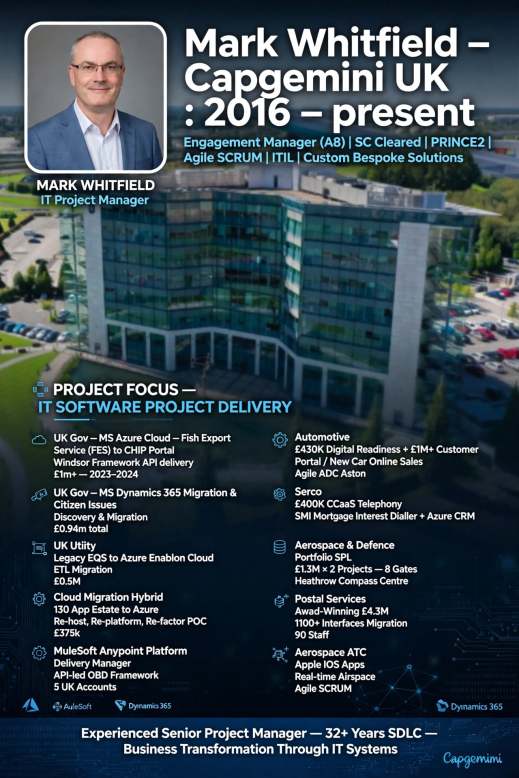
Mark Whitfield, Senior Project Manager, Career Summary

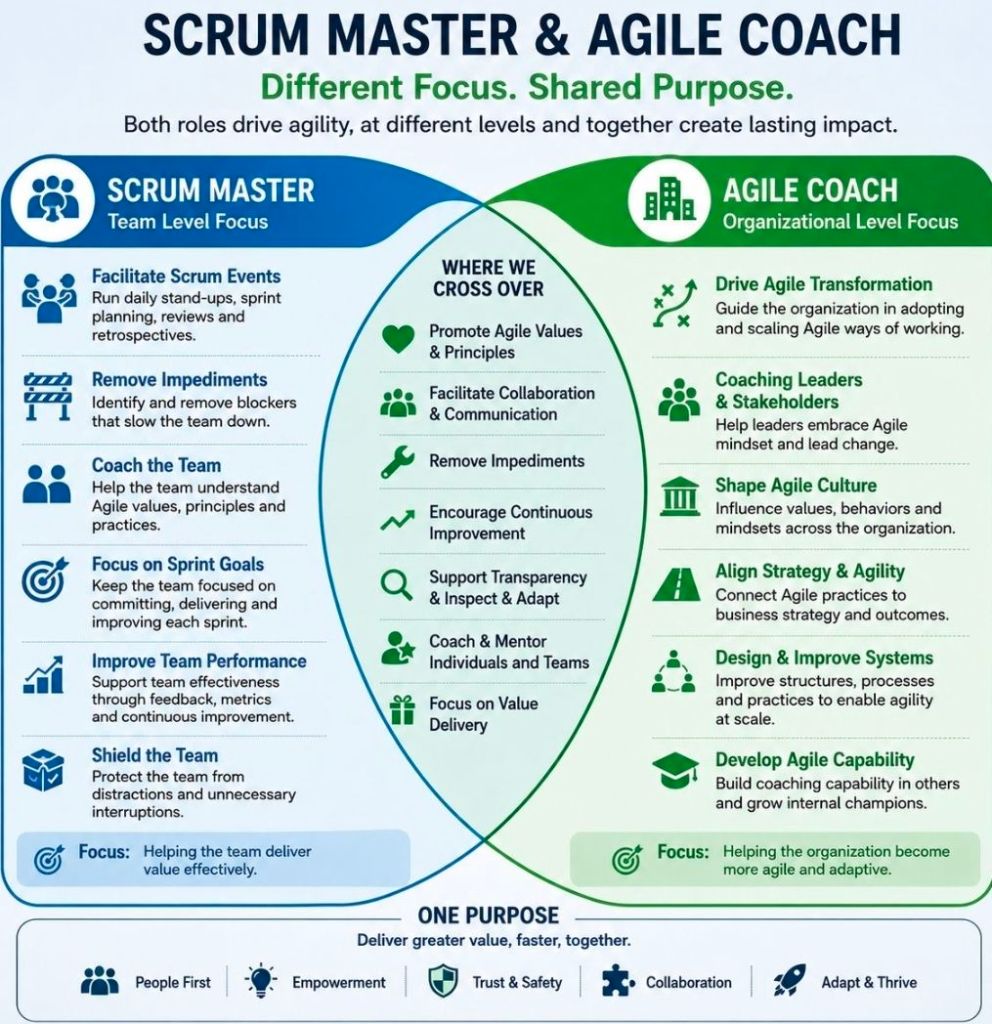
Mark Whitfield is a UK-based, SC-cleared Senior IT Project Manager and Engagement Manager with over three decades of experience in software development lifecycle (SDLC) delivery.

Mark Whitfield, High-Level Career Summary from 1990 thru 2026

Mark Whitfield, High-Level Career
Summary from 1990 thru 2026

Over his career, he has transitioned from deep technical engineering on legacy systems (HPE NonStop formerly Tandem Computers) to enterprise-scale digital transformation, cloud migrations, and API-led integrations. He is also the author of a comprehensive online toolkit for project delivery frameworks.

Click the ‘Company Worked‘ links below for more detail as required.

Project Management Career Breakdown:

1. Early Engineering & Technical Analysis Era (1990–1995)

  • Company Worked: The Software Partnership / Deluxe Data International
  • Geographical Location: Runcorn (head office) / on-site at both Knutsford / Poole, UK (for Barclays delivery)
  • Clients include: Barclays Bank (BBM II), RaboBank, Bank of Scotland, Girofon, TSB
  • Main Focus Items: Core software design, coding, and back-end integration for electronic desktop banking.
  • Technology Areas: Electronic banking software systems. Periphonics interactive (touch-tone phone) voice software.
  • Software Languages/ Products: sp/ARCHITECT-BANK, SQL, COBOL, SCOBOL, PATHWAY, PATHMAKER, ENSCRIBE, INSPECT, EMS, Tandem Mainframes (now HPE NonStop)
  • Methodology: Early iterative development & structured Waterfall lifecycles.

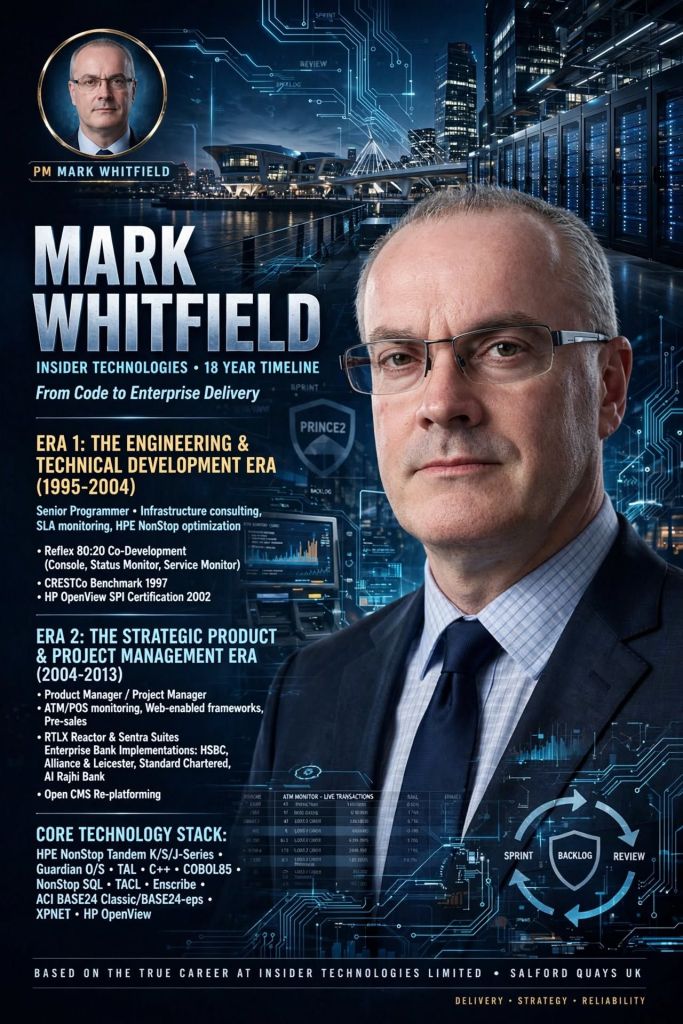
2. Technical Consultancy & Product Management (1995–2013)

  • Company Worked: Insider Technologies Limited (ITL)
  • Geographical Location: Salford Quays, UK (office); London, UK; Client sites across Europe/ Middle East
  • Clients include: Global Payments, Standard Chartered, Girofon, Rabobank, CRESTCo (Euroclear), Alrajhi Bank, LloydsTSB, HSBC, Santander, Bank of Ireland, Bank of Valletta (Malta) and both Commercial and Piraeus Bank (Greece)
  • Main Focus Items: Infrastructure consulting, volume testing, system management & monitoring, and Service Level Agreement (SLA) monitoring for critical path payment applications. Attending related conferences, EBUG, ITUG, BITUG, SATUG
  • Technology Areas: HPE NonStop monitoring, ATM/POS system & transaction monitoring and stock settlement.
  • Software Languages/ Products: Reflex, RTLX, Sentra, TIVOLI, COMMAND/POST, XPERT24, XPNET, HPE NonStop, HP OpenView Operations, BASE24 Classic, BASE24-eps, C, C++, SQL, SCOBOL, COBOL, TAL, PATHWAY, ENSCRIBE, EMS, MS Project
  • Methodology: Structured Waterfall, Agile Scrum & Custom Product Engineering Lifecycles.
  • Also: Designer and author of a new company website using an Open Content Management framework identified as part of a Research phase.

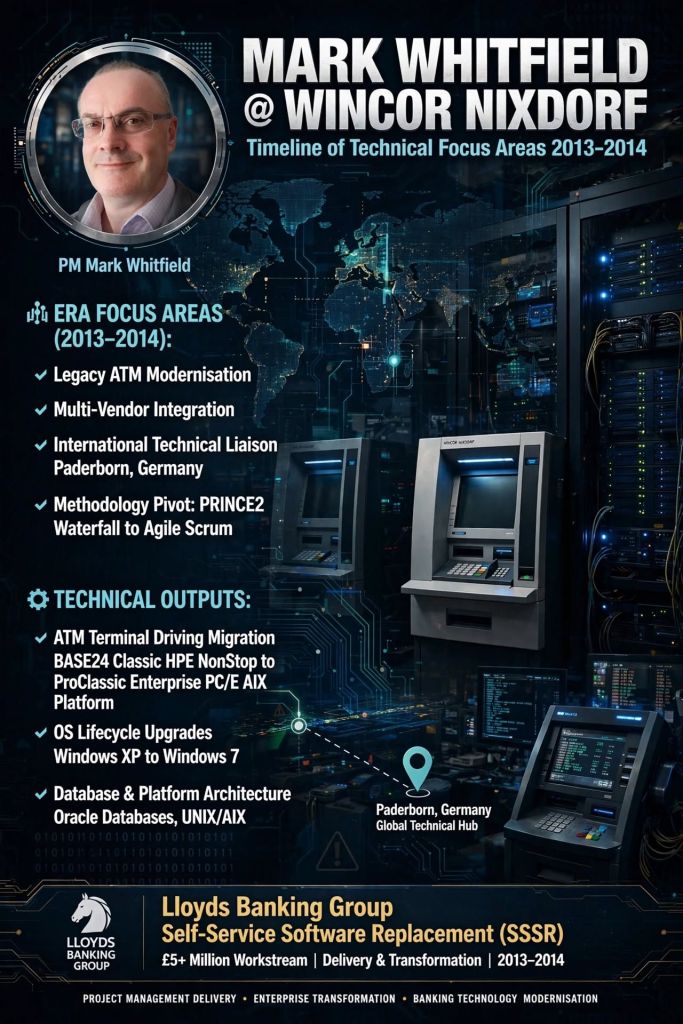
3. Professional Services Banking Delivery (2013–2014)

  • Company Worked: Wincor Nixdorf
  • Geographical Location: Woking / Bracknell / UK wide
  • Client: Lloyds Banking Group
  • Main Focus Items: Modernising legacy ATM software and directing hardware/software transitions. Implementing ProClassic/Enterprise and PC/E SmartClient (Win 7) to replace the existing ProCash/NDC (Win XP) Stacks on a variety of multivendor devices.
  • Technology Areas: Multi-vendor hardware & software integration for ATMs.
  • Software Languages/ Products: BASE24 Classic, ProClassic Enterprise (PC/E), Oracle, AIX Platform, Windows 7
  • Methodology: Strict PRINCE2 Waterfall and Agile transition methodologies.
  • Also: Wincor ‘Above and Beyond’ award for Customer Satisfaction, Commitment to Excellence and Commitment to One Wincor

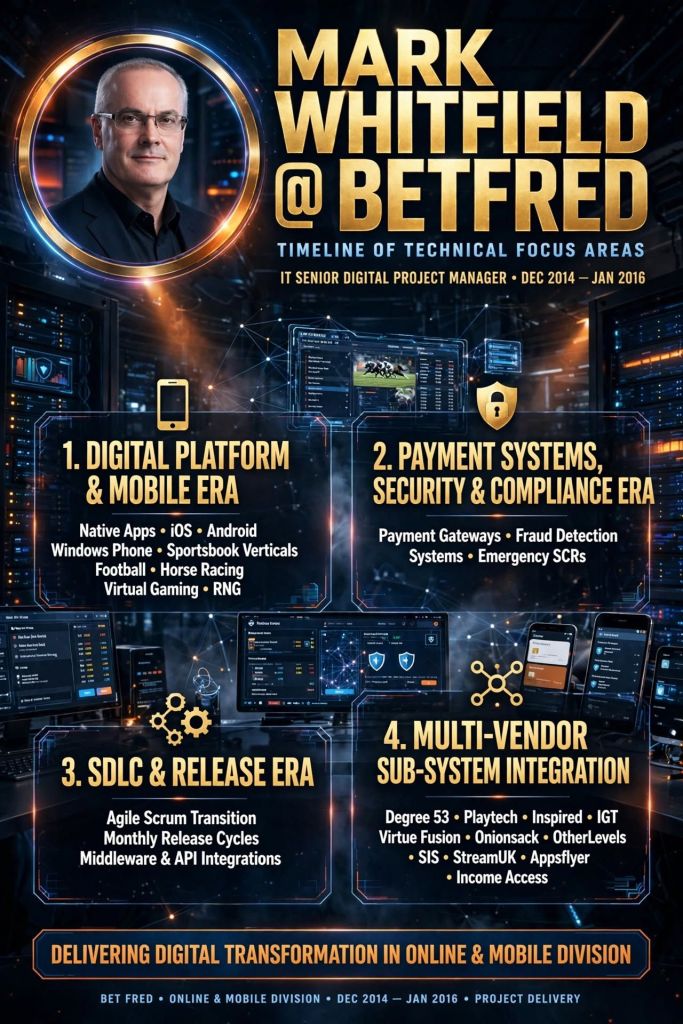
4. Digital Sportsbook Transformation (2014–2016)

  • Company Worked: Betfred
  • Geographical Location: Wigan / Greater Manchester, UK
  • Client: Betfred Online and Mobile
  • Supplier Management: for external software suppliers like Degree53, Playtech, Onionsack, Intelligent Payments (Myriad), Inspired, iovation, StreamUK, Finsoft, Ineda, OtherLevels, Appsflyer, Income Access, Activewin, Virgo, Virtue Fusion, In Game Media, Satellite Information Services (SIS) and IGT
  • Main Focus Items: Taking new sports and virtual gaming components live, integrating payment gateways, managing app release cycles, and handling regulatory compliance.
  • Technology Areas: Fraud detection, consumer mobile/desktop betting platforms.
  • Software Languages/ Products: Java, iOS, Android, MS SQL, ASP.NET
  • Methodology: Agile SCRUM.

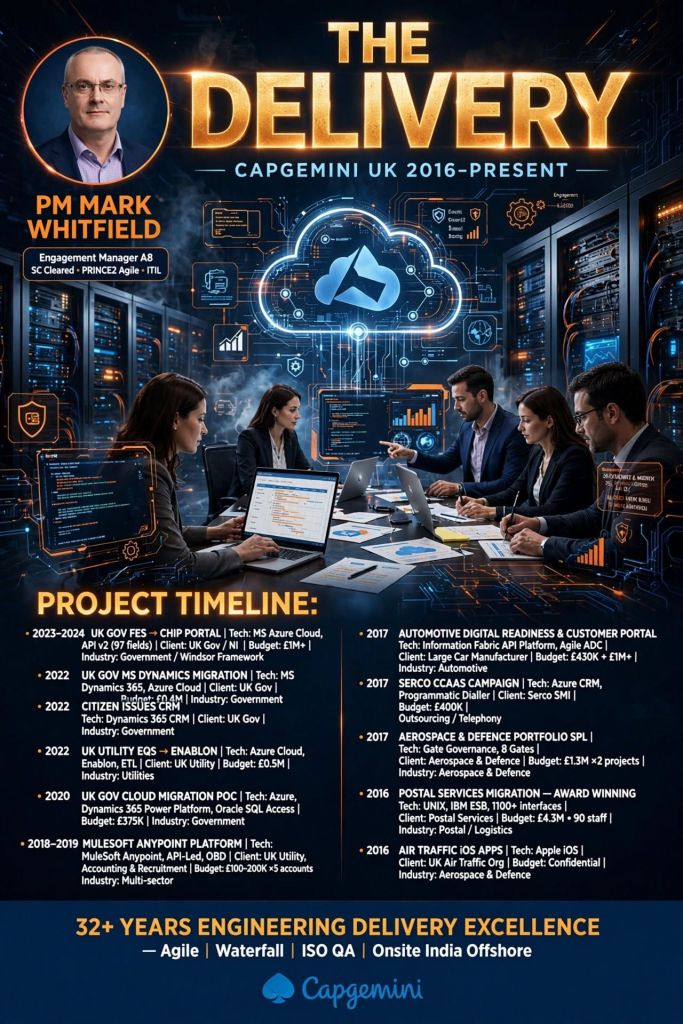
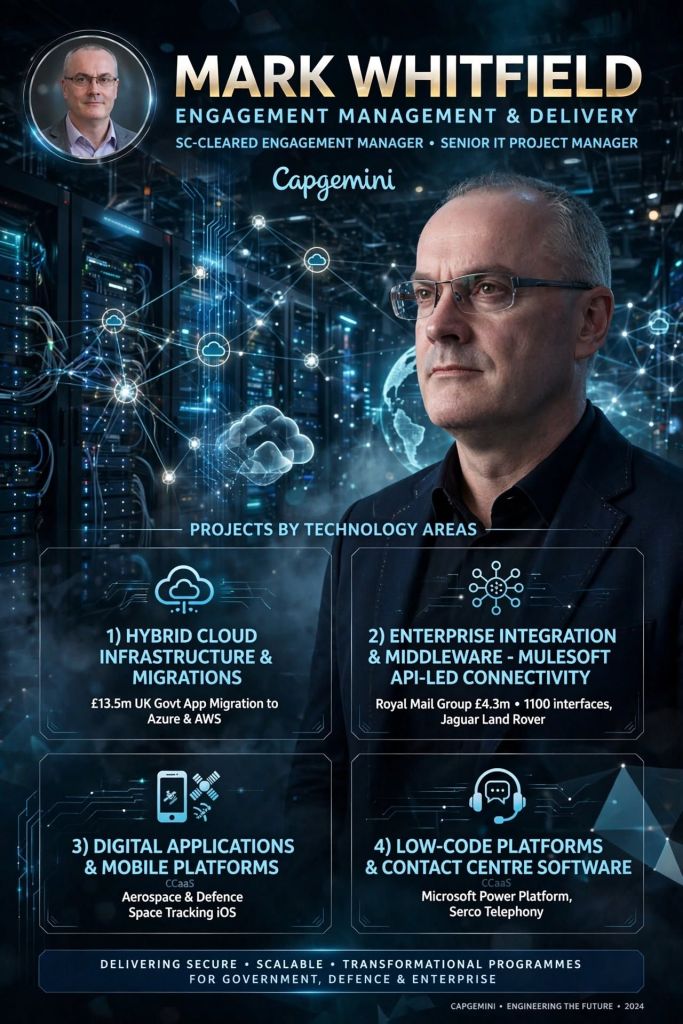
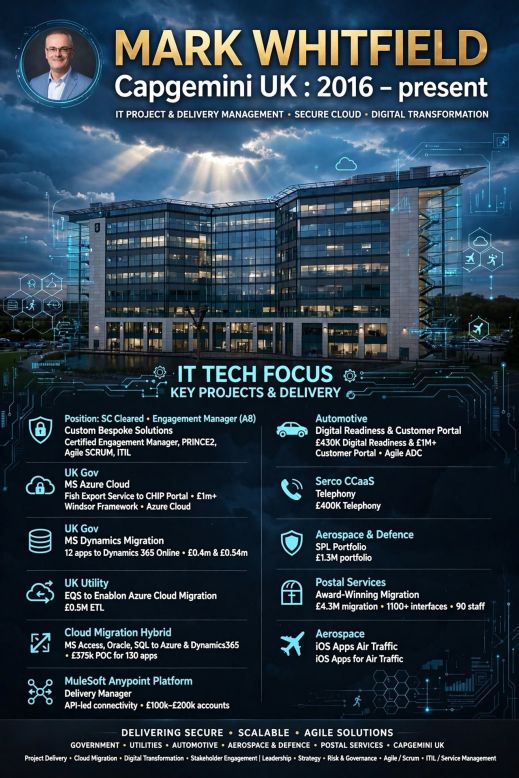
5. Enterprise Cloud & Integration Delivery (2016–Present)

  • Company Worked: Capgemini UK Consultancy
  • Geographical Location: Manchester / London and UK wide
  • Clients include: Jaguar Land Rover (JLR), Royal Mail Group (RMG), NATS, UK Gov, Heathrow, MuleSoft (augmented)
  • Main Focus Items: Managing hybrid cloud migrations, re-hosting/ refactoring applications, API-led connectivity, and complex manufacturing supply chain data pipelines.
  • Technology Areas: Hybrid cloud infrastructure and system integration.
  • Software Languages/Products: MuleSoft Anypoint Platform, Azure, AWS, Power Platform, Enablon
  • Methodology: Hybrid Agile and PRINCE2.
  • Also: C&CA UK’s Communications & Engagement Award Winner 2022 – Cloud & Custom Applications – Capgemini UK.

In addition to his consultancy work, Mark Whitfield actively publishes his extensive collection of Project Management Templates, which are actively utilized across the industry for RAID Logs, Agile Burndown Charts, and Plan on a Page (POaP) blueprints.

Agile Scrum Five Events

1. Agile Scrum Five Events
2. Agile Scrum Five Events
Agile Scrum Five Events

Why an Organisation Needs a PMO, Project Management Office

Why an Organisation Needs a PMO, Project Management Office
Why an Organisation Needs a PMO,
Project Management Office

An organisation needs a Project Management Office (PMO) to act as the strategic backbone that standardises processes, minimises operational risks, and directly aligns day-to-day project execution with long-term business goals.

Research by the Project Management Institute (PMI) highlights that 80% of high-performing organisations have established PMOs. Furthermore, companies utilizing a PMO deliver initiatives up to 2.5 times faster and waste 38% less budget compared to those operating without one.

1. Strategic Alignment & Portfolio Prioritisation

  • Goal connection: PMOs act as a filter, continuously checking that all active projects serve the corporate strategy.
  • Value redirection: The office can proactively recommend pausing or canceling redundant projects, redirecting resources to high-value initiatives.
  • Intake governance: They design a structured framework for project intake to stop random, impulsive investments.

2. Standardisation & Quality Assurance

  • Unified framework: PMOs replace chaotic “every-team-for-itself” habits with shared templates, common metrics, and standard delivery methodologies.
  • Repetitive economy: Creating consistent guidelines allows multi-project execution to become a predictable machine, reducing human error.
  • Performance baselines: Standardised metrics give leadership an objective rubric to compare project health across entirely different business units.

3. Resource Optimisation

  • Bottleneck reduction: Centralised control prevents staff from being unsustainably double-booked across competing silo projects.
  • Capacity visibility: Real-time capacity mapping lets the executive suite understand exactly who is available before approving future workloads.
  • Skills leverage: PMOs actively track internal talents, allowing organisations to pivot specialized professionals to high-priority issues quickly.

4. Data-Driven Governance & Risk Management

  • Executive transparency: PMOs deliver aggregated status dashboards (like “Stop Light” reporting) to keep stakeholders clearly informed without digging through minor details.
  • Early risk mitigation: Using institutional tools like RAID logs, they catch budget variances and deadline slips before they cascade out of control.
  • Compliance protection: They ensure strict adherence to industry regulations, corporate ethics, and legal benchmarks to safeguard the firm from penalties.

5. Knowledge Management & Continuity

  • Lessons learned: The PMO retains historical metrics, helping project teams build realistic, accurate cost and timeframe estimates on subsequent iterations.
  • Mentorship hubs: They provide ongoing skills coaching and workshops to organically raise the project management maturity level across the company.

Definition of Done DoD vs Definition of Ready DoR in Agile Scrum

1. Definition of Done DoD vs Definition of Ready DoR in Agile Scrum
2. Definition of Done DoD vs Definition of Ready DoR in Agile Scrum
Definition of Done DoD vs Definition
of Ready DoR in Agile Scrum