Microsoft Excel Development Timeline History

Microsoft Excel has evolved from a niche Apple Macintosh tool into the world’s most dominant spreadsheet software. Its history is marked by strategic shifts, such as jumping from the MS-DOS era to graphical interfaces to outmanoeuvre then-leader Lotus 1-2-3. 

Timeline of Major Excel Milestones
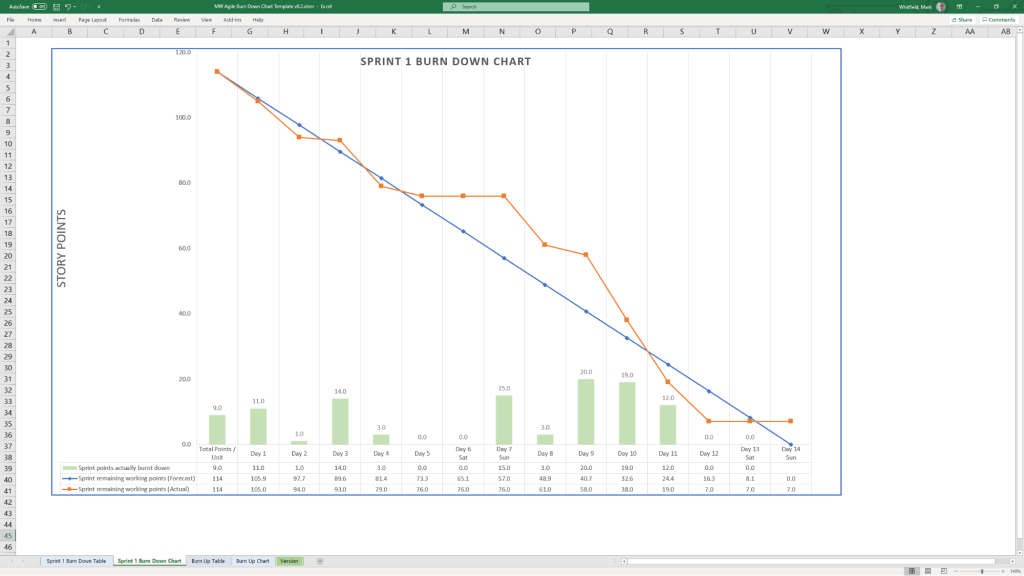
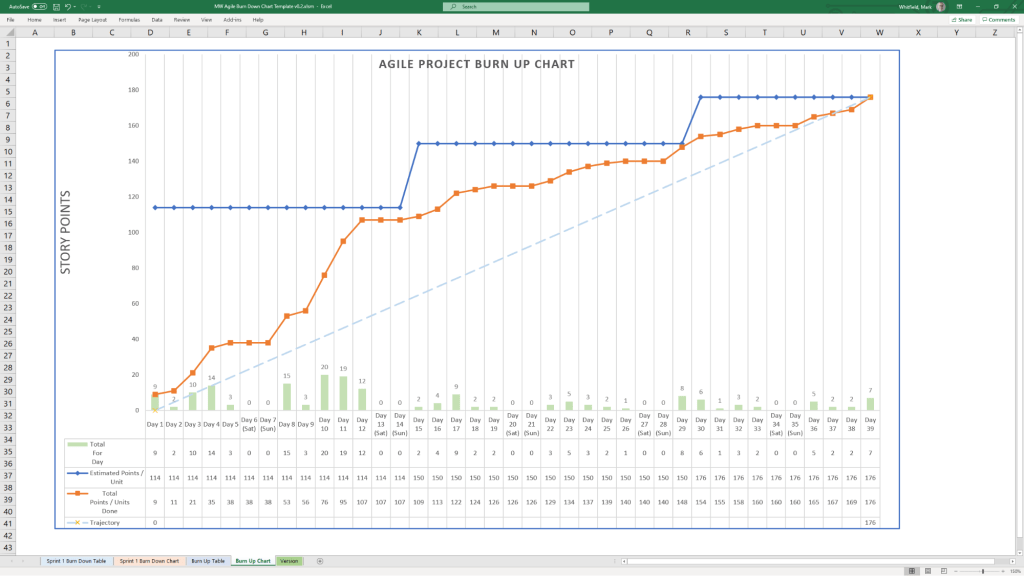
Agile Templates available at download link at website banner
  • 1982: Multiplan (The Predecessor) – Microsoft’s first spreadsheet program. While popular on CP/M systems, it struggled against Lotus 1-2-3 on MS-DOS.
  • 1985: Excel 1.0 (Macintosh Exclusive) – Realising they couldn’t beat Lotus on DOS, Microsoft built a graphical spreadsheet for the new Mac. It introduced the ability to adjust cell heights, widths, and fonts.
  • 1987: Excel 2.0 (First Windows Version) – Launched alongside the first Windows environments, it introduced color support (like red for negative numbers) and was significantly faster than competitors.
  • 1990: Excel 3.0 – Added 3D charts, toolbars, and drawing tools, helping Excel finally overtake Lotus 1-2-3 as the market leader.
  • 1993: Excel 5.0 – A major turning point that introduced Visual Basic for Applications (VBA), allowing users to automate tasks with macros.
  • 1997: Excel 8.0 (Office 97) – Introduced the Paperclip Assistant (“Clippy”) and the first version of the modern VBA environment.
  • 2007: Excel 12.0 (The Ribbon Era) – Replaced menus with the Ribbon interface and dramatically increased grid capacity to 1,048,576 rows by 16,384 columns.
  • 2010: Excel 14.0 – Introduced Slicers for PivotTables and Sparklines (mini charts inside cells).
  • 2013-2016: Data Intelligence – Added Power Query, Power Pivot, and new chart types like Waterfall, Pareto, and Treemap to support advanced data modeling.
  • 2019-Present: AI & Cloud Integration – Modern versions focus on seamless collaboration, dynamic arrays (like XLOOKUP), and AI-powered insights that can extract data directly from images. 

Technological Evolution Highlights
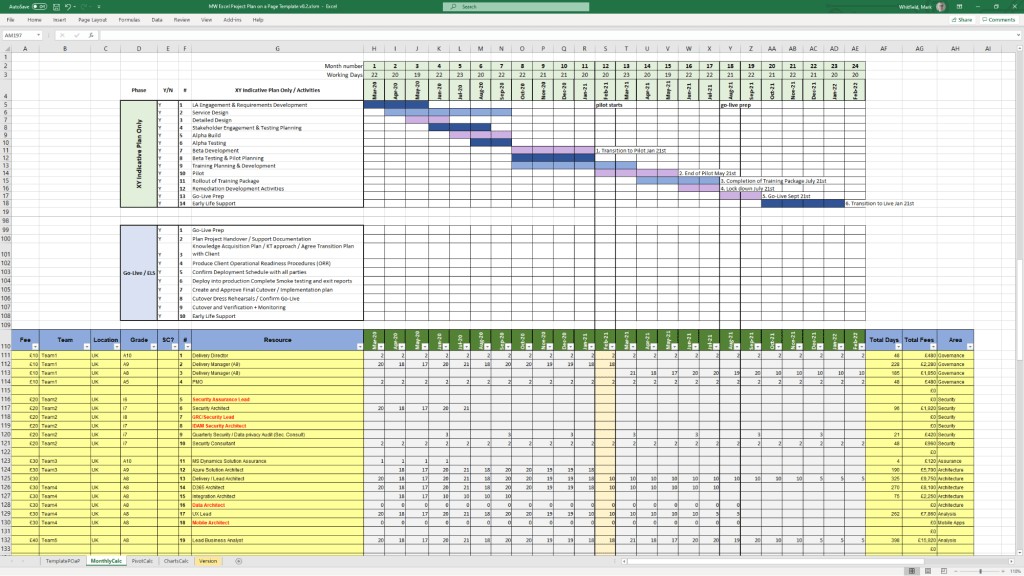
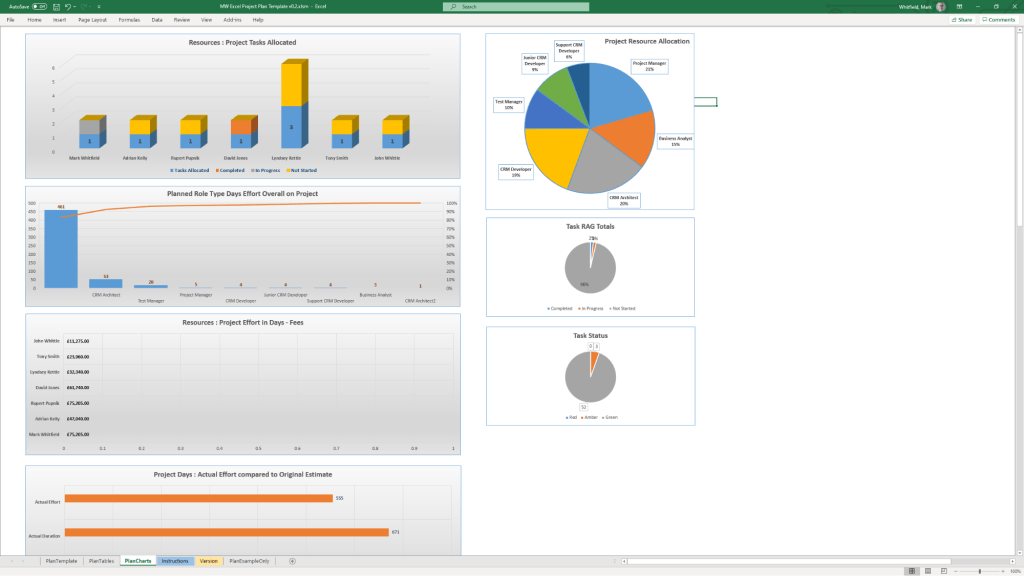
MS Excel templates available on bundle download at website banner
  • Architecture: Shifted from 16-bit to 32-bit with Excel 95, greatly improving stability.
  • Collaborative Features: Modern Version History and “Show Changes” now allow teams to track every edit in real-time.
  • Visualisation: Excel now supports complex timelines via SmartArt or custom Scatter charts with error bars for professional project tracking.

Microsoft Excel Development Timeline History
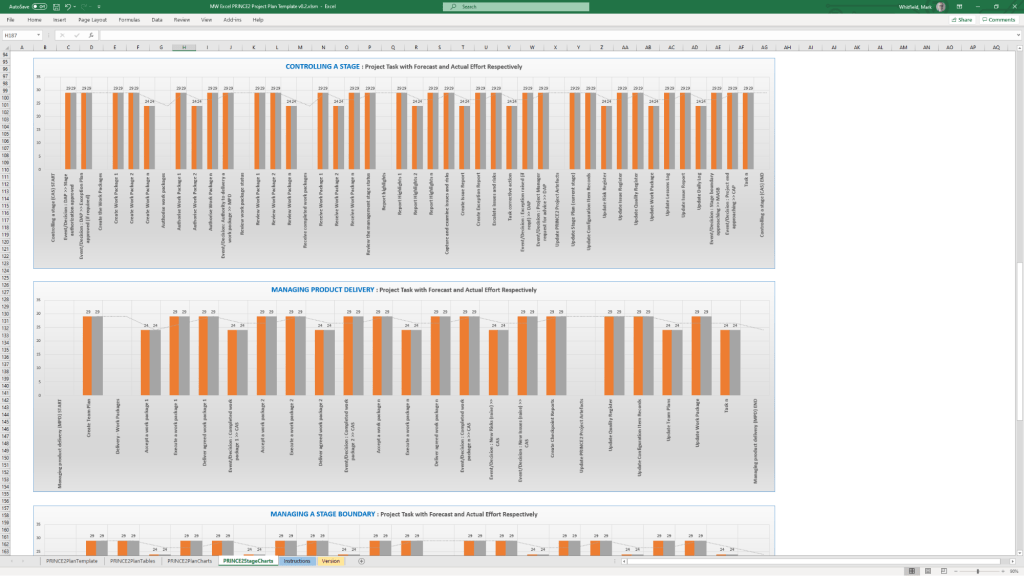
Microsoft Excel templates available at banner above, FREE upgrades

Project Management Templates Bundle FREE Upgrades

Mark Whitfield’s project management templates offer a range of timeline and planning views designed for Agile, Waterfall, and PRINCE2 delivery. These templates typically include a high-level Plan on a Page (POaP) and detailed Microsoft Project (MPP) or Excel schedules. 

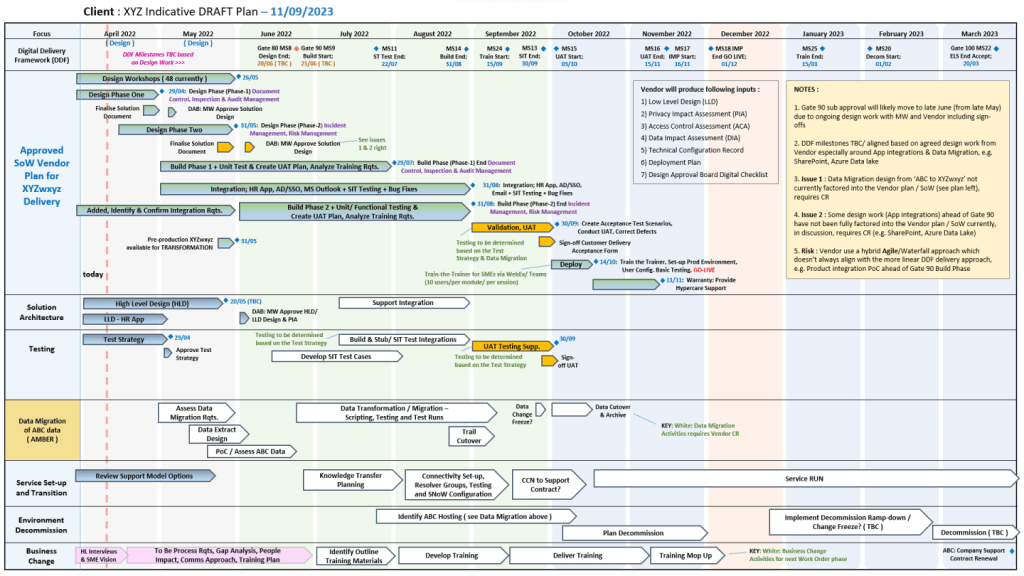
Example Plan on a Page POaP

Timeline & Planning Views

  • Plan on a Page (POaP): A high-level summary view (often in PowerPoint or Excel) used to communicate key phases and milestones to stakeholders without the clutter of a full Gantt chart.
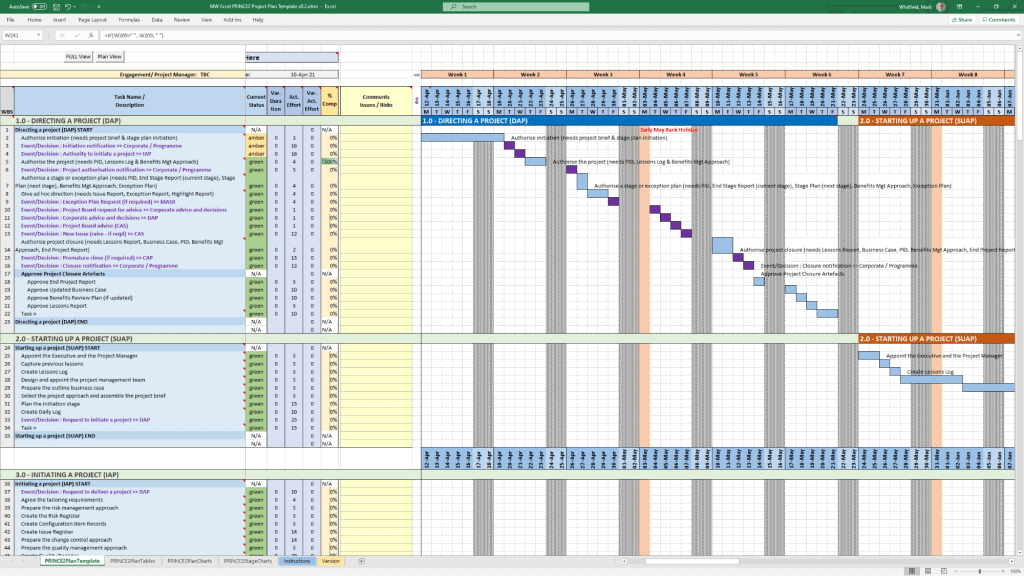
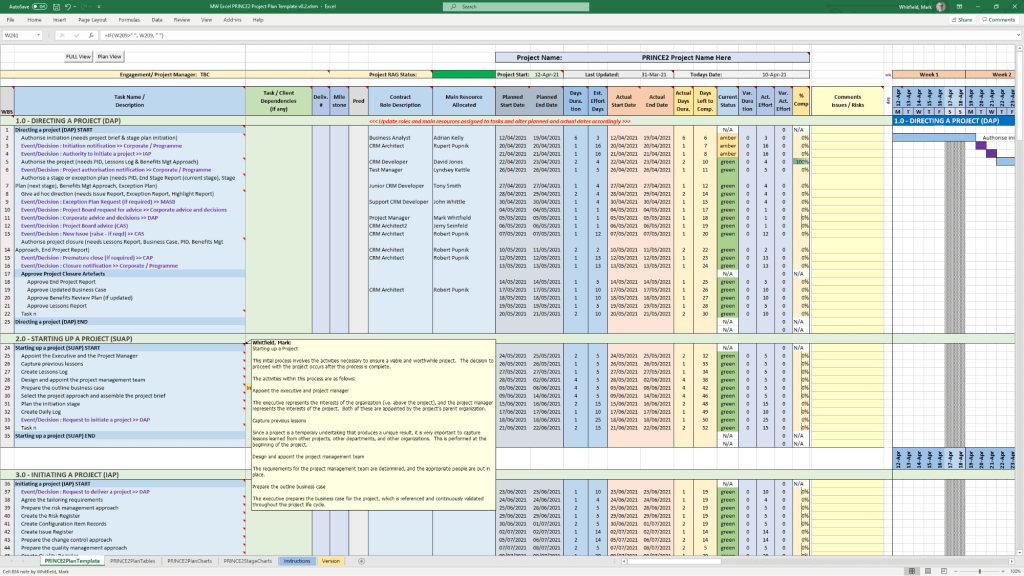
  • Detailed Gantt Charts: Provided in both Microsoft Project (MPP) and Excel, these timelines include task dependencies, resource allocations, and critical path tracking.
  • Agile Sprint Timelines: Specialized views for tracking 2–4 week sprints, daily stand-ups, and sprint retrospectives within a broader project framework.
  • SDLC Progression: The templates are often structured around a typical Software Development Life-cycle (SDLC), moving from Inception to Transition and Early Live Support (ELS). 

Key Timeline Components

The templates are pre-configured with several essential timeline elements: 

  1. Project Start & End Dates: Easily adjustable fields that automatically update durations and downstream tasks.
  2. Milestones & Gateways: Visual markers for critical sign-off points and delivery stages.
  3. Task Dependencies: Pre-built links that show how delays in one area (e.g., hardware delivery) impact the overall project finish date.
  4. Resource View: Timelines integrated with resource calendars to account for holidays and leave. 

You can find the full package of over 200 editable templates, which include these timeline views and RAID logs, on Mark Whitfield’s official website or via his Etsy store. 

Project Management Templates Bundle FREE Upgrades

PRINCE2 – PRojects IN Controlled Environments – Timeline

PRINCE2 (PRojects IN Controlled Environments) has evolved from a rigid, IT-specific framework into a globally recognised, flexible project management standard. 

Historical Evolution Timeline

  • 1975: PROMPT Origins – Simpact Systems Ltd developed PROMPT (Project Resource Organisation Management and Planning Techniques) to address IT project overruns.
  • 1989: The Birth of PRINCE – The UK’s Central Computer and Telecommunications Agency (CCTA) licensed PROMPT, renaming it PRINCE (originally “PROMPT II IN the CCTA Environment”).
  • 1996: PRINCE2 Launch – Developed with input from 150 European organisations, PRINCE2 was released as a generic, scalable framework suitable for any industry.
  • 2000–2013: Ownership Shifts – Ownership moved from the CCTA to the Office of Government Commerce (OGC) in 2000, then to AXELOS Ltd (a joint venture) in 2013.
  • 2009: Major “Refresh” – Introduced the seven core principles and made the method more customisable.
  • 2017: 6th Edition Update – Formerly known as the “2017 Update,” this version focused heavily on scalability and tailoring to specific project needs.
  • 2021–Present: PeopleCert Era – PeopleCert acquired AXELOS in 2021. In 2023, PRINCE2 7 was launched, introducing a greater emphasis on people management and sustainability. 

Comprehensive Project Timeline Breakdown

A standard PRINCE2 project follows a lifecycle defined by seven processes: 

  1. Pre-Project: Starting up a Project (SU)
    • Ensures the project is viable and worthwhile.
    • Key Output: Project Brief.
  2. Initiation: Initiating a Project (IP)
  3. High-Level Oversight: Directing a Project (DP)
    • An ongoing process where the Project Board provides guidance and makes key decisions without managing day-to-day tasks.
  4. Day-to-Day Management: Controlling a Stage (CS)
    • The Project Manager monitors work, manages risks, and reports progress for each individual stage.
  5. Technical Delivery: Managing Product Delivery (MP)
    • The Team Manager ensures products (deliverables) are created, tested, and handed over according to specifications.
  6. Transition: Managing a Stage Boundary (SB)
  7. Finalisation: Closing a Project (CP)
    • The formal decommissioning of the project, ensuring all products are accepted and lessons are documented. 

PRINCE2 – PRojects IN Controlled Environments

Mark Whitfield IT Career Timeline, AI generated from Google

The technical timeline for 

Mark Whitfield, an SC cleared, Senior IT Project Manager and Engagement Manager, spans over 30 years and transitions from specialized banking software development to high-level project leadership and cloud migrations. 

Professional Career Timeline

  • 1990 – 1994: Programmer at The Software Partnership (later Deluxe Data). Developed electronic banking software (sp/ARCHITECT-BANK) on Tandem Computers (now HPE NonStop) for major banks like TSB and Bank of Scotland.
  • 1994 – 1995: Lead Analyst at Deluxe Data International, continuing support and development for banking customer systems.
  • 1995 – 2013: Project Manager of Strategic Technical Initiatives at Insider Technologies Limited. Oversaw projects involving Reflex 80:20, Sentra development, and corporate website authoring.
  • 2013 – 2014: Project Manager (Banking Division) at Wincor Nixdorf Limited, focusing on professional services for the banking sector.
  • 2014 – 2016: Senior Digital Project Manager at Betfred Limited, managing the Online and Mobile Division.
  • 2016 – Present:Engagement Manager / Senior PM at Capgemini UK.
    • 2016: Led a £4.3M data centre migration for Royal Mail (RMG) involving 1,100+ interfaces.
    • 2018 – 2019: Augmented into MuleSoft as a Delivery Manager for the Anypoint Platform.
    • 2020 – Present: Leading a £13.5M cloud migration program moving 130 UK government apps to Azure and AWS. 

Technical Training & Education

Whitfield maintains an active Professional Training timeline to adapt to changing technologies:

  • 1990: Graduated in Computing.
  • 1995: HP NonStop TAL Programming and Performance Tuning.
  • 1997: C/C++ Programming at Comtec.
  • 2006 – 2009: Deep dive into security and databases, including Cryptography, Thales e-Security, and Microsoft SQL 2000.
  • 2011: Java and Google Android programming using Eclipse IDE.
  • 2014 – 2024: Advanced Microsoft Excel and AI-focused refreshers. 

He is also a Certified Engagement Manager and a registered PRINCE2 Practitioner proficient in both Agile Scrum and Waterfall methodologies.

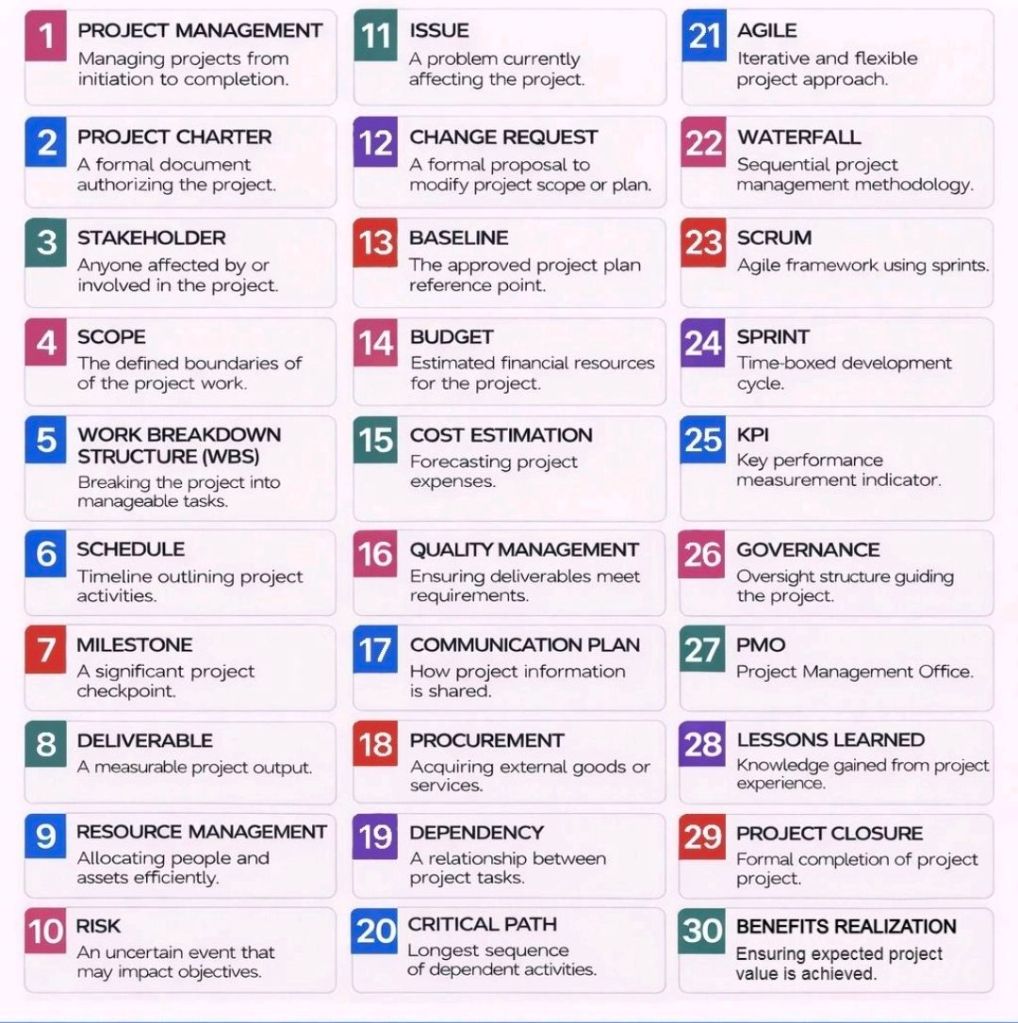
Project Management Terms Explained Overview

Project Management Terms Explained Overview

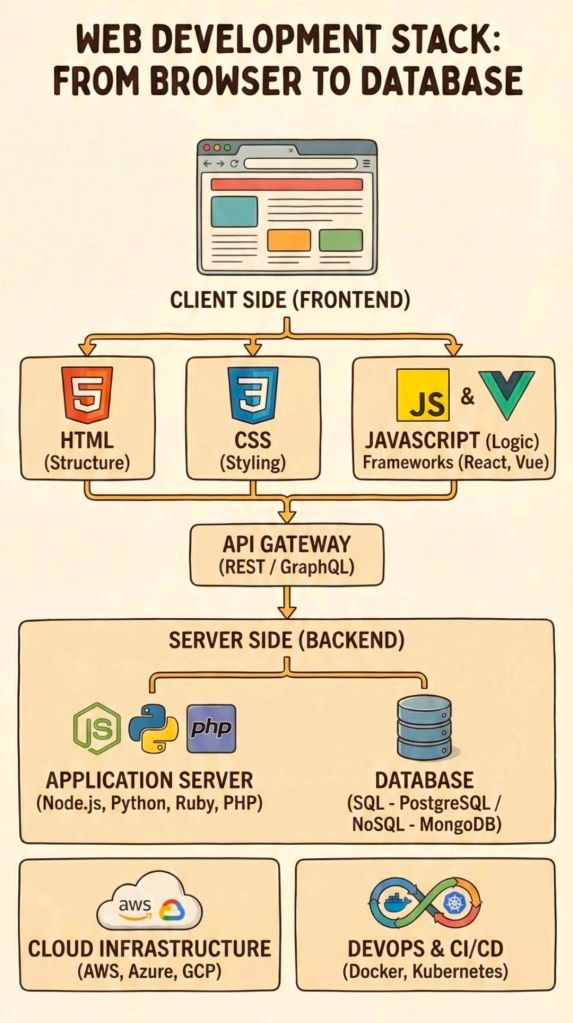
Web Development Stack from Browser to Database

Web Development Stack from Browser to Database

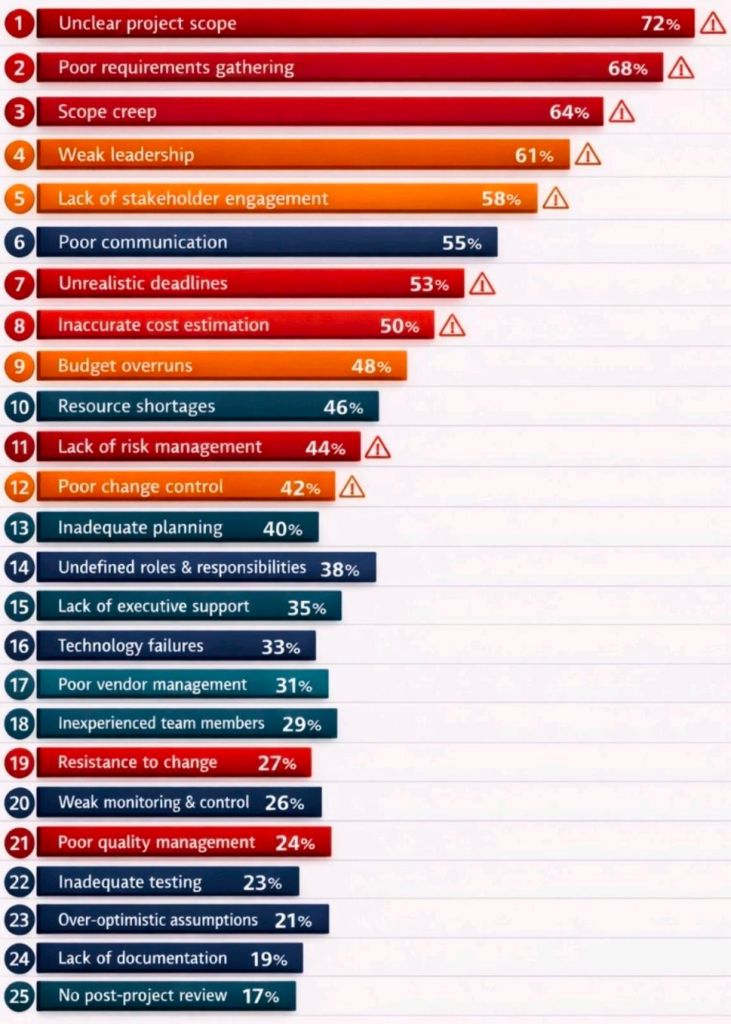
Why Projects Fail

Why Projects Fail

A Successful Project Plan Approach includes

A Successful Project Plan Approach includes