BASE24 and BASE24-eps architecture overview

The BASE24 electronic payment system developed by ACI Worldwide exists in two primary architectural generations:

BASE24 Classic (historically deployed on HPE NonStop / Tandem fault-tolerant hardware) and

BASE24-eps (Enterprise Payments System, built using an object-oriented C++ framework deployable across open systems, z/OS, and cloud infrastructure).

Despite structural differences, both share a highly optimized, component-based transaction routing engine.
BASE24 and BASE24-eps architecture overview
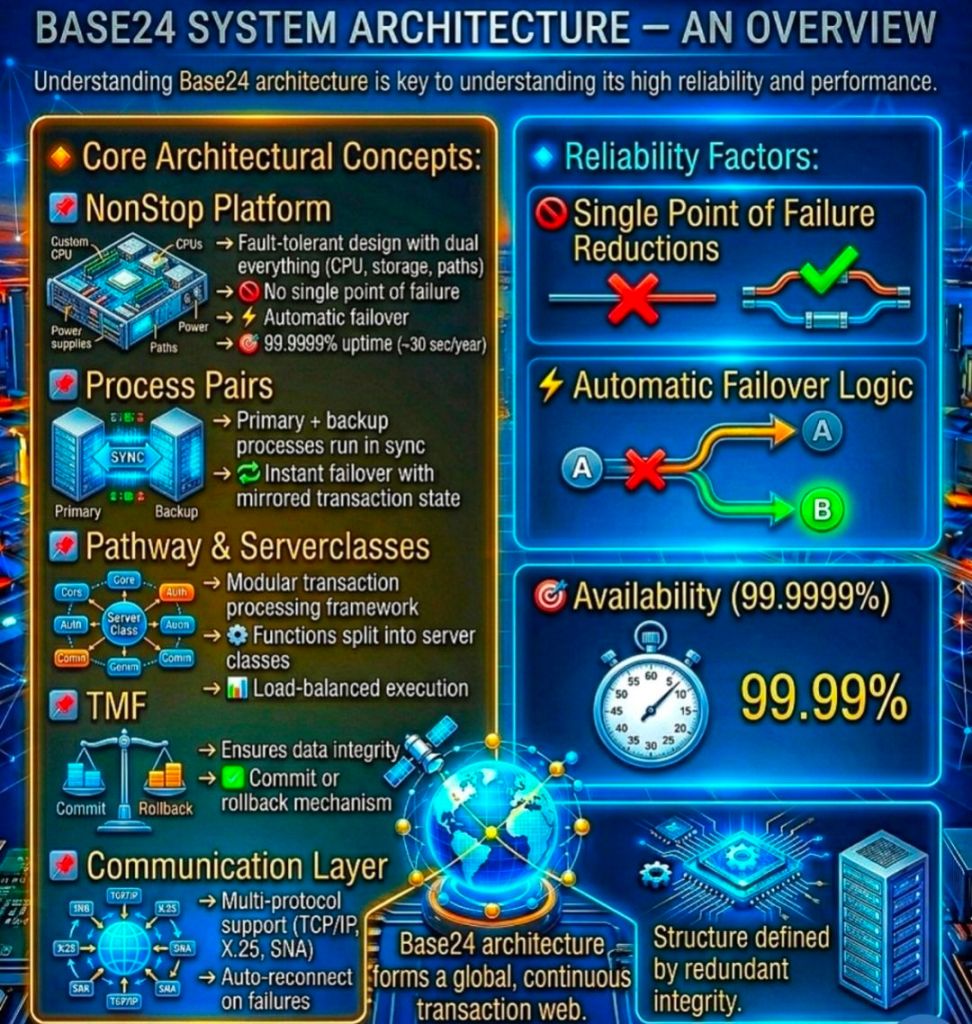
BASE24 architecture overview

Core Structural Component Layers

The component architecture maps the complete end-to-end lifecycle of a financial message (such as ISO 8583) through five distinct functional sub-systems:

1. Network & Message Routing Component (XPNET)

  • Purpose: Coordinates all message traffic across internal processes and physical network nodes.
  • Function: Operates as a specialized middleware network manager that decouples low-level communication links from upper transaction routing layers.
  • Configuration: Relies on a Logical Network Configuration File (LCONF) to define active execution nodes, hardware lines, and physical stations.

2. Perimeter Access Layer (Device Handlers)

  • Purpose: Translates device-specific message protocol formats into the system’s unified internal format.
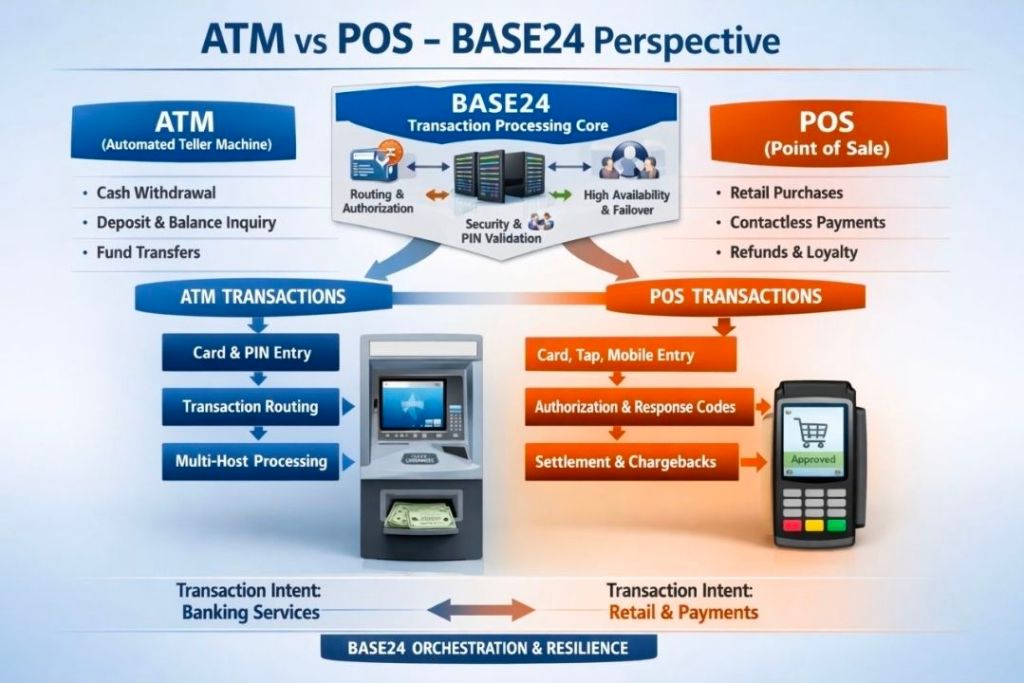
  • ATM Device Handlers (ATMDH): Manage direct connectivity to automated teller machines, unpack specific vendor dialects (such as Diebold or NCR states), and track terminal hardware statuses.
  • POS Device Handlers (POSDH): Interface with point-of-sale acquirer terminals and merchants.
  • Security Operations: Triggers immediate payload encryption/decryption and Hardware Security Module (HSM) PIN-block translation directly within this ingestion ring.

3. Core Transaction Logic (Authorization System)

  • Purpose: Determines whether a payment request should be accepted, rejected, or modified.
  • Full On-Us Authorization: Inspects internal databases for matching account records, positive balances, and velocity thresholds to issue real-time decisions.
  • Parametric/Negative Checks: Validates card status against offline negative files, usage restrictions, or custom risk parameters.
  • Scripting Engine: Modern BASE24-eps variants execute localized transaction routing scripts via customized operators without forcing a compile rewrite of the core engine core.

4. Boundary Channels (Interchange & Host Interfaces)

  • Interchange Interfaces (ICH): Package and transform the transaction payload into international network profiles (e.g., Visa, Mastercard, regional switches). It handles strict message mapping and regional network check requirements.
  • Host Interfaces (HIF): Create synchronous links back to an institution’s underlying Core Banking system to apply ledger adjustments, check balances, or execute real-time holds.

5. Offline & Administrative Subsystems

  • Extract Component: Gathers active transaction logs and streams filtered payloads out to analytical reporting databases.
  • Refresh Component: Updates terminal operational data, key packages, and card exclusion lists from parent systems down to active execution nodes.
  • Settlement Initiator: Groups, cleanses, and batches net-clearing totals to finalize payment entries into regional clearinghouses.

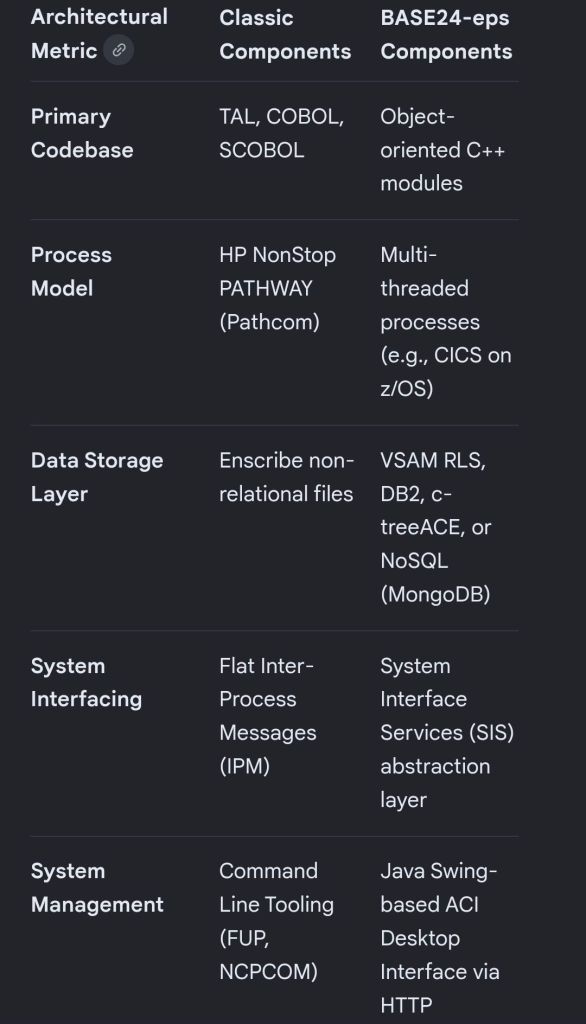
Architectural Divergence: Classic vs. EPS

The structural design varies significantly depending on the generation of the software deployment:
BASE24 and BASE24-eps architecture overview

End-to-End Component Transaction Flow

  1. An ATM transaction arrives at the network interface layer managed by XPNET.
  2. The message is routed to the Device Handler, which strips hardware packaging and requests translation from the HSM.
  3. The clean internal message passes to the Authorization Engine.
  4. If it is a “Not-On-Us” card, the engine identifies the destination BIN and transfers routing control to the Interchange Interface.
  5. The Interchange Interface maps the payload to the external scheme standard (such as Visa) and transmits it to the external network.
  6. The outbound network response is unwrapped by the Interchange component and tracked through the core engine to log final response codes.
  7. The transaction safely records inside the active log file, allowing the Extract / Settlement components to pick it up later during batch processing.

BASE24 and BASE24-eps architecture overview
BASE24 and BASE24-eps architecture overview
Business Analyst BA Interview Prep Items

Business Analyst BA Interview Prep Items

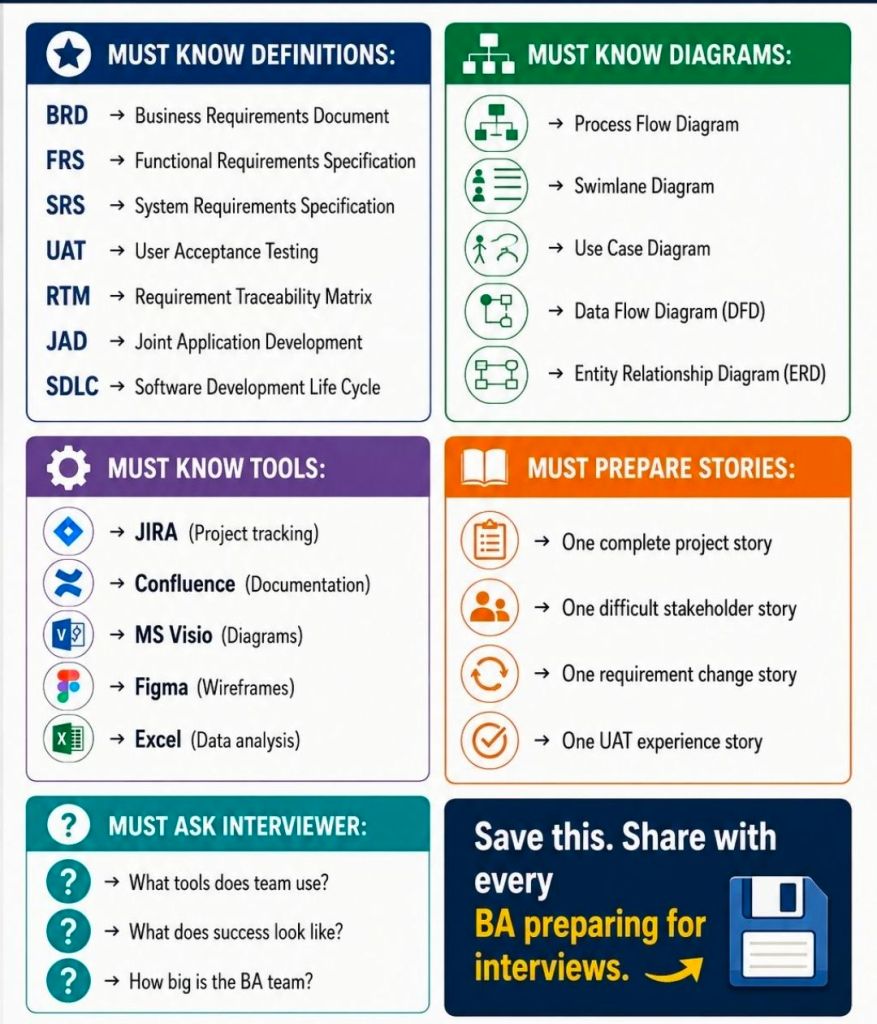
Business Analyst (BA) interview prep focuses on demonstrating how you translate business problems into technical/process solutions. Preparation revolves around three core pillars: competence (technical knowledge), communication (behavioral stories), and cultural fit.

1. Technical & Core Knowledge Prep

Familiarize yourself with the fundamental BA methodologies, documentation, and tools:

  • Methodologies: Understand the differences between Agile (Scrum, Kanban, sprints, user stories) and Waterfall (structured phase-gating).
  • Documentation: Review how to create a Business Requirements Document (BRD), Functional Requirements Document (FRD), and Software Requirements Specification (SRS).
  • Process Modeling: Refresh your knowledge on reading and creating Use Cases, User Stories, and UML diagrams (Activity diagrams, Flowcharts).
  • Requirements Gathering: Be ready to discuss techniques like interviews, workshops, prototyping, and document analysis.

2. Behavioral & Scenario Prep (The STAR/STARS Method)

Expect situational questions that require you to tell a story about your past experience. Structure your answers using the STAR method (Situation, Task, Action, Result):

  • Conflict Resolution: How do you align stakeholders with opposing views or conflicting priorities?
  • Scope Creep: How do you manage a stakeholder requesting major changes midway through a project?
  • Ambiguity: Tell me about a time you had to work with limited data or changing requirements.
  • Failure/Mistakes: Describe a time you made an analytical error or missed a requirement and how you resolved it.

3. Interview Action Items Checklist

  • Work Samples: Bring a physical or digital portfolio containing redacted work samples (e.g., a process flow, user story backlog, or requirements document you’ve built).
  • The 30-60-90 Day Plan: Think about how you would approach the first few months on the job. (e.g., Day 1-30: Learn the business domain; Day 31-60: Map current processes; Day 61-90: Identify optimization opportunities.)
  • Reverse Questions: Prepare engaging questions to ask the interviewer, such as: “What does success look like in this role in the first 6 months?” or “Can you share more about how BAs collaborate with the technical team here?”

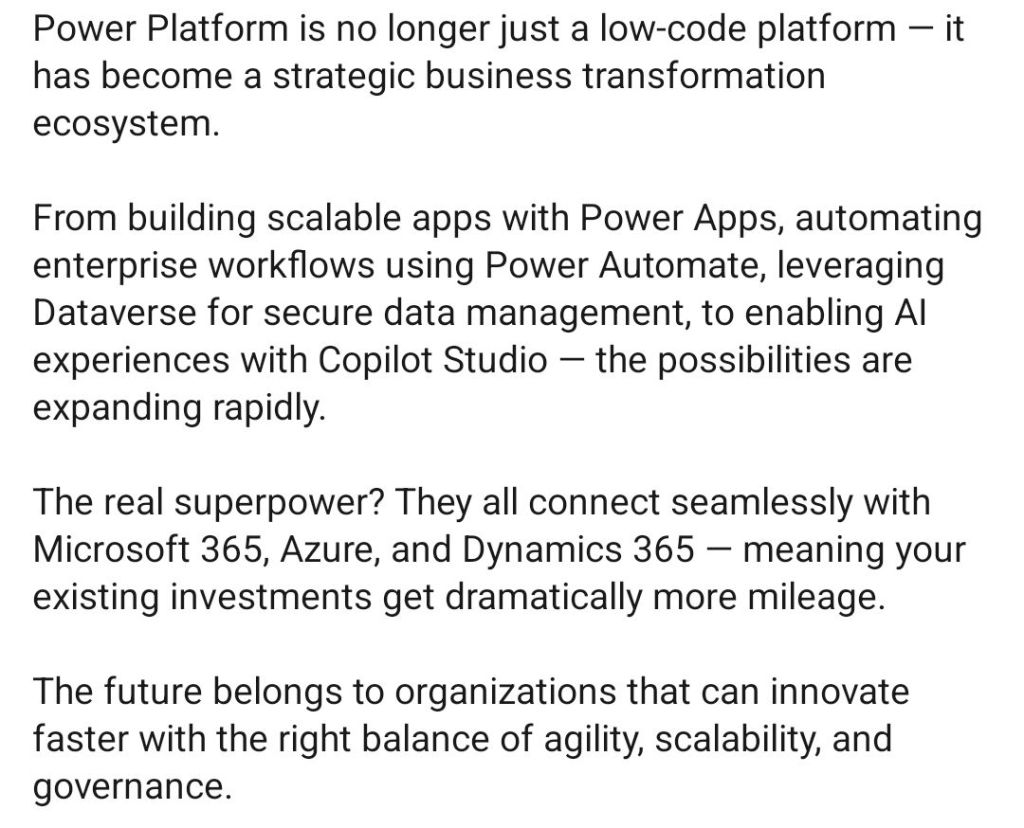
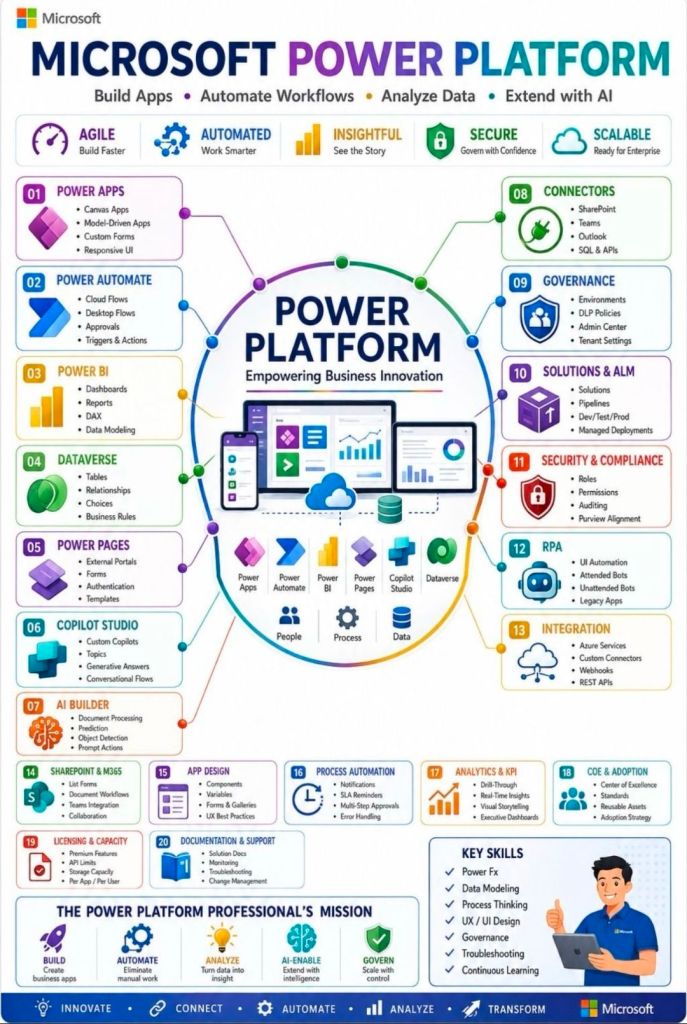
Microsoft Power Platform, Build Apps, Automate Workflows, Analyze Data, Extend with AI

Microsoft Power Platform, Build Apps, Automate Workflows, Analyze Data, Extend with AI

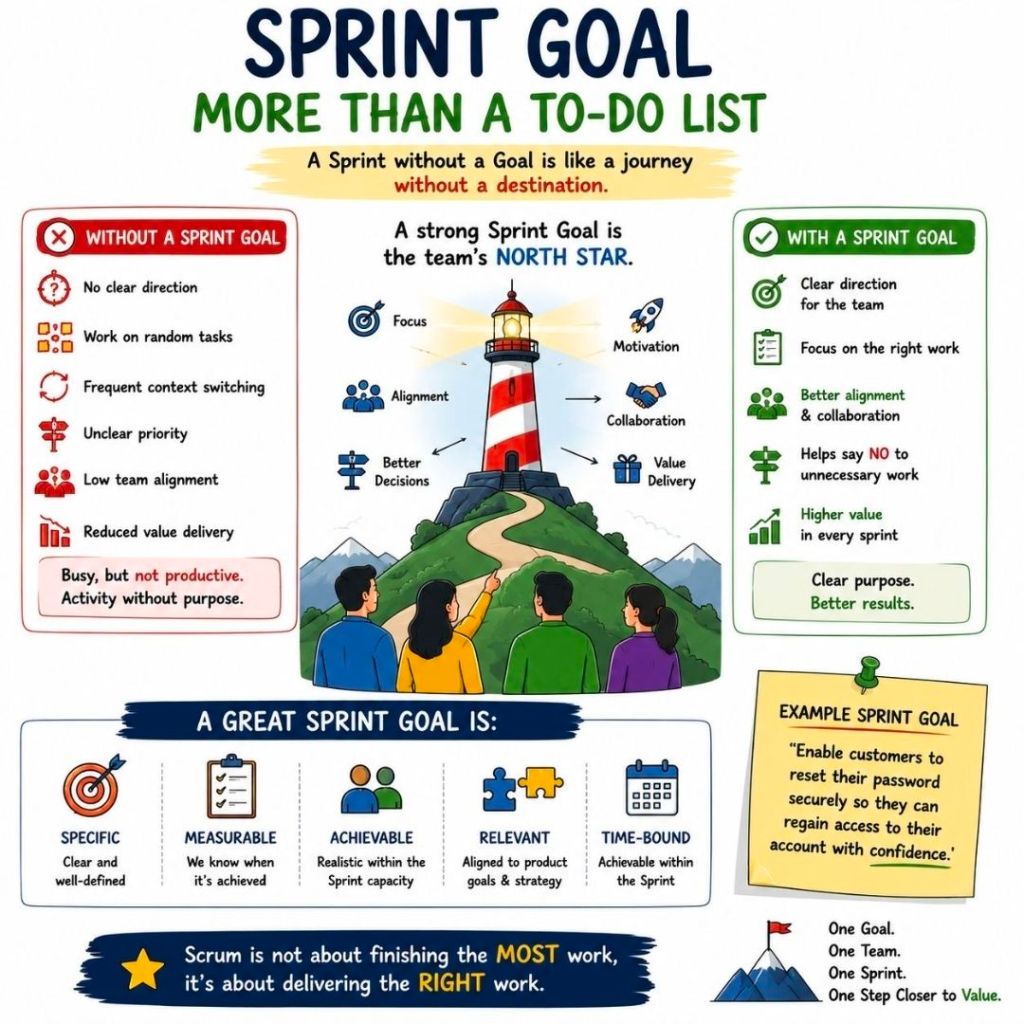
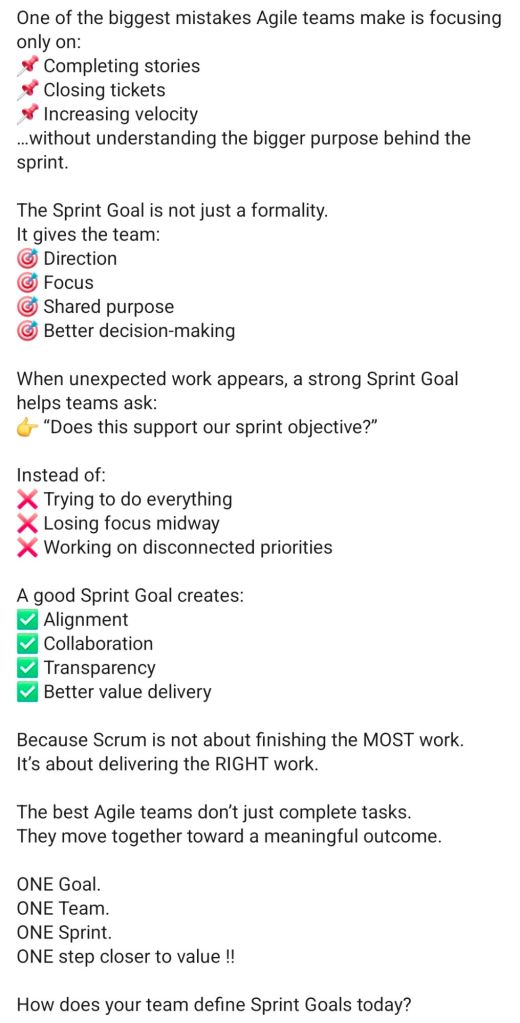
Agile Sprint Goal Summary Overview

Agile Sprint Goal Summary Overview

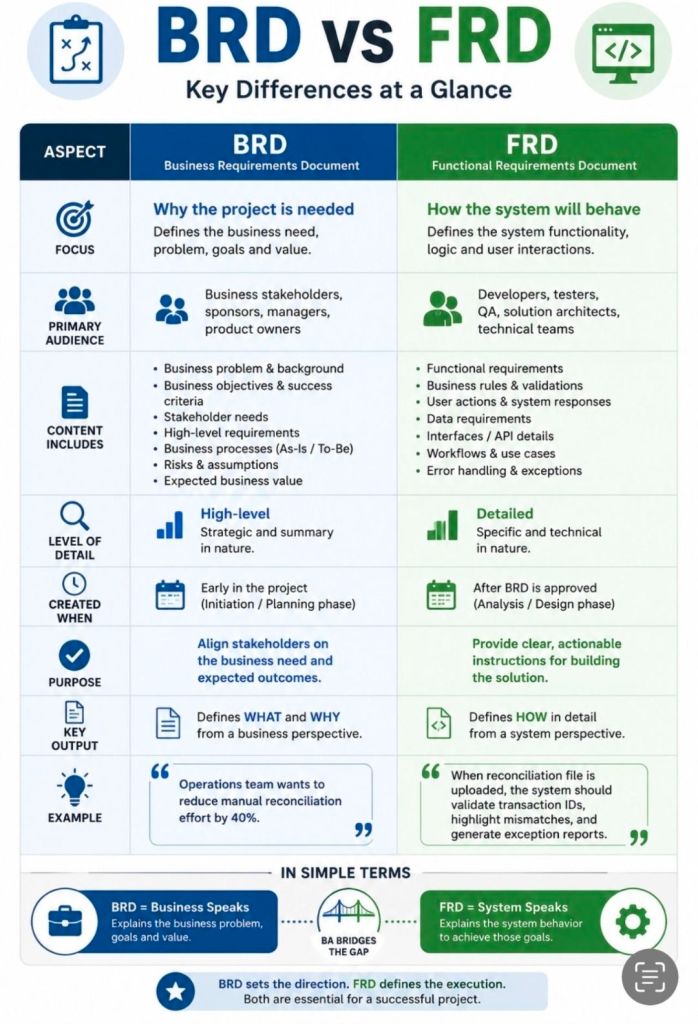
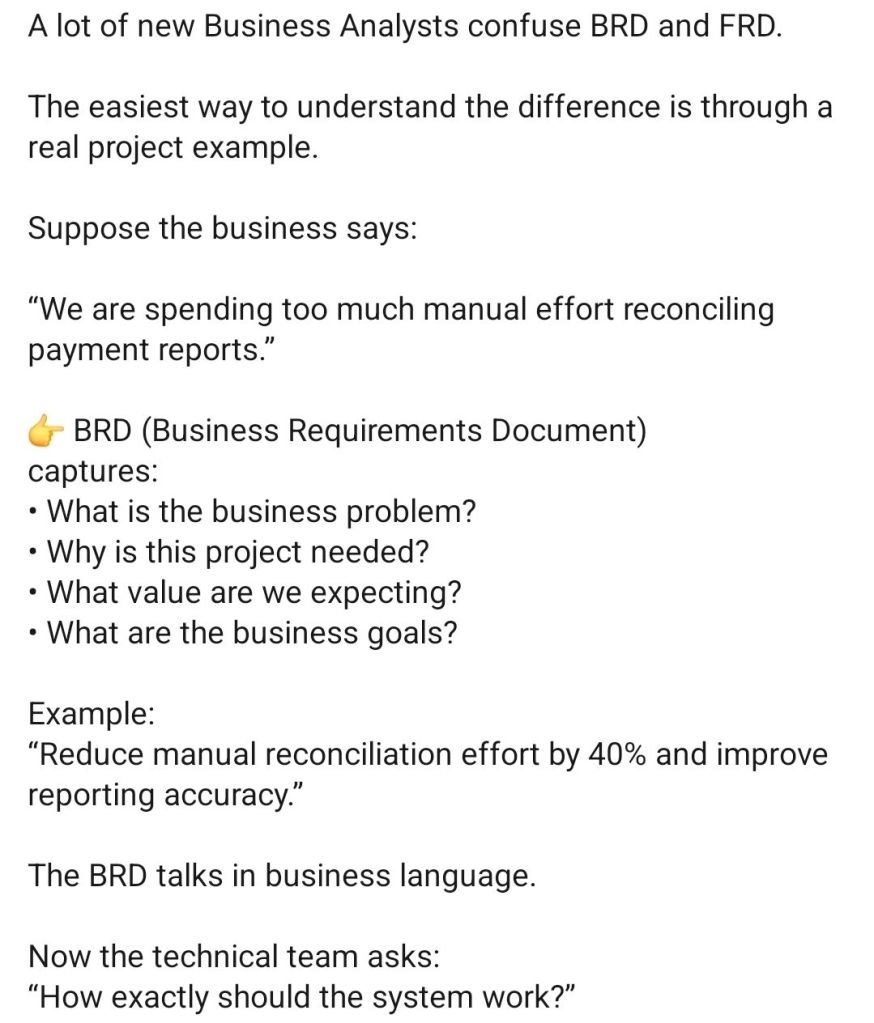
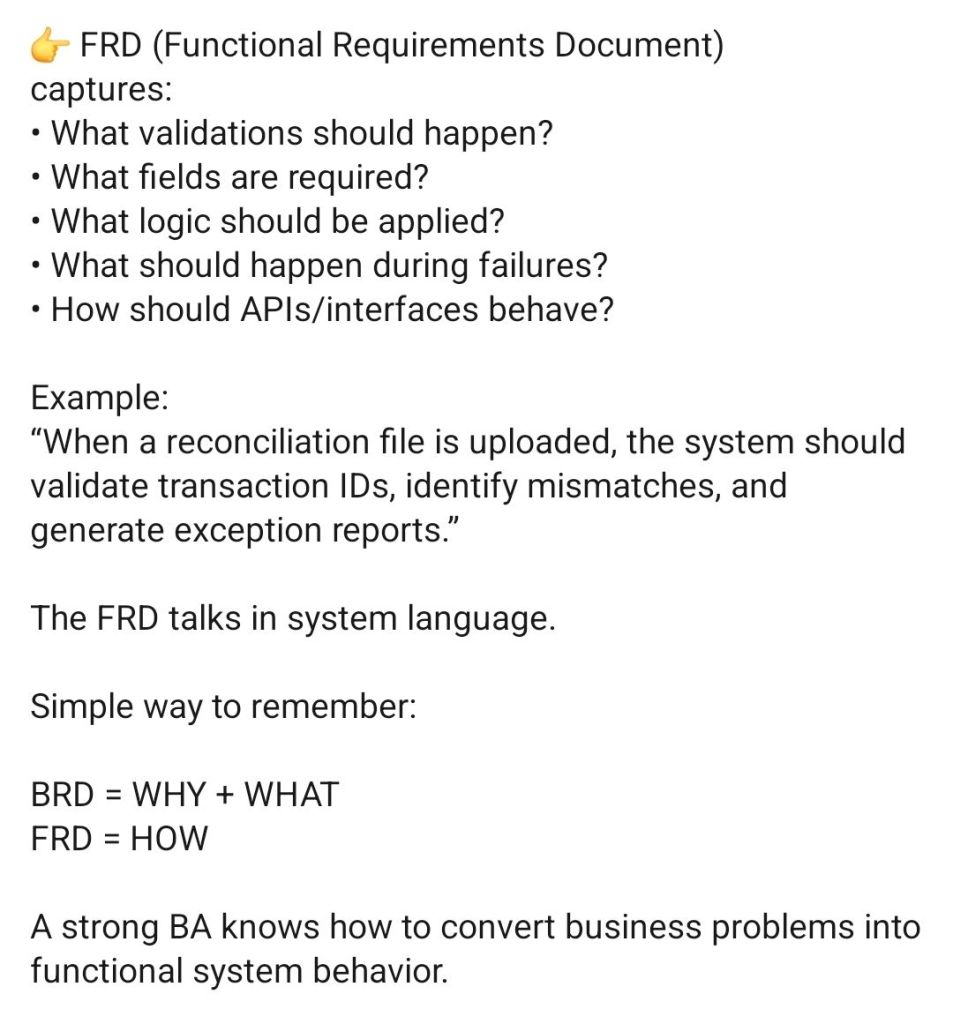
Business Requirements Document BRD vs Functional Requirements Document FRD

Business Requirements Document BRD vs Functional Requirements Document FRD

Action Man Soldier by parity, with gripping hands, 1970s – used to have one 😀

Action Man Soldier by parity, with gripping hands, 1970s

The Action Man Soldier with Gripping Hands is a legendary 12-inch military action figure produced in the UK by Palitoy under license from Hasbro. First introduced in 1973, this milestone version of the classic Action Soldier replaced the previous “hard hand” iterations with a new, soft plastic compound designed to realistically hold rifles, pistols, and equipment.

Era & Key Innovations

  • 1973 Debut: Palitoy launched the updated figure in a freshly illustrated box featuring the text “Now with Gripping Hands”.
  • Flock Hair: This era retained the realistic fuzzy blonde, brown, or auburn flock hair originally introduced in 1970.
  • Signature Details: The figure featured Action Man’s distinctive square jaw and the iconic copyrighted battle scar on the right cheek.
  • Body Construction: Built using the standard 1960s/70s articulation setup featuring internal elastic stringing, crimped metal eyelets, and metal rivets.

Equipment & Box Variations

The standard 1973 Action Man Soldier package underwent several production tweaks throughout the mid-1970s:

  • The 1973 Box: Early printings mistakenly listed “Gaitors” in the contents list on the packaging, though they were not actually included in the box.
  • The 1975 Update: Palitoy corrected the box text to remove the mention of gaiters, updated the artwork, and added a revised “made in Hong Kong” manufacturing credit.
  • Standard Gear: The standard uniform typically included olive green army denim fatigues (jacket and trousers), a flat black plastic beret, tall brown boots with dished soles, a life-size replica dog tag, and an Army Manual.

Collector’s Note on Condition

When seeking a vintage 1970s figure on marketplaces like eBay, pay close attention to the hands. The early 1973 flexible hand compound (often made of Kraton) is notoriously prone to perishing over time. It is highly common to find vintage figures where the hands have turned dark orange, gone completely hard, become brittle, or disintegrated entirely. Intact, supple original hands significantly drive up the figure’s valuation.

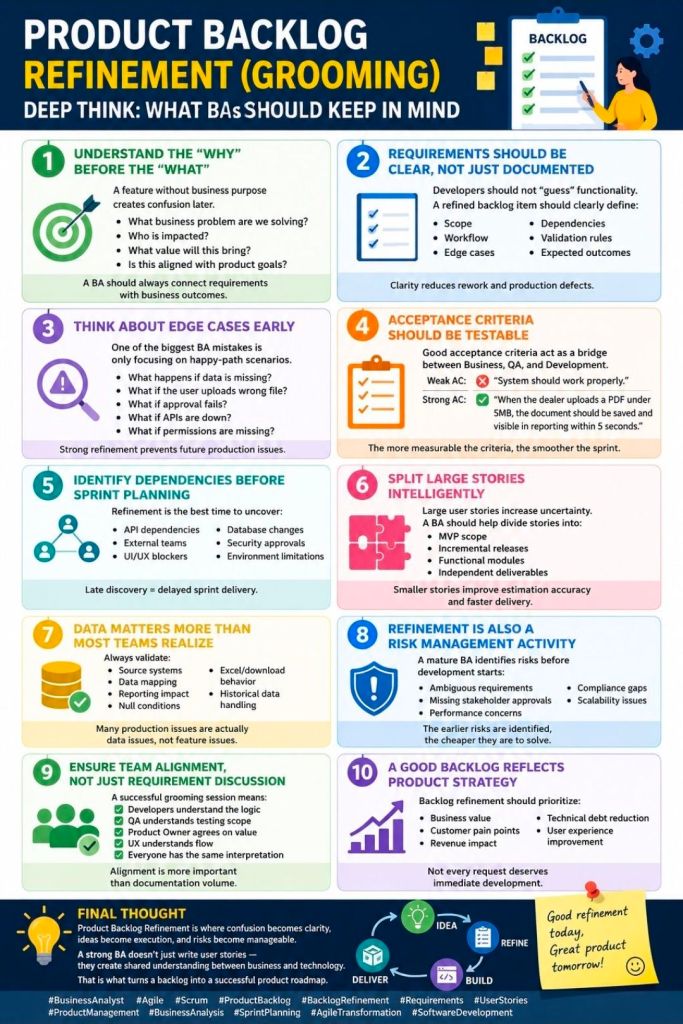
Agile Product Backlog Refinement Grooming

Agile Product Backlog Refinement Grooming

HPE NonStop MultiBatch Batch Job Scheduling Overview and Timeline

Overview

MultiBatch is a robust enterprise workload automation and job scheduling tool designed specifically for the HPE NonStop parallel architecture. Developed originally by Insider Technologies and subsequently managed/distributed alongside partners like ETI-NET, it enables organization-wide task automation.

MultiBatch provides high-performance, concurrent execution of batch schedules across multiple nodes. It natively supports both Guardian and OSS environments. By utilizing modern graphical user interfaces (GUIs) alongside traditional Pathway components, it eliminates the need for complex, manual, and high-maintenance TACL or JCL scripts.

Core Technical Capabilities

  • Parallel Execution: Uses NonStop architecture to execute batch workloads concurrently across one or multiple nodes.
  • Advanced Scheduling: Drives automated tasks based on time parameters, complex intervals, custom calendars, and direct cross-job dependencies.
  • Reusable Infrastructure: Environment classes—including PARAM, ASSIGN, DEFINE, FD, and environmental variables—can be configured once and safely shared across various jobs.
  • Inbuilt Disaster Recovery: Features automated, built-in monitor recovery mechanisms to preserve execution integrity during hardware or connection failures.
  • Seamless Migration: Simplifies moving production workloads between environments via a deep migration utility that automatically handles environmental translation without manual intervention.

Timeline Breakdown by Year and Version

The evolution of MultiBatch highlights its transition toward broader configuration capacities, simplified environment integrations, and eventual product lifecycle milestones.

2020: Operational and Security Consolidation

  • Version Focus: Pre-v10 Infrastructure (Enterprise Deployments)
  • Key Enhancements:
    • Formalized rigid separation of internal user roles, establishing MBAT.OPS for view-only status monitoring and MBAT.CONFIG for structural schedule maintenance.
    • Refined the “Migrator” module, eliminating manual TACL operations when extracting and inserting batch definitions across network test and production nodes.
    • Added capabilities allowing all MultiBatch jobs to execute securely under the system Batch Monitor Process (BMON) owner or explicitly assigned application user IDs.

2022 (November): MultiBatch Version 10.0 Launch

  • Version Focus: Architecture Restructuring
  • Key Enhancements:
    • Define Classes: Introduced reusable Define Classes to group environments cleanly.
    • Scale Upgrades: Upgraded the main Batch Monitor (BMON) subsystem to actively scale up to 2,500 jobs concurrently.
    • Parameterization: Modified the core configuration boundaries and decoupled utility processes (MBPARHK) to seamlessly process non-step related records across database structures.
    • Clean Up: Formally deprecated legacy components including UTCSV to reduce technical debt.

2023 (February): MultiBatch Version 10.1 Refinement

  • Version Focus: OSS Overhaul & Operational Control
  • Key Enhancements:
    • OSS Reworking: Re-engineered and optimized support for Open System Services (OSS) processes, granting them equal parity with traditional Guardian tasks.
    • On-Demand Execution: Enabled ad-hoc “On Demand Job” invocation directly through user channels without altering master schedules.
    • Conditional Variables: Extended character limits for Conditional Parameter values up to 100 characters.
    • Subsystem Unification: Consolidated Event Timer processing and Conditional Parameters fully into standard MultiBatch menus, auditing frameworks, and security tracking.
    • Control Commands: Integrated the SWITCH BMON command line directive to easily pass control between operational monitors.
    • Interface Upgrade: Rolled out an entirely new Ops GUI Server to modernize scheduling visibility.

Current Era: Version 10.2 Maintenance & Commercial Sunset

  • Version Focus: Version 10.2 / Product Lifecycle Transition
  • Key Milestones:
    • MultiBatch 10.2: Operates as the current, stable production tier delivered via ETI-NET, featuring deep parameterization and centralized network deployment protocols.
    • Commercial End of Life: As of March 1, 2026, new software licenses for Multi-Batch are no longer available for purchase. The software has officially reached the end of its commercial sales life.
    • Ongoing Support: Existing license holders retain full permission to execute, maintain, and run the product inside their environments according to their long-term licensing agreements.

HPE NonStop MultiBatch Batch Job Scheduling Overview and Timeline