Mark Whitfield’s Project Management templates are a comprehensive, editable suite of over 200 documents designed for Agile, Waterfall, and PRINCE2 methodologies, based on over 30 years of project delivery experience. Available through his website (click banner link above), Etsy, Flevy and Eloquens, these templates are designed to be used across the project lifecycle—from initiation to closure—and include lifetime free updates and additions.
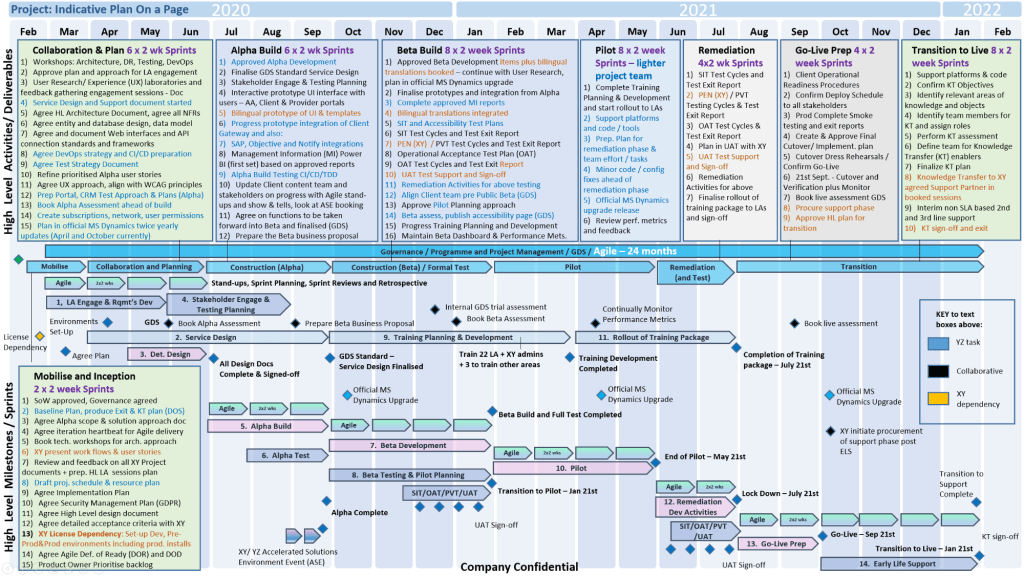
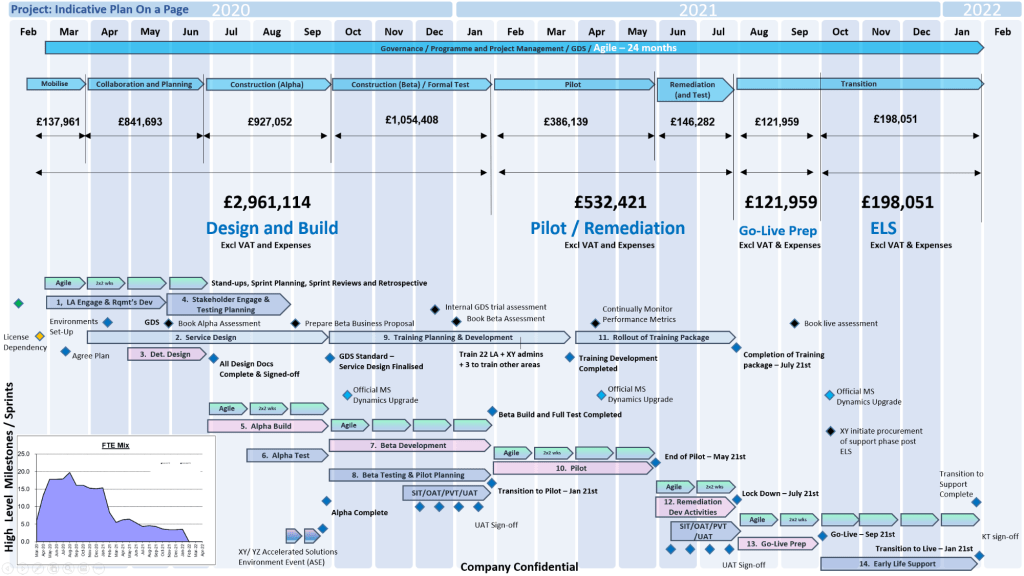
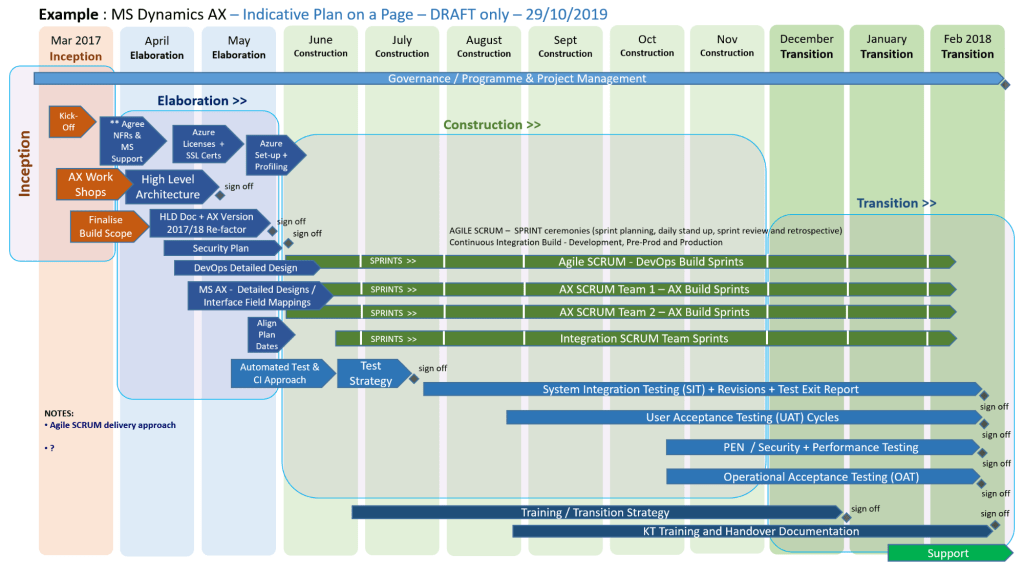
Many POaP Plan On a Page examples
Full Overview of Mark Whitfield Template Bundle
The bundle, priced at around £38.00 (as of April 2026), provides tools for MS Excel, Word, PowerPoint, and MS Project (.mpp).
1. Planning & Scheduling
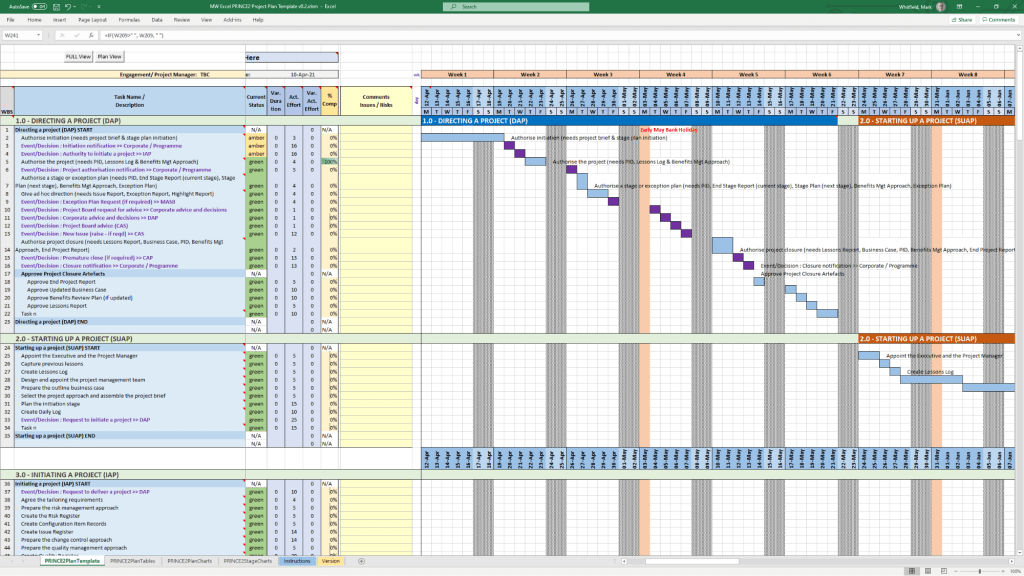
MS Project (MPP / MSP): Includes full PRINCE2 7th Edition, Agile Scrum, and SDLC (Software Development Life-cycle) plans.
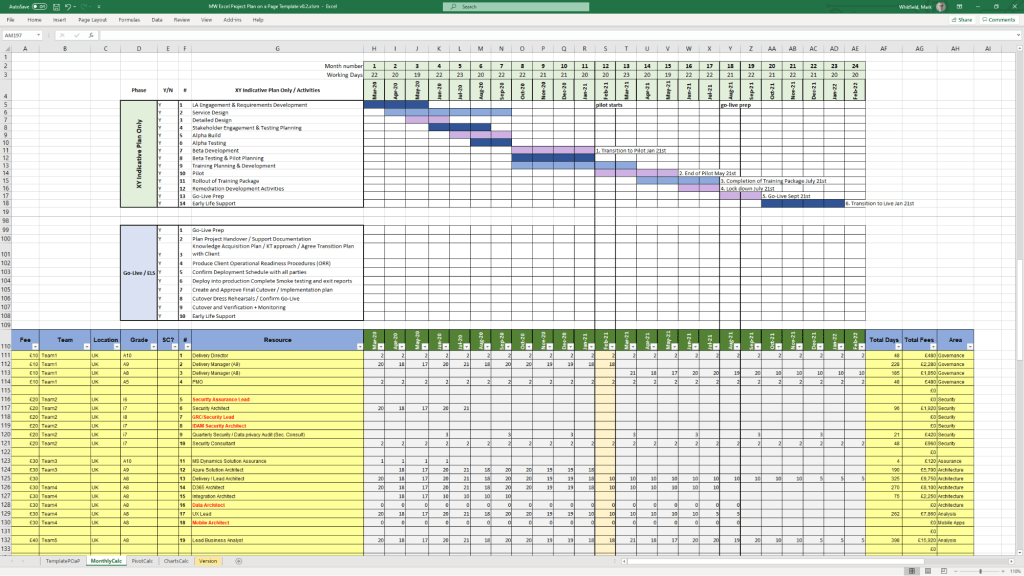
Excel Detailed Plans: Includes Gantt chart tracking for users without MS Project.
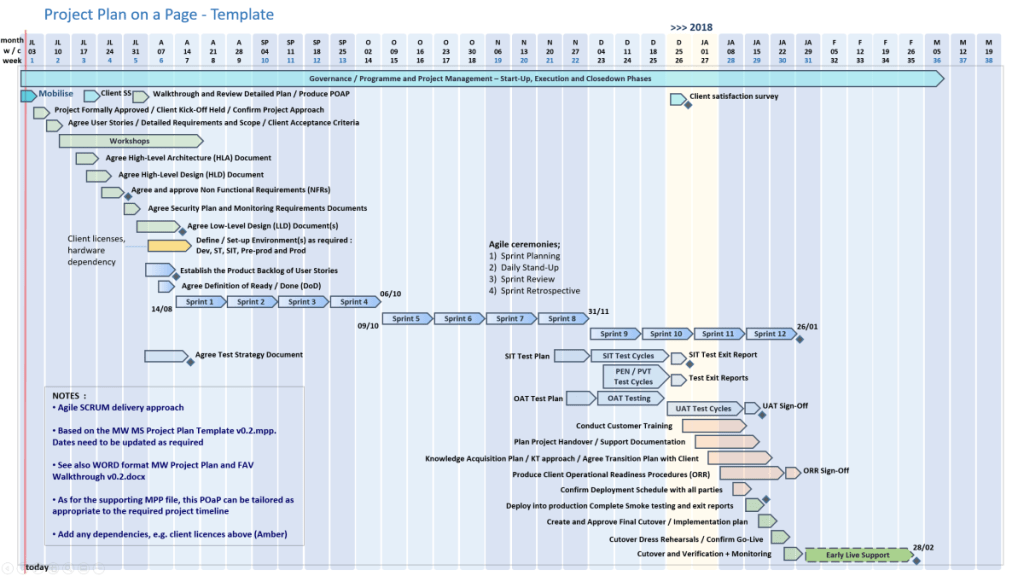
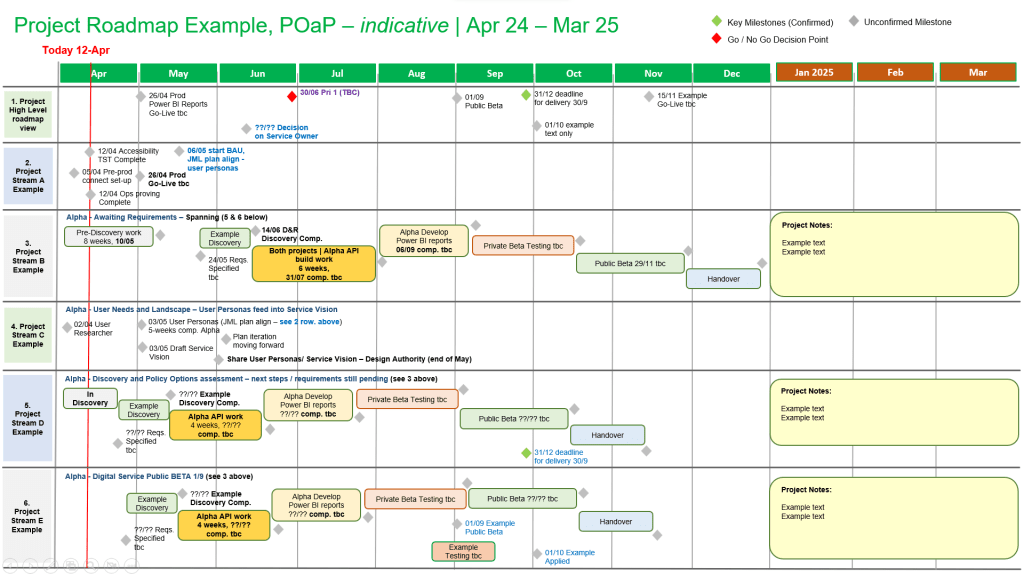
Plan on a Page (POaP): Over 30 PowerPoint examples for executive summaries.
Example Plan On a Page POaP
2. PRINCE2 & Governance
Full set of over 200 documents including Project Initiation Document (PID), Business Case, Work Packages, Risk Management Strategy, and Configuration Item Records.
Reporting: Highlight reports, exception reports, and end-stage reports.
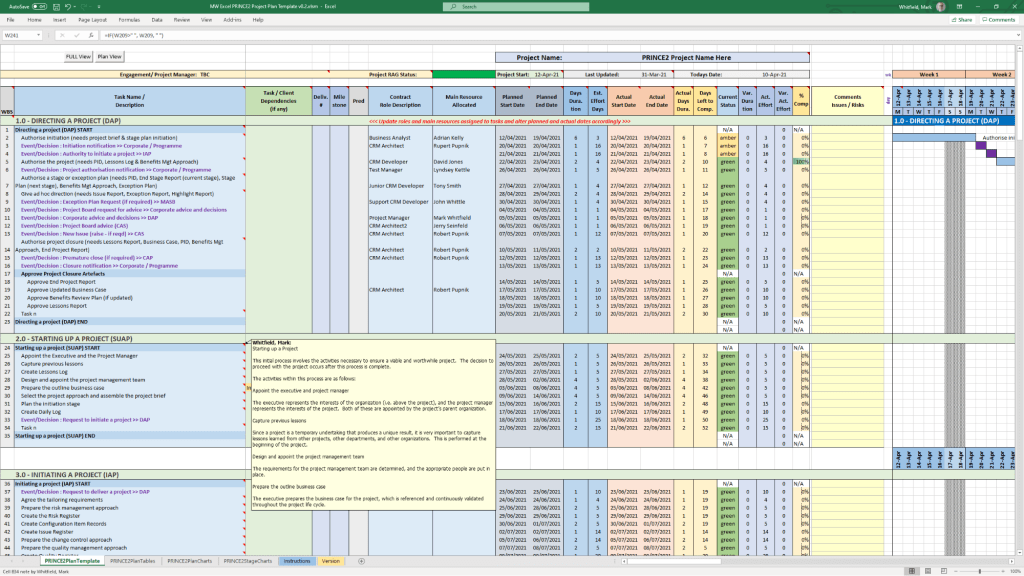
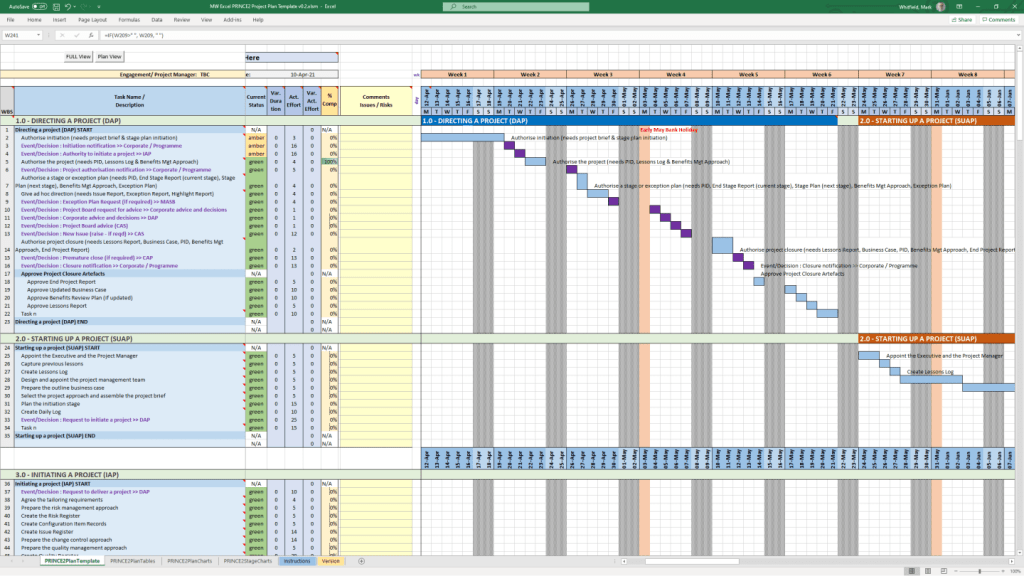
PRINCE2 Delivery Plan in MS Excel Example
3. Tracking & Risk Management
RAID Logs: Comprehensive trackers for Risks, Assumptions, Issues, and Dependencies (includes simple and detailed versions).
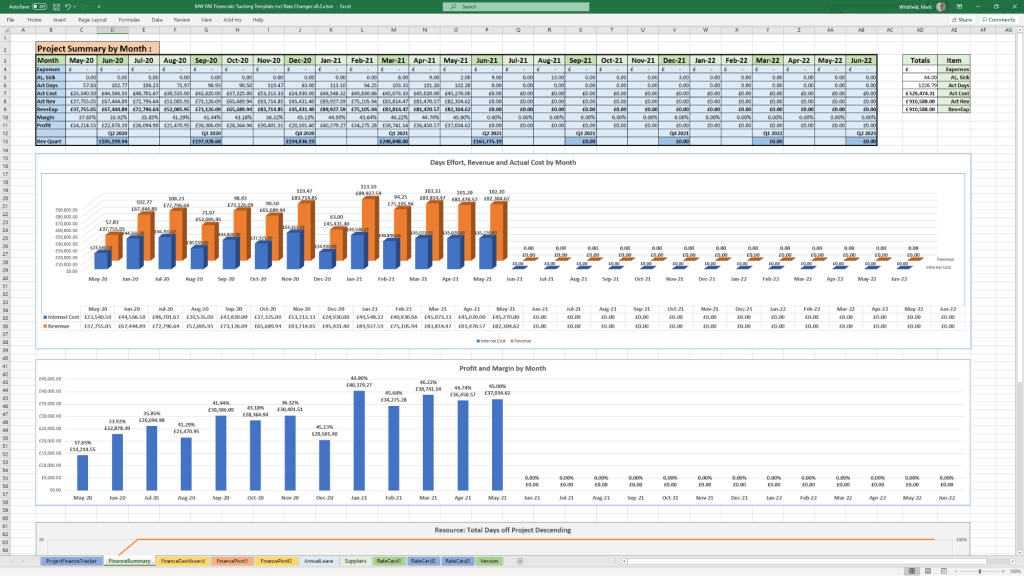
Finance Trackers: Simple and full project finance trackers (forecasting, actuals, variance, rate lookups).
SDLC: Detailed Software Development Life-cycle plans.
Deployment/Runbook: Execution and release planning documents.
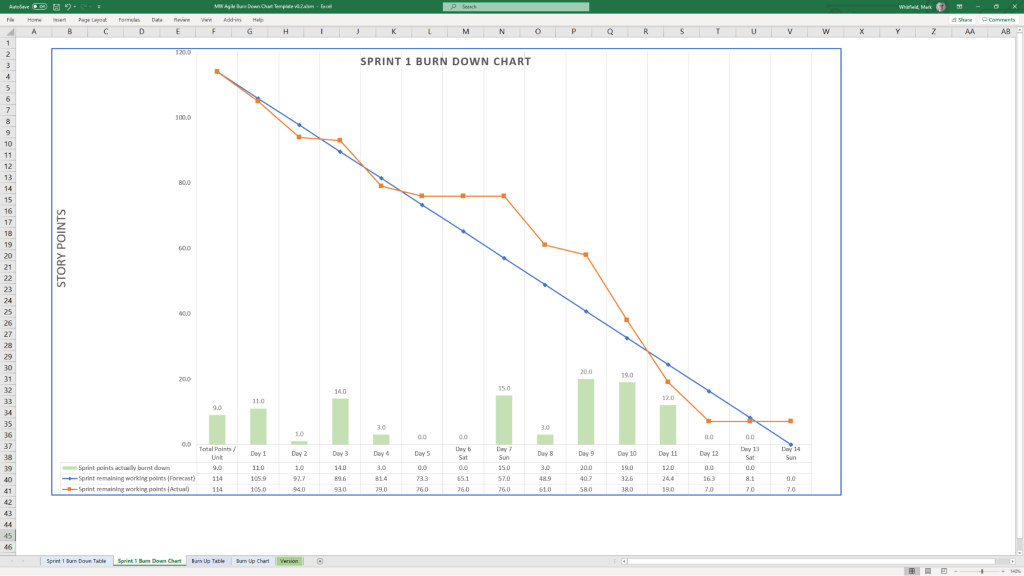
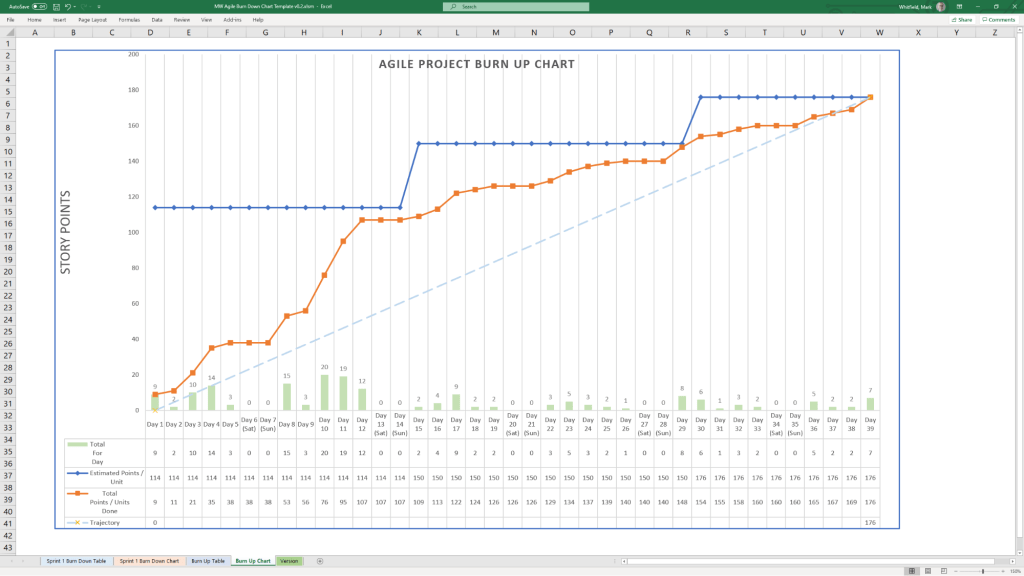
Agile: Burn down and burn up charts.
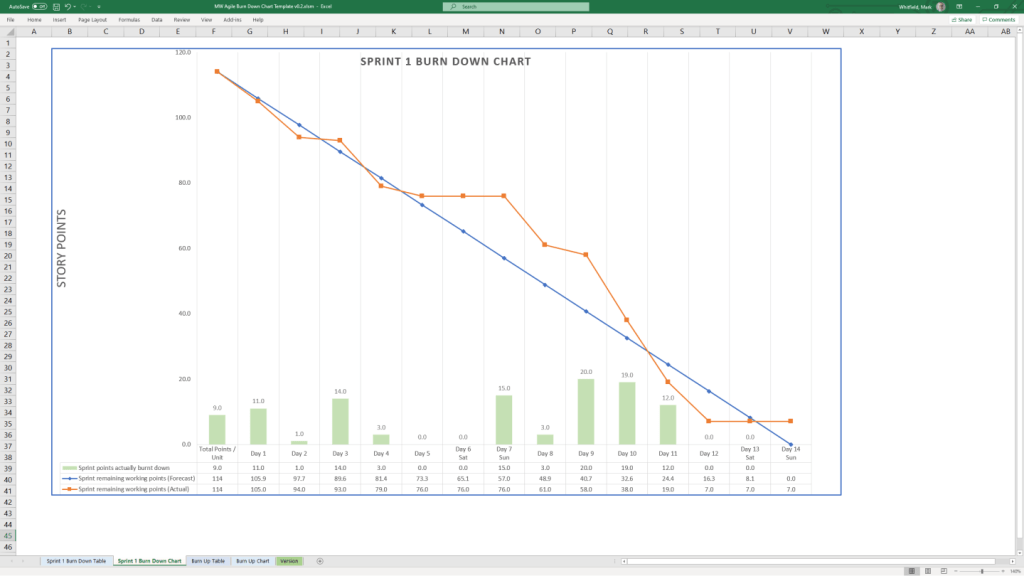
Example Agile Scrum Burn Down Chart
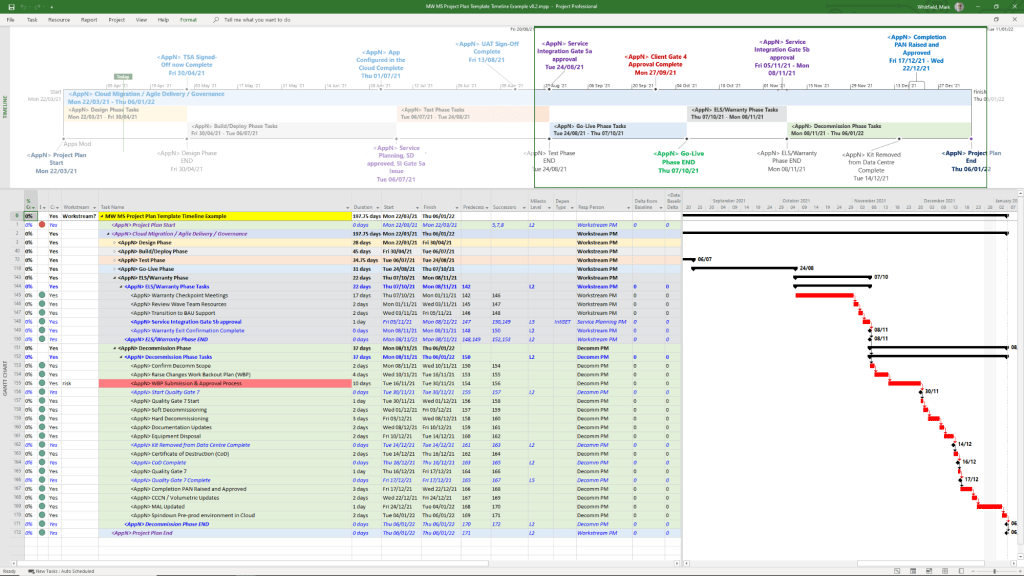
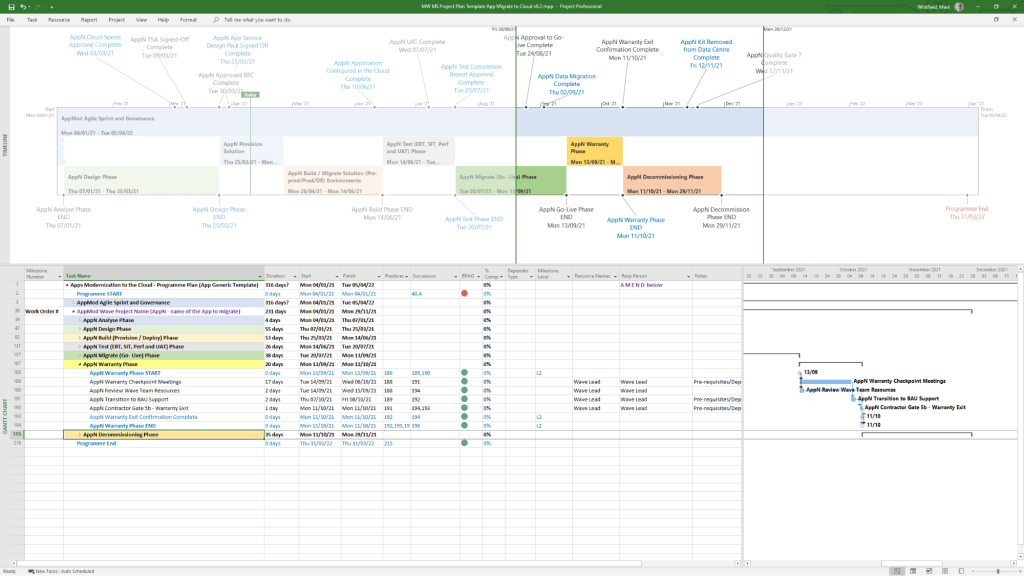
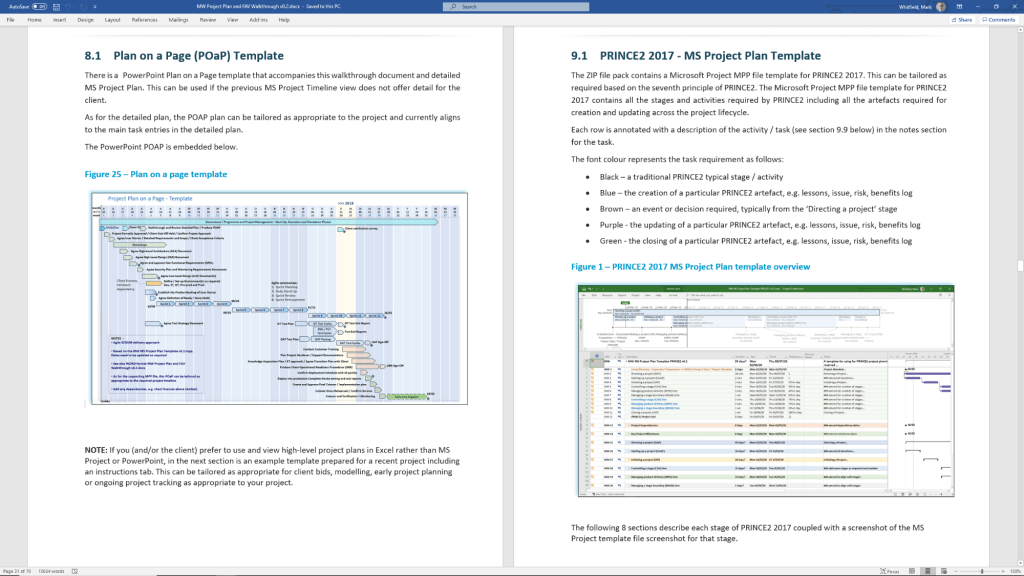
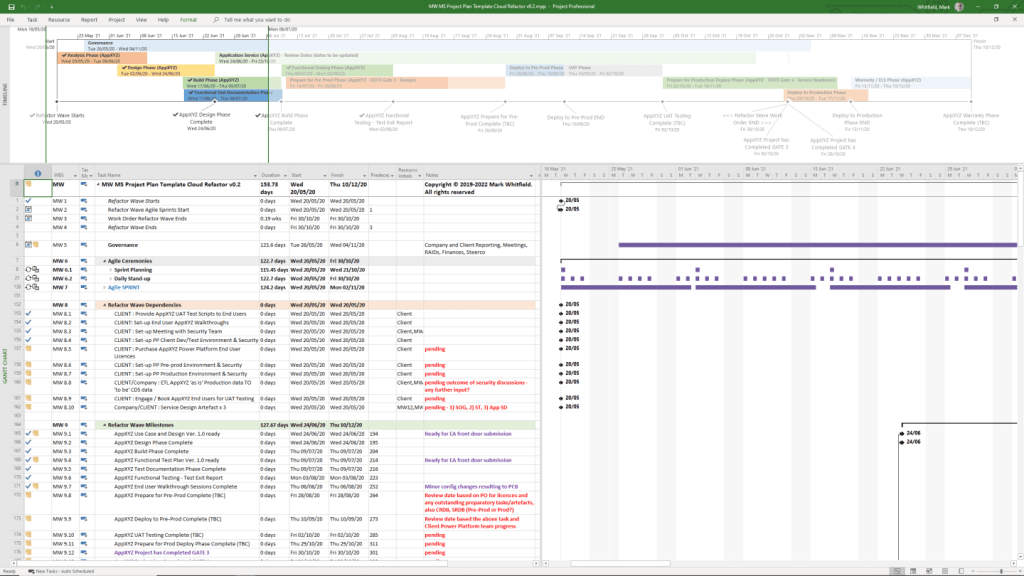
Detailed Timeline by Project Life Cycle
Templates provide detailed MS Project (.mpp) and Excel schedules that map out the standard project life cycle over time. The plans include notes and color-coded tasks (black: standard task, blue: artifact creation, brown: decision/event, purple: artifact update).
sp/ARCHITECT was a pioneering electronic banking and funds-transfer software suite originally developed by the Runcorn-based firm The Software Partnership (TSP). Following its acquisition by the American firm Deluxe Electronic Payment Systems in 1994, the Runcorn office became the European hub for what was then rebranded as Deluxe Data.
sp/ARCHITECT electroinic banking by The Software Partnership TSP
Overview
The Runcorn operation specialised in high-availability, mission-critical banking software, specifically the sp/ARCHITECT-BANK product. This software was designed to run on Tandem Computers (now HPE NonStop), which were known for their fault-tolerant architecture. The “sp/ARCHITECT” platform was highly valued for its client-server design, allowing it to be adapted for various hardware brands, including Unix-based systems.
Historical Timeline
Mid-1980s: The Software Partnership (TSP) is co-founded by Nigel Walsh. The company starts developing online banking systems in Timperley before moving to Runcorn.
1990: The firm establishes itself at Norton House in Crowngate, Runcorn, focusing on electronic banking software for major clients like TSB and Bank of Scotland.
1992: The Runcorn office relocates to Wingate House on Northway.
1994: Deluxe Electronic Payment Systems (a subsidiary of Deluxe Corporation) acquires The Software Partnership for an undisclosed sum. The acquisition is aimed at helping Deluxe expand its global presence and accelerate the use of the sp/ARCHITECT suite.
1994–1995: The Runcorn office operates as Deluxe Data, providing software design, coding, and 24-hour support for international clients including Rabobank.
2000: Following a series of corporate shifts, the company name changes to EFD eFunds.
2007: By this year, the operation has transitioned to Fidelity National Information Services (FIS) and is based in Aegon House, Daresbury, Warrington.
sp/ARCHITECT electroinic banking by The Software Partnership TSP
Mark Whitfield provides a comprehensive suite of over 200 editable project management templates designed for both Agile and Waterfall delivery. These tools are built based on 21+ years of IT project delivery experience and are formatted for Microsoft Office (Excel, Word, PowerPoint) and Microsoft Project (MPP).
Core Planning & Tracking Templates
Detailed Project Plans: Comprehensive MPP and Excel files covering the full Software Development Life-cycle (SDLC), including Waterfall and Agile Scrum sprints.
Plan on a Page (POaP): High-level visual summaries in PowerPoint or Excel for client reporting and executive snapshots.
RAID Log: A central tracker for Risks, Actions, Issues, and Dependencies, often including tabs for Decisions, Opportunities, and Lessons Learned.
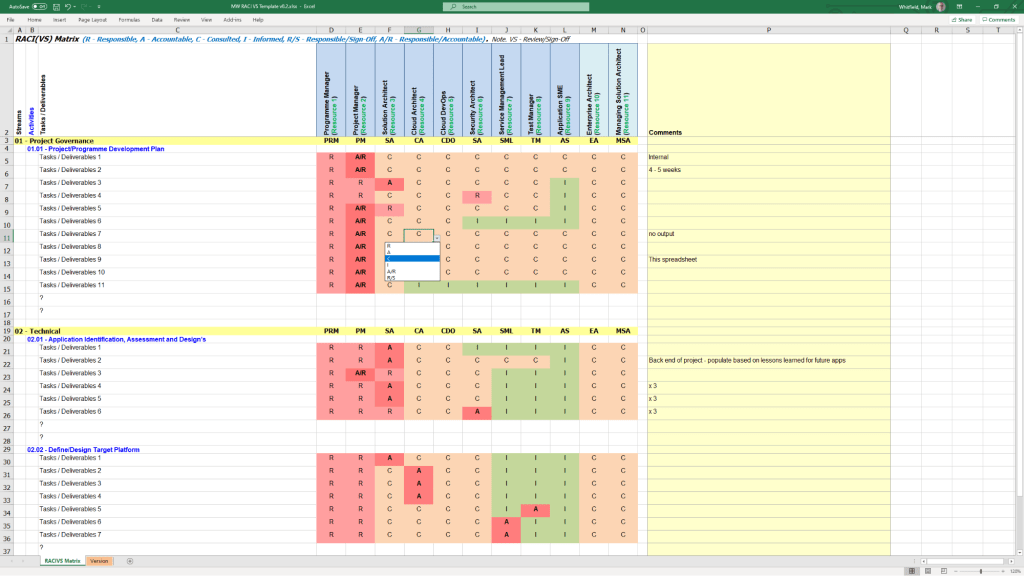
RACI Matrix: A tracker to define roles and responsibilities (Responsible, Accountable, Consulted, Informed).
Financial & Resource Management
Project Finance Tracker: Tools for managing project budgets, including forecasts vs. actuals, margin analysis, and variation tracking.
Resource Planning: Grid templates for costing project resources per phase and tracking team allocations.
Benefits Realisation: A spreadsheet to compare initial project goals against actual business outcomes and costs.
Reporting & Communication
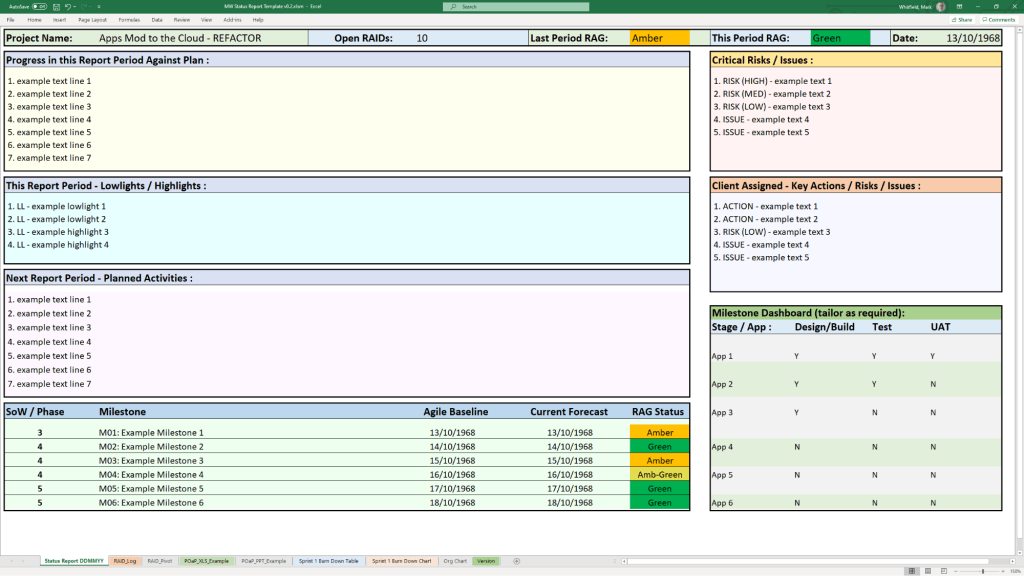
Status Reports: Weekly and monthly templates in Word and PowerPoint that include milestone dashboards, project health indicators, and “next steps”.
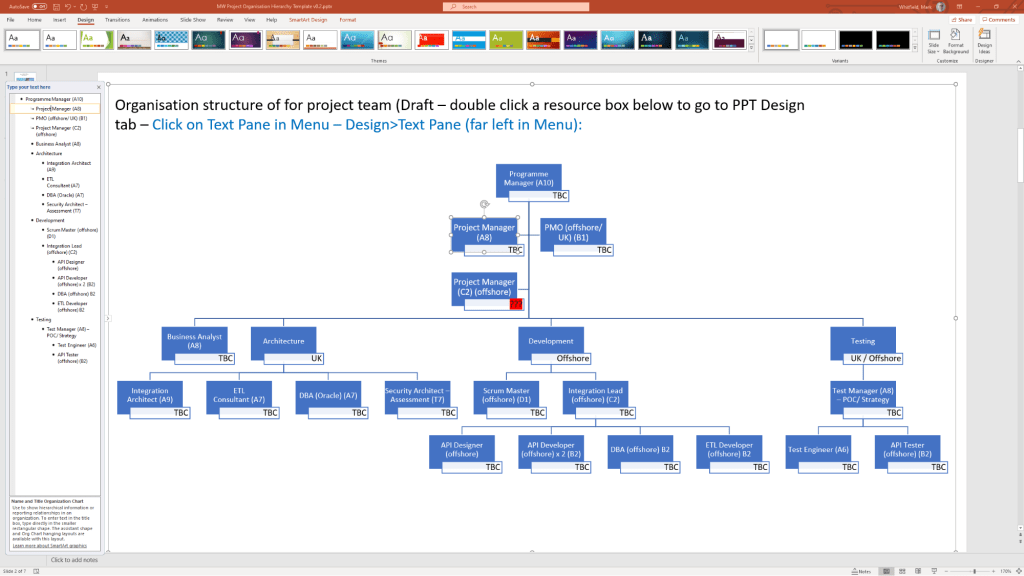
Organisation Charts: Templates for visualising the project hierarchy and stakeholder contacts.
Agile Dashboards: Excel-based Burn Down and Burn Up charts for teams that do not have access to tools like Jira.
Methodology Support
PRINCE2 7th Edition: Specific MPP and Excel templates aligned with the latest PRINCE2 standards.
Agile Frameworks: Templates for Sprint Planning, Daily Stand-ups, and Sprint Retrospectives.
These templates are available for purchase on Mark Whitfield’s official site and typically include free lifetime upgrades.
Free Upgrade Project Management Templates Download by focus area
Mark Whitfield is an experienced IT Project Manager and software developer who has spent over 22 years specialising in HP NonStop (formerly Tandem) systems. He is currently an Engagement Project Manager at Capgemini.
Career & Expertise
Whitfield’s career in HP NonStop began in 1990 and includes significant technical and leadership roles across the financial and technology sectors:
Software Development: Early in his career, he worked as a programmer for The Software Partnership (later Deluxe Data/FIS), focusing on electronic banking software like sp/ARCHITECT on Tandem mainframes.
Insider Technologies (1995–2013): He spent 18 years at Insider Technologies as a Senior Development Engineer and Project Manager. His work involved:
Developing monitoring and diagnostic software such as Reflex 80:20, Reflex ONE24, and RTLX (Real-Time Log Extraction) for payment systems.
Managing the first HP OpenView Operations Smart Plug-In certification for the NonStop platform.
Designing XPERT24, a performance tracking product for ACI’s XPNET layer.
Capgemini (2016–Present): As an Engagement Project Manager, he has led digital projects for major clients in the automotive, government, and aerospace sectors, including a cloud migration for UK Government applications.
Technical Contributions
Publications: He has authored articles for globally published journals like The Connection (2013), discussing topics such as querying terabytes of legacy transaction log data from NonStop mainframes.
Project History: He has managed high-value projects, including a £5 million initiative to migrate legacy HP NonStop software to AIX-based technologies for a large UK retail bank.
Training: He is trained in various NonStop-specific technologies, including TAL (Transaction Application Language), COBOL85, PATHWAY, and NonStop SQL.
Whitfield also maintains a professional website, mark-whitfield.com, where he provides project management templates and resources related to HP NonStop and Tandem systems.
Mark Whitfield provides a comprehensive bundle of over 200 editable project management templates designed for Agile, Waterfall, and PRINCE2 methodologies. These templates are based on over 30 years of project delivery experience and are available for purchase via his official website or Etsy shop.
Key Template Categories
The bundle includes a wide variety of tools across different formats (Excel, PowerPoint, Word, and MS Project):
Planning & Scheduling:
Plan on a Page (POaP): Over 30 PowerPoint slide examples for executive-level summaries.
Detailed Project Plans: MS Project (MPP) and Excel templates for SDLC, PRINCE2 7th Edition, and Agile Scrum projects.
Gantt Charts: Built-in tracking views for both MS Project and Excel.
Tracking & Control:
RAID Logs: Comprehensive logs for tracking Risks, Actions, Issues, and Dependencies, plus additional tabs for Change Requests and Lessons Learned.
RACI Matrix: Templates to define project roles and responsibilities (Responsible, Accountable, Consulted, Informed).
Finance Trackers: Tools for internal and external forecast vs. actual costs, including margin and variance tracking.
Agile Specific Tools:
Burn Down & Burn Up Charts: Excel-based alternatives when tools like Jira are unavailable.
Agile Story Dependency Tracking: Specifically for managing dependencies between agile stories and external suppliers.
Reporting & Governance:
Status Reports: Weekly and monthly templates in Word and PowerPoint formats.
Stakeholder Analysis: Power/interest mapping and engagement plan templates.
Benefits Realisation: Plans to track project outcomes against initial business goals.
Purchase Benefits
Lifetime Upgrades: Once purchased, all future additions and updates to the template package are provided for free.
Compatibility: Templates are designed for Microsoft Office 365 but also include Excel versions compatible with earlier software.
Support: The package typically includes walkthrough Word documents to guide users on how to use each major template.
Mark Whitfield HP NonStop Tandem experience & Project Management Templates
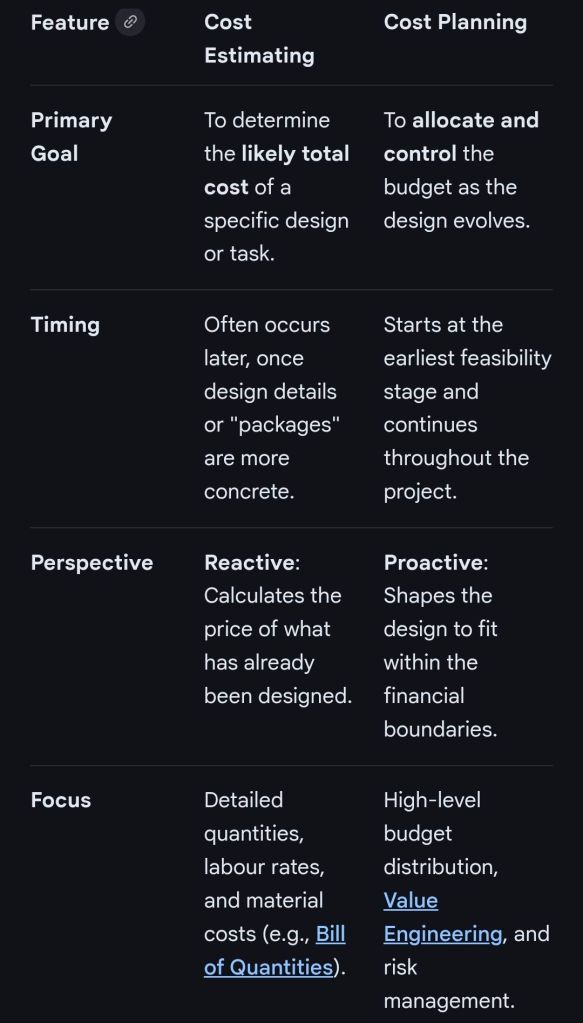
In professional project management and construction, cost estimating and cost planning are complementary processes that occur at different stages to ensure a project remains financially viable.
1. Cost Estimating: “What will it cost?”
Cost estimating is a technical assessment used to predict the expenditures for a project.
Early Stages: Estimates might be “rough orders of magnitude” based on square footage or historical data (e.g., cost per hotel room).
Later Stages: Estimates become precise “tender figures” used by contractors to bid on work, factoring in current market rates for labour and materials.
Function: It answers the question: “Is this specific plan affordable?”.
2. Cost Planning: “How do we stay on budget?”
Cost planning is a strategic framework that manages a project’s financial health from start to finish.
Iterative Process: It is a “living document” that is updated as the project moves from concept to detailed design.
Allocation: It breaks down the total budget into “elemental” targets (e.g., spending £X on the foundation and £Y on finishes).
Control: If an estimate for one part of the project exceeds its target, the cost plan guides the team to adjust the design or find savings elsewhere to keep the overall project on track.
Standard Professional Guidance
The Royal Institution of Chartered Surveyors (RICS) provides the New Rules of Measurement (NRM 1), which standardises how these processes work together:
Order of Cost Estimate: Establishing the initial viability of a project.
Elemental Cost Plan: Breaking the estimate down into functional parts.
Cost Checking: Continually comparing design changes against the cost plan to prevent overspending.