API (Application Programming Interface) for Business Analysts BA

An API (Application Programming Interface) is a set of rules that lets different software programs communicate and share data with each other. Think of it like a waiter in a restaurant: you (the application) place an order (a request), and the waiter takes it to the kitchen (the server) and brings back exactly what you asked for.

API Application Programming Interface for Business Analysts BA
API (Application Programming Interface)
for Business Analysts BA

How They Work

  • The Request: One program asks another for specific data or actions using an API call.
  • The Rules: The API dictates exactly how this request must be formatted to ensure security and consistency.
  • The Response: The receiving program processes the request and sends the requested information or executes the task.

For business analysts (BAs), APIs are crucial business enablers that connect systems, automate workflows, and drive revenue. Categorizing APIs helps BAs identify technical impacts, scope integration requirements, and align solutions with strategic business goals.

Categorization can be divided into three primary frameworks: Access Level, Business Purpose, and Architecture Style.

1. By Access Level (Audience)

This categorization defines who has permission to use the API and dictates security requirements.

  • Internal (Private) APIs: Developed by a company strictly for internal use. These connect backend systems (e.g., a CRM talking to an ERP) or allow different internal departments to share data securely.
  • Partner APIs: Shared specifically with external business partners or vendors. These require strict authentication and agreements to streamline supply chain or B2B operations (e.g., granting a distributor inventory access).
  • Public (Open) APIs: Exposed to developers and the general public to foster third-party integrations, app development, or ecosystem growth. They often require an API key or OAuth for tracking usage.

2. By Business Purpose (API-led Connectivity)

This approach, often used in integration methodologies like MuleSoft, categorizes APIs by their role in the enterprise architecture.

  • System APIs: Unlock data directly from core systems of record (e.g., a legacy database, an ERP, or a billing system).
  • Process APIs: Interact with and shape data across multiple systems to break down data silos (e.g., an API that takes order fulfillment data and formats it for shipment and inventory updates).
  • Experience APIs: Provide a business context for the data to be easily consumed by end-user interfaces like mobile applications, web portals, or chatbots (e.g., fetching a 360-degree customer view).

3. By Architecture Style (Technical Format)

While solution architects define the exact protocol, BAs must understand these styles to document data flow, map payloads, and communicate limitations with developers.

  • REST (Representational State Transfer): The most common web API standard. It uses HTTP methods to transfer data in simple formats like JSON.
  • SOAP (Simple Object Access Protocol): An older, highly structured protocol heavily used in enterprise and highly regulated industries (like banking and healthcare).
  • GraphQL: A query language for APIs that allows the client (e.g., a mobile app) to request exactly the specific data it needs, rather than fetching entire datasets.
  • Webhooks: Automated, event-driven APIs. Rather than a client requesting data, the server “pushes” data to the client the moment a specific event happens (e.g., sending a receipt to an app the instant a payment clears).
API Architecture Styles

Key API Concepts for BAs

Business analysts rarely build APIs, but they must understand high-level concepts to document API requirements effectively:

  • Payload: The data that is being sent (Request) or received (Response).
  • CRUD / HTTP Methods: The basic actions mapped to data. BAs need to understand GET (Read), POST (Create), PUT/PATCH (Update), and DELETE (Remove).
  • Status Codes: Standardized numbers that indicate the result of a request (e.g., 200 for success, 404 for not found, or 500 for server error).
  • Documentation: BAs use standards like Swagger/OpenAPI to interpret how an API should behave.
Status Codes, Standardized numbers that indicate the result of a request (e.g., 200 for success, 404 for not found, or 500 for server error)
API Status Codes – standardized numbers
that indicate the result of a request

API (Application Programming Interface) for Business Analysts BA

i_Pro_PM_Templates on Flevy is a comprehensive library of 19 project management templates

The i_Pro_PM_Templates collection on Flevy is a highly comprehensive library of 19 specialized project management resources spanning Waterfall and Agile methodologies. Developed by a contributor with 30 years of project management experience, these fully editable files (PowerPoint, Excel, Word, and MS Project) are designed to bridge corporate strategy with rapid execution. The complete 200+ template ZIP file package can be purchased here also.

The specific templates offered by i_Pro_PM_Templates are organized below by their operational category and core function:


🗺️ 1. Project Planning & Roadmaps

Designed to provide executive stakeholders and project teams with high-level visualization and structured timelines.

  • Plan on a Page (PoaP) 30+ Examples (PowerPoint): Synthesises complex timelines into an executive-ready format.
  • Project Plan on a Page Template (Excel): Tracks milestones and deliverables on a single sheet.
  • Waterfall Project Planner with Gantt View (Excel): Automates timeline bars and highlights dependency tracking.
  • Microsoft Project Plan Editable Templates (MPP / MSP): Implements native tracking with pre-populated project paths.

📊 2. Project Governance & Status Reporting

Built to manage the cadence of team communications, track risks, and report progress up to the PMO.

  • Weekly Status Report (PowerPoint): Provides standardized internal and external updates for Agile or Waterfall projects.
  • Status Report with PoaP, RAIDs, & Burn Down (Excel): Combines execution charts with high-level summary roadmaps.
  • MS Excel RAID Log: Acts as a central command log for Risks, Issues, Dependencies, and Change Requests (CRs).

⚖️ 3. Value & Benefits Realization

Ensures project delivery aligns with financial targets and baseline calculations.

  • Programme & Project Benefits Realization Tracker (Excel): Uses automated calculations and RAG status indicators to ensure value delivery.
  • Project Finance Tracker (Excel): Integrates budget forecasting against actual financial performance.

📦 4. Comprehensive Master Toolkits

Bundled suites that consolidate hundreds of micro-assets into standalone lifecycle frameworks.

  • 200+ Project Management Templates Bundle (PDF/ZIP): Features customizable documents covering initialization through to closeout.
  • PRINCE2 Templates + MPP & Excel Pack: Embeds strict PRINCE2 project stages into functional tracking models.
  • MS Teams Free Planner Guide: Details how to organize and execute Agile backlogs directly inside Microsoft Teams.

A detailed breakdown of the exact templates published by this author, structured by their functional use and file format, includes the following:

📈 PowerPoint (PPT / PPTX) Formats

  • Plan on a Page (POaP) Examples: A 39-slide PowerPoint document providing high-level visual roadmap templates to summarize project delivery tracks for executives.
  • Weekly Status Report (Internal / External): A 15-slide PowerPoint designed for recurring project health reporting, configured for both Agile and Waterfall methodologies.

📊 Excel (XLS / XLSX) Formats

  • Waterfall Project Planner: A structured spreadsheet featuring built-in, automated Gantt view generation tools for scheduling sequential project stages.
  • Status Report with Plan on a Page & RAIDs: A hybrid workbook integrating high-level timelines, a Risk, Assumptions, Issues, and Dependencies (RAID) log, and an Agile burn-down chart tracker.
  • PRINCE2 Editable Planning & Cost Tracker: A financial tracking sheet customized specifically to align with the stage-gate requirements of the PRINCE2 methodology.

🛠️ Microsoft Project (MPP) Formats

  • Microsoft Project Plan Template: A baseline editable project plan native schedule built for resource loading and critical path tracking.
  • PRINCE2 Microsoft Project Plan: A pre-configured schedule mapped directly to standard PRINCE2 product breakdowns and stages.

Requirement versus User Story

Project requirements are comprehensive, formal specifications describing what a system must do, usually written from the system’s perspective. User stories are short, lightweight descriptions of functionality written from the end-user’s perspective to drive team collaboration and conversation.

The distinction between these two approaches shapes how modern development teams capture scope and value.

Requirement versus User Story

Understanding Project Requirements

  • Focus: System functionality, technical constraints, and business rules.
  • Perspective: Written from the viewpoint of the system or product (e.g., “The system shall generate daily PDF reports.”).
  • Format: Heavy documentation, PRDs (Product Requirements Documents), spreadsheets, or flowcharts.
  • Methodology: Traditionally used in waterfall methodologies to define the scope comprehensively before any design or development begins.

Understanding User Stories

  • Focus: The user’s goal, business value, and the “why” behind a feature.
  • Perspective: Written from the viewpoint of the persona using the system (e.g., “As a Sales Manager, I want to review daily signups so that I can prioritize my sales calls.”).
  • Format: Short, often using the template: As a [User], I want to [Action], so that [Benefit]. Accompanied by Acceptance Criteria.
  • Methodology: An Agile-first tool. They are designed to act as an “invitation to a conversation” rather than a finalized contract.

Key Differences at a Glance

How They Work Together (The Hybrid Approach)

Most modern software development teams don’t abandon requirements entirely, but they shift the format. They use lightweight User Stories to represent the core value, and then pair them with technical Acceptance Criteria or supplementary design specifications to clarify the exact requirements the system must satisfy.

Requirement versus User Story

Planning Phase Business Analyst BA Deliverables

Planning Phase Business Analyst BA Deliverables

In the project planning phase, a Business Analyst (BA) focuses on establishing the project’s strategic alignment, defining the baseline scope, mapping stakeholders, and structuring the business analysis methodology.

The critical BA deliverables generated during this phase ensure clarity and alignment across technical and business teams before execution begins.

Strategic & Scope Foundations

  • Business Problem Statement: Defines the core issue being addressed, why it matters to the organisation, and the downstream impact if no action is taken.
  • Business Case: Outlines the shortlisted, viable operational choices alongside a comprehensive cost-benefit analysis to justify financial investment.
  • Project Vision & Scope: A high-level description outlining system boundaries, project objectives, and structural constraints to prevent eventual scope creep.

Stakeholder & Communication Frameworks

  • Stakeholder Map: Visually identifies all internal and external parties who are involved in, impacted by, or influential to the initiative.
  • Stakeholder Analysis Matrix: Assesses stakeholder interest and decision-making power to customize communication and engagement strategies.
  • Business Glossary: A standardized registry defining critical business terminology to maintain consistent vocabulary across different teams.

Process & Data Models

  • Current State Discovery (“As-Is” Models): A structured overview detailing exactly how today’s workflows, processes, and operating models currently function.
  • High-Level Context Diagram: Maps the structural boundaries of the proposed project, showing how the internal system will interact with external users and data systems.
  • Data Flow Diagram (DFD): Illustrates how information travels visually across different processes, storage points, actors, and functional areas.

BA Execution Planning

  • Business Analysis Approach: Outlines the core delivery methodology (e.g., Predictive/Waterfall or Adaptive/Agile), specifying the timelines, techniques, and governance processes to be used.
  • Requirements Management Plan: Defines the tools for managing requirements, access protocols, configuration control, and how changes to the baseline will be systematically approved.

Business Analyst and Sprint Planning focus

Business Analyst and Sprint Planning focus

In Agile and Scrum frameworks, the Business Analyst (BA) bridges the gap between high-level business vision and tactical development execution. During Sprint Planning, a BA’s primary focus is to ensure that the development team has absolute requirement clarity, eliminating assumptions before a single line of code is written.

The exact focus areas of an Agile Business Analyst are divided into pre-planning readiness, active session support, and look-ahead risk management.

1. Requirements Readiness (Definition of Ready)

The primary pre-planning objective for a BA is ensuring that the top of the Product Backlog satisfies the team’s “Definition of Ready” (DoR).

  • INVEST Criteria: Verifying that each Product Backlog Item (PBI) is Independent, Negotiable, Valuable, Estimable, Small, and Testable.
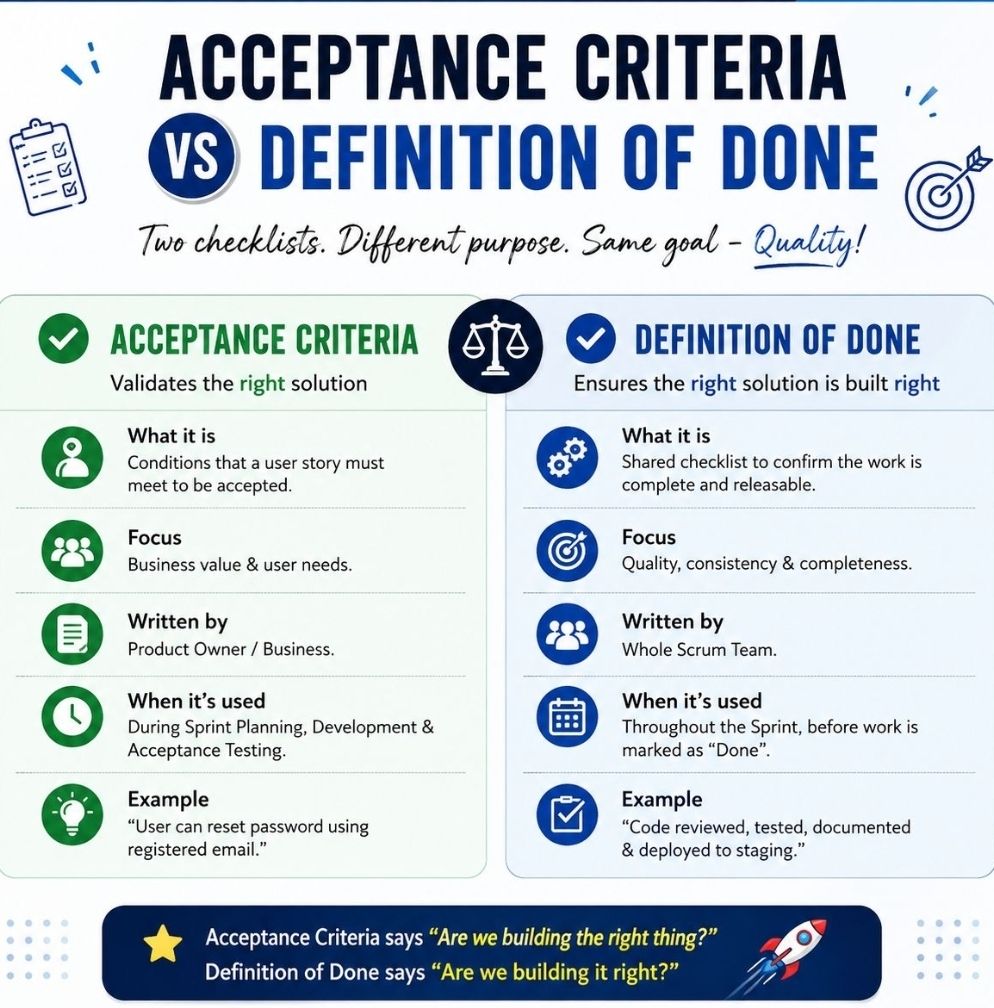
  • Acceptance Criteria: Drafting robust, edge-case-tested functional parameters (often using the Given-When-Then format) to govern testing.
  • Business Rules & Models: Mapping complex data models, workflows, and process rules so developers have clear visuals alongside text.

2. Guarding the Business Value and Sprint Goal

While the Product Owner (PO) sets the priority, the BA confirms that the selected sprint backlog items align logically to form a cohesive target.

  • Sprint Goal Formulation: Supporting the PO in defining a functional, clear objective for the iteration rather than a random collection of tickets.
  • Value Justification: Serving as the “voice of the user,” reminding the technical team why a feature is being built and how it affects the end-user journey.

3. Technical and Functional Bridging

During the actual planning meeting, developers break down stories into sub-tasks and estimate effort. The BA provides live context.

  • Assumption Removal: Answering immediate clarifications regarding data constraints, legacy dependencies, or UI expectations.
  • Sizing Support: Assisting the team during story-point estimation by highlighting hidden functional complexities that impact effort.
  • Scope Trimming: Helping break down massive User Stories (Epics) into bite-sized, single-sprint tasks if an item is deemed too large.

4. Dependency and Risk Mitigation

A critical focus for the BA is ensuring the upcoming sprint does not get blocked by outside factors.

  • Cross-Team Alignment: Identifying if a story relies on an API or data feed managed by an external team, ensuring those pieces are unblocked.
  • Non-Functional Requirements (NFRs): Catching frequently missed parameters, such as specific security protocols, compliance standards, or localization requirements, before work kicks off.

Project Templates Soft Storefront on Etsy

ProjectTemplatesSoft on Etsy is a highly rated, UK-based digital storefront specializing in professional-grade project management spreadsheets and presentation documents. Founded by Mark Whitfield, a veteran Senior Project Manager with over 30 years of delivery experience in IT and the Software Development Lifecycle (SDLC), the shop bridge the gap between heavy enterprise software and simple, flexible spreadsheets.

Example POaP PPT and XLS plan 
project templates
Example POaP PPT and XLS plan
project templates (200+ in all)

The products are distinctively built around core professional methodologies including PRINCE2 Waterfall and Agile Scrum frameworks. A key differentiator for this storefront is its customer lifetime model: all template upgrades and functional versions are 100% free after a single purchase by contacting the seller directly. The tools are fully unlocked, editable, and act as a portable alternative for teams or clients without expensive Microsoft Project licensing.


Product Breakdown by Category Focus

📊 1. Schedule Planning & Waterfall Templates

These tools target timeline generation, resource distribution, and critical path management for traditional structured delivery.

  • Waterfall Project Planner & Cost Tracker: An advanced interactive timeline engine that acts as a localized alternative to MS Project. It allows teams to map out milestones while calculating live run-rate expenditures.
  • Plan on a Page (POaP) Blueprint: A high-level stakeholder alignment presentation tool crafted in Microsoft Excel and PowerPoint designed to condense multi-layered delivery milestones into one scannable executive slide.
  • Work Breakdown Structure (WBS) Matrix: Structural templates built to parse complex client scopes into manageable, sequential project tasks.

🔄 2. Agile & Scrum Framework Toolkits

Tailored for modern software development environments executing iterative design, rapid deployments, and sprint-based task management.

  • Agile Scrum Master Pack: Complete tracking logs optimizing sprint velocities, backlog grooming sessions, and team capacity limits.
  • Sprint Burndown & Velocity Trackers: Automated graphical spreadsheets showing real-time target completions against literal daily sprint efforts.

📈 3. PMO Governance, RAID, & Operational Logs

Built for Programme Management Offices requiring cross-project transparency, strict risk mitigation, and central staff scheduling.

  • Central RAID Log: A classic, comprehensive spreadsheet designed to track project Risks, Assumptions, Issues, and Dependencies under strict corporate governance standards.
  • Resource Absence & Sickness Tracker: A centralized planner for operations managers to log annual leave, sickness intervals, and alternative project allocations.
  • Project Team Kick-Off Decks: Professionally designed slide blueprints that outline scope definitions, stakeholder communication channels, and milestone objectives during initiation phases.

Essential Shop & Resource Hyperlinks

Over 200 editable templates for both Agile & Waterfall / PRINCE2 frameworks

Mark Whitfield’s Project Management (PM) methodology relies on over 200 editable templates tailored for both Agile Scrum and Waterfall / PRINCE2 frameworks. Developed over 24 years of IT and digital delivery, the toolkit focuses on high-level reporting, rigorous risk control, and visual tracking to align teams with corporate governance.

Over 200 editable templates for both Agile & Waterfall / PRINCE2 frameworks
An example of many Plan On a Page
(POAP) templates

Templates by Category and Methodology

1. Detailed Planning & Scheduling

  • Methodology: Mapped to the Software Development Life Cycle (SDLC) for both sequential Waterfall phases and iterative Agile sprints.
  • Templates:
    • Microsoft Project (MPP): Fully loaded schedules detailing project inception, elaboration, construction, and transition.
    • Excel Detailed Plans: Work Breakdown Structure (WBS) mapped to sequential and date-driven task management with built-in RAG (Red/Amber/Green) status indicators.

2. Visual Reporting & Execution (Plan on a Page)

  • Methodology: Focuses on structural, executive communication to prevent scope creep and keep stakeholders aligned.
  • Templates:
    • POaP (Plan on a Page): High-level visual summaries designed for client presentations and quick-glance milestone tracking in Excel and PowerPoint.
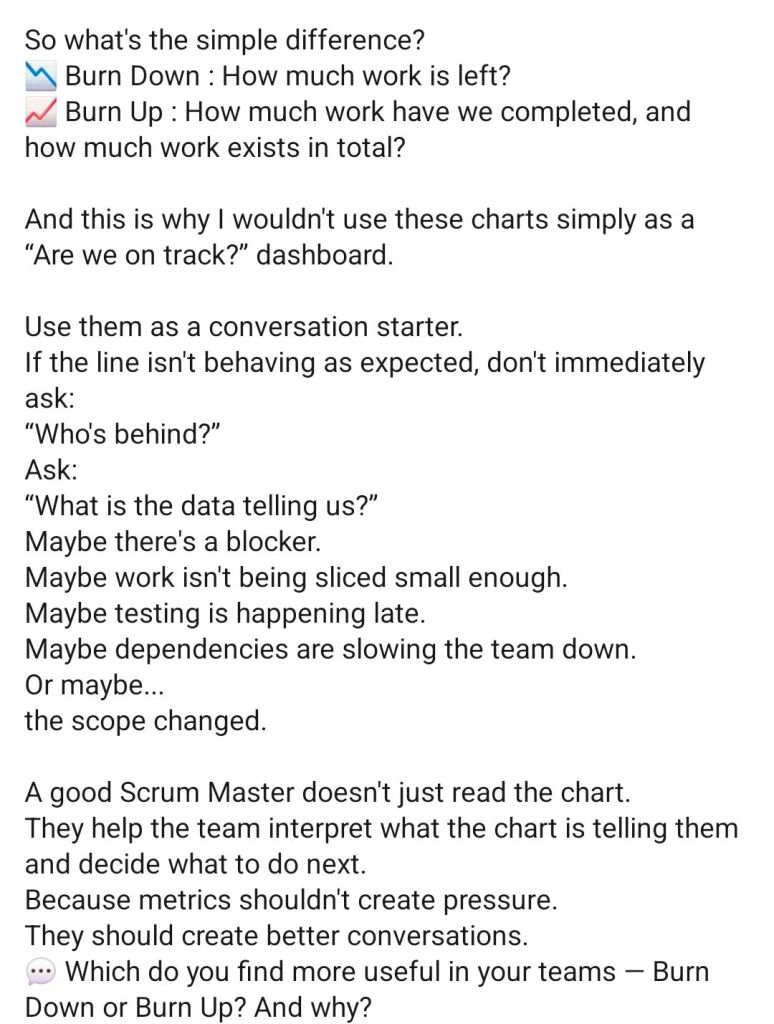
    • Burn-up / Burn-down Charts: Visual tracking metrics used in Agile Sprints to show progress towards delivery goals.

3. Risk & Governance Control

  • Methodology: Built on strict risk/action tracking and regular lessons learned to manage uncertainty throughout the project lifecycle.
  • Templates:
    • RAID Log: Centralized Excel trackers recording Risks, Actions, Issues, and Dependencies.
    • Change Requests/Decisions Log: Supplementary tabs within the RAID register to strictly manage scope changes and project governance.

4. Financial Trackers

  • Methodology: Ensures project adherence to contracted margins, tracking both internal/external costs and resource efforts.
  • Templates:
    • Budget & Resource Trackers: Spreadsheets for forecasting versus actual expenses, variance calculations, expense reporting, and margin tracking with pivot-table readiness.

5. Team RACI & Status Reporting

  • Methodology: Clearly defines stakeholder roles and communication frequencies (weekly/monthly) to ensure continuous monitoring and control.
  • Templates:
    • RACI Matrix: A mapping tool defining who is Responsible, Accountable, Consulted, and Informed.
    • Weekly Status Reports: Word/Excel templates detailing internal and external project health, current milestones, and upcoming sprints.

To explore the entire toolkit, you can visit the Mark Whitfield PROject Templates portal.

Enterprise Data Governance, Business Ownership to Trusted Data Value

Enterprise Data Governance, Business Ownership, Trusted Data Value
Text : Enterprise Data Governance > Business Ownership > Trusted Data Value
Enterprise Data Governance > Business Ownership > Trusted Data Value