API (Application Programming Interface) for Business Analysts BA

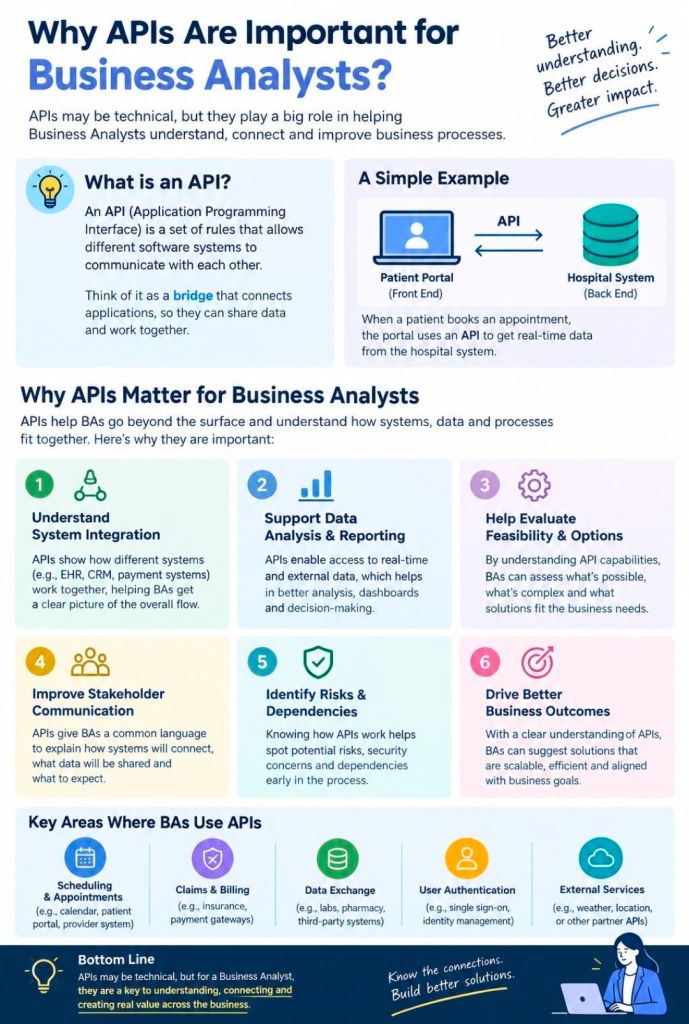
An API (Application Programming Interface) is a set of rules that lets different software programs communicate and share data with each other. Think of it like a waiter in a restaurant: you (the application) place an order (a request), and the waiter takes it to the kitchen (the server) and brings back exactly what you asked for.

API Application Programming Interface for Business Analysts BA
API (Application Programming Interface)
for Business Analysts BA

How They Work

  • The Request: One program asks another for specific data or actions using an API call.
  • The Rules: The API dictates exactly how this request must be formatted to ensure security and consistency.
  • The Response: The receiving program processes the request and sends the requested information or executes the task.

For business analysts (BAs), APIs are crucial business enablers that connect systems, automate workflows, and drive revenue. Categorizing APIs helps BAs identify technical impacts, scope integration requirements, and align solutions with strategic business goals.

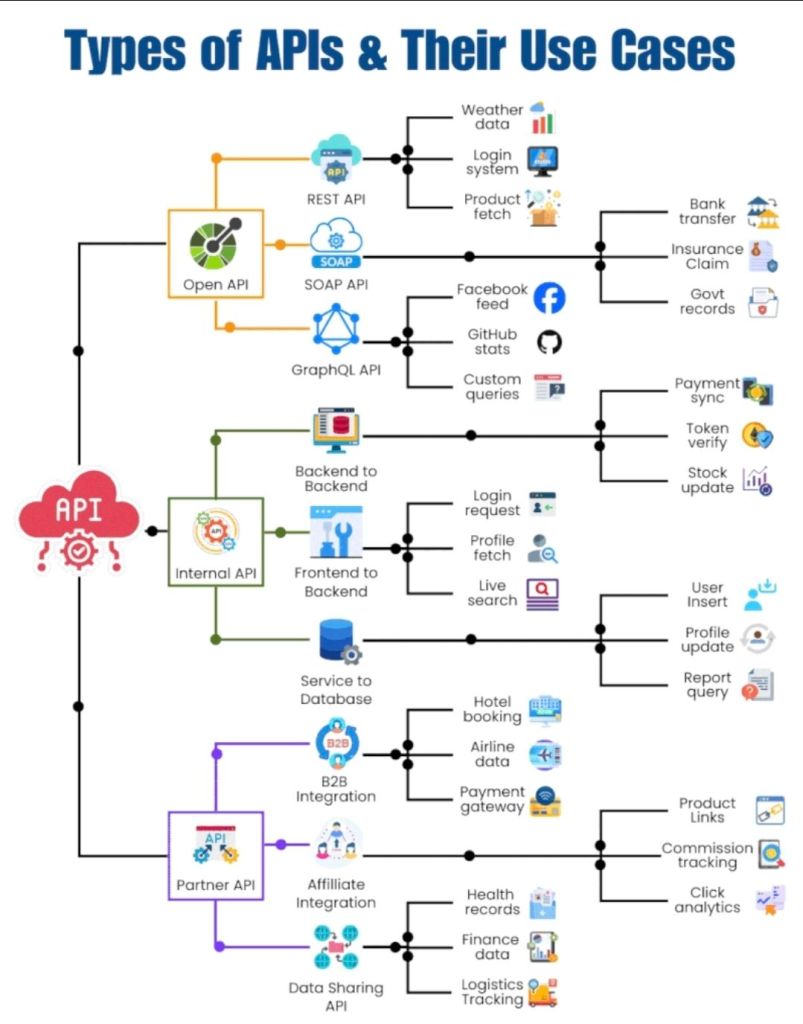
Categorization can be divided into three primary frameworks: Access Level, Business Purpose, and Architecture Style.

1. By Access Level (Audience)

This categorization defines who has permission to use the API and dictates security requirements.

  • Internal (Private) APIs: Developed by a company strictly for internal use. These connect backend systems (e.g., a CRM talking to an ERP) or allow different internal departments to share data securely.
  • Partner APIs: Shared specifically with external business partners or vendors. These require strict authentication and agreements to streamline supply chain or B2B operations (e.g., granting a distributor inventory access).
  • Public (Open) APIs: Exposed to developers and the general public to foster third-party integrations, app development, or ecosystem growth. They often require an API key or OAuth for tracking usage.

2. By Business Purpose (API-led Connectivity)

This approach, often used in integration methodologies like MuleSoft, categorizes APIs by their role in the enterprise architecture.

  • System APIs: Unlock data directly from core systems of record (e.g., a legacy database, an ERP, or a billing system).
  • Process APIs: Interact with and shape data across multiple systems to break down data silos (e.g., an API that takes order fulfillment data and formats it for shipment and inventory updates).
  • Experience APIs: Provide a business context for the data to be easily consumed by end-user interfaces like mobile applications, web portals, or chatbots (e.g., fetching a 360-degree customer view).

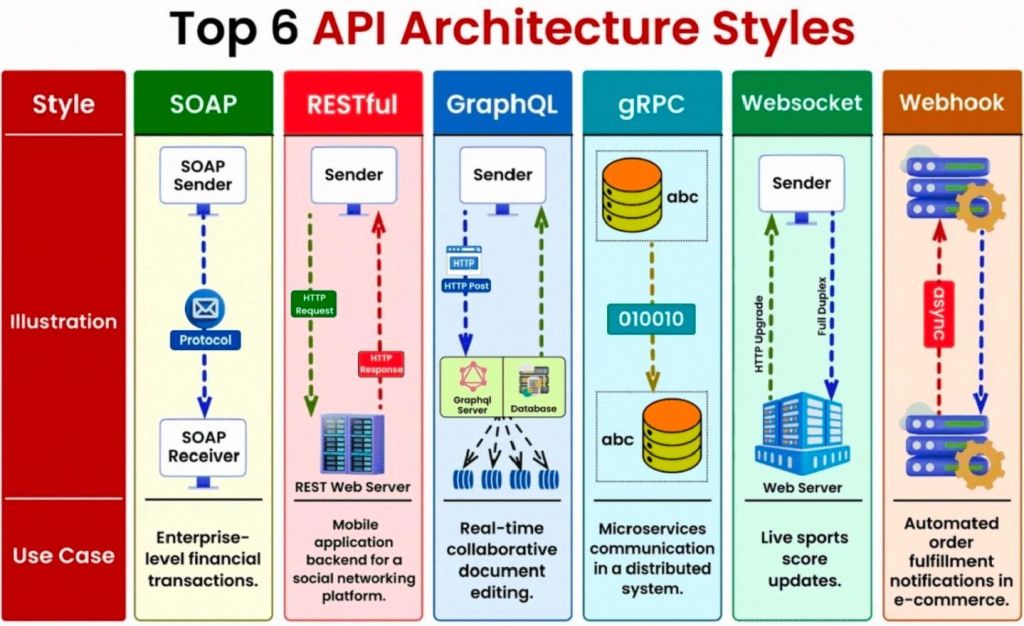
3. By Architecture Style (Technical Format)

While solution architects define the exact protocol, BAs must understand these styles to document data flow, map payloads, and communicate limitations with developers.

  • REST (Representational State Transfer): The most common web API standard. It uses HTTP methods to transfer data in simple formats like JSON.
  • SOAP (Simple Object Access Protocol): An older, highly structured protocol heavily used in enterprise and highly regulated industries (like banking and healthcare).
  • GraphQL: A query language for APIs that allows the client (e.g., a mobile app) to request exactly the specific data it needs, rather than fetching entire datasets.
  • Webhooks: Automated, event-driven APIs. Rather than a client requesting data, the server “pushes” data to the client the moment a specific event happens (e.g., sending a receipt to an app the instant a payment clears).
API Architecture Styles

Key API Concepts for BAs

Business analysts rarely build APIs, but they must understand high-level concepts to document API requirements effectively:

  • Payload: The data that is being sent (Request) or received (Response).
  • CRUD / HTTP Methods: The basic actions mapped to data. BAs need to understand GET (Read), POST (Create), PUT/PATCH (Update), and DELETE (Remove).
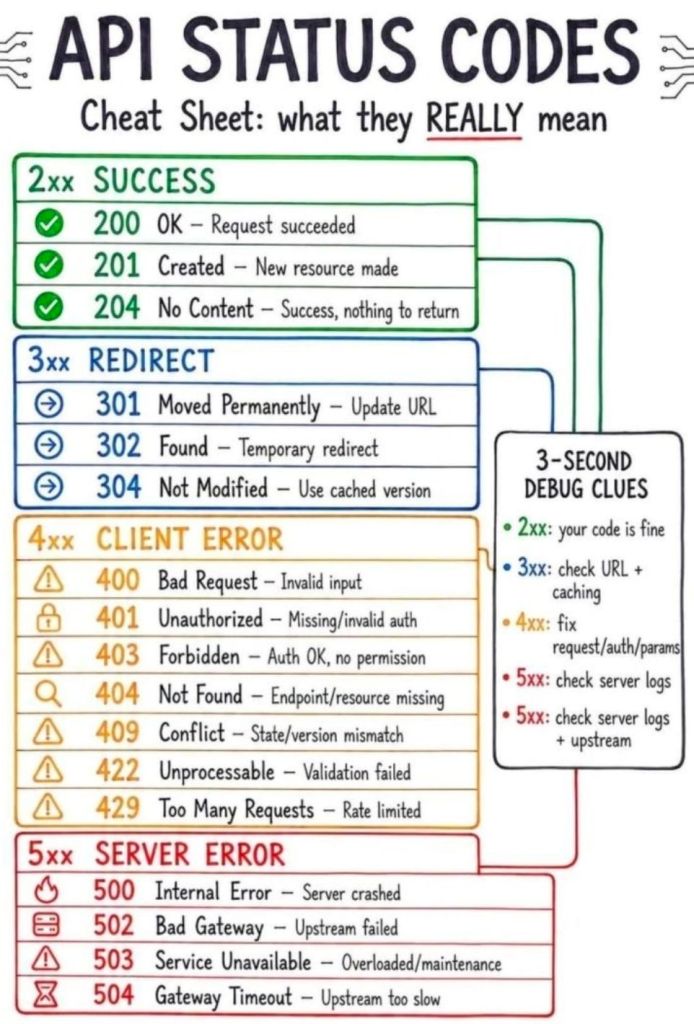
  • Status Codes: Standardized numbers that indicate the result of a request (e.g., 200 for success, 404 for not found, or 500 for server error).
  • Documentation: BAs use standards like Swagger/OpenAPI to interpret how an API should behave.
Status Codes, Standardized numbers that indicate the result of a request (e.g., 200 for success, 404 for not found, or 500 for server error)
API Status Codes – standardized numbers
that indicate the result of a request

API (Application Programming Interface) for Business Analysts BA