Business Analyst BA Levels and Responsibilities

Business Analyst BA Levels and Responsibilities
2. Business Analyst BA Levels and Responsibilities
BA Levels and Responsibilities

Scrum Master Cheat Sheet

Scrum Master Cheat Sheet

Project Management Templates inventory by category

Mark Whitfield’s PROject Templates consist of a comprehensive bundle of over 200 fully editable delivery templates. Designed specifically to bridge the gap between structured Waterfall frameworks (like PRINCE2) and iterative Agile Scrum execution, the inventory covers real-world artifacts across Microsoft Project (.mpp), Excel, PowerPoint, and Word formats.

1. Project Management Templates inventory by category
Plan on a Page example, 30+ in Zip pack

The detailed breakdown of Mark Whitfield’s template inventory by core management category includes:

1. Project Planning & Timelines

These templates provide multi-layered scheduling depending on whether you require micro-level tracking or high-level stakeholder summaries.

2. Project Management Templates inventory by category
Another POaP example in MS PowerPoint
  • Detailed Project Plans: Comprehensive Systems Development Life Cycle (SDLC) templates available in Microsoft Project (MSP .mpp) format as well as standalone MS Excel detailed plans for environments without dedicated project software.
3. Project Management Templates inventory by category
Microsoft MPP Project Plan example
  • Plan on a Page (POaP): High-level, visual Gantt chart timeline templates in Excel and PowerPoint used to present milestones and core roadmaps to executives.
  • Critical Path Analysis (CPA): Structural templates mapping out sequential, dependent tasks to isolate the project’s critical path.

2. Risk, Governance & Issue Tracking

Built to operationalise PMO toolkits, these documents streamline governance and day-to-day item control.

4. Project Management Templates inventory by category
RACI template example in MS Excel
  • Comprehensive RAIDs Logs: Extensive MS Excel workbooks equipped with built-in charts featuring dedicated tracking tabs for Risks, Actions, Issues, Opportunities, Lessons Learned, and Dependencies.
  • Change Requests & Variations: Specific registers within the RAIDs ecosystem to log scope creep, contract management deviations, and formal modifications.
  • RACI Matrices: Role assignment trackers specifying who is Responsible, Accountable, Consulted, and Informed across project milestones.

3. Financial & Resource Management

These templates bypass complex corporate accounting tools to provide lightweight, transparent budgeting directly inside spreadsheet architectures.

5. Project Management Templates inventory by category
Project Budget tracker in Microsoft Excel
  • Project Financial Trackers: Multi-currency ledgers charting forecasts vs. actual costs, profit margins, variation overheads, and project revenues.
  • Client Cost Summaries: Simplified external expense templates meant to be packaged and securely shared directly with clients.
  • Resource and Leave Trackers: Resource allocation grids accounting for internal/external team capacity, annual leave, and resource hierarchy organization charts.

4. Agile & Iterative Delivery Worksheets

For hybrid or purely iterative structures, the package includes functional Excel equivalents to modern project tracking tools.

6. Project Management Templates inventory by category
MS Excel template for an Agile Scrum Burndown chart
  • Velocity Tracking: Standalone, manually updatable Agile Burn Down and Burn Up charts.
  • Sprint Dynamics: Templates designed for managing Scrum backlogs and release cycles.
  • Team Performance: Includes functional icebreakers like the Project Team Quiz template to introduce light relief into daily stand-ups.

5. Communications, Onboarding & Reporting

Designed to cover critical communication pathways, from inception contracts to routine progress updates.

7. Project Management Templates inventory by category
Microsoft Excel Template project status report
  • Status Reports: Standardized weekly and monthly reporting templates distributed across one Word variation and two tailored PowerPoint styles.
  • Mobilisation Kits: Comprehensive PowerPoint decks built as a unified Programme Mobilise / Team On-boarding Kit.
  • Stakeholder Analysis Plans: Impact mapping grids that chart Stakeholder Influence vs. Impact to categorize communication strategies into Involve, Inform, Consult, or Monitor.
  • Core Governance Files: Standard administrative files including formal Meeting Minutes, Statement of Work (SOW) guidelines, and Benefits Realisation plans.

The complete toolkit is available directly via the official PROject Templates platform or via his authorized marketplace storefront, ProjectTemplatesSoft on Etsy. Both options include a lifetime guarantee of free additions and package upgrades.

Estimation in Scrum

Estimation in Scrum
Estimation in Scrum
2. Estimation in Scrum
3. Estimation in Scrum

Mark Whitfield’s PROject Templates

Mark Whitfield’s PROject Templates are widely regarded as a high-quality, practical toolkit for IT and project management professionals. Instead of generic, academic frameworks, his resources are built from over 24 years of real-world delivery experience managing multimillion-pound projects for blue-chip companies like Capgemini, Lloyds Banking Group, and Royal Mail.

The primary selling point of the package is that it bridges the gap between traditional structured governance (Waterfall, PRINCE2) and modern iterative execution (Agile Scrum).

Here is a breakdown of what makes them well-regarded and a few things to consider:

✅ Why They Are Considered Good

  • Massive, Comprehensive Bundle: The toolkit includes a downloadable ZIP file containing over 200 fully editable templates. This spans Microsoft Project (.mpp) plans, Excel dashboards, Word documents, and over 35 PowerPoint variations for stakeholder reporting.
  • Designed for “What Actually Works”: The tools are modeled after actual client-facing delivery rather than theoretical textbook guidelines. They cover essential day-to-day artifacts like RAIDs logs (Risks, Actions, Issues, Dependencies), Plan on a Page (POaP) timelines, RACI matrices, and financial forecast trackers.
  • No Software Lock-in: For teams or clients who do not use complex software like Microsoft Project or Jira, the toolkit provides lightweight Excel equivalents—such as standalone Excel POaPs and manual Burn Down/Up charts.
  • Exceptional Value & Free Lifetime Upgrades: Purchased directly via the PROject Templates Platform, the complete bundle is frequently offered at a promotional rate of £38.00. Once you buy it, all future additions and version upgrades are free for life.

⚠️ What to Keep in Mind

  • Microsoft Office Ecosystem: The templates are heavily built around MS Excel, Project, PowerPoint, and Word. While they work across multiple devices and cloud platforms, you will get the most seamless experience if your organization relies natively on the Microsoft 365 ecosystem.
  • Hybrid Focus: If your team is strictly 100% pure Agile and manages absolutely everything natively inside Jira or Asana, some of the hybrid Waterfall/Agile governance templates might feel more thorough than you strictly need. However, they are incredibly useful if you have to report Agile progress to traditional C-suite executives.

Red Flags in Project Management

Red Flags in Project Management

Key red flags in project management serve as early warning signs that a project is veering off course, helping teams intervene before minor issues escalate into total project failure.

Experienced project managers look past superficial status updates to spot subtle breakdowns in communication, planning, and execution.

The most common project management red flags are grouped by their operational area below:

📋 Scope and Strategy

  • Continuous Scope Creep: Requirements keep expanding without corresponding adjustments to the project budget, timeline, or resource allocation.
  • Misalignment with Strategy: The project outputs focus entirely on immediate tactical tasks but no longer deliver the overarching strategic value or outcomes the business actually needs.
  • Superficial Project Plan: Key details, task dependencies, or success metrics are absent, making it difficult for team members to know what steps to take next.

⏱️ Timeline and Tracking

  • Slipping Timelines with Vague Excuses: Milestones are consistently missed or delayed, accompanied by repetitive, hollow reassurances that the team will “catch up later”.
  • Always-Green Status Reports: The project status dashboard shows a perfect “Green” light week after week, yet actual deliverables are lagging or shifting behind the scenes.
  • Lack of a Baseline Schedule: Work is actively progressing in the field or in development, but the team still hasn’t officially approved or aligned on a baseline schedule to measure progress against.

👥 Team and Resources

  • Key Person Risk: Critical technical or institutional knowledge is held entirely by one individual, making the entire project fragile if they leave or step away.
  • Resource Misallocation: Shared resources or team members are over-allocated across multiple projects, leading to immediate bottlenecks and unmanaged dependencies.
  • PM-as-Glue Syndrome: The project is only moving forward because the project manager is manually holding everything together through sheer willpower, rather than relying on an established system.

💬 Communication and Culture

  • Sudden Drop in Engagement: Stakeholders stop replying to messages promptly, meeting attendance drops off significantly, or team collaboration noticeably slows down.
  • Decision Paralysis: Leadership or key decision-makers repeatedly delay approvals or shift their minds, leaving the execution team completely stalled.
  • False Alignment: Team members nod their heads and agree in meetings but silently push back or reverse decisions once the session is over.

A Beginner’s Guide to Agile and Scrum

A Beginner's Guide to Agile and Scrum
A Beginner’s Guide to Agile and Scrum

💡 Understanding the Core: Agile vs. Scrum

It is common to hear people use “Agile” and “Scrum” interchangeably, but they refer to two distinct concepts:

  • Agile is a guiding philosophy and mindset. It values flexibility, collaboration, and delivering value to users incrementally rather than all at once.
  • Scrum is a specific framework used to put Agile principles into practice. It provides a structured set of roles, meetings, and deliverables to get the work done.

Think of Agile as a healthy lifestyle, while Scrum is the specific workout routine you follow to stay in shape.


🔎 The Agile Philosophy

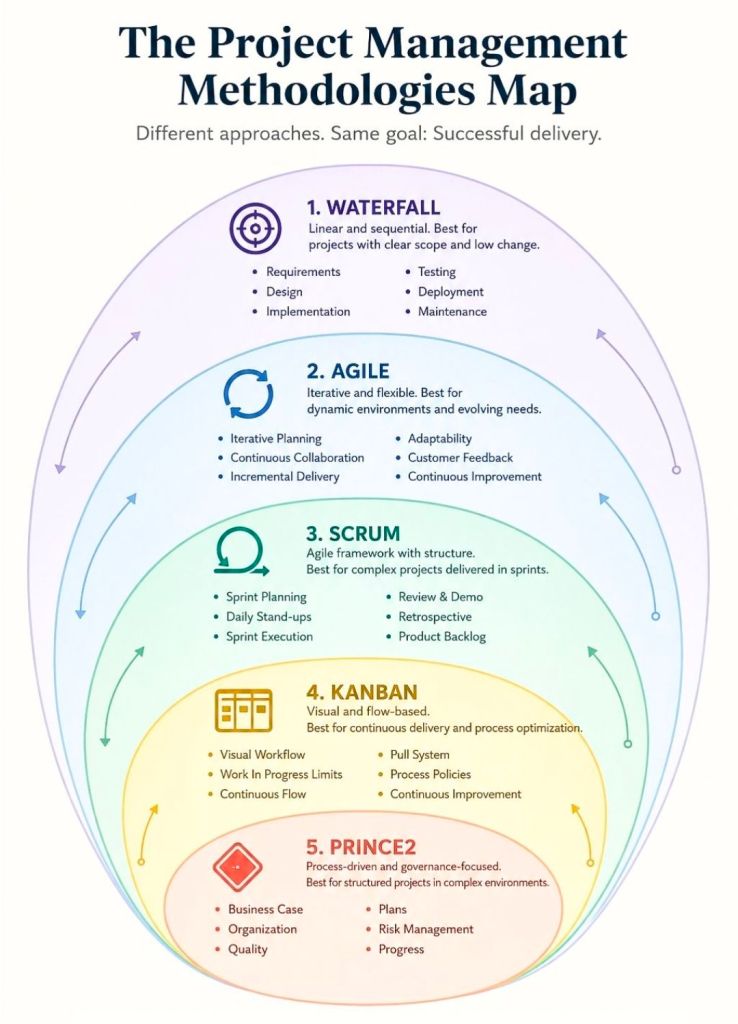
Traditional project management (often called the Waterfall model) relies on fixed, sequential phases: you plan everything upfront, build it, and test it at the very end. If customer needs change halfway through, pivoting is incredibly difficult.

Agile flips this by breaking a large project into smaller, manageable chunks. The core benefits include:

  • Adaptability: Teams can easily pivot based on new feedback.
  • Faster Delivery: Instead of waiting months or years for a final release, usable increments are delivered continuously.
  • Continuous Feedback: Stakeholders review the progress regularly to ensure the project stays on track.

📋 The Scrum Framework Breakdown

Scrum provides structure to the Agile philosophy by dividing work into short, time-boxed blocks called Sprints (typically lasting 1 to 4 weeks). To run Scrum, a team relies on three pillars: Roles, Artifacts, and Events.

1. Scrum Roles 👥

A typical Scrum team is cross-functional, self-organising, and consists of three specific roles:

  • Product Owner: Represents the customer or business. They are responsible for defining what needs to be built and prioritizing the work.
  • Scrum Master: Acts as a coach and facilitator. They ensure the team understands Scrum principles and clear away any obstacles or blockers preventing the team from working.
  • Developers/Team Members: The professionals who actually build the product (e.g., engineers, designers, writers). They decide how to execute the work.

2. Scrum Artifacts 🗒

Artifacts are the core deliverables or tracking tools used during a project:

  • Product Backlog: A master, living list of all features, requirements, and tasks needed for the project, ordered by priority.
  • Sprint Backlog: The subset of tasks chosen from the Product Backlog that the team commits to finishing during the current Sprint.
  • Increment: The actual usable, working portion of the product completed by the end of a Sprint.

3. Scrum Events (The Workflow) 🔄

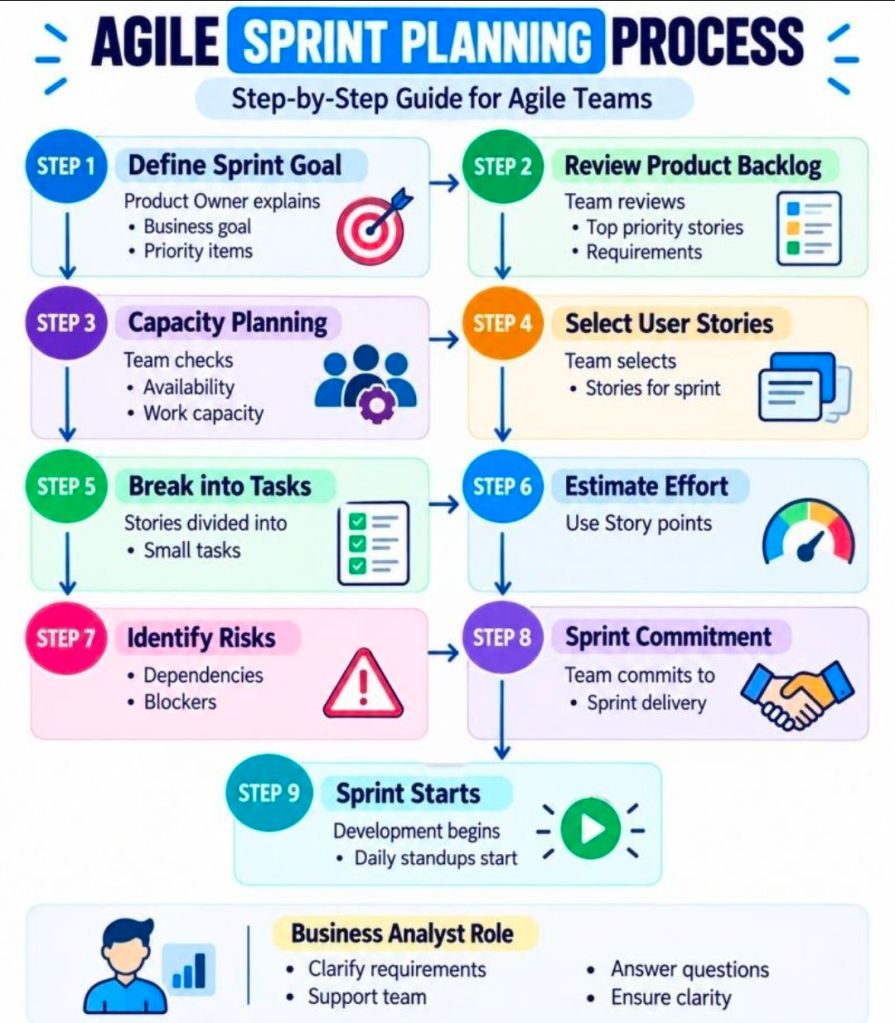
  • Sprint Planning: At the start of a Sprint, the team meets to determine what items from the Product Backlog they can realistically complete.
  • Daily Scrum (Standup): A quick, 15-minute daily meeting where the team syncs on what they did yesterday, what they will do today, and any roadblocks they face.
  • Sprint Review: Held at the end of the Sprint. The team demonstrates the finished working increment to stakeholders to gather feedback.
  • Sprint Retrospective: The final meeting of the cycle. The team looks inward to evaluate their workflow and identify ways to improve the process for the next Sprint.

📖 Highly Rated Reading Material for Beginners

If you want to dive deeper into implementing these frameworks, here are highly regarded introductory books on Agile and Scrum:

  • Agile Scrum: Your Quick Start Guide with Step-by-Step Instructions by Scott M. Graffius: An award-winning, user-friendly paperback that guides beginners through the exact steps needed to implement Scrum from scratch.
  • Learn Agile and Scrum in 2 Hours by Kieran Morgan and Luke Pivac: An ultra-concise audiobook version that cuts through technical jargon to deliver an immediate “Agile 101” overview.
  • Agile Essentials You Always Wanted To Know by Vibrant Publishers: A comprehensive self-learning guide focused heavily on Agile planning, execution, and foundational methodologies.

The Agile Scrum Process from Idea to Value

1. The Agile Scrum Process from Idea to Value
2. The Agile Scrum Process from Idea to Value
The Agile Scrum Process from Idea to Value