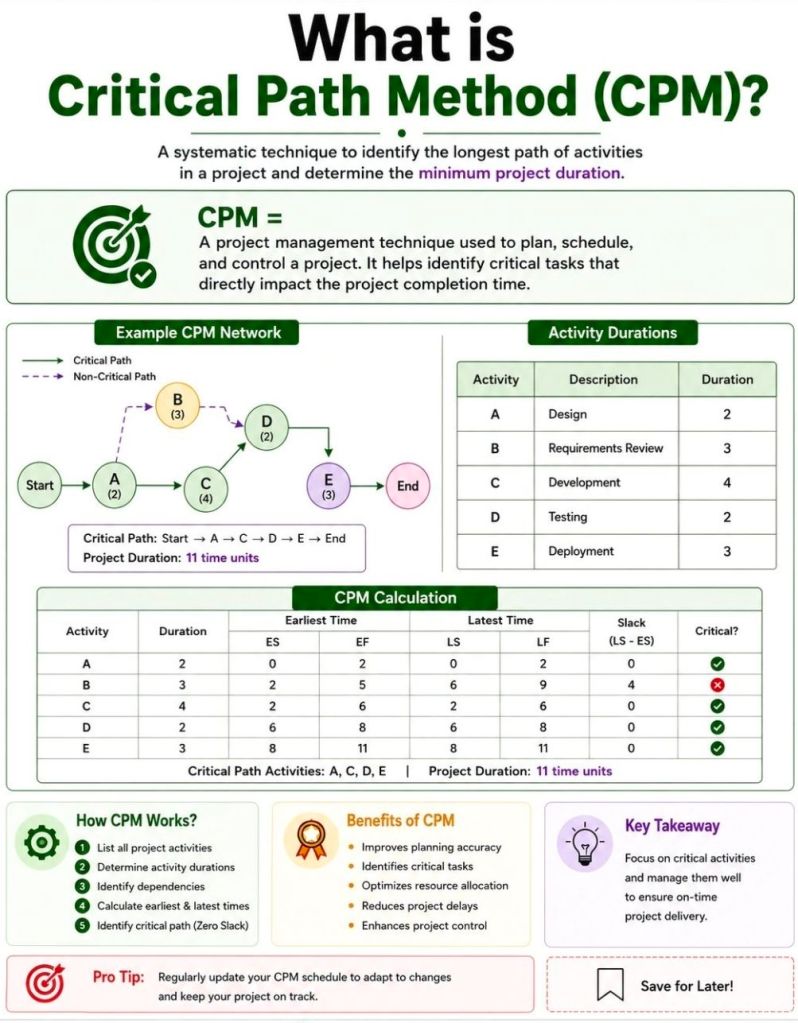
The Critical Path Method (CPM) is a project management algorithm used to identify the longest sequence of dependent tasks required to complete a project. It establishes the shortest possible project duration and highlights the “critical” activities that cannot be delayed without extending the entire project’s deadline.
How the Critical Path Works
CPM relies on finding the path through your project’s workflow that takes the most time from start to finish.
Critical Activities: Tasks on the critical path have zero “float” (or slack), meaning any delay directly impacts the final delivery date.
Non-Critical Activities: Other task sequences may have buffer time, allowing them to be delayed without throwing off the main project timeline.
Steps to Calculate the Critical Path
Identify Tasks: Break the project down into individual activities (often using a Work Breakdown Structure).
Determine Dependencies: Map out which tasks must happen before others can begin.
Estimate Durations: Assign a realistic time frame for completing each task.
Draw a Network Diagram: Create a flowchart visually connecting tasks with arrows to illustrate the sequence.
Analyze the Paths: Calculate the total duration for every possible sequence of tasks. The longest sequence is your critical path.
Key Terminology
Float (Slack): The amount of time a task can be delayed without causing a delay to subsequent tasks or the overall project.
Forward Pass: A calculation used to find the Earliest Start and Earliest Finish times for each task.
Backward Pass: A calculation used to find the Latest Start and Latest Finish times for each task before the project is delayed.
When and Why to Use It
Project managers use CPM during the planning phase to build realistic schedules and set clear baselines. It is highly beneficial for complex, predictable projects like construction or software rollouts, where many tasks rely on the completion of previous ones.
By knowing exactly which tasks control your timeline, you can prioritize resources, prevent bottlenecks, and use “fast-tracking” (doing tasks in parallel) if you need to compress a timeline.
Agile Scrum Master’s Checklist for Program Increment
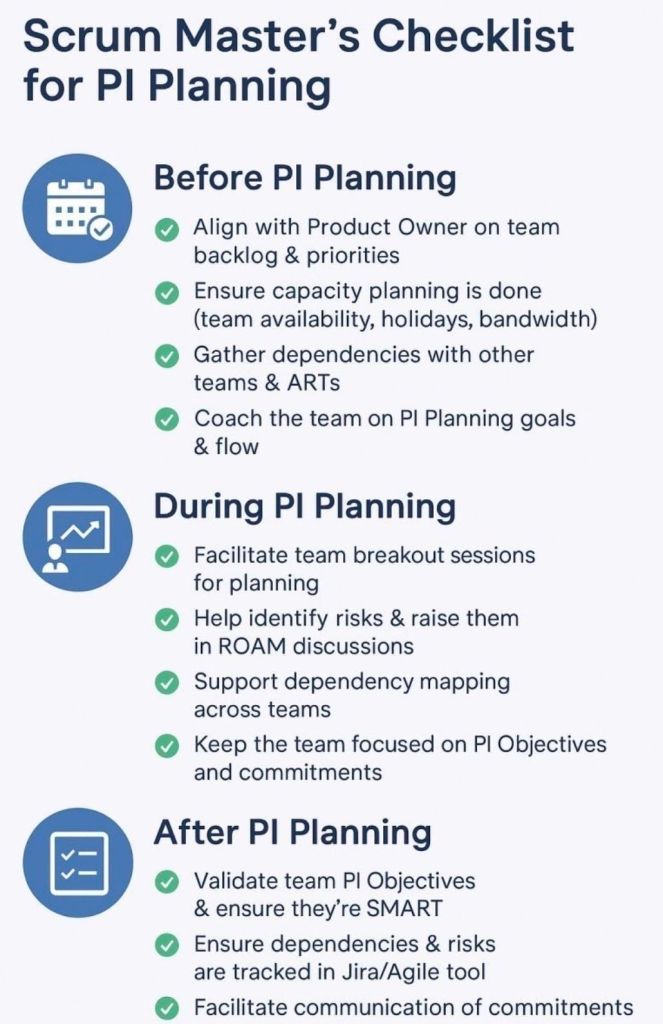
An Agile Scrum Master’s checklist for a Program Increment (PI)ensures your team is aligned, dependencies are resolved, and a realistic delivery plan is established for the upcoming 8–12 weeks of work. As a facilitator and coach, you support the team across three core phases: Pre-PI Planning, During PI Planning Events, and Post-PI Execution.
Here is a comprehensive checklist structured across the lifecycle of a Program Increment.
📅 Phase 1: Pre-PI Planning Readiness
Establish Sprint Cadence: Define exact start/end dates for every sprint within the upcoming PI.
Calculate Team Capacity: Factor in vacations, public holidays, corporate events, and historic team velocity.
Refine the Backlog: Collaborate with the Product Owner to ensure top features meet the Definition of Ready (DoR).
Encourage Feature Decomposition: Guide developers to begin breaking down high-priority features into draft user stories.
Prepare Digital Tooling: Set up virtual whiteboards like Miro or MURAL, and structure project boards in systems like Jira.
Align Engineering Standards: Review architectural patterns with system architects to prevent technical blockers.
🛠️ Phase 2: During the PI Planning Event
Day 1 Breakout Management: Facilitate your team’s breakdown of features into actionable, estimated sprint user stories.
Map Dependencies: Identify files, data, or logic needed from external teams and link them on the program board.
Draft PI Objectives: Help the team write clear, outcome-oriented, and SMART goals based on their planned work.
Surface Program Risks: Collaboratively categorize all technical or resource hurdles using the ROAM framework (Resolved, Owned, Accepted, Mitigated).
Day 2 Plan Finalization: Ensure uncommitted objectives are preserved for high-risk items requiring external prerequisites.
Conduct Confidence Votes: Run an anonymous digital vote to gauge psychological safety and realistic alignment before final team commitment.
🚀 Phase 3: Post-PI & Execution Tracking
Sync the Agile Tooling: Move sticky notes and analog mappings directly into active Jira epics or tracking backlogs.
Establish Sprint Tracking: Distribute automated calendar sequences for recurring Daily Scrums, Sprint Plannings, and Sprint Reviews.
Monitor Cross-Team Risks: Attend standard Scrum of Scrums (SoS) meetings to report on blockers and coordinate incoming dependency tracks.
Protect the WIP Limits: Enforce explicitly defined work-in-progress (WIP) boundaries to prevent team burnout over mid-increment changes.
Inspect and Adapt (I&A): Facilitate the final evaluation comparing actual value delivered against initial PI targets to feed process enhancements back into the train.
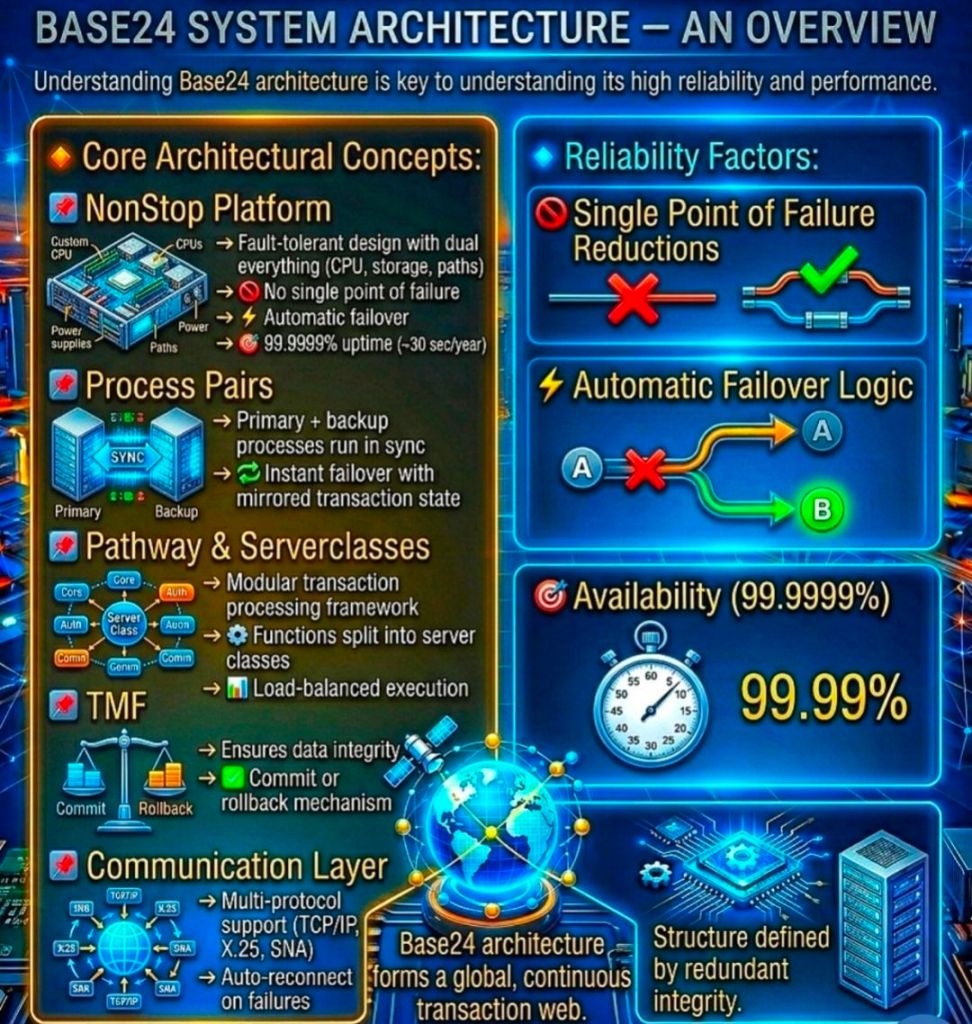
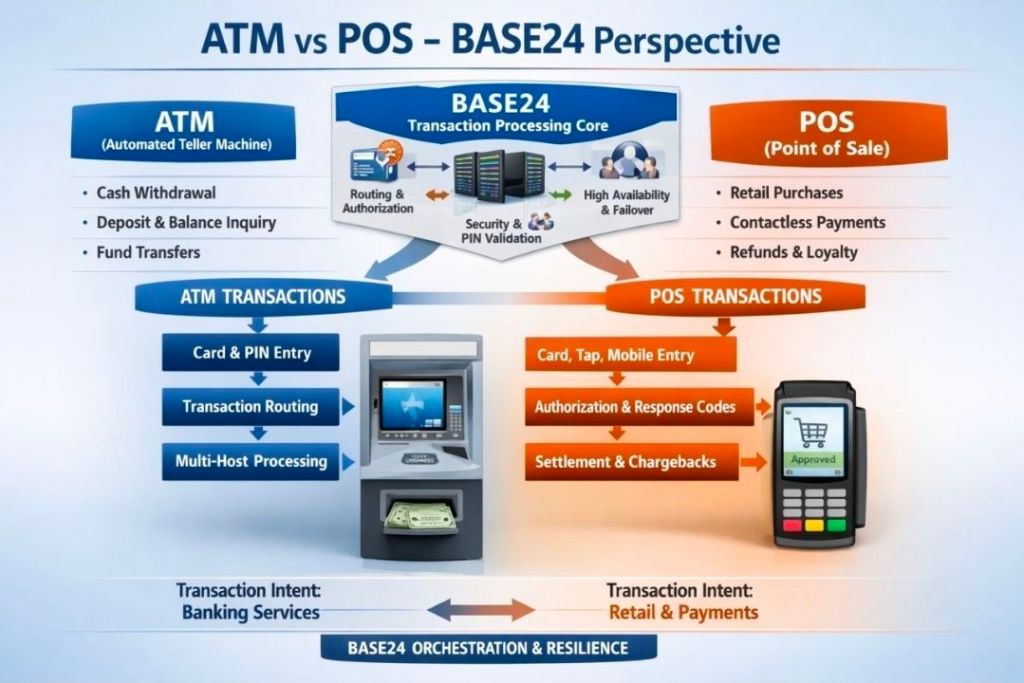
BASE24 is a market-leading, fault-tolerant Electronic Funds Transfer (EFT) software application developed by ACI Worldwide. For decades, it has served as the backbone for global banking, processing billions of ATM, Point of Sale (POS), and smart card transactions.
BASE24 Electronic Funds Transfer (EFT) software application developed by ACI Worldwide, Overview
The product achieves its landmark 24/7/365 uptime by running natively on the HPE NonStop architecture—originally engineered by Tandem Computers.
1. Underlying Technology Stack
BASE24 Classic was built from the ground up to utilize the unique properties of the Tandem/HPE NonStop platform:
Database:Enscribe, a native hierarchical/flat file database optimized for ultra-fast, unstructured file access. Newer iterations use NonStop SQL/MX.
Programming Languages: Primarily TAL (Tandem Application Language), pTAL, and COBOL/SCOBOL.
Middleware:PATHWAY (PATHCOM), which acts as the transaction processing monitor to dynamically manage and load-balance server processes.
2. High-Level Component Architecture
BASE24 relies on an interconnected network of specialized processes that route and manage messages.
A. XPNET (The Networking Engine)
XPNET is a critical, proprietary communication subsystem. It provides the messaging infrastructure where applications interface with network communication lines. XPNET acts as the buffer layer, monitoring physical lines, enforcing transaction timing checks, and distributing data loads uniformly across CPUs.
B. Device Handlers (DH)
Device Handlers act as the translators for peripheral devices.
Function: They intercept hardware-specific protocol messages (e.g., Diebold or NCR formats from ATMs) and normalize them into BASE24’s internal standard message format.
Security: DH processes handle terminal-level PIN encryption, coordinate MAC (Message Authentication Code) keys, and initiate terminal downline loads.
C. Authorization Process (AUTH)
AUTH is the core decision engine of the application.
Function: It validates card restrictions, tracks card usage accumulations, and performs transaction risk checks.
Fallback Management: If a bank’s core system goes offline, AUTH drops into “Stand-Alone” or “Negative/Parametric Authorization” mode, approving transactions locally up to safe, pre-defined limits.
D. Host Interfaces (HI)
The Host Interface connects BASE24 to the financial institution’s primary backend core banking systems. It handles “On-Us” transactions—meaning the card used belongs to the bank owning the terminal.
E. Interchange Interfaces (II)
The Interchange Interface formats, translates, and routes transactions to global credit/debit networks (such as Visa, Mastercard, AMEX) or regional switches. It transforms internal BASE24 data formats into compliance standard formatting, such as ISO 8583. It handles “Not-On-Us” transactions.
3. Core Database & File Structure
BASE24 captures system activities across specialized transactional and tracking files, mostly utilizing Enscribe:
TLF (Transaction Log File): The primary log capturing every ATM event, amount, response code, and terminal ID in real-time.
PTLF (POS Transaction Log File): Mirrors the utility of the TLF, but optimizes records strictly for merchant POS transactions.
LCONF (Logical Network Configuration File): Dictates how network configurations, devices, institutions, and communication paths map into XPNET.
CAF (Cardholder Authorization File): Stores specific card numbers, limits, and statuses used for stand-alone authorization if host links break down.
4. Daily Operational Processes
Beyond live message switching, BASE24 executes several critical back-office operations:
Extract: Periodically filters transaction data from live TLF/PTLF logs to move to external billing arrays.
Refresh: Downloads updated data dumps (such as blacklisted cards or updated balances) from core hosts into local BASE24 database files.
Settlement Initiator: Aggregates transaction volumes at specified cutoff times to reconcile balanced records between ATMs, POS terminals, and clearing networks.
5. Why Tandem/HPE NonStop is Essential to BASE24
BASE24 relies on the hardware/software synergy provided by HPE NonStop to achieve near-zero downtime:
Shared-Nothing Architecture: Processors operate independently with their own memory stacks. If a physical CPU suffers hardware failure, it cannot corrupt the rest of the application.
Process Pairs: BASE24 components operate via a primary process in one CPU and a backup process in an alternate CPU. The primary constantly syncs checkpoint data with its backup. If the primary drops, the backup assumes processing instantly without interrupting transaction flights.
Active/Active Configuration: Utilizing replication software like HPE Shadowbase or DRNet, financial firms link distinct geographic NonStop locations. Both processing sites operate concurrently, managing localized transactions and replicating states reciprocally.
6. Product Evolution: BASE24 Classic vs. BASE24-eps
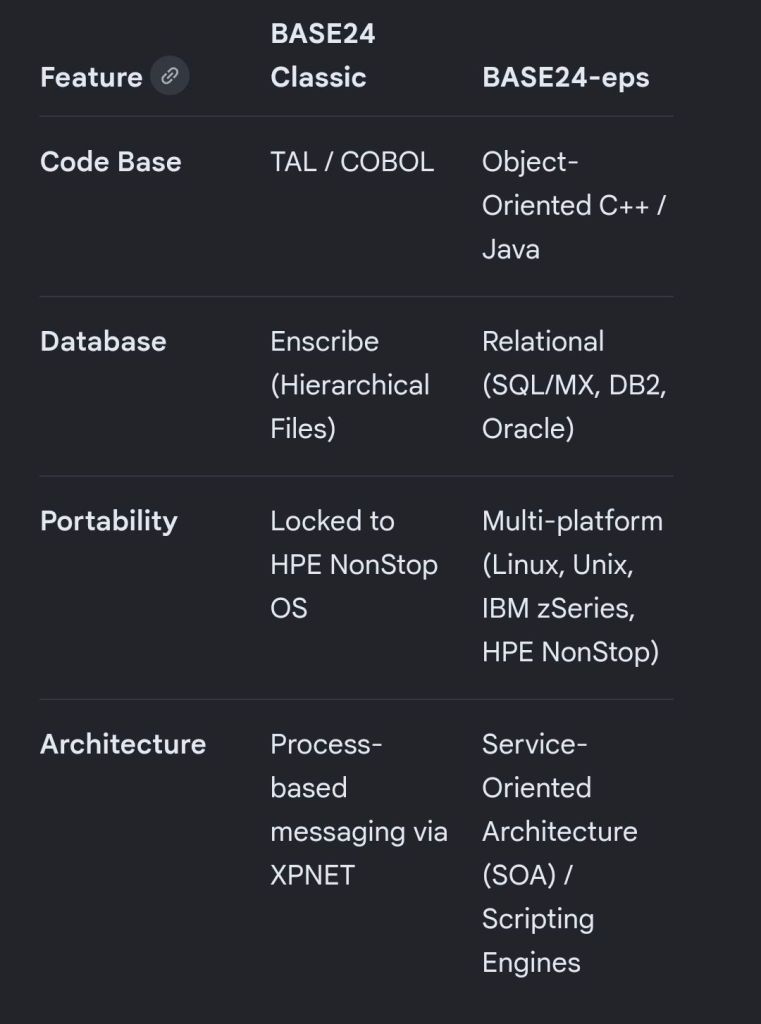
ACI Worldwide evolved the platform from BASE24 Classic into BASE24-eps (Enterprise Payment System):
Product Evolution: BASE24 Classic vs. BASE24-eps
BASE24 Electronic Funds Transfer (EFT) software application developed by ACI Worldwide, Overview
BASE24 Electronic Funds Transfer (EFT) software application developed by ACI Worldwide, Overview
The HPE NonStop architecture (originally engineered by Tandem Computers in 1976) is a specialized, 100% fault-tolerant computing platform designed to achieve continuous application availability and absolute data integrity. Unlike traditional mainframes or high-availability clusters that rely on rapid rebooting or switching resources upon a crash, NonStop prevents downtime entirely by masking failures through a hardware-software co-designed shared-nothing architecture.
At the physical tier, a NonStop system is built as a Loosely Coupled Multiprocessing (LCM) environment.
Independent Processor Modules: A single system consists of 2 to 16 independent CPUs (expandable via clustering up to 4,000+ CPUs). Each processor module contains its own dedicated Intel Xeon cores, memory, and I/O logic. Processors share no main memory, buses, or execution states. This isolation guarantees that a memory corruption or hardware crash in one CPU cannot physically propagate to another.
The Interconnect Fabric (ServerNet / RoCE): Because CPUs share nothing, they cooperate entirely by passing high-speed messages. Historically, this handled via a proprietary dual-bus named Dynabus, which evolved into ServerNet (the foundational grandfather of InfiniBand). Modern HPE NonStop X systems leverage RDMA over Converged Ethernet (RoCE) as the multi-gigabit interconnect fabric, providing dual-path, point-to-point messaging with sub-microsecond latency.
Dual-Ported, Redundant I/O Controllers: Every storage device, network interface, and controller card is physically dual-ported and cross-connected to two separate processor modules. If Processor A fails, Processor B seamlessly accesses the disk or network line using the alternate hardware path.
No-Spare, Active-Active Components: Every active element operates under a “no-spare” philosophy. Power supplies, cooling fans, and storage arrays are fully redundant and hot-swappable, ensuring the system can be repaired or upgraded while fully operational.
2. Operating System Architecture: NonStop OS (Guardian)
The foundational operating system is NonStop OS, which embeds the Guardian Kernel.
Distributed Copy Model: Every individual processor module loads and runs its own separate copy of the Guardian kernel. Rather than a monolithic OS orchestrating all chips, the system runs as a highly cooperative, message-driven distributed microkernel OS.
The Message System: The core of Guardian is its message router. Every operational request—whether writing a line to a database, opening a network socket, or checking a disk—is written as an inter-process message sent across the RoCE fabric. If a local resource is occupied, the message router redirects the request transparently across the fabric, making the entire cluster appear to applications as a single system image (SSI).
Continuous Heartbeats: All components and processors continually broadcast periodic “alive” heartbeat messages to one another. If a processor fails to respond to a heartbeat within a few milliseconds, the remaining CPUs immediately sever ties with it, declare it dead, and safely re-route pending workloads.
3. Software Fault Tolerance: Process Pairing
Hardware isolation is only half the battle. To tolerate software failures without dropping transactions, NonStop utilizes Process Pairs.
Primary and Backup Processes: When a critical application or system service starts, it creates two instances: a Primary Process executing on Processor 1, and a Hot-Standby Backup Process residing on Processor 2.
Real-Time Checkpointing: As the primary process performs work (e.g., executing a financial transaction step), it sends regular checkpoint messages to the backup process. These checkpoints copy vital state changes, register values, and memory updates.
Instant Takeover: If Processor 1 crashes, the Guardian OS instantly promotes the backup process to Primary. Because the backup contains the mirror state of the last transaction checkpoint, it picks up execution precisely where the failed process stopped. No state is lost, no connections drop, and the end-user experiences zero interruption.
4. Database & Storage Architecture: Enscribe, NonStop SQL, and TMF
Data integrity is paramount in NonStop’s design. It enforces strict ACID compliance at massive scale through layered data management software.
Enscribe & NonStop SQL/MX: NonStop supports Enscribe (a highly resilient structured file system) and NonStop SQL/MX (an ANSI-compliant relational database management system). Both are entirely decentralized, natively distributing table partitions across different physical disk drives managed by separate CPUs.
Mirrored Disks: Storage volumes are configured via volume-level mirroring (Disk 1 and Disk 2 track identical data blocks). Disk writes are executed in parallel across distinct I/O paths. If a drive fails or a sector corrupts, reads are immediately diverted to the mirror disc.
Transaction Monitoring Facility (TMF): TMF is the protected transaction manager. It acts as a distributed two-phase commit coordinator. If an application crashes mid-transaction, or an entire processing module loses power, TMF uses audit logs to back out incomplete transactions cleanly, guaranteeing that the database is never left in an inconsistent or corrupt state.
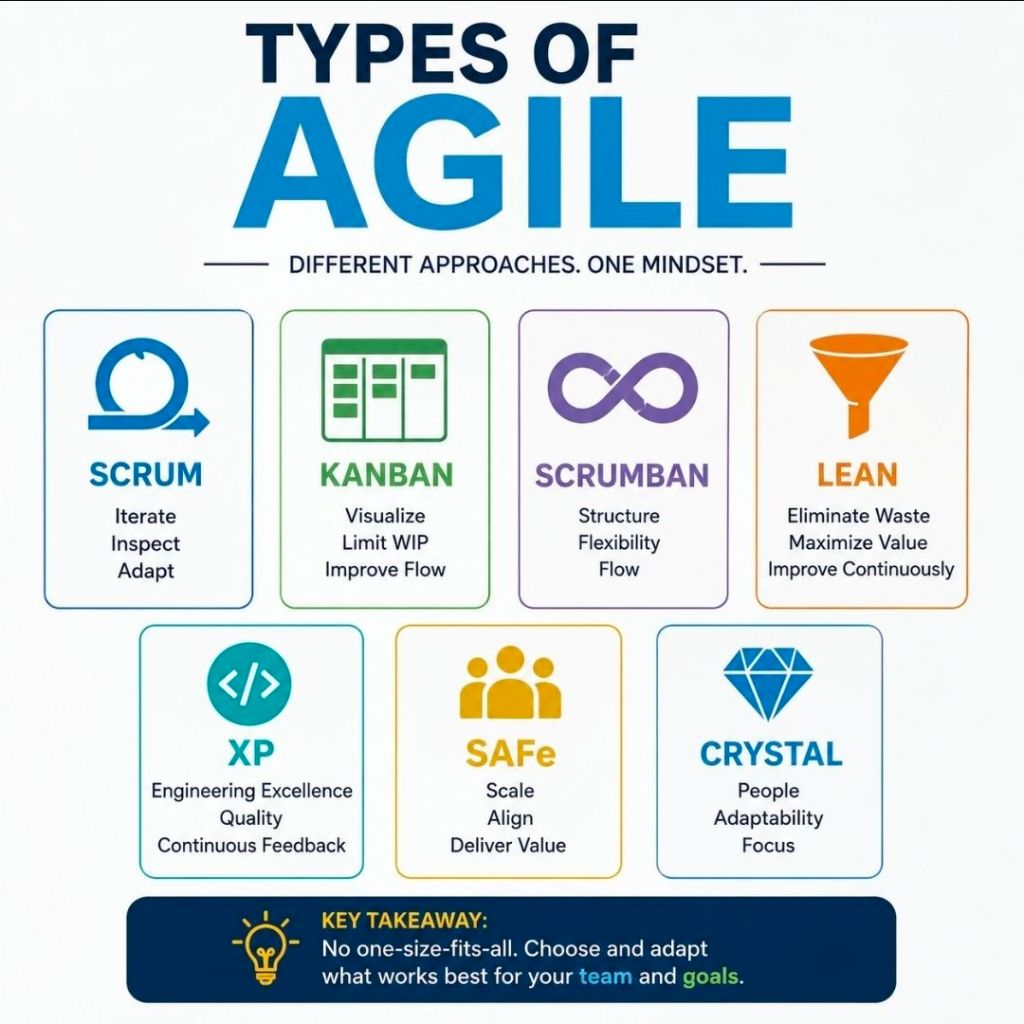
Agile delivery is an iterative approach to project management that focuses on delivering value early, frequently adapting to change, and maintaining continuous customer feedback. Rather than executing a project sequentially, teams break work into small increments to maximize flexibility and product quality.
The most common types and frameworks of agile delivery include the following structured methodologies:
1. Scrum
Scrum is the most widely used agile framework, characterized by highly structured, time-boxed iterations called Sprints (typically 1 to 4 weeks long).
Key Concept: Teams work toward a single, actionable goal during each sprint.
Key Roles: Product Owner (represents the customer), Scrum Master (removes obstacles and enforces the framework), and Developers.
Best For: Projects where requirements change frequently and close collaboration with clients is required.
2. Kanban
Kanban is a visual workflow management system that emphasizes continuous delivery and transparency without strict time-boxed iterations.
Key Concept: Work is tracked on a Kanban board divided into columns (e.g., “To Do,” “In Progress,” “Done”).
Key Roles: Self-organizing teams with a pull-based approach.
Best For: Operational workflows, support/maintenance teams, and organizations that need to limit “work in progress” (WIP) to prevent bottlenecks.
3. Lean Software Development
Adapted from Toyota’s lean manufacturing principles, Lean focuses on maximizing customer value while minimizing waste.
Key Concept: Focuses on “eliminating waste” (anything that doesn’t add value to the end user), amplifying learning, and delivering as fast as possible.
Best For: Optimizing overall organizational workflows and reducing overhead.
4. Extreme Programming (XP)
XP focuses heavily on technical excellence and software engineering practices to boost product quality and responsiveness.
Key Concept: Uses practices like pair programming, test-driven development (TDD), and continuous integration.
Best For: Development teams that need to release updates frequently while maintaining strict quality and low bug rates.
5. Feature-Driven Development (FDD)
FDD is a model-driven approach that is highly structured and focuses on building software in short, feature-by-feature iterations.
Key Concept: Work revolves around creating detailed software models and planning by specific features, which are built one by one.
Best For: Teams that prefer structured, step-by-step processes or environments with traditional hierarchical structures.
6. Scaled Agile Framework (SAFe)
SAFe is designed for larger enterprises that need to align cross-functional, multiple Agile teams toward a single business strategy.
Key Concept: Blends Lean, Agile, and DevOps principles to coordinate alignment, governance, and delivery across a massive scale.
Best For: Large organizations and complex projects requiring multiple teams to coordinate efforts.
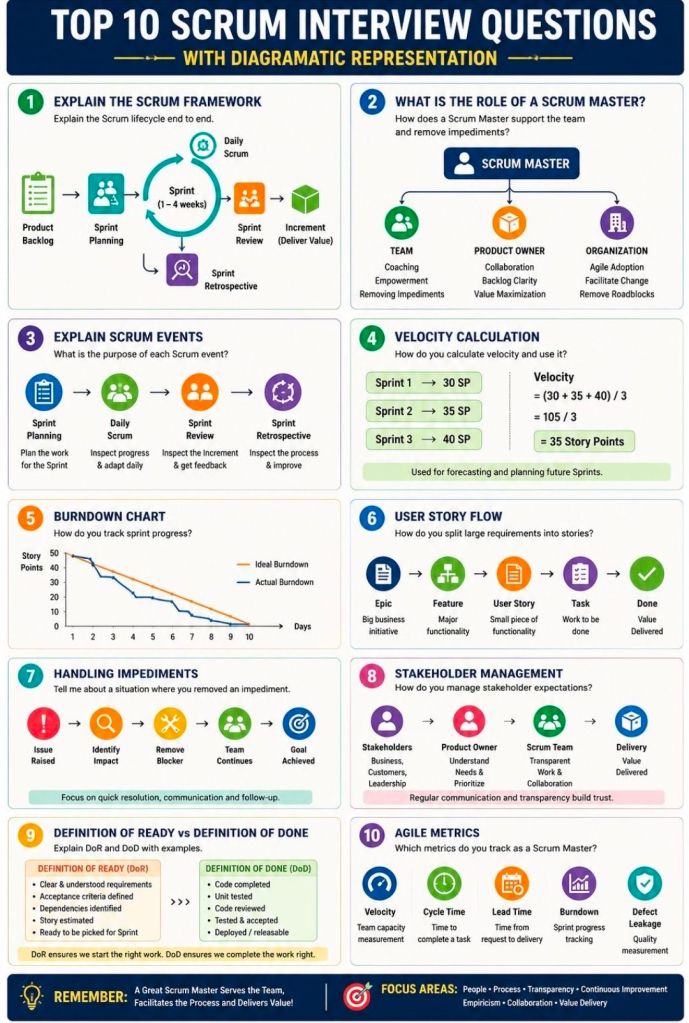
Preparing for an Agile Scrum interview requires a mix of theoretical knowledge, situational problem-solving, and a clear understanding of your specific role (Scrum Master, Product Owner, or Developer). Be ready to discuss the Scrum framework, roles, artifacts, ceremonies, and how you foster self-organization and continuous improvement.
Review these common Agile Scrum interview questions, categorized by topic:
1. Fundamentals & Frameworks
What is the difference between Agile and Scrum? Agile is an overarching project management philosophy focused on iterative development and flexibility. Scrum is a specific, lightweight framework within Agile that uses set roles, artifacts, and timeboxed “sprints” (usually 1-4 weeks).
What are the core roles on a Scrum Team? The three primary roles are the Product Owner (maximizes value, owns the backlog), the Scrum Master (servant-leader, removes impediments, ensures Scrum rules are followed), and the Developers (cross-functional team that delivers the increment).
What is a “Spike”? A spike is a timeboxed research or exploration task used to reduce uncertainty, figure out a technical approach, or better understand a requirement before development begins.
2. Scrum Ceremonies (Events)
What happens during a Sprint Planning meeting? The team collaborates to determine what work can be delivered in the upcoming sprint and creates a plan (the Sprint Backlog) for how to achieve this Product Goal.
Can you give a 2-3 minute overview of the Daily Scrum? It is a 15-minute timeboxed event for the Developers to inspect progress toward the Sprint Goal and adapt the upcoming work. It is not a status report to management; it is for the team to synchronize and plan the next 24 hours.
What is the purpose of a Sprint Retrospective? Held at the end of every sprint, the team inspects the past sprint regarding people, relationships, processes, and tools. The goal is to identify what went well and create a plan for implementing improvements.
What is the difference between a Sprint Review and a Retrospective? The Review inspects the software/product increment to adapt the Product Backlog. The Retrospective inspects the team’s process and working environment.
3. Artifacts & Estimation
What is the Definition of Done (DoD)? It is a shared, clear checklist of criteria that must be met for a product increment to be considered ready for release. It ensures consistency and quality across the team.
What is Velocity? Velocity measures the total amount of work (usually in Story Points) a Scrum Team can deliver during a single sprint. It is typically calculated as an average over the last 3-4 sprints and helps predict future delivery.
How do you handle scope creep? Emphasize that in Scrum, the sprint scope is locked once the sprint starts. If new work is urgent, it should go to the Product Backlog for future planning, or the team can negotiate with the Product Owner to remove an equally sized task from the current sprint to make room.
What do you do if a manager tries to dictate or assign tasks to the team? Coach the manager on Scrum principles (self-management) and act as a shield to protect the team from outside interference, allowing them to focus on the Sprint Goal.
How do you build trust with your team? Focus on empathy, transparency, consistency, and active listening. Build a safe space where the team can fail forward, experiment, and voice concerns without fear of retaliation.
How do you handle conflict within the team? Encourage the team to resolve conflicts themselves first, stepping in only if it affects the sprint goals. Facilitate open dialogue focusing on the issue (the process/problem), not the person.