Download Templates for PROject Management | FREE Upgrades & Additions
Author: Mark Whitfield
Welcome to my site!
After graduating in Computing in 1990, I accepted a position as a programmer at a Runcorn based software house specialising in electronic banking software, namely sp/ARCHITECT-BANK on Tandem Computers (now HPE NonStop). This was before the internet became more prevalent and so the notion of enabling desktop access to company accounts for inter-account transfers and book keeping was still quite a cutting edge idea (and smartphones only ever hinted at in Space 1999). The company was called The Software Partnership (which was taken over by Deluxe Data in 1994).
I spent 5 years in Runcorn developing code for SP/ARCHITECT for various banks like TSB, Bank of Scotland, Rabobank and Girofon (Denmark) to name but a few. I then moved onto a software house in Salford Quays for further bank facing projects. After a further 23 years in the IT industry and now a Senior IT Project Manager (both Agile and Waterfall delivery), I thought I would echo out my Career Profile in this corner of the internet for quick and easy access.
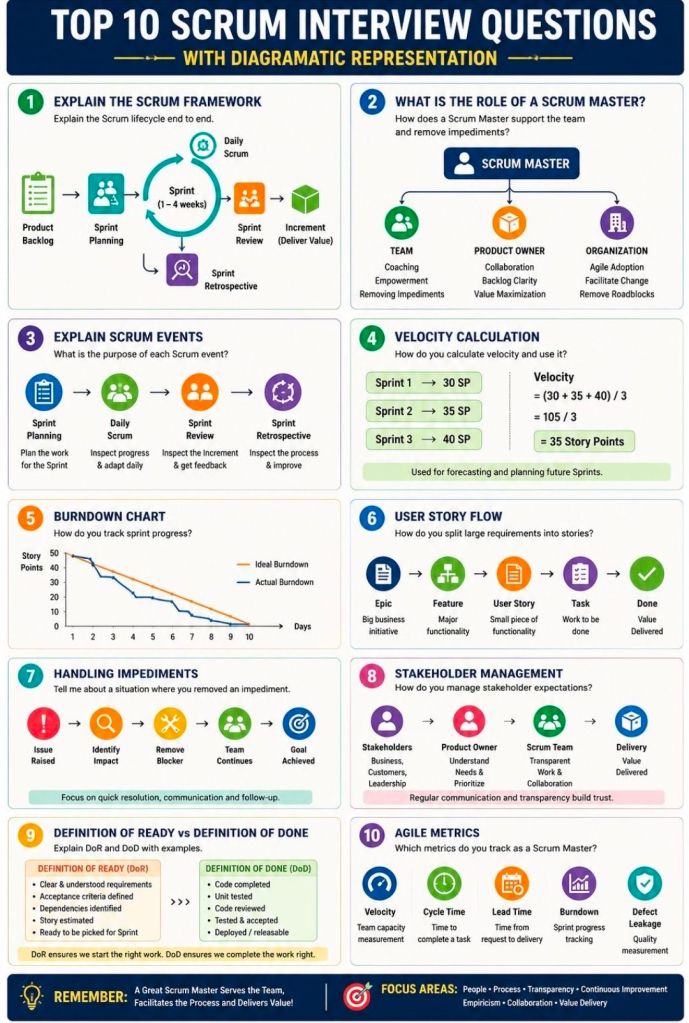
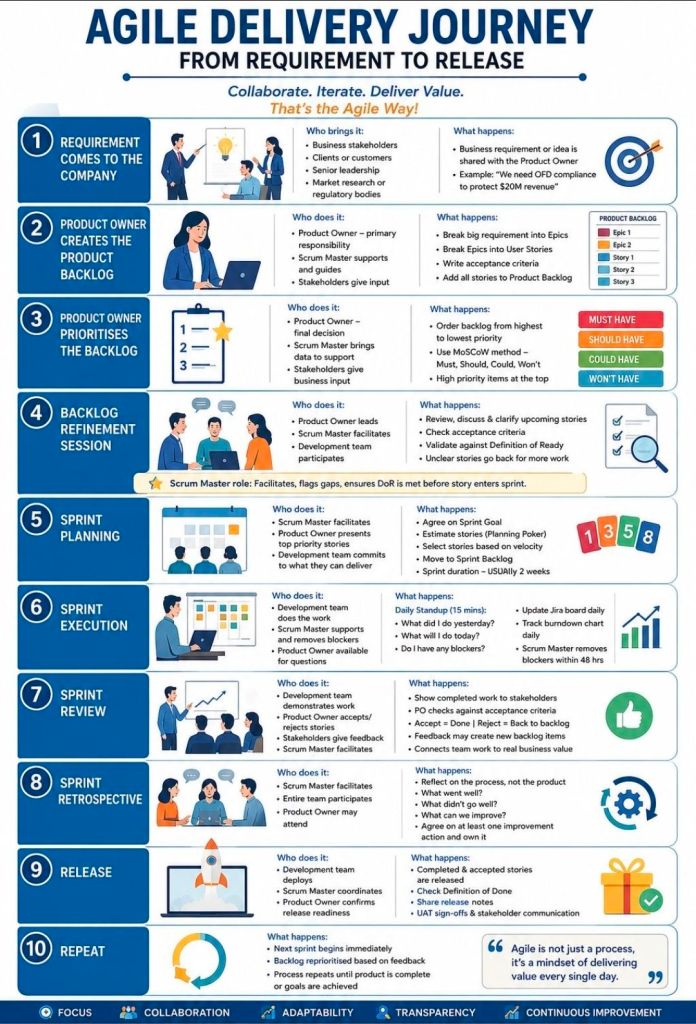
Preparing for an Agile Scrum interview requires a mix of theoretical knowledge, situational problem-solving, and a clear understanding of your specific role (Scrum Master, Product Owner, or Developer). Be ready to discuss the Scrum framework, roles, artifacts, ceremonies, and how you foster self-organization and continuous improvement.
Review these common Agile Scrum interview questions, categorized by topic:
1. Fundamentals & Frameworks
What is the difference between Agile and Scrum? Agile is an overarching project management philosophy focused on iterative development and flexibility. Scrum is a specific, lightweight framework within Agile that uses set roles, artifacts, and timeboxed “sprints” (usually 1-4 weeks).
What are the core roles on a Scrum Team? The three primary roles are the Product Owner (maximizes value, owns the backlog), the Scrum Master (servant-leader, removes impediments, ensures Scrum rules are followed), and the Developers (cross-functional team that delivers the increment).
What is a “Spike”? A spike is a timeboxed research or exploration task used to reduce uncertainty, figure out a technical approach, or better understand a requirement before development begins.
2. Scrum Ceremonies (Events)
What happens during a Sprint Planning meeting? The team collaborates to determine what work can be delivered in the upcoming sprint and creates a plan (the Sprint Backlog) for how to achieve this Product Goal.
Can you give a 2-3 minute overview of the Daily Scrum? It is a 15-minute timeboxed event for the Developers to inspect progress toward the Sprint Goal and adapt the upcoming work. It is not a status report to management; it is for the team to synchronize and plan the next 24 hours.
What is the purpose of a Sprint Retrospective? Held at the end of every sprint, the team inspects the past sprint regarding people, relationships, processes, and tools. The goal is to identify what went well and create a plan for implementing improvements.
What is the difference between a Sprint Review and a Retrospective? The Review inspects the software/product increment to adapt the Product Backlog. The Retrospective inspects the team’s process and working environment.
3. Artifacts & Estimation
What is the Definition of Done (DoD)? It is a shared, clear checklist of criteria that must be met for a product increment to be considered ready for release. It ensures consistency and quality across the team.
What is Velocity? Velocity measures the total amount of work (usually in Story Points) a Scrum Team can deliver during a single sprint. It is typically calculated as an average over the last 3-4 sprints and helps predict future delivery.
How do you handle scope creep? Emphasize that in Scrum, the sprint scope is locked once the sprint starts. If new work is urgent, it should go to the Product Backlog for future planning, or the team can negotiate with the Product Owner to remove an equally sized task from the current sprint to make room.
What do you do if a manager tries to dictate or assign tasks to the team? Coach the manager on Scrum principles (self-management) and act as a shield to protect the team from outside interference, allowing them to focus on the Sprint Goal.
How do you build trust with your team? Focus on empathy, transparency, consistency, and active listening. Build a safe space where the team can fail forward, experiment, and voice concerns without fear of retaliation.
How do you handle conflict within the team? Encourage the team to resolve conflicts themselves first, stepping in only if it affects the sprint goals. Facilitate open dialogue focusing on the issue (the process/problem), not the person.
The development of programming languages on the HPE NonStop platform (originally founded as Tandem Computers) is tightly bound to its architectural hardware transitions: from custom CISC stack machines to MIPS RISC, Intel Itanium, and eventually standard Intel x86-64 infrastructures.
Detailed List of NonStop Programming Languages
1. Core Proprietary & System Languages
TAL (Transaction Application Language): The foundational system programming language for Tandem. It is a block-structured, machine-dependent procedural language designed to compile directly into highly efficient machine instructions. It features ALGOL/Pascal-like syntax but implements C-like semantics, structural pointers, and weak data typing.
pTAL & epTAL: Specialized evolutions of TAL. Rather than rewriting legacy codebases from scratch during architecture shifts, pTAL was introduced to compile existing TAL code natively into MIPS RISC architectures. Later, epTAL was developed to target Intel Itanium microprocessors.
TACL (Tandem Advanced Command Language): A built-in command interpreter and interpreted scripting language. It functions like a Unix Bash shell but features highly complex macro capacities used to orchestrate system configurations, monitor processes, and automate failover procedures.
2. Enterprise & Enterprise Legacy Languages
COBOL85 (and older COBOL74): The undisputed workhorse of NonStop commercial workloads. HPE’s tailored implementation of the COBOL85 standard natively interfaces with the Guardian OS. It allows programmers to embed SQL/MP statements and program fault-tolerant Process Pairs through HPE NonStop Pathway (TS/MP).
SCOBOL (Screen COBOL): A specialized, high-level structural derivative of COBOL utilized exclusively to build blocks for character-cell terminal interfaces (such as the 6530 terminal environments) running within Pathway architectures.
NonStop SQL (SQL/MP and SQL/MX): While technically a database system, its embedded syntax acts as a declarative language integrated into C and COBOL. SQL/MP works with the legacy Guardian file system, while SQL/MX brings ANSI-compliant SQL closely bound with the Open System Services (OSS) environment.
3. Standard Mainstream Languages
C & C++: Heavily introduced during the RISC transition to allow software portability. Mainstream development on modern NonStop systems uses standard C/C++ cross-compilers. They run in either the native fault-tolerant Guardian personality or the standard POSIX-compliant Open System Services (OSS) environment.
Java: A first-class language layer deployed natively on NonStop. HPE optimizes the Java Virtual Machine (JVM) to scale across multi-CPU shared-nothing frameworks, allowing modern enterprise web apps to run with out-of-the-box system availability.
4. Modern Open-Source Options
Python, Go, & JavaScript (Node.js): Modern procedural and script utilities provided by HPE. These environments leverage the OSS POSIX platform layer, running modern DevOps orchestration, microservices, and hybrid-cloud pipelines alongside the native database engines.
Detailed Timeline Breakdown by Era and Year
The evolution of NonStop languages maps directly across distinct engineering ownership eras.
The Proprietary Foundation Era (Tandem Computers: 1974–1989)
1976: Tandem ships the original Tandem/16 (NonStop I). TAL is the only available language on the platform. The entire Guardian Operating System is written completely in TAL.
1981: The NonStop II hardware is introduced. Tandem expands language support to include COBOL74, FORTRAN, and BASIC to attract mainstream banking clients.
1983: Tandem releases the Transaction Monitoring Facility (TMF) and Pathway application management software. SCOBOL is introduced alongside them to program secure terminal entry interfaces.
1985: TACL is deployed, completely modernizing the command line shell ecosystem with scalable macros and structured operational control.
1986: Tandem launches NonStop SQL, the first linearly scalable, fault-tolerant relational database engine. Embedded SQL syntax is integrated directly into TAL and COBOL compilers.
1988: Compilers undergo a major update to natively support the newly established COBOL85 standard, which quickly replaces COBOL74 for all mission-critical banking transactions.
The Open Systems & Hardware Transition Era (Compaq: 1990–2001)
1991: Hardware migrates from CISC stacks to MIPS RISC architectures with systems like the Cyclone/R. To protect client software assets, Tandem delivers the pTAL compiler to translate TAL source code into native RISC binaries.
1995: Tandem introduces Open System Services (OSS), a POSIX-compliant UNIX subsystem running over the Guardian kernel. This brings full-scale, native native compliance for standard ANSI C and C++ programming.
1997: Compaq acquires Tandem Computers. Engineering shifts heavily toward implementing Java on NonStop, targeting cross-platform, enterprise internet-banking codebases.
2000: NonStop SQL/MX is released. It allows developers to use embedded SQL statements within standard C, C++, and emerging Java applications inside the OSS runtime environment.
The Corporate Alignment & Itanium Era (Hewlett-Packard: 2002–2014)
2002: HP merges with Compaq. Java is designated as a first-class citizen on the platform, receiving deeper optimization to tie into native clusters seamlessly.
2005: HP releases the Integrity “NonStop i” servers, moving processors away from MIPS onto Intel Itanium architectures. The epTAL compiler is rolled out alongside standard C/C++ updates to seamlessly compile older environments onto Itanium.
2011: Open-source scripting engines, including early ports of modern Python, are introduced to the OSS environment, easing the system-management burden for engineers unfamiliar with legacy TACL.
The Modern Enterprise Era (Hewlett Packard Enterprise: 2015–2026)
2015: HP splits, and the platform transitions to HPE. Standard Intel x86-64 hardware dominates with the NonStop X architecture. Compilers utilize an standard GCC/LLVM-based back end, allowing normal Linux/Unix C++ programs to build on NonStop with minimal alteration.
2020: Sales of Itanium systems officially terminate. Legacy languages like TAL are deprecated for new software creation but are preserved to support older, foundational logic.
2023–2024: HPE rolls out modern cloud-ready DevOps Starter Kits. Full, native support is added for modern languages such as Go, modern Python 3.x, and Node.js, allowing them to integrate into modern automated CI/CD build environments.
HPE NonStop Tandem Programming Languages and Development Timeline
Requirements Traceability Matrix RTM & Business Analyst BA
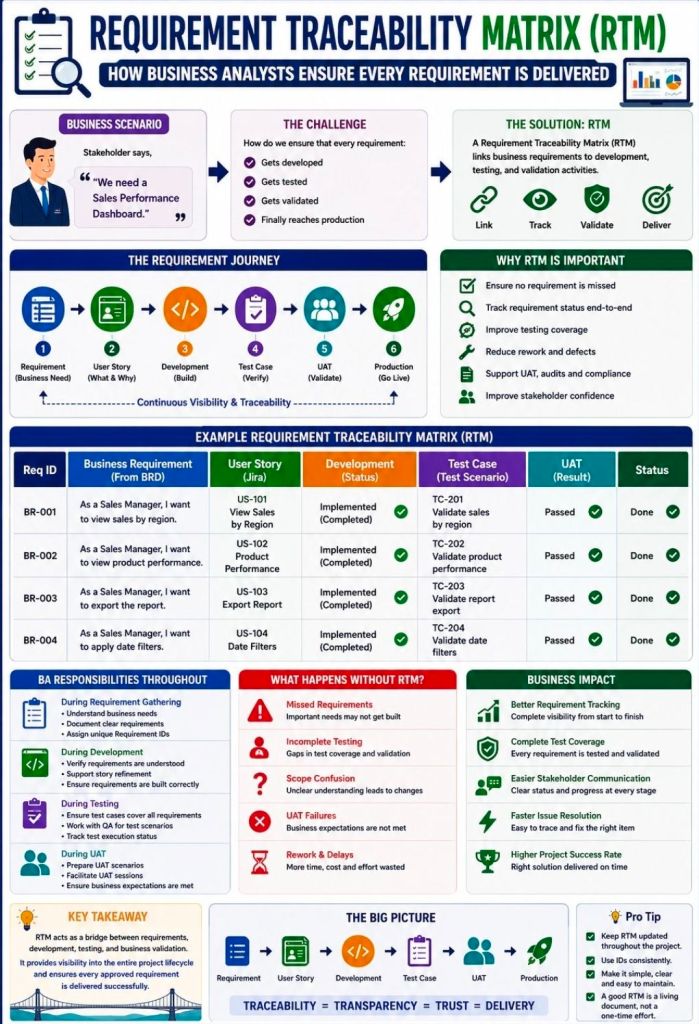
A Requirements Traceability Matrix (RTM) is a structured project management document that links user and stakeholder requirements directly to their corresponding design elements, development deliverables, and verification test cases.
Acting as a living checklist throughout the project life cycle, its primary purpose is to ensure 100% test coverage, validate that all client requests are fulfilled, and prevent scope creep by identifying undocumented work.
The visual layout of a typical RTM template maps individual requirement rows against critical validation milestones.
🔄 Three Main Types of Traceability
The configuration of an RTM depends heavily on the direction of tracking needed for the project:
Forward Traceability: Tracks requirements forward into design, code, and test cases. It ensures the project executes every requested feature and that nothing gets left behind.
Backward (Backward-Looking) Traceability: Traces test cases and final deliverables back to the original requirement. It checks for scope creep, confirming that no extra, unauthorized features were added.
Bidirectional Traceability: Combines both approaches. It links requirements from origin to destination and vice versa, providing clear visibility during change management or troubleshooting.
📋 Structured Breakdown of RTM Content
A standard RTM is formatted as a multidimensional table. Below is the foundational structure, broken down into its logical data components:
1. Core Requirement Parameters
Requirement ID: A distinct alphanumeric identifier (e.g., REQ-001, BRD-102) for quick cross-referencing.
Requirement Type: Classifies the item (e.g., Business, Functional, Technical, UI, Security, or Regulatory Compliance).
Requirement Description: A concise textual explanation defining exactly what the feature or system must achieve.
Source/Origin: The document, stakeholder, client request, or meeting minutes where the requirement originated.
Priority Level: The urgency ranking of the item, usually categorized as High, Medium, or Low (or via MoSCoW ranking).
2. Design and Development Artifacts
Functional Specification ID: Links the requirement to the specific section of the functional design document.
Technical Design/Architecture Module: Points to the code packages, database tables, or system architectural components implementing the requirement.
3. Verification & Validation (Testing) Data
Test Case ID: The unique ID of the specific test cases designed to validate the feature (e.g., TC-101, TC-102).
Test Case Description/Objective: A snapshot of what the test case actually checks.
User Acceptance Testing (UAT) ID: Specific ID linking to end-user validation scenarios.
4. Execution & Quality Control Tracking
Test Execution Status: The real-time health indicator of the testing suite (e.g., Passed, Failed, Blocked, Not Run).
Defect/Bug ID: If a test fails, this column logs the active issue tracker ID (e.g., Jira ticket BUG-404) linked to the breakdown.
Current Deployment Status: Defines the project readiness stage (e.g., In Progress, Dev, QA, Production).
💡 Core Benefits of Maintaining an RTM
Prevents Missed Features: Verifies that every business requirement translates into clean code and valid testing cycles before software deployment.
Streamlines Change Management: If a client alters a feature, developers can quickly scan the RTM row to see exactly which code modules and test scripts need updates.
Simplifies Compliance Audits: Serves as regulatory proof in safety-critical landscapes (like medical devices or automotive software) that every target function passed validation.
Requirements Traceability Matrix RTM & Business Analyst BA
Bluetooth is a universal, short-range wireless communication standard that enables electronic devices to exchange data and audio over ultra-high frequency (UHF) radio waves (operating between 2.402 GHz and 2.480 GHz). It forms localized, temporary networks known as piconets to seamlessly bridge data gaps without the clutter of physical wires or cables.
To combat signal congestion in the crowded 2.4 GHz band—which it shares with Wi-Fi and microwaves—Bluetooth uses a technique called Adaptive Frequency Hopping (AFH), rapidly switching between 79 or 40 channels up to 1,600 times per second to maintain a stable, secure connection.
Named by Intel engineer Jim Kardach after the 10th-century Scandinavian King Harald “Bluetooth” Gormsson—who famously united warring Danish tribes into a single kingdom—the technology was built to similarly unify incompatible PC, cellular, and digital device ecosystems. The iconic Bluetooth logo is a direct nod to this heritage, fusing the ancient Norse runes ᚼ (Hagall) and ᛒ (Bjarkan) representing King Harald’s initials.
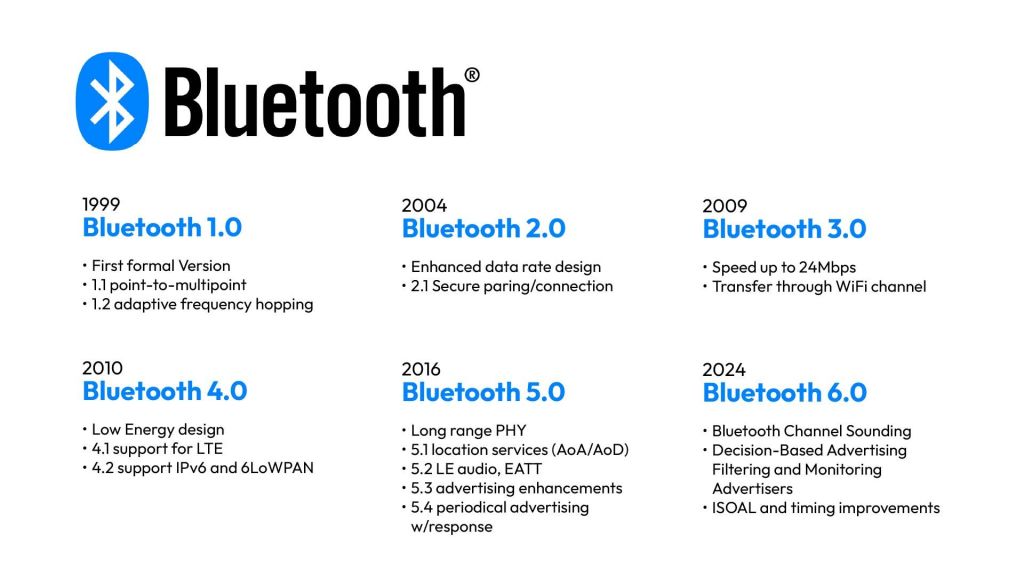
Bluetooth Overview and Detailed Chronological Timeline
🏛️ Era 1: Pre-Commercialization & Foundation (1989–1998)
Before becoming an open global standard, Bluetooth began as a proprietary corporate feasibility project aimed at liberating electronics from restrictive RS-232 data cables.
1989: Nils Rydbeck (CTO of Ericsson Mobile) and inventor Johan Ullman initiate a “short-link” radio technology project designed to develop comfortable wireless headsets.
1994: Jaap Haartsen and Sven Mattisson are tasked by Ericsson leadership to formally design the hardware infrastructure in Lund, Sweden. They focus on low-power, low-cost radio architectures.
1997: The engineering team achieves a functional, workable link layer solution. Intel’s Jim Kardach proposes the temporary codename “Bluetooth”.
1998: Recognizing a global framework requires cross-industry alignment, Ericsson joins forces with IBM, Intel, Nokia, and Toshiba to found the Bluetooth Special Interest Group (SIG) to establish an open, license-free standard.
📱 Era 2: The Classic Bluetooth Era (1999–2009)
The first commercial implementation focused heavily on replacing peripheral wires. However, early builds struggled with device-role conflicts, high power consumption, and severe data limitations.
1999 (v1.0 & v1.0b): The Bluetooth SIG publishes the official Bluetooth 1.0 specification. It is heavily plagued by interoperability issues and mandatory hardware address exposure, creating distinct privacy gaps.
2001 (v1.1): Standardized globally under the IEEE 802.15.1 banner. Fixes version 1.0 connection bugs, supports point-to-multipoint slave connections, and introduces unencrypted channel support. The Sony Ericsson T36 debuts as the first commercial phone with integrated Bluetooth.
2003 (v1.2): Introduces Adaptive Frequency Hopping (AFH) to stop Wi-Fi network interference. Adds Extended Synchronous Connections (eSCO) to rescue voice audio quality by allowing packet retransmissions.
2004 (v2.0 + EDR): Unleashes Enhanced Data Rate (EDR). Maximum throughput leaps from a nominal 721 kbps to 3 Mbps, greatly reducing power draw through shorter transmission cycles.
2007 (v2.1 + EDR): Introduces Secure Simple Pairing (SSP). This eliminates complex PIN-code handshakes, improving device security while seamlessly supporting Near Field Communication (NFC) proximity pairings.
2009 (v3.0 + HS): Debuts High Speed (HS) architecture. It uses a clever dual-radio configuration where Bluetooth creates the initial handshake, but offloads large media payloads to an internal 802.11 Wi-Fi link for speeds up to 24 Mbps.
🔋 Era 3: The Bluetooth Low Energy (BLE) & IoT Era (2010–2015)
Prior versions consumed too much power for miniature electronic applications. This era redefined the standard, establishing an entirely separate protocol tier optimized to run on tiny coin-cell batteries for the burgeoning Internet of Things (IoT) market.
2010 (v4.0): The pivotal launch of Bluetooth Low Energy (BLE) (branded initially as Bluetooth Smart). Devices can remain asleep until data bursts happen, drastically dropping baseline energy consumption.
2013 (v4.1): Engineers adjust software layers to prevent direct frequency collision with 4G LTE bands. Devices can now act as both an independent hub and peripheral sensor simultaneously.
2014 (v4.2): Designed entirely for smart home architecture, this update adds support for IPv6 and 6LoWPAN. This allows smart sensors to connect directly to the internet without intermediary mobile gateways.
🌐 Era 4: High-Performance & High-Precision Mesh Era (2016–Present)
Modern iterations have fundamentally transformed the technology from a basic local data-link pipe into a highly robust, secure mesh network and precision spatial positioning framework.
2016 (v5.0): Doubles BLE transmission speeds to 2 Mbps and quadruples operational range up to 240 metres. It optimizes performance for large-scale smart homes and multi-room layouts.
2019 (v5.1): Introduces Direction Finding via Angle of Arrival (AoA) and Angle of Departure (AoD) antennae arrays. Devices achieve hyper-local indoor positioning down to centimeter-level accuracy.
2020 (v5.2): Unveils LE Audio running over the highly efficient LC3 Codec. It introduces Auracast, which enables a single source device to stream high-fidelity audio to an infinite number of nearby headphones or hearing aids.
2021 (v5.3): Adds connection subrating to reduce communication switching latencies. Improves peripheral device power optimization and encryption control keys.
2023 (v5.4): Adds Periodic Advertising with Responses (PAwR) alongside Encrypted Advertising Data (EAD). This allows two-way secure mass communication, tailored specifically for thousands of commercial electronic shelf labels.
2024 (v6.0): Incorporates groundbreaking Channel Sounding technology. It employs phase-based time-of-flight measurements to provide centimeter-level distance awareness, creating incredibly secure digital car and home keys that prevent relay signal tracking attacks.
Bluetooth Overview and Detailed Chronological Timeline
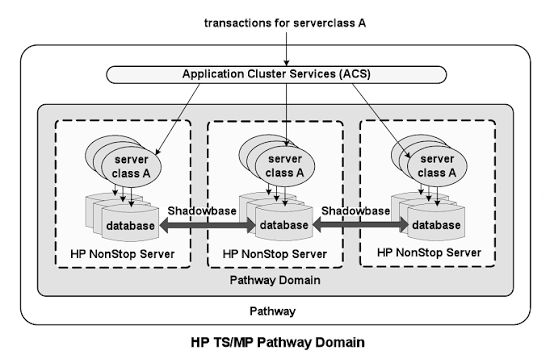
HPE NonStop Pathway is a premier transaction processing and application server environment (TS/MP) that powers mission-critical Online Transaction Processing (OLTP). It handles critical application services—such as fault tolerance, load balancing, memory management, and process scheduling—automatically, allowing developers to focus strictly on business logic.
HPE NonStop Pathway is a transaction processing & application server environment (TS/MP)
Detailed Timeline Breakdown
The history and evolution of the Tandem NonStop platform and its Pathway environment span decades of architectural transformations and corporate ownership, categorized by distinct hardware and software eras:
1. The Tandem Era (1974–1997)
1974: Tandem Computers Inc. is founded by Jimmy Treybig to build the first fault-tolerant commercial hardware.
1976: The first Tandem NonStop system (NSI) is launched. Early apps had to be manually coded for fault tolerance.
1981: NonStop II is released, bringing 32-bit addressing.
1983: The Transaction Monitoring Facility (TMF) is introduced. Together with the launch of the Pathway transaction management software, the need for programmers to write manual fault-tolerance logic into their code is officially eliminated.
1986: Tandem releases the EXT as an entry-level system, followed by the VLX.
1991: Tandem introduces the Cyclone/R and initiates a massive architectural shift away from proprietary stack machines towards MIPS RISC processors.
1997: Compaq acquires Tandem Computers, placing the NonStop product line under its umbrella.
2. The Compaq & Early HP Era (1997–2014)
2001–2002: Hewlett-Packard (HP) merges with Compaq. The platform is rebranded as HP NonStop.
2005: The HP Integrity NonStop (TNS/E) series is introduced, migrating the fault-tolerant platform to Intel Itanium microprocessors. Pathway continues to be the main driver for high-volume banking and telecom applications.
2011: Further hardware advancements lead to the release of HP Integrity NonStop BladeSystems.
3. The Modern HPE Era (2015–Present)
2015: Hewlett-Packard splits, and the NonStop environment transitions to Hewlett Packard Enterprise (HPE).
2015/2016: Introduction of NonStop X (TNS/X) systems, marking the platform’s migration to standard Intel x86-64 processors and adopting InfiniBand interconnects. Pathway capabilities are updated to span dynamic server classes across multiple systems (Pathway Domains).
Present: HPE continues to modernize the NonStop architecture, integrating the platform with HPE GreenLake for consumption-based models and providing native support for modern DevOps tools and hybrid cloud deployments.
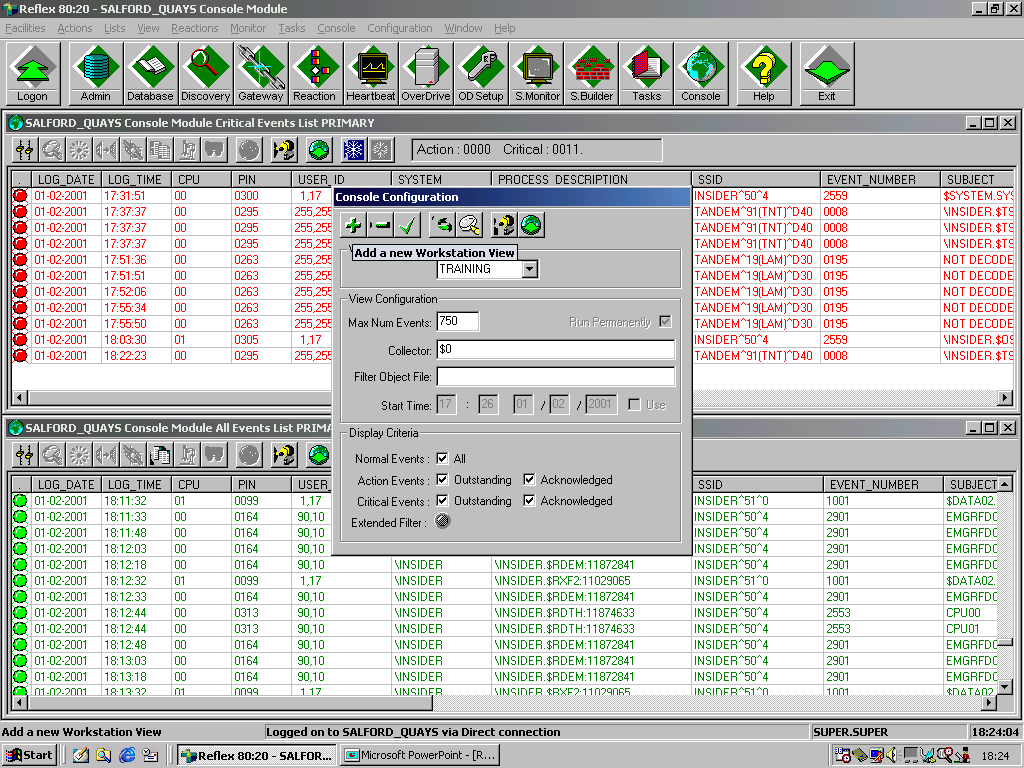
In the HPE NonStop ecosystem, EMS (Event Management Service) is the core software subsystem responsible for collecting, formatting, filtering, logging, and routing system and application event messages. It provides fault-tolerant monitoring by gathering data from EMS collectors and selectively delivering alerts to consoles, log files, or automated management applications.
The evolution and detailed historical timeline of NonStop EMS events and architecture is broken down by era below:
1. The Tandem Guardian Era (Late 1970s – 1980s)
Focus: Foundation of Fault-Tolerant Event Logging
1976: Tandem releases the original Tandem/16 (NonStop I) system. Early event handling was primarily a rudimentary terminal console logging process.
1978: System administrators struggled with message scaling as clusters and terminal networks expanded. Tandem began developing structured event tracking, paving the way for standardized subsystem messages.
1980s: Introduction of early message formatting. Event messages 1 through 511 were reserved for unformatted, raw console events. The Event Management Service (EMS) was gradually formalized to centralize scattered terminal messages.
2. The D-Series & TMF Era (1990s)
Focus: Distributed Management & The Birth of Modern EMS
1991: Tandem releases the Cyclone/R (CLX/R) and later the Himalaya K-series using MIPS processors.
1993: The publication of the seminal EMS Reference Summaries standardized EMS APIs and SPI (System Programming Interface). Event IDs were structured into standardized subsystems (e.g., negative-numbered kernel messages).
1995: The NonStop Kernel introduced Open System Services (OSS), natively integrating Unix-like event logs into the Guardian architecture.
1997: Compaq acquires Tandem Computers. EMS underwent significant rewrites to interface with remote servers and client networks. The S-Series was launched utilizing ServerNet fabric, introducing advanced, distributed event collectors and distributors.
3. The Compaq Transition & HP Integration (2000s)
Focus: Web-Based Management and Automation
2000 – 2003: Legacy ViewPoint tools were expanded. The emergence of GUI interfaces and DSM/PM (Distributed Systems Management/Performance Monitor) allowed operators to browse and filter EMS logs on alternate/primary event files.
2003 – 2005: The transition to Web ViewPoint commenced, turning text-based EMS event logs into interactive, web-based graphical operations interfaces.
2006 – 2009: With HP fully in charge after merging with Compaq, EMS event viewing was modernized through TSM (Tandem/HP Systems Management) and the Open System Management (OSM) Event Viewer.
2015 – 2017: The platform is rebranded as HPE NonStop as the architecture migrates to x86 processors. EMS systems are upgraded to handle large datasets, feeding complex event processing (CEP) and SNMP trap frameworks for modern data centers.
2018 – 2023: HPE integrates NonStop systems with HPE GreenLake. EMS event logging is modernized with API-driven integrations, allowing system events to be consumed by off-platform enterprise loggers, Splunk, and cloud-management consoles.
2024 – 2026: EMS events operate in highly virtualized and hybrid cloud (x86 and Virtual NonStop) environments. Event management heavily relies on modern distributed systems where EMS distributors push logs seamlessly into centralized IT monitoring suites and continuous availability dashboards.