Performing a Root Cause Analysis (RCA) in IT

To perform a Root Cause Analysis (RCA) in IT, you must systematically isolate the underlying technical or process failure that caused an incident, rather than just treating the visible symptoms.

Following a structured IT service management framework ensures you fix the issue permanently and prevent it from happening again.
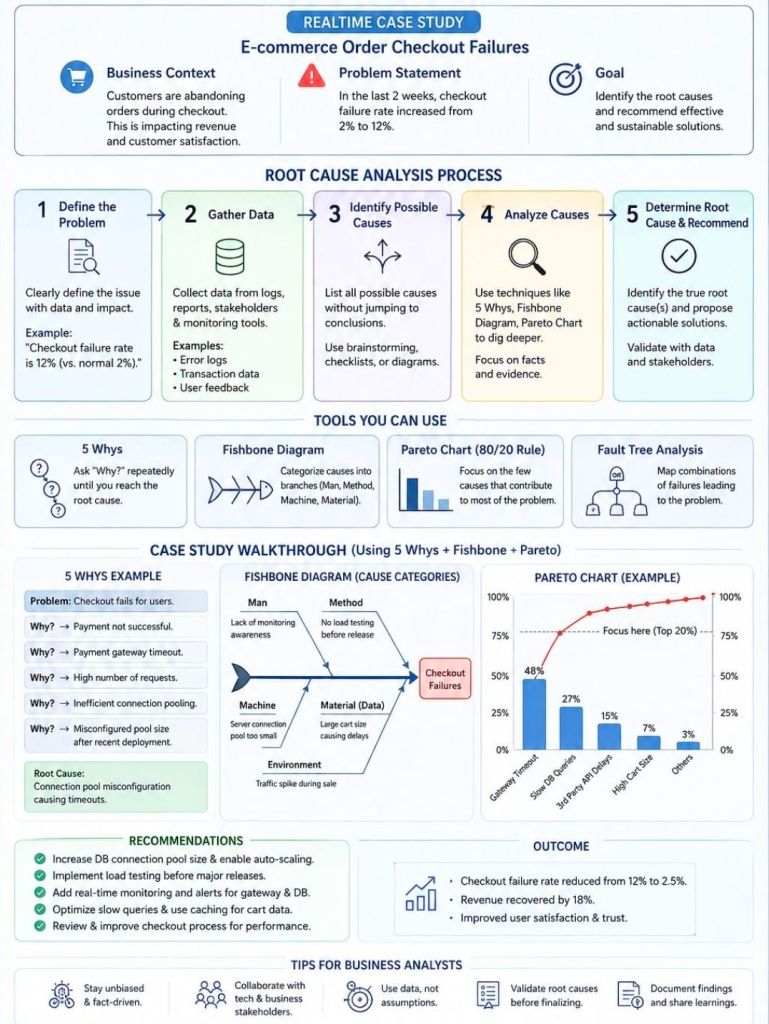
To perform a Root Cause Analysis (RCA) in IT

1. Define the Incident and Its Impact

Clearly articulate what went wrong using specific, technical terms. Avoid vague descriptions.

  • Draft a precise problem statement: Specify the exact error message, system component, and affected user base.
  • Quantify the impact: Note the financial cost, operational downtime, or number of disrupted transactions.
  • Establish containment: Ensure short-term workarounds are active to protect users while you investigate.

2. Gather Evidence and Timeline

Collect empirical data from your IT environment to reconstruct the exact order of events.

  • Pull system logs: Review application logs, server telemetry, database queries, and network traffic captures.
  • Check the change management registry: Cross-reference the exact time of failure against recent code deployments, infrastructure modifications, or patch updates.
  • Map out the sequence: Build a chronological timeline from the last known stable state to the moment of failure.

3. Identify Potential Causal Factors

Brainstorm all possible technical and human vectors that could have triggered the event.

  • Brainstorm with a cross-functional team: Involve developers, system administrators, and network engineers to get different perspectives.
  • Categorize via Fishbone (Ishikawa) Diagrams: Separate potential culprits into categories like Code, Hardware, Processes, People, and Third-Party Vendors.
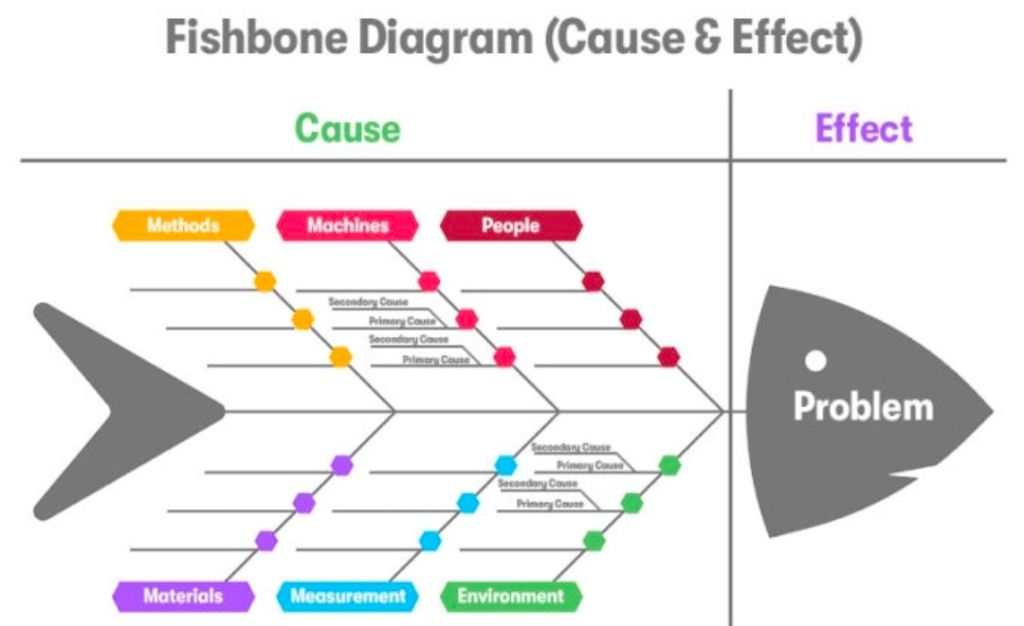
Categorize via Fishbone (Ishikawa) Diagram
Categorize via Fishbone (Ishikawa) Diagrams

4. Isolate the Root Cause

Use deep analytical methods to narrow your broad list of potential causes down to the single source failure.

  • Apply the 5 Whys technique: Ask “Why?” repeatedly to drill past surface symptoms. For example:
    1. Why did the application crash? The database ran out of memory.
    2. Why did it run out of memory? A specific query caused a memory leak.
    3. Why did the query leak memory? A recent code change did not close database connections.
    4. Why were connections left open? The developer missed the disposal pattern in the new framework.
    5. Why was it missed? There was no automated code linting or peer review rule for this framework (Root Cause).
  • Utilize Fault Tree Analysis (FTA): Use boolean logic to visually map how combinations of lower-level system faults lead to a high-level systemic failure.

5. Develop and Implement Preventive Solutions

Design a permanent fix targeting the root cause so the issue cannot happen again.

  • Deploy technical remediation: Patch code, reconfigure infrastructure, or scale resources.
  • Fix the process gap: Update documentation, add automated testing pipelines, or adjust alert thresholds.
  • Assign clear ownership: Appoint explicit owners and deadlines for each action item.

6. Document and Practice Blameless Reviews

Foster transparency to improve future infrastructure resilience.

  • Conduct a blameless post-mortem: Focus entirely on how the system allowed the failure to occur, not who made the mistake.
  • Publish an internal RCA report: Document the timeline, data points, root cause, and remediation steps in a searchable knowledge base.

For a visual breakdown of how to execute these problem-solving techniques in practice, watch this tutorial on conducting a root cause analysis:

How to Do Root Cause Analysis (RCA) the Right Way | Lean Six Sigma ToolsYouTube · InfiniLean

Performing a Root Cause Analysis (RCA) in IT
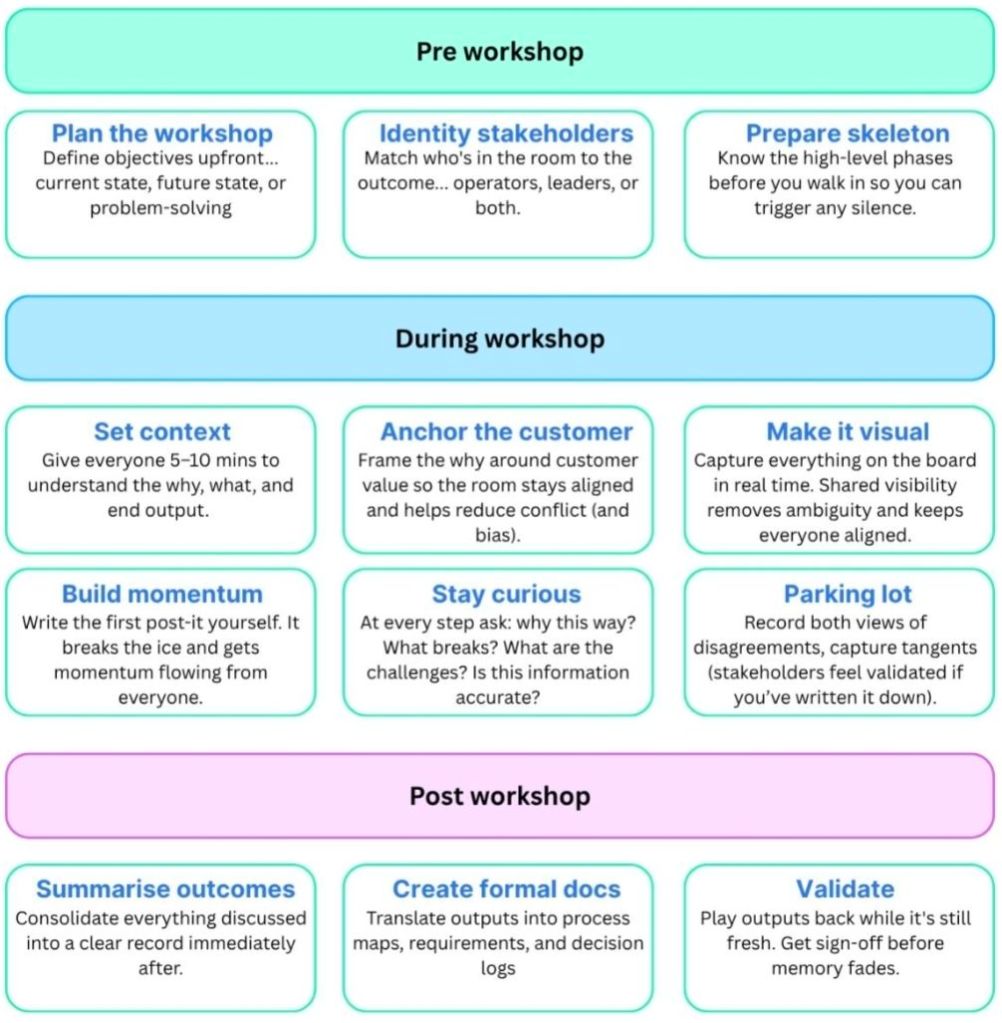
Facilitating Workshops as a Business Analyst BA

Facilitating Workshops as a Business Analyst BA
Facilitating Workshops as a Business Analyst
Facilitating Workshops as a Business Analyst BA

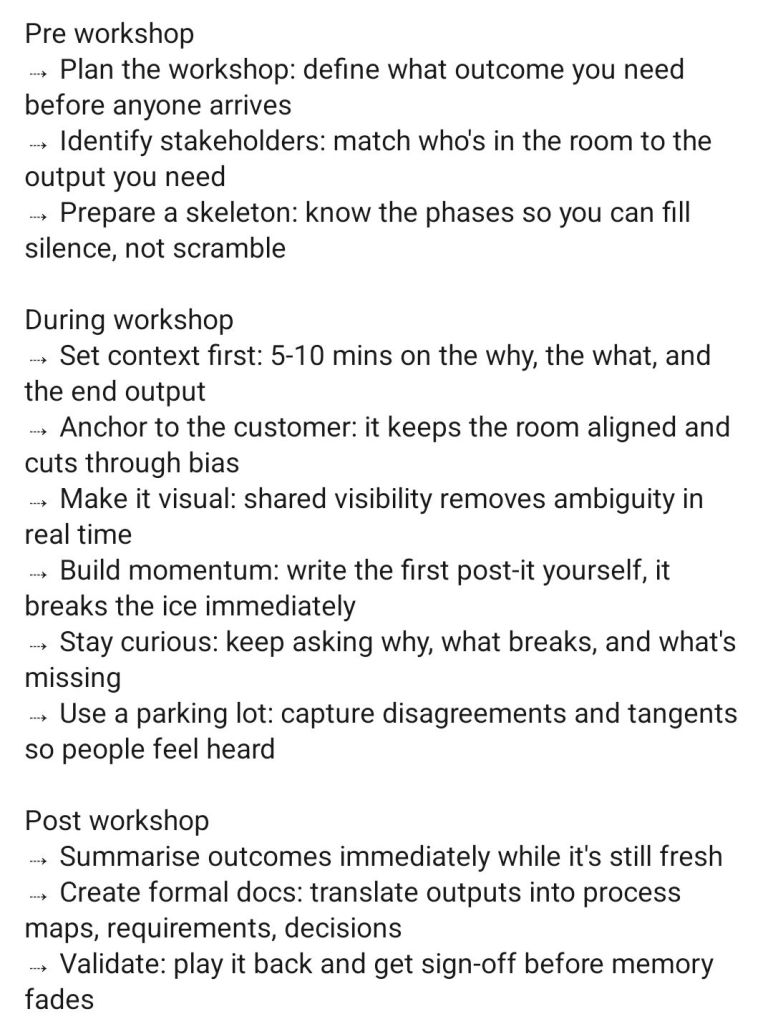
As a Business Analyst (BA), facilitating workshops is a core competency used to elicit requirements, align cross-functional teams, and achieve stakeholder consensus. Success hinges on meticulous pre-session planning, active moderation of group dynamics during the session, and timely post-workshop documentation.

A proven framework for facilitating impactful BA workshops involves three critical phases:

1. Preparation

Planning is the most important step for a successful workshop. Poorly planned sessions waste valuable stakeholder time.

  • Define the Objective: Identify exactly what needs to be achieved (e.g., process mapping, feature prioritization, or user story mapping).
  • Select Participants: Invite subject matter experts (SMEs), decision-makers, and end-users. Keep the group size manageable, usually between 5 to 10 people to ensure productivity.
  • Create a Clear Agenda: Break the time down into specific activities. Allocate time for introductions, the core activity, breaks (if >1 hour), and a summary.
  • Prepare Materials: Set up whiteboards (physical or digital like Miro/Mural) and prepare your facilitation techniques (e.g., brainstorming, MoSCoW prioritization).

2. Execution (In the Session)

Your role is to act as a neutral guide, keeping the team focused on the objective rather than getting bogged down in implementation details.

  • Set Ground Rules: Establish parameters early, such as one conversation at a time, keeping devices put away, and respecting everyone’s input.
  • Manage Group Dynamics: Encourage quieter participants to speak up while politely reigning in dominant voices.
  • Use a ‘Parking Lot’: Create a designated section on a whiteboard for off-topic ideas, out-of-scope concerns, or unresolved questions to prevent the meeting from derailing.
  • Visual Collaboration: Use process flows, mockups, or sticky notes to give the conversation a focal point. This triggers ideas and helps maintain stakeholder attention.

3. Post-Workshop

The work doesn’t end when the meeting concludes. You must synthesize the information gathered to ensure it translates into actionable project deliverables.

  • Consolidate Documentation: Clean up notes, digitize whiteboard sessions, and format the elicited requirements.
  • Distribute and Align: Send a clear, written summary to participants outlining decisions made, parking lot items that need resolution, and agreed-upon next steps (who is doing what and by when).

Resources and Best Practices

  • For structured, globally recognized techniques and study material, explore the International Institute of Business Analysis (IIBA).
  • To learn practical workshop formats like user story mapping and discovery, watch this BA Requirements Workshop Guide on YouTube.

Scrum Master Activities before Sprint Planning

Scrum Master Activities before Sprint Planning
Tye Scrum Master Activities before the Sprint Planning
Scrum Master Activities before Sprint Planning

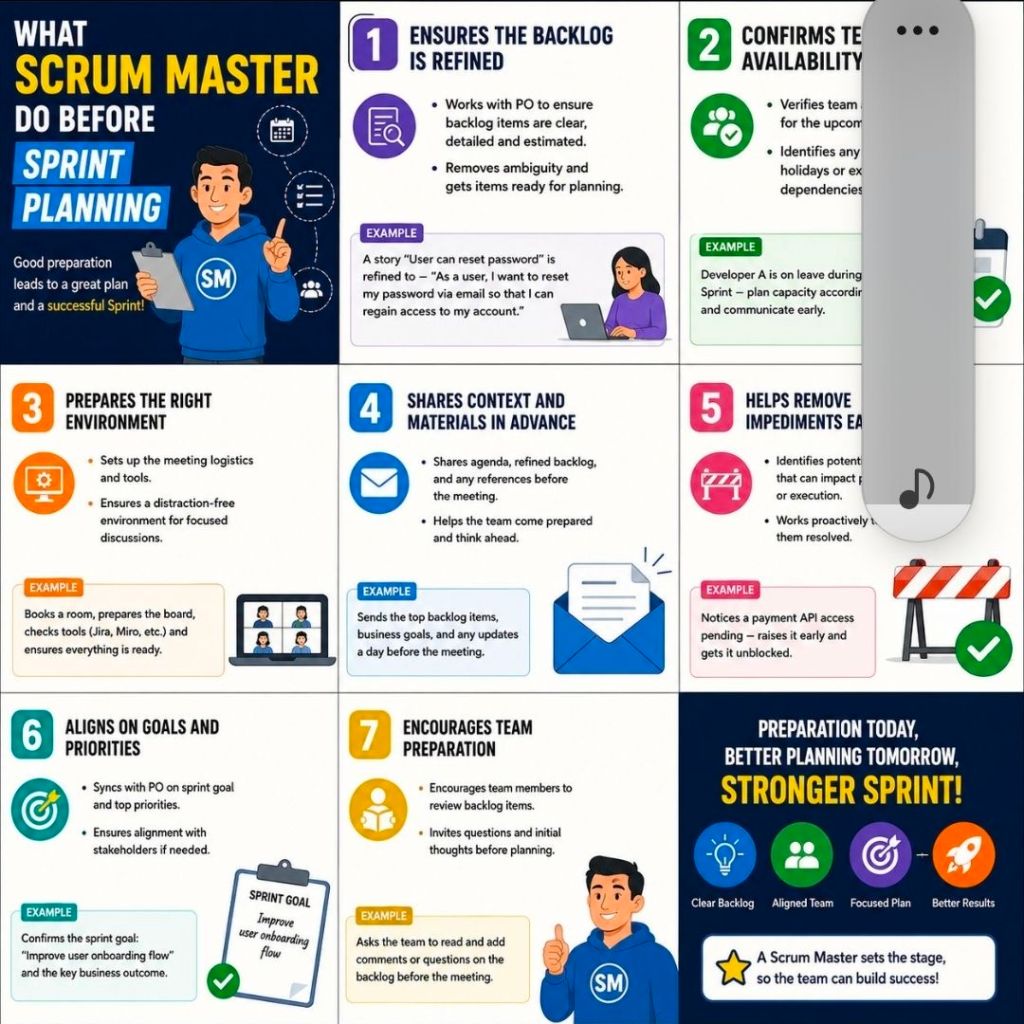
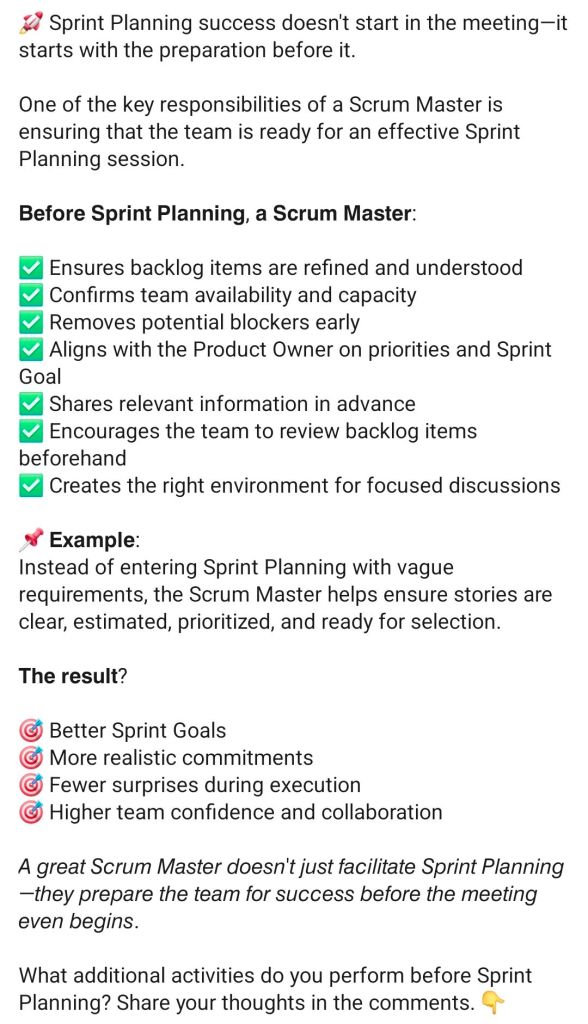
The primary role of a Scrum Master before Sprint Planning is to ensure the Scrum Team is fully prepared so that the actual planning event remains focused, highly efficient, and time-boxed. Rather than managing the tasks themselves, the Scrum Master acts as a coach and facilitator to clear roadblocks beforehand.

The core activities a Scrum Master performs prior to Sprint Planning include:

1. Facilitate Product Backlog Refinement

  • Ensure regular grooming: Schedule and guide Product Backlog Refinement sessions to avoid lengthy discussions during the planning meeting.
  • Uphold the Definition of Ready (DoR): Coach the team to ensure top backlog items have clear acceptance criteria, dependencies mapped out, and early estimations completed.
  • Review Definition of Done (DoD): Verify if changes to the product’s DoD are required, as this directly impacts the team’s capacity and effort forecasting.

2. Support and Coach the Product Owner (PO)

  • Clarify strategic intent: Collaborate with the Product Owner to align upcoming work with the broader Product Goal and roadmap.
  • Draft a preliminary Sprint Goal: Help the PO articulate a clear, value-driven objective before the meeting.
  • Backlog sequencing: Ensure the Product Owner has ordered the backlog by business priority so the team knows exactly where to focus.

3. Calculate Team Capacity and Velocity

  • Assess availability: Gather data on planned leaves, holidays, corporate events, or company-wide obligations for the upcoming sprint window.
  • Analyze historical data: Review past performance metrics and stable velocity charts via tools like ScrumDesk to establish a realistic baseline.
  • Account for overhead: Factor in time for technical debt, unplanned production support, or cross-team collaborations.

4. Remove External Dependencies and Blockers

  • Cross-team coordination: Identify and resolve external technical blockers or team dependencies that could halt execution.
  • Invite external experts: Coordinate with the Product Owner to invite technical experts, stakeholders, or users from other departments to provide advice during planning.

5. Prepare the Logistics and Workspace

  • Set the agenda: Create and distribute a structured time-boxed agenda to set expectations and keep the session on track.
  • Set up digital boards: Organize Jira boards, Miro canvases, or Azure DevOps instances to ensure the workspace is ready for smooth item mapping.

Mark Whitfield PM – Website & Blog focus areas

The blog posts by Mark Whitfield, a Senior IT Project and Engagement Manager, primarily focus on practical project management (PM) frameworks, methodology implementation, and digital delivery execution.

Mark Whitfield PM - Website and Blog focus areas

Hosted on his platform, PROject Templates, the blog acts as an extension of his 30+ year career transitioning from mainframe engineering to leading large-scale Agile and Waterfall digital transformations.

Blog Overview and Key Topics

The core purpose of the blog is to guide project professionals through real-world deployment challenges while showcasing an ecosystem of over 200 editable Microsoft Office templates.

The main content focus areas include:

  • Framework Implementation: In-depth overviews on aligning project lifecycles with PRINCE2 (7th Edition), Agile Scrum, and Kanban methodologies.
  • Detailed Project Planning: Actionable steps for setting up Software Development Life Cycles (SDLC), defining dependencies, establishing milestones, and handling project baselines.
  • Operational Checklists: Daily, highly practical guides tailored for specific team roles, such as his “Daily Checklist for Scrum Masters”.
  • Risk and Governance Control: Best practices on organizing and managing RAIDs logs (Risks, Actions, Issues, Dependencies), change requests, and corporate project governance.
  • High-Level Reporting: Frameworks for structural communication with stakeholders, utilizing Plan on a Page (POaP) examples, dashboard designs, and financial budget tracking templates.
  • Digital & Cloud Delivery Lessons: Real-world insights drawn from his corporate and public sector experiences, covering topics like middleware architecture deployments and hybrid cloud application refactoring.

Agile for Business Analysts BA

Agile for Business Analysts BA

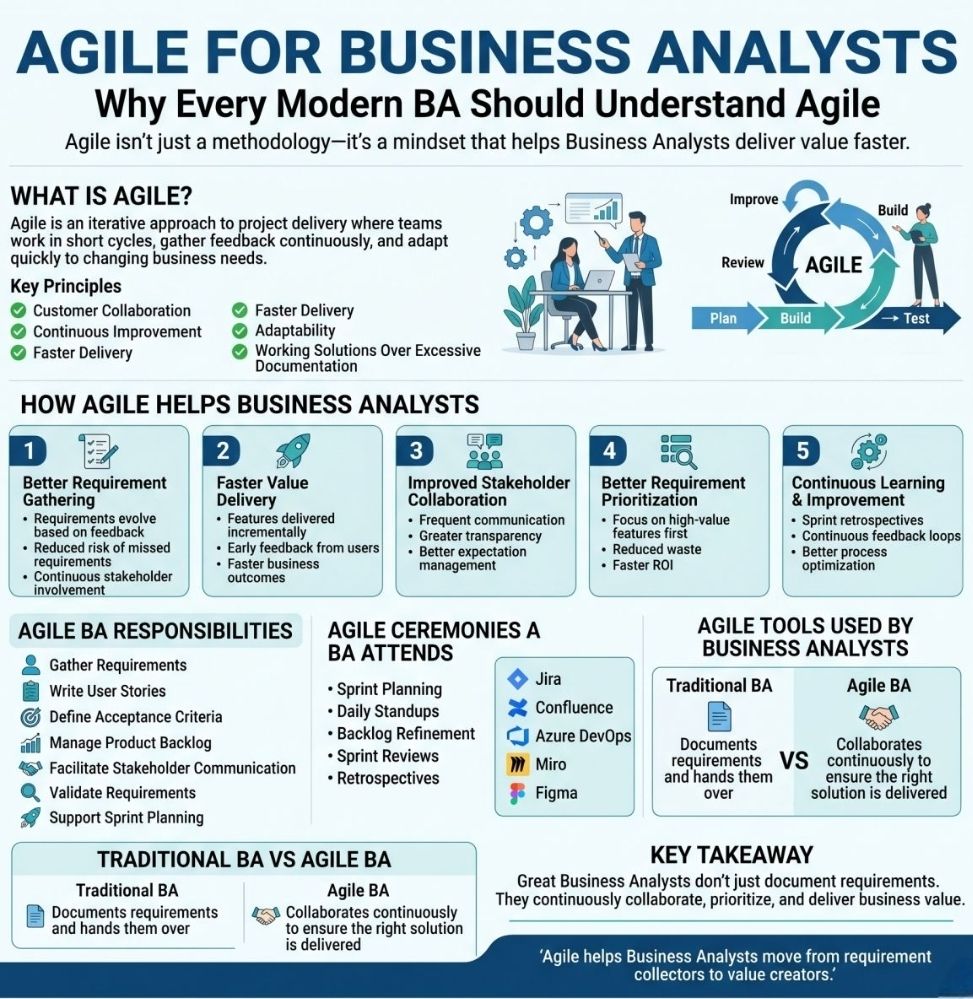
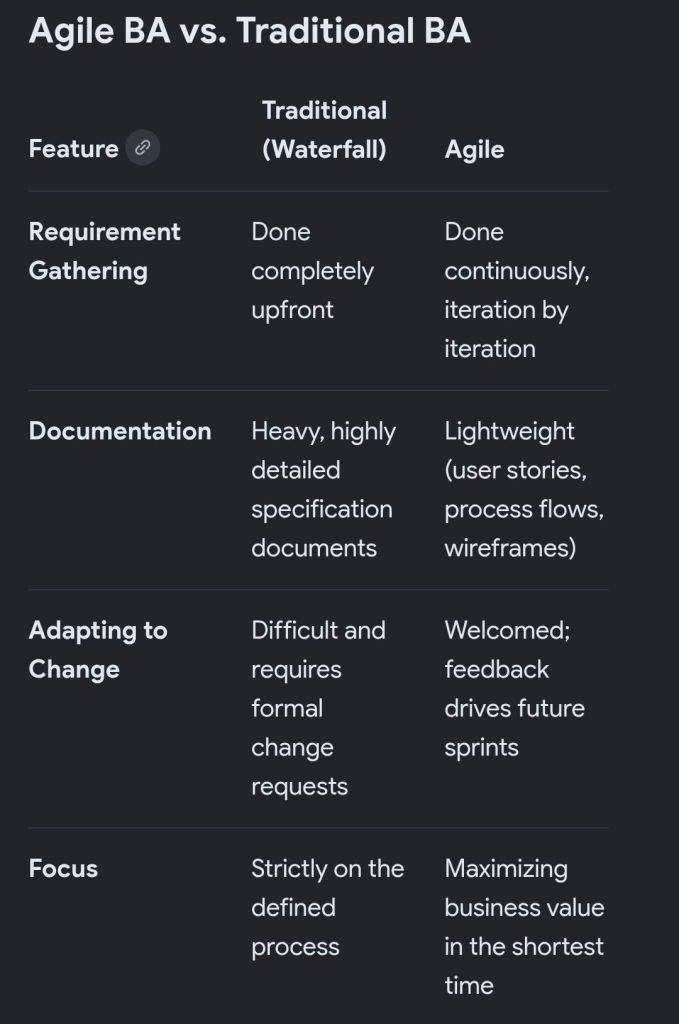
In an Agile environment, a Business Analyst (BA)acts as the crucial bridge between business stakeholders and the technical team. Rather than gathering all requirements upfront, Agile BAs focus on continuous analysis, delivering value in small increments, and writing lightweight user stories that adapt as the product evolves.

Transitioning from traditional (Waterfall) analysis to an Agile framework requires a fundamental shift in how requirements are handled, documented, and delivered.

The Core Shifts in an Agile BA Role

  • Continuous Discovery: Instead of producing a massive Requirements Document at the start, BAs analyze and refine requirements just-in-time and just-enough to keep the development team moving.
  • User Stories over BRDs: Traditional Business Requirements Documents (BRDs) are replaced with collaborative user stories and acceptance criteria.
  • Value-Driven Prioritization: The BA continuously helps the Product Owner (or acts as the Product Owner proxy) rank the Product Backlog so that the highest-value features are built first.
  • Shared Understanding: The focus is on face-to-face communication, workshops, and visual modeling (like wireframes) to ensure developers fully grasp what needs to be built.

Key Responsibilities

Agile BAs operate across several domains throughout the sprint lifecycle:

  1. Backlog Refinement: Collaborating with stakeholders to break down large, complex requirements into smaller, manageable chunks (Epics to User Stories).
  2. Definition of Ready (DoR): Ensuring that user stories are clear, testable, and have defined acceptance criteria before they are pulled into an active sprint.
  3. Sprint Support: Answering questions from the development team in real-time, clarifying business rules, and helping to remove blockers.
  4. Acceptance Testing: Assisting Quality Assurance (QA) teams or business users to validate that the delivered software works as intended and solves the underlying business problem.
Agile BA versus Traditional BA

Common Frameworks for Agile BAs

  • Scrum: Working alongside the Scrum Master, Product Owner, and Developers in short iterations (sprints), typically lasting 2 to 4 weeks.
  • Kanban: Managing a continuous flow of analysis work, prioritizing items on a visual board as development capacity allows.
  • AgileBA: A specific certification and framework designed by the Agile Business Consortium that provides BAs with practical tools for working in Agile settings.

Recommended Resources for Skill Building

To deepen your expertise in Agile business analysis, explore these highly regarded methodologies and guides:

  • Use the AgileBA Certification guide to understand official best practices.
  • Read the IIBA Agile Extension to the BABOK Guide for authoritative frameworks.
  • Review Bridging the Gap for practical, real-world implementation strategies.

Agile Scrum vs SAFe (Scaled Agile Framework), Key Differences

Agile Scrum vs SAFe (Scaled Agile Framework), Key Differences
Agile Scrum vs Scaled Agile Framework (SAFe)

The fundamental difference is scale: Agile Scrum is designed for a single, autonomous team (typically 5–9 people), whereas Scaled Agile Framework (SAFe) is built for the enterprise level to coordinate dozens of teams (50+ people) working toward shared business goals.

Scrum prioritizes team flexibility and speed. Conversely, SAFe trades complete autonomy for centralized alignment, consistency, and structural predictability.

Industry Perspectives on the Trade-offs

While SAFe solves enterprise synchronization challenges, it faces regular scrutiny from product leaders who argue that its highly prescriptive nature can stifle the true spirit of agility.

A popular comment from an agile practitioner on Reddit’s Scrum Community highlights the developer sentiment regarding the process overhead:

“I’ve never seen SAFe implemented without a meeting explosion. More planning, more roles, more acronyms and way more time blocked on calendars.”

Another developer shared a similar perspective on Reddit’s ExperiencedDevs Community:

“Number of meetings have increased 4x. More time is spent for planning to build software than actually building software. Bureaucratic rituals are more important than getting things done.”

Ultimately, SAFe does not replace Scrum. Most organizations implementing SAFe still utilize standard Scrum practices at the team level, leveraging the macro framework solely to manage the dependencies that threaten to derail massive initiatives.


Choosing the Right Approach

  • Choose Scrum if: You have a small or mid-sized setup, your teams operate independently, you are early in your Agile journey, and your primary pain point is a need for fast market-feedback loops.
  • Choose SAFe if: You are coordinating 50 to 1,000+ engineers across complex legacy systems, cross-team dependencies frequently delay your releases, and you need strict regulatory compliance or top-down executive alignment.

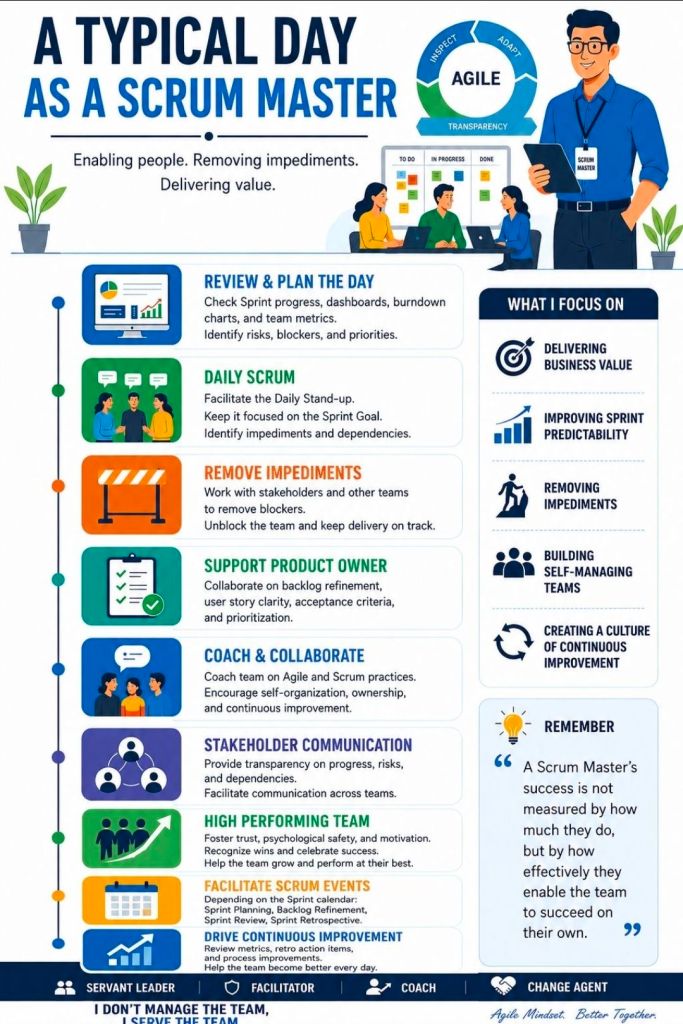
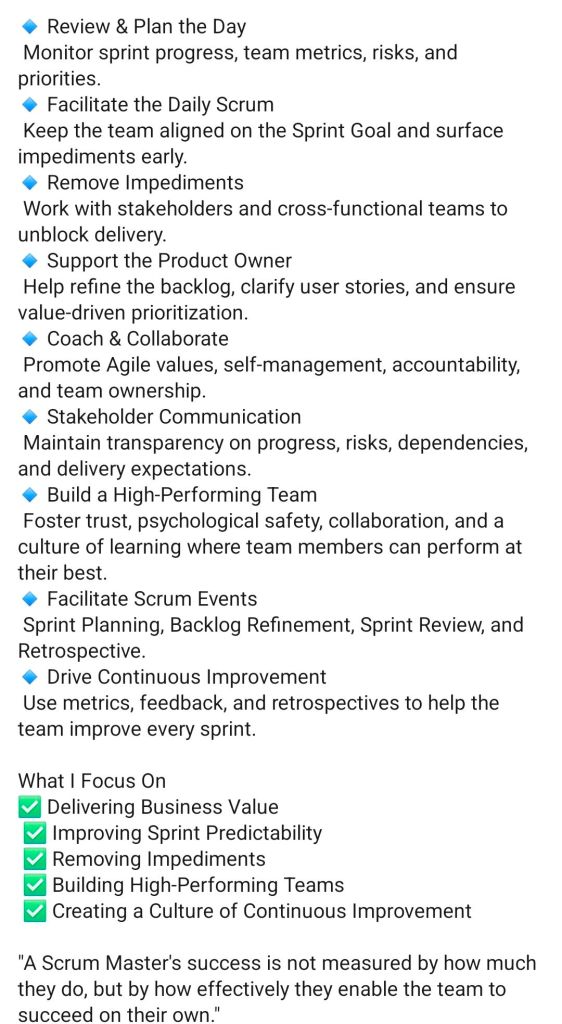
Agile Scrum Master, a Typical Day

Agile Scrum Master, a Typical Day
Agile Scrum Master, Typical Day

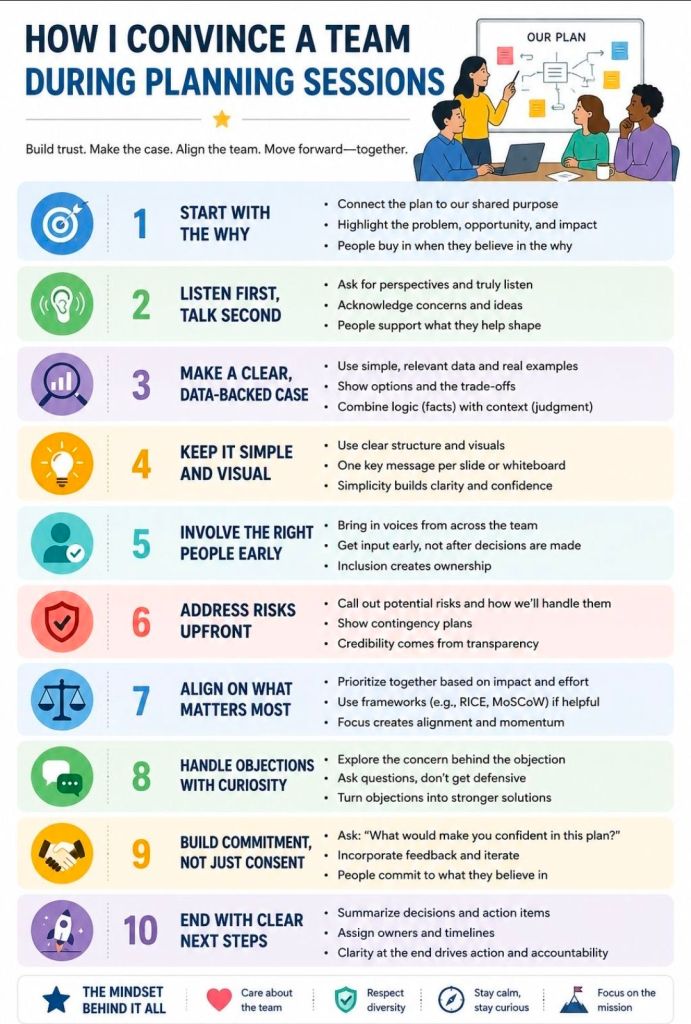
Convincing a Team During PM Planning Sessions

Convincing a Team During Project Management Planning Sessions
Convincing a Team During PM Planning Sessions