

To perform a Root Cause Analysis (RCA) in IT, you must systematically isolate the underlying technical or process failure that caused an incident, rather than just treating the visible symptoms.
Following a structured IT service management framework ensures you fix the issue permanently and prevent it from happening again.
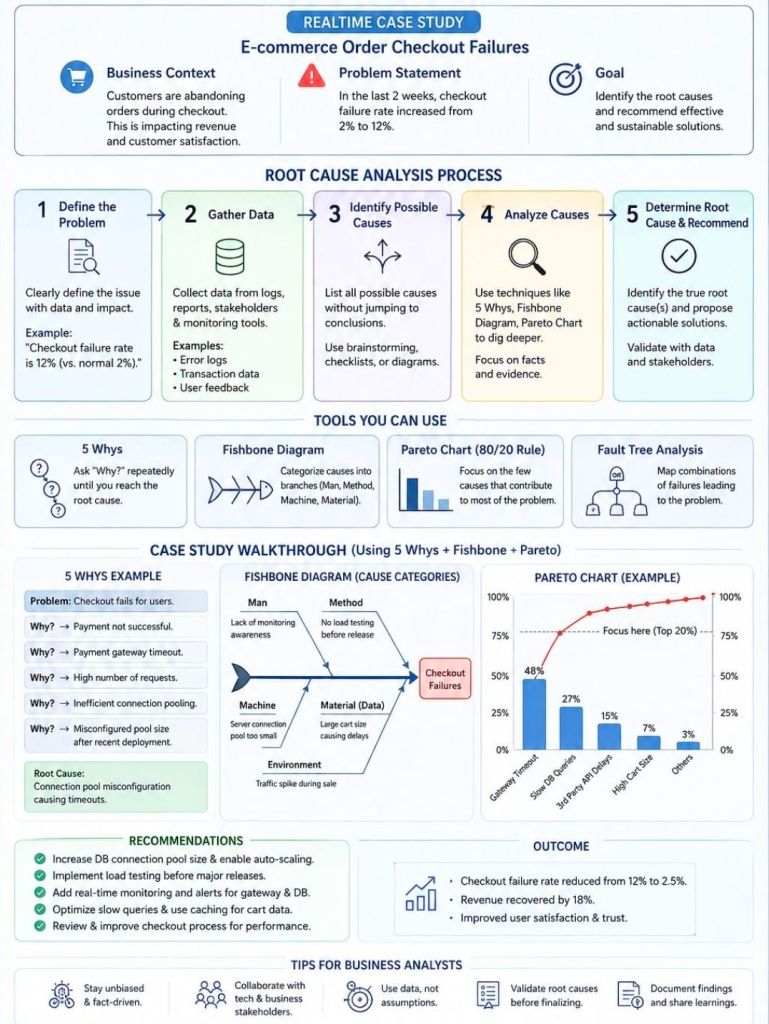
1. Define the Incident and Its Impact
Clearly articulate what went wrong using specific, technical terms. Avoid vague descriptions.
- Draft a precise problem statement: Specify the exact error message, system component, and affected user base.
- Quantify the impact: Note the financial cost, operational downtime, or number of disrupted transactions.
- Establish containment: Ensure short-term workarounds are active to protect users while you investigate.
2. Gather Evidence and Timeline
Collect empirical data from your IT environment to reconstruct the exact order of events.
- Pull system logs: Review application logs, server telemetry, database queries, and network traffic captures.
- Check the change management registry: Cross-reference the exact time of failure against recent code deployments, infrastructure modifications, or patch updates.
- Map out the sequence: Build a chronological timeline from the last known stable state to the moment of failure.
3. Identify Potential Causal Factors
Brainstorm all possible technical and human vectors that could have triggered the event.
- Brainstorm with a cross-functional team: Involve developers, system administrators, and network engineers to get different perspectives.
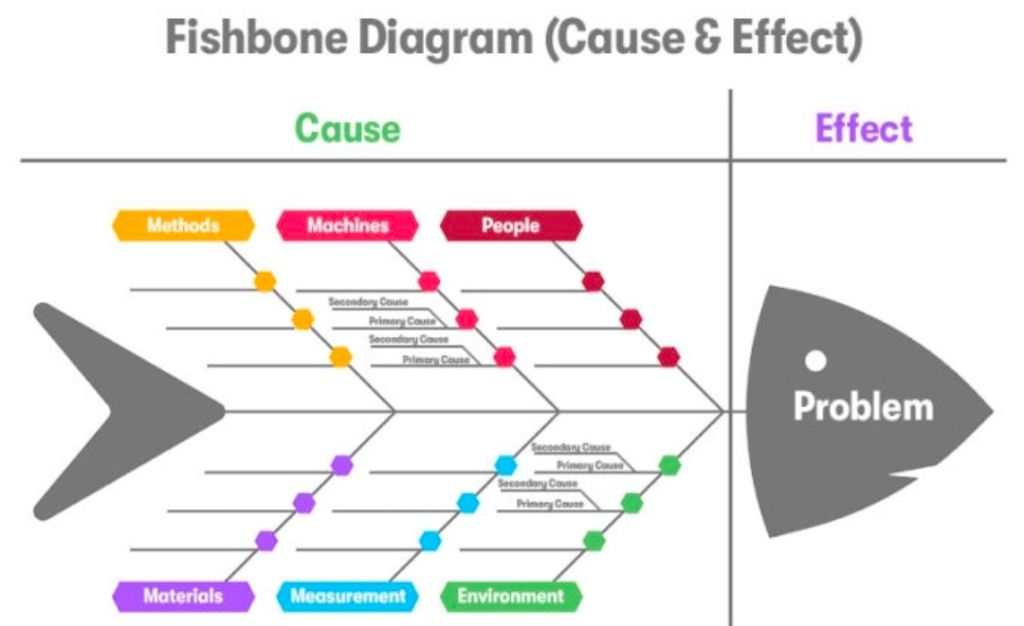
- Categorize via Fishbone (Ishikawa) Diagrams: Separate potential culprits into categories like Code, Hardware, Processes, People, and Third-Party Vendors.
4. Isolate the Root Cause
Use deep analytical methods to narrow your broad list of potential causes down to the single source failure.
- Apply the 5 Whys technique: Ask “Why?” repeatedly to drill past surface symptoms. For example:
- Why did the application crash? The database ran out of memory.
- Why did it run out of memory? A specific query caused a memory leak.
- Why did the query leak memory? A recent code change did not close database connections.
- Why were connections left open? The developer missed the disposal pattern in the new framework.
- Why was it missed? There was no automated code linting or peer review rule for this framework (Root Cause).
- Utilize Fault Tree Analysis (FTA): Use boolean logic to visually map how combinations of lower-level system faults lead to a high-level systemic failure.
5. Develop and Implement Preventive Solutions
Design a permanent fix targeting the root cause so the issue cannot happen again.
- Deploy technical remediation: Patch code, reconfigure infrastructure, or scale resources.
- Fix the process gap: Update documentation, add automated testing pipelines, or adjust alert thresholds.
- Assign clear ownership: Appoint explicit owners and deadlines for each action item.
6. Document and Practice Blameless Reviews
Foster transparency to improve future infrastructure resilience.
- Conduct a blameless post-mortem: Focus entirely on how the system allowed the failure to occur, not who made the mistake.
- Publish an internal RCA report: Document the timeline, data points, root cause, and remediation steps in a searchable knowledge base.
For a visual breakdown of how to execute these problem-solving techniques in practice, watch this tutorial on conducting a root cause analysis:
How to Do Root Cause Analysis (RCA) the Right Way | Lean Six Sigma ToolsYouTube · InfiniLean
Performing a Root Cause Analysis (RCA) in IT


