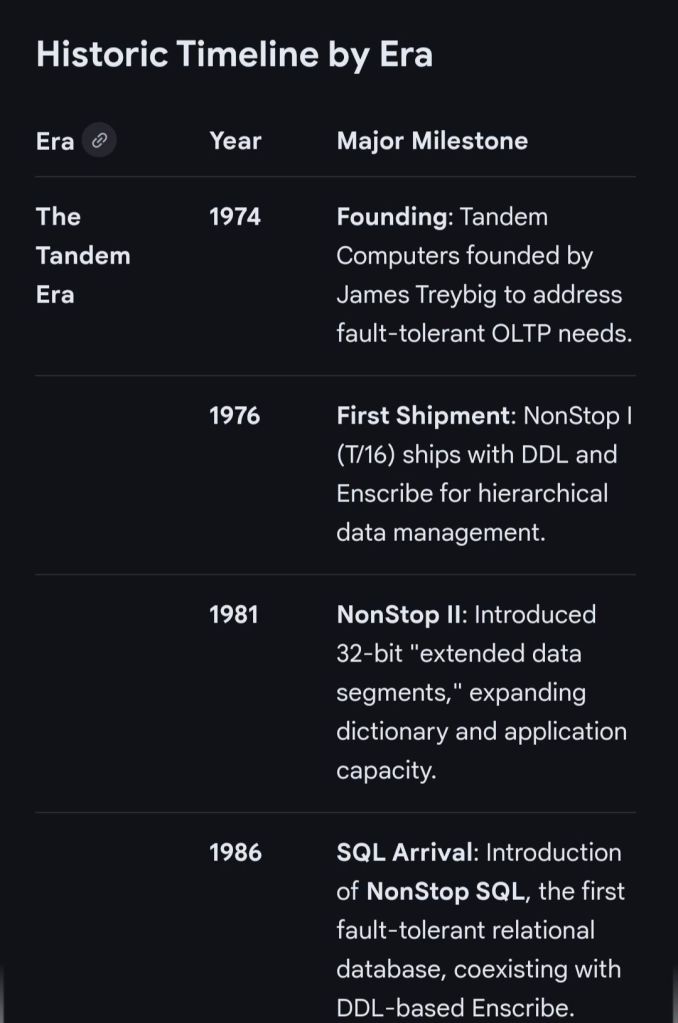
HPE NonStop EMSDIST, Event Management Service EMS Distributor Timeline by Era

HPE NonStop EMSDIST (Event Management Service Distributor) is a critical component within the HPE NonStop operating system responsible for distributing and managing event messages (logs) generated by the system, subsystems, or applications. It is part of the Event Management Service (EMS), which is essential for fault-tolerant monitoring. 

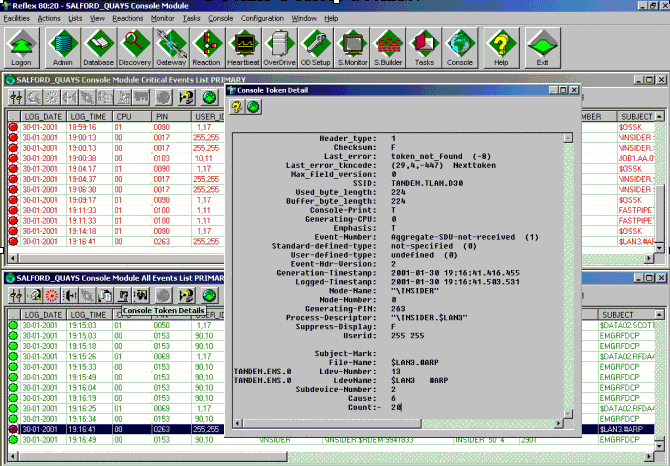
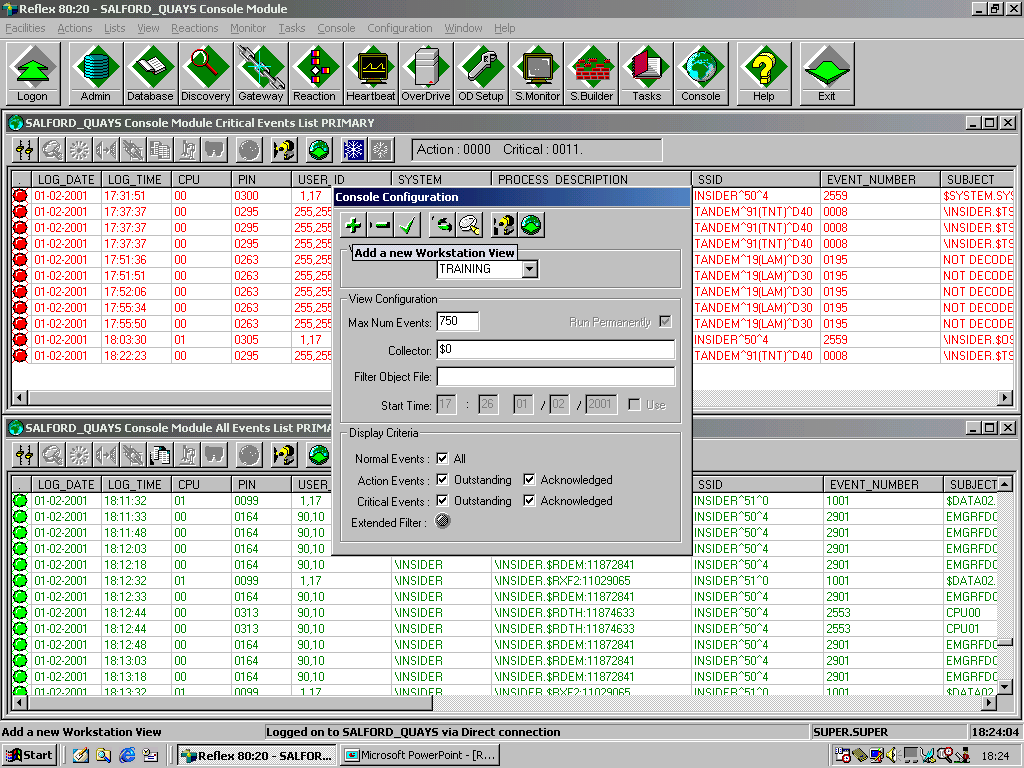
EMS events (via EMSDIST) seen in the Reflex 80:20 application ( now Sentinel (Nonstop Monitoring) by ETI-NET)

EMSDist Overview

  • Purpose: EMSDIST reads events from an EMS collector process ($0, $ZLOG, etc.) or a collector logfile, filters them based on user criteria, and sends them to a user-specified destination (such as a terminal, printer, or another file).
  • Key Functionality: It enables both real-time monitoring and historical analysis of events.
  • Event Handling: It handles EMS messages, including those generated by the EMS subsystem itself (messages 513-999) and those from EMS distributors (messages > 1000).
  • Integration: Often used in conjunction with TACL (Tandem Advanced Command Language) for automated event management scripts. 

Detailed Historic Timeline and Evolution

EMSDIST has evolved alongside Tandem / Compaq / HPE NonStop systems, transitioning from basic console management to complex distributed management systems. 

1. The Tandem Guardian Era (Late 1970s – 1980s)

  • Context: The emergence of Tandem NonStop systems focused on continuous availability.
  • EMS Origins: Initial event handling was largely via console messages. As systems grew, the need to manage logs across multiple processors led to early Event Management Service components.
  • Role of EMSDist: Early distributors primarily moved messages from local collectors to a central console or tape log.

2. The D-Series & TMF Era (1990s)

  • Context: Introduction of sophisticated transaction monitoring and distributed databases.
  • 1996: A significant EMS Reference Summary was released (PN 114754), formalizing the structure of EMS collectors and distributors.
  • Capabilities: EMSDIST became capable of filtering high-volume events, separating critical errors from warning messages (513-1019).
  • Evolution: Began integrating with the Distributed Systems Management (DSM) suite for better network-wide event visibility. 

3. The Compaq & Integrity (J-Series/H-Series) Era (2000s – 2010s)

  • Context: Shift from MIPS-based processors to Intel Itanium (Integrity) servers.
  • 2003-2005: Integration with Windows-based management systems (DSM/NOW) and improvements to the Multi Event Viewer (MEV).
  • 2014: HP Integrity NonStop Operations Guides emphasized using EMSDIST alongside modern tools like OSM (Open System Management) Event Viewer, especially for H-Series and J-Series systems.
  • Key Capability: Improved handling of large logs, with better time-based querying (TIME and STOP options) for auditing and troubleshooting. 

4. The HPE NonStop X & Modern Era (2015 – Present)

  • Context: Adoption of x86 architecture and cloud-ready systems (L-Series).
  • 2015: HPE takes over the portfolio, accelerating integration with HPE InfoSight for AI-driven log analysis.
  • Modernization: While EMSDIST remains, modern environments heavily leverage NS Software Essentials and third-party tools for advanced analytics.
  • Continued Importance: EMSDIST remains essential for analyzing historical logs via the LOGFILE option, especially when dealing with cold-standby or restored logs from tape/disk. 

Key Functional Milestones

  • Message Categorization: Formalization of messages 513-999 (collectors) and >1000 (distributors) for structured analysis.
  • Filtering Efficiency: Implementation of complex FILTER parameters allowed operators to filter events by process, user, or time.
  • Logfile Access: The ability for EMSDIST to process archived or older LOGFILE entries independently of the live $0 collector.
  • Template Support: Ability to use specific =_EMS_TEMPLATES for customizable output formatting. 

HPE NonStop EMSDIST, Event Management Service Distributor Timeline by year

sp/ARCHITECT electronic banking by The Software Partnership TSP

sp/ARCHITECT was a pioneering electronic banking and funds-transfer software suite originally developed by the Runcorn-based firm The Software Partnership (TSP). Following its acquisition by the American firm Deluxe Electronic Payment Systems in 1994, the Runcorn office became the European hub for what was then rebranded as Deluxe Data

sp/ARCHITECT electroinic banking by The Software Partnership TSP

Overview

The Runcorn operation specialised in high-availability, mission-critical banking software, specifically the sp/ARCHITECT-BANK product. This software was designed to run on Tandem Computers (now HPE NonStop), which were known for their fault-tolerant architecture. The “sp/ARCHITECT” platform was highly valued for its client-server design, allowing it to be adapted for various hardware brands, including Unix-based systems. 

Historical Timeline

  • Mid-1980sThe Software Partnership (TSP) is co-founded by Nigel Walsh. The company starts developing online banking systems in Timperley before moving to Runcorn.
  • 1990: The firm establishes itself at Norton House in Crowngate, Runcorn, focusing on electronic banking software for major clients like TSB and Bank of Scotland.
  • 1992: The Runcorn office relocates to Wingate House on Northway.
  • 1994Deluxe Electronic Payment Systems (a subsidiary of Deluxe Corporation) acquires The Software Partnership for an undisclosed sum. The acquisition is aimed at helping Deluxe expand its global presence and accelerate the use of the sp/ARCHITECT suite.
  • 1994–1995: The Runcorn office operates as Deluxe Data, providing software design, coding, and 24-hour support for international clients including Rabobank.
  • 2000: Following a series of corporate shifts, the company name changes to EFD eFunds.
  • 2007: By this year, the operation has transitioned to Fidelity National Information Services (FIS) and is based in Aegon House, Daresbury, Warrington. 

sp/ARCHITECT electroinic banking by The Software Partnership TSP

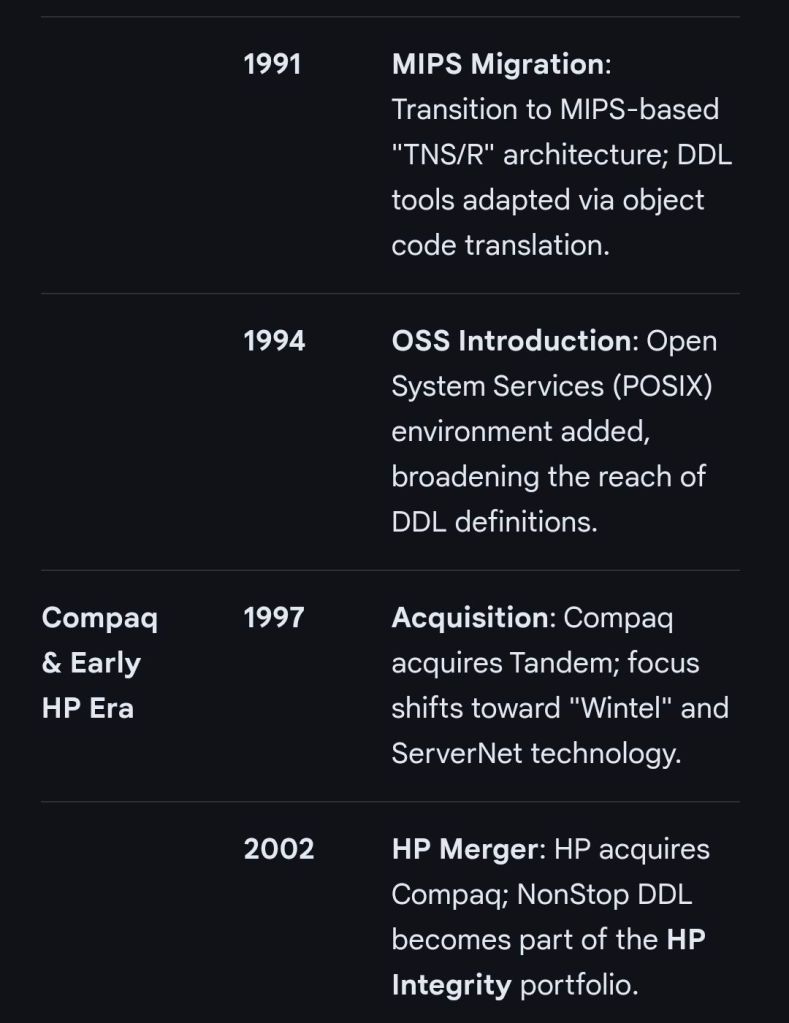
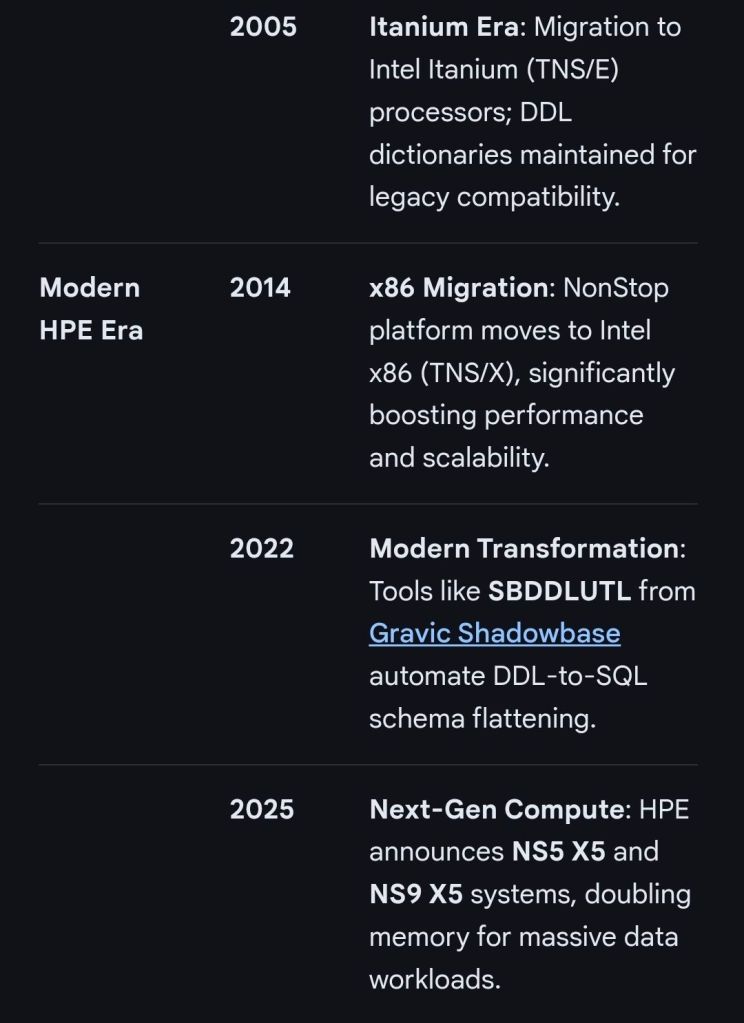
HPE NonStop Data Definition Language (DDL) dictionary overview and timeline

The HPE NonStop Data Definition Language (DDL) dictionary is a specialized subsystem used to define and manage data objects for Enscribe files and translate those definitions into source code for various programming languages. It serves as a central repository for metadata, ensuring consistent data structures across applications written in C, COBOL, TAL, or TACL. 

Program Summary

The DDL dictionary program functions as a metadata management tool. Key capabilities include: 

  • Centralised Definition: Defines records, fields, and file attributes in a hierarchical structure.
  • Code Generation: Translates DDL definitions into language-specific source code (e.g., COBOL copybooks or C headers).
  • Dictionary Maintenance: Allows users to create, examine, and update dictionaries to reflect changes in data structures.
  • Interoperability: Modern tools like Ddl2Bean convert dictionary files into Java Beans or XML, enabling cross-language and cross-platform use. 

Future Outlook

The future of HPE NonStop DDL focuses on modernisation and integration rather than replacement. 

  • Data Virtualization: Integration with AI factories and object storage platforms to expose legacy metadata in open-table formats like Apache Iceberg.
  • API Centricity: Enhancements to the NonStop API Gateway will likely use DDL metadata to automate REST/JSON service orchestration.
  • Real-time Analytics: Native streaming of NonStop data into platforms like Kafka, using DDL definitions to map real-time changes into analytics-ready formats. 

Internet Links & Manuals

HPE NonStop Data Definition Language (DDL) dictionary overview and timeline

HPE NonStop PATHCOM, interactive management interface, Pathway transaction processing environment

HPE NonStop PATHCOM is the interactive management interface for the Pathway transaction processing environment. It allows administrators to configure, monitor, and control PATHMON-governed objects such as serverclasses, TCPs (Terminal Control Processes), and links. 

Historical Timeline: The Evolution of Pathway & PATHCOM

The history of PATHCOM is inseparable from the Tandem NonStop platform, which pioneered fault-tolerant Online Transaction Processing (OLTP). 

The Tandem Era (1974 – 1997) 

  • 1974 – 1976: Tandem Computers is founded. The first NonStop I system ships in 1976.
  • 1983: Tandem introduces Pathway software alongside the Transaction Monitoring Facility (TMF). This milestone removes the requirement for developers to manually code fault tolerance into applications, as the Pathway infrastructure (managed via PATHCOM) handles it automatically.
  • Early 1990s: The platform migrates from proprietary stack machines to MIPS RISC processors (TNS/R architecture). PATHCOM evolves to manage more complex distributed environments.
  • 1994Open System Services (OSS) is introduced, allowing NonStop to support a Unix-like POSIX environment. 

The Compaq & Early HP Era (1997 – 2014) 

  • 1997Compaq acquires Tandem.
  • 2002HP merges with Compaq.
  • 2005: Migration from MIPS to Intel Itanium (Integrity NonStop) begins.
  • 2010s: Pathway evolves into HPE NonStop Pathway with TS/MP (Transaction Services/Massive Parallelism), enabling near-linear scalability for massive OLTP workloads. 

The Modern HPE Era (2014 – Present)

  • 2014NonStop X is introduced, migrating the architecture to Intel x86-64 processors.
  • 2015: Hewlett-Packard splits; the platform continues under Hewlett Packard Enterprise (HPE).
  • 2020 – 2024: Focus shifts toward virtualisation and hybrid cloud. Modern Pathway/TS environments now support massive scaling up to 24,480 cores in a single system image.
Summary of PATHCOM Functionality

Future of NonStop Pathway

HPE’s roadmap for NonStop focuses on integrating mission-critical reliability with modern data centre technologies:

  • Modernisation: Support for Kubernetes Helm deployments and cloud-native frameworks.
  • Hardware Advancements: New NS9 X5 and NS5 X5 platforms offer double the memory capacity and 2x faster system interconnects.
  • Open Integration: Continued emphasis on open application development environments and open-source frameworks.
  • Hybrid Cloud: Positioning NonStop as a key component of HPE GreenLake for mission-critical workloads in the cloud.

HPE NonStop PATHCOM, interactive management interface, Pathway transaction processing environment

HPE NonStop Spoolcom subsystem Spooler Command Language program Overview and Timeline

The HPE NonStop Spoolcom (Spooler Command Language) program is the administrative interface for managing the Spooler subsystem on HPE NonStop systems. It allows operators to configure, monitor, and control print jobs, collectors, and print processes. 

Program Summary

  • Purpose: Used to define and manage spooler objects such as collectors, devices, and jobs.
  • Key Functions: Starting/stopping the spooler, modifying device attributes, and controlling job states (e.g., hold, release, delete).
  • Architecture: Operates within the Guardian environment, communicating with the Spooler supervisor process to maintain 24/7 fault-tolerant printing operations. 

Historical Timeline by Era

1. The Tandem Era (1974–1997) 

  • 1976: Introduction of the Tandem NonStop system; basic spooling capabilities were essential for early OLTP (Online Transaction Processing).
  • 1980s: The Spooler evolved to handle complex routing and multiple collectors to support growing enterprise needs.
  • 1997: Spooler D41 released, providing stable management for the MIPS-based architecture. 

2. The Compaq & Early HP Era (1997–2014)

  • 1999–2000: Release of Spooler D46, enhancing device ownership and virtual device support.
  • 2001–2002: Spooler D48 released during the transition to the HP Integrity NonStop (Itanium) platform.
  • 2012: Major updates to Spooler D48 to support H01 and H02 RVUs, improving scalability for high-end systems. 

3. The Modern HPE Era (2014–Present)

  • 2014NonStop X (x86-64) introduced. Spoolcom adapted to support the new architecture and virtualised environments.
  • 2018–2020: Focus shifted toward modernised interfaces. While Spoolcom remains the CLI standard, graphical alternatives like MultiBatch began gaining traction for batch management.
  • 2023–2024: Continued integration with HPE GreenLake and hybrid cloud models, ensuring spooling services are available in private cloud deployments. 

Futures and Roadmap

  • Modernisation: HPE is pushing toward “modernisation through tradition,” which includes better integration of legacy tools like Spoolcom with modern DevSecOps and cloud-native frameworks.
  • Kernel-Level Threading (KLT): Future updates aim to leverage KLT to improve the performance and scale-up capabilities of management processes.
  • Data-Centric Security: Integration with security platforms like TAMUNIO for field-level tokenization ensures that printed data remains compliant with PCI DSS 4.0 and GDPR. 

Useful Resources

HPE NonStop Spoolcom subsystem Spooler Command Language program – Overview and Timeline

HPE NonStop Inspect debugger Overview and timeline by year

HPE NonStop Inspect is the primary symbolic, source-level debugger for applications running on the HPE NonStop (formerly Tandem) operating system. It allows developers to interactively control program execution, examine and change data variables, and debug complex multi-process applications in both the Guardian and Open System Services (OSS) environments. 

Program Summary

The Inspect debugger family facilitates high-availability software development through several specialized versions: 

  • Inspect (Legacy): A command-line tool for TNS, TNS/R, and TNS/E systems.
  • Native Inspect (eInspect/xInspect): Adapted from GDB for Itanium and x86 architectures; it provides a command-line interface with scripting capabilities.
  • Visual Inspect: A Windows-hosted GUI debugger that provides “point-and-click” efficiency for setting breakpoints and displaying variables.
  • NSDEE (Eclipse): Modern debugging integrated into the Eclipse-based development environment, supporting NonStop Application, Attach Process, and Snapshot debug configurations. 

Historic Timeline by Era

The evolution of the NonStop debugger mirrors the platform’s hardware transitions over five decades.

The Tandem Era (1974 – 1997) 

  • 1974: Tandem Computers is founded; the platform begins with T/16 (NonStop I).
  • 1980s: Inspect is introduced as the standard interactive debugger for the TNS (Tandem Network Strategy) CISC architecture.
  • Early 1990s: Migration to MIPS-based TNS/R systems; Inspect is updated to support RISC instruction sets and optimized compilers. 

The Compaq & Early HP Era (1997 – 2014)

  • 1997: Compaq acquires Tandem.
  • 2002: HP acquires Compaq; migration to TNS/E (Intel Itanium) architecture begins.
  • 2005 – 2010: Visual Inspect becomes a staple for developers seeking a GUI experience on Windows.
  • 2013: Release of the Inspect H01 Manual, documenting full support for TNS/R and TNS/E concurrent debugging. 

The Modern HPE Era (2014 – Present)

  • 2014: Introduction of NonStop X (x86-64 architecture). Native Inspect (xInspect) is launched, based on GDB, to support the move away from Itanium.
  • 2015: HPE is formed; focus shifts to the NonStop Development Environment for Eclipse (NSDEE).
  • 2020 – 2024: Enhancements in NSDEE include improved OSS process handling and support for large-scale application debugging.
  • 2025: HPE celebrates 50 years of NonStop; updates to the OS introduce greater development and debugging flexibility for named processes on NS5 X5 and NS9 X5 platforms

Future Outlook

HPE’s roadmap for NonStop focuses on modernisation through tradition, ensuring that legacy tools like Inspect remain compatible while transitioning to cloud-native and virtualized environments. 

  • Virtualized NonStop (vNS): Debugging tools are being adapted to work seamlessly within enterprise private clouds and HPE GreenLake consumption models.
  • AI Integration: Future enhancements likely include AI-driven diagnostics and automation within the debugger infrastructure to manage the complexity of modern REST/JSON API gateways and Kafka messaging buses.

HPE NonStop Inspect debugger Overview and timeline by year

Richard Buckle of Pyalla Technologies, is a thought leader in the HPE NonStop community

Richard Buckle, founder of Pyalla Technologies, is a prominent thought leader in the HPE NonStop community known for his “Real Time View” column. His work provides a detailed chronological perspective on the platform’s evolution from its Tandem origins to modern cloud-native implementations. 

The Tandem Era: Foundations (1974 – 1997)

This era established the core architecture of fault tolerance and “non-stop” processing. 

  • 1974: Tandem Computers is founded; the first “NonStop” system is commissioned.
  • 1970s – 1980s: The platform gains dominance in financial services, telco, and healthcare.
  • 1996: Managed service models begin for Tandem users, with firms like Tandem Computer Management (TCM) winning major contracts like Bank of Scotland. 

The Compaq & Early HP Era: Transition (1997 – 2013)

A period of shifting corporate ownership and the end of the original Cupertino campus era. 

  • 1997: Compaq acquires Tandem Computers.
  • 2002: HP acquires Compaq, bringing NonStop into the HP Enterprise fold.
  • 2008: The official end of the Cupertino Tandem campus as NonStop teams move to other facilities. 

The X86 & Virtualization Era: Modernization (2013 – 2023)

Buckle documented the massive shift from proprietary hardware to industry-standard Intel x86 architecture. 

  • 2013: Announcement at NonStop TBC that the platform will support Intel x86.
  • 2014 – 2015: Launch of HPE Integrity NonStop X, utilizing InfiniBand and x86 architecture.
  • 2016: Demonstrations of Virtual NonStop (vNonStop), moving the platform toward software-defined infrastructure.
  • 2020 – 2021: Focus shifts to hybrid cloud and containerized environments. 

The 50th Anniversary & AI Era: Resilience (2024 – 2026+)

Current columns focus on “Business Resilience” and the integration of AI into mission-critical systems. 

Richard Buckle of Pyalla Technologies, is a thought leader in the HPE NonStop community

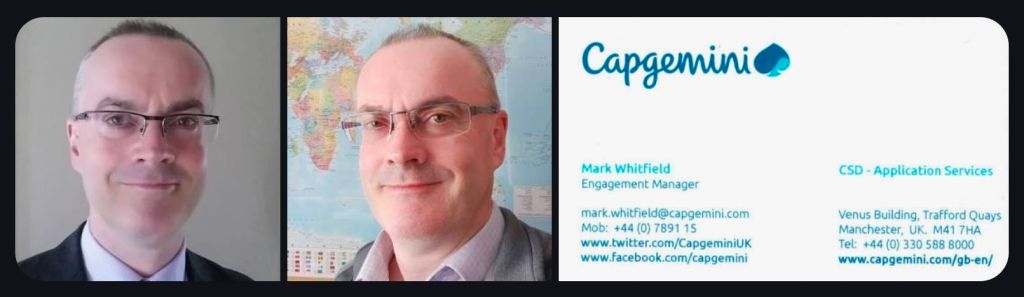
Senior IT Project Manager & Project Templates author – Mark Whitfield

Mark Whitfield is a highly experienced SC-cleared Senior IT Project Manager and Engagement Manager with over 30 years of experience in the software development lifecycle (SDLC), specializing in Agile and Waterfall delivery for financial, automotive, and public sector clients. He has a strong background in HP NonStop (Tandem) systems and currently works for Capgemini. 

Mark Whitfield, Senior IT PM and Project templates author

Comprehensive Career Timeline

Early Career & Foundations (1988–1995) 

  • 1988–1990: Completed Higher National Diploma (HND) in Computing at Bolton Institute of Higher Education (BIHE).
  • 1990–1994: The Software Partnership (Runcorn): Programmer specializing in electronic banking software (sp/ARCHITECT-BANK) on Tandem Computers.
  • 1994–1995: Deluxe Data (formerly TSP): Lead Analyst/Programmer, focusing on software investigation, design, coding, and on-site installation for clients like TSB, Bank of Scotland, and Rabobank. 

Development & Technical Specialization (1995–2013) 

  • 1995–2013: Insider Technologies Limited: Spent 18 years progressing from Senior Development Engineer to Project Manager for Strategic Technical Initiatives.
  • Key Roles: Managed Reflex 80:20 and Reflex ONE24 product development, technical pre-sales, and consultancy. Developed diagnostic software for monitoring payment systems (BASE24).
  • Notable Project: Managed a bid to replace legacy ATM tools at LloydsTSB (5000 ATMs) with Reflex ONE24. 

Banking & Digital Project Management (2013–2016) 

  • 2013–2014: Wincor Nixdorf: Project Manager in the Professional Services Banking Division, managing a £5m+ work stream for Lloyds Banking Group’s Self-Service Software Replacement (SSSR) programme.
  • 2014–2016: Betfred: Senior Digital Project Manager for the Online and Mobile Division, delivering payment gateways and sportsbooks for iOS, Android, and Windows. 

Senior Engagement Management (2016–Present)

  • 2016–Present: Capgemini UK: Engagement Project Manager responsible for delivering both Waterfall and Agile digital projects.
  • 2016 (Approx.): Assigned to a UK-wide Air Traffic organization (NATS) for Apple iOS app delivery.
  • 2018–2019: MuleSoft (Secondment): Served as a Delivery Manager for the Anypoint Platform.
  • Current Focus: Cloud Migration (Hybrid) of 130 apps for UK Government. 

Client & Colleague Recommendations

Mark Whitfield is noted for being a detail-oriented manager who provides a strong barrier between developers and difficult clients, while maintaining a friendly, professional, and diplomatical approach. 

  • Agile Management: “Mark provided an excellent barrier between us (developers) and a difficult client…ensuring that we followed the agile principles” — Callum Marriage (Developer).
  • MuleSoft/Capgemini Engagement: “Customers loved him. His was extremely detailed oriented and understood the often-complex needs…never became flustered in high pressure situations” — Delivery Manager, MuleSoft.
  • Betfred (2015): “I would highly recommend Mark for his ability to successfully multi-task under significant pressure… [he] produced a very comprehensive handover document” — IT Compliance Analyst, Betfred.
  • Capgemini/JLR Project: “Mark was able to do a good planning, with the correct resources, on time delivery and with good relationship between stakeholders” — Head of Integration Development

Key Areas of Expertise

  • Methodologies: PRINCE2 Practitioner, Agile SCRUM, ITIL, ISO9001:2008.
  • Tools: MS Project, MS Excel/Office, RAID logs.
  • Technical Background: HP NonStop (Tandem) Systems, BASE24, C++, TAL, COBOL.
  • Industries: Financial/Banking, Aerospace & Defence, Government, Automotive, Gambling. 

Mark Whitfield’s website (mark-whitfield.com) serves as a professional portfolio and resource hub for his 30+ year career as a SC-cleared Senior IT Project Manager. It offers over 200 editable project management templates for Agile, Waterfall, and PRINCE2 methodologies, alongside career insights and project experience. 

Website & Content Overview

  • Project Management Resources: The site, often known as PROject Templates, provides downloadable templates for planning, scheduling (Gantt charts), project initiation (PID), and project control.
  • Methodology Focus: Resources are tailored for PRINCE2 (including Agile Scrum), and Agile/Waterfall delivery methods.
  • Career Portfolio: Features his work history as a Senior IT Project Manager, including roles at Capgemini, Betfred, and various financial institutions.
  • Technical Specialization: Highlights expertise in HP NonStop systems, digital projects, and payment/transaction systems.
  • Professional Background: Mentions his experience with major clients such as Jaguar Landrover, Heathrow, Royal Mail, and various banks. 

The site is designed for project managers looking for templates to speed up project documentation and for clients looking to review his career accomplishments. 

Senior IT Project Manager & Project Templates author – Mark Whitfield

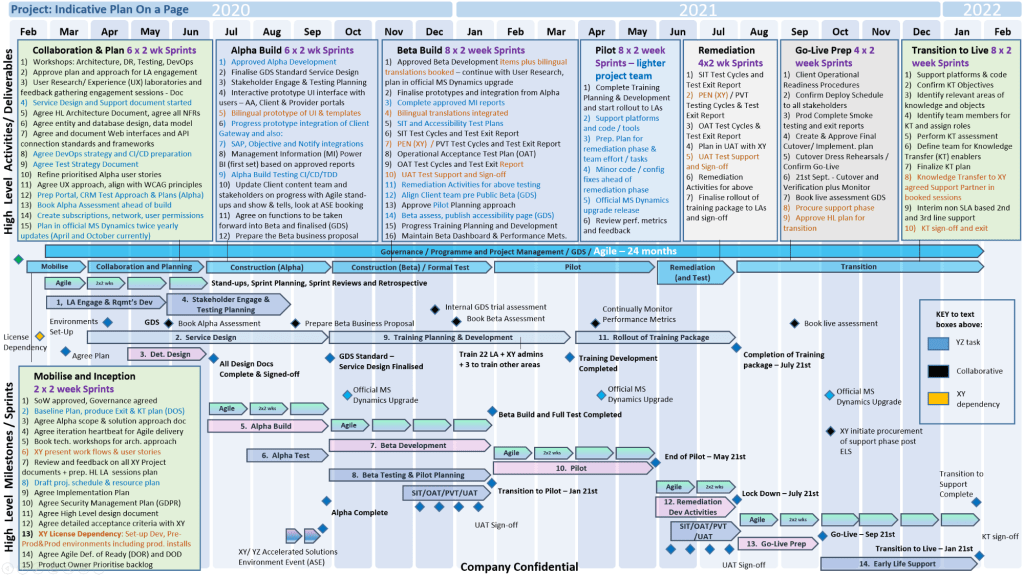
Templates sold on this website are designed for Microsoft Office (Excel, Word, PowerPoint) and MS Project (MPP) and are used for tracking and planning software development lifecycle (SDLC) projects. 

Template Breakdown

The templates, often sold in a bundle, include over 200+ editable items aimed at project delivery. Key components include: 

  • Project Planning (MS Project & Excel): Detailed Waterfall project planners with Gantt views, Agile Sprint plans, and Plan on a Page (POaP) examples.
  • RAID Logs (Risk, Action, Issue, Dependency): Comprehensive Excel trackers for managing risks, issues, assumptions, and dependencies.
  • Financial & Resource Management: Project finance trackers (forecasts, actuals, variance) and resource trackers for tracking team members and costs.
  • Project Governance (Word & PowerPoint): Project initiation documentation (PID), status reports, RACI matrices (responsible, accountable, consulted, informed), and project organization charts.
  • Agile/Scrum Tools: Burn-down and burn-up charts, story dependency trackers, and Kanban templates.
  • Closeout: Lessons learned logs and benefit realization analysis trackers. 

Where to Buy

  • Official Website: mark-whitfield.com (PROject Templates) is the primary source, offering a bundle with free lifetime upgrades.
  • Etsy: Mark Whitfield’s templates are available for purchase here, particularly for those needing alternative payment methods.
  • Eloquens: He maintains a channel on Eloquens for downloading professional templates. 

The templates are fully editable, allowing users to tailor them to specific project requirements.