Microsoft Project MPP (.mpp) template examples for download

Mark Whitfield’s IT Project Management (PM) toolkits provide highly comprehensive, fully editable Microsoft Project (.mpp) templates designed to manage and track complex delivery lifecycles. His premium packages bridge the gap between traditional structured governance (like Waterfall and PRINCE2) and modern Agile execution.
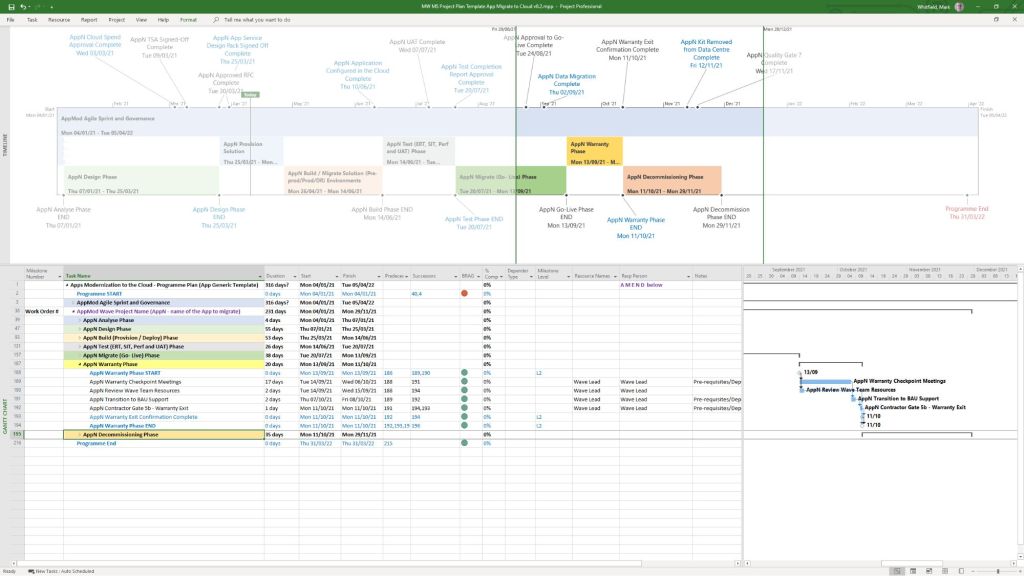
MS Project mpp Template file example
Microsoft Project MPP Template file example

You can preview and purchase the complete toolkit via Mark Whitfield’s Project Management Templates Hub or download specific formats from his dedicated Project Planning Template Examples Page.

Core MPP Template Examples & Formats

Mark Whitfield’s templates feature color-coded logic and structured notes embedded directly into task rows to help PMs easily map out dependencies:

  • Detailed SDLC Project Plan (.mpp): Built specifically for Software Development Life-Cycles, incorporating essential stage-gate structures, development sprints, testing phases, and release checkpoints.
  • PRINCE2 7th Edition Delivery Template: Structurally maps out every required stage, activity, and artifact mandated by the framework (e.g., initiating, directing, managing stage boundaries, and closing).
  • Agile & Hybrid Scrum Frameworks: Blends fixed governance milestones with flexible, rolling 2-week Agile sprint schedules, sprint reviews, and retrospective tasks.
  • Gantt Plan on a Page (POaP): High-level visual schedules perfect for stakeholder reporting, summary timelines, and executive board meetings.

Key Features of His Project Plans

  • Color-Coded Tasks: Uses dedicated text colors (e.g., Blue for new artifacts, Black for traditional stages, and Purple for updates) to simplify visual navigation.
  • Annotated Task Notes: Key rows contain descriptions of the required activities or outputs right inside the MPP file notes section.
  • Embedded Best Practices: Pre-configured with dynamic WBS (Work Breakdown Structure) codes, baseline options, and calendar tracking for public holidays and resource leave.

What is Included in the Broader Toolkit?

If you opt for his full premium download bundle, it features over 200 tailored Microsoft Office files accumulated from 24+ years of enterprise PM experience. Alongside the core .mpp files, you receive companion assets on the Mark Whitfield Premium Delivery Templates Page including:

  • Comprehensive RAID Logs: Excel sheets tracking Risks, Assumptions, Issues, Dependencies, and Change Requests.
  • RACI Trackers: Matrices defining Accountabilities, Responsibilities, and Communication lines.
  • Financial & Budget Trackers: Sheets featuring rate lookups, project forecasting, actuals tracking, and variance charts.
  • Agile Trackers: Templates for burn-down/burn-up metrics and resource allocation logs.

MS Project MPP (.mpp) template examples for download
Microsoft Excel Project Backlog template & Work in Progress WIP

A Microsoft Excel project backlog template is a prioritized, centralized list of all pending work—features, user stories, bug fixes, and tasks—that need to be completed, often used in Agile, Scrum, or Kanban frameworks to manage team workload and project scope. 

Key Columns for an Effective Backlog Template

To create a detailed backlog, the following columns are essential for tracking, prioritizing, and assigning work items: 

  • ID / Task Number: A unique identifier for each item (e.g., P-001, P-002) for easy referencing.
  • Item Name / Title: A concise title describing the task or requirement.
  • User Story / Description: A detailed description of the work, often in the format: “As a [type of user], I want to [action], so that [value]”.
  • Type: Categorizes the work (e.g., Feature, Bug, Improvement, Technical Debt).
  • Priority: Defines the order of execution, typically Rank (1, 2, 3), High/Medium/Low, or MoSCoW (Must-have, Should-have, Could-have, Won’t-have).
  • Status: Indicates the current stage of the item (e.g., Backlog, To-Do, In Progress, Testing, Done).
  • Assignee / Owner: The team member responsible for completing the item.
  • Story Points / Effort Estimate: An estimated size of the task (e.g., using Fibonacci sequence: 1, 2, 3, 5, 8…).
  • Acceptance Criteria: Specific conditions that must be met for the item to be marked as “Done”.
  • Target Sprint / Release: The planned iteration or release version in which the task is scheduled. 

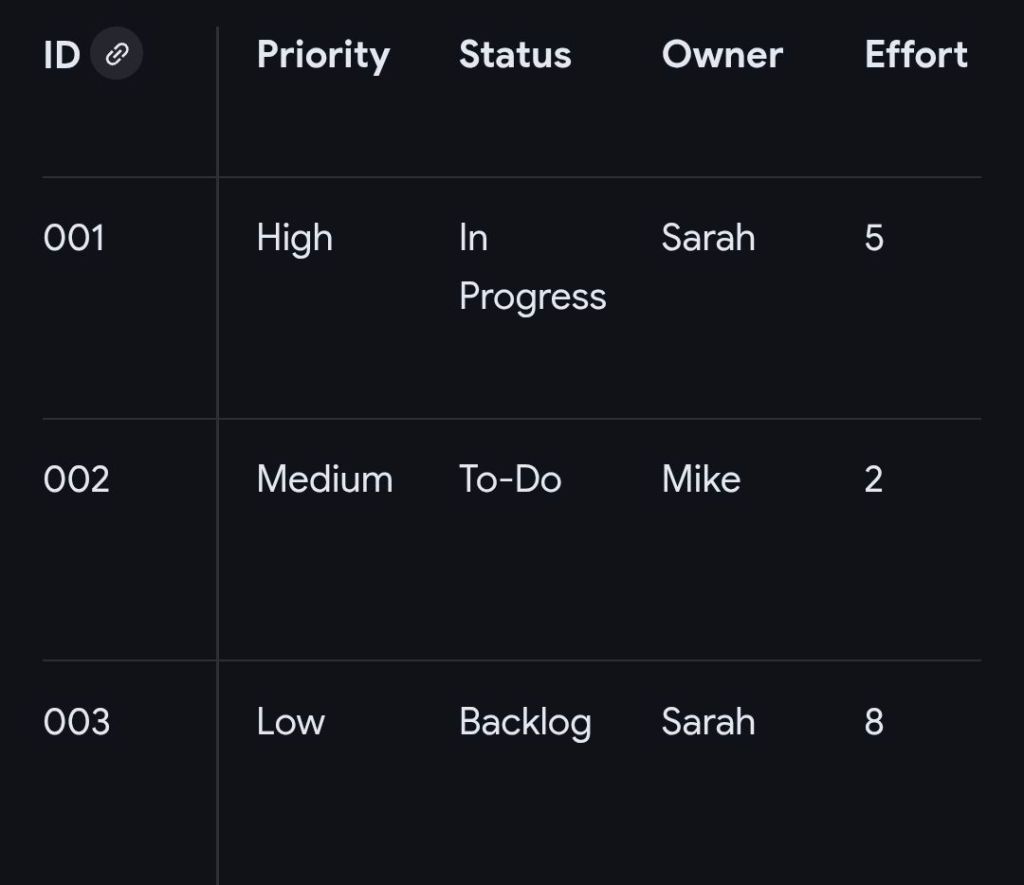
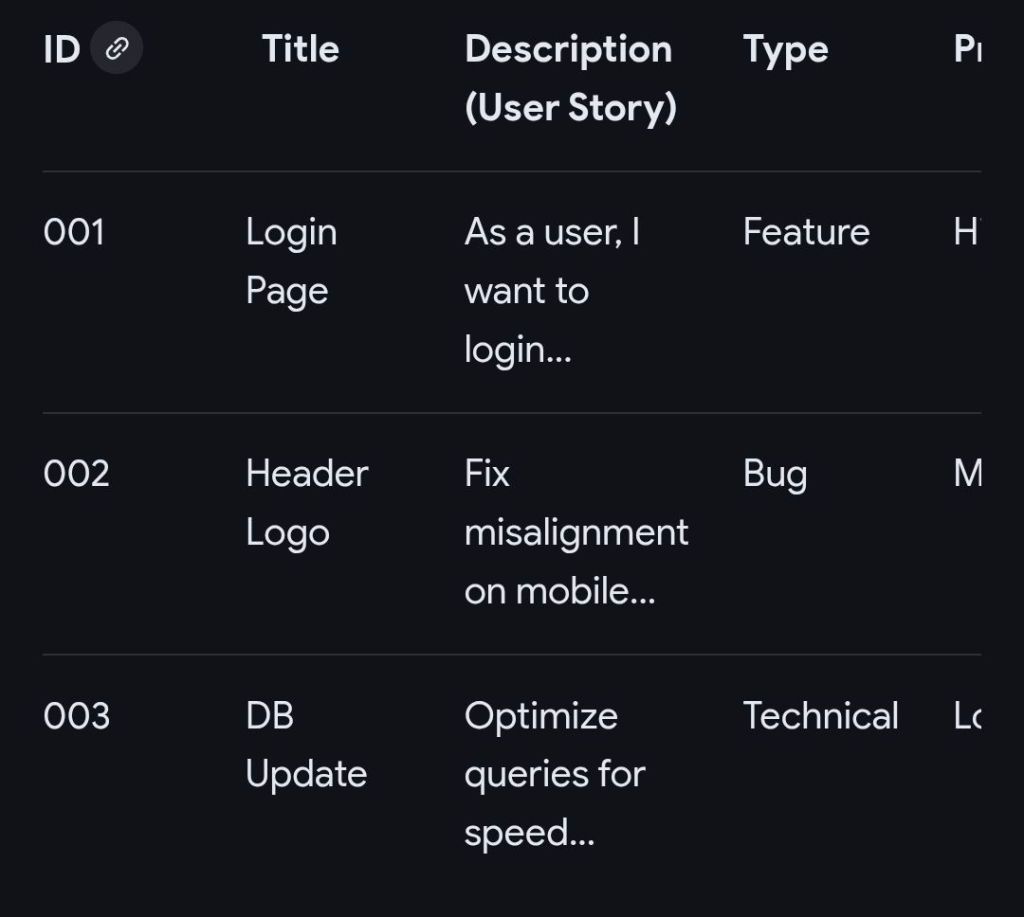
Example Structure for MS Excel Project Backlog

This structure can be implemented in a simple Microsoft Excel sheet, enabling filtering and sorting by priority or assignee. 

Example Structure for MS Excel Project Backlog

Detailed Overview of Functional Features

  • Drop-down Menus (Data Validation): Use these for “Status,” “Priority,” and “Type” columns to maintain data consistency.
  • Conditional Formatting: Automatically color-code rows based on status (e.g., “Done” turns green) or priority (e.g., “High” turns red) to visually identify bottlenecks.
  • Formulas: Implement formulas to calculate total story points or project completion percentage.
  • Filtering: Use filtering on column headers to immediately view specific categories or an assignee’s workload. 

Related Agile Templates in MS Excel

  • Sprint Backlog: Contains only items selected from the main Product Backlog for the current 2-4 week sprint.
  • Kanban Board View: Organizes the backlog into vertical columns representing stages of workflow (Backlog, In Progress, Done).
  • Burndown Chart: Uses data from the backlog to plot remaining work hours over the course of a sprint.

……….

Project Work in Progress or WIP

A Work in Progress (WIP) template in Microsoft Excel serves two primary purposes depending on your industry: operational task tracking for project management or financial reporting for construction and contracting. 

1. Essential Columns for Operational WIP (Project Management) 

This format focuses on day-to-day task execution and risk management. 

  • Task / Activity: Clear description of the work being done (e.g., “Design Phase Sign-off”).
  • Owner / Assigned To: Name of the person or team responsible for the task.
  • Due Date: The critical deadline for task completion.
  • Status: Current state of the task, typically using a dropdown menu for “Not Started,” “In Progress,” “Blocked,” or “Complete”.
  • % Complete: A numerical value (0–100%) providing granular visibility into progress.
  • Priority: Categorisation of importance (High, Medium, Low) to help teams focus on critical items.
  • Notes / Blockers: Documentation of risks, dependencies, or reasons for delay. 

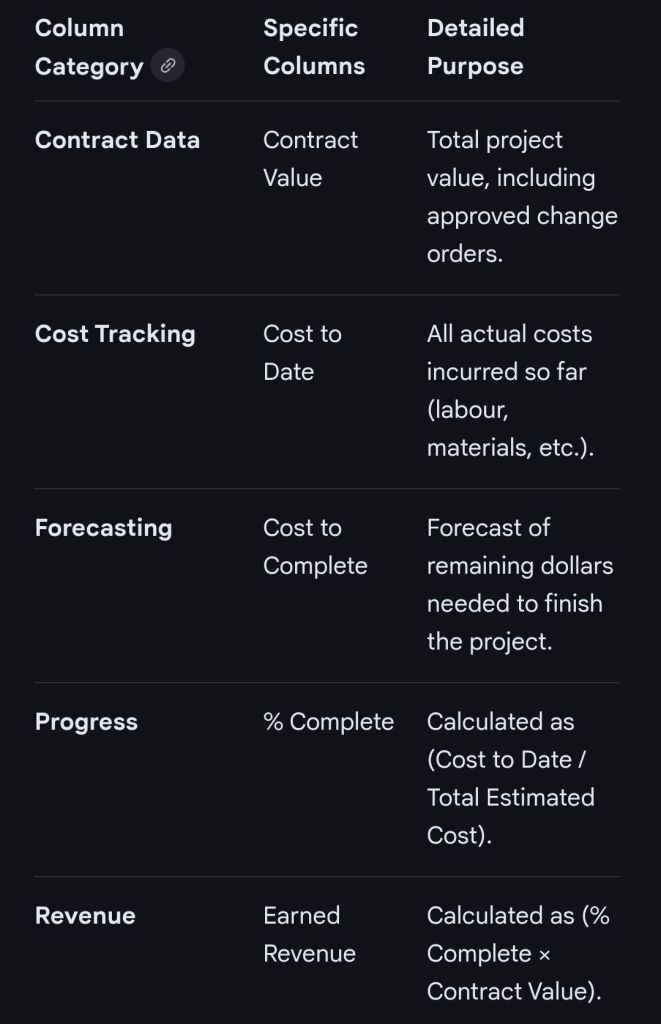
2. Essential Columns for Financial WIP (Construction/Contracting)

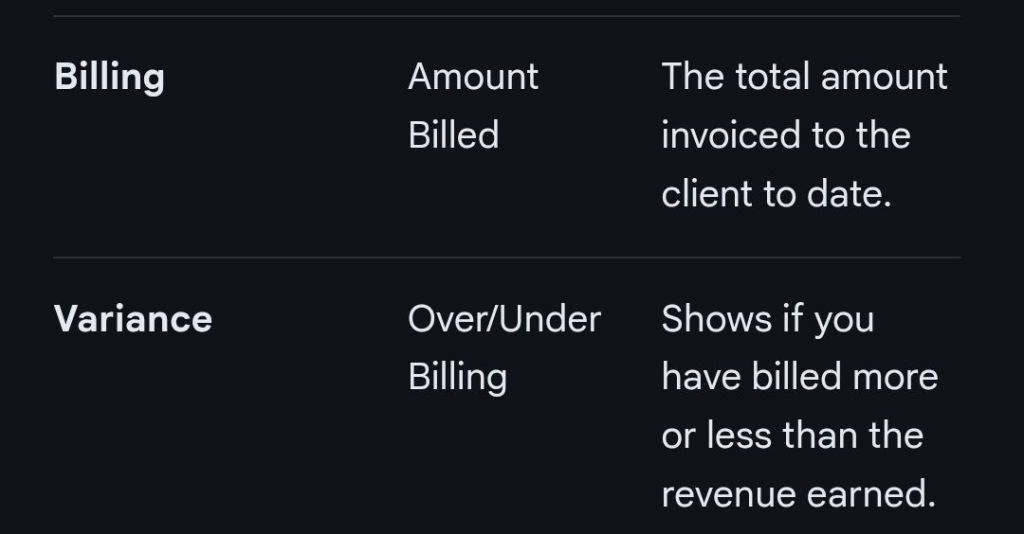
This format bridges financial data with project completion to calculate earned revenue and billing accuracy.

Essential MS Excel Columns for Financial WIP (Construction/Contracting)

Advanced Template Features

  • Status Dashboard: A summary section at the top of the sheet displaying overall project health, risks, and budget status.
  • Data Validation: Using dropdown lists for the “Status” and “Budget” columns to ensure consistent data entry.
  • Conditional Formatting: Using color-coded indicators (Red, Yellow, Green) for at-risk tasks or budget overruns.
  • Freeze Panes: Locking the header rows so they remain visible while scrolling through long task lists. 

Microsoft Excel Project Backlog template & Work in Progress WIP

……….

Summary of ‘Project Backlog’ columns in Excel

  1. ID / Task Number
  2. Item Name / Title
  3. User Story / Description
  4. Type
  5. Priority
  6. Status
  7. Assignee / Owner
  8. Story Points / Effort Estimate
  9. Acceptance Criteria
  10. Target Sprint / Release

……….

Summary of (Project Management) ‘Operational’ Work in Progress (WIP) columns in Excel

  1. Task Activity
  2. Owner / Assigned To
  3. Due Date
  4. Status
  5. % Complete
  6. Priority
  7. Notes / Blockers

……….

Summary of (Construction / Contracting) ‘Financial’ Work in Progress (WIP) columns in Excel

  1. Contract Data
  2. Cost Tracking
  3. Forecasting
  4. Progress
  5. Revenue
  6. Billing
  7. Variance

……….

End> Microsoft Excel Project Backlog template & Work in Progress WIP

Buy Editable Project Program Management Template Examples, FREE upgrades and Additions

https://www.eloquens.com/channel/mark-whitfield

https://officedocdepot.com/channel/i_pro_pm_templates/

https://ebay.us/m/Japc7k

https://flevy.com/author/ipropmtemplates

https://www.depop.com/products/nonstopmark-free-upgrades-4-life-50/

Buy Editable Project Program Management Template Examples, FREE upgrades and Additions