Microsoft PowerPoint Development Timeline History

Microsoft PowerPoint was originally developed as “Presenter” by Forethought, Inc. in 1987 for the Apple Macintosh. Microsoft acquired it just three months later for $14 million, marking their first major acquisition. 

MS PowerPoint Plan On a Page POaP templates downloaded at website banner

Foundational Years (1984–1990) 

  • 1984: The idea for a presentation program is conceived by Robert Gaskins.
  • 1987 (April): PowerPoint 1.0 launches for Macintosh, supporting only black and white slides.
  • 1987 (July): Microsoft acquires Forethought.
  • 1990 (May): The first Windows version (PowerPoint 2.0) is released, coinciding with Windows 3.0. 

Office Integration (1992–2003) 

MS PowerPoint Plan On a Page POaP templates downloaded at website banner
  • 1992: PowerPoint 3.0 introduces video transitions and sound.
  • 1994: PowerPoint 4.0 begins deep integration with the Microsoft Office suite, sharing interface components with Word and Excel.
  • 1997: PowerPoint 97 brings significant upgrades like “Custom Animation” and the “Office Assistant” (Clippy).
  • 2003: PowerPoint 2003 focuses on collaboration and improved “Package for CD” features. 

Modernization & Cloud (2007–Present)

MS PowerPoint Plan On a Page POaP templates downloaded at website banner
  • 2007: Introduces the Ribbon interface and the XML-based .pptx file format.
  • 2010: Adds video export, section organization, and co-authoring capabilities.
  • 2013: PowerPoint for Web is released, alongside the first dedicated mobile apps for iOS and Android.
  • 2016–2021: Features focus on AI-driven design (PowerPoint Designer), Morph transitions, and real-time collaboration via Microsoft 365.
  • 2023+: Integration of AI tools like Copilot for automated slide generation and DALL-E 2 for image creation. 

Microsoft PowerPoint Development Timeline History

MS PowerPoint Plan On a Page POaP templates downloaded at website banner

Microsoft Excel Development Timeline History

Microsoft Excel has evolved from a niche Apple Macintosh tool into the world’s most dominant spreadsheet software. Its history is marked by strategic shifts, such as jumping from the MS-DOS era to graphical interfaces to outmanoeuvre then-leader Lotus 1-2-3

Timeline of Major Excel Milestones

Agile Templates available at download link at website banner
  • 1982: Multiplan (The Predecessor) – Microsoft’s first spreadsheet program. While popular on CP/M systems, it struggled against Lotus 1-2-3 on MS-DOS.
  • 1985: Excel 1.0 (Macintosh Exclusive) – Realising they couldn’t beat Lotus on DOS, Microsoft built a graphical spreadsheet for the new Mac. It introduced the ability to adjust cell heights, widths, and fonts.
  • 1987: Excel 2.0 (First Windows Version) – Launched alongside the first Windows environments, it introduced color support (like red for negative numbers) and was significantly faster than competitors.
  • 1990: Excel 3.0 – Added 3D charts, toolbars, and drawing tools, helping Excel finally overtake Lotus 1-2-3 as the market leader.
  • 1993: Excel 5.0 – A major turning point that introduced Visual Basic for Applications (VBA), allowing users to automate tasks with macros.
  • 1997: Excel 8.0 (Office 97) – Introduced the Paperclip Assistant (“Clippy”) and the first version of the modern VBA environment.
  • 2007: Excel 12.0 (The Ribbon Era) – Replaced menus with the Ribbon interface and dramatically increased grid capacity to 1,048,576 rows by 16,384 columns.
  • 2010: Excel 14.0 – Introduced Slicers for PivotTables and Sparklines (mini charts inside cells).
  • 2013-2016: Data Intelligence – Added Power Query, Power Pivot, and new chart types like Waterfall, Pareto, and Treemap to support advanced data modeling.
  • 2019-Present: AI & Cloud Integration – Modern versions focus on seamless collaboration, dynamic arrays (like XLOOKUP), and AI-powered insights that can extract data directly from images. 

Technological Evolution Highlights

MS Excel templates available on bundle download at website banner
  • Architecture: Shifted from 16-bit to 32-bit with Excel 95, greatly improving stability.
  • Collaborative Features: Modern Version History and “Show Changes” now allow teams to track every edit in real-time.
  • Visualisation: Excel now supports complex timelines via SmartArt or custom Scatter charts with error bars for professional project tracking.

Microsoft Excel Development Timeline History

Microsoft Excel templates available at banner above, FREE upgrades

Microsoft Project Timeline, Development History Overview

Microsoft Project has evolved from a DOS-based tool in the 1980s into a cloud-integrated platform. Its “Timeline” feature specifically has transitioned from a simple static view to a multi-layered, interactive reporting tool. 

Template included in package – see website banner

Timeline Feature Development History

  • Early Era (1984–2007): For decades, the “timeline” was synonymous with the Gantt Chart. Users had to rely on complex print-outs or third-party tools to create high-level summaries for executives.
  • The dedicated Timeline View (2010): Microsoft introduced a native Timeline view in Project 2010, allowing users to cherry-pick specific tasks and milestones to display on a single horizontal bar.
  • Multi-Timeline Support (2016): Project 2016 expanded this by allowing multiple timeline bars in a single view. This enabled managers to represent different project phases or workstreams with independent start and end dates.
  • Cloud & Web Integration (2019–Present): With the launch of Project for the web, timelines became more interactive, supporting drag-and-drop adjustments and real-time co-authoring.
  • Task History Tracking (2023): Microsoft added a Task History pane to the web version, allowing users to see a chronological log of changes to specific timeline items. 

Key Components of a Modern MS Project Timeline

Templates included in download bundle – see website banner
  • Gantt-Style Visualization: Displays tasks as horizontal bars against a calendar timescale.
  • Milestones & Callouts: Important dates appear as diamonds or labels that can be dragged above or below the main bar to avoid clutter.
  • Dependencies: Visual links between tasks that illustrate the sequence of work and the Critical Path.
  • Copy for Presentation: A dedicated formatting tool that allows users to export the timeline directly to Microsoft PowerPoint or email at various sizes (Small, Medium, Full Size). 

Future Outlook

Template included in download bundle – see website banner

Microsoft has announced that Project Online will be officially retired on 30 September 2026, with development focus shifting entirely to the new Microsoft Planner and Project for the web ecosystem.

Microsoft Project Timeline, Development History Overview

Project Management Templates Bundle FREE Upgrades

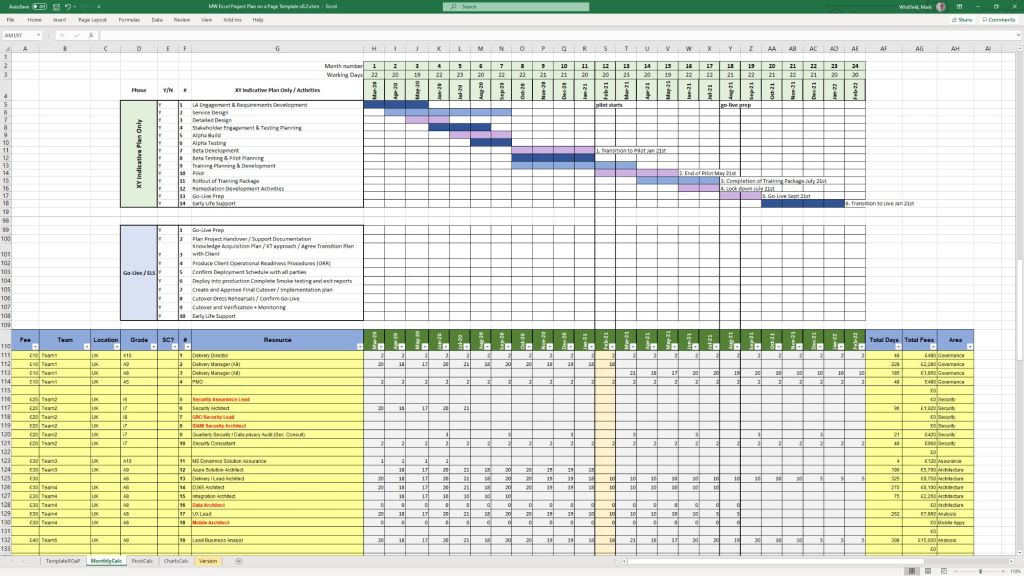
Mark Whitfield’s project management templates offer a range of timeline and planning views designed for Agile, Waterfall, and PRINCE2 delivery. These templates typically include a high-level Plan on a Page (POaP) and detailed Microsoft Project (MPP) or Excel schedules. 

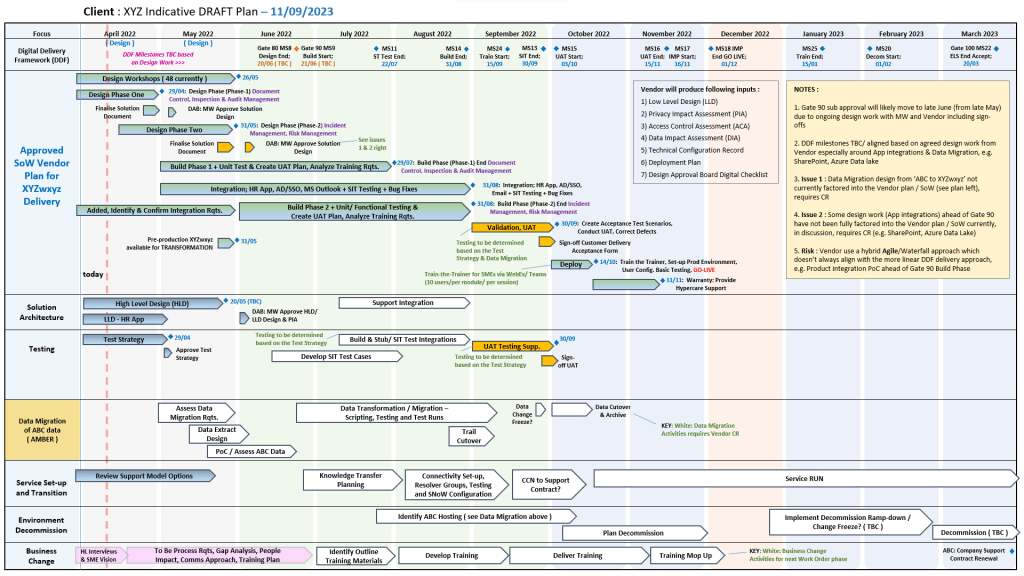
Example Plan on a Page POaP

Timeline & Planning Views

  • Plan on a Page (POaP): A high-level summary view (often in PowerPoint or Excel) used to communicate key phases and milestones to stakeholders without the clutter of a full Gantt chart.
  • Detailed Gantt Charts: Provided in both Microsoft Project (MPP) and Excel, these timelines include task dependencies, resource allocations, and critical path tracking.
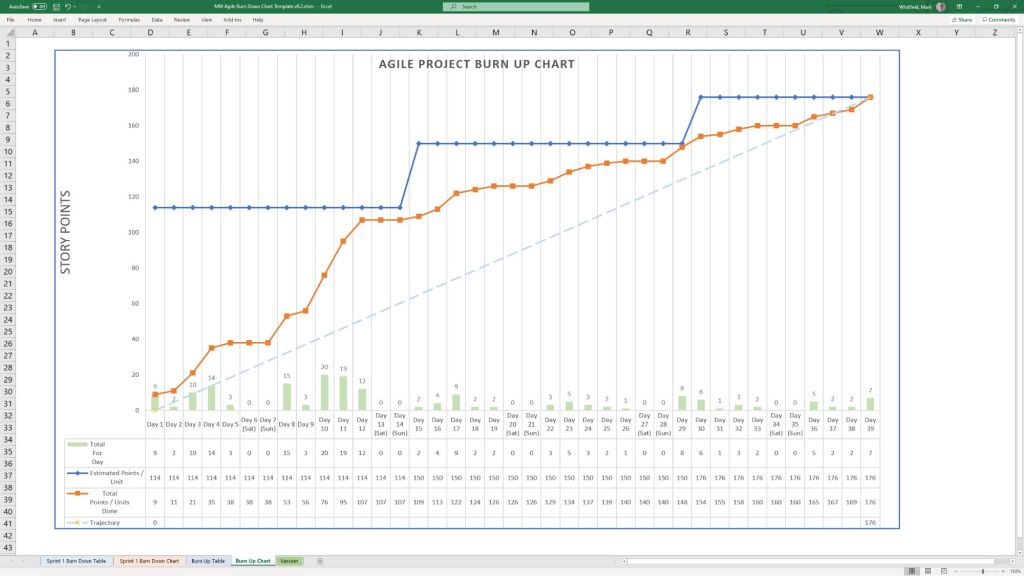
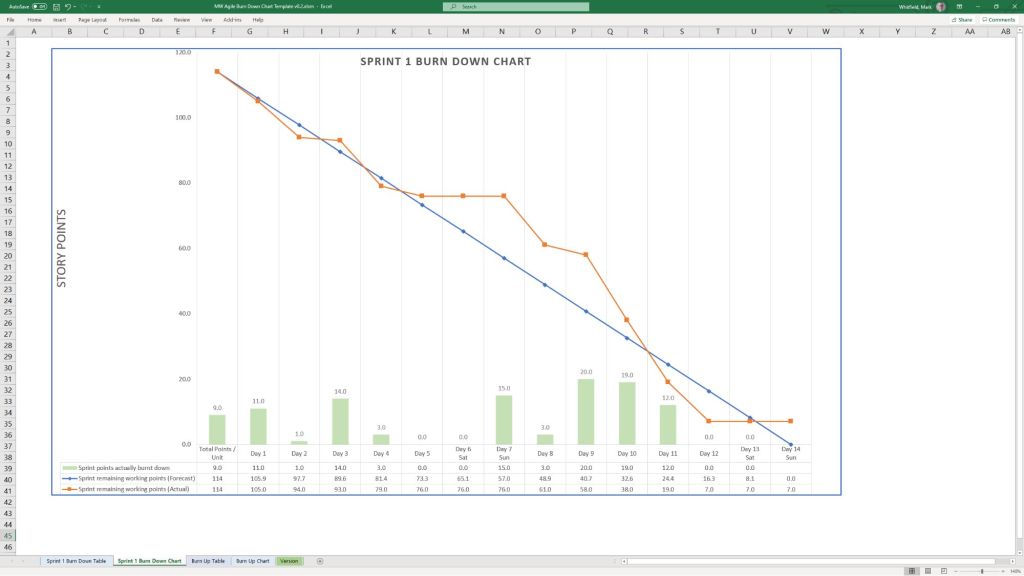
  • Agile Sprint Timelines: Specialized views for tracking 2–4 week sprints, daily stand-ups, and sprint retrospectives within a broader project framework.
  • SDLC Progression: The templates are often structured around a typical Software Development Life-cycle (SDLC), moving from Inception to Transition and Early Live Support (ELS). 

Key Timeline Components

The templates are pre-configured with several essential timeline elements: 

  1. Project Start & End Dates: Easily adjustable fields that automatically update durations and downstream tasks.
  2. Milestones & Gateways: Visual markers for critical sign-off points and delivery stages.
  3. Task Dependencies: Pre-built links that show how delays in one area (e.g., hardware delivery) impact the overall project finish date.
  4. Resource View: Timelines integrated with resource calendars to account for holidays and leave. 

You can find the full package of over 200 editable templates, which include these timeline views and RAID logs, on Mark Whitfield’s official website or via his Etsy store

Project Management Templates Bundle FREE Upgrades

Agile Scrum Timeline and Overview

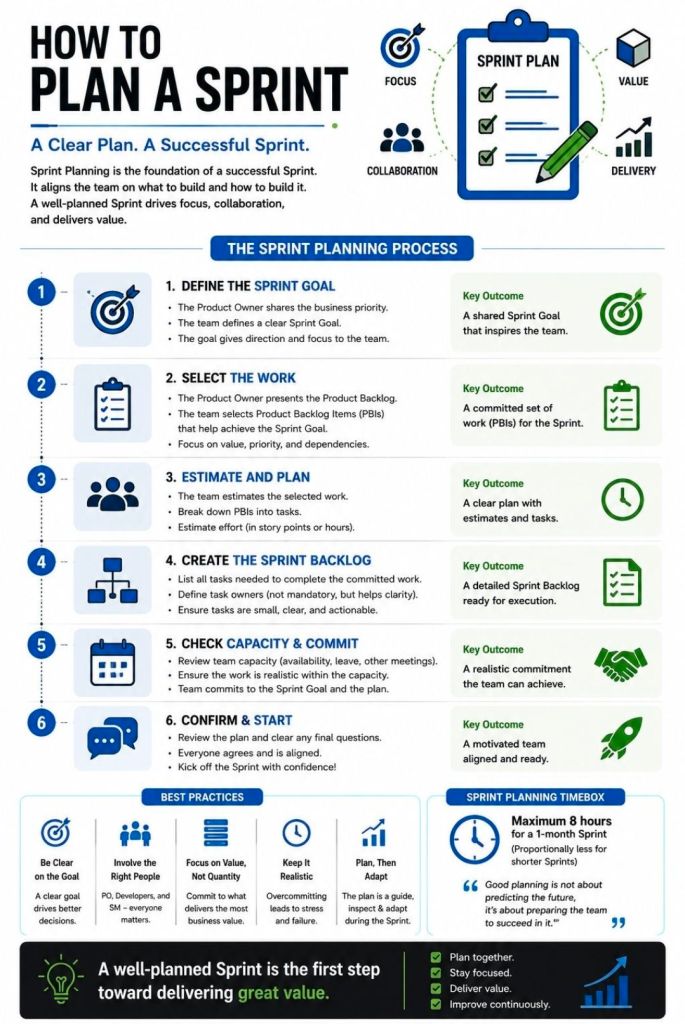
In Scrum, the “timeline” is typically structured as a repeatable, time-boxed cycle known as a Sprint, which usually lasts between one and four weeks. Each sprint follows a strict sequence of “ceremonies” designed to ensure constant delivery and feedback. 

The Standard Sprint Timeline (2-Week Example)

The following is a common chronological breakdown of a typical 10-day (two-week) sprint:

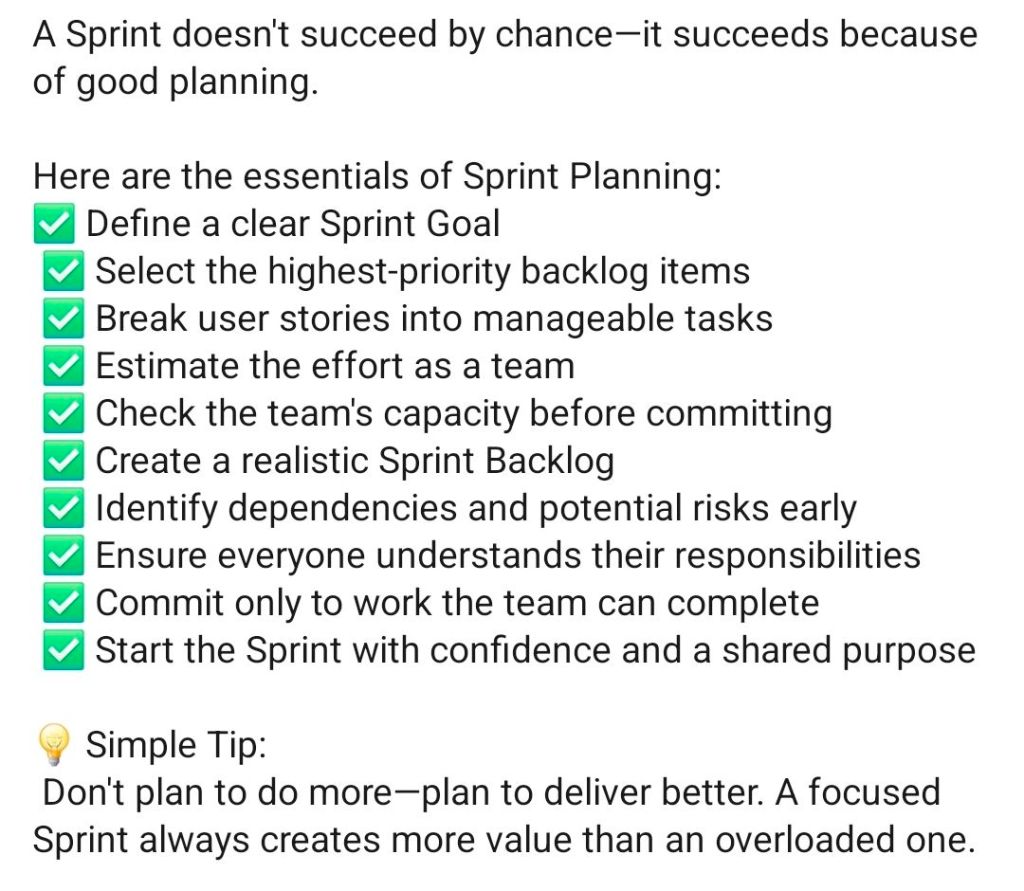
  1. Day 1: Sprint Planning
    • Goal: Define what will be delivered and how.
    • Activity: The Product Owner presents prioritized items from the Product Backlog. The team selects items to move into the Sprint Backlog.
  2. Days 2–9: Development & Daily Scrum
    • Development: The team works in parallel on design, coding, and testing.
    • Daily Scrum: A 15-minute “stand-up” held every morning. Team members sync on progress and identify blockers.
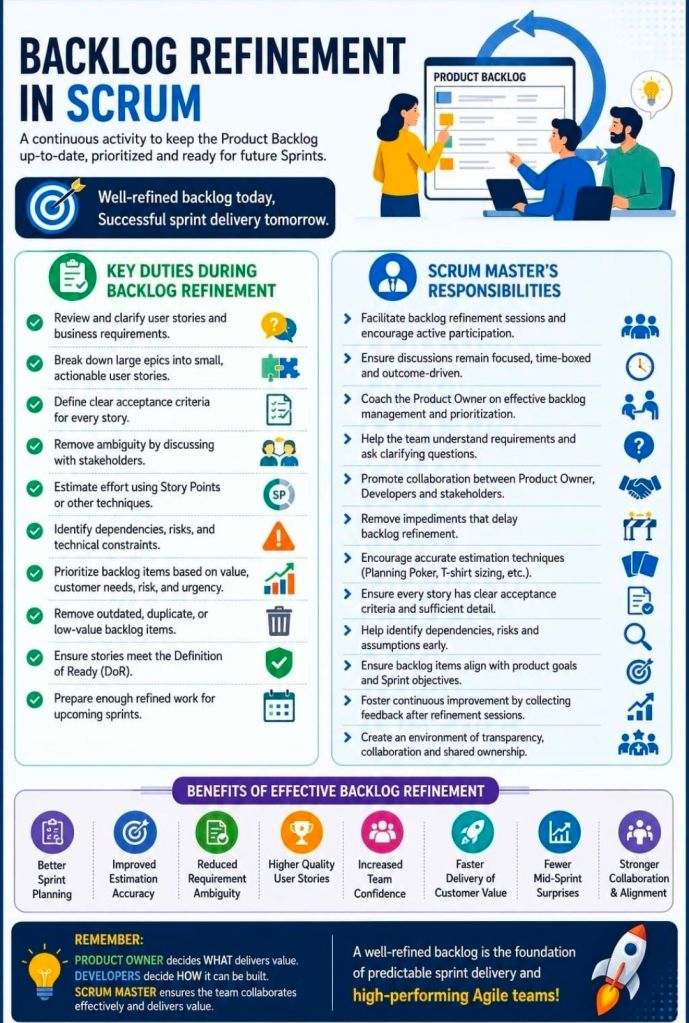
  3. Ongoing: Backlog Refinement
    • Goal: Prepare for future sprints.
    • Activity: The team reviews upcoming backlog items to ensure they are “ready” for the next planning session.
  4. Day 10: Sprint Review & Retrospective
    • Sprint Review: A demo for stakeholders to show the Product Increment (completed work) and gather feedback.
    • Sprint Retrospective: An internal meeting where the team reflects on their process to improve for the next cycle. 

Strategic Project Phases

While the sprint is the heart of execution, a broader Agile project often follows these foundational stages: 

  • Concept/Ideation: Defining project vision, high-level requirements, and initial scope.
  • Inception: Building the team, setting up architecture, and creating a mock-up.
  • Construction (Iterative Sprints): The primary execution phase consisting of multiple back-to-back sprints.
  • Release/Deployment: Final testing, security checks, and launching the product increment to production.
  • Maintenance & Operations: Ongoing support, bug fixes, and incorporating user feedback into new sprints. 

Time Allocation (The 15/10/5 Rule)

For a standard sprint, many teams use a percentage-based guide to manage ceremony time: 

  • 15% for Sprint Planning.
  • 10% for Sprint Review.
  • 5% for Sprint Retrospective. 

For more hands-on planning, tools like the Wrike Sprint Template or Jira Timelines can help visualize these cycles across a long-term roadmap.

Agile Scrum Timeline and Overview

Mark Whitfield IT Career Timeline, AI generated from Google

The technical timeline for 

Mark Whitfield, an SC cleared, Senior IT Project Manager and Engagement Manager, spans over 30 years and transitions from specialized banking software development to high-level project leadership and cloud migrations. 

Professional Career Timeline

  • 1990 – 1994: Programmer at The Software Partnership (later Deluxe Data). Developed electronic banking software (sp/ARCHITECT-BANK) on Tandem Computers (now HPE NonStop) for major banks like TSB and Bank of Scotland.
  • 1994 – 1995: Lead Analyst at Deluxe Data International, continuing support and development for banking customer systems.
  • 1995 – 2013: Project Manager of Strategic Technical Initiatives at Insider Technologies Limited. Oversaw projects involving Reflex 80:20, Sentra development, and corporate website authoring.
  • 2013 – 2014: Project Manager (Banking Division) at Wincor Nixdorf Limited, focusing on professional services for the banking sector.
  • 2014 – 2016: Senior Digital Project Manager at Betfred Limited, managing the Online and Mobile Division.
  • 2016 – Present:Engagement Manager / Senior PM at Capgemini UK.
    • 2016: Led a £4.3M data centre migration for Royal Mail (RMG) involving 1,100+ interfaces.
    • 2018 – 2019: Augmented into MuleSoft as a Delivery Manager for the Anypoint Platform.
    • 2020 – Present: Leading a £13.5M cloud migration program moving 130 UK government apps to Azure and AWS. 

Technical Training & Education

Whitfield maintains an active Professional Training timeline to adapt to changing technologies:

  • 1990: Graduated in Computing.
  • 1995: HP NonStop TAL Programming and Performance Tuning.
  • 1997: C/C++ Programming at Comtec.
  • 2006 – 2009: Deep dive into security and databases, including Cryptography, Thales e-Security, and Microsoft SQL 2000.
  • 2011: Java and Google Android programming using Eclipse IDE.
  • 2014 – 2024: Advanced Microsoft Excel and AI-focused refreshers. 

He is also a Certified Engagement Manager and a registered PRINCE2 Practitioner proficient in both Agile Scrum and Waterfall methodologies.

Project Management Terms Explained Overview

Project Management Terms Explained Overview

Acronyms in Project Management, Waterfall and Agile

Acronyms in Project Management, Waterfall and Agile

Scrum Framework, the Heart of the Agile Methodology

Scrum Framework, the Heart of the Agile Methodology

Capacity Planning in Agile Scrum

Capacity Planning in Agile Scrum

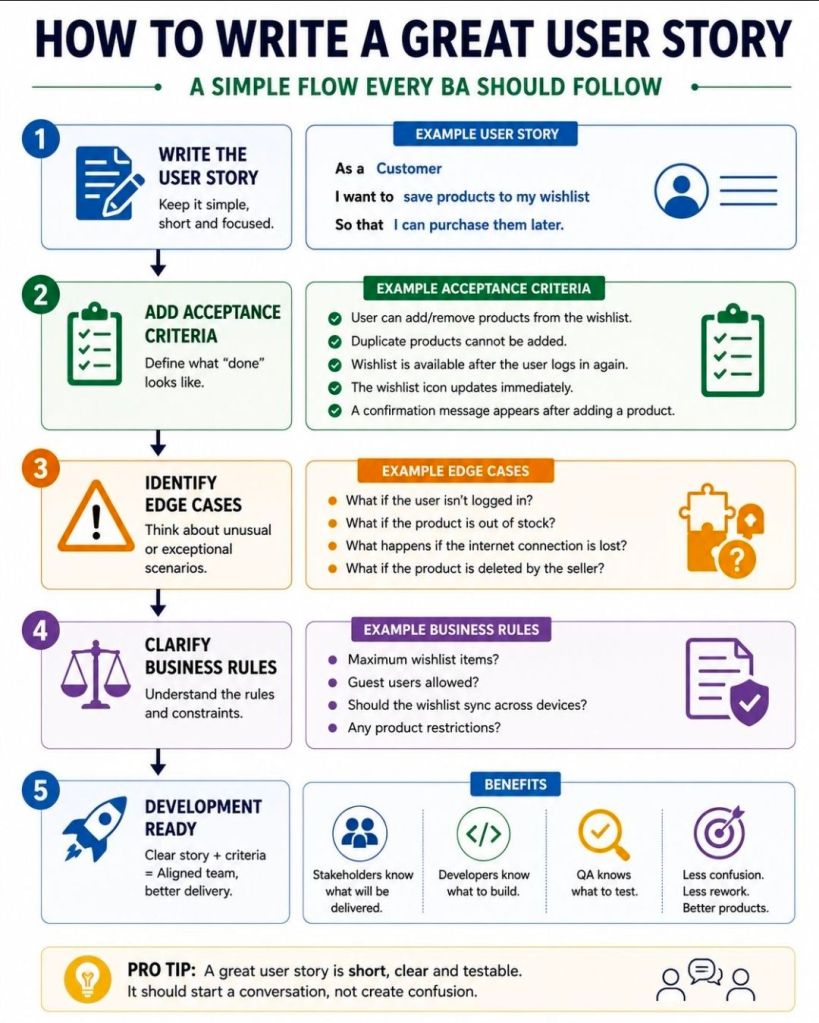
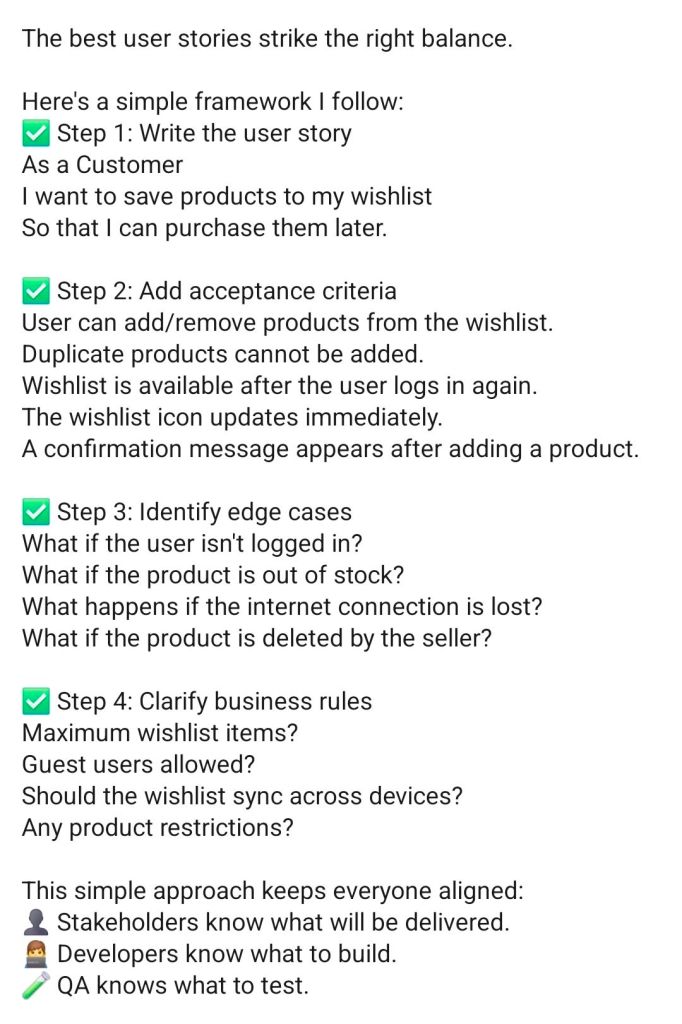
Agile User Story Definition of Done DoD

Agile User Story Definition of Done DoD

Web Development Stack from Browser to Database

Web Development Stack from Browser to Database

Why Projects Fail

Why Projects Fail

A Successful Project Plan Approach includes

A Successful Project Plan Approach includes

Agile Development – Continuous Integration CI, Continuous Delivery/Deployment CD

Agile Development – Continuous Integration CI, Continuous Delivery/Deployment CD

Project Management Soft Skills Overview

Project Management Soft Skills Overview

Agile Scrum Pillars Overview – Transparency, Inspection and Adaption

Agile Scrum Pillars Overview – Transparency, Inspection and Adaption

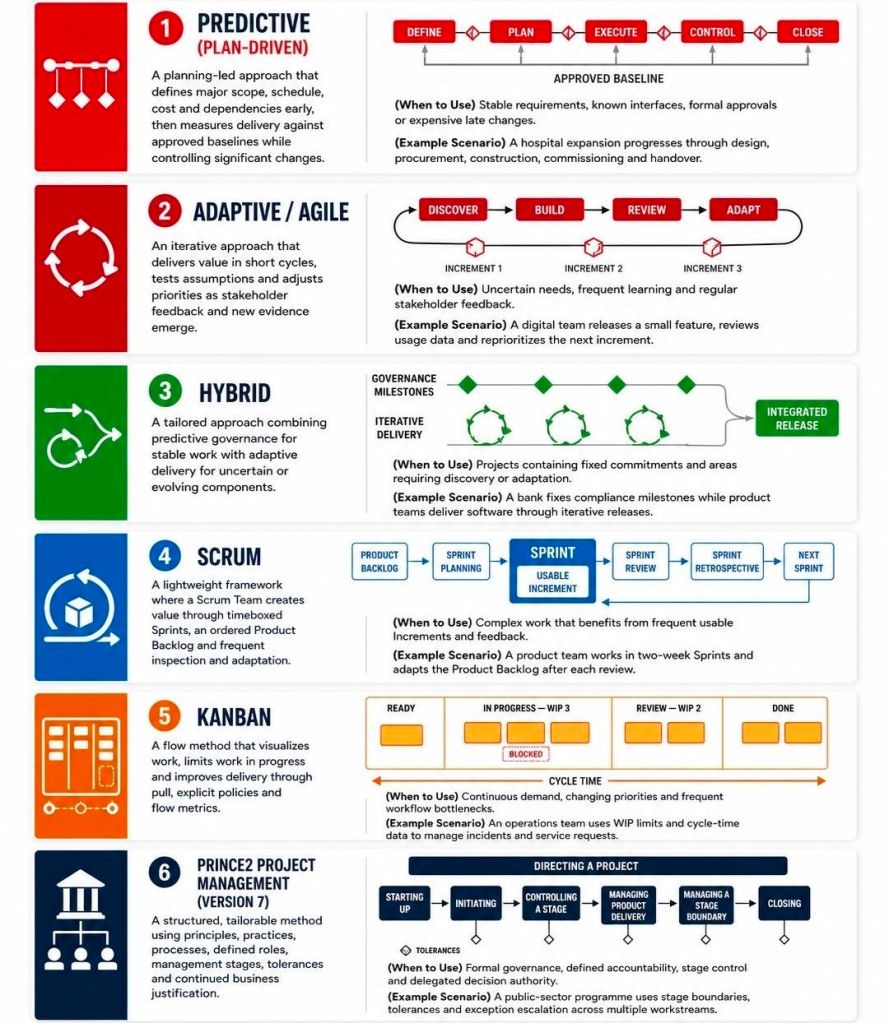
Project Management Types Summarised, Overview

Project Management Types Summarised, Overview