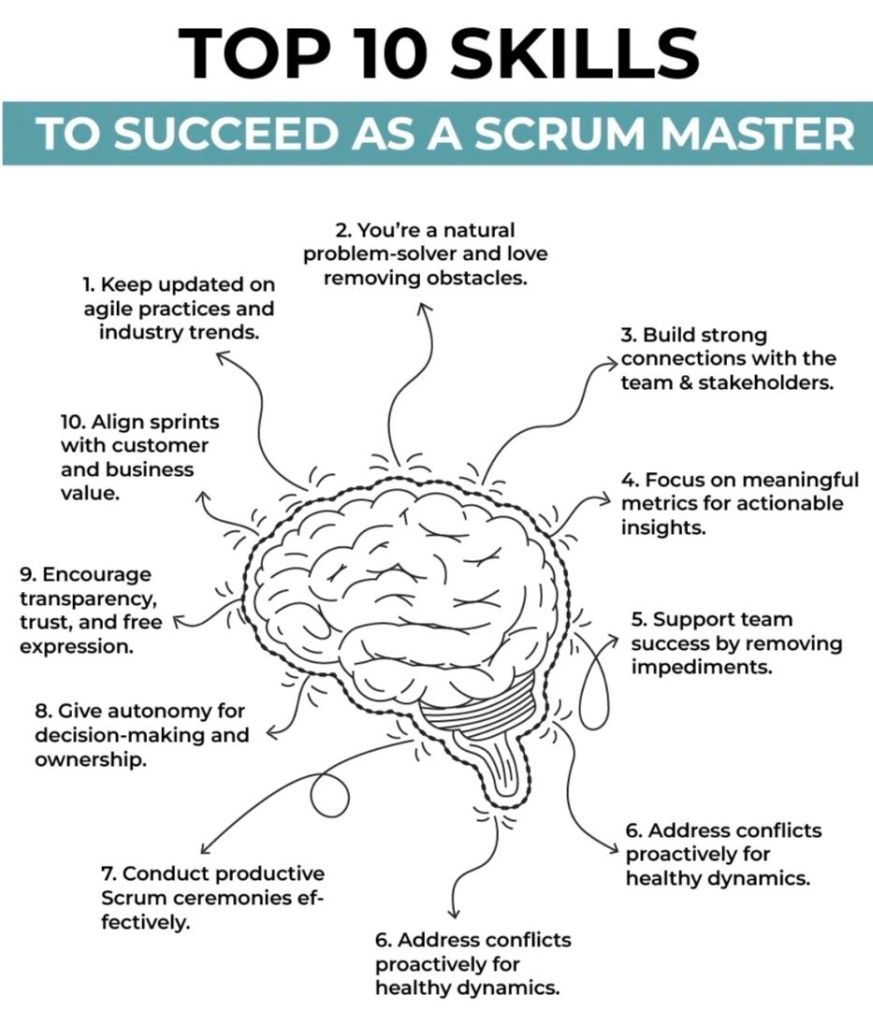
Agile Scrum Master Skills for Success

Agile Scrum Master Skills for Success

Top Open Content Management CMS OCM Solutions in 2026

In 2026, the landscape for open content management solutions is defined by a shift toward headless architectures, AI-native workflows, and high-security frameworks for regulated sectors. While established players remain dominant, newer platforms are gaining ground by treating content as structured data for omnichannel delivery. 

Top Open-Source CMS Solutions

These platforms are the most prominent open-source options available in 2026, often used as the foundation for both simple sites and complex enterprise architectures. 

  • WordPress: Remains the global leader, powering over 42.8% of all websites. The 2026 updates have modernised the platform with real-time collaboration features similar to Google Docs and significant performance gains in its core editor. This particular website is built using WordPress, https://mark-whitfield.com
  • Strapi: A leading headless CMS preferred by developers for its API-first design. Strapi 5 features a complete TypeScript migration and a new “Document Service API” that simplifies frontend integration.
  • Drupal: The primary choice for high-security environments like government, healthcare, and higher education. Drupal 11 (released in late 2024) and upcoming updates in 2026 focus on modernising its technical stack with newer Symfony components.
  • Joomla: Serves as a “middle-ground” option, offering more native structural control than WordPress without the extreme complexity of Drupal. It features native support for 70+ languages without needing additional plugins.
  • Ghost: A specialized Node.js platform for modern publishing and newsletters. Ghost 6.0 introduced native analytics and networked publishing, achieving extremely fast load times of under 0.7 seconds.
  • TYPO3: Highly favoured by European enterprises for multi-site management. Its “Site Sets” functionality allows reusable configurations across thousands of sub-sites from a single installation. 

Key 2026 Evaluation Criteria

When choosing a solution in 2026, organizations are prioritizing the following:

Feature Trend for 2026

AI Integration, Shift from simple text generation to Agentic AI that can automate workflows, update metadata, and audit content autonomously.

Architecture Hybrid Headless is the “sweet spot” for mid-market companies, combining API-driven delivery with visual editing for marketers.

Security, Adherence to modern standards like NIST SP 800-53 and OWASP Top 10:2025 is critical, especially regarding supply chain security in plugin ecosystems.

Performance, Core Web Vitals targets have tightened, with top platforms aiming for a Largest Contentful Paint (LCP) under 2.5 seconds.

Specialized Alternatives

  • For E-commerce: Shopify remains the dominant SaaS choice, while WooCommerce (open-source) is the top pick for those wanting full ownership.
  • For Design-Centric Teams: Webflow and Wix Studio are leading the “visual-first” CMS market, though they are proprietary SaaS models rather than open-source.
  • For Advanced Content Ops: Sanity is increasingly viewed as a “Content Operating System” rather than a traditional CMS, focusing on content as programmable data for AI applications. 

Open content management (OCM) refers to platforms that allow for flexible, open-source, or highly integrated digital content and change management. Below is a timeline of the top open solutions based on their market entry and evolution into 2026. 

Open Content Management (OCM) Evolution Timeline

  • 1998: TYPO3 Release
    • One of the earliest enterprise-class open-source CMS platforms, known for its scalability and multilingual support.
  • 2001: Drupal Launch
    • Established as a highly flexible, community-driven framework.
    • By 2026, it remains a top choice for complex, large-scale enterprise websites due to its modular design.
  • 2003: WordPress and Textpattern
    • WordPress: Initially a blogging tool, it evolved into the world’s most popular CMS, powering over 43% of websites including this site, https://mark-whitfield.com
    • Textpattern: Launched as a simple, elegant open-source alternative for content creators.
  • 2005: Joomla! and Alfresco
    • Joomla!: Released as a user-friendly but powerful open-source CMS, balancing flexibility with ease of use.
    • Alfresco: Introduced as an open-source Enterprise Content Management (ECM) system, focusing on document management and information governance.
  • 2008: Magento (Adobe Commerce)
    • Launched as a specialized open-source platform for e-commerce content management.
  • 2009: Nuxeo and dotCMS
    • Nuxeo: Entered the market as a cloud-native, open-source ECM platform designed for complex content lifecycles.
    • dotCMS: Released as a Java-based hybrid CMS that bridges traditional and headless content delivery.
  • 2013–2015: Rise of Headless & Modern OCM
    • Ghost (2013): A modern, open-source “headless” CMS specifically for professional publishing and newsletters.
    • Backdrop CMS (2015): A Drupal fork aimed at providing a more accessible path for small-to-medium organizations.
  • 2020–2026: Integrated & AI-Driven OCM
    • OCM Solution (OCMS Portal): Emerged as a leading modern platform for Organizational Change Management (OCM), providing open templates and digital tools for tracking business transformation.
    • Strapi & TinaCMS: Gained popularity as developer-first, open-source headless solutions for modern web applications.
    • Drupal CMS (2026): A new, simplified version of Drupal designed to be more accessible for non-developers while maintaining its “open” core. 

Top Open Content Management OCM CMS Solutions in 2026

Best way to optimize SEO Search Engine Optimization for your website

To optimize SEO (Search Engine Optimization), you must align your website with search engine requirements across four foundational pillars: technical performance, on-page structure, content value, and off-page authority. 

1. Technical SEO (The Foundation)

Technical optimization ensures search engines can find, crawl, and index your pages. 

  • Improve Page Speed: Use Google PageSpeed Insights to identify bottlenecks; compress images and use modern formats like WebP or AVIF.
  • Enable Mobile-First Design: Ensure your site is fully responsive, as Google prioritizes mobile versions for indexing.
  • Secure with HTTPS: Use an SSL certificate to protect user data and gain a minor ranking boost.
  • Use XML Sitemaps: Submit a sitemap via Google Search Console to help bots discover all your URLs. 

2. On-Page SEO (The Structure)

On-page factors help search engines understand what a specific page is about. 

  • Optimize Meta Tags: Include your primary keyword near the beginning of your Title Tag (under 60 characters) and Meta Description (105-160 characters).
  • Use Descriptive Headings: Structure content with a single H1 for the main title and logical H2/H3 tags for subtopics.
  • Clean URL Slugs: Create short, descriptive URLs that include the target keyword (e.g., /how-to-optimize-seo/).
  • Add Image Alt Text: Write descriptive text for all images to assist both accessibility and image search rankings. 

3. Content Strategy (The Value)

High-quality content is the most influential factor for long-term SEO success. 

  • Keyword Research: Use tools like Ahrefs, Semrush, or Google Keyword Planner to find terms with high volume and low difficulty.
  • Match Search Intent: Identify if users want information, a specific product, or a comparison, and tailor your content to fulfill that exact need.
  • Demonstrate E-E-A-T: Show Experience, Expertise, Authoritativeness, and Trustworthiness by citing original research, expert quotes, and unique insights.
  • Optimize for AI Overviews: Use clear “Key Takeaways” boxes and answer common questions directly to increase chances of being cited by AI search features. 

4. Off-Page SEO (The Authority)

Off-page signals prove your site’s credibility to the rest of the web. 

  • Build High-Quality Backlinks: Earn links from reputable websites through guest posting, digital PR, or creating “linkable assets” like infographics.
  • Internal Linking: Connect related pages within your own site to distribute “link equity” and help users navigate.
  • Manage Online Reputation: For local businesses, maintain an updated Google Business Profile and respond promptly to reviews.

Best way to optimize SEO Search Engine Optimization for your website

Centiun Microsoft Business Applications and AI Specialists

Website: https://centiun.com

Centiun Microsoft Business Applications and AI Specialists

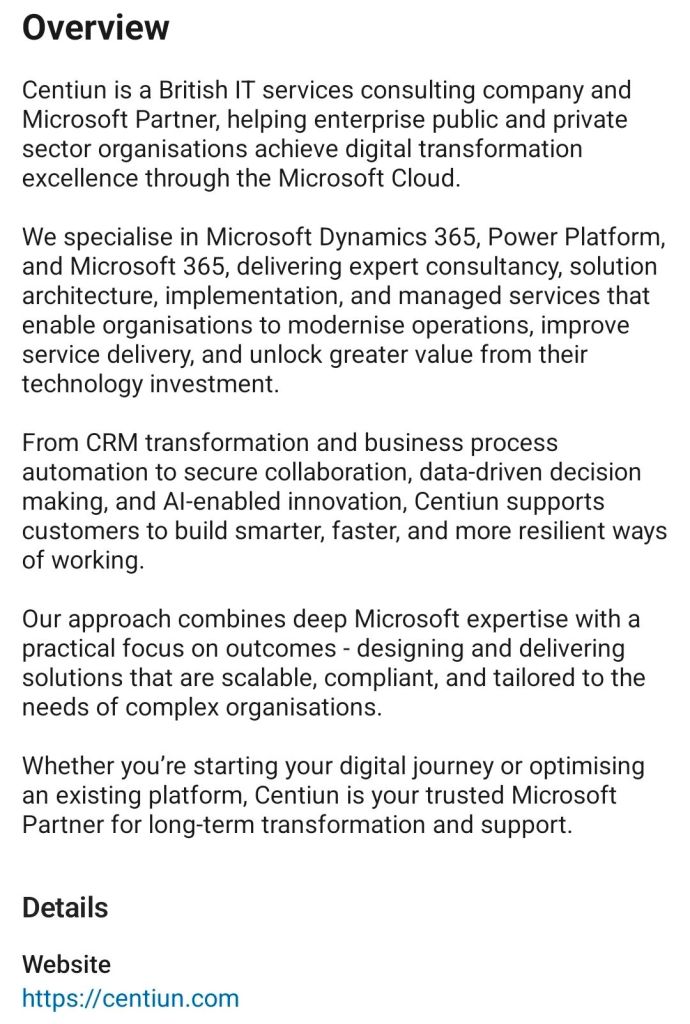
Centiun Overview

Centiun is a British IT services consulting company and Microsoft Partner, helping enterprise public and private sector organisations achieve digital transformation excellence through the Microsoft cloud.

We specialise in Microsft Dynamics 365, Power Platform, and Micrisoft 365, delivering expert consultancy, solution architecture, implementation, and managed services that enable organisations to modernise operations, improve service delivery, and unlock greater value from their technology investment.

From CRM transformation and business process automation to secure collaboration, data-driven decision making, and AI enabled innovation, Centiun supports customers to build smarter, faster and more resilient ways of working.

Our approach combines deep Microsoft expertise with a practical focus on outcomes – designing and delivering solutions that are scalable, compliant, and tailored to the needs of complex organisations.

Whether you’re starting your digital journey or optimising an existing platform, Centiun is your trusted Microsoft for long-term transformation and support.

Website: https://centiun.com

On LinkedIn: https://www.linkedin.com/company/centiun/

Email: info@centiun.com

Centiun services
Centiun Microsoft Business Applications and AI Specialists

Mark Whitfield IT Training Career Timeline Overview

Mark Whitfield, an experienced IT Project Manager, has a career and certification history spanning over 30 years. His professional development includes a range of technical, project management, and cloud-based qualifications. 

2020s: Cloud & Modern Platforms

  • 2024 (July): Microsoft Excel Refresher Course – Udemy.
  • 2022 (December/February): C&CA UK’s Communications & Engagement Award and AZ-900 Microsoft Certified Azure Fundamentals. 

2010s: Advanced Management & Development 

  • 2017 (November/April): Advanced Engagement Management (Level 2) and Microsoft Excel 2010 Expert Skills.
  • 2014 (July): Advanced Microsoft Excel 2013.
  • 2011 (May–July): PRINCE2 Practitioner, Agile SCRUM, Java, and Android programming. 

2000s: Web Applications & Database Systems 

  • 2009 (March–November): Thales e-Security, BIRT, Web Design, and SQL Server training.
  • 2006 (Feb–Dec): NetObjects Fusion, Cryptography, and Thales e-SECURITY SafeSign.
  • 2004 (March): MultiBatch NSK Job Scheduling.
  • 2000 (February): Fundamentals of Successful Project Management. 

1990s: Core Programming & System Fundamentals

  • 1990s (1993–1999): TANDEM/HP NonStop systems, C/C++ programming, project management, and HND in Computer Studies (1990).

Mark Whitfield Training IT Career Timeline Overview

Mark Whitfield, a Senior IT Project Manager who has spent over 30 years specialising in HP NonStop (formerly Tandem) computing systems. 

Professional Background

  • Specialisation: Mark Whitfield is a highly experienced technician and project manager for the HP NonStop platform, which is a high-availability, fault-tolerant mainframe environment used primarily for mission-critical financial transactions.
  • Career Timeline:
    • The Software Partnership / Deluxe Data (1990–1995): Began as a programmer working on the sp/ARCHITECT-BANK solution for Tandem computers.
    • Insider Technologies (1995–2013): Spent 18 years focusing on monitoring and diagnostic software for HP NonStop, including products like Reflex 80:20, XPERT24, and Enterprise Manager.
    • Capgemini (2016–Present): Currently serves as an SC-cleared Senior Project Manager, delivering complex IT projects for major banks and government agencies. 

Key Technical Contributions to NonStop

  • Product Development: He co-developed Reflex (a platform health/diagnostic tool) and designed XPERT24 to monitor performance in the XPNET layer of BASE24.
  • Financial Systems: He has managed major projects for global financial entities, including Barclays, HSBC, Bank of England, and Royal Mail Group, often involving ATM and POS monitoring systems.
  • Programming Expertise: His technical skill set includes NonStop-specific languages and tools such as TAL (Tandem Application Language), PATHWAY, XPNET, COBOL85, and C++. 

About HP NonStop Systems

In the context of Mark Whitfield’s work, NonStop refers to a “shared-nothing” architecture designed by Tandem Computers. These systems are uniquely capable of: 

  • Fault Tolerance: Handling hardware or software failures without system downtime.
  • Scalability: Doubling throughput by adding processors (up to 4,000) without hitches in performance.
  • Core Banking: Processing massive commercial workloads for retail banks and stock exchanges globally.

Home Computers, ZX Spectrum versus Commodore 64

The Commodore 64 (C64) and ZX Spectrum were the primary rivals of the 8-bit home computing era, particularly in the UK, where they defined a decade of “playground wars”. While the ZX Spectrum launched in April 1982 as an affordable entry into computing, the Commodore 64 followed in August 1982 with superior custom hardware for sound and graphics. 

1982: The Birth of the Icons 

  • January: Commodore unveils the Commodore 64 at CES in Las Vegas.
  • 23 April: Sinclair Research launches the Sinclair ZX Spectrum 16K/48K in the UK. It is marketed for its 15-colour palette and affordable price compared to the BBC Micro.
  • August: The Commodore 64 begins volume production and goes on sale in the US for $595.
  • Late 1982: Sinclair introduces the Issue 2 motherboard for the Spectrum to fix manufacturing defects. 

1983: Expansion and Price Wars

  • January: Commodore introduces the Commodore SX-64, the first commercial full-color portable computer.
  • July: The Timex Sinclair 2068, an enhanced US version of the Spectrum, is launched.
  • August: Spectrum sales in Britain and Europe exceed 500,000 units.
  • December: The millionth ZX Spectrum is manufactured.
  • Market Shift: Commodore begins aggressive price-cutting to underbid competitors, leading to the “Home Computer Price War”. 

1984–1985: New Iterations and Corporate Shifts

  • January 1984: Sinclair announces the Sinclair QL, intended as a professional successor to the Spectrum.
  • October 1984: Sinclair releases the Sinclair ZX Spectrum+, featuring a new QL-style case and a plastic injection-moulded keyboard to replace the original rubber keys.
  • January 1985: Commodore releases the Commodore 128, a successor that includes a dedicated “64 mode” for 100% compatibility with C64 software.
  • September 1985: The Sinclair ZX Spectrum 128 (codenamed “Derby”) is launched in Spain, featuring 128KB RAM and a three-channel sound chip. 

1986–1987: The Amstrad Era and Redesigns 

  • January 1986: The ZX Spectrum 128 is officially released in the UK.
  • 7 April 1986: Amstrad acquires the Sinclair brand and computer range for £5 million after Sinclair Research faces financial difficulties.
  • Late 1986: Commodore introduces the Commodore 64C, a redesigned model with a sleeker, light-coloured case matching the C128’s aesthetic.
  • Late 1986: Amstrad releases the ZX Spectrum +2, featuring a grey case and a built-in cassette recorder.
  • 1987: Amstrad launches the ZX Spectrum +3, which includes a built-in 3-inch floppy disk drive. 

1988–1994: The Twilight Years 

  • 1988: Amstrad releases the ZX Spectrum +2A, updating the +2 with the internal circuitry of the +3.
  • 1990: Commodore attempts to move into the console market with the Commodore 64 Games System (C64GS), a keyboard-less version of the C64 that ultimately fails commercially.
  • 1992: Amstrad officially discontinues all ZX Spectrum models after approximately 5 million total units sold.
  • April 1994: The Commodore 64 is officially discontinued as Commodore International enters bankruptcy. It remains the best-selling single computer model of all time with 12.5 to 17 million units sold. 

Home Computers, ZX Spectrum versus Commodore 64

Commodore 64 Home Computer Timeline Overview

The Commodore 64 (C64) is the best-selling single computer model of all time, with an estimated 12.5 to 30 million units sold during its 12-year production run. 

Commodore 64 Annual Timeline

  • 1981: Development Phase
    • January: Engineers at MOS Technology begin a project to design state-of-the-art video and sound chips (VIC-II and SID) for the next generation of games consoles.
    • November: The cutting-edge chips are completed, and Commodore decides to use them for a new home computer to succeed the VIC-20.
  • 1982: Launch and Early Expansion
    • January: The Commodore 64 is officially introduced at the Consumer Electronics Show (CES) with a starting price of $595.
    • August: The C64 begins shipping in the USA, featuring its iconic “breadbox” design.
    • Other Models: The Japan-only MAX Machine (a console version) and the Educator 64 (aimed at schools) are also released.
  • 1983: Price Wars and Portables
    • January: Commodore introduces the SX-64, the world’s first portable computer with a colour screen, retailing for approximately $1,600.
    • June: To dominate the market, Commodore slashes the C64 price to $300, triggering an intense price war that drives competitors like Texas Instruments out of the market.
  • 1984: Leadership Changes
    • January: Founder Jack Tramiel resigns from Commodore after a disagreement with chairman Irving Gould.
    • Expansion: The Commodore 16 and Plus/4 are introduced as low-cost alternatives, though they lack full C64 compatibility.
  • 1985: Peak Performance
    • C128 Release: Commodore launches the Commodore 128, which includes a dedicated C64 compatibility mode to leverage the existing library.
    • Gaming Dominance: The C64 becomes the primary platform for video games, with thousands of titles released by developers like System 3 and MicroProse.
  • 1986: The Redesign
    • May: The Commodore 64C is released, featuring a sleeker, flatter cream-coloured case similar to the Amiga 500.
    • Milestones: To celebrate selling one million units in Germany, a limited “Gold Edition” is presented at the BMW museum.
  • 1987–1989: Late-Era Variants
    • 1987: The C64 Aldi is sold through German supermarkets as a budget model.
    • 1988: The C64G is introduced, returning to the original breadbox shape but using the modern 64C internal hardware.
  • 1990: Consolidation and Consoles
    • C64 Games System (GS): Commodore attempts to enter the console market by releasing the C64 GS (a keyboardless C64), but it fails to compete with the rising 16-bit systems like the Sega Genesis.
  • 1994: The End of an Era
    • April: Despite reaching a final sales total of roughly 17–22 million units, Commodore International files for bankruptcy and the C64 is officially discontinued. 

Commodore 64 Home Computer Timeline Overview

Project planning timeline is typically structured to five phases

A project planning timeline is typically structured around the five phases of the project management lifecycle: Initiation, Planning, Execution, Monitoring/Control, and Closure. This framework breaks a complex project into manageable stages to ensure systematic progress and stakeholder alignment. 

1. Project Initiation

The foundation phase where the project’s value and feasibility are established. 

  • Primary Objective: Secure formal approval to begin.
  • Key Activities: Identify stakeholders, perform feasibility studies, and create a Project Charter.
  • Output: Project Charter or Business Case. 

2. Project Planning

The most critical stage for the timeline, where the high-level vision is translated into a detailed roadmap. 

  • Primary Objective: Define the “how” of project delivery.
  • Key Activities:
    • Scope Definition: Establish what is and is not included.
    • Work Breakdown Structure (WBS): Break large goals into “bite-sized” tasks.
    • Scheduling: Sequence tasks, estimate durations, and link dependencies.
    • Resource & Risk Planning: Allocate staff/budget and identify potential bottlenecks.
  • Output: Gantt Chart or Project Management Plan. 

3. Project Execution

The “action” phase where the team carries out the planned tasks to produce deliverables. 

  • Primary Objective: Complete the work according to the finalized plan.
  • Key Activities: Assign tasks, hold kickoff meetings, and manage workflows using tools like Asana or Trello.
  • Output: Status reports and tangible deliverable packages. 

4. Project Monitoring and Controlling

This phase runs concurrently with Execution to ensure the project stays on track. 

  • Primary Objective: Track progress against the original timeline and budget.
  • Key Activities: Measure KPIs (e.g., ROI, cost performance), manage scope creep, and adjust schedules as needed.
  • Output: KPI Dashboards and Change Logs. 

5. Project Closure

The final wrap-up where the project is formally ended and evaluated. 

  • Primary Objective: Formal handover and knowledge capture for future projects.
  • Key Activities: Host a Post-Mortem Meeting, archive project documents, and release remaining resources.
  • Output: Final reports and a lessons-learned document. 

Project planning timeline is typically structured to five phases