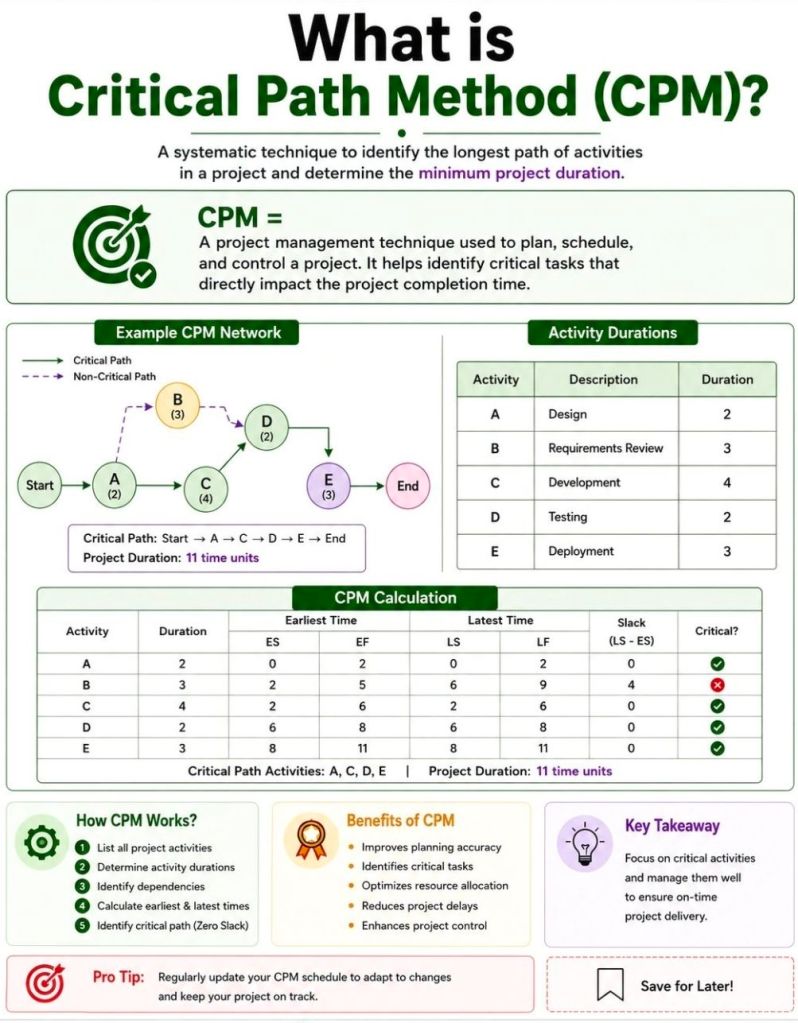
The Critical Path Method (CPM) is a project management algorithm used to identify the longest sequence of dependent tasks required to complete a project. It establishes the shortest possible project duration and highlights the “critical” activities that cannot be delayed without extending the entire project’s deadline.
How the Critical Path Works
CPM relies on finding the path through your project’s workflow that takes the most time from start to finish.
Critical Activities: Tasks on the critical path have zero “float” (or slack), meaning any delay directly impacts the final delivery date.
Non-Critical Activities: Other task sequences may have buffer time, allowing them to be delayed without throwing off the main project timeline.
Steps to Calculate the Critical Path
Identify Tasks: Break the project down into individual activities (often using a Work Breakdown Structure).
Determine Dependencies: Map out which tasks must happen before others can begin.
Estimate Durations: Assign a realistic time frame for completing each task.
Draw a Network Diagram: Create a flowchart visually connecting tasks with arrows to illustrate the sequence.
Analyze the Paths: Calculate the total duration for every possible sequence of tasks. The longest sequence is your critical path.
Key Terminology
Float (Slack): The amount of time a task can be delayed without causing a delay to subsequent tasks or the overall project.
Forward Pass: A calculation used to find the Earliest Start and Earliest Finish times for each task.
Backward Pass: A calculation used to find the Latest Start and Latest Finish times for each task before the project is delayed.
When and Why to Use It
Project managers use CPM during the planning phase to build realistic schedules and set clear baselines. It is highly beneficial for complex, predictable projects like construction or software rollouts, where many tasks rely on the completion of previous ones.
By knowing exactly which tasks control your timeline, you can prioritize resources, prevent bottlenecks, and use “fast-tracking” (doing tasks in parallel) if you need to compress a timeline.
Agile Scrum Master’s Checklist for Program Increment
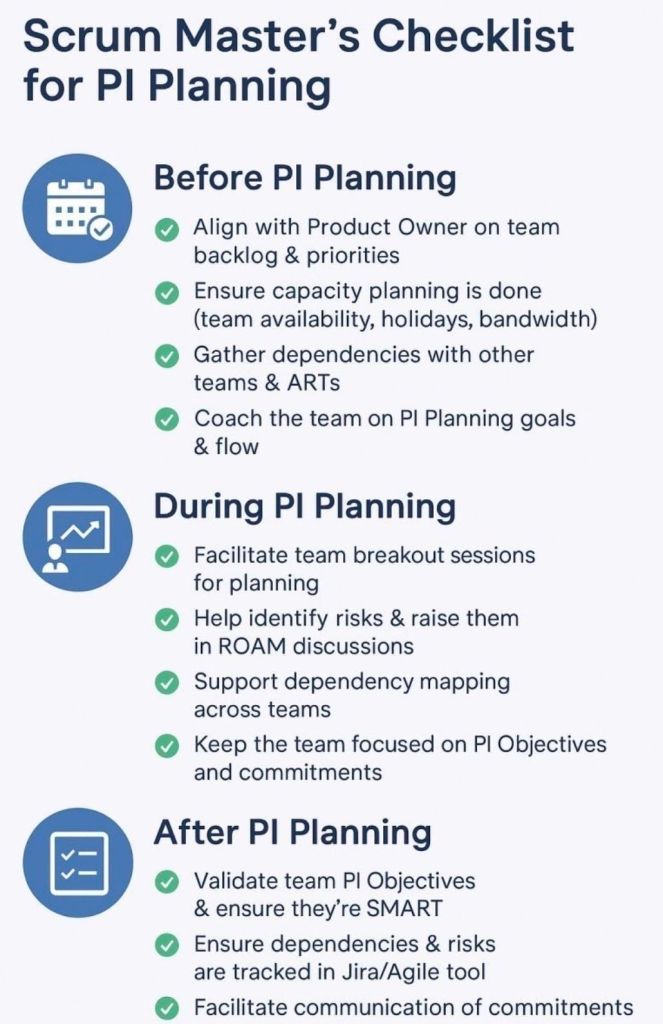
An Agile Scrum Master’s checklist for a Program Increment (PI)ensures your team is aligned, dependencies are resolved, and a realistic delivery plan is established for the upcoming 8–12 weeks of work. As a facilitator and coach, you support the team across three core phases: Pre-PI Planning, During PI Planning Events, and Post-PI Execution.
Here is a comprehensive checklist structured across the lifecycle of a Program Increment.
📅 Phase 1: Pre-PI Planning Readiness
Establish Sprint Cadence: Define exact start/end dates for every sprint within the upcoming PI.
Calculate Team Capacity: Factor in vacations, public holidays, corporate events, and historic team velocity.
Refine the Backlog: Collaborate with the Product Owner to ensure top features meet the Definition of Ready (DoR).
Encourage Feature Decomposition: Guide developers to begin breaking down high-priority features into draft user stories.
Prepare Digital Tooling: Set up virtual whiteboards like Miro or MURAL, and structure project boards in systems like Jira.
Align Engineering Standards: Review architectural patterns with system architects to prevent technical blockers.
🛠️ Phase 2: During the PI Planning Event
Day 1 Breakout Management: Facilitate your team’s breakdown of features into actionable, estimated sprint user stories.
Map Dependencies: Identify files, data, or logic needed from external teams and link them on the program board.
Draft PI Objectives: Help the team write clear, outcome-oriented, and SMART goals based on their planned work.
Surface Program Risks: Collaboratively categorize all technical or resource hurdles using the ROAM framework (Resolved, Owned, Accepted, Mitigated).
Day 2 Plan Finalization: Ensure uncommitted objectives are preserved for high-risk items requiring external prerequisites.
Conduct Confidence Votes: Run an anonymous digital vote to gauge psychological safety and realistic alignment before final team commitment.
🚀 Phase 3: Post-PI & Execution Tracking
Sync the Agile Tooling: Move sticky notes and analog mappings directly into active Jira epics or tracking backlogs.
Establish Sprint Tracking: Distribute automated calendar sequences for recurring Daily Scrums, Sprint Plannings, and Sprint Reviews.
Monitor Cross-Team Risks: Attend standard Scrum of Scrums (SoS) meetings to report on blockers and coordinate incoming dependency tracks.
Protect the WIP Limits: Enforce explicitly defined work-in-progress (WIP) boundaries to prevent team burnout over mid-increment changes.
Inspect and Adapt (I&A): Facilitate the final evaluation comparing actual value delivered against initial PI targets to feed process enhancements back into the train.
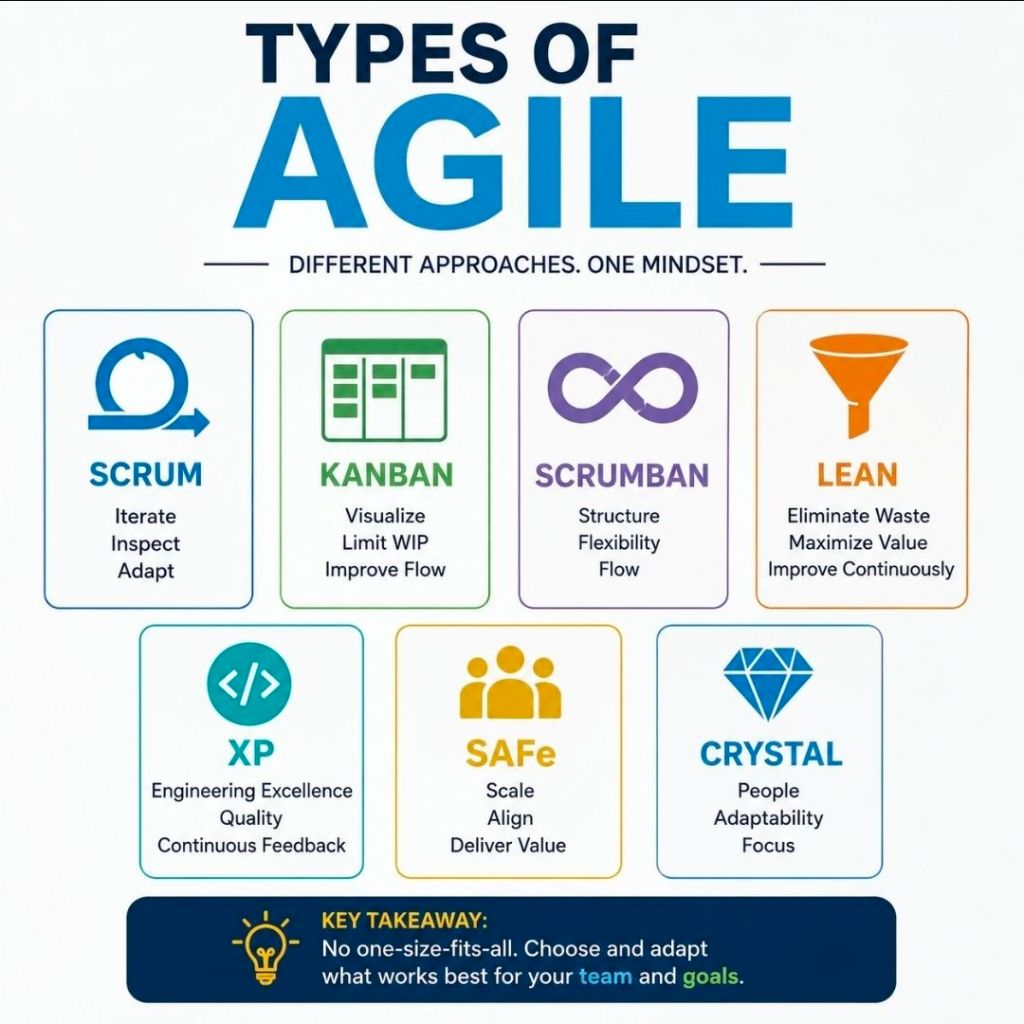
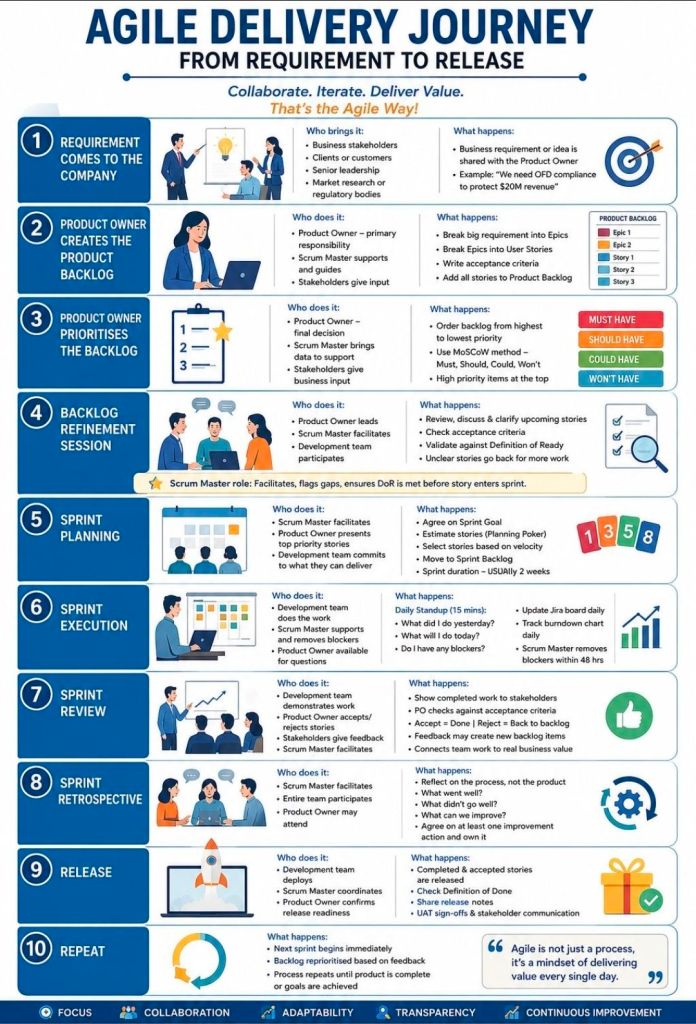
Agile delivery is an iterative approach to project management that focuses on delivering value early, frequently adapting to change, and maintaining continuous customer feedback. Rather than executing a project sequentially, teams break work into small increments to maximize flexibility and product quality.
The most common types and frameworks of agile delivery include the following structured methodologies:
1. Scrum
Scrum is the most widely used agile framework, characterized by highly structured, time-boxed iterations called Sprints (typically 1 to 4 weeks long).
Key Concept: Teams work toward a single, actionable goal during each sprint.
Key Roles: Product Owner (represents the customer), Scrum Master (removes obstacles and enforces the framework), and Developers.
Best For: Projects where requirements change frequently and close collaboration with clients is required.
2. Kanban
Kanban is a visual workflow management system that emphasizes continuous delivery and transparency without strict time-boxed iterations.
Key Concept: Work is tracked on a Kanban board divided into columns (e.g., “To Do,” “In Progress,” “Done”).
Key Roles: Self-organizing teams with a pull-based approach.
Best For: Operational workflows, support/maintenance teams, and organizations that need to limit “work in progress” (WIP) to prevent bottlenecks.
3. Lean Software Development
Adapted from Toyota’s lean manufacturing principles, Lean focuses on maximizing customer value while minimizing waste.
Key Concept: Focuses on “eliminating waste” (anything that doesn’t add value to the end user), amplifying learning, and delivering as fast as possible.
Best For: Optimizing overall organizational workflows and reducing overhead.
4. Extreme Programming (XP)
XP focuses heavily on technical excellence and software engineering practices to boost product quality and responsiveness.
Key Concept: Uses practices like pair programming, test-driven development (TDD), and continuous integration.
Best For: Development teams that need to release updates frequently while maintaining strict quality and low bug rates.
5. Feature-Driven Development (FDD)
FDD is a model-driven approach that is highly structured and focuses on building software in short, feature-by-feature iterations.
Key Concept: Work revolves around creating detailed software models and planning by specific features, which are built one by one.
Best For: Teams that prefer structured, step-by-step processes or environments with traditional hierarchical structures.
6. Scaled Agile Framework (SAFe)
SAFe is designed for larger enterprises that need to align cross-functional, multiple Agile teams toward a single business strategy.
Key Concept: Blends Lean, Agile, and DevOps principles to coordinate alignment, governance, and delivery across a massive scale.
Best For: Large organizations and complex projects requiring multiple teams to coordinate efforts.
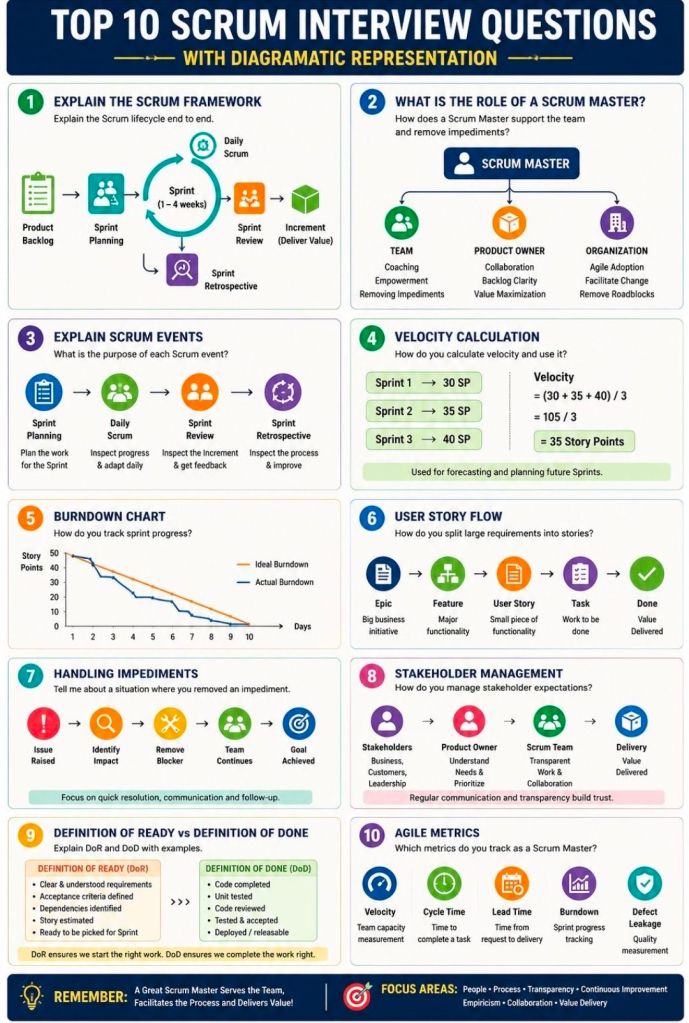
Preparing for an Agile Scrum interview requires a mix of theoretical knowledge, situational problem-solving, and a clear understanding of your specific role (Scrum Master, Product Owner, or Developer). Be ready to discuss the Scrum framework, roles, artifacts, ceremonies, and how you foster self-organization and continuous improvement.
Review these common Agile Scrum interview questions, categorized by topic:
1. Fundamentals & Frameworks
What is the difference between Agile and Scrum? Agile is an overarching project management philosophy focused on iterative development and flexibility. Scrum is a specific, lightweight framework within Agile that uses set roles, artifacts, and timeboxed “sprints” (usually 1-4 weeks).
What are the core roles on a Scrum Team? The three primary roles are the Product Owner (maximizes value, owns the backlog), the Scrum Master (servant-leader, removes impediments, ensures Scrum rules are followed), and the Developers (cross-functional team that delivers the increment).
What is a “Spike”? A spike is a timeboxed research or exploration task used to reduce uncertainty, figure out a technical approach, or better understand a requirement before development begins.
2. Scrum Ceremonies (Events)
What happens during a Sprint Planning meeting? The team collaborates to determine what work can be delivered in the upcoming sprint and creates a plan (the Sprint Backlog) for how to achieve this Product Goal.
Can you give a 2-3 minute overview of the Daily Scrum? It is a 15-minute timeboxed event for the Developers to inspect progress toward the Sprint Goal and adapt the upcoming work. It is not a status report to management; it is for the team to synchronize and plan the next 24 hours.
What is the purpose of a Sprint Retrospective? Held at the end of every sprint, the team inspects the past sprint regarding people, relationships, processes, and tools. The goal is to identify what went well and create a plan for implementing improvements.
What is the difference between a Sprint Review and a Retrospective? The Review inspects the software/product increment to adapt the Product Backlog. The Retrospective inspects the team’s process and working environment.
3. Artifacts & Estimation
What is the Definition of Done (DoD)? It is a shared, clear checklist of criteria that must be met for a product increment to be considered ready for release. It ensures consistency and quality across the team.
What is Velocity? Velocity measures the total amount of work (usually in Story Points) a Scrum Team can deliver during a single sprint. It is typically calculated as an average over the last 3-4 sprints and helps predict future delivery.
How do you handle scope creep? Emphasize that in Scrum, the sprint scope is locked once the sprint starts. If new work is urgent, it should go to the Product Backlog for future planning, or the team can negotiate with the Product Owner to remove an equally sized task from the current sprint to make room.
What do you do if a manager tries to dictate or assign tasks to the team? Coach the manager on Scrum principles (self-management) and act as a shield to protect the team from outside interference, allowing them to focus on the Sprint Goal.
How do you build trust with your team? Focus on empathy, transparency, consistency, and active listening. Build a safe space where the team can fail forward, experiment, and voice concerns without fear of retaliation.
How do you handle conflict within the team? Encourage the team to resolve conflicts themselves first, stepping in only if it affects the sprint goals. Facilitate open dialogue focusing on the issue (the process/problem), not the person.
Requirements Traceability Matrix RTM & Business Analyst BA
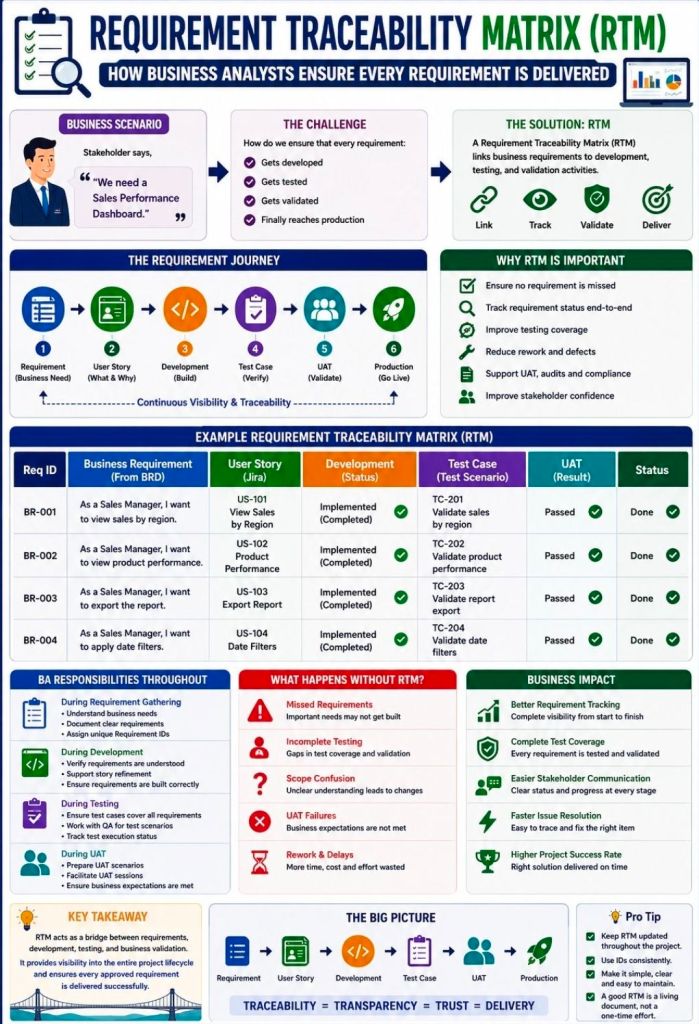
A Requirements Traceability Matrix (RTM) is a structured project management document that links user and stakeholder requirements directly to their corresponding design elements, development deliverables, and verification test cases.
Acting as a living checklist throughout the project life cycle, its primary purpose is to ensure 100% test coverage, validate that all client requests are fulfilled, and prevent scope creep by identifying undocumented work.
The visual layout of a typical RTM template maps individual requirement rows against critical validation milestones.
🔄 Three Main Types of Traceability
The configuration of an RTM depends heavily on the direction of tracking needed for the project:
Forward Traceability: Tracks requirements forward into design, code, and test cases. It ensures the project executes every requested feature and that nothing gets left behind.
Backward (Backward-Looking) Traceability: Traces test cases and final deliverables back to the original requirement. It checks for scope creep, confirming that no extra, unauthorized features were added.
Bidirectional Traceability: Combines both approaches. It links requirements from origin to destination and vice versa, providing clear visibility during change management or troubleshooting.
📋 Structured Breakdown of RTM Content
A standard RTM is formatted as a multidimensional table. Below is the foundational structure, broken down into its logical data components:
1. Core Requirement Parameters
Requirement ID: A distinct alphanumeric identifier (e.g., REQ-001, BRD-102) for quick cross-referencing.
Requirement Type: Classifies the item (e.g., Business, Functional, Technical, UI, Security, or Regulatory Compliance).
Requirement Description: A concise textual explanation defining exactly what the feature or system must achieve.
Source/Origin: The document, stakeholder, client request, or meeting minutes where the requirement originated.
Priority Level: The urgency ranking of the item, usually categorized as High, Medium, or Low (or via MoSCoW ranking).
2. Design and Development Artifacts
Functional Specification ID: Links the requirement to the specific section of the functional design document.
Technical Design/Architecture Module: Points to the code packages, database tables, or system architectural components implementing the requirement.
3. Verification & Validation (Testing) Data
Test Case ID: The unique ID of the specific test cases designed to validate the feature (e.g., TC-101, TC-102).
Test Case Description/Objective: A snapshot of what the test case actually checks.
User Acceptance Testing (UAT) ID: Specific ID linking to end-user validation scenarios.
4. Execution & Quality Control Tracking
Test Execution Status: The real-time health indicator of the testing suite (e.g., Passed, Failed, Blocked, Not Run).
Defect/Bug ID: If a test fails, this column logs the active issue tracker ID (e.g., Jira ticket BUG-404) linked to the breakdown.
Current Deployment Status: Defines the project readiness stage (e.g., In Progress, Dev, QA, Production).
💡 Core Benefits of Maintaining an RTM
Prevents Missed Features: Verifies that every business requirement translates into clean code and valid testing cycles before software deployment.
Streamlines Change Management: If a client alters a feature, developers can quickly scan the RTM row to see exactly which code modules and test scripts need updates.
Simplifies Compliance Audits: Serves as regulatory proof in safety-critical landscapes (like medical devices or automotive software) that every target function passed validation.
Requirements Traceability Matrix RTM & Business Analyst BA